The vast majority of business data is tabular — living in data warehouses, CRMs, and financial ledgers — yet building a reliable model from it still means training a new one from scratch for every dataset, then maintaining hyperparameter tuning loops, feature engineering, and retraining pipelines to fight data drift. Google Research is proposing a way around that: a new foundation model called TabFM that treats tabular prediction as an in-context learning problem instead.
It can generate predictions for a new, unseen table in a single forward pass. For enterprise developers and AI engineers, this reduces the time-to-production from weeks of pipeline engineering to a single API call.
The challenge with traditional ML
To extract reliable predictions from a gradient-boosted tree, data scientists must build and maintain complex data pipelines. They have to clean messy inputs, impute missing values, encode categorical variables into numerical formats, and engineer custom feature crosses.
Once the data is ready, they must run repetitive hyperparameter optimization loops, searching across learning rates, tree depths, subsampling ratios, and regularization grids to find the best configuration.
Advertisement
Once deployed, these traditional models “incur ongoing operational debt through data drift monitoring and retraining pipelines to stay accurate,” Weihao Kong, Research Scientist at Google Research, told VentureBeat.
Meanwhile, the rest of the AI industry has moved on. Generative AI models for text and computer vision have seamlessly shifted to zero-shot inference, where a model can perform a completely new task simply by being prompted with context.
Large language models (LLMs) already excel at in-context learning, so why can’t we just feed tables into an off-the-shelf LLM?
Because LLMs are trained on natural language rather than structured data, they struggle to process tables directly. First, their context limits are exhausted quickly by medium-sized tables containing just a few thousand rows and hundreds of columns. Second, LLMs suffer from tokenization inefficiency, awkwardly splitting numerical values and destroying mathematical precision. Finally, they suffer from structural blindness. When a 2D table is serialized as a 1D text string, LLMs lose track of which value belongs to which row and column as the table grows.
Advertisement
“That’s why, today, it is far more effective to use an LLM to write the code that handles feature engineering and calls XGBoost than to ask the LLM to read the table itself,” Kong said.
What is TabFM?
To run inference with TabFM, you do not update any model weights. Instead, you take your historical examples (the training rows with their known labels) and your target rows (the new data you want to predict) and pass them to the model as a single, unified prompt. The model learns to interpret the relationships between columns and rows directly from this context at runtime.
For example, consider an enterprise analyst trying to predict customer churn. Instead of building a bespoke data pipeline and training an XGBoost model, they can simply pass a sample of historical user session data alongside a new, active session into TabFM. In one forward pass, the model returns an instant churn probability.
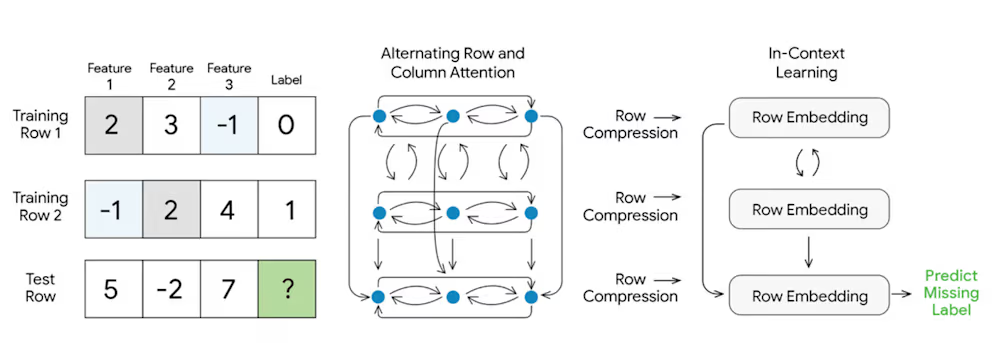
TabFM architecture (source: Google Research)
Advertisement
TabFM overcomes the limitations of LLMs by treating the data as a grid, preserving its structural integrity without forcing it into a single-dimensional text string.
To effectively process diverse tabular structures while enabling scalable zero-shot prediction, TabFM synthesizes the strengths of earlier experimental architectures, TabPFN and TabICL. TabPFN, developed by Prior Labs, first proved that a transformer architecture could perform zero-shot classification on small tables, though it struggled to scale computationally to larger datasets.
Later, TabICL, developed by France’s National Research Institute for Digital Science and Technology, addressed this bottleneck by introducing row compression, allowing in-context learning to efficiently process much larger tables.
TabFM combines TabPFN’s deep feature contextualization with TabICL’s efficient compression into a novel hybrid design built on three key mechanisms:
Advertisement
1. Alternating row and column attention: The raw table is first processed through a multilayer attention module that alternates across both columns (features) and rows (examples). By continuously attending across these two dimensions, the model natively captures complex feature interactions. This deep contextualization does the heavy lifting that would usually require tedious manual feature crafting by data scientists.
2. Row compression: Following this contextualization, the cross-attended information for each row is compressed into a single, dense vector representation. TabICL pioneered this by using CLS tokens to compress a row’s rich information into one vector, “in contrast to TabPFN v2, v2.5, and v2.6, which attend over the full cell grid throughout the network,” Kong explained. This drastically shrinks the computational footprint.
3. In-context learning (ICL): A causal Transformer then operates on this sequence of compressed embeddings. This Transformer model uses the attention mechanism of TabICL to attend over these dense row vectors, drastically reducing the computation cost and allowing the model to process large datasets efficiently.
A major selling point of TabFM is its pretraining recipe. The model was trained entirely on hundreds of millions of synthetic datasets. These datasets were dynamically generated using structural causal models (SCMs) that incorporate a wide variety of random functions. By training exclusively on synthetic SCMs, TabFM learned the fundamental mathematical priors of how tabular features interact without ingesting real-world, confidential CSV files.
Advertisement
TabFM in action
To test the model’s capabilities, Google researchers benchmarked TabFM on TabArena, a comprehensive evaluation suite spanning 51 diverse tabular datasets across 38 classification and 13 regression tasks.
On these public benchmarks, TabFM’s zero-shot predictions already match or beat heavily tuned supervised baselines. However, Google is careful to note that this does not automatically mean TabFM will universally dethrone bespoke, hyper-optimized production models on every enterprise workload.
TabFM perfornace on industry benchmarks (source: Google Research)
“Instead of replacing hyper-optimized production models, the true practical business value it unlocks for lean engineering teams is velocity,” Kong said. “It allows data analysts and backend engineers to instantly spin up high-quality baseline models without a dedicated data science team managing a complex lifecycle.”
Advertisement
For advanced practitioners looking to squeeze out maximum accuracy, the research team also introduced a “TabFM-Ensemble” configuration. By running the model through 32 distinct variations and blending the results, TabFM pushes the performance even further.
Getting started, trade-offs, and the cloud future
The shift to in-context learning for tables introduces a new economic trade-off that engineering teams must consider.
With traditional algorithms, training is slow and expensive, but inference is lightning-fast and cheap. TabFM flips this dynamic. While training time drops to zero, inference becomes significantly heavier. Because the model must process the entire historical dataset as context during every single prediction, it requires more compute and memory at runtime.
In this new paradigm, “traditional machine learning training becomes the ‘prefill’ phase (KV caching) in the context window,” Kong said. While this prefill cost is steep, it is paid only once per table, and the cache is reused across subsequent queries. “The catch is prediction latency, which no amount of caching removes,” Kong added. Every new prediction requires a pass through a large transformer. “Any production API requiring single-digit-millisecond response times cannot tolerate TabFM’s forward-pass overhead.”
Advertisement
For developers looking to evaluate the model today, the barrier to entry is low. Google designed TabFM as a drop-in replacement for traditional ML workflows, offering a scikit-learn compatible API (TabFMClassifier and TabFMRegressor). It natively handles mixed numerical and categorical columns, works directly with pandas DataFrames, and requires no manual ordinal encoders or numerical scalers. The library supports both JAX and PyTorch backends.
However, enterprise teams need to be aware of current limitations and licensing restrictions. The model architecture has a hard limit of 10 output classes for classification tasks, and it is optimized for tables with up to 500 features. More importantly, while Google released the underlying codebase under the permissive Apache 2.0 license, the pre-trained model weights are published on Hugging Face under a strict tabfm-non-commercial-v1.0 license. Developers can evaluate the model internally, but it cannot be deployed in commercial products yet.
Looking ahead, Google is addressing the commercial deployment friction through its cloud ecosystem. TabFM is being integrated directly into Google BigQuery, allowing analysts to run zero-shot predictions natively via an “AI.PREDICT” command. By putting foundation model inference right next to the data warehouse, TabFM could soon make complex tabular machine learning as accessible as a basic database query.
In practice, TabFM shines in rapid prototyping, high data drift environments, and small to medium-sized datasets under 100,000 rows. Conversely, teams should stick to traditional models for strict, ultra-low latency APIs, or massive tables exceeding one million rows, which currently require aggressive row sampling that degrades the foundation model’s competitive advantage.
At-home microcurrent devices have become popular skin care tools thanks to claims that they can help reduce the appearance of fine lines and wrinkles, giving you firmer, lifted skin. To find out whether this is true and whether these devices can replace professional treatment, we consulted dermatologists to ask if they actually work, what the potential benefits are, who shouldn’t use a microcurrent device, and, ultimately, whether they’re worth the cost.
Do microcurrent devices work?
At-home microcurrent devices aren’t cheap, costing hundreds of dollars. If you’re thinking about investing in one, you might be wondering whether they actually work. What do the experts say?
“Yes, at-home microcurrent devices can provide noticeable benefits, though they’re generally less powerful than professional-grade treatments,” said Hannah Kopelman, a dermatologist at Kopelman Aesthetic Surgery. “These devices deliver low-level electrical currents designed to stimulate facial muscles and boost circulation. Over time, this can create a temporary lifting effect and provide mild improvement in skin tone.”
Advertisement
While the effectiveness of at-home microcurrent devices hasn’t been thoroughly tested, some studies show they can deliver real results. In a 2024 study, 56 participants were instructed to use the Slendertone Face microcurrent device, and 52 were assigned to a control group. After using the Slendertone Face device five days per week for 12 weeks, participants reported significantly better skin tone, radiance and fewer wrinkles compared to the control group.
But before you start using an at-home microcurrent device, it’s important to set realistic expectations.
“At-home microcurrent devices can be a beneficial part of your skin care routine, but they work best for mild improvements and maintenance, rather than dramatic changes,” Kopelman said. “For individuals looking for more immediate or pronounced results, professional treatments remain the gold standard.”
Advertisement
Wellness Editor Anna Gragert’s results using the NuFace Trinity Plus, before, during and after.
Anna Gragert/CNET
Microcurrent device benefits can depend on the person
When you use an at-home microcurrent device consistently, it can have a wide range of benefits for your skin. “The main benefits include mild lifting and firming of the skin, improved circulation and enhanced lymphatic drainage, which can reduce puffiness. Some users also report that their skin looks more refreshed and radiant after consistent use,” Kopelman said.
For deeper wrinkles and significant sagging, however, Kopelman said these devices probably won’t have the same effect as professional treatments or more invasive in-office procedures.
While these at-home devices can be effective, the results aren’t one-size-fits-all. According to Dr. Robyn Gmyrek, a dermatologist at New York-based UnionDerm, “The benefits of at-home microcurrent devices vary from person to person based on age, health status and behavioral choices, like sun exposure, smoking, diet and the specific device used.”
Advertisement
Like with most skin care treatments and procedures, you shouldn’t expect results immediately. “With at-home devices, consistency is everything,” Gmyrek said. “I recommend using a microcurrent device daily, or at least three to five times per week. Think of it like the gym — if you don’t continue to go, you will lose the benefits.”
Microcurrent devices could have side effects
Generally speaking, at-home microcurrent devices are safe when used as directed. And because the microcurrents are small, the treatments shouldn’t be painful. Some side effects are possible, though.
“Some people may experience mild redness or a tingling sensation during use but this is usually temporary. However, improper use — like applying excessive pressure or using the device for longer than recommended — can lead to skin irritation or muscle fatigue,” Kopelman said.
In the 2024 study referenced above, only a few participants experienced mild skin redness during their treatments. None of the participants had any other adverse reactions, suggesting that these devices are mostly safe.
Advertisement
While there are dozens of at-home devices that deliver microcurrents, they’re not all created equal. Each device works differently and has unique advantages and drawbacks.
If you’re in the market for an at-home microcurrent device, there are a few things you should look for, according to Gmyrek. She recommends buying a device with FDA clearance, multiple intensity levels and different functions, such as LED light therapy. You should also look for a device that comes with or requires a conductive gel to properly transmit the microcurrent. Pick a device from a well-established brand with positive user and expert reviews.
The ZIIP Halo with its Electric Complex Gel.
Advertisement
Anna Gragert/CNET
How to use a microcurrent device, step by step
Before using an at-home microcurrent device, read the manufacturer’s instructions. Each device might be slightly different but here’s a general overview of how these devices should be used:
Wash your face: You should always start with clean, dry skin before using a microcurrent device.
Apply conductive: Most microcurrent devices require a conductive gel that allows the device to glide over your face and helps deliver the current into the deeper layers of your skin.
Select the intensity level: If your device has multiple intensity settings, select the one that is right for your skin at the time of use. Start low and gradually increase once you get used to the different settings.
Glide the device over your face: Using light pressure, gently move the device across your face in an upward and outward motion. You can use the device on your jawline, cheekbones, forehead and the sides of your neck (make sure to avoid the thyroid in the center).
Remove the gel from your face and device: Once you’re finished, wash the gel off your face. Follow the manufacturer’s instructions for cleaning the device — generally, you can wipe off the gel with a soft, clean cloth. Then, you can continue with the next steps in your skin care routine.
Repeat based on the manufacturer’s recommendation: Most at-home microcurrent devices should only be used five times per week, for 3 to 5 minutes, but some devices can be used daily. Check the instructions to see how often your device should be used for optimal results.
The best microcurrent devices we tested
To figure out which microcurrent devices are the best, CNET Wellness Editor Anna Gragert tested six devices over the course of two months. Based on price, modes, accessories, features, FDA clearance, cleaning instructions, app compatibility and the required conductive gel, she found the NuFace Trinity Plus to be the best microcurrent device overall.
The NuFace Trinity Plus costs $395. It helps you track time with audible beeps, has helpful tutorials on its app and is easy to charge with its included stand.
If you’re looking for a device with more features, such as massage and LED light therapy, the $420 TheraFace Pro is recommended. This device can also cleanse the face. Hot and cold rings are sold separately but can be used with the device. The only potential downside is that app tutorials are on the longer side and would be better with voice instructions.
Can you overdo it with a microcurrent device?
At-home microcurrent devices aren’t without risks, and using them too often can do more harm than good.
Advertisement
“Overuse can lead to inflammation in the skin, redness and swelling,” said Gmyrek. If that happens, you should stop using the device immediately until your side effects resolve.
“Using an at-home microcurrent device too frequently can also cause muscle fatigue, leaving the facial muscles feeling sore or overly tight. Sticking to the manufacturer’s recommended usage schedule can help avoid this issue,” added Kopelman.
Before you start using an at-home microcurrent device, read the instructions on the frequency of use, which will vary by product. For example, the Foreo Bear is designed for everyday use. However, the NuFace Trinity Plus and Skin Gym Microcurrent Wand should be used five times per week for 60 days, then up to three times per week for maintenance.
Don’t be tempted to use the device more often than recommended. Experts agree that overusing won’t provide better benefits or faster results. Plus, you could end up damaging your skin in the process.
Advertisement
Who shouldn’t use a microcurrent device?
Although at-home microcurrent devices are typically safe, not everyone is a good candidate.
“Individuals with certain medical conditions, such as epilepsy, a pacemaker or other implanted electrical devices, should avoid using microcurrent devices, as the electrical currents could interfere with their function,” said Kopelman.
Microcurrent devices should also be avoided during pregnancy, unless it’s cleared by a health care provider.
Advertisement
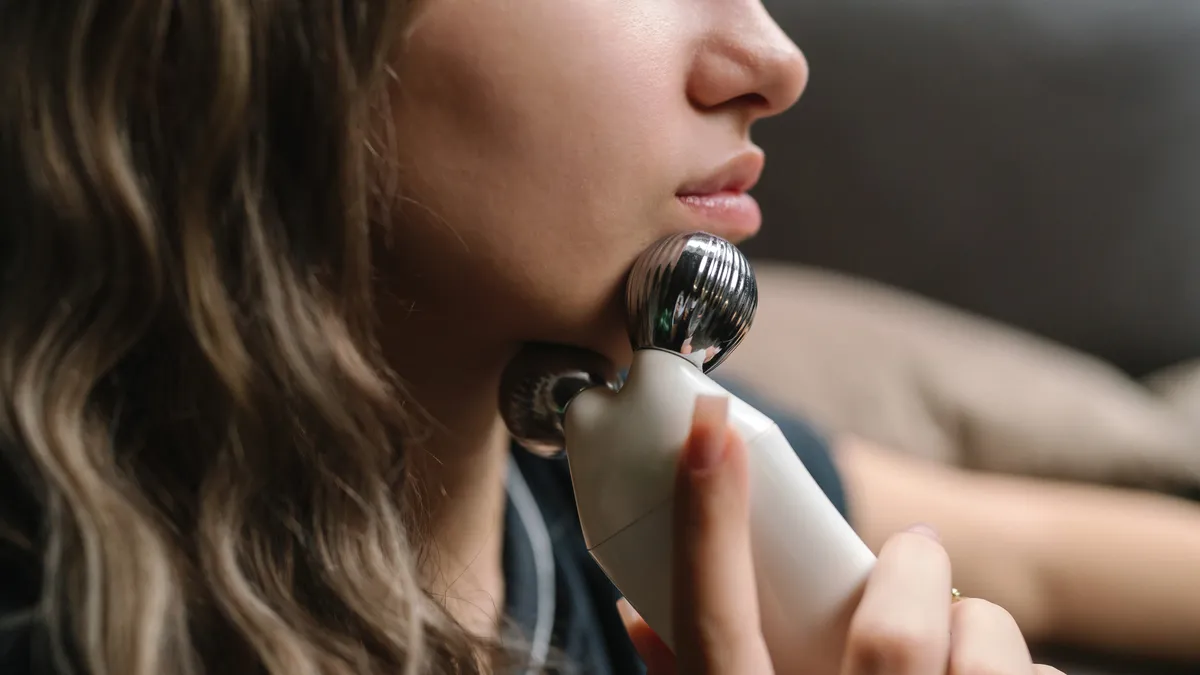
If you have certain medical conditions or are pregnant, a microcurrent device may not be for you.
Tatsiana Volkava/Getty Images
Professional vs. at-home microcurrent devices
Microcurrent is a popular offering at many medical spas and skin care clinics as a standalone treatment or an add-on to other services. According to experts, in-office treatments offer more bang for your buck.
“Professional microcurrent devices used in clinical settings are much more powerful and can deliver a more significant, long-lasting lifting effect in a shorter period of time,” said Kopelman.
Additionally, professional treatments can be better personalized to your needs, potentially giving you better results faster.
Advertisement
“Licensed professionals are also trained to adjust settings based on your skin’s needs, which makes the treatment more customized,” said Kopelman. “At-home devices, by contrast, are designed to be safe for general use, so they deliver lower current levels and require more frequent treatments to maintain results.”
At-home microcurrent devices aren’t cheap, either. FDA-cleared devices can cost anywhere from $150 to upward of $400. Most devices also require a conductive gel, which is sold separately.
However, at-home devices tend to be slightly cheaper than professional procedures. In-office microcurrent treatments often cost between $250 and $500 per session but it depends on various factors, including the type of treatment, length of treatment and your location.
The bottom line
At-home microcurrent devices can be a great addition to your skin care routine if you want to improve skin firmness, reduce puffiness and sculpt your face. But it’s important to have realistic expectations about the results. While at-home devices do work, they aren’t nearly as effective as professional treatments.
Advertisement
If you’re on the fence about getting an at-home microcurrent device, there are a few things you can consider. First, think about your skin goals. An at-home microcurrent device won’t get rid of deep wrinkles and it’s not an alternative to Botox, dermal fillers or skin lasers.
You should also determine how often you will realistically use the device. Here’s some advice from Gmyrek: “Be honest with yourself — if you aren’t going to use an at-home device consistently, don’t bother spending the money on it. Instead, spend that money on in-office treatments that are more effective.”
The dermatologists we contacted said that at-home microcurrent devices can be beneficial but work best for mild improvements. If you’re looking for more immediate results, you may want to consider professional treatments instead.
When used as directed, microcurrent is generally safe. However, some people may experience mild, temporary redness and tingling during use. If used incorrectly, microcurrent may cause muscle fatigue or skin irritation.
Amazon has brought the 42mm Apple Watch Series 11 back down to $299 for the weekend, offering $100 off its regular price. The sale also includes discounts on larger 46mm models and premium titanium styles.
Weekend Apple Watch shoppers have plenty of reasons to take a look at Amazon, where Apple Watch Series 11 models are $100 off across multiple configurations. The standout offer drops the 42mm GPS model to $299, within $20 of the lowest price on record.
The sale extends beyond the entry-level model, with discounts on larger 46mm versions as well as premium titanium configurations. Whether you’re looking for GPS or GPS + Cellular connectivity, the models below are $70 to $130 off while supplies last.
42mm Apple Watch Series 11 deals
Advertisement
42mm Apple Watch Series 11 GPS (Aluminum Case, Sport Band): $299 ($100 off)
42mm Apple Watch Series 11 GPS + Cellular (Aluminum Case, Sport Band): $399 ($100 off)
42mm Apple Watch Series 11 GPS + Cellular (Titanium Case, Sport Band): $629 ($70 off)
42mm Apple Watch Series 11 GPS + Cellular (Titanium Case, Milanese Loop): $649 ($100 off)
46mm Apple Watch Series 11 deals
46mm Apple Watch Series 11 GPS (Aluminum Case, Sport Band): $329 ($100 off)
46mm Apple Watch Series 11 GPS + Cellular (Aluminum Case, Sport Band): $399 ($130 off)
46mm Apple Watch Series 11 GPS + Cellular (Titanium Case, Milanese Loop Band): $729 ($70 off)
Our Apple Watch Price Guide offers a comprehensive breakdown of the deals across retailers and styles.
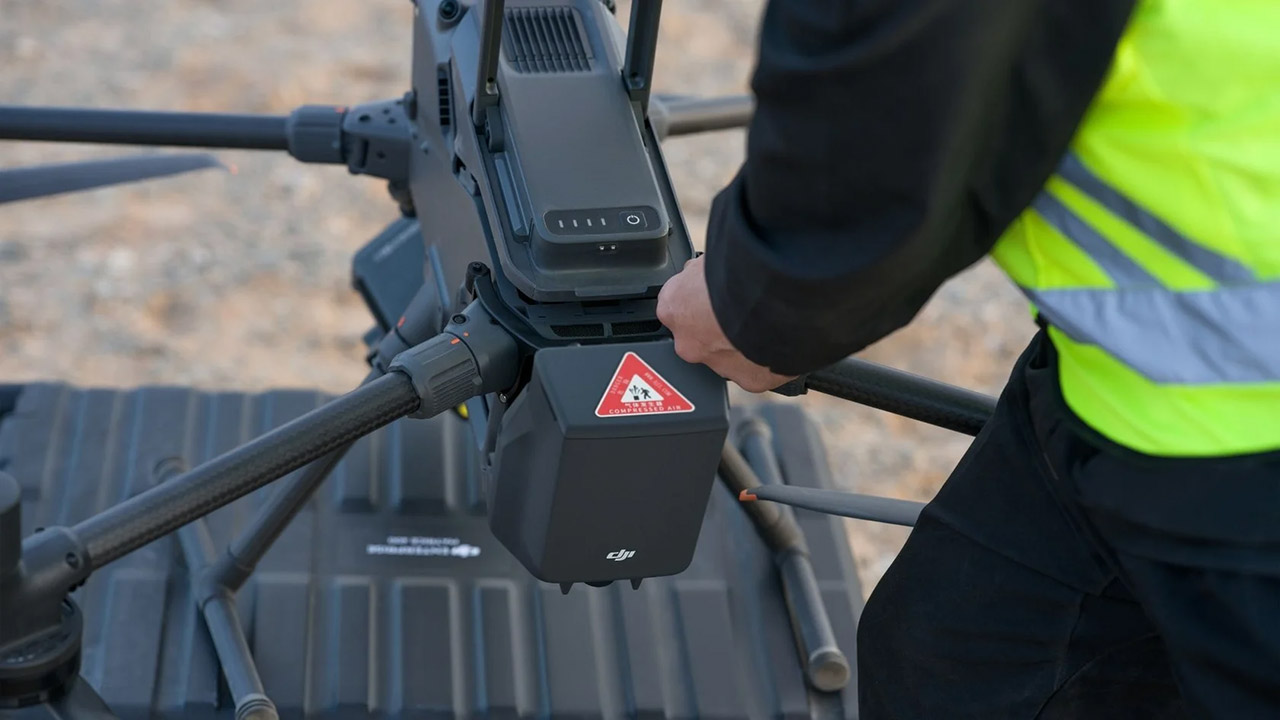
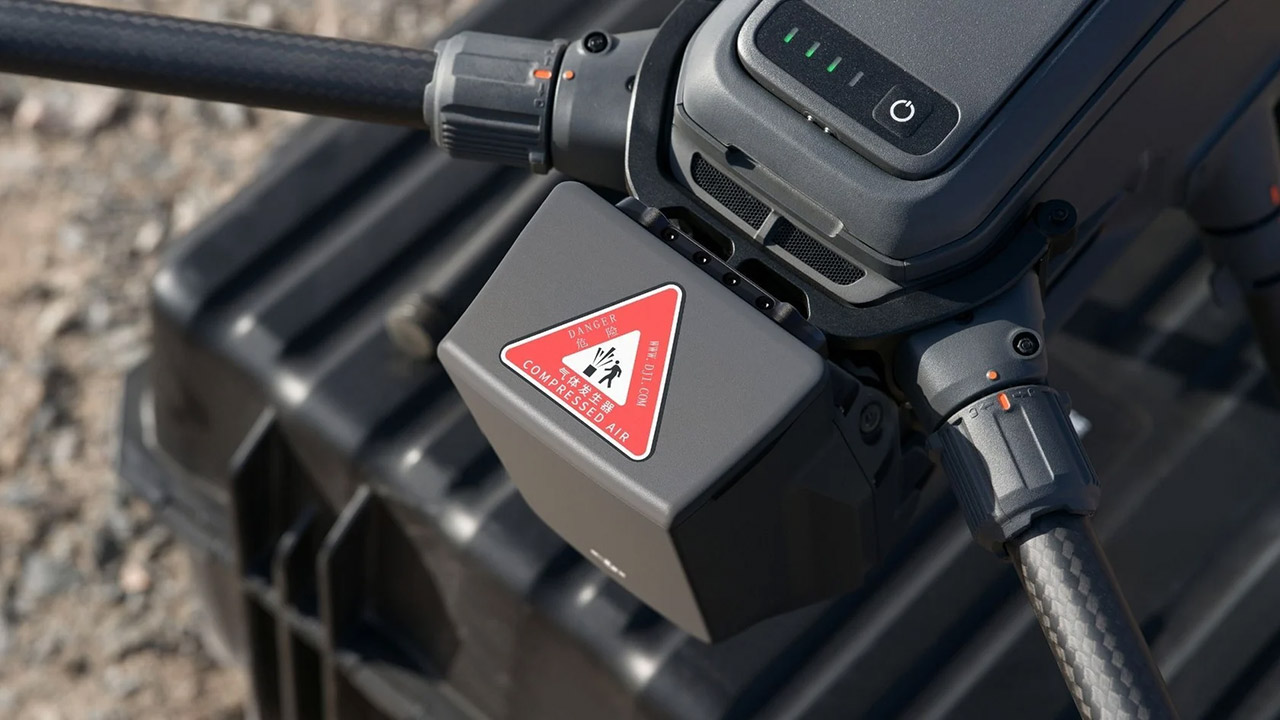
DJI just released the AP100 Parachute, and the system essentially mounts to the rear of the Matrice 400 enterprise drone and gives operators a reliable option when flight does not go as planned. Enterprise teams use the Matrice 400 for inspection, surveying, and public safety work. Those jobs sometimes take the aircraft over cities or stretch beyond visual range. A sudden power loss or link drop can turn a heavy drone into a fast-falling object. The AP100 changes that outcome by turning an uncontrolled fall into a slower, more predictable descent.
The AP100 module weighs little over 935 grams and comes with its own power supply. Dual capacitors provide a dependable source of power for up to an hour. That manner, the parachute can continue to monitor the situation and deploy even if the main aircraft batteries fail. To eliminate the possibility of a single point of failure, the module is totally isolated from the drone’s power system. The unit has an IP55 designation for dust and water protection and can operate in temperatures ranging from -20 to 50 degrees Celsius, which is exactly the same as the Matrice 400.
Due to platform compatibility issue, the DJI Fly app has been removed from Google Play. DJI Neo must be activated in the DJI Fly App, to ensure a…
Lightweight and Regulation Friendly – At just 135g, this drone with camera for adults 4K may be even lighter than your phone and does not require FAA…
Palm Takeoff & Landing, Go Controller-Free [1] – Neo takes off from your hand with just a push of a button. The safe and easy operation of this drone…
Inside the module, there is an independent flight computer, an IMU, and some other sensors, all of which constantly cross-check each other. The algorithms compare the data received from the parachute and drone in real time. This arrangement was meant to avoid false alarms while still detecting true problems, such as a sudden tilt or speed shift. Pilots can check their health status using the Health Management System in the DJI Pilot 2 app. The system does daily self-checks on the gas generator and communication links, and if anything is out of whack, it sends an alert.
Advertisement
When the parachute eventually deploys, it follows a very methodical pattern. When the system decides it’s ready to fire, an independent Flight Termination System cuts power to the motors in under 600 milliseconds. That turns off the rotors before the parachute emerges from the container, preventing the canopy from becoming entangled with spinning blades. The parachute then deploys at altitudes more than 30 meters, and the descent rate remains modest, at less than 5 meters per second. At lower altitudes, the parachute still deploys, however you may not have enough time for full inflation and slowing before hitting the ground; however, the system will not deploy at all unless the aircraft is airborne.
Operators have a few options for getting the parachute to deploy. The Pilot 2 app includes a simple slider that allows you to do it manually whenever you want. In some countries, the system will also appear immediately if the drone violates a geofencing boundary you’ve defined within the app or if the sensors detect something visibly wrong. If you manage a fleet of drones, you can even give orders remotely using FlightHub 2 as long as you have a live connection via a cellular dongle. Near your home point, the system adds a few extra precautions to prevent things from getting messy on the ground and disables parachute deployment if the drone is in cleaning or standby mode.
Once the parachute is deployed, the module just continues to move. It will sound an ear-piercing siren and flash some extremely bright lights for around an hour. This warns people nearby and assists recovery personnel in identifying the aircraft later, after which the entire incident is over because deploying a single-use gadget necessitates the purchase of a new one. If the module remains packed and performs well, DJI expects it to last about three years before needing to be retired.
The agency appears to have actually done something useful in striking a new settlement with agricultural giant John Deere to address the company’s longstanding “right to repair” abuses. According to an FTC announcement, the settlement to the joint lawsuit brought by the FTC and five states requires that the FTC spend at least ten years trying to make repairing its tractors easier:
“The FTC’s settlement requires Deere—for the next 10 years and under the supervision of the FTC and plaintiff states—to provide farmers and independent repair providers with the same equipment repair resources, including applicable software capabilities, that it currently provides to authorized Deere dealers.”
As is often the case, whether this actually sees any meaningful enforcement will remain an open question. But right to repair advocates like U.S. PIRG’s Nathan Proctor say the settlement is a meaningful one, and a step up to the agreement John Deere made when recently settling a different right to repair class action lawsuit for $99 million.
Advertisement
“The agreement between Deere and the FTC is much better than the deal secured in a similar class action lawsuit,” Proctor said. “For example, it protects independent mechanics from anti-competitive practices in the repair marketplace.”
As we’ve covered for years, John Deere went out of its way to acquire smaller, independent repair centers to force users to use more expensive John Deere dealership repairs. Then it went out of its way to make tools, manuals, and parts as difficult as possible to get. In short they worked tirelessly, for years, to create a monopoly on repair — dramatically driving up costs for consumers.
John Deere’s behaviors had one positive net benefit: they directly sparked a nationwide and bipartisan right to repair reform movement that sparked Massachusetts, New York, Texas, Minnesota, Colorado, California, Oregon, and Washington to pass state level right to repair laws. All 50 states have considered such laws, and several (like Maine and Ohio) have gotten close in recent years.
More recently, John Deere had been striking meaningless “memorandums of understanding” with key trade groups, pinky swearing to stop their bad behavior if the groups agreed to not support state or federal right to repair legislation. Several such groups backed off their criticism, only to have John Deere continue its monopolistic behavior, the FTC’s original complaint noted.
Advertisement
It’s worth reiterating that since passage not a single state has actually enforced the laws despise no shortage of offenders, so a lot of work needs to be done on the enforcement front. And again, a settlement with the FTC is also only as good as enforcement; not exactly the Trump administration or U.S. government’s strong suit when it comes to standing up to consolidated corporate power.
This season of Love Island USA has been feeding fans plenty of bombshells, challenges, couplings (and recouplings) at Casa Amor with its dating-show twists. The initial cast lineup included the brother of a Season 7 participant, the daughter of a former NBA player and a Paralympic athlete. You can marathon all the current episodes of the season now with Peacock Premium.
In addition to Love Island USA’s returning host, Ariana Madix, Ciara Miller and Tefi Pessoa co-host the talk show Aftersun on Saturdays. But the addictive summer reality show is getting ready to wrap this latest run, and here’s how you can watch how things end up with the Season 8 Islanders in Fiji.
Advertisement
When to watch the Love Island USA Season 8 finale
Love Island USA Season 8 initially premiered on Peacock on June 2 at 9 p.m. ET (6 p.m. PT). New episodes hit Peacock Mondays, Tuesdays, Thursdays, Fridays and Sundays, all at 9 p.m. ET (6 p.m. PT). Wednesday is the show’s day off; Saturday is dedicated to Aftersun, the official aftershow that recaps the previous week’s events.
The finale will hit on Sunday, with four couples vying to win — so be sure to catch it and see if your favorites are crowned.
Peacock’s subscriptions include Premium, Premium Plus and Select. The $8-per-month Select tier provides seasons of NBC and Bravo titles such as The Office and The Real Housewives, but it doesn’t offer original Peacock shows such as Love Island USA. You’ll need Premium, which costs $11 per month, or Premium Plus, which runs $17 per month, to binge the popular summer reality show.
Advertisement
Peacock/CNET
You may be able to save money on Peacock by paying annually. You can also subscribe to a bundle of Peacock and Apple TV (formerly Apple TV Plus) if you want both of those services. Premium is the ad-supported tier, while Premium Plus is ad-free with some exceptions, such as commercials on live sports and a few shows and movies.
“Elon Musk and Sam Altman criticized each other in new posts on X,” reports CNBC, “highlighting the billionaires’ long-standing tussle over OpenAI’s evolution.”
This week, SpaceX released the Grok 4.5 generative AI model, while OpenAI debuted its own GPT-5.6 Sol. For days, Musk and Altman have hyped up their respective releases, but on Saturday the rivalry got personal. In response to a post about Apple filing suit against OpenAI on Friday over alleged theft of trade secrets, Musk wrote, “Scam Altman strikes again ….” Minutes after his post, Musk doubled down, writing, “He takes scamming to a whole new level.” Next, Musk published a photo of Altman that included the words, “I’m doing this because I love it.”
“By ‘this’ he means scamming,” Musk wrote, including two rolling-on-the-floor-laughing emojis. Musk then replied to that post, writing, “He might literally love scamming more than any human alive!”
The flurry of social activity got Altman’s attention. “[H]omeboy you’re the one sellling public market investors on short-term space datacenters,” Altman wrote in an X post of his own that garnered over 11 million views.
Advertisement
“We start flying them next year. Maybe you can come see them if your parole officer approves,” Musk fired back.
Separately, Altman put Musk’s fresh wave of attention in the context of OpenAI’s fresh model release. “[T]here are a lot of benchmarks that suggest 5.6 sol is the best model in the world right now, but the most reliable way to tell is that elon is obsessed with me again,” Altman wrote on X.
Reacting to another post, Altman wrote that he was “not afraid of apple, but i have tremendous respect for them. s-tier company,” CNBC reports — leading to a sarcastic response from X’s head of product. “Incredible trade secrets as well, some of the best.”
And CNBC notes that Musk “replied with a face-with-tears-of-joy emoji.”
From the gloom of Soylent Green’s desperate future to the boiling point of Falling Down’s crumbling present, two more Warner catalog gems have received high-fidelity 4K restorations from Arrow Films.
Soylent Green
In the unimaginably distant year of 2022, everything is in short supply: living space, jobs, clean water, and, most notably here, food. The title of the movie refers to a miraculous edible substance made from plankton, one of the last hopes for overgrown humankind to avoid starvation. Into this bleak urban landscape struts Charlton Heston, deep in the sci-fi phase of his career (see also Planet of the Apes and The Omega Man), here as cynical cop Thorn. Corruption is rampant, but when a big shot with important connections is murdered and the official story doesn’t add up, Thorn follows the clues down a dangerous path to a shocking discovery.
There’s an epic sci-fi actioner yearning to break free from this low-budget, workmanlike production. Heston’s commanding presence elevates the material, as do strong supporting performances from his researcher and roommate, Edward G. Robinson, and the too-pretty-for-words love interest, Leigh Taylor-Young. Some of the movie’s predictions of Earth’s unfortunate fate are close to the mark, while others are thankfully exaggerated (NYC’s population tops 40,000,000!), and it all adds up to an entertaining bit of early ’70s paranoia that makes us wonder what we dodged and what’s to come.
Along with Falling Down, below, Soylent Green is one of a pair of Warner catalog titles receiving a 4K, 16-bit scan and restoration by Arrow Films. Early scenes reveal extraordinary precision in the pattern on Edward G.’s shirt, as well as in his wrinkles and liver spots. Little details can pop nicely, such as the eight-ohm rating on Thorn’s headphones in a late scene. The fairly mundane shooting locations are made far more interesting by the outstandingly lifelike matte paintings by Matthew Yuricich. Grain is restrained but present, although some misty exteriors are surprisingly noisy.
The sole audio option is lossless mono, restored to a clarity rivaling that of its 1973 debut. The movie is dialogue-heavy and always clear, a particular boon to Ms. Taylor-Young’s dulcet tones. Beyond that, there’s the sharp clang of a crowbar on cement and the imposing clank of a steam shovel sent to round up unruly citizens, but not much to show off our speakers.
Advertisement
Both titles arrive as single 100GB discs in simple slipcases with comprehensive little booklets. Soylent Green brings together a wealth of archival bonus content, starting with an audio commentary from Leigh and director Richard Fleischer, the latter also featured in an extensive onstage interview. Mr. Heston’s own retrospective interview is audio-only, presented with the movie playing onscreen. There are also a vintage promotional film and a tribute to Edward G. Robinson. New for this edition is a second audio commentary from a pair of experts.
Soylent Green – Movie Details
Media Format: Ultra HD 4K Blu-ray (July 28, 2026)
Studio: Arrow Video
Theatrical Release Year: 1973
Aspect Ratio: 2.39:1
HDR Formats: Dolby Vision, HDR10
Audio Format: Linear PCM 1.0
Length: 97 minutes
MPAA Rating: PG
Director: Richard Fleischer
Starring: Charlton Heston, Leigh Taylor-Young, Edward G. Robinson, Chuck Connors, Brock Peters, Paula Kelly
Our Ratings
★★★★★★★★★★ Movie
★★★★★★★★★★ Picture
★★★★★★★★★★ Sound
★★★★★★★★★★ Extras
Advertisement
Where to buy
Falling Down
Anyone wanting to reevaluate the canon of filmmaker Joel Schumacher and see beyond what he did to Batman should begin with Falling Down. A dark comedy that’s long on social commentary, it captures one pivotal day in the life of a working man at his breaking point. It’s not just in response to the typical indignities of early ’90s life in Los Angeles; it’s about a world he feels has betrayed him. Yes, he’s as mad as hell and he’s not going to take it anymore, but this deeply flawed, not always likable individual—played to volatile, unhinged perfection by Michael Douglas—does much more than bark. Sure, he goes a little too far with the violence and racist rhetoric during his quest through some of the city’s worst neighborhoods, but some of his frustrations are strangely relatable.
Advertisement. Scroll to continue reading.
A hit with audiences, Falling Down has remained a cultural talking point, neatly capturing its era and courageously addressing the nasty thoughts lurking in many viewers’ minds. The one big sin the script commits is making too many of the cops overt jerks, repeatedly dismissing the correct hunches of the one good detective, played by Robert Duvall, on the case. It’s an unfortunate trope, likely added to beef up Duvall’s role.
The late Mr. Schumacher had a knack for incorporating ugly scenery that was shot beautifully, and many scenes are manipulated with a pleasant but unnaturally warm glow, a look maintained by the color grading supervised and approved by cinematographer Andrzej Bartkowiak. The image also has appreciable texture, not just in the usual places but in the decrepit concrete and the graffiti scribbled on a phone booth. A persistent, distracting vertical scratch did pop up in a couple of shots, having slipped past the restoration team.
The disc defaults to lossless 2.0, but I actually preferred the alternate DTS-HD Master Audio 4.0 because the sometimes manic sounds of this crazy day are essential to the story, and the surrounds definitely do their part. Random annoyances pile up, ratcheting up the emotional pressure, but atmospheric wind chimes also lighten a quieter moment, and the music tightens its grip again during tense beats. There’s no dedicated LFE, but there is still ample impact when needed.
Advertisement
The above-average archival cast-and-crew commentary, featuring star Michael Douglas, director Joel Schumacher, and several others, is joined by a 2009 on-camera interview with Douglas. New for this disc is a trio of featurettes introducing us to the filming locations, then and now; composer James Newton Howard; and screenwriter Ebbe Roe Smith.
Come to think of it, I suppose you could end your Schumacher film festival with Falling Down instead, just so long as Tigerland and Phone Booth are also on the bill somewhere.
Falling Down – Movie Details
Media Format: Ultra HD 4K Blu-ray (July 28, 2026)
Studio: Arrow Video
Theatrical Release Year: 1993
Aspect Ratio: 2.39:1
HDR Formats: Dolby Vision, HDR10
Audio Formats: Linear PCM 2.0, DTS-HD Master Audio 4.0
Length: 113 minutes
MPAA Rating: R
Director: Joel Schumacher
STARRING: Michael Douglas, Robert Duvall, Barbara Hershey, Rachel Ticotin, Tuesday Weld, Frederic Forrest
It takes years to tape out a chip and bring it to market, with overall industry seismic shifts taking much less time. Nothing will demonstrate that better than the rumored six-month gap between the M6 processor debut and the AI-focused M7.
Apple’s chip lines have gradually become more AI-centric, and that will be the same in the future too. However, rather than sticking to an established release format, Apple’s intending to skip ahead to the bits it wants the public to use.
In Sunday’s “Power On” newsletter for Bloomberg, Mark Gurman revives a late June report that the M6 Pro and M6 Max chips won’t exist. Instead, it is putting the work into the development of AI-first chips for the M7 generation.
The fall cycle will include the usual base chip release, consisting of the M6. But there won’t be an M6 Pro, M6 Max, or even an M6 Ultra following months later.
Advertisement
Apple’s intended schedule is to instead bring the base M7 chip line a mere six months after the M6. That would make it a release in the first half of 2027.
The M7 Pro and M7 Max are thought to arrive at the end of 2027. That will then be followed by the M7 Ultra sometime in 2028.
Skipping to the good part
Gurman doesn’t really explain why Apple is moving to get M6 out of the way in favor of the M7 generation on Sunday. However, he did a better job doing so in June.
The M6 will improve the memory bandwidth from 153 gigabytes per second in the M5 to a massive 200 gigabytes per second. That will be by introducing a new memory architecture, as well as boosting the Neural Engine and using 12 GPU cores instead of ten.
Advertisement
While memory bandwidth is important, the M7 generation will have a much bigger focus on AI processing. This should help the prospective users of the M7 Pro, M7 Max, and M7 Ultra, who will have more complex workflows and could benefit from AI.
Even in the M7, memory bandwidth will also be increased, going up to around 240 gigabytes per second in the base chip.
The massive improvements in the M7 range are deemed by Apple to be sufficient enough to skip most of a chip generation.
Server Strategy
The usually massive performance of the Ultra chip is also at play here. To Gurman, the upgrades in the M7 Ultra allegedly bring the chip close in performance to dedicated AI accelerators, including Nvidia’s Blackwell.
Advertisement
That includes support for as much as 1.5 terabytes of memory. This may not necessarily be an amount presented to consumers or enterprise customers considering the current memory pricing crisis, but it could still be useful for servers.
Gurman proposes that the M7 Ultra could be the basis for Apple’s AI server strategy. While Apple is soon to introduce servers based on the M5 Ultra, engineers are said to be working on a new server chip built around the M7 Ultra.
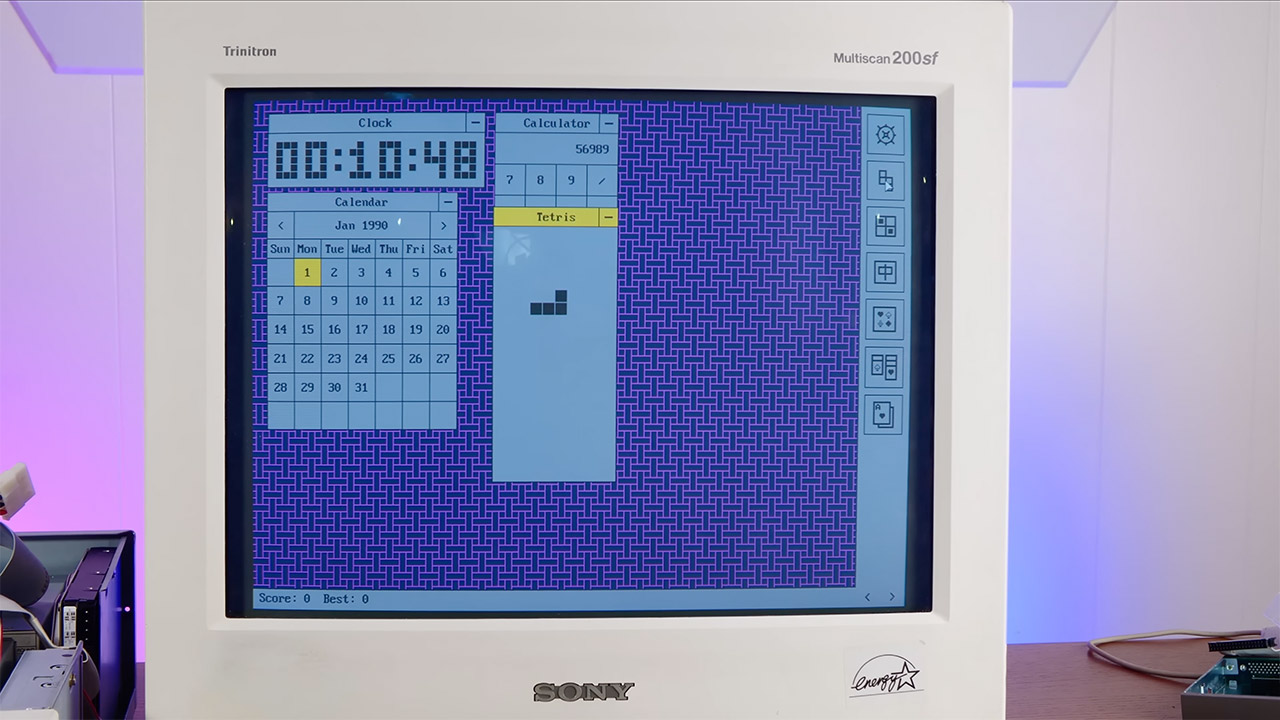
Old machines often end up sidelined once faster hardware arrives. Yet plenty of people still own working 386-era laptops and desktops that boot just fine. GentleOS steps in as a project built specifically for those systems. It delivers a graphical desktop experience without demanding modern resources or complex setup.
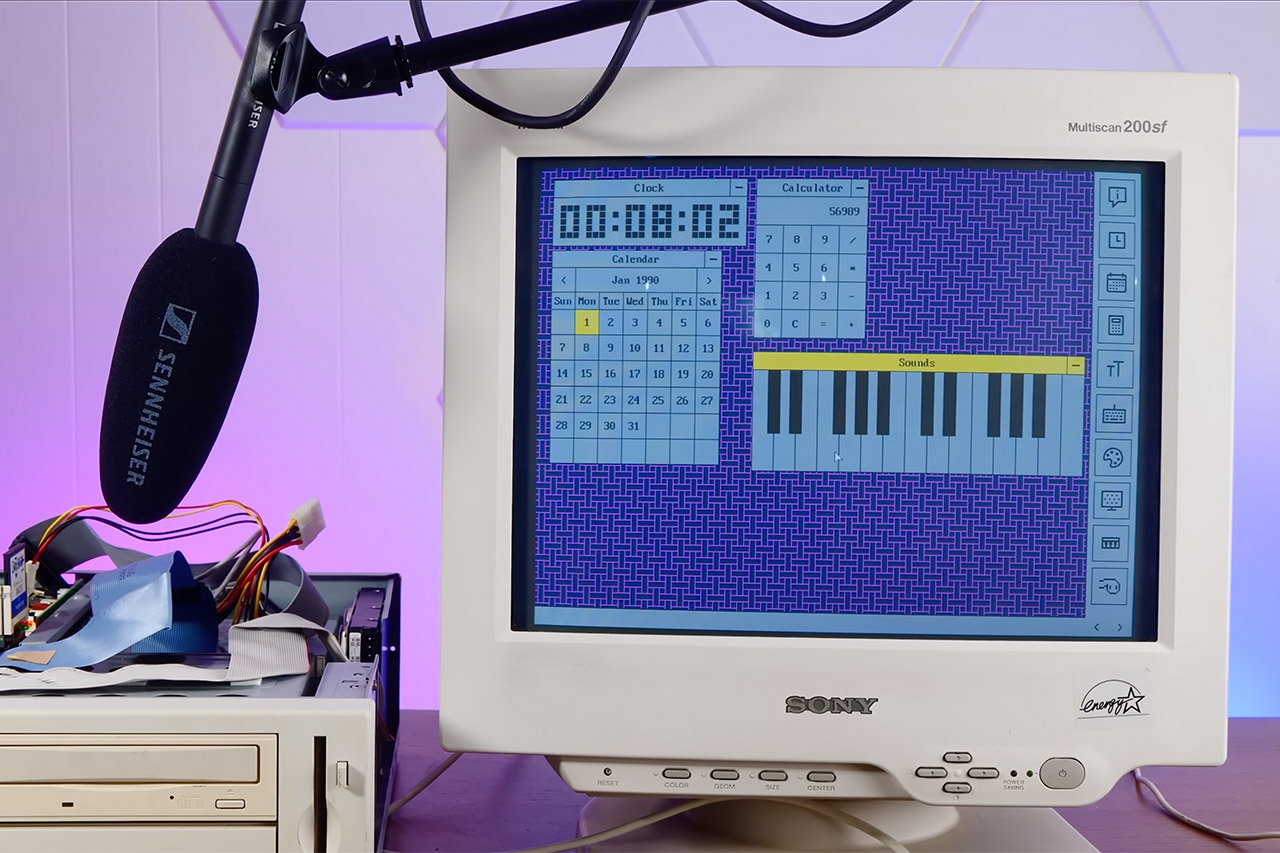
Luke 8086, the developer, worked on this operating system as a hobby. The goal is to provide hobbyists with a clean platform on which to work with vintage x86 hardware or run interactive graphical programs as near to the metal as possible. There is no online browser or app store, as the focus is on what the machine can accomplish directly in front of you. GentleOS/32, which targets 32-bit PCs starting with the i386 processor, was the first of two versions created. Depending on the boot image, you’ll need 2 to 4 MB of RAM, a mouse, and a VGA screen with a resolution of at least 640 by 480 and 16 colors, or higher VESA modes with 256 colors. Then there’s GentleOS/16, a more stripped-down version for actual 16-bit hardware such as 8086 or 80186 CPUs. That one uses less than 192 KB of RAM and rudimentary CGA graphics at 320 by 200 resolution in four colors.
【Mini Pc With Amd Ryzen R2544】ACEMAGIC mini computer is equipped with AMD Ryzen R2544 processor (4 cores/8 threads, base 3.35GHz, boost up to…
【Radeon Graphics For Entertainment & Business Office】The integrated upgraded AMD Radeon Graphics in the Ryzen R2544 (max 1300Mhz, graphics cores…
【Ample Storage & Flexible Upgrade Options】This mini computer comes with 8GB DDR4 memory, delivering smooth multitasking and efficient performance…
Both versions use the same design, with everything compiled down to a single binary that runs directly on the hardware, similar to microcontroller firmware rather than a standard operating system. The code is written in basic C with a little amount of assembly, allowing developers to easily follow the logic without becoming bogged down in layers of abstraction.
This approach lacks some of the capabilities that you would expect to see in newer systems. There is no virtual memory, no separate user and kernel zones, and no preemptive multitasking. Many modern systems provide file storage and networking capabilities, but this is not the case here. The entire system runs in memory and is single-threaded, with the main event loop managing graphics and dispatching actions to built-in programs.
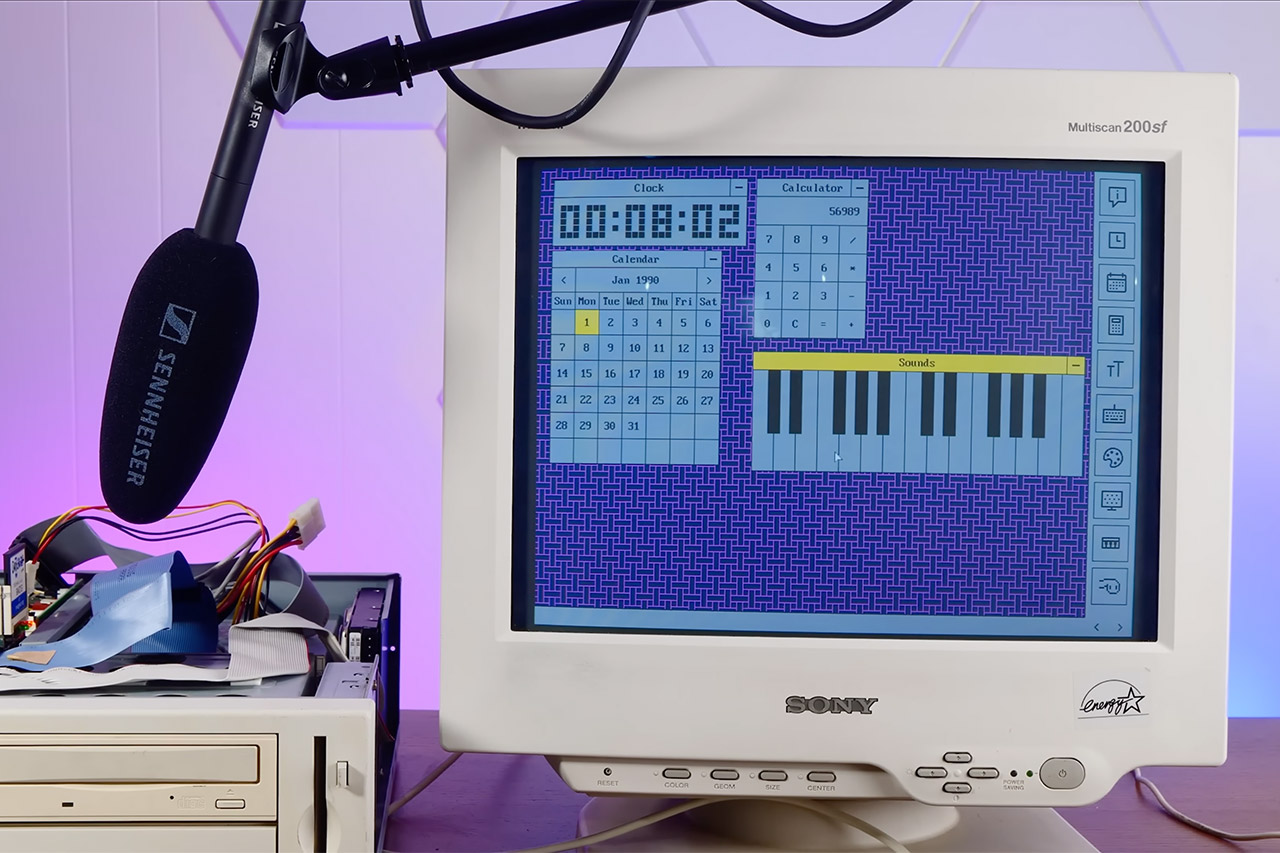
Nonetheless, the finished design appears familiar, with a retro-style desktop with movable windows, an icon sidebar for quick access, and a simple color scheme. You get a retro clock with massive, segmented digits that update in real time, Klondike solitaire for some classic card game fun, a color palette tool for some quick creative work, and a about box to see what’s going on behind the scenes. The same concept is also used in programs for calendar functions, basic mathematics, art, and certain light games.
SanDisk’s BiCS10 chip reaches 29Gb per square millimetre in density
Bit density improved 59% compared to the previous BiCS8 generation
Interface speeds now hit 4.8Gb/s, a 33% increase
SanDisk has confirmed it is now sampling BiCS10, its 10th-generation 3D NAND flash chip, built jointly with longtime manufacturing partner Kioxia.
The 1Tb TLC chip packs 332 memory layers into a die that reaches an area bit density above 29Gb per square millimetre, which the company calls industry-leading.
That figure represents a 59% improvement in bit density compared to the previous BiCS8 generation currently in mass production.
Latest Videos From
A small chip built to scale into massive drives
BiCS10 uses Sandisk’s CMOS directly bonded to an array architecture, paired with a new Toggle DDR6.0 interface that pushes data transfer speeds up to 4.8Gb/s.
Advertisement
This marks a 33% improvement over the prior generation’s interface speed, according to SanDisk’s own announcement of the sampling milestone.
Power efficiency also improved substantially, with input power consumption dropping 10% and output power consumption falling 34% relative to BiCS8.
SanDisk has already confirmed a broader roadmap built around this chip, targeting a 256TB SSD in 2026 and a 512TB drive in 2027.
Advertisement
Sign up to the TechRadar Pro newsletter to get all the top news, opinion, features and guidance your business needs to succeed!
The company has also teased an eventual 1PB data center drive, though it has not committed to a specific year for that product.
These capacity jumps depend on QLC memory adoption, with SanDisk shifting toward QLC for most capacity-focused products by 2028.
The technology behind these future drives comes from a new 332-layer 3D NAND generation developed through the SanDisk and Kioxia partnership.
Advertisement
The chip is built as a 1Tb TLC die, with capacity increases coming through layer stacking and improved lateral scaling rather than adding more bits per cell.
Instead of adding more bits into each memory cell, the companies are increasing density through additional layers, improved layouts, and new circuit designs.
The company reported that the new generation achieved a 4.8Gbps data transfer rate while reducing read energy consumption by 29% compared with previous designs.
Advertisement
These improvements are aimed at increasing capacity without sacrificing endurance and reliability as much as higher-bit-per-cell methods could create.
Current pricing shows why 512TB drives won’t come cheap
Existing high-capacity enterprise drives offer the clearest signal of where 512TB pricing will eventually land.
Solidigm’s 122.88TB D5-P5336 series currently retails between roughly $49,275 and $64,168, depending on configuration and packaging options chosen.
Advertisement
Scaling that per-terabyte cost toward a 512TB drive suggests a price comfortably beyond $300,000 once SanDisk’s version reaches market in 2027.
Competition in this space remains intense, with Kioxia, Samsung, Solidigm, and Micron all racing toward similar capacity milestones on comparable timelines.
Samsung has separately confirmed plans for a 512TB PCIe 6.0 drive around 2027, following a 256TB Gen 5 launch expected in 2026.
NAND supply itself remains tight, with flash contract prices projected to rise 70 to 75% quarter over quarter heading into mid-2026.
Advertisement
That shortage, driven largely by enterprise demand tied to generative AI infrastructure, will likely keep pricing on these drives elevated well beyond initial launch.
SanDisk’s BiCS10 sampling marks only the earliest technical step toward that 2027 target, with mass production and finished drives still several years from broad availability.



























































You must be logged in to post a comment Login