Connect with us
DAPA Banner
DAPA Coin
DAPA
COIN PAYMENT ASSET
PRIVACY · BLOCKDAG · HOMOMORPHIC ENCRYPTION · RUST
ElGamal Encrypted MINE DAPA
🚫 GENESIS SOLD OUT
DAPAPAY COMING

Tech

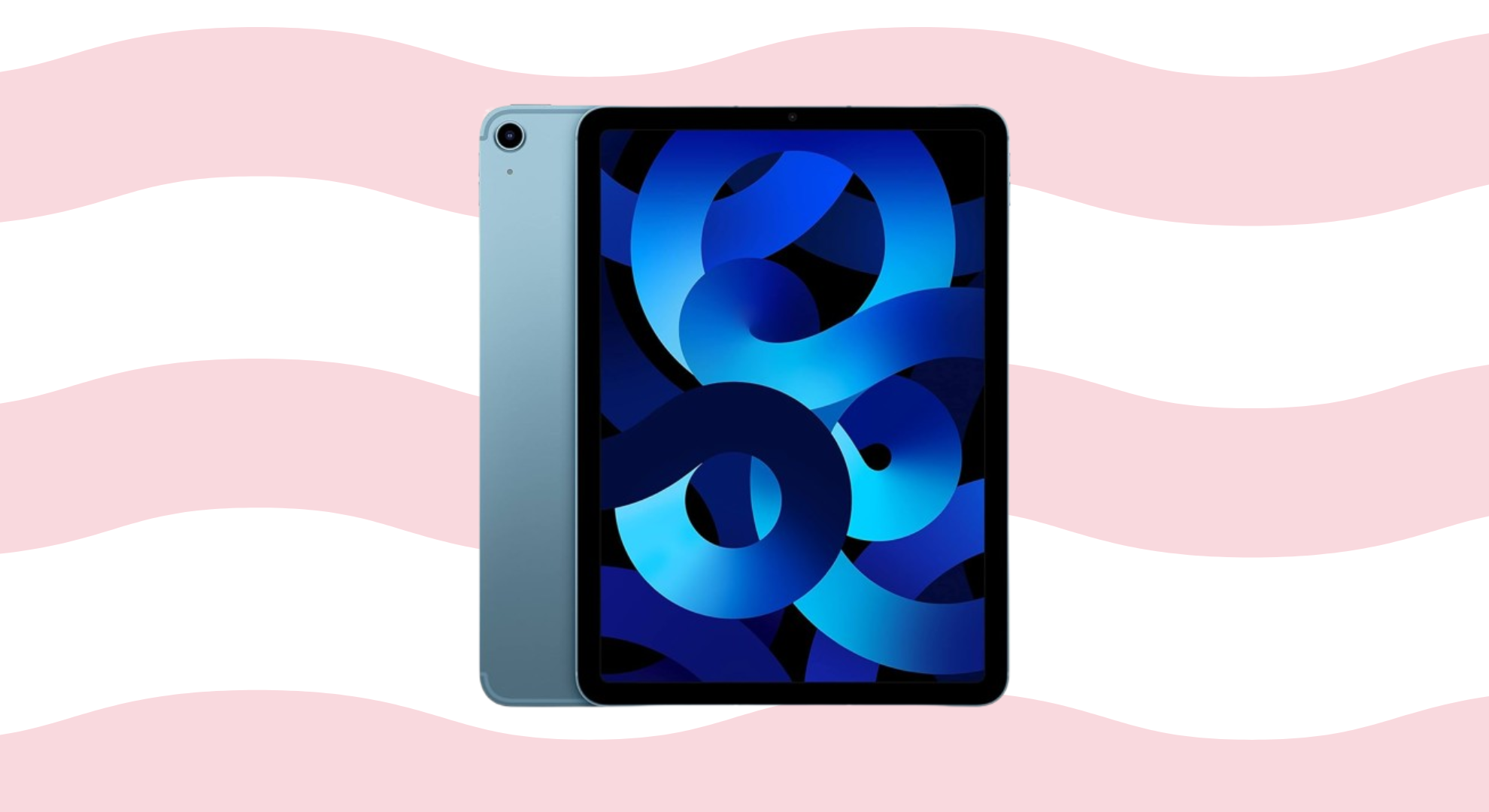
Apple’s cheaper iPads could be stuck on hold for another year

Published

on

Anyone hoping Apple would refresh its entry-level iPad or iPad Air before the end of next year may need to be patient.

According to Bloomberg, Apple is planning a rollout that begins with a new iPad mini in October 2026. This will be followed by a refreshed entry-level iPad in the first quarter of 2027. Updated iPad Air models are then expected to follow in spring 2027.

The base iPad appears to be getting the most meaningful upgrade of the bunch. While it will not receive a redesign or an OLED display, the report claims it will move from the current A16 chip to an A19 processor. This change would bring support for Apple Intelligence. As a result, it would become the last iPad in Apple’s lineup to gain access to the company’s AI features.

The rest of the lineup looks set for more modest changes. Bloomberg says neither the 11-inch nor 13-inch iPad Air is expected to receive a major visual overhaul. However, previous reports have suggested Apple is preparing an OLED version of the tablet. Samsung is reportedly due to begin mass-producing those panels in late 2026. This points to a possible launch around March 2027.

Advertisement

The iPad Pro is also expected to return around the same time. While the latest report doesn’t mention any significant design changes, earlier rumours have claimed Apple is working on vapor chamber cooling for the premium tablet. That could help sustain performance during heavier workloads.

Advertisement

The only iPad expected to arrive sooner is the iPad mini. Rumours have consistently pointed to an October 2026 launch. The compact tablet is tipped to become the next model in Apple’s lineup to adopt an OLED display. If that proves accurate, it would make the iPad mini the second OLED-equipped iPad after the current iPad Pro.

Advertisement

Source link

Continue Reading
Click to comment

You must be logged in to post a comment Login

Leave a Reply

Tech

Apple vs. Open AI Explained: The Battle for AI Gadgets Begins With a Juicy Lawsuit

Published

on

Apple’s lawsuit against OpenAI is full of astonishing accusations and details, with Apple alleging it uncovered a pattern of theft of Apple’s trade secrets. Apple’s complaint mostly points the finger at a few ex-Apple employees that now work at OpenAI, the maker of ChatGPT.

OpenAI has faced quite a number of lawsuits lately on how it does business, but Apple’s suit brings a different twist. If this case goes to trial, it could reveal the secret hardware that OpenAI has long teased. A trial could seek damages if Apple’s work is being used to help develop some sort of rival AI device. Would a lawsuit spill the beans on a device — or several devices — before OpenAI is ready to launch?

Advertisement

Watch this: Apple vs. OpenAI: These Lawsuit Details Are Wild

This week’s episode of One More Thing, embedded above, goes into the juicy details of the suit and what happens next. OpenAI CEO Sam Altman says he’s not afraid of Apple, but maybe he should be. Taking rivals to court is part of the Apple playbook, and the company knows how to do it well

The fight could also drag in a few famous Apple faces. Apple’s former design chief, Jony Ive, is now working on making AI gadgets for OpenAI. That means Apple lawyers might call to the stand the former designer of the iPhone, to see if he used information stolen from Apple. (Awkwaaard.)

For more One More Thing, subscribe to our YouTube page to catch Bridget Carey breaking down the latest Apple news and issues every Friday.

Advertisement

Source link

Continue Reading

Tech

Kalshi Flags Trump’s Teleprompter Operator For Alleged Insider Trading

Published

on

ABC News reports that White House teleprompter operator Gabriel Perez allegedly made more than $100,000 betting on Kalshi markets tied to what President Trump would say in speeches, using his access to prepared remarks and last-minute edits. ABC News reports: According to the sources, Kalshi alerted its regulator, the Commodity Futures Trading Commission (CFTC), to the suspicious activity on its “Mentions” market, where users can bet on whether specific words, phrases or topics are uttered during a public speech. “Our surveillance team promptly flagged and referred these trades to the CFTC, and we are cooperating and assisting regulators,” Kalshi’s head of enforcement, Bobby DeNault, said in a statement provided to ABC News.

White House Press Secretary Karoline Leavitt told reporters Thursday afternoon, following ABC News’ report, that Perez has been put on unpaid administrative leave. Leavitt said she spoke with President Trump about it, and he thought it was a “disgrace” and made the decision himself to put Perez on unpaid leave. Leavitt said she was unaware of any other White House staffers who have made such trades. “The White House has strict ethics guidelines that we expect all staffers and officials to follow,” said White House spokesperson Davis Ingle when contacted by ABC News.

In addition to February’s State of the Union address, sources said CFTC investigators discovered that Perez placed bets on more than a dozen Trump speeches over a three-month period, including a December primetime address, a January speech at the World Economic Forum in Davos, Switzerland, and Trump’s remarks in March during a Medal of Honor ceremony.

Source link

Advertisement
Continue Reading

Tech

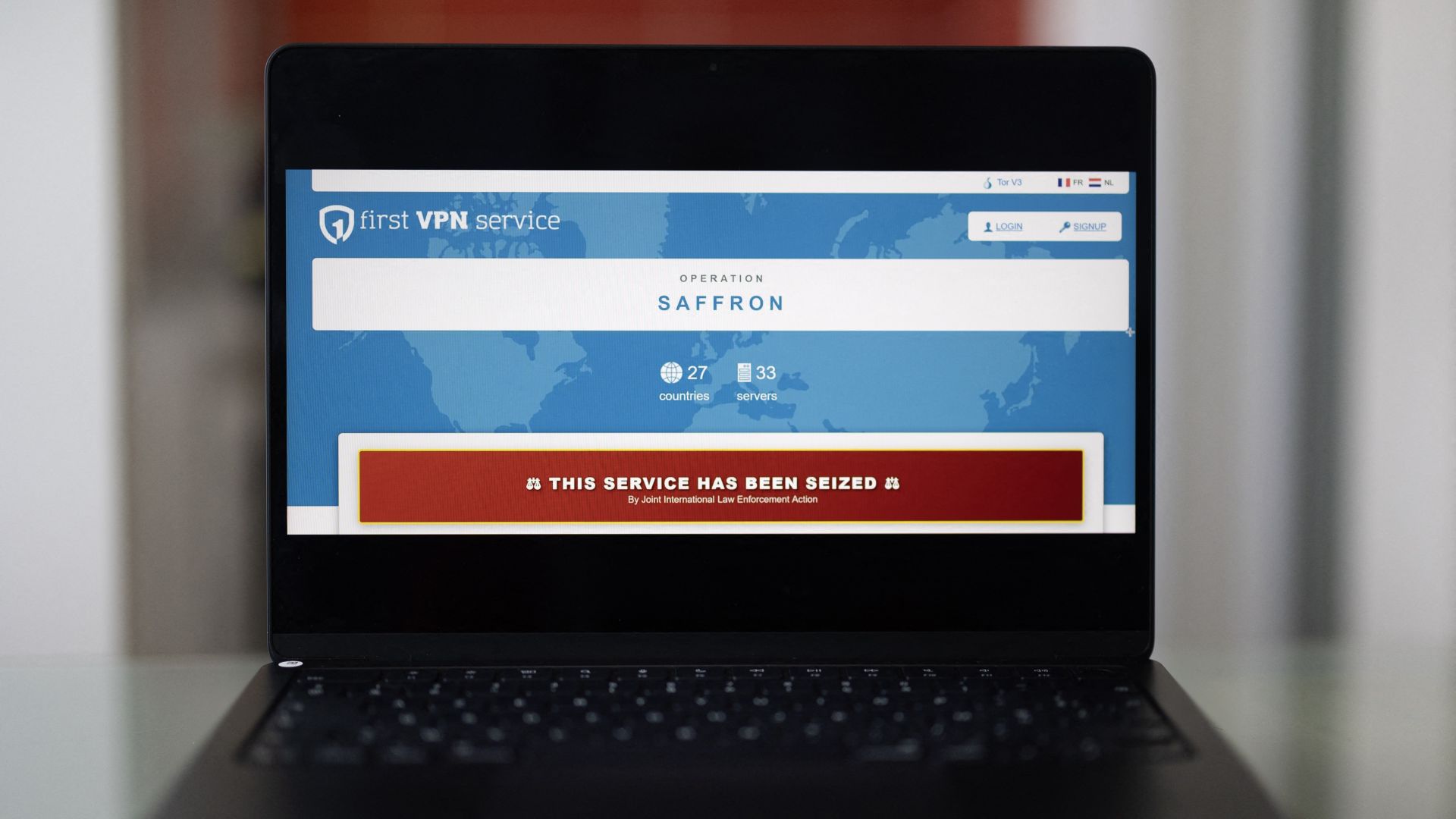
US sanctions on rogue VPN accidentally break Telegram’s short links worldwide

Published

on


  • The US Treasury sanctioned First VPN Service for aiding ransomware gangs
  • Complying with the sanctions, the .ME registry wrongly suspended Telegram’s entire t.me domain
  • The domain was restored roughly 19 hours later after Telegram CEO Pavel Durov flagged the issue online

If you clicked a Telegram link on Monday and stared at a blank screen, you weren’t alone. Every shortlink starting with ‘t.me’ suddenly vanished from the global internet, breaking group invites, profile shares, and channel links for roughly a billion users worldwide.

But the outage wasn’t caused by a technical glitch or a targeted cyberattack. Instead, it was the unintended collateral damage of a US government crackdown on a cybercriminal proxy network.

Source link

Advertisement
Continue Reading

Tech

The EU is forcing Google to give rival AI assistants the same access as Gemini on Android

Published

on

What just happened? European Union regulators are forcing Google to change how Android handles artificial intelligence, ordering the company to open up the operating system and its search data to competing AI services. Under a binding decision announced on Thursday, Google must grant rival AI assistants the same system-level access that its Gemini assistant enjoys on Android phones in the bloc. The move is intended to prevent Google from using Android’s vast reach to tilt the fast-growing AI market in its favor and to ensure that competing services have a fair opportunity to reach users.

The stakes are high. Android powers about 60% of smartphones in the European Union, and AI companies see those devices as the primary gateway for turning chatbots into everyday assistants. The deeper a service is integrated into a device – reading the screen, handling messages, and interacting with other apps – the more useful it becomes. That is precisely the layer of control EU officials are now trying to open up.

Regulators said Google will have to place rival AI services on “equal footing” with Gemini. That includes access to voice commands, system search, and the ability to perform actions in other apps, such as ordering a ride, replying to a text message, or pulling up information about a place a user recently visited. The changes must be implemented by next July.

The order also extends beyond the operating system. By January, Google will have to begin sharing anonymized search data with competing services, including developers of AI chatbots. The goal is to give those rivals access to more of the behavioral signals that help improve search and assistant products without exposing individual users.

Advertisement

Google has not said whether it will challenge the ruling in court. Instead, the company has warned that the EU’s demands could create new risks.

“Today’s decisions risk undermining vital privacy and security safeguards for millions of Europeans,” Kent Walker, Google’s general counsel, said in a statement. Google argues that allowing third-party developers to access sensitive data stored on a person’s smartphone or in their search history could weaken the protections built into its products.

European officials see it differently. The bloc has long taken a tough stance toward large technology platforms, and it views artificial intelligence as the next gateway to digital services. In their view, allowing a handful of companies to control the main AI assistants built into phones, browsers, and operating systems would entrench those players and shut out competitors.

The legal basis for the ruling is the Digital Markets Act, a competition law that applies to gatekeeper companies such as Google and Apple. The DMA requires them to make their products interoperable so that outside developers can offer competing AI assistants alongside – or instead of – built-in options such as Google’s Gemini and Apple’s Siri.

Advertisement

That requirement is already causing friction. In June, Apple said it would withhold new AI features for Siri in the European Union because it could not reach an agreement with regulators. As a result, iPhone users in the bloc will not receive the same Siri upgrades that Apple plans to roll out elsewhere, at least for now.

At the same time, some AI companies are trying to sidestep the mobile platform issue entirely by developing their own hardware. Last year, OpenAI hired Jony Ive, Apple’s former chief designer, to lead work on new AI-centric devices. The goal is to create products in which an AI assistant serves as the primary interface, rather than one that operates within another company’s operating system.

That partnership is now under strain. Last week, Apple sued OpenAI, accusing the company of stealing trade secrets. OpenAI has denied the allegations.

Advertisement

Source link

Continue Reading

Tech

Microsoft Restores Player’s 25-Year-Old Account After Nuking It Due to Hacker

Published

on

Microsoft restored streamer Joshua Khane’s 25-year-old Xbox and OneDrive account after it was compromised by a hacker and then suspended, putting years of personal data, baby photos, and thousands of dollars in games at risk. IGN reports: While he was “extremely happy” and thanked Microsoft for its help recovering his account and all the invaluable information therein, he levied some criticisms toward the brand for its initial response, claiming it had told him the suspension was “irreversible” at first. “It’s unfortunate that such a big company can bring back your account if you ask them to,” he said. “The way it all went, to me, is a little bit shady, because it’s not that they can’t bring back your account — they won’t bring back your account if you’re a nobody.”

Khane credited the community for making his story go viral and bringing it to Microsoft’s attention, but felt that without their help, he would have been up a creek without a paddle. He also tied the situation to the growing conversation surrounding digital ownership, comparing it to Sony’s decision to stop printing physical game discs starting January 2028.

Source link

Continue Reading

Tech

This new Mac malware won’t let you use your computer until you surrender your password

Published

on

A newly discovered strain of macOS malware is taking social engineering to an unsettling new level. Instead of exploiting a software vulnerability or silently stealing information in the background, it simply refuses to let you use your Mac until you type in your login password.

Dubbed ClickLock, the malware repeatedly shuts down key macOS processes, disables notifications, displays convincing Apple password prompts, and effectively traps users in a loop that only ends when the correct password is entered. Once that happens, it doesn’t just steal the password. It goes after browser data, cryptocurrency wallets, saved credentials, password managers, and much more.

A BleepingComputer reports states researchers at Group-IB say the malware has already infected at least 100 systems across 33 countries since May. Even more worrying, when it was first uploaded to VirusTotal in June, none of the security engines on the platform flagged it as malicious.

ClickLock doesn’t hack your Mac. It hacks you.

Unlike many modern malware campaigns that rely on zero-day exploits or privilege escalation vulnerabilities, ClickLock succeeds through psychological pressure. The infection is believed to begin with a ClickFix-style attack, where users are tricked into copying and pasting a command into Terminal under the guise of completing a Cloudflare “human verification” check. While a fake verification progress bar keeps the victim distracted, the malware quietly downloads its payloads in the background.

Advertisement

At the same time, it disables keyboard interrupts, hides the Terminal cursor, and suppresses macOS Notification Center alerts for nearly six hours, making it much harder for victims to realise something suspicious is happening.

The malware’s most disturbing feature comes next. It displays what appears to be a legitimate macOS password dialog complete with the user’s real account name and Apple branding. If the victim enters the correct system password, ClickLock immediately validates it and sends the credentials to the attackers through Telegram.

If the user refuses, the malware doesn’t give up. Instead, it installs persistence mechanisms that reactivate after the next login. Once triggered, ClickLock begins killing critical macOS processes every 210 milliseconds, including Finder, Dock, Terminal, Activity Monitor, Console, System Settings, Spotlight, and even popular web browsers.

The result is a Mac that appears almost completely unusable, leaving only the password prompt visible on screen. According to Group-IB, this loop can continue for more than 83 hours, or until the victim finally gives in.

It wants far more than your password

The login password is only the beginning. ClickLock also attempts to trick victims into approving a genuine Keychain access prompt that grants permission to Chrome’s Safe Storage key. That key can later be used to decrypt stored passwords, cookies, and autofill information from Chromium-based browsers.

Advertisement

The malware’s data-stealing module casts an exceptionally wide net. It targets browser profiles from Chrome, Firefox, Brave, Microsoft Edge, Opera, Vivaldi, Arc and Chromium, harvesting saved passwords, cookies, bookmarks, browsing sessions, local storage and autofill information.

Cryptocurrency users face an even greater risk. ClickLock searches for browser wallet extensions, desktop wallet files, encrypted wallet vaults and cached wallet addresses across major blockchain ecosystems including Bitcoin, Ethereum-compatible chains, Solana, TRON, TON and Stacks.

It also collects FileZilla FTP configurations, shell history, basic system information and public IP addresses before compressing everything into ZIP archives and uploading the stolen data through the Telegram Bot API. To ensure attackers maintain long-term access, ClickLock deploys a modified version of the open-source GSocket tool, creating a persistent backdoor capable of remotely controlling the infected Mac. Unlike the malware’s other components, which delete themselves after execution to minimise forensic evidence, this backdoor remains active on the system.

The stealth techniques don’t end there. Researchers say the malware is hosted on compromised but otherwise legitimate websites, helping it evade reputation-based security systems. Its payloads also remove themselves after execution, leaving very few traces behind. Despite that, Group-IB says defenders can still spot suspicious behaviour by watching for repeated password dialog boxes generated through osascript, continuous termination of macOS processes, mass access to browser profile folders and unusual outbound connections to Telegram.

The biggest takeaway, however, is surprisingly simple. If a website ever asks you to open Terminal and paste a command to prove you’re human, close the page immediately. No legitimate website, including Cloudflare, requires Terminal access for human verification. And if your Mac suddenly becomes unusable while repeatedly demanding your system password, resist the urge to comply. Instead, force a shutdown using the power button, restart in Safe Mode, and investigate the system before entering any credentials. In ClickLock’s case, your password isn’t solving the problem. It’s exactly what the attackers are waiting for.

Advertisement

Source link

Continue Reading

Tech

Microsoft gives admins Exchange Online breathing room

Published

on

SAAS

Retirement of PowerShell -Credential parameter pushed back to the end of 2026

Microsoft has delayed the removal of the -Credential parameter from Exchange Online PowerShell until December 2026, giving administrators more time to update affected scripts and automation.

The -Credential parameter is used when connecting to Exchange Online PowerShell. It allows an administrator to supply stored username and password credentials. These days, it is heavily discouraged, particularly when more secure authentication methods are available.

Advertisement

Microsoft had designated the parameter for removal in July 2026 as part of its move away from password-based authentication. The trouble is tracking down automation scripts that use it, updating them, and validating the changes – assuming a fix is even possible.

Once the parameter is gone from the Connect-ExchangeOnline and Connect-IppsSession cmdlets in the Exchange Online PowerShell module, any scripts still relying on it will break, potentially taking carefully built workflows down with them.

However, Microsoft has opted to push back the retirement beginning December 2026 – a festive gift for administrators.

The company stated: “If your organization uses the -Credential parameter in PowerShell scripts or automation workflows connecting to Exchange Online or Security & Compliance PowerShell, those scripts will break when you update to an Exchange Online PowerShell module version released beginning December 2026.”

Advertisement

As such, the retirement won’t take effect until an update is performed. The server-side retirement of the underlying authentication flow is planned “for a later date.”

“When that occurs, the -Credential parameter will stop functioning even on older module versions.”

Microsoft said it delayed the retirement due to “customer feedback,” although it came late in the day. That said, a few extra months will be welcomed by affected administrators dealing with the impact of the change.

And the change is still coming. Microsoft added: “While our published timeline extends to the start of December 2026, we strongly recommend that all customers transition away from the -Credential parameter as soon as possible and not wait until the deadline.” ®

Advertisement

Source link

Continue Reading

Tech

This handheld gaming PC deal makes the MSI Claw 8 much easier to recommend

Published

on

The MSI Claw A8 was the first handheld to run AMD’s Ryzen Z2 Extreme chip, and now it’s £150 cheaper too.

The MSI Claw A8 is currently listed at Currys for £749, down from £899, a £150 saving that brings AMD’s most powerful handheld chip within reach of buyers who baulked at its original price tag when it launched.

MIS Claw A8 on a pastel backgroundMIS Claw A8 on a pastel background

Save £150 on the MSI claw 8 handheld gaming console of your dreams

Powered by AMD’s most powerful handheld chip, the Ryzen Z2 Extreme, with a 120Hz screen, the MSI Claw A8 is down to £749, a £150 saving.

Advertisement

View Deal

That chip is a 16-thread Ryzen Z2 Extreme paired with a 16-core RDNA 3.5 GPU, and in games like Forza Horizon 5 it managed a smooth 59fps at native resolution without needing any upscaling to get there.

Advertisement

It’s paired with an 8-inch, 1920×1200 IPS screen running at 120Hz, hitting a genuinely bright 514.9 nits in testing, so fast-paced titles look sharp and punchy rather than washed out on a smaller, dimmer panel.

The Hall effect thumbsticks and triggers are a genuine upgrade over cheaper mechanisms, staying accurate and drift-free over time, while the blockier grips make the 765g body comfortable to hold even during longer gaming sessions away from a desk.

Advertisement

The Whatsapp LogoThe Whatsapp Logo

Get Updates Straight to Your WhatsApp

Advertisement

Join Now

Connectivity is well catered for too, with a pair of Thunderbolt 4 ports up top that let you dock the Claw A8 to an external monitor or a fast SSD without needing extra adapters at your desk.

Advertisement

There’s 24GB of fast LPDDR5X memory and a full 1TB SSD onboard, plenty of room for a handful of modern AAA titles alongside the smaller indie games most people actually play, though a couple of bigger installs will eat into that fast.

MSI’s 80Whr battery is one of the largest in this category, lasting close to ten hours in general use and around two hours and forty five minutes of sustained gaming, with the bundled 65W charger getting it back to half power in just 31 minutes.

At £749 instead of £899, the Claw A8 becomes a far easier sell against pricier Windows rivals, and anyone chasing the strongest chip currently available in a handheld gets it without paying full flagship money for the privilege.

Advertisement

Advertisement

SQUIRREL_PLAYLIST_10148964

Source link

Continue Reading

Tech

How to make Apple Journal part of a mindful daily routine

Published

on

Apple’s Journal app doesn’t promise to improve mental health, but its approach to reflective writing closely aligns with what decades of psychological research actually supports. Here’s why that matters, and how Apple’s approach differs from most wellness apps.

Journal focuses on people’s thoughts and experiences instead of their bodies, unlike the data-driven health tracking with Apple Watch. The app encourages users to reflect on their emotions and pay closer attention to the everyday moments that shape their lives.

Instead of evaluating users or assigning psychological scores, Apple designed Journal as a private place for writing and memory. People can use it to revisit meaningful moments and build a habit of reflection over time.

Apple’s decision to prioritize writing over interpretation aligns with decades of research showing that expressive writing can produce measurable psychological benefits (Frattaroli, 2006; Reinhold et al., 2018). Journal encourages reflection without trying to explain what users think or how they should feel.

Advertisement

Apple has never described Journal as a treatment for depression, anxiety, or any other mental health condition. Researchers also haven’t conducted clinical trials evaluating Apple’s implementation, so no one can honestly claim the app itself improves mental health.

The strongest evidence comes from research on expressive writing, gratitude interventions, autobiographical memory, habit formation, and emotional self-monitoring (Frattaroli, 2006; Sohal et al., 2022). Many wellness apps make mental health claims that go beyond the available evidence.

Apple has taken a more restrained approach with Journal. The company presents the app as a tool for reflection, which is consistent with what current research supports.

Mindfulness doesn’t always begin with meditation

Meditation has become closely associated with mindfulness for stress management and emotional distress. Mindfulness, however, includes paying closer attention to thoughts, emotions, and everyday experiences.

Advertisement

Reflective writing develops that awareness by encouraging people to revisit experiences and examine their emotional reactions. Journaling asks people to think about experiences they’ve already lived.

A difficult conversation, an afternoon hike, dinner with friends, or an ordinary Tuesday can all become opportunities to pause and consider what happened instead of immediately moving on to the next task.

Reflective journaling also asks different questions than a traditional diary, which usually records the events of the day. The practice focuses on why those events mattered, why someone reacted a certain way, or what can be learned from the experience.

Researchers generally agree that intentional reflective writing provides greater psychological value than simply documenting daily activities. The benefits are usually modest and vary considerably from person to person (Frattaroli, 2006; Reinhold et al., 2018).

Advertisement

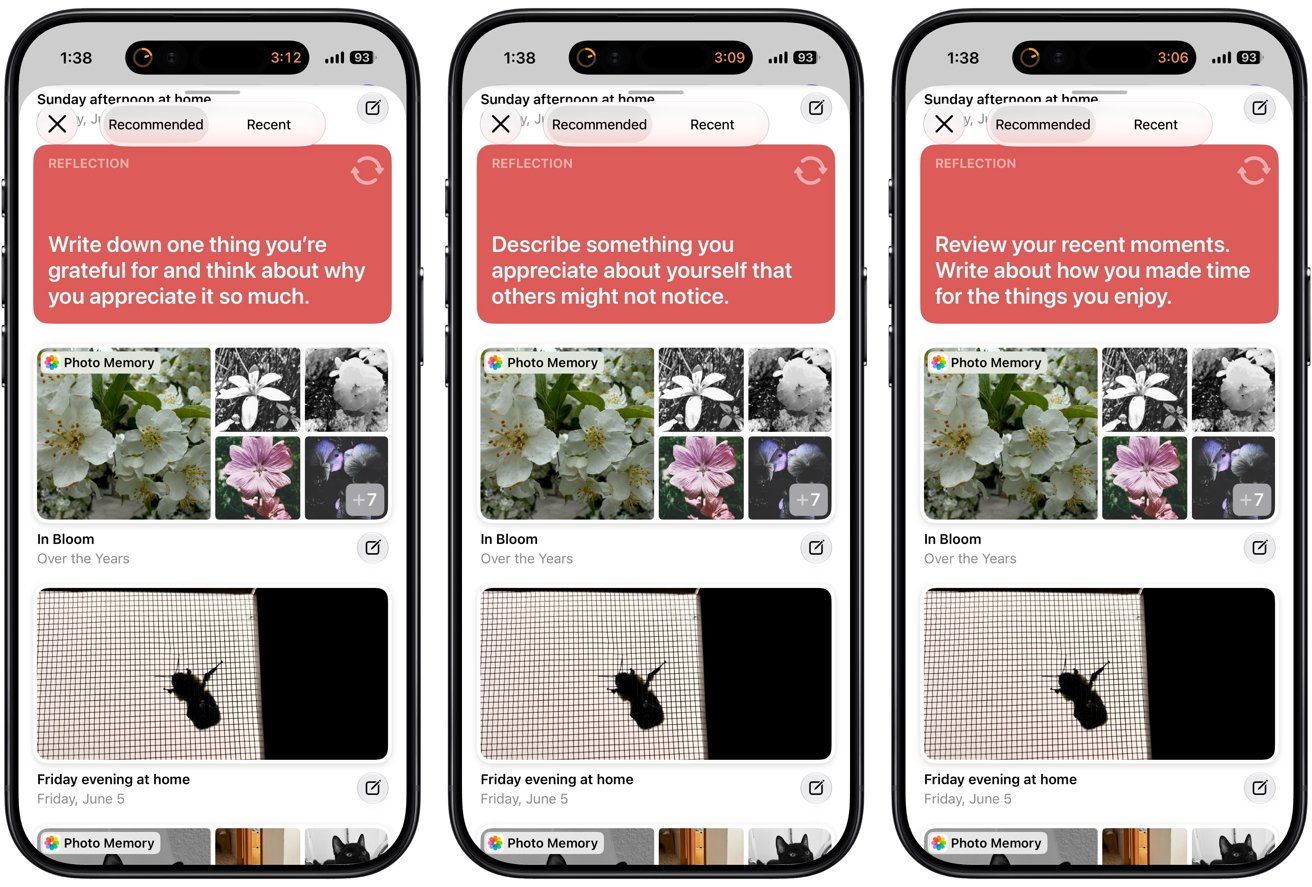
Journal’s writing prompts reinforce that approach without making the experience feel like homework. The app’s widget suggests topics such as gratitude, kindness, purpose, and meaningful moments instead of asking users to list everything they did that day. Reflection prompts are one of the app’s primary ways of encouraging that habit.

Writing is still Journal’s most powerful feature

Psychologists have studied expressive writing for decades by asking participants to write privately about emotionally meaningful experiences over multiple sessions.

Individual studies have reached different conclusions. Large reviews have still found a consistent pattern across the research (Frattaroli, 2006; Reinhold et al., 2018).

People who write thoughtfully and repeatedly often report small improvements in psychological well-being compared with people who don’t write at all. The benefits appear consistently enough to support reflective writing as a useful mental wellness practice.

Advertisement

The limits of expressive writing are as important as its potential benefits. Researchers don’t consider expressive writing a treatment for depression or anxiety, and they don’t recommend replacing professional care with journaling alone (Reinhold et al., 2018).

Writing about emotionally difficult experiences can temporarily increase distress before those experiences become easier to process. Research also suggests that structured writing exercises usually produce better results than completely open-ended journaling.

Regular practice appears more helpful than writing only during periods of overwhelming stress (Reinhold et al., 2018; Smyth et al., 2018). Apple doesn’t require users to follow a structured writing program, but Journal encourages several habits that researchers have linked to better outcomes.

Reflection prompts reduce the pressure of facing a blank page, suggested moments highlight experiences with emotional significance, and reminders make it easier to return to the app consistently.

Advertisement

Apple doesn’t tell users what conclusions they should reach. Journal focuses on removing common barriers that make reflective writing harder to maintain.

Consistency may be Journal’s most important design goal. Most people don’t abandon journaling because they dislike writing.

Often, people stop because they don’t know what to write about, they forget to open the app, or the effort required to get started outweighs the habit. Apple addresses each of those problems by making reflection easier to begin rather than trying to make journaling more entertaining.

Journal Suggestions may be Apple’s smartest design decision

Opening a blank page can feel surprisingly intimidating. Even people who enjoy writing often struggle to decide whether an experience is interesting enough to record.

Advertisement

Journal Suggestions solve that problem by shifting the question. Instead of asking users to invent something worth writing about, the app surfaces experiences that have already happened.

Psychologists have long understood that autobiographical memory depends heavily on cues. People rarely retrieve memories in chronological order like scrolling through a timeline (Crane et al., 2007).

Three smartphone screens showing a journaling app with gratitude and reflection prompts, above photo thumbnails of flowers and a notebook with pen, suggesting users write about recent moments and self-appreciationJournaling Suggestions

A photograph can suddenly bring back details that seemed forgotten. A familiar song can transport someone to a particular afternoon years earlier. Walking past a familiar location often recalls conversations, emotions, and experiences connected to that place.

Apple appears to have designed Journal around that understanding of memory. Journal Suggestions don’t preserve memories more accurately or strengthen memory itself, and the research doesn’t support making claims that broad.

Presenting those moments changes how the journaling experience feels. Journal brings meaningful experiences back to users instead of asking them to search for something to write about.

Advertisement

Apple extends that philosophy throughout the rest of the app. Users can begin an entry on their iPhones, attach photos, voice recordings, and locations without switching between apps, and continue writing later on an iPad or Mac.

None of those features change the psychology behind reflection. Each one removes another small barrier between living an experience and thinking about what that experience meant.

Health adds context without trying to explain everything

Journal becomes even more interesting when viewed alongside Apple’s Health app. Users can choose to log a state of mind while writing and automatically record time spent journaling as mindful minutes.

Health then places those entries alongside sleep, exercise, daylight exposure, and other health information. Apple’s decision to separate those responsibilities between two apps deserves attention.

Advertisement

Journal captures experiences while they’re still fresh. Health organizes information over weeks and months, allowing trends to emerge naturally instead of interrupting the writing process with charts and graphs.

The separation keeps Journal focused on reflection while allowing Health to remain the place where patterns become visible.

Researchers generally consider emotional self-monitoring a useful practice when used thoughtfully. Recording moods over time can reveal recurring stressors and show how daily habits affect emotional well-being (Wright et al., 2025).

Tablet screen showing a mental health journaling app with a large yellow abstract star asking Choose how you're feeling right now and a slider set toward PleasantUsing the Mental Wellbeing feature

Mood records can also make conversations with healthcare providers more productive because people don’t have to rely entirely on memory. Several weeks of entries often reveal patterns that are difficult to recognize one day at a time.

Mood tracking also has limitations, and Apple deserves credit for avoiding some of the most common pitfalls. Research has found that repeatedly monitoring emotions without a clear purpose can make ordinary emotional fluctuations feel more significant than they really are (Wright et al., 2025).

Advertisement

Some wellness apps respond by generating scores, interpretations, or personalized advice that imply a level of certainty the underlying data can’t support. Apple takes a more restrained approach.

State of Mind entries remain optional, and Health presents relationships rather than explanations. Someone may notice that poor sleep often coincides with lower mood or that regular exercise tends to accompany more positive days.

Health doesn’t claim one caused the other, and Journal doesn’t attempt to interpret those observations. Apple gives users information while leaving the conclusions to them.

Privacy encourages honest reflection

Journaling only works when people feel comfortable writing honestly. Self-reflection becomes much more difficult when people worry that deeply personal thoughts could become advertising data, appear on social media, or be accessed by someone else.

Advertisement

Apple built Journal around keeping personal reflections private. Journal Suggestions are generated using on-device intelligence instead of sending personal context to Apple’s servers for analysis.

Users also decide whether Journal can access Health data, choose what information appears in entries, and can lock the app with Face ID, Touch ID, or a device passcode.

Apple also protects Journal entries stored in iCloud with end-to-end encryption. As long as users enable two-factor authentication and secure their devices with a passcode, only their trusted devices hold the keys needed to decrypt journal entries.

Journal entries stored in iCloud remain end-to-end encrypted even when Advanced Data Protection is turned off.

Advertisement

Privacy alone doesn’t make journaling effective, but it can remove an important obstacle. Research on expressive writing consistently suggests that people are more willing to explore difficult thoughts and emotions when they believe their writing will remain confidential (Frattaroli, 2006).

Apple’s privacy model supports that process by making personal reflection feel like a conversation with yourself.

Consistency matters more than perfection

One of the clearest findings across habit research is that consistency usually matters more than intensity. Habits become part of daily life because repeating the same behavior gradually requires less conscious effort (Lally et al., 2010).

Journal reflects that understanding in dozens of small ways. Reminders encourage people to return at regular times, and suggested moments eliminate the pressure of finding something worth writing about.

Advertisement

The research also suggests people don’t need to write pages every night to benefit from reflection. Spending five or ten minutes thinking carefully about one meaningful experience is often easier to sustain than waiting for inspiration to produce a long journal entry (Smyth et al., 2018).

Pairing journaling with an existing routine, such as finishing dinner or plugging in an iPhone before bed, may also help reflection become part of everyday life instead of another goal competing for attention.

Looking back through older entries can be just as valuable as writing new ones. Individual entries often feel ordinary while they’re being written. Weeks or months of consistent reflection can reveal recurring themes that are difficult to notice in the moment.

Small sources of stress, recurring moments of gratitude, changing priorities, and gradual personal growth become much easier to recognize once enough experiences have accumulated on the page.

Advertisement

Journal doesn’t introduce a new theory of mental wellness. Apple built the app around well-established psychological principles and removed as much friction as possible from the act of reflection.

Tablet screen displaying a journaling app dashboard with colorful cards showing weekly streaks, daily and weekly counts, entry statistics, word counts, journaling days, and a sidebar list of journal categoriesJournal provides insights on your journey

Reflective writing, expressed gratitude, habit formation, and self-monitoring can all make modest contributions to everyday well-being.

People stop because life gets busy, blank pages become intimidating, and habits quietly disappear. Journal addresses those problems with thoughtful design instead of exaggerated promises.

Journal’s greatest achievement may be its restraint. Rather than trying to convince people they need another wellness platform, Apple built software that steps aside and lets one of psychology’s oldest reflective practices become part of everyday life.

How Journal became my external memory

Research explains why reflective writing can be valuable, but one idea changed how I think about journaling. I stopped treating journaling as a diary and started thinking of it as an external brain.

Advertisement

I’ve been journaling through various apps since 2013, and it has become “A History of Andrew Thus Far.” I record interesting dreams, write down memories when one randomly pops into my head, and save photos and videos of memorable events.

Earlier in 2026, I started thinking about journaling differently. Instead of treating a journal entry as one long Captain’s Log of each day’s events, I began treating it like a personal social network.

I write multiple short entries a day, even if it’s one sentence, such as a joke I thought of or an insight into myself. Memory is fallible and I’ve learned of “cognitive offloading” in which a journal becomes an external archive.

My grandpa suffered from Alzheimer’s disease before he passed away, although I was too young to remember him much. Journaling, and apps like Reminders, are alternatives to posting sticky notes around my apartment so that I don’t forget important things.

Advertisement

Another aspect of journaling is thinking more about myself through time. Past Andrew, Present Andrew, and Future Andrew are part of a continuum. Present Andrew learns from Past Andrew to make sure that Future Andrew will be a good person.

Journaling helps me do that, and the wonderful thing about using an app is the ability to search through memories.

I hope that Apple creates a “On This Day” widget that surfaces old entries so that I can be reminded and even update past entries with current thoughts and experiences.

People may never read my journal, or maybe someday I’ll print it out at the end of my life. Journaling is a way to let the universe know that I was here, that I was able to exist.

Advertisement

References

There’s a lot that went into the research and use of this piece. In-line links didn’t seem appropriate in this case. Here’s what I’ve used over the years while developing my program, habits, and mindfulness.

Crane, C., Barnhofer, T., Visser, C., Nightingale, H., & Williams, J. M. G. (2007). Cue self-relevance affects autobiographical memory specificity in individuals with a history of major depression. Memory, 15(3), 312-323.

Cregg, D. R., & Cheavens, J. S. (2021). Gratitude interventions: Effective self-help? A meta-analysis of the impact on symptoms of depression and anxiety. Journal of Happiness Studies, 22(1), 413-445.

Frattaroli, J. (2006). Experimental disclosure and its moderators: A meta-analysis. Psychological Bulletin, 132(6), 823-865.

Advertisement

Kirca, M., Yldrm, M., & Bakrcolu, R. (2023). Expressed gratitude interventions: A meta-analysis. Journal of Well-Being Assessment, 7, 207-233.

Lally, P., van Jaarsveld, C. H. M., Potts, H. W. W., & Wardle, J. (2010). How are habits formed: Modelling habit formation in the real world. European Journal of Social Psychology, 40(6), 998-1009.

Reinhold, M., Brkner, P.-C., & Holling, H. (2018). Effects of expressive writing on depressive symptoms: A meta-analysis. Clinical Psychology: Science and Practice, 25(1), e12224.

Smyth, J. M., Johnson, J. A., Auer, B. J., Lehman, E., Talamo, G., & Sciamanna, C. N. (2018). Online positive affect journaling in the improvement of mental distress and well-being in general medical patients with elevated anxiety symptoms: A preliminary randomized controlled trial. JMIR Mental Health, 5(4), e11290.

Advertisement

Sohal, M., Singh, P., Dhillon, B. S., & Gill, H. S. (2022). Efficacy of journaling in the management of mental illness: A systematic review and meta-analysis. Family Medicine and Community Health, 10(1), e001154.

Wright, L. A., Majid, M., Shajan, G., Momoh, G., Patil, R., Rawsthorne, M., Purewal, D., Patel, S., & Morriss, R. (2025). The user experience of ambulatory assessment and mood monitoring in depression: A systematic review and meta-synthesis. npj Digital Medicine, 8, 737.

Source link

Advertisement
Continue Reading

Tech

Caviar’s Exclusive Smartphones for Messi and Ronaldo Showcase Legends in 24-Karat Gold

Published

on

Caviar Legends Collection Messi Ronaldo Smartphones
Few companies turn flagship phones into objects that belong in a display case as much as on a desk. Caviar has spent years refining that balance, and its newest Legends collection takes the approach one step further by centering two of the most recognizable names in football. Timed with the close of the 2026 FIFA World Cup, the collection marks what many expect to be the final major international chapter for Lionel Messi and Cristiano Ronaldo.


Instead of normal run-of-the-mill products, Caviar created a pair of exceptionally rare handsets that combined the latest smartphones with hand-finished enamel artwork and extensive gold plating. The Messi edition is based on Samsung’s upcoming Galaxy Z Fold 8 Ultra model. The regular rear side is replaced with a detailed portrait of the Argentine captain done in cloisonne enamel in the national team’s white and sky-blue colors, which were chosen for national pride. The jersey number 10, national emblems, and edges of the entire artwork are all fully plated with 24-karat gold. The phone’s frame is likewise encased in matching gold, and just 19 will be created.

Sale


LEGO Editions Lionel Messi – Collector’s Set Co-Pack – Building Toy for Kids – Soccer Collectible…
  • INCREDIBLE SOCCER COLLECTIBLE – Excite soccer fans with this 2 in 1 building toy, featuring the LEGO Editions Lionel Messi – Soccer Highlights…
  • DETAILED SPORTS DISPLAY – Pay tribute to a legendary soccer player with a unique piece of sports décor featuring a buildable number 10, an M-shaped…
  • BUILDABLE LIONEL MESSI-FIGURE – Construct a highly detailed model of Lionel Messi that can be displayed pointing towards the sky in his signature…

Caviar Legends Collection Messi Ronaldo Smartphones
The Ronaldo edition begins with the iPhone 17 Pro and iPhone 17 Pro Max as the foundation. You get a cloisonne enamel portrait in the Portuguese national team’s classic red and green colors. The design features Ronaldo’s trademark number 7, the Portuguese coat of arms, and a background with strict, upward lines. The frame and artwork’s distinguishing forms are accented with 24-karat gold plating. It will also be limited to exactly 19 units, like the Messi edition.

Caviar Legends Collection Messi Ronaldo Smartphones
Both phones retain all of the normal functions of their base versions. The customization occurs only on the outside, where the enamel and gold transform each smartphone into a portable, or more accurately, carryable piece of commemorative art rather than a normal everyday phone. Caviar doesn’t just give you the phone as part of the package. Along with the handset, you get specially branded packaging, a gold-plated key, a Caviar coin, and a multi-level certificate of authenticity, giving the whole affair some considerable weight. You also get a one-year warranty, and they accept custom orders, which include engraving your initials or logos on the side, modifying the artwork, or even swapping out the materials.

Caviar Legends Collection Messi Ronaldo Smartphones
The Ronaldo iPhone 17 Pro with 256GB costs $11,410. The Messi Galaxy Z Fold 8 Ultra starts at $13,130 for the same storage capacity. Those figures represent the level of craftsmanship that has gone into each and every one of these handsets, the quality of the gold plating, and the fact that you will be one of just 19 people to own any of these limited edition smartphones.
[Source]

Advertisement

Source link

Continue Reading

Trending

Copyright © 2025