Connect with us

Tech

Calculus-Free PID (Almost) In A Spreadsheet

Published

on

PID controllers are everywhere. They regulate temperature, motor speed, power supplies, positioning systems, process equipment, and probably a dozen things within arm’s reach of you right now.

They’re also frequently explained with enough calculus to make them seem more mysterious than they really are. Granted, the I and D in PID stand for calculus terms, but they are easy enough to build into a spreadsheet. Grab a copy and keep it open while you read this post.

The Google Sheet implements a simple simulated PID controller along with a simulated process — the thing we’re trying to control. You can change the controller gains, alter the process, introduce disturbances, and watch what happens without compiling anything or wiring up a heater that might accidentally become a toaster.

The three letters in PID stand for Proportional, Integral, and Derivative. If your calculus is rusty, integral is just how much is building up over time, and the derivative is how much changed just now. Each operates on the error:

Advertisement
error = setpoint - process value

The setpoint is where we’d like the system to be, the process value (PV) is where it actually is, and we would obviously like the error to be zero. Proportional is the most obvious method of control. The more we are off, the more we adjust. The closer we are to the setpoint, the less proportional output we need.

Integral, on the other hand, looks at a running tally of errors. Finally, derivative measures how much things have changed from the last time we looked. The basic cycle time for the spreadsheet is set by dt, which, by default, is 0.1 seconds. Therefore, it takes ten spreadsheet rows to cover an entire second.

Suppose we’re controlling temperature and want it to be 20 degrees. If the temperature is 15, the error is +5. If it’s 22, the error is -2. Our controller’s job is to turn that error into an output. That output affects something — a heater or a motor speed or whatever — that can change the process value. So for a temperature example, the output might drive a heating resistor, and the process value is measured by a thermistor.

The PID tries to drive the heater so that the process value is as close as possible to the setpoint. To the PID algorithm, the actual units of the output and the process values are immaterial. The spreadsheet limits output from 0 to 100 and, presumably, that would be a percentage of voltage or a PWM duty cycle. The setpoint and process value might be in degrees C or F. But the algorithm doesn’t really care.

Advertisement

First, Just P

Make sure the Model drop-down is set to DEFAULT. We’ll begin by setting:

Kp = 4
Ki = 0
Kd = 0

Set the initial process value to 0, the setpoint to 20, the process gain to 1, and the time constant to 2 seconds. With only the proportional term operating, the controller is particularly easy to understand:

output = Kp × error

At the beginning, the error is 20, so the controller asks for an output of 80 (that is, 4 times 20). However, the process doesn’t instantly jump to 80. Our simulated plant is a first-order system implemented essentially as:

PVnew = PVold + dt/tau × (Kprocess × output - PVold)

The actual spreadsheet has extra terms for a bias and disturbance, but you’ll usually leave those at zero. That’s a useful generic model for a surprising number of real things. Turn up a heater, and the temperature approaches a new value gradually. Apply voltage to a motor and its speed doesn’t change instantaneously. Charge a capacitor through a resistor, and you’ve seen exactly this sort of exponential behavior before.

Advertisement

As the process value rises, the error gets smaller. Because the error gets smaller, the proportional controller reduces its output. This works. At least, mostly.
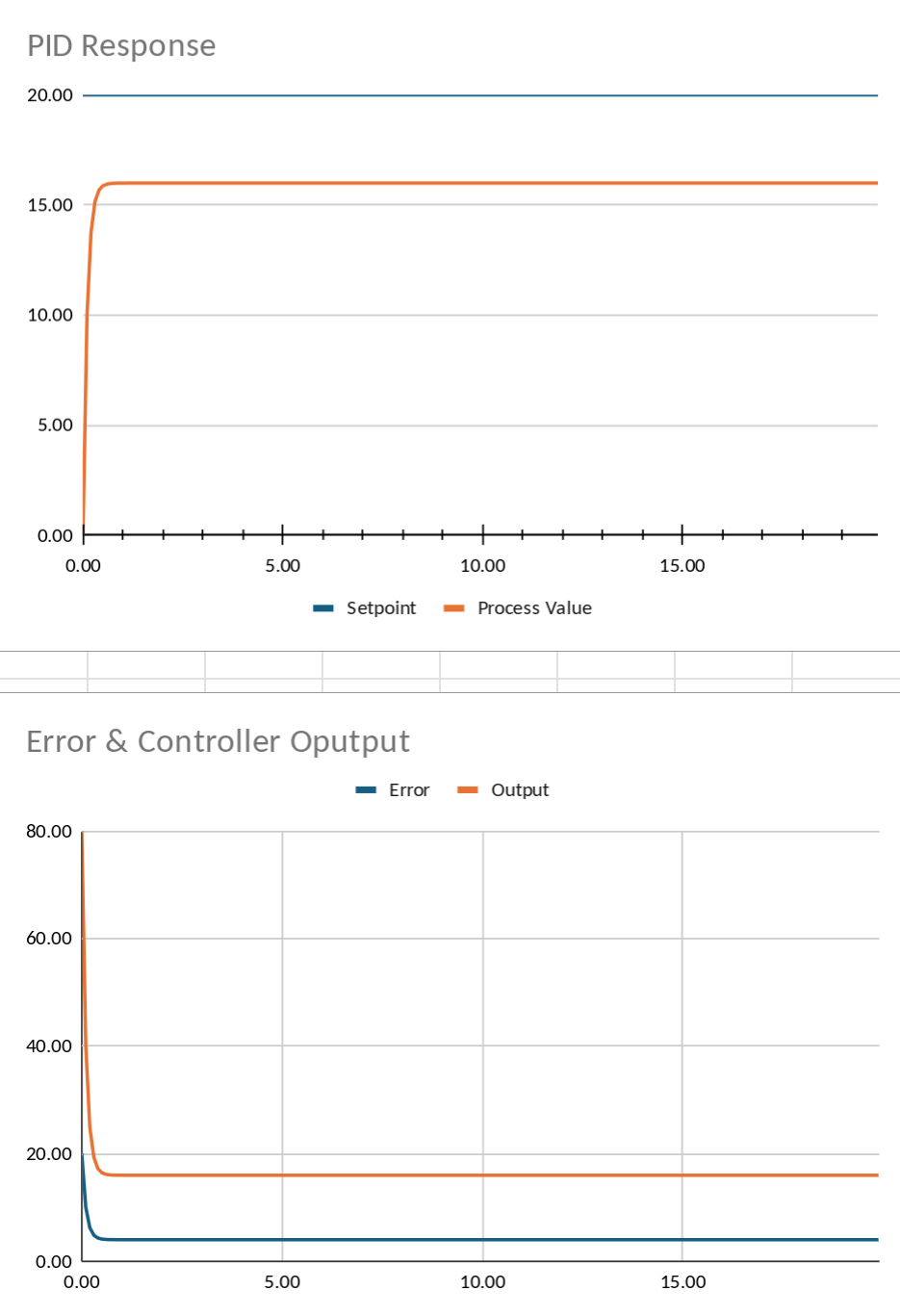
Proportional can’t quite get there.

Watch where it eventually settles. With the suggested values, the process value winds up around 16 even though our setpoint is 20. Why? At a process value of 20, the error would be zero. A proportional controller presented with zero error produces zero output. But this particular process needs an output of 20 to remain at 20. Therefore, it can’t ever quite get there.

This is the classic steady-state error of proportional-only control. We could crank Kp upward. Try Kp=8. The process gets much closer to the setpoint. But continually increasing proportional gain isn’t a universal solution. Eventually real systems start overshooting, oscillating, amplifying noise, or otherwise expressing their displeasure. We need another term.

Remember the Error

Set Kp back to 4 and try:

Ki = 0.5

The integral term looks at not just the error right now, but the error accumulated over time. In the spreadsheet there’s an Integral State column. Each row does approximately this:

Advertisement
integral = previous_integral + error × dt

and the I contribution becomes:

I = Ki × integral

Now consider our P controller sitting stubbornly below the desired value. As long as some positive error remains, the integral keeps growing.

That gradually increases the controller output until the remaining error disappears. Instead of settling around 16, the process now creeps all the way toward 20. This demonstrates one of the major reasons integral control exists: it eliminates persistent offset. It also gives us a good excuse to disturb the system.
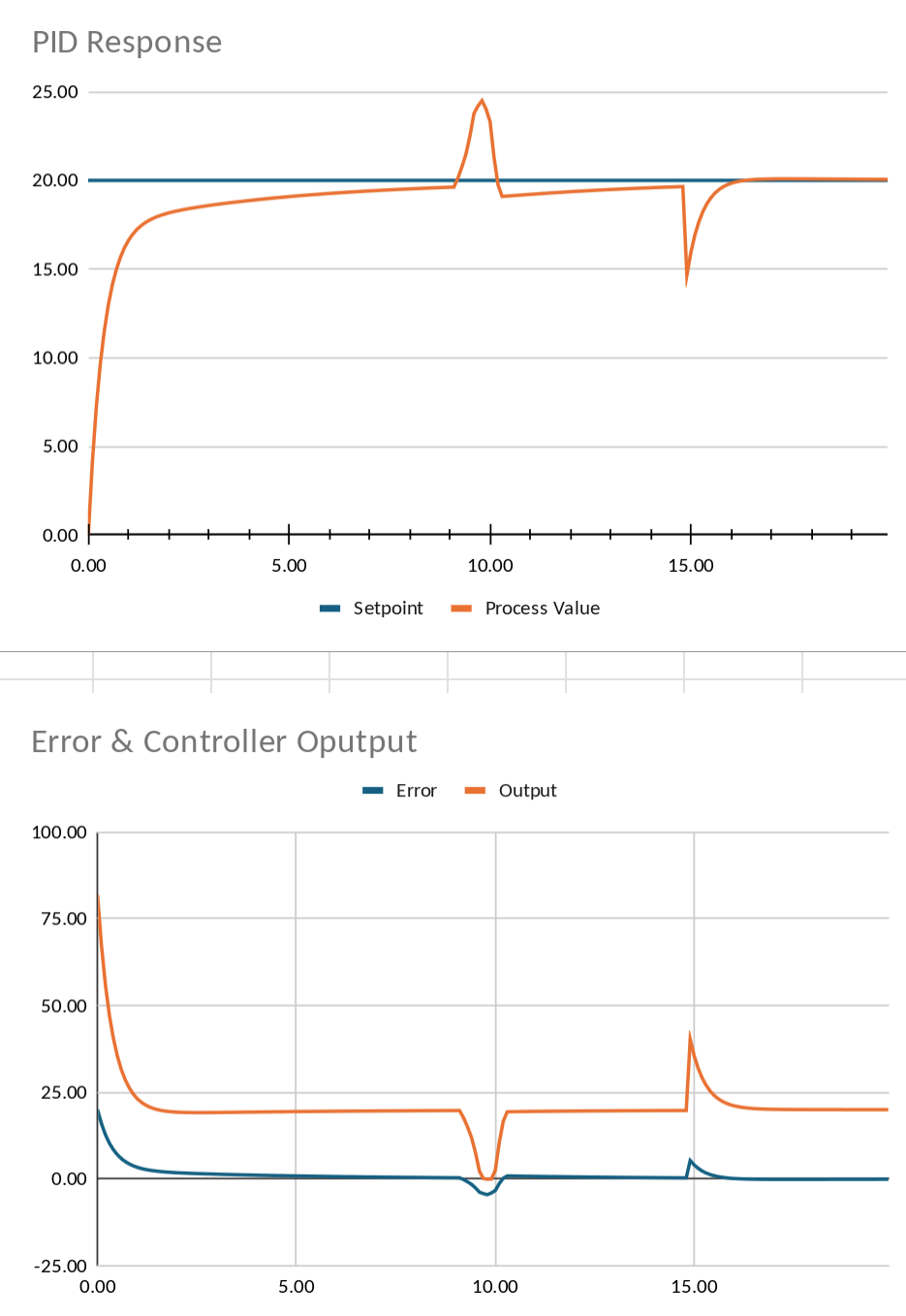
Select the user process model and set User Model # to 1. This will let you disturb the process value by entering numbers into the User1 column. Leave the first bit of the User1 column at 0. But somewhere farther down the simulation, put a disturbance into that column — perhaps -5. If you are feeling especially salty, try a sequence like: 0.5, 0.75, 1, 1.5, 2, 1.5, 0.75, 0.5, -1, -1, -0.5. That sequence should already be in the template’s User1 column.
You can imagine that as opening a refrigerator door, suddenly putting a mechanical load on a motor, or connecting another load to a regulated power supply.

Advertisement

A proportional-only controller reacts immediately, but once things settle, it again tolerates a permanent error.

The integral controller doesn’t. If the process remains below the setpoint, integral action continues increasing until the disturbance has been compensated. That’s a powerful trick. Unfortunately, integral control has tricks of its own.

Too Much of a Good Thing

Integral action remembers errors, but memories aren’t always helpful. The derivative term responds to how rapidly the error is changing:

D = Kd × (error - previous_error) / dt

If proportional control asks, “How far away are we?”, derivative control asks, “How fast are we approaching?” Or, more precisely in this case, “How fast is the error changing?”

Advertisement

Make the simulated process faster by changing its time constant from 2 to about 0.8 seconds. Then try something deliberately more aggressive:

Kp = 8
Ki = 1
Kd = 0
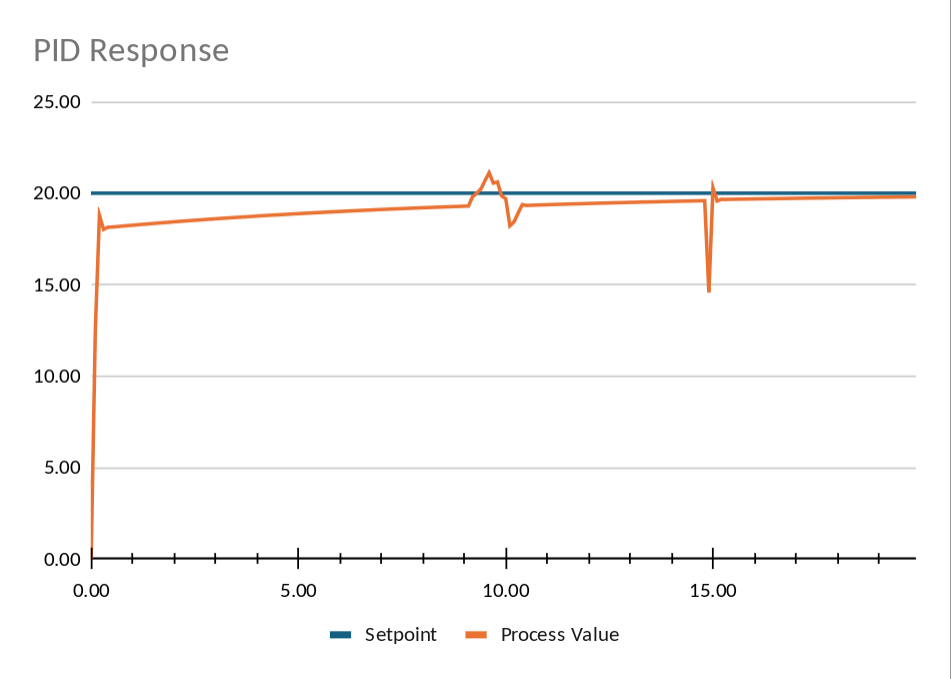
Overshoot in user model #1

The response now gets to the setpoint quickly, but it overshoots it. The problem is easy to see in the spreadsheet. While the process is racing upward, it remains below the setpoint, so the integral continues accumulating positive error. By the time we arrive at the destination, the integral term is still pushing. Depending on the process and gains, the result may be a little overshoot, a lot of overshoot, or sustained oscillation.

Since the default plant is only first-order, derivative action doesn’t have much to work with. User Model 2 adds another lag, using the USER2 column as an intermediate process state. That produces more phase lag and makes aggressive PI tuning more prone to overshoot.
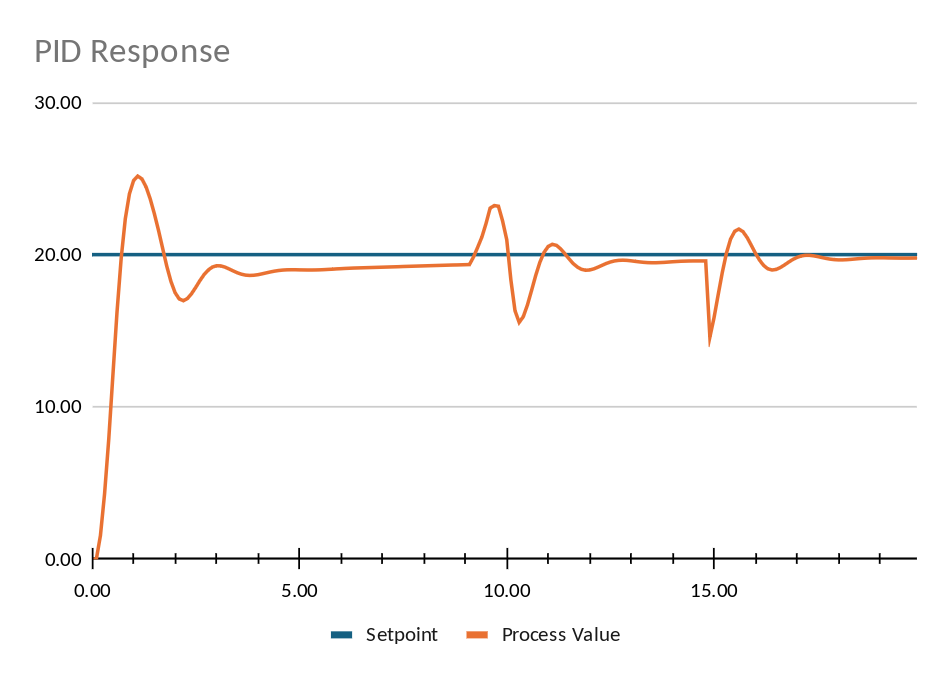
Overshoot observed in model 2.

Switch to User Model 2 and start with Kd=0. Then note the peak process value. Then try Kd=0.2, 0.5, and perhaps 1.0. Try some negative values. You will find that there is a range where the peak overshoot is reduced slightly, but keep going and the response starts to ring. Push Kd far enough, and the derivative term becomes part of the problem rather than part of the cure. The graphs autoscale, so sometimes what looks like a peak the same size (or even bigger) is really smaller than the previous result. Be sure to read the numbers.

That’s the basic PID balancing act. P reacts to the error that exists now. I reacts to error that has existed for a while. D reacts to where the error appears to be heading. Put all three together, and you have a controller that may respond strongly, eliminate steady-state error, and anticipate rapid changes. However, sometimes you are better off with, for example, just PI or even just pure proportional control. Having the algorithm in a spreadsheet form is a nice way to experiment, especially if you can model the system’s behavior.

It’s Only a Spreadsheet

You can add your own models by modifying USR_PROCESS to call your function or just modify one of the existing ones. DEF_PROCESS is just a simple lag model. USR_PROCESS0 has some random noise, while USR_PROCESS1 lets you inject a disturbance in the USER1 column. USR_PROCESS2 is like USR_PROCESS1 but has a second-order process in the USER2 column as well. Of course, real control systems are messier than these nice models.

Advertisement

The output may have hard limits. In fact, the spreadsheet includes minimum and maximum output clamps. This exposes another classic PID problem: integral windup. If the controller desperately requests an output of 150 but the actuator can only deliver 100, the integral can continue accumulating error even though the actuator cannot respond. When the error finally reverses, all of that stored integral has to unwind. Practical controllers frequently include anti-windup schemes to deal with this. In practical terms, imagine a thermistor gets unplugged, and the system suddenly thinks there is a giant temperature error. It will try to correct it, but it can’t. Then someone plugs the sensor back in. All the accumulated error in the integral term now has to be backed off.

Derivative action causes its own problems. The spreadsheet calculates derivative from the error, which means suddenly changing the setpoint produces a large derivative pulse — the notorious derivative kick. Real controllers often calculate derivative from the process value instead.

Of course, real measurements also contain noise. Differentiation is very good at making high-frequency noise more prominent, so the D term is commonly filtered. We aren’t doing any of those sophisticated things here, and that’s intentional. The point of the sheet is that every number is visible and to make it easy to experiment.

Change a setpoint in the middle of the Setpoint column, and you’ve generated a step input. Change one of the User columns, and you can inject a disturbance. Adjust Kp, Ki, or Kd, and you can immediately see which portions of the controller output changed and why.

Advertisement

To add your own models, modify USR_PROCESS and add a custom function to the SWITCH statement. Then create your custom function. If you need to grab data from the spreadsheet, you’ll see examples of using ROW() and INDIRECT() to get the right numbers. It is fairly straightforward to add motors, thermal systems, second-order plants, dead time, nonlinearities, or whatever other pathological system you’d like to inflict on your controller.

The most important lesson about PID control? There isn’t a magic set of Kp, Ki, and Kd values. A set of gains that works beautifully on one plant may be terrible on another. Change the mass, thermal capacity, load, delay, sample rate, actuator limits, or sensor characteristics and the optimum controller changes with it. Not every control job needs all three terms.

The equations fit comfortably into a few spreadsheet cells. The interesting part is figuring out what numbers to put in them.

Most of our spreadsheet hijinks center around DSP. Except for the ones that simulate computers.

Advertisement

Source link

Continue Reading
Click to comment

You must be logged in to post a comment Login

Leave a Reply

Tech

Apple TV offers free ‘Widow’s Bay’ AMC screenings

Published

on

Fans of “Widow’s Bay” in Atlanta, Boston, Chicago, Los Angeles, New York, and San Francisco can catch a free screening of the series’ final three episodes of the first season at select AMC theaters.

“Widow’s Bay” made its debut in April, quickly becoming an Apple TV hit. The series has been praised for blending genuine horror with character-driven comedy.

Even with its late premiere date, it earned 19 Emmy nominations. That includes the coveted Best Comedy Series.

Now, Apple TV wants to do something for “Widow’s Bay” fans.

Advertisement

According to Deadline, Apple TV has teamed up with Rutgers University, alma mater of “Widow’s Bay” creator Katie Dippold, for free, one-night-only fan screenings of the first season’s final three episodes. The screenings will take place in select AMC theaters on Wednesday, August 12, in Atlanta, Boston, Chicago, Los Angeles, New York, and San Francisco.

If you’re interested in going, there’s a helpful Apple TV Screenings site that shows which theaters are participating.

Apple TV continues to churn out hits under the direction of Eddy Cue. Cue was recently honored with Cannes Lions’ Entertainment Person of the Year.

Advertisement

Source link

Continue Reading

Tech

Flock Highlighted Police Departments Using Its Tech. Now 4 Face Allegations of Misuse

Published

on

The Albany Police Department did not respond to WIRED’s request for comment.

Flock’s Savannah video centers on an interview with then major of police Robert Gavin, who praised how Flock facilitates data-sharing between different law enforcement agencies.

“We spent a lot of time doing community talks about what we’re gonna use them for, what we’re not gonna use them for,” Gavin says, adding that the overall objective is to “keep everybody safe.”

On July 31, Savannah police mayor Van Johnson wrote in a Facebook post that the allegations involving the six employees had been referred to the GBI to determine whether criminal charges should be filed.

Advertisement

The Savannah Police Department did not respond for comment. The GBI confirmed that it investigated the incidents in Savannah and Albany, but didn’t provide information, noting that the Savannah investigation is “still active.”

According to Johnson, the Savannah Police Department conducted an internal investigation through the Flock Safety Audit Assistance Program, which Flock introduced in April. In a press release announcing the tool, Flock said it “continuously monitors system activity and surfaces search patterns that fall outside an agency’s typical usage.” Savannah police chief Lenny Gunther told a local news outlet that the investigation surfaced 127 inappropriate searches out of the 39,000 it conducted this year.

“Public trust is non-negotiable,” Johnson said in his Facebook statement. “These tools exist to keep our community safe, not for personal or unauthorized use.”

In 2020, Flock posted a video by the Atlanta Journal-Constitution about the Sandy Springs Police Department’s arrest of a porch pirate. The video did not feature any interviews with Sandy Springs Police Department personnel, but noted that the man was arrested after a Flock camera captured the license plate of the suspect.

Advertisement

About five years later, the Sandy Springs Police Department launched an internal investigation into whether one of its officers had misused Flock’s technology. According to investigators, the officer allegedly ran ALPR searches to support beta testing for Signal 8, a law enforcement software company that employed the officer in a second job.

This officer, the police department claimed, did not cooperate with its investigation and was subsequently terminated.

Meanwhile, Flock showcased the Baytown Police Department in 2025 as part of a brief series highlighting cases where police said Flock was instrumental in apprehending a suspect.

“We use it multiple times every day, and once I log in to my computer, Flock is the first thing I click on,” a Baytown police officer says.

Advertisement

On July 30, Baytown police chief John Stringer announced the resignation of a police officer who had been under investigation for allegedly misusing Flock’s technology. The Baytown Police Department did not respond to WIRED’s request for comment.

In his video statement, Stringer said that two investigations into the officer’s alleged misuse—one internal, one criminal—remained ongoing.

“Accountability to the fullest extent of the law will be pursued,” Stringer added.

Source link

Advertisement
Continue Reading

Tech

There’s No Good Way to Talk About Celebrities and Eating Disorders

Published

on

When a patient is seeking treatment, Logue says, she does not use their appearance to express concern or as a motivator, because there are always other contributing factors. With a public figure, Logue says, we don’t have real insights into these factors. Instead, most people focus on what their body looks like.

Although a lot of commenters say they’re less worried about Grande individually and more concerned about the impact she may have on her young fans, Logue says focusing our efforts on celebrities’ appearances also doesn’t meaningfully combat aspirational thinness in our day-to-day lives, either.

“Talking about how you look fat, engaging in fatphobia, it’s all these things that are so normalized. And when I work with clients, that is the dangerous stuff,” she says. “I’ve never had a client sit down and say, ‘I got an eating disorder because I heard Demi Lovato had an eating disorder.’”

One big sign that the viral posts about celebrities aren’t helping people with eating disorders is that almost none of them share resources, such as links to groups like the National Eating Disorder Association. And many of the posts contain an undeniable strain of snark, cruelty, and carelessness. There are viral compilations of celebrity women with captions like “it’s not just Ariana,” most of which exclude celebrity men entirely. Some people have used AI tools to edit images of these women to make them appear obese and used them as memes, while others have analyzed every part of their bodies in photos to declare them too skinny.

Advertisement

Women in various stages of eating disorder recovery are actively grappling with the issue. Natália Franz, a Slovak actress, commented on one video about celebrities and eating disorders to say, “I wish more people were worried about me when I was not eating rather than normalizing it.”

Franz tells WIRED that she’s concerned about the influence celebrities have over their fans, and she’s hoping that the discourse can change the culture for her own daughter. She also says that her body image issues started at home and that parents need to be careful with how they talk about food and appearance around their kids.

“I actually think it’s weird this heated discussion is only about one celebrity,” Franz says. “But when you see so many celebrities getting this thin, it’s very obvious patriarchy is on the rise.”

Having a personal history with eating disorders can provide a more informed perspective, as evidenced by some of the more nuanced conversations happening online. But the reality is that eating disorders are complicated, multifaceted, and different from person to person. Outsiders cannot infer what is going on privately in any celebrity’s life based on the limited information they share with the public, but that doesn’t stop people from labeling those in their inner circle “enablers” or assuming that a break from the public eye means they’re seeking treatment for an eating disorder.

Advertisement

“Talking about this in a heightened, gossipy, fearmongering kind of way is not necessarily going to inspire people to get help,” says Keesha Amezcua, chief clinical officer at Alsana Eating Disorder Treatment Center. “A lot of people on social media platforms are not informed, they’re not educated, and they don’t know what they’re witnessing and participating in is incredibly unhealthy and harmful.”

The National Alliance for Eating Disorders helpline provides resources about treatment options at 1-866-662-1235, or you can text “ALLIANCE” to 741741 if you are experiencing a crisis. More information can be found on the National Eating Disorder Association’s website.

Source link

Advertisement
Continue Reading

Tech

Google Wallet Now Lets Parents Create Secure Tap and Pay Balances for Kids

Published

on

Google Wallet is giving parents a new way to help their kids manage money without the need for a traditional bank account. The feature, which was announced Thursday, lets parents set up a secure balance for their children to use to spend money with their NFC-enabled Android phone or WearOS device anywhere Google Pay is accepted. 

Parents can use the Google Wallet app to add money to their child’s balance, and the funds will instantly be available for use. Unlike some traditional payment apps, there won’t be any additional fees or the need to transfer the funds to a physical card before it can be used. 

The new feature allows parents to set boundaries and teach their kids healthy spending habits by creating daily spending limits. Parents can also view all of their child’s spending transactions or receive a push notification when a new transaction is made via Family Link. Push notifications will include the amount of money spent and the name of the location where the transaction took place. 

The new features also allow the ability to lock or unlock the balance at any given moment. This could be helpful if a device is misplaced, stolen or if a parent wants to establish a “spending timeout.”

Advertisement

Source link

Advertisement
Continue Reading

Tech

Hisense Adds Dolby Vision 2 Max to Select 2026 TVs With Software Update

Published

on

Hisense today announced that Dolby Vision 2 is now available on select 2026 televisions, with UX, UR9, UR8, and U7 models receiving Dolby Vision 2 Max firmware updates over the coming weeks. The supported TVs include Hisense’s 2026 UX, UR9, UR8, and U7 (U7 Pro in EU, MEA, CSA) televisions running Google TV or VIDAA OS across North America, Europe, and APAC.

There is a lot to unpack regarding Dolby Vision 2, along with premium features added to Dolby Vision 2 Max. Of course there is now regular Dolby Vision (or Dolby Vision), which originally unlocked HDR (high dynamic range) content about 10 years ago and is available across thousands of movies and TV shows — both streaming and on 4K UHD discs. Fortunately, all Dolby Vision content is backward compatible and will play perfectly fine — and potentially even better — on Dolby Vision 2 enabled TVs.

Yes, Dolby reps told us, “better”! The reason is that TV capabilities have outpaced Dolby Vision’s original specifications, so the new versions of Dolby Vision let TV makers tap into the full potential of the latest generation TVs, with higher brightness, faster refresh rates, and greater color volume.

Ultimately, it should be automatic for the TV viewer. However, with Dolby’s new specifications filmmakers need to catch up too. Creators need to make use of Dolby’s new specification toolkit, which ultimately gets assigned as new metadata that Dolby Vision 2 TVs decode. Until that happens we won’t know the full potential Dolby Vision 2 and Dolby Vision 2 Max offers.

Advertisement

For a deeper discussion, watch our Dolby Vision 2 podcast here.

Dolby Vision 2 vs. Dolby Vision 2 Max

Since originally learning about Dolby Vision 2 last year, Dolby has attempted to simplify improvements for consumers.

Dolby Vision 2 TVs get:

  • A powerful new image engine to deliver an enhanced Dolby Vision experience across both new and available Dolby Vision titles.

  • Content Intelligence that leverages new and existing metadata to further bridge the creative suite to the viewer’s living room. Leveraging precise instructions embedded in every title, it dynamically adjusts the picture based on what you’re watching, so every scene looks its best — from the darkest cinematic moments to the most action-packed sports and games. No remote or complex settings required.
  • An intensity slider allows users to control the depth and richness of their Dolby Vision 2 experience to compensate for contrast lost by viewing angles or reflections while also enabling more personalization based on individual preferences. 

Dolby Vision 2 Max TVs add:

  • Authentic Motion which aims to offer a more cinematic feel while eliminating unwanted judder and soap opera effects (requires new metadata/content).
  • Light Sense 2, which continuously optimizes picture quality for any lighting environment without compromising artistic intent so that even the darkest scenes in a sunlit room become crystal clear. 
  • Pro settings that give enthusiasts even more precise control over how their display performs.
2026-hisense-ur9-tv
2026 Hisense UR9 TV will get Dolby Vision 2 Max update.

The Bottom Line

Hisense owners benefit most because select 2026 TVs are gaining Dolby Vision 2 Max without requiring another expensive hardware upgrade. Movie fans, sports viewers, gamers, and anyone watching in brighter rooms should see the biggest improvements, although the format’s full potential will depend on studios and filmmakers adopting the new metadata tools.

Advertisement. Scroll to continue reading.
Advertisement

Source link

Continue Reading

Tech

Elon Musk’s Grokipedia Quietly Stopped Updating In April. Basically No One Noticed.

Published

on

from the dead-site-walking dept

As perhaps a few Elon Musk fans may remember, he got really annoyed at Wikipedia last year and tasked his second-rate LLM, Grok, with recreating it as “Grokipedia.” Grokipedia, launched nearly a year ago, basically starts by forking Wikipedia and then having its AI “generate” more details and more stories. It’s… not very good.

And apparently, it hasn’t been updating. And it seems like almost no one noticed.

Over at Lawfare, they put out an article showing that Grokipedia basically stopped accepting updates back in April.

At first, we wondered whether the AI was avoiding sensitive topics. To test that possibility, we submitted an uncomplicated factual update: SpaceX has recently launched its initial public offering (IPO). Grokipedia had not added this extensively sourced, indisputable fact to the SpaceX page. We observed that other users had suggested this edit as well; their requests were also “in review,” some since the day after the June 12 IPO. 

We then examined the most popular pages, reasoning that if anything moved through the queue, we would likely see it there. Because Grokipedia provides view counts on individual pages but offers no site-wide ranking leaderboard, we approximated one using the site’s own search-suggestion (typeahead) feature, which returns, for any queried word, the most-viewed pages whose titles contain it. For example, if you type “The ” into the search bar, the first two suggestions are “The Beatles” and “Alexander the Great,” both of which have over 4.7 million views. Using the 10,000 most common words in Grokipedia page titles (obtained from the 5.9 million pages listed in the site map) gave us over 300,000 pages. Like many websites, its individual pages have a steep popularity curve. High-traffic entries on topics such as Elon Musk, ChatGPT, Donald Trump, Taylor Swift, World War II, and Bitcoin draw millions of views, while millions of minor pages sit in a zero-visit long tail.

Advertisement

But neither popular nor unpopular pages seemed to be updating. On ChatGPT’s entry, 12 edits submitted on April 24 were approved the same day, and every edit submitted afterward—May, June, and July—remains “in review.” The same pattern holds across topics and traffic levels; the largest political entries on the site (across both parties) and a second-division football club are both stalled, which is difficult to reconcile with a content- or topic-specific explanation.

In our subsequent analysis of 34,519 pages with at least one suggested edit in our sample, containing a total of 225,496 recommended edits, we found no accepted or rejected corrections dated within the past three months.

You’d think someone would have noticed sooner.

But, as the article notes, it sure looks like the actual human users of Grokipedia quickly dwindled as well:

Advertisement

Across the pages examined, submissions from human users continue at a reduced volume—averaging 216per week post-April.

Other tools that monitored activity on Grokipedia apparently died much earlier:

A public feed that once showed the editing process at grokipedia.com/live—a stream that the Tow Center had scraped to assemble its dataset—stopped functioning between mid-January and early March. A Wayback Machine capture from Jan. 12 shows the feed fully operational, with a running count of approved edits, while a capture from March 5 returns an error page.

These are all signs of a project that’s basically flatlined. For all the hype Grokipedia received as the antidote to Wikipedia, it doesn’t seem to have gained any traction. And, the fact that it basically broke months ago seems to have been noticed by almost no one other than… the dozen or so people out there trying and failing to edit Grokipedia:

While more than half of all contributors suggested only a single edit, a tiny cohort of 13 power users accounts for 42.6 percent of all human edit requests (nearly 40,000 edits). The most prolific contributor submitted over 8,000 corrections across 4,000 pages.

One self-described frequent contributor reported in mid-June that the review system had been stuck for more than 50 days. That places the onset in late April, consistent with our data. He also wrote on X that someone he identified as an xAI team member had acknowledged the complaint but could not provide a status update.

For these power contributors, Grokipedia went from a platform with rapid review times to a black hole.

Advertisement

The article notes that Elon hasn’t mentioned the site since February — barely four months after it launched in October. That silence has now stretched on for about six months and counting.

Even worse, Grokipedia’s logging system appears to have broken as well:

A mass rewrite of the encyclopedia seems to have happened on March 14. Because user suggestions are anchored to specific text selections (“Highlighted sections”), the rewrite appears to have broken the anchors. Grokipedia’s logging system retroactively reclassified previously accepted edits as rejected, attaching the error message, “Highlighted section not found.” However, in several cases that we reviewed, the textual changes appear to have been incorporated into the articles anyway. For example, the 10 launch-week edits to the entry for the actress Prunella Scales are recorded as approved in the Tow archive; nine of the edits now display as rejected on the live site, despite their contents appearing to have been incorporated into the article.

The edit log, in other words, is not entirely stable or reliable. This is potentially confusing for users who made suggestions and might have seen their valid contribution accepted with a “rejected” message nonetheless. It is also not ideal from an auditing standpoint.

It’s entirely possible that someone at xAI (or SpaceX or wherever the checks get cut these days) will flip the server back on and get things started again, but given how much the media hyped up Grokipedia when it launched as a potential “Wikipedia killer,” shouldn’t at least some of them acknowledge what a total failure it has been?

Advertisement

Filed Under: elon musk, grokipedia

Companies: spacex, wikipedia, xai

Source link

Advertisement
Continue Reading

Tech

5 Changes We Wish Harbor Freight Would Make

Published

on


Harbor Freight has a lot to offer its customers compared to larger competitors. The company also leaves a lot to be desired. Let’s start with the good stuff. Harbor Freight offers tens of thousands of tools and equipment, usually at a fraction of what places like Lowe’s and Home Depot charge. If you’re on a budget, you’ll be happy to know there are lots of good tools under $150 at Harbor Freight. The company also offers conveniences like online shopping, coupons, members-only deals, store credit accounts, and a large stock of replacement parts for the tools you already own.

But no store is perfect, and Harbor Freight has its share of flaws. A few changes could easily improve the customer experience, and some requests show up more consistently in online feedback than others. Everyone’s entitled to their opinion, and Harbor Freight employees and executives probably hear thousands of suggestions every day. That said, these are five changes that we wish Harbor Freight would make.

Advertisement

Have a cooler of cold drinks in stores

Harbor Freight’s customer base tends to consist of professional craftsmen and everyday DIYers. While some customers plan trips to the store ahead of time, it’s safe to assume that others visit the store to get that one tool they’re missing when they’re already elbows deep in a project. In either case, a cold refreshment could be a welcome relief for hardworking customers.

People pay for convenience. Grabbing a cold drink from a cooler at the checkout counter feels like a small purchase, but it makes a big impact to someone who’s spent the last few hours slogging away on a job or project. A good selection of bottled water, electrolyte drinks like Gatorade or Powerade, sodas, and energy drinks offers a little something to everyone. Plus, every drink purchase is more revenue for the store, so it’s a win-win.

Advertisement

Offer product demos in stores

Nothing sells a product like seeing what it can do up close. Customers can read the specs on the box or check reviews online, but there’s something about seeing the product in person that photos and videos can’t compare to. Some Reddit users point out that stores like Home Depot have demo products that allow customers to test and compare items in the store, and we agree that this benefit would be welcome at Harbor Freight.

Advertisement

Having demo products available for customers to test gives them a better idea of what they’re buying. That doesn’t mean customers should be able to take things like chainsaws and jackhammers for an in-store test drive, but some items, like hand tools, would work well for demos. Out of the package, customers can hold the tools to get better a feel for grip, weight, size, and comfort. Some Harbor Freight stores do have demo tools, such as the G2 ratchets, but having more items on display for touching and testing would be a helpful change for shoppers.

Advertisement

Consolidate product lines

Harbor Freight isn’t lacking on product lines. For example, the brand currently have four brands of pliers: Pittsburgh Pro, Quinn, Icon, and Doyle. The same four names pop up in the screwdriver section, along with the Warrior brand. Having four or more brands per tool type is a bit excessive, and we wish Harbor Freight would stick to just two or three per product line.

Variety is usually a good thing. Shoppers like options, especially when it comes to price. But too many options can make it harder to compare products, and even harder to make a decision. Three tool brands — budget, mid-grade, and premium — could to be the sweet spot. Anything beyond that just adds to the confusion. However, two tools of a similar price can be significantly different if they’re made for different purposes. For example, a Doyle side cutter is different from an Icon side cutter since one is for electrical work and the other is made with car mechanics in mind. Regardless of the tool’s purpose, having fewer options per tool might make some buying decisions easier.

Advertisement

Make Bauer and Hercules tools use the same batteries

Bauer and Hercules are two of the most recognizable Harbor Freight brands. They’re only found at Harbor Freight, and they’re made to rival other popular tool systems like Milwaukee Tool, Ryobi, and DeWalt, all of which use a proprietary battery line. Since both brands are made specifically for Harbor Freight, some shoppers think the two product lines should use only one type of battery compatible with all their tools.

This is something no other tool brand does, which could give Harbor Freight a competitive advantage. It would also prevent shoppers from getting locked in one battery system or having to buy new, expensive batteries when switching from one to the other. Compatible batteries mean customers can build up their tool collection with the best mix of Bauer and Hercules for much cheaper. Naturally, there are drawbacks to this idea. For example, this move might not be profitable for Harbor Freight, which could mean an increase in the price of each brand’s tools. Still, we can still dream.

Advertisement

Get free ship-to-store options

One thing you might have noticed about Harbor Freight is that it always charges for shipping for online orders. What you might not know is why it does this. Many big box stores bake shipping into the price you see online, so shipping is only technically free. Harbor Freight does not do this. If you don’t want to pay for shipping, your only alternative is to buy your items in the store.

We wish Harbor Freight would give us another option: shipping items to the store for free. Currently, there is no such option, but it would be a helpful addition in case an item isn’t available locally. Shipping between stores is probably cheaper for Harbor Freight, while the customer can get the item they need while avoiding shipping costs. This isn’t an uncommon practice; Stores like Walmart, Target, and Home Depot offer this service at no charge to the customer. It could also lead that user to make more purchases, since they’d have to get through the store’s doors to retrieve their item.

Advertisement


Source link

Advertisement
Continue Reading

Tech

DeepMind Says Its AI Can Predict Hurricanes Earlier Than Everyone Else

Published

on

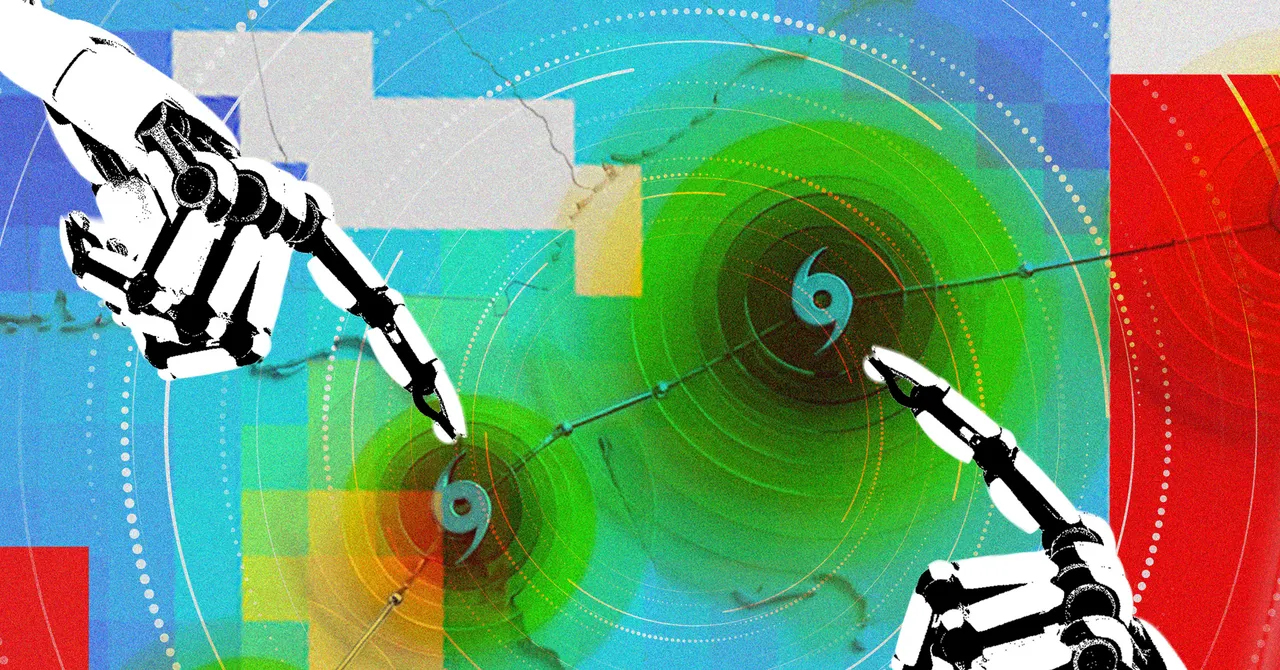
In October 2025, a storm brewed over the Caribbean Sea. Weather models differed on its trajectory. Would it remain weak and end up in Haiti, or would it intensify and head to Jamaica? Artificial intelligence model WeatherNext, developed by Google’s DeepMind and Google Research, went with the latter. Five days before landfall, it predicted with 80 percent confidence that the storm system would hit Jamaica as a Category 5 hurricane.

Hurricane Melissa was catastrophic, causing flooding and landslides across Jamaica. But the AI model helped forecasters give an earlier warning to communities in its path, so they could better prepare.

In a paper published on Thursday in Nature, researchers show the WeatherNext AI model can predict cyclones with unprecedented accuracy. On average, it gives forecasters a day more lead time than existing models; this means its predictions three days out are as accurate as previous models’ predictions two days out. On the ground, that extra day can mean a lot.

“Even a few hours can make a difference,” says Mike Brennan, director of the US National Hurricane Center. Organizing evacuations, staging supplies, and moving resources to respond to a hurricane risk are all time-sensitive tasks—and making the wrong decision can have big consequences. “Time is really golden when it comes to those types of decisions, so the ability to push forecast accuracy out as much as a day beyond what we’ve previously been able to do is really valuable,” he says.

Advertisement

Historically, bringing forecasts forward by a day would take a decade of work, the researchers say.

Modeling extreme events can be challenging for AI. Machine learning requires ample training data in order to make future predictions, but extreme events are by nature rare occurrences. “We don’t have that much cyclone data, but we have a lot of weather data,” says Ferran Alet, a research scientist at Google DeepMind and one of the paper’s lead authors. “So what we did was train a model to be both good at weather as well as cyclones.”

Hurricanes are particularly difficult to predict because they operate at multiple spatial scales, says Kate Musgrave, tropical cyclone group lead at the Cooperative Institute for Research in the Atmosphere, and an author on the paper. Predicting a storm’s track—which direction it’s traveling —requires data about weather on a global scale, taking in information such as the location of cold fronts and prevailing winds. Predicting a storm’s intensity, however, requires much smaller-scale data focused specifically on the local atmospheric and ocean conditions.

“That’s something we just don’t get from these global models,” Musgrave says. While earlier AI models have done well at predicting a storm’s track, “intensity they could not do well at all.”

Advertisement

It’s critical to predict both: A change in intensity can mean the difference between a relatively weak storm and a major hurricane. Sometimes—as in the case of Hurricane Melissa—a storm system can intensify rapidly, developing into an emergency situation overnight. Melissa marked the first time the National Hurricane Centre was able to predict a Category 5 hurricane when the storm was only at a Category 1 stage.

Before the WeatherNext model was used in live forecasts, researchers tested it on retrospective data. “The results were so good that we were skeptical that we would actually see that in the real-time demonstration,” Musgrave says. But when forecasters started adopting the model into their operations, this performance held true. “I think everybody was surprised at just how well it did,” Musgrave says.

Even the DeepMind researchers working on the model don’t fully understand how the AI model produces such accurate predictions, given it uses much lower-resolution atmospheric data than traditional models require to forecast storm intensity. “When we told the community that our model was only using relatively coarse resolution, they were shocked, because that means that the lower-resolution inputs capture more signal about what’s going to happen than previously believed,” Alet says.

Source link

Advertisement
Continue Reading

Tech

Telo MT1 Electric Pickup Now Claims an 8,000-Pound Tow Rating, Out-Tows Cybertruck and F-150

Published

on

Telo MT1 Electric Pickup Truck Towing
Compact electric pickups rarely make headlines for brute strength. Yet Telo Trucks just raised the bar on its MT1, a vehicle only 152 inches long, by confirming it can safely pull 8,000 pounds. That figure tops the standard Tesla Cybertruck’s 7,500-pound rating and edges past the base 2026 Ford F-150 equipped with the 2.7-liter EcoBoost engine, which sits between 7,400 and 7,600 pounds depending on axle ratio.


Telo’s co-founder and CTO, Forrest North, revealed the shocking amount following extensive testing. Initially, they predicted 6600 pounds, but this new figure is a significant increase. All of this is made possible by the truck’s regenerative braking, its 4,400-pound curb weight, and the custom-built chassis, which places the axles near the vehicle’s ends, allowing everything to work together seamlessly. A lower rear overhang lessens the hitch’s leverage, allowing the MT1 to tow much more tongue weight before lifting the front end. North also stated that the increased rating now allows for newer trailers with built-in batteries and motors, such as the Pebble Flow camper, which they have already been able to tow with a gross weight of over 6800 pounds.

Sale


BLUETTI AC180 Portable Power Station 1152Wh 1800W LiFePO4 Solar Generator
  • [Charged in 1 Hour] – The AC180 packs a 1152Wh LiFePO4 battery, which can be fully charged in just 1 hour at 1440W AC input – always ready to go when…
  • [Power All Your Needs] – The AC180 boasts 1800W output and 8 outlets to handle almost anything you plug in. With a tap on the BLUETTI App, you can…
  • [Solar Fast Charge] – With a 500W solar input, you can charge this solar generator in 2.8-3.3 hours using only solar energy. Add an AC source and you…


The dimensions remain unchanged, with the overall length of a Mini Cooper two-door, 73 inches wide and 67 inches high, and a wheelbase of 111 inches. The bed is 5 feet long, similar to a short-bed Toyota Tacoma, but it can be extended to around 8 feet long by folding down the midgate and keeping the tailgate closed, which should barely fit a full sheet of plywood or longer boards. You have 10 inches of ground clearance and an approach angle of 87 degrees. Seating for five is conventional, but a third row can be added back in the bed, using the underfloor storage tube as a footwell.

Advertisement

Telo MT1 Electric Pickup Truck Update
As for power, you have two options: a single rear motor with 300 horsepower and rear-wheel drive, which gets you from 0 to 60 in 6 seconds. Alternatively, you may go all out with dual motors, which provide 500 horsepower and all-wheel drive, reducing the time to four seconds. You can also select between two battery packs: a 77kWh pack that will bring you an estimated 260 miles, and a 106kWh pack that claims to extend the range to an impressive 350 miles. Charging is also speedy, with a 400kw direct current charger on same 800 volt design, taking you from 20 to 80% in just 20 minutes. The payload is approximately 2000 pounds for the rear-wheel drive variant and 1700 pounds for the all-wheel drive vehicle.

Telo MT1 Electric Pickup Truck Update
The entry-level model, the rear-wheel drive vehicle, starts at $41,520, while the dual-motor long-range model costs $50,000 before any extras are added. This puts it around $2,000 above the cheapest four-door F-150, but $30,000 behind the base Cybertruck. Telo received $20 million in funding last year and has a manufacturing partner lined up in Schwab Industries, who will do the body in white for them. First deliveries are expected in late 2026, and they want to produce roughly 500 vehicles in the United States using that bay-build process.
[Source]

Source link

Continue Reading

Tech

OpenAI Will No Longer Limit How Many Texts Free Accounts Can Send To ChatGPT

Published

on

OpenAI is making a major change to how it operates ChatGPT free and Go accounts. Starting next week, the company will no longer enforce rate limits on users of those accounts for prompts that involve only text. In effect, that change will allow you to talk with ChatGPT as much as you want. The company will continue to enforce separate limits for other forms of usage. For instance, adding files and images to your prompts will see you eventually hit a limit as a free or Go tier user, as will making use of image generation and ChatGPT’s recently updated voice mode.  

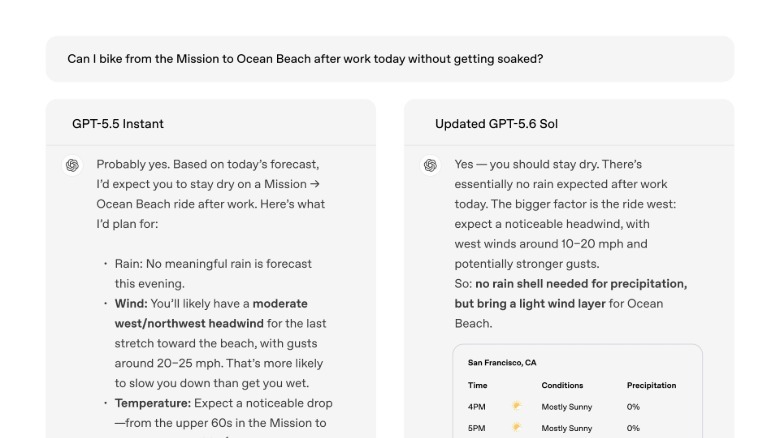
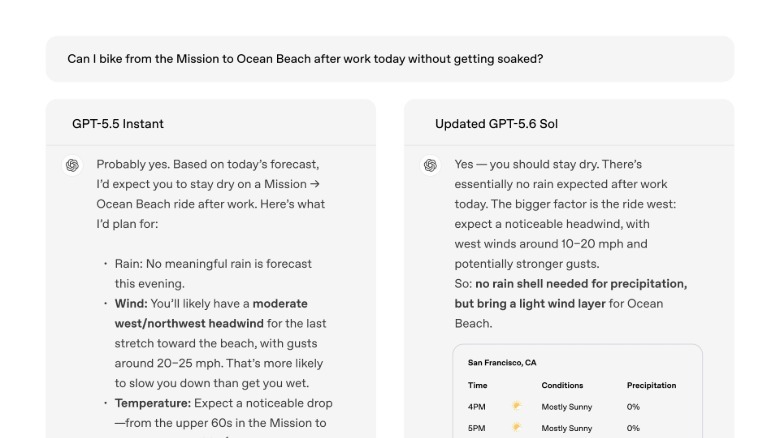
OpenAI is also making GPT-5.6 Luna, the smallest model in its new GPT-5.6 family, the new default for Free and Go accounts. It will replace GPT-5.5 Instant, which had been the default since this past May. That change will go through this week. Users will also see a new “Think” button that will prompt GPT-5.6 Luna to take additional time to generate an answer. For text chats, free and Go users can use that feature without limit — unless you combine it with other features, in which case your usage will count against a separate limit.   

If you’re feeling left out as a Plus or Pro tier user, don’t be; you’re also getting enhancements to your ChatGPT experience. OpenAI is updating GPT-5.6 Sol, its current flagship model, to optimize it for everyday conversations. In ChatGPT, the updated system “delivers more focused answers, adapts its level of detail to the question, avoids unnecessary formatting, and offers a helpful correction when simply agreeing wouldn’t be useful,” according to the company. OpenAI is also introducing a new slider (akin to Claude’s effort menu) that allows Plus and Pro users to decide how much “thought” ChatGPT puts into an answer.   

Removing rate limits, even if it’s just for text chats, is a major milestone for OpenAI. The company didn’t say how it managed the feat, but given rate limits are a reflection of inference costs (the amount AI providers pay for their trained models to process data), OpenAI may have made a major advancement there. A recent report from The Information suggested the company was close to a breakthrough. 

“This is a concrete step toward more abundant intelligence: making our latest models more widely available, improving the usefulness and reliability of the answers people get, and letting free users keep text chats going without a rate limit,” OpenAI said today. “Access shapes opportunity, and this update gives more people the ability to keep asking, develop an idea, and get help when they need it.”

Advertisement

Source link

Continue Reading

Trending

Copyright © 2025