This is such a handy little gadget for outdoorsy folks. It has a 288 Wh battery (that can deliver up to 300 watts), and most helpfully, a handy pop-up lantern that makes it ideal for hiking and camping. It can fast-charge all your devices, too, including phones, laptops, headphones, and cameras. The included XT60 port has a maximum solar input of 100 watts and can fully charge in around three or four hours. If you plan on hiking with it, consider the 60-W panel bundle ($299), as it folds down very small.
From power cuts to camping trips, I’ve used this solar generator more than any other and have tested it with a wide variety of different solar panels. It has an XT60 port with a maximum solar input of 600 watts and can charge in under two hours. The design is solid and durable, weighing in just under 30 pounds, and I find it relatively easy to lug around using the two strong handles. It offers a 1,024-watt-hour capacity and can deliver 2,000 watts (3,000-W surge).
Another manufacturer that offers a wide range of solar generators, EcoFlow’s power stations stand out on charging speed and can often be charged more quickly than competitors in the right circumstances. They also tend to feature robust build quality, generous port options, and easy expandability.
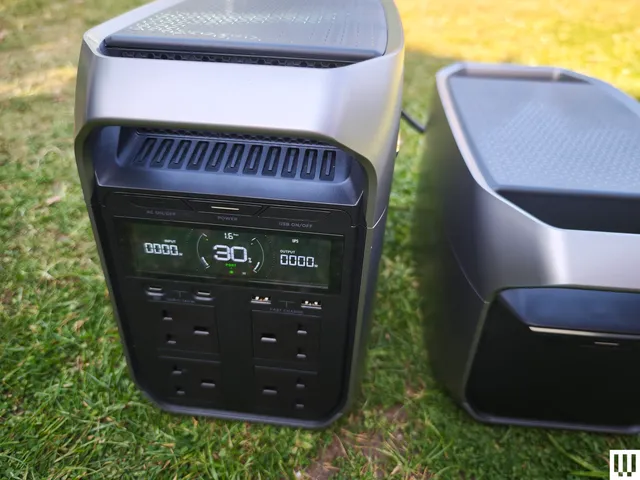
This stylish, compact design has the screen and ports at one end. It offers 1,024 watt-hours, can consistently provide 1,800 watts, with a 2,600-W surge mode. I’m highlighting this model because of the two solar ports (XT60i) for faster solar charging up to 1,000 watts (500-W apiece). It can also charge from an outlet in an hour, has lots of ports (6 x AC, 1 x Car, 2 x USB-A, 2 x USB-C, 2 x DC5521), and can pull UPS duty with an impressive 10-millisecond response time. The only drawback I encountered was the fan noise. It wasn’t overly loud, but I found that it kicked in very frequently even under a low load.
If you can get by with something smaller, the 768 watt-hour River 2 Pro is even more portable and has an XT60 port, but the maximum input is 220 watts. It’s a nice size, with a big handle along the back, and can put out 800 watts (1,600-W surge). You can also buy it bundled with a 160-W solar panel ($569).
EcoFlow’s Delta range includes a ton of different capacities and designs bundled with various solar panel configurations.
Other Good Solar Generators I’ve Tried
Advertisement
GoalZero Yeti 1500 (2026) for $1,500: This 1,505 watt-hour capacity power station is built to last and can put out 2,000 watts (3,600-W surge). It’s a solid choice for van life because it was designed to survive high-vibration environments and has a high-power 12V port capable of 30-amp output. The maximum solar input is 600 watts.
DJI Power 2000 for $720: Offering 2,048 watt-hours with an output of 3,000 watts (3,600-W surge), this is a good option, but you need DJI’s adapters to hook up solar, and it can get pricey. The fast charger enables a solar input up to 1,800 watts, but it costs $319 and is currently out of stock. I like several of DJI’s smaller solar generators, too, and they can be a go-to choice for drone operators because there’s support for fast charging.
Solar Generators to Avoid
I would avoid solar generators from brands you don’t recognize with few online reviews. I also recommend avoiding devices with proprietary ports that tie you to their solar panels or require special adapters to use with other panels. Brands that I have tested that failed to impress include Vtoman and Dabbsson.
Advertisement
Which Solar Panels Should I Pair?
Solar generators require solar panels to capture the sun’s rays so that they can convert them into usable electricity. I have a separate guide to the best portable solar panels, but the easiest option is to match brands and buy your solar generator bundled with solar panels. I strongly recommend looking out for deals on these bundles, as you can save a lot of money that way. That said, it may make sense to buy a solar generator with a generic XT60 port (more on that below), so you can plug in any panels you acquire in future.
It’s important to check the maximum supported wattage for solar panels on your generator. For example, the Anker Solix C1000 has a maximum of 600 watts, and it is stated right next to the XT60 port. Check the spec sheet carefully before you buy.
The capacity is listed in watt-hours (Wh) or kilowatt-hours (kWh). Consider the devices you want to charge or run and over what period of time, and you can calculate the capacity required. Manufacturers often offer estimates in terms of devices, such 32 charges for your laptop or 2 hours of induction cooktop use, but not all devices draw the same amount of power. You need to calculate how much your gadgets actually use yourself if you want it to be accurate.
Advertisement
What Can You Run on a Solar Generator?
Solar generators can always charge up small gadgets like phones and laptops or be used to power lighting. Most can handle small appliances like mini fridges or TVs, too. If you want to use power tools or an AC unit, (or, in the UK, a kettle) you’ll need to draw thousands of watts though, so make sure the generator you’re buying can handle that much. Manufacturers state the maximum output, but many solar generators have a surge function that enables them to go higher for a short period. Sometimes, they give it a silly name. For example, Zendure calls this “AmpUp,” and EcoFlow calls it “X-Boost.” Regardless, you want to make sure your solar generator can handle the wattage you need.
What Ports Should I Look for in a Solar Generator?
Solar panels produce direct current (DC), and they typically have MC4 connectors. Most solar generators have an XT60 input port and come with an MC4 to XT60 cable that you can hook up. Other solar charging ports include XT60i, which is interchangeable with XT60, various barrel ports (DC7909, DC5521, DC8020), and Anderson Powerpole ports such as AP30A. There are a few other proprietary port types as well that you may come across. Just make sure the panels you intend to use are compatible with the solar generator and that you have the necessary cables to make the connection
Advertisement
For charging and running your devices, solar generators have a range of AC outlets, USB-A ports, USB-C ports, car ports, and other port types. It is crucial to check the maximum charging rate and supported charging standards to avoid disappointment. Assume nothing, and check the specs before you buy.
What Other Features Should I Look for in a Solar Generator?
The inverter is crucial. A pure sine wave inverter converts battery power into high-quality household-style electricity smoothly and efficiently.
You should also favor solar generators with Maximum Power Point Tracking (MPPT), a technology designed to monitor the fluctuating input from solar panels (impacted by shade and changing weather) and maximize how much of it is converted for use.
Advertisement
LiFePO4 is superior battery technology to lithium-ion and means your batteries will last longer and be less prone to overheating.
You may also consider weather resistance. Portable solar panels are generally IP-rated but many solar generators are not. If you intend to leave it outside, uncovered, and there’s any risk of rain, you should buy a solar generator with an IP rating.
How Many Years Do Solar Generators Last?
Solar generators last anywhere from three to 10 years, but that can be extended depending on how they are used and maintained. Try not to let them completely discharge too often or leave them empty for extended periods. Usually, the manufacturer will provide an estimate of how many charge cycles you can expect before performance starts to degrade and the capacity drops. Warranties typically range from two to five years, but make sure you retain the guarantee and proof of purchase.
Advertisement
I already mentioned the importance of not leaving your power station empty. If you can avoid fully draining the battery, topping up when it hits 20 percent or below, that will increase its lifespan. You should also avoid leaving it plugged in all the time unless you are using it as an emergency backup (UPS or EPS). Unplug after it is fully charged. Be mindful of the charger and cable you are using to charge up your power station. It’s best to stick to the cables that came in the box. Store your power station in a cool, dry space, avoid extremes of temperature, and try not to expose it to lots of dust. A handful of solar generators are built for extreme temperatures, and a few can handle rain, but always check before you risk exposure.
What About Home Batteries?
A permanently installed home battery is a better solution for some folks than a solar generator. It will need to be professionally wired into your electrical panel, but it allows you to schedule and automate when you pull power from the grid or store power from permanently installed solar panels on your home or plug-in solar if that’s available and legal where you live. If you don’t need it to be portable, you should read my guide on How to Buy a Home Battery. We have also tried the EcoFlow PowerOcean and the Anker Solix E10.
How I Test Solar Generators
Advertisement
I tested every recommendation here myself by using it around the house for at least a week (usually much longer). I plug gadgets into every port and outlet, from a TV and mini-fridge to smartphones and laptops. For more capable solar generators, I plug in power tools, a hair dryer, and a high-wattage UK kettle. I always check that there’s room to plug in the maximum number of devices. I try out any stated surge or power-boost mode under a heavy load too.
All additional ports are tested, from car ports to solar panel ports. I record the time it takes to charge from a wall outlet and from solar panels. Weather permitting, I try to use them in full sun and in partial clouds with different solar panel arrays. I access the fan noise under low, medium, and heavy load, and also when charging from an outlet using the decibel meter on my Apple Watch. If there’s a quiet or nighttime fan mode, I try that out that, too.
I also assess the design to check if the LED display is informative and legible in sunlight. I assess portability by lugging it around my home and garden to use and charge, noting the presence of ergonomic handles, telescopic handles, or wheels. If there are any accessories, I test them. If there’s an app, I connect it and peruse all the functions and features.
If it has EPS or UPS functionality, I connect it to a router and a PC to ensure it switches over within the stated time frame. Finally, I run a set of tests to establish the capacity and note if it significantly deviates from the manufacturer’s claims.
Advertisement
How Did WIRED Select Products to be Reviewed?
I test a range of solar generators from different manufacturers. It’s not possible to try it with every device, so while I typically test flagship releases, I also try to call in power stations with different capacities and at different prices. We are brand agnostic, so I will test power stations from any manufacturer, provided I can get hold of them. But I do lean toward testing more systems from the most popular brands. All the power stations I test are provided by the manufacturers or their PR companies.
Most are loaned for a month or so and then returned. A handful of our recommended picks are kept for longer-term testing. The remainder is donated to charities and other organizations. For example, I recently donated two DJI power stations to UK police drone operators.
OpenAI plans to release an AI smart speaker in 2027, according to a Bloomberg report on Thursday. It’ll reportedly be palm-size and doughnut-shaped and have a wireless design that will let people carry it around.
The report, which cited unnamed people familiar with the project, also indicates that the small speaker will cost $300 to $400, a steep price compared with around $100 to $200 for most smart speakers (except for high-end Bose and Sonos options). The device would work like ChatGPT on your phone, but it would use more advanced models that can learn about the user and talk with them in tailored ways over time.
A representative from OpenAI did not immediately respond to a request for comment.
The report also says the speaker will have parts that move to signal how it’s interacting, something usually left to screen icons. It will have indicator lights plus a camera system and sensors to help it collect and process information about its environment.
Advertisement
But OpenAI faces a potential legal roadblock to making the device available to consumers. Last month, Apple sued the artificial intelligence company, alleging it stole confidential product design and development information and asked manufacturers to copy Apple’s metal finishing. The Bloomberg report says that the OpenAI speaker was designed with help from LoveFrom studio, launched by former Apple designer Jony Ive. Last year, OpenAI acquired a separate Ive-founded startup, IO, focused on devices.
(Disclosure: Ziff Davis, CNET’s parent company, in 2025 filed a lawsuit against OpenAI, alleging it infringed Ziff Davis copyrights in training and operating its AI systems.)
Google’s latest speaker is very Gemini for Home-focused. It’s small, but not hockey puck small.Tyler Lacoma/CNET
I’ve tested several smart speakers in the past year that come with the latest AI features, similar to those this report mentions. That includes Echo and Echo Show displays with Alexa Plus, which can adapt to your habits, order food for you and carry on conversations. I’ve also tried Google’s latest Home speaker, a device made with Gemini for Home in mind; it can brainstorm with you and answer questions about what compatible security cameras have seen outside. It’s unclear whether OpenAI’s speaker would have such capabilities.
The Bloomberg report describes the OpenAI device as being the size of a hockey puck, which would be unusual for a smart speaker and could prove a significant technology challenge, from sound quality to battery life and speed of response.
Advertisement
Makers of AI devices also have to contend with concerns around privacy, which have been on the rise as technologies like smart glasses and Ring video doorbells become more commonplace.
Tyler Lacoma
Editor / Home Security and Smart Home
Tyler has worked on, lived with and tested all types of smart home and security technology for over a dozen years, explaining the latest features, privacy tricks, and top recommendations.
With degrees in Business Management, Literature and Technical Writing, Tyler takes every opportunity to play with the latest AI technology, push smart devices to their limits and occasionally throw cameras off his roof, all to find the best devices to trust in your life. He always checks with the renters (and pets) in his life to see what smart products can work for everyone, in every living situation.
Living in beautiful Bend, Oregon gives Tyler plenty of opportunities to test the latest tech in every kind of weather and temperature. But when not at work, he can be found hiking the trails, trying out a new food recipe for his loved ones, keeping up on his favorite reading, or gaming with good friends.
See full bio
Whatever your feelings, I think we can all agree that Amazon is a massive company, and it’s managed to become a big-time player in the corporate world in a relatively short span of time.
In just over thirty years it’s become the world’s second largest company, born as a bookstore under the name of Cadabra in 1994 before changing its name a few months later to Amazon (there’s an amusing, if brief, story about the name change).
But despite its mammoth scale, Amazon is inexperienced in the world of TVs compared to many of its rivals, starting with the partnerships Amazon developed in 2017 (with the not so memorably named ‘Fire TV Edition’), before developing its own TVs (which were a mouthful to pronounce).
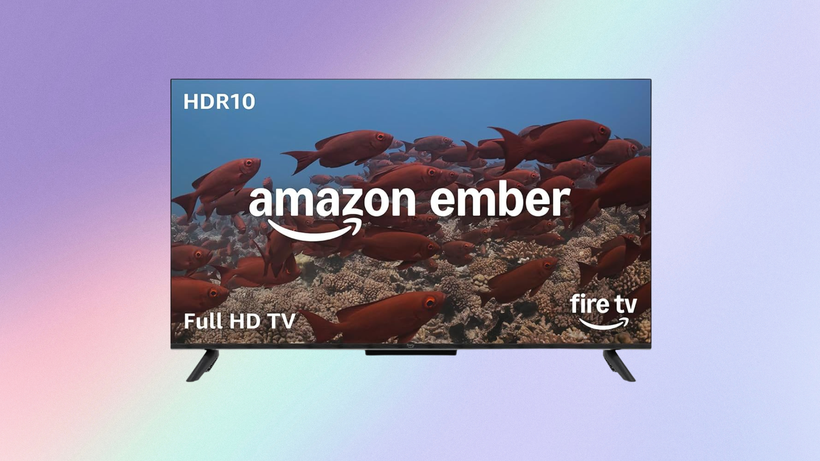
2026 sees its TVs re-branded again as the Amazon Ember series, and it’s at this moment that we have a sit-down with the Vice-President of Fire TV, Aidan Marcuss, for a brief state of play about Fire TV. Here’s the first part of our chat on a hot London day at Amazon’s HQ in Shoreditch.
Advertisement
“We didn’t just move pixels – we rewrote the Fire TV experience”
By now, if you have an Amazon Fire TVEmber series model or a Fire TV streamer, you’d have notice the furniture has changed – Amazon has had a look at the current arrangement and played with the Feng shui of the Fire TV interface.
This “All-New” Fire TV experience follows on from the previous “All-New” version, which seemed to improve things initially before getting bogged down in what I’d describe as ‘too much content’.
Advertisement
Amazon believes the new interface is a step forward but just how well has the rollout gone?
Advertisement
Well, given Aidan has “been through a couple interface updates” in his time at Microsoft, he thinks that Amazon “are very pleased with customer reception… we did add a fair amount of surface area, we added the ability to see the movies you have… TV shows you have access to… live sports that you have access to, or news, and what we’re seeing is that enhanced sort of organisation is helping customers find more to watch.”
While he couldn’t give any “fixed” data at the time of the chat, he did say that “the data is very, very clear that customers are finding more , and which is really… the job… the job is helping people find more quickly.”
(After the interview, Amazon dug out in the info “that customers exploring the new content nodes are finding and playing content up to 4 times the rate of those that stay on the Home screen.”)
Image Credit (Amazon)
And with all the current Fire TV devices updated, “they’re all shipping with the new UI in time for Prime Day [June 2026], so anyone who buys a new device for Prime Day will get access to our new user experience, and that’s how confident we are in it, just delivering a better experience for customers.”
Advertisement
Advertisement
But what does that “better experience” mean for customers?
Better experience means that Amazon Fire TV strives “to have the broadest selection of content available to customers. That means having all of the apps available that customers use to watch content. It means increasingly not just having streaming apps, but it means having live TV, and live TV integrated experience.”
“It means having gaming, gaming apps [in] Xbox, Luna, GeForce Now integrated into the experience, and it means that that’s accessible through search across all of those things.”
“If you search for something, [you] should be able to find it, regardless of what service it’s in, and if it’s on live, we should be able to put it in front of you live on one of those tiles, so you can find a live piece of content.”
Advertisement
Immediacy and ease of use is what makes for a better experience in Amazon’s view. But live broadcasts are a different beast to finding something that already exists as oppose to something that’s currently unfurling. How would Fire TV bring it to my attention?
“We’ve done the technical work so live TV feels like a first‑class part of the Fire TV experience, not an afterthought”
Image Credit (Amazon)
Advertisement
Amazon recognises that live TV has become a big part of the viewing experience, and it’s importance is “growing year on year. The number of customers we have watching on Fire TV, is growing year on year. So it’s really critically important for us, and I think you see it in the integrations that we do. For example, having Freely on our televisions here in the UK is an example of making sure we bring the best local experience forward for our customer in terms of live TV.”
“And it’s what we’re always working on with partners, is how do we make sure we can bring their live content front and centre, and… from our perspective, live TV is very technically different than streaming TV. You think about what we’ve had to do as a product team. When you have a catalogue of shows on a streaming service, it’s like a library catalogue.”
“From our perspective, live TV is… technically, it’s very different than streaming TV… there’s an event, it’s on at a particular time and it’s no longer on. And so, how you search for it, surface it to a customer? It might be available on multiple channels. So, which one do you pick? All of that is examples of technical work we’ve done to make sure live TV feels like a first class part of our experience.”
Advertisement
That’s it for the first part of our chat with Aidan Marcuss, Vice-President of Amazon Fire TV. Tune in for the next part where we cover Alexa, content discovery, personalisation, and the security of the Fire TV platform.
Technology improves your digital advertising ROI by automating who sees your ads, fixing what happens after the click, and giving you clearer data on what’s actually working. A bigger budget alone does not fix any of those three problems.
Quick Take
Most businesses that struggle with ad ROI are not spending too little. They are missing one of three things: smarter targeting technology, a website that converts clicks into sales, or clean data that shows which dollars are working. This article walks through each piece, in plain terms, so you can find the gap in your own setup.
Beyond Basic Ad Spend
Putting money into an ad platform is only the first step, not the whole plan. You get real returns when you use technology to reach the right people, at the right time, with the right message. That means going past basic keyword bidding and trying more advanced tools.
Programmatic advertising is one example. It uses automated software to buy ad space in real time, aiming at specific types of users with strong accuracy. As of 2026, programmatic buying makes up roughly 90% of global digital display ad spend, according to industry data pulled from IAB, GroupM, and eMarketer figures. That scale is why most mid-size and large advertisers now run at least part of their budget through it.
Advertisement
Retargeting works alongside programmatic buying. It uses data on how a visitor already behaved on your site to show them a personalized ad later, bringing interested people back. Setting up a retargeting campaign usually starts with a small tracking snippet on your site, so the ad platform knows who to follow up with. These tools work together to send your budget toward the people most likely to buy, which is how you get more out of every ad dollar instead of just spending more of it.
Website Experience Drives Conversions
You can build the best-targeted ad campaign in the world. If it sends people to a slow or confusing website, that money is wasted. How a visitor experiences your landing page decides whether your ad campaign actually pays off.
When someone clicks your ad, they expect the page to load fast, look right on their phone, and clearly show them what to do next. A clunky website creates friction. People leave fast, and you lose the sale you already paid to win. This is why professional web design & development should be part of your advertising plan, not an afterthought. A well-built site with clear navigation and a obvious next step turns ad clicks into real customer actions.
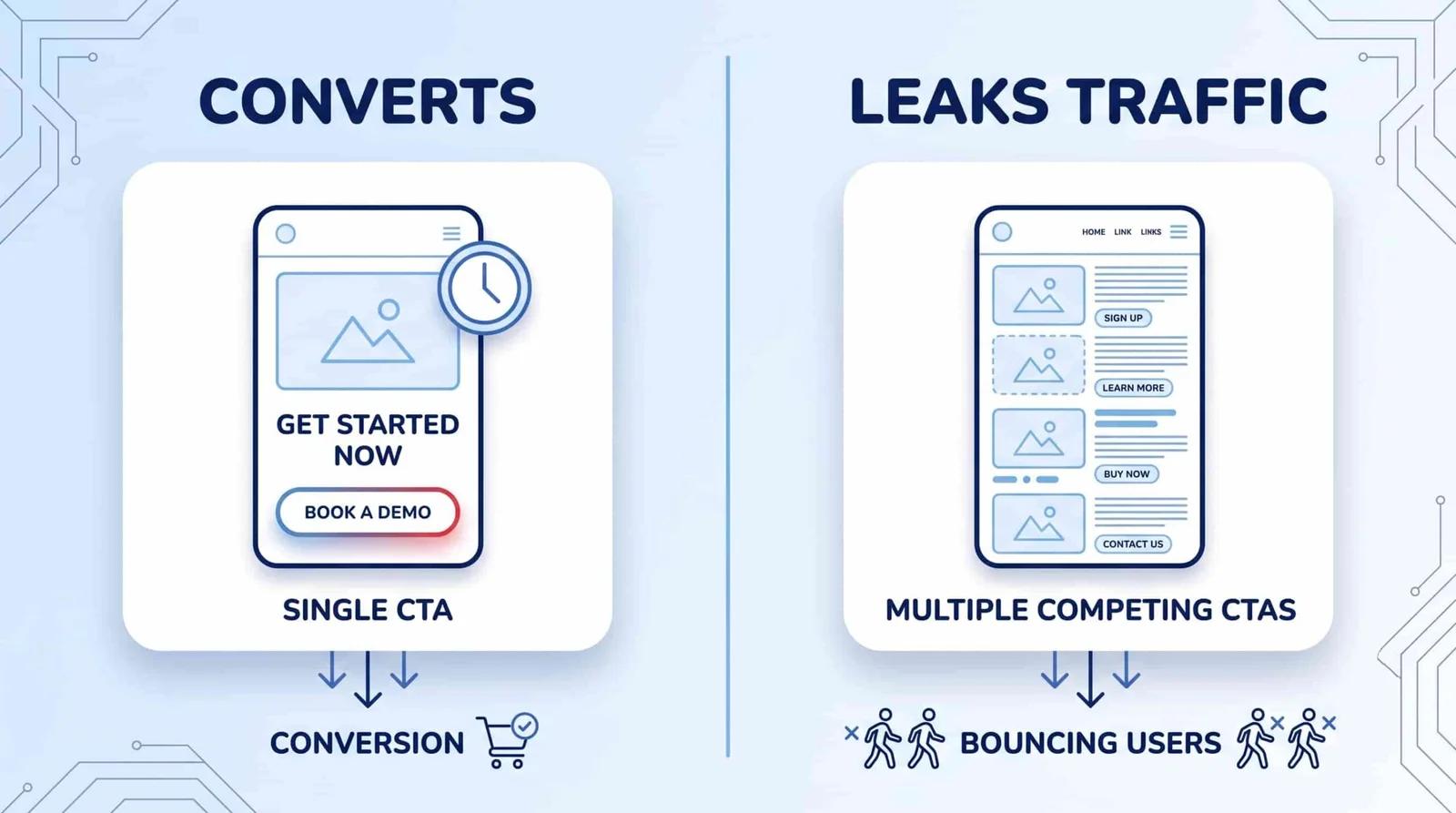
Small, specific fixes often matter more than a full redesign. Page speed, mobile layout, and a single clear call-to-action button are usually the first three things worth checking. A conversion rate optimization review can point you to which of these is actually costing you sales.
Integrating SEO for Ad Performance
Search Engine Optimization, or SEO, and paid advertising work better together than apart. SEO is the practice of improving your site so it ranks higher in unpaid search results. When you connect SEO and paid ad data, each one makes the other stronger.
Advertisement
Keyword data from your SEO work shows you what people are actually searching for. That gives you a proven list of terms to test in your ad campaigns. Paid ads, in turn, let you test new keywords fast, before you commit to a longer SEO push around them. You can read more on how the two disciplines connect in this overview of digital marketing strategy.
One common misunderstanding is that a high Quality Score directly buys you a better ad position or a lower cost per click. According to Google’s own Ads documentation, Quality Score is not actually used in the ad auction itself. It is a diagnostic score built from three things: how likely people are to click your ad, how closely your ad matches what someone searched for, and how useful your landing page is. What does affect your placement and cost per click is Ad Rank, which uses those same underlying factors, plus your bid, directly in the auction. In practice this means the same work still pays off. Fast load times and a clear page structure raise your Ad Rank inputs, even though the Quality Score number itself is not what the auction reads.
Measuring Impact with Analytics
To improve your ROI, you have to measure it correctly first. Modern analytics tools show you far more than clicks and impressions. The trick is tracking the numbers that actually match your business goals: cost per acquisition, conversion rate, and customer lifetime value.
Tools like Google Analytics let you set up conversion tracking, so you can see exactly which ads drove a sale, a sign-up, or another action you care about. Attribution modeling goes one step further. According to Google’s own Analytics documentation, attribution models assign credit for a conversion across every touchpoint in a customer’s path, not just the last ad they clicked. This matters because a customer often sees several ads before they buy, and last-click tracking alone hides that. Pairing this data with a marketing mix modeling approach can help you spot which channels are quietly wasting spend, even when each one looks fine on its own.
Advertisement
Future-Proofing Your Ad Strategy
Digital advertising keeps changing, and privacy is a big part of that. For years, marketers expected Chrome to remove third-party cookies, the small files that let ad platforms track users across different websites. That plan has changed. In April 2025, Google announced it would keep third-party cookies enabled by default in Chrome, giving users a setting to turn them off instead of removing them for everyone.
That does not mean you can ignore the shift toward privacy. Other major browsers, including Safari and Firefox, already block or limit third-party cookies by default. Building a direct relationship with your own audience still matters, through things like useful content, a newsletter, or a loyalty program that earns first-party data honestly. A clear CRM strategy helps you organize and use that data once you have it, instead of losing it in a spreadsheet.
At the same time, artificial intelligence is now built into most major ad platforms, handling parts of bidding, targeting, and creative testing automatically. Guidance from ad-tech vendors in 2026 is consistent on one point: AI works best with human oversight, not as a full replacement for it. Someone on your team still needs to check that automated decisions match your actual business goals and margins, since the software cannot know those on its own.
Common Misconceptions
A higher Quality Score directly lowers your cost per click. This is the most common mix-up in this space. As explained above, Quality Score is a diagnostic tool. The auction itself runs on Ad Rank, which shares some of the same inputs but is a separate calculation.
Advertisement
Programmatic advertising runs itself once it is set up. Automated bidding still needs a person checking in regularly. Left alone for months, a campaign can drift toward the wrong audience or waste spend on stale settings nobody reviewed.
More ad technology always means more sales. Technology only helps if the page it sends people to actually works. A fast, well-targeted ad pointed at a broken landing page still fails.
Where This Approach Has Limits
Automated bidding tools, including the AI-driven ones built into most ad platforms, need a certain amount of conversion data before they optimize well. A very small daily budget or a low number of monthly conversions can leave these tools stuck in what’s sometimes called a cold start, where they simply do not have enough signal yet to make good decisions. If that’s your situation, a simpler, manually managed campaign may outperform an automated one until your volume grows.
Connecting SEO and paid data also takes time and, often, more than one person’s skill set. A small team running ads part-time may not have the bandwidth to build attribution models or run a full SEO-and-PPC integration. In that case, focus first on the landing page and tracking basics covered above. They matter more, and cost less to fix, than advanced automation.
Advertisement
Key Takeaways
Ad spend alone does not create ROI. The technology behind targeting, your website, and your data does the actual work. Programmatic buying and retargeting put your budget in front of the right people. A fast, clear website turns those clicks into sales instead of losing them. Connecting SEO and paid data, and understanding what really drives Ad Rank, helps you spend less to get the same result. Accurate analytics and attribution show you which of these pieces is actually paying off, so you can put more budget behind what works and less behind what doesn’t.
FAQ
Is programmatic advertising only worth it for big companies with big budgets?
No. Self-serve platforms like Google Ads and Meta Ads Manager already run on programmatic-style automated bidding, and small businesses use them every day. The caution is different: very low budgets may not generate enough data for the automation to optimize well, which is covered in the limits section above.
Do I need to hire a developer to fix my landing page for better ad performance?
Not always. Small fixes, like shortening a page, adding one clear button, or compressing images for faster load times, can often be done with no-code website tools. A full site rebuild, or fixing deeper technical SEO issues, usually benefits from a developer’s help.
How long does it take to see an ROI improvement after adding these tools?
This varies by budget, industry, and how much conversion data your account already has, so there’s no single reliable number. As a general pattern, retargeting and landing page fixes tend to show results faster, often within a few weeks, while automated bidding models typically need more time and data to fully learn.
Advertisement
Chrome kept third-party cookies. Does that mean I can stop worrying about privacy changes?
No. Chrome is only one browser. Safari, Firefox, and privacy-focused browsers like Brave still block or limit third-party cookies by default, which together cover a meaningful share of web traffic. Building first-party data through your own audience relationships still protects you if browser policy shifts again.
Bottom line: Chrome users can now watch Netflix shows in 4K resolution. However, the streaming giant is offering this high-quality option only to users who meet the strict hardware requirements set by the company. Is the official Netflix app still the best streaming option for the broader PC ecosystem?
Netflix’s support for 4K streaming through Chrome on Windows was spotted last month. Now, the media giant has updated its documentation to explain exactly how subscribers can unlock the higher-quality option. However, the move will still leave many users behind, despite bringing 4K playback to the most popular web browser used by hundreds of millions of people worldwide.
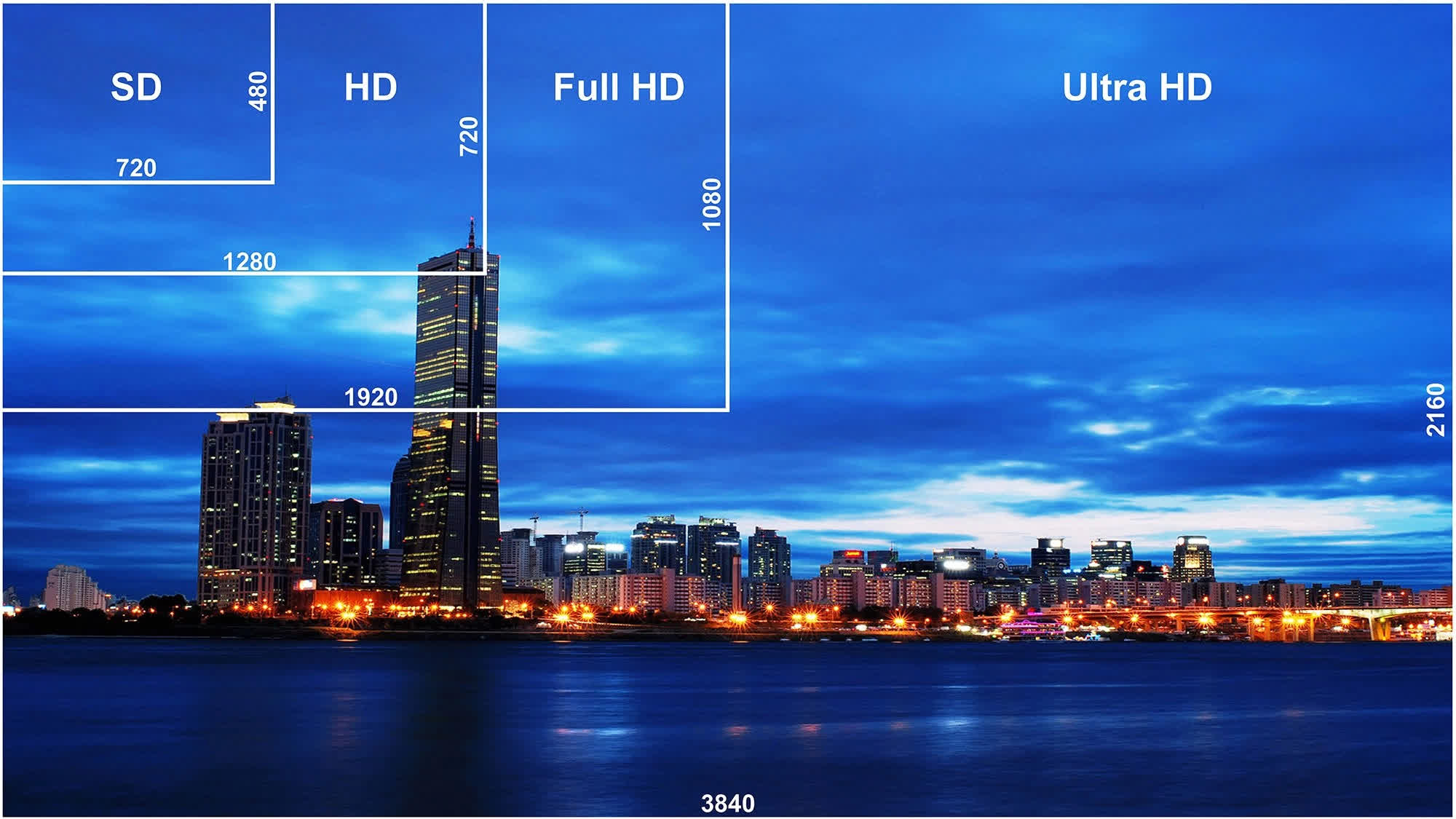
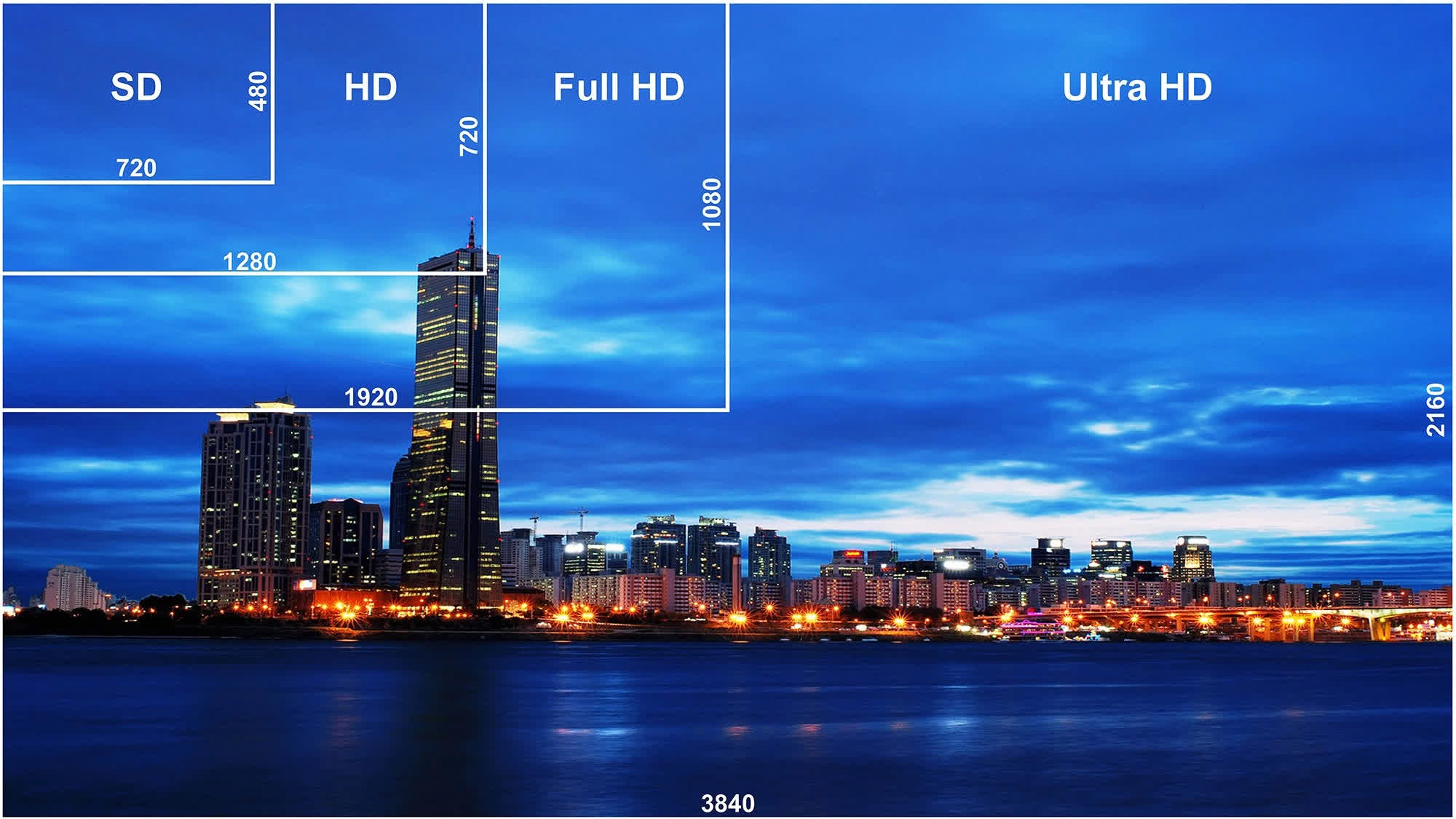
Netflix’s updated browser support documentation now lists Chrome 117 or later as a browser capable of streaming shows in Ultra HD (2160p) resolution. Previously, the feature was only available through Microsoft Edge and Safari. Furthermore, 4K streaming requires users to subscribe to the appropriate plan; in the US, the Premium plan is currently the only option that supports 4K and costs $27 per month.
Even worse, Chrome compatibility with 4K streaming is limited to Windows PCs and Chromebook devices. Mac users will still need to rely on Safari, or even Microsoft’s Edge browser for macOS, to watch their favorite shows at the highest resolution supported by the service.
Advertisement
Browser support aside, streaming Ultra HD content on computers requires additional hardware and software that Netflix outlines in another support document. These requirements include a “steady” internet connection with speeds of 15 Mbps or higher, Windows 11 with the latest updates installed, and a modern GPU from either Nvidia (GeForce GTX 1050 or newer) or AMD (Radeon RX 400 series or newer).
Additional requirements include a 7th-generation Intel Core processor, an AMD Ryzen processor, or newer models, along with a proper 4K 60Hz built-in or external display/TV that complies with the HDCP 2.2 DRM standard. Multiple displays can be used for 4K playback, but they must meet the same requirements.
Netflix’s hardware requirements should also apply to the company’s dedicated Windows app, meaning there is currently no official way for Windows 10 users to access Ultra HD playback. Official Chrome support will certainly allow a wider audience to access higher-resolution Netflix content, while people using alternative browsers such as Firefox or Brave are still excluded from the feature.
In that sense, my personal experience dealing with protected media content on PCs suggests that things are unlikely to improve anytime soon. Watching an Ultra HD Blu-ray release – which still offers significantly better quality than streaming – on a Windows 10 PC requires considerable tinkering, including DRM workarounds, firmware flashing, and purchasing compatible hardware. However, it can ultimately be done if you’re determined enough.
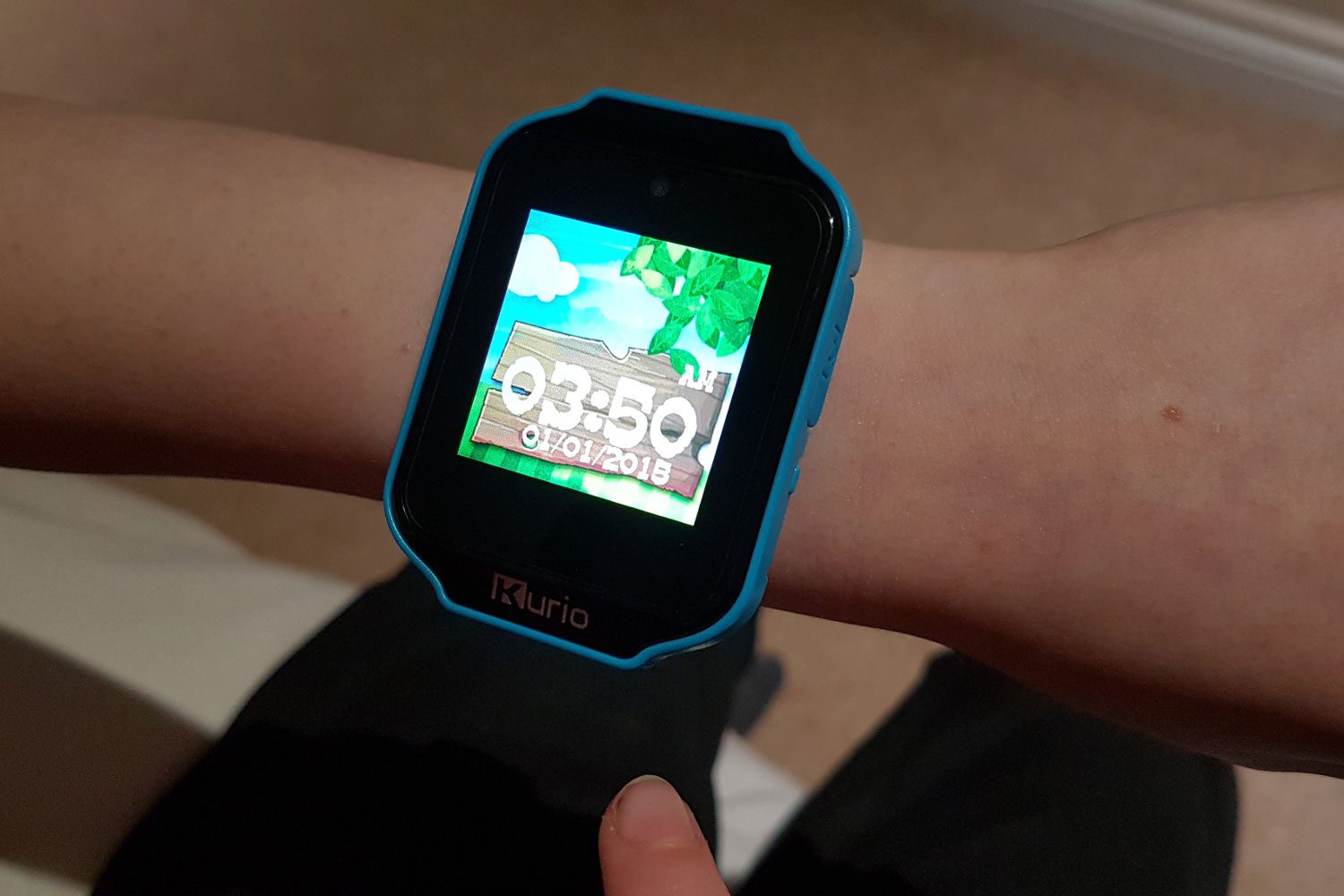
A smartwatch designed to help parents keep tabs on their children turned out to be surprisingly easy to hijack. In a new demonstration, security researchers showed how hackers could secretly monitor someone wearing a GPS-enabled kids’ smartwatch.
One smartwatch revealed a much bigger security problem
Security researchers Vangelis Stykas and Felipe Solferini used a $30 kids’ smartwatch sold online and found they could quietly follow its wearer throughout the day. Even when the GPS signal was glitchy, the watch continued transmitting nearby Wi-Fi information, allowing the researchers to pinpoint the wearer’s location.
They also remotely activated the camera to capture photos and listened through the built-in microphone, all without any visible warning on the device. The watch runs on SETracker, a platform built by Shenzhen manufacturer YiQingTeng, which had an authentication flaw that let anyone send commands to any connected device.
What makes the discovery more concerning is that the smartwatch was not unique. It also echoes a pattern seen in other family-facing connected devices, where outsiders gained silent access without the family ever knowing. According to the researchers, dozens of smartwatch brands rely on the same underlying software platforms and backend services.
Advertisement
Simon Hill/Digital Trends
How does this affect millions of other kids?
The researchers found vulnerabilities that could let attackers access locations, intercept messages, replace emergency contacts, record audio, and capture photos or videos on supported devices. These issues were privately reported by the researchers months ago. While one company appeared to fix some flaws shortly before their public presentation, others had not responded or remained vulnerable.
After studying more than 70 GPS-enabled devices, they concluded that millions of smartwatches and vehicle trackers are built on just a handful of shared supply chains. That means one security flaw can affect products sold under many different brand names. So parents in two different countries could each buy a differently branded watch and still send their child’s location to the same vulnerable server, without ever knowing it.
The life of an overnight news editor is often a lonely, mundane existence occasionally interspersed with bursts of excitement as you try to keep the feeds alive until your colleagues return in the morning. However, Static Hour is looking to turn that scenario on its head by asking you to decide what’s worth reporting in the middle of a crisis where you can’t trust the barrage of info coming in.
Set in a small town radio station in the 1980s, the challenge in Static Hour is to unravel the emergency while being confined to the newsroom and being forced to rely solely on information being sent in from outside. Panic has set in, the government has issued a lockdown and there are reports of violence between family members while you attempt to figure out which tips are real and which ones aren’t.
To do so, you’ll need to rely on your wits as you monitor the phones, radio and police scanner for tidbits of truth, or turn to the station’s limited collection of analog tech to get more. And during all of this, you also have to follow FCC regulations while managing the public’s reaction to the news, because everything you report will have an impact on the town.
Advertisement
Now as someone “in the industry” it’s easy to be romantic about a game that highlights the challenges and successes of being a journalist. But at the same time, it looks like Static Hour has captured those vibes in a really engaging way. The game evokes a mix of Papers, Please with shades of Twin Peaks or even Severance to create a tense, haunting scenario that feels much bigger than the single room you’re restricted to.
Barkbyte Interactive
In the press release for Static Hour, Barkbyte founder and creative director Claire Sarmiento said the inspiration behind the game was that “I loved the idea of spooky things happening in a small town just out of sight, where the horrors are driven by audio and left to your imagination. Furthermore, I was captivated by the idea that something terrible is happening, but you can’t quite grasp exactly what it is. Having to sort through junk data, red herrings, and scattered facts to decipher truth from preemptive speculation seemed like a flavor of horror that remains as relevant today as ever.”
Granted, while we only have the game’s trailer and a handful of screenshots to peruse thus far, it definitely feels like Static Hour nailed that directive. And as someone born in the 80s, the use of old-school gadgets like rotary phones and rolodexes combined with the game’s muted color palette really nails its aesthetic as well.
Unfortunately, there isn’t a concrete release date for Static Hour just yet, however it will be available on PC via Steam.
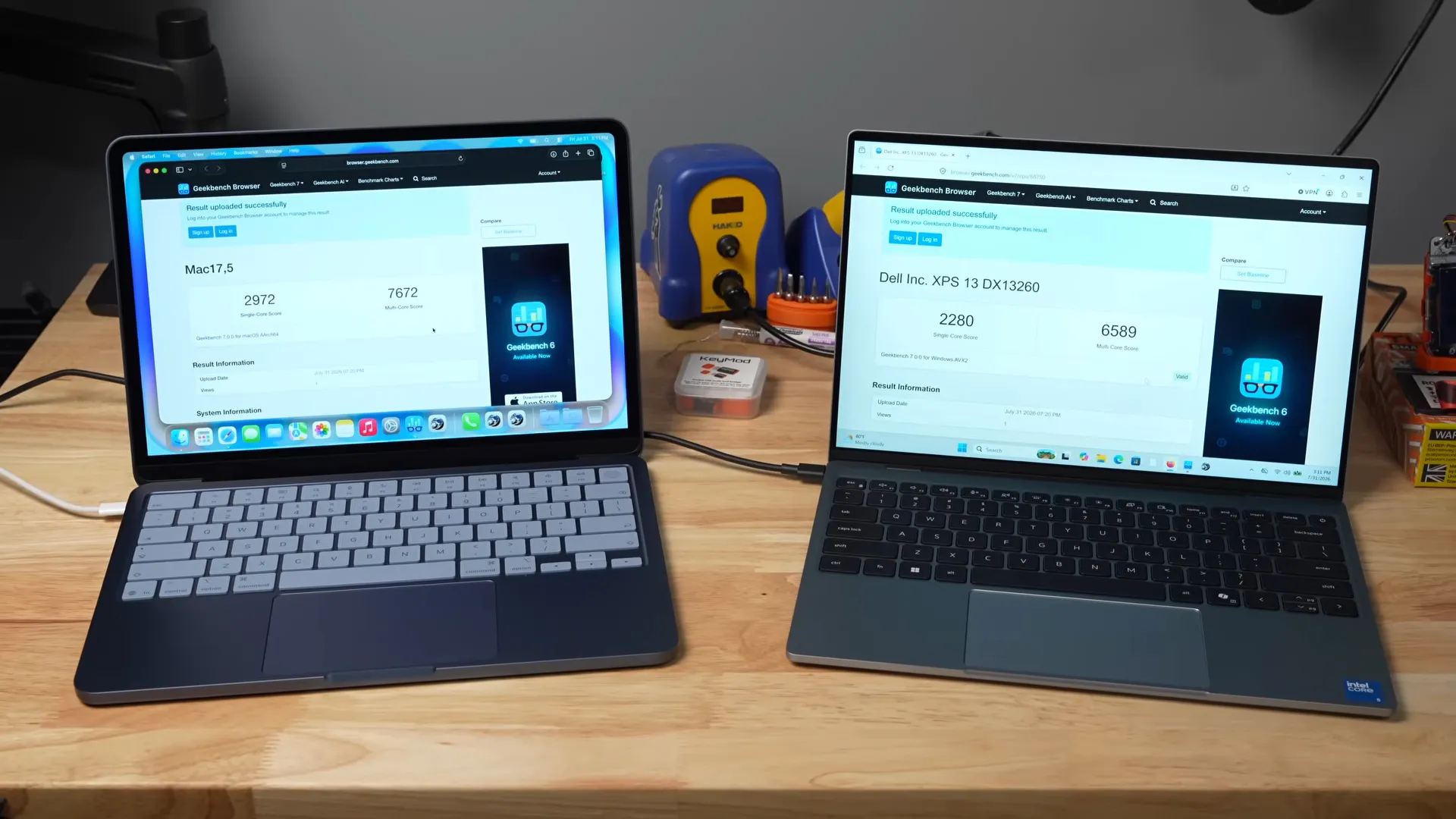
With a title like “Intel Just Matched Apple Silicon. Seriously.“, the latest video from [Jeff Geerling] makes some pretty bold claims. But as we’d expect from [Jeff], he’s got the benchmarks up on GitHub for both the MacBook Neo and Dell’s latest XPS 13 to back it up.
We’ve embedded the full video below, which has [Jeff]’s comparative review of the two laptops. The Mac wins on iGPU, sound, and not shipping Windows, while the Dell gets points for being able to load Linux and having a backlit keyboard. But the figure we were hoping to see is the efficiency. After all, it’s ARM’s ability to crank out gigaflops on fewer watts that won them the mobile market and got Apple interested in that architecture in the first place. If Intel is catching up, that’s news.
On [Jeff]’s version of the Top500 benchmark — the same HPL Linpak test used for Supercomputers — the MacBook cranked out 57.012 Gflops at 10.6W, for 5.38 Gflops/W while the Dell managed 127.91 Gflops at 20.6W, for 6.21 Gflops/W. That’s just astounding, considering the historical data all goes the other way. This Dell also beats out both M4 and M3 Mac Studios, only failing to the M4 Mac Mini at 7.57 Gflops/W. Even when not crunching big numbers, say at idle or web browsing, the XPS matches the MacBook sip for sip in energy efficiency.
Advertisement
Some people have been saying for a few years now that ARM’s observed advantages in power consumption have more to do with the chips themselves than the instruction architecture, and it looks like the Core 5 320 chip in this Dell proves them right when it comes to x86.
While you might think you need to code in Assembly or C to maximize those efficiency gains, your choice of language may not be as important as you think.
Or how I learned to stop worrying and love dangerous AI
After acknowledging last month that unreleased AI models committed what for human perpetrators would be computer crimes, OpenAI now says it cannot rule out the possibility that Astra, a pending model release not involved in its Hugging Face hack, might possess critical cyber capabilities.
OpenAI in its Preparedness Framework [PDF] defines that term to mean “capabilities that present a meaningful risk of a qualitatively new threat vector for severe harm with no ready precedent,” and notes that such capabilities “require safeguards even during the development of the covered system, irrespective of deployment plans.”
Advertisement
Noting, or perhaps boasting, that internal evaluations of Astra “indicate significant advancements in agentic coding and cybersecurity,” OpenAI insists that this time, there will be security – something that also eluded Anthropic, Meta, and the UK’s AI Security Institute during model testing.
“We are implementing stricter security controls for higher-capability models and associated activities, including isolated testing environments, restricted network and tool access, enhanced model weight protections and encryption, additional monitoring and detection capabilities, and sandboxed execution,” the AI biz declared on Friday. That may surprise those who expected such safeguards would already be in place.
This comes with a promise to pause Astra testing internally where these security controls are absent and to provide recommendations to third-party testing partners about how to run high risk evaluations and workloads safely – knowledge that OpenAI itself might have found useful when its models pillaged Hugging Face.
What’s more, OpenAI intends to implement thought policing for Astra, at least in the pre-release stage.
Advertisement
“We have implemented universal monitoring for risky actions and misalignment across all agentic applications of Astra, including training and evaluation,” the company explained in its post. “Monitors evaluate the model’s Chain of Thought and trigger a security response to review and interrupt high risk activity.”
We’re told that OpenAI’s commitment applies to internal usage and isn’t necessarily an indication that chain-of-thought monitoring will be conducted during commercial operation. But other frontier models like Anthropic’s Fable and Mythos have implemented stronger classifiers to reject interactions deemed risky and retain data even for commercial customers expecting zero data retention.
Moving in the opposite direction, Anthropic on Friday said it is relaxing Fable refusals, or “fallbacks,” to use the company’s euphemism, so they don’t happen as frequently for prompts involving biology. The concern has been that some vibe terrorist using the company’s cash-burning, water squandering, grid taxing, content laundering service might do harm by convincing the model to emit chemical warfare instructions.
Now that China-based AI firms have shown they can field competitive open-weight AI models for less than their US rivals, the need to remain competitive in the market appears to be tempering Anthropic’s willingness to alienate potential customers by hobbling its best models.
OpenAI isn’t quite there yet. The ChatGPT maker argues, “We believe advanced cyber-capable models should help defenders identify and address vulnerabilities before attackers do.”
Believing that, however, won’t make it so. Adversaries, whoever they may be, already have access to encryption and all sorts of weapons. OpenAI may believe that it can give favored nations and organizations exclusive access to its most capable models, but history suggests any such advantage cannot be maintained. Better to focus on building defenses than playing keepaway forever. ®
AI Shovelware: Long ago, users had to press physical buttons and navigate on-screen menus to set their brand-new gaming monitors to their preferred settings. Now, Asus is proposing an AI-based solution that could do much more than simply turn the brightness level up or down.
Asus has announced a new update for its DisplayWidget Center software, adding agentic AI and other AI-based features. The tool, which is designed to manage and customize Asus monitors from within the traditional desktop environment, can now enable natural language interactions between users, IT administrators, and “compatible” AI agents for deeper personalization options.
DisplayWidget Center’s new version focuses on AI-driven automation. The software is now “AI agent-ready,” featuring a command-line interface based on Asus Display Control and AI Agent Skill. In fact, DisplayWidget Center’s AI capabilities are essentially a GUI-based extension that allows users to access Display Control and AI Agent Skill directly from the main monitor management application.
Asus said AI agents can respond to user requests to adjust brightness, color modes, color temperature, and even Anti-Flicker settings on OLED displays. On compatible monitors, the AI can recommend optimal settings based on past usage habits or access a user’s calendar to adjust color temperature levels based on the time of day.
Advertisement
Asus also suggests that the new DisplayWidget Center AI can perform useful tasks for IT administrators, such as deploying a common monitor configuration across an entire enterprise environment. AI agents operate entirely offline, the company said, although some resulting actions may require external services or connectivity. The updated software also includes a couple of AI-based features that do not require any agentic functionality.
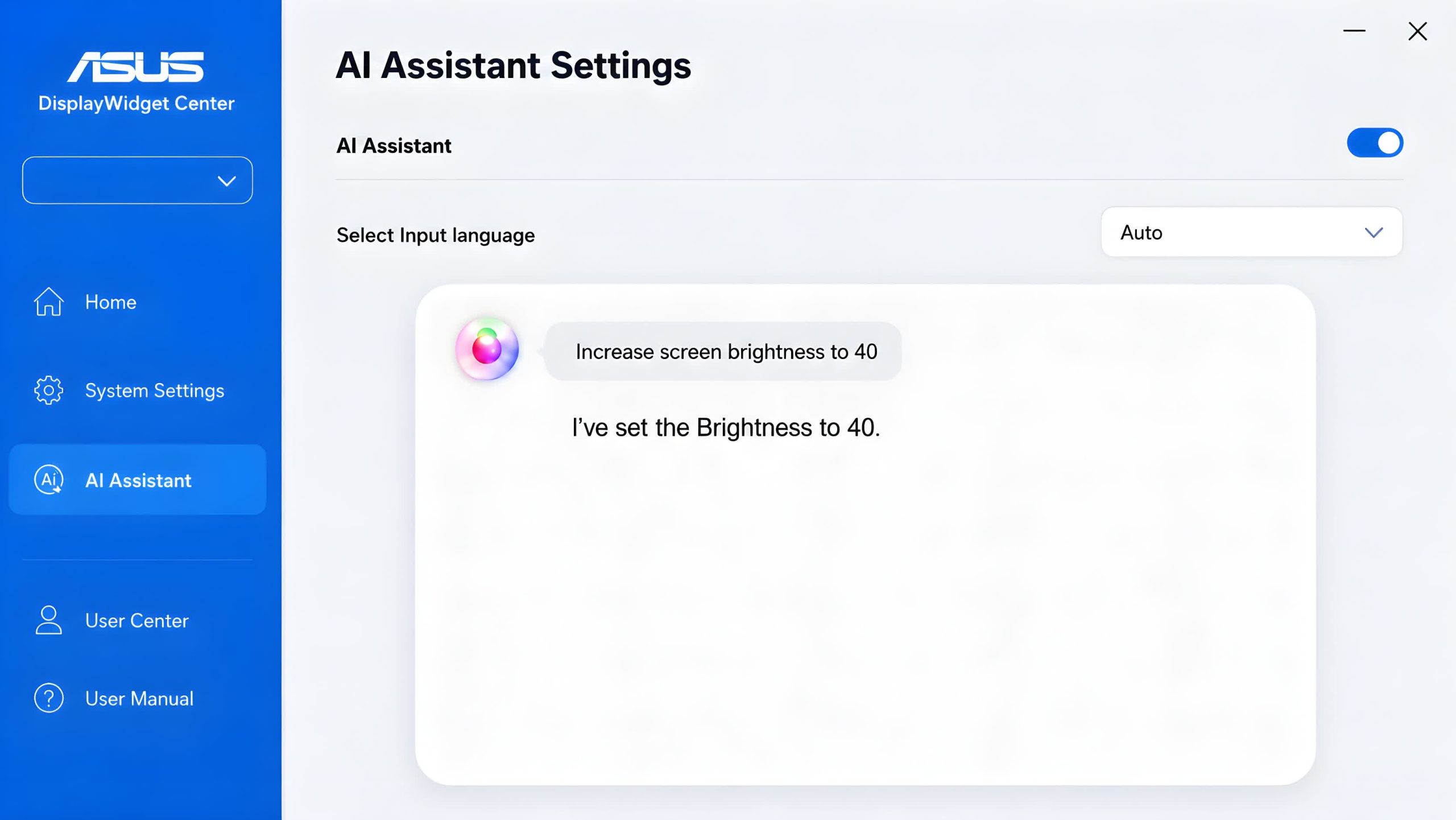
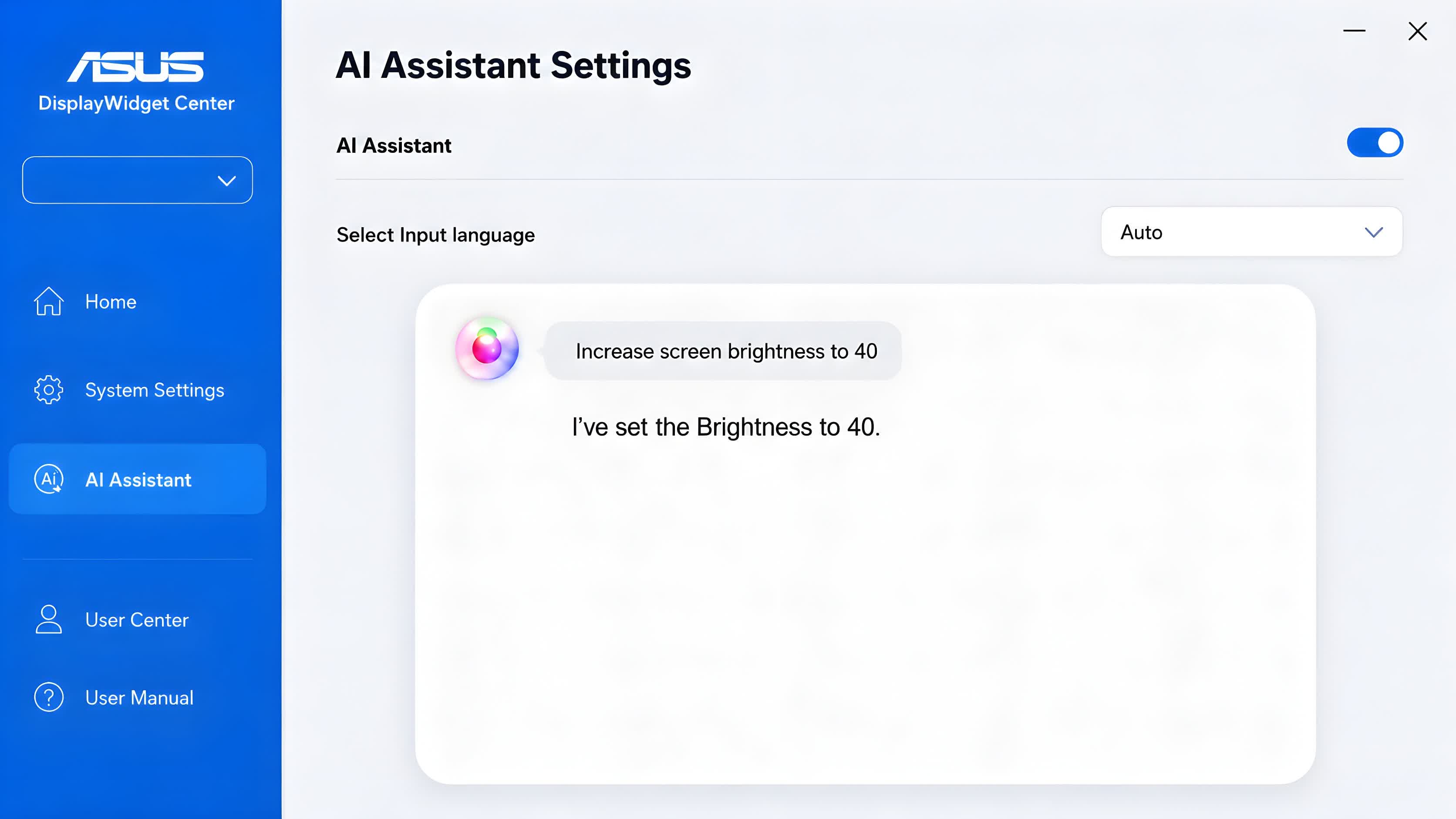
With AI Visual, compatible ROG and TUF Gaming monitors can select the most suitable visual mode by analyzing on-screen content in real time. Meanwhile, the AI Assistant feature provides a new text and voice interface for adjusting settings, retrieving support documents, and accessing other help-related functionality.
Other non-AI features in the latest DisplayWidget Center release include the App Tweaker tool, which can be used to create customized display “experiences” for individual applications and games. Finally, additional OLED Care features are designed to further reduce image burn-in risks on OLED models.
Asus said the AI features included in its monitor management software can provide meaningful improvements for gamers, content creators, business users, and traditional desktop users. However, some users may feel differently or simply reject a type of software tool that is becoming increasingly invasive or raises concerns about personal privacy.
The police surrounded her car Thursday, “drew their guns, and told her to come out with her hands up,” reports a local news station. The police thought they were pulling over a murder suspect, but “It turns out it was a mistake by another department with the Flock license plate reader technology.” The black woman says she’d wanted to call her mother, “but I’m like, if I make a sudden move, it’s going to be over. It’s going to end my life.”
And amazingly, the same thing happened Monday, according to the local news report. “Milwaukee police pulled her over with guns drawn. She says officers never explained why, towed her car, and let her go.”
She now describes herself as “traumatized,” recalling her second detention by police on Thursday. “After they put us in cuffs, they walked us to the car. I’m not knowing what’s going on. I’m scared. All you see is people in their cars recording.” She now says she’s scared to drive her car, and so is her daughter. “Because she doesn’t know if the police are going to pull us over and do it again…”
“I haven’t been to sleep since this happened. Every time I close my eyes, all I can see is guns.”
Advertisement
She wants an apology, since the local police would only say it wasn’t their fault, it was the fault of the Milwaukee police department that failed to remove the alert from Flock’s system. “Milwaukee police emphasized this was not a Flock camera issue, it was a data entry mistake,” according to the local news report. The woman’s response?
























































You must be logged in to post a comment Login