






Connect with us

Tech

Google’s top hacker hunter explains why hacking groups get codenames

Published

on

For more than a decade, the cybersecurity industry has been assigning names to different hacking groups. Some of them, like Fancy Bear, have crossed over into the mainstream because of their prominent hacks and memorable names. Others are only known within the cybersecurity industry. 

Oftentimes, even industry insiders can’t keep track. In part, that’s because every company names hacking groups differently. That’s why there are resources like this one, which attempt to be a one-stop shop where cybersecurity professionals, government officials, policymakers, journalists, and the wider public can make sense of who is who. 

Last month, Google became the latest company to revamp its naming system for hacking groups.

Gone are the days APT1, APT41 or APT whatever number, which was the system adopted by Mandiant, once an independent security firm that’s now part of Google. Mandiant was the first to adopt a naming scheme.

Advertisement

From now on, Google’s system is relatively simple: A hacking group will have a first name that is memorable and random, and a second word whose initial indicates the country of origin: Castle for China, Ion for Iran, Neptune for North Korea, and Relic for Russia.

According to Shane Huntley, the chief technology officer of Google Threat Intelligence Group, the company’s in-house hacker hunting team, the revamp was necessary to bring clarity to security researchers both inside the company and externally. 

In the early 2010s, when companies started publishing reports on cyberattacks and naming the hackers behind them, Huntley told TechCrunch that, “we were not expecting to have as many threat groups as we do today.”

It had become hard to keep track of everyone. Google now tracks more than 5,000 “activity clusters” in several countries, according to John Hultquist, chief analyst at Google Threat Intelligence Group. Huntley said that there are very few developed nations that don’t have their own cyber capabilities and hacking groups. 

Advertisement

But what is the point of naming hacking groups? It’s not just an academic exercise, Huntley explained. The goal is to have a baseline understanding of who is attacking who, and how they are attacking them. That way organizations can recognize threats more quickly, prepare against them, ideally stop them, or at least investigate incidents more promptly. 

All that, he said, it’s possible only if you name the hackers and track them consistently. 

“If you actually get hacked by them or you’re dealing with some incident, knowing how that actor behaves, what they do, what they’ve done in the past, all of these details become critically important to help the response and also work out your coverage against these threats as well,” said Huntley.

Knowing how the North Korean government hackers known as the Lazarus Group behaves, what their goals usually are, and who they work for, gives defenders a starting point in dealing with these hackers. 

Advertisement

Tracking state-sponsored hackers, while challenging, is easier than tracking cybercriminal groups and hackers-for-hire, Huntley explained. The government hackers tend to have more consistent targets and activities, while cybercriminal groups have members that come and go, sometimes splinter, and otherwise are more amorphous. Hacker-for-hire groups and spyware makers tend to have a lot of customers in different parts of the world, making them slightly harder to track. 

A common criticism whenever a new naming system gets announced is: Why don’t all companies and organizations just use the same codenames? While that seems like an easy question to answer, the reality is that every company has a slightly different view of every group, based on their own sets of data and telemetry. Huntely said this is an inescapable reality that can’t be avoided just by sharing more information among companies and groups of researchers. 

“No one has perfect visibility,” he said. “We are building our model and our best understanding, but we will never know everything about what’s going on.”

By unifying the naming scheme of Google’s old Threat Analysis Group, which Huntely headed, and Mandiant, at least now there’s one fewer scheme to remember. For everything else, refer to this gargantuan list.

Advertisement

When you purchase through links in our articles, we may earn a small commission. This doesn’t affect our editorial independence.

Source link

Continue Reading
Click to comment

You must be logged in to post a comment Login

Leave a Reply

Tech

Cloudflare says humans could become a “rounding error” as bots generate 1,000 times more internet traffic

Published

on

Crystal ball: Just a couple of months after Cloudflare revealed that bots have officially surpassed human traffic online, the company has given its view on what things will look like in five years. It’s not good news for us fleshy meatsacks: non-human traffic could be up to 1,000 times higher than human traffic.

CDN and cybersecurity giant Cloudflare held its Q2 earnings call on Thursday, during which chief financial officer Thomas Seifert gave a concerning prediction about what the web will look like in the future.

“If the current trends continue, we think in five years, non-human traffic will be as much as 1,000 times as much as human traffic,” he said.

“In other words, humans will be a rounding error on the internet, not because human traffic goes down, but that’s just how fast we’re seeing non-human traffic grow.”

Advertisement

Seifert did add the important caveat that his predictions have been wrong in the past. Cloudflare CEO and co-founder Matthew Prince will likely be able to relate to this. He had predicted that bot traffic would surpass humans at the end of 2027, but it happened earlier this year.

Also read: The Zero Click Internet

It goes without saying that the sudden acceleration in non-human traffic is being driven by AI – agentic AI, specifically. Agentic systems behave very differently from traditional web crawlers and fraud bots. Their activity can closely resemble ordinary browsing, but it happens at machine speed and can be repeated on an enormous scale.

Advertisement

Even a straightforward prompt may trigger thousands of requests. Prince illustrated the difference using online shopping: someone searching for a camera might check five retailers, while an AI agent could examine 5,000 sites on their behalf. Multiply that behavior across millions of users asking assistants to compare products and airfares, research topics, collect information, or condense articles, and you can see why Seifert believes humanity’s online presence will become a rounding error.

Seifert said that if traffic does grow the way he expects, “we’ve got to get a lot more efficient,” which is where Cloudflare’s services come in, of course. He also mentioned the security implications of a web made up pretty much entirely of bots.

The idea that Dead Internet Theory – the concept that the internet is mostly run by bots and AI – will be demonstrably true in a few years (or now, arguably) is a concerning one. For a start, it could see the end of independent sites that have relied on the web’s business model since the 1990s.

There’s also the fact that an internet full of bots, AI slop, and privacy risks is making more people pull away from the online world. In our poll, 97% of people said the internet today was a hellscape compared to its early days, and it looks like things are only going to get worse.

Advertisement

Source link

Continue Reading

Tech

Google Should Still Be Forced To Shed Chrome, Advocacy Group Argues

Published

on

“Google should be required to divest the Chrome browser, and prohibited from paying Apple to distribute Google’s search engine, the nonprofit advocacy group Public Knowledge argues in a new court filing,” MediaPost reports, citing a friend-of-the-court brief filed Tuesday in the D.C. Circuit Court of Appeals:

The group adds that “independent ownership” of Chrome “would open the distribution channel Google controls and allow Chrome to serve browser users when it makes privacy decisions and determines how to integrate search and (artificial intelligence)…”

In September 2025, [U.S. District Court Judge] Mehta issued a remedies order that requires Google to share some data about users’ searches with “qualified” competitors and to provide syndicated search results and ads to those competitors. The order also prohibits Google from entering into exclusive distribution contracts for Google Search, Chrome, Google Assistant and the Gemini app for six years, but allows the company to continue to make payments for search-ad revenue or distribution to Apple, Mozilla and others…
Google recently appealed Mehta’s order. The company argued in its written brief that it “prevailed in the marketplace fair and square,” adding that Apple and Mozilla “sensibly chose” Google as the default search engine “because it gave their users the best experience,” and because Apple and Mozilla would earn the most ad revenue through the deals. The [U.S.] Justice Department and states countered to the appellate court last week that the liability finding should stand, and also argued that Google should have been banned from paying Apple and Mozilla for placement as the default search engine on their browsers.

[Antitrust enforcers had originally asked the judge to order Google to divest Chrome, but he’s already rejected that request.] The government did not argue in its appellate papers that Google should be forced to sell Chrome. But Public Knowledge independently contends in its friend-of-the-court brief that divestiture would benefit consumers… “Divestiture would place those decisions with an institution whose success depends on serving browser users primarily….” The group is calling the appellate court’s attention to Google’s April 2025 decision to preserve tracking cookies — a reversal from its earlier plans to block third-party cookies by default. “Google is in the position of both deciding Chrome’s tracking rules while running the advertising business affected by them,” Public Knowledge writes. “An independent Chrome could make those decisions on behalf of users alone.”

Advertisement

But Firefox developer Mozilla filed its own friend-of-the-court brief Thursday warning Firefox could be forced to “exit the browser and browser engine markets” if it can’t receive payment from Google for distributing its search engine, according to a later report from MediaPost:

Federal and state antitrust enforcers recently asked the appellate court to reverse the portion of Mehta’s order that allows those payments to continue. But Mozilla counters in its new friend-of-the-court brief that Mehta’s decision regarding those payments was supported by the evidence –including a study it conducted concluding that its revenue would “decline dramatically” if forced to replace Google with Bing as Firefox’s default search engine…

Google is expected to file new arguments with the appellate court next month.

Read more of this story at Slashdot.

Advertisement

Source link

Continue Reading

Tech

Qwen 3.8-Max and Claude Opus 5 show why raw benchmark scores don’t predict the bill

Published

on

Alibaba released Qwen 3.8-Max this week and marketed the preview as second only to Claude Fable 5 (their launch-day table was more equivocal: the model leads on one of 12 coding-agent rows). But an independent harness came close to the opposite conclusion: a benchmark run, apparently using the Preview version, put Qwen 3.8-Max’s best effort setting mid-pack, and its default setting last.

Both results are real and defensible. The gap between them is about token and time budgets, and that matters because those figures aren’t usually headline numbers. Alibaba’s footnotes give its coding numbers a five-hour timeout, and up to 12 hours per run on PaperBench. The independent harness, VulcanBench, allowed between 45 and 60 minutes of wall clock time. A time budget between five and 16 times larger on Alibaba’s side explains the huge difference in results.

It’s time to do two things to start accounting for these differences when choosing models. First, the metric to use is cost per successful task: total spend, including everything you spent on attempts that failed, divided by the tasks that actually passed your acceptance check. Second, you need to make time or token budgets an explicit part of your acceptance criteria, not a hidden detail.

Price per token has stopped predicting the bill

The comparison everyone published in Qwen 3.8-Max’s first week was a price comparison, because that was the only data available. It is not a cheap model. DeepSeek-V4-Flash-0731, which entered public API beta on July 31, lists at 14 cents per million input tokens and 28 cents output. Qwen 3.8-Max lists at $2 and $6. Kimi K3 sits at $3 and $15.

Advertisement

Those prices tell you less than they used to, for a reason specific to reasoning models like Qwen: getting to a result costs thinking tokens. A model that spends most of its token allowance on reasoning can reach a token cap before it writes the answer, giving you an empty result indistinguishable from a total failure at the cost of a full run.

Artificial Analysis has the cleanest published measurement of how this can affect real agent spend: running its Intelligence Index on DeepSeek-V4-Flash at maximum effort took 210 million output tokens against a class median of 100 million. Absolute cost stayed low anyway, because the tokens were so cheap. But verbosity costs time, not just money, and depending on your use case that can sink you.

What you need is a number that counts everything you spent, including the attempts that came back empty, against the tasks that actually got done in the time and token budget you specified. This is what a cost-per-success metric helps you see.

Your failure rate is partly a configuration setting

A run that produces a wrong answer and a run that runs out of budget are different events with different fixes. Almost no harness distinguishes them, and almost no leaderboard reports the split. I hit this building an agent benchmark of my own: the harness logged a failure and nothing about why, and I had to add the distinction myself. When you do separate them, budget exhaustion turns out to dominate.

Advertisement

Long-Horizon-Terminal-Bench, published in July, ran 17 frontier models across 46 tasks through a shared harness with one 90-minute attempt each. Timeouts accounted for 79% of unresolved runs, against 19% for agents that stopped on their own and 3% for harness errors. The authors are careful about what that does and does not mean: the timed-out runs were not close to finishing, with mean reward between 0.10 and 0.35, so you cannot assume more time would have resulted in success. But the lesson is: benchmarks are implicitly measuring time efficiency, whether or not they shout about that.

The clearest published example of the mechanism comes from VulcanBench, the same open-source harness behind the Qwen chart. In a report dated July 26, Claude Opus 5’s lowest-effort setting was its best, solving 20 of 23 tasks against 18 at high effort. The extra reasoning wasn’t useless: high effort returned the fewest wrong answers of any setting, one against three. It ran out of clock instead, and a timeout scores zero. Two of its three regressions were cutoffs on tasks that low effort solves, and given unlimited time on both it only ties its cheapest setting, at 3.1 times the cost.

That has a direct consequence for anyone building a routing ladder. The standard design escalates to more reasoning when a cheap attempt fails, on the assumption that the next rung is better and merely costs more. For a meaningful share of model and task combinations that assumption is wrong, and you pay the higher rung’s price to escalate into a timeout or hitting a cap.

Who is already measuring this

Several groups have landed on cost per successful task independently in the last few months, which is the strongest signal it’s becoming standard.

Advertisement

VulcanBench reports dollars per solved task as a headline column and has since its earliest reports. Long-Horizon-Terminal-Bench publishes per-task cost next to accuracy, and its most instructive row is GPT-5.4 at roughly $26 per task with a much lower pass rate than Grok 4.5 at about $11. TestEvo-Bench runs agents under a cost cap, and Claude Code’s test-generation score falls from 71% to 44% at the tighter cap.

Vendors are already on board with the idea of measuring per successful task. HubSpot moved its Breeze Customer Agent in April to 50 cents per resolved conversation, down from $1 per handled conversation. Zendesk bills per automated resolution. Fin charges 99 cents per outcome and bills only on end-to-end resolution.

What to change this week

  • Emit a failure reason on every agent run as a required field, with budget exhaustion, verifier failure and harness error as distinct values rather than one failure flag. Until you can separate a timeout from a wrong answer, your pass rate is measuring two things at once and you cannot tell which one to fix.

  • Compute cost per successful task per effort level, not just per model. Total spend including failed attempts, divided by tasks that passed your acceptance check. The ranking will not match the rate card, and the cheapest setting may well win.

  • Cap on tokens rather than wall clock unless latency is genuinely in your service level objective. A wall-clock cap scores your provider’s serving speed as model quality.

  • Check the default effort setting on everything you have deployed. Qwen 3.8-Max runs at its highest reasoning setting when the effort field is unset, and its highest setting was its worst performer in independent testing. A team that never touches that parameter is running the configuration that costs the most per solved task.

Source link

Advertisement
Continue Reading

Tech

How To Get The Best Battery Life From Your Retro Handheld Game Console

Published

on

If your vintage gaming system eats through batteries in a hurry, this is for you.

Old-school gaming handhelds can be battery hogs. Whether it’s the original Game Boy’s four AA batteries or the Game Gear’s six, they tear through cells at a rate that makes modern consoles feel like luxuries. Here’s the easiest way to boost your battery setup on your old Nintendo, Sega or Atari portable.

For this guide, we’re focusing on the most popular battery-powered handhelds from the late ’80s through the early 2000s. Those would be Nintendo’s original Game Boy, Game Boy Color, Game Boy Pocket and Game Boy Advance, plus Sega’s Game Gear and the Atari Lynx.

Advertisement

The bottom line? Modern rechargeable batteries smooth much of the friction out of these retro handhelds. They save money, cut environmental waste and let you avoid the headaches that go along with disposable alkalines.

The right rechargeable batteries

For most people, a set of nickel-metal hydride (NiMH) rechargeable batteries is the way to go. They’re reliable, reusable and much cheaper over time than disposable alkalines.

Panasonic Eneloop is an Engadget staff favorite. It’s consistent and tends to hold up over time better than cheaper options. If you want to save a few bucks, IKEA LADDA is a good budget alternative. (Some have speculated that they’re rebranded Eneloops, but that isn’t confirmed.) Both are sold in the AA and AAA sizes you need for these systems.

Advertisement
  • Game Boy – 4 × AA
  • Game Boy Color – 2 × AA
  • Game Boy Pocket – 2 × AAA
  • Game Boy Advance – 2 × AA
  • Game Gear – 6 × AA
  • Atari Lynx – 6 × AA

Just keep in mind that the system’s battery indicators don’t always behave the same way with rechargeables. If the low-battery warning comes on, you may want to get in the habit of quickly saving your game to be safe.

As for how many batteries you need, a good rule of thumb is to buy two full sets. That way, you always have one in the handheld with another charged and ready to go.

One possible exception is modded retro handhelds, since things like brighter screens can run through batteries faster than the stock hardware. In that case, a third set could be in order. Some power-hungry or voltage-sensitive mods might work better with 1.5V rechargeable lithium batteries, although they tend to cost more than standard NiMH cells.

Advertisement

USB-C battery mods

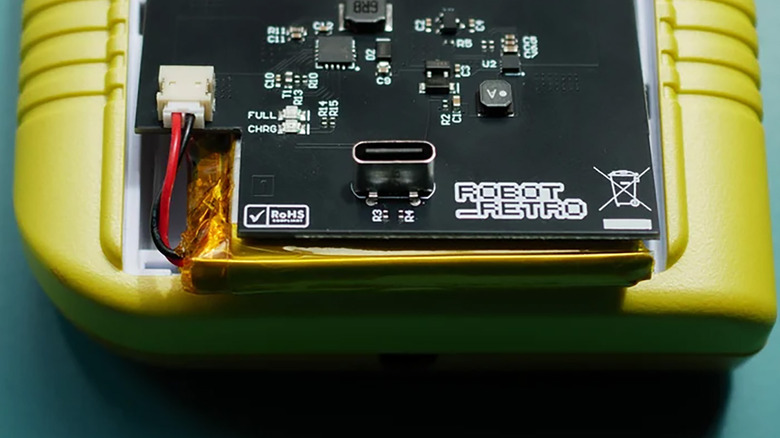
Some models, including the original Game Boy, can be modded with USB-C rechargeable battery pack kits. These make the handheld feel more like a modern system, removing the annoyance of battery swaps. Some work with USB-C power banks, although not all support charge-and-play.

There are a few risks and downsides. For example, some USB-C battery mods don’t fully isolate the battery while charging. This can generate extra heat and make it less safe to play while charging. So, it’s worth checking user feedback and sticking with well-regarded mods if you go that route.

Source link

Advertisement
Continue Reading

Tech

RingConn Gen 3 review | TechRadar

Published

on

Why you can trust TechRadar


We spend hours testing every product or service we review, so you can be sure you’re buying the best. Find out more about how we test.

RingConn Gen 3: One minute review

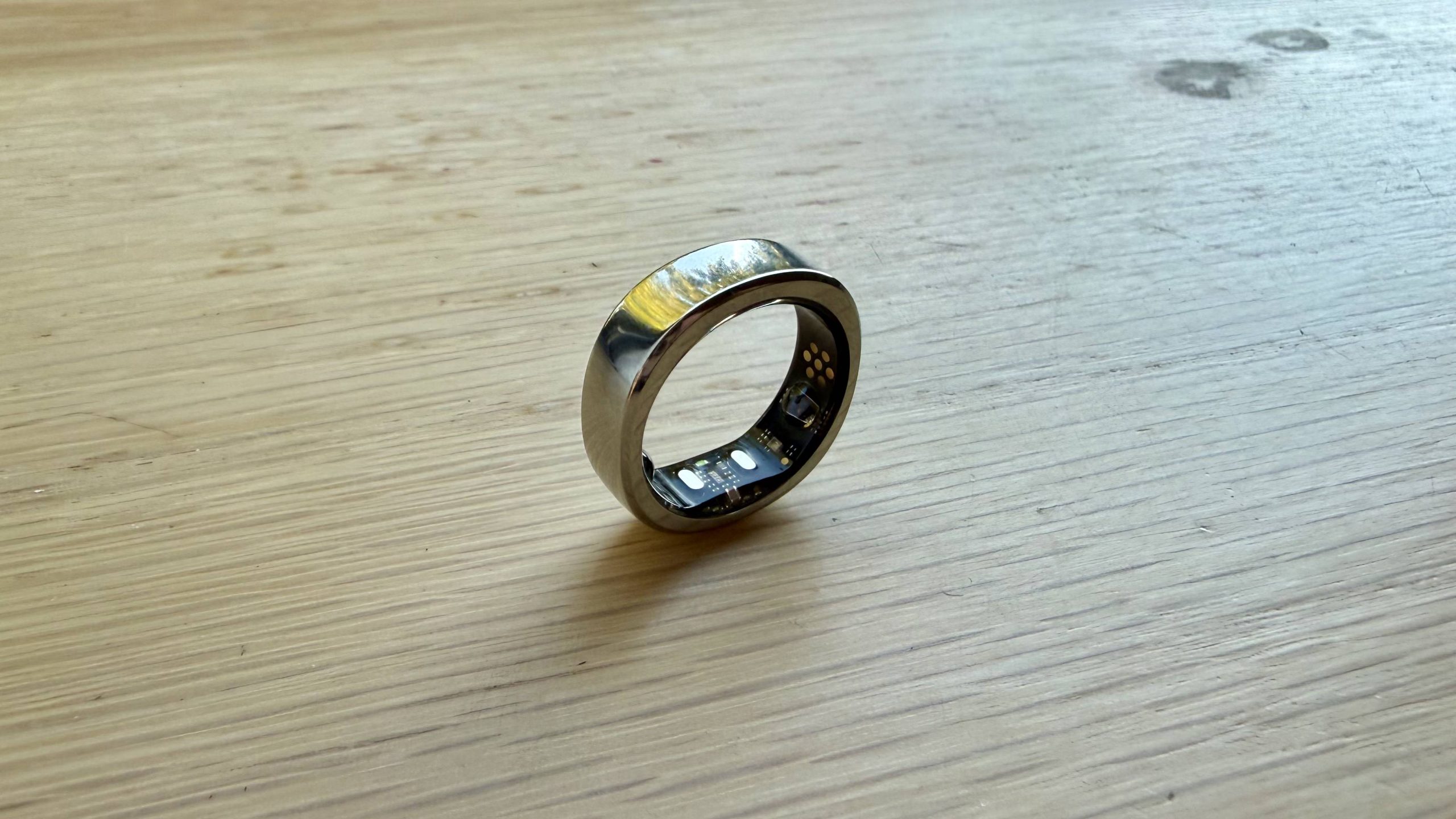
RingConn has always been a solid challenger to Oura in the smart ring space, and after spending two weeks testing it, I can safely say the new RingConn Gen 3 continues that trend. You’ll get most of the same health, sleep and recovery tracking features as rivals in our best smart rings guide here, but without the monthly subscription that puts some people off buying a smart ring altogether.

The Gen 3 tracks heart rate, heart rate variability (HRV), blood oxygen levels, skin temperature, respiratory rate, stress, activity and sleep. New additions include a haptic motor for some alerts and reminders, improved battery life and new vascular health trend insights, which are designed to give you a picture of your cardiovascular wellbeing over time.

Advertisement

Source link

Continue Reading

Tech

Apple continues to dominate premium smartphone market share

Published

on

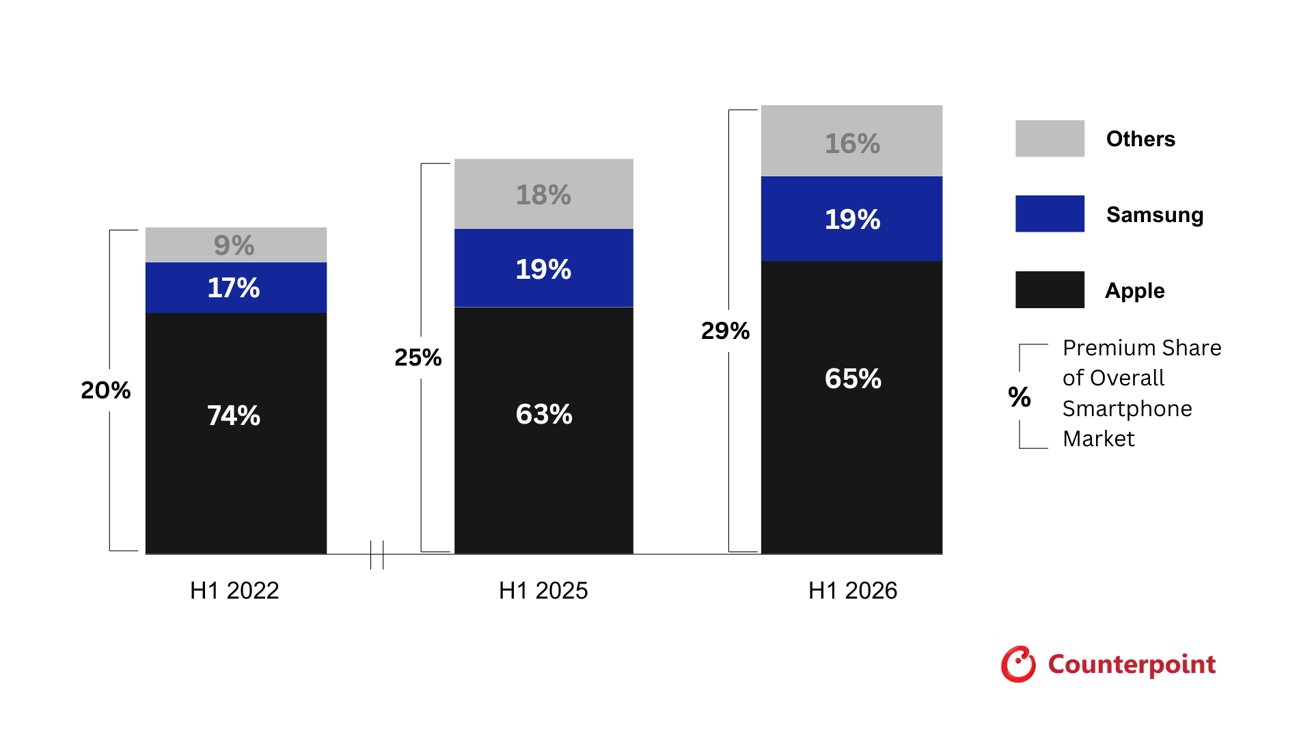
For smartphones selling at over $600, Apple owns 65% of that market and grew 9% year over year in the first half of 2026. However, Chinese brands are making a dent in local market share.

Apple ships 23% of all smartphones sold globally and captures 49% of all profit. It’s a behemoth on its own, but when accounting for smartphones in the $600 plus range, it’s the clear leader in market share.

According to a report from Counterpoint Research, Apple captured 65% of the global premium smartphone market. It grew 9% year over year during the first half of 2026, though its market share is still down when compared to the 74% held in 2022.

The decline since 2022 can be attributed to the premium Chinese smartphone market growing in popularity. When a Chinese consumer is presented with an option between an iPhone and a smartphone from Huawei, Xiaomi, or Oppo, they choose the local brand.

Advertisement

That said, Apple still holds most of the market globally at 65% and Samsung at 19%. The other OEMs make up the remaining 16%.

Bar chart comparing premium smartphone market share: Apple dominates around two-thirds, Samsung about one-fifth, others under one-fifth across H1 2022, H1 2025, H1 2026, with overall premium share gradually increasing.

Apple holds onto 65% of premium market share even as the rest of the market increases prices. Image source: Counterpoint

The premium smartphone market grew 5% overall year over year for the first half of 2026 and makes up a record 29% of the global market. The global RAM shortage driving up prices has pushed more smartphones into the premium $600 plus segment and price hikes on lower-end models are driving customers to more premium models.

The report suggests these trends are why smartphone manufacturers are leaning further into financing options. Samsung recently launched its Galaxy Card while Apple has introduced Apple Upgrade.

Advertisement

Trade-in prices have also gone up, as was seen with Apple earlier Thursday. Everything is meant to entice customers holding onto their more expensive devices for longer to upgrade sooner in spite of price increases.

It’s going to be an interesting fall as everything seems to be creating quite the hurdle for Apple to overcome. iPhone 18 Pro sales could be limited by the RAM shortage and Apple reports that it’s already selling as many iPhone 17 models as it can make.

Demand won’t be the issue, but supply held back by global supply chain instability. Consumers may be feeling the impact of economic uncertainty, but that may not matter if financing options continue to be plentiful.

Advertisement

Source link

Continue Reading

Tech

What Are The 5 Ps For Pilots And Why Are They So Important?

Published

on


Safely piloting an aircraft requires training, skills, and experience. Take the 1500-hour rule for pilots for example, which requires those seeking to be licensed in airline transport to achieve a certain number of hours performing flights in different scenarios, totaling 1,500 hours. Even then, there’s still a number of factors to keep in mind, especially when you’re the sole aviator behind the controls. It’s for this reason, practices like the 5 P checklist are recommended as part of a successful single-pilot crew resource management (SRM) system.

The 5 P checklist is comprised of plan, plane, pilot, passengers and programming. Each one of these categories exist in order to help manage the level of risk for each flight. While on its face, the 5 P checklist seems fairly self-explanatory, going through each one helps to provide a thorough means of preparation and readiness. This isn’t something reserved for new pilots either, as repetitious checklists help even seasoned aviators ensure they’ve covered everything. 

Advertisement

Each part of the 5 P checklist explained

There should always be a plan in place, which takes into account specific aspects of the trip. Some things to consider include whether the destination airport has any of the runways shut down, alternate airports should a problem arise, current weather conditions, and contingencies in the event of an emergency.

Of course, the plane itself should also be subject to evaluation. Pilot’s must go through pre-flight checklists and consider the aircraft’s limitations versus the flight requirements. Double check that the plane is configured properly, such as the distribution of weight, which affects the aircraft’s center of gravity.

Pilots should be evaluating themselves as well, to ensure they aren’t contributing to risks. For example, a pilot’s health, mental state, and experience are crucial components of a safe journey. If a pilot has the flu, is highly fatigued or lacks specific knowledge relating to the flight, they can actively reduce the level of safety.

Advertisement

A pilot also can’t neglect their passengers, as this can lead to problems in the air. Explaining things like emergency procedures beforehand and what to anticipate during the flight can help limit risk and reduce stress in the passengers.

The last entry of the 5 P checklist is programming, which reminds a pilot to verify things like their route and navigation points in their GPS system. GPS is just one aspect of how pilots see at night, so it’s critical to verify the system is functioning properly.

Advertisement

The 5 P checklist is used throughout the flight

The 5 P checklist is something that’s employed not only before the flight, but throughout it as well. There are several different phases of a flight, and each one presents its own set of potential risks. Therefore, a pilot must reevaluate during each one of these phases, making choices to help reduce hazards and enhance safety.

These phases of a flight consist of pre-take off, navigating to the runway (taxiing), the plane lifting off the runway, gaining altitude, reaching cruising height for level flight, descending, and finally landing. During these phases some aviators employ procedures based off of FAA guidelines, like the 30/70 rule, which can make takeoffs safer.

Pilots don’t only rely on the 5 P checklist but also combines it with others like the PAVE checklist, which stands for the pilot in command, the aircraft, the environment, and any external pressures. So, if as a passenger you’ve ever wondered what the pilot is up to before and during a flight, it’s likely they’re running through some of these checklists among other responsibilities.

Advertisement


Source link

Advertisement
Continue Reading

Tech

ShinyHunters called cancer diagnostics biz and tricked staffers into giving them access. Now they’ve dumped 10.9M email addresses

Published

on

CYBER-CRIME

Cancer diagnostics breach spills personal and health info as extortion crew says healthcare giant ‘should’ve paid the ransom’

Hackers have dumped data stolen from Abbott’s cancer diagnostics business after the healthcare giant apparently declined to pay up, with the leak containing 10.9 million unique email addresses alongside personal and health information.

Have I Been Pwned added the Exact Sciences breach to its database on Friday after data stolen by the ShinyHunters extortion crew was published online. The leak includes names, email and physical addresses, phone numbers, dates of birth, genders, and personal health information belonging to customers, patients, and healthcare providers.

Advertisement

Abbott, which acquired cancer diagnostics outfit Exact Sciences earlier this year, first disclosed the break-in on July 16. In an update on August 5, it acknowledged that some of the files accessed contained personal information and/or personal health information, but said it was still analyzing the data and had yet to determine who needed to be notified.

The company also revealed that the intrusion began with a vishing attack, and stressed that this was “not an encryption malware event.” It said only a limited number of internal systems within its cancer diagnostics business were affected, with no disruption to products, manufacturing, laboratory operations, or patient services.

ShinyHunters has a rather different way of describing what happened. On its dark web leak site, seen by The Register, the extortion crew told Abbott it “should’ve paid the ransom” and claimed the company had failed to reach an agreement despite being given multiple chances to do so.

The crooks claim that they made off with more than 30 million rows of customer information, including more than one million Social Security numbers and 7.5 million dates of birth. More concerning are claims that the haul includes 22 million-plus rows of client notes containing confidential doctor-patient conversations and health information, as well as more than 20 million medical-order records containing patient IDs, prescription types, order dates, and refill information.

Advertisement

ShinyHunters also claims to have siphoned more than 425 million rows of assorted data from Databricks, 130,000 files from SharePoint, and 89,000 contracts from Coupa, though those figures have not been independently verified.

Abbott has not said how the vishing attack led to the theft of the data, how long the intruders had access to its systems, or whether it received an extortion demand. Its latest update says the investigation remains ongoing and that affected individuals will be notified where required.

For those caught up in the breach, however, that review may come a little late. Whatever number Abbott eventually puts on the incident, a sizeable chunk of the stolen data is already in the wild. ®

Source link

Advertisement
Continue Reading

Tech

The Samsung Galaxy S25 FE is at its lowest price ever

Published

on

Samsung’s newest mid-ranger just landed its biggest discount yet, and you can now grab the Galaxy S25 FE for almost a third of its price off.

That drops the 256GB Samsung Galaxy S25 FE from an RRP of £699 to just £499, a straight £200 saving and the lowest this model has ever been. For a phone this recent, that’s a rare window to jump on.

Samsung Galaxy S25 FE on a sunset backgroundSamsung Galaxy S25 FE on a sunset background

Samsung Galaxy S25 FE 256GB hits its lowest price yet: £499, down from £699

Amazon just dropped the Galaxy S25 FE down to £499, Thats £200 off this recent 256GB flagship-adjacent phone.

Advertisement

View Deal

A £200 cut is no token gesture on a handset this new, and it pushes the S25 FE well beneath where flagship-adjacent Samsungs usually sit, so you end up paying mid-range money for a phone built to stay current and supported until well into the next decade.

Advertisement

Our own tech expert Thomas Deehan reviewed the S25 FE and found the 6.7-inch AMOLED display perfect for entertainment, with 1,900 nits of peak brightness and a 120Hz refresh rate that keeps everything from social feeds to Call of Duty Mobile looking effortlessly smooth, likening it to carrying a mini tablet ideal for long flights or gym-session binges.

That generous screen leans on a bigger battery that saw Deehan comfortably clear a heavy day with 22% left in the tank before clawing back 67% in just half an hour thanks to the upgraded 45W wired charging.

Advertisement

The Whatsapp LogoThe Whatsapp Logo

Get Updates Straight to Your WhatsApp

Advertisement

Join Now

Powering all of it is the upgraded Exynos 2400 chipset, which handled everyday multitasking and most games without stutter in Deehan’s testing, loading apps quickly and running Galaxy AI features at a reasonable pace, with only the most demanding 3D titles asking more than it could comfortably give.

Advertisement

The triple rear camera carries over a capable 50MP main sensor, 12MP ultrawide and 8MP telephoto, now joined by a new 12MP selfie camera that genuinely impressed Deehan. Wrapped in One UI 8, which he called the best software experience he has seen from Samsung, it feels far more premium than this price suggests.

At £499, the S25 FE makes one of the smartest value cases Samsung currently offers, and this deal window is the moment to act on it. If you want to weigh it against the rest of the range before you commit, our roundup of the best Samsung phones for 2026 is the place to start.

SQUIRREL_PLAYLIST_10148964

Advertisement

Advertisement

Source link

Continue Reading

Tech

How BBEdit quietly became a beloved Mac app

Published

on

You may like Pages and you may tolerate Microsoft Word, but text editor BBEdit has been rightly earning devotees on the Mac for 34 years. Here’s how.

There are very few Mac apps that go back this far, and even fewer that remain both actively developed and actually beloved by its users. And there is only one with the trademark “It doesn’t suck.”

BBEdit is just a text editor, but rather than this meaning it is limited, it means that BBEdit is focused. It is and always has been a plain text editor, it does not also try to be a mind-mapping tool or an image editor or a chatbot.

This is going to read like an unqualified hymn of praise, although there are actually a few qualifications. But this is what BBEdit does to you. While there are other apps I write in for many different purposes, BBEdit does what it does extraordinarily well.

Advertisement

I don’t remember when I first came across it, but it would’ve been before 2000 and possibly before Steve Jobs came back to Apple. Its original version was written in 1989 because of a problem with editing text on the Mac.

After it was released as BBEdit in 1992, Bare Bones Software never stopped developing it.

The problem back then was just that Apple offered an API for handling text, but it couldn’t handle large files. The creators of BBEdit were working on a version of the Pascal programming language for Mac that effectively demanded longer files.

While Apple’s Pascal faded away, their text editor grew into this favorite for programmers and writers.

Advertisement

If you’ve never used it, though, it’s hard to convey just why BBEdit is so popular among its users. There are people who will never leave the Mac because there isn’t a PC version of BBEdit, for instance.

And as you use it, you have such a clear sense that so do its developers. This is not a day job or a side project, BBEdit keeps getting better because its developers add what they want it to do themselves.

“I use BBEdit for everything I produce that involves text: code (C, C++, Objective-C), web site content (HTML, Markdown, Textile), and more,” said Rich Siegel, developer of the app, in a 2011 interview. “In a very real sense, BBEdit is written using itself — my daily-use build is the same one that’s being beta tested or used in the field by our customers.”

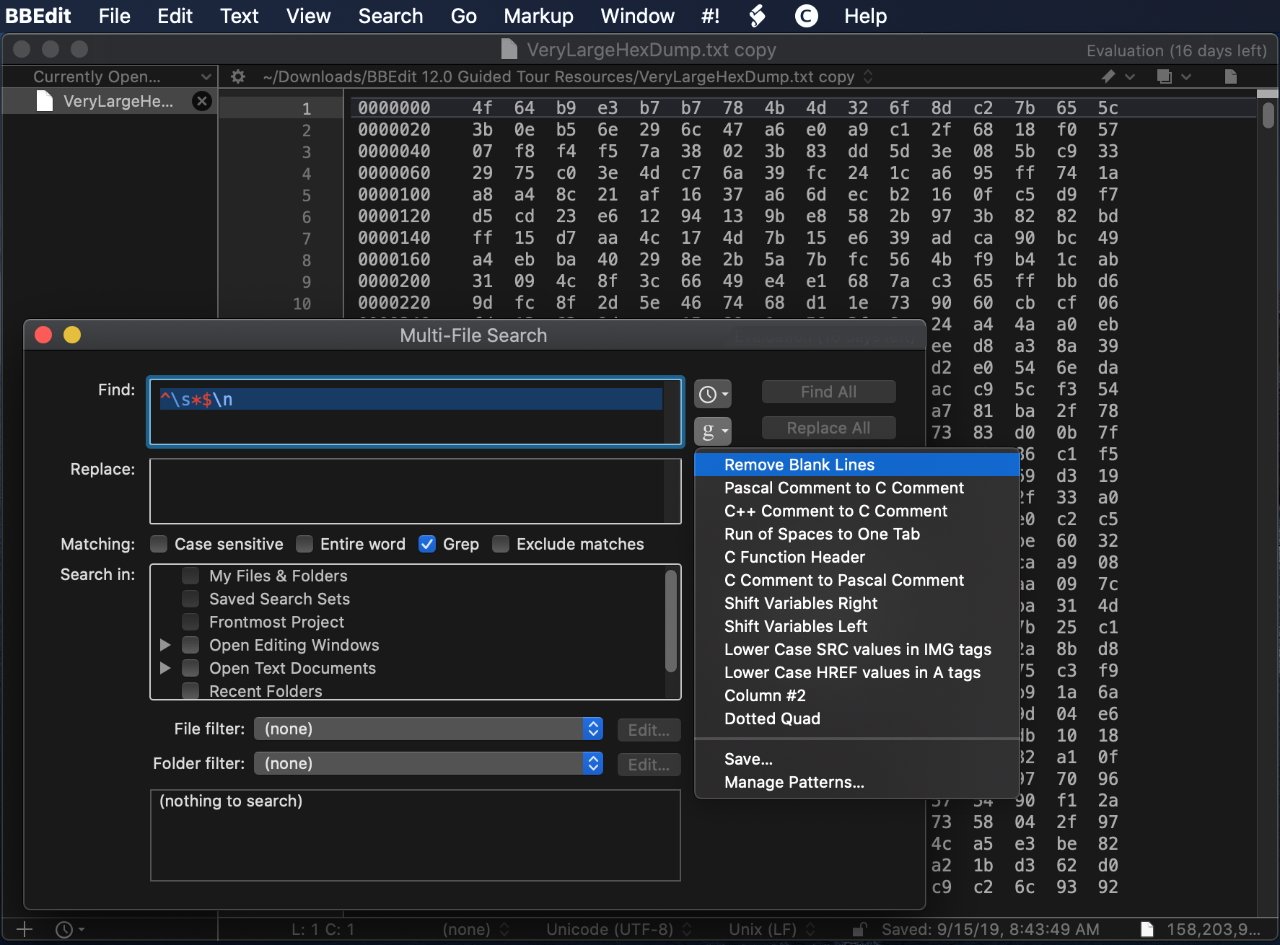
Text editor on macOS showing a hex data view, with a Multi-File Search dialog open in front and a menu of text processing options such as Remove Blank Lines expanded

If BBEdit’s search feature can’t find something, it isn’t there.

Advertisement

So an app that has been available for more than three decades, two hardware architectures ago, is still being actively developed. An app that was meant to be just a “bare bones” text editor is still simple to use, yet it has so many features a keystroke away that it’s hard not to gush about this app.

To be fair, there are actually reasons not to use it, there are writers for whom BBEdit is just the wrong choice. But if it suits your writing or it suits how you like to work, BBEdit can make you into a passionate fan.

“BBEdit is legendary because we keep improving it to serve the needs of our customers,” Siegel said on the release of version 9. It’s now on version 16, which is promoted as having “millions* of new features and refinements (*estimated).”

With marketing like that, BBEdit remains a taste of those early times with the Mac some 34 years after it was first launched. It’s serious software that doesn’t take itself too seriously.

Advertisement

What BBEdit does and how

The short version is that BBEdit is a text editor. That’s not the same thing as a word processor which offers formatting options like styles or margin control, as a text editor is just for getting the words down.

BBEdit Application Settings window on macOS showing sidebar categories and main panel options for opening documents, changing workspaces, reopening documents, automatic updates, sandbox access, and a Restore Defaults button

There aren’t countless settings you can choose in BBEdit, but there are more than you’d like to count.

As such a text editor, BBEdit is fast and responsive, and it generally doesn’t get in your way. You don’t have to set any settings, you can just open it and start typing.

When you have written a lot of text, maybe even over several years, you will start to appreciate a feature called grep. This is a form of regular expression, the feature takes you beyond normal search and replace.

Advertisement

For instance, in any word processor you could search for a date like 01/12/2026. But in BBEdit, you can search for all dates in the document, matching every one of them simultaneously.

It’s a form of regular expression. As well as being powerful, though, the BBEdit version includes an on-screen guide to help you through it as simply as possible.

“Our base started as Mac software developers, scientists, system administrators, and other technical users,” Rich Siegel told Apple in 2019. “The first big change was popularity among HTML authors and web back-end developers.”

Web design software window showing a Background settings dialog with selector, file path, color picker grid, and positioning options, overlaid on HTML/CSS code and a list of webpage files

Web designs can write CSS files in BBEdit – image credit: Bare Bones Software

Advertisement

“As word spread, we were able to help folks understand that the internet was built with text that you could treat as data or you could treat it as a document,” he continued. “So the next wave brought in internet architects, cryptanalysts, and scientists from unexpected disciplines.”

Thos unexpected disciplines, he said, included “writers and other content creators-folks who see their text not as data but as words, and who want as little as possible between them and their words.”

Overall design

Beyond the simplicity of writing in BBEdit, part of this get-on-with-it design is in how it stores your documents. Unlike most apps other than Ulysses, BBEdit can in theory be a single repository for all of your writing.

So rather than opening and saving documents all the time, you can just open BBEdit, press Command-N and be writing in a new document. Everything you’ve written before is still there, listed in a navigation bar on the left, until you choose to close it.

Advertisement

You don’t even have to save that previous work before you start a new one.

But then if you want to, you can. Anything you write can remain in BBEdit’s list on the left of the screen, but you can also save any of it out to separate, individual .txt files.

Mac desktop showing a text editor window titled

You can keep all of your recent documents open in BBEdit. Or don’t even ever save them, just write in this text editor and export the final text to wherever you need it to go.

Then it might not require you to set anything up, and it might not get in your way, but BBEdit is built to help you. So for example, if you type an opening quote mark, BBedit immediately adds a closing one right after it and leaves your cursor in the middle.

Advertisement

It’s the same with brackets. Type an opening bracket, and you get that plus a closing one for free. That’s chiefly convenient in that it means you can’t ever forget to include a closing speech mark or bracket, you’d have to choose to delete them.

If you’re a programmer, that can also make the difference between your code working or not. It’s easy to forget to close brackets, unless you’re writing in BBEdit.

But it is also a little pain when you’re writing dialog. So often you’re going to follow a speech with a phrase like “she said,” and to do that you have to cursor over the automatically-inserted end quote mark.

Split computer screen showing Markdown text editor on the left and rendered Markdown documentation with browser developer tools panel open on the right, demonstrating live preview and HTML structure

You can set BBEdit to wrap words and it also supports Markdown, plus a split-screen view.

Advertisement

You may well have just shrugged at that, and if you did, it’s because you are the true target audience for BBEdit. While any type of writer can use it, and every type of writer does, it is best for coders and programmers.

These are people whose writing tends to be in short lines rather than paragraphs. So they may never even need to notice something about BBEdit lines that will strike a novelist or a journalist immediately.

That’s how, by default, BBEdit does not wrap text at the end of the screen or at some margin stop. You could write a novel on the same long single line if you wanted to.

But then you could alternatively go to Settings, Editor Defaults, and turn on Soft Wrap. Set it to wrap your text at a specific character count, at the width of your default page size for printing, or the width of the window.

Advertisement

There are hundreds upon hundreds of settings you can change, but none that you have to in order to start writing. You can readily believe the gag that it has “millions” of new features, but this is still not an app where you have to study the manual.

Although, actually, there is a manual. In another throwback to the early days of the Mac, there exists to this day a 456-page BBEdit manual, and it is constantly updated.

How it got here

BBEdit began as this way to address a problem on the Mac. Today you know TextEdit as the name of Apple’s free text editing app, but back in the day, it was what the company called its text handling API.

If you wanted to include text in your app, from a word processor to just labels on a drawing, you could use this API and it did the job. But it wouldn’t handle anything over 32K, it wouldn’t handle anything long.

Advertisement

BBEdit was made to show that longer files could be handled on the Mac. It did the job, it was popular, and in 1992 when it first came out, BBEdit was also free.

Code editor showing CSS file with syntax highlighting and an autocomplete dropdown listing border-related properties as a developer types a style rule for a website layout

As well as automatically adding closing brackets for any user, if you’re a programmer or web designer then BBEdit will offer auto-completion suggestions – image credit: Bare Bones Software

That didn’t last. Around a year later, Bare Bones Software launched version 2.5 and began selling it for $99 (around $230 in today’s money). Users of the previous free ones, or owners of various programming languages such as THINK Pascal, could buy it for $49.

At the same time, Bare Bones Software released a cut-down edition called BBEdit Lite. That was free, and users of it could upgrade to the full BBEdit for $49.

Advertisement

They could get it on a floppy disk by mailing — not emailing, regular postal mailing — the developer on an Massachusetts address. Please enclose a check for $5.

BBEdit Lite no longer exists, and nor does its brief replacement, TextWrangler. That was released in 2003 for $49, offering what Bare Bones Software thought would be a compelling mix of BBEdit features for programmers and database administrators.

Compared to some apps, TextWrangler did well, sticking around 14 years, even if it quickly became free. It may have seemed like it spent much of that time nagging users to upgrade to BBEdit, but come 2017, there was no longer any choice.

TextWrangler was ostensibly folded back into BBEdit and users were encouraged to move to the full app.

Advertisement

“We promise that you will feel right at home, because BBEdit and TextWrangler are identical in every way that you’re used to,” said the company at the time. “They’re built on the same foundation, by the same developers, with the same care; and they work the same way.”

Behind the scenes, that must’ve been a reason to drop TextWrangler. Maintaining the same code base across two apps was surely taking up time that could be spent developing new features.

It certainly wasn’t the lure of cash from upgraders that made Bare Bones Software do this. As welcome as that would doubtlessly be, the company also sweetened the deal.

If you bought or upgraded to BBEdit at that time, you could use it for free for 30 days. It’s not unusual to have such a trial period, but what happens afterward is much more rare.

Advertisement

Bare Bones Software made it so that you could continue using the app for free, with just a limited feature set. What it left in was generous, and really it created what was effectively a new, free, BBEdit Lite in all but name.

BBEdit and Apple

If you’re a long-time Mac user, you may distantly remember technologies such as OpenDoc, but you’re unlikely to have used any of it. Bare Bones Software has, it even added OpenDoc support to BBEdit.

BBEdit has been a good Mac citizen from the start but sometimes you don’t know what you’ve got until it’s gone. That happened with Apple and BBEdit over the Mac App Store.

While it’s never really seen a fraction of the business that the iPhone App Store has, the Mac version has been around longer than you think. It debuted in 2011 and BBEDit was right there as one of the very first products on the Mac App Store.

Advertisement

By 2014, though, it was gone.

The reasons given at the time were not very specific, but they centered on how the Mac App Store sandboxes apps. Any app on the store is deliberately limited to prevent it being able to control the user’s Mac or other apps.

In BBEdit’s case, the app was reportedly not allowed full access to the user’s files and folders. It needed to be able to open and save wherever the user wanted, and at the time, Apple put limits on this.

There was also, though, an issue of money. While BBEdit was a one-time purchase, Bare Bones Software has always issued paid upgrades at intervals.

Advertisement

The Mac App Store did not allow for paid upgrades once a user had bought the app. So the company could have gained a true believer but never know it, never profit from it, and that user would never know what new features were available.

By 2019, enough developers had complained about sandboxing that Apple made some changes. They were sufficient to mean that BBEdit came back on the Mac App Store, but perhaps chiefly because there was now a solution to the upgrade problem.

Three colorful article cards: a serious man portrait titled Where Respect Is Due, a stylized crowd cutting paper titled BFGs: A Writer's Secret Weapon, and abstract coders titled Code. Write. Munge.

Apple welcomed BBEdit back to the Mac App Store with a trio of promotions – image credit: Apple

While Apple still does not allow paid upgrades, it both allows and encourages subscriptions. So today you can buy BBEdit 16 from the developer for a one-off $60, but you can subscribe via the Mac App Store for $5/month, or $50/year.

Advertisement

And if you were looking when BBEdit returned to the Mac App Store in 2019, you will have seen Apple rushing to make up for arguably ignoring it. That return saw an App Store front page profile of its main developer, Siegel, plus an article about BBEdit’s search features, and another about its overall feature set.

At that time, Apple’s senior vice president of worldwide marketing was Phil Schiller, who oversaw the App Store. He tweeted a welcome back to BBEdit, although that tweet is no longer available since Schiller quit Twitter/X back in 2022.

There’s something missing

BBEdit sounds perfect. Unless you’re a novelist or a screenwriter, or perhaps even a non-fiction author, maybe it is. And if you are any of those things, you can make BBEdit work for you if its comprehensive yet no-nonsense feature set appeals.

What you can’t do is make BBEdit work on anything other than a Mac. There’s no PC version, for example, although if you cared about that you wouldn’t be reading this far into an AppleInsider article.

Advertisement

The real missing piece is the iPad.

It’s been some years since Bare Bones Software has talked about why it’s stayed Mac-only. So perhaps things will change, but 37 years after starting it, and 34 since it went on sale, BBEdit is a legend among macOS apps.

Enough so that it’s one of the very, very few apps I would enthuse about this much. Bare Bones Software and Naomi Pearce helped out with finding images like that ancient photo of the boxed version, but they haven’t read this prior to publication, and they certainly didn’t pay for it.

Try it out for yourself. Once again, it may not be the right writing tool for you, but if it is, you’ll become a fan.

Advertisement

BBEdit 16 for Mac is available for $60 direct from the developer as a one-time purchase. You can also get it from the Mac App Store on subscription for $5/month, or $50/year.

Source link

Advertisement
Continue Reading

Trending

Copyright © 2025