When a loved one dies, who downloads their important files from their cloud storage account? Who monitors their email inbox? Who decides what happens to the photos and videos on their social media accounts? And what if those tasks fall to you?
Everyone will die, but not everyone has planned what they want to happen with their digital assets after they’re gone. Even when someone makes a plan, survivors might still be limited in what they can do.
Tying up loose ends can become a nightmare for the living, especially when the volume of digital assets is enormous. Still, the more you know, the better you can plan for your own digital estate, and the easier it will be to manage someone else’s.
Take Inventory
The biggest determining factor in how much work it’s going to be to manage the online accounts and digital assets of someone who is incapacitated or deceased is whether they did any estate planning. If a person doesn’t write down what digital assets they have and what they want done with them, it’s impossible for anyone to know.
Advertisement
It’s not always a simple matter of memorializing a Facebook account or downloading photos from iCloud either. Digital assets can have as much monetary value as sentimental value. Say a person’s social media accounts earn dividends. How will a beneficiary collect future proceeds? And should they keep the account alive?
What about cryptocurrency? If it’s stored in a private wallet and no one has the key, the money is lost forever. It’s a different story, however, if a third party, like Coinbase or PayPal, holds the crypto. At present, bitcoin and other cryptocurrencies are considered “digital assets” and thus need to be treated that way when doing any estate planning.
Navigating the Law
In the US, digital inheritance is overseen by state law, the same as traditional probate and estate matters, according to Benjamin Orzeske, chief counsel at the Uniform Law Commission. He and his organization developed a state law known as the Revised Uniform Fiduciary Access to Digital Assets Act (RUFADAA), which has been enacted in 48 states, Washington, DC, and the US Virgin Islands. The missing two states are Massachusetts, where RUFADAA has been adopted but not yet enacted as of this writing, and Louisiana, which went its own way with a similar but different law.
“At the heart of RUFADAA is this recognition that digital property is in some ways different from traditional, tangible property,” Orzeske says. He gives the example of mail versus email. When a person dies, their mail gets forwarded to a dedicated person, the fiduciary, who then receives incoming communication, bills, and payments. If they get a bill in the mail for a magazine subscription, they know to cancel it. Receiving the mail effectively gives the person appropriate information and access to manage the deceased’s accounts and estate going forward. Email is different. The fiduciary doesn’t just get new incoming mail. They might also have access to a searchable history of communication, which the deceased person might have expected to be kept private.
Advertisement
The real point of conflict, according to Orzeske, lies in the Stored Communications Act, a federal law that says companies that handle our online assets can’t release them without our permission. So RUFADAA gives survivors some rights while retaining the original asset holder’s privacy.
Under RUFADAA, a named trusted person can close accounts, but they can only get the contents—meaning the bodies of emails, private messages, videos, photos, attachments, and so forth—if the decedent specifically “grants the authority to the personal representative fiduciary,” according to Catherine Hodder, a senior attorney editor at FindLaw. FindLaw is an informational website that breaks down legal issues for a general audience.
Apple quietly killed the ceramic Apple Watch in 2020, and for the fans of the fancy material, it has been an inexplicable absence ever since. For those catching up, ceramic was the lineup’s most premium material option.
It was smooth to touch, scratch-resistant, and had that distinct non-metallic appearance, a characteristic of all titanium and aluminum frames. Now, according to Bloomberg’s Mark Gurman, Apple is actively planning its return.
Nadeem Sarwar / Digital Trends
Why does the ceramic case’s return actually matter?
While it isn’t mentioned clearly in the report, Apple could re-introduce a ceramic version of the Apple Watch with either the Series 12 in September or in 2027. “It will also offer new colors and bands, and a series of new health and fitness-related upgrades,” the report mentions.
For those catching up, ceramic is harder than stainless steel and retains its polish far longer. Basically, it’s the perfect blend of a luxury and a sporty finish. It’s the kind of materials upgrade that could serve as a major marketing campaign for the lineup without changing a single feature.
What else is Apple changing with the Series 12 and Ultra 4?
Bringing back ceramic is a smart way to restock the premium end of the Apple Watch lineup, but in my opinion, it will buy the company some time to figure out what the smartwatch will look like over the next decade: Apple’s yearning for a major Watch overhaul.
Quite a bit, actually. Beyond the ceramic case option, both the Series 12 and the Ultra 4 are getting their first meaningful performance bump in years. The performance upgrade could be accompanied by new colors, updated band options, and a bunch of new health and fitness-related features.
Together, the performance upgrade on the Series 12 and Ultra 4 and the potential arrival of a ceramic case version suggest Apple wants to ship a comprehensive Watch lineup this year.
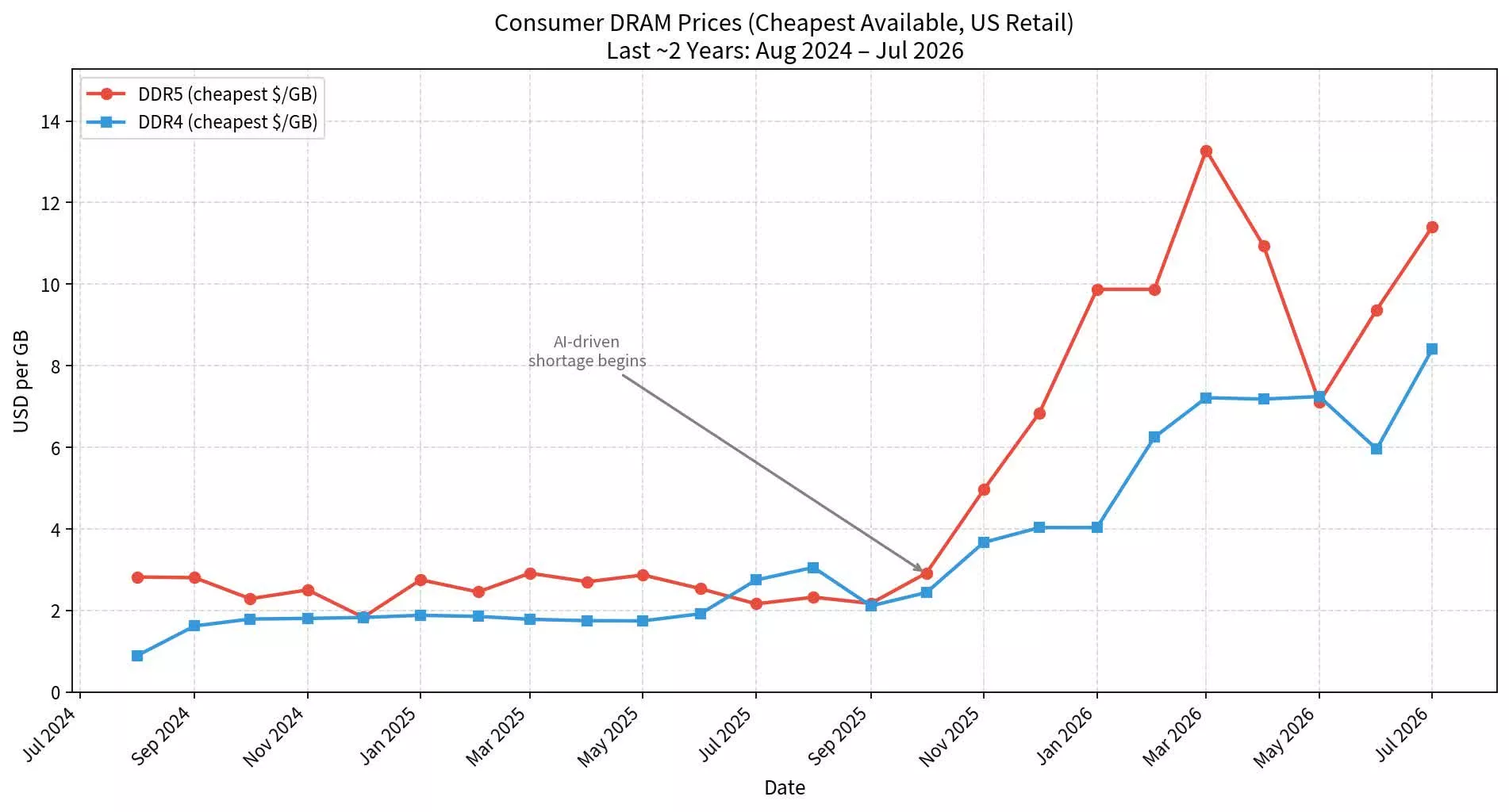
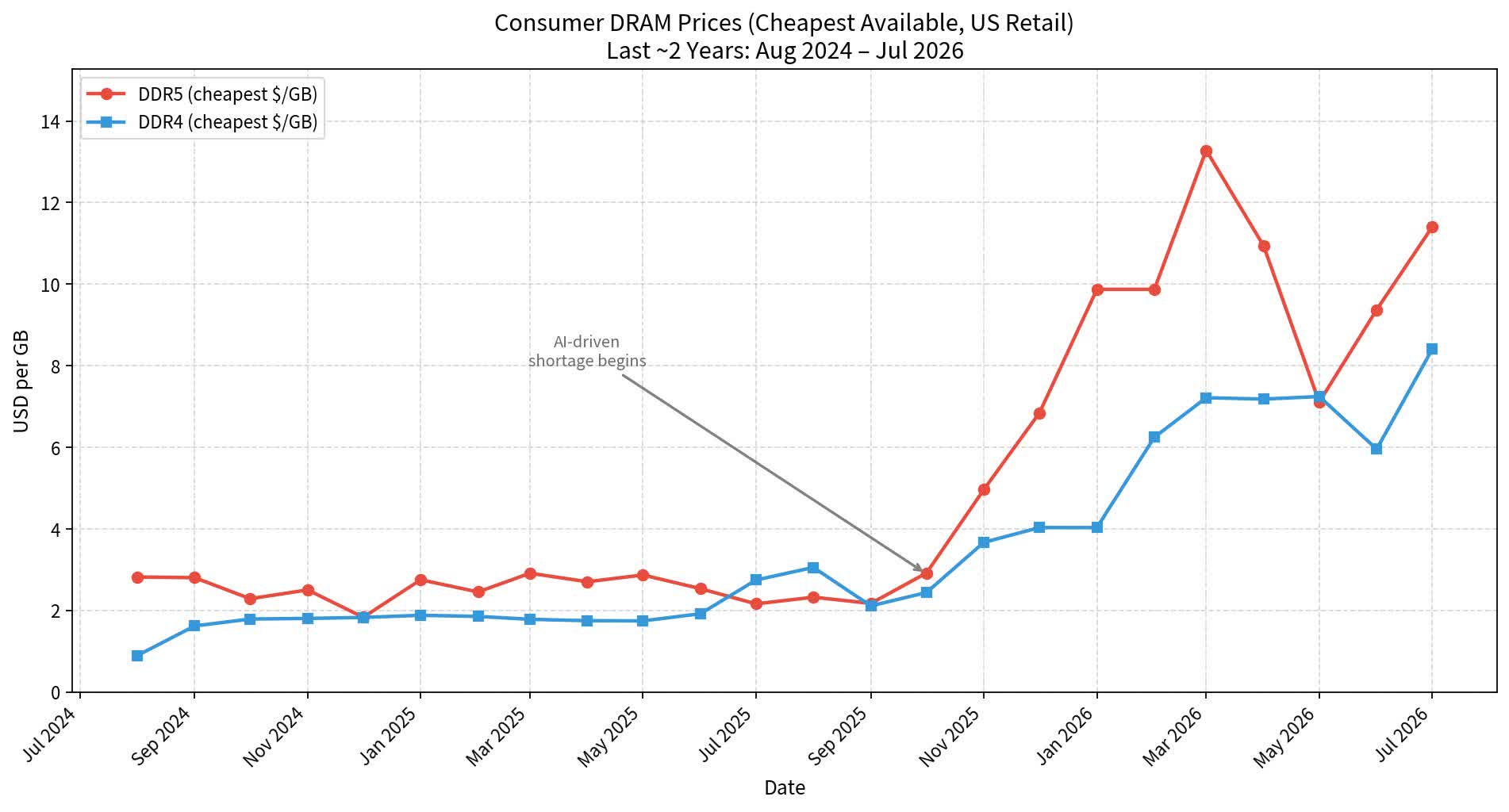
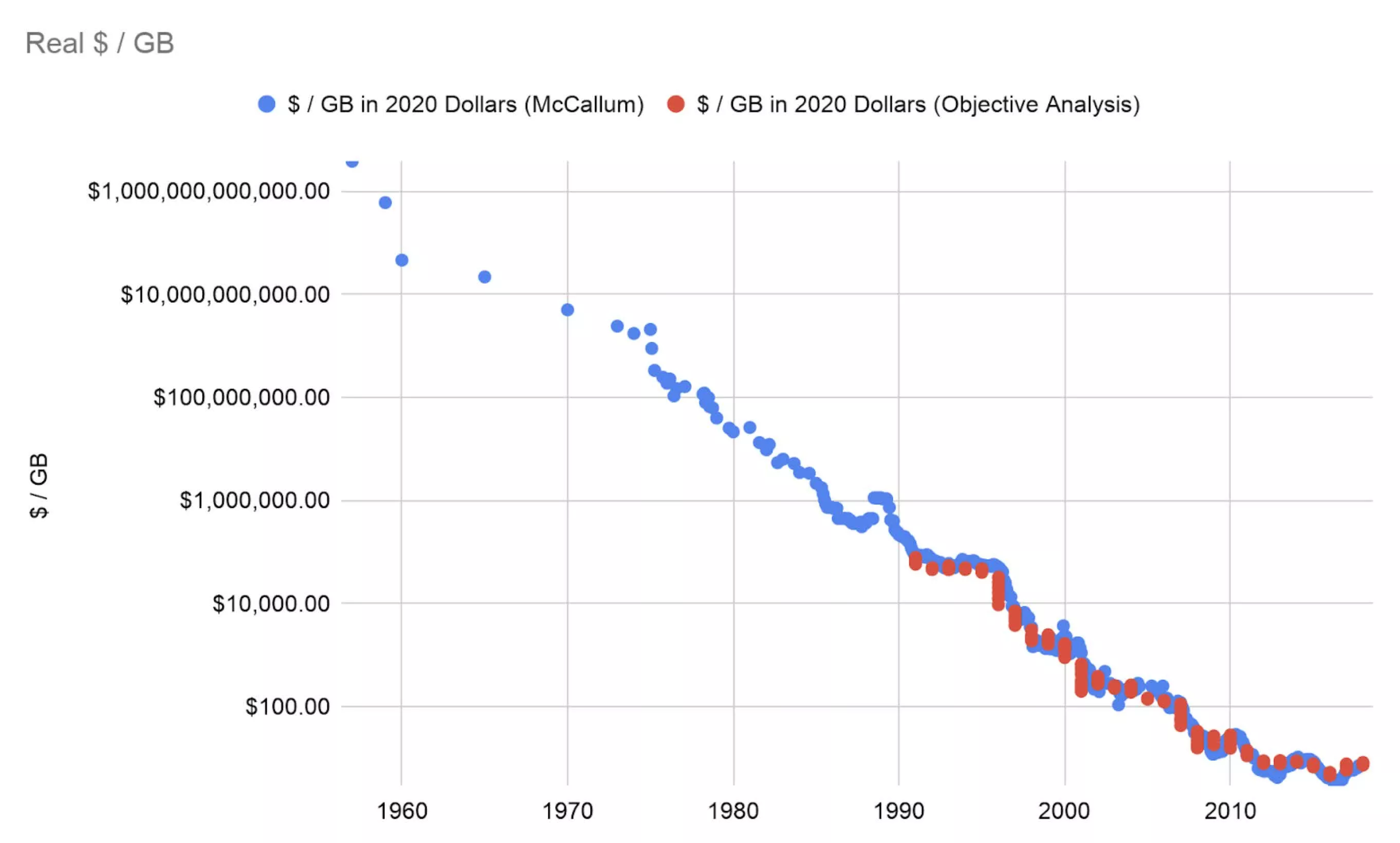
The takeaway: Memory prices have been trending upward for more than a year, with many analysts predicting further increases in the near future. A prominent GitHub developer has now published a series of graphs and charts showing just how quickly prices have surged to 2007 levels on a per-unit basis, effectively undoing two decades of progress in making PC hardware more affordable for consumers.
According to computer science researcher and software performance expert Daniel Lemire, skyrocketing memory prices are a “historical anomaly,” with the unprecedented increases effectively erasing decades of steady, exponential cost reductions.
He believes that for prices to normalize, either software developers will have to find ways to build AI systems that require less memory, or the hardware industry will need to increase production capacity.
Driven largely by rising demand from the AI sector, global memory prices have surged dramatically over the last two years, with a recent J.P. Morgan report estimating an increase of more than 400% since the start of 2024. Unfortunately for consumers, the surge isn’t limited to DRAM chips, as an acute manufacturing shortage in flash memory has also pushed up prices for SSDs, flash drives, memory cards, and external storage.
According to industry reports, contract and retail prices for NAND flash have risen between 50% and 100% since the start of the crisis, triggering price increases across a broad spectrum of consumer electronics, including laptops, desktops, graphics cards, smartphones, and video game consoles. While brands such as HP, Dell, and Apple have raised prices for their laptops and MacBooks, Sony and Nintendo have also raised prices for the PS5 and Switch 2, respectively.
Ominously for consumers, South Korean semiconductor giant SK Hynix has predicted that the global memory crisis is far from over. According to CEO Kwak Noh-Jung, 2027 will be the worst year ever for the industry, with demand continuing to outstrip supply even beyond 2030.
However, whether these predictions materialize will depend in part on the health of the AI industry, amid growing fears that speculative investment in the sector is creating a bubble that could burst at any time.
This spring, my wife and I moved from the Denver suburbs into the Colorado Rockies. The high-altitude retreat presented a welcome reprieve from our otherwise tech-dominated lives. As remote workers, however, we faced certain challenges, and technology was the only reason our move was possible in the first place.
Prior to my time at El Reg, I, among other things, breathlessly covered a subset of the networking industry, which as it happens had become big business following the COVID-19 outbreak and the pandemic that followed. I’m speaking, of course, about software defined wide-area-networking (SD-WAN).
Little did I know, a mere six years later, this technology would become essential to my wife and me.
Had it not been for 5G and Starlink, the move might as well have been time travel. To put it into perspective just how far into the foothills we’d ventured, the fastest wired connection at our disposal was DSL. CenturyLink promised, but notably did not guarantee, up to 20 Mbps down and a staggering 1.5 Mbps up.
Advertisement
Compared to the symmetrical gigabit fiber line we’d enjoyed in the Denver suburbs for the past six years, relying on DSL alone felt positively medieval. To those, including many of my neighbors, living this reality, you have my sympathies.
Thankfully, DSL wasn’t our only option. For better or worse, 5G and Starlink are helping to close the digital divide in a meaningful way — but individually they’re still far from perfect.
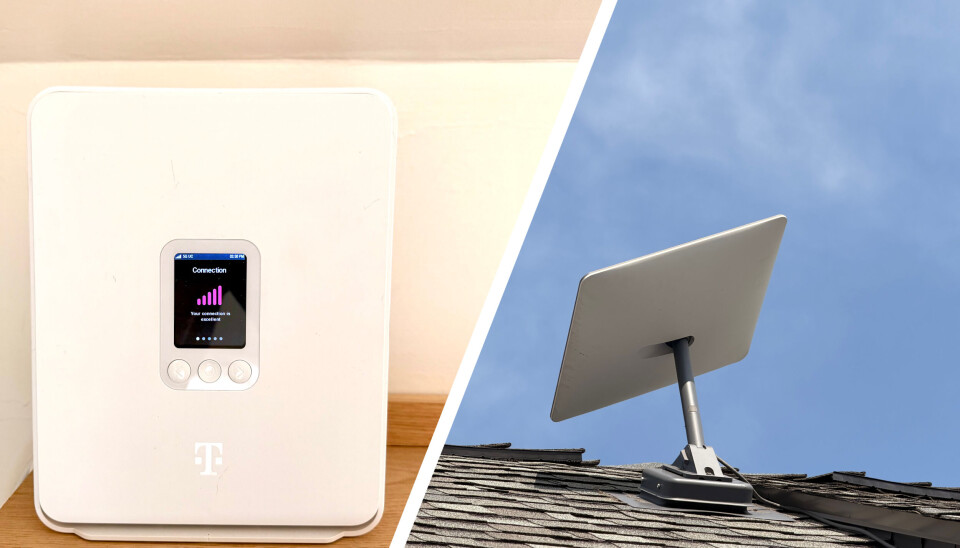
Left, a T-Mobile 5G home internet combo modem/router — Right, a second-gen Starlink dishy that we don’t actually use, but is positioned in a far more photogenic spot on our roof than the V4 dish we actually do connect to.Tobias Mann
Where we live, T-Mobile’s 5G internet service delivers near-gigabit download speeds and uplink speeds ranging from 30–40 Mbps. Meanwhile, Starlink promised between 100 and 400 Mbps downlink depending on the plan, with uplinks that, at least for us, capped out at around 30 Mbps.
Either would be fast enough for our needs, but reliable? Turns out there’s still some room for improvement. In the past two months we’ve experienced no fewer than a dozen dropped connections lasting anywhere from a minute all the way to five. Making matters worse, the majority of these drops took place during working hours.
Advertisement
With a relatively clear view of the sky, we’ve found Starlink to be more reliable, but even SpaceX isn’t immune to the occasional outage. That’s not to mention the threat of space junk kicking off a Kessler syndrome-like event.
SD-WAN to the rescue
The easy way to approach multi-WAN would have been to set up two networks, each with its own SSID. In the event one went down, we’d switch to the other.
While simple, it’s far from perfect, and does nothing to mitigate disruptions to the voice and video calls on which my wife and I spend a considerable amount of our week. With two WiFi access points, we’d also have to contend with interference from overlapping channels.
Wrangling multiple LANs, wireless SSIDs, and firewall rules isn’t exactly ideal. Thankfully, there’s a better way, and we just so happened to have all the equipment we needed.
Advertisement
SD-WAN was developed in the early 2010s to solve a very specific problem: as SaaS apps like Office 365, Salesforce, and Google Apps took off, more and more enterprise traffic was going out to the internet.
This was a problem for a lot of enterprise WANs, which often relied on expensive MPLS links designed to connect satellite offices to servers running back at headquarters or regional datacenters. In many cases, these WANs were built to prioritize reliability over bandwidth, and due to their topology required backhauling traffic tens or hundreds of miles just to access the internet.
SD-WAN gateways offered an alternative. These devices could route internal traffic over the private WAN while SaaS and other internet-bound traffic could be piped over whatever local ISP served businesses in that area.
SD-WAN is an entire can of worms in itself, but for my purposes two key capabilities stood out: multi-WAN and policy-based routing support. Our router, a Ubiquiti UniFi Dream Machine SE (UDM-SE), already supported both.
Advertisement
The hardware
Ubiquiti’s UDM-SE (the lower of the two silver boxes) isn’t the most feature rich of SD-WAN gateways, but it doesn’t require a license and it supports the features I actually need, multi-WAN failover, load balancing and policy-based routing.Tobias Mann
The UDM-SE is not Ubiquiti’s newest nor even its most capable gateway. Introduced in 2022, the all-in-one appliance combines a 3.5 Gbps router (with IPS/IDS enabled) with an 8-port gigabit PoE switch, an integrated network video recorder, and critically two WAN ports, one good for 2.5 Gbps and another capable of 10 Gbps.
Ubiquiti’s SD-WAN implementation is somewhat basic compared to gateways from HPE, Cisco, or Extreme. However, of the bevy of networking and security features SD-WAN encompasses, we only really needed a handful – multi-WAN and policy-based routing were the main ones – and Ubiquiti is kind enough not to gate this functionality behind an enterprise license.
The setup itself was about as simple as it gets: plug each ISP-provided gateway into one of UDM-SE’s WAN ports and tell it whether you want to load-balance traffic across the two, or failover in the event of an outage or dropped connection.
In practice there were a few extra steps, including disabling the 5G and Starlink gateways’ onboard routing and WiFi functionality. Starlink supports a bypass mode, but the T-Mobile modem+router combo didn’t. We were able to disable the onboard WiFi, but only using an onboard utility.
Advertisement
Putting it to the test
With everything connected, we opted to configure the UDM-SE for WAN failover with T-Mobile as the primary and Starlink as the backup, rather than load-balancing traffic across the two, in part because the 5G link was so much faster.
The first few days after setting everything up, my wife and I were questioning whether we even needed Starlink. But then we saw the notification: “Internet connection WAN1 (T-Mobile USA) on port 9 is down and WAN2 (Starlink) is now active,” and then a few minutes later, “Internet connection WAN1 (T-Mobile USA) on port 9 is restored after failing over to WAN2 (Starlink).”
Both notifications were dated two hours earlier. We just hadn’t noticed. In fact, despite at least a dozen dropped connections over the past two months, the UDM-SE failed over fast enough that it was never an issue. No dropped calls, no buffering video, no timed-out web pages.
Perhaps the most surprising discovery was that while Starlink didn’t offer the fastest or lowest-latency connectivity, it was remarkably reliable. Despite less than perfect alignment and view of the sky, the logs show just two dropped connections in the past month, one of which happened in the middle of the night when no one was awake to notice.
Advertisement
While not an everyday occurrence, dropped connections still happen far more often and for longer than I’d like.Tobias Mann
While WAN failover kept us online, it didn’t do anything to guard against network congestion. The UDM-SE offers a preconfigured quality-of-service (QoS) policy that in theory should detect Zoom or MS Teams traffic and prioritize it over something like Windows Update or YouTube.
But since we had two WANs, we could go one better and take advantage of another SD-WAN favorite: policy-based routing. This allowed us to force certain devices or services to prioritize one ISP over the other. For example, because Starlink had proven to be the more reliable of the two links, I wrote a policy to route traffic from my wife’s work laptop over the satellite link first and fail over to T-Mobile in the event of an outage. This also had the benefit of ensuring that if I happened to kick off a large game or AI model download while she was in the middle of a meeting, I wouldn’t get myself in trouble for turning her Zoom call into a pixelated mess.
The digital divide is narrowing, not closed
In the more rural parts of the US where wired connectivity isn’t a given, cellular home internet and low-Earth orbit (LEO) satellite communications, like Starlink, have gone a long way toward closing the digital divide — particularly for those working from home.
However, individually they’re still far from perfect. Dropped connections weren’t a daily occurrence, but they still occurred more frequently and for longer than we would have liked. Five minutes is a long time to wait wondering whether the person on the other end of the Zoom call will be there when you eventually get back online.
Advertisement
Technologies like SD-WAN can help to mitigate the problem by allowing multi-WAN failover, load balancing, and policy based routing, but to take advantage of them also requires paying for two ISPs and hundreds of dollars of equipment, which may or may not require monthly subscriptions or annual licenses.
We were fortunate that the hardware we already owned supported these features and didn’t lock them behind a pricy enterprise license. Even still, we’re paying more for internet than we’d like. Between T-Mobile and Starlink, we’re spending around $125 a month to get online.
Along with the higher price, network latency is also a lot higher than we’d like. Compared to our old fiber line, which routinely achieved latencies under 5 ms, T-Mobile and Starlink ranged from 15 ms at best to as much as 80 ms at worst.
The only online game I play regularly is a real-time strategy that’s old enough to drink. I’m not playing CS:GO or whatever twitch shooter is popular these days, so the higher latency wasn’t that big of a deal, but if you’re a competitive gamer, a wired connection is still a must.
Advertisement
The good news is T-Mobile and Starlink may not be our only options for high-speed internet for much longer. There are numerous ongoing efforts across the US and other nations to improve access to fiber connectivity, including one slowly working its way down the highway in our general direction.
On a personal note, while it’s neat to experience a technology firsthand that I dedicated years of my life to writing about, the moment fiber-to-the-home comes, both our Starlink and 5G home internet subscriptions are getting the boot. ®
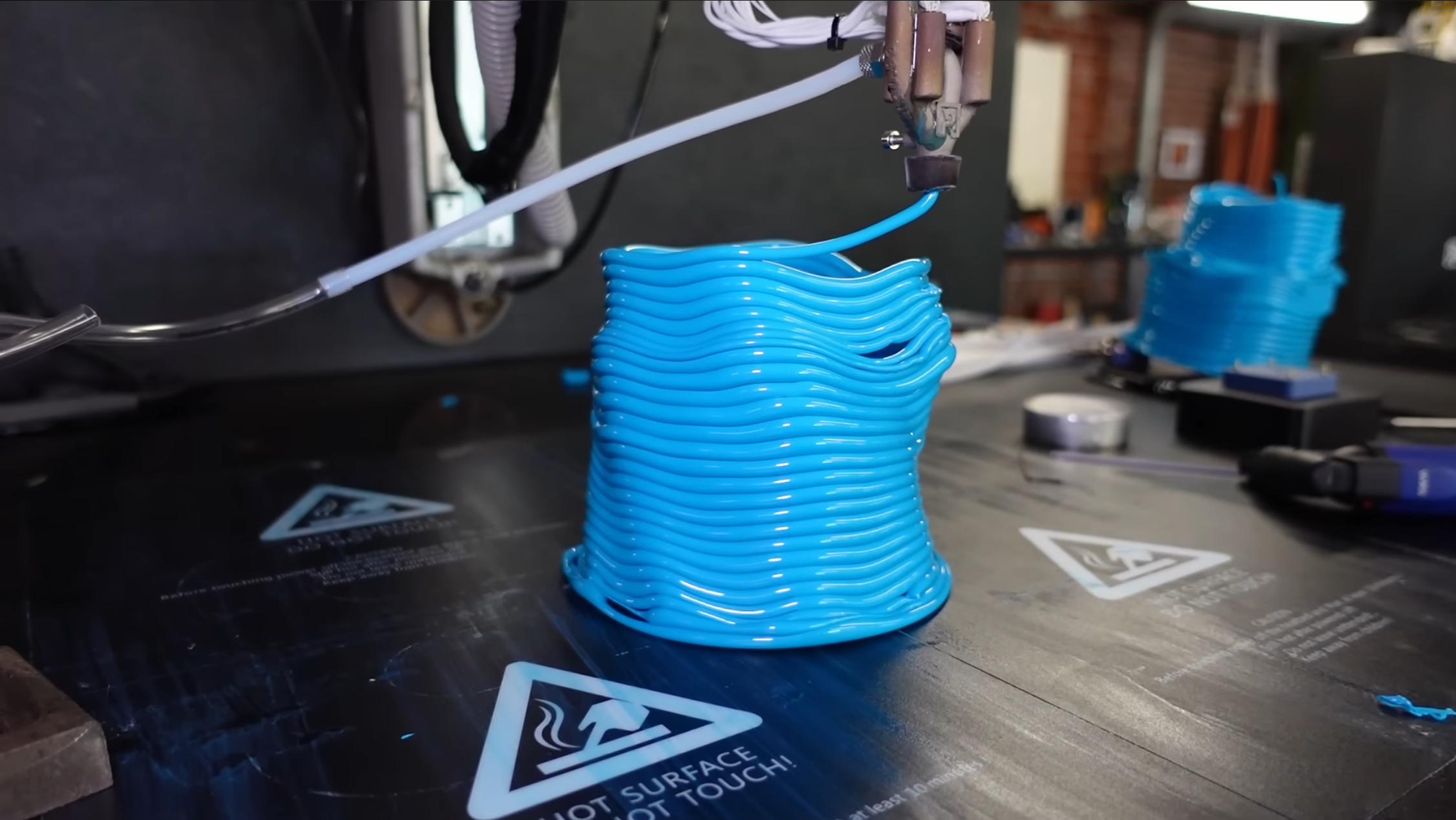
[Jan] of [Roetz 4.0] has a unique approach to multi-material 3D printing: he’s designed an extruder which takes two different materials and extrudes one as a shell around the other. This opens up some interesting possibilities, such as a conductive filament surrounded by an insulating shell; [Jan], however, didn’t have an immediate use for the process, so he moved on to a related technique: extruding plastic tubes with a compressed-air core.
The extruder he used for this was a variation on the dual-material extruder; it takes in two strands of filament, melts them, and extrudes them as a shell around the outlet of a compressed-air line, which was controlled by a high-precision pressure regulator. During testing with PLA, it seemed capable of extruding airtight tubes of filament, though it had a tendency to blow bubbles and form tubes with inconsistent diameters. The low thermal conductivity of the stainless steel extruder also proved problematic; coupled with the cooling effect of the compressed air, filament sometimes solidified inside the extruder.
[Jan] found it almost impossible to get consistent results using only pressure-based control; as the layer of molten plastic around the air gets thinner, it provides less resistance to further ballooning, leading to continuous expansion until the bubble bursts. Controlling the volume of air extruded provided much more consistent results, and in a second video, he built a peristaltic pump to do just that. He also switched to using TPU filament, which greatly improved layer adhesion. When inflated with compressed air, the finished TPU structures expanded slightly, though there were still air leaks. The results look promising, and TU Darmstadt has already carried out some research in this area.
In a separate research project, we’ve seen a similar multi-material co-extrusion approach used to print pneumatic channels. For more on the history of [Jan]’s multi-filament extruder, check out his Minuteman printer.
There are a few different ways to keep apps under the radar.
Andranik Hakobyan/Getty Images
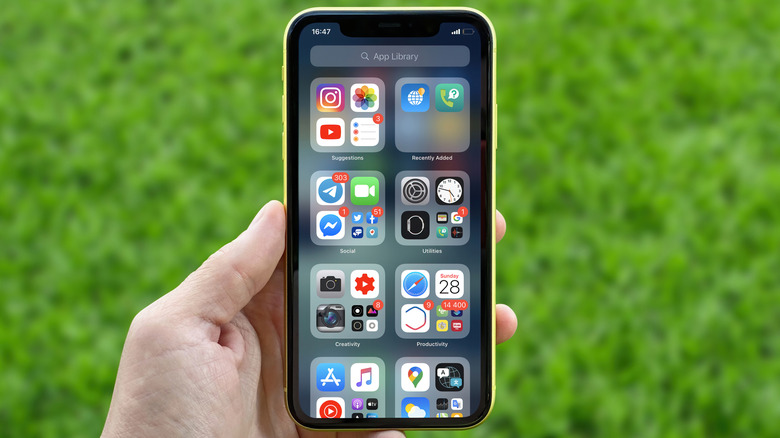
Sometimes, you don’t want your iPhone or iPad to display all installed apps right on the Home screen. The simplest method is long-pressing an icon, tapping the – (minus) icon next to it and choosing Remove from Home Screen. This banishes it to the App Library, but you can go further.
Maybe you want to declutter your iPhone and keep the list tidy, keep getting distracted by social media or don’t want others seeing what you have installed. In these cases, iOS and iPadOS give you several ways to hide apps to keep them out of your (and others’) view. While these methods aren’t secret agent-level tricks that hide in plain sight, they’re suitable for keeping icons out of view and locking anything that needs extra security. In case a full lock and hide isn’t right for you, you can still remove apps from your screen or suppress their content around your phone.
We focus on iPhone and Face ID for brevity, but this works the same way on iPad and models that have Touch ID.
Advertisement
The primary method for hiding iPhone apps
Mr.Mikla/Shutterstock
Prior to iOS 18, there was no official way to hide apps on iPhone or iPad; you had to stick one inside a folder to keep it out of view. Now, there’s a better method. To hide an app, long-press it on your device’s Home screen and choose Require Face ID. Doing so shows a new prompt that explains what happens upon locking. You have to authenticate with Face ID or your passcode to open it, notifications won’t contain any details and its content won’t show up in places like Spotlight searches or CarPlay.
It’s a smart idea to lock financial tools for a second layer of security. You’ll find lots of stories online of people being scammed by strangers who asked to use their phone in an “emergency.” Once they have your phone in hand, it only takes seconds to transfer money to themselves using Venmo or similar. Even though you shouldn’t hand your phone to a stranger in the first place, requiring re-authentication for the app prevents schemes like this.
Choosing Require Face ID keeps the icon where it is while requiring authentication every time you open it. Alternatively, pick Hide and Require Face ID to remove it from your Home screen and searches. After hiding an app, you’ll get no notifications from it. You can’t lock most default apps; this is limited to ones you’ve installed. And the status of what you’ve hidden doesn’t sync to your other Apple devices.
Advertisement
Hidden apps live in a special folder, aptly called Hidden, at the bottom of the App Library. Swipe all the way to the rightmost page to see this. That Hidden folder appears blank no matter how many apps you have hidden (including zero). Tapping it requires you to authenticate before you can see what apps are inside, and then you’ll need to verify again when opening one. To unhide something later, long-press on it in the Hidden folder, choose Don’t Require Face ID, and the app will return to the top of the list after it verifies you. You can then search for it using Spotlight and drag it back to wherever you’d like.
Hidden apps aren’t totally invisible
Cheng Xin/Getty Images
While this process greatly reduces an app’s visual presence on your device, it doesn’t erase all traces. Anyone with your passcode can browse the Hidden folder, as well as the same list under Settings > Apps > Hidden apps.
But there are other places where “hidden” apps can appear: Settings > Screen Time > See All App & Website Activity and Settings > Battery > View All Battery Usage. These show how long you’ve used each and how much battery it’s consumed on your phone, respectively. Even if it’s hidden, it will still show up in these spots if there’s data to report.
Advertisement
Apps you download also show up in your App Store purchase history (even free ones, despite the name). To hide these, open the App Store, then tap your profile icon at the top right and choose Apps & Purchase History. If you’re in a family group, tap Your Apps. Everything you’ve downloaded, including any not on your iPhone anymore, appears here. Swipe from right to left and choose Hide to remove an item from this list. If you change your mind later, go back to the top-level App Store menu, touch your name at the top, and choose Hidden Purchases. There, you can Unhide any to put them back in the list.
This method is more for decluttering than any form of privacy. You don’t need to authenticate to view the Hidden Purchases list, plus your transaction history is also kept under Purchase History in the Apps & Purchase History menu. Hiding purchases prevents anyone in your family group from redownloading them, but it won’t hide the apps themselves.
Advertisement
Other methods to keep apps under control
Tada Images/Shutterstock
Hiding apps isn’t the only method of controlling what appears on your phone. As we’ve seen, it’s a good way to spend less time on addictive software, since it adds additional steps for access and hides all notifications. But you can add more restrictions for these.
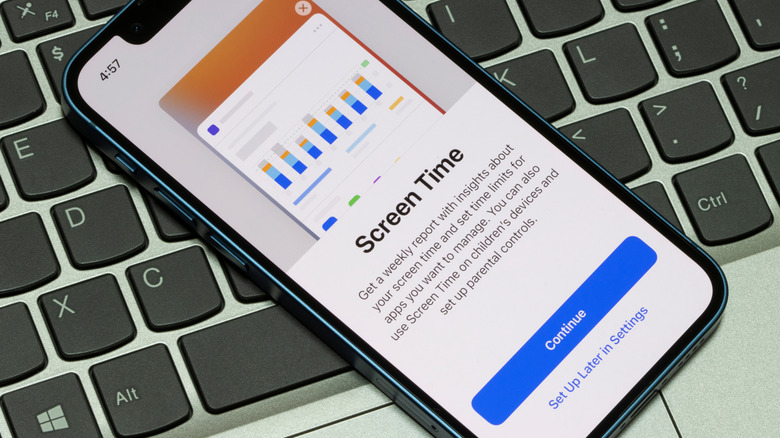
Head to Settings > Screen Time to set a daily time limit for chosen apps (App Limits) or set hours when you can’t access them (Downtime). Also in this menu under Content & Privacy Restrictions > Allowed Apps & Features, you can disable access to some built-in tools (like FaceTime and Mail), which removes them from the Home screen. While many of these options are great for controlling a child’s iPad, anyone can take advantage of them.
If an app is bothering you too much, go to Settings > Notifications, select the offender, and fine-tune its notifications so you aren’t nagged. To make your iPhone stop suggesting an app, visit Settings > Apple Intelligence & Siri > Apps, choose one, then disable the sliders to stop your phone from suggesting it. And to remove an app from search, visit Settings > Search, select it and disable both sliders. Hiding an app does all of these, but you can take these actions without hiding if you want to keep it visible.
Hiding apps isn’t 100 percent foolproof, but it adds more steps for people to see what you’d rather them not. Maybe you don’t want others snooping around your phone when you hand it to them, or you want to add additional protection against someone trying to use your phone for nefarious purposes. For more protection, consider enabling Stolen Device Protection on your iPhone.
The Apple Watch will see a revamp in the coming years, as Apple is reportedly in the middle of a shake up its wearables formula to meet an ever-changing market.
The Apple Watch has retained the same core design of a square display on a watch band, but it has evolved over time. While it has become thinner, larger, and more rugged in the Apple Watch Ultra, it can potentially do more.
In Sunday’s “Power On” newsletter for Bloomberg, Mark Gurman writes that the Apple Watch is ready to get overhauled into something new. The company’s industrial design team has been rethinking smartwatches in general over the last year, and it’s considering new directions to go in.
The team hasn’t quite decided what to actually do with the Apple Watch yet, but it is mulling the problem over.
Advertisement
These changes apparently include switching the square display for a circular version of various sizes. There’s also the possibility of removing the display altogether, to match the growing market for wearables without screens.
Smart rings are also seeing a rise in adoption, which gives Apple another wearable avenue to explore. It has repeatedly filed patents in the field, but an Apple Ring release continues to elude the company.
Sooner changes
Whatever new direction the Apple Watch takes, it won’t be anytime soon. The expected Apple Watch Series 12 and Apple Watch Ultra 4 will be largely performance-based updates.
Health and fitness changes are said to be included. Despite previous rumors, there are no major design changes in 2026 for the main Apple Watch body.
Advertisement
There is, however, a rumor that Apple will be introducing a new band attachment method for the 2026 model. If correct, it’s a change that will probably make earlier Apple Watch bands incompatible with the new model.
That said, it’s a rumor that we have heard on and off since 2022. It may happen, but it could be better suited as part of a larger overhaul.
I was fourteen or so when I went to the Gadget Show Live (once a big tech event in the UK which showed off the latest technology) in 2016 as a punter and overheard someone on a stand I’d visited mention they’d spent £1,000 on a custom gaming PC.
A thousand pounds. On a computer. I remember turning that figure over in my head (it’s roughly $1,400) and not quite being able to make sense of it, not necessarily because I couldn’t fathom how much money that was, but because at the time, it seemed like a lot of money to spend on a PC without any frame of reference as to what that price got you.
As it turned out, £1,000 would have bought you an upper mid-range system back then, and speccing a top-end system of the time would have added an awful lot more to my ‘dream budget’. A properly specced 3XS system built around Intel‘s then-flagship Kaby Lake processor, the Core i7-7700K, and an Nvidia GeForce GTX 1080, would set you back around £1,700 including VAT.
Advertisement
Latest Videos FromTechRadar
Nvidia went one further with the venerable GTX 1080 Ti, which arrived in March 2017. It immediately became the card every serious PC gamer wanted, and pushed that high price even higher. Nonetheless, you still got an entire top-of-the-range PC for that price.
(Image credit: Future)
Here’s what’s strange about that number in 2026: it’s roughly what you’d pay for a flagship graphics card alone. Nvidia’s RTX 5090 should retail for roughly in line with what this entire PC cost, although the Asus ROG RTX 5090 Astral I’ve got for testing is over double the RRP of this PC, even taking inflation into account.
Intriguingly, the GPU that was the ceiling of consumer ambition in 2017 is now, in isolation, cheaper than a mid-range graphics card in 2026. Nvidia’s GTX 1080 Ti launched at £699 / $699 (about AU$930); the RTX 5090 launched at £1,799, at least for the Founder’s Edition card.
That’s not a like-for-like comparison — flagship GPU pricing has always been a law unto itself — but it does tell you something about the economic difference between these two moments in PC gaming history.
Sign up for breaking news, reviews, opinion, top tech deals, and more.
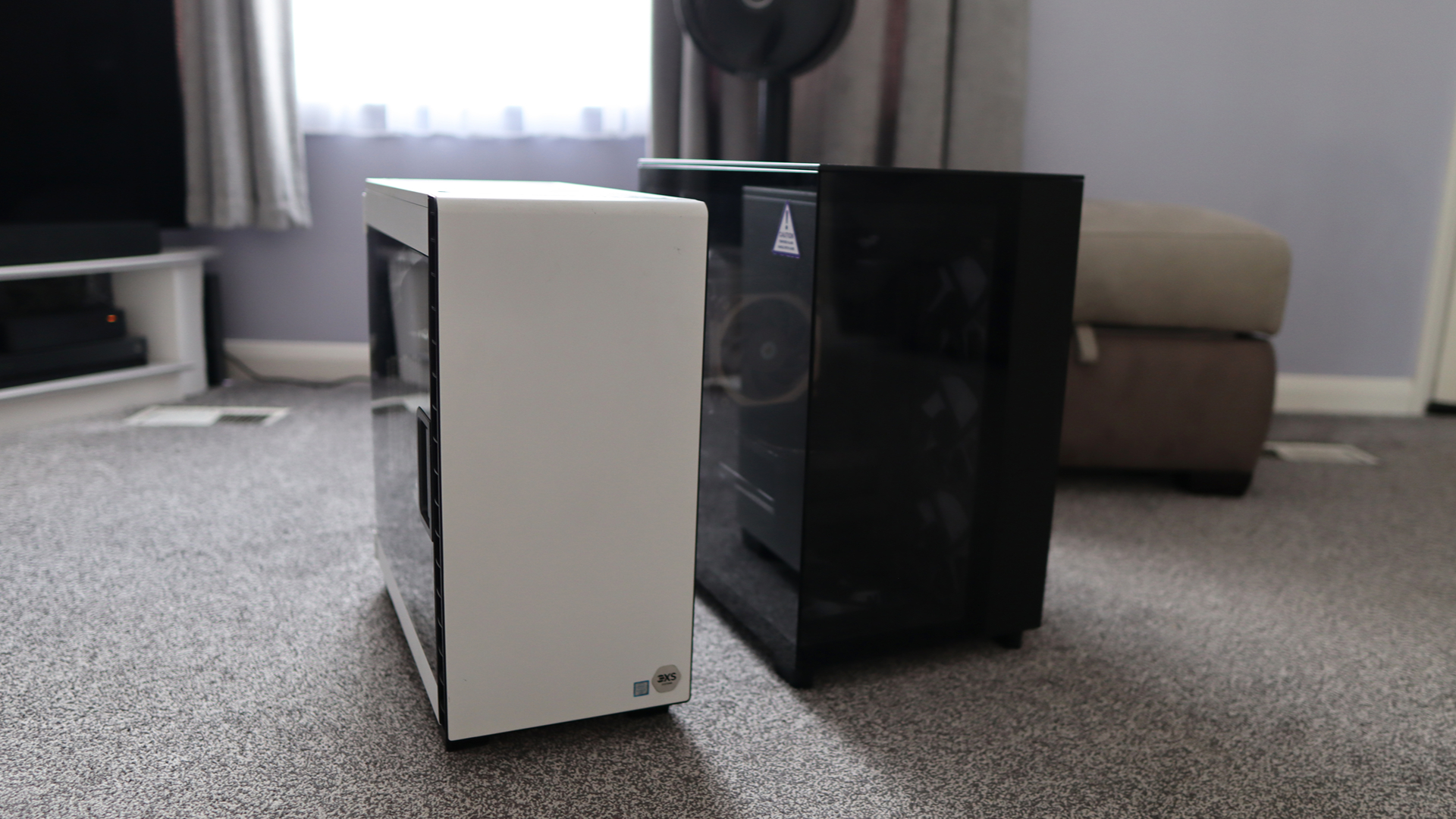
Now, Scan has sent me that exact system, and I’ve plonked the GTX 1080 Ti Founder’s Edition inside, and I’ve been running it alongside my own high-spec rig, with an RTX 5090 added for good measure, to see how the decade-old dream holds up.
Advertisement
What £1,700 bought you nearly a decade ago
Here’s the entire spec sheet of the 3XS PC that Scan sent my way with the GPU swapped out:
CPU: Intel Core i7-7700K
Cooler: Corsair 240mm AIO
GPU: Nvidia GTX 1080 Ti Founder’s Edition
RAM: Corsair Vengeance LED 16GB DDR4-3000
SSD: Samsung 960 Evo 250GB SSD (supplemented with a further 1TB SSD for game storage in my case)
Motherboard: Asus ROG Strix Z270F Gaming
PSU: Corsair RM750x 750W White
Case: Corsair Carbide 400C in white
On first impressions, I’m a fan of the Corsair Carbide 400C case, feeling it to be a quieter and more considered choice than a lot of the RGB-laden alternatives that were becoming increasingly common at the time. Coming in white adds a bit of style to proceedings, and it seems roomy enough for the build on offer here. The hinged door with glass window is a nice touch, too.
Inside, the Asus ROG Strix Z270F Gaming motherboard is decently feature-rich and adds a smattering of RGB in the top corner to sit alongside the white LEDs of the RAM and the stock case fan inside. The Samsung 960 Evo SSD would have been top spec at the time, but is the one component that feels particularly outdated. It’s a fast, capable boot drive, but is easily filled up with a modern Windows 11 installation and a game or two. Back in 2017, you’d have definitely wanted a hard drive installed as well.
Advertisement
(Image credit: Future)
Then there’s the GTX 1080 Ti Founder’s Edition. Nvidia’s reference cooler on the Ti was a meaningful step up from the blower-style designs of previous generations, with an open dual-fan layout that kept temperatures in check. It’s a handsome card even by today’s standards and feels more restrained than the AIB partner designs that surrounded it. Holding it in 2026 feels like handling something from a very specific and rather significant chapter in GPU history, given its legendary status.
The 1080 Ti has a reputation that outlasted the hardware cycle it was supposed to belong to. When Nvidia’s RTX 2080 Ti arrived in 2018, it brought ray tracing and a steeper price — and offered only a slight bump in rasterisation performance that most 1080 Ti owners looked at the cost of upgrading and decided against it. Even now, folks are asking how good this card is today, which is testament to its performance – and indeed its reputation.
A modern point of reference
Of course, benchmark numbers are no good in isolation, so for comparison’s sake, I’m putting the Scan system against my own personal gaming rig, with the added boost of the RTX 5090. Usually it’d be an RTX 4080 Super, but for a ‘dream PC’ angle, I needed to go with the modern dream. Here it is in terms of specs:
That isn’t too bad of a PC if I do say so myself, and yes, I could use faster RAM or a beefier AMD processor if I wanted to eke out as much performance as possible, but I haven’t seen fit to upgrade just yet.
(Image credit: Future)
Benchmarking methodology
To see how this 2017-era PC performs in the big 2026, I thought it might be fun to run it through a range of games – both ones that are contemporaries of the system and some slightly more modern titles that might push it quite hard. I’ve also put it through a range of modern benchmark tests to gauge performance against the newer hardware.
To Scan’s credit, the machine came running the latest version of Windows 11 25H2 and Nvidia’s latest driver release for GTX 10-series desktop cards, driver 582.66, which was a security update released in June 2026.
I’ve also elected to run games hooked up to my 4K QD-OLED monitor to see how far we can really push this Scan system, running at 1080p, 1440p and 4K to give you a full picture. The RTX 5090 system has also been put through the same tests, as close as possible, to give some comparable results and a frame of reference.
Advertisement
Testing 2017-era games
Firstly, I thought it was correct to run the Scan system through some games that would be period-correct for the time this PC was released to give an idea of a baseline. All four titles were run at their maximum settings, for reference.
Far Cry 5 seemed an ideal first candidate, being from 2018, and at the Ultra preset with HD textures enabled, it managed a 113fps average at 1080p. Going up to 1440p pushed things to 95fps, proving some surprisingly playable results. It was only when I got up to 4K that things dipped immensely, with a 50fps average. For reference, the RTX 5090 system hit 186fps at 4K, which tells you something about how much the goalposts have moved.
I followed this up with the original Dirt Rally, a game that relies on a strong CPU to help alongside the 1080 Ti, so the Core i7-7700K has to do a fair bit of heavy lifting. At the Ultra preset, the 1080 Ti managed 127fps at 1080p and 126fps at 1440p — results so close together that the GPU clearly isn’t the bottleneck at either resolution; the 7700K is setting the ceiling, and it’s holding it pretty well. At 4K, the GPU gets more of a say, and results come in at a still-reasonable 79fps.
Advertisement
(Image credit: Ubisoft)
However, this revealed one of the bigger gulfs between the older system and my more modern option. The RTX 5090 system managed 304fps at 1080p, 267fps at 1440p, and 225fps at 4K — numbers so high they serve as a reminder of how differently the two machines interpret the same game.
The original Hitman, which uses DirectX 12 at maximum settings, returned 128fps at 1080p, 106fps at 1440p, and 59.5fps at 4K. The RTX 5090 system managed 203fps at 1080p, 191fps at 1440p, and 186fps at 4K — again, the gap narrowing considerably at lower resolutions before opening up at 4K.
I’d argue Rise of the Tomb Raider is the 1080 Ti’s finest hour in this period-correct lineup. Running at the Very High preset in DirectX 12, it returned 144fps at 1080p and 110fps at 1440p. These are numbers that would have felt sky-high at the time and still feel impressive today. Even at 4K, the 59.7fps result is the most modern-feeling 4K figure of the four period titles, suggesting this is a game the 1080 Ti was particularly well-matched for, and a near-60fps average provides some very playable results even today.
(Image credit: Future)
That is, until you get the RTX 5090 involved – it posted 316fps, 302fps, and 281fps across the three resolutions in Rise of the Tomb Raider.
Advertisement
Trying newer games
The older game results paint a flattering picture of the 1080 Ti. However, modern titles are much less kind, as you might expect.
My first port of call was Cyberpunk 2077, perhaps this generation’s Crysis equivalent, as it can be quite a demanding title for a range of systems. For the 1080 Ti, at the Ultra preset without any upscaling, it managed 52fps at 1080p — passable, if not quite the experience the game deserves — while 1440p dropped to 32fps, and 4K delivered a deeply unimpressive 13.9fps. Enabling FSR 2.1 Quality improved things to 62fps, 41fps, and 20.5fps across the three resolutions respectively, which at least makes 1080p feel workable.
Beyond that, it’s a significant compromise. Ray tracing isn’t an option here at all — the 1080 Ti simply has not got the hardware for it, and that means for 2026’s most demanding titles, including Indiana Jones & The Great Circle that require hardware-based ray-tracing to even run, you won’t be able to play them at all.
Advertisement
(Image credit: CD Projekt Red)
The RTX 5090, by contrast, ran the Ultra preset at 173fps, 148fps, and 116fps natively. Plus, a more modern card supplements its raw power with Nvidia’s DLSS upscaler and fully-fledged RT performance. With DLSS Transformer enabled, those numbers climbed to 183fps, 170fps, and 167fps. With a combination of Cyberpunk 2077 at its RT: Ultra preset with DLSS Transformer enabled, it managed 130fps, 129fps, and 125fps at 1080p, 1440p, and 4K respectively. The gap between these two machines in Cyberpunk 2077 is the widest in my entire test suite, and the most instructive.
This is especially true when you take the multi-frame-gen tech Nvidia has put into these new Blackwell cards, acting as a multiplier for ‘fake frames’ for a smoother feeling experience, as long as you’re starting with a solid enough base frame rate so too much latency isn’t introduced. With the RT: Ultra preset, and the MFG multiplier set to 4x, the RTX 5090 system managed 511fps at 1080p, 452fps at 1440p and 355fps at 4K, widening the gulf even further.
Returnal tells a similar story for this matchup. The Epic preset returned 57fps at 1080p, 45fps at 1440p, and 27fps at 4K — the 1080p result is playable, but Returnal’s fast-paced action makes anything below 60fps feel like a handicap, and 27fps at 4K is below any reasonable threshold. The RTX 5090 managed 231fps, 207fps, and 147fps at the same resolutions. In a game built around sharp reactions and split-second timing, that headroom matters more than in most.
(Image credit: Future)
Moving over to Rainbow Six Extraction, I had higher hopes for a more modern eSports-type title. The default Ultra preset includes a Dynamic resolution of 25-100% of the selected one, which is how I left it, revealing 126fps at 1080p, 85fps at 1440p, and a genuinely solid 66fps at 4K. It’s the most comfortable the 1080 Ti looks across this entire modern test suite, and a reminder that there are modern titles that aren’t particularly demanding, which are still playable on older hardware.
Advertisement
Meanwhile the RTX 5090-equipped modern PC scored 461fps at 1080p, 405fps at 1440p, and 272fps at 4K, and prove the benefit of the bevvy of high refresh rate OLED screens we’ve begun to see in recent years when paired with such powerful hardware.
For one final test, I thought it’d be interesting to try a super up-to-date Unreal Engine 5-based title in Black Myth Wukong, as one of the few titles that doesn’t need any hardware-based ray-tracing, unlike a lot of its contemporaries.
I elected to step down to the Very High preset, with FSR enabled (with a resolution scale of 33 for 4K, 49 for 1440p and 66 for 1080p) and frame-gen on. The result was 46fps at 1080p, 44fps at 1440p, and 40fps at 4K, which make for some remarkably consistent numbers across different resolutions that make it clear that frame-gen is doing some form of heavy lifting to keep the output FPS so stable. The RTX 5090 managed 120fps, 122fps, and 119fps with the same settings.
Advertisement
Synthetic benchmark time!
The synthetic benchmarks tell a predictable story. The 7700K holds up reasonably well in single-core workloads — the gap to the 7800X3D is meaningful but not embarrassing, and is somewhere in the region of 50% depending on which test you trust.
Multi-threaded performance is a different matter, though, where nearly a decade of core count increases and architectural progress make the comparison increasingly one-sided.
On the GPU side, the picture is more interesting. In 3DMark Fire Strike — a DirectX 11 test that’s broadly representative of the conditions the 1080 Ti was designed around — the RTX 5090 leads by roughly three time. Push to Fire Strike Ultra at 4K, and that becomes nearly five times, and the Time Spy results, which move into DirectX 12 territory, tell the same story: a 4x gap at 1440p becoming 4.6x at the Extreme variant.
The 1080 Ti doesn’t just lose ground to newer hardware — it loses it disproportionately as resolution and API demands increase, which is worth keeping in mind as we come to a judgement on this entire system.
Advertisement
Swipe to scroll horizontally
Header Cell – Column 0
Intel Core i7-7700K + Nvidia GTX 1080 Ti FE
AMD Ryzen 7 7800X3D + Nvidia RTX 5090
Geekbench 6
1,643 (Single) 5,484 (Multi)
Advertisement
2,691 (Single) 14,911 (Multi)
Cinebench R23
1,204 (Single) 6,038 (Multi)
1,763 (Single) 17,541 (Multi)
Advertisement
3DMark Fire Strike
19,076
55,465
3DMark Fire Strike Ultra
Advertisement
6,241
30,553
3DMark Steel Nomad
1,982
Advertisement
N/A
3DMark Time Spy
7,785
31,075
Advertisement
3DMark Time Spy Extreme
3,627
16,828
Advertisement
Summing up
The comparisons made here make for a fascinating reminder of just how much the PC gaming landscape has changed over the past decade.
In 2017, £1,700 bought you an entire dream machine built around the best consumer graphics hardware money could buy. In 2026, that same sort of money barely gets you through the door for a flagship GPU alone. The economics are strange, but the performance gulf is telling: the RTX 5090 system is several times faster in many of the tests here, especially as resolutions rise and modern rendering technologies come into play.
However, the old Scan system isn’t the write-off those numbers might suggest when you drill down. The GTX 1080 Ti and Core i7-7700K remain a remarkably capable pairing in the games they were designed around, with high-refresh-rate 1080p and 1440p gaming still very much within reach for those older titles. Even some newer titles remain playable with sensible settings, although the lack of dedicated ray-tracing hardware and modern AI-assisted upscaling means there are increasingly firm limits to what the system can do.
That perhaps says more about how well balanced the original machine was than anything else. The 1080 Ti earned its legendary reputation because it wasn’t merely fast for its time, but rather remained relevant for years afterwards, and even now it can still provide a decent experience in the right games. There are still folks talking about how well it does today, which is a testament to its legacy.
Advertisement
(Image credit: Future)
Admittedly, the rest of the system has aged more unevenly, with the 16GB of DDR4 memory and tiny 250GB boot drive feeling particularly constrained in 2026, but there is still something satisfying about using a PC that once represented the absolute pinnacle of enthusiast gaming so far removed from the original situation.
The modern machine is undeniably better in almost every measurable sense. It’s dramatically faster, more capable at 4K, and supported by technologies that simply didn’t exist when the GTX 1080 Ti launched. Features such as DLSS, frame generation and hardware-accelerated ray tracing have changed what we expect from a high-end graphics card, while high-refresh-rate OLED displays, such as the one both systems have been hooked up to from Philips, give all that extra performance somewhere meaningful to go.
Still, there is a certain charm to the 2017 system in my book. It represents a point when a top-end gaming PC felt aspirational but not entirely unattainable — when spending £1,700 could buy the whole dream, rather than just the graphics card. The hardware may no longer be cutting-edge, but it hasn’t become entirely obsolete either. If anything, testing it against a 2026 flagship proves just how exceptional the GTX 1080 Ti was, and how long a genuinely well-specced gaming PC can remain enjoyable.
The goalposts have moved enormously, but the old dream still has plenty of game left in it.
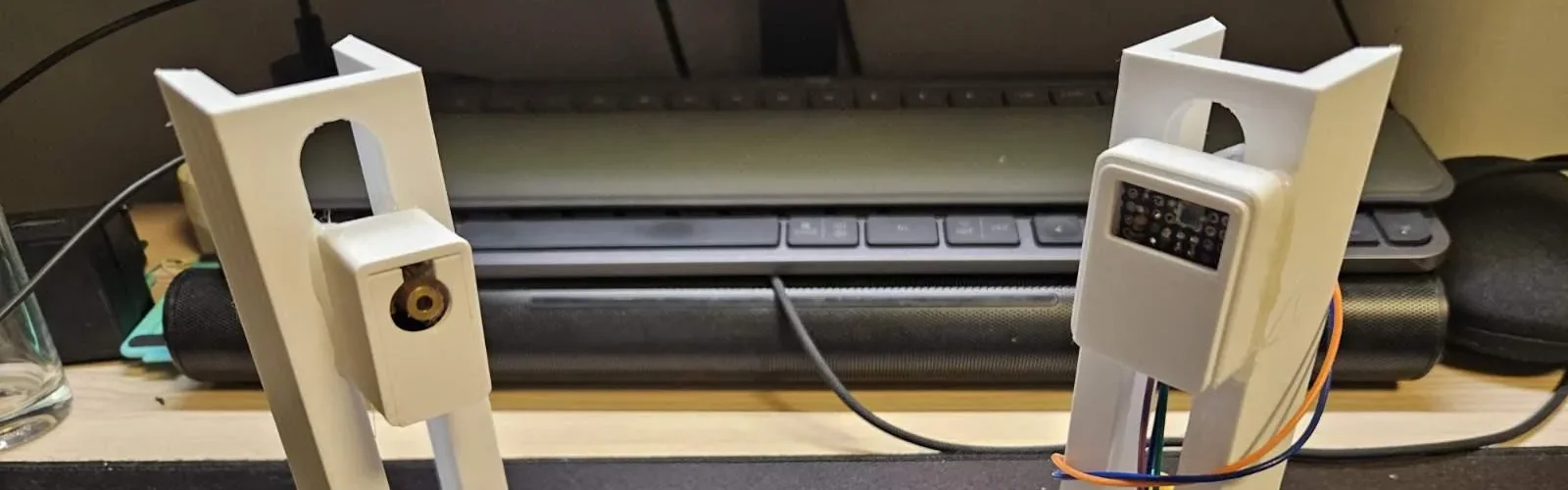
Transmitting analog video via photons is old hat: that’s how everything started, after all, back in the day with over-the-air TV. Up the frequency of those photons from radio to visible light, though? Well, now that’s rather interesting. [Daniel] aka [milar111]’s LYME 101– which doesn’t seem to stand for anything–laser-video transmitter/receiver pair was a strong contender in the recently-completed Frikken’ Laser Beams challenge, but somehow we missed putting it up on the blog.
The project is documented quite well on GitHub as linked above, as well as on Instructables, and Hackaday.io, and in a YouTube video we’ve embedded below so you can see it in action. In principle it’s pretty simple: a Raspberry Pi is used to generate the composite video signal, which modulates a red laser diode through a 2N2222 NPN transistor and some passives. The reciever is a BPW34 photodiode wired with reverse bias for speed and fed through a LM318N op-amp. To get +9V and -9V for this circuit, [Daniel] makes the easy hack of using a pair of 9V batteries for a noiseless dual supply. It hooks up to a CRT just fine, but a little finessing in the form of a terminator resistor and a DC bias pot on the transmitter were needed to get his USB capture card working with the signal.
It’s not the weirdest way we’ve seen people hack analog video signals– there’s no audio cassettes to be seen, and the signal isn’t even SECAM, the oddest encoding— but that’s not a slight. Transmitting video with higher-than-normal-frequency photons might not be that weird, but it looks like a lot of fun.
Vinyl has survived cassettes, CDs, Napster, the iPod, Spotify and several decades of people confidently predicting its imminent death because records continue to provide something streaming cannot: ownership, permanence, large artwork, ritual and a physical connection to music that someone presumably cared enough to write, perform, record and master. Artificial intelligence has apparently looked at all of that and decided it needed a piece of the action.
Suno is preparing to launch Suno Vinyl, a service that will turn music generated through its AI platform into personalized 12 inch records. Users will be able to select up to 46 minutes of music, create custom artwork and labels, and have the finished record pressed and shipped to their door for an estimated $45 plus shipping. The service is not yet live, although Suno is accepting users for its waitlist, which raises the fairly obvious question of who exactly has been sitting around waiting for this particular collision between generative AI and physical media.
That does not make Suno Vinyl an irrelevant story. Quite the opposite. Suno has become one of the largest generative music platforms in the world, raised hundreds of millions of dollars and is now operating at a scale where its decisions can influence how AI generated music is created, distributed and monetized. What makes this announcement interesting is not that somebody can turn an AI song into a record; it is that AI generated music is rapidly acquiring the same commercial infrastructure as conventional recorded music, including licensing, distribution, royalty policies, copyright disputes and now physical products.
Whether it deserves all of that is another question.
Advertisement
Calling It “Vinyl” Requires an Asterisk
There is one detail getting somewhat lost in the excitement: Suno calls the service Suno Vinyl, but the actual 12 inch record is manufactured from black PETG rather than conventional PVC vinyl. Suno describes the material as environmentally friendly and says the records are genuinely pressed rather than novelty lathe cuts, with full color printed sleeves, custom labels and audio taken from the user’s final mix.
Why Suno Vinyl exists (from Suno Vinyl website)
That is fine as far as it goes, but if you are charging roughly $45 for something intended to spend its life on a turntable, we would like considerably more information. Suno currently says nothing meaningful about the pressing plant, mastering process, record weight, manufacturing tolerances or whether the supplied file receives any additional preparation before being committed to the physical format. The company promises “high quality audio,” but without any technical context that phrase carries about as much useful information as “premium sound” on the side of a Bluetooth speaker box.
Those omissions would be troubling if Suno were positioning this as an audiophile product, although there is little indication that it is. The target customer is not likely to be comparing cutter heads, lacquer sources or different pressings of A Love Supreme before deciding whether a PETG copy of an AI generated ska song about the family Labradoodle deserves shelf space.
$45 Buys a Lot of Actual Music
The pricing becomes more amusing when placed beside what traditional record buyers can purchase for the same money. We recently reviewed Rhino High Fidelity’s new edition of Curtis Mayfield’s Super Fly, an all analog release cut by Kevin Gray and produced specifically for listeners who care about sound quality, and that record sells for $39.98.
Suno estimates about $45 plus shipping for a personalized PETG pressing of whatever its software generated after somebody typed a sufficiently elaborate prompt. The comparison is not entirely fair because Rhino can manufacture an established title in quantity while Suno is offering personalized, low volume production with custom artwork and packaging, but consumers do not make purchasing decisions inside an accounting seminar. They have $45, and that amount buys excellent new releases, several used records, a stack of inexpensive CDs or, depending on your level of restraint inside a record shop, the first twelve minutes of what eventually becomes a $140 purchase.
Advertisement
That is why Suno Vinyl makes almost no sense as a value proposition for conventional music collectors. It is not really competing with Rhino, Blue Note, Craft Recordings, Analogue Productions or any of the labels serving the vinyl enthusiast market. It is competing with personalized gifts, novelty merchandise and the emotional satisfaction of taking something that existed only on a screen and turning it into an object.
What Problem Is Suno Vinyl Solving?
Generative AI has removed almost every traditional obstacle involved in creating something resembling a finished song. You do not necessarily need musicians, a recording studio, microphones, instruments, engineers or enough musical ability to survive “Hot Cross Buns” on a recorder because software can produce something in seconds that has vocals, instrumentation, structure and a finished mix.
Advertisement. Scroll to continue reading.
If the result is terrible, you generate another one. If that is terrible, you generate ten more. Deezer recently reported receiving tens of thousands of fully AI generated tracks every day, which underscores one of the central contradictions of this entire market: we can now create music much faster than anybody can realistically consume it.
Advertisement
Against that backdrop, Suno’s decision to turn one of those infinitely reproducible digital files into a scarce physical object is almost comically logical. The technology creates abundance, while the record creates the appearance of permanence and scarcity. You have to admire the capitalism involved because Suno has effectively identified a way to assign physical and emotional weight to a product whose defining advantage is that it can be generated endlessly and almost instantly.
That may ultimately be the real appeal.
Vinyl Means Something AI Music Does Not
The resilience of physical music has very little to do with consumers suddenly forgetting how convenient streaming is. Hundreds of millions of people pay for streaming subscriptions precisely because instant access to almost everything is useful, yet vinyl and CDs continue selling because ownership still means something when the rest of our media lives increasingly exist behind subscriptions, licensing agreements and corporate servers.
People stream because it is convenient; they buy records because some music matters enough to own. A copy of Kind of Blue, London Calling, Super Fly or Songs in the Key of Life does not become meaningful because somebody pressed it onto plastic. The record exists because the music already demonstrated enough cultural or personal value that listeners wanted to keep it, display it and return to it.
Advertisement
Suno reverses that relationship. Pressing the music onto a record can become part of the process of convincing ourselves that the thing mattered in the first place, which is a considerably stranger proposition. Someone may create a song about a deceased parent, a wedding, a child’s birth or another deeply personal experience and treasure the resulting object, and there is nothing artificial about that emotional reaction. But Suno also promotes birthday songs, anniversary tracks and inside jokes as likely applications, which tells us far more about the real market than any grand claim about reshaping music creation.
So Who Is This Actually For?
Suno Vinyl is primarily personalized merchandise, and viewed through that lens the concept begins to make considerably more sense. It is for the person who generates a birthday song for Dad and thinks presenting him with an actual record will be funnier and more memorable than texting him a link. It is for couples who want their AI generated anniversary anthem sitting beside the wedding photographs, and for people creating fictional bands, joke albums and personal projects who simply want to hold the finished result in their hands.
There is also a more legitimate creative use case for musicians who employ AI as one tool inside a larger process involving their own lyrics, vocals, instrumentation or production. AI assisted music and fully AI generated music are not the same thing, something we have argued repeatedly in our recent coverage, and a physical pressing of a genuinely collaborative project may have real personal or promotional value.
But none of that turns Suno Vinyl into the next meaningful development in analog playback. For most customers, it is closer to a custom photo mug that happens to spin at 33⅓ rpm, which is not necessarily an insult because personalized products can be fun. It merely means the thing belongs in a very different conversation from an AAA Blue Note reissue, and nobody should expect Kevin Gray to arrive with tasting notes.
Advertisement
The Copyright Mess Now Comes With a Record Sleeve
The physical format also makes the unresolved legal and ethical issues surrounding AI music feel considerably more tangible. Suno says users who create songs while subscribed to its paid plans are considered the owners of those songs and retain commercial usage rights, while material created on its free tier is intended for noncommercial use. The company also acknowledges that ownership of a generated recording does not necessarily mean the work qualifies for copyright protection, particularly when the human contribution is limited.
That distinction becomes harder to ignore when the thing arrives in the mail with your name printed on the jacket.
Suno’s relationship with the traditional music business remains equally complicated. Warner Music Group settled its dispute with Suno and entered into a partnership intended to support future licensed models and new AI experiences involving participating artists, yet litigation involving AI training and copyrighted material continues elsewhere. A Munich court recently ruled against Suno in a case brought by German rights organization GEMA, illustrating just how unsettled the legal framework remains even as companies race ahead with new commercial products.
Advertisement. Scroll to continue reading.
Advertisement
That is why Suno Vinyl deserves more attention than a goofy product announcement normally would. AI music now has creation platforms, label partnerships, licensing agreements, streaming distribution, royalty policies, chart debates, copyright litigation and physical records. It has managed to recreate almost the entire music industry with remarkable speed, although nobody has yet announced an AI tour manager capable of losing the band’s cash somewhere outside Cleveland.
Physical Media Deserves Better Than More Content
We have spent much of 2026 covering the continued strength of physical music because records and CDs provide something increasingly valuable in an era of rented digital access. They offer ownership, preserve particular masterings and editions, support artists and labels, and encourage listeners to engage with albums rather than allowing an algorithm to pour background audio through the room until everyone goes to bed.
That is what makes Suno Vinyl simultaneously fascinating and faintly ridiculous. The vinyl revival has been driven partly by listeners deciding that certain music deserves more attention, more permanence and more emotional investment than another disposable stream, while Suno’s technology is built around making the creation of additional music almost frictionless. Those ideas are fundamentally at odds, and putting one inside the packaging of the other does not solve the contradiction so much as give it a rather handsome record sleeve.
The Bottom Line
Suno Vinyl is an important story attached to a profoundly unnecessary product. The company plans to let users take up to 46 minutes of music from their Suno libraries, add custom artwork and receive a genuinely pressed 12 inch PETG record for approximately $45 plus shipping, but there is almost no audiophile reason to care. Suno has disclosed very little about the mastering or manufacturing process, the record is PETG rather than conventional PVC vinyl, and the same amount of money can buy exceptionally well produced recordings containing music written, performed and engineered by human beings.
Advertisement
That comparison is ultimately beside the point because audiophiles are not really the customer. Suno Vinyl is a keepsake, novelty item, personalized gift and piece of creator merchandise designed for people who want something generated on a screen to feel more permanent, and that is precisely why the product matters even if most serious record collectors would never consider buying one.
AI companies have become remarkably good at generating limitless quantities of content. Suno is now testing whether putting some of that content into a physical object can make consumers assign it greater emotional and monetary value, and perhaps it can. If the next phase involves AI generated yacht rock pressed onto PETG, numbered 1 of 1 and listed on Discogs for $175, we may finally have reached the runout groove.
The Trump administration is paying another $1.2 billion to cancel an offshore wind lease, this time to German utility RWE.
The energy company said in an announcement that the wind farms would have been built off the coasts of California, Louisiana, and New York. Instead, RWE will spend $900 million to buy a small stake in a Louisiana liquid natural gas export terminal.
The New York wind farm would have generated more than 3 gigawatts, according to Heatmap News.
The remaining $300 million will go toward buying natural gas turbines to power 15 peaking power plants around the country. Peaking power plants are among the most expensive and most polluting natural gas power plants to operate. It’s unclear when those will be completed — there’s currently a backlog for new turbines stretching into the early 2030s.
Advertisement
RWE isn’t backing off its offshore wind investments elsewhere, though. The company said it bought 6.9 gigawatts of capacity in the U.K.’s recent auction.
The Trump administration has paid $3.93 billion for the 12 leases it has coaxed developers into abandoning.































































You must be logged in to post a comment Login