Connect with us

Tech

Steady in Your Hand, Why the DJI Osmo Pocket 3 Still Earns Its Place in 2026

Published

on

DJI Osmo Pocket 3 in 2026
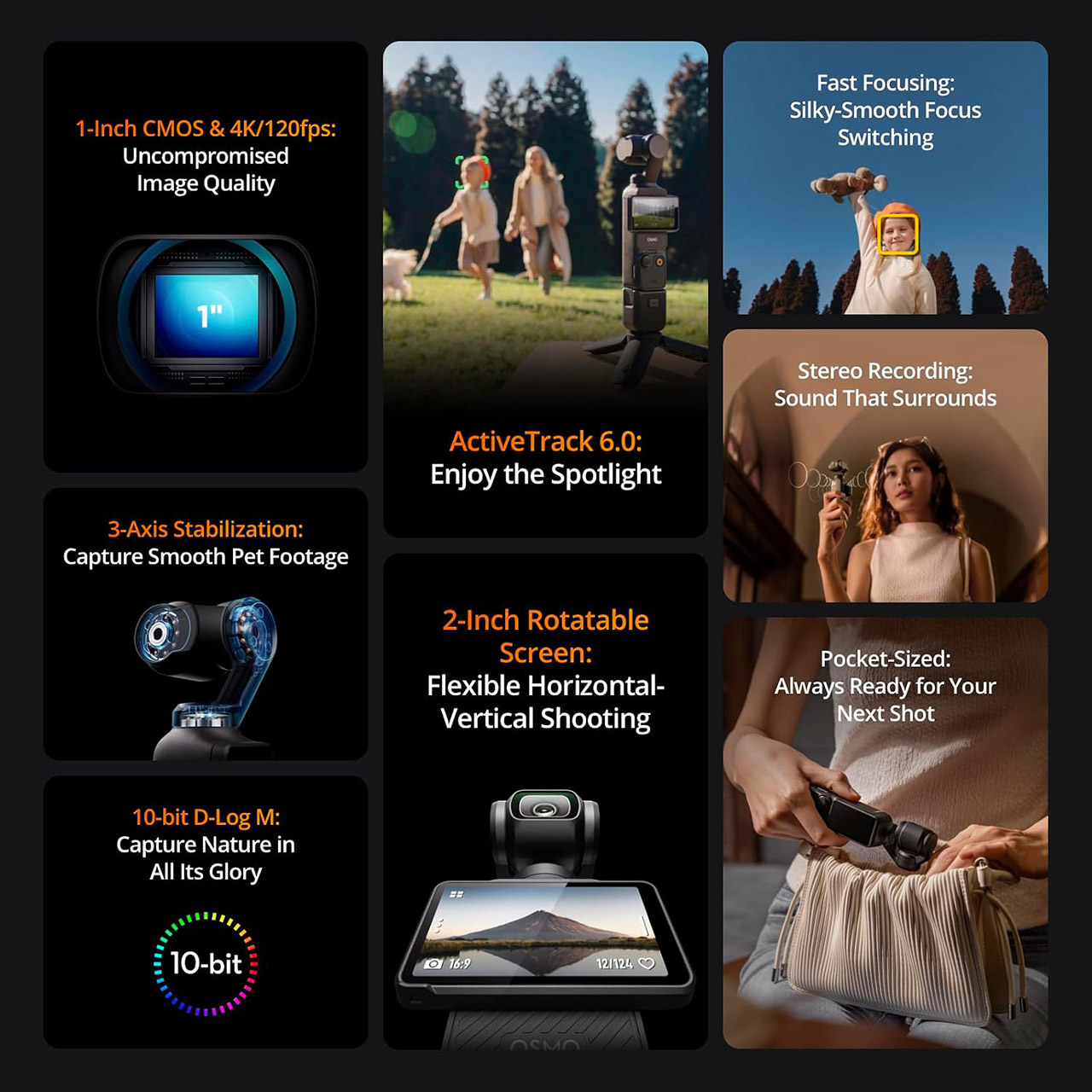
Flipping the two-inch screen open is all it takes to start recording with the DJI Osmo Pocket 3, priced at $399 (was $499). That simple motion turns the camera on and gets you rolling in about two seconds, whether you hold it upright for vertical clips or keep it horizontal for wider scenes. The screen itself rotates freely and stays bright enough to read outdoors at 700 nits, so framing a quick walk-and-talk or a family moment never feels like a chore.


The image quality is much improved because of this device’s one-inch sensor. Coupled with a 20mm equivalent f/2.0 lens that can zoom in from only 20 centimeters out to infinity, the camera does an excellent job of capturing clean details even as the light fades, while 4k video can run at 60 frames per second in standard mode and 120 frames per second in slo-mo without losing resolution. You have ten-bit color options, including D-Log M, which gives you even more editing freedom, and the basic profile generates results that appear highly polished straight out of the box. Even in low-light conditions, this item beats most pocket cameras, as noise is maintained under control even when photography in a restaurant or outside in the evening.

Sale


DJI Osmo Pocket 3 Vlogging Camera with 1” CMOS & 4K/120fps Video
  • Capture Stunning Footage – Osmo Pocket 3 vlogging camera features a 1-inch CMOS sensor and records in 4K resolution at an impressive 120fps. Capture…
  • Effortlessly Frame Your Shots – Get the ideal composition with Osmo Pocket 3’s expansive 2-inch touch screen that rotates for both horizontal and…
  • Ultra-Steady Footage – Say goodbye to shaky videos! Osmo Pocket 3’s advanced 3-axis mechanical stabilization delivers superb stability. Enjoy smooth…


The 3-axis mechanical stabilization ensures that everything looks as smooth as possible. Walking at a reasonable pace, up a flight of stairs, or following someone around a room results in silky smooth film with no artificial warping. Activetrack 6 locks on to a face, person, or object and keeps it in the center even when the gimbal pans and tilts, and full-pixel phase detection focusing snaps in and stays locked even when your subject moves closer or further away.

Advertisement

DJI Osmo Pocket 3 in 2026
The sound quality is also respectable, even for everyday conversations, thanks to the camera’s three built-in mics, which capture crisp stereo sound and effortlessly combine with up to two DJI mic mini or mic 2 transmitters. When you clip a wireless mic to your shirt, the signal comes thru loud and clear; no additional adaptor is necessary, allowing solo vlogging or easy interviews a one-handed process.

DJI Osmo Pocket 3 in 2026
Battery life is adequate for a casual afternoon of shooting. The internal battery provides up to 166 minutes of run time in ideal settings at 1080p, and in the real world, you should anticipate to get an hour or so depending on the resolution and tracking you’re doing, and don’t worry if you run out of juice; the battery recharges quickly. It will charge you back up to 80% in roughly 16 minutes with a competent USB-C charger. Plus, if you need more space, you can simply replace out the card for a larger one, as microSD supports up to 1TB, so your only true limit is the card in your pocket.

DJI Osmo Pocket 3 in 2026
At 179 grams and 14 cm tall, this device is small enough to fit into a jacket pocket or bag without adding any bulk, and if you need more grip or a place to put it, simply screw on the accompanying handle with a quarter-inch thread.

Source link

Continue Reading
Click to comment

You must be logged in to post a comment Login

Leave a Reply

Tech

Three new Windows flaws can bypass security, gain system privileges, and even install malware remotely

Published

on

What we know so far: Cybersecurity researchers have uncovered at least three new vulnerabilities that could potentially allow attackers to gain system privileges even on patched Windows computers. These include a memory configuration chip exploit named “Download more RAM,” a zero-day flaw dubbed “ShieldBreak,” and a “plug and pwn” exploit that could install malware remotely over RDP.

The “Download More RAM” vulnerability, which was presented at the 2026 USENIX Security Symposium in Baltimore, was discovered by researchers from the University of Birmingham and Durham University. It reportedly allows malicious actors to bypass Windows 11 security and gain system privileges without physical access by exploiting the lack of write protection on consumer memory modules.

The vulnerability allows anybody to remotely rewrite the Serial Presence Detect configuration chip that notifies the computer about the amount of installed RAM in the system. Attackers can take advantage of this vulnerability to transmit fake information to the computer, tricking it into believing that it has twice as much RAM installed as it actually does.

The false data tricks the memory controller into mapping additional pseudo-addresses, which overlap with genuine addresses. The aliases allow attackers to create a backdoor into memory by circumventing security and access control mechanisms used by the operating system and the processor.

Advertisement

The vulnerability could potentially allow hackers to re-enable old drivers with known exploits, disable anti-malware software, break into virtualization-based security enclaves, change corporate device management settings, and even bypass kernel-level anti-cheat systems used by video games.

Professor Tom Chothia from the University of Birmingham noted that the attack only requires a script that can be deployed remotely, while previous attacks of this kind required physical access to the machine. He added that major memory brands, including Corsair, G.Skill, and ADATA, ship at least one model line with an unprotected configuration chip in violation of JEDEC guidelines.

Tracked as CVE-2026-23670, the vulnerability has been acknowledged by both Microsoft and Corsair. While Microsoft issued mitigations in its April 2026 update, Corsair has added a feature to its iCue hardware management tool, allowing users to enable write protection on their DIMMs. PC diagnostic app HWiNFO has also added the same feature for non-Corsair users.

There’s also a zero-day vulnerability called ShieldBreak, found by bug hunter Nightmare Eclipse. Tracked as CVE-2026-50656, it’s an elevation-of-privilege vulnerability in Microsoft Defender that can circumvent the RoguePlanet patch and allow attackers to gain system privileges on Windows 10, Windows 11, and Windows Server. However, Microsoft Defender has to be active for the exploit to work.

Advertisement

Finally, security researchers Alejandro Hernando and Borja Martinez have described a new “plug and pwn” attack that exploits Windows’ automatic hardware identification and driver installation process to install signed vendor driver packages with system-level privileges.

Presented at DEF CON 34 in Las Vegas, the vulnerability can be exploited without admin privileges and without a logged-in user. In their proof-of-concept demo, the researchers also showed that the attack can be performed remotely over RDP without connecting any physical USB hardware to the target device.

Source link

Advertisement
Continue Reading

Tech

1.6M RingCentral accounts’ data dumped after ShinyHunters extortion attack

Published

on

CYBER-CRIME

Another one bites the dust

Some 1.6 million unique email addresses tied to RingCentral have been leaked online, alongside names, physical addresses, and phone numbers, according to Have I Been Pwned. RingCentral disclosed the breach on July 28 and said “it was the target of a sophisticated social engineering campaign” affecting a “limited portion of RingCentral customers.”

The comms platform said that it promptly responded to the intrusion upon detecting it, “took steps to stop the unauthorized activity,” and immediately launched an investigation into the security incident with help from a “leading third-party forensic firm.”

Advertisement

“We have not seen any new unauthorized activity since taking these remediation efforts,” the company added.

RingCentral did not immediately respond to The Register’s request for comment on this story. We will update it as needed. 

While the company hasn’t named its attacker, notorious data theft and extortion gang ShinyHunters previously claimed it compromised the collaboration platform, according to a post on its data leak site, viewed by The Register. Screenshots of the post also circulated on social media. The crooks claimed they stole more than 623 GB of data, and set a July 30 deadline for RingCentral to pay up – or else the crew would dump the stolen information online.

RingCentral apparently didn’t pay the extortion demand, and ShinyHunters followed through on its threat, posting customers’ details on the internet.

Advertisement

“The company failed to reach an agreement with us despite our incredible patience, all the chances and offers we made. They don’t care,” the crims wrote on August 3.

A ShinyHunters spokesperson told us that the group broke into RingCentral by voice-phishing an employee and tricking them into giving the crooks their password.

This same group, which security sleuth Dominic Alvieri says is his “top threat group and probably is for most analysts,” has hacked hundreds of organizations since the start of the year, including education tech firms that provide services for schools and universities along with healthcare-sector organizations

Recently, ShinyHunters dumped data stolen from Abbott’s cancer diagnostics business with the leak containing 10.9 million unique email addresses alongside personal and health information.

Advertisement

The crooks claim that they made off with more than 30 million rows of customer information, including more than one million Social Security numbers and 7.5 million dates of birth. More concerning, however, they said the haul includes 22 million-plus rows of client notes containing confidential doctor-patient conversations and health information, and more than 20 million medical-order records containing patient IDs, prescription types, order dates, and refill information.®

Editor’s note: This story was amended post-publication with comment from ShinyHunters.

Source link

Advertisement
Continue Reading

Tech

Six Years of Quiet Work Built a Pair of Robots That Make an Acoustic Guitar Play Itself, Called MegCell Pulse

Published

on

Guitar-Playing Robot MegCell Pulse
After long evenings spent designing mechanisms and calibrating movement, a New Zealand engineer named Bruce finished a system that mounts directly onto an ordinary acoustic guitar and turns digital tablature into live string vibration. He calls it MegCell Pulse. Two coordinated robots handle the work of human hands. One presses the strings against the frets. The other plucks them with six individual plectrums. The sound that reaches the room is the actual instrument speaking, complete with the body resonance and the space around it.


Bruce began this project as an engineer rather than a musician, drawing on his skills in naval engineering, composite work, CAD drawings, and automation. In spare hours after his day job he kept asking what would happen if digital music instructions could drive a real guitar instead of a speaker. He spent roughly 6 or 7 years tinkering with the concept and its variants. The majority of the build is completed on a normal 3D printer, with the remaining parts sourced from a basic list that anybody can order. The software translates ordinary digital tablature into a precise timing signal for the actuators, and it does so without requiring special programming for each song.

Sale


Enya NOVA GO SP1 Carbon Fiber 35-Inch Smart Acoustic-Electric Travel Guitar
  • WHY CARBON FIBER – Nova Go SP1 is made of carbon fiber composite material, which means it’s impervious to temperature and humidity change. Taking it…
  • WHERE THINGS GET INTERESTING – The absolute differentiator of this guitar is that it’s equipped with the SP1 pickup system. It gets you reverb…
  • A PRODUCTIVITY WORKHORSE – SP1 pickup system not only allows you to have tons of fun unplugged. But if you plug it into an amp or PA, this Nova Go SP…

After you put the frames onto the guitar, some gears and magnetic actuators begin moving the arms, which is quite cool. The fretting side simply presses each string in the proper location between the frets, while the plucking side strikes individual strings in sequence or all at once, depending on the file you imported. Timing remains fixed to the digital instructions, ensuring consistent performance from one run to the next. All the user has to do is load a tab file and hit play: the robots will do the rest, while the wooden body and strings generate the tone.

Advertisement


One of the most practical applications allows a human to handle only the plucking, leaving the fretting to the machine. A single-handed musician may complete a full arrangement this way, as Bruce has demonstrated in a video where the robot supplies the left-hand section while a person handles the right, which feels rather natural.

There are a few things it can’t do currently, such as not covering the entire fretboard or doing that nice sliding between frets for legato lines, but the limitations are real, and it still covers a large range of pieces if they are first available as digital tablature. The method focuses on accuracy and consistency rather than trying to record every single human flourish, which keeps the performances sounding rather clean.


No finished units are shipped from the factory, but Kickstarter backers receive the complete digital product, which includes STL files for the printed pieces, a detailed assembly guide, control software, and a parts list. The top tier was one hundred dollars. Once printed and assembled, the owner can simply fix or change it at home. That way, the project remains accessible while still allowing the design to grow and evolve in response to user feedback.
[Source]

Advertisement

Source link

Continue Reading

Tech

What Is A Bluetooth Codec And Which One Offers The Best Audio Quality?

Published

on

If you want the best quality out of your Bluetooth audio, it’s worth reviewing some settings.

Bluetooth is perhaps one of the most enigmatic technologies around. Fittingly symbolized by Scandinavian runes and named after a king who likely had a nasty dental problem, this mysterious technology that transports data through the air is fairly difficult to fully comprehend in and of itself. To further complicate things, there are Bluetooth codecs — which determine the quality of the audio you hear — to contend with, but these are actually simpler than they seem once you learn the terminology.

Codec comes from the words “coder” and “decoder,” and is the method in which your audio data is communicated from the source to your Bluetooth headphones or speakers. They’re essentially like different languages — they’re all communicating the same thing (your audio files), but doing so differently depending on the codec. Each codec has different limitations, as do the devices you’re using. Even Bluetooth itself, despite improvements over the years, can only handle so much data: it caps out at around 2 Mbps, and no Bluetooth device can currently handle true lossless audio unless they simultaneously utilize a Wi-Fi connection.

Advertisement

Understanding Bluetooth codecs

Which Bluetooth codec is best is situational, dependent upon what devices you’re using to send and receive audio and the quality of the audio itself. To best understand the difference between codecs, there are a few different measurements that are important to know. In simplified terms, it all comes down to bits of data.

Bit rate: How much data is sent per second; the more data that can be sent at once, the more of the original quality of the audio is preserved

Audio bit depth: This is the number of bits in each second of audio, which impacts the highs and lows of audio able to be communicated on the other side; the higher the bit depth, the better the dynamic range

Advertisement

Sample rate (kHz): The sample rate of the music per second — essentially how many times a snapshot of the audio is captured. The more it’s sampled, the more accurate the snapshot. The most common sample rate in music production is 44.1kHz, which means that 44,100 snapshots are captured per second.

The standard codec is SBC, which is receivable by and included on every Bluetooth device. For all other codecs, it’s a case-by-case basis for whether they’ll be compatible with your device, making it important to check the finer details on your headphones or speakers. Some codecs, like the Sony-developed LDAC and Samsung Scalable, are proprietary, making the tech that supports it more niche. Though AptX codecs are more widely supported, it’s still a family of codecs owned by Qualcomm, meaning that some (like AptX HD) require specific licensing if you want to, say, use it on your PC. Looking at just the raw data, this is how the most common Bluetooth codecs compare.

Advertisement

Which Bluetooth codec is best?

Looking at just the raw data, this is how the most common Bluetooth codecs compare:

Codec

   Max Bit Rate

   Max Audio Depth

   Max Sample Rate

Advertisement

SBC

   345 kbps

   16-bit

   48 kHz

Advertisement

AAC

   264 kbps

   16-bit

   44.1 kHz

Advertisement

AptX

   352 kbps

   16-bit

   48 kHz

Advertisement

AptX HD

   576 kbps

   24-bit

   48 kHz

Advertisement

AptX Adaptive

   420 kbps

   24-bit

   96 kHz

Advertisement

AptX Lossless

   1.2 mbps

   24-bit

   96 kHz

Advertisement

LDAC

   990 kbps

   24-bit

   96 kHz

Advertisement

LHDC

   900 kbps

   24-bit

   96 kHz

Advertisement

LC3

   345 kbps

   32-bit

   48 kHz

Advertisement

Samsung Scalable

   512 kbps

   24-bit

   44.1 kHz

Advertisement

There are still other factors to consider when dubbing one codec “best.” Just because a certain codec has a higher bit rate than another, it may still compress audio less efficiently — this is the case with SBC versus AAC, where the latter utilizes a more complex algorithm. Other variables and limitations apply as well, like the fact that SBC can have a bit rate of up to 345 kbps, but manufacturers often limit this to 256kbps to prevent battery drain.

Similarly, LDAC, AptX Adaptive and Lossless, LHDC and LC3 all use variable bit rates, adjusting based on the strength of your connection, so you may not reap the full benefits of the codec. That being said, at a certain point there are diminishing returns, as the human ear can only hear qualitative differences up to a certain point. Some of the higher-quality codecs can also drain battery much quicker, so they aren’t the best choice for all-day listening.

Advertisement

How to switch Bluetooth codecs

Depending on your device, you may not be able to control which codec your tech is using. Apple devices, for example, only support AAC and SBC. With an Android device, you can toggle your codecs by activating Developer options or third-party apps.

Switching codecs with developer settings

  1. Turn on Bluetooth and connect your accessory

  2. Go to Settings

  3. Select About phone

  4. Select Software information

  5. Press Build number seven times to activate Developer options

  6. Go back to Settings

  7. Select Developer options, then search for codec

  8. Select Bluetooth Audio Codec in the results, then again once your phone navigates there

  9. Select the codec you want and press OK

Alternatively, you can use an app like the Bluetooth Codec Changer from developer AmrG DEV. This can be less cumbersome than navigating Android menus, and also allows you to do things like set specific audio profiles for different occasions — the kind of codec setup you need for phone calls is likely different than dedicated music listening, for example — though some of these special features require a subscription.

Advertisement

Source link

Continue Reading

Tech

Woman claims her stepfather used Grok to transform childhood photo into explicit imagery

Published

on

A woman identified as Jane Doe 4 has joined a lawsuit filed by three Tennessee teenagers against Elon Musk’s xAI over the role the company’s chatbot Grok allegedly played in creating child sexual abuse material.

According to a report in The Washington Post, the woman alleged that her stepfather used Grok to manipulate a photo taken when she was 11 years old to create more than 7,000 explicit images of her. The woman also said that her stepfather was found dead of suicide two days after the images were uncovered in a law enforcement raid.

“Limitless access to these tools is spreading so quickly,” said the woman. “It is taking everyday life and turning it into child sexual abuse.”

The teenagers who’d filed lawsuit accused xAI (now part of SpaceX) of failing to take basic precautions to prevent Grok from being used to create explicit images of real people, including minors. (X was flooded with millions of Grok-generated sexualized images earlier this year.) They are seeking class action status for their suit.

Advertisement

TechCrunch has reached out to xAI for comment.

If you are in a crisis or having thoughts of suicide, call or text 988 to reach the 988 Suicide and Crisis Lifeline.

Source link

Advertisement
Continue Reading

Tech

DeepSeek’s innovative harness treats everything as a plug-in

Published

on

DeepSeek has piqued the interest of the developer community by releasing an early version of its open source agent harness. This happens as harnesses have become increasingly important to those working with machine learning models.

“Powered by the Cordis meta-framework, DeepSeek Harness is an agent harness built around one core idea: Everything is a plugin,” the China-based AI biz said. “Models, tools, skills, sessions, sandboxes, filesystems, loops, orchestration, and UI are ALL implemented as plugins, and can be mixed, matched, replaced, and extended.”

The term “harness” came into common use this year to describe a longstanding software function – middleware or a mediation layer that handles the input passed to an AI model and the output returned from it. Harnesses oversee prompts, context management, tool orchestration, the agent loop, state management, error handling, safety, permissions, and related concerns.

Claude Code serves as a harness for Anthropic’s Claude model family and Codex performs a similar function for OpenAI’s GPT model family. And there are many other model harnesses, including Aider, Cline, Goose, OpenCode, OpenHands, and Pi, to name a few. 

Advertisement

The term isn’t precise: It may be used to refer just to the agent loop and tools, or it may be extended to a broader set of concerns related to orchestrating different tools, services, and capabilities like sandboxing, subagents, and so on. Google Antigravity, for example, consists of the Antigravity Agent Runtime (harness) that can be accessed through the Agent SDK, the Antigravity 2.0 desktop application, and the Antigravity CLI.

Vague definitions aside, AI model harnesses are now where much of the competition is happening, particularly as models proliferate and become commoditized. The harness often implements the user interface, a source of user inertia, and once developers configure their tooling and become accustomed to doing things a certain way, it becomes more burdensome to switch to a competing product, even if the interface consists mainly of a command line.

What’s more, various studies have suggested that model performance (and cost) varies significantly with the harness used, due to different design choices. For example, the Pi coding agent relies on a minimal system prompt of about 200 tokens. Claude Code by comparison uses a system prompt of around 10,000 tokens (or did until last month when Anthropic trimmed the system prompt by about 80 percent). The same model will produce different results with different harnesses.

DeepSeek Harness is noteworthy because of its innovative design, and because it shows Chinese AI labs moving to compete beyond model benchmarks and pricing.

Advertisement

First, it treats everything as a plugin. It uses the plugin system from its underlying Cordis framework, which is designed to make it possible to add and remove components dynamically without wreaking havoc.

“Plugins provide every agent capability, including models, tools, skills, sessions, sandboxes, storage, loops, scheduling, and the UI,” the DeepSeek Harness website explains. “Cordis services and events let the plugins work together. Developers can select, swap, or extend any capability in configuration without changing the DeepSeek Harness source code.”

A DeepSeek paper [PDF] by researchers Yifan Shi, Wei Zhang, and Tianyi Cui explains the function of Cordis in more detail. Cordis is designed to support dynamic composability – adding plugins and removing them on the fly without breaking the application.

The paper refers to this as temporal composability – removing a component and reverting its effect upon removal – and spatial composability – allowing components to manage dependencies upon other components.

Advertisement

It cites as an example the plugin system used by Microsoft’s Visual Studio Code. VS Code, the authors explain, runs all of its extensions in a shared process called the extension host. Once activated, they cannot be removed on the fly; the host has to be restarted. 

While VS Code provides a way for extensions to declare dependencies between extensions, it’s seldom used. DeepSeek Harness supports plugin dependencies.

The DeepSeek researchers argue temporal and spatial composability are necessary in a system where modification can occur continuously with little or no human oversight. It’s a way of avoiding forced restarts and crashes when components appear and disappear.

DeepSeek Harness also supports another useful feature: chain of thought traces.

Advertisement

“Everything the model sees is recorded in an append-only session log: system prompts, reasoning, tool calls and results, subagent scheduling, and every context injection,” the DeepSeek Harness website says. “In the Trajectory view, you can inspect these records by source. Resume, fork, search, and replay all operate on the same event stream.”

DeepSeek R1 made waves when it was released last year and it was trained to use chain of thought reasoning. This involves breaking down prompts into a series of “thoughts” and reflecting on those steps before emitting a final answer.

Access to this intermediate reasoning turns out to be useful for assessing whether a model is reasoning well, whether its responses are accurate, how additional “thinking” affects output, and so on. 

Anthropic provides some access to thinking when extended or adaptive thinking is available (it varies by model). But increasingly the biz has been hiding model reasoning by summarizing chain of thought traces. That appears to be due in part to concerns that chain of thought traces can be used for copying models through a standard research process called distillation. 

Advertisement

Earlier this year, Anthropic said it had implemented classifiers for the “detection of chain-of-thought elicitation used to construct reasoning training data.” The company also does not display raw chain of thought. It explains that “the text in a thinking block is a summary of Claude’s reasoning.” Accessing raw thinking requires contacting Anthropic sales personnel.

Except for its open source models, OpenAI has also chosen to hide chain of thought reasoning, which the company uses for model monitoring. “After weighing multiple factors including user experience, competitive advantage, and the option to pursue the chain of thought monitoring, we have decided not to show the raw chains of thought to users,” the biz said two years ago when it introduced its o1 reasoning model.

With the newly released DeepSeek-V4-Pro and V4-Flash, the API provides thinking mode enabled by default. And as the open source model ecosystem matures, having access to chain of thought looks likely to become another opportunity for competitive differentiation.

“I don’t think the DeepSeek Harness is perfect but this is for sure the first time I have been looking at something new in the space and felt quite inspired to revisit some of our choices,” said Armin Ronacher, co-founder of AI biz Earendil, which now steers the development of the Pi agent, in a social media post. “I love that part about Open Source a lot!” ®

Advertisement

Source link

Continue Reading

Tech

Claude is getting ambitious with watermarking, and I can smell the problems from a mile away

Published

on

Anthropic wants to make AI-generated text easier to identify, and on paper, I have very little reason to complain. The company is experimenting with an invisible watermark that can be baked directly into text generated by Claude.

It sounds like a sensible idea. AI-generated text is everywhere, and knowing where something came from could certainly help. Moreover, Anthropic isn’t simply hiding a marker somewhere inside a document. Its approach changes how Claude selects words to create a statistical pattern that can later be detected.

But there is one detail that bothers me. Anthropic is testing just how persistent that watermark can be, even after the text has been modified.

That is where I can already smell trouble.

Advertisement

Claude touched my writing. Did it actually write it?

Think about translation for a moment. Let’s say someone writes an entire essay themselves in Spanish and asks Claude to translate it into English. The ideas are theirs. The research is theirs. The arguments are theirs. Claude’s only job is translation.

Yet the resulting text could still carry Claude’s watermark.

The same question applies to proofreading. What if someone writes something themselves and asks Claude to fix the grammar? What about shortening a paragraph, changing its tone, cleaning up dictated text, or simply making an awkward sentence easier to read?

These aren’t fringe uses for AI anymore. People increasingly turn to assistants like ChatGPT, Gemini, and Claude for everyday tasks that have little to do with generating original work. A watermark can tell you that Claude was involved with a piece of text. It cannot tell you whether Claude actually wrote it. Anthropic makes the same point, saying the watermark shows Claude’s involvement, not who created the original work.

Now imagine explaining that distinction to a professor after their detection software has just flagged your essay.

Advertisement

We already know how messy AI detection can get

I wouldn’t worry nearly as much if our track record with AI detection were particularly good. It isn’t.

MIT Sloan’s guidance is quite straightforward about existing AI detectors. It says they have high error rates and can lead instructors to falsely accuse students of misconduct.

We’ve already seen what that looks like in practice. Students have found themselves defending work they say they wrote themselves after automated systems identified it as AI-generated. In one case documented by The Guardian, a student’s essay was flagged as entirely AI-generated despite the student saying they had only used approved spelling and grammar assistance. The appeal was eventually accepted.

To be clear, Claude’s watermark is fundamentally different. Conventional AI detectors look at writing and essentially estimate whether an AI might have produced it. Anthropic is deliberately planting a detectable signal in Claude’s output. In theory, that should make its system considerably more reliable. But reliability isn’t the only problem here. Interpretation is.

We’re using AI to prove we didn’t use AI

Things have already reached a slightly ridiculous point.

Students worried about AI detection are turning to so-called AI humanizers, which rewrite text specifically to make it less likely to trigger detectors. Some students are even using these tools on work they wrote themselves because they’re worried about false positives. Detector companies, naturally, are developing ways to identify humanizers.

Advertisement

Read that again.

A human can write something, worry that an AI will think an AI wrote it, feed it through another AI to make it look more human, and then have yet another system determine whether the AI made it look human.

It’s a technological ouroboros.

Making Claude’s watermark resilient enough to survive editing and translation is technically impressive. Previous research has shown that translation can defeat some text-watermarking techniques, so solving that weakness would represent meaningful progress.

Advertisement

I just don’t think making the signal harder to remove solves the more important problem.

A watermark needs context

There are good reasons to watermark AI-generated content. It could help identify mass-produced misinformation, undisclosed synthetic text, or AI-written material that later ends up in training datasets.

The problem is that AI assistants now do far more than generate content from scratch. People use them to translate text, proofread documents, summarize research, help with code, improve accessibility, or simply clean up an email before sending it. In that context, detecting AI involvement does not automatically tell you who actually created the work.

All of those interactions involve AI to wildly different degrees. If Claude writes an essay from scratch, knowing that is useful. If Claude translates an essay someone spent three weeks researching and writing themselves, knowing Claude was involved tells you considerably less.

The watermark may be perfectly capable of answering “Did Claude touch this?” My concern is what happens when people start treating the answer as proof of “Did Claude write this?”

Advertisement

Anthropic can build the smartest watermark in the world. Unless the people using it understand that difference, I suspect we’re going to have some problems.

Source link

Advertisement
Continue Reading

Tech

France’s court just blocked Macron’s plan to ban kids from social media

Published

on

The big picture: As various governments grapple with how to rein in the effects of social media on children, many, including several European countries, are considering an outright youth ban. However, France has just demonstrated that balancing such legislation with constitutional freedoms remains tricky.

France’s highest court struck down a law this week that would have banned children under 15 from accessing social media networks such as Facebook and X. The legislation had previously sailed through the lower chambers of government with unusually broad bipartisan support.

In addition to blocking social media for children and young teenagers, the bill would have banned smartphone use in schools. Resources such as Wikipedia, GitHub, and scientific directories would have been exempt.

The National Assembly had approved the bill in January, voting 130 to 21, before the Senate passed it in July and the Assembly voted in favor again the same day by a margin of 279 to 81. President Emmanuel Macron, championing the legislation as a defense against American tech companies and Chinese algorithms, sought to fast-track the bill into force before the beginning of the school year in September.

Advertisement

However, France’s Constitutional Council ruled that the law infringed on freedom of expression and communication. The president now hopes to revise and reintroduce the ban before spring. If it passes, it will likely be one of his final major accomplishments before his term ends next year.

The law would make France the first European Union country to ban children from social media. The Norwegian and British parliaments plan to introduce similar legislation sometime this year, and Greece aims to enforce a ban in 2027. Spain is also weighing the issue.

Australia attempted to set an early example late last year, but recent data suggests that keeping kids off social media is easier said than done. Studies suggest that as many as 85% of under-16s who had accounts before the ban can still access them. While some underage users circumvented age gates with VPNs (which France might also target), most never encountered any restrictions.

While regulators accuse social media companies of dragging their heels on the issue, verifying users’ ages involves steep technical, security, and privacy-related challenges. Prior studies have shown that facial scans struggle to estimate teenagers’ ages, and uploading government IDs invites the risk of data breaches.

Advertisement

Source link

Continue Reading

Tech

The Seahawks Are Streaming Football in Dolby Vision: Why Doesn’t Every NFL Game Look This Good?

Published

on

The Seattle Seahawks are about to give some football fans something they still can’t count on from most live sports broadcasts: Dolby Vision HDR delivered directly through the team’s own streaming platforms.

Beginning with Seattle’s 2026 preseason coverage, games streamed through the Seahawks Mobile App and Seahawks.com will use Dolby OptiView with Dolby Vision on supported devices. Team press conferences and other live digital coverage will also use the platform throughout the season. Local preseason viewers can additionally receive Dolby Vision through KING 5 using ATSC 3.0 on compatible equipment.

That makes Seattle the first individual NFL team to integrate Dolby OptiView with Dolby Vision into its own digital experience. And it raises an obvious question.

If the Seahawks can do this for preseason football, why doesn’t every NFL game look this good?

Advertisement

Related Reading: WTF Is Dolby Vision?

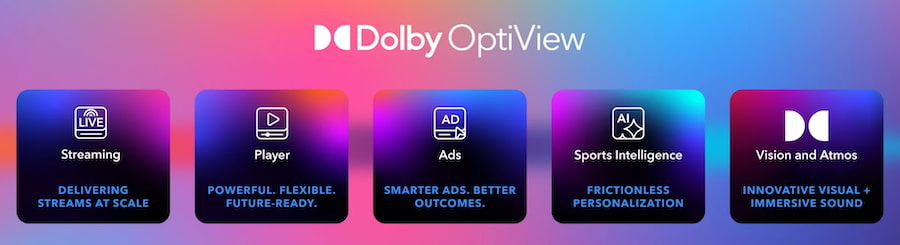
What Dolby OptiView Actually Does

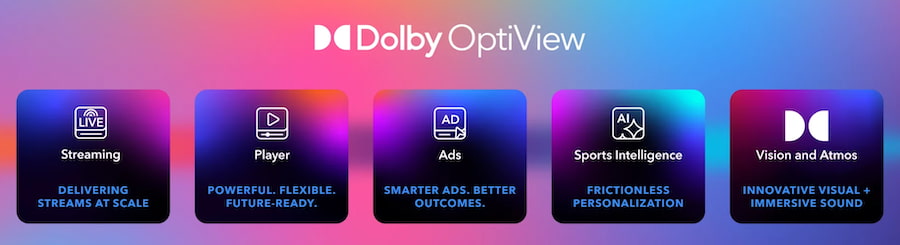
dolby-optiview-features

Dolby OptiView is not simply another HDR badge. The platform combines live video delivery and playback technology with configurable latency, synchronized streams and support across web browsers, mobile devices, smart TVs and other streaming platforms. The Seahawks say the implementation will provide richer visuals, lower latency and a more immersive streaming experience.

Dolby Vision adds dynamic HDR processing designed to provide brighter highlights, deeper contrast and richer color on compatible displays. There is one specification worth making clear: Dolby Vision does not automatically mean 4K. Neither Dolby nor the Seahawks has specified that the Seahawks streams will be delivered at 4K resolution. Dolby Vision can be used with HD or 4K production workflows.

That distinction matters when consumers have been trained to lump 4K, HDR and Dolby Vision together as though they were the same thing. They aren’t.

Advertisement

Live sports remain one of the areas where the difference between an expensive modern television and the signal being fed into it can be painfully obvious.

You can own a premium OLED or Mini LED TV capable of spectacular HDR performance, yet the quality of the game still depends on how it was captured, encoded, distributed and streamed. Seattle’s approach attacks more than one part of that chain.

Dolby Vision can improve HDR presentation, while OptiView is designed to reduce latency and keep streams synchronized. Anyone who has heard a neighbor celebrate a touchdown several seconds before it appears on their television understands why latency matters almost as much as picture quality during live sports.

Advertisement. Scroll to continue reading.
Advertisement

The biggest beneficiaries are therefore Seahawks fans watching supported preseason streams on compatible Dolby Vision devices, especially those who have already invested in televisions capable of displaying HDR properly.

They don’t need another TV. They need somebody to send their existing TV a better signal.

So Why Isn’t the Entire NFL Doing This?

The technology itself is only part of the problem.

The NFL’s regular-season television rights are divided among multiple major media partners, including CBS, FOX, NBC, ESPN/ABC and Amazon under agreements that run through the 2033 season. Those broadcasters and streaming services control the production and distribution of huge portions of the regular-season schedule.

Advertisement

That makes a team-controlled preseason game very different from Sunday Night FootballMonday Night Football, a CBS or FOX Sunday afternoon game, or Thursday Night Football on Prime Video.

Seattle has much greater control over the digital production and distribution chain for its own preseason and team-produced content. It cannot simply decide that every regular-season Seahawks game will suddenly be streamed in Dolby Vision through Seahawks.com.

There are rights agreements, broadcasters, production trucks, cameras, HDR workflows, encoders, apps and millions of playback devices involved.

The NFL is not starting from zero, either. Dolby says the league already uses Dolby OptiView technology within NFL+ for video playback and monitoring. What Seattle is doing differently is adding Dolby Vision to a team-level OptiView implementation.

Advertisement

So this is less a case of the Seahawks discovering technology the NFL has never heard of and more a demonstration of what can happen when one organization has greater control over the entire viewing experience.

The Rest of the NFL Should Be Watching

Seattle’s experiment could become an important test case.

If fans respond positively, other NFL clubs have little reason not to investigate similar technology for preseason games, press conferences, team-produced programming and other content they control directly. The larger opportunity belongs to the league and its broadcast partners.

NBCUniversal has already demonstrated that premium live sports can be delivered at scale. Super Bowl LX and the 2026 Winter Olympics were presented in 4K HDR on NBC and Peacock, and Peacock has been expanding Dolby Vision and Dolby Atmos across its live sports programming.

Advertisement
Advertisement. Scroll to continue reading.

The question is no longer whether premium HDR can work for live sports, but how quickly it can be implanted and whether the manufacturers and league can promote the benefit to viewers. Because it’s not like anyone watches professional football on Sunday.

MLB and the NBA Are Already Moving

Baseball and basketball do not actually need Seattle to tell them that this is coming.

Peacock announced plans to expand Dolby Vision and Dolby Atmos across Sunday Night Football, NBA and MLB coverage throughout 2026. The platform also streamed Telemundo’s Spanish-language FIFA World Cup coverage in Dolby Vision and Dolby Atmos this summer.

Advertisement

That is important because baseball and basketball are particularly good showcases for modern HDR displays. A baseball game offers bright daylight, stadium lighting, uniforms and huge differences between shaded and illuminated areas. Basketball combines brightly lit courts, dark seating areas, saturated uniforms and constant motion. Apple is so desperate to sell the Vision Pro that immersive 8K baseball is coming later this month. Professional sports in Dolby Vision is most certainly an easier sell.

What About the NHL?

Hockey might be one of the most interesting candidates of all.

The 2026-27 NHL season will continue to be distributed nationally in the U.S. through ESPN/ABC and TNT Sports, including HBO Max, while Sportsnet remains a major Canadian partner.

There has not been a comparable league-wide Dolby Vision announcement from the NHL.

Advertisement

That feels like an opportunity.

Hockey presents television cameras with an unusually difficult image: a huge bright sheet of ice surrounded by darker seating areas, fast-moving players, dark pucks and rapidly changing camera angles. Better HDR production and display handling could be particularly valuable in maintaining highlight detail and contrast.

The NHL and its broadcasters should be paying attention to what Seattle, Peacock and Dolby are doing.

The Bottom Line

The Seahawks are not suddenly giving every Seattle game the Dolby Vision treatment. For now, the big consumer-facing change applies primarily to preseason games and team-produced streaming content, with geographic and device restrictions applying.

Advertisement

But that almost misses the larger point.

Advertisement. Scroll to continue reading.

Seattle has demonstrated that a professional sports team can control its own streaming experience and deliver Dolby Vision, lower latency and synchronized playback directly to fans using devices many of them already own. That should put pressure on everyone else.

Consumers have spent years buying OLED and Mini LED televisions capable of extraordinary HDR performance. Streaming services and sports leagues are finally starting to provide live content capable of taking advantage of them.

Advertisement

Source link

Continue Reading

Tech

Scanning For Lifesigns With ESP32 And Raspberry Pi

Published

on

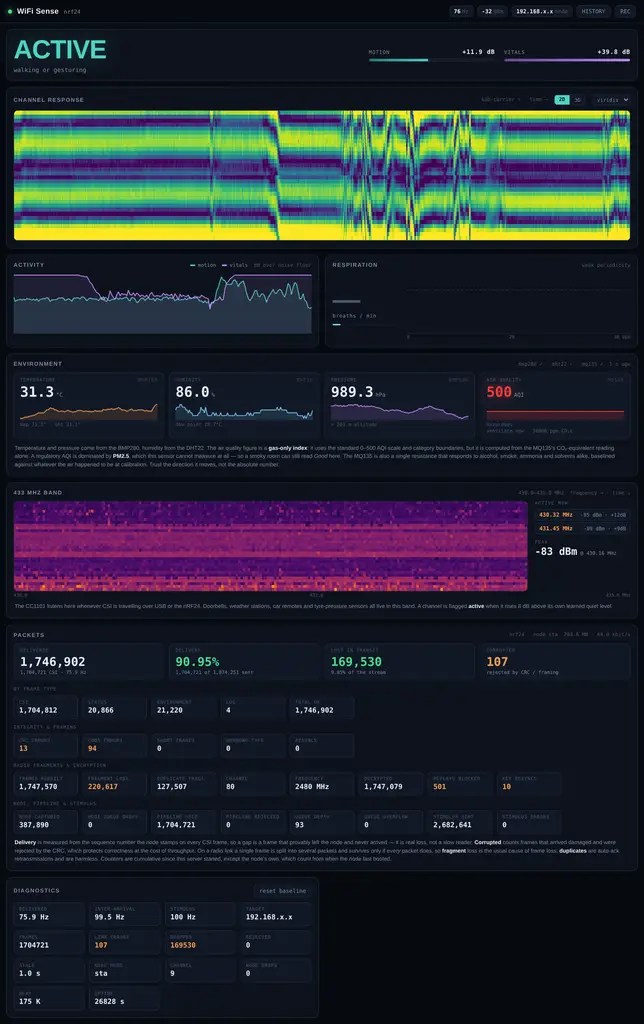
It’s a sci-fi trope that you can ‘scan for life signs’ and detect if there are humans — or suspiciously human-shaped aliens — present, but in real life it’s harder than that. [The Masked Bear]’s wifisense-pi project isn’t really scanning for signs of life, either, unless you happen to consider breathing a sign of life. Even then, it’s not detecting breathing per se, but the subtle motion that goes with it: it’s a very sensitive motion detector that relies on the fact that we fleshy bags of goo disturb WiFi signals with our presence, and motion alters those disturbances.

We’d probably waste a lot of time watching the signal graphs on the WifiSense-Pi dashboard.

The device uses an ESP32-S3 to measure the radio channel 100 times per second, while a Raspberry Pi 4 provides the signal processing muscle. It can detect the slightest motions, and even determine the presence of a perfectly still human by their breathing, though you can hide your presence for as long as you can hold your breath. A single sensor, no matter how sensitive, cannot give position information, and while multiple humans will distort WiFi more than a single one, [The Masked Bear] reports you cannot reliably extract that signal. So this project answers the question: “are there humans in this room?” Or, even more likely, “are there any large breathing animals in this room?” We can’t imagine a 50 kg Mastiff looking any different to this sensor than an equivalent mass of quivering human flesh.

Before you dismiss this as just another motion sensor, keep in mind that it is sniffing the signals already present on the 2.4 GHz band, and, like the WiFi signals themselves, it can work through walls. So we think it’s pretty nifty. Of course, there are many other ways to detect humans, from machine-learning cameras to millimeter-wave sensors to a simple PIR. This isn’t the first project we’ve seen that uses WiFi like this. It isn’t even the first with an ESP32, but it’s an interesting implementation worth checking out.

Advertisement

Source link

Continue Reading

Trending

Copyright © 2025