Connect with us

Tech

Ratfield After Dark, Heatwarped Brings Back the Neon Nights of Early 2000s Need for Speed Street Racing

Published

on

Heatwarped Game Indie Racer Need for Speed
Somewhere between the wet asphalt reflections and the glow of undercarriage lights, a small indie team has built something a lot of players have wanted for years. Heatwarped, from Sealime, is an open-world arcade racer set squarely in the 2000s. It leans hard into the feeling of those late-night underground meets that defined Need for Speed Underground and its closest contemporaries. A free demo is already available on Steam, and the full game remains unscheduled.


Ratfield is smack in the midst of it all, a city that combines the excitement of busy downtown regions illuminated by neon lights with the wide-open spaces of the outskirts where you can stretch your legs and go for a run. As a player, you can freely switch between the two, hunting for rare components, fine-tuning your car’s setup, and earning your reputation one race at a time. Races often feature four cars on the road at the same time, and getting them all to the finish line is as simple as checking the board on your beloved PDA, which serves as a portable racing forum. You simply check the board, accept certain challenges, and off you go.


PlayStation®5 Digital Edition – 825GB
  • Slim Design, players get powerful gaming technology packed inside a sleek and compact console design.
  • 825GB of storage, keep your favorite games raeady and waiting for you to jump in and play
  • Ultra-High Speed SSD, maximize yoru play sessions with near instant load times for installed PS5 games

Heatwarped Game Screenshot
The primary focus of the game, however, is on the automobiles, namely the level of customization available. Deep, deep customization options allow you to go all out for that exact Y2K look, complete with body kits, spoilers, exposed carbon fiber hoods, and neon kits – or build up from an everyday ride into a real head-turner with some rare parts, and the goal remains the same as it has always been: make that car your own, then show it off on the street.

Heatwarped Game Screenshot
Driving-wise, the game remains firmly arcade, with extended drifts, nitrous blasts that leave a trail of light behind them, and the occasional jump to keep the adrenaline going. The city roads use a neat glowing chevron system so you can see those racing lines clearly while still feeling like you have plenty of room to move around in, and night driving gets a special treatment, as the way the light reflects off the wet road, the way the headlights cut through the darkness, and a soundtrack that matches the mood all work together to really pull you into the scene.

Heatwarped Game Screenshot
One of the most interesting things the developers have done is with the graphical settings. In addition to a very clean ‘Enhanced’ option, there’s a ‘Authentic’ setting that purposely reduces the graphics and interface to create a deliberate retro vibe, like the old sixth-generation consoles, and you can even drop the resolution way back to low if you want to get that true period feel.

Heatwarped Game Screenshot
The demo is brief, but it provides a decent overview of the main loop; simply stroll around, tweak your car, race a few times, and experiment with both visual styles. The good news is that full controller support is already in place, so if you have a controller, you can get right into it. When the entire game is out, you’ll be able to compete against other players online, racing in the same city.
[Source]

Source link

Advertisement
Continue Reading
Click to comment

You must be logged in to post a comment Login

Leave a Reply

Tech

The 4 Best Monitor Arms to Clear Up Your Desk Space (2026)

Published

on

Other Monitor Arms We’ve Tested

Image may contain Gun and Weapon

Photograph: Jacob Roach

Wali Heavy-Duty Monitor Arm for $75: I made the brilliant decision to buy a 42-inch monitor without thinking about actually using a 42-inch monitor. Most monitor stands can’t support that kind of size, regardless of whether you’re using something like a 42-inch LG C4 or Samsung’s massive Odyssey OLED G9. This arm from Wali looks inconspicuous, but it’s kept my monitor—the KTC G42P5—stable for over a year without even a hint of droop. —Jacob Roach

Image may contain Furniture Desk Table Person Accessories and Glasses

Photograph: Luke Larsen

Branch Monitor Arm for $129: As I’ve discovered while testing monitor arms, many of them use the same exact parts with only minor differences in branding. You likely wouldn’t know that just by looking at the Amazon listing or even the company’s photos. I tested the Branch Monitor Arm, for example, and discovered that it’s nearly identical to the BenQ Ergo Arm. It’s a solid option and slightly cheaper, but it doesn’t come with the reinforcement plate to protect your desk, and the dual-arm version isn’t as versatile.

Monoprice Workstream Single Monitor Arm for $83: I’m using this dual version of this monitor arm to hold a 32-inch ultrawide monitor and a wide vertical monitor, and it’s been treating me wonderfully for several months. The arms move smoothly and don’t sink under the weight of the screens. It’s also one of the few monitor arms that has a clamp large enough for my thick 5-inch desktop. —Julian Chokkattu

Advertisement

Pout Eyes 12 Monitor Arm for $55: This was previously my pick as a solid budget monitor arm option. You have to be very careful with super cheap monitor arms on Amazon, but that’s not to say there’s nothing good out there. I tested this one out based on the clean look and cheap price, and although it’s far from perfect, I found a lot to like about it. First, there’s the design. It’s a simple touch, but the dual-tone, gray-and-black aesthetic has a bit more flavor than your average all-black monitor arm. The mechanism in the arm is mechanical, or “spring-assisted,” as the company says, meaning the motion isn’t as fluid as a gas spring. Unfortunately, it appears it’s no longer being sold directly to consumers, and is primarily a business-only product

Image may contain Electronics

AmazonBasics Adjustable Desk Mount Arm.

Photograph: Luke Larsen

Advertisement

AmazonBasics Adjustable Desk Mount Arm for $29: I’ll set aside the fact that the first version of this I received was beat up and busted, like it had been used (and even the replacement box had a big hole in it). But really, when it comes down to it, your monitor (and your neck) deserves something better than this. It might function better than some of the plastic, bottom-of-the-barrel stuff you’ll find on Amazon, but this old-school pole design means adjustments are inconvenient to make. It’s also pretty shaky, and I couldn’t get it to be as stable as other monitor arms I tested.

Mount-It! Heavy Duty Dual Monitor Arm for $322: I used this mount to hold up my 34-inch ultrawide monitor for years, and it worked like a charm. It can hold screens between 15 and 34 inches (up to 20 pounds). It’s adjustable, has built-in cable management, and doesn’t look hideous. It uses the VESA mounting standard, so make sure the monitor you have supports that. —Julian Chokkattu

Removing your monitor from its stand, buying a separate monitor arm, and clamping it down to your desk can be a frustrating experience. There are two main reasons why it’s worth the trouble.

Advertisement

First, it’s the ergonomic flexibility. Many monitors come with built-in stands, but they’re limited in terms of height adjustment. Ideally, you want your monitor to be at eye level to avoid being hunched over. A good monitor arm gives you a dramatically wider range of motion, even allowing you to pull it forward when you want to lean in. This is all done with a level of ease that a built-in or external monitor stand cannot match.

The second reason to buy a monitor stand is the space savings. Ridding your desk of an unwieldy monitor base gives you a cleaner workspace and opens up more room for storage. This is particularly important with larger monitors, such as ones that use an ultrawide aspect ratio, which need infamously huge bases to hold up the extra weight.

What to Look For in a Monitor Arm

Once you’ve decided it’s time to buy a monitor arm, there are still hundreds of options out there, especially if you’re shopping on Amazon. Here are some of the most important factors to consider.

Advertisement

Type of Arm: These days, the most common kind of monitor arm is fully articulated. This is most likely what most people imagine when you say “monitor arm.” It resembles a robotic arm. However, there are some simpler pole designs that only let you adjust the height of the monitor. I don’t usually recommend those, as the adjustments are very limited. The in-between option is a pole design with an articulated arm, which is how some multi-arm designs function.

Brand: Sticking with a well-known brand is a safe way to go, although Amazon also has some best-selling options from less-known names like Huanuo or Ergotron that offer great value. Monitor manufacturers also often make monitor arms and are a good place to look, whether that’s Asus, MSI, BenQ, or Acer. Lastly, more high-end names in the home office game, like Herman Miller, also make arms with more panache.

Materials and Design: Monitor arms tend to be ugly contraptions, especially when they’re overly chunky and made of cheap plastic. Look for aluminum or steel options for more robust, elegant arms.

Weight Limit: A monitor arm’s job is to keep your monitor in position without constantly sinking or damaging your desk. Make sure to look up the weight of your monitor and pay careful attention to the stated weight limit of the monitor arm you’re considering. If your display is curved, give yourself a buffer of around 5 pounds, as the curve adds extra forward weight that puts more tension on the monitor arm. It’s also not recommended to use a lightweight monitor on a heavy-duty monitor arm, as it can cause it to float up because the tension in the arm is too loose.

Advertisement

Clamps, Grommets, and Stands: When we say “monitor arms,” we usually mean ones that clamp to a desk. Some monitor arms take things a step further and come with an option for permanently installing the arm to your desk by drilling a hole and attaching it through a metal plate or grommet. Personally, I don’t love the idea of drilling holes into my desk, but it’s certainly the most stable method of securing the arm. Some are also designed for wall mounting if that’s your only option.

What Is a Gas-Spring Monitor Arm?

If you start perusing the digital aisles of Amazon for monitor arms, you’ll likely come across the term “gas spring.” This means that instead of using traditional springs, the internal cylinder in the arm is filled with nitrogen gas, which creates a more powerful counterbalance when making adjustments. Monitor arms using gas springs often cost more but feel smoother and less rigid when moving around. Mechanical springs, on the other hand, are much cheaper and feel more stiff. But they can be a decent option if you don’t intend on making frequent adjustments.

Should I Buy a Dual-Monitor Arm or Two Single Monitor Arms?

Advertisement

If you’re working with two monitors, I recommend a dual-monitor arm, which includes both arms in a single clamp. Not only is this a simpler setup with less mess, it’s also easier to position them side-by-side without a gap.

However, if you’re creating a PC gaming setup, you may prefer using two single monitor arms next to each other. This way, you have a primary display that can be centered more easily. Dual-monitor arms can be awkward if you’re using one screen as your dominant source and want it to be centered in your view. This is also true if you plan to use a secondary monitor vertically.

Can Your Monitor and Desk Support a Monitor Arm?

Not all monitors and desks can safely use a monitor arm. For example, if your desk is overly thin or has rounded edges, it’ll be difficult to install the clamp securely. Also, if you’re using a glass table or a lightweight table with a hollow core, you’re out of luck.

Advertisement

You’ll also need to check that your monitor is VESA-compatible, meaning it has four screw holes on the back in a square. This is what allows you to attach the back of the screen to the monitor arm. The most common size is 100 mm by 100 mm, though some smaller or older monitors use the 75 mm by 75 mm size.

These days, the only monitors that lack VESA support are cheap monitors under $200, so it’s something to keep in mind if you’re shopping in that price range.

As the WIRED monitor reviewer, I’ve got plenty of external screens lying around to attach to monitor arms. To test an arm, I assemble it, mount it to a monitor, and clamp it down to my desk. For heavy-duty monitor arms, I test them with larger-format or ultrawide displays to make sure they can handle the weight they claim to. In terms of how I choose which monitor arms to review, my goal is to test ones from both established brands and smaller companies you find on Amazon.

Either way, because so many of these monitor arms are built using many of the same parts, I’ve been on the hunt for ones that really stand out from a design and functionality perspective.

Advertisement

Next, I’ll be looking at the higher-end market, with monitor arms by boutique furniture office companies Humanscale and Herman Miller. On the opposite side of the spectrum, I’ll also be diving more into the murky waters of Amazon to hopefully surface with some gems from the depths that balance quality with affordability.

Power up with unlimited access to WIRED. Get best-in-class reporting and exclusive subscriber content that’s too important to ignore. Subscribe Today.

Source link

Advertisement
Continue Reading

Tech

Saily Ultra eSIM Premum Plan Review: Packed With Perks

Published

on

I tested the Premium plan extensively in the UK and briefly in Europe. It was quick and easy to set up in the Saily app and kept me connected as I roamed, offering decent speeds up to around 300 Mbps on 5G networks in city center locations, inevitably dropping off to 4G and around 15 Mbps in more rural spots. The specific speeds you’ll get depend entirely on the local network. Saily piggybacks on local providers, mainly connecting to EE and Vodafone during my month of testing.

The Ultra plan includes 30 GB of high-speed data. In this case, high-speed simply means unfettered; the actual speed you get depends on coverage where you are. After that 30 GB is gone, you get unlimited throttled data at up to 1 Mbps. In practice, I found this lower speed was enough for messaging, web scrolling, and navigation, but anything data-hungry, like video, is out.

It’s worth noting that the 30 GB limit is for the month. Most folks use around 20 GB of data in a month, so 30 GB sounds like a lot. But consider that you are probably connected to Wi-Fi most of the time at home or work, and you may not be when traveling. That 30 GB can disappear surprisingly quickly, and you should take advantage of Wi-Fi whenever you can on your travels. One of my top travel tips is to download videos and maps before you go, or when you’re connected to Wi-Fi.

Advertisement

If you’re only visiting one or two countries, it’s probably better to get a pay-as-you-go plan for that specific region or country. For example, Saily offers unlimited data in the UK for 15 days for $49, but there’s a fair usage policy that will throttle you after 5 GB in a single 24-hour period (until the next day). Unlimited data across Europe (35 countries) for a month will cost you $72, with the same 5 GB daily limit. You could also just buy 20 GB of data to use over 30 days for $23 in France or $31 in the UK.

Having used a few different international eSIM and regular SIM services for travel over the years, Saily compares favorably on performance and ease of use but is relatively expensive. That said, most other eSIM services don’t come with a bundle of extras.

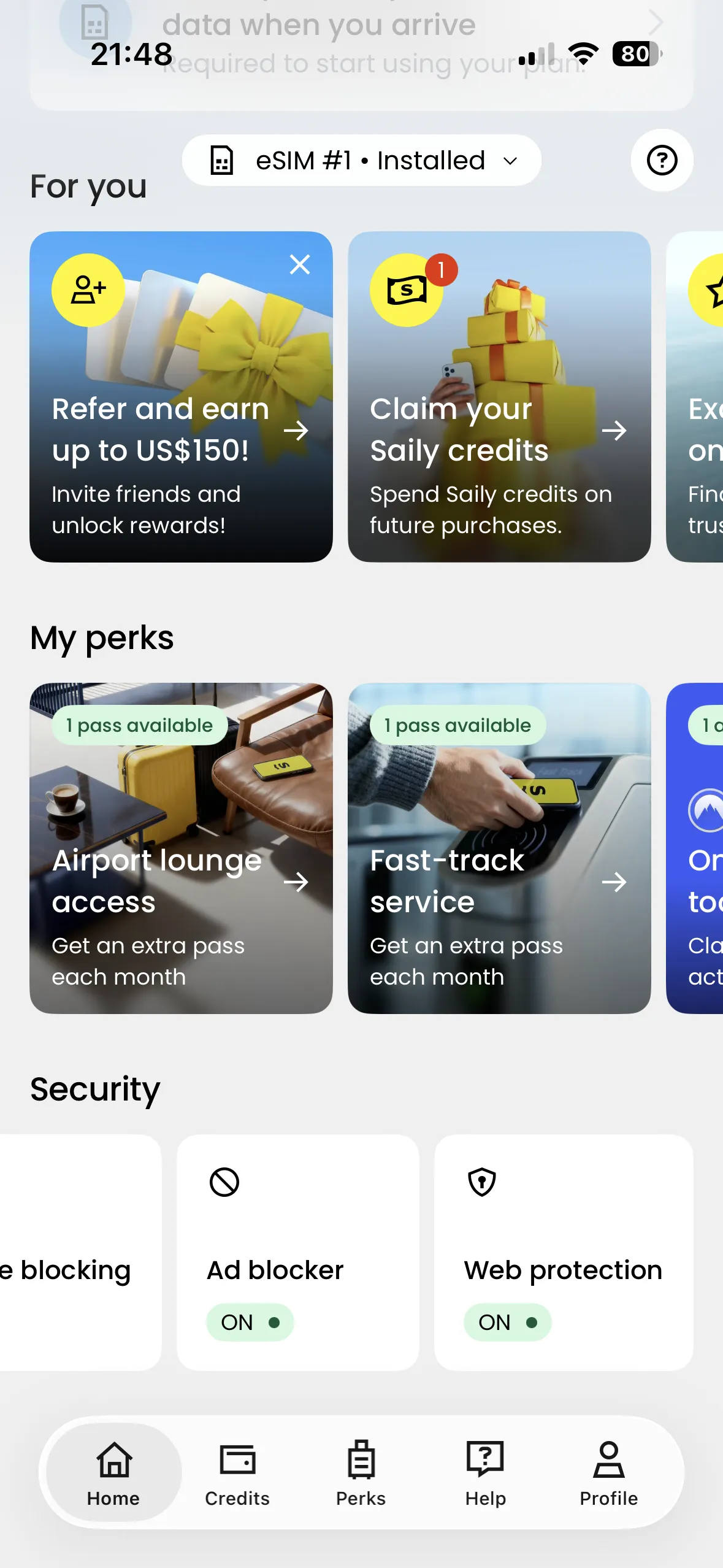
Plenty of Perks

Saily Ultra will be a hard sell for most folks simply looking at the data, but frequent travelers will appreciate the plentiful perks. Here’s what you get:

Image may contain Text and Person

Screenshot

  • 1x Airport Lounge Pass per month: Airports can be noisy and uncomfortable, but airport lounges offer quieter spaces where you can work or relax, with fast Wi-Fi, comfier seating, and complimentary food and drink. If you’re stuck in an airport for a few hours, a lounge pass can make your wait as painless as possible. With Saily Ultra, you get one free pass per month for one person. It generates a QR code in the app that’s valid for 30 minutes. Here’s the complete list of supported lounge destinations. You also get a free lounge pass for that trip if your flight is delayed for more than two hours (contact support in the app).
  • 1x Fast-Track Pass per month: You can skip the long security queue with fast-track and get straight through into the terminal. With Saily Ultra, you get one free fast-track pass for one person, generated as a QR code in the app. Here’s the complete list of supported fast-track destinations. Availability is far more limited than with the lounge pass, so I was unable to test this.
  • Online Security Tools: You get access to NordVPN, NordPass, NordLocker, and Incogni with an activation code in the Saily app. Saily’s parent company is Nord Security, so it makes sense that its popular VPN service, password manager, and secure cloud storage are included. Incogni is a privacy tool that can help you remove personal data from the internet.

Saily lists several other perks on its website, including priority support, an ad blocker, and 8 percent back in Saily credits. The ad blocker is handy and also reduces your data usage, and you can use any credits you accrue to buy data plans or extra perks, like additional lounge passes. It’s also worth noting that lounge and fast-track benefits rollover for up to three months if unused, though you can’t share them. Saily also lists a ClassPass subscription on the site right now, but that wasn’t available when I tested. The perks are subject to change, so it’s important to check what’s included at the time of purchase.

Source link

Advertisement
Continue Reading

Tech

555 Makes A Useful Beat Frequency Oscillator

Published

on

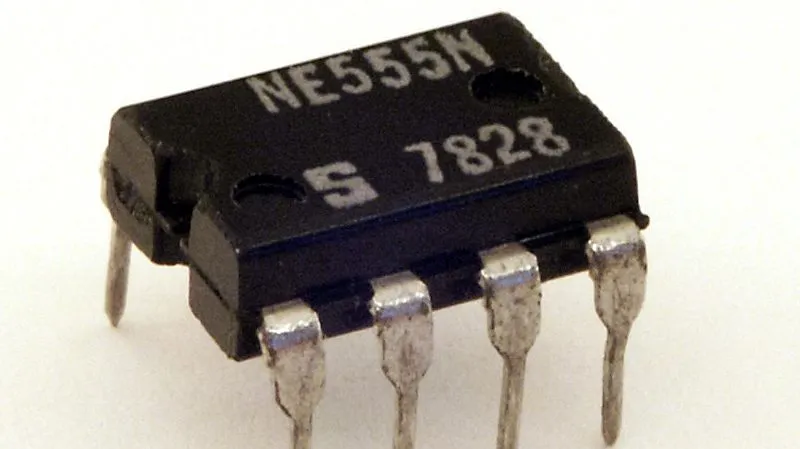
If you’ve got a cheap ham rig, it might not be very practical for you to receive certain transmissions out of the box. However, if you were to hack in a convenient little beat frequency oscillator (BFO) to your rig, then you’d be up and running. Here’s a simple way to do just that with a venerable old part everybody knows and loves.

The build in question concerns the use of a 555 timer IC. It’s seasoned with the right smattering of resistors and capacitors to taste, producing a 455 kHz beat frequency oscillator. This can be injected into the intermediate frequency chain of a receiver, making up for the lack of a steady carrier wave when receiving continuous-wave and single side-band suppressed carrier transmissions. Thanks to a potentiometer in the circuit, it’s tunable, too, from 455 kHz, plus or minus twenty percent or so. Thanks to the versatility of the 555, it’s possible to run the chip on a wide voltage range, anywhere from 4.5 volts to 16 volts, which makes it easy to install in just about any old radio set without requiring adding a specialized power supply. There’s also an alternative design that EDN covered in greater detail some time ago.

If you’re eager to dive into a wider range of transmissions than your radio can currently receive, this old-school ham hack could be just what the shack ordered. We feature plenty of good ham hacks around these parts, and don’t forget—we always want to hear about the freshest ones on the tipsline.

Advertisement

Source link

Advertisement
Continue Reading

Tech

Apollo finds AI is hitting paychecks rather than payrolls

Published

on

An Apollo analysis of 321 occupations found that wages in jobs highly exposed to AI grew 6.7% more slowly after 2023, with no statistically significant employment effect. The gap was 10.7% in the lowest-paid quartile and absent in the highest.

The first measurable mark AI has left on the labour market is not unemployment. Apollo’s chief economist Torsten Slok says the employment effect so far is insignificant, and that the visible damage is to pay.

His analysis with Sania Edlich found that wages in occupations highly exposed to AI grew 6.7% more slowly after 2023 than in low-exposure work. Employment in those occupations showed no statistically significant change.

The distribution is the part worth sitting with. The gap was 10.7% in the bottom wage quartile, 5.4% in the second and 4.0% in the third, and there was no significant effect at all in the top quartile.

Advertisement

The method is unusual and worth stating. The authors matched 321 occupations to labour statistics data from 2015 to 2025, using the Anthropic Economic Index, which measures observed AI usage from actual model interactions rather than theoretical exposure.

They are candid about the limits. Exposure is measured from one company’s usage data, only 321 of roughly 800 occupations were matched, and their most dramatic figure, a 24.3% gap for service workers, is flagged as a small subsample to be treated with caution.

Other evidence points the other way. US statisticians found a 0.2% fall in jobs across 18 exposed occupations while payrolls overall grew 0.8%, and Goldman Sachs reported faster declines in openings in fields exposed to AI substitution, in a market where new entrants are already being squeezed.

Diane Gherson, formerly IBM’s chief human resources officer, offers a reason the job losses may be hard to see. Companies are quietly hiring fewer people into high-attrition, lower-wage roles rather than announcing layoffs.

Advertisement

She also names an accounting distortion that pushes the same way. Severance can be booked as a one-off restructuring charge that investors discount, while retraining lands in operating expenses every quarter, which makes cutting look better on paper than reskilling.

The counterexample she reaches for is European. Ikea retrained call centre staff as remote interior design advisers after automating much of their previous work, and the resulting service has been widely reported as a business worth around €1.3bn.

Slok’s wider claim is that the economy is getting more dynamic rather than smaller, with business formation at the highest rate on record. He also concedes the productivity payoff is unproven, since margins outside the largest technology companies have not yet risen.

Europe has no equivalent study, which is the gap worth noticing. The wage channel Apollo describes would be invisible in most European labour data, and TNW has already reported what AI is actually doing to jobs here without anyone measuring pay this way.

Advertisement

Source link

Continue Reading

Tech

Custom Hammond Organ Boasts Hand-Cranked Tonewheels and Twelve Keys That Sing Through Steel

Published

on

Hammond Organ Project Build
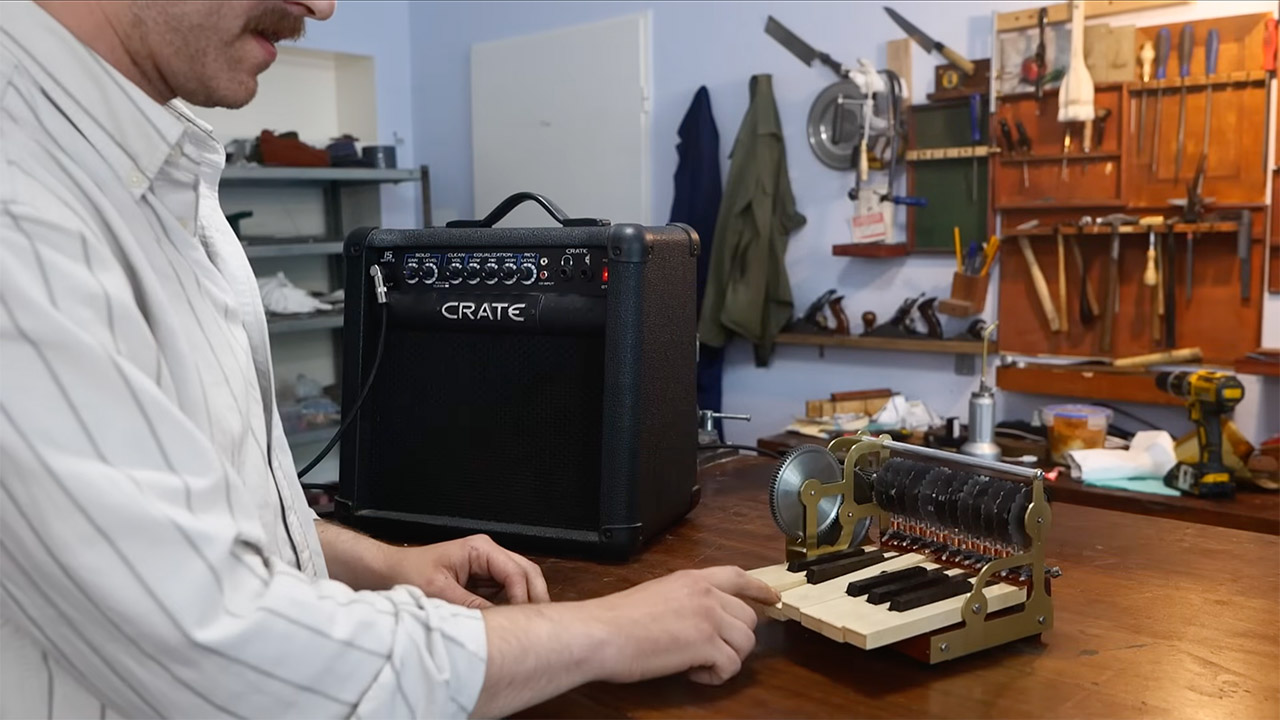
Uri Tuchman decided a musician friend needed a present that could actually make noise. He chose the Hammond organ, that old electromechanical machine whose spinning iron disks and magnetic coils once filled churches and stages with pure tones. Instead of a full console, he built a single octave version he could turn by hand. The result sits somewhere between a careful reconstruction and a living demonstration of how sound can come from metal moving past a coil.


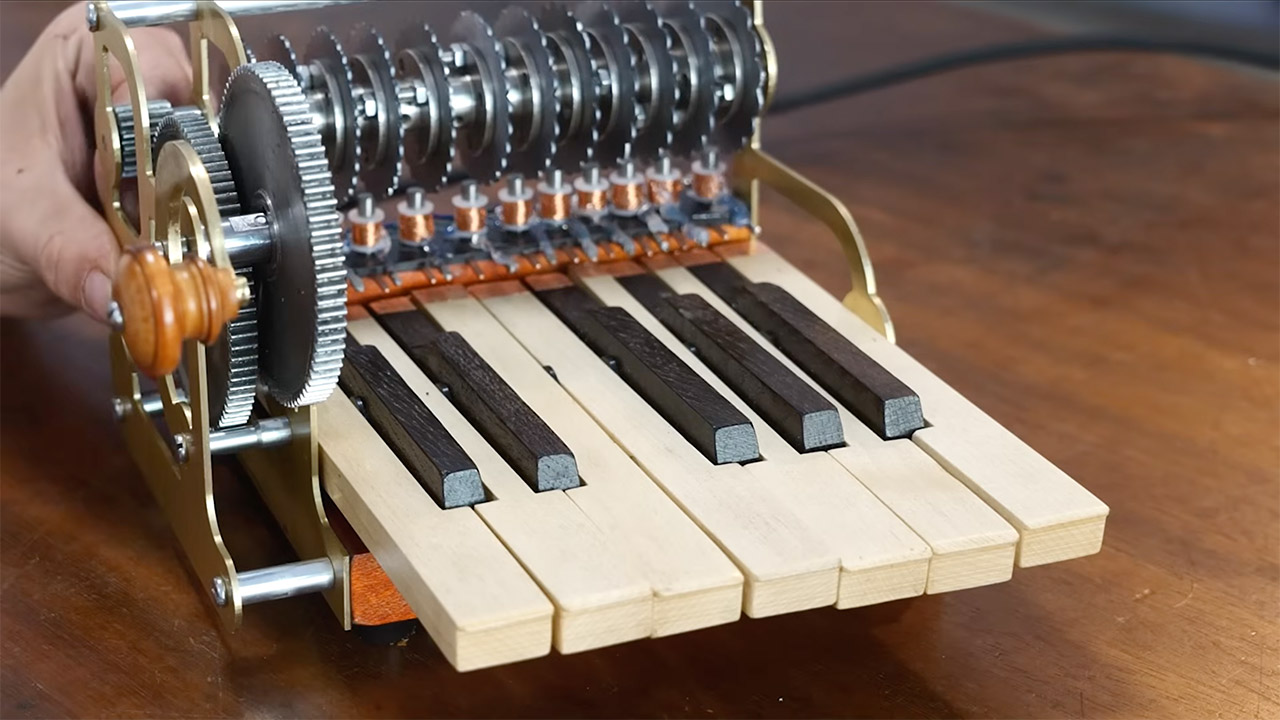
He began with these keys, the white ones made of strong maple wood and the black ones from a denser hardwood that didn’t have a fancy name. Each key boils down to a simple on/off switch; press it, and the circuit closes. Twelve keys, twelve switches; that portion seemed almost routine until you looked closer at the woodwork, how clean the cuts were, and how perfectly the entire mechanism fit inside the brass frame.

Sale


Elgato Stream Deck MK.2 Studio Controller, 15 Macro Keys
  • 15 Customizable LCD Keys: instantly control your apps, tools and platforms.
  • One-Touch Operation: trigger single or multiple actions, launch social posts, adjust audio, mute mic, turn on lights, and much more.
  • Visual Feedback: know that your command has been executed.

Hammond Organ Project Build
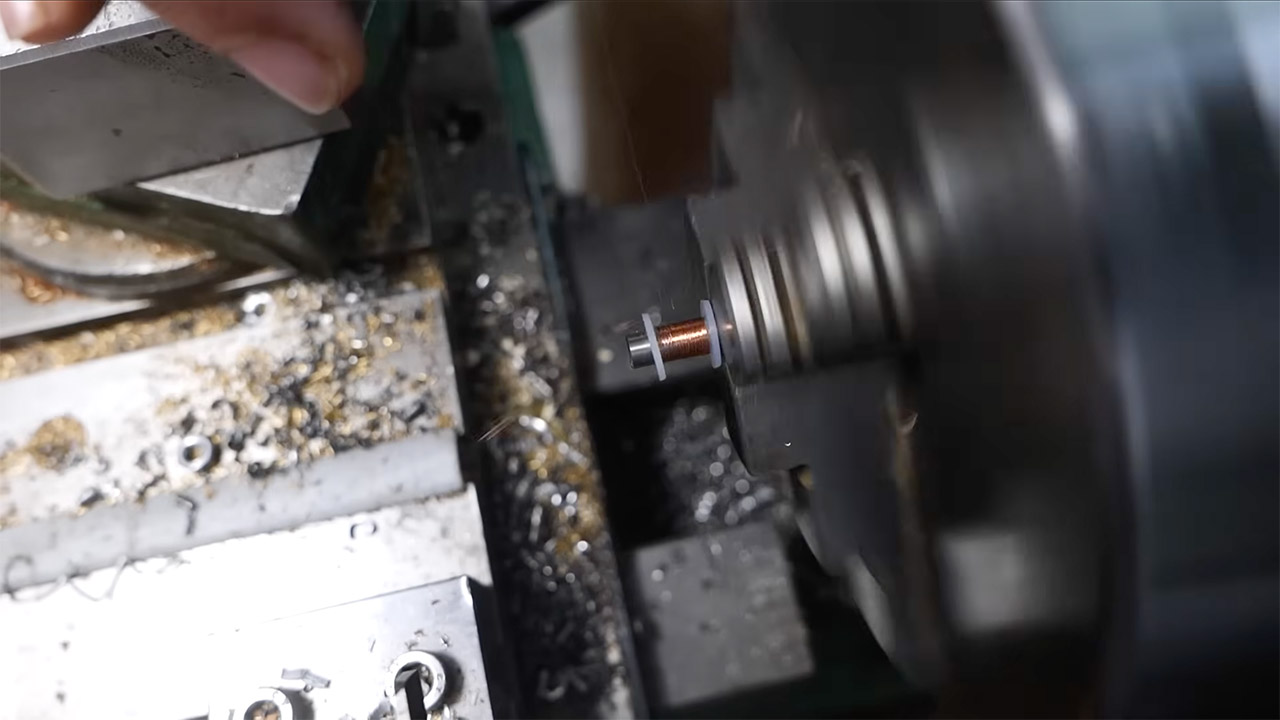
Next came the pickups. Each is a coil of copper wire wrapped around a steel rod, similar to how a guitar pickup works. The coil is up against a revolving tonewheel. When the edge of the iron disk moves past the rod, the changing magnetic field creates a little current. The little current is the note. Uri coiled the coils carefully to ensure that the signal was powerful enough to drive a standard guitar amp with no further electronics in between the pickups and the amp. One key, one tonewheel, and twelve notes.

Hammond Organ Project Build
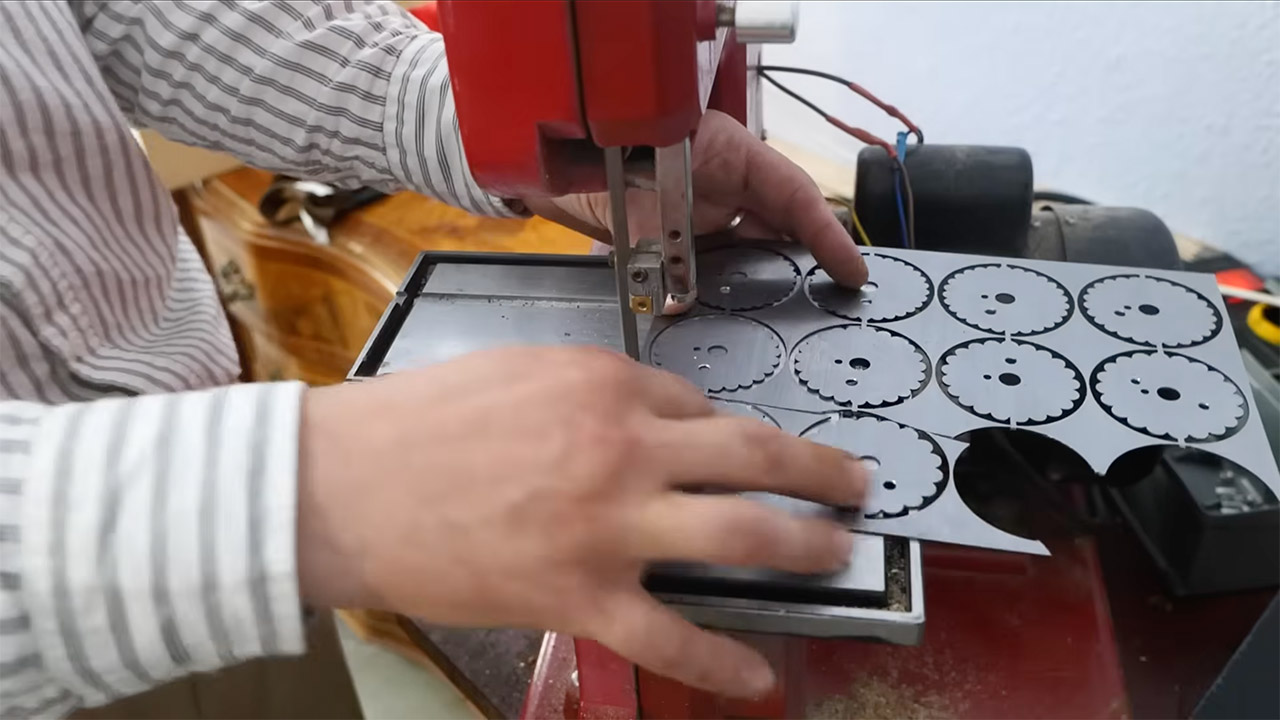
The tonewheels themselves had to be built of iron or steel because it was the only metal that had enough of an effect on the magnetic field to produce a useful signal. Uri had them laser cut to ensure precise results. The edges are not sharp gear teeth, but rather smooth rounded profiles designed to produce something similar to a sine wave when they spin past the pickup. The tough part is finding the perfect spacing between those profiles. Equal temperament necessitates ratios based on the twelfth root of two, which is a tall order considering you’re working with metal; gears and cut disks can only scrape the surface of those ratios. Hammond’s first machines never quite achieved perfect equal temperament, but they came close enough that the ear was content to accept the result, and that minor imperfection became part of the instrument’s character. Uri’s smaller set operates on the same principle: the disks rotate on a common shaft powered by a hand crank and a few gears.

Hammond Organ Project Build
Because everything can spin at any pace you like, tuning is entirely up to you. If you spin it too slowly or too fast, every note begins to tremble. That constraint becomes a feature in the finished instrument. Changing the speed of the crank while a key is still held down causes all of these sliding warbling effects that a fixed speed motor could never achieve. The device simply plugs into a guitar amplifier. No fancy Leslie speakers, no drawbars, and no frequency doubling. You get the raw output of twelve mechanical oscillators.

Hammond Organ Project Build
The finished organ is pretty compact, made largely of brass and wood, with dark iron disks poking out from the inside. It appears more like a well-made tool than a polished musical instrument. Which is suitable for the project. Uri has a long history of creating things that clearly demonstrate how they work. This organ does the same. The wheels spin, the keys close the circuit, and the pure tones appear as soon as the crank reaches the proper speed. The sound is a little thin compared to a full-on Hammond, and it’s intentionally faulty, but the mechanism is obvious.
[Source]

Advertisement

Source link

Continue Reading

Tech

What Speed Do Fighter Jets Land At?

Published

on


Fighter jets are some of the fastest air-breathing machines mankind has ever made, so it’s well-established that they move quickly through the air. The F-35 Lightning II, for example, has a top speed of Mach 1.6 (1,200 mph), so it’s not slow. Given how fast it and other fighter jets typically operate, it begs the question, “How fast do they land?” 

Comparatively, when you’re in a fast-moving commercial passenger plane that’s coming in for a landing, you probably don’t think too much about speed. Still, you’re moving pretty fast, and the same is true of fighter jets, though it depends on where it’s landing. Touching down on a nice, paved runway is ideal in most situations, but for fighter jets, the most challenging landing happens on an aircraft carrier, which forces the plane to a nearly immediate stop almost as soon as its wheels hit the deck. That’s due to the limited space and the need to arrest the aircraft’s movement so it doesn’t fall off the edge of the ship.

Advertisement

Looking back at commercial jets, they typically land at between 130 and 160 mph. The same is mostly true of fighter jets, as the physics of landing don’t change all that much whether you’re talking about a 344-ton Boeing 747 or a 9.85-ton F-16 Fighting Falcon. The typical range that a fighter jet lands is between 170 and 210 mph, so they come in at greater speeds than commercial aircraft, but not by too much. There are several reasons for this, including a fighter’s design for supersonic speeds, which actually makes it safer to land faster than a commercial aircraft would.

Advertisement

Fighters are designed to land at high speeds

Landing for commercial aircraft is purposefully designed to be as quiet and easy as possible. If not, fewer people would board a plane knowing that it would be an uncomfortable bump at the end of their flight. Military aviators aren’t afforded such luxury, but fast landings aren’t always about combat readiness. The problem concerns a fighter’s design, which prefers maneuverability and speed to comfort. As a result, landing slowly risks stalling; while hitting the ground at speeds of 210 mph may be rough, but it’s the safest way to get a fighter jet on the ground.

When you’re talking about landing a plane onto an aircraft carrier, however, it’s a completely different level of complexity. A fighter approaches the carrier for landing at around 150 mph, but don’t forget that the carrier itself is in constant motion; even if the ship isn’t moving forward, it’s sitting atop an ever-changing ocean landscape. Once the aircraft hits the flat top’s runway, it has to stop within 350 feet, which is where the arresting cables come into play.

In the above image, an F/A-18 Super Hornet is coming in for a landing on the USS Theodore Roosevelt (CVN-71). You can see its hook, jutting out behind the landing gear. This is meant to “grab” the cable, which stops the aircraft before it runs off the edge. So, while a Navy Aviator lands at 150 mph, they also stop almost suddenly, going from 150-0 mph in a matter of seconds. That’s quite different from landing on a runway, but many brave men and women do it numerous times throughout their careers.

Advertisement


Source link

Advertisement
Continue Reading

Tech

MRO Data Cleansing Before ERP Modernization: What to Fix First

Published

on

“In a perfect world, field and maintenance workers would go right to the system, search for a part, find it, and be on their way. However, many have a hard time locating what they need.”

 — Robbie Thompson, EY Americas Energy Supply Chain and Operations Leader

ERP modernization programs rank among the most capital-intensive initiatives in asset-intensive operations. The business case rests on automation, predictive maintenance, integrated procurement, and real-time inventory visibility. However, each of these capabilities depends on something a new platform cannot improve on its own : the quality of MRO data in the material master.

A new ERP changes how data is processed, connected, and used.. The content of that data stays exactly as it was on migration day. Duplicate records, unstructured descriptions, missing classifications, obsolete part numbers, and broken bills of material travel into a modern system intact, and the platform then acts on all of them.

Advertisement

The question that follows concerns sequence. Enterprise material masters can contain hundreds of thousands of records, and every modernization program works against a fixed go-live date. Teams that establish which defects to correct first arrive at go-live with a catalog the platform can trust.

The MRO Data Quality Gap: What Modernization Leaves Untouched

The material master in most legacy MRO systems reflects years of decentralized data entry, system migrations, and inconsistent conventions. Maintenance and procurement teams absorb the resulting gaps through undocumented operator knowledge and informal workarounds, which keeps those gaps invisible during routine operations.

The problems become harder to ignore when the data must support automated processes, cross-system reporting, or platform migration. At that point, the underlying issues appear in five recurring forms.

Duplicate Item Records

Advertisement

The same physical part appears under multiple descriptions, and each record carries its own stock balance, purchasing history, and reorder parameters. Demand and spend data fragments across those records, carrying costs rise, and part availability stays flat.

Unstructured Descriptions

Critical attributes such as dimensions and material specifications remain buried in free-text fields or go missing altogether. Naming conventions and data fields also drift across time and departments. A term such as “start date” or “criticality,” or a given part code, often carries a different definition today than it carried in 2015. Records that lack structured attributes fall out of search results, resist classification, and block automated processing.

Missing Classification

Advertisement

Records without UNSPSC codes, ECLASS identifiers, or standardized units of measure sit outside catalog-level governance. Spend analysis, demand aggregation, and supplier rationalization all need classification data, and each one stalls when that data goes missing.

Obsolete Records

Parts associated with decommissioned equipment stay active in the item master, hold safety stock, generate false demand signals, and overstate inventory values.

Orphaned Bills of Material

Advertisement

Spare parts that lack a link to the assets they support push maintenance planners back onto institutional knowledge. When the planner holding that knowledge stays unavailable, parts identification during a repair event slows to a halt.

The Operational and Financial Consequences of Poor MRO Data

Migration carries the downstream impacts of poor MRO data forward rather than clearing them. The new system inherits them all, and automation hides the data layer from direct view, making the same problems harder to trace.

This pattern extends well past ERP modernization. Product information management shows the same behavior, where a better system delivers better outcomes only when the underlying data supports it.

“In B2B and MRO contexts, incorrect product data creates duplicate ordering, wrong-part procurement, and downstream operational disruption.”

 — SunTec India

Advertisement

In ERP modernization programs, those consequences take five recurring operational and financial forms.

Inflated Working Capital: Duplicate SKUs hold the same physical parts under separate records, which raises carrying costs while availability stays where it was.

Procurement Leakage: The organization sources the same item from multiple suppliers at variable price points, because spend sits fragmented across duplicate records and resists consolidation.

Extended Mean Time to Repair (MTTR): Incomplete bills of material and broken spare-to-asset linkages delay parts identification during repair events, and asset availability falls as a result.

Advertisement

Inaccurate Financial Reporting: Duplicate and obsolete records overstate inventory and asset values, which creates exposure during an external audit.

Constrained Planning Accuracy: Inconsistent attribute and classification data undermine demand forecasting, criticality scoring, and inventory optimization at the catalog level.

How Modern ERP Platforms Compound Poor Data Quality

Modern ERP platforms remove the manual intermediary that legacy systems relied on. Automated reordering, predictive maintenance algorithms, spend analytics, and inventory optimization operate directly on master data and skip per-transaction human review. The platform acts on the inputs it receives, and that behaviour represents the core value proposition of modernization in MRO master data management.

The same behavior turns existing data gaps into larger operational liabilities.

Advertisement

In a legacy environment, humans filter data quality issues at the point of transaction. Modernization hands that filtering job back to the data itself.

Human-Mediated
Corrections Under Legacy MRO Systems

Outcomes
Under Modern ERP Platforms

A buyer recognizes that two records refer to
the same part and overrides the system before issuing a PO

Advertisement

Automated reordering generates separate
replenishment orders for the same physical part under multiple SKUs

A planner ignores a phantom BOM entry based
on field knowledge

Work order automation schedules an emergency
callout against a part that the system fails to locate

A category manager flags misclassified spend
before reporting it upward

Advertisement

Spend analytics produces a report that
misallocates spend by category and supplier

“When humans step too far back, a small system error can quickly turn into a wider operational problem. AI systems don’t fail only because of bad data; they can also fail by pushing a correct process in the wrong direction.”

 — Forbes

The Real Question: What Does an ERP Modernization Need in Order to Deliver Its Business Case?

The answer is MRO data cleansing, completed before migration and governed after go-live. Clean, deduplicated, and classified MRO data determines whether automated workflows deliver the business case or compound the failure. The platform inherits the data problem and passes it straight through to every process that runs on it. That work belongs upstream, in the data itself, before it ever reaches the new system.

Advertisement

Modernize MRO Operations: Cleanse, Govern, and Migrate

Phase 1: Cleanse MRO Data in Dependency Order Against a Stable Baseline

The team cleanses the current material master before it finalizes the migration design. The order of activities carries as much weight as the activities themselves, because each one consumes the output of the one before it:

1. Description normalization to ISO 8000-compliant noun-modifier-attribute format. Structured descriptions come first, because deduplication, taxonomy mapping, and catalog search all read these fields.

2. Deduplication across item masters, vendor masters, and cross-site records. Structured attributes turn duplicate detection from string matching into attribute comparison, which surfaces the pairs that free text hides.

Advertisement

3. Taxonomy mapping to UNSPSC, ECLASS, or another industry classification standard. Mapping runs once per surviving record, which spares the team a second round of adjudication after merges complete.

4. Attribute enrichment from OEM catalogs and verified supplier databases, applied to the records that survive consolidation.

5. Obsolete record identification and deletion flagging, carried out after consolidation so that the accurate record survives and its weaker twin retires.

6. BOM-to-asset linkage for critical spares, built last so that every link points at a stable, classified, enriched record.

Advertisement

Subject-matter experts review records after automated processing. Their review covers ambiguous duplicates, criticality classifications, regulated items, and BOM linkage decisions that call for field-level expertise of specific assets and operating environments.

Phase 2: Establish Governance Before Migration

Governance established before migration embeds itself in the new platform’s configuration. Teams that retrofit it after go-live find it harder to enforce and easier to bypass. The work includes:

  • Mandatory attribute sets enforced at the point of record creation
  • Restricted creation rights held by assigned data stewards by item category
  • Duplicate-check workflows embedded in the material requisition process
  • Change-control procedures governing the addition, modification, and deletion of records

Phase 3: Migrate Clean MRO Data

Clean, governed data turns validation into confirmation rather than discovery. Predictive maintenance, automated reordering, and spend analytics receive the structured, complete, and deduplicated inputs they need to deliver the operational returns the modernization promised: reduced downtime, optimized inventory, and consolidated spend.

Advertisement

MRO Data Cleansing: Automation with Human Oversight

MRO data cleansing has historically faced four constraints: timeline, cost, expert availability, and consistency at scale. Manual review at enterprise catalog depth ran slowly, cost heavily, and produced inconsistent results across thousands of records handled by multiple analysts.

AI-assisted approaches changed each of these constraints. Capabilities now standard in MRO cleansing programs include:

  • NLP-driven deduplication that identifies semantic duplicates across records whose descriptions and abbreviations differ
  • Machine learning classification engines that map items to target taxonomies at enterprise volume
  • Automated attribute enrichment against OEM catalogs and supplier databases

Human oversight remains essential throughout the cleansing process. Subject-matter experts review confidence scores on automated decisions, audit samples drawn from high-volume operations, and apply full adjudication to records that carry operational, safety, or compliance stakes.

The Business Case: Four Constraints Shape the Build-or-Buy Decision

Material masters at enterprise scale demand a time commitment that internal teams manage only by keeping attention away from their primary operations.

Domain expertise spans equipment, parts, suppliers, regulatory standards, and industry taxonomies, and few internal teams hold that combination end to end.

Advertisement

The supporting tooling stack covers NLP deduplication, ML classification, agentic enrichment, and validation databases, and building it for a single program ties up substantial capital.

Consistency across thousands of records depends on standardized workflows that mature over repeated engagements, not a single one.

Specialized MRO data cleansing services close these gaps. They provide domain expertise, technical infrastructure, and standardized workflows for assessment, cleansing, enrichment, and governance, leaving internal teams free to focus on core business operations and enterprise growth.

Conclusion: Clean MRO Data Is Critical to ERP Modernization 

The bigger question for modernization leaders is the data, not the platform. Every modern ERP processes MRO data at scale. The decision that matters is whether the data arrives clean, complete, and governed well enough for the organization to trust the maintenance, procurement, inventory, and reporting processes the platform will run on it.

Advertisement

MRO data cleansing therefore needs to be completed before migration, when defects can still be resolved without disrupting live workflows. Prioritize records with the greatest operational impact, establish clear ownership, and embed validation rules in the new environment before go-live.

It reduces the need for manual workarounds, gives automated processes more dependable inputs, and makes future data issues easier to identify and correct. In this way, data quality becomes part of how the organization sustains the value of ERP modernization after implementation. 

Source link

Advertisement
Continue Reading

Tech

Oura is facing a lawsuit over whether its $300 ring can actually track sleep

Published

on

Crystal ball: Oura is facing a proposed class action lawsuit over the accuracy of its sleep-tracking claims. Filed this week in San Francisco by Clarkson Law Firm, the complaint argues that Oura’s smart rings can’t directly detect the physiological signals needed to assess sleep quality or identify sleep stages, and instead lean on AI-generated estimates the suit says amount to “a coin flip’s chance of being correct.”

The lawsuit takes aim at a core feature of the product: its ability to turn data collected from a wearer’s finger into scores for sleep, readiness, and activity. Oura rings track measures like heart activity and skin temperature, then run that data through software to generate sleep reports.

But the complaint argues this approach can’t deliver the same information as a clinical sleep study. Sleep stages, it says, are determined through brain and eye measurements that require electrodes on the scalp and sensors near the eyes.

“Sleep happens in the brain, not on one’s finger,” the complaint states.

Advertisement

Oura has marketed its ring as “built for accuracy” and offering “unparalleled accuracy,” according to the filing. The complaint says the company has claimed 79% accuracy in its measurements and, more recently, 95% sleep-staging accuracy compared with clinical sleep labs.

The complaint alleges Oura marketed rings costing $300 or more as tools capable of tracking sleep and identifying its four stages. It argues those claims overstate what a finger-worn device can do, since determining sleep stages requires the scalp electrodes and eye sensors used in clinical sleep studies.

The plaintiffs argue that Oura’s marketing leaves consumers with the impression that the ring can measure sleep the same way a lab can. They say consumers may use the device’s reports to shape health-related decisions, even though its estimates may not reflect their actual sleep.

The lawsuit follows years of online complaints from Oura users questioning the accuracy of the ring’s sleep reports. Some have said the device logged a strong night of sleep when they felt exhausted. Others have questioned its ability to identify REM and deep sleep.

Advertisement

The complaint asks the court to stop Oura from making what it calls misleading claims about the ring’s capabilities, and seeks restitution for consumers who bought Oura products based on those claims. Oura did not immediately respond to a request for comment.

Source link

Advertisement
Continue Reading

Tech

Apple says third parties won’t run safe App Stores, but isn’t either

Published

on

Apple doesn’t even seem to be trying with App Store Review. Users should not be the ones who find problem apps, but over and over, that is what is happening. And, it’s happened again with a renovation app hiding Russian bank functionality.

No question, Apple has the resources to protect us from bad apps, and, no question, it keeps telling regulators that it has. As regulators around the world press for third-party firms to run iPhone App Stores, Apple consistently protests that only it can do a good job of keeping bad apps at bay.

It is absolutely true that if, or when, the door is open to rival App Stores, there will be a flood of apps that set out to defraud users. But if you’re going to hold up the App Store Review process as the last thin line of defense, you have to make it work and Apple is repeatedly failing.

Staggering and repeated mistakes

In August 2026, after countries such as the UK outlawed “nudifying” apps, for instance, The Independent has found several still on the App Store. One unnamed example lets users upload images into scenes called “bedroom rape.”

Advertisement

As keeps happening, Apple has now removed that app. But it passed App Store review and was only taken down when Apple was asked about it by that newspaper.

There are ways that developers can try skirting around the App Store Review process. They can, at least in theory, present an app that retrieves images and other assets from a website.

And then once the app is in the store, they can change those assets, or redirect the website. Apple would need to keep checking apps after they’ve passed the review process.

There are an incredible number of apps being submitted to the App Store every day, so periodic rechecking is time-consuming and expensive. But Apple cannot claim to be this protector of us all and then say except where it costs too much.

Advertisement

It appears, too, that in the case of that abhorrent “bedroom rape” app, Apple may have been able to catch it during the regular review process. That’s because the listing for the app reportedly featured descriptions and even graphic videos.

If the developer originally listed the app with something innocuous, then surely it uploading anything else should have triggered a new review. Developers have legitimate reasons to update their listings, but those listings are hosted on Apple’s servers so any change should be spotted and at least flagged for attention.

Gaming the system

There are too many apps being submitted and it’s at least conceivably possible for developers to make certain changes after being accepted. But it really does not appear as if Apple’s App Review team is doing its job.

For instance, long-time developer Jeff Johnson has detailed how he spotted and investigated a suspicious app. He dug into developer’s company and checked the validity of cited reviews. There were obvious clues from the start.

Advertisement
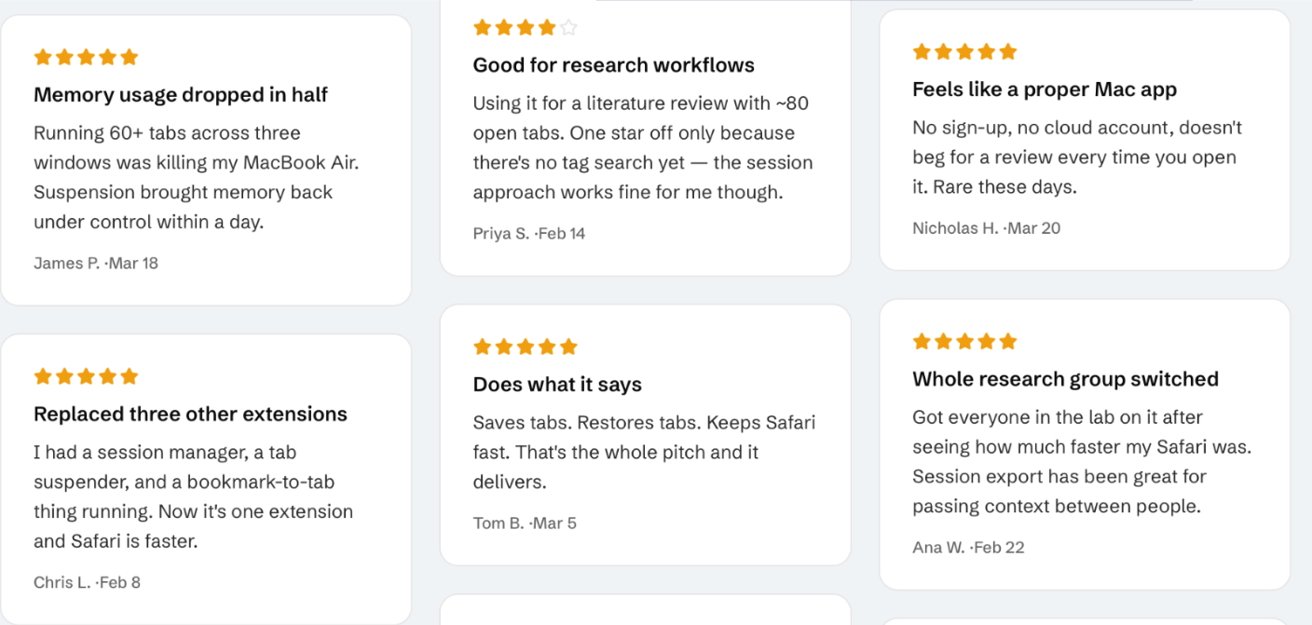
Grid of six customer review cards with five-star ratings, short testimonial titles, and brief text describing positive experiences using a software tool, including improved memory usage, research workflows, and tab management

Five-star reviews purportedly from the App Store, but including dates months before the app was released. Image credit: Jeff Johnson.

Johnson has two Safari extensions in the Mac App Store, and noticed that the same section includes one with a 4.9 out of 5 star rating. However, TabControl, which is still available in the App Store, unquestionably was not showing a genuine App Store rating.

Instead, the whole “4.9” part was a banner in the poster image, it has nothing to do with the App Store. At time of writing, there is no genuine App Store rating.

“This app hasn’t received enough ratings or reviews to display an overview,” says the App Store listing.

Advertisement

That’s a little odd when the app’s official website says that the extension is currently being used by “5,000+ Safari users.”

Johnson also found a number of purported App Store reviews listed on that site. These now appear to have been removed, but Johnson shows screengrabs including reviews that are dated from before the app was on the App Store.

“Do I expect Apple App Store review to do the research that I’ve done in this blog post?” writes Johnson. “Well, yes. Yes I do!”

We do too. It just isn’t happening with enough regularity.

Advertisement

“Practically speaking, App Store review didn’t even need to go as far down the rabbit hole as I did,” he continues. “The ‘4.9 out of 5’ stars in the App Store screenshot should have been a red flag.”

As he points out, Apple has all the details of all the ratings and reviews of every app from every country, so the App Store Review team should know it’s false advertising.

Even among more legitimate-seeming apps, though, Apple is ignoring clear problems. In AppleInsider research, for instance, we found that many price tiers listed for the “Simply Piano” app bore no relation to what the developer actually charges.

In that case, the developer first nonsensically claimed that it was a currency conversion issue. Then when that didn’t wash, they said that Apple keeps listing old prices because some users remain on those subscription rates.

Advertisement
Sidebyside screenshots showing a Simply Piano subscription: App Store list highlighting Individual Plan 1 Year at ?83.99, and a marketing screen advertising Individual Plan 12 months at ?164.99 billed annually

Left: Simply Piano’s listing for a one year individual plan in the UK App Store. Right: the same plan as charged inside the app downloaded from the App Store. Note the difference, it equates to $109. Screenshots taken 13 August 2026.

We reported this to Apple in June 2026, but the issue has not been addressed. Right now on the UK version of the App Store, Simply Piano’s listed price for an individual annual subscription is about $109 less than the app then charges.

It can’t go on

Apple is actually right about third-party App Stores, it is a dangerous and even frightening prospect that apps will not be tested and reviewed. It is true that we can’t automatically trust an app and just download it to see if we like it.

We’re already there in the official App Store. Trust in the App Store is already eroded, and it’s entirely Apple’s own fault.

Advertisement

The positive side is that for now it is under Apple’s control and so Apple can do something about all of this. There was the recent moment, for instance, when it pulled Telegram practically the moment that a user posted porn on it.

Apple also quickly restored it after the issue was resolved, so that’s another positive thing. But the Telegram issue was one user reportedly doing this deliberately to take down the app.

Grok flooded X with AI-generated porn in January 2026, some of it featuring minors. Reportedly Apple did threaten to remove Grok, and it did reject an update.

But the app remained on the App Store throughout. Apple rattled the sabers, and threatened removal. It didn’t actually do anything to prevent a horrific situation.

Advertisement

Maybe you can make a case that the App Store Review team gets tricked by developers replacing their listings or assets. And Apple surely isn’t lying when it proclaims that its App Review process prevented more than $2.2 billion in potentially fraudulent transactions in 2025.

What we cannot know, though, is how much fraud actually got through. We cannot know how much of that $2.2 billion was only prevented because of users like Johnson.

The Grok incidents were in your face headline news that caused global outrage, and the world’s richest man was publicly laughing about it. If that isn’t enough to get an app blocked, it’s no longer that the review process is about safety, it’s apparently about which developers have the most clout.

You shouldn’t have to be the one to investigate apps you want to try. That is the future of third-party App Stores, and that is a future to be fought.

Advertisement

But that future is here with the first-party App Store we already have. And this inability to trust an App Store is here, right now, because Apple will not do what it keeps saying it is doing and what it is charging developers to do.

Updated August 21 1:00 PM ET: The Russian T-Bank client “K8chen Pro” has made it to the top of the app store, masquerading as a 3D-rendering kitchen renovation assistant.

Source link

Advertisement
Continue Reading

Tech

Amazon drones go national, inside Anduril’s Seattle buildup, and AirTag leads to secret book-scanning site

Published

on

This week on the GeekWire Podcast: Amazon’s delivery drones are going national, nearly 13 years after Jeff Bezos unveiled them on 60 Minutes. We listen back and discuss what’s next.

Plus: We go inside Anduril’s unmarked Bellevue office as the defense company builds toward 1,000 Seattle-area engineers; a reporter hides an AirTag in a rare book and tracks it to a secret Amazon book-scanning facility in Las Vegas; and an Anduril-themed trivia challenge.

Audio editing and production by Curt Milton.

Related stories and links

Mentioned at the top

Amazon drone delivery

The AirTag and the book-scanning facility

Anduril in the Seattle region

Subscribe to GeekWire in Apple Podcasts, Spotify, or wherever you listen.

Source link

Advertisement
Continue Reading

Trending

Copyright © 2025