When it first happens to you, you think you’re crazy. You wander into a cafe and look at a menu with a variety of bagel sandwiches, but each illustration looks eerily flawless, precisely symmetrical, and oddly smooth, eliciting a visceral sensation that something isn’t right. You might think you’re paranoid, but you’re not losing your mind. Generative AI menus have hit the restaurant business courtesy of models trained on a narrow, “pleasing” aesthetic that feels wrong even when you can’t articulate why.
Sometimes, these illustrations are egregiously fake, like a burrito with cheese so bubbly and melty that it looks more like avant garde art than lunch. More often, they’re so ordinarylooking that you only notice something is wrong when you take a second to look more closely.
“It’s almost like an alien trying to make a pizza without understanding its core principles,” Reality Defender CTO Alex Lisle told TechCrunch. (Reality Defender itself is part of a growing category of startups selling AI-detection and content-verification tools — a business that exists in part because of issues like this one.)
Lisle says that the way these models are built can help explain why illustrations seem to embrace such a specific aesthetic — one where every ice cream scoop is perfectly round, and where shrimp seem to have been genetically modified to eat their own tails, creating new “Lovecraftian food horrors.”
Advertisement
Large language models (LLMs) and diffusion models — the kinds of AI models that make seemingly omniscient chatbots and image generators like ChatGPT and Midjourney possible — are trained on vast quantities of data. The models then identify patterns in the datasets to predict what a user is looking for when they ask something like, “Make me a menu for a burger restaurant.”
“A lot of this stuff looks like a Chili’s menu from 2015, and there’s a reason for that,” Lisle said. “That was the corpus of work from which [the models] drew their function.”
Image Credits:ChatGPT Image 2.0
New training data is invaluable to the companies building AI models — Amazon has even been found to source rare books to scan and add to its training data, only to destroy those books once they’ve been uploaded. It’s inevitable that some AI-generated content will seep into these incomprehensibly large data sets. But when AI models train on too much of their own AI-generated content, they risk model collapse.
“Model collapse is almost like a mad cow disease… when you feed the outputs from one model back into itself, eventually the inbreeding becomes too much, and the whole thing collapses,” Lisle explained. “What we see here is convergence, which isn’t necessarily model collapse.”
Convergence is a bit less extreme, degrading the quality of an AI’s outputs without making it entirely useless.
Advertisement
If someone asks an AI model to generate a menu for a fast food restaurant, the model will likely reference menus from Wendy’s, Burger King, McDonald’s, or another popular chain. These menus already share a similar style, which means that the AI-generated outputs will mimic that same style, only to further reinforce it further if the AI-generated menu ends up back in training data.
But menus and advertisements for food will always look better than the real thing, like a Big Mac in a McDonald’s commercial where each layer of the sandwich is arranged by a prop designer to look maximally appetizing. This effect can become even more pronounced in AI outputs.
“The optimization of the data sets is for pleasingness, or you know, not being offensive, and so there’s a way that turns into homogenization,” Lee Rainie, Director of the Imagining the Digital Future Center at Elon University, told TechCrunch. “What AI is known to do both in images and language is to shave off the edges.”
On a more localized scale, this smoothing of images seems to happen when you use an AI image generator to create a menu and apply edits to it. On X, a user named Labtec showed what happens when you make a menu in ChatGPT, then edit it 100 times to see how the food continues to look less and less like it should. (We replicated the experiment and found similar results.)
Advertisement
“The end result actually makes me uncomfortable,” Labtec wrote.
I made a restaurant menu in ChatGPT then edited it 100 times to see how those hideous slop menus end up the way they are. The end result actually makes me uncomfortable pic.twitter.com/sDIUKlabdp
Restaurants are likely falling victim to this problem, revising their AI-generated menus to alter small details over and over, like prices or item names. It seems that with each edit, the food images become a tiny bit more round and smooth.
“People have an almost unexplainable sense about when they’re looking at something that’s AI-generated, compared with something that was real in the first place,” Rainie said. “There’s just a sensibility that people sometimes find hard to articulate, but they kind of know it when they see it and I think that’s one of the reasons why some of the early stories about the backlash [against restaurants using AI menus] is so pronounced.”
Advertisement
There’s science behind our aversion to these AI menus. Researchers at the University of Duisburg-Essen in Germany found that AI-generated food images exhibited an “uncanny valley” effect, where images of food that looked almost real elicited more disgust and unease than images that were obviously fake. That squeamishness only intensifies in light of the cultural context around AI.
If people react to these images so negatively, then that’s probably reason enough for restaurants to stop trying to make AI menus work. But the issues that bring us perfectly browned hamburger buns extend beyond the dinner table.
“Seeing and hearing has always been believing, to the point where even our court systems are entirely tuned to the idea that the gold standard in evidence is taped confessions and videotaped evidence,” Lisle said. “That’s no longer the case. The world has fundamentally shifted, for good or for ill.”
When you purchase through links in our articles, we may earn a small commission. This doesn’t affect our editorial independence.
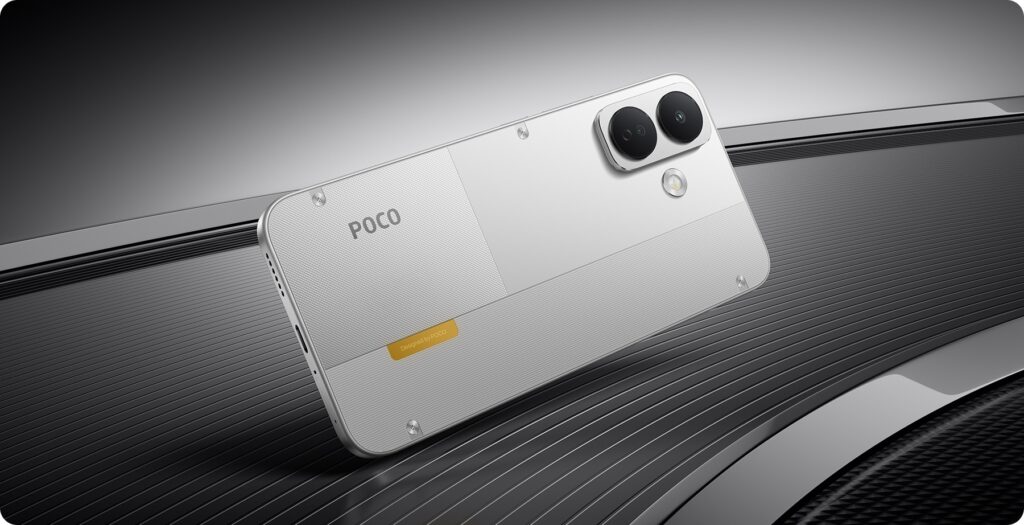
POCO has expanded its X8 lineup with the global launch of the POCO X8 5G. The standard model comes with a 6.83-inch 1.5K AMOLED display with a 120Hz refresh rate and is powered by the Snapdragon 6s Gen 4 SoC. It also packs an 8,340mAh battery and supports 67W charging. The device will launch in India on September 4, where it is expected to feature an even larger 9,000mAh battery.
POCO X8 5G Specifications and Features
The POCO X8 5G gets a 6.83-inch AMOLED panel with 1.5K resolution and a 120Hz refresh rate. It has a resolution of 1280 x 2772 pixels and a maximum brightness of 3,200 nits. The other attributes of the display include HDR10+, 12-bit color depth, and 3,840Hz PWM dimming. The Snapdragon 6s Gen 4 SoC powers the phone with up to 12GB of LPDDR4X RAM. In addition, it comes with up to 256GB of UFS 3.1 storage and runs Android 16 with HyperOS 3.
For photography, the phone has a 50-megapixel primary rear camera with OIS and EIS. It pairs the main camera with a 2-megapixel depth sensor. A 16-megapixel front camera handles selfies and video calls. In addition, the camera system supports up to 1080p video recording and offers several additional features. These include underwater shooting, dual-video recording, Glare Removal, Erase Pro, Image Expansion, and Image Enhancement.
The POCO X8 5G packs an 8,340mAh silicon-carbon battery with 13 percent silicon content. It supports 67W wired charging and 22.5W wired reverse charging. POCO claims the battery can retain at least 80 percent capacity after 1,600 charging cycles. The Indian model is expected to feature a larger 9,000mAh battery. For connectivity, the phone supports 5G, dual 4G VoLTE, Wi-Fi 5, and Bluetooth 5.1.
Other specifications include a fingerprint scanner within the display, an infrared scanner, and Xiaomi Offline Communication. This mobile comes with IP66, IP68, IP69, and IP69K certifications for dust and water resistance. These are certified for high-pressure and high-temperature water resistance. POCO X8 5G is 163.45 x 78.27 x 8.6mm in size, with a weight of 223 grams.
Advertisement
Price and Availability
POCO has priced the 6GB + 128GB version of the X8 5G at $269, around Rs 25,500. The 8GB + 256GB variant costs $299, roughly Rs 28,400. Meanwhile, the 12GB + 256GB model comes with a $349 price tag, or about Rs 33,100. The phone comes in Black, Orange, and White color options globally. The company has not announced global sale details yet. In India, the POCO X8 5G will launch on September 4 alongside the POCO X8 Power. Both smartphones will go on sale from September 11 at 12 noon exclusively through Flipkart. Customers can also buy the phones with 12-month No-Cost EMI options. The EMI starts at Rs 2,250 per month for the POCO X8 and at Rs 2,750 per month for the Power.
The size of the Go 6 is perfect, both for reading when you’re out and about and at home. Its 6-inch screen puts it on par with the entry level Kindle and the Kobo Clara BW for compactness, landing right in the Goldilocks Zone of portability and readability. It fits in my smallest bags while still having a large enough display to read comfortably. It can sit in the back pocket of most jeans and even some front pockets (barring those afflicted by Bad Designs for Women’s Clothing).
There is at least one limitation to consider when bringing it around, though. The Go 6 (Gen II) doesn’t have an IP rating for water or dust resistance, so I’d hesitate to take it to the beach, camping or even use it poolside without a protective case. Kobo has it beat there.
At roughly 160 grams, it is noticeably lighter than the other device that spends the most time in my hand, my Galaxy Z Flip 6. That makes it great for reading in bed or lying down on the couch. So does its adjustable front light, which you can dim and brighten to your likeness, and shift from cool to warm tones to prevent eye strain. Additionally, its 300PPI ePaper display is crisp and bright.
Cheyenne MacDonald for Engadget
I did notice a fair amount of ghosting when switching between different apps and device menus, but Boox offers a number of refresh and color modes to cut down on this sort of thing if it bothers you. There’s also the option to set how frequently the screen refreshes. I found ghosting was much less of an issue while I was actually reading and I ultimately set my Full Refresh Frequency to every 30 taps. Never is an option as well, and you can set different settings for each app to optimize them for the display. A quick-access gesture launches BOOX EinkWise, where you can fine-tune any given app’s refresh and color modes, layout, contrast and anti-flicker levels.
The 1,500mAh battery will get you several days of use if you’re reading for a few hours a day and using apps moderately. You can get lots more out of the battery by turning off Wi-Fi and Bluetooth when you’re not using them, freezing apps to prevent them from running in the background and keeping the front light low or off when lighting conditions allow. It’s currently been eight days since I last charged it and I still have 24 percent left. That’s still far less than you’ll get with the comparable Kindle and Kobo devices, which have weeks-long battery life, but that’s the tradeoff of having Android.
Advertisement
Putting books on the Go 6 (Gen II) is painless. You can transfer files wirelessly to the device using its BooxDrop file sharing tool, by syncing with several cloud-based storage platforms it supports, like Dropbox and Google Drive, or using the USB-C cable. The built-in Boox store is extremely limited, containing only a small selection of public domain works, so if you want to buy or rent books on-device, you’re going to need to turn to another app.
I’ve really enjoyed the freedom this ereader allows in using my go-to apps to source and read books, as my reading habits tend to be all over the place. I can buy and download a book from the Bookshop.org app, which is only available on iOS and Android, and then go to The StoryGraph app to jot down a review immediately upon finishing it without having to switch over to my phone. Moon+ Reader works alright too, but you’ll want to play with your books’ settings to make them more readable for E Ink, otherwise you’re likely to experience a ton of ghosting.
With artificial intelligence being the bête noir of the moment, there are some projects using it which maybe don’t bring much to the table. So it’s nice to see one that uses it in a creative way, and delivers something new. [arnegiacomo]’s e-paper screen is a great example, as it draws a picture in real time of whatever birds are outside.
Behind the quite large screen sits a Raspberry Pi 5, and on that is BirdNet-Go, an AI-powered birdsong classifier. A USB microphone catches the birdsong, and Birdnet comes up with the species. The birds on the display are then those species as pictures from 19th century bird spotters guides, assembled into a collage. You can even see what the current set of birds it hears are, live, and they are a representative cross section of the European birds you’d find in Norway where it’s located.
If you’re thinking about getting into content creation or you just want a more suitable device to record your next family holiday, it’s never been easier thanks to the best vlogging cameras currently available. These purpose-built devices are portable and typically a lot more affordable than smartphones and professional-grade cameras, and thanks to the hard work of our tech experts, you can use this guide to find the right option for your needs.
Although it might be tempting to pick up one of the best cameras around to start your vlogging journey, these devices are best left to enthusiast and professional photographers who know how to make the most of all the tech on offer. By comparison, vlogging cameras are designed to be more user-friendly, usually packing a front-facing screen that makes it much easier to line up your shots.
You’ll also find that vlogging cameras have better stabilisation than most capture devices, with the likes of GoPro, DJI and Insta360 having refined their stabilisation tech over the years to the point where it looks as if your footage has been recorded using a gimbal. This is perfect for when you’re filming a vlog that includes adventurous activities such as hiking or mountain biking.
As a final point, a lot of these cameras have been designed alongside dedicated smartphone apps so you can quickly extract any footage you’ve captured and share it to social media with little effort required. Most apps tend to include some form of editing suite, so it’s very easy for newcomers to get started without having to spend a small fortune on both hardware and software.
Advertisement
For this list, our tech experts have tested the latest vlogging cameras in a range of scenarios, seeing how they perform in the real world and documenting their experience in our reviews so you get a full understanding of what each camera is like to own. Keep on reading to see which options we currently recommend, or check out our separate list for the best action cameras, if you’re mostly interested in capturing fast-paced content.
Best vlogging camera at a glance
Best overall: DJI Osmo Pocket 4
Best for professionals: DJI Osmo Pocket 4P
Best for beginners: Insta360 Go Ultra
Best for full-frame capture: GoPro Mission 1 Pro
Advertisement
Learn more about how we test cameras
We test every camera we review thoroughly. We use set tests to compare features properly and we use it as our main device over the review period. We’ll always tell you what we find and we never, ever, accept money to review a product.
A wonderfully versatile and portable camera – – –
100GB built-in storage is super useful
Easy to use and control
240fps 4K slow mode is superb
Zoom is still a little grainy, especially in low light
Some controls can be fiddly on a small touchscreen
Battery drains fairly quickly in the higher frame-rate/resolution modes
You really want the Combo to get the best features
Advertisement
At this point, it isn’t really hyperbole to say that the DJI Osmo Pocket 3 really raised the bar for vlogging cameras across the board. Not only did it capture great-looking footage, but its small footprint made it so easy to carry with you throughout the day, which in turn gave you more opportunities to shoot video on the go. It set up a pretty solid foundation for DJI’s stake in the market, but the DJI Osmo Pocket 4 has taken things a step further.
The big upgrade with this successor is the larger 1-inch CMOS sensor which manages to push for even higher-quality video, the likes of which will grab the attention of anyone scrolling through their social media feed. Although the footage will always look best when there’s a good amount of natural light around, we were impressed to see that the Pocket 4 can more than hold its own in low-light environments, so if you want to explore a city after dark, you have the freedom to do that here.
For when you’re not shooting to-camera content and you want to grab a handful of establishing shots, you can swap over to the rather brilliant 4K/240fps mode. It just looks stunning, and it’s a great way of transitioning from one location to another in your final video. In terms of the core functionality at play, there are two new additions that make the process of filming a great deal easier.
For starters, there’s now 107GB built-in storage so you’re no longer forced to use a microSD card, although you have that option there if you want to shoot tons of content and don’t want to ever worry about reaching that limit. There’s also now a dedicated zoom button which is a lot easier to use than the touchscreen alternative that exists on the Pocket 3.
Advertisement
Although the Osmo Pocket 4 is great on its own, if you’re looking to get serious about your ability to capture professional looking video then we recommend plumping for the Creator Combo bundle which includes the excellent DJI Mic 3 and a dedicated fill light to inject a boost of visual fidelity when there isn’t much light available. It does cost a fair bit more, but for all you get here, it’s worth every penny.
Useful second lens expands its capabilities
17-stop dynamic range is a big step up on the Pocket 4
ActiveTrack 8.0 tracking across both cameras is excellent
Compact and well built
Advertisement
Heavier and less pocketable than the standard Pocket 4
D-Log 2 shooting comes with some restrictions
The bundled FrameTap remote feels like an afterthought
DJI’s current crop of vlogging cameras says a lot about the company’s ambitions in this space. The DJI Osmo Pocket 4 is already a great option for content creators who really want to stand out and move on up from shooting on their smartphone, plus the Osmo Pocket 3 can now be bought at a discount if you’re starting out on a budget. However, for the professionals out there, the DJI Osmo Pocket 4P, this pick has been made with you in mind.
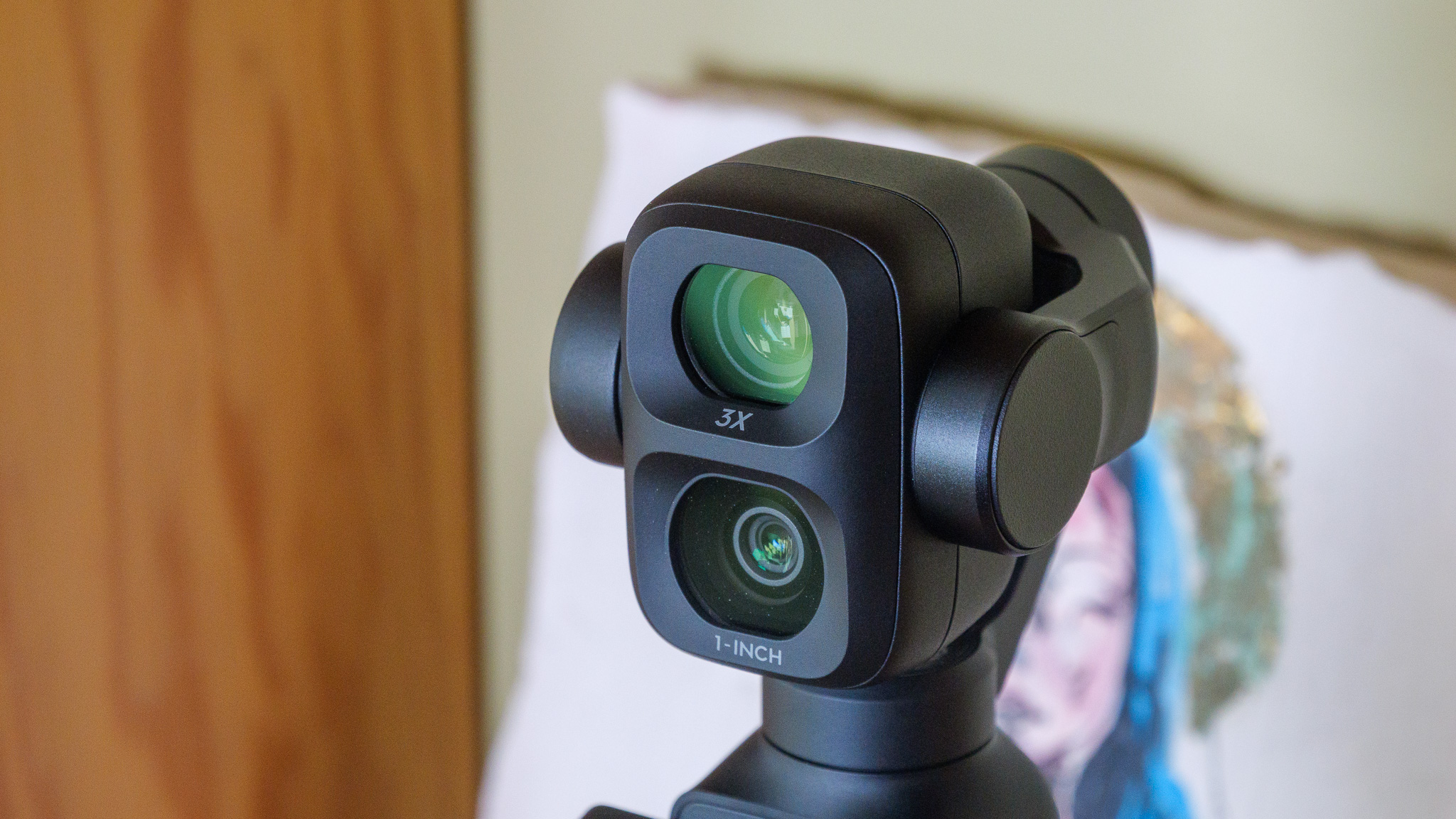
There are quite a few upgrades in this device over the standard Pocket 4, chief among them is the secondary telephoto lens. This additional snapper is a 1/1.28-inch sensor that packs a large f/1.8 aperture, and effectively works with a 3x optical zoom over the main camera, so you can now get excellent capture quality even from a distance, which was one of the few areas where the other Osmo Pocket cameras fell behind.
If a subject or object is really far away then you can punch in with 12x digital zoom which, to our surprise, actually holds up quite well. When it comes to the main 1-inch CMOS sensor, although it is largely the same as the one you’ll find on the Pocket 4, this version can now provide 17 stops of dynamic range instead of 14, so shots have much better overall composition, especially in tricky lighting.
Advertisement
This is partially achieved via the jump to using the new D-Log 2 profile, offering more flexibility for professionals who want to colour grade their footage after the fact. What really helps however if you’re shooting a scene which involves multiple people, is that the Pocket 4P is capable of multi-person tracking which takes a lot of the framing out of your hands, leaving you free to focus on other aspects of the video.
Just like the standard Pocket 4, there’s now built-in storage here of just over 100GB so there’s no need to worry if you forget to bring a microSD card with you on a shoot. The upgraded ActiveTrack 8.0 software is arguably DJI’s best take on stabilisation to date, with all footage looking incredibly smooth no matter what happens. This is just a great camera all around that professionals can really tinker with to achieve phenomenal results.
Advertisement
Massive upgrade to image quality
A far stronger magnetic connection than before
Terrific performance with the new chipset
Major jump in battery life
Notable price increase
AI editing is a bit half baked
Out of all the vlogging cameras we’ve tested, the one that is arguably the most fun to use is the Insta360 Go Ultra. This square-like camera is a little marvel, one that encourages you to get creative with your shots in a way that few other cameras do. Unfortunately, its price increase over the similarly brilliant Insta360 Go 3S means that it has pretty tough competition, particularly as you can find the DJI Osmo Pocket 3 for less, but for a lot of content creators, it’ll be exactly what they’re looking for.
The killer feature that separates the Go Ultra from the pack is its much stronger magnetic backing, which allows it be placed on almost any metal surface. This effectively gives you the chance to get some tripod-style height in your videos with very little effort, but it also encourages you to search your environment to think of fun spots where the camera can be placed to achieve unique and eye-catching angles. No other vlogging camera challenges you in quite the same way.
Advertisement
Helping the Go Ultra is the upgraded 1/1.28″ sensor which is 221% larger than before and lets in a ton of natural light. The end result is that video looks wonderfully vibrant, even when there isn’t a massive amount of light to draw from. Even when taking the camera for a test shoot on a cloudy day, the likes of which would cause lesser cameras to really struggle, but the Go Ultra showed off impressive dynamic range for a pleasing overall image.
Insta360 has shown itself to be very adept at stabilisation with previous entries, and that very much continues with the Go Ultra. Even when holding the camera on its own, outside of the Action Pod casing, it did a great job with minimising the natural wobble of a walk. Still, if you are shooting to camera as you move then housing the Ultra in the Action Pod is the way to go, as you can attach a grip to the bottom. Plus, you can flip the screen out to better frame yourself in the shot.
If you’re starting from scratch and you don’t any editing software to lean on, you’ll be glad to know that the Insta360 app comes with a fairly substantial, if heavy-handed, video editor. Admittedly, we weren’t majorly impressed with the AI features injected into the editor, but you can ignore them and stick to the typical suite of options.
Advertisement
Outstanding image quality for an action camera, particularly in low light
8K Open Gate capture offers huge reframing flexibility
Impressive stabilisation and slo-mo capabilities
Tough, waterproof to 20m and easy to mount almost anywhere
60cm minimum focus distance makes close-ups and handheld vlogging tricky
Stills performance lags behind the video capabilities
Expensive next to close rivals that aren’t drastically worse
App locks key features behind a subscription
Although GoPro was the dominant force in the world of action/vlogging cameras for the longest time, the brand definitely conceded a fair amount of ground to the likes of Insta360 and DJI in the last few years. Well, keen not to lose any more ground, GoPro went back to the drawing board and returned with a rebrand, bringing the outstanding GoPro Mission 1 Pro to market.
Advertisement
This time around, the Mission 1 Pro is packing a large 1-inch sensor, which does a great job of letting in more light and creating an eye-catching image in the final product. There’s a great amount of detail too, particularly when shooting after dark. As we know from plenty of testing in this area, low-light filming is where a lot of cameras can falter, but the Mission 1 Pro outdoes the likes of the Insta360 Ace Pro 2 and the DJI Osmo Action 4, both of which set the previous standard here.
What really sets the Mission 1 Pro apart from the competition however is the all-new 8K Open Gate capture. For those who don’t know, this method of filming is capable of recording the full frame of the sensor, instead of a frame that’s already cropped from the get-go. What this means is that you have more flexibility on how to frame your video in the final edit.
Unlike some action cameras, the Mission 1 Pro has full waterproofing without the need for an additional case, so if you want to get some underwater shots to really spice up your content, you can do that with ease here. When you’re on land, you’ll be glad to know that the camera boasts some of the best stabilisation we’ve tested – at times it honestly looks like the video has been captured with the use of a gimbal.
One issue that did pop up is that with a minimum focus distance of 60cm, you can’t get too close to the camera otherwise you’ll come across a bit blurry. So long as you keep that in mind as you vlog then you can work around it, especially if you have a reasonably sized grip accessory in tow, but it isn’t something that a lot of competing cameras put on users to contend with.
Advertisement
FAQs
Which is the best vlogging camera for extreme sports and adventures?
The GoPro Hero 12 Black is the best option for challenging environments like these.
Advertisement
Which cameras can record in 4K?
Every camera on this list is capable of capturing 4K video, with the GoPro going up to 5.3K and the GH6 as far as 5.7K.
The recent funding reportedly raises the start-ups’ value to around $30bn
In October of 2025, it was reported that Crusoe, a cloud computing company and data centre developer, was believed to be valued at more than $10bn, post the closure of a Series E funding round worth $1.375bn.
The round was co-led by technology investors Valor Equity Partners and Mubadala Capital and included participation from investors such as 137 Ventures, Salesforce Ventures, Nvidia, Winklevoss Capital and Founders Fund.
Since then Bloomberg has reported that Crusoe has raised more than $3bn in a funding round. Unnamed sources close to the announcement have stated that the latest investment brings Crusoe’s valuation to roughly $30bn.
Advertisement
The round was co-led by Atreides Management and Valor Equity Partners co-led the round. Mubadala Capital, the alternative asset manager owned by Abu Dhabi sovereign wealth fund Mubadala, is also participating, according to Bloomberg’s sources.
Established in 2018 and headquartered in Denver, Colorado, by Chase Lochmiller and Cully Cavness, Crusoe aims to accelerate the merging of energy and intelligence. The company provides energy-first solutions for AI infrastructure, by harnessing large-scale energy resources, building AI-optimised data centres and delivering an AI cloud platform.
Reportedly, Crusoe also recently signed a major $13bn contract that would see the organisation supply quantitative trading firm Jane Street with GPUs and AI infrastructure over the course of the next five years.
The last couple of years have been formative for Crusoe, as it extends its global reach.
Advertisement
In February of last year it was announced that the company is establishing a European base of operations in Dublin, Ireland and will create 100 jobs for professionals in the areas of networking, site reliability engineering, customer success and support departments, over the course of three years.
Don’t miss out on the knowledge you need to succeed. Sign up for the Daily Brief, Silicon Republic’s digest of need-to-know sci-tech news.
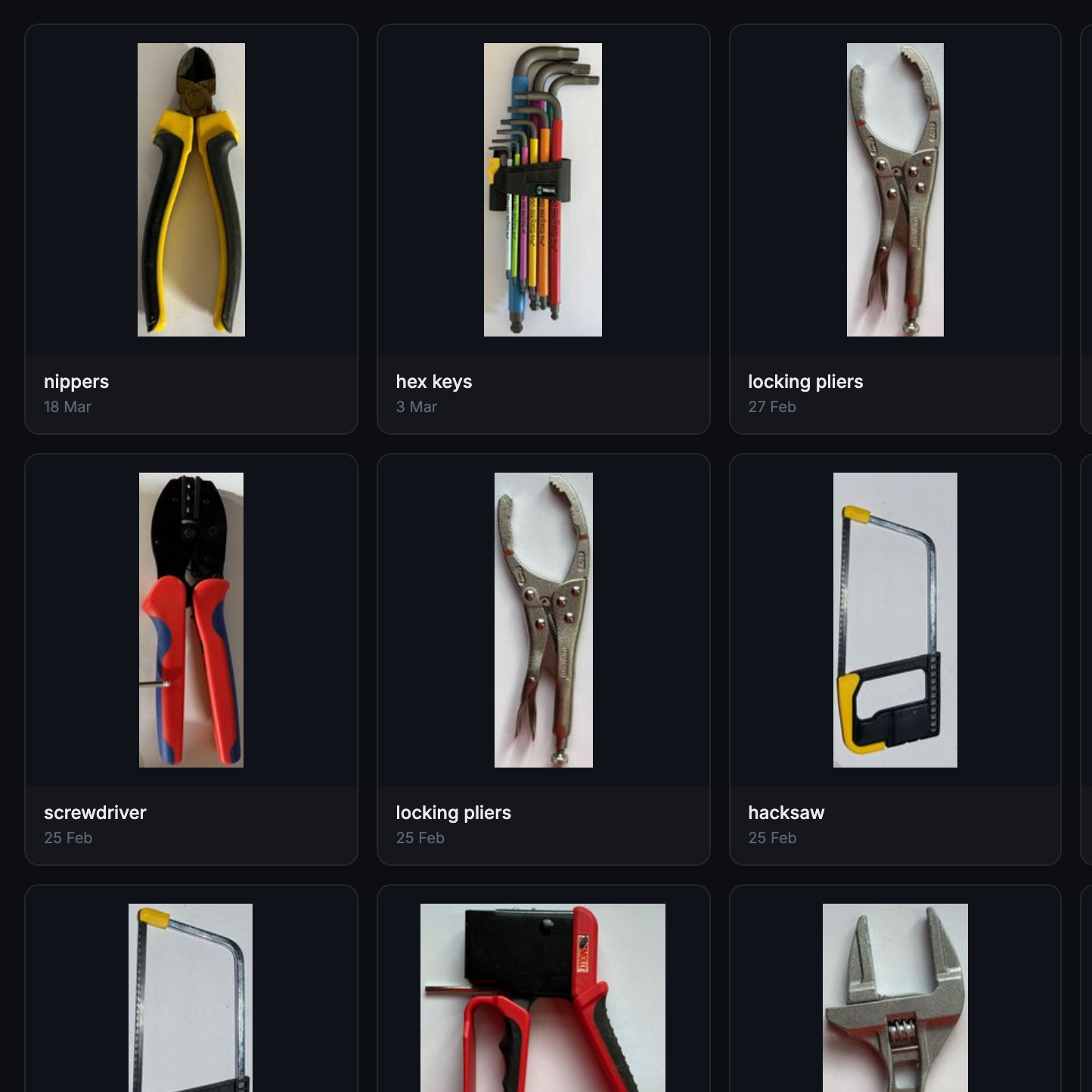
What if the organization and storage benefits of tool shadowing could be had and improved with a modular, semi-automated process? Tracefinity attempts that by generating custom Gridfinity bins from photos of tools, and has quite a few nifty features that are worth a look.
Maintaining a library of tools makes it easy to create project-based custom layouts.
The basic workflow is this: place one or more tools on a sheet of paper, take a photo, then upload the photo and have the system trace and save the outline and add it to a private tool library. When one is ready to create some bins, use the library of saved tool outlines to generate custom Gridfinity layouts.
If you’re unfamiliar, Gridfinity is a modular system of standardized bins and baseplates designed with 3D printing in mind, making it an ideal match for highly-customized organization tasks and a particularly natural fit for a tool-tracing system like this one.
The idea of taking a photo of a tool and generating a custom bin is a compelling one, and a couple years ago we covered a project that did just that. Tracefinity seems like a natural evolution of the idea, and includes handy features like easy design adjustments, optional magnet holes, and we really like the concept of a tool library from which individual tools are scanned once then later selected to create specific, project-based layouts.
Tracefinity takes advantage of new software capabilities like machine learning to improve and streamline the tracing process, but that doesn’t mean it relies on any external services. It can be entirely self-hosted and by default uses a local, CPU-friendly object detection model for tool tracing. There is an option to provide a API key to use Google Gemini instead, but it’s not required. It can come in handy for especially complex tool outlines or dealing with non-ideal source photos, however.
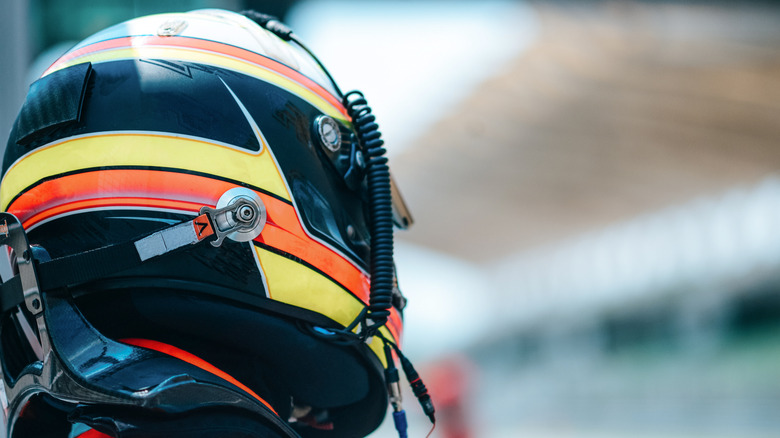
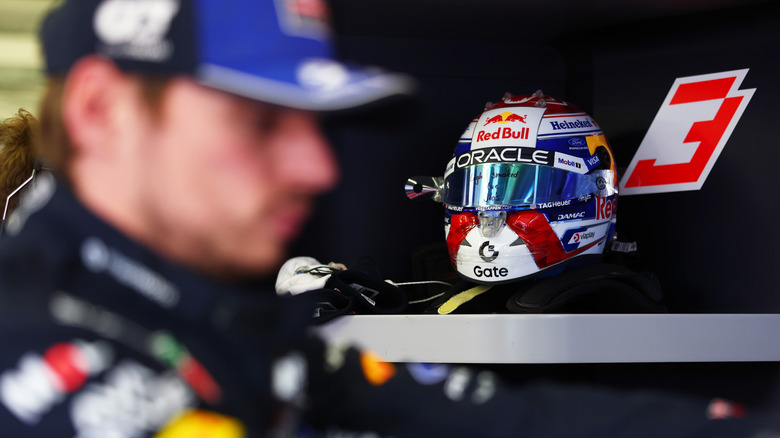
Formula 1 is a sport widely known for its many technological innovations. From the Golden Era of the 1960s to 1970s with aerodynamic advances, to the Turbo Era of the 1980s, the screaming engines of the 2000s, to the modern Hybrid Era, it’s a sport dripping with cutting-edge tech, all in the name of making the fastest form of circuit racing in the world. But not every piece of technology is that advanced — for every lifesaving Halo device, there’s a simple adhesive plastic strip. Enter the visor tear-off.
You know the plastic covering on your phone’s screen when you first buy it? A tear-off is basically a beefed-up version of that. It’s meant to protect the body of the driver’s visor from debris, oil, dirt, scratches, and whatever else comes their way. Once the translucent screen is coated with all this detritus, the driver simply rips it off and presto, you have a clear line of sight again.
The actual number of tear-offs varies, and there’s no readily explained rhyme or reason because it’s more of a soft regulation. In fact, Formula 1’s only hard rule regarding these plastic strips is a directive to keep drivers from throwing them onto the track, which makes sense considering you don’t want a slick piece of plastic right in the middle of a crucial apex. Otherwise, drivers have from around a half-dozen to possibly nine or more; the number likely varies depending on track conditions and other factors.
Advertisement
What exactly are tear-offs made of?
Rosley Majid/Getty Images
Tear-offs exist in just about every circuit racing format featuring closed-helmet, open-cockpit racing, ranging from karting to MotoGP and beyond. Closed-cockpit cars have a similar system despite also having windshield wipers — the film is removed when the driver comes in for a pit stop, particularly useful in long-distance endurance races.
The composition and number of these strips depend on the discipline and manufacturer, but generally you have layers of laminated plastic designed to be torn off sequentially, something like Mylar or a similar material. They stick together to prevent grime from getting between the strips, otherwise stuff like oil and water could separate the layers prematurely. They have to be plastic because they’re bonded to the ballistic material of the visor itself; anything that shatters would never pass muster, considering how bad some crashes can get.
Advertisement
Bear in mind that in a crash, debris like nuts and bolts can be ejected at 150-plus mph, and helmets are designed with those safety considerations in mind. Open-face helmets, let alone stuff that could break, could be a death sentence in a crash at modern F1 speeds. So the visor itself is clearly an extremely resilient material, but nobody said it can’t be scratched or get dirty. And Formula 1 cars have many amazing technologies on-board, but windshield wipers aren’t one of them.
Advertisement
How and when tear-offs are used
Mark Thompson/Getty Images
It’s generally up to the driver’s discretion as to how many they use and when they rip them off. It’s common practice to store them somewhere in the car, at least according to contemporary F1 regulations; the practice of tossing them has actually caused accidents before. The most recent example of this is the 2026 MotoGP Spanish Grand Prix, when rider Marco Bezzecchi had an accident before the sprint race even started because his Aprilia slipped on a tear-off.
Formula 1 cars appear more stable than bikes, sure, but the drivers nevertheless drive on the limit of tire grip. Any unpredictable material on the track could change the course of a race instantaneously. Moreover, it’s not like you can simply put more on. You have a finite amount of tear-offs that you decide before the race, so ripping them off after every lap would not only litter the track, but you’d quickly run out of visibility. In other words, it’s an as-needed device, not something to do at set times.
Other motorsports have similar regulations. Take endurance racing, for example. Cars can run longer than five Grands Prix put together, and watching footage of these races often reveals a tear-off every pit stop or so. After all, why bother with the mechanical trouble of wiring in a windshield washer reservoir and pump when a simple piece of plastic will do? Just another way high-level motorsport demonstrates that sometimes the best solution is the simplest one, like how F1 sometimes goes back to old-school pit boards for driver communication when radios fail.
Chargers usually don’t have much personality. Plug something in, maybe glance at a tiny LED, and hope your phone or laptop is getting power as quickly as it should. Vention’s latest charger has a slightly more entertaining way of keeping you informed: It makes faces at you.
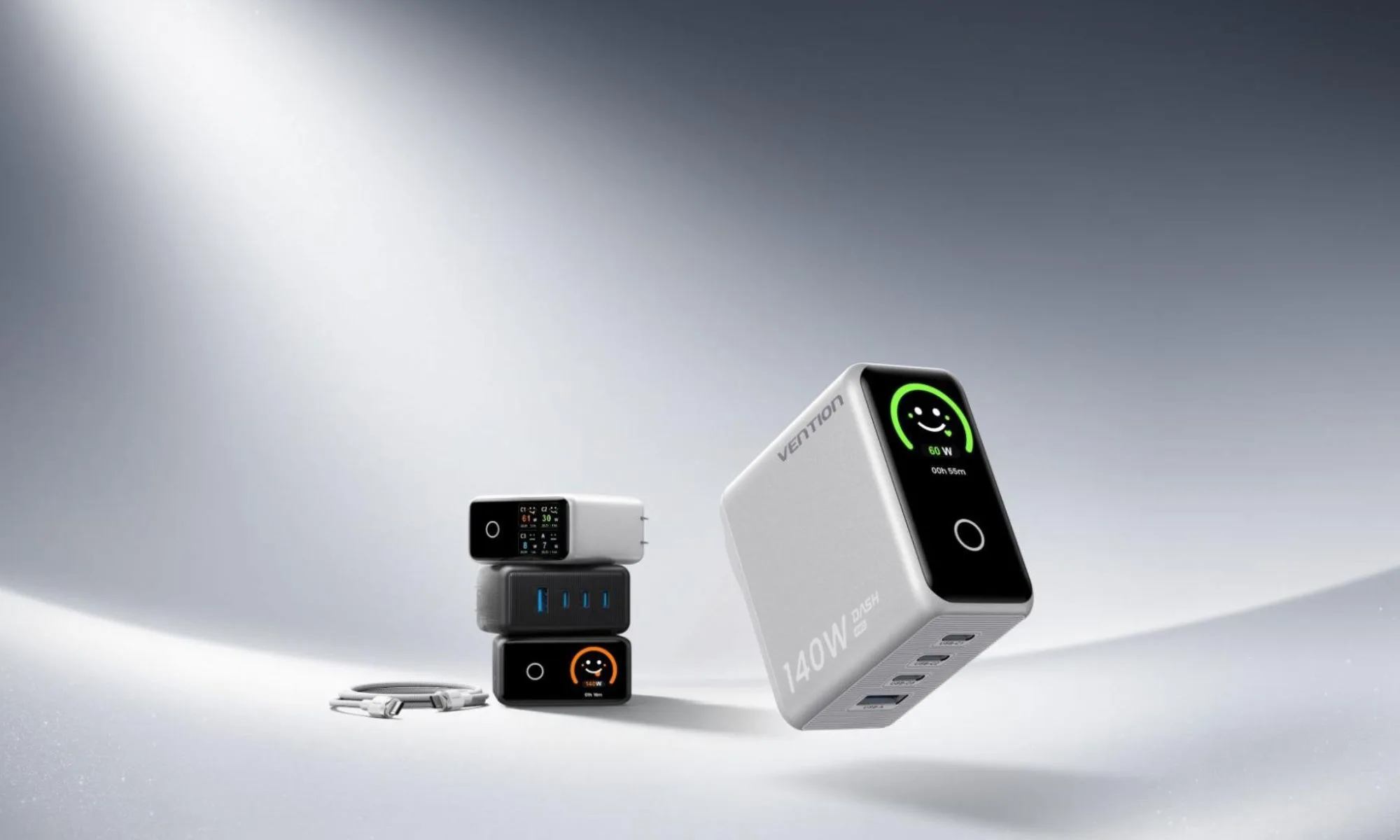
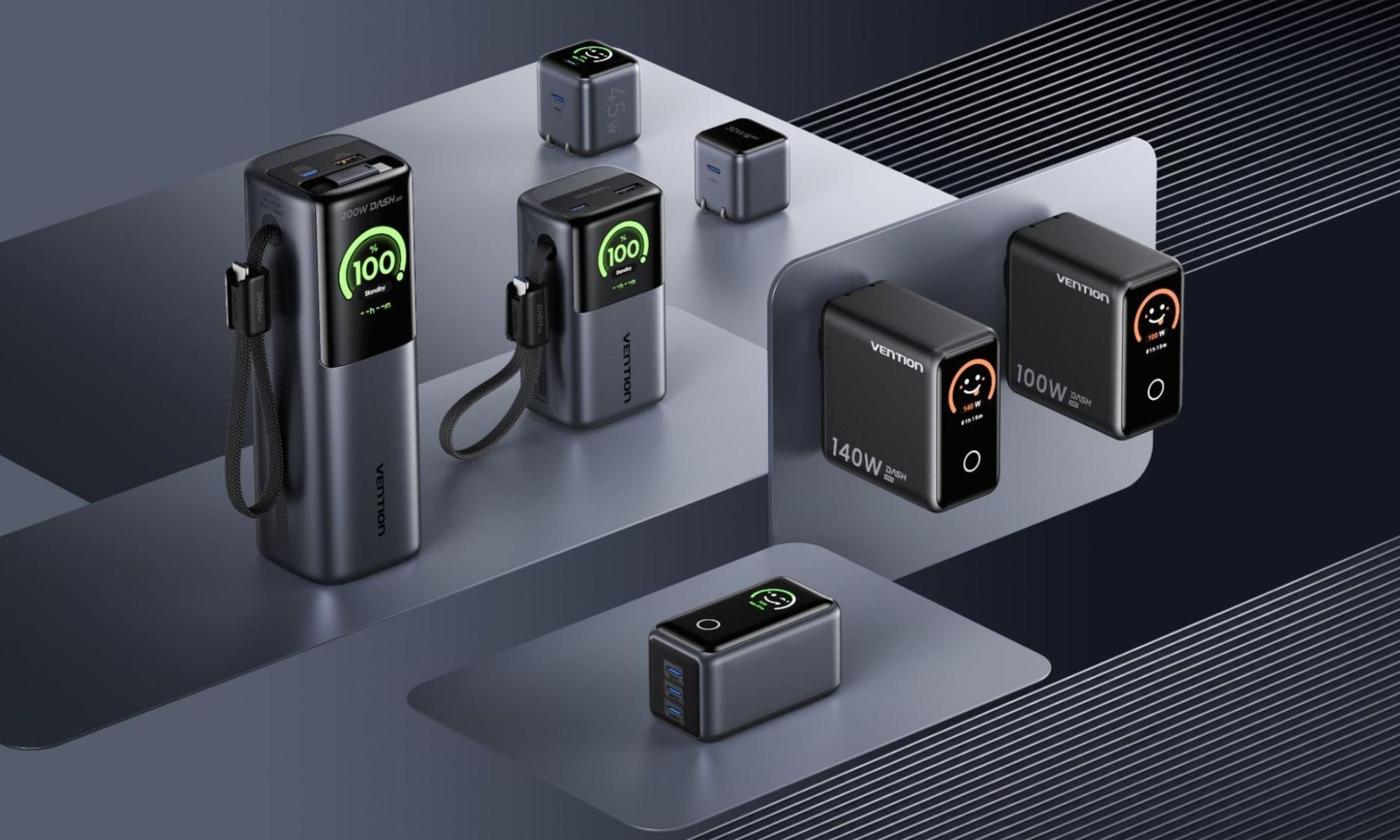
Unveiled at IFA 2026, the Vention Dash Pro is a 140W GaN charger with four ports and a small display that uses animated, color-coded faces to show what’s happening. Alongside it, Vention has introduced the H Series, a remarkably thin magnetic power bank that puts considerably more emphasis on design than the chunky battery packs we’re used to carrying around. Both are part of Vention’s bigger push into the US and European markets, but they tackle portable charging in very different ways.
Your charger looks happy for a reason
The Dash Pro’s display is easily its most unusual feature. Rather than expecting you to interpret charging figures, it translates the charger’s current status into one of five faces. You’ll see a sleepy white face when nothing is happening; for example, while fast charging produces a happy green face. Push the charger to its maximum output and the face turns an excited orange. The charger also shows a red warning face if it detects a problem.
Vention
If you’d rather have the numbers, Vention’s companion app provides information such as real-time charging power, current, temperature, and connected-device status. There’s plenty of power behind those expressions, too. The Dash Pro can deliver up to 140W and uses three USB-C ports alongside one USB-A port, allowing four devices to charge simultaneously. Vention says its EnergyCore system can identify connected hardware and adjust power delivery automatically, while support for standards including PD 3.1, PPS, QC, and UFCS should cover a wide range of phones, tablets, laptops, and other gadgets. The foldable plug and 100V-240V support also make it particularly suited to travel.
Vention also made a seriously thin power bank
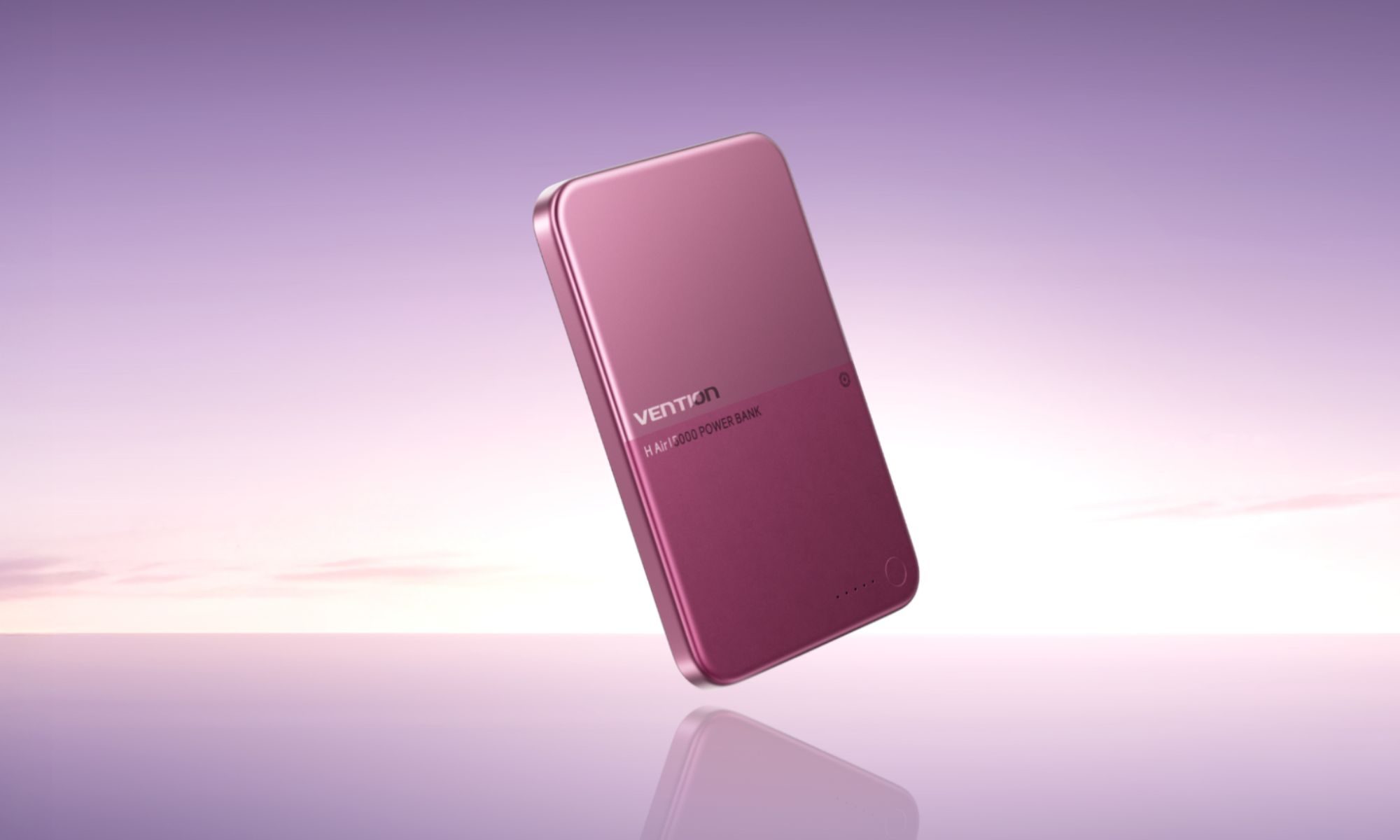
The H Series takes a more minimalist approach. Its 5,000mAh battery is squeezed into a body measuring just 6.9mm thick, with an aluminum exterior and curved edges intended to make it easier to carry alongside a phone. Vention is offering it in Burgundy Dusk, Cloud White, and Midnight Black, with a two-tone finish that makes it look less like a traditional battery pack. Inside is a solid-liquid hybrid battery, which helps Vention fit that capacity into the slim enclosure.
Advertisement
VentionVention
The app also provides battery temperature, charging status, current, capacity, and system-health information rather than simply showing a remaining percentage. Vention hasn’t shared pricing or exact availability for either product yet. It also brought several other accessories to IFA, including a retractable charging cable, a 7-in-2 USB-C dock, and its SpotTag Pop Bluetooth tracker. But between a power bank barely thicker than some phones and a charger that gets visibly excited about fast charging, its newest power gear certainly has more character than most.
At an IFA event, Lenovo unveiled a range of new laptops aimed for everyone from developers and professionals to the more style-conscious among us.
Heading up the laptops is the 15-inch Yoga Pro 9N, as it’s the most powerful of the lot. Built for developers and creators in mind, the Pro 9N delivers up to 80W TDP and runs on Nvidia’s RTX Spark “super chip” that brings together Blackwell RTX GPU, Grace CPU and high capacity unified memory, all in one seriously mighty processor.
Alongside the standard Yoga Pro 9N is the two-in-one iteration which also benefits from RTX Spark’s power. Unsurprisingly coined the Yoga Pro 9N 2-in-1, the laptop doubles as both a standard laptop and a tablet thanks to its folding keyboard. The two-in-one also supports the new Yoga Pen Gen 2, which promises low latency, palm rejection for easier drawing while resting your hand on the screen, smart gestures and customisable buttons too.
That’s not all that Lenovo launched at its IFA-adjacent event. Let’s face it, not all of us really need all the power that RTX Spark promises and, realistically, just need a laptop for more casual or less intensive work uses. That’s where the Ideapad 5 line-up comes in.
Advertisement
Image Credit (Trusted Reviews)
Advertisement
Available in a choice of six eye-catching colours including Spicy Gold, Zen Green, Dreamy Violet, Radiant Coral, Jewel Blue and Lowkey Grey, Lenovo explained at the launch event that the colour was one of the things they were “most excited about” as the brand partnered with the Pantone Colour Institute and analysed emerging trends to come up with the colour palette.
Design aside, powering the IdeaPad 5 is powered by Intel – although at the time of writing we don’t know the exact processor series behind it.
Overall, Lenovo’s new launch seemingly offers something for everyone, whether it’s for developers who need extra oomph, or for those who don’t need too much power and would rather a stylish machine. I mentioned when covering Acer’s relaunch of Packard Bell, that I found the bright orange DotBook a welcome relief from the stale and boring colours usually adorned by laptop manufacturers.
With this in mind, it’s great to see Lenovo embracing more bold colours too.
Attackers compromised Coder’s Cloudflare infrastructure and added unauthorized registry servers that delivered malicious Terraform modules containing credential-stealing code.
The Coder platform enables organizations to provide developers with secure, self-hosted cloud development environments for building and deploying software, including AI applications.
The project is used by prominent private and government organizations, including Dropbox, Palantir, Square, Mercedes-Benz, KKR, EnBW, the U.S. government, and defense companies.
Earlier this week, Coder disclosed that an attacker targeted registry.coder.com, the project’s package-hosting site that developers use to source components for their workspace templates.
Advertisement
Although Coder’s registry runs behind Cloudflare, the attacker accessed its underlying infrastructure and added unauthorized servers to the registry’s pool.
As a result, Cloudflare routed some registry requests to the attacker’s servers, instead of Coder’s legitimate servers, delivering malicious files to a subset of users.
“An unidentified malicious actor gained access to Coder’s Cloudflare infrastructure and added unauthorized IP addresses to the pool used for Coder’s module registry,” reads Coder’s advisory.
“These unauthorized IP addresses hosted a version of Coder’s registry that contained artifacts which included malicious code.”
Advertisement
The project said that the delivery window for the malicious artifacts was between 07:35 UTC and 21:45 UTC on Monday, August 31.
During this time, the malicious servers delivered modified versions of Terraform modules, which are ready-made bundles of instructions for creating and configuring computing infrastructure.
According to Coder, the malicious modules acted as information stealers on infected hosts, searching for:
Provisioner environment variables and secrets
Cloud infrastructure and AI-tooling API keys
CI/CD credentials
Configuration-file secrets and terminal history
User OIDC tokens
Configured SSH keys
One-time external authentication tokens
Coder database passwords and other configuration secrets when the provisioner ran within ‘coderd’
The collected information was exfiltrated to the lookalike domain ‘coder-infra[.]com.’
It is recommended that potentially impacted users rotate all impacted secrets mentioned in the above list as soon as possible.
Advertisement
Before upgrading to a patched release, versions 2.37.0, 2.36.4, 2.35.7, and 2.34.9, Coder recommends that users examine firewall, proxy, DNS, and VPC flow logs for connections to coder-infra[.]com.
Developers should also search provisioner logs for data.external.telemetry, identify modules downloaded during the exposure window, and purge potentially malicious cached packages.
To help users determine if they were impacted, Coder shared an SQL query that can identify potentially affected cached modules and template versions.
The project said refresh tokens were not passed to the provisioner and that there was no evidence of any impact to customer data it maintained.
Advertisement
However, because the attacker’s infrastructure is outside the project’s control, Coder does not have access to crucial logs and cannot conclusively identify every compromised deployment.
Overall prevention scores can hide what happens after initial access. Once attackers are using valid credentials, prevention drops sharply.
The Blue Report 2026 measures defenses technique by technique across 338 million simulations run in customer production environments.

























































You must be logged in to post a comment Login