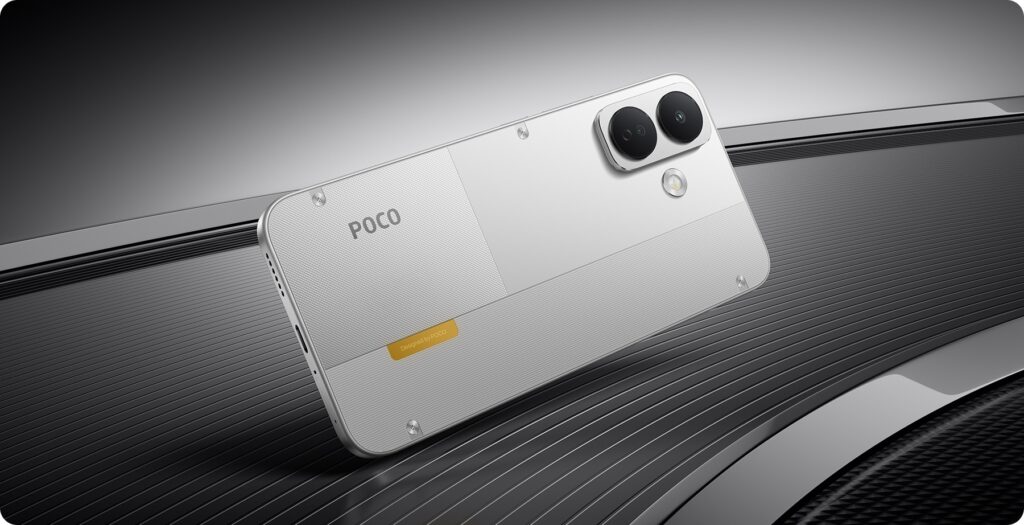
POCO has expanded its X8 lineup with the global launch of the POCO X8 5G. The standard model comes with a 6.83-inch 1.5K AMOLED display with a 120Hz refresh rate and is powered by the Snapdragon 6s Gen 4 SoC. It also packs an 8,340mAh battery and supports 67W charging. The device will launch in India on September 4, where it is expected to feature an even larger 9,000mAh battery.
POCO X8 5G Specifications and Features
The POCO X8 5G gets a 6.83-inch AMOLED panel with 1.5K resolution and a 120Hz refresh rate. It has a resolution of 1280 x 2772 pixels and a maximum brightness of 3,200 nits. The other attributes of the display include HDR10+, 12-bit color depth, and 3,840Hz PWM dimming. The Snapdragon 6s Gen 4 SoC powers the phone with up to 12GB of LPDDR4X RAM. In addition, it comes with up to 256GB of UFS 3.1 storage and runs Android 16 with HyperOS 3.
For photography, the phone has a 50-megapixel primary rear camera with OIS and EIS. It pairs the main camera with a 2-megapixel depth sensor. A 16-megapixel front camera handles selfies and video calls. In addition, the camera system supports up to 1080p video recording and offers several additional features. These include underwater shooting, dual-video recording, Glare Removal, Erase Pro, Image Expansion, and Image Enhancement.
The POCO X8 5G packs an 8,340mAh silicon-carbon battery with 13 percent silicon content. It supports 67W wired charging and 22.5W wired reverse charging. POCO claims the battery can retain at least 80 percent capacity after 1,600 charging cycles. The Indian model is expected to feature a larger 9,000mAh battery. For connectivity, the phone supports 5G, dual 4G VoLTE, Wi-Fi 5, and Bluetooth 5.1.
Other specifications include a fingerprint scanner within the display, an infrared scanner, and Xiaomi Offline Communication. This mobile comes with IP66, IP68, IP69, and IP69K certifications for dust and water resistance. These are certified for high-pressure and high-temperature water resistance. POCO X8 5G is 163.45 x 78.27 x 8.6mm in size, with a weight of 223 grams.
Advertisement
Price and Availability
POCO has priced the 6GB + 128GB version of the X8 5G at $269, around Rs 25,500. The 8GB + 256GB variant costs $299, roughly Rs 28,400. Meanwhile, the 12GB + 256GB model comes with a $349 price tag, or about Rs 33,100. The phone comes in Black, Orange, and White color options globally. The company has not announced global sale details yet. In India, the POCO X8 5G will launch on September 4 alongside the POCO X8 Power. Both smartphones will go on sale from September 11 at 12 noon exclusively through Flipkart. Customers can also buy the phones with 12-month No-Cost EMI options. The EMI starts at Rs 2,250 per month for the POCO X8 and at Rs 2,750 per month for the Power.
Wireless headphones have spent the past decade becoming smarter, more convenient and considerably harder to repair. Batteries are usually sealed inside, ear pads eventually deteriorate, and too many otherwise functional headphones become disposable once one critical component wears out.
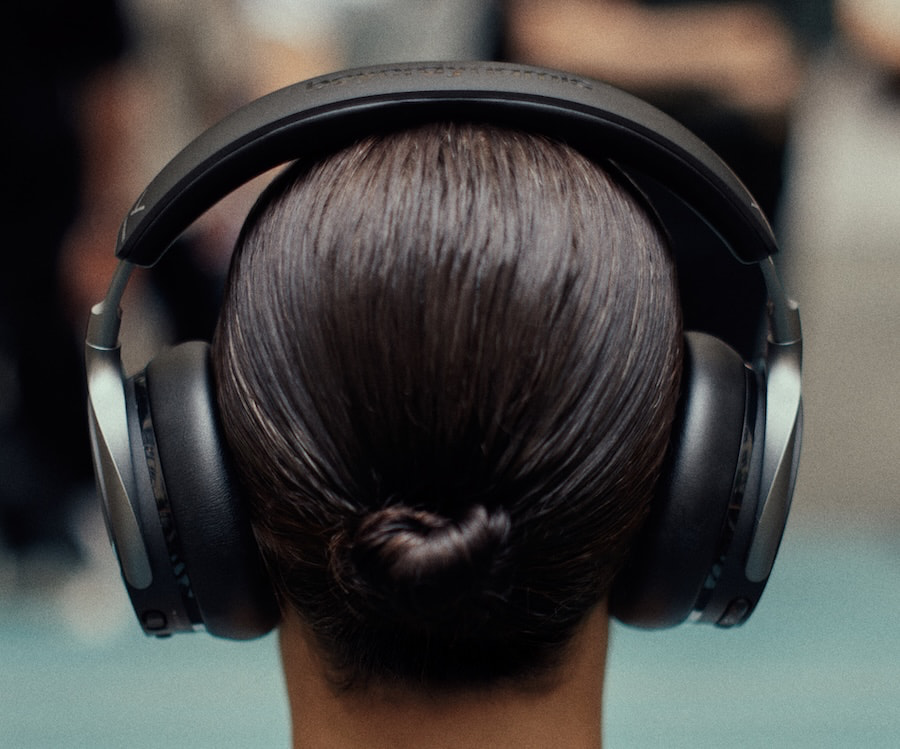
That is starting to change. A small but important group of manufacturers is putting greater emphasis on replaceable batteries, removable ear pads and serviceable components, and beyerdynamic is leaning directly into that idea with the new AVENTHO Y.
Introduced at IFA 2026 for $149.99, the closed-back wireless over-ear headphone offers active noise cancellation, Bluetooth 6.0 multipoint connectivity, 45mm dynamic drivers, app-based EQ and up to 90 hours of battery life. None of those features alone makes it unusual, but beyerdynamic has taken a different approach to durability and long-term ownership that deserves more attention.
What Makes the AVENTHO Y Different?
Wireless headphones eventually develop the same problem as every other rechargeable product: batteries wear out. On many models, that can turn an otherwise perfectly functional headphone into electronic waste or an expensive repair project.
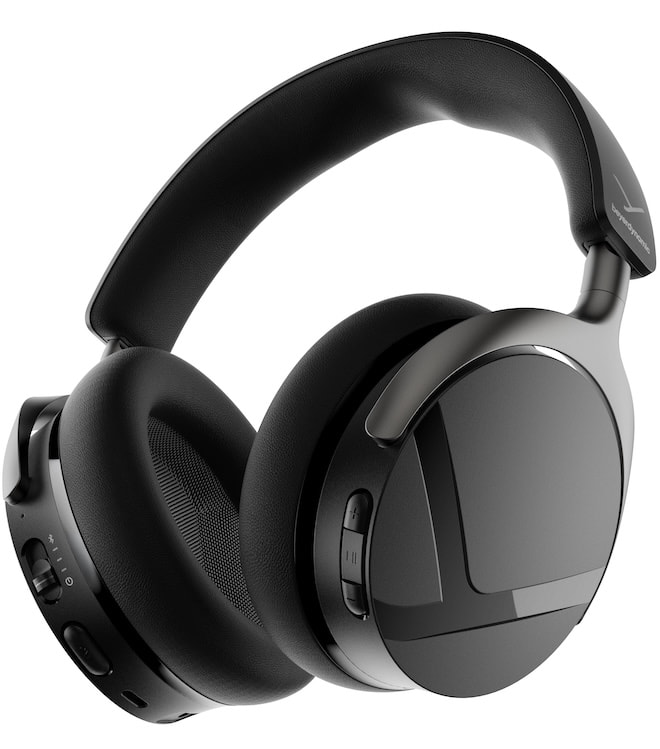
Beyerdynamic has designed the AVENTHO Y with a user-replaceable battery, magnetic interchangeable ear pads, aluminum sliders and stainless-steel hinges. The company also offers optional black or gray velour ear pads, while an upgrade package adds a low-latency USB-C dongle and detachable boom microphone. An integrated compartment inside the earcup can store the optional dongle or a spare battery.
Advertisement
That modular approach is probably the AVENTHO Y’s strongest differentiator. The optional dongle and microphone also broaden its usefulness beyond commuting and music listening, giving owners the ability to configure it for gaming, video calls or work without purchasing a separate headset.
ANC, Bluetooth 6.0 and 45mm Drivers
The AVENTHO Y uses 45mm dynamic drivers in a closed-back, foldable over-ear design with a specified frequency response of 20 Hz to 20 kHz. Active noise cancellation is joined by a Transparency mode, while two integrated microphones use environmental noise cancellation to reduce background noise during calls.
Bluetooth 6.0 supports multipoint connectivity and a claimed range of up to 20 meters. The beyerdynamic app provides firmware updates, adjustable controls and a 5-band equalizer, allowing users to alter the headphone’s tonal balance rather than being locked into the factory tuning.
There is one specification worth examining more closely. The AVENTHO Y supports SBC and AAC, but beyerdynamic does not list aptX, aptX Adaptive, aptX Lossless or LDAC. Bluetooth 6.0 is the current version of the wireless standard, but the version number should not be confused with automatic support for higher-bitrate Bluetooth audio codecs.
Battery Life Should Be a Major Selling Point
Beyerdynamic rates the AVENTHO Y for up to 90 hours of playback with ANC switched off and up to 60 hours with ANC active. A full charge takes approximately one hour, while five minutes of fast charging can provide up to six additional hours of playback.
Those figures put it near the top of the category, although Audio-Technica’s ATH-S300BT essentially matches them with up to 90 hours without ANC and 60 hours with it. The Audio-Technica requires approximately 2.5 hours for a full charge, however, versus one hour for the beyerdynamic.
Advertisement
Advertisement. Scroll to continue reading.
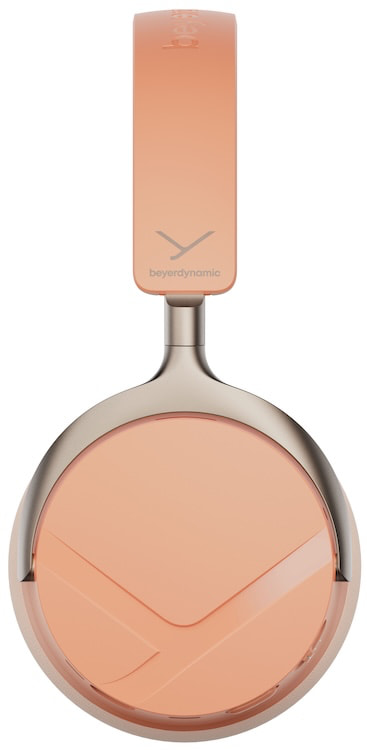
The AVENTHO Y weighs 316 grams, which is worth considering for anyone planning to wear it throughout the workday or on long flights. Beyerdynamic is offering four finishes: Liquid Black, Blue Fusion, Soft Jade and Peach Blush.
Plenty of Competition at $150
The AVENTHO Y is entering a much tougher part of the wireless headphone market than its $149.99 price might suggest. Final’s UX3000 SV sells for the same $149.99 and takes a more sound-focused approach, combining custom 40mm drivers with hybrid ANC, multipoint connectivity and support for aptX and aptX HD. Battery life is considerably shorter at 35 hours without ANC and 25 hours with it, but Final has built much of its reputation around tuning rather than winning the specification-sheet contest.
The new EarFun Wave Pro X may be an even more direct threat. Originally shown at CES 2026 and priced at $129.99, it uses a dual-driver configuration with 40mm DLC and 10mm LCP drivers, Bluetooth 6.0 and an unusually comprehensive codec package that includes aptX Adaptive, aptX Lossless, LDAC and LE Audio. Auracast, multipoint connectivity, hybrid ANC, an eight-microphone call system and up to 90 hours of battery life make the absence of anything beyond SBC and AAC on the AVENTHO Y considerably more noticeable.
Advertisement
Nothing’s 2026 Headphone (a) sits slightly higher at a $199 MSRP, although Nothing is currently selling it for $159 in the U.S. It offers adaptive ANC, LDAC, USB-C and 3.5mm wired playback, an 8-band EQ and a remarkable claimed 135 hours of playback without ANC or 75 hours with it engaged. At 310 grams, it is also very close to the 316-gram beyerdynamic, making the comparison considerably more relevant than the lightweight Sony WH-CH720N.
What the AVENTHO Y has that none of those models can match as a complete package is its emphasis on long-term ownership. The user-replaceable battery, magnetic ear pads, stainless-steel hinges and optional low-latency dongle and boom microphone give it an upgrade and repair path that most wireless headphones still lack. That is a stronger reason to consider the beyerdynamic than Bluetooth 6.0 or another hour-counting exercise.
Key Specifications
Type: Wireless closed-back over-ear
Drivers: 45mm dynamic
Frequency response: 20 Hz to 20 kHz
ANC: Yes
Transparency mode: Yes
Bluetooth: 6.0 with multipoint
Codecs: SBC, AAC
Wireless range: Up to 20 meters
Battery life with ANC: Up to 60 hours
Battery life without ANC: Up to 90 hours
Charging time: Approximately 1 hour
Fast charging: 5 minutes for up to 6 hours
EQ: 5-band via beyerdynamic app
Battery: User replaceable
Ear pads: Magnetic and interchangeable
Weight: 316 grams
Colors: Liquid Black, Blue Fusion, Soft Jade, Peach Blush
Price: $149.99
Pricing & Availability
The beyerdynamic AVENTHO Y is priced at $149.99 in the United States and will be sold through beyerdynamic.com and Amazon.
At that price, the replaceable battery might matter more than another Bluetooth codec or marketing feature. Wireless headphones have become better and considerably more affordable, but relatively few are designed around the idea that owners might still want to use them after the original battery has reached the end of its useful life. Beyerdynamic appears to have noticed that problem, and the AVENTHO Y offers a rather sensible solution.
I’ve covered the many ways smart thermostats can convert your home to a well-heated haven and how quickly they can pay for themselves through energy savings, but there’s one glaring issue. Almost all smart thermostats are designed only for central hubs and forced air heating/cooling. Imagine my relief when Sonoff showed up at IFA 2026 with a smart alternative.
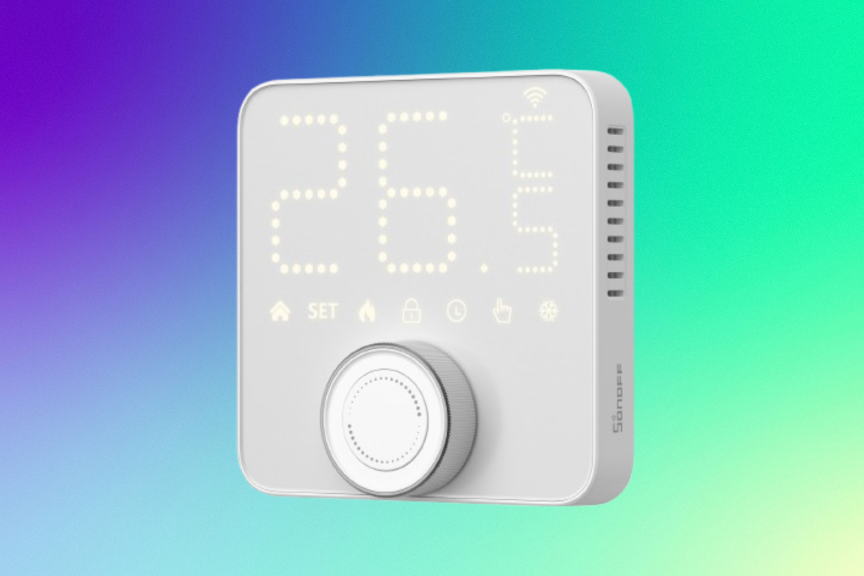
At last, I’ve found an alternative, thanks to Sonoff’s announcement of its latest TRV Smart Thermostatic Radiator Valve. It’s designed to fit on the valve pipe of a traditional home radiator, screwing in place and connecting to Wi-Fi to provide app insights and a full suite of control options. It’s available right now on the Sonoff website for $35 and supports both Celsius and Fahrenheit.
It’s difficult to find up-to-date smart radiator solutions in the IS, let alone everything Sonoff is offering here. The valve lets you adjust between several temperature plans and uses an IPS color screen to show temperature and settings at a glance. Its app also offers low-battery alerts so you can recharge it, as well as important reminders for frost protection, anti-calcification maintenance and even connections to window sensors that can automatically stop heating when windows are opened. There’s even a child lock to keep little fingers from messing up your heating schedule.
Advertisement
This combination of features is exactly what people need if they live in homes that primarily use radiators, have radiators in addition to central heating, or use radiators only in certain spots, like a finished basement. It offers the same savings potential and convenience as standard smart thermostats, plus some features tailored specifically for radiators.
Since I don’t have radiators in my home, I can’t easily test this smart valve out. I’ll have to ask other CNET editors if one of their rooms has a radiator they could test in so we can get real-world results, but everything looks promising here.
Are you more of a radiant floor heat home? Sonoff has you covered, too
Sonoff also has a smart upgrade for those with heated flooring. Sonoff
Many newer homes have a different kind of heating technology, radiant flooring heating, popular in bathrooms and homes with certain kinds of wood flooring. If you’re interested in smart additions to this kind of radiant heating, Sonoff brought good news to IFA for you, too.
Sonoff also announced a Thermostat Core, designed to fit standard hydronic underfloor heating systems. It outfits floor heating with complete app controls, scheduling options and connection options with Sonoff temperature sensors, so floor heating can respond to the current temperature of a specific room. It sports a presence-activated screen, frost protection and other synergies similar to the radiator valve, too.
I don’t currently have pricing information for the Thermostat Core, but when I find out the details, I’ll let you know.
Advertisement
While I’m most excited about the smart heating, I’d be remiss not to mention that Sonoff announced several other smart products at IFA. It showed off an indoor siren and, most notably, a window security cam. Eufy also showed up with a window camera at IFA, so it’s apparently a new home security trend. Wyze got in the game much earlier this year with its own window security cam, and you can see what I thought about it here. These unique, covered cams fit directly on windows and are particularly useful for apartments and similar spots.
Tyler Lacoma
Editor / Home Security and Smart Home
Tyler has worked on, lived with and tested all types of smart home and security technology for over a dozen years, explaining the latest features, privacy tricks, and top recommendations.
With degrees in Business Management, Literature and Technical Writing, Tyler takes every opportunity to play with the latest AI technology, push smart devices to their limits and occasionally throw cameras off his roof, all to find the best devices to trust in your life. He always checks with the renters (and pets) in his life to see what smart products can work for everyone, in every living situation.
Living in beautiful Bend, Oregon gives Tyler plenty of opportunities to test the latest tech in every kind of weather and temperature. But when not at work, he can be found hiking the trails, trying out a new food recipe for his loved ones, keeping up on his favorite reading, or gaming with good friends.
See full bio
Turns out, you can rewrite history. Well, a chatbot’s understanding of your personal history, anyway.
Igor Bonifacic for Engadget
Since the summer of 2025, Claude has had the ability to remember past conversations. This feature — which Anthropic, like other AI labs, calls memory — allows the chatbot to personalize its responses and save you the hassle of repeating context for it. By default, memory is enabled for all Claude users, including those with free accounts, and following a recent update allows the chatbot to carry over its memory across both chats and Claude Cowork sessions. In recent weeks, Anthropic has also been rolling out more granular controls that give users the ability to edit the specific topics Claude remembers. Here’s how you can edit what Claude remembers about you.
Advertisement
How to edit Claude’s memory
Anthropic
Claude organizes its memory around specific topics. The easiest way to edit those topics is from the chatbot’s web client, accessible via claude.ai. Once you’re there, follow these steps:
Select Settings from the profile page menu.
Click Memory.
Scroll down and find the Topics section.
Press the Edit icon to modify a memory, or the Delete icon to remove a topic from Claude’s memory.
If you’re editing a memory, use the prompt bar to describe what Claude should change.
On mobile, follow these steps instead:
Tap the profile icon to access the Settings menu.
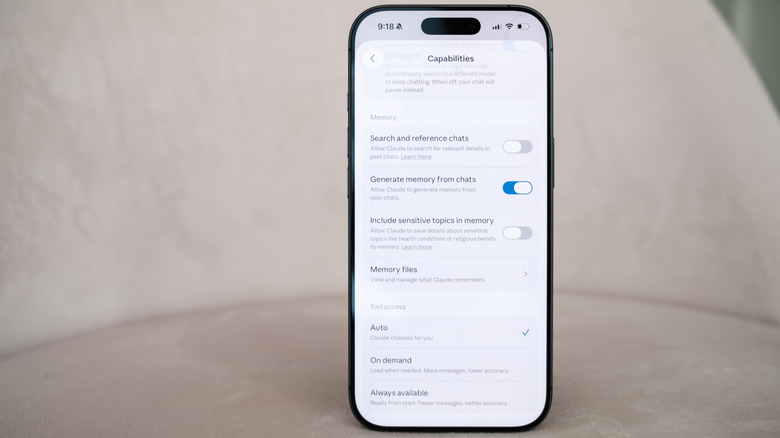
Under the App section, select Capabilities.
Scroll down and tap Memory files.
Select a topic.
If you want to edit a memory, use the prompt bar to describe what Claude should change. Tap the trash icon to delete a memory instead.
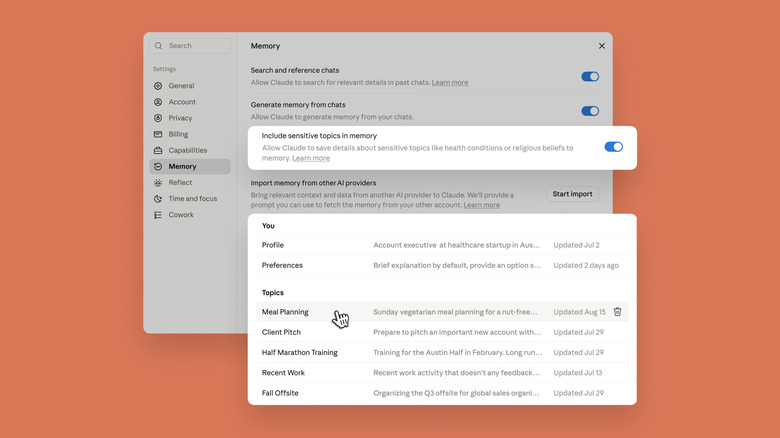
Following Claude’s latest memory update, Anthropic added an option called Include sensitive topics in memory. By default, Claude won’t save memories related to subjects like your health, race, ethnicity, religious beliefs, politics or gender identity. By enabling the new option, it will begin recording more sensitive information. Each time Claude generates a memory related to a sensitive subject, you will see a notice. According to Anthropic, “if you’re using an older version or the mobile app, you will not see this notice, and Claude won’t save the sensitive topic to its memory.”
The chatbot won’t retroactively save past conversations, and some information, such as government ID numbers, Claude will never save, even with Include sensitive topics in memory enabled.
As mentioned above, by default Claude will automatically generate memories for all users. You can disable this feature by toggling off Generate memory from chats. From there, Anthropic gives you two options: Pause memory or Reset memory. The company warns the latter cannot be undone. “Upon re-enabling the feature, you’ll start from scratch, and Claude will not have its previous memory,” Anthropic notes.
Advertisement
How Claude’s memory works in projects
One wrinkle worth noting is that Anthropic silos Claude’s memory in projects so that the chatbot’s context window doesn’t get overwhelmed with information that isn’t relevant to your current task. You can shape Claude’s memory in projects by adding comments, documents and information from GitHub through the right side of the interface. At the end of each day, Claude will generate a summary of the work it’s done for you, which you can edit from the same interface.
If you accidentally prompt Claude outside of a project, click or tap the three dots icon and select Add to project to properly sort the conversation. If you want Claude to remember something specific across every tool you can interact with, including projects, you can add that information to the Profile section of Memory menu.
Advertisement
Some additional tips
Anthropic
If at any point you want to temporarily avoid the possibility of Claude writing something to its memory, you can switch the chatbot to Incognito mode by clicking or tapping the ghost icon on the top right of the interface. “Incognito chats aren’t saved, added to memory, or used to train models,” Anthropic explains.
In March, Anthropic added an import tool to make it easier for people to bring their conversations from other chatbots over to Claude. Engadget has a full guide on how to export your chats to Claude, but here I’ll mention that you can select Start import next to Import memory from other AI providers to get that process started.
Labor Day sales are usually a great excuse to finally buy the tech you’ve been putting off. Cameras, microphones, webcams— almost everything sees a discount. If you’re a creator or simply love documenting trips, Insta360’s Labor Day sale is worth paying attention to.
The sale runs in the U.S. from August 27 through September 7, with discounts across the company’s flagship 360 cameras, action cameras, webcams, and wireless microphone lineup. Whether you’re looking for an 8K 360 camera or a pocket-sized action cam for travel, here are the five best Insta360 deals to consider.
Best Insta360 Labor Day deals at a glance
Product
Best for
Labor Day price
Insta360 X5
360° filmmaking & travel
$464.99
Insta360 Ace Pro 2
Action camera users
$329.99
Insta360 GO Ultra
Tiny wearable camera
$379.99
Insta360 Mic Pro
Wireless audio
$299.99
Insta360 Link 2 Pro
Streaming & video calls
$209.99
Insta360 X5: $464.99
If you just need one recommendation from this list, it has to be the Insta360 X5. Up until just a week ago, it was the company’s flagship 360 camera, and arguably the most versatile option for creators who shoot everything from road trips to mountain biking.
The biggest reason to buy the X5 is flexibility. It captures 8K 360-degree video, meaning you don’t have to worry about framing while shooting. Instead, you record everything around you first, then decide on the camera angle later inside the Insta360 app. That’s especially useful for cycling, skiing, motorcycle rides, or solo travel where you don’t have someone behind the camera.
Insta360 has also improved low-light performance over previous generations, so nighttime city walks and sunset footage retain noticeably better detail than older 360 cameras.
Advertisement
Insta360 Ace Pro 2: $329.99
Not everyone wants a 360 camera. If your priority is traditional wide-angle footage, the Insta360 Ace Pro 2 is arguably the better buy at $329.99. Unlike the X5, the Ace Pro 2 is built around a 1/1.3-inch image sensor paired with dual AI imaging chips. That combination allows it to record 8K video while delivering much cleaner footage in difficult lighting conditions, especially indoors or after sunset.
The camera is also designed for creators who spend more time editing than reframing. You simply mount it, hit record, and get stabilized footage without the additional workflow that comes with 360-degree video.
Insta360 GO Ultra: $379.99
The Insta360 GO Ultra is probably the most unique product in the sale. Priced at $379.99, it’s less about cinematic filmmaking and more about capturing moments you would’ve otherwise missed.
The camera weighs very little and can clip onto clothing or attach magnetically using Insta360’s mounting system. That makes it perfect for first-person cooking videos, walking tours, skiing, or simply recording family moments without holding a camera.
Despite its tiny size, it records 4K stabilized video, and Insta360’s FlowState stabilization keeps footage remarkably smooth while walking or running.
Insta360 Mic Pro: $299.99
Video quality gets all the attention, but audio is usually what separates professional content from amateur footage. That’s where the Insta360 Mic Pro comes in.
Discounted to $299, the Mic Pro is a dual wireless microphone system aimed at creators who shoot interviews, podcasts, or YouTube videos. Its standout feature is the customizable e-ink display, which lets you monitor recording information while consuming very little power.
Advertisement
The system also includes intelligent noise reduction and professional-grade wireless recording, making it a strong alternative to premium options from DJI and Rode.
Insta360 Link 2 Pro: $209.99
If your content is created at a desk rather than outdoors, the Insta360 Link 2 Pro deserves attention. At $209, it’s one of the better premium webcam deals this Labor Day.
The webcam uses a 1/1.3-inch sensor—much larger than what most webcams offer—which translates into sharper 4K video and significantly better performance in dim rooms. It also supports multiple audio pickup modes, making it useful for video calls, livestreaming, and online teaching without requiring a separate microphone in many situations. For remote workers and streamers, it’s easily one of the strongest value picks in the sale.
If you want improve a model rocket’s performance, all the common options come with serious trade-offs: you could increase the motor’s size, which raises safety issues, or you could cut down on weight, which limits the possible payload. [Con Hathy] was therefore intrigued by the design of the Arcas sounding rockets, which with the aid of a gas-fed launch tube could reach an altitude of 100 km. Even in models without a gas generator, a launch tube apparently boosted performance, an effect which [Con] was able to replicate in a much smaller model rocket.
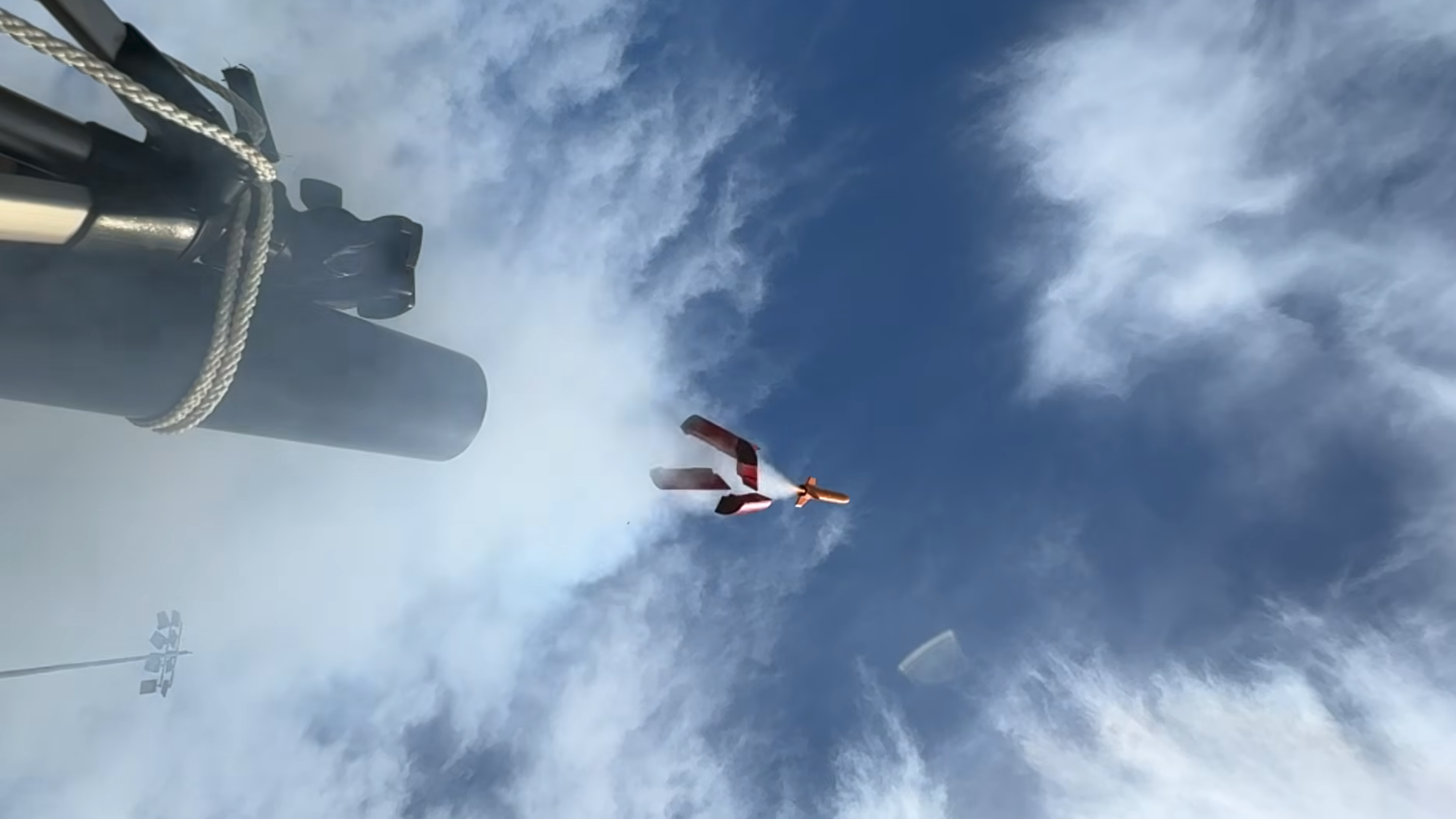
In theory, as the rocket engine fires, it should pressurize the tube behind the rocket, providing an extra boost out of the tube. To test this, [Con] 3D printed a test rocket, launched it both from a standard rail and from a tube, and compared the results. During tube launches, a printed sabot fit around the rocket and formed a seal with the launch tube. The results were surprising: the tube-launched rocket actually performed substantially worse than a rail launch. After building a simulation, [Con] found that, as the rocket moves down the tube, the volume of tube it needs to back-fill with gas increases faster than the engine puts out exhaust; it was pulling a slight vacuum behind it, slowing itself down.
To solve this, [Con] decreased the diameter of the launch tube. To let the rocket fit into the tube, he also modified it to use pop-out stabilizer fins which wrap around the rocket while in the tube. The sabot was also shrunk, and had foam added to improve the seal between it and the rocket. For this second test, [Con] also connected a pressure sensor to the base of the launch tube. The results on the second launch were much better: according to an altimeter, it managed to fly 72% higher. Based on the pressure sensor’s data, a longer tube could have squeezed out still more performance, but this still demonstrated the principle quite well.
We’ve seen a tube-launched rocket before, though not with such a performance focus.
The size of the Go 6 is perfect, both for reading when you’re out and about and at home. Its 6-inch screen puts it on par with the entry level Kindle and the Kobo Clara BW for compactness, landing right in the Goldilocks Zone of portability and readability. It fits in my smallest bags while still having a large enough display to read comfortably. It can sit in the back pocket of most jeans and even some front pockets (barring those afflicted by Bad Designs for Women’s Clothing).
There is at least one limitation to consider when bringing it around, though. The Go 6 (Gen II) doesn’t have an IP rating for water or dust resistance, so I’d hesitate to take it to the beach, camping or even use it poolside without a protective case. Kobo has it beat there.
At roughly 160 grams, it is noticeably lighter than the other device that spends the most time in my hand, my Galaxy Z Flip 6. That makes it great for reading in bed or lying down on the couch. So does its adjustable front light, which you can dim and brighten to your likeness, and shift from cool to warm tones to prevent eye strain. Additionally, its 300PPI ePaper display is crisp and bright.
Cheyenne MacDonald for Engadget
I did notice a fair amount of ghosting when switching between different apps and device menus, but Boox offers a number of refresh and color modes to cut down on this sort of thing if it bothers you. There’s also the option to set how frequently the screen refreshes. I found ghosting was much less of an issue while I was actually reading and I ultimately set my Full Refresh Frequency to every 30 taps. Never is an option as well, and you can set different settings for each app to optimize them for the display. A quick-access gesture launches BOOX EinkWise, where you can fine-tune any given app’s refresh and color modes, layout, contrast and anti-flicker levels.
The 1,500mAh battery will get you several days of use if you’re reading for a few hours a day and using apps moderately. You can get lots more out of the battery by turning off Wi-Fi and Bluetooth when you’re not using them, freezing apps to prevent them from running in the background and keeping the front light low or off when lighting conditions allow. It’s currently been eight days since I last charged it and I still have 24 percent left. That’s still far less than you’ll get with the comparable Kindle and Kobo devices, which have weeks-long battery life, but that’s the tradeoff of having Android.
Advertisement
Putting books on the Go 6 (Gen II) is painless. You can transfer files wirelessly to the device using its BooxDrop file sharing tool, by syncing with several cloud-based storage platforms it supports, like Dropbox and Google Drive, or using the USB-C cable. The built-in Boox store is extremely limited, containing only a small selection of public domain works, so if you want to buy or rent books on-device, you’re going to need to turn to another app.
I’ve really enjoyed the freedom this ereader allows in using my go-to apps to source and read books, as my reading habits tend to be all over the place. I can buy and download a book from the Bookshop.org app, which is only available on iOS and Android, and then go to The StoryGraph app to jot down a review immediately upon finishing it without having to switch over to my phone. Moon+ Reader works alright too, but you’ll want to play with your books’ settings to make them more readable for E Ink, otherwise you’re likely to experience a ton of ghosting.
With artificial intelligence being the bête noir of the moment, there are some projects using it which maybe don’t bring much to the table. So it’s nice to see one that uses it in a creative way, and delivers something new. [arnegiacomo]’s e-paper screen is a great example, as it draws a picture in real time of whatever birds are outside.
Behind the quite large screen sits a Raspberry Pi 5, and on that is BirdNet-Go, an AI-powered birdsong classifier. A USB microphone catches the birdsong, and Birdnet comes up with the species. The birds on the display are then those species as pictures from 19th century bird spotters guides, assembled into a collage. You can even see what the current set of birds it hears are, live, and they are a representative cross section of the European birds you’d find in Norway where it’s located.
If you’re thinking about getting into content creation or you just want a more suitable device to record your next family holiday, it’s never been easier thanks to the best vlogging cameras currently available. These purpose-built devices are portable and typically a lot more affordable than smartphones and professional-grade cameras, and thanks to the hard work of our tech experts, you can use this guide to find the right option for your needs.
Although it might be tempting to pick up one of the best cameras around to start your vlogging journey, these devices are best left to enthusiast and professional photographers who know how to make the most of all the tech on offer. By comparison, vlogging cameras are designed to be more user-friendly, usually packing a front-facing screen that makes it much easier to line up your shots.
You’ll also find that vlogging cameras have better stabilisation than most capture devices, with the likes of GoPro, DJI and Insta360 having refined their stabilisation tech over the years to the point where it looks as if your footage has been recorded using a gimbal. This is perfect for when you’re filming a vlog that includes adventurous activities such as hiking or mountain biking.
As a final point, a lot of these cameras have been designed alongside dedicated smartphone apps so you can quickly extract any footage you’ve captured and share it to social media with little effort required. Most apps tend to include some form of editing suite, so it’s very easy for newcomers to get started without having to spend a small fortune on both hardware and software.
Advertisement
For this list, our tech experts have tested the latest vlogging cameras in a range of scenarios, seeing how they perform in the real world and documenting their experience in our reviews so you get a full understanding of what each camera is like to own. Keep on reading to see which options we currently recommend, or check out our separate list for the best action cameras, if you’re mostly interested in capturing fast-paced content.
Best vlogging camera at a glance
Best overall: DJI Osmo Pocket 4
Best for professionals: DJI Osmo Pocket 4P
Best for beginners: Insta360 Go Ultra
Best for full-frame capture: GoPro Mission 1 Pro
Advertisement
Learn more about how we test cameras
We test every camera we review thoroughly. We use set tests to compare features properly and we use it as our main device over the review period. We’ll always tell you what we find and we never, ever, accept money to review a product.
A wonderfully versatile and portable camera – – –
100GB built-in storage is super useful
Easy to use and control
240fps 4K slow mode is superb
Zoom is still a little grainy, especially in low light
Some controls can be fiddly on a small touchscreen
Battery drains fairly quickly in the higher frame-rate/resolution modes
You really want the Combo to get the best features
Advertisement
At this point, it isn’t really hyperbole to say that the DJI Osmo Pocket 3 really raised the bar for vlogging cameras across the board. Not only did it capture great-looking footage, but its small footprint made it so easy to carry with you throughout the day, which in turn gave you more opportunities to shoot video on the go. It set up a pretty solid foundation for DJI’s stake in the market, but the DJI Osmo Pocket 4 has taken things a step further.
The big upgrade with this successor is the larger 1-inch CMOS sensor which manages to push for even higher-quality video, the likes of which will grab the attention of anyone scrolling through their social media feed. Although the footage will always look best when there’s a good amount of natural light around, we were impressed to see that the Pocket 4 can more than hold its own in low-light environments, so if you want to explore a city after dark, you have the freedom to do that here.
For when you’re not shooting to-camera content and you want to grab a handful of establishing shots, you can swap over to the rather brilliant 4K/240fps mode. It just looks stunning, and it’s a great way of transitioning from one location to another in your final video. In terms of the core functionality at play, there are two new additions that make the process of filming a great deal easier.
For starters, there’s now 107GB built-in storage so you’re no longer forced to use a microSD card, although you have that option there if you want to shoot tons of content and don’t want to ever worry about reaching that limit. There’s also now a dedicated zoom button which is a lot easier to use than the touchscreen alternative that exists on the Pocket 3.
Advertisement
Although the Osmo Pocket 4 is great on its own, if you’re looking to get serious about your ability to capture professional looking video then we recommend plumping for the Creator Combo bundle which includes the excellent DJI Mic 3 and a dedicated fill light to inject a boost of visual fidelity when there isn’t much light available. It does cost a fair bit more, but for all you get here, it’s worth every penny.
Useful second lens expands its capabilities
17-stop dynamic range is a big step up on the Pocket 4
ActiveTrack 8.0 tracking across both cameras is excellent
Compact and well built
Advertisement
Heavier and less pocketable than the standard Pocket 4
D-Log 2 shooting comes with some restrictions
The bundled FrameTap remote feels like an afterthought
DJI’s current crop of vlogging cameras says a lot about the company’s ambitions in this space. The DJI Osmo Pocket 4 is already a great option for content creators who really want to stand out and move on up from shooting on their smartphone, plus the Osmo Pocket 3 can now be bought at a discount if you’re starting out on a budget. However, for the professionals out there, the DJI Osmo Pocket 4P, this pick has been made with you in mind.
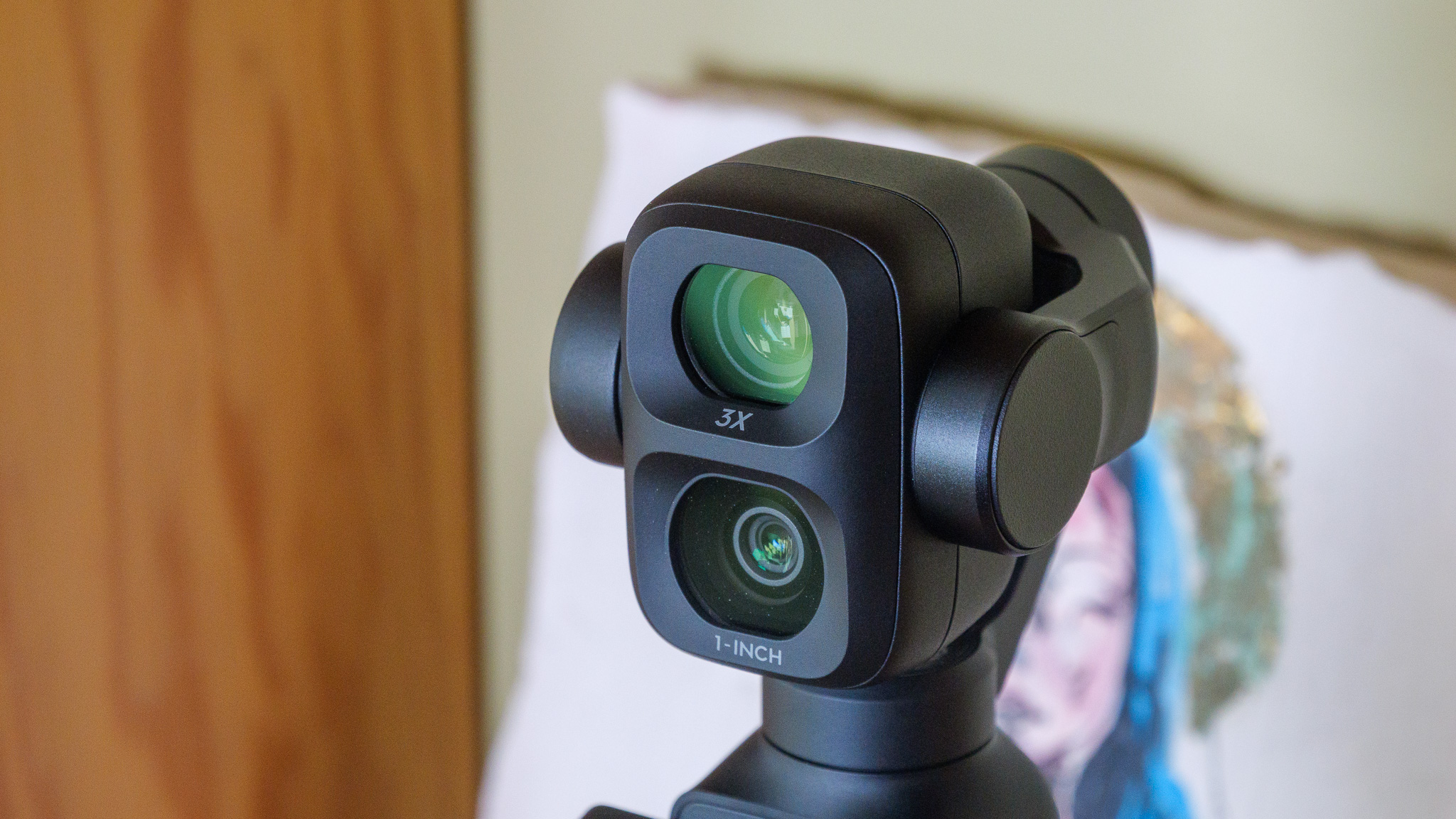
There are quite a few upgrades in this device over the standard Pocket 4, chief among them is the secondary telephoto lens. This additional snapper is a 1/1.28-inch sensor that packs a large f/1.8 aperture, and effectively works with a 3x optical zoom over the main camera, so you can now get excellent capture quality even from a distance, which was one of the few areas where the other Osmo Pocket cameras fell behind.
If a subject or object is really far away then you can punch in with 12x digital zoom which, to our surprise, actually holds up quite well. When it comes to the main 1-inch CMOS sensor, although it is largely the same as the one you’ll find on the Pocket 4, this version can now provide 17 stops of dynamic range instead of 14, so shots have much better overall composition, especially in tricky lighting.
Advertisement
This is partially achieved via the jump to using the new D-Log 2 profile, offering more flexibility for professionals who want to colour grade their footage after the fact. What really helps however if you’re shooting a scene which involves multiple people, is that the Pocket 4P is capable of multi-person tracking which takes a lot of the framing out of your hands, leaving you free to focus on other aspects of the video.
Just like the standard Pocket 4, there’s now built-in storage here of just over 100GB so there’s no need to worry if you forget to bring a microSD card with you on a shoot. The upgraded ActiveTrack 8.0 software is arguably DJI’s best take on stabilisation to date, with all footage looking incredibly smooth no matter what happens. This is just a great camera all around that professionals can really tinker with to achieve phenomenal results.
Advertisement
Massive upgrade to image quality
A far stronger magnetic connection than before
Terrific performance with the new chipset
Major jump in battery life
Notable price increase
AI editing is a bit half baked
Out of all the vlogging cameras we’ve tested, the one that is arguably the most fun to use is the Insta360 Go Ultra. This square-like camera is a little marvel, one that encourages you to get creative with your shots in a way that few other cameras do. Unfortunately, its price increase over the similarly brilliant Insta360 Go 3S means that it has pretty tough competition, particularly as you can find the DJI Osmo Pocket 3 for less, but for a lot of content creators, it’ll be exactly what they’re looking for.
The killer feature that separates the Go Ultra from the pack is its much stronger magnetic backing, which allows it be placed on almost any metal surface. This effectively gives you the chance to get some tripod-style height in your videos with very little effort, but it also encourages you to search your environment to think of fun spots where the camera can be placed to achieve unique and eye-catching angles. No other vlogging camera challenges you in quite the same way.
Advertisement
Helping the Go Ultra is the upgraded 1/1.28″ sensor which is 221% larger than before and lets in a ton of natural light. The end result is that video looks wonderfully vibrant, even when there isn’t a massive amount of light to draw from. Even when taking the camera for a test shoot on a cloudy day, the likes of which would cause lesser cameras to really struggle, but the Go Ultra showed off impressive dynamic range for a pleasing overall image.
Insta360 has shown itself to be very adept at stabilisation with previous entries, and that very much continues with the Go Ultra. Even when holding the camera on its own, outside of the Action Pod casing, it did a great job with minimising the natural wobble of a walk. Still, if you are shooting to camera as you move then housing the Ultra in the Action Pod is the way to go, as you can attach a grip to the bottom. Plus, you can flip the screen out to better frame yourself in the shot.
If you’re starting from scratch and you don’t any editing software to lean on, you’ll be glad to know that the Insta360 app comes with a fairly substantial, if heavy-handed, video editor. Admittedly, we weren’t majorly impressed with the AI features injected into the editor, but you can ignore them and stick to the typical suite of options.
Advertisement
Outstanding image quality for an action camera, particularly in low light
8K Open Gate capture offers huge reframing flexibility
Impressive stabilisation and slo-mo capabilities
Tough, waterproof to 20m and easy to mount almost anywhere
60cm minimum focus distance makes close-ups and handheld vlogging tricky
Stills performance lags behind the video capabilities
Expensive next to close rivals that aren’t drastically worse
App locks key features behind a subscription
Although GoPro was the dominant force in the world of action/vlogging cameras for the longest time, the brand definitely conceded a fair amount of ground to the likes of Insta360 and DJI in the last few years. Well, keen not to lose any more ground, GoPro went back to the drawing board and returned with a rebrand, bringing the outstanding GoPro Mission 1 Pro to market.
Advertisement
This time around, the Mission 1 Pro is packing a large 1-inch sensor, which does a great job of letting in more light and creating an eye-catching image in the final product. There’s a great amount of detail too, particularly when shooting after dark. As we know from plenty of testing in this area, low-light filming is where a lot of cameras can falter, but the Mission 1 Pro outdoes the likes of the Insta360 Ace Pro 2 and the DJI Osmo Action 4, both of which set the previous standard here.
What really sets the Mission 1 Pro apart from the competition however is the all-new 8K Open Gate capture. For those who don’t know, this method of filming is capable of recording the full frame of the sensor, instead of a frame that’s already cropped from the get-go. What this means is that you have more flexibility on how to frame your video in the final edit.
Unlike some action cameras, the Mission 1 Pro has full waterproofing without the need for an additional case, so if you want to get some underwater shots to really spice up your content, you can do that with ease here. When you’re on land, you’ll be glad to know that the camera boasts some of the best stabilisation we’ve tested – at times it honestly looks like the video has been captured with the use of a gimbal.
One issue that did pop up is that with a minimum focus distance of 60cm, you can’t get too close to the camera otherwise you’ll come across a bit blurry. So long as you keep that in mind as you vlog then you can work around it, especially if you have a reasonably sized grip accessory in tow, but it isn’t something that a lot of competing cameras put on users to contend with.
Advertisement
FAQs
Which is the best vlogging camera for extreme sports and adventures?
The GoPro Hero 12 Black is the best option for challenging environments like these.
Advertisement
Which cameras can record in 4K?
Every camera on this list is capable of capturing 4K video, with the GoPro going up to 5.3K and the GH6 as far as 5.7K.
The recent funding reportedly raises the start-ups’ value to around $30bn
In October of 2025, it was reported that Crusoe, a cloud computing company and data centre developer, was believed to be valued at more than $10bn, post the closure of a Series E funding round worth $1.375bn.
The round was co-led by technology investors Valor Equity Partners and Mubadala Capital and included participation from investors such as 137 Ventures, Salesforce Ventures, Nvidia, Winklevoss Capital and Founders Fund.
Since then Bloomberg has reported that Crusoe has raised more than $3bn in a funding round. Unnamed sources close to the announcement have stated that the latest investment brings Crusoe’s valuation to roughly $30bn.
Advertisement
The round was co-led by Atreides Management and Valor Equity Partners co-led the round. Mubadala Capital, the alternative asset manager owned by Abu Dhabi sovereign wealth fund Mubadala, is also participating, according to Bloomberg’s sources.
Established in 2018 and headquartered in Denver, Colorado, by Chase Lochmiller and Cully Cavness, Crusoe aims to accelerate the merging of energy and intelligence. The company provides energy-first solutions for AI infrastructure, by harnessing large-scale energy resources, building AI-optimised data centres and delivering an AI cloud platform.
Reportedly, Crusoe also recently signed a major $13bn contract that would see the organisation supply quantitative trading firm Jane Street with GPUs and AI infrastructure over the course of the next five years.
The last couple of years have been formative for Crusoe, as it extends its global reach.
Advertisement
In February of last year it was announced that the company is establishing a European base of operations in Dublin, Ireland and will create 100 jobs for professionals in the areas of networking, site reliability engineering, customer success and support departments, over the course of three years.
Don’t miss out on the knowledge you need to succeed. Sign up for the Daily Brief, Silicon Republic’s digest of need-to-know sci-tech news.
What if the organization and storage benefits of tool shadowing could be had and improved with a modular, semi-automated process? Tracefinity attempts that by generating custom Gridfinity bins from photos of tools, and has quite a few nifty features that are worth a look.
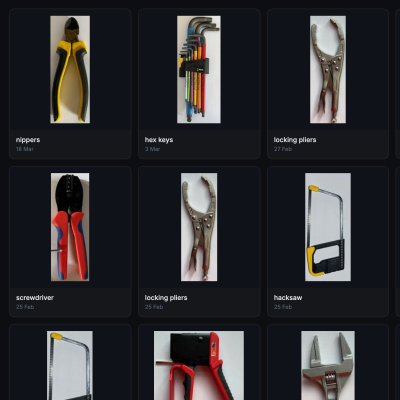
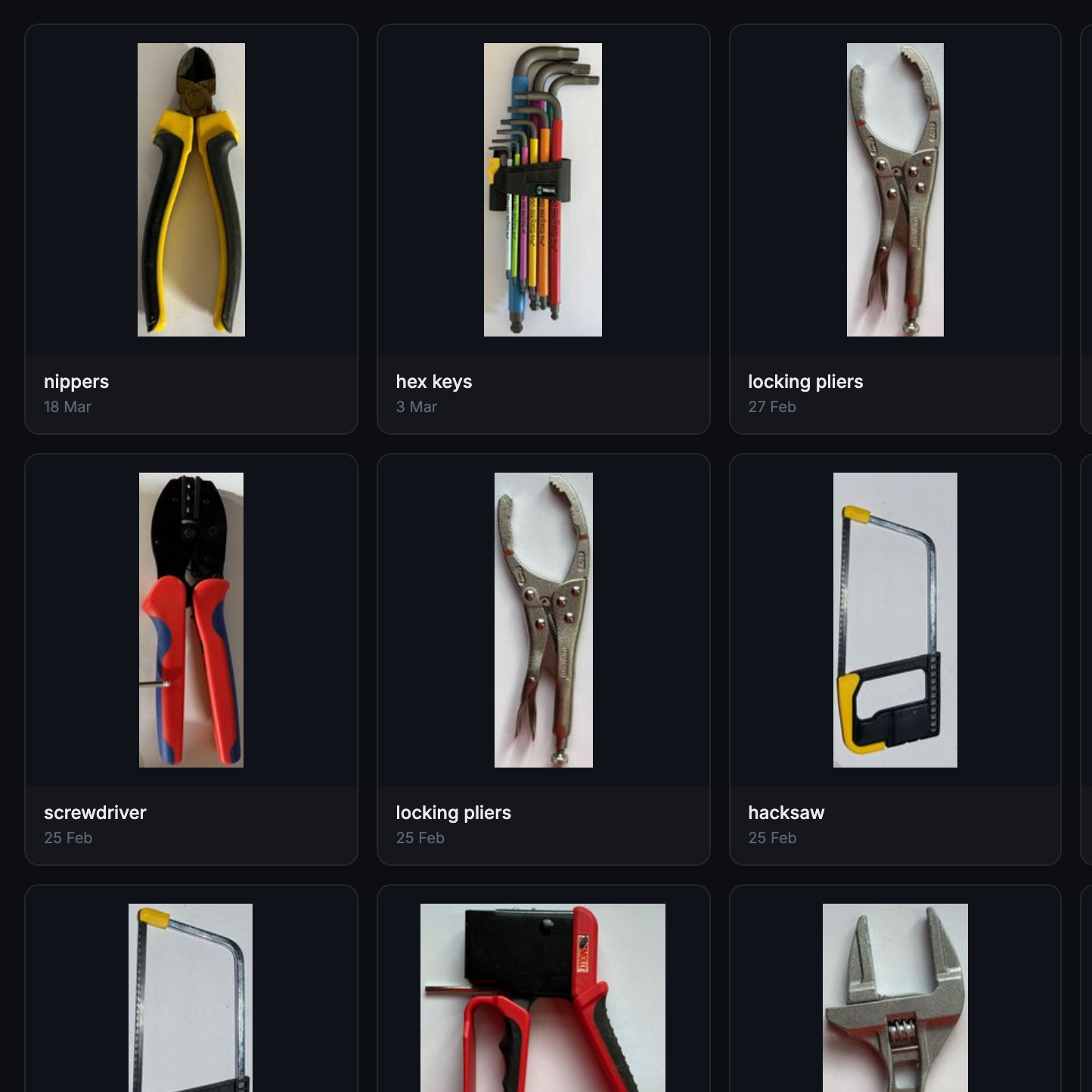
Maintaining a library of tools makes it easy to create project-based custom layouts.
The basic workflow is this: place one or more tools on a sheet of paper, take a photo, then upload the photo and have the system trace and save the outline and add it to a private tool library. When one is ready to create some bins, use the library of saved tool outlines to generate custom Gridfinity layouts.
If you’re unfamiliar, Gridfinity is a modular system of standardized bins and baseplates designed with 3D printing in mind, making it an ideal match for highly-customized organization tasks and a particularly natural fit for a tool-tracing system like this one.
The idea of taking a photo of a tool and generating a custom bin is a compelling one, and a couple years ago we covered a project that did just that. Tracefinity seems like a natural evolution of the idea, and includes handy features like easy design adjustments, optional magnet holes, and we really like the concept of a tool library from which individual tools are scanned once then later selected to create specific, project-based layouts.
Tracefinity takes advantage of new software capabilities like machine learning to improve and streamline the tracing process, but that doesn’t mean it relies on any external services. It can be entirely self-hosted and by default uses a local, CPU-friendly object detection model for tool tracing. There is an option to provide a API key to use Google Gemini instead, but it’s not required. It can come in handy for especially complex tool outlines or dealing with non-ideal source photos, however.



























































You must be logged in to post a comment Login