
Join Mikko Hyppönen and security leaders from the NFL, CHANEL, and Atlassian for a two-hour digital summit on what AI-speed attacks change, what defenders should stop doing, and how to validate, decide, fix, and re-validate at machine speed.
Tech
Surfshark VPN says hackers breached internal testing, proxy servers

Surfshark disclosed that hackers accessed one of its internal test servers after a configuration error exposed it to the internet.
The VPN service provider said the incident did not affect its customers and did not extend to other parts of its infrastructure, but it exposed service configurations and build-related credentials.
“Due to a human error, an internal test server used by our engineering teams was misconfigured in a way that made it reachable from the internet,” Surfshark explained on its website.
The exposed environment also contained portions of system binaries and code history.
Surfshark said that the unauthorized party accessed a separate server used for content-accessibility optimization. The machine acted as a proxy and did not have access to any sensitive data, like user identity, IP addresses, encryption keys, or browsing traffic.
The company did not specify which specific binaries, configurations, services, credentials, or files were exposed, but confirmed that production VPN infrastructure and customer data were not impacted.
“Personal information was never held and accessible from here [the breached server], VPN traffic and browsing activity are not logged or retained in the first place, and the apps and browser extensions on your devices were not altered in any way,” the VPN vendor assured.
The company detected suspicious activity on August 31 and contained the incident on September 2. Three days later, the company completed the remediation process.
It also said there was no evidence that the exposed credentials had been misused or that the compromise had spread to other systems.
In response to the incident, Surfshark rotated all internal credentials that may have been impacted, revoked the exposed tokens, and implemented additional threat detection, activity monitoring, and system hardening measures.
These measures include implementing production-level security controls to test environments, improving build-process credential management, and commissioning an independent audit of its broader infrastructure.
Surfshark promised to provide further updates if the ongoing investigation reveals additional important findings.
Based on the published information, Surfshark users do not need to take any action to protect their accounts. However, vigilance against suspicious activity or unsolicited communications is still recommended.


Continue Reading

America’s highest court heard Sam Bankman-Fried’s request for a new trial on Thursday, CNN reports. But they add that “the former crypto mogul who was convicted of defrauding investors by secretly diverting billions of dollars of their money” also asked America’s high court “to throw out a court order requiring him to pay $11 billion as part of his sentence.”
Bankman-Fried was sentenced to 25 years in prison in 2024 after prosecutors said he directed billions of dollars from the crypto exchange FTX to a hedge fund he controlled called Alameda Research, where the funds were used for risky investments, political donations and his own personal benefit. The Supreme Court appeal, which was reviewed by CNN, raises a technical question about evidence that was submitted at his trial, and whether Bankman-Fried should have been permitted to demonstrate that his investments were ultimately sound and would have covered any losses by FTX customers.
He also argues that the $11 billion forfeiture violates the 8th Amendment’s prohibition on excessive fines. “Where the government pursues a theory of fraud under which it doesn’t matter whether any victims lost money, introducing evidence suggesting that people actually lost money is distracting and prejudicial,” veteran Supreme Court attorney Jeffrey Fisher told CNN. “All the more so where the truth is the victims did not lose money, and the defendant is unable to make that clear.”
The 2nd US Circuit Court of Appeals rejected the arguments earlier this year.


Read more of this story at Slashdot.
“This is what happened when we tried to record Flock installing a new camera on public roads,” says Emmy award-winning reporter Brendan Keefe in a new video for InvestigateTV. In an accompanying article, InvestigateTV says their reporter “parked on the public street at a distance, donned a yellow safety vest and a hat emblazoned with the logo of InvestigateTV’s Atlanta affiliate where he also works, displayed a press placard on his dashboard and then pulled out a camera to record the installation…. The installer saw him and immediately packed up his equipment and drove away, so Keefe also returned to his car and followed several cars behind, hoping to document the next stop.”
And then Flock’s technician called 911. When asked “What’s the address of your emergency” Flock’s technician answered “I’m getting followed — harassed, pretty much. Taking videos and pictures!” Flock’s worker said they’d been harassed multiple times that day, then stated incorrectly that “I know for a fact” that that was what the reporter wanted to do too.
InvestigateTV reports that as a result of the Flock technician’s call, “Three police cars ended up in the national investigative reporter’s rearview mirror that Wednesday afternoon.” Keefe told one of the three police officers who pulled him over, “There is an irony here that they’re setting up these cameras that track all of our movements, that follow everywhere we go. But when I try to get video in public of him in public setting up a camera, he’s afraid I’m following him?”
InvestigateTV also reports that “About 17 minutes after the stop began, the responding officers returned to their vehicles and Keefe was allowed to drive away.” But the call that brought three police cars to their reporter “was not the first time this summer someone working for Flock Safety summoned police over a camera. ”
About 17 minutes after the stop began, the responding officers returned to their vehicles and Keefe was allowed to drive away… [But the stop] was not the first time this summer someone working for Flock Safety summoned police over a camera. On June 5, police in Smyrna, Georgia, responded to a 911 call from a Flock employee after a group of YouTube creators began filming outside the company’s distribution center located in the Atlanta suburb… The caller claimed the group filming had “been driving around the perimeter, basically harassing everyone” working at the facility. “Three young white males, probably mid-twenties, I’m not sure if they’re armed. And they’re carrying filming equipment as well,” the caller said. Three times during the call he raised the possibility the people filming might be armed, though, when asked, he told the dispatcher he had not seen any weapons… [One of the protesters later told the caller “I think it’s interesting, when you guys have this happen, you call the police and make us get stopped. But then you do it and it’s okay?”]
No one was charged in the YouTuber group, though the individuals were ordered to leave the premises under an official trespass warning.
Keefe’s video report ends with one final irony. “Every day on my way to work, I’m captured again by those same new shiny Flock cameras. We tried watching the watchers. Turns outs, it’s a lot easier for them to watch us.”
Flock responded to the report by claiming “We do not object to members of the public or press photographing Flock cameras or personnel in public.” But they added that employees working “in the field” must “prioritize their safety” and “may contact law enforcement when they believe they are being threatened, harassed, followed, or otherwise face a safety concern.”
Read more of this story at Slashdot.
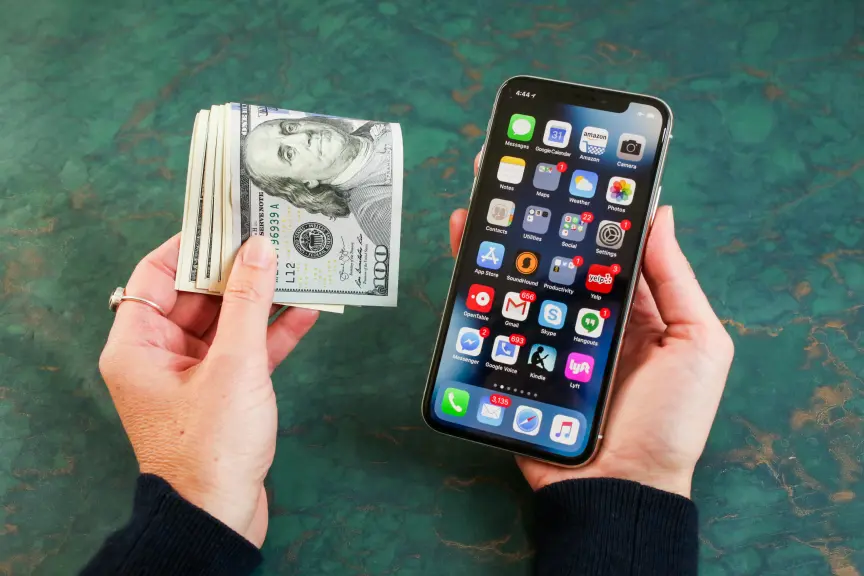
With phone prices climbing higher than ever, it’s no wonder most people turn to carrier financing to buy a new phone. Not only can you spread out your payments over time, but cellular companies often offer enticing deals to win customers over, especially if you’re switching to a new provider. Depending on the deal, sometimes you can even get your new phone for free.
But those deals can be a little confusing, and involve caveats and rules that aren’t always clear. Very rarely is a discount given without a catch. You might also come across terms like “bill credits” or “trade-in credits” that you don’t fully understand.
If you want to know what these terms mean or other details, like what happens if you decide to switch carriers midplan, read on as we walk you through what you need to know before accepting a new carrier deal.
This article was made possible in part by T-Mobile. It was written and edited independently without partner oversight.
What is carrier financing?

Simply put, instead of paying up front for a new phone, carrier financing lets you pay for the phone over time through an installment plan. So, for example, if a phone is $1,200, you can spread the cost over 24 months, which translates to just $50 a month. That’s a lot easier for most people to manage.
It’s worth noting that you will still need to pay upfront costs, like activation fees and taxes on the new phone, whether you’re on an installment plan or not. Sometimes carriers do offer deals that let you spread that out over time. T-Mobile, for example, has the Equipment Installation Plan Flex 36 that will spread out the payment of the device, fees and taxes over 36 months, making the initial cost zero. That said, you still need to qualify for the plan, and depending on your credit, you could have to pay interest on top of that.
One particular downside of carrier financing is that it locks you into that carrier for an extended period (usually two to three years). This means you can’t use your phone with another carrier during this time. If you want to end your agreement with the carrier, that will usually result in early termination fees, or ETFs.
Being stuck with a carrier-locked phone is sometimes bad news if you travel a lot and want to use international eSIMs, which only work with unlocked phones. Otherwise, you’ll have to use your carrier’s international data plan, which can be more expensive.
What are trade-ins and bill credits?

When shopping around for new phones, you might see the words “bill credit” or “trade-in credit” advertised by a carrier. For example, a carrier might offer a trade-in credit of up to $1,000 if you trade in your existing iPhone for a new one. Then they might say that the trade-in credit will be paid to you as 24- or 36-month bill credits.
What does all of that mean? First, let’s talk about that trade-in credit. Not all phones will be eligible for one. Often, the carrier will only give a trade-in credit for newer phones. The newer the device, the more trade-in credit you will get. So that out-of-date iPhone 11, for example, probably won’t be worth very much, if at all.
It’s also worth looking into what else is required for you to get that trade-in credit. Sometimes carriers will only offer the trade-in credit if you sign up for a more expensive monthly plan with services you might not need. Other times, however, the carrier just wants you to switch over, so you might not need to do that.
Let’s say you agree to the terms and the carrier offers you that $1,000 trade-in credit. Here’s where bill credits come in. If the carrier says the trade-in credit will be paid over 36 months of bill credits, it means that $1,000 will be paid off over the period of 36 months. You won’t get a lump sum of that $1,000 credit instantly, and the credits you do get can’t be cashed out and can only be used toward the amount of your phone bill.
But let’s say you don’t have a phone to trade in at all. You could still save some money if you don’t mind switching carriers. Sometimes carriers will offer to pay for your device as an incentive to switch over to their company. Again, device payments are often applied as bill credits spread over a 24- or 36-month period.
What happens if I pay off my plan early?

You can certainly pay off the remaining balance on your phone if you don’t mind paying the upfront cost. However, be warned that you’ll also forfeit any remaining credits you received for the device you traded in. You could also forfeit any other discounts that you agreed to upon signing up for the plan. Be sure to read through the early payoff rules before deciding to pay off your phone ahead of schedule.
What if I want to switch carriers?

If you want to switch carriers while you’re in an existing installment plan, you might have to pay ETFs to end your current agreement. However, most major carriers like T-Mobile, AT&T and Verizon will offer carrier-switching incentives where they’ll pay your ETFs for you. Bear in mind that there’s often a cap on how much of the ETF they will cover. The payment is also often in the form of bill credits.
You can take advantage of carrier deals when choosing this route. T-Mobile, for example, has a five-year price guarantee that locks in the price of text, talk and data for at least five years. AT&T is also attempting to draw new customers with a modular Build-A-Plan that lets you customize your plan according to your budget. Verizon recently introduced Simplicity, an unlimited phone plan that usually costs $45 a month, but is just $30 a month for new customers who bring their own number.



A Redmond, Wash., robotics software startup founded by former Microsoft researchers says its platform can now handle much of the work of getting a robot up and running in a factory, warehouse or other industrial setting, a job that used to take a team of engineers.
General Robotics said Wednesday that advances in GRID, its robot intelligence platform, have cut the process of onboarding a new robot from about a month to as little as two hours. The company calls the approach “Auto Engineering,” with each onboarded robot and diagnosed failure feeding back into the system and speeding up the next deployment.

“Before this moment, it would take us a team of experts to go and execute on behalf of our customers,” said General Robotics CEO and co-founder Ashish Kapoor in an interview. “Clearly non-scalable, clearly very expensive, and clearly will take a long time.”
With Auto Engineering, he said, “we can magnify and accelerate each engineer’s capability.”
Founded in 2023, the company has grown to about 50 employees, primarily engineers. It has raised nearly $34 million, most recently in an April round led by Construct Capital, with participation from Khosla Ventures, Accenture Ventures, Nvidia and Valo Ventures. PitchBook put the size of the round at $25 million; the companies didn’t disclose terms at the time.
Kapoor said General Robotics has roughly a dozen customers — large enterprises across manufacturing, logistics, energy and defense — and revenue in the millions of dollars.
Customers include HTX, the science and technology agency of Singapore’s Ministry of Home Affairs, which Kapoor said has been working with General Robotics for about a year and a half.
The company’s platform works with robot types including industrial arms, humanoids, quadrupeds, wheeled robots and drones, according to the company.
General Robotics is operating in a competitive and well-funded sector. Physical Intelligence, which builds foundation models for robots, has raised more than $2 billion. Nvidia — an investor in General Robotics, and the maker of the Isaac Sim simulation software built into GRID — is developing its own robot models and deployment tools.
Robot makers build good hardware, Kapoor said, but often lack the expertise to put it to work in a specific setting like a shipping terminal. “That last layer is missing.”
Before co-founding the company, Kapoor spent 17 years at Microsoft, ultimately as general manager of its autonomous systems and robotics research group in Redmond, where he created the open-source drone simulator AirSim. General Robotics co-founders Sai Vemprala (CTO) and Shuhang Chen came from the same Microsoft team.
GeekWire covered the launch in 2023, when it was Scaled Foundations and billed itself as “ChatGPT for robots.” It had five employees at the time, focused on aerial robotics and drones, with backing from Khosla and E14 Fund. It later renamed itself General Robotics.
Doom is such a simple, beautifully designed game that it can run on all sorts of weird things, from pregnancy tests to potatoes. Weird things can play it, too. In an effort to eternally one-up itself, the community has now gotten a map of a fruit fly’s brain to play the 1993 first-person shooter.
It started with Google, which partnered with HHMI Janelia Research and other collaborators to map the brain and central nervous system of a male fruit fly. This mapping, which is weirdly beautiful, contains 11,700 types of neurons and 166,000 neurons overall, breaking the record for the most complex neuron mapping ever done.
The research is pretty cool: It involved taking very thin slices of a fly’s brain and body, imaging them and using AI to combine the millions of 2D images into 3D neural shapes. Google says that “knowing the structure of the brain allows neuroscientists to understand the mechanisms behind brain function.”
Now, make it play Doom

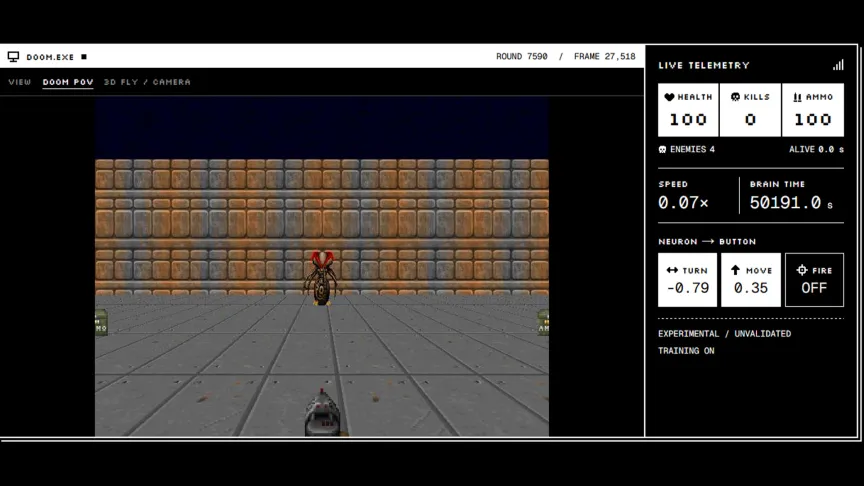
It turns out that knowing the structure of the male fruit fly brain can also help modders and developers teach it how to play Doom. A few days after Google dropped its fly brain research, software engineer Alex Wormuth created a simulated fly brain using Google’s map and then set it loose to learn how to play the pioneering FPS.
The process is quite complicated. Each frame of the game generates 3,335 brightness inputs and 811 R8 color inputs. These inputs are fed into the simulated fruit fly brain, which contains 25.6 million connections. These inputs hit specific neurons based on what the frame shows, and that information is used to determine which controls the fly uses. This process repeats each frame the game runs.
It even works with pain. Wormuth says that nonfatal damage targets the PPL101 dopamine receptors, which control hunger and aggression in real fruit flies.
You can watch the fly’s progress in learning how to play Doom on Wormuth’s Doomfly website, which also shows sensory input, neural activity and other metrics so you can watch the simulated fly brain work in real time. If you swap to the 3D view, you can watch the fly shoot demons.
Flying high with other games, too
Doom isn’t the only game that a simulated fly brain is learning how to play. Developer Jessica Paquette set up a similar neural network with the fly’s brain to learn how to play Super Mario 64, while mechanistic interpretability researcher Lyra Bubbles made another one learn how to play Beat Saber.
A few days later, X user David began teaching it how to do an escape room, and another, Shashank Jain, taught it how to play soccer. Wormuth came back a couple of days later and gave the fly brain $100 worth of bitcoin to trade to see what it would do. X user Simba made the fly brain deploy its own cryptocurrency token on Robinhood.
The fly brain experiment is going to have a lot more impact in neuroscience in the long run, but for at least the next few weeks, don’t be surprised if you see headlines about a fruit fly brain learning how to do other random stuff, like creating real fonts that you can download right now or putting it in music videos and letting it dance.

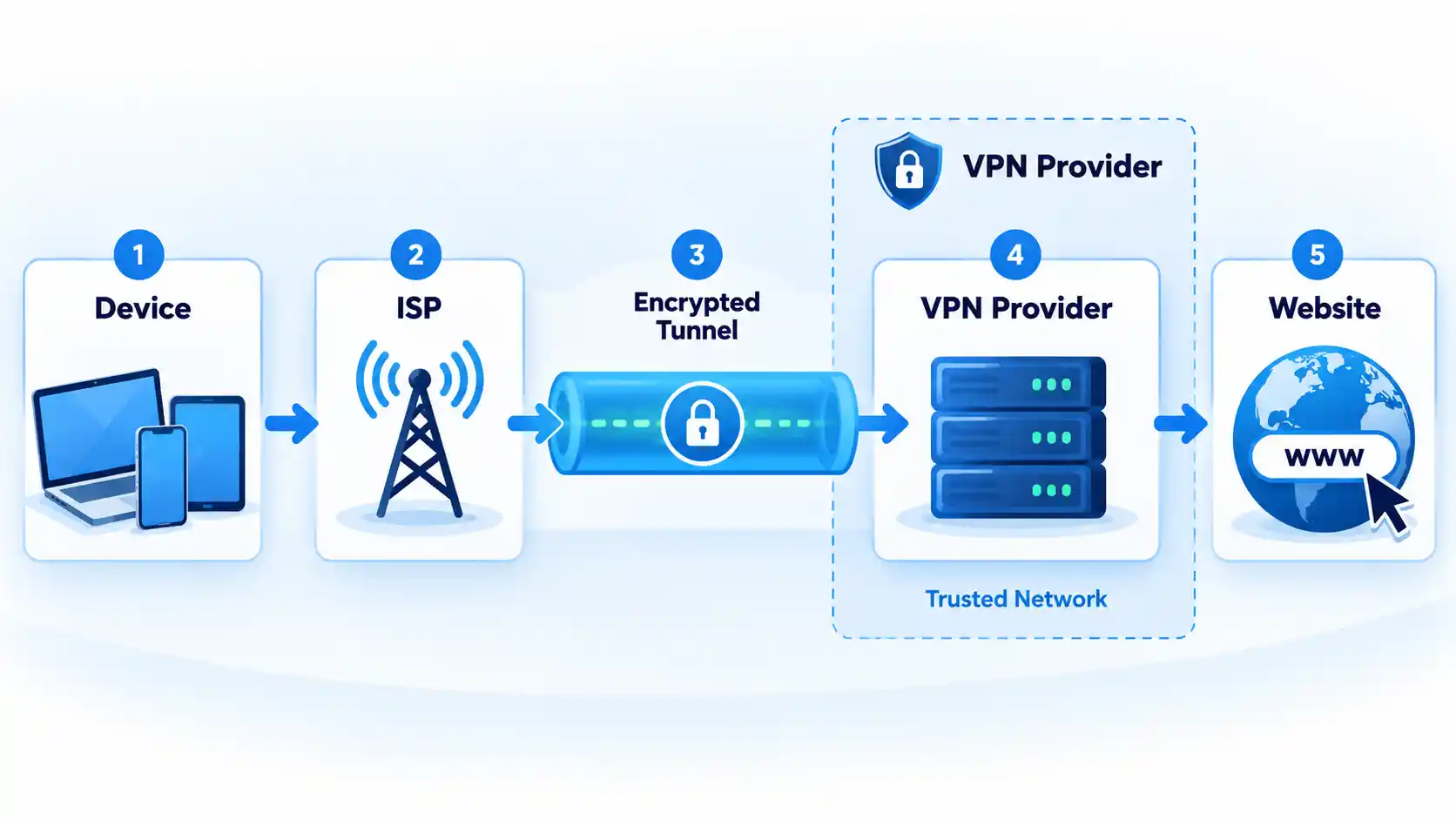
A reputable free VPN can be enough when its privacy practices and usage limits fit your needs. Paying generally buys more capacity, server choice, simultaneous connections, support, and advanced features, but it does not automatically make a VPN more private, secure, or faster.
The useful comparison is therefore not simply “$0 versus subscription.” You need to separate privacy evidence from product limits, distinguish an explicit speed restriction from congestion, and compare what a paid plan actually costs rather than relying on its advertised monthly equivalent.
Free VPN vs Paid VPN: What Actually Changes?
A virtual private network, or VPN, creates an encrypted tunnel between your device and a VPN server when the service and protocol are configured to provide that protection. Free and paid tiers from the same provider can use the same core VPN technology, while differing substantially in capacity, location choice, connection limits, and additional features.
Proton VPN is a useful example. Proton states that its free plan uses the same security level and no-logs policy as its paid plans, without a data, time, or routine speed limit. Its paid tiers add capabilities including broader server choice, more simultaneous devices, paid-plan streaming support, BitTorrent support, and advanced features. Proton’s free-versus-paid plan documentation also states that the free tier is limited to one device at a time.
That distinction matters because a free tier from an established provider is not necessarily a technically weaker VPN. Its main compromises may instead be data allowance, location control, device count, server availability, support, or premium functions.
Free VPN vs paid VPN at a glance
| Feature | Free VPN | Paid VPN |
|---|---|---|
| Subscription cost | No recurring subscription charge | Monthly, annual, or multi-year payment |
| Core VPN security | Can match the paid tier on documented freemium services | Provider-dependent; payment itself does not prove stronger security |
| Data allowance | May be unlimited or capped | Often removes a free-tier data cap |
| Server choice | Often restricted | Usually broader within the same provider |
| Simultaneous devices | Provider-dependent | May increase the connection allowance |
| Privacy | Depends on the provider, policy, implementation, and supporting evidence | Depends on the provider, policy, implementation, and supporting evidence |
| Performance | Can be affected by a smaller server pool, congestion, or plan restrictions | May provide more server choice or capacity, but faster performance is not guaranteed |
| Advanced features | Often limited | More likely to include additional routing, P2P, filtering, or support options |
There is no universal winner in that table. A free tier with unlimited data can be entirely adequate for one person, while someone who needs several simultaneous connections, precise exit locations, or paid-only features may encounter its limits immediately.
Privacy: Paying Does Not Automatically Make a VPN Trustworthy
Price is a poor shortcut for privacy. When a VPN is active, traffic is routed through infrastructure operated by the VPN provider, so the provider occupies a position of significant trust.
The U.S. Federal Trade Commission explains that a VPN can shift trust away from the local network or internet provider and toward the VPN operator. It also warns that VPN apps may request sensitive permissions, may share information with third parties, and do not make users completely anonymous. Although that guidance was published in 2018, its basic trust model remains applicable. The FTC’s VPN privacy guidance recommends examining the operator and its practices rather than relying on privacy marketing alone.
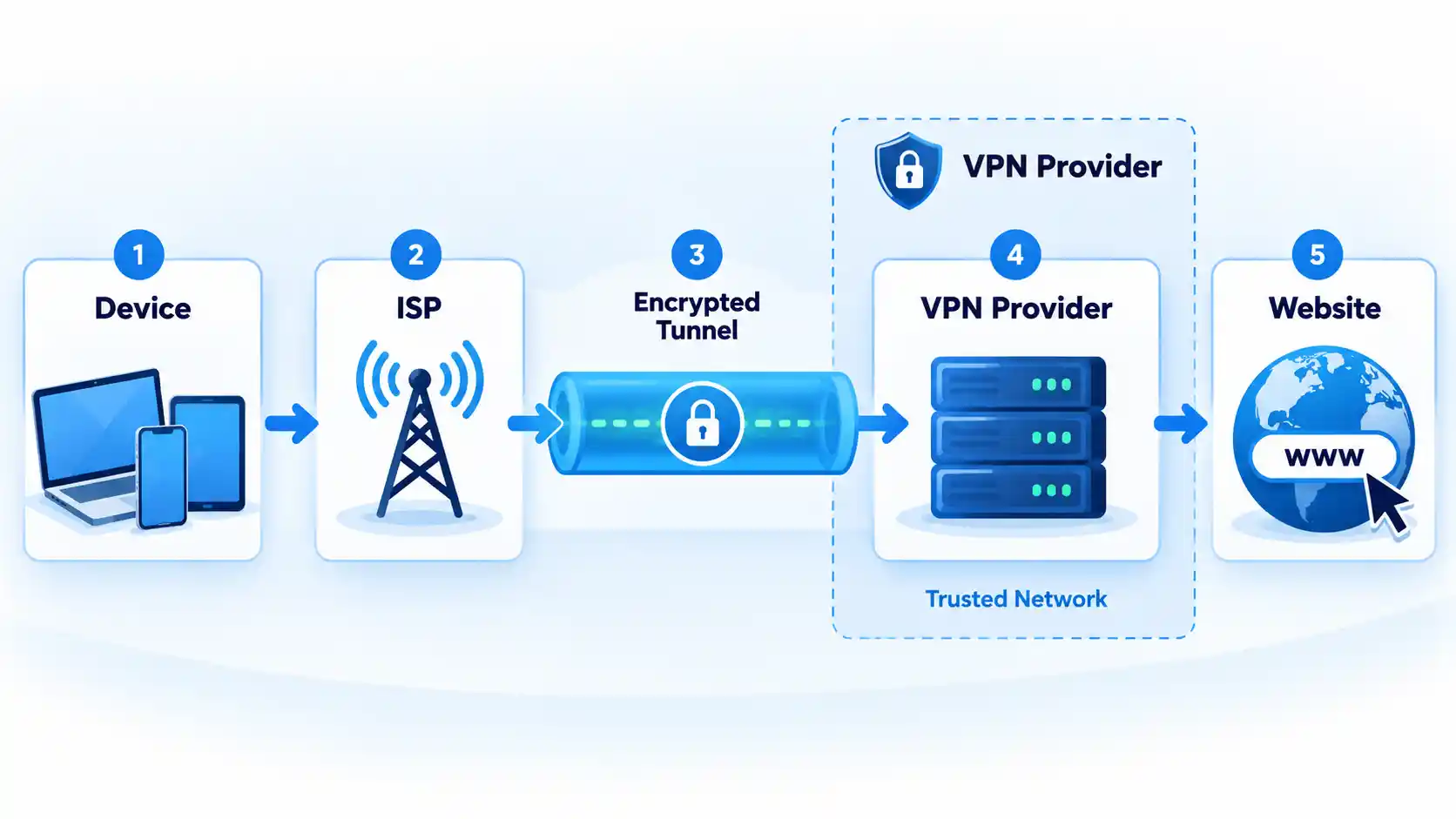
Recent research also shows why implementation matters. Work presented at USENIX Security 2026 describes observed VPN failure modes including real-IP leakage during tunnel failures, Domain Name System (DNS) queries escaping the tunnel, cleartext traffic, insecure configuration delivery, and advertising-ID exfiltration in the apps and providers studied. The USENIX Security 2026 presentation supports evaluating technical behavior rather than assuming that a paid label establishes security.
When a provider says it keeps “no logs,” check what that statement covers. A no-logs policy can address browsing activity and VPN-session information while the service still retains limited operational account data needed to administer an account or enforce a plan.
Windscribe provides a concrete example. It says a free account can retain a username, hashed password, an email address if supplied, the total bandwidth used during the current period, and a timestamp of last activity. It separately says it does not retain visited sites, DNS queries, the user’s real IP address, or traffic-linked session logs. Windscribe’s free-plan disclosure shows why operational records and browsing-activity logs should not be treated as the same thing.
Independent assessments can strengthen a provider’s claim, but they have a defined scope and date. Proton says its no-logs infrastructure completed a fifth consecutive annual third-party audit in 2026. Proton’s published audit history links the 2026 assessment and earlier reports. That is more useful evidence than an unsupported slogan, but it is not a permanent guarantee about every future app version or security failure.
Whether a VPN is free or paid, examine the provider’s privacy policy, ownership, requested application permissions, independent assessments where available, and the specificity of its technical claims. A subscription receipt is not privacy evidence.
Free VPN Limits: Data, Servers, Devices, and Features
The word “limit” can describe several different restrictions. A data cap limits how much traffic you can use during a period. A device limit controls concurrent connections. A server restriction limits the locations or infrastructure available to the account. None of those automatically means that every connection is deliberately slowed.
Windscribe uses a data-cap model. Its current free-plan page states that an account receives 2 GB per month without a confirmed email address or 10 GB per month with one, and that the free account can be used across unlimited personal devices. Its free server selection is smaller than the paid network. Windscribe documents the allowance and free-tier restrictions.
Windscribe’s current pages do not agree on the exact number of free countries: its main free-plan page lists 10, while a May 2026 support article says 11. Because the provider’s own documentation conflicts, the exact country count is not used here.
Proton takes a different approach. Its free plan has no monthly data ceiling, while paid service expands location choice, increases the connection allowance to as many as 10 devices on eligible paid plans, and adds features unavailable to free users. Proton’s VPN privacy policy says the free service generally has no speed restrictions but reserves the right to impose restrictions in cases of excessive consumption to maintain service quality on free servers.
The practical difference becomes clearer when you consider real workloads. A monthly allowance can be consumed by video, operating-system downloads, cloud synchronization, application updates, or other background traffic even when browsing itself is light. An unlimited-data plan avoids that particular constraint but can still restrict server selection, concurrent devices, or premium functionality.
Different services impose those restrictions in different combinations, so compare free VPN data allowances, device limits, and server restrictions rather than assuming every free tier makes the same compromise.
Speed: Why Paying Can Help Without Guaranteeing a Faster VPN
A paid tier can have a practical performance advantage when it provides access to more servers, additional locations, or infrastructure unavailable to free users. That does not establish a fixed speed difference between free and paid VPNs.
Throughput is the amount of data transferred over time. Latency is the delay between sending network traffic and receiving a response. Both can change because of server distance, congestion, protocol choice, internet routing, Wi-Fi conditions, packet loss, device processing limits, and the underlying connection.
A free plan can introduce another constraint. If free users share a smaller server pool, congestion can become more noticeable when demand rises. A provider can also impose an explicit free-tier speed restriction. Those are different mechanisms: congestion varies with load, while throttling deliberately limits performance according to a rule.
Proton is a useful counterexample to the blanket claim that free VPNs are always throttled. Its current documentation says it imposes no routine speed limit on Proton VPN Free, although free servers can have more users and its privacy policy reserves an excessive-consumption restriction. Paid plans provide broader server access and are marketed as offering faster performance. That supports a narrower conclusion: paying can give you more performance options, but it does not guarantee a particular speed.
No first-hand speed measurements were supplied for this article, so there is no defensible universal percentage showing how much faster a paid VPN is.
If performance is poor, price alone does not identify the cause. Server load, distance, protocol selection, local Wi-Fi, packet loss, routing, Maximum Transmission Unit (MTU) problems, and device processing can produce similar symptoms. VPN slowdown troubleshooting is therefore more useful than upgrading blindly when the problem has not been isolated.
Cost: Compare the Real Bill, Not Just the Monthly Headline
A free VPN has no subscription charge, but paid VPN pricing still requires careful comparison because providers use different billing structures.
Mullvad uses a simple model. In February 2026, it stated that its price remains €5 per month regardless of how long a customer pays for. Mullvad’s pricing statement makes the payment term and monthly rate relatively straightforward.
Windscribe illustrates a different structure. Its May 2026 pricing documentation lists Pro at $9 per month or $69 per year and describes Build-A-Plan as having a $3 minimum purchase. Windscribe’s current pricing explanation shows how monthly, annual, and configurable plans can coexist within one service.
Those prices should not be read as a direct cheapest-provider ranking because they use different currencies, products, and billing structures. Instead, use them to identify what needs checking before you buy:
- the amount charged at checkout;
- how long that payment covers;
- whether the advertised monthly figure requires annual or multi-year prepayment;
- the renewal price after any introductory period;
- whether tax is additional;
- and whether the plan includes services you do not need.
Some VPN pricing pages are also localized by region, currency, or promotion. Treat any quoted price as a dated snapshot and verify the checkout terms before purchasing.
When a Free VPN Is Enough
A reputable free plan can be sufficient when its documented restrictions do not interfere with what you need to do. Examples include light or occasional use, one device on a service with a one-device limit, or routine browsing where you do not need a specific exit location.
The data model matters. Proton’s unlimited allowance removes the need to monitor a monthly data meter, while Windscribe can accommodate multiple personal devices but applies a monthly data allowance to its standard free accounts.
The important qualification is reputable. A free application that provides little information about its operator, funding model, privacy practices, permissions, or technical controls should not be treated as equivalent to a documented freemium service merely because both cost $0.
A free VPN becomes a poor fit when you repeatedly exhaust its data allowance, cannot select a required location, exceed its connection limit, or need a feature reserved for paying accounts. At that point, the relevant question is whether paying removes a constraint you actually encounter.
When Paying for a VPN Is Worth It
A paid VPN is easier to justify when its additional capacity solves a specific problem. That can include sustained high-volume use, several simultaneous devices, access to particular server locations, broader P2P support, advanced routing options, or customer support unavailable on the free tier.
Paying can also reduce recurring friction. If you repeatedly disconnect one device to connect another, exhaust a monthly allowance, or cannot access a suitable server location, a paid plan may remove those constraints.
Do not pay solely because a product is described as “premium.” Identify the limitation you need removed, verify that the paid tier actually removes it, and compare the billing terms with alternatives.
Once a paid service fits your requirements better, compare VPN privacy evidence, device limits, protocols, features, and subscription terms rather than treating payment itself as the deciding factor.
Choose this if: you have verified the provider’s privacy practices and its data allowance, server access, location control, and connection limits already cover your normal use.
Avoid this if: you repeatedly hit a data cap, need unavailable locations, exceed its connection allowance, or require paid-only functions.
Main trade-off: no subscription charge in exchange for provider-specific limits on capacity, choice, or features. Choose this if: you need sustained usage, broader server choice, more simultaneous devices, additional routing or P2P functions, or support that a suitable free tier does not provide.
Avoid this if: the subscription adds features you will not use or you are relying on price alone as proof of privacy, security, or speed.
Main trade-off: greater capacity and flexibility in return for an ongoing charge and, on some plans, a longer prepaid commitment.
Which option should you choose?
Choose a free VPN
Choose a paid VPN
Start with provider trust, then compare your data volume, device count, required locations, performance needs, and additional features. If a reputable free tier satisfies those requirements, paying may add little practical value. If one of its restrictions repeatedly interferes with normal use, a well-vetted paid plan is usually the more practical choice.

Whatever wasn’t already going poorly for Flock Safety is just going to keep getting worse. Data collected by privacy activist group Secure Justice pointed out what Flock already knows: it’s losing customers at an unprecedented rate. More than 214 cities and counties have dropped Flock since 2021. More than 90 of those have done that in the last month alone.
It’s not just the persistent surveillance angle working against Flock. While Flock insists its cameras increase public safety, there’s no data out there that supports those claims. The bigger problem is how easily its tech can be abused. Flock allows officers to search a nationwide network of cameras — one that collects 20 billion plate reads a month — while providing very little in terms of restrictions.
In the last month, Flock has attempted to respond to persistent criticism of its tech. It will now limit retention periods and install some mandatory reporting features, most of which are being put in place to prevent cops from committing crimes. That’s how bad it’s gotten. Cops have dragged Flock into their ex-stalking gutter for years and only now is Flock attempting to distance itself from the miscreants it has enabled.
While it must be noted there are several competitors absolutely loling at Flock’s misfortune and slurping up tax dollars to deliver taxpayers more of the stuff they thought they had voted down, the upside of all of this is that Flock has now realized it can’t do business the way it always has.
What’s even more surprising about this backlash is that even cops are turning against it. And it’s not just cops. It’s the people running some of the most MAGA, pro-cop states in the US.
Welcome to the resistance, Ron DeSantis:
Florida has banned local police from placing cameras that read license plates on its state highways in response to growing divisions over law enforcement’s use of technology supplied by Flock Safety and others to track vehicles in many parts of the U.S.
Florida’s Department of Transportation said it would revoke previous permits for the cameras and no longer issue new permits within its jurisdiction.
[…]
The memo followed remarks from Florida Republican Governor Ron DeSantis, who last week said the use of automated license plate readers has “gotten out of control.”
The caveats are plainly apparent. This only affects state-level cameras, allowing towns and counties to decide whether or not they want to subject their residents to surveillance and stalking. As long as the locals keep their cameras on local streets, the ban does not apply.
But it’s something. And it’s far more than we might have expected from a state where every cop is sacred and every person who doesn’t like the current management an antifa.
The same thing can be said for Texas, which has also delivered its own quasi-ban of Flock products. This one may have less to do with Flock’s enabling of officer-involved crime and more to do with the governor getting caught out by his own appointees’ misuse of public funds:
Abbott’s order blocking state agencies from spending money on Flock cameras came Aug. 27, amid the Tribune’s inquiries about a small state agency tapping at least $30 million from a fund dedicated to catalytic converter theft to help pay for at least 3,200 Flock cameras for law enforcement agencies across the state. Six of the seven board members of the Motor Vehicle Crime Prevention Authority are appointed by Abbott.
Caveats all over, starting with the fact that there’s nothing retroactive about this “ban.” Flock cameras obtained with misappropriated funds will apparently still be allowed to operate. This only prevents the CPA from misusing more public funds to buy more Flock cameras.
That obviously means cities and counties can still do whatever they want when it comes to Flock products. And the Texas Department of Public Safety (DPS) is making it clear the governor’s memo doesn’t change a damn thing:
Asked if Abbott’s directive affected the state police force’s camera network, a DPS spokesperson said it will pause installing additional cameras. But a spokesperson said the agency will continue using existing cameras for a variety of “legitimate public safety efforts.”
That’s a bit much to take when the root cause of the quasi-ban was the misuse of funds that were supposed to be used to address a specific “public safety effort.” The fact that more than 206 Texas law enforcement agencies have access to DPS cameras is similarly concerning, considering (by its own admission) DPS has done nothing whatsoever to limit access, much less track abuse of its database.
Still, it’s notable that these two states are doing anything at all to address public concerns about law enforcement misuse of surveillance tech. That’s never seemed to bother them before as neither has shown any resistance to giving federal officers unauthorized access to hunt down migrants or utilizing the surveillance network to do things like track people who are seeking abortions.
These aren’t wins. And the “bans” are so limited you can’t even call them “ties.” But it’s more than we had before Flock repeatedly shot itself in the proverbial foot. Hopefully, this is just the beginning, rather than a “will this do” act of lazy performance that refuses to address real, ongoing problems in favor of “looking busy” for a week or two until the next news cycle rolls through.
Filed Under: alpr, florida, greg abbott, location tracking, ron desantis, surveillance, texas
Companies: flock, flock safety

You can’t enjoy your Roku if it keeps shutting off all the time.

The Roku line of streaming devices has a lot of features that aren’t necessarily obvious. Some can be incredibly useful, like built-in Bluetooth support for night owls, while others may not be everyone’s cup of tea, like the recently added AI slop Roku channel. There’s one function in particular that might be cutting your time in Roku City short without you even knowing it, but the fix is easy.
If your Roku has randomly been turning off without your permission, the culprit is likely the device’s auto power saving feature. With this setting turned on, your Roku will enter a low power mode after 20 minutes when you’re not streaming content or otherwise controlling it. In turn, it will try to turn off the TV it’s connected to.
When this happens, you can wake up your Roku by powering on the TV, pressing a button on the Roku remote, controlling it from the mobile app or casting content via Airplay or apps like YouTube. However, you can also make it so your Roku never needs to be awakened in the first place.
How to turn off auto power saving on your Roku
Not all Roku devices support the auto power saving feature, but the following do:
-
Roku Express 4K, model 3940
-
Roku Express 4K+, model 3941
-
Roku Streaming Stick 4K, model 3820
-
Roku Streaming Stick 4K+, model 3821
-
Roku 4, model 4400
-
Roku Ultra, models 4800, 4802 and 4850
-
Roku Ultra LT, model 4801
If you have one of these models, you can turn the feature off using the following steps:
-
Press Home on the Roku remote.
-
Select Settings.
-
Select Power, then Auto power savings.
-
Uncheck the box next to After 20 minutes of no interaction.
If you ever wind up resetting your Roku, you’ll need to adjust this feature again.
What if your Roku continues to turn off?

If you continue to face this issue, or your device isn’t one that supports the power saving feature, you should next check for connection issues. Make sure your Roku and your TV are both plugged into a reliable power source. The USB port on your TV might not supply enough power to keep your Roku going, so try plugging the streaming box into the wall directly. Double-check that the HDMI connection between the two is good. Unplug and reconnect everything to confirm there are no loose connections.
The Roku remote is another potential cause. Test for this by removing its batteries and seeing if the power problem continues. If it stops, try replacing your remote’s batteries and cleaning the buttons. Make sure your Roku remote is programmed correctly, too.
It’s also possible that your television is utilizing its own power-saving feature independent of the Roku. Depending on the manufacturer, this setting’s location will vary, so it’s best to search for your model online or check the manual.
The problem might also lie with another device connected to your TV that’s utilizing HDMI-CEC, which is what allows connected devices to send command signals to one another. To check if this is the problem, try unplugging all HDMI devices from your television and seeing if the TV continues to turn off. From there, you can plug in devices one-by-one until the issue returns. When it does, track down the CEC settings on the problematic device and turn the function off.
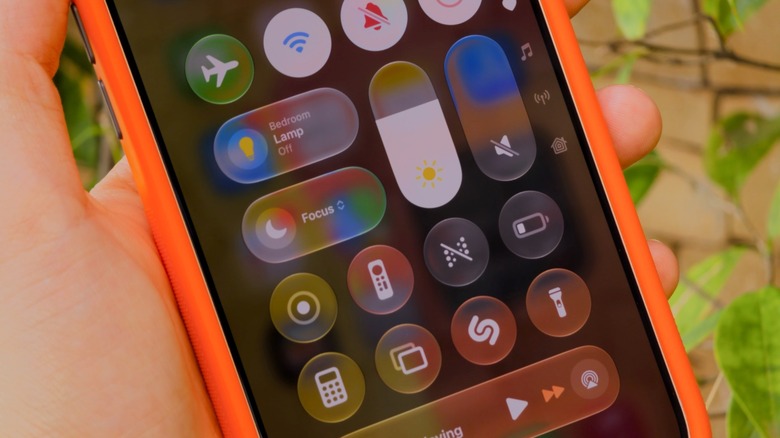
Your iPhone has more ways to silence notifications than you realize.
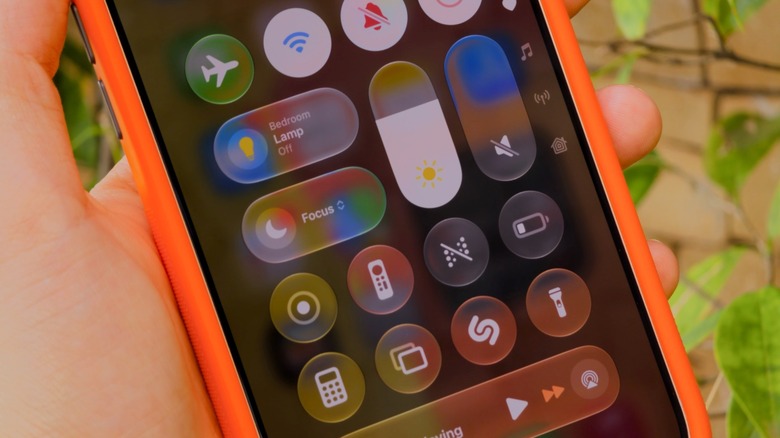
Notifications can get really annoying, especially during a meeting or at bedtime. The good news is that your iPhone has plenty of ways to silence and suppress them: Do Not Disturb, Focus modes and, of course, the classic silent mode.
While silent mode is active, notifications still appear, but your phone won’t make any noise (though it might vibrate). In Do Not Disturb, notifications don’t show in the first place. And Focus modes are like Do Not Disturb on steroids — highly customizable for specific situations, like work or sleep. iOS has some predefined Focus modes, plus you can create your own.
It’s worth noting that these features aren’t new. Do Not Disturb was first introduced with iOS 6, and it has a single job: fully silencing all your notifications. You won’t see any banners, calls or alerts when it’s turned on. It works well when you really don’t want your phone distracting you. But Do Not Disturb can be too strict when you still want to receive important alerts, like calls from your family. That’s why Apple introduced Focus with iOS 15.
Setting up Focus modes and Do Not Disturb on iPhone
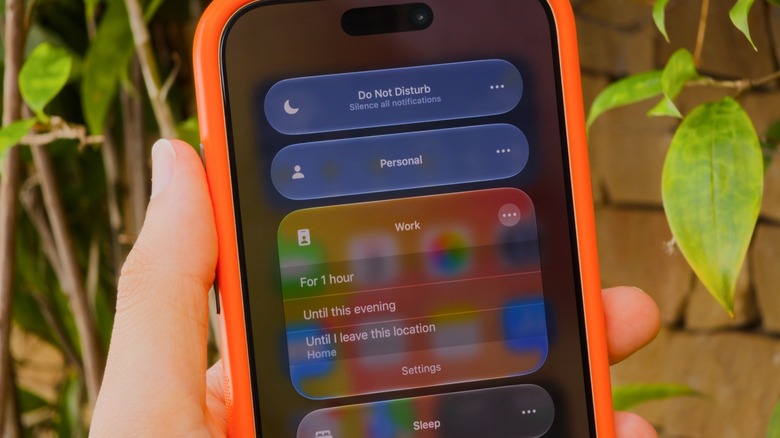
Do Not Disturb and Focus live in your iPhone’s Control Center, accessible by swiping down from the top-right corner of your screen. If you’re still rocking an iPhone with a Home button, slide up from the bottom instead. Tap the Focus button and you’ll see every available option laid out: classic Do Not Disturb, plus Personal, Work and Sleep. To tweak a specific mode, tap the three dots, then Settings.
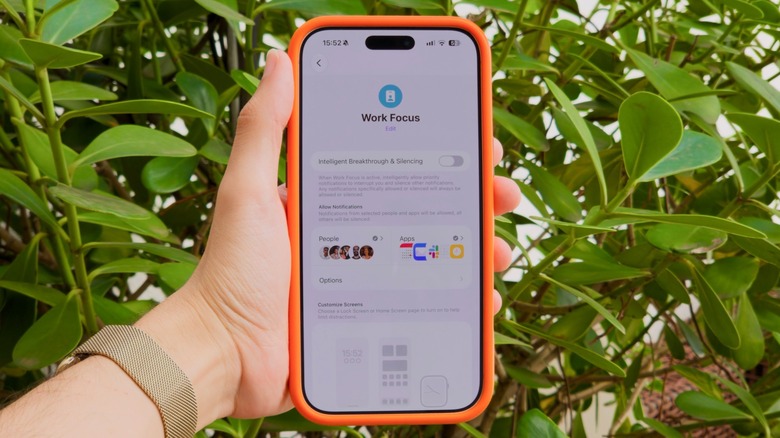
If you’ve never used a Focus before, you’ll need to set it up first. That’s what makes this feature so powerful: in its settings (Settings > Focus), you can choose which apps and people are allowed to notify you when a mode is on. Let’s say in the Work Focus, you only allow notifications from apps like Slack and Mail, while all others are silenced. The same goes for people; it’s in your control whether calls or messages from specific contacts notify you.
To set these up, tap People or Apps while inside a Focus’s options. You can choose to Allow or Silence Notifications From the list you created — whichever makes more sense for that Focus. Under Apps, be sure to enable Time Sensitive Notifications so you still receive important alerts like reminders, alarms or calendar events. You can also customize a Focus mode by applying Filters and Smart Activation. It’s definitely worth taking the time to check out all the available options, given what a great productivity tool Focus is.
As you may notice, Do Not Disturb is its own Focus, meaning it’s customizable like the rest. You might wish to allow alerts from your spouse even in Do Not Disturb, perhaps.
Smart Focus modes for bedtime and driving
You can toggle focus modes manually from Control Center anytime, but your iPhone can also trigger them automatically. For example, there’s a Sleep Focus that turns on when it’s time to go to bed. It’s based on your sleep schedule in the Health app, meaning there’s no need to turn it on manually every night. Driving works similarly, as it turns on when your iPhone connects to CarPlay to help reduce distractions on the road.
If you have Apple Intelligence enabled, there’s also the special Reduce Interruptions Focus. This uses AI to figure out which notifications might be important and which aren’t. Because this does all the work for you, it’s a good Focus to try first. If you’d like to create your own Focus from scratch, tap New Focus at the bottom of the Control Center panel, or hit the Plus (+) button under Settings > Focus. Give your new mode a name and icon, then customize it like any of the others.
By default, anyone who contacts you via iMessage will see a small notice that you have a Focus turned on. While any Focus mode is active, some or all notifications will be suppressed following the way you’ve set it up. You’ll still receive these messages, emails and other notifications; you just won’t get pings for them. When you want notifications to alert you normally again, turn the Focus off.
Tech
Coastal Source Expands Outdoor Audio and Lighting at CEDIA 2026 With Bollard 1000 Speakers and Lutron Integration

The annual CEDIA Expo places a heavy emphasis on home theater and smart home technology, but there is also a growing presence in the outdoor audio category. Origin Acoustics, Theory Audio, ELAC, and Polk Audio are among the players in this category, but two companies getting more aggressive in the segment are KEF and Coastal Source.
At CEDIA 2026, Coastal Source was on hand with several new products, including its recently released Bollard 100 Series speakers, Ovation Ceiling Speaker, Power Source Low Voltage Plug-and-Play System, and Via Dynamic Outdoor Lighting, developed in partnership with Lutron.
The Bollard 1000 Series

We have previously reported on the Coastal Source Bollard 1000 Series speakers, but the company’s presence at CEDIA gave us an opportunity to listen to two models; the 3-Way B2600 and 2-Way EB1250 Ellipse — on the show floor.
Both sounded better than I expected, delivering impressive bass, a very prominent midrange, and clear highs. The “weatherized” ribbon tweeters certainly did their job. More importantly, these speakers sounded much closer to what you would expect from mid-to-high-end indoor loudspeakers than conventional outdoor speakers.
Coastal Source Model
B2600
EB1250 Ellipse
Product Type
3-Way Bollard Speaker
2-Way Bollard Speaker
Construction
Rotomolded color-through polymer composite
Rotomolded color-through polymer composite
Outdoor Rating
Meets or exceeds NEMA 6 / IP67 testing standards
Meets or exceeds NEMA 6 / IP67 testing standards
Tweeter
2.5” Planar Ribbon
3” Planar Ribbon
Mid-Bass Woofer
6.5” Carbon Fiber Cone
7″ x 10” Carbon Fiber Cone
Passive Radiators
3x 6.5” Passive Radiators
Not Applicable
Subwoofer
4x 6.5” Laminate Cones
Not Applicable
Power Handling
Sub – 500W, Sat – 125W
200W
Frequency Response
30Hz – 20kHz
50Hz – 20kHz
Sensitivity
Sat – 88db @ 1w/M, Sub – 88db @ 1w/M
90db @ 1w/M
Dispersion
120°
120°
Impedance
16 ohms
16 ohms
Speaker Connectors
8C16 Uni-Connect Input & Output Connectors
8C16 Uni-Connect Input & Output Connectors
Finish
Brown (fine textured satin)
Brown (fine textured satin)
Mounting
Freestanding, Partial Burial, or Hardscape Mount (optional)
Freestanding, Partial Burial, or Hardscape Mount (optional)
Dimensions (HWD)
42.5” x 11” x 12.25”
29” x 11” x 12.25”
Weight
50.6 lb
27.5 lb
For full details and specifications on the entire 1000 Series Bollard lineup, refer to our detailed report: Coastal Source 1000 Series Bollards Bring Ribbon Tweeters Outdoors, Because Why Not.
Ovation Ceiling Speaker
Initially released at the 2025 CEDIA Expo, the Coastal Source Ovation made another appearance at CEDIA this year.
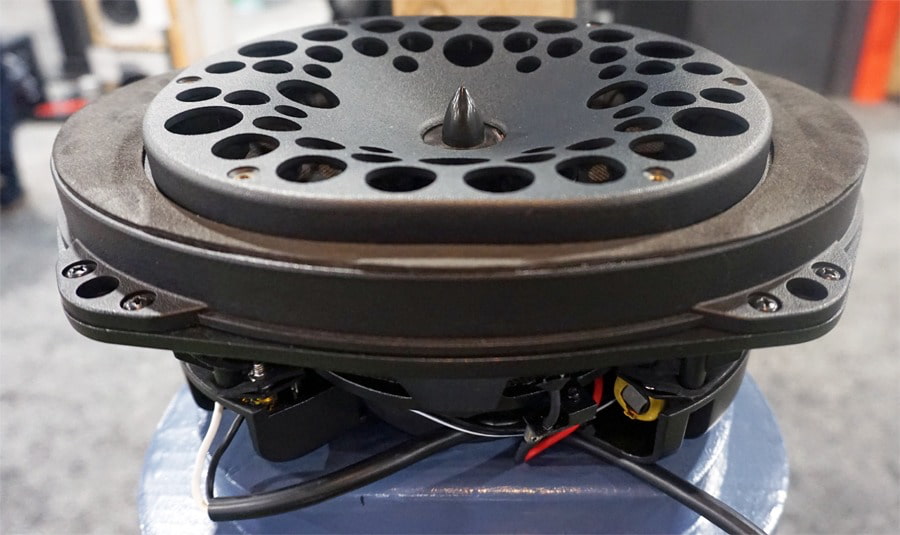
The Ovation combines high-end performance with a compact but heavy-duty design that is easy to install either outdoors or indoors, with a flush-mount design and 360° clamping system.
The Ovation provides environmental protection with a combination of a rust-resistant extruded aluminum grille and UV-stable plastics & weatherproof fabrics. The Ovation is built to last.
For sound reproduction, the Ovation incorporates an elliptical driver and ribbon tweeter that provide wide coverage without losing focus on sound quality. It also provides exceptional bass for such a small form factor.
| Coastal Source Model | Ovation |
| Product Type | Outdoor/Indoor Ceiling Speaker |
| Construction | Rust-resistant extruded aluminum grille and UV-stable plastics & weatherproof fabrics |
| Ceiling Placement | Designed for protected outdoor spaces such as covered patios, lanais, cabanas, and breezeways |
| Outdoor Rating | Wiithstands harsh climates, salt spray, sun, snow, and heavy rain – |
| Tweeter | 1.25″ coaxial planar ribbon tweeter |
| Woofer | 7″ x 10″ elliptical woofer |
| Power Handling | up to 80 watts RMS |
| Frequency Response | 40-25,000 Hz (-6 dB) |
| Sensitivity | 86 dB |
| Dispersion | 120° conical dispersion pattern |
| Impedance | 8 ohms |
| Speaker Connectors | Binding posts with male Coastal Mini Connector (CMC) pigtail |
| Mounting | In-Ceiling |
| Dimensions (WHD) | 10.675” x 5.25” x 7.675″ |
| Weight | 4 lbs |
VIA Lighting
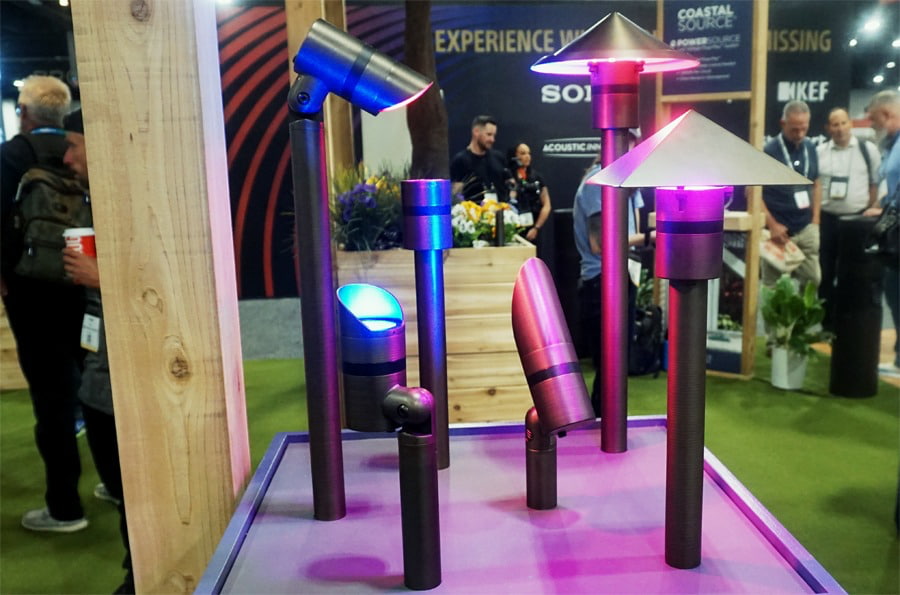

In addition to the Bollard 1000 Series and Ovation speakers, Coastal Source also showcased examples of its VIA lighting solutions, developed in partnership with Lutron. The system supports Lutron’s Ketra full-spectrum color and accent lighting capabilities, along with Rania tunable white lighting.
The fixtures are available in a variety of styles designed to complement different architectural and landscape requirements.
VIA Lighting fixtures feature solid brass construction and plug-and-play installation with Coastal Source power systems, with control provided through Lutron HomeWorks.
Coastal Source PowerSource
One of the biggest challenges with outdoor audio and lighting systems is the complexity of power management. At CEDIA 2026, Coastal Source gave us a closer look at its PowerSource system, designed to simplify that part of the installation process.
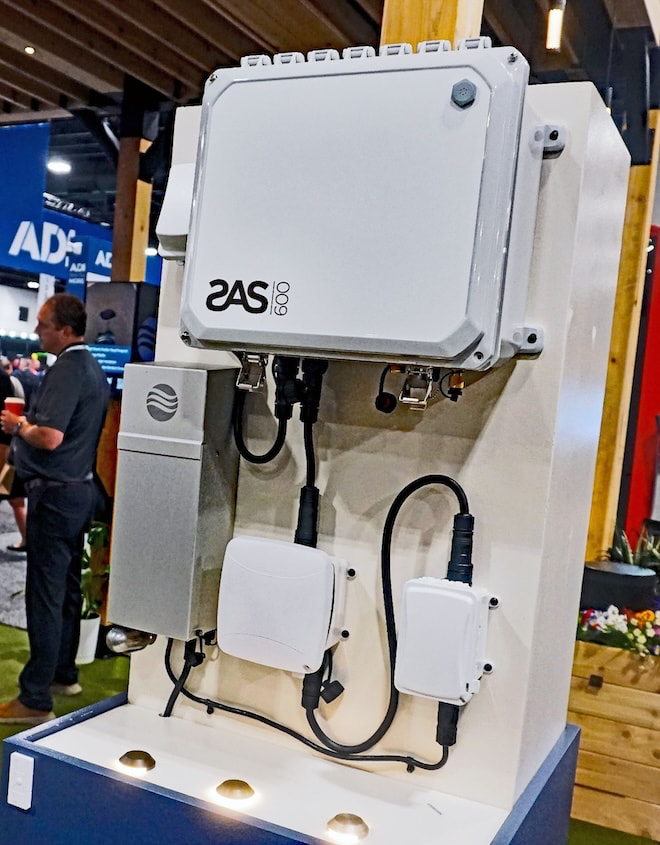
According to Coastal Source, its PowerSource system is the first UL-certified, plug-and-play 120V system approved for direct burial (NEMA 6) and above-ground use. The company says the system is designed to provide safe, reliable power where needed while reducing the permitting delays and licensed line-voltage labor costs traditionally associated with outdoor power installations. Local permitting, electrical code, and licensing requirements may still vary by jurisdiction.
The system consists of pre-assembled, modular components that screw together, shortening installation times and reducing the level of specialized labor required. Its modular design also makes the system easier to scale as outdoor audio, lighting, and other systems expand.
PowerSource can also shorten cable runs and improve system efficiency while, perhaps most importantly for the homeowner, helping keep installations clean and discreet.
The Bottom Line
Coastal Source is not approaching the backyard as a place to bolt a few speakers to the house and call it a day. The Bollard 1000 Series, Ovation, VIA Lighting, and PowerSource system are designed to work together as part of a more complete outdoor entertainment and architectural platform, with sound quality, lighting, installation, and power management addressed under one roof.
The company’s use of weatherized ribbon tweeters is also unusual in this category, and based on what we heard at CEDIA, the better Bollard models can deliver the kind of bass weight, midrange presence, and treble clarity that we normally associate with considerably more serious indoor loudspeakers.
This is primarily aimed at custom integrators, landscape designers, and homeowners building premium outdoor spaces where aesthetics and reliability matter just as much as sound quality. It is not the solution for someone looking to hang a $300 pair of patio speakers beside the grill.
Coastal Source also has considerably more competition than it did a few years ago. Theory Audio Design has been pushing high-output landscape audio further upmarket, while KEF’s expanding outdoor lineup adds speakers, subwoofers, and amplification from one of the biggest names in high-end audio.
The backyard audio wars have officially moved well beyond waterproof speakers and an extension cord.
Price & Availability
Coastal Source products (including amplifiers) are available through Coastal Source and Authorized Dealers. Refer to dealers for pricing and installation.
Related Reading:

News Videos2 minutes ago
I Paid Off His $200,000 Debt

NewsBeat4 minutes ago
Boris Johnson’s train is evacuated in Ukraine after Russian drone strike hits passenger service nearby

Business4 minutes ago
(VIDEO) Wisconsin Rep. Tom Tiffany Sustains Minor Injuries After Plane Makes Emergency Landing on Lake Wausau

Tech5 days ago
Memory prices are slowing because buyers ran out of money

Business3 days ago
Micron Stock Climbs Above $1,031 as AI Memory Crunch and a $50 Billion Outlook Fuel the Rally

Business4 days ago
AMD Stock Climbs After Management Lifts 2027 Data Center Outlook Toward $70 Billion in AI Sales


-
Tech5 days ago
Memory prices are slowing because buyers ran out of money
-
 Business3 days ago
Micron Stock Climbs Above $1,031 as AI Memory Crunch and a $50 Billion Outlook Fuel the Rally
-
 Business4 days ago
AMD Stock Climbs After Management Lifts 2027 Data Center Outlook Toward $70 Billion in AI Sales
-

 Crypto World5 days ago
Bitcoin price risks $76K drop as $78K support weakens
-

 Crypto World5 days ago
Robinhood Stock: How To Take Advantage With Reduced Risk
-

 Fashion2 days ago
Weekend Open Thread – Corporette.com
-

 Crypto World5 days ago
Ethereum price stalls below $2,500 as ADX drops to 11
-

 Crypto World2 days ago
XAG/USD: Silver’s Short-Term Rally Meets Its Moment of Truth
-

 NewsBeat5 days ago
England up in reading, maths and science rankings as Scotland and Wales dip
-

 Crypto World3 days ago
2 Chip Stocks Broke Out This Week. Neither Was Nvidia
-

 Crypto World3 days ago
OKX launches 10x OpenAI, Anthropic X-Perps in Europe
-

 Crypto World2 days ago
Diesel Tops $6 a Gallon for the First Time as 28 States Set Records
-

 Tech3 days ago
Battery life is the only iPhone 18 Pro and iPhone Duo upgrade I care about. Apple didn’t disappoint
-

 Business2 days ago
10 Most-Streamed Songs On Spotify In 2026 So Far, Led By Ella Langley’s Dominant Run On The Charts This Year
-

 Crypto World5 days ago
Intel Stock Jumps 9% on Chip Price Hike Report, US Stake Gains $36 Billion
-

 NewsBeat5 days ago
What went right this week: an ‘historic’ fall in violent crime, plus more
-

 Crypto World4 days ago
Bitcoin price risks $70K if $78K neckline breaks
-
 Tech4 days ago
Apple Watch Ultra 4 vs Watch Ultra 3: Should you really spend another $799?
-
Crypto World3 days ago
Ethereum Price Analysis: Consolidation at $2.5K Tests Momentum as On-Chain Activity Surges
-
 Crypto World4 days ago
Bitcoin price holds near $79K as cycle drawdowns narrow
You must be logged in to post a comment Login