Steve Hobbs, secretary of state for Washington, poses at his booth during the 2026 Penny Arcade Expo in Seattle. (GeekWire Photo/Thomas Wilde)
If you explore the main expo hall during the Penny Arcade Expo, you can often find some interesting booths around the edges of the room. These can offer rare games, designer clothing, blind boxes of themed merch, and occasionally/inexplicably, unfiltered access to local Washington politicians.
Steve Hobbs has held the secretary of state position for Washington since 2021. Visitors to his booth during PAX, held over Labor Day weekend at the Seattle Convention Center, could meet Hobbs and spin a prize wheel, with rewards that included buttons, collectible pins featuring the office’s official mascot Finn, custom 20-sided dice with Finn on the 20 face, and free snacks.
This wasn’t Hobbs’ first time at PAX, but it was the first time I’d heard about a closed-doors event he’d hosted on the night before PAX. One of the local exhibitors mentioned that Hobbs’ office had held a networking event in Seattle on Thursday, Sept. 3, between local tabletop companies and an assortment of international game publishers.
That got me curious enough to schedule a short conversation with Hobbs on the third day of PAX. Once we sat down, however, I had to ask him the question that I’d heard from a lot of other attendees: what was he doing at PAX in the first place?
“It’s twofold,” Hobbs told me. “One, this is a great opportunity for me to reach out to the gaming companies here in the state of Washington and look for opportunities for them to go overseas, linking up some of these indie game developers with major publishers.”
Advertisement
He continued, “The rest of it is civic engagement. Just reminding people, hey, don’t forget to vote. Don’t forget to check your registration.”
Washington mails a ballot to every registered voter, who can return it by mail or at an official drop box. Hobbs was urging people to use the drop boxes, citing what he called “a low-key fight with the USPS.”
Washington and 24 other states sued in August to block a U.S. Postal Service rule requiring new barcodes on ballot envelopes, and the Supreme Court kept it from taking effect on Sept. 14, after this interview.
“Look, PAX is where all the young people are at, right?” Hobbs said. “This is a very diverse, young community, and this is where we need to engage people.”
Advertisement
Visitors to the secretary of state’s booth during PAX could win collectible pins or 20-sided dice featuring the office’s mascot Finn. (GeekWire Photo/Thomas Wilde)
That brings us back to the games.
The Thursday-night event was intended to help connect Washington’s homegrown board games industry with interested publishers and players in Japan, Poland and elsewhere. This could allow Washington-based designers to sell their products overseas, as well as potentially letting foreign partners export their own games to North America.
Washington doesn’t make quite as big a deal about it as one might expect, but it’s one of the biggest states in the U.S. for tabletop and board game design, if not the biggest. Local Washington studios range in size from Renton-based Wizards of the Coast to one-person indie creators who make card games as a hobby. Hobbs’ office estimated early last year that tabletop gaming in Washington is a $2 billion industry.
The Secretary of State’s Office is best known for its core duties of running elections and registering businesses, but state law also directs the secretary of state to develop a citizens’ exchange program promoting ties that “may result in increased tourism, business relationships, and trade.”
“So what we do is help these indie game developers get access to foreign markets by putting on these trade missions,” Hobbs said. “What we’ll do is provide the booth [at international gaming conferences, such as Game Market in Tokyo], which is the most expensive thing. We will also help them navigate through the federal grant process in order to mitigate some of the costs over there.”
Advertisement
His office then works its connections with the U.S. State Department and the host nation’s commerce department to set up meetings for the developers.
“We have really strong ties with the German and Japanese governments, and we actually get these people to do their pitches with the major publishers in Europe and Japan,” Hobbs said.
As an example of the initiative’s success, Hobbs pointed to Lethal Shadows, a Snohomish County business that specializes in premium tabletop miniatures. According to Hobbs, he’d helped Lethal Shadows partner up with a Lithuanian company. As a result, Lethal Shadows has moved from a garage to a warehouse and is hiring more employees.
That did raise the question of why Hobbs’ office wasn’t making equivalent inroads toward Washington’s significantly larger video game industry.
Advertisement
“It’s more of a lack of bandwidth,” Hobbs said. “We want to take baby steps. We didn’t want to take a big step into it. And frankly, I didn’t realize that it was important to go to these conventions. In Japan, Germany, and Poland, we’re seeing if there might be an opportunity to do the same thing on the digital side.”
Hobbs continued, “I believe trade must go two ways. We need to support each other.”
The research from the Global Undergraduate Awards highlighted the concerns held by undergraduate students as they prepare to enter the workforce.
According to new research published by the Global Undergraduate Awards (GUA), during the announcement of the undergraduate winners for 2026, more than half of students who took part in the report regard AI as a significant concern.
Data was collected from 400 globally diverse undergraduate students across more than 200 universities in nearly 100 countries, from 8-15 June.
55pc of participating undergraduate students cited AI as a concern this year, a figure which rose from 48pc in 2025, moving it from fifth to second place in global rankings of concerns. The report noted that it was the only issue in the top five to rise, even as the overall field of concerns held broadly steady.
Advertisement
The fears around artificial intelligence were second only to social and economic inequality and came ahead of the climate crisis, mental health and environmental issues. Much of the fear was related to concerns around job loss or destruction.
Commenting on the results report, Jim Barry, the chair of the GUA, said: “The findings clearly show that AI is rising up the agenda as a key area of concern for undergraduates globally.
“This is something that policymakers need to take note of. The central focus is the job market post-graduation and what sort of impact AI is going to have on career prospects for many.
“There is a palpable concern about the prospect of jobs destruction. The fact that AI has accelerated in our research findings from fifth to second place in just one year is a tangible demonstration of how quickly it has become a significant issue for students as they look to the future.”
Advertisement
While the changing rankings highlight the growing prominence of AI alongside the longstanding social and environmental challenges facing the next generation, Barry is of the opinion that it is concerning to see other issues fall somewhat to the wayside.
He explained: “While climate change remains firmly in the top three concerns, it is worrying to see it fall in the rankings as its impacts become increasingly visible and significant. It highlights the challenge of keeping climate change to the forefront as other issues compete for attention and the societal and economic changes required are increasingly weaponised politically.”
Worldwide worry
The GUA report suggests that for students, artificial intelligence is no longer a distant or theoretical concept, rather, it is ingrained in how people study, research and think about their future careers.
The research said: “There are huge opportunities that come with it, but also a lot of uncertainty about what its rapid development will mean for this generation.”
Advertisement
The GUA’s research comes at a time when there is increasing worldwide concern about the impact the advancement of artificial intelligence is having – particularly in relation to how it might damage career opportunities for both new and established professionals.
SiliconRepublic.com recently spoke to Pluralsight’s Beckey Woodard Cole about the growing issue of AI in the workplace and how it is disassembling the traditional career ladder.
Earlier in the month, global talent platform Andela released a report which found that in a working landscape being transformed daily by AI, 53pc of AI job postings are asking for skills that don’t match the listed job title, highlighting a disconnect between organisations, recruiters and jobseekers.
Additional research from Microsoft Ireland, via the 2026 Work Trend Index, also found that many Irish employees are considering new career opportunities as AI reshapes the environment.
Advertisement
Don’t miss out on the knowledge you need to succeed. Sign up for the Daily Brief, Silicon Republic’s digest of need-to-know sci-tech news.
The wireless earbud industry spent the better part of a decade convincing consumers that progress meant sealing their ear canals more effectively, adding increasingly aggressive active noise cancellation and pretending the outside world could safely be placed on mute.
Apparently, a growing number of listeners would like to hear the bus coming.
New market data from Omdia, the global technology research firm owned by Informa TechTarget, shows that open wireless stereo (OWS) products are moving in the opposite direction from conventional true wireless earbuds. Global TWS (aka regular wireless earbuds) shipments slipped 0.7% year over year to 82.1 million units in Q2 2026, the category’s first annual decline since Q2 2023. Conventional in-ear and semi-in-ear TWS declined 2%, while open-ear shipments grew 12% to 11.1 million units.
Open-ear products now represent 13.5% of global TWS shipments, up from 12% one year ago. That is still a minority of the market, but it is becoming far too large for major headphone brands to treat as a fitness niche populated exclusively by runners who refuse to stop at intersections.
Advertisement
Related Reading:
Clip-On Earbuds Are Driving the Growth
The most revealing number may be the form factor.
Omdia says clip-on models accounted for 61% of OWS shipments during Q2, compared with 39% for ear-hook designs. Clip-ons increasingly blur the line between wearable technology and fashion accessory, while ear hooks remain particularly attractive for sports and activities where staying attached to the listener is generally considered useful.
Price growth is even more striking. The $100 to $199 segment jumped 253% year over year, driven in part by established brands including Huawei, Shokz and OPPO. Below $50, shipments exploded 323%, demonstrating that open-ear audio is spreading in both directions rather than becoming another premium category with a $299 entrance fee and a velvet rope.
Omdia expects annual OWS shipments to climb from 43.9 million units in 2026 to 90.5 million by 2030, when open-ear models could represent nearly one in five TWS shipments.
Advertisement
That is not a fad. It is an adjacent market becoming a substantial one.
Why Now?
The mistake would be interpreting these numbers as consumers suddenly rejecting conventional earbuds. They are not. Sealed TWS remains vastly larger, and ANC still makes considerably more sense on airplanes, trains and anywhere else where situational awareness mostly means hearing somebody else’s child watch YouTube without headphones.
Open-ear audio solves a different set of problems.
Advertisement. Scroll to continue reading.
Advertisement
Long-term comfort matters to people who dislike having silicone tips inserted for hours. Runners and cyclists need environmental awareness. Office users may need to hear coworkers while listening to music, and parents generally appreciate being able to detect whatever object has just broken in the next room.
Omdia Research Director Jason Low expects vendors to focus increasingly on fitness, commuting and office productivity, while adding smarter ecosystem and AI features. Sound quality remains the harder engineering problem because an open design cannot exploit the acoustic seal that helps conventional earbuds produce deeper bass and greater isolation.
That explains why the category is suddenly attracting considerably more serious engineering.
The Open-Ear Models Defining the Market
2026 Bose Ultra Open Earbuds 2nd Gen
Bose made its intentions very clear this morning with the new $199 Sport Open Earbuds and $299 Ultra Open Earbuds 2nd Gen. The Sport model targets workouts with an IP54 cuff design, while the Ultra adds deeper bass, higher output, improved calling and Cinema Mode. Bose is no longer treating open-ear as one experimental SKU hiding in the catalog.
Shokz OpenDots ONE ($199.95) sit almost directly in the segment where Omdia is seeing explosive growth. Their clip-on design combines 11.8mm drivers, Dolby Audio, IP54 protection and up to 10 hours of playback, with 40 hours available from the wireless charging case. Shokz is particularly noteworthy because Omdia specifically identifies the company among the brands driving growth in the $100 to $199 tier.
Advertisement
Sony has gone more premium with the $229.99 LinkBuds Clip, which we reviewed earlier this year. Their strengths were comfort, situational awareness and useful listening modes rather than outright fidelity; our testing also exposed the fundamental challenge facing every manufacturer in this space — open-ear convenience still comes with compromises in bass extension and resolution.
At the other end, the $99 CMF Clip Pro demonstrates how quickly pricing pressure is arriving. LDAC, multipoint, a 10-hour battery and IP54 protection are now available below $100, which should make companies charging two or three times as much increasingly uncomfortable unless the audible difference justifies it.
Sony LinkBuds Clip Wireless Earbud
The Bottom Line
Open-ear earbuds are not replacing conventional TWS. They do not need to.
The market is splitting according to use case. Sealed earbuds remain the better option when isolation, ANC and maximum bass performance matter. Open-ear designs increasingly make more sense when comfort, awareness and all-day wear take priority.
The important change is that consumers no longer have to accept terrible sound or awkward hardware to make that trade. Bose, Shokz, Sony and a rapidly expanding group of competitors are spending real engineering money trying to close the performance gap, while lower-cost brands are attacking the category from underneath.
Advertisement
Omdia’s numbers suggest consumers have noticed.
After a decade spent perfecting ways to block out the world, the next big wireless-audio growth story may be about letting some of it back in.
Microsoft has fixed a known issue that causes copy-and-paste failures for some Excel users after installing the September 2026 KB5002914 security update.
This follows a wave of customer reports on the Microsoft Q&A forums and Reddit that KB5002914 breaks copy-and-paste, autofill, and formula dragging in Excel.
“Although users try to paste content, the source remains selected and the destination is unmodified,” Microsoft said when it confirmed these issues earlier this week and blamed them on what it described as a code regression. “When this issue occurs, users receive no indication of the failure, such as a beep or error message.”
However, while this bug affects Excel Online and Excel 2024, 2021, 2019, and 2016, Microsoft has released a fix that will only resolve these issues for Excel 2016 users.
Advertisement
“We released update KB5002665 to mitigate this issue. We are aware of some user scenarios impacted by conditional formatting and recommend customers follow our guidance,” Microsoft told BleepingComputer when asked to confirm if it fixes the copy and paste shortcut bug.
“This update fixes the known issue in KB5002914 that causes certain paste operations to fail silently,” it says in a support document released on Wednesday.
Microsoft added that the fix only addresses the bug in the Microsoft Installer (.msi)-based edition of Office 2016 and doesn’t apply to Office 2016 Click-to-Run editions, such as Microsoft Office 365 Home.
While users have told BleepingComputer that updates released for Office 2019, Office 2021, and Office 2024 on September 12th resolve these issues, Microsoft has not officially confirmed that these updates fix the bug.
Advertisement
Temporary workaround available
Until Microsoft ships a permanent official solution for all affected Excel versions, the company advised impacted customers to try the “Paste Special” option.
To do that, they must select Paste Special in the “Paste” drop-down after opening the “Home” tab, then choose what to paste using the Ctrl+Alt+V keyboard shortcut: Formula, Formula and number formats, Values, Values and number formats, or Paste Link.
Excel Paste Special box (Microsoft)
Affected Excel users have also reported that uninstalling the KB5002914 security update restores copy-and-paste functionality on impacted systems.
However, it’s important to note that uninstalling this update will also remove a long list of patches for remote code execution and information disclosure vulnerabilities.
To do that, you have to open a Command Prompt window with the “Run as administrator” option and run one of the following commands (depending on your Office version):
One month later, it also fixed an issue that prevented third-party applications from launching Microsoft Office apps like Word, Excel, PowerPoint, and Access and from opening documents on up-to-date Windows systems.
Join Mikko Hyppönen and security leaders from the NFL, CHANEL, and Atlassian for a two-hour digital summit on what AI-speed attacks change, what defenders should stop doing, and how to validate, decide, fix, and re-validate at machine speed.
Spanish Point Technologies’ Daire Cunningham explores the human element that’s key to digital transformation, especially in relation to AI adoption.
Artificial intelligence has become remarkably easy to buy, yet surprisingly difficult to transform a business with.
That distinction matters. McKinsey’s latest global research found that 88pc of organisations are now using AI in at least one business function, yet only around a third have begun scaling their AI programmes across the enterprise.
The gap between those figures points to a challenge that is becoming increasingly apparent. Access to AI is no longer the primary obstacle for most organisations. The harder task is understanding where it can genuinely create value and what needs to change within the business for that value to be realised.
Advertisement
In the rush to adopt AI, organisations can easily begin with the wrong question: Which AI tool should we use?
A better starting point is to ask what problem the organisation is actually trying to solve. Once that is clear, leaders can work backwards. They can identify what information is required, where it sits, who should have access to it, how the existing process operates and where the real bottlenecks lie.
They can also determine which decisions should remain firmly in human hands and where technology could meaningfully improve the outcome. The choice of model or platform should follow those decisions, rather than lead them.
This matters because one of the biggest obstacles to AI transformation is not a shortage of sophisticated technology, but the condition of the organisation underneath it.
Advertisement
A 2026 Dun & Bradstreet survey found that while more than three-quarters of businesses are already reporting some measurable return from AI, just 6pc say their enterprise data is fully ready to support AI at scale.
Businesses have spent decades accumulating information across databases, applications, document repositories and departmental systems. Permissions have evolved over time, processes have been layered on top of other processes, and employees have developed workarounds to get things done. AI has a tendency to make the weaknesses in those arrangements much harder to ignore.
Consider an AI assistant connected to an organisation’s internal information. If an employee asks it a question and receives a confidential document they should never have been able to access, it is tempting to describe that as an AI security problem. In reality, the technology may not have created the underlying vulnerability at all. It may simply have exposed the fact that the employee already had inappropriate access.
As AI makes it dramatically easier to retrieve and connect information, identity, permissions and governance become more important, not less.
Advertisement
‘Technology itself is only part of the story’
We have seen the value of getting those foundations right in identity modernisation projects. At the Royal College of Physicians of Ireland, 13 separate systems were brought into a single identity platform, introducing single sign-on and automated access management for more than 86,000 users across 95 countries.
Administrative overhead was reduced by 50pc. The technology itself is only part of the story. Establishing a clearer way of managing identities, permissions and access provides a much stronger foundation for any organisation introducing technologies capable of searching, connecting and retrieving information across multiple systems.
There is an equally important human dimension to this. I have always thought about digital transformation partly in terms of arming the workforce to adopt and employ modern technology in their working practices. An organisation can deploy an exceptional system, but if employees do not understand where it fits into their jobs, why they should use it or how their responsibilities change around it, its value will remain limited.
McKinsey’s research has found that redesigning workflows is among the factors most strongly associated with organisations seeing financial impact from generative AI. That makes sense: transformation does not happen because somebody has been given access to another piece of software. It happens when organisations rethink how work gets done.
Advertisement
At the same time, AI does not remove the need for professional discipline.
Engineers can use it to accelerate coding, testing and analysis, but generated code still has to be reviewed, systems still have to be tested and security requirements still apply. Someone remains accountable for what ultimately goes into production.
The same principle applies across other professions. AI can accelerate elements of the work, but capable professionals still need to understand the outputs, recognise when something is wrong and exercise judgement over the decisions that follow. As systems become more capable, that human oversight becomes more important rather than redundant.
This is also why the strongest applications of AI tend to make more sense when described in terms of the problem being solved rather than the technology being deployed.
Advertisement
The music industry provides a useful example. Identifying potentially fraudulent music registrations across immense volumes of metadata is a specific problem that becomes increasingly difficult to address at scale.
Applying machine learning and AI-driven metadata analysis to that challenge has enabled suspicious registrations to be identified across large datasets, with processing times reduced by 70pc in one implementation. The significance is not simply that the same work can be completed faster. Greater processing capacity allows skilled people to focus their attention on the cases that genuinely require investigation, judgement and expertise.
That points to a broader question about how businesses measure the value of AI. Much of the discussion still focuses on automation, efficiency and ultimately how much human work can be removed from a process.
Efficiency matters, but it is only one measure of what these technologies can contribute. AI can also make previously impractical work possible by analysing volumes of information that would have required enormous amounts of human time, identifying patterns that warrant further investigation and allowing skilled employees to concentrate on more complex decisions.
Advertisement
Instead of asking only what work AI can remove, businesses should also be asking what their people can now do that they could not realistically do before.
There will always be another model, platform or AI capability arriving on the market, which is precisely why businesses cannot build a transformation strategy around chasing each new development.
They need something more durable: a clear understanding of the problems they want to solve, trusted information, appropriate governance, well-designed processes and employees who understand how to use the technology responsibly.
The organisations that succeed with AI will not necessarily be those that adopt every new tool first. They will be those that know where AI belongs, prepare the foundations beneath it and give capable people the structures and confidence to use it effectively.
Advertisement
Technology certainly enables transformation, but people still have to make it work.
Daire Cunningham is the COO at Spanish Point Technologies, where he has worked since 2008. Prior to joining Spanish Point Technologies, Cunningham spent some time working in software systems design and development roles at companies such as Dolmen Stockbrokers and Fyntel.
Advertisement
Don’t miss out on the knowledge you need to succeed. Sign up for the Daily Brief, Silicon Republic’s digest of need-to-know sci-tech news.
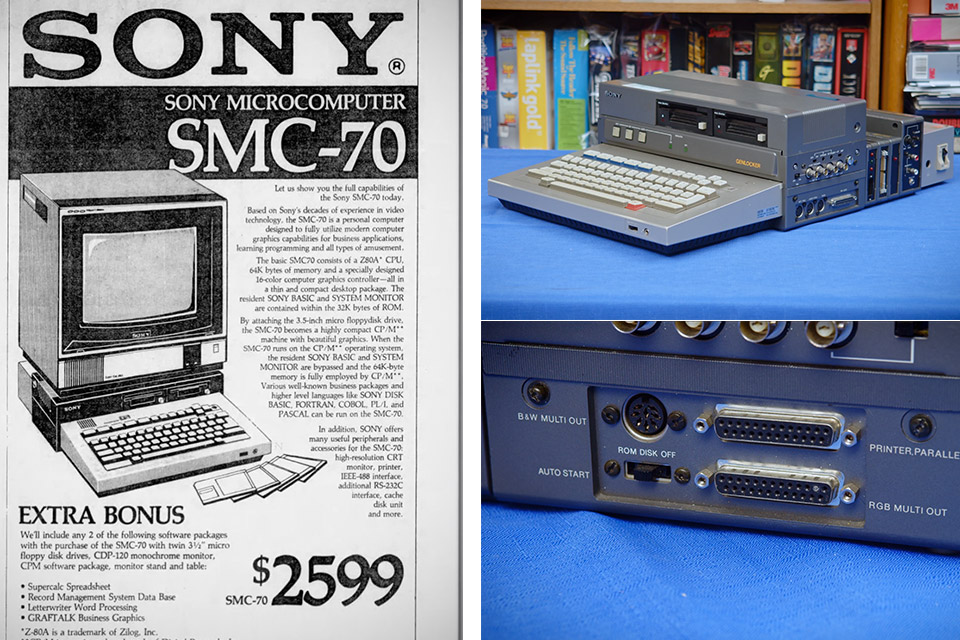
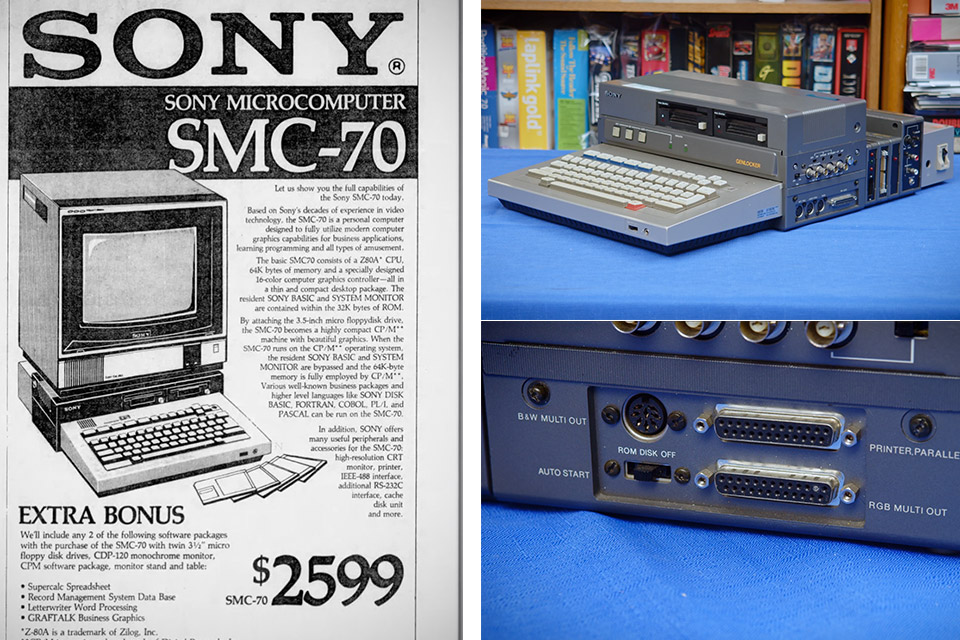
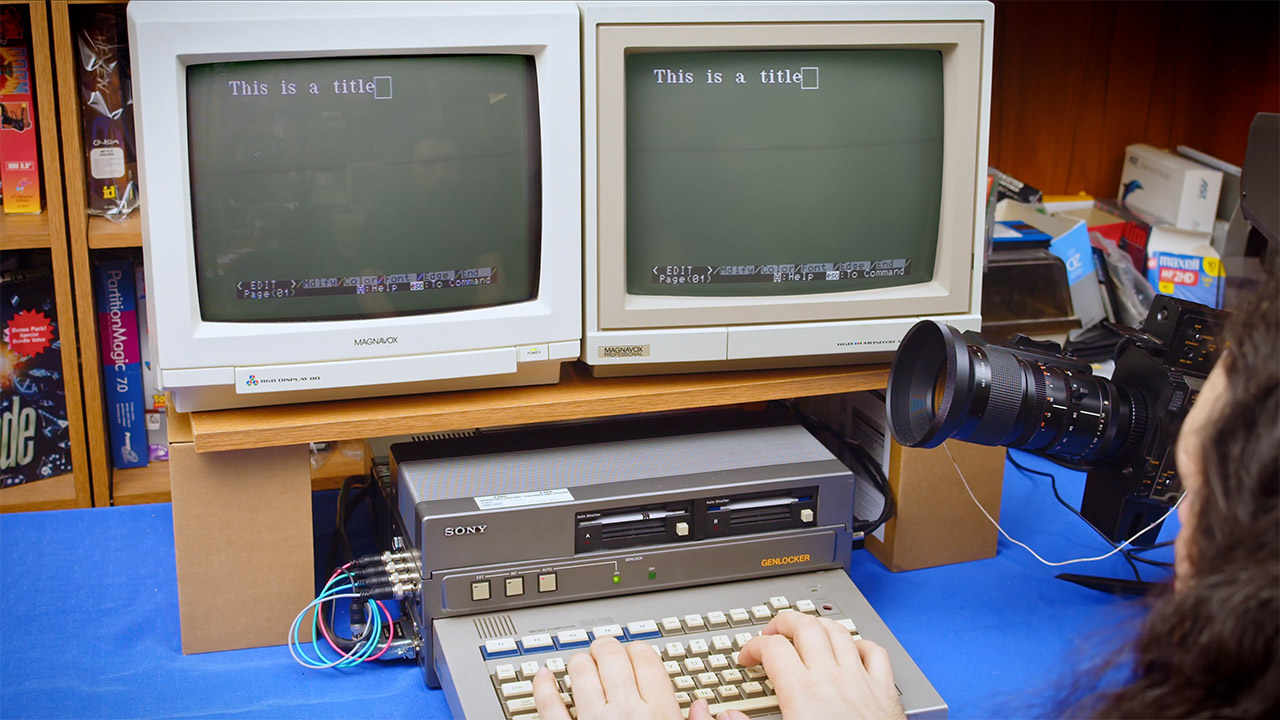
Photo credit: ETZone Sony shipped the SMC-70 in September 1982 as its first real microcomputer, first in the United States for office work and then in Japan on December 1. Most people walking past a gray-and-silver slab that year would have assumed it belonged to NEC or Sharp. Few realized the company that made Trinitron sets and Walkmans had just entered the personal-computer business with a Z80A running at 4.028 MHz, 64 KB of user RAM, and Sony BASIC already sitting in ROM.
This scrunched-up keyboard and computer combination, measuring only 90 millimeters high and weighing 4.8 kilograms, was a real head-turner, resembling a polished typewriter rather than the lumbering old CP/M computers that plagued workplaces. The dual-tone keys also had a useful red Help button. The analog RGB and composite outputs connected to Sony’s own line of color monitors, while a cassette port running at 1200 baud and an RS-232C serial port handled the rest of the day’s peripherals. If you wanted to go all out, you could even install an internal 3.5-inch drive, the same ones Sony had produced a couple of years before, which housed roughly 280 KB of formatted goodness and whirred along at 600 rpm, as that was a whole lot faster than the 5.25-inch disks everyone else was still stuck on.
LITTLE DO-IT-ALL — Mac mini packs pure power into a small, five-by-five-inch desktop as the M6 chip delivers next-level AI capabilities. Mac mini…
M6 CHIP — Everything you do on Mac mini feels more responsive with the M6 chip and its next-generation CPU. Fly through AI workflows with up to 4.8x…
CONNECT IT ALL — Features three Thunderbolt 4 ports, an HDMI port, and a 2.5Gb Ethernet port in the back, and two USB-C ports and a headphone jack…
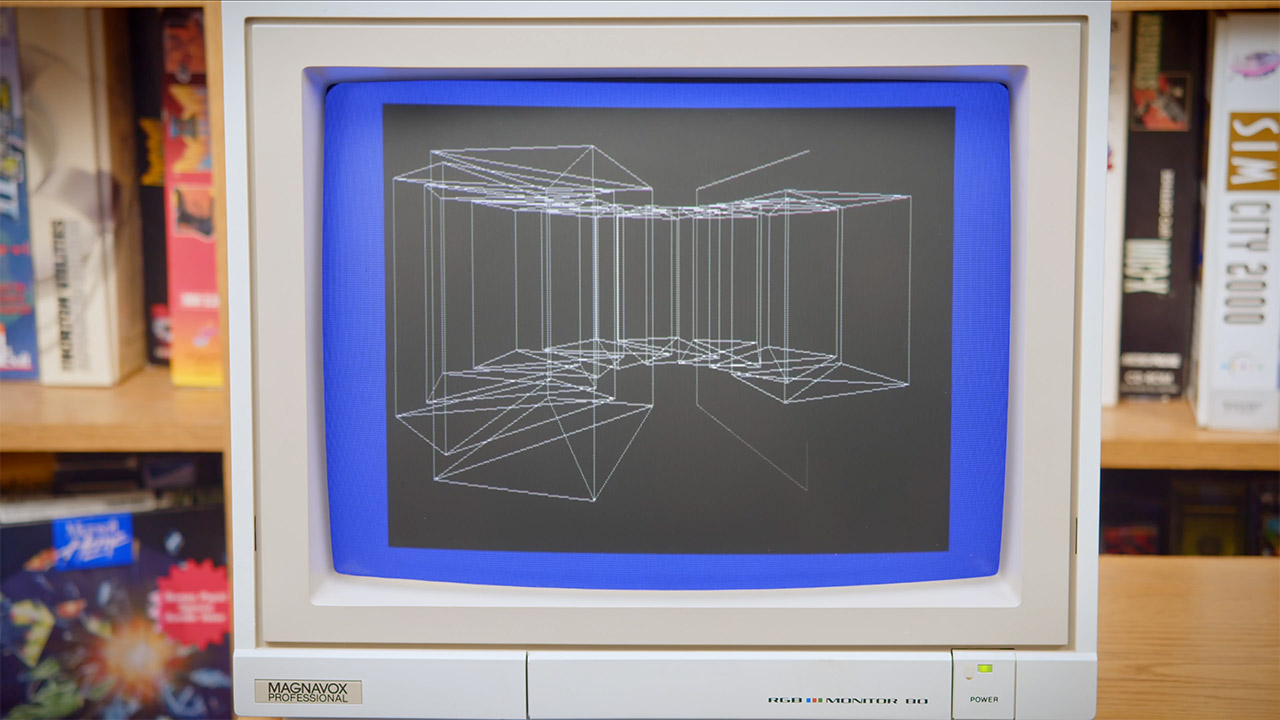
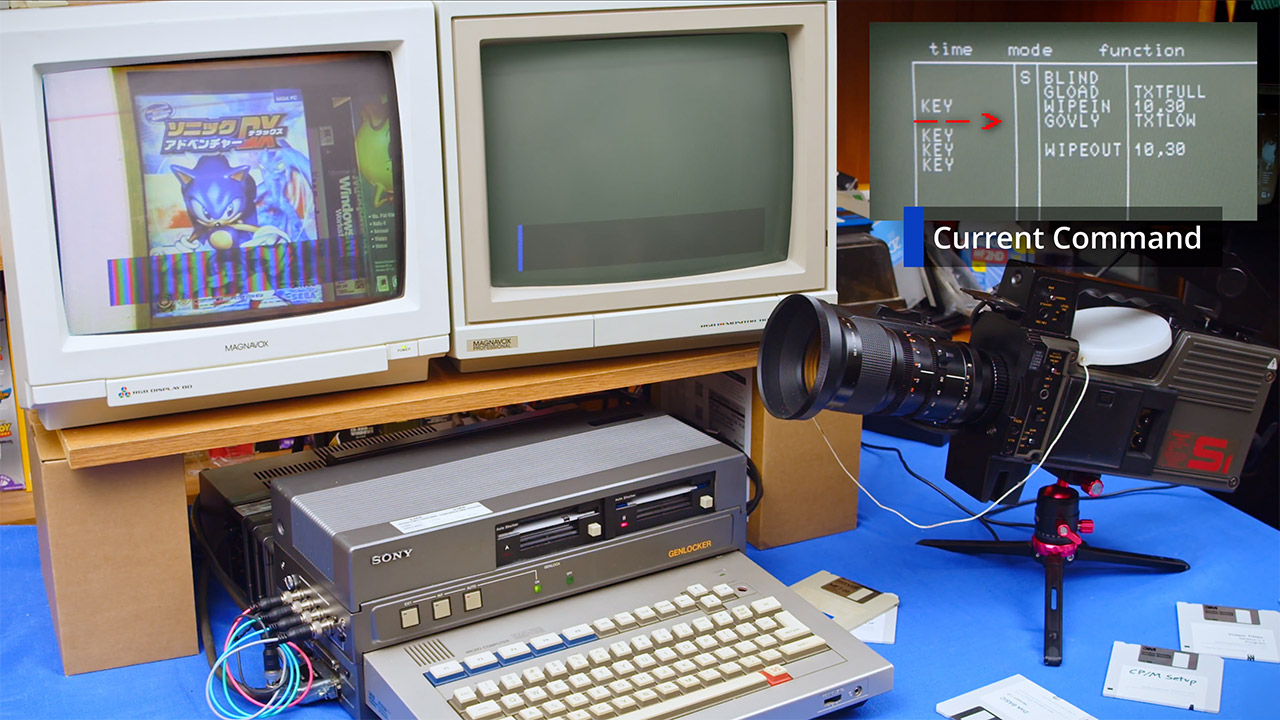
Graphically, this compact machine sported four modes that left the majority of its 8-bit competition in the dust: 320 by 200 pixels in 16 colors, 640 by 200 in four colors, 640 by 400 in monochrome, and even a 160-by-100 four-page mode in 16 colors. You could control the character, graphics, and border planes separately and stack them on top of each other, ensuring that your text was clearly visible above any drawings. If you wanted to be really creative, there was a light-pen port and a programmed character generator, allowing you to draw titles or diagrams directly on the device. The CP/M 2.2 worked perfectly with Sony’s color extensions, and if you splurged on the cache-disk module, it would convert a portion of your RAM into a lightning-fast virtual drive.
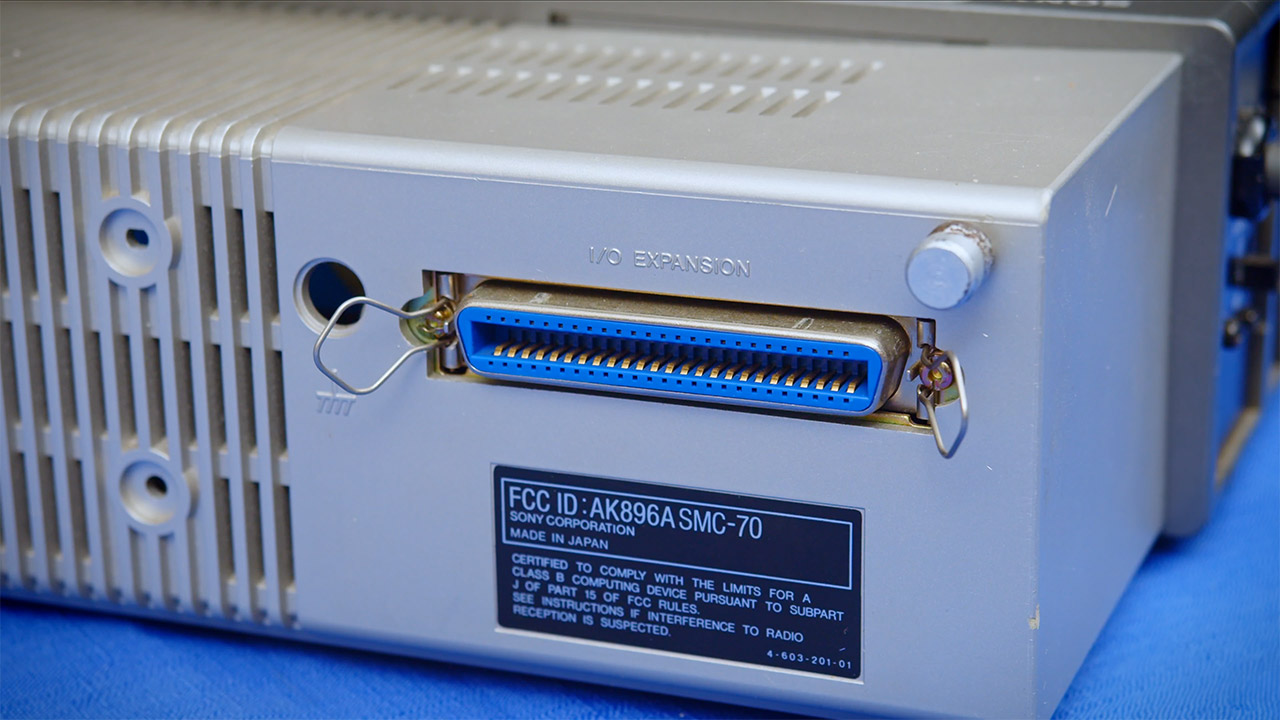
Expansion was a breeze because there was no need to fiddle with casings and slots like on the old S-100 and ISA motherboards. This chassis simply split in the center, allowing you to stack all of your modules on top of one another and secure them in place with those neat little metal rods that worked as skewers. Ribbon cables or external links allow the stack to grow indefinitely, either vertically or horizontally. Later on, you could add additional RAM banks of up to 256 KB, an IEEE-488 interface, kanji ROM for Japanese characters, or the Supercharger box, which had a 5 MHz 8086, up to 768 KB of extra memory, and even CP/M-86. Sony even promised MS-DOS support, but it never materialized in any significant quantities.
Broadcast versions followed in 1983. The SMC-70G and PAL-equipped SMC-70GP both have built-in genlock circuitry, allowing computer graphics to lock onto an incoming video stream. That made them extremely handy for stations and production studios looking to create character creation, lower-thirds, weather maps, or other simple digital effects that could be experimented with on tape or laserdisc. There was also software available, such as Graphics Editor and Video Titler, that allowed you to draw in sixteen different colors or set text in many sizes and faces, then layer the results directly on top of everything else without the need for a special character generator.
In the end, sales did not take off as the engineers had hoped. This item remained a bit of an anomaly, a well-built computer that people remembered fondly, now largely by collectors who repair those crazy module stacks and the strange film that drew one out of storage. Sony had been building computers for a long time, but the SMC-70 was the first time they combined a full microcomputer, color graphics, and a brand-new small floppy drive all on the same tabletop. [Source]
One cloud in, one cloud out. Samsung phone users can now sync photos and videos in their Gallery app to Google, as native Microsoft OneDrive integration ends Sept. 30. The update will roll out over the coming days, and availability may vary depending on account type, device model or region.
Tech insider Ice Universe viewed the new feature and posted images on X, noting that you may now see a new “Sync photos and videos” option in Gallery Settings.
As detailed on this Google page, you must have a compatible Samsung device running Android 13 or newer and a personal Google account. To find out which Android version you have, go to Settings > About phone > Software information, then look for the Android version. If you need to create a Google account, the details are here.
After syncing Gallery to Google Photos, users can view and share multimedia from their Samsung devices, the Google Photos app and photos.google.com. But there are limitations. Google Workspace accounts can’t use it, and synced items can’t be viewed in Google features such as memories and highlights, live albums or search unless you back up photos and videos via Google Photos.
Advertisement
Also, Google Accounts supervised by parents are ineligible to use the feature.
Google says that you can back up photos, videos, albums, device folders such as downloads or screenshots, and metadata such as timestamps, location, and favorites status.
Representatives for Samsung and Google did not immediately respond to requests for further comment.
How to sync to Google Photos
Syncing Samsung Gallery to Google Photos is optional, but storing photos and videos only in the Gallery will quickly eat up phone storage space. Open the Samsung Gallery app on your phone, then tap the three-line hamburger menu at the bottom right. Select Settings, then Sync Photos and videos. Choose a Google account from the instructions and grant permission to sync media.
Advertisement
Deleting items from either Samsung Gallery or Google Photos will remove them from both apps and from your cloud storage. Editing photos in either app will also show up everywhere.
Users can also turn off syncing at any time, and previously backed up items remain safely stored in their Google Account.
Ever since being admittedly fascinated by the Cambridge coffee webcam from the 1990s, I’ve written about VPNs, the NFL, smartphones, living wages, over/unders and everything in between.
See full bio
CNN’s sources claim the US nearly attacked a Chinese ship it believed was carrying nuclear weapon components.
J. David Ake/Getty Images
A false, partially AI-generated intelligence report nearly prompted the US military to attack a Chinese ship in the Middle East, CNN reports. The incident “almost started a war,” according to a source cited in the report, and highlights the risks of incorporating AI into the sensitive work of the US Department of Defense.
Engadget has asked the Department of Defense to comment on CNN‘s reporting. We’ll update this article if we hear back.
The assessment was put together by a special operations command analyst who asked an AI chatbot about the Chinese ship’s manifest. According to CNN, the chatbot combined “open-source intelligence with secret signals intelligence” to conclude that the ship contained the “components of a nuclear weapons program” — a claim that nearly led the military to apprehend the ship until officials found out it was AI-generated.
Advertisement
CNN wasn’t able to find out what the ship was actually carrying or what AI tool, whether commercial or designed for the US government, the analyst used. Given the Department of Defense’s push to adopt AI overall, there are potentially several options.
In January, Secretary of Defense Pete Hegseth published a memo directing the DoD to become “AI-first” and experiment with models from leading US AI companies. That didn’t work out quite as planned with Anthropic, who refused to let the military use its models for the development of autonomous weapons, and was briefly banned by the government, but it has led to several other AI partnerships. For example, SpaceXAI reportedly struck a deal to let the military use Grok in February, and NVIDIA, Microsoft and Amazon entered into a partnership to offer their AI technologies to the DoD in May. These kinds of government deals are lucrative, which is why companies pursue them. But helping spread AI adoption clearly carries risks that normal enterprise software doesn’t.
A Smart TV app is usually missing because it does not support your TV model or operating system, is unavailable in your region, has been removed from the platform, or the TV’s app store is not loading correctly. Check compatibility and regional availability before assuming that restarting or resetting the television will fix it.
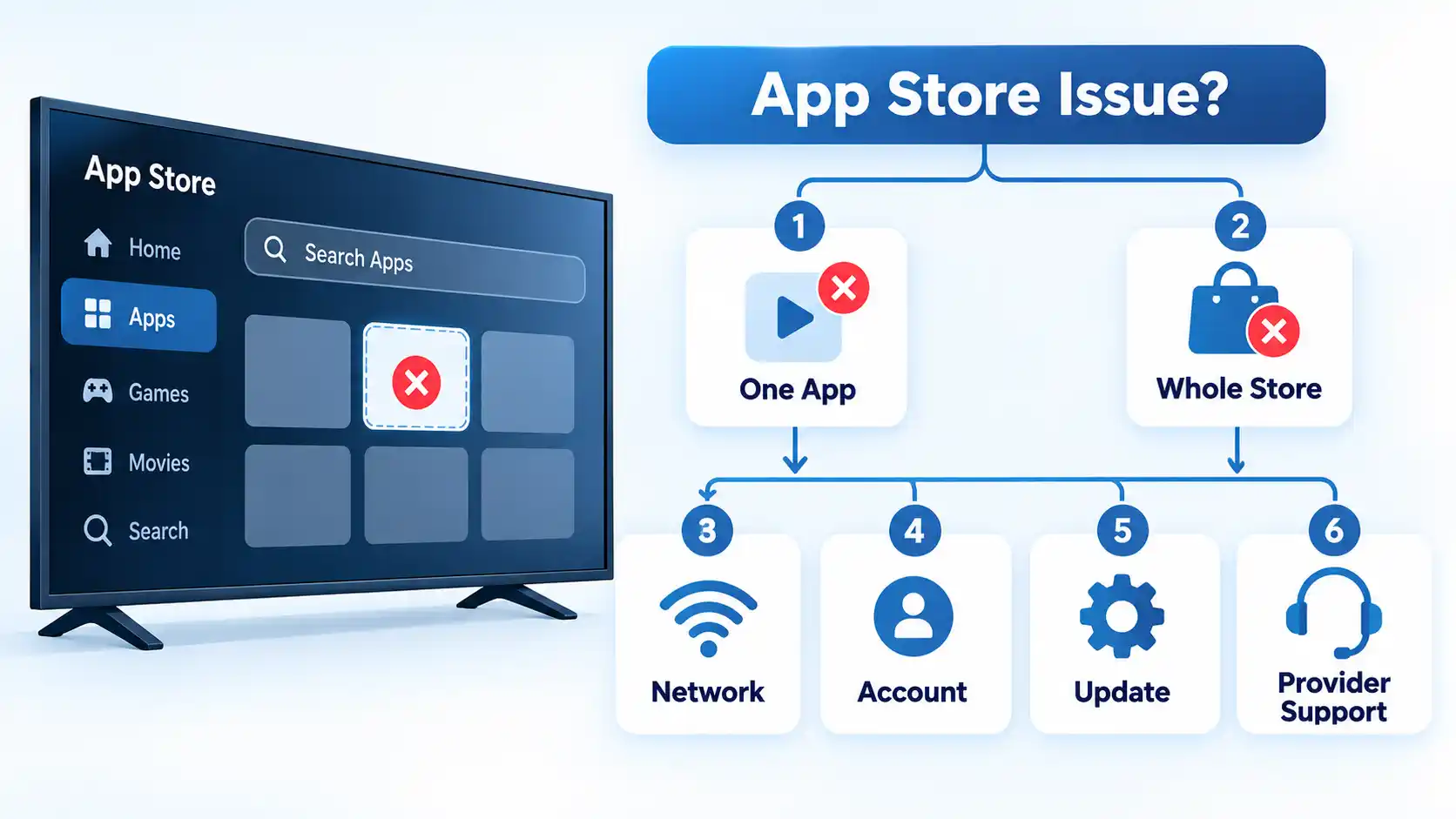
The most useful first step is to identify exactly what “missing” means. An app that never appears in search is a different problem from an installed app that disappeared from the Home screen or an app store that will not open at all.
First, Identify What “Missing” Means
Smart TV app problems can look similar, but the symptom tells you which part of the system to investigate.
The app does not appear in store search: compatibility, region, developer distribution, or platform availability are the first areas to check.
The app appears but cannot be installed: the TV may not meet the app’s compatibility requirements, or the platform may be blocking installation because of account, storage, or other device-specific requirements.
The app used to be available but is gone: the developer or platform may have removed it, renamed it, or stopped supporting that device category.
The app is installed but missing from the Home screen: it may still appear in the TV’s complete installed-app list even if it is not pinned or shown prominently on Home.
The entire app store will not open: network connectivity, account state, store-service access, or TV software is more relevant than one app’s compatibility.
That distinction matters because repeatedly restarting a television will not make an unsupported app compatible, while checking a compatibility page will not repair an app store that cannot connect to the internet.
Cause 1: The App Does Not Support Your TV Model or Operating System
An application can be available on one television from a brand and missing on another from the same brand. Smart TV platforms change across model years, operating-system versions, processors, and other hardware capabilities.
App compatibility means that the developer has made the application available for that type of device and that the device meets the software and hardware requirements used for distribution.
Google Play works similarly. Google’s current guidance for an app that cannot be found says a missing app may be incompatible with the device and that individual app developers determine compatibility. Google Play can therefore make an app available for one device associated with your account while withholding it from another.
On Fire TV, Amazon documents the same principle from the developer side. Developers can choose which Fire OS devices their app supports, while device compatibility is also affected by the application’s binary and manifest requirements.
Advertisement
This is why a phone version of an app does not prove that a Smart TV version exists. Android phones, Android TV, Fire TV, Samsung Tizen, LG webOS, Roku, and other television platforms do not all use the same application builds or distribution requirements.
For example, a streaming provider might continue supporting its Android phone app while dropping an older television operating-system version. The TV panel can still work normally even though the provider no longer distributes an app for its built-in platform.
Cause 2: The App Is Not Available in Your Region
Smart TV app stores are regional catalogs rather than one universal list. Two otherwise similar televisions can show different applications when they are configured for different markets.
Amazon makes a similar distinction for Fire TV. Its Fire TV guidance for use in another country says content availability varies by country and that some apps and games may not work after the Amazon account country changes.
The correct response is to verify that the television and platform account reflect the country where you are actually using the service. Changing a country setting does not guarantee that an unsupported app will become available, and it should not be treated as a way to bypass a provider’s licensing or regional restrictions.
A service can also offer its mobile application in a country without publishing an equivalent app for every television platform there. Mobile availability and Smart TV availability are separate questions.
Cause 3: The App Was Removed, Renamed, or Replaced
Sometimes there is nothing wrong with the television. The application itself is no longer distributed under the name you remember.
Advertisement
Google Play says an app that no longer appears may have been removed by its developer or removed from Google Play for violating platform rules. Its current missing-app guidance therefore recommends checking compatibility and contacting the developer when necessary instead of assuming that the device is faulty.
Streaming services can also change names, combine services, retire old applications, or move subscribers to replacement apps. When an app used to exist but no longer appears, check the provider’s current website and supported-device information for the present service name before troubleshooting the television.
An old screenshot or article showing that an app once existed in a store is not evidence that the provider still distributes it there today.
If a service appears to have changed identity, search for its current official name instead of downloading an old installer from an unfamiliar site. Old mobile Android packages are also not a general replacement for apps built for webOS, Tizen, Roku, Fire TV, or other television platforms.
Advertisement
Cause 4: The App Store or TV Is Not Connecting Properly
If one application is missing, compatibility or provider availability should be checked first. If the whole store fails to load or many normally available apps fail at once, the problem is more likely to involve the television, network, account, or store service.
Only one app is missing
Check the application’s current device-support page, your exact TV model and operating-system version, and the app-store region first. LG says supported apps can vary by country and model, while Google Play and Amazon both document device-specific compatibility filtering. Restarting the television will not override those distribution rules.
The entire app store will not load
Confirm that the TV has working internet access, then restart the television and network equipment if necessary. Check whether the platform requires you to sign in or accept current service agreements. A whole-store failure points more strongly to connectivity, account, software, or store-service problems than to one app’s compatibility.
Several apps suddenly stop working
Check the television’s network connection and system software before reinstalling individual apps. LG’s current troubleshooting guidance says network instability is a common reason apps fail to load and recommends checking connectivity before moving to app-specific fixes.
Advertisement
Only one installed app crashes or will not open
Update or reinstall that app if the platform provides those options. LG says that when the problem affects only one app, it is likely app-specific and recommends contacting the app provider if updating or reinstalling does not resolve the problem.
The app appears but will not install
Check device compatibility, account sign-in, regional settings, and available storage before resetting the TV. LG’s current installation guidance specifically lists internet access, LG Account sign-in, LG Services Country, model or regional availability, and sufficient storage among factors that can prevent an app from installing.
On LG televisions, current troubleshooting guidance recommends checking the network first when apps fail to load, then updating or reinstalling an individual app when the problem affects only that application. LG also documents account, region, and storage checks when an app is visible but will not install.
Cause 5: The App Is Installed but Missing From the Home Screen
An app that is installed but not visible on the Home screen is different from an app that is unavailable in the store.
Advertisement
On Android TV, Google’s current app-management instructions let you find installed applications through Settings or the Play Store’s installed-app list. Google’s Home-screen guidance also distinguishes the complete Apps area from the smaller Favorites row, where apps can be added, removed, or reordered.
Before reinstalling anything, check the television’s full installed-app list. If the app is present there but absent from Home or Favorites, the problem is presentation or launcher placement rather than proof that the application was removed from the device.
The exact controls vary by television brand and operating-system version, so do not assume that Samsung, LG, Android TV, Fire TV, and Roku use the same recovery path.
How to Check Whether the App Officially Supports Your TV
Before changing major television settings, establish whether the application is supposed to be available on your hardware at all.
Advertisement
Find the exact TV model. Use the model information in the television settings, rear label, or manufacturer’s device information rather than relying only on the brand name.
Identify the TV operating system and software version. A service may support one webOS, Android TV, Fire OS, Tizen, or Roku OS generation but not another.
Check the manufacturer’s app catalog or support page. LG, for example, lets users check supported apps using the country and television model.
Check the app provider’s supported-device page. Confirm that the provider still lists your television platform and, where specified, the required model year or operating-system version.
Check regional availability. Make sure the television or platform account reflects the country where you are actually using the service.
Confirm the app’s current name. A service may have been renamed, merged, or replaced by another application.
Only then troubleshoot the store. If the app should be supported but is still absent, move to connectivity, account, software-update, and store-service checks.
Manufacturer and app-provider documentation can occasionally lag one another. If the TV manufacturer still lists an app but the streaming provider says that platform is no longer supported, do not assume that reinstalling or resetting the TV will restore service. The app provider’s current device-support information matters because it controls whether the service continues maintaining that application.
What to Do If the App Really Is Not Supported
If the television’s built-in platform is unsupported, the screen itself may still be perfectly usable. You can move the streaming-software layer to another supported device instead of replacing the television solely because one native app is unavailable.
Possible alternatives include a current external streaming stick or box, an officially supported casting method, a compatible game console, or an HDMI-connected computer when the service supports browser playback.
If you are deciding whether external hardware is worthwhile, compare a Smart TV app, Chromecast, and streaming stick by app support, control method, portability, and upgrade path rather than assuming every external streamer works the same way.
Avoid downloading random Android application package (APK) files simply because the television’s normal store does not offer an application. A phone APK does not automatically work on a television, and LG webOS, Samsung Tizen, Roku, Fire TV, and Android TV do not all use the same application format or distribution system.
Advertisement
When Should You Reset the TV?
A factory reset should be a late-stage troubleshooting step, not the first response to a missing app.
Warning!
A factory reset cannot make an unsupported or region-unavailable app become compatible. It can also erase installed apps and personal settings, so verify support, region, network access, account state, and normal update options first.
Consider a reset only when the application is officially compatible, the region is correct, the television can reach the network, the account and store are functioning, available storage is not blocking installation, software updates have been applied, and lower-impact troubleshooting has failed.
If the application is unsupported by design, resetting the television only returns you to the same compatibility limitation after setup.
Bottom Line
When a Smart TV app is missing, check in this order: whether the app supports your exact TV, whether it is available in your region, whether the provider removed or renamed it, and whether the app store itself is working normally.
If the app is genuinely unsupported, repeated resets and unofficial installers will not change the underlying compatibility rule. A supported external streaming device or casting route can be a more practical way to keep using an otherwise functional television.
Check Point Software has released security updates to address a critical vulnerability that can let attackers execute code with root privileges on management systems.
Tracked as CVE-2026-91843, this flaw stems from a stack-based buffer overflow weakness in the login process for Security Management Server instances, which manage Security Gateways (firewalls) and monitor network security events.
The security issue also affects the company’s Log Server, a dedicated server that collects and stores logs generated by Check Point firewalls.
Successful exploitation lets threat actors without privileges gain root remote code execution in low-complexity attacks that don’t require user interaction.
Advertisement
Check Point also provided temporary mitigation measures for customers who can’t deploy the latest LivePatch, including hardening vulnerable systems against attacks and limiting access to trusted IP addresses/subnets by editing the entries under Manage & Settings > Permissions & Administrators > Trusted Clients in the SmartConsole dashboard.
While the company has not yet flagged this security flaw as actively exploited, it said security teams can identify CVE-2026-91843 attacks by looking for “Administrator failed to log in: Username too long” alerts in the Audit and Admin login logs.
CVE-2026-91843 alert in SmartConsole (Check Point Software)
Last week, it patched another critical remote code execution flaw (CVE-2026-85103) stemming from a heap overflow in the VPN certificate ASN.1 decoding flow that affects Check Point firewalls and management systems.
“All Security Management Server deployments are vulnerable, regardless of configuration,” Check Point warned. “The vulnerability is not dependent on any specific management configuration. The management is vulnerable even when VPN in not in use or configured.”
The same day, it patched a second critical flaw (CVE-2026-85102) that lets unauthenticated hackers bypass authentication and execute code remotely on vulnerable firewalls.
Advertisement
Although these vulnerabilities are not yet exploited in the wild, Check Point flagged other flaws as actively exploited in recent months.
More recently, the Dutch National Cyber Security Centre (NCSC-NL) warned organizations to prioritize patching two critical Check Point VPN flaws tracked as CVE-2026-85102 and CVE-2026-85103 because it “expects exploitation attempts to occur soon.”
Join Mikko Hyppönen and security leaders from the NFL, CHANEL, and Atlassian for a two-hour digital summit on what AI-speed attacks change, what defenders should stop doing, and how to validate, decide, fix, and re-validate at machine speed.
Fast-growing companies often have no shortage of security recommendations for protecting Google Workspace. The harder question is determining which controls will actually make the greatest difference when security teams have limited time and resources.
The webinar will feature Rajan Kapoor, Vice President of Security at Material Security, and Rick Fitzgerald, President of Fireside Consulting LLC, examining real, publicly documented Google Workspace breaches and what organizations can learn from them.
Rather than working through another lengthy security checklist, the speakers will use real breaches to discuss which Google Workspace security controls matter most, which may be overrated, and what they would prioritize if they were designing a security program for a fast-growing company from scratch.
Advertisement
The discussion will include two attacks that combined social engineering with malicious OAuth applications to gain access to Google Workspace environments.
These incidents provide an opportunity to look beyond theoretical risks and examine where defenses broke down, which overlooked weaknesses left users and data exposed, and what organizations could have done differently.
The webinar will also examine what happened during the critical first hours after the breaches were discovered and which response decisions helped limit—or potentially worsen—the impact.
For lean security teams, the goal isn’t to implement every possible security control. It’s understanding where the greatest risks exist and prioritizing improvements based on the effort required and the potential impact they can have.
Advertisement
Attendees will leave with a practical view of the controls and response measures that matter most when protecting Google Workspace environments.
Building Google Workspace security around real-world risks
Security guidance can quickly turn into long lists of settings, products, policies, and recommended controls.
But fast-growing organizations rarely have unlimited resources to implement and continuously manage every possible defense.
By examining how real Google Workspace breaches unfolded, security teams can better understand where attackers are finding opportunities and which defenses deserve the most attention.
Advertisement
The speakers will also discuss what they would build differently if they were designing a Google Workspace security program from scratch, giving attendees a practical framework for evaluating their own security priorities.
The upcoming webinar will cover:
Which security controls provide the greatest value for fast-growing companies with limited security resources
Which Google Workspace security measures may receive more attention than their real-world impact warrants
How social engineering and malicious OAuth applications can lead to Google Workspace breaches
Commonly overlooked weaknesses that can leave users, data, and connected applications exposed
Practical security improvements organizations can implement quickly, ranked by effort and potential impact
Join us to learn which Google Workspace security controls deserve the most attention and how lessons from real-world breaches can help organizations decide where to focus their limited security resources.





























































You must be logged in to post a comment Login