


Connect with us

Tech

HP OmniPad 12 Review: The Android Tablet That Wants to Replace Your Laptop

Published

on

The ever-increasing RAM prices (please blame AI) have forced laptop makers to abandon budget laptops altogether. A machine that used to cost less than 50K is now a premium device the masses can’t afford. Given the situation, tablets have become much more important. Imagine this: you’re a student prepping for one of the many competitive exams and need a capable device to take notes and watch lessons. A tablet fits that use case perfectly, and it also makes sense for office-goers who need a lightweight machine for video calls and reviewing projects. HP has already jumped on this bandwagon with the new OmniPad 12.

The OmniPad 12 gets you an aluminum-built machine with a 12-inch 90Hz display, 18 hours of battery life, and the Snapdragon 6 Gen 3 processor. Don’t forget: the keyboard and trackpad case are included in the box. So, is it worth spending ₹49,990? Or would you be better off getting an old Windows laptop instead? To find out, I’ve been using the OmniPad 12 as my primary office machine for the last two weeks. Here’s how it held up.

HP OmniPad 12 Review

Hisan Kidwai

Advertisement

Summary

If you’re a student taking notes, watching lectures, or an office-goer who spends most of the day inside Chrome and video calls, the OmniPad 12 is a compelling package. The aluminum build is super premium, the included keyboard folio saves you a few thousand rupees, and the desktop mode is surprisingly polished.

Advertisement

HP OmniPad 12 Design: Built Beautiful

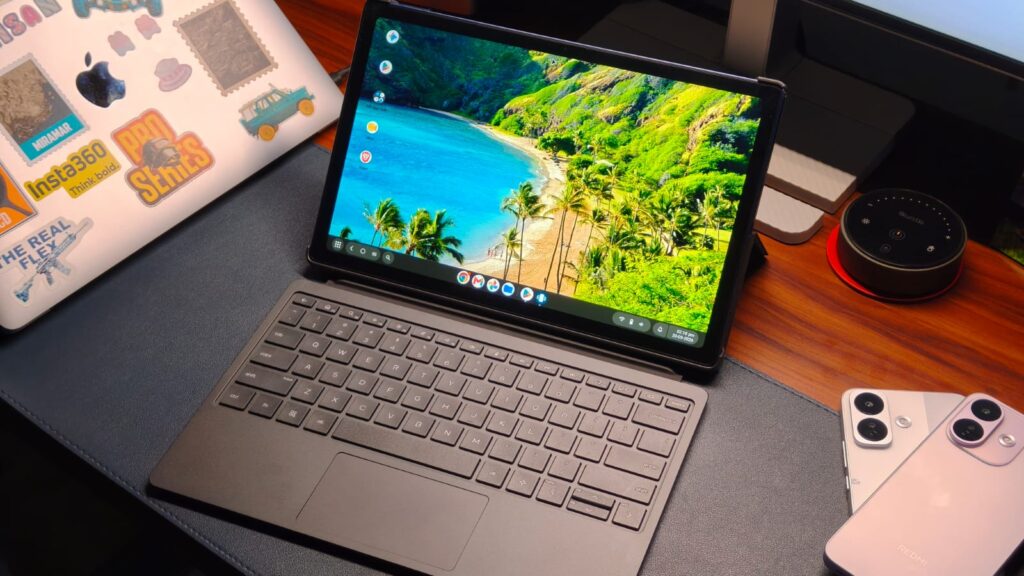
Desktop mode of the OmniPad 12

HP’s build quality has always been up to the mark, and I can say the same thing about the OmniPad 12. Instead of taking the plastic route, like many Android tablet makers, the OmniPad 12 is made entirely from aluminum. This provides structural rigidity, so it won’t bend in your backpack like some iPads. I didn’t notice any bends or creaks when putting pressure on it, so rest assured. I also love how the OmniPad 12 looks.

The blue color looks fantastic—far more premium than some of the other Android tablets I’ve tested. There’s also a big and shiny HP logo in the middle. Even the flat sides make the tablet comfortable to hold. I’d recommend keeping a microfiber cloth handy, because the blue color does pick up smudges from oily hands like mine.

Back finish of the OmniPad

The power-on button is located on the top left (in landscape mode), and the volume rockers are on the left side. HP has included the audio jack, which is a nice touch. I think this tablet is meant for landscape use, given its wide aspect ratio, which is fine. As for handling, the OmniPad 12 weighs 600 g. I wouldn’t call it the lightest because it’s not. But carrying it wasn’t a problem.

Keyboard & Trackpad

Close up of the keyboard and trackpad of the Omnipad

Below the HP logo, you’ll find three magnetic pins, and that’s where the magic happens. Your purchase includes a keyboard folio case, and it’s excellent. It’s made from a leather-like material that feels so much more sophisticated. The OmniPad fits inside like a case, so it’s not just a magnet holding on to your dear machine.

The keyboard connects via Bluetooth and pairs automatically with your tablet. While most tablet keyboards I’ve tested have been meh, the HP alternative isn’t bad. Of course, it’s smaller than the one on my MacBook, but I got to my usual typing speed after a couple of days because it’s full-size. The keys aren’t mushy; they have some feedback, and the travel is decent.

The trackpad is also small, but I don’t have anything to complain about. It has a physical clicking mechanism and tracks pretty accurately. The only minor inconvenience is the weight. The tablet and keyboard case combined weigh 1.2 kg, which places it firmly in the laptop territory.

HP OmniPad 12 Display & Cameras

HDR video playing

There are two ways to look at the OmniPad’s display. If we talk strictly about tablet screens, then OmniPad’s 12-inch 2K LCD touchscreen panel with a 90Hz refresh rate could feel a little underwhelming. But compared to laptops under 50K, it suddenly feels a lot better. And I think the same. The 12-inch screen is big for writing assignments or using two apps at once. I mainly used it to research new topics at work. I also flew with the OmniPad on a work trip to Delhi, and it fit perfectly on the cramped Indigo tray table.

Thanks to the 100% sRGB coverage, even watching content was great. I watched the first episode of Widow’s Bay (great watch btw), and the experience was fantastic. Colors looked vibrant without feeling oversaturated, and the details were plenty sharp. While HP hasn’t stated the exact brightness, I used the OmniPad in a bright café, and visibility was never a problem. There were some reflections, but nothing major to affect my work. Moving to the speakers, of which there are four, they are great. The DTS:X Ultra setup delivers loud and clear audio no matter the content. Even the soundstage was pretty wide, and instrument separation was plenty.

Advertisement

The OmniPad 12 also features a couple of cameras. It has a 13MP shooter on the back and an 8MP selfie camera on the front. Look, I know nobody carries their tablets outside to shoot anymore, but the sensors on the OmniPad 12 are still quite good for scanning documents or taking a video call. The selfie snapper has a wide field of view and captured more detail against my aging MacBook Air M1.

HP OmniPad 12 Performance: Slightly Underpowered

Split screen mode

I’ll get straight to the point: using the Snapdragon 6 Gen 3 in 2026 is like forcing Max Verstappen to drive a Williams car. He will be limited by the machinery. For the record, I’m not blaming HP. It’s AI that’s to blame for all the crazy prices. Coming back to the OmniPad 12, its performance is decent. With the 8GB DDR5 RAM, if your work mainly involves using Chrome, watching lessons on YouTube, or reviewing assignments, you won’t have many problems. The tablet can do all that. That said, multitasking was a different story. When I flicked through different apps, I saw a little stuttering, and the tablet occasionally took an extra second to open apps. It’s not anything major, but it’s worth keeping in mind.

CODM gameplay

Where things turn in the OmniPad 12’s favor is the desktop mode. Connect the keyboard case, and it prompts you to switch to the PC-like mode. And I love it. The notifications and other quick settings move to the bottom right, while your favorite apps sit in a dock like macOS. Apps open in windows, not full screen. The best part? All trackpad gestures work exactly like Windows/macOS, which was a huge relief. The OmniPad 12 runs Android 16 out of the box.

Since this is a review, I also ran benchmarks. In Geekbench, the tablet scored 882 in the single-core test and 2,591 in the multi-core test. For context, those are similar to the newer, yet still old, 6s Gen 4 on the Redmi Note 17 Pro. Continuing the testing, I also played CODM on the OmniPad 12. The game defaulted to high graphics settings, and the experience was actually really good. I got a solid 60 FPS, and the frame rate stayed consistent even during intense battles.

HP OmniPad 12 Battery Life: Endurance for Days

A person using the tablet

Another advantage of the OmniPad 12 over Windows laptops in its class is the battery. Thanks to a 32 Wh cell, HP claims 18 hours on a single charge. Usually, manufacturers’ battery claims are nowhere near real-world usage, but that’s not the case. I genuinely got roughly 15 hours of screen-on time on a single charge. Truth be told: my workday included researching on Chrome, watching videos, editing some spreadsheets, and listening to songs on YouTube Music. But I also think the workload will be the same for most OmniPad buyers.

When it runs out of charge after a few days, HP also bundles a 33W charger inside the box. It’s not particularly fast, only taking the tablet from zero to 35% in 30 minutes, but given that you won’t be charging frequently, it wasn’t an issue. A full charge takes about 2 hours, so keep that in mind.

Verdict

A person holding the HP Omnipad 12 in tablet mode

Starting at ₹49,990, the OmniPad 12, despite its shortcomings, knows who it’s for. If you’re a student taking notes, watching lectures, or an office-goer who spends most of the day inside Chrome and video calls, it’s a compelling package. The aluminum build is super premium, the included keyboard folio saves you a few thousand rupees, and the desktop mode is surprisingly polished. The only compromise is performance, where heavy multitasking and demanding apps expose the Snapdragon 6 Gen 3’s limits. Still, I do like the 15-hour battery life.

Source link

Advertisement
Continue Reading
Click to comment

You must be logged in to post a comment Login

Leave a Reply

Tech

Chrome vs Firefox Proxy Settings: Key Differences Explained

Published

on

Chrome and Firefox can both use proxies, but they expose control differently. Chrome normally starts from the operating system’s proxy configuration and can be changed by policy, extensions, PAC rules, or explicit overrides, while Firefox gives you a visible browser-level choice between system, manual, automatic, PAC, and no-proxy modes.

Quick Take

Chrome is not limited to a system proxy, and Firefox does not always ignore the system proxy. Chrome normally inherits platform settings but supports several override layers; Firefox makes those choices visible in its own connection settings. PAC rules, bypass lists, extensions, policy, and SOCKS behavior can make the two browsers take different routes on the same computer.

Chrome vs Firefox Proxy Settings at a Glance

The useful comparison is not simply “system proxy versus browser proxy.” Instead, compare where each browser gets its proxy configuration, how easily it can replace the operating-system setting, and which other layers can change the route for a particular request.

Chrome vs Firefox proxy behavior

Typical proxy configuration differences between Chrome and Firefox
Feature Chrome Firefox
Normal configuration source Normally starts from platform or system proxy configuration Exposes an explicit browser connection mode that can inherit or replace system settings
Can use system proxy Yes; this is the normal starting point when no higher-priority override applies Yes, through Use system proxy settings
Browser-specific manual control Available through supported configuration such as command-line options, policy, extensions, or PAC Built directly into Firefox Connection Settings
PAC support Yes Yes, including an explicit Automatic proxy configuration URL mode
Bypass behavior Supports explicit bypass rules and implicit local-address exceptions Supports No Proxy For and PAC-based direct routing
SOCKS support Supports SOCKSv4 and SOCKSv5 Supports SOCKS configuration with browser-level controls
SOCKS DNS behavior SOCKSv5 target-name resolution is proxy-side Proxy-side DNS can be enabled for SOCKS v5
Extensions can control proxy settings Yes, through Chrome’s proxy extension API Yes; Firefox can show extensions controlling its connection
Enterprise policy Can enforce proxy mode and related settings Can enforce proxy mode, endpoints, bypass rules, SOCKS behavior, and DNS handling
Useful diagnostic clue Check system settings first, then policy, extensions, PAC, bypasses, and explicit overrides Check the selected Firefox connection mode first, then extensions, PAC, bypasses, and policy

Neither browser has a universally better proxy model. Chrome fits naturally into environments where the browser should inherit platform or centrally managed network settings, while Firefox makes browser-specific proxy control easier to see and change.

Advertisement

How Chrome Decides Which Proxy to Use

Chrome performs proxy resolution at the URL level. For each requested URL, the browser decides whether to connect through one or more proxy servers or directly to the destination.

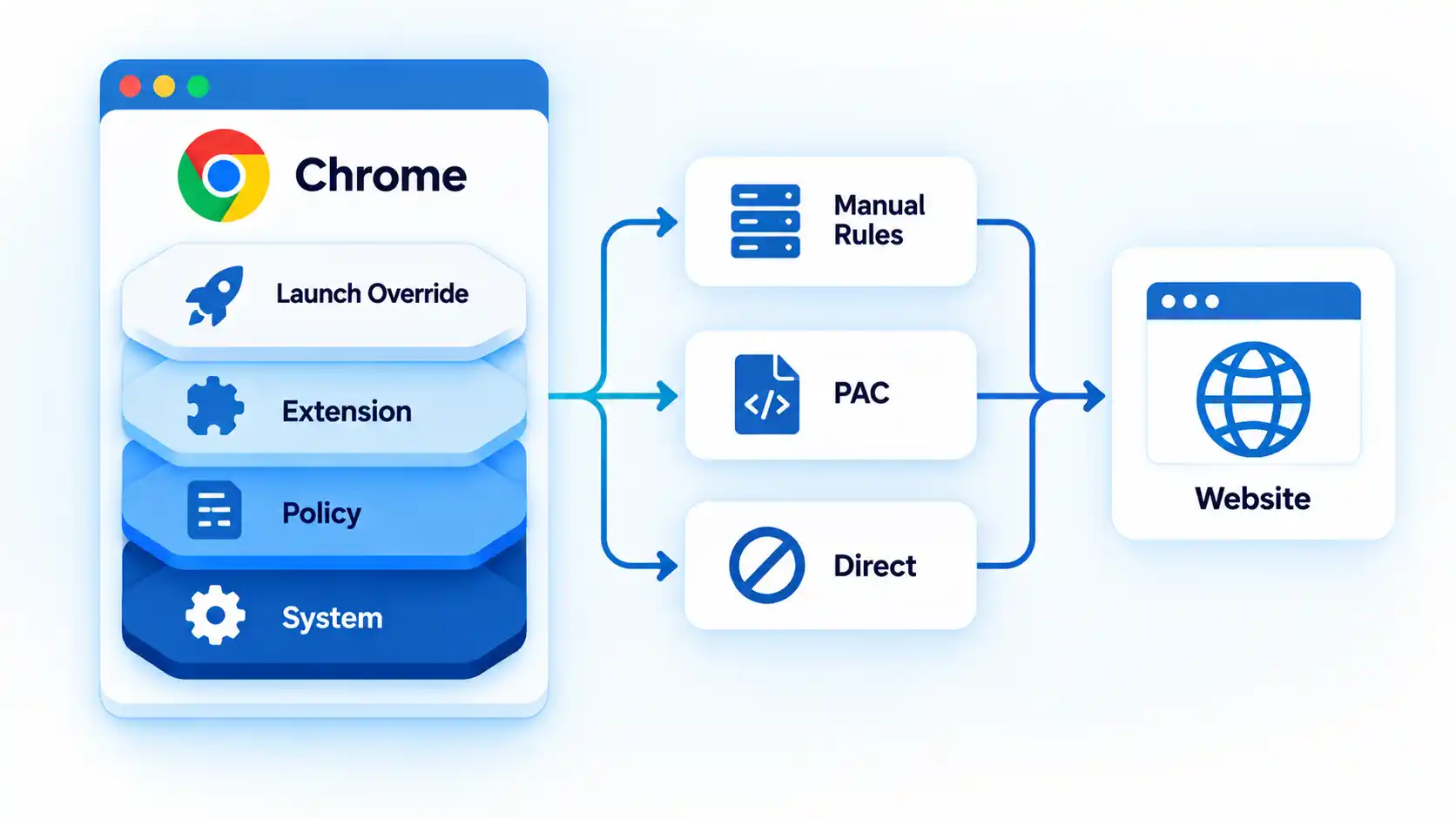
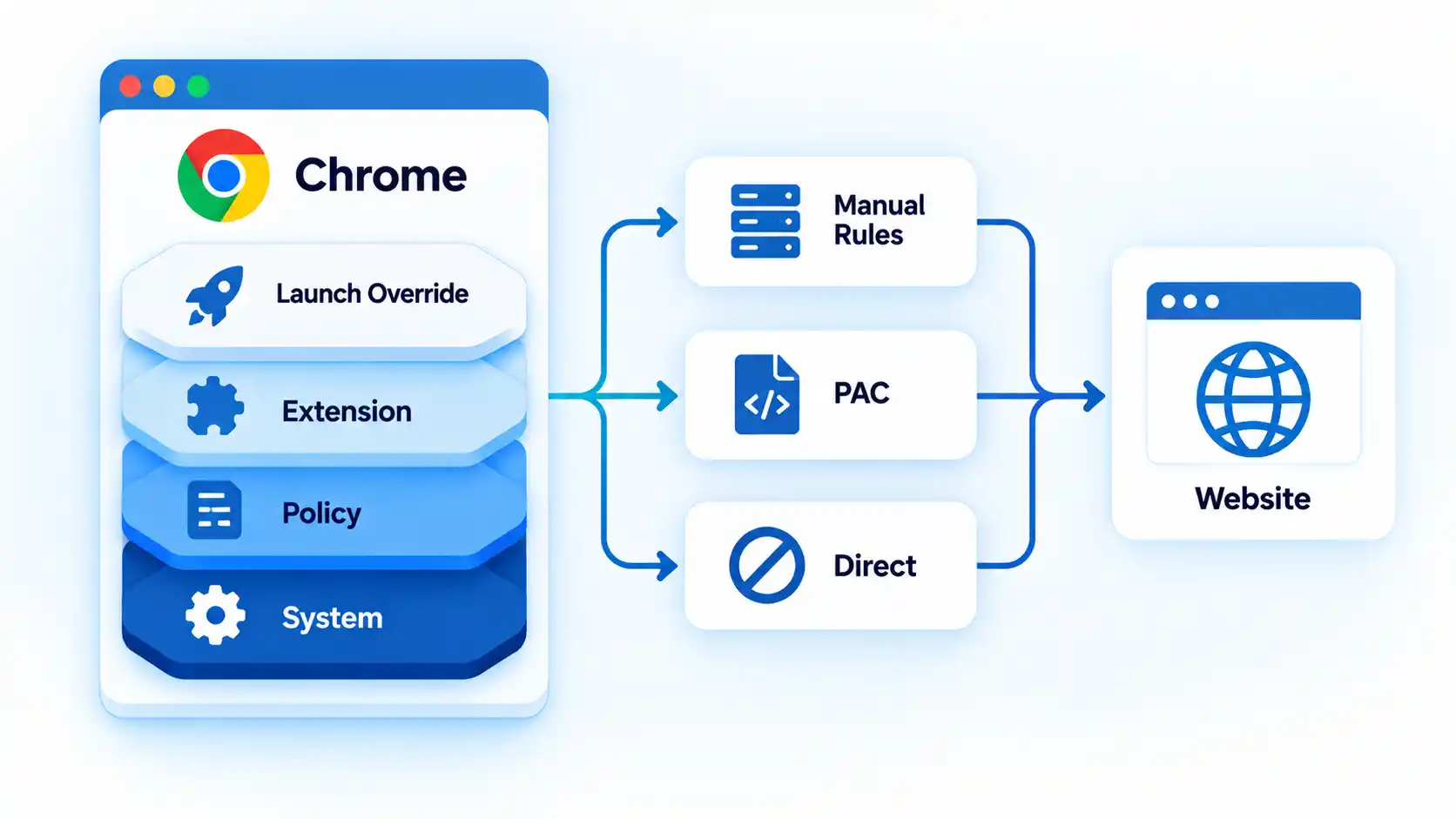
Chrome proxy stack layers System, Policy, Extension, and Launch Override before Manual Rules, PAC, or Direct routing.

Chromium’s current Chrome proxy documentation describes three major proxy-resolution approaches: manual proxy rules, a proxy auto-configuration (PAC) script, and automatic discovery through Web Proxy Auto-Discovery (WPAD).

Manual rules map requests to proxy endpoints and can define destinations that should bypass those proxies. PAC evaluates routing logic for individual URLs. Automatic discovery attempts to locate PAC configuration from the network.

The operating system is therefore Chrome’s normal starting point, not its only possible source of proxy behavior. Chrome can also receive effective proxy settings from command-line options, managed policy, extensions, or PAC configuration.

Advertisement

Chrome can route individual requests directly

Chromium treats DIRECT as a valid proxy-resolution result. A request that receives this result is sent directly to the destination rather than to a proxy.

For example, a PAC script can send an internal application through a corporate proxy while returning DIRECT for another website. Seeing both routes during one Chrome session does not necessarily indicate a configuration failure.

How Firefox Decides Which Proxy to Use

Firefox exposes the configuration source more directly. Instead of relying only on the operating system’s network controls, Firefox provides its own selector for deciding how connections should be proxied.

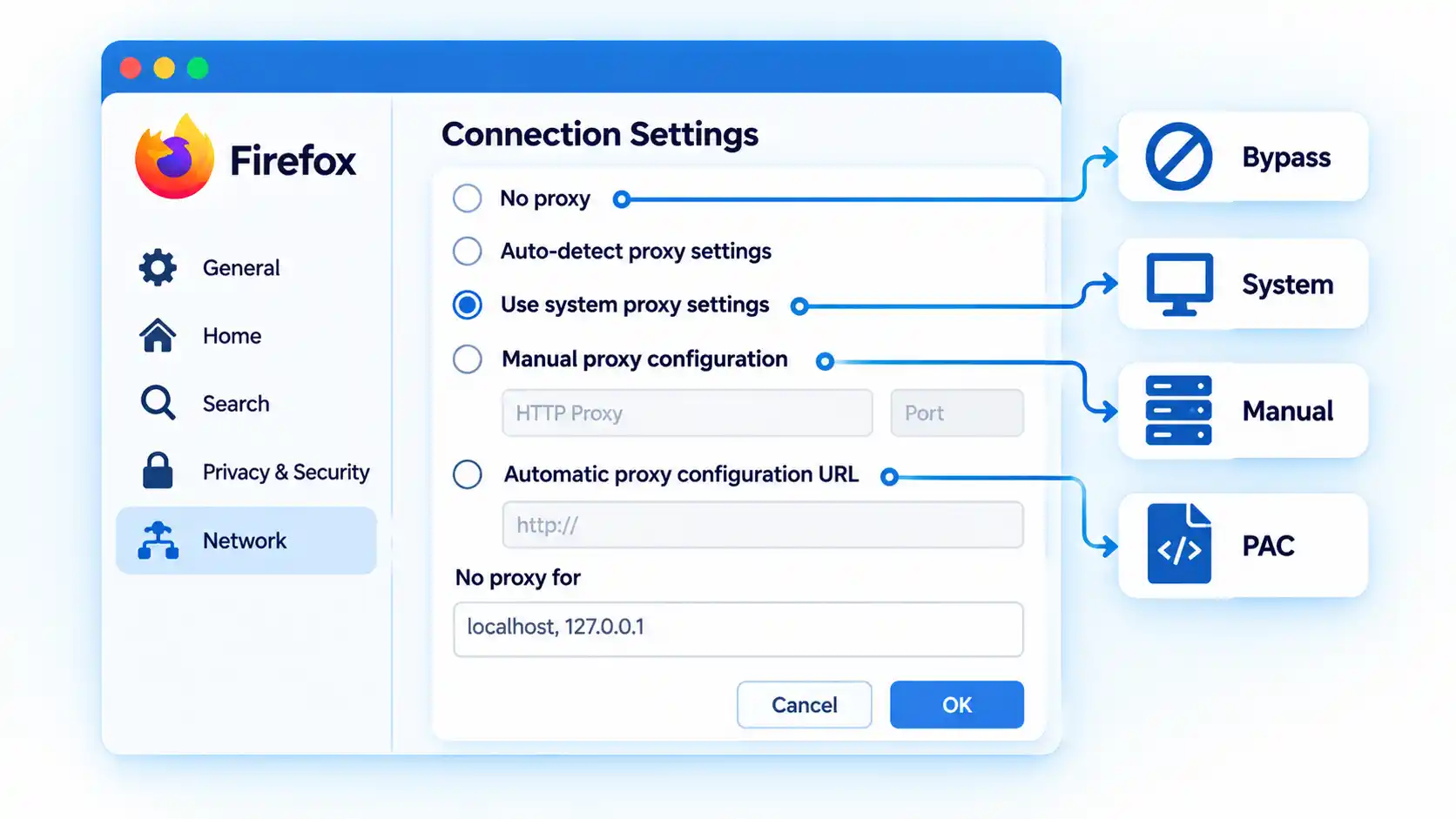
Firefox Connection Settings with system, manual, PAC, and bypass proxy options highlighted.

Mozilla’s current Firefox connection settings documentation provides these modes:

Advertisement
  • No proxy, which tells Firefox not to use a proxy from this connection setting.
  • Auto-detect proxy settings for this network, which attempts automatic discovery.
  • Use system proxy settings, which tells Firefox to use the operating system’s proxy configuration.
  • Manual proxy configuration, which lets Firefox use browser-specific proxy endpoints.
  • Automatic proxy configuration URL, which loads routing rules from a PAC file.

These are informational configuration modes, not ranked choices. The correct mode depends on whether Firefox should inherit the computer’s network policy or use browser-specific behavior.

Firefox also exposes No Proxy For, which allows selected hostnames or IP addresses to bypass the configured proxy.

The Biggest Difference: Inheritance vs Explicit Browser Control

The practical difference is where that control is surfaced.

Chrome normally begins with platform network settings. Its proxy engine supports manual mappings, PAC, bypass rules, several proxy schemes, extension control, command-line configuration, and policy, but many of those controls live outside an ordinary Chrome settings screen.

Firefox makes the decision explicit inside the browser. It can inherit the same system proxy Chrome uses, or deliberately switch to no proxy, a separate manual endpoint, automatic discovery, or its own PAC configuration.

Advertisement

The broader difference between system proxy and browser-specific proxy behavior is therefore about inheritance and configuration scope, not a simple rule that one browser “has a proxy” and the other does not.

A more accurate shorthand is:

Chrome normally inherits platform proxy configuration unless another supported layer changes it; Firefox lets you explicitly choose whether to inherit or replace that configuration.

PAC Files Behave Differently From a Fixed Proxy

A proxy auto-configuration (PAC) file contains routing logic instead of one fixed proxy address. The browser evaluates that logic for requested destinations and can receive a proxy endpoint or a direct-connection result.

Advertisement

Chromium documents PAC as one of its standard proxy-resolution methods, while Firefox exposes an Automatic proxy configuration URL mode in its connection settings.

This means a browser using PAC cannot always be described accurately as simply “proxied” or “not proxied.” The route can change from one destination to another.

The mechanics of proxy auto-configuration explain why two requests from the same browser can follow different routes without any setting being changed between them.

Proxy Bypass Rules Can Make the Browsers Look Inconsistent

A bypass rule tells the browser or networking layer to connect directly to selected destinations even though a proxy is otherwise configured.

Advertisement

Warning

Do not use one successful IP check or one proxied website as proof that every request from Chrome or Firefox follows the same proxy. PAC decisions, bypass rules, local-address exceptions, extensions, and policy can route other destinations differently.

Firefox provides No Proxy For. Chromium supports explicit proxy bypass rules and also applies implicit bypass behavior for certain local destinations.

For example, Chromium documents implicit bypass behavior for loopback destinations such as local addresses. A development service running on the same machine can therefore connect directly while external websites use the configured proxy.

Advertisement

This behavior can look inconsistent only because the exception is not obvious until you inspect the effective routing rules.

SOCKS and DNS: A Technical Difference That Matters

SOCKS is a transport-level proxy protocol rather than an HTTP-specific proxy. Both Chrome and Firefox support SOCKS, but name resolution is an important difference.

Chromium’s current documentation states that with a SOCKSv5 proxy, Chrome performs target-host name resolution on the proxy side. Chrome does not provide an equivalent switch for moving SOCKSv5 target-name resolution back to the client.

Firefox exposes configurable behavior here. Mozilla’s current Firefox Proxy policy reference includes UseProxyForDNS for SOCKS v5, along with SOCKS version and proxy endpoint controls.

Advertisement

The distinction matters when local DNS and proxy-side DNS would resolve a hostname differently, such as an internal hostname that exists only from one side of the proxy connection.

The deeper interaction between SOCKS5 proxy DNS and local name resolution depends on the proxy protocol and configuration rather than browser branding alone.

Extensions and Enterprise Policies Can Override Expectations

Browser behavior can also come from management or extension layers rather than the settings visible at first glance.

Chrome extensions and policy

Chrome provides a dedicated proxy API for extensions. That API can use direct, system, automatic-detection, PAC, or fixed-server modes, and Chrome can report which layer currently controls the setting.

Advertisement

Managed Chrome environments can also impose proxy configuration through policy. As a result, an organization’s Chrome installation may behave differently from an unmanaged browser even on the same operating system.

Firefox extensions and policy

Mozilla notes that Firefox’s Connection Settings interface can show extensions that control how the browser connects to the internet.

Firefox’s enterprise Proxy policy can also define system, manual, auto-detect, or PAC modes and control HTTP, SSL, SOCKS, passthrough, SOCKS version, and proxy-DNS behavior.

If Chrome or Firefox behaves differently from the visible operating-system proxy setting, extensions and managed policy therefore belong in the diagnostic path rather than being treated as rare exceptions.

Advertisement

How to Check Which Proxy Chrome or Firefox Is Actually Using

Work from the broadest configuration source toward browser-specific overrides. Each step removes one possible source of the mismatch before you investigate the next layer.

  1. Check the operating-system proxy. Confirm whether Windows or macOS has a manual proxy, automatic discovery, PAC configuration, or bypass rules enabled. This establishes the configuration Chrome is likely to inherit and the system configuration Firefox can choose to use.
  2. Check Firefox’s selected connection mode. Determine whether Firefox uses system settings, No proxy, manual proxy configuration, automatic detection, or a PAC URL. If Firefox is not using system settings, a difference from Chrome may already be explained.
  3. Check Chrome for explicit or managed overrides. Look for a proxy-controlling extension, organization-managed policy, or deliberate launch configuration that replaces normal platform behavior. On a managed installation, do not assume the visible system proxy is the final authority.
  4. Inspect PAC and bypass behavior. Check whether either browser is using a PAC file, bypass list, local-address exception, or direct-routing rule for the destination you are testing. A direct connection can be the intended result rather than evidence that the proxy was ignored.
  5. Compare routes whose expected behavior you already know. If your configuration deliberately proxies one destination and bypasses another, compare those two cases. Their different behavior can show whether the configured rules are being applied as intended without assuming that one public-IP check represents every request.
  6. Change only one configuration layer at a time. If the cause is still unclear, modify one layer, retest, and then restore or keep that change before moving to the next. Changing the operating system, Firefox, extensions, and PAC rules simultaneously makes the effective configuration harder to identify.

If you need the actual platform-specific setup paths rather than the diagnostic model, you can configure a proxy on Windows, macOS and Firefox using the relevant system and browser controls.

Which Browser Gives You the Right Proxy Scope?

Firefox is useful when one browser needs proxy behavior that differs from the operating system. Its visible connection selector makes system inheritance, manual proxying, PAC, automatic detection, and no-proxy behavior easy to distinguish.

Chrome fits naturally when the browser should follow operating-system or centrally managed network policy. That does not mean Chrome lacks browser-specific proxy capability: Chromium supports detailed routing rules, PAC, extensions, command-line configuration, and managed policy, but many of those controls are supplied outside an ordinary Chrome settings screen.

Neither approach is universally superior. The appropriate model depends on whether you need explicit browser-specific control or consistent inheritance from device or organization network settings.

Advertisement

Bottom Line

Chrome and Firefox differ mainly in how proxy control is surfaced, not in whether they can use proxies. Chrome normally begins with platform settings and can be changed by several configuration layers, while Firefox lets you explicitly choose whether to inherit those settings or replace them with browser-specific behavior.

When the two browsers take different routes, check the effective configuration source, PAC decisions, bypass rules, SOCKS behavior, extensions, and managed policy before assuming that one browser is ignoring the proxy.

Source link

Advertisement
Continue Reading

Tech

Apple’s new hardware chief says seeing screen protectors used on iPhones makes his “skin crawl”

Published

on

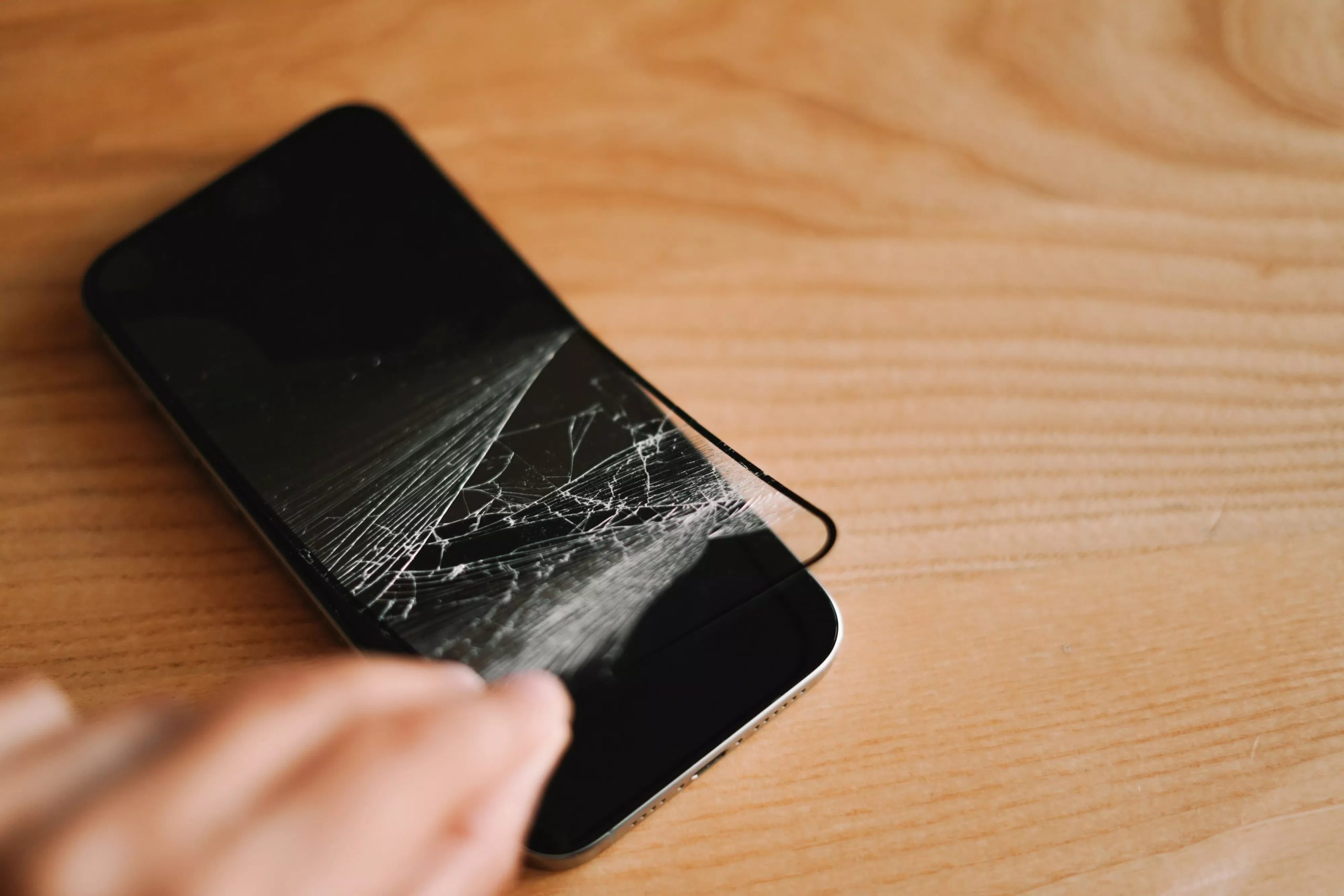
Big quote: Tom Marieb has a visceral reaction when he sees an iPhone owner put on a screen protector. “Personally, when I see someone put a screen protector on their iPhone, it makes my skin crawl, because we work so hard to make beautiful front screens,” he told TechRadar. The remark from Apple’s new vice president of hardware engineering reflects the company’s confidence in Ceramic Shield 2, its latest display material.

Apple introduced the material with the iPhone 17 lineup and also uses it on the new iPhone 18 Pro and the outer screen of the new iPhone Duo foldable.

Marieb said Apple set out to solve a familiar problem for smartphone owners: screens that pick up scratches through normal use. But scratch resistance alone wasn’t the whole goal; the company also wanted the coating to stay durable as the device aged, since the two properties tend to work against each other in most materials.

Apple said Ceramic Shield 2 provides three times the scratch resistance of the previous generation. The company’s position is that its display technology is strong enough that users should be able to enjoy the appearance of the front glass without immediately covering it with another layer.

Advertisement

Not everyone finds that argument persuasive, and the reaction to Marieb’s comments online suggests the disagreement isn’t really about how tough Ceramic Shield 2 is. For a lot of iPhone owners, a protector is less about preventing scratches on great glass and more about not paying for a screen repair at all: out-of-warranty replacements can run into the hundreds of dollars, so a cheap, disposable layer functions as insurance regardless of how durable the glass underneath happens to be.

Others use protectors for reasons that have nothing to do with scratch resistance in the first place, like privacy filtering or extra glare reduction, features no amount of Ceramic Shield toughness would replace.

That same focus on long-term durability extends to the iPhone Duo. The foldable introduces an inner display and hinge system that Apple had to design around issues that don’t affect standard slab-style phones.

Marieb said the company spent significant time refining the hinge so that it feels secure in every position, including open, closed, and partially folded. Apple wanted the mechanism to close with the solid feel of a high-end car door, rather than feeling loose or “floppy.”

Advertisement

“A lot of blood, sweat, and tears went into that,” Marieb said. The Duo’s inner screen has a matte finish intended to make any changes around the fold less noticeable than they’d be on a glossy display. Marieb said Apple should be judged on how well that claim holds up over time.

“Hold us accountable to that,” he said.

Ceramic Shield 2 and the Duo’s hinge represent two sides of the same durability push: one limits scratches on Apple’s conventional iPhones, the other addresses the mechanical and display challenges unique to a foldable design.

Advertisement

Source link

Continue Reading

Tech

Anthropic is operating a lab that conducts biology experiments

Published

on

Anthropic has a wet biology lab in the Bay Area where it can use its AI models to run physical experiments, it has confirmed to TechCrunch.

AI leaders have been promising that AI is the key to curing human disease. Dario Amodei opined just last week: “I believe that AI could cure most major diseases in the next 5–10 years.” To do that, an LLM would have to have methods to test its theories in real life.

“We believe that to do biology, the final test is still, and will be for a while, in real lab work,” Anthropic’s head of life sciences, Eric Kauderer-Abrams, told Reuters. “We absolutely are doing that today.” He added that the lab operates like most biotech labs: Anthropic conducts some research there while also working with external partners.

This news probably shouldn’t be shocking. Anthropic bought Coefficient Bio, a stealth AI biotech, in April.

Advertisement

While Anthropic declined to give specifics on what the wet lab is working on, it did say the main focus was fundamental biology, not drug discovery.

Anthropic doesn’t want to give the appearance of competing with the pharma industry, where it has numerous major customers and partners (e.g., it just announced a deal to work with Novo Nordisk on joint drug discovery). Anthropic has already faced backlash for launching products perceived to compete with those of its customers.

To that end, Anthropic also launched a Life Sciences Verification Program this week, to give vetted bio researchers access to its most powerful models. It has also published recent reports on some of the research it’s doing to support drug discovery. This includes one report on accelerating protein design and one on uplifting bimolecular modeling.

But the world is still reeling from the resignation of Anthropic researcher Jacob Coxon, who warned that “the people building AI earnestly believe that it could kill us all by the end of the decade.” Anthropic’s own alignment lead gave the odds at greater than 10% that AI could exterminate humanity within the next decade.

Advertisement

The fervor has grown so intense that CEO Dario Amodei published a post last weekend calling on the industry to slow down and institute self-regulation. He has repeatedly called bioterrorism one of AI’s biggest risks.

The juxtaposition of these dire warnings and the wet lab has not gone unnoticed in the tech industry. As investor and AI coding startup founder Chamath Palihapitiya posted on X, somewhat tongue in cheek: “The group behind such hits as: ‘We’re All Going To Die’ and ‘Regulate Me Now’ are building a wet lab in SF. I do not recommend this.”

When you purchase through links in our articles, we may earn a small commission. This doesn’t affect our editorial independence.

Source link

Advertisement
Continue Reading

Tech

States push back against rising AI-driven electricity infrastructure costs

Published

on


As AI becomes an ever-present in many businesses, most will now be looking to determine not just when AI will genuinely make a difference – as opposed to when it might just add cost and complexity.

So does every business process really need AI, or should companies be focusing on specific needs which will help them the most?

Source link

Advertisement
Continue Reading

Tech

Google’s Gemini-powered Pixel Watch is close to its lowest price yet

Published

on

Google’s Gemini assistant is now built directly into a smartwatch, and it has just gotten £109 cheaper.

The Google Pixel Watch 4 (41mm) has dropped to £240 at Amazon, down from its usual £349 asking price, which gives you a straightforward saving of 31% off the smartwatch’s original cost.

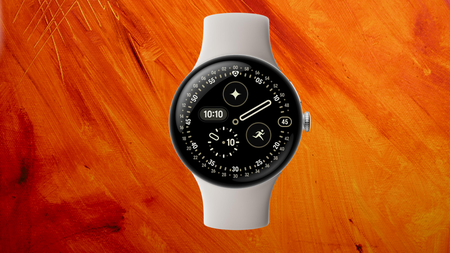
Pixel Watch 4 on an orange backgroundPixel Watch 4 on an orange background

Get Google’s Gemini powered smartwatch for £240, 31% off

Google’s Pixel Watch 4, featuring built-in Gemini AI help and a domed display, is now available for just £240 thanks to a 31% discount.

Advertisement

View Deal

A discount like this brings Google’s most capable wearable within reach of buyers who have spent the past year watching Apple and Samsung’s flagship watches sit stubbornly above the £350 mark without ever discounting quite this deeply.

Advertisement

Bring the watch close to your mouth, and Gemini responds immediately, delivering quick, personalised answers without requiring the wake word first, turning what used to be a clunky voice assistant interaction into something that actually keeps pace with a conversation.

That same attention to responsiveness carries through to the Actua 360 domed display, a screen that curves with the glass itself rather than sitting flat beneath it, giving the Pixel Watch 4 a wraparound look that feels genuinely different on the wrist.

Advertisement

SQUIRREL_PLAYLIST_10148964

Advertisement

Underneath that screen sits Fitbit’s health tracking, covering heart rate, sleep analysis, fall detection and Loss of Pulse Detection, which can call emergency services if something goes wrong. It also tracks recovery alongside daily activity, so training decisions reflect how the body actually responded last time.

All of that sensor work is powered by a battery that Google rates at up to 40 hours, and testing has shown the 41mm model comfortably running past 48 hours with the always-on display switched on.

That endurance is backed up by a charging dock that turns the watch into a bedside clock while it tops up, taking the Pixel Watch 4 from empty to a full charge in under an hour.

Elsewhere, one of our tech experts, Lewis Painter, has reviewed the Pixel Watch 4 in full, praising its charming take on Wear OS 6 and its genuinely excellent Fitbit-powered health tracking as reasons it stands as Google’s best wearable yet.

Advertisement

For only £240, the Pixel Watch 4 undercuts most flagship Android watches on price while matching them on features, making this the moment to buy for anyone who has been waiting for Gemini to actually turn up on the wrist.

Advertisement

The Pixel Watch 4 is undoubtedly the best Google wearable to date; it perfects the sleek, dome-shaped design, offers a unique take on Wear OS 6 with Material 3 Expressive, Fitbit-powered fitness tracking and excellent battery life. It’s not quite as long-lasting as the OnePlus Watch 3, and Fitbit Premium gripes remain, but overall, it’s a package that most people will enjoy.

Advertisement
  • Charming take on Wear OS 6

  • Excellent Fitbit-powered health tracking

  • LTE and satellite connectivity

  • Multi-day battery life and rapid charging

  • Fitbit Premium locks some health data behind a paywall

  • Exposed screen could make it more prone to damage

  • Some AI features not available outside the US

The Whatsapp LogoThe Whatsapp Logo

Get Updates Straight to Your WhatsApp

Advertisement

Join Now

Source link

Advertisement
Continue Reading

Tech

A startup that builds other startups raised $100M and is all-in on physical AI

Published

on

Four years ago, a startup lab launched that wasn’t quite an incubator, accelerator program, or venture firm. UP.Labs, as it was called then, built startups designed to solve problems for corporate customers such as Alaska Airlines and Porsche, as well as for the outside world.

The firm still has the same mission — albeit with a critical addition to its approach, a new name, and a $100 million investment from Silversmith Capital Partners. Vantora, as the firm is now called, continues to work with its corporate customers, including some new ones in industrial manufacturing that it declined to name, and in the oil and gas sector.

But now it’s more focused on building startups solely for its corporate customers and not for the broader market.

Founder and CEO John Kuolt told TechCrunch that Vantora is moving toward a “proprietary M&A pipeline.” This means Vantora will still build startups for its corporate partners, which invest in the ventures and serve as their first customers. But those corporate partners now have the option to fold the startups into their core businesses — and essentially keep them to themselves.

Advertisement

That shift has influenced Vantora’s increased focus on physical AI startups, according to Kuolt.

In the past, Vantora would end up spiking ideas that were strategic to its corporate partners, but too sensitive to bring to the outside world.

“We were missing on the biggest value problems, which had the biggest upside because of that,” Kuolt said in a recent interview. “Imagine you’re a Fortune 100 industrial company and you need to retrofit all of your hardware and machines for autonomy. You need to own that, it needs to be sovereign, and you can’t rely on a third party to go do that for you. You need to own that intelligence layer. They’re never going to let us go sell that to their competitors.”

This change has allowed Vantora to “unlock big physical AI use cases,” according to Kuolt, including with its existing customers.

Advertisement

For example, the firm came up with an idea to use AI to advance the business of its partner J.B. Hunt. “They said there is no way you can take this out to the world, and so we passed on it,” he said, adding that this proprietary model now allows Vantora to pursue it.

The firm launched in 2022 with Porsche as its first corporate partner. Since then, Vantora has launched several startups for Porsche and struck deals with Alaska Airlines, J.B. Hunt, Wabash, and TDG, the parent of Ashley Furniture.

In its early days, UP.Labs was tied — although never financially — to venture firm Up.Partners. While Vantora still shares office space with the California-based VC, it is its own entity, Kuolt explained, noting that the $100 million from Silversmith is the company’s first outside investment.

When you purchase through links in our articles, we may earn a small commission. This doesn’t affect our editorial independence.

Advertisement

Source link

Continue Reading

Tech

How America’s Taste In Car Colors Has Changed

Published

on


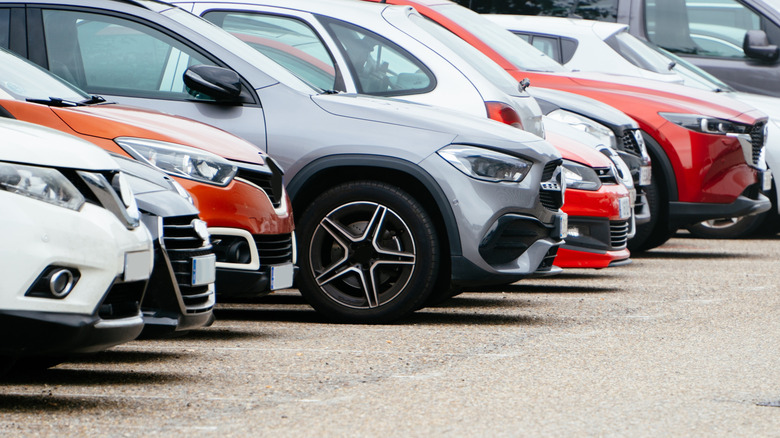
If you’re curious about the most and least popular car colors in America, a recent study published by iSeeCars.com looked at the most popular exterior hues today, comparing them to those of 30 years ago, in 1996. What they found was a major shift to “grayscale” colors — an incredible 80.4% of the current market consists of cars that are black, gray, silver, or white. The market share for these four colors in 1996 was 47.3%, showing significant growth over the past 30 years. While white increased in popularity from 22.1% to 25.7%, the largest increases were seen in gray (from 3.6% to 22.9%) and black (from 14.2% to 23.4%).

The market share of the most popular non-grayscale colors, which are red, green, and blue, have seen declines. Blue came out best, going from 10.2% to 9.1%. But red is down from 20.1% to 7.0%, while green suffered the largest percentage loss, dropping from 13.4% to 2.2%.

If you’re wondering how iSeeCars did this, the publication analyzed the specific colors of more than 22 million used cars from model years 1996-2025 sold from January 2025 to May 2026. The percentage share of each color for each model year was calculated, along with each color’s difference in share between the model years of 1996 and 2025. While this does not include the 1996 cars that didn’t survive to be counted in 2025, it is likely that they were evenly distributed across all possible colors.

Advertisement

Is there any good news for fans of color in the iSeeCars study?

If you’re a sports car fan, the color news gets better. The iSeeCars.com study found the prevalence of grayscale colors was lower among sports cars, with only a 63.6% share. This means that 36.2% of sports cars are purchased in colors, with blue ranking highest at 15.5%, followed by red at 10.8%, green at 4.5%, yellow at 2.3%, and purple at 1.8%. Other colors like orange, brown, gold, and beige each had less than one percent.

The iSeeCars.com analysts had some good news for those who like cars with color. The trend to grayscale cars leveled out around the 80% mark since 2020, leading them to conclude that colors may make a slow, steady comeback soon. This trend may not extend to trucks, where grayscale colors now account for 83.5% of the total market, with the two dominant colors being white, taking 33.6%, and black, the hardest color to maintain, claiming 23.4%. Things are also less colorful in SUVs, where grayscale colors currently take 79.3% of the market.

Advertisement

The reasons for why we have arrived here, with an 80% inventory of grayscale cars, could have a lot to do with dealers who just want to stock the most popular, and therefore easily sellable, hues. Buyers may likewise choose a neutral color in the hopes that future resale is easier. If you’re a fan of color, you do still have options though, as every major car brand still sells cool colors in 2026.


Advertisement

Source link

Continue Reading

Tech

iPhone 18 Pro stars in new ‘Shot on iPhone’ music video

Published

on

Apple is putting the iPhone 18 Pro’s new camera front and center with a music video for K-Pop artist Rose.

On Friday, Apple shared a brand-new 35-second “Shot on iPhone” ad. This time it doubles as a bite-sized music video.

The video is for “new trick” by K-Pop artist Rose. Of the project, Apple says: “The new variable aperture lens on the 48MP main camera captured improved low-light footage and impressive depth of field to bring the music video to life.

Apple announced the iPhone 18 Pro and its larger sibling, the iPhone 18 Pro Max, on September 9 at its “Surprise and Shine” event. The lineup opened for preorder on September 12 and began arriving at customers’ doors and in stores on September 18.

Advertisement

Source link

Continue Reading

Tech

Xcode 27.1 beta adds iPhone Duo development tools

Published

on

Apple has opened the starting gate for iPhone Duo app development, but that means developers have a single month to finish the race.

On Friday, Apple released the first Xcode 27.1 beta, giving developers the tools they need to prepare for iPhone Duo. They now have roughly one month to test their apps across the foldable iPhone’s many possible layouts.

Xcode 27.1 includes Swift 6.4 and SDKs for iOS 27.1, iPadOS 27.1, and Apple’s other operating systems. It also adds tools specifically intended to help developers see how their apps behave on iPhone Duo.

This means that devs can now preview content using a device’s alternative display through a new Display group in Xcode’s canvas. That matters because iPhone Duo can present apps across dramatically different screen sizes and orientations.

Advertisement

The beta also includes an iPhone Duo Simulator runtime, although there are some notable limitations at this time. For example, Apple notes that StandBy is not available, and running and debugging most app extensions also isn’t currently supported.

Initial Simulator launches can also take several minutes, according to Apple’s release notes. Unfortunately, these limitations arrive as developers face a compressed timeline before iPhone Duo reaches customers.

Developers have a month to prepare for iPhone Duo

It’s possible that current apps developed with existing guidelines could adapt reasonably well to iPhone Duo. However, developers still need Xcode 27.1 to test how their apps behave across its new layouts.

Apple’s first foldable introduces more orientations, screen sizes, and display configurations developers must account for. New APIs also let apps take advantage of features specific to Apple’s foldable hardware.

Advertisement

Developers only gained access to these testing tools after Apple revealed iPhone Duo. This means developers have a greatly compressed timeline before the device reaches customers.

Apps that aren’t updated should still run, but they may not properly fill the available display. And it’s likely that some developers, like Adobe and Microsoft, could be slow to update for the iPhone Duo.

The iPhone Duo goes up for pre-order on October 16 and becomes widely available on October 23. There will be apps that don’t support the foldable at launch due to the complexity of implementing support in some apps.

Advertisement

Source link

Continue Reading

Tech

Tech Industry Scratches Its Head Over Trump's 'AI Force' Proposal

Published

on

Saturday morning President Trump announced he’s creating an AI task force and appointing an AI czar, reports Politico.

“I am forming the AI Force, much like I did Space Force, which has been a tremendous SUCCESS,” Trump wrote Saturday in what Politico earlier described as “a lengthy Truth Social post on Saturday morning.”

TRUMP: Over the years, there have been many Hoaxes, all generated by the Radical Left Dumocrats, for purposes of destroying our Country. RUSSIA, RUSSIA, RUSSIA, UKRAINE, UKRAINE, UKRAINE, Global Warming, Impeachment Hoax #1, Impeachment Hoax #2 […] and now, the decimation, or destruction, of AI, commonly known as Artificial Intelligence — And I, as President of the United States, will not stand by and let this happen.

It all began with an attack on our Data Centers, until people realized how wealthy and prestigious they were for the Communities in which they were built. Higher Salaries, Lower Taxes, and Safer Streets, was the result, and the crazed Data Center attack has largely failed, so now […] they are going straight at AI. We will not in any way hinder or stifle the Growth of this incredible Industry. Rather, we will cherish it, help it, and watch over it, as it grows!

Advertisement

However, we will also be looking for BAD, and we can do that, very easily, with our already existing Criminal and Civil Justice System. For this purpose, I am forming the AI Force, much like I did Space Force, which has been a tremendous SUCCESS, in my First Term. To that end, I will be announcing, in the near future, the AI “Czar” — Only High I.Q. individuals need apply!

Trump concluded by saying AI “is the next Industrial Revolution, or Internet, but will be even larger and more impactful… We are leading China, and the rest of the World, and I intend to keep it that way!”

But what exactly is AI Force? “The White House did not immediately respond to a request to clarify whether the agency would be military or civilian,” notes the Washington Post. So now “The tech industry is struggling to make sense of President Donald Trump’s surprise announcement,” Politico reported Saturday afternoon:

Four representatives for the sector, who were granted anonymity because they were not authorized to speak publicly, told POLITICO that the industry was not widely informed of Trump’s decision prior to the Truth Social post. “Nobody knows what the idea even is,” one of the people said. Another said that feedback on the idea was not widely solicited within the industry. The White House did not immediately respond to a request for comment…

Advertisement

“I think that he clearly feels pressure to say something, but he’s torn because he’s just spent the last few days saying that the whole thing is a hoax,” Adam Kovacevich, CEO of the progressive tech industry coalition Chamber of Progress, said of Trump and his prior dismissal of AI doomsday scenarios. Since the departure of David Sacks, who stepped down as the Trump administration’s previous AI czar earlier this year, the White House has been “making up AI policy as it goes,” Kovacevich added. “I think it’s clear they’ve really missed the presence of an organized leader like David Sacks was.”

One of the tech industry representatives said they were confused about whether the task force would be charged with formulating more AI regulations or recommending policies that would further stimulate the tech’s development. Taylor Barkley, director of federal government affairs at the industry-aligned Abundance Institute, is eyeing it as a way to solidify a light-touch government approach to the technology he says will foster innovation. “Any AI Force or AI Czar should have one job: keep the field open so entrepreneurs at every scale can compete, free from onerous regulation,” he told POLITICO. “Existing criminal and civil law can handle bad actors. New permission regimes will stifle the very activity America needs most.”

It’s worth noting that the day before, California’s governor made an announcement. “With Donald Trump and Congress asleep at the wheel, Governor Gavin Newsom is once again taking the lead to strengthen AI safety for all Americans,” the governor’s office announced Friday. Newsom issued a strong executive order convening experts to help California create new AI safety laws and reporting rules, possibly even requiring safety auditors embedded in labs and emergency “kill switches” in frontier models.

Read more of this story at Slashdot.

Advertisement

Source link

Continue Reading

Trending

Copyright © 2025