Don’t just hand your laptop to a friend or secondhand store; you need to protect your personal data.
zhu difeng/Shutterstock
There’s a lot of value in keeping an old laptop. You can hold onto it as a backup, hand it down to a family member, use it as a media server and much more. But if your old laptop doesn’t have much life left in it, you may instead decide it’s time to get rid of the old machine.
Of course, you shouldn’t throw an old laptop in the trash. The best options are selling or donating if it’s still usable, or taking it in for safe recycling otherwise. No matter what destiny you choose for your old laptop, there are a few steps you should take first. Clearing out your files and running a factory reset are both crucial, but there’s more to it. Whether you’re getting rid of a MacBook or a Windows computer, make sure you do what’s necessary to protect your private information and prepare the device for a new owner, if applicable.
Advertisement
Back up everything first
Jun/Getty Images
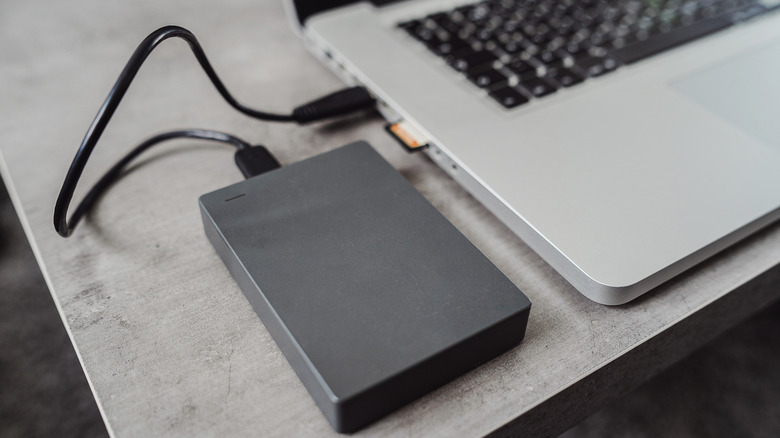
Backing up is always the important first step, even before transferring files to a new laptop. On a Windows PC, you can use Windows Backup by searching for it in the Start menu. You’ll see a list of what can be backed up to OneDrive and when you last did. While convenient, its major roadblock is that free Microsoft accounts only comes with 5GB of cloud storage. You can subscribe for more if you like; another option is making a local backup to a portable HDD or SSD. While you can copy files to the drive manually, EaseUS Todo Backup’s free version is a good choice for automating this. Since Windows Backup covers settings like account details and personalization features, a combination backup is smart.
For a MacBook, use Apple’s Time Machine. The built-in macOS backup tool can back up everything onto a USB drive so you can recover it on another computer. Visit System Settings >General >Time Machine >Add Backup Disk, then select the storage device you have connected (ideally with at least twice the storage of your MacBook) and follow the instructions. You can also use iCloud to back up some kinds of data under System Settings > [Your Name] > iCloud > Saved to iCloud. Apple offers only 5GB of free storage, but you can subscribe for more.
Third-party backup software and cloud services can also work. As a supplement to the full backup, double-check important apps, like enabling sync in your browser so you don’t lose your bookmarks. Also check the ports on your laptop to make sure you don’t leave any accessories behind, like small USB dongles or SD cards.
Before you move on, sign out of all accounts and de-authorize software licenses for tools like the Adobe suite. Some licenses can only be used on a certain number of computers, so you don’t want to have a phantom machine wasting one of your spots. If you’re not sure whether your license can be moved to a new computer by signing into your account, copy the license or product key so you can contact the provider.
Advertisement
Do a proper wipe of your laptop
Organic Media/Getty Images
You’re now ready to wipe the machine. While a basic factory reset is the simplest option, data you remove from a computer is still technically recoverable. Thankfully, modern versions of Windows and macOS have built-in reset tools that de-authorize your accounts, wipe the machine, reset everything and make what you had on the drive unrecoverable. Third-party software is also available if you want to make sure the drive is totally clean.
The process for wiping a Windows laptop varies by version. For Windows 11, go to Start > Settings > System > Recovery > Reset PC. Choose Remove everything, then select Cloud download or Local reinstall depending on how you want to reinstall the OS. When presented with the Additional settings page, choose Change settings and enable Clean data to securely overwrite the drive.
On Windows 10, go to Settings > Update & security > Recovery and click Get started under Reset this PC; the process is similar to Windows 11 from there. For Windows 8.1, this is under Settings > Change PC settings > Update and recovery > Recovery; click Get started under Remove everything and reinstall Windows. For Windows 7, you’ll need to use bootable media, access the manufacturer’s recovery partition or run a third-party tool to erase everything on the drive.
Advertisement
For a Mac running macOS Monterey or later, open System Settings >General >Transfer or Reset > Erase All Contents and Settings. You’ll have to enter your computer password as well as your Apple ID password to sign out of that. Confirm the erasure, then the computer will sign you out of iCloud, wipe and restart.
For older Intel-based Macs, you need to first sign out of iCloud manually to remove Activation Lock; you’ll find this under System Settings > [Your Name] > Sign Out or System Preferences > Apple ID > Overview > Sign Out depending on your macOS version. After that, go into Recovery Mode (hold Command + R after a restart), select Disk Utility >Continue >Erase, and choose APFS (assuming your Mac has an SSD). Finally, pick Erase Volume Group orErase. Once it’s done, if someone else will use the computer in the future, quit Disk Utility and choose Reinstall macOS to install a fresh copy.
Hubble’s new frame of NGC 4698 arrives from 55 million light years out in Virgo, a spiral tucked into the nearest big cluster of more than a thousand galaxies bound by gravity. Brown dust lanes cut through the outer disk and young blue stars light the same curves, yet those arms refuse to spiral into the middle. They hang in a ring around the perimeter and leave the bright core standing on its own, with reddish pockets of fresh star birth mixed among the dust.
Pale older stars form a vast bulge with a faint off-white tint that spins around a monster black hole several million times heavier than our sun, and this black hole just keeps feeding, growing larger with each passing instant, dining on gas that is pulled in. The bulge is perched at a 90-degree angle to the disk, so a delicate thread of faint starlight can be seen peeking up and down from the dusty plane. The stars and gas closest to the center behave strangely, moving in straight lines at a right angle to the outer ring, so there is no overlap between the inner stars and the outer disk because they spin in different directions.
EXPLORE THE HUBBLE SPACE TELESCOPE – Celebrate one of humanity’s greatest scientific feats while enjoying a relaxing building experience with the…
REPLICA SPACE MODEL – Recreate the legendary space-based telescope with posable solar arrays and antennas, an opening aperture door and a detailed…
AUTHENTIC DETAILS – Remove the exterior panels to reveal a detailed instrument bay, which features gyroscopes alongside primary and secondary…
It is now assumed that some of the gas that strayed in from outside developed its own inner disk with a different angle from the one we see now, and that a short hydrogen tail on one side represents the ghost of a minor galaxy that NGC 4698 swallowed up a long time ago. Hubble captured this light with the Wide Field Camera 3 as part of program 18103, which was led by D. Thilker and the MAUVE-HST team. They used ultraviolet to red filters, as well as a unique line, to map out star clusters and nebulae across the Virgo Cluster. This same set of data provides some unique insights into how a galaxy’s journey through a crowded neighborhood can either impede or reshape any new star formation that occurs.
NGC 4698 is one of a small number of spirals in which the inner stars ignore the spin of the outer disk and go on anyway, and this Hubble image shows that mismatch in a single glimpse, from the quieter ring of blue stars to the sideways brightness in the center.
Bluetti’s FridgePower does exactly what it says, with enough storage and a high enough output to keep even an ancient, inefficient fridge/freezer going for a few hours off grid. You’ll get longer with modern devices, with our tests suggesting likely backup time of more than a day for today’s efficient fridges. The Bluetti FridgePower isn’t scared of a little heavier duty work, either; it’s got enough poke to run a microwave or two-slot toaster, but it’s not really optimised to be a power-everything kitchen workhorse.
Adds a day’s backup power to a fridge
Very slim and expandable
Strong value
A little noisy
Slightly odd time-of-use behaviour
Key Features
Advertisement
Review Price:
£1299
A slim power station for fridges
Advertisement
This power station is designed to keep your fridge running through a power outage. It stores enough power to last a modern fridge/freezer around a day, and it can even handle some other more power-hungry kitchen devices.
Quite specialised
Advertisement
The FridgePower has only two mains output sockets, with no USB or DC outputs for charging phones, so it’s not really built as a general-purpose power supply.
Introduction
If you live out in the sticks, or you’re often on the road in a camper van, you might be familiar with the problem of keeping a fridge running when you’re away from a reliable source of power. The Bluetti FridgePower aims to provide an answer: it’s a slimline battery power station for fridges, designed to slip in alongside them or sit unobtrusively on top. Its narrow section is deceptive, as Bluetti has squeezed in enough batteries to store just over two kilowatt hours (kWh) of power.
In theory that’s enough to last a modern fridge freezer for over a day of running; perfect for riding out even a significant power cut. And if you live in an area that frequently sees multi-day outages, you can even add up to three expansion batteries, potentially keeping the milk fresh and your peas frozen for a week or more.
Advertisement
While most of today’s fridges top out at only 200-300W of consumption – and typically use quite a bit less – the FridgePower can deliver up to 1,800W. That means you could use it to backup a couple of coolers and perhaps even a microwave or two-slot toaster, but it doesn’t have the grunt for very powerful appliances such as a kettle or oven. We wanted to put this specialised power station through our usual tests, and more.
Advertisement
Design and features
Slim, but heavy
Handle and wall-mounting bracket
Basic but practical display
As you might expect, this power station’s 2kWh of batteries make it rather heavy – almost 20kg in fact – but it comes with a screw-on handle if you do need to cart it around. There’s also a sturdy wall mount if you want to keep it off the floor or counter top.
Image Credit (Trusted Reviews)
The other recommended orientation is to place the Bluetti FridgePower on top of the fridge – that’s how I positioned it, but I’d advise taking great care when lifting it into place or back down again.
Image Credit (Trusted Reviews)
This isn’t built as a general-purpose battery power station, so its ports and inputs are comparatively limited. Around the back you’ll find a standard mains power input and an XC60 connector for DC sources including solar panels. There are also just two mains output sockets. The most significant omission is that you won’t find any USB connectors, a shame if the FridgePower is within reach and you wanted a convenient place to charge a phone.
Advertisement
While Bluetti’s power stations usually get a display showing battery, input and output status, here you get a simplified version that uses five green LEDs to show the state of charge, plus a couple of other indicators for things like grid power availability. This is better than the norm in one important way; it’s always on, giving you an at-a-glance battery check in the middle of a power cut.
Advertisement
Image Credit (Trusted Reviews)
Alternatively you can buy the FridgePower with a magnetic screen designed to stick onto the side of the fridge. I didn’t have one to test, but it appears to work along the same lines as Bluetti’s standard on-device displays, showing the charge state, input and output power at a glance.
This display’s a neat idea, but I’m not convinced it’s necessary given you can get the same information from Bluetti’s app. Here you get the usual range of information and settings, including a choice of function modes. The default Standard UPS mode is fine for straightforward power security: when the grid is up the FridgePower will recharge and provide power, and when it’s down it’ll switch to battery power within 10 milliseconds. There’s also a PV priority mode, which lets you set a battery threshold above which the unit stops recharging on mains power: useful for favouring solar panels if you have them. In this mode, you can configure the use of some mains power to quickly recover a baseline amount of stored energy after a long power cut.
Image Credit (Trusted Reviews)
There are two time-control UPS modes, where the FridgePower recharges and provides standard UPS support during your off-peak hours, then powers your fridge from stored battery power during peak rate. That could be a good way to lower your fridge running costs, but if a power cut occurs late in the day when the battery’s depleted, you’ll get less backup time before your ice cream goes runny.
Advertisement
It isn’t just food that goes off; even the heavy-duty lithium iron phosphate (LFP) batteries in the fridge power will lose some of their capacity over time. Bluetti says that they’ll retain at least 80% of their rated capacity after 4000 full charge cycles, which equates to more than eight years of daily use. You can extend this life by using the app to limit both the maximum state of charge and the maximum depth of discharge. The flipside is that this will leave you with a smaller working battery range, and less time off the grid when you need it.
Bluetti has designed the FridgePower to be expandable. Additional battery units are priced at about £900 each, and could give you a total storage capacity of up to 8,064Wh (8kWh) – enough to power a single fridge freezer for four to eight days. The port for connecting each pack is behind a rubber bung on one of the long edges, seen at the right of this photo.
Advertisement
Image Credit (Trusted Reviews)
The Bluetti FridgePower is the latest example of how battery storage prices are falling. We calculate a power station’s value by dividing its price by the amount of energy you could expect it to store over its batteries’ working lifetime – in this case that’s the 80% over 4,000 cycles figure I mention above. Low values are good, with most of the supplies we’ve tested recently working out somewhere between 10-25p per kWh. Assuming steady degradation over time, and calculated for the discounted £999 launch price, you’d pay about 14p for every kWh stored in the FridgePower, which is among the best we’ve seen.
Charging
Charge from the mains. Solar or vehicle charging are optional
Maximum 1800W AC charging power
Full recharge in a little over an hour and a quarter
If you’re installing the Bluetti FridgePower to backup your fridge or freezer at home, you’ll almost certainly be recharging it from the mains. Typically for a Bluetti power station you can choose from Silent, Standard or Turbo modes, with the latter drawing a maximum of around 1800W. Starting with fully empty batteries, I timed a Turbo recharge to 100% full at 83 minutes. This consumed 2089Wh – only a little more than this power station’s stated capacity.
Advertisement
In truth, there’s unlikely to be much need for recharging this power station in a hurry. At the default Standard mode it demanded around 1200W and finished charging in a couple of hours, consuming 2041Wh in the process. Silent mode demanded 600W, took nearer four hours, and consumed only 2011Wh – actually slightly less than the battery pack’s 2016Wh rated capacity. Based on these tests, Silent recharging would be the ideal choice if you’re using the FridgePower in time-control mode, provided you get at least four hours of off-peak power each night.
Image Credit (Trusted Reviews)
The presence of a DC input port does open up some options, particularly if you have a few solar panels near your kitchen or on the roof of your RV. The Bluetti FridgePower can accept up to 1000W of solar input. If you have an RV and don’t mind shelling out the extra £500 or so for Bluetti’s Charger 2, you could recharge at up to 800W from your van’s alternator alone – provided you also won’t mind losing about 1 horsepower of engine output. This power station supports simultaneous AC and DC charging up to a 2200W maximum.
It’s worth noting a couple of quirks depending on your market. US models will only charge at up to 1440W from the mains, while Japanese models top out at 1200W. UK and EU customers also get the best surge performance (a momentary 3600W) and bypass power output (a sustained 2300W), although even the lowest capabilities as found in the Japanese model should be plenty high enough for a couple of domestic fridges.
Image Credit (Trusted Reviews)
Performance
Stable at maximum power
A bit noisy even at light duty
Very strong efficiency
Advertisement
While I usually head straight for our standard load tests, I first wanted to understand how this power station performed in its intended role. With it connected to my fridge and fully recharged, switching the mains power on and off didn’t cause any noticeable effects at all: the fridge continued working steadily.
Advertisement
I was interested to see whether the FridgePower’s Time Control mode might be a useful way to combine backup power with cheaper off-peak electricity, so I configured it to charge during my overnight off-peak tariff and discharge during the day. My Bosch fridge/freezer typically uses only around 60W, but even so I was amazed at how long the FridgePower’s battery lasted, with a slow discharge that suggested it could go for almost four days between charges. The maths suggested this shouldn’t be possible.
Switching back to Standard UPS mode helped clear things up. Here I put a separate smart socket on the FridgePower’s input cable, scheduled to turn the AC input on only during off-peak hours. The battery power state dropped far quicker when working from battery power in this configuration, suggesting that in Time Control mode the FridgePower had been consuming some grid power during peak hours.
Image Credit (Trusted Reviews)
With a couple of mains power meters added to the setup, I could see that the FridgePower did indeed consume around 60W of mains electricity in Time Control mode. This was constant, and occurred even during peak hours: the time period during which I was trying to avoid any power use. However, because of this the battery was less depleted by the end of peak hours, so there was less off-peak consumption to replenish it.
I let the fridge run for 48 hours in each configuration. The FridgePower (3kWh) and fridge (2kWh) consumed exactly the same amount of power during each test, but in Time Control mode some of the FridgePower’s mains use was during more expensive peak hours – if you were aiming to save money, you’d want to avoid that.
Advertisement
Advertisement
Things were much more straightforward on our standard tests, where we fully recharge a power supply and subject it to a constant load until its batteries are empty. At the maximum 1800W this device supplied only 1558Wh – some way short of its rated storage – while at a steady 1000W load it delivered 1696Wh. Using these figures I calculated a best round-trip efficiency of 84.3% – that’s excellent, meaning that of every 8kWh you store in the FridgePower, you might get nearly 7kWh back out again.
One small annoyance to mention is that the Bluetti FridgePower isn’t fully silent, even when it’s hardly under load. During the day it cycled its cooling fan on and off quite regularly and, while not loud, this was audible enough that it bothered me when watching TV on the other side of our living room. To be fair, I bother easily when it comes to noise – my partner barely noticed it.
Should you buy it?
You need dependable backup for your fridge
Advertisement
The Bluetti FridgePower really is suited to backing up one or two fridges for at least several hours during a power cut, and you can extend this with extra batteries. It’s a good choice if that’s your focus.
Advertisement
You want a general-purpose battery power station
This power station performs well, but it isn’t optimised for more general use in the home. If you want backup power for all your appliances, buy a generalist supply with more ports.
Advertisement
Final Thoughts
If you live somewhere that regularly gets power cuts, the Bluetti FridgePower could be ideal. It stores a sensible amount of power, can easily be upgraded with more, and has a high enough output to cope with the surges of fridge compressors switching on and off. It’s even got a bit of headroom spare to deal with other kitchen gadgets. For the owners of smaller camper vans, this might actually make the FridgePower an option for powering a modest kitchen where a more conventionally shaped power supply simply wouldn’t fit. Whatever you need it for, its 14p per kWh of lifetime energy storage makes it great value.
Personally however, I’d go for a more general-purpose power station where space allows. Alternatives like the Anker SOLIX C2000 Gen 2 offer similar storage and charge modes, combined with more ports and a higher maximum output. That makes them more flexible in a power cut and for everyday device powering and charging – even if they won’t fit neatly down the side of your fridge.
How We Test
We test every power station we review thoroughly over an extended period of time. We use standard tests to compare features properly. We’ll always tell you what we find. We never, ever, accept money to review a product.
Find out more about how we test in our ethics policy.
Advertisement
We test with a variety of devices to see how long the battery will last.
We test different charging methods to see how quickly the battery can be topped up.
Advertisement
FAQs
Where can I buy the Bluetti FridgePower?
Bluetti announced the FridgePower several months before it launched, leading to some confusion among people who wanted to buy it. It’s now available via the Bluetti website, and through resellers like Amazon in territories including the UK, US and Canada.
Can the Bluetti power a refrigerator?
Advertisement
Battery power stations with an output of at least five hundred watts can usually power a refrigerator. In fact, some supplies with just a couple of hundred watts’ output can do it, provided they’re able to cope with the momentary power surge each time the fridge’s compressor starts up. Bluetti’s been sensible with the FridgePower: its 1.8kW output is enough to cope with several coolers cycling on and off, and it gives headroom to spare for other mid-to-high power devices.
“I do see this as a continued trajectory of their main business model of controlling what people see, putting ads in front of them, and collecting more data,” Mir says.
It’s definitely rational to be anxious about handing over your credit card to an agent. Even if you could trust these AI tools wouldn’t be tricked into spending money in ways you don’t want, outsourcing your shopping decisions can have unintended consequences. Consumer advocates see this purchasing automation as potentially opening the door for companies to prioritize certain brands or other products in an agent’s output, based on sponsorship deals. Meta’s Chief AI officer Alexandr Wang hinted in an interview with Axios that it’s looking for more revenue opportunities in Muse that aren’t ads, without disclosing specifics.
Personally, I enjoy the slow scrolls of online shopping, where I can spend an hour on a website and leave with nothing in my cart. There’s a whimsical inefficiency to browsing Depop for leather jackets I likely won’t even buy. By exploring the Internet on my own, I’m slowly building my own sense of taste and curating an understanding of what I actually enjoy. If Muse does everything for me, I lose out on the journey that led to the decision.
“At some point, the AI is making all of your meaningful taste decisions, your preference decisions, decisions about where you go, where you eat, what you do, what vacations you take,” Schroeder says. “That’s kind of the joy of being human—getting to test things out and figure out what you like. So, the concept of turning all of that over to a machine is pretty horrifying to me.”
Advertisement
Sharing Machines
Relying on agents, like Meta’s Muse, could degrade our functioning while these tools collect data about us.
“The design of AI agents is such that it disengages users,” says Margaret Mitchell, a researcher and chief ethics scientist at Hugging Face. “So, users become more passive.” Mitchell recently co-wrote a research paper unpacking how agentic tools are not effectively designed for human oversight and may actually worsen the user’s ability to assess what the agent is doing on their behalf.
People who use agents may become overly reliant on the tools, even more so than when interacting with a standard chatbot, since agents have access to more information and can do more tasks. One potential impact is “cognitive degradation,” where users rely on automations from a confident-sounding, external source and are less able to make independent decisions.
Mitchell also sees high levels of personalization as potentially priming users to share even more data about themselves. “It’s not only that it knows about you, so you trust it more,” she says. “It’s that it’s actually aligning to you in what it talks about and how it talks about it, in a way that further pulls you into interacting with it and divulging more private information.” Recent research shows that AI tools may start to mirror a user’s speaking style as they collect more interaction data.
Advertisement
While Muse is powerful, I’ve decided to send this data goblin back to its cave, and deleted the app after my initial experiments.
Before I could remove Muse from my phone, the agent sent me one final ping. A tip! I wonder what it could be. “Connect your apps so I can do more,” the notification read. Alright, buddy. I heard you the first time.
Back in 2018, a new appliance brand hit the marketplace called Café. This wasn’t an entirely new name though. GE Appliances first introduced the Café name back in 2007 as a luxury appliance line, but it was just one line of appliances under the greater GE umbrella. That changed when GE Appliances decided that Café should be its own standalone brand, which it has been since 2018. While GE Appliances is its parent company, the true owner of Café Appliances is Haier. This is a Chinese conglomerate that owns many different appliance brands around the world, and it acquired GE Appliances in 2016.
Despite being a subsidiary of a Chinese company, appliances from Café are still primarily manufactured in the United States. Café Appliances headquarters is located in Louisville, Kentucky, which is also the home to GE Appliances’ headquarters, and while that is the main hub, it’s not the only place these appliances are built. GE’s plant in Lafayette, Georgia is where the cooking products are built, and there’s another a smaller facility in Selmer, Tennessee that focuses primarily on refrigerators and freezers for Café and other Haier-owned luxury brands like Monogram and GE Profile.
Advertisement
Unlike many other appliance brands, Café focuses exclusively on kitchen appliances. These include ovens and stove ranges to refrigerators and dishwashers. There’s also a number countertop appliances it produces, like toasters and coffee makers. The company specializes in high-end luxury appliances for those looking to revamp their kitchen, both in performance and aesthetics. Consequently, Café Appliances sells its products at a premium as well, but the reason its prices are so high goes beyond it just being your average luxury brand.
Advertisement
Why are Café appliances so expensive?
GE Profile is one of GE Appliance’s brands that focuses on luxury and smart appliances. As a comparison point, the most expensive GE Profile double wall oven costs $4,099 and is the only model above $4,000 it offers. This is a combination oven that includes the ability to bake, air fry, or steam your food. Café Appliances, on the other hand, has six double wall ovens costing over $4,000 with the most expensive model going for $7,019. It includes all of those cooking modes on the GE Profile model plus a French door opening for the top oven. The most important thing upping the cost though is the ability for aesthetic customization.
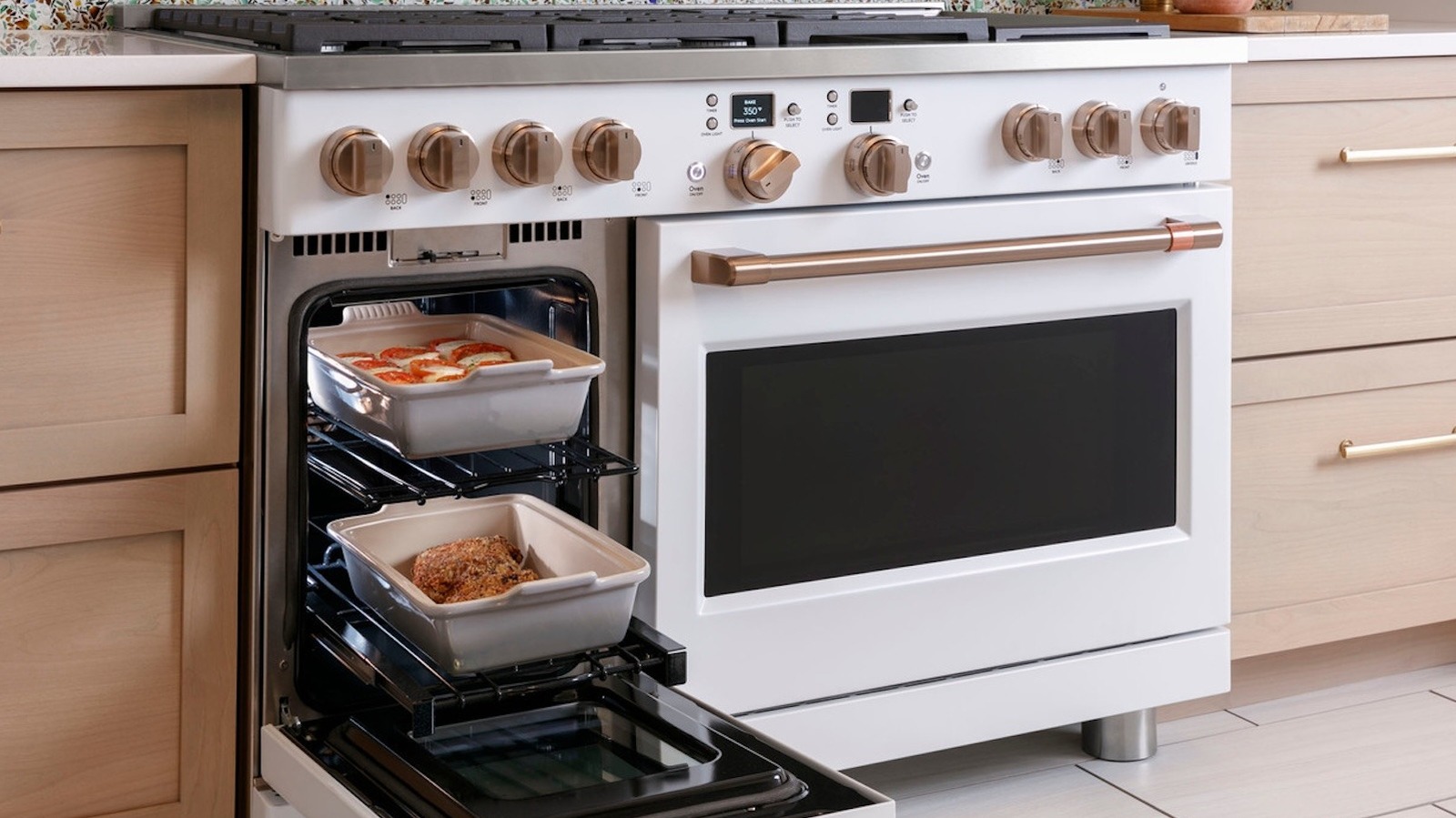
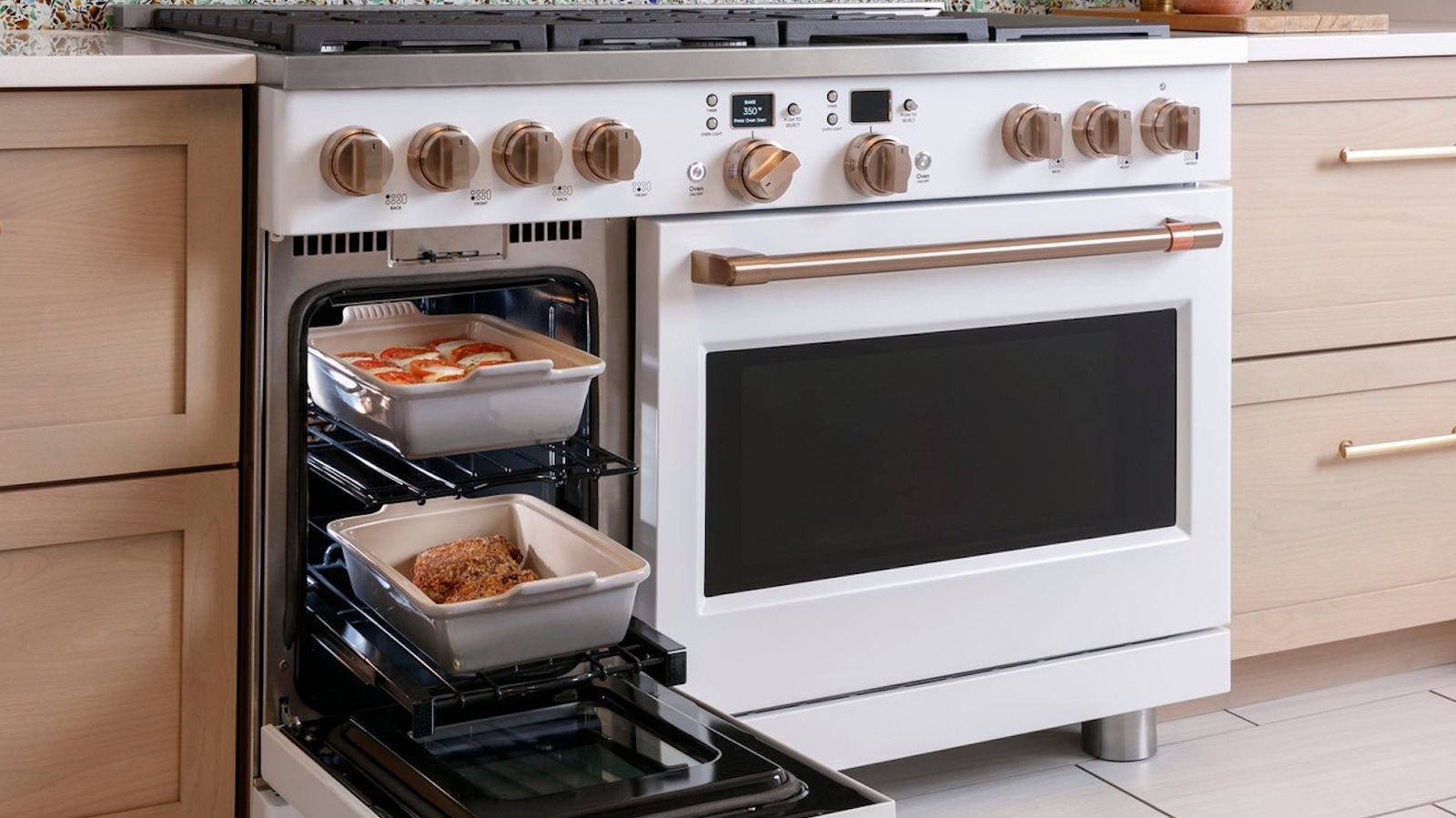
This double oven allows you to choose between three different look bases — stainless steel, matte white, and matte black — and six different finishes for the hardware, such as handles that are bronze, copper, black, or another finish. These are the kinds of options Café has all over its appliance selections, but the customization doesn’t stop there either. It also has the Café Style Studio. This is a service that lets you consult its in-house interior design experts to help you select the best aesthetic options for your kitchen. This is a free service, but Café offering it means the money needs to come from somewhere else, hence the increased appliance prices. Some appliances, like fridges, even have the option for a completely customizable panel in order for it to blend in seamlessly with your kitchen cabinetry. While Café doesn’t place particularly high in SlashGear’s ranking of smart fridge brands, you can surely get one that looks tailor-made for your kitchen.
Welcome back toPower Play! Each week, senior writer Molly Taft tackles a topic around this midterm season’s biggest issue: data centers. If you’ve got a question or thought for the column, feel free to shoot Molly an email at [email protected] or reach them securely on Signal at mollytaft.76.
Molly McCann Sanders has a lot in common with many of the other women who helped Donald Trump win a second term as president. A pro-life Catholic who lives in Texas, she has staunchly conservative opinions on immigration and a fierce hatred of eminent domain—the practice of the government taking private property for public use.
Sanders, the president of the Eagle Forum Education & Legal Defense Fund, which was started by Phyllis Schlafly, also describes herself as “a crunchy MAHA mom”—and says she’s been paying particular attention to data centers.
“I’m alarmed by the idea that these data centers can move in and pollute,” she tells me. “I’m not a data center expert. I’m not a tech expert. But I’m suspicious and wary, and want to move slowly.”
Advertisement
She loves Trump, “but I think he’s wrong about data centers,” she says. And she sees the GOP’s effort to court what she calls “the laptop class”—young men who are enthusiastic about technology—at the Republican midterm convention earlier this month as a huge misstep with midterms nearing.
McCann Sanders isn’t alone. More than 60 percent of Americans, including 47 percent of Republicans, say they are opposed to the construction of data centers in a poll released by The New York Times last week. In August, the National Republican Senatorial Committee sent a private memo to AI companies sounding the alarm on how voters perceive data centers, warning that “campaign or party committees can not fix the toxic brand of an entire segment of the economy.” Last week, GOP strategist Tony Fabrizio issued a memo to the party’s candidates claiming that “unqualified support for building more AI data centers is a losing position.”
But the GOP is facing one big hurdle: Trump himself. In recent weeks, facing mounting scrutiny on his policies and support for the industry, Trump has doubled down on his defense of both data centers and AI. In late August, he wrote in a Truth Social post that only communities that wanted to be “backwards and poor” would refuse data centers coming to town.
Last week, he issued yet another series of posts boosting AI data centers. Users on his own Truth Social platform pushed back. An analysis from The New York Times of thousands of responses found that anti-data-center and anti-AI comments—including from staunch MAGA accounts—outnumbered positive comments by four to one.
Advertisement
Sanders says she sometimes “looks past” the wilder things Trump says, but she can’t fully overlook his pro-data-center rhetoric.
“That is not the right way to go about this,” she says of the “backwards and poor” post. “We do have legitimate concerns. There are real problems.”
My colleague Hugo Lowell, who covers the White House and writes our Inner Loop newsletter, says he’s not surprised by Trump’s attitude. “He’s bullish on AI,” he tells me. “He’s been told that restricting data center development means restricting compute, which means the US loses to China.”
The China competition angle is being publicly echoed by tech accelerationists and White House allies, including former White House AI czar David Sacks and investor and Palantir cofounder Joe Lonsdale. The latter debated Steve Bannon’s tech editor Joe Allen—whom I profiled last month—at an auxiliary event during the convention. That conversation between Lonsdale and Allen, Sanders says, was the only time she heard data centers brought up during the entire midterm convention.
Just past 6 pm on a recent Wednesday night, half a dozen pet owners logged into a Zoom meeting to confess something they’re afraid to talk about in public: They’re fed up with their dogs.
Before discussion began, Louise Crane, the president and cofounder of Dogs Anonymous, the organization hosting the meeting, recited the seven acknowledgements participants must agree to, the first being, “I admit that life with my dog is not what I imagined.” Crane wore a black T-shirt exclaiming “Abolish ICE” in thick white lettering.
“I may need to be talked off a ledge,” one attendee said as conversation kicked off, mentioning that she wasn’t sure how to handle her dog’s mood swings. Her family had been through a series of new changes: Their other dog died and they were also fostering one, and now their boxer was “unsettled” and “grumpy” to the point he was doing more “demand barking, which has never been like him.”
Other attendees confessed their private shames: a shepherd mix had started engaging in more intense “resource guarding” when around other dogs—the term for when dogs aggressively protect something they value. “He got into it with my sister’s little weiner dog the other day because they both were begging for food.” One woman, who lives in a busy apartment complex, needed advice on how to better handle her dachshund’s constant barking at strangers. (In the spirit of anonymity, Dogs Anonymous asked WIRED to leave out the names and identifying characteristics of its participants.)
Advertisement
Shame is the emotion attendees struggle with the most in these meetings. “The embarrassment of having a dog that’s losing its shit, especially as a woman,” is difficult for some people, Crane tells me when we speak a few days before.
Crane launched Dogs Anonymous, a nonprofit focused on training and emotional support by animal behavior experts, in 2025 in an attempt to help people vocalize their shame.
“We wanted to give people not just a space they could trust for advice on behavior issues or if they are having a crisis with their dog, but also a place where they don’t feel judged to ask questions and admit that maybe it’s a little bit too much for them,” Daphne Mendoza-Tervanis, a cofounder, says.
Sessions are held weekly and span first-time and experienced dog owners, adopters, foster caregivers, and occasionally trainers seeking tips on how to work aggression cases. The meetings are primarily attended by US residents, though previous sessions have attracted dog owners from Singapore, Costa Rica, and beyond.
Advertisement
Jerri Scherff, a cofounder who is 13 years sober, had first-hand experience with recovery programs, and it was important to her that Dogs Anonymous also include some of the same traditions as Alcoholics Anonymous. “We wanted to create something that was repeatable, sustainable, and eventually autonomous, which is the way that recovery groups work,” she says. The most important one was anonymity—what is discussed in the group stays in the group.
The founders say the effectiveness of the group doesn’t necessarily stem from the advice they impart during meetings but comes from members bonding over shared struggles. “The magic of AA the community is that you are going through something that somebody else has either been through or they’re going through the same thing,” Crane adds. This approach, called “sharing your experience, strength and hope,” is a core part of the 12-step recovery program and encourages members to analyze their experience in a way that makes them feel less alone.
According to a survey published in the scientific journal Pets in June examining guilt, burden, and wellbeing among owners of dogs with behavior problems, 53 percent of respondents reported feeling alone, and 78 percent reported “elevated caregiver burden,” a term for the emotional and financial strain of being a caregiver.
Get caught up on the latest technology and startup news from the past week. Here are the most popular stories on GeekWire for the week of Sept. 13, 2026.
Neuramill is building software that captures how experienced machinists decide to make a part, then applies that knowledge to new jobs at aerospace and defense machine shops. The company was founded last year by two engineers in their 20s who started their careers in Seattle. Read More… Read More
Providence will receive $1.1 billion from Nike co-founder Phil Knight and his wife, Penny — one of the largest gifts ever pledged to a U.S. healthcare institution — to build Oregon’s first women’s hospital and expand cardiovascular services. The funds, directed to Portland’s Providence St. Vincent Medical Center and Providence Heart Institute, build on the Knights’ prior $200 million gift to the heart institute. Read More… Read More
Several years after leaving Seattle’s startup scene to build a “tech outpost” in the Alaskan wilderness, serial entrepreneurs and twin brothers Lee and Lucas Brown, founders of Tune, have set their sights on a new frontier: replacing the traditional newsroom with artificial intelligence. Read More… Read More
Silvia Candiani has been promoted to CVP of the recently launched Microsoft Frontier Company, while Microsoft Elevate has hired a former UNICEF leader as VP. Amazon Web Services has promoted Alexis Bateman to director of global sustainability. Gradial has added a CMO, and Yoodli and Kestra have each named a VP. Read More… Read More
The cuts are part of broader nationwide layoffs at the enterprise software giant and heavily impact technical engineering and management roles. Read More… Read More
Software engineer Jeff Kohler is asking the U.S. Supreme Court to clarify the Alice patent standard after courts invalidated his patent and dismissed his infringement case against Google without examining the C++ source code he submitted. IP law experts and federal judges have called for the Supreme Court to revisit how the standard is applied to software inventions. Read More… Read More
Truveta co-founders Jay Nanduri and Ryan Ahern will serve as interim co-CEOs of the health data company, which Myerson helped build from a pandemic-era idea into a business with 500 employees and 30 member health systems. Read More… Read More
It caps a significant growth stretch for the Bellevue-based open-source platform, whose annualized revenue run rate recently surpassed $250 million — growing over 200% year-over-year. Read More… Read More
Agility Robotics, which is preparing to go public through a SPAC merger, unveiled Digit 5, a humanoid robot it says can work safely alongside people in warehouses and factories. The company says the new robot can lift 50 pounds, reach shelves 7.2 feet high and work more than 20 hours a day. Read More… Read More
Helion Energy added $35 million to its latest funding round, bringing the round to $500 million and its total war chest to more than $1.5 billion. The capital supports the fusion startup’s effort to power a Microsoft data center by 2028 despite timeline and technical skepticism. Read More… Read More
A new report claims that Apple is cutting jobs at Apple Fitness+, but without supporting evidence, concludes that this means enormous changes are coming.
As a devision, Apple Fitness+ has had some bad press about bullying, but if it’s correct that there are now job cuts, they are not substantial. The new Bloomberg report suggests that Apple Fitness+ is in trouble and claims audio features such as Time to Walk and Time To Run are being scaled back.
But it then takes this to mean that Apple Fitness+ will at some point be subsumed into Apple Health. Yet even as it makes that conclusion, the report admits that the job cuts amount to handful of roles.
It does not mention that there are currently 73 Cupertino-based positions being advertised by Apple that mention fitness.
Advertisement
That’s because this is another story of how any departure or redundancies is the end of Apple. In this case, the handful of job cuts has been extrapolated out to the potential end of Apple Fitness+ by way of a completely false assertion over the costs of the service.
Apple Fitness+ is a core services offering
The argument is specifically that Apple Fitness+ is an easy place for Apple to make cuts because users are demanding more content. There is also a claim about subscriber numbers changing, although that isn’t backed up with any detail.
Getting rid of people when your userbase is calling for more content does not seem the most practical response. If the report were correct about the costs of the service, that might be an issue.
But unlike independent production companies that have to rent space as and when they need it, Apple owns its studios. Those studios are costing money whether or not anything is being filmed in them.
Advertisement
Apple Fitness+ has a very low cost overhead
It’s the same with filming equipment, although there it’s not known if Apple has bought or leased its cameras. Either way, it’s a sunk cost and since Apple Fitness+ is entirely studio-bound, it presumably never needs to hire extra cameras.
So whether it’s bought or is leasing them, Apple Fitness+ has the cameras, it has the studio, and even according to Bloomberg, the service requires constant new content.
That does leave staffing as the only part that could practically be reduced. Only, the staff are television producers, editors, and fitness people turned presenters.
Advertisement
These are not the most highly-paid positions and the cost benefit of making a handful redundant is laughable.
This isn’t to say there aren’t redundancies, and it is not to say that Apple Fitness+ might well benefit from some shakeup. But a handful of people leaving is not the end of Apple Fitness+, even if they aren’t being replaced.
If Apple Fitness+ is to be absorbed into Apple Health, it will likely be some time before that occurs. While some services shifts can seemingly happen at any random point, Apple missed a great opportunity to go ahead and get it done with the Apple Health app redesign coming later in watchOS 27.
The service itself launched in December 2020, just in time for New Year’s resolutions to fall into place. Apple isn’t on some kind of set calendar here, but it does like saving its biggest changes for event announcements, and rearranging fitness and health seems to be a perfect fit for an Apple Watch release announcement.
Advertisement
It didn’t happen in 2026, so perhaps these musings will come to pass in 2027. Regardless, Apple Fitness+ isn’t going anywhere for now, even if Apple’s plans shift a bit on the backend.
Angle the speakers, move the couch a bit, lay down a rug.
Onurdongel/Getty Images
If your home surround system isn’t exactly performing the way you expected, then the problem probably isn’t your equipment. There’s a massive chance that the big issue is that you set your system up years ago, plugged it in and haven’t touched it since. All the while, the room itself and the way the speakers are aimed have changed completely.
The good news is that, more often than not, you don’t have to spend more money to improve your home theater experience. Before you go throwing money around, you should try out a series of small but targeted adjustments to what you already own. Adding a rug, repositioning your couch, angling your speakers, placing the subwoofer right and running the built-in calibration tool most speaker systems come with can make a world of difference.
You could, of course, use acoustic foam, call up professionals to set things up for you and buy new hardware. But why spend a ton of money when you could just try a few simple fixes that work with a basic 5.1 system or something more elaborate. Check out the whole guide to see whether there’s any advice you want to give a try.
Advertisement
Start by fixing room acoustics
Room acoustics are the easiest thing you can fix and often the one thing everyone overlooks. Hard surfaces like bare walls, tile floors and large windows reflect sound waves, creating muddied sound and echo that affect dialogue and sound effects. Anthony Grimani, President of Performance Media Industries and several other audio engineering firms, as well as a former sound engineer with Dolby Laboratories and Lucasfilm THX, states that more than half of what you hear in a regular room is sound bouncing off hard surfaces like ceilings, walls and hard flooring.
The fix to this problem isn’t buying foam panels that would require a whole overhaul of your living room. Instead, you can improve this with rugs, curtains, artworks and framed photos. So, start decorating!
Advertisement
The right way to position your speakers
Where you place your speakers is half of this equation, while the other half is how you point your speakers. The front left and right speakers need to be about a foot away from side and back walls. They also need to have about the same space between them as there is between the speakers and your seating position. The speakers should also be angled toward your main seat, so start poking at them until they’re positioned just right.
The center channel should be placed directly above or below your TV, aligned with the screen’s midpoint. Since this speaker carries most of your movie dialogue, keeping it aimed at ear level matters.
For 5.1 surround systems, you have to position the speakers to the sides of your seating area, always aiming towards your main seat, ideally at or slightly above ear level. For 7.1 surround systems, the back speakers should be placed behind your seating position. Randomly placing your speakers wherever they fit in the room will undermine every effort you make to improve sound quality.
Advertisement
Where should I put my subwoofer?
Derevianko Dmytro/Getty Images
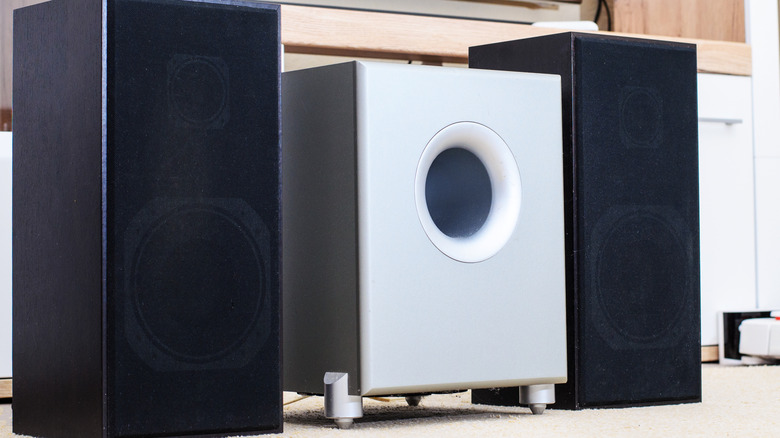
Subwoofer placement is one of the things that has the biggest impact on sound quality in any room. When it comes to subs, it’s not so much which direction you angle them, but rather where you put them in the room. Subwoofers are omnidirectional by nature, so a slight change in orientation won’t break your whole sound quality. You do have to ensure, however, that ported subs are not boxed in or glued to the wall because those vents need room to breathe. There’s no universal answer for the rest of the subwoofers, however, because every room has different wall materials, sizes and furniture, all of which change how bass frequencies behave. Place your subwoofer in two or three different spots and try out how it sounds.
Settings matter a lot
While the position of your speakers and subwoofer matter, settings do too. Calibration is the step most people skip because they assume it’s complicated. In reality, most modern AV receivers come with automatic calibration software. Systems from brands like Yamaha or Pioneer test tones through each speaker, measure the room’s acoustics and apply corrective filters automatically.
Of course, if you’re more hands-on, you can calibrate these things manually with a sound level meter app on your phone or an external meter. Either way, calibration is needed for each system because out-of-the-box settings don’t account for all room setups.
One thing every owner of a surround system can do is to check the audio decoding menu on each connected source and confirm it’s outputting a genuine surround format, like Dolby Digital, Dolby Atmos or DTS, rather than defaulting to plain stereo.
Advertisement
Other things to try out to improve sound quality
Imaginima/Getty Images
Moving your furniture around can have a big impact as well. Depending on how much free room you have, you might want to try pushing the couch a foot or two forward or backward and check the difference in clarity and bass response. If you have an older sound system, you might also want to check on those cables to ensure they’re not fraying or chewed up by one of your pets. Also, wired connections will always outperform Wi-Fi or Bluetooth when it comes to consistency and sound quality, so swap to that if at all possible.
Great surround sound doesn’t require tearing your setup apart and starting over. Addressing room acoustics, refining speaker aim, figuring out the best subwoofer placement, running calibration and adjusting your seating position will all impact how good your system sounds.
CD players are back. Back again. Tell a friend — preferably the one who dumped an entire collection at Goodwill because Spotify was supposedly the future forever.
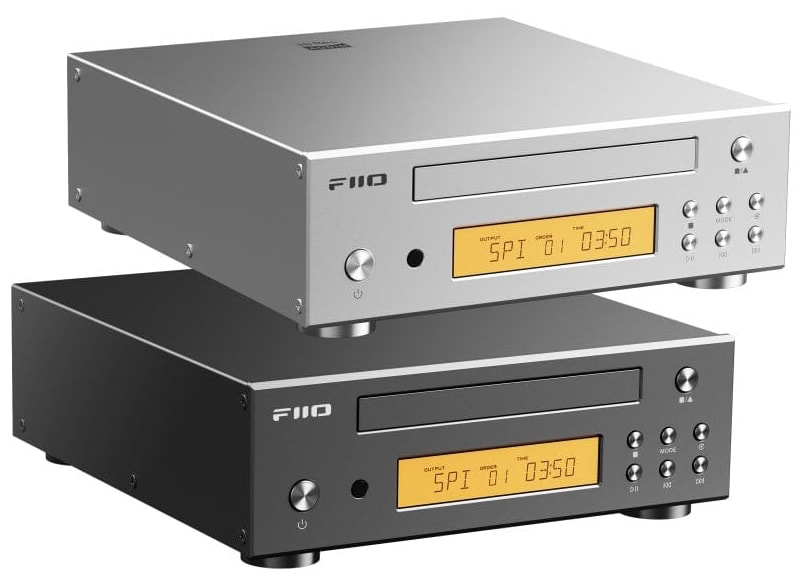
The timing of FiiO’s new DP11 could hardly be better. Our recent look at RIAA data found U.S. CD unit volume up 45.7% to 17.5 million during the first half of 2026, while wholesale revenue jumped 58.6% to $171.1 million. Streaming still dominates music consumption, but the little silver disc is behaving rather poorly for a format that was pronounced dead years ago.
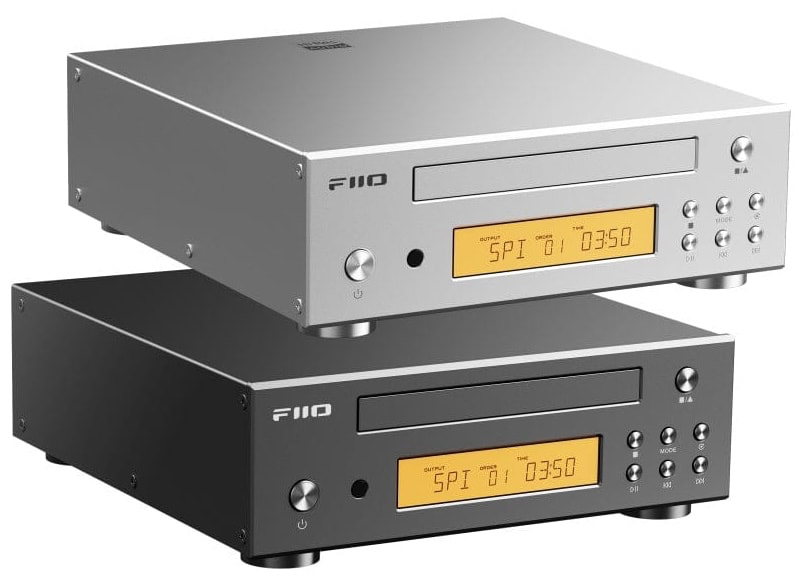
FiiO has already leaned hard into the revival with portable models including the DM13 and DM15 R2R. The DP11 takes a different approach: it is a compact desktop CD transport and player designed to sit in a proper hi-fi system.
Related Reading:
What Makes the DP11 Different?
Currently listed at $169.99 through HiFiGo, the DP11 is unusually well equipped for the money. FiiO uses a custom desktop CD mechanism with optimized servo control and a support structure designed to reduce mechanical noise during playback.
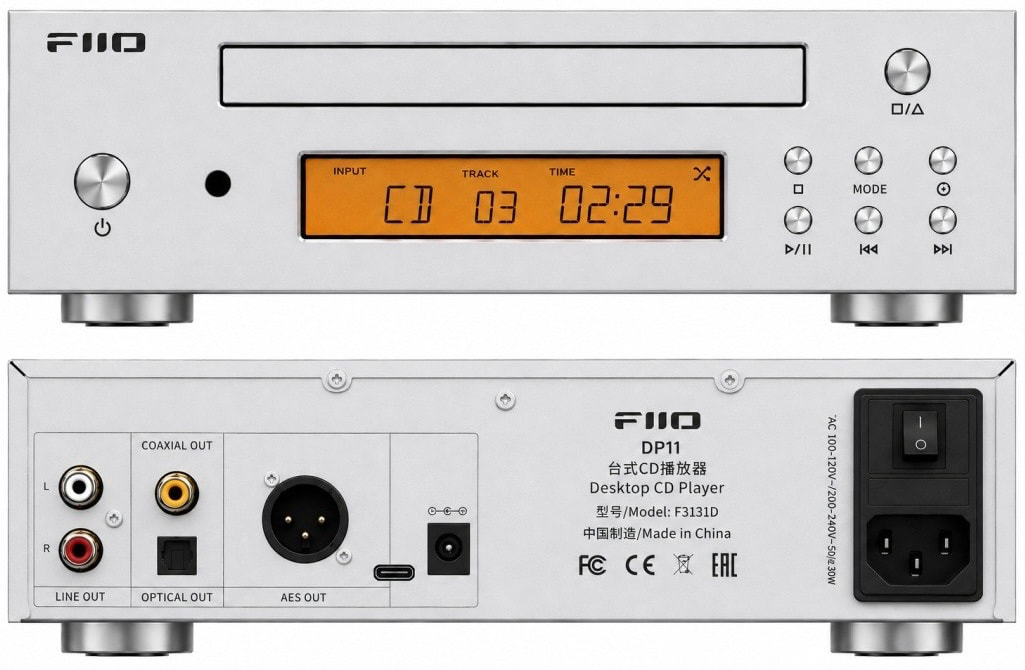
The rear panel is the real story. AES, coaxial and optical digital outputs let the DP11 feed an external DAC, while an internal Cirrus Logic CS43198 DAC and stereo RCA output mean you do not actually need one. USB can also turn the DP11 into a digital interface for a computer, phone or tablet, while CDs can be ripped directly to USB storage in lossless WAV format.
Advertisement
Power can come from the internal AC supply or an external 12V DC supply, giving tweakers an obvious path toward an aftermarket linear power supply. Nobody required FiiO to make a $170 CD player this flexible, but here we are.
FiiO DP11 Specifications
Type: Desktop CD player / digital transport
Mechanism: Custom tray-loading CD drive
DAC: Cirrus Logic CS43198
Digital Outputs: AES, coaxial, optical
Analog Output: Stereo RCA
USB: Digital interface and CD ripping
CD Ripping: Lossless WAV to USB storage
Display: 3.71-inch LCD
Power: Internal AC or 12V/2A DC
Remote Control: Included
Dimensions: 213 x 230 x 67 mm
Weight: 1.8 kg / 4 lbs
Finishes: Black or silver
The Bottom Line
The DP11 is not an everything box. There is no headphone output, SACD playback, Bluetooth or network streaming, so anyone wanting a Discman, streamer and headphone amplifier rolled into one should keep walking.
That focus is also part of the appeal. The $299 Shanling CR60 also rips CDs and functions as a compact transport, but requires an external DAC. The $199 Shanling EC Play adds Bluetooth 6.0, LDAC and headphone outputs, but is designed primarily as a portable player.
For listeners with shelves full of CDs and an existing amplifier or DAC, the DP11 offers an unusually complete set of connections for very little money. Considering what has happened to CD sales in 2026, FiiO may have arrived at exactly the right moment.
The CD player is back. Again. Please try to act surprised.







































































You must be logged in to post a comment Login