
Join Mikko Hyppönen and security leaders from the NFL, CHANEL, and Atlassian for a two-hour digital summit on what AI-speed attacks change, what defenders should stop doing, and how to validate, decide, fix, and re-validate at machine speed.
Tech
F5 patches BIG-IP APM zero-day flaw exploited in RCE attacks



F5 has released security updates to address a critical BIG-IP APM zero-day vulnerability being exploited in remote code execution attacks.
BIG-IP APM (short for Access Policy Manager) is the company’s centralized access management proxy solution that helps admins secure access to their organizations’ networks, applications, cloud, and application programming interfaces (APIs).
Tracked as CVE-2026-94127, the flaw affects instances configured as an OAuth Authorization Server when a BIG-IP APM access policy and an OAuth profile are configured on a virtual server.
“We have learned that this vulnerability has been exploited,” F5 warned in a security advisory published on Tuesday. “Deployments using APM strictly as an OAuth Client / Resource Server (without OAuth authorization server profiles configured) are not affected by this vulnerability.”
The company advised customers to review systems for indicators of compromise if they detect a combination of multiple OAuth authentication failures and suspicious commands, shortly followed by a TMM SIGABRT.
F5 also shared mitigation measures for admins who can’t immediately install the security updates, which require applying an iRule (available from F5 Support) to the affected BIG-IP APM virtual server.
Internet threat monitoring non-profit Shadowserver currently tracks over 14,700 IP addresses with BIG-IP APM fingerprints. However, there is no information on how many have already been patched or are honeypots.

On Tuesday, the Cybersecurity and Infrastructure Security Agency (CISA) also added CVE-2026-94127 to its Known Exploited Vulnerabilities (KEV) Catalog and ordered U.S. federal agencies to secure their networks against this flaw by Friday.
“These types of vulnerabilities are a frequent attack vector for malicious cyber actors and pose significant risks to the federal enterprise,” the cybersecurity agency warned.
Cybercrime and state-backed threat groups have often exploited F5 vulnerabilities in recent years. For instance, attackers have targeted security flaws in F5 products to breach corporate networks, hijack devices, map internal servers, deploy data-wiping malware, and steal sensitive documents.
F5 also disclosed in October 2025 that state-sponsored hackers breached its systems in August 2025 and stole undisclosed BIG-IP security source code and vulnerabilities.
Since November 2021, CISA has flagged eight actively exploited F5 vulnerabilities, four of which have also been abused in ransomware attacks.
F5 is a Fortune 500 company that provides cybersecurity, application delivery networking (ADN), and other services to more than 23,000 customers worldwide, including 48 of the Fortune 50 companies and 80% of the Fortune Global 500.


Continue Reading


We may receive a commission on purchases made from links.
As of 2025, the generations-long Ford F-Series and Chevy Silverado are the two best-selling vehicles in America, with the Ram Pickup coming in fifth. In fact, trucks had a higher share of vehicle purchases than passenger cars last year. All this means that truck driving isn’t just common in the U.S.; it’s a point of pride and a defining feature of the nation’s roads. To serve that massive portion of buyers, we’re highlighting a few tools that can prove important for truck drivers. But because of the unique nature of pickup trucks in comparison to cars, these tools can be rather different and more specialized.
Industry giant DeWalt has an enormous array of highly-rated tools in every category, and it can be quite difficult to know what’s best for your vehicle, especially if you’re newer to the world of trucks. So, if you’re looking to update your toolkit as a truck driver, the following popular picks from DeWalt are the perfect place to start. We’ve picked items from a range of different categories that we deem most useful for truck drivers, so that regardless of your budget or specific needs at the moment, there should be something to consider.
20V MAX LED handheld area light
That small emergency flashlight that you keep in your glove compartment can be perfectly suitable for illuminating the interior and exterior of your car as needed, but for truck drivers, this can dramatically complicate the work of finding an essential component, securing cargo, completing a routine maintenance job, or inspecting the truck before setting out on a job. Truck drivers, then, will typically appreciate something more heavy-duty.
If you’re a DeWalt customer, there’s one particular item that’s a good fit: The 20V MAX LED handheld area light. As the name suggests, it’s designed not simply to provide a narrow beam of light that the user has to direct by hand, but also to be quickly and temporarily affixed where needed to give broader, hands-free illumination. Its body is shaped with grips that make it more comfortable to hold for longer periods, and it also features a beltloop accessory.
The versatility of DeWalt’s 20V MAX* LED handheld area light extends to its suite of features as well. DeWalt notes that the area light features can be set between 300 and 1000 lumens, with a head that can swivel 140 degrees. Its compatibility with the rest of the range also means that users of other 20V MAX products may already have the battery and charging capacity they need for this model. Being designed for job sites, it can be a truck driver’s stalwart companion. You can currently find it for $55 on Best Buy and $45.10 on Amazon (down from $89), where it boasts an average of 4.8 stars based on over 1,300 reviews.
Grabo suction lifter
Pickup trucks are perfect for transporting heavier goods such as construction materials around a job site. However, a trucker needs a convenient, safety-compliant means of lifting them. Larger commercial trucks, of course, are often equipped with tail lifts for exactly this purpose, but another convenient tool for transporting heavy goods and equipment safely is the DeWalt Grabo Suction Lifter. A collaboration between DeWalt and GRABO, this is, according to the brand, “the first professional electric vacuum lifter.” A tool like a vacuum lifter, in some cases, may be the only practical way to move heavy loads with smooth surfaces, such as metal or plastic panels, slabs, and stones.
With a maximum load capacity of 265 lbs, this heavy-duty vacuum lifter is powered by batteries from DeWalt’s 18V or Flexcolt line. It boasts a foam/rubber seal with vital safety measures, including a two-action release and a warning and temporary inoperability state if a worker attempts to use it when its battery is below a certain threshold. As with the other items in the DeWalt range, it was created for versatility, and it is compatible with materials ranging from plywood and glass to MDF and pathing slabs. It will set you back $249 on Amazon, but it’s currently discounted to $189.99.
ToughSystem 2.0 DS450 mobile storage box
While trucks with big beds can transport large items — or large quantities of items — that a car owner would be unable to manage, transporting all those goods safely is just as important. This is where a rugged and hard-wearing storage solution you can keep safely in the bed of your truck comes in handy. There are a lot of things to consider before buying a truck bed toolbox, but the DeWalt ToughSystem 2.0 DS450 Mobile storage box could be just the solution for you.
DeWalt’s ToughSystem is a product range created to meet these sorts of needs, to transport both heavy and hard-wearing and more fragile tools without the risk of damage. The DS450 mobile storage box boasts a generous capacity that’s further customizable depending on how the user intends to transport their items. It’s designed to be operated with one hand to be wheeled across a work site on its 8-inch wheels, while its metal two-piece latches on the front keep the tools inside secure.
Because of the range’s modular nature, it can also be used as one important part of an even larger storage system that includes two additional storage boxes as part of the three-piece tower. Couple this with the 250-lb load capacity of the original storage box itself, and it’s clear just how much storage users can have and, of course, how much room they’ll need in a truck bed. The box is available in several stores, including Home Depot, where it’s priced at $125, while all three boxes will set you back $259.97, but are recommended by 82% of the customers.
heavy-duty ratchet tie-down straps
A lot of trucks have open beds, which is naturally a setup that can leave any cargo prone to shifting around heavily with the motion of the vehicle. For the vital job of securing everything you’re carrying in your truck’s open bed, then, you can consider DeWalt’s Heavy-Duty Ratchet Tie-Down Straps. DeWalt’s ratchet straps are available in several varieties, with two hefty versions being the 1.25-inch-by-16-foot Ratchet Tie Down Straps with 3,000 pounds of break strength and the 2-inch-by-27-foot Heavy-Duty RATCHET Tie-Down Strap with a formidable break strength of 10,000 lbs.
These straps are created for different weights or quantities of cargo, and while they also have utility for securing loads in other situations such as trailers, they’re primarily useful with trucks rather than smaller cars. They are made from polyester and feature metal ratchets and armored caps, but note that DeWalt specifies they are weather-resistant rather than weatherproof. The clips are designed to be hard-wearing yet quick to attach.
ACME Tools lists the larger and more formidable variety of 10,000-lb break strength straps for $29.99. Compared to some truck drivers’ essentials, they are far from breaking the bank and can also be easily stored away for convenient access when needed. Though a compact package when not in use, they also have considerable length. Nonetheless, it’s also important to remember that there’s still a limit to these products, and it can be extremely dangerous to exceed it. According to DeWalt, a 10,000-lb break strength translates to a safe working strength of 3,333 lbs, while a 3,000-lb break strength translates to 1,000 lbs.
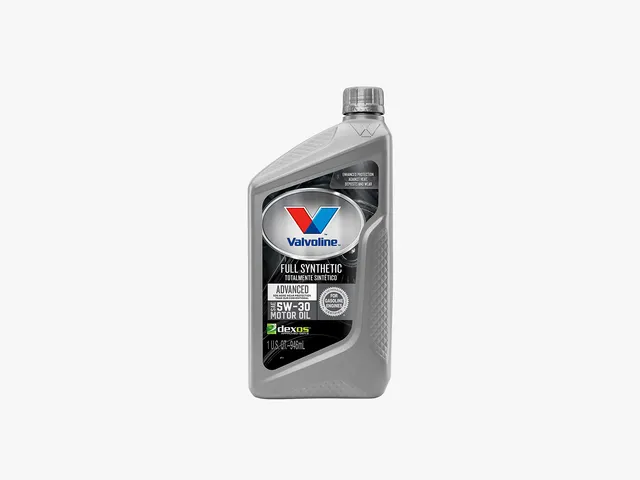
I come from a car family, the kind that always had four or five vehicles in various states of “restoration.” Changing your own oil in my house was not only a rite of passage but a duty—proof that you were self-sufficient and economical, not, as my uncle would say, a “handy-man.” (“I open my wallet and hand over my credit card!” he’d roar.)
Suffice it to say, I changed my own oil for most of my adult life until about eight years ago, when I bought my first new hybrid SUV. Opening the hood for the first time, I saw an arrangement of black plastic rectangles, not the discrete auto parts I recognized. I didn’t know how to change the oil, and I wasn’t sure I wanted to figure it out. I was (and still am) a working parent, and I always appreciate having another chore taken off my plate.
The nearest oil change facility to my house turned out to be a Valvoline Instant Oil Change, and I have been going there ever since, for both that same hybrid SUV and a second one I bought a few years later. Hybrid vehicles require fully synthetic oil, which costs about twice as much per quart as conventional oil, so having the oil changed by a shop is typically worth it when factoring in the labor—especially if you have a Valvoline Instant Oil Change coupon.
Valvoline may be best known for its line of retail automotive products like oil and additives, but it also operates 2,100 US locations of Valvoline Instant Oil Change garages, which perform oil changes at up to 50 percent less than most car dealerships. And faster, too—usually around half an hour in my experience. If you, too, would like to have your oil changed quickly and inexpensively, or get some cash off some quarts of motor oil if you’re still DIY-ing, check out our Valvoline coupons and deals below.

Valvoline Advanced Full Synthetic 5W-30 Engine Oil
Get $10 Off Full-Service Conventional Oil Change
If you have a basic, non-hybrid vehicle driven under normal conditions (infrequent stop-and-go traffic, no towing), you’re in luck—your oil change will already be relatively inexpensive. It will be even cheaper with this $10-off Valvoline coupon, which includes 5 quarts of Valvoline brand motor oil (diesel quarts may vary), a filter, lube and maintenance check, and tax. Print it or save it to your phone so you have it next time you’re out and about. Not valid with other offers or customer-supplied oil (at that point, you may as well do it yourself).
Unlock $15 Off with Valvoline Blend Oil Change Coupon
This is the coupon I personally use when I get my oil changed. In fact, I’m printing it out right now! Synthetic and synthetic blend oils are best for hybrid vehicles, luxury vehicles, vehicles subjected to a lot of stop-and-go traffic, trucks that tow, or any car with an engine that needs a little TLC. Because synthetic oil is engineered to be more consistent and uniform, it provides better temperature stability and cleaning power, leading to less wear and tear on an engine. It is also, of course, more expensive than conventional oil, so this Valvoline coupon offers a little more off—$15 as opposed to $10. Like the offer above, this Valvoline coupon is good for up to 5 quarts of Valvoline oil, a filter, lube and maintenance check, and tax.
Save 25% When You Subscribe and Save
When you buy more at Valvoline, you save more. One of the easiest ways to save is to buy in bulk, which is especially cost-effective if you have multiple cars or a family with several cars. When you purchase multiple units of motor oil, gear oil, or transmission fluid, you’ll receive a larger discount the more you buy, up to 25% off.
Valvoline Promo Code: $5 Off
Do you change your own oil and shop at a farm store, such as Fleet Farm, Blains, Rural King, Bomgaars, Theisen, Farm King, Quincy, L&M, Runnings, Buchheit, Family Farm & Home, Tractor Supply, or Norby’s? If so, you can get a $5 rebate with the purchase of five quarts of any Valvoline Motor Oil or 1 gallon of Premium Blue Heavy Diesel Engine Oil. Limit 3.
Find Your Nearest Valvoline Oil Change
There’s a reason Valvoline is a go-to for convenient, one-stop oil changes. With more than 2,100 locations nationwide, it’s likely there’s a Valvoline within twenty minutes of you. You can even check online—enter your location on the map and it’ll instantly show the nearest locations, so you and your car can hit the road again. Be sure to check Valvoline’s offers, which often include several oil change coupons so you can save big on your next Valvoline Instant Oil Change. When you find an offer on the coupon page, text or email it, print it from your desktop, or save it to your mobile wallet so you have it handy for your next discounted oil change.

KRAFTON India has launched KIGI Cohort 4 to support more game developers and studios in the country. Applications open on September 22, 2026. Through KIGI, developers can get financial assistance, expert guidance, and access to global platforms as they work on their games. The new cohort will also consider projects that have moved beyond early development.
KIGI Cohort 4 Expands Support for Games at Different Stages
KIGI Cohort 4 will continue to support early-stage teams and new game concepts. However, the program is expanding its scope to include games further along in development. Mobile games in beta or soft launch can now be considered. For PC games, developers can apply with titles that have a live Steam demo. The demo should also be receiving encouraging community interest. This wider approach gives developers a chance to seek support at different stages of development.
KIGI’s Previous Cohorts and Growing Game Development Support
KIGI launched in 2023 to support emerging game development talent in India. Since then, its earlier cohorts have helped several studios move their projects forward. Studios from the first batch have already reached a successful soft launch. In the second batch, Mumbai-based studio Singular Scheme made progress. Its game, Frontier Paladin, became the first PC game to come out of KIGI and launched on Steam on April 24, 2026.
KIGI Cohort 3 received around 1,000 applications before selecting four studios. These included Xod Games Studio, EvolX Games, Ether Games, and RedDevil Studio. With Cohort 4 now open for applications, more game development teams can apply for support through the program.
Tech
A KLM flight turned around after a power bank caught fire, and it belonged to the airline’s ex-CEO

What just happened? A KLM flight from Amsterdam to Curaçao returned to the Netherlands after a portable charger caught fire in the business-class cabin. The incident underscores how a small battery failure can become a major operational issue on a long-haul flight, especially when an aircraft is far from its destination. It also put a former KLM chief executive at the center of an incident that highlighted the airline industry’s growing focus on portable power banks.
The power bank belonged to Camiel Eurlings, the former chief executive of KLM. The fire started nearly six hours into the flight, while the aircraft was over the Atlantic Ocean. The device left marks on Eurlings’ business-class seat and the window blind beside it.
The timing added to the disruption. Returning to the Netherlands required passengers to retrace much of the route rather than continue to Curaçao. The delay also carried into the next day, when travelers were rebooked on another flight and eventually completed the journey without further disruption.
The diversion shows why airlines pay close attention to portable chargers and other battery-powered devices. A power bank is small, but it contains lithium-ion cells capable of storing a significant amount of energy. If a battery overheats or fails, it can produce heat, smoke, and flames in a confined cabin. Such an incident is harder to manage on a long-haul route, especially when an aircraft is already far from its destination.
Airline rules vary, but carriers have tightened their policies around power banks and charging cords in recent years. Passengers are generally instructed to stop using a device if it becomes hot or begins to smoke.

The incident drew added attention because Eurlings once led KLM. He was not simply a passenger on the diverted flight; he had previously been responsible for the airline whose aircraft was involved.
One passenger told Dutch broadcaster RTL that Eurlings was “very upset” by the disruption but described his decision as “stupid.” Another passenger said: “If you are just a passenger, such a mistake can happen. But if you have enforced the company’s house rules, then this is very strange.”
As portable chargers become standard travel gear, airlines face a difficult balance. Keeping the devices in the cabin gives crews and passengers a chance to spot overheating batteries quickly, but it also puts a potential ignition source in a crowded, enclosed space.
Image credit: RTL
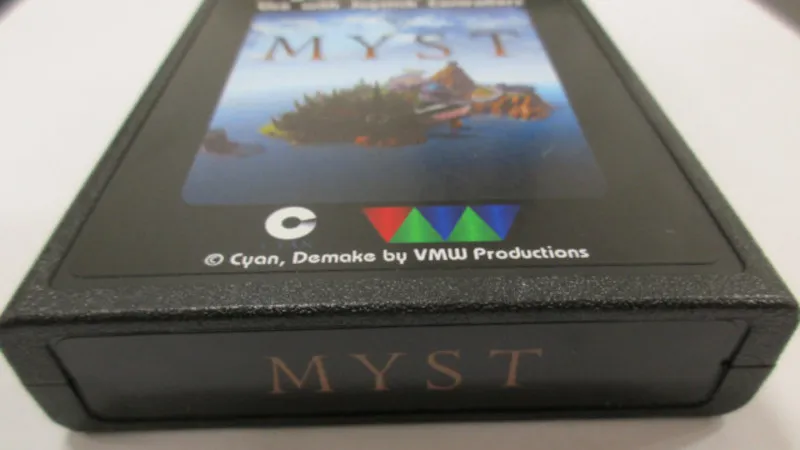
Although the Atari 2600 was a hugely popular game console in the late 70s, its hardware specs were limited, to say the least. For a dedicated game console of the era this isn’t too surprising, but things like 128 bytes of RAM meant programmers had to work hard to make games that were fun and playable (and they didn’t always succeed). Programming on this system even now is difficult, but nonetheless [Vince] wanted to get a version of Myst running on this system.
Obviously a PC game from the 90s is much to large, in many ways, to fit into an Atari cartridge or play on the 70s-era hardware. For that, there is a “demake” of Myst, a recreation of the game purposely built to run on older hardware it was never meant for. Even so, the game is running on a specialized cartridge built by [Vince] using parts from the real Atari game cartridge BurgerTime which had a bit more memory than normal. It wasn’t quite as straightforward as flashing the new game file to an old EEPROM though; [Vince] came across all kinds of timing issues and other miscellaneous problems that stretched this project out to around a three-year endeavor.
At the end of everything, though, he has a cartridge that will run Myst on the Atari, using the E7 bank switching scheme which afforded this system more memory within the cartridge. For [Vince], who is a fan of the demo scene for consoles like this, this was an interesting experiment to push original hardware to its limits. And, if you want to try this on an Atari 2600 handheld which also uses original hardware, we’d recommend using one of these.

One of the most essential accessories for a person who keeps up with technology is a good pair of headphones. If you’re looking for the top-of-the-line products, you’ll likely come across Bose. We’ve highlighted several of the company’s offerings, from customer favorite Bose earbuds, to more immersive over-ear models such as the Bose QuietComfort headphones. If you have the budget for it, Bose is certainly one of the tried-and-true headphone options out there.
Of course, even premium electronics run into glitches sometimes. If, for some reason, your Bose headphones stop working as intended, there are a number of ways to troubleshoot them. The first step is usually turning the headphones off and then on again after around 30 seconds to one minute to force a power cycle. How to do it on your Bose headphones will depend on what model you own, but in general, there should be a power button right on the device that you can press.
If performing a basic power cycle doesn’t get your headphones back to working condition, your user manual or Bose’s support pages may offer solutions specific to the headphone function you’re having an issue with. When all else fails, your last resort could be to factory reset your Bose headphones and start fresh.
How to turn off your Bose headphones and perform a power cycle

Before you panic and contact customer service, one of the easiest glitch fixes you can try without huge repercussions is turning your Bose headphones off. In some cases — for older models such as the Bose Noise Cancelling Headphones 700 – all it takes is a quick press and release of the power/Bluetooth button to turn the headphones off.
Headsets like the Bose QuietComfort 35 may have a slide power button that you’ll have to push to the left to shut the device down. For newer iterations, namely the Bose QuietComfort Ultra Headphones (2nd Gen), you will need to long-press the power/Bluetooth button until you hear a power down tone or see the status light turn off. If you happen to have Bose earbuds, you’ll probably need to place both back in the charging case and close the lid to execute a power down.
After around 30 to 60 seconds, hit the power button again or take your earbuds out of the case to complete a basic power cycle. Normally, this should clear any temporary bugs or memory issues without erasing any pertinent device preferences. If a problem persists, consult your user manual or Bose’s Help Center for your specific needs. Only consider factory resetting your Bose headphones as a last resort as it may clear your paired device history and other customizations you’ve done to your headphones’ audio settings. Apart from the power switch on the headphones, another common fix is toggling the Bluetooth function your Bose headphones are connected to, forcing a new connection by unpairing the headphones from your device, or updating the Bose app on your device. If none of these work, you may need tо go with the factory reset.
How to reset your Bose headphones by rebooting
Resetting your Bose accessory can be further classified into two actions: you can either “reboot” or “restore” your device. The less aggressive of the two is to reboot, which entails restarting your device without modifying any of your settings. This is often the move if your headphones are not responding or if none of the controls are working. Although performing a power cycle can also be a way of restarting your headphones, actual rebooting refers to a series of steps to be performed in order.
For cup-style or over-ear headphones like Bose QuietComfort Ultra Headphones (2nd Gen) or Bose QuietComfort Headphones (2nd Gen):
- Remove the headphones from your device’s Bluetooth list.
- Disconnect any charging or audio cables from the headphones.
- Connect the headphones’ charging cable and charger head to a power outlet, or a powered on computer’s USB port. Do not connect the headphones to the charging cable yet.
- Long-press the power/Bluetooth button on your headphones.
- While long-pressing the button, connect the charging cable to the left (on the Bose QuietComfort Ultra Headphones 2nd Gen) or right (on the Bose QuietComfort Headphones 2nd Gen) earcup. This should cause the power light to blink twice.
- Once connected, wait a few seconds then let go of the power/Bluetooth button.
For the Bose QuietComfort Ultra Earbuds (2nd Gen):
- Place the earbuds in the charging case and make sure the light that indicates it’s charging is on.
- Close the lid of the charging case.
- Plug the charging case to a wall charger or a powered on computer using its charging cable.
- Long-press the button on the back of the case for around 30 seconds until the light on the case turns off.
How to reset your Bose headphones by restoring

For most Bose headphones, rebooting should be sufficient enough to fix unresponsiveness. If not, you can try the reboot process one more time. If it really doesn’t do anything to fix the problem, you may need to go all-in and reset your headphones by completely restoring them.
Also known as a “factory reset” or “factory default,” restoring returns your headphones to its original, out-of-the-box state. It will remove all your settings modifications as well as all the pairings you’ve established. This option is usually reserved for more serious issues, such as headphones that won’t connect or pair to a device.
Here’s how to restore the Bose QuietComfort Ultra Headphones (2nd Gen) to factory default settings:
- Remove the headphones from your device’s Bluetooth list.
- Remove the headphones from your Bose account using the Bose app on your mobile device.
- Long-press the power/Bluetooth button and multi-function button at the same time. This will cause the status light to blink amber for five seconds.
- Keep long-pressing both buttons for 15 seconds until the status light turns solid white. The light should pulse blue when the restore process is complete, indicating that it’s ready for Bluetooth pairing.
To restore the Bose QuietComfort Ultra Earbuds (2nd Gen) to factory settings, do the following after removing the headphones from your device’s Bluetooth list as well as from your Bose account via the Bose app:
- Place both earbuds in the charging case and keep the lid open.
- Long-press the button on the back of the case for 25 seconds until the status light blinks white twice, pulses blue, and then turns off.
- Repeat step 2 two more times. After the third time, the status light should blink amber for three seconds to indicate that the reset is starting. The light will pulse blue once the restore process is complete.
Based on testing, some Bose headphones models only offer the “reboot” option to reset your product. Double-check your manual and your product’s dedicated page on Bose’s Help Center for steps on resetting your product by “restoring” your headphones to factory settings. If you can’t find any, reach out to customer support via Bose’s Contact Us page for assistance in restoring your Bose headphones to its out-of-box conditions.


From the day I started Heidi, the ambition was always bigger than writing doctor’s notes.
Dr Thomas Kelly said that on Tuesday, as the company he cofounded announced US$340m of new funding.
The money arrives in two parts. In its announcement, Heidi said Blackbird led a US$100m Series C that values the Melbourne company at US$900m. Phoenix Court, Point72 Private Investments and Headline also took part.
That price is almost double the US$465m Heidi carried last October, when Point72 led a US$65m Series B.
The other US$240m is not equity
The larger half comes from General Catalyst’s Customer Value Fund, and it buys no shares.
Olivia Poh reported for Bloomberg that the CVF is a debt-like instrument. General Catalyst holds no stock and no warrants in Heidi. It funds sales and marketing, then takes a capped share of the revenue that spending produces, on top of getting its money back.
Pranav Singhvi, who cofounded the fund, said it exists so companies with good unit economics can push their growth engine without spending their own balance sheet on it.
Heidi has now raised US$436.6m in total.
The numbers behind the round
Annual recurring revenue went from US$1m to US$50m in two years, reaching that mark in April.
Heidi says its product has supported more than 175 million patient visits, up from 73 million at the Series B, and more than 67 million clinical hours. It puts weekly volume at about 2.8 million patient interactions, across 110 languages and 190 countries. A year ago it counted 116 countries.
At the Series B last October, Heidi reported about two million patient interactions a week across 116 countries. Those are the figures the new ones are measured against.
Enterprise activation sits at around 62%, by the company’s own measure. Heidi employs close to 600 people.
Kelly founded the company in Melbourne with Waleed Mussa and Yu Liu. Blackbird has held a stake since the pre-seed in 2021 and leads this round.
Michael Tolo of Blackbird, which has backed the company since its pre-seed in 2021, said generic AI will not close the healthcare deficit because clinicians ignore it.
Kelly told Bloomberg the company plans to add as many as 150 staff over the next year, and to push into Asia and the Middle East.
Where Heidi already runs
In the UK, Heidi is sole supplier to NHS England Midlands, in what the company calls the largest clinical AI procurement in NHS history. In the US it is used by Beth Israel Lahey Health in Massachusetts. In New Zealand it runs in every emergency department in the country.
Australian deployments include the Royal Children’s Hospital Melbourne, Children’s Health Queensland and Metro South Health.
Britain is buying clinical AI at scale at the moment. Palantir’s £330m NHS contract is heading for renewal with a former deputy Labour leader newly on its payroll.
What the money pays for
Kelly said the round funds a move from documentation to agents that take on clinical work under supervision. He told Bloomberg that within six to twelve months Heidi should handle most of what a doctor asks of it.
Heidi has built its own models rather than renting frontier ones. It says transcription and note generation, which account for most of its compute, now run almost entirely on in-house technology.
Beyond the scribe it has shipped Evidence, which answers clinical guideline questions and has handled more than 10 million queries since March. It has also shipped Remote, a wearable for audio capture, and Dictate.
Part of the round pays for clinical evidence, quality management systems and regulatory submissions. Heidi says it will work with regulators on the appropriate pathway.
The General Catalyst money is tied to go-to-market spending by the structure of the fund, so the equity is what pays for the rest.
Not in the UK or EU
Heidi added one line under its investor quotes. The coming product capabilities will not be available in the UK and EU. The company gave no reason and no timeline.
It does list the paperwork it holds: ISO 27001, SOC 2 Type II, Cyber Essentials Plus and ISO 42001, plus alignment with NHS requirements, GDPR, HIPAA and the Australian Privacy Principles.
Europe has a route for autonomous clinical AI, and it is slow. Vara spent years securing CE certification for AI that reads breast screening images without a second radiologist.
The scrutiny around clinical AI
We reported in August that NHS AI scribes were making errors in patient records, with Healthwatch raising concerns and the MHRA involved. In a separate case, an AI receptionist mishandled a stroke patient.
Heidi says every agentic decision stays under clinician control. Its clinical research team runs testing, validation and published research ahead of release.
Bloomberg points to a 2023 Pew Research Center survey in which 60% of American adults said they would be uncomfortable if their doctor relied on AI to diagnose them.
Other scribe rounds this year
Tandem Health raised $100m on 15 September to turn its own AI scribe into clinic software. That is the same amount of equity, for the same strategic move, one week earlier.
Bloomberg notes two more. Forus took $150m this month at a $3bn valuation, and Latent raised $80m earlier in the year.
Kelly’s pitch against general-purpose assistants is retention. He told Bloomberg that healthcare involves a lot of setup and configuration, and that the company’s data shows customers stay.
The World Health Organization projects a shortfall of 11 million health workers by 2030. Heidi cites that gap as the market it sells into.
Shadow IT includes hardware, software, and services running outside IT and security teams’ visibility or approval. It can include unapproved applications employees install, browser extensions with excessive permissions, and endpoints provisioned once and never enrolled in any monitoring platform. These unmanaged assets create visibility gaps because existing security controls do not monitor them.
Many organizations rely on network discovery scans to measure asset coverage. While useful, network discovery only identifies endpoints that respond during the scan window. Powered-off devices, isolated network segments, and software that does not expose listening ports can remain invisible. As a result, network discovery measures network reachability, not monitoring coverage.
Wazuh is a free and open source security platform that unifies SIEM and XDR capabilities across endpoints and cloud workloads. It collects system inventory data directly from each monitored endpoint, allowing security teams to compare what network scans report against what the Wazuh-monitored endpoints report.
This comparison helps identify unmanaged endpoints, unauthorized software, and monitoring gaps.
Why shadow IT resists discovery
Shadow IT persists because the tools that report findings often can’t observe the assets in question. Understanding where the gaps form helps security teams decide which controls to extend.
- Unmanaged endpoints: A workstation that is reimaged and never re-enrolled, or a virtual machine built for a short-lived project and left running, produces no telemetry. It does not appear in patch reports, vulnerability findings, or alert data, because no agent is installed to monitor them.
- Unapproved applications on managed endpoints: Remote access tools, file sharing clients, and productivity utilities installed outside the approved software baseline introduce risk on endpoints that are otherwise fully monitored. The endpoints are visible, but the software running on them is not always reviewed against policy.
- Software that opens no network port: Unauthenticated network discovery can infer services from the ports a host exposes, but it cannot reliably identify software that does not listen for inbound connections. Browser extensions, locally installed utilities, and remote access tools that initiate outbound connections to a broker are not observable through that method.
- Devices that cannot run an agent: Printers, switches, IP cameras, and other network devices require inventory and monitoring methods other than an endpoint agent.
Addressing these categories requires endpoint telemetry and additional data sources for devices that cannot run an agent.
Closing the blind spot with Wazuh
Wazuh helps organizations reduce shadow IT exposure through continuous system inventory collection, centralized analysis, and correlation of inventory data with vulnerability and policy information. The following capabilities help security teams identify unmanaged assets and unauthorized software across their environment.
- Continuous system inventory: The Wazuh agent collects hardware details, operating system information, installed packages, network interfaces, listening ports, running processes, services, users, groups, and browser extensions from each monitored endpoint. The Wazuh agent on Windows endpoints additionally reports installed updates. The Wazuh agent forwards this data to the Wazuh server, which processes it and stores it in the Wazuh indexer as the endpoint’s current state. The system inventory capability is enabled by default, runs an initial scan when the Wazuh agent starts, and rescans on a configurable interval that defaults to one hour.
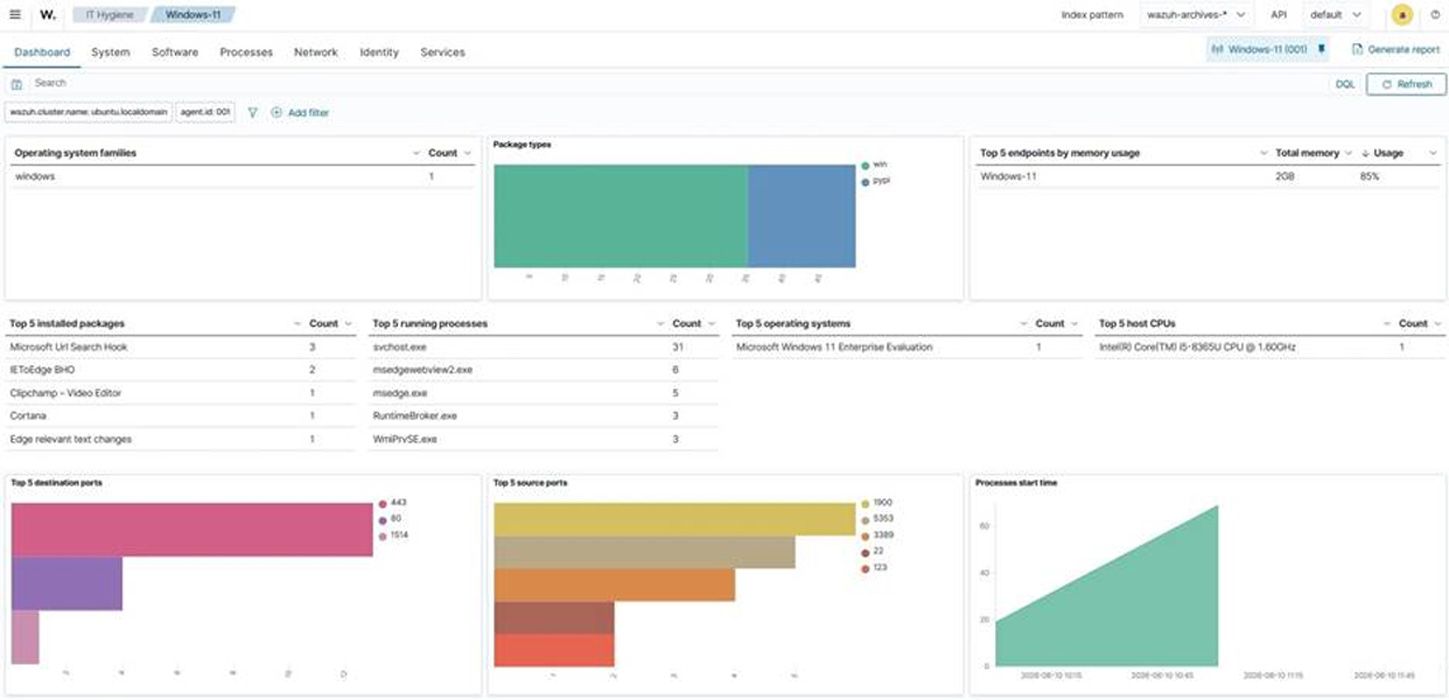
Figure 1: Wazuh IT Hygiene dashboard - Centralized visibility across the environment: Inventory data from every monitored endpoint is aggregated into dedicated indices and presented on the Wazuh dashboard under IT Hygiene, organized into Dashboard, System, Software, Processes, Network, Identity, and Services sections. Security teams can query the entire data from a single interface rather than inspecting endpoints individually. The Network section includes a Traffic tab listing the ports actively listening on each endpoint. This is a host-side view of the same information a network scan attempts to infer remotely.
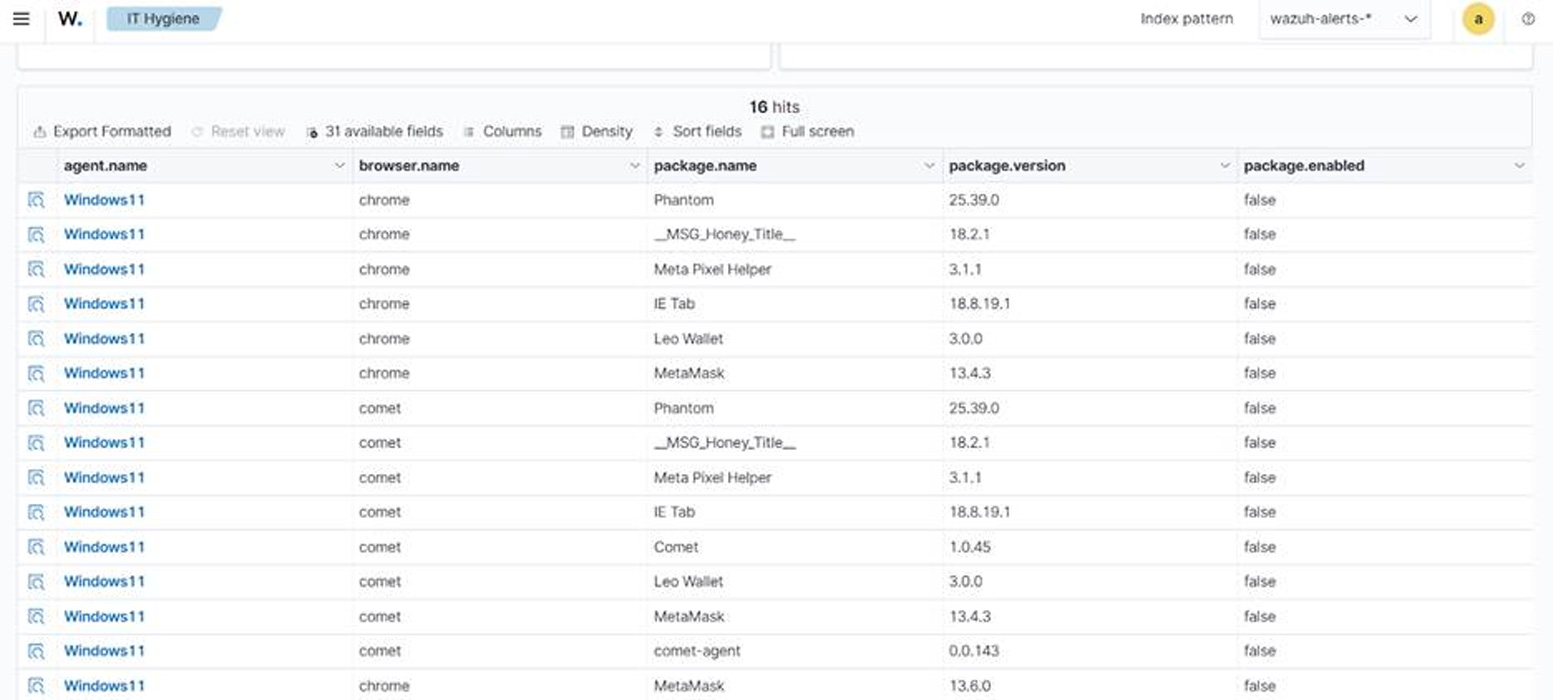
- Visibility into browser extensions and endpoint services: Wazuh 4.14.0 and later collect inventory data about browser extensions, endpoint services, users, and groups. The browser extension model is unified across Windows, macOS, and Linux, allowing security teams to identify extensions with broad permissions across the estate from a single query. The services inventory normalizes Windows services alongside Linux systemd units, which helps teams find unapproved software configured to start automatically.
- Coverage for devices that cannot run a Wazuh agent: Wazuh provides agentless monitoring over SSH for routers, firewalls, switches, and Linux or BSD systems. For devices that support neither an agent nor an SSH session, the Wazuh server accepts syslog directly from network appliances and other equipment. These capabilities provide additional visibility into devices that cannot run a Wazuh agent. However, SSH and syslog monitoring provide only the information exposed by the configured commands, files, and device logs.
- Monitoring agent coverage itself: Agent enrollment status measures coverage among endpoints already registered with the Wazuh server. It does not identify unknown endpoints that were never installed or enrolled. A Wazuh agent reports one of four states: never connected, pending, active, or disconnected. Agents that enrolled but never connected indicate deployments that did not complete. An agent moves to disconnected when no keep-alive message arrives within the configured window, which defaults to 15 minutes. Reviewing these states helps security teams identify endpoints assumed to be monitored but not reporting.
- Correlating inventory against vulnerabilities and policy: Inventory data supports security decisions when compared against a reference. Wazuh vulnerability detection correlates collected software inventory with vulnerability content from the Wazuh Cyber Threat Intelligence (CTI) platform. It does not probe endpoints or sweep the network, so the analysis runs centrally on data the endpoints have already reported. The same inventory can be joined against external data sources to identify end-of-life software that no longer receives security updates.
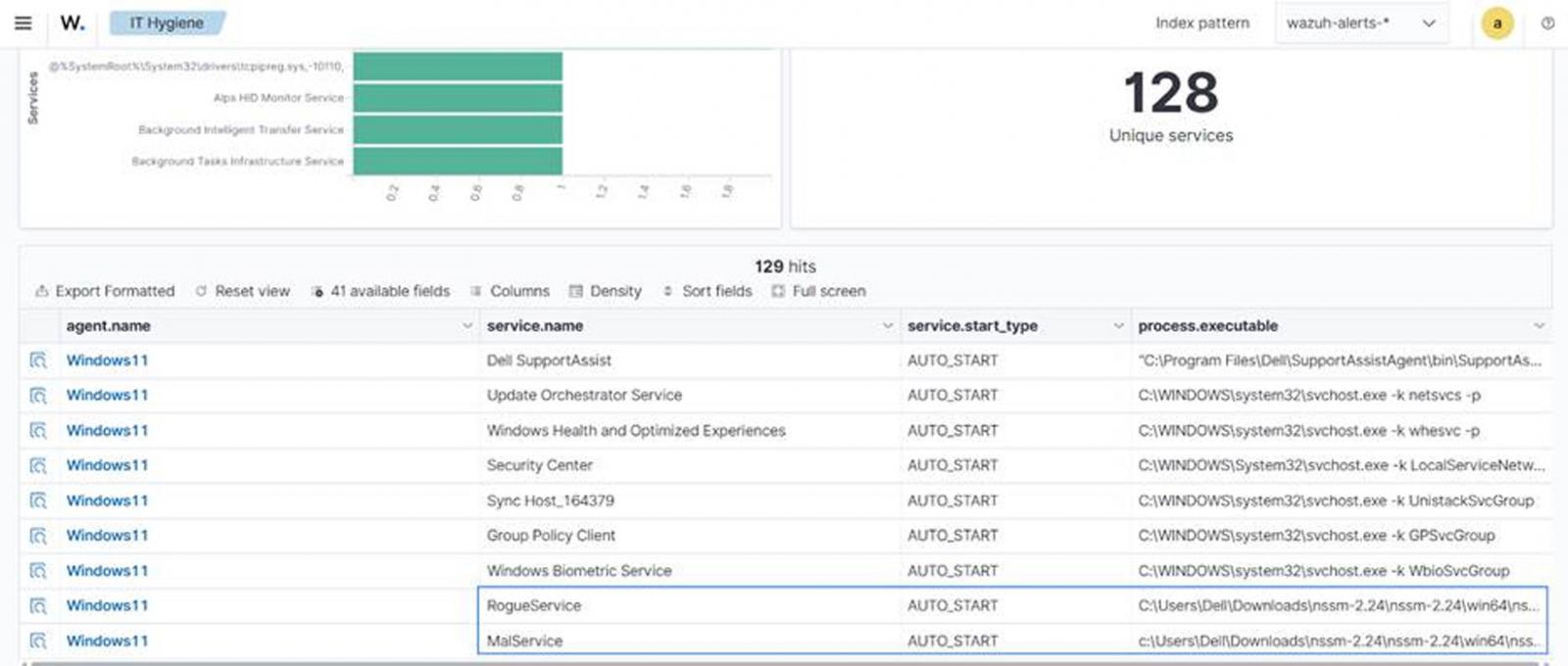
- Threat hunting across inventory data: Because inventory is stored centrally and indexed, security teams can query it during investigations rather than collecting data on demand. The Wazuh blog post Threat hunting using inventory data collected by Wazuh demonstrates this with custom rules, CDB lists of unauthorized software and ports, and queries run against the inventory. This approach surfaces assets that no single alert flags on its own.
- Detecting and removing unauthorized applications: Security teams can configure custom Wazuh rules to detect selected unauthorized applications and use a tested Active Response script to remove them from monitored endpoints. The Wazuh blog post Managing shadow IT with Wazuh covers the full configuration, including the custom detection rules and the active response script that uninstalls unapproved applications from monitored endpoints.
Conclusion
Shadow IT is a visibility problem before it is a policy problem. Organizations cannot enforce a software baseline on assets they cannot see, and network scanning alone shows only the systems that respond during a scan.
Wazuh helps reduce this visibility gap by collecting inventory from monitored endpoints and ingesting data from configured agentless sources. Endpoint inventory shows what is installed, running, and listening on each host, while agentless monitoring and syslog ingestion extend visibility to supported devices that cannot run a Wazuh agent. Wazuh agent enrollment states also help security teams measure monitoring coverage instead of assuming it.
With this data indexed centrally, security teams can identify vulnerabilities, investigate inventory across monitored endpoints, compare software with lifecycle information, and initiate configured remediation for applications outside the approved software baseline.
Discover more about Wazuh by exploring its documentation and joining its growing community of professionals.
Sponsored and written by Wazuh.


We may receive a commission on purchases made from links.
The convenience afforded by cordless power tools is obvious — even if you are in range of a power outlet, not getting tangled up in wires makes them worth it alone. However, the batteries and chargers that come with most power tool aren’t typically cheap. They can also be bulky and heavy, which negates the portability aspect.
That’s what makes Ryobi’s USB Lithium line notable. Instead of using large lithium-ion battery packs, these tools are more compact and are charged directly via USB. If you’ve already got a spot reserved for charging your smartphone, you likely already have what you need to charge a Ryobi USB Lithium tool — though they also come with the required accessories in case you don’t.
Of course, they’re not as powerful as Ryobi’s 18V and 40V tools — you won’t find a cordless circular saw in this system. But for lighter-duty jobs, their ultra-compact size is an asset, not a detriment. Plus, many of them come fairly cheap, especially compared to larger cordless tools. In addition to existing products, there are several new Ryobi USB Lithium tools as well. Here are five USB Lithium Ryobi tools under $40 worth adding to your collection.
USB Lithium Compact Detail Scrubber
Cleaning intricate or tight spaces often requires significant manual effort, and if you’re sick of wearing out your arm scrubbing away with an old toothbrush, the USB Lithium Compact Detail Scrubber is worth considering. It spins at 6,300 oscillations per minute. In addition to a 2Ah battery and USB charging cable, the tool comes with three different heads you can swap out, depending on the task: medium, hard, and scour.
The USB Lithium Compact Detail Scrubber has a promising 4.3 out of 5 overall user rating from nearly 400 Home Depot customers, who note it’s useful for cleaning hard-to-reach areas and comes in handy in the bathroom dealing with tile and grout. Ryobi also says it can be used on fiberglass and other surfaces.
It’s likely to get wet when cleaning in the bathroom or kitchen, so the tool is built to be IPX7 water-resistant. That means it can be submerged for a half hour in up to three feet of water.
The Ryobi USB Lithium Compact Detail Scrubber Kit (model FVG52K) is available at Home Depot for $39.97.
USB Lithium LED Flashlight
You may think that $40 is pricey for a compact flashlight, but despite its small size, the Ryobi USB Lithium LED Flashlight is capable of delivering up to 600 lumens. After testing the device, Pro Tool Reviews found it to be worth the cost, especially since it can run continuously at that brightness level for over 130 minutes. After that, the light indicates that it is running out of juice while providing another few minutes of 100 lumens to give you a chance to find your charging cable.
The 100 lumens is the low setting the flashlight also comes with — in that setting, it can last a whopping 18 hours. There’s also a third mode — strobe — which is useful if you’re using it as a makeshift hazard flare while changing a tire on the side of the road or a makeshift disco ball if you decide to have an impromptu dance party.
The Ryobi USB Lithium LED Flashlight also features a lanyard loop and belt clip to keep it attached to your person on the jobsite or while hiking. The tool is also suited for either of those situations since it’s rated IP54 for water and dust resistance. While it’s not as convenient as the Ryobi USB Lithium Magnetic LED Headlamp, which can be used as a hands-free work light in two different ways, those who prefer having an inline flashlight on hand have this as an option.
The Ryobi USB Lithium LED Flashlight (model FVL51K) is available from Home Depot for $39.97.
USB Lithium High-Volume Inflator
Last year, Jona Shone, a YouTuber reviewer of “quirky tools,” tested out every Ryobi USB Lithium tool they could get their hands on. After all that hands-on time with the platform, Shone named the Ryobi USB Lithium High-Volume Inflator one of the top two tools in the system. One reason the tool ranked so highly was its compact design, which makes it portable enough to take camping to inflator tents.
Another reason cited is the device’s onboard storage, which allows the included attachments — a sweeper nozzle and narrow pinch valve nozzle — to be kept on the side. Perhaps most importantly, Shone says that the inflator produces good air volume, which is the whole point of such a tool, but it is not a blower, despite Ryobi describing it as such. It’s not the right choice if you’re looking for a rechargeable tool to clear dust or debris from a workbench or computer keyboard.
As for inflating and deflating though, it’s solid. It’s not as powerful or versatile as the highest-rated Ryobi air pumps and you won’t be filling your truck tires with it, but it’ll get the job done with air mattresses, pool toys, beach balls, and the like. It’s IPX4 water resistant, so it’s fine to take to beaches and pools. Other features include a low- and high-speed setting and a pistol grip, affording more handling and control.
The Ryobi USB Lithium High-Volume Inflator (model FVIF51B) is available from Home Depot for $30.
USB Lithium Clamp Fan
If you’re looking for one of the Ryobi products that can keep you cool in the heat that can also use the brand’s USB Lithium batteries, the USB Lithium Clamp Fan can be a convenient choice. Because it can clamp onto surfaces, it’s useful to use in a garage or workshop. Its integrated clamp base is a standard 1-¼ inches, so it can be attached to desks, strollers, or the rim of an open toolbox. There are also built-in lanyard loops to carry it around hands-free.
It can run for over 7 hours on a single charge, so it could even last all day if you take it with you on a picnic. Of course, that maximum runtime applies to its low setting. The Ryobi USB Lithium Clamp Fan’s other setting is more powerful and eats through battery quicker but delivers up to 165 cfm of airflow despite the compact size of the device. Ryobi describes the product as its most portable fan to date.
On Ryobi’s website, over 1,000 users have rated the USB Lithium Clamp Fan a near-perfect 4.9 out of 5 average customer score. User sentiment is overwhelmingly positive and even enthusiastic, with owners praising the battery life and lightweight design, as well as how quietly it runs. Backing this up is the overall user score based on over 2,200 ratings from Home Depot customers — a 4.6 out of 5. One of the few complaints you can find about the tool is that it can’t be used while it’s recharging.
The Ryobi USB Lithium Clamp Fan (model FVF51K) is available from Home Depot for $39.97.
USB Lithium 200-Lumen Magnifying Light
There are multiple lighting solutions in Ryobi’s USB Lithium line, but — there’s a decent chance there’s one Ryobi USB Lithium tool you didn’t know existed — the 200-Lumen Magnifying Light. It’s not the brightest of the bunch, but its magnifying glass gives it an advantage none of the others do, allowing you to easily read blueprints, diagrams, and instruction manuals.
With a maximum of 200 lumens, you’ll have plenty of light to read such things, even in dimly lit areas. Other use cases include trying to find a dirty screw deep in the engine well where natural light is scarce. This somewhat niche but obviously useful ability is probably why the device has an excellent 4.7 out of 5 overall user rating from over 300 Home Depot shoppers, with 94% of surveyed customers recommending it. Users find the light to be bright enough for what it does and also cite the portability and intuitive form — it’s designed like an old-school, Sherlock Holmes-style magnifying glass — as reasons the device is worth having.
For what it’s worth, some owners do note that a hands-free option would be appreciated, and others say the magnifying lens — which offers 3x magnification — can distort images. But users find the pros outweigh the cons overall. The light has two brightness settings and can run up to 16 hours on a single charge.
The Ryobi USB Lithium 200-Lumen Magnifying Light (model FVL55K) is available from Home Depot for $29.97.

from the modular-design dept
A theme going on many years here at Techdirt has been the idea that separating content and advertising, as was the traditional model, makes far less sense in the modern era. Audiences are no longer captive in the way they used to be, with many ways to skip advertising. Entertainment vectors are far more plentiful then they used to be, with more options for how we spend our entertainment time. Eyeballs are the currency of the day, which has led to far, far more things competing for our attention.
Given all of that, content is always some form of advertisement, intentional or otherwise, and advertising definitely better include good content or it will be ignored. On the advertising side, this means creating ads of one sort or another that are engaging and interesting. That itself can take many forms, but absurdity and humor are a common method for achieving this.
And if you want absurdity and humor, allow me to introduce you to Ikea’s approach, which was to create a Skyrim mod.
Ikea, the Swedish furniture-and-stuff giant, has released a mod for Skyrim called Kallax Storageborn: A new companion who is also a shelf, who is also voiced by Matt Berry. If you think that sounds weird, it gets weirder, because this mod doesn’t just add a companion, it includes an entirely new questline built around the character. Becoming encumbered in the game, as will inevitably happen eventually, will give you the opportunity to visit an abandoned dwemer emporium, where you’ll embark upon a quest to “unravel the origins of a mysterious master.”
During this quest, you’ll assemble Kallax Storageborn, a companion “with unfathomable storage capacity,” who can be summoned with a newly-added Thu’um—Skyrim’s famous voice of power—even when he’s not your active companion. Your ultimate goal: Tidy up the clutter plaguing the realm of Nords and Dragonborn.
There’s more. You can acquire the Allenblade, which is, yes, a sword styled after an Allen wrench, a common tool shipped with Ikea furniture. There’s also a helmet that is made from a meatball, a nod towards Ikea’s famous in-store Swedish meatballs.
You can see the announcement video here for yourself.
This whole thing is incredibly dumb, and I mean that in the most endearing, praising way possible, because it’s also quite smart. It’s a creative way to advertise a brand and, yes, a specific model of shelving from a furniture store. The delivery is done with Monty Python-esque silliness, a motif which fits quite comfortably in the realm of Skyrim, an otherwise very serious game. The voice production is a nice touch. It doesn’t in any way take itself seriously.
And, if you’ve played Skyrim yourself for more than an hour, you’ll know that encumbrance and inventory capacity are major, and to some annoying, challenges within the game.
So, this is advertising on a relatively low budget in a game still widely played and modded to this day, with a mod that actually addresses something some players find annoying, and does so with absurd humor and self-deprecation. And a meatball helmet.
Whatever else you think of this advertising, there’s no denying that it’s also content.
Filed Under: advertising is content, allenblade, content is advertising, kallax storageborn, skyrim
Companies: ikea

Sports3 minutes ago
Fantasy football Week 3 RB Preview: Travis Etienne faces major workload concerns

News Videos5 minutes ago
PROBLEMAS FINANCEIROS VOLTAM A ATORMENTAR O SANTOS

NewsBeat6 minutes ago
Suicide ‘poison seller’ linked to five deaths in Scotland to face justice in Canada




-

 Fashion5 days ago
Weekend Open Thread: Talbots – Corporette.com
-

 Tech2 days ago
Researchers escape OpenAI Codex sandbox to run commands on host
-

 Crypto World4 days ago
Circle launches Arc Studio AI agent for building onchain apps
-
 NewsBeat4 days ago
Trump says US has reached an agreement to take permanent control of Greenland’s security
-

 Crypto World2 days ago
Who Needs CLARITY Anyway? ARB Could See 70X Increase: Hodler’s Digest
-

 Crypto World4 days ago
Trading Bitcoin on Robinhood? Why 2% Spread Has Traders Worried
-

 Crypto World4 days ago
Bitcoin price breaks channel as RSI climbs to 63
-

 Crypto World6 days ago
US Charges Robinhood Engineers Over Crypto Listing Trades
-

 Crypto World5 days ago
Mortgage and refinance interest rates today, Thursday, September 17, 2026
-

 Crypto World4 days ago
World Money launches in 150+ countries with Stripe
-

 Business2 days ago
Analog Devices (ADI) Bets $1.35 Billion on Chips that Let Machines Think for Themselves
-

 Crypto World5 days ago
Silver prices recover quickly, hitting weekly high today
-

 Crypto World2 days ago
Coinbase, Robinhood, Circle Seen as Tokenized-Stock Winners
-

 Tech5 days ago
GPT-6 Astra Reached the Nether in Minecraft, Lost Its Stash to a Creeper, and Farmed Potatoes for Hours
-

 Crypto World2 days ago
Bitcoin price holds above $81K as key catalysts line up
-

 Entertainment7 days ago
Grey’s Anatomy Showrunner Teases Changes After Cast Exits
-
 NewsBeat5 days ago
US was ‘on brink of war’ with China over false AI report of nukes moving in Middle East
-

 Tech4 days ago
Trump suggests rebranding AI with a new name, says he’s also creating an AI Force
-

 Crypto World4 days ago
CFTC sends crypto market structure rulemaking to White House
-

 Business5 days ago
Newsom accelerates AI oversight, advances ‘kill switch’ plan
You must be logged in to post a comment Login