
Join Mikko Hyppönen and security leaders from the NFL, CHANEL, and Atlassian for a two-hour digital summit on what AI-speed attacks change, what defenders should stop doing, and how to validate, decide, fix, and re-validate at machine speed.
Tech
GitHub Actions re-enabled with Mini Shai-Hulud payload still active



Two third-party GitHub Actions previously compromised in a Mini Shai-Hulud campaign were re-enabled by their maintainer and remained accessible for more than a week despite still pointing to malicious code.
After being compromised on May 18, the GitHub security team removed actions-cool/issues-helper and actions-cool/maintain-one-comment, preventing any downstream workflow from downloading malware.
According to researchers at application security company Socket, starting September 16 and up to September 25, the two actions became active again with the same release tags, causing workflows referencing their actions to download and execute the old payload.
The Mini Shai-Hulud supply-chain attack in May affected 323 packages and 639 package versions on the Node Package Manager (npm) index, infecting them with malware that targets developers’ tokens, credentials, and CI/CD secrets.
Socket researchers found that last Wednesday the release tags for actions-cool/issues-helper and actions-cool/maintain-one-comment resolved to a commit containing the obfuscated payload inside the ‘index.js’ file.
“On September 16, 2026, both repositories became accessible again. Their release tags were not cleaned up first,” Socket explained.
“They still point to the malicious content introduced on May 18, so any workflow that references either action by a version tag resumed downloading and executing the payload on its next run.”
It is unclear exactly why these repositories were re-enabled without proper cleaning occurring first.
.jpg)
Source: Socket
Socket says that GitHub’s dependency graph lists about 15,000 repositories depending on ‘issues-helper,’ though this does not mean all of them were compromised.
The researchers note that they have not yet established how many dependents reference either action by mutable tag instead of a pinned commit.
However, they explained that the impacted actions are those running almost daily, as they support issue-housekeeping needs.
On September 25, Socket found that both actions were disabled again on GitHub, leading workflows that reference them to fail instead of running the payload.
Socket recommends finding references to both actions, removing them or pinning a verified clean commit, reviewing runs since September 16, and rotating secrets accessible to workflows that ran an affected tag.
Potentially impacted developers should look for references to both actions and remove them or pin a verified clean commit.
The exposure started on September 16 between 11:09 and 18:16 GMT+2.


Continue Reading


Merlin Entertainments and Mojang Studios used Saturday’s Minecraft Live stream to confirm Minecraft World Hotel will open in 2027 at Chessington World of Adventures in south-west London, inside a new £50 million land called Minecraft World. The stay sits beside the first official Minecraft theme park land, a project first sketched in March 2026 and now far enough along that construction footage shows coaster track already going in.
Sixty-nine rooms will be packed into a four-story building at Chessington, divided into 20 premium and 49 regular rooms that truly bring the world of Minecraft to life, with biomes, creatures, and items replicated just as they would appear in game. Family rooms will be designed out similarly to Merlin’s Legoland hotels, with larger beds for adults and a separate section for children, often a set of bunks or a trundle bed. The blocky aesthetic can be found everyplace, from Creeper face pillows to wooden chests that double as furniture, block style lighting, and wall scenes, as well as passageways that resemble mineshafts and lifts straight out of a video game. Beds are provided, therefore there is no need to bring your crafting table, as stated on the official page.
Sale

LEGO Minecraft The Baby Pig House Toy Figures and Playset – Building Minecraft Toy for Kids, Boys and…
- LEGO MINECRAFT TOY WITH ANIMALS – The Baby Pig House is packed with pretend play fun for girls and boys ages 7 years old and up who have a passion…
- MINECRAFT FIGURES – This set includes a hero character in a wolf skin, a baby pig, bee, an adult pig and a zombified piglin
- BUILDABLE PLAYSET – Kids build a pig-shaped house that comes with a farm plot where potatoes and beets grow, plus a field with a gate to guide the…

The public spaces are equally immersive as the apartments themselves. The lobby concept picture is packed of detail, with minecart tracks, Steve brandishing a pickaxe, and a newborn zombie dressed as a chicken jockey. Great food is essential in every hotel, and at the Deep Sea Diner, you can eat from tables that are truly surrounded by an underwater setting. The hotel bar is inspired on the Woodland Mansion. Room rates and a release date have yet to be determined, and booking a room is currently unavailable.

Minecraft fans are also in for a treat with the brand new Escape the Nether rollercoaster, which is marketed as the world’s first Minecraft rollercoaster. You get to board a minecart with Steve and Alex and rush through the darkness, avoiding aggressive creatures and lava until bursting out into the Nether portal and splashing into the Overworld. The rules for riders will be announced closer to the event’s start. Chessington Park has also added a new area dedicated to Minecraft World, which will have play spaces, interactive adventures, its own shops and eating, and even the opportunity to meet some of the game’s most famous mobs. It replaces the previous Wild Asia region.

Merlin and Mojang struck a deal in 2024 to bring Minecraft to the UK and US, with £85 million set aside for the two nations, and Chessington is the first of the new venues to launch. No information about other US sites has been given yet. Daisy Mercedes, Merlin’s creative producer, says you’ll be able to sleep inside the game and wake up exactly where you want to be. Filip Keatley Thoms, Mojang’s head for Minecraft Parks and Experiences, stated that the team worked hard to ensure that the game felt as immersive in real life as it does in the game when strolling around the biomes and witnessing the critters in person.
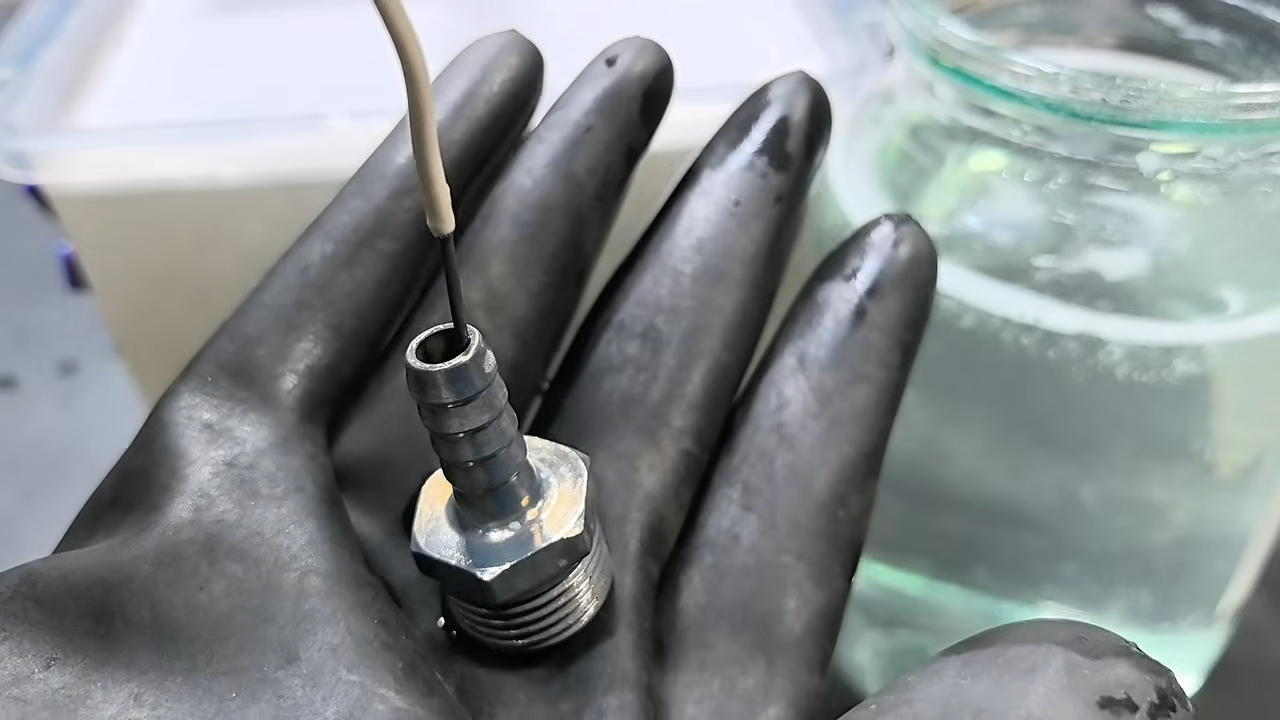
As useful as steel and iron are to the modern world, their tendency to rust is a major downside. There’s a spectrum of ways to prevent it, from quickly slapping on a coat of paint on the easy side to alloying, chromizing, or physical vapor deposition at the extremely difficult or industrial-only end. For a middle ground accessible to the home shop, galvanizing is a go-to method of rust prevention that deposits a layer of zinc onto the metal instead, but even this generally involves the use of strong acids. This method, though, makes galvanizing accessible without any acids. (Spoiler alert: substitute strong bases.)
Although the acids are omitted, the solution is caustic, so similar safety measures are still advised. The first step in the process is to dissolve sodium hydroxide into a container of distilled water. Metallic zinc can then be dissolved in the solution, with a bit of sugar and liquid soap to improve the finished quality of the coating. An electric current is applied to the solution, using a graphite plate at the anode and the part to be electroplated as the cathode. After some time, the part will be uniformly coated in a layer of zinc, which can then be brightened in a solution of only-mildly-acidic citric acid if needed.
One of the benefits of using a strong base to galvanize a metal part, beyond the preference of avoiding strong acids, is that this process can be better at plating parts that are non-uniform in shape, so things with deep crevices or other odd shapes that might coat unevenly in acid. If there’s a preference for electroplating with acid, there are some ways of producing one’s own using various methods.


Mitsubishi spent the late 1980s and early 1990s stretching the limits of glass and electron guns until a 40-inch direct-view tube became something you could actually buy. The CS4307 belongs to that short, expensive run of sets that sat at the top of the company’s American lineup in the mid-1990s. Few other makers even tried a tube this large for living-room use. Projection sets offered more inches for less money, yet they never matched the punch of a real cathode-ray picture. Owners who wanted the biggest possible image without a projector chose this family of Mitsubishi consoles and paid accordingly.
A finished CS4307 weighs about 250 pounds and measures 39 and a half inches broad, 32 inches tall, and 27 inches deep, making it a bit of a handful to lift. Usually, you need four adults to lift the item. The cabinets, by the way, come in a fairly standard dark plastic with a very basic front panel layout that includes a power button, volume control, channel select, input select, a dedicated degauss switch because, you know, having one on the front can be useful at times, and an A/V reset for when things go wrong.
Sale

Amazon Fire HD 10 tablet, built for relaxation, 10.1″ vibrant Full HD screen, octa-core processor, 4 GB…
- Do what you love, uninterrupted — 25% faster performance than the previous generation and is ideal for seamless streaming, reading, and gaming.
- High-def entertainment — A 10.1″ 1080p Full HD display brings brilliant color to all your shows and games. Binge watch longer with 13-hour battery…
- Thin, light, durable — Tap into entertainment from anywhere with a lightweight, durable design and strengthened glass made from aluminosilicate…
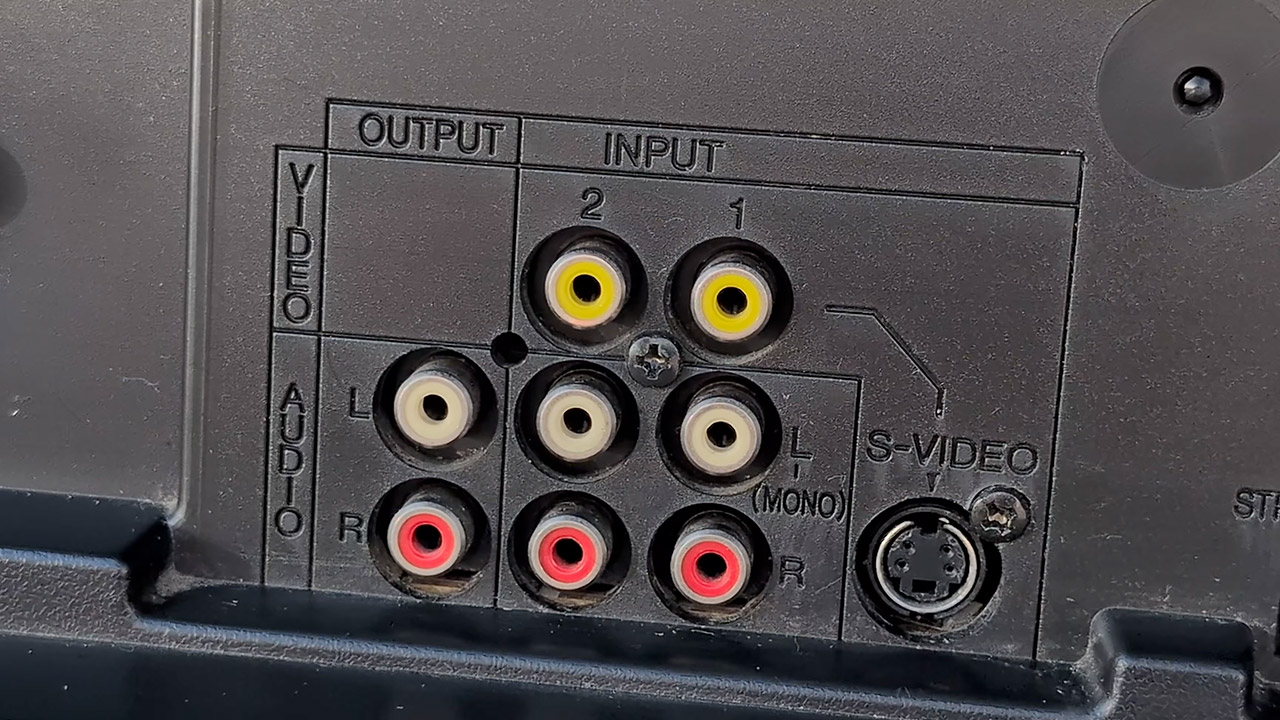
Rear connections? Pretty basic for the time, however most 1996 versions include RF, composite, and S-Video; later, one of its siblings added component video, making it the only 40-inch standard-definition set in North America with that input. Some of the higher-end models also had twin tuners, which allowed you to view one channel in a small window while retaining the other full screen. The stereo speakers that came with it sit on either side of the image tube and generate surprisingly clear sound for a mid-nineties television.

Mitsubishi built the chassis in Braselton, Georgia, and paired it with a Japanese-made slot-mask tube with a dark tint and a dual-focus electron gun. Horizontal scan remains rock solid at 15 kHz, vertical scan at 60 Hz, hence the set performs best at 240p and 480i. Now I’m told that the three-line digital comb filter handles the most of the work when it comes to differentiating color and brightness.
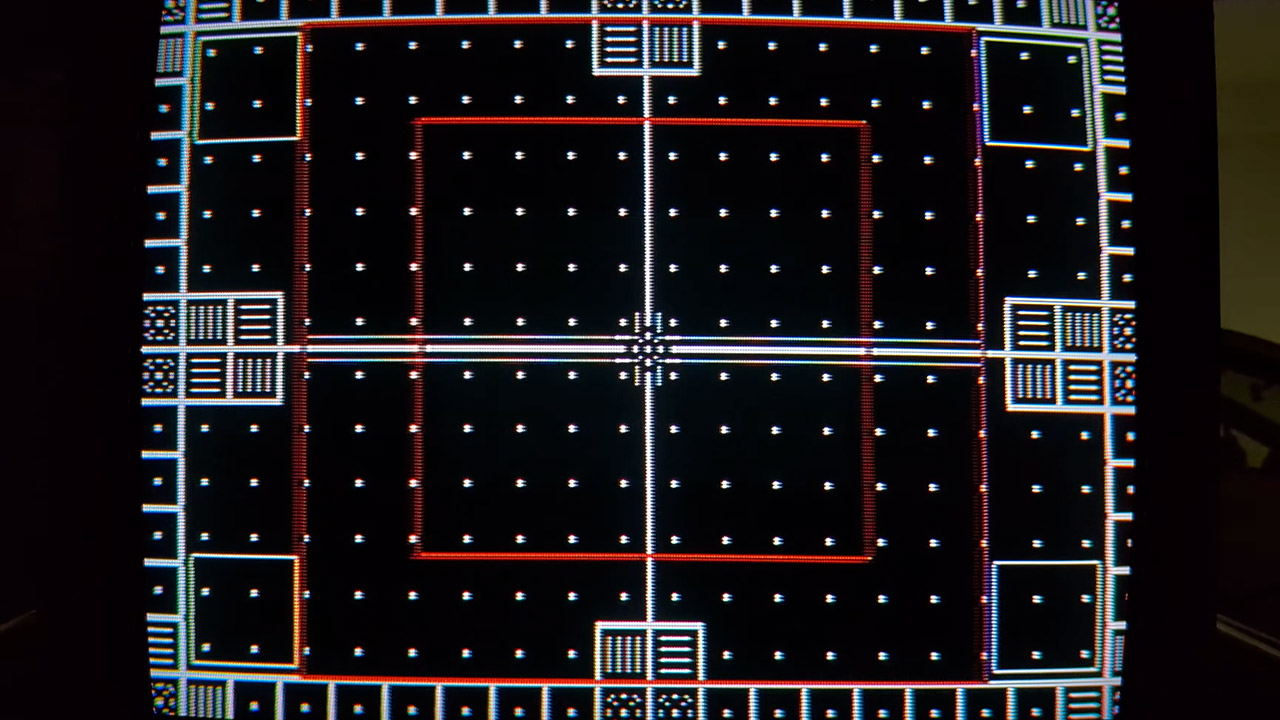
The geometry on a well-adjusted example is somewhat unexpected, especially given the size of the thing, since circles appear round and squares appear square after consulting the service menu. Of course, color purity is important, as the huge glass in this item is sensitive to the Earth’s magnetic field. That’s why you get a variety of switches to help tell the set if it’s facing north, south, or sitting in a neutral position, as well as a manual degauss button right on the front for when the picture starts to become a little weird and you get that telltale patch of color.

The list price was between $3,400 and $4,000 ($7,259 and $8,540 today), depending on the year and any extras you wanted, such as the StarSight program guide or the ViewPoint on-screen menu. For that money, you got a picture with deep blacks, natural skin tones, and enough brightness to cut through a typically lighted room after a little gray-scale tweaking. Letterboxed films looked their best because the black bars stayed black, and retro gamers later discovered the same strength: 240p from a NES, Super Nintendo, or PlayStation looked sharp and colorful through S-Video, and the large screen on set thing brought light-gun games closer to the arcade experience.
Why you can trust TechRadar
We spend hours testing every product or service we review, so you can be sure you’re buying the best. Find out more about how we test.
INNOCN E49M1R: 30-second review
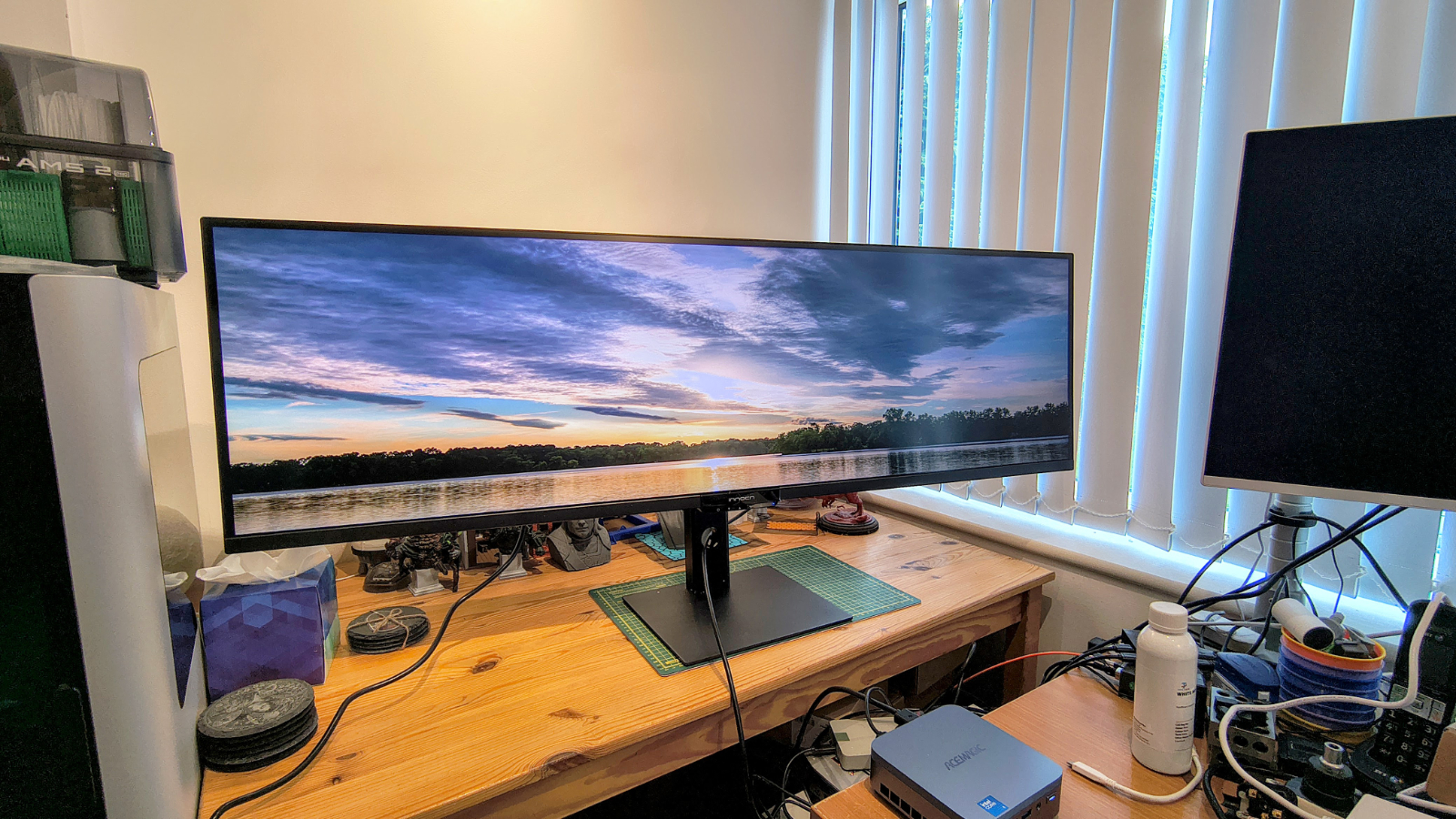
The 49-inch ultrawide market has always demanded a compromise. Curve the panel, and you gain immersion but lose straight lines along your windows’ edges. Keep it flat, and those two features simply swap places. Innocn has decided that trade-off is no longer guaranteed, and the E49M1R is the result.
By the maker’s own description, this is the world’s first 49-inch flat Mini LED ultrawide monitor. That single design choice sets it apart from almost every other super ultrawide currently on sale, since curved panels have dominated this size class for years. Traders, video editors, developers and anyone who values straight lines over cinematic curvature now have a genuine flat alternative at this scale.
Underneath that flat glass sits a 5120 x 1440 VA panel, often marketed as DQHD, which is effectively two 27-inch QHD monitors joined without a centre bezel. Add a 165Hz refresh rate and a 2ms overdrive response time, and you have a display built to appeal equally to people juggling financial dashboards, editors scrubbing long timelines, and gamers who want peripheral vision without warped geometry.
Backlighting comes from 1760 local dimming zones, a genuinely high number for a monitor at this size and this price. INNOCN pairs that with HDR1000 certification, a typical brightness of 450 nits, and a claimed peak that reaches four figures in HDR content. On paper, that combination should deliver punchy highlights alongside properly dark shadows, rather than the washed-out grey blacks that cheaper Mini LED panels sometimes produce.
Colour coverage looks strong too, with sRGB essentially maxed out and comfortable coverage claimed of the wider Adobe RGB and DCI-P3 spaces. Either way, the combination suggests this panel was built with more than gaming in mind, rather than for design work.
Connectivity runs to two HDMI 2.1 ports and two DisplayPort 1.4 inputs, a sensible spread for switching between a desktop and a laptop, or a work machine and a console, without reaching for an adapter. You can display all four inputs at once, or use a range of picture-in-picture options.
A USB hub, twin 5W speakers and support for AMD FreeSync round out the feature list.
The stand offers 120mm of height adjustment along with tilt from minus five to plus fifteen degrees and a modest fifteen degrees of swivel. There is no mention of pivot, which is hardly surprising given the sheer width involved. At 13.3kg with the stand attached, this design rewards a permanent spot on a desk rather than regular repositioning.
Pricing in the US sits at $999.99, which places the E49M1R against established 49-inch rivals from Samsung and LG, several of which still rely on curved panels at similar or higher price points.
The core promise here, a genuinely flat super ultrawide with Mini LED backlighting and a proper refresh rate, is compelling enough that INNOCN deserves the benefit of the doubt until testing confirms whether the numbers hold up on a desk rather than on a spec sheet.
INNOCN E49M1R: Price and availability

- How much does it cost? $999
- When is it out? Available now in the US and Japan
- Where can you get it? Direct from Innocn
Innocn lists the E49M1R at $999.99 on its US store, with free shipping, a 30-day return window and a standard 12-month warranty. Orders placed before 1 October 2026 qualify for an extended three-year warranty as a launch promotion.
The monitor also launched in Japan on 10 September 2026 at 159,999 yen, roughly $1,044, with an introductory price of 135,990 yen, roughly $887, running for a limited period around launch.
Is this a good price? It’s hard to say, since no other monitor brand has anything like this available to compare.
INNOCN E49M1R: Specs
Swipe to scroll horizontally
|
Specification |
Detail |
|
Model |
E49M1R |
|
Panel size |
49 inches, flat |
|
Panel type |
VA, Mini LED backlit |
|
Resolution |
5120 x 1440 (5K DQHD) |
|
Aspect ratio |
32:9 |
|
Refresh rate |
165Hz |
|
Response time |
8ms GtG, 2ms with overdrive |
|
Local dimming zones |
1760 |
|
HDR |
HDR1000 |
|
Brightness |
450 nits quoted |
|
Contrast ratio |
3000:1 |
|
Colour depth |
8bit |
|
Colour coverage |
100% sRGB claimed, 98% tested |
|
Connectivity |
2x HDMI 2.1, 2x DisplayPort 1.4, USB hub, 1x audio out |
|
Adaptive sync |
AMD FreeSync |
|
Speakers |
2x 5W |
|
Stand adjustment |
120mm height, tilt -5 to +15 degrees, 15 degree swivel |
|
VESA mount |
100 x 100mm |
|
Power consumption |
95W typical, 240W maximum |
|
Weight with stand |
13.3kg |
|
Warranty |
3-year (launch offer) |
INNOCN E49M1R: Design

- Flat panel, not curved
- Minimal bezel across a 32:9 frame
- Height-adjustable stand but modest rotation
Where most 49-inch ultrawides curve their panel to keep the far edges within easy view, the E49M1R stays flat.
Innocn calls it the first monitor of its kind at this size, and it is a genuine point of difference rather than a marketing flourish. A flat panel keeps straight lines straight, which matters for anyone lining up spreadsheet columns, CAD drawings or video timelines across the full width of the screen.
You can get the same 5120 x 1440 resolution at this scale by combining two 27-inch 1440p displays, and that would be cheaper. But for those who want a single seamless experience, this is the way.
However, that creates an entirely different issue: the sides of the screen are significantly farther from a centrally placed viewer than the middle.
How much further? Well, if you are 75cm from the middle of the panel then the left and right edges are another 20cm away.
Depending on the flexibility of your eyesight, this is either not a problem or a major snag.
You might want to consider a desk you can slide sideways so that, if you are working at one side, you can bring it nearer, then roll your chair to the other when needed. This might seem silly, but if you are using this panel to monitor things, you’ll need to make some adjustments.
What’s impressive is how narrow the bezel is on the top and sides, making the display the predominant aspect of this screen.

The stand provides 120mm of height travel, a tilt range from minus five to fifteen degrees, and also fifteen degrees of swivel. No pivot option is listed, which makes sense given the panel’s width. It has a VESA 100 mounting point in the centre, but you need to consider that any support will need to handle the not insignificant weight of the E49M1R.
At 13.3kg with the stand fitted, this is not a monitor you will want to move often, or possibly without some help.
Settings on this monitor are slightly old-school, with five buttons under the central Innocn logo being used to control an on-screen menu.
I’ll be honest and say I hate these menus, because six clicks to make a change when it would be one with a mouse and an app seems bonkers. However, all the interesting features are on this menu, if you can be bothered to click through them.
Overall, there isn’t much that’s revolutionary here in the design; most of that showboating is reserved for the underlying technology.
However, despite the obvious awkwardness of having a monitor this large, in most respects it works as intended, and for some applications is something of a joy.
The trick I think Innocn missed is that this screen is perfect for controlling multiple systems, since you can display each input simultaneously. What’s required to make this perfect is a KVM, and since Innocn put a USB hub into the monitor, why did they not make this a KVM?
Even if it only supported two computers, splitting the screen for two systems, and tracking a hotkey switch (like a SCRL LOCK double tap) to flip the USB port over for mouse and keyboard, this would be terrific. Yes, you can get the same effect with a separate KVM, as I have, but if it were all in one package, it would be brilliant.
The key weaknesses are the lack of motion on the stand and the lack of a software control panel, which forces you to use tiny buttons to change modes.
But these flaws don’t undermine what is a solid product in most respects.

INNOCN E49M1R: Performance
- Up to 480 nits
- 98% sRGB
- 72% AdobeRGB
Swipe to scroll horizontally
|
Colour Gamut |
Percentage |
|
sRGB |
98% |
|
AdobeRGB |
72% |
|
P3 |
74% |
|
NTSC |
68% |
|
Rec2020 |
53% |
|
Gamma |
1.8 |
|
Maximum Brightness |
481.5 |
|
Maximum Contrast |
4180 : 1 |
This design has a weird dichotomy I’ve never seen before: some of it comes from the design choices, and some from the panel’s technology.
But first, let’s talk about what’s good about this screen, because in many respects the positive aspects outweigh the negative ones.
Two aspects are 5/5 in my opinion: color gamut and contrast. Being able to display lots of colours and a decent contrast between the brightest and darkest makes this an extremely readable display, and a punchy chromatic experience. I’m not sure how that fits with the Innocn specification that this is an 8-bit VA panel underneath.
The brightness is also greater than the 450nits that the maker quotes, and typically that number is overstated.
On paper, the E49M1R’s performance case rests on three pillars. The first is contrast, delivered by 1760 local dimming zones feeding a VA panel with a quoted 3000:1 native contrast ratio. That is a considerably more granular backlight than the edge-lit arrangements found on cheaper ultrawides, and it should translate into deeper blacks alongside bright highlights in HDR content, rather than the obvious blooming that coarser dimming grids produce.
The second is color. Innocn claims essentially full sRGB coverage, with wide claimed coverage of Adobe RGB and DCI-P3 as well, alongside a Delta E accuracy target below two. Those numbers would put the E49M1R comfortably ahead of most gaming-focused ultrawides for colour-critical work, but it’s more nuanced than that.
While the gamut is great, color accuracy isn’t wonderful, making this design less than ideal for designers working with color. You might be able to tweak settings to improve colour accuracy, but this screen will never compete with an OLED panel.
The third pillar is motion. A 165Hz refresh rate, 2ms overdrive response time, and AMD FreeSync support should keep fast-moving content smooth, though the product page makes no G-Sync compatibility claim, which is worth noting for Nvidia users who rely on that certification.
In conclusion, if you need an ultrawide display for monitoring multiple systems, huge spreadsheets, motion graphics, a flight or racing simulator, then this is an excellent choice.
The lack of accuracy here is an issue for color-critical jobs, but that’s not something most people buy an ultrawide monitor for.

INNOCN E49M1R: Final verdict
On specification alone, the E49M1R makes a compelling case. Innocn has combined a genuinely novel flat panel with a dense Mini LED backlight, a proper 165Hz refresh rate and colour coverage that reaches well beyond sRGB.
For traders, editors, developers and anyone tired of curved screens distorting their straight lines, this looks like the ultrawide the category has been missing.
I do wonder if Innocn has another E49M1 design in development that uses OLED and would address the color accuracy issues I detected, but for now this VA design with Mini LED backlighting is a dramatic improvement over any single-source backlight hardware.
With the hardware available today, the E49M1R could be one of the year’s most significant ultrawide launches. And, at less than $1000, this is a huge monitor for a modest asking price. If you don’t need such a high resolution, Innocn also offers the slightly cheaper E49M1G with a 3840 x 1080 resolution and a 144Hz refresh rate.
On a personal note, I’ve been using this panel this week, and having my PC desktop on one side and a mini PC I’m benchmarking on the other makes for a great workflow. Similarly, when I transfer my work from Word to the publishing system, being able to extend my desktop is equally helpful.
While the E49M1R isn’t for everyone, for those who can use its abilities, it’s genuinely revolutionary.

InnoCN GA27S1Q: Report card
Swipe to scroll horizontally
|
Value |
When only a company makes something, the price is the price |
5 / 5 |
|
Design |
Massive display with a restrictive stand, but plenty of good features |
4 / 5 |
|
Performance |
Large gamut and incredible contrast, but not color accurate |
4 / 5 |
|
Total |
Easily worth what the maker is asking for an Mini LED this big |
4.5 / 5 |
Should you buy a INNOCN E49M1R?

Buy it if…
Don’t buy if…
For more options, we’ve tested the best business monitors.
Why you can trust TechRadar
We spend hours testing every product or service we review, so you can be sure you’re buying the best. Find out more about how we test.
Reolink OMVI 3i: two-minute review
Shenzhen-based firm Reolink is a well-established brand in the home security market having gained a solid reputation for well-built, user-friendly cameras and video doorbells at an affordable price. I’ve reviewed quite a few models for TechRadar in my time and have generally been very impressed. One particular favourite is the recently launched Reolink Solar Floodlight Cam which combines a solar panel with two powerful spotlights either side of the main unit, as well as a loud onboard siren.
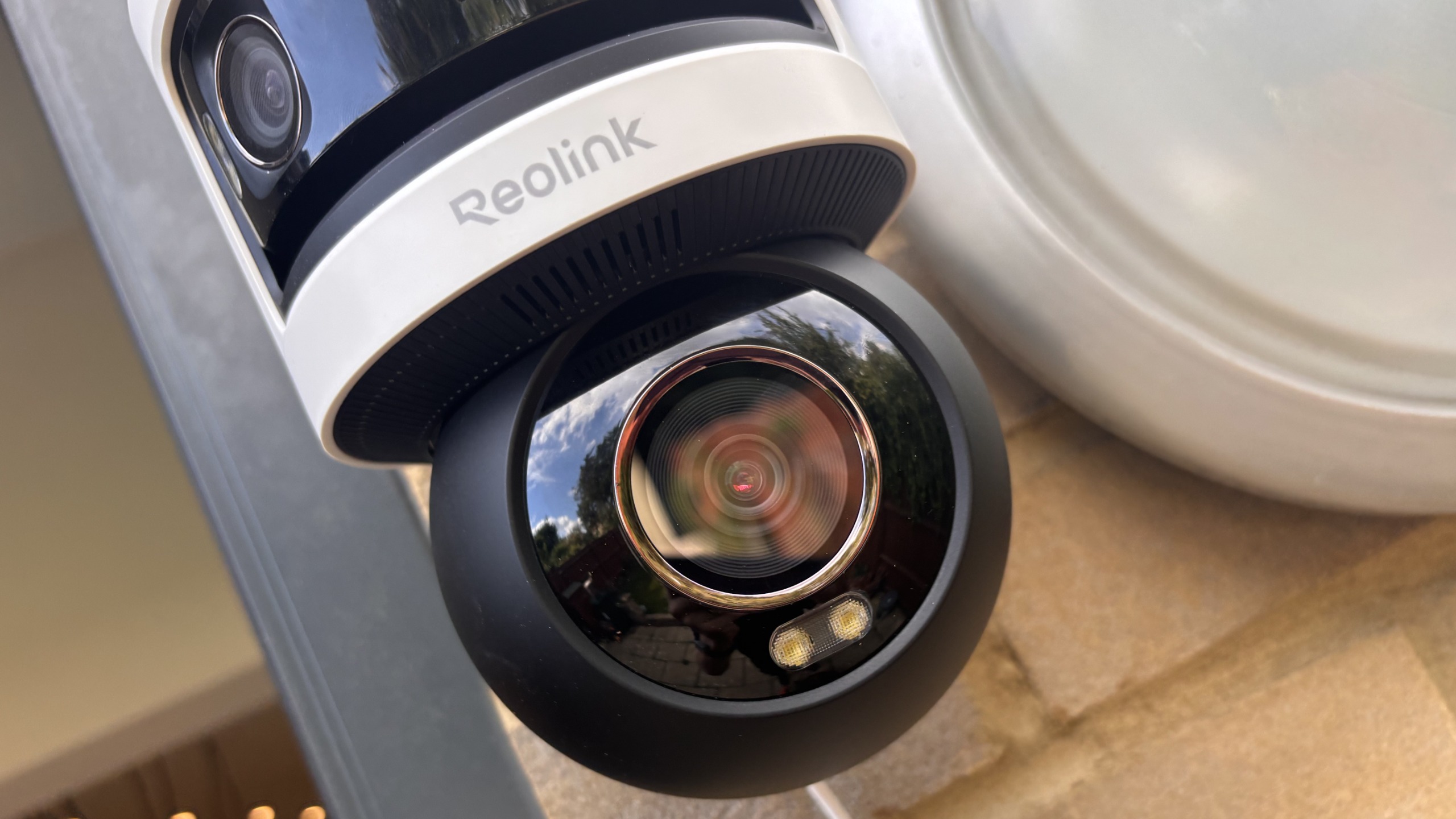
Like the Solar Floodlight Cam, the OMVI 3i also features powerful spotlights (there are eight in total) plus an ear-piercing 110dB siren. However, the key difference is that rather than relying on solar power combined with a built-in lithium-ion battery that can be recharged, the much bulkier Reolink OMVI 3i is mains-operated only and can’t be powered by battery or solar. This means it will have to be located near an AC power supply which isn’t always possible outdoors.
Two versions are available, a wired Power of Ethernet (PoE) version and the Wi-Fi model that we tested. Unlike some cheaper models, the OMVI 3i supports both 2.4GHz and 5GHz Wi-Fi — though the 5GHz frequencies are recommended for outdoor use. Practically identical to one another, both models are very bulky, requiring careful mounting on a wall using a drill in conjunction with brackets, screws and wall plugs provided.
Latest Videos FromTechRadar

Whereas most security cameras rely on cloud-based processing to identify objects, this latest Reolink features powerful integrated edge AI. This onboard intelligence allows the camera to easily distinguish between people, animals, and vehicles, letting you independently adjust sensitivity settings for each category to help dramatically reduce false alarms. Particularly clever is the smart tracking option alongside advanced package detection, which can alert you if a parcel is removed from a specific zone – making it a potentially useful tool in the fight against porch pirates.
When viewing footage via the easy-to-use app, two screens are displayed – one from the top panoramic camera producing a 180-degree image from two separate lenses and the other from a motorized pan-and-tilt camera that can rotate horizontally up to 355 degrees and vertically up to 50 degrees. Rather usefully, if you spot something untoward on the panoramic display such as an intruder, you can simply identify the area with your finger and it will then hone in on that area using the pan-and-tilt camera underneath.
Finally, where security camera manufacturers usually make their money is in selling you a monthly subscription to store your video footage in the cloud. Not only is this a potential cybersecurity risk, it can also get very expensive over time. With the Reolink OMVI 3i, there’s the choice between storing on a MicroSD card slot (not supplied) or subscribing to Reolink’s cloud service from just £2.71 (about $3.60 / AU$5.10) per month (yes it’s a strange amount). And because this OMVI 3i is mains-operated, the camera can record 24/7 if you want it to without having to worry about the battery losing its charge. This makes it ideal for business as well as consumer use.
Reolink OMVI 3i: subscription options
Reolink Cloud, Single Device Plan: Up to 30-day cloud video history, one camera, unlimited cloud storage, unlimited rich notifications, AI Video Search. £2.71 (about $3.60 / AU$5.10) per month.
Reolink Cloud, Standard Plan: Up to 30-day cloud video history, up to five cameras supported, unlimited cloud storage, unlimited rich notifications. £2.87 (about $2.80 / AU$5.40) per month.
See https://cloud.reolink.com/cloud-plan for further details
Reolink OMVI 3i: price and availability
- How much does it cost? $329.99 / £259.99 / AU$439
- When is it available? Available since June / July 2026
- Where is it available? UK, US, Australia, and select global markets via Amazon and Reolink’s official store.
When you consider everything that the Reolink OMVI 3i camera has to offer, including dual panoramic lenses, a 4K pan-and-tilt mechanism, integrated edge AI and powerful spotlights, this security camera simply is fantastic value for money — especially as it’s pretty well built too. A few years ago, a device like this would have set you back nearer to £400 in the UK where I’m reviewing it, yet at the time of writing Amazon is offering it for just £220.
And while there are of course cheaper models on the market, none that I’ve seen offer anywhere near the same levels of performance. In fact, the Reolink OMVI 3i substantially undercuts commercial-grade monitoring systems, making it the ideal choice for small businesses/shops that want to use it for monitoring their premises.
Furthermore, even if you opt for cloud storage, the subscription fee isn’t that bad coming in at under £3 a month. Better still, you can avoid ongoing costs completely by buying your own MicroSD card for local event logging, 24/7 continuous recording, or audio capture, making it a remarkably cost-effective long-term investment.
Reolink OMVI 3i: design
- Triple-lens configuration (10MP panoramic top lenses + 4K 8MP PTZ bottom lens)
- Heavy-duty weatherproof (IP66) housing with drilling template included
- Mains-powered only
Unlike many modern compact outdoor security cameras, the OMVI 3i is one heck of a big beast! Tipping up the scales at 2.4lbs / 1.1kg for the Wi-Fi variant and 2.9lbs / 1.3kg for the PoE version, it’s a really bulky unit. Installation isn’t the easiest either. Because of its weight and the way it protrudes from the wall, it requires a very secure mount. It’s not a camera you can casually stick up with a couple of small screws. Instead, you’ll need a drill, screws, wall plugs and the mount to ensure it stays firmly anchored.

(Image credit: Future)


Using the template provided I drilled holes for the sturdy mounting bracket, placing the unit high up on my outside wall overlooking the garden. But there’s no getting away from the fact this is a big unit designed for high performance rather than looks. Another major problem is that it needs to be plugged into the mains. Thankfully I already have a mains socket outdoors, but if you don’t, you will run have to connect the cabling to a plug indoors.

Essentially the design comprises two main elements — the upper part with twin lenses for panorama mode and the single lens pan-and-tilt camera underneath. Round the back of the unit is a waterproof rubber flap housing a MicroSD card slot and reset button. The maximum supported MicroSD card size for the Reolink OMVI 3i (both WiFi and PoE versions) is 512 GB. Alternatively you can subscribe to store recorded footage in the cloud or buy a Reolink NVR (network video recorder).
Reolink OMVI 3i: performance
- SyncTrack enables the Pan-Tilt camera to automatically lock on and follow subjects
- Integrated edge AI for people, animals and vehicles
- Removed item alerts and 24/7 continuous recording capability
When it comes to performance, the Reolink OMVI 3i Wi-Fi is certainly one of the best I’ve ever seen. Freed from battery limitations, it can focus completely on offering high-definition recordings from the triple-lens set up, rather than having to compromise on image quality to save battery power.
Indeed, visual performance is exceptionally strong. The 4K 8-megapixel pan-and-tilt camera delivers crisp, high-definition clarity that lets you easily zoom in on distant facial features or car number plates. Furthermore, the 10MP panoramic lenses on top provide an ultra-wide 180-degree overview, delivering the ultimate ‘best of both worlds’ setup where nothing escapes your field of vision. When an event occurs in the panoramic overview, you can simply tap or click on a specific area within the wide feed, and the 4K PTZ camera will instantly ‘pinpoint’ and swivel to that exact spot, zooming in to provide close-up detail without losing track of the broader context.

Even at night, picture quality remains exceptional. Infra-red night vision provides sharp monochrome clarity, while the multiple integrated spotlights proved amazingly powerful, bathing my garden in light late at night to ensure color recordings. Also on board is a powerful 110dB siren for startling unwanted trespassers, as well as two-way audio so you can tell intruders to get off your land!
But that’s not all. Particularly impressive is OMVI 3i’s built-in local AI processing. Rather than relying on sluggish or privacy-invasive cloud servers, the camera runs intelligence directly on the device. This allows it to distinguish between people, animals and vehicles with impressive accuracy. You can also independently fine-tune the motion sensitivity for each category, which dramatically cuts down on the nuisance false alarms that plague many security cameras.

Although I didn’t test the feature, removed-item alerts enable you to get a notification if a parcel is lifted from a marked doorway zone (handy in the fight against porch pirates!) while if you want continuous coverage, you can set the camera to record 24/7 or configure it to record audio by default.
Yet despite these standout strengths, the camera’s performance is not entirely without flaws. One small issue I encountered during testing is that the software stitching between the two top cameras for the 180-degree panorama occasionally fails, disrupting the seamless wide-angle view (this can be corrected with software within the app). Additionally, while the automated tracking of people, vehicles and animals is generally smooth, fast-moving targets can cause the pan-and-tilt mechanism to stutter or momentarily lose tracking if they dart across the frame too quickly.

Finally, because the camera captures such a massive, wide-angle view, it does demand careful positioning. If you have limited private space, its lenses can easily spill over into neighboring properties or public walkways, requiring you to use the detection exclusion zones software provided.
Should you buy the Reolink OMVI 3i?
Swipe to scroll horizontally
|
Attribute |
Notes |
Score |
|---|---|---|
|
Value |
The Reolink is excellent value for money considering its triple-lens hardware, local AI and flexible storage options. |
5/5 |
|
Design |
Heavy and bulky, requiring wall plugs and a drill for secure mounting. Also runs on mains power and is unsuited for tight private spaces due to large field of view. |
3.5/5 |
|
Performance |
Combines crisp 4K resolution, Pinpoint synchronized tracking, a 180-degree panoramic overview, 355-degree PTZ tracking, powerful spotlights, and a loud siren. |
4.5/5 |
Buy it if
Don’t buy it if
Reolink OMVI 3i: also consider
Swipe to scroll horizontally
| Header Cell – Column 0 |
Reolink OMVI 3i Wi-Fi |
IMOU AOV PT |
Reolink Solar Floodlight Cam |
|---|---|---|---|
|
Subscription price |
Optional cloud from £2.71 a month (or MicroSD storage) |
Optional subscription from £3 a month |
None. Optional subscription from £2.71 a month |
|
Viewing angle |
180-degree panoramic dual lens and 355-degree pan and tilt camera |
360-degree pan and tilt lens |
150-degree ultra-wide diagonal |
|
Network connection |
Wi-Fi/ PoE versions (2.5GHz/5GHz) |
Wi-Fi (2.4GHz)/4G cellular |
Wi-Fi (2.4GHz/5GHz) |
|
Audio |
Two-way audio |
Two-way audio |
Two-way audio |
|
Video |
4K 8MP PTZ + 10MP panoramic resolution |
3K (5MP) video resolution |
2K (1440p) video resolution |
|
Power |
Mains power (with waterproof cable design) |
Battery/Solar |
Battery/Solar |
|
Hardware price |
£220-£250 |
£129 (with separate solar panel) |
£85 (with built in solar panel) |
How I tested the Reolink OMVI 3i
- I used the camera outdoors for seven days
- I set it up myself using the fittings provided by the manufacturer
- The security camera was installed facing my back garden.
Usually when testing outdoor security cameras, I like to install them on my summer house which doubles as a home office and gym. This gives me a great view of the garden back towards the house. However, for the Reolink OMVI 3i I had to change things around for a couple of reasons.
Firstly, the size of the camera meant that I couldn’t be sure that the wooden-built summer house would hold the weight. Secondly, although I have power inside the summer house I would have needed to run power quite a long way to the outside of the building which wasn’t possible with the cable provided.
So, instead, I opted to drill the camera bracket into the wall outside my kitchen and face the camera the other way towards the end of the garden. This had the added advantage of the camera not being visible to the neighbors. I tested the camera for several days and nights, using the onboard AI to capture people and animals in the garden, though thankfully no intruders made it into my heavily fortified property.
First reviewed September 2026

Follow TechRadar on Google News and add us as a preferred source to get our expert news, reviews, and opinion in your feeds.
Apple’s new Health Sensing System for Apple Watch Ultra 4 means more accurate and more frequent health metric tracking. It feels like the peak offering of a device before a necessary complete redesign.
Nearly every improvement made to Apple Watch Ultra 4 relates to health, fitness, and the ability to track those metrics. Even the longer battery life was pitched as a way to track metrics over a longer period of time.
Tim Cook may have stepped down as CEO before Apple Watch Ultra 4 was revealed, but it and the Apple Watch Series 12 are clear realizations of his vision. Apple Watch is a health-focused wearable that aims to improve the wearer’s life, and perhaps even save them in emergency situations.
Out of all of Apple’s products, the Apple Watch is perhaps the most mature with very little wiggle room, even when compared to the Apple TV — there just isn’t enough space. That is clear given that even the Apple Watch Ultra 4 gained a gram in weight thanks to the new sensor system.
The Apple Watch Ultra line appears to be in an even more awkward position compared to the standard “Series” line. It has consistently received all of the updates brought to models like Apple Watch Series 12 (on sale now), but nothing “Ultra” has been added or upgraded since the original model’s launch.
As I pointed out in my Apple Watch Ultra 3 review, it’s still the larger, high-end watch with the most sensors and ruggedness. However, Apple seems stumped on how to iterate on the premium Apple Watch beyond keeping it in lock step with the rest of the lineup.
That said, the 2026 model at least is a significant step forward. Here’s what Apple Watch Ultra 4 offers.
Apple Watch Ultra 4 review: Design
When you’re looking at Apple Watch Ultra 4 on someone’s wrist, you’ll never guess which generation it is from design alone. Apple has stuck with the same design since the original launched, though the black option did arrive as a change in gen 2.

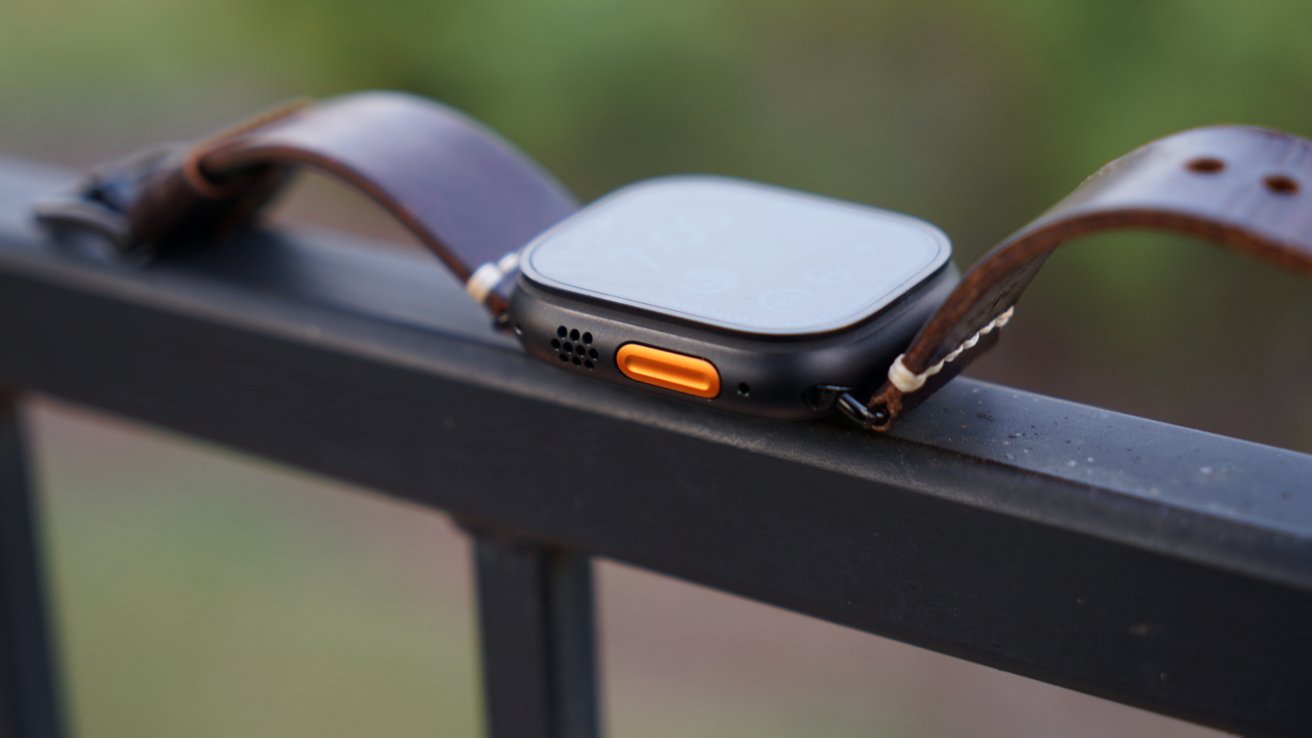
Apple Watch Ultra 4 review: Same design, color, and orange Action button
Flip it on its back and you’ll see a significant difference thanks to the new Health Sensing System. Apple has replaced the sensor stack with updated components for more frequent and more accurate readings.
The electrodes are larger, which surround the photo diodes where green LEDs are shown through to collect data. This all fits in the Apple Watch, though there has been a weight increase of about 1.4 grams.
It’s such a small change that I haven’t noticed a difference.
The display is identical across generations, you’re getting the same 100m dive spec, and it is still a titanium case with orange accents. I do think Apple could have made a statement with a new case color or design tweak, but that wasn’t for this year.
Apple Watch Ultra 4 review: Features
Much of what was introduced in Apple Watch Ultra 4 and Apple Watch Series 12 is tied to the updated Health app coming in iOS 27.2. I’ve tested the Watch with and without this update, but I won’t spend too much time on the app itself here.

Apple Watch Ultra 4 review: Every upgrade can be tied to S11 and new sensors
All of the metrics that matter most on Apple Watch saw a boost with the new system. These upgrades come at no loss of battery life, and even then, Apple says the battery life has increased in the latest generation.
Here is every new feature for Apple Watch Ultra 4:
- Health Sensing System
- Second-generation electrical heart sensor
- Always-on optical heart sensor
- Improved step tracking
- Recovery HRV
- High-frequency background heart rate tracking
- HRV in the Vitals app
- Audio Intelligence
- Single-tap gesture
There’s also the new Readiness app, but I’ve not had enough nights of data collection for it to show anything just yet. It gathers data over a week, and as this is published, it has been a week since getting the device. I’ll discuss Readiness when I write more about the new Health app, which deserves its own full breakdown.
All of these new sensors add up to a new health-forward platform that should excite anyone that likes putting data in databases. Your heart rate is read every five seconds and HRV data is collected every five minutes.
Heart Rate Variability has become a popular way to measure a person’s overall health, mostly due to products like the Whoop health band. Apple already collected this data, but it is putting it front and center with the Apple Watch Ultra 4.

Apple Watch Ultra 4 review: Feeding more data into Apple Health
I personally don’t care about any individual health metric, but the idea of getting more data that’s more accurate is appealing to me. I want my new Apple Health app with Apple Intelligence to have every bit it can to help with my health journey.
I don’t feel the need to detail every Apple Watch Ultra feature, as they should be fairly well-known by now. It’s a rugged smartwatch that can withstand extreme conditions, has a siren for emergencies, can make emergency calls via satellite, and has a much longer battery life than standard Apple Watches.
Apple Watch Ultra 4 has identical wireless specs with Wi-Fi 4, Bluetooth 5.3, and 5G.
The Apple Watch Ultra 3 was my first Apple Watch Ultra, so I broke down the smaller details in that review. That’s the thing — Apple’s Ultra updates lack new “Ultra” features, so rehashing identical feature lists seems redundant.

Apple Watch Ultra 4 review: This is an Apple Watch Ultra 3, but you wouldn’t have known that without being told
The base feature set exclusive to Apple Watch Ultra hasn’t changed since the original model beyond satellite connectivity. I’m glad Apple has added the S11 and the benefits provided by that chipset, but we’re not seeing anything else.
That chipset is what enables many of the upgrades without sacrificing battery life. The S11 has a neural engine derived from the A20 Pro used in iPhone 18 Pro (check deals), which enables new AI features.
A boost in battery life
That battery life is particularly impressive with Apple Watch Ultra 4, as it gained about 8 hours in regular use. Previously, Apple Watch Ultra could last about 42 hours without a charge, but now it’s 50 hours.

Apple Watch Ultra 4 review: Battery life for days
That takes it well over the two-day without-charging threshold. For most people, that should mean taking it off to charge while showering should occur at some point in that 50 hours.
And yes, charging in the shower is more than enough time to top off the battery. Get 80% battery in about 45 minutes or fast charge for just 15 minutes for 18 additional hours of use.
I take a long shower and don’t rush to put the watch back on, so that’s more than enough time to get the battery somewhere near 100% every day or two. It may be the “rugged” or “adventurer” Apple Watch, but I am willing to bet much of the sales of Apple Watch Ultra comes from people seeking longer battery life.
That said, it is quite the smartwatch for athletes. Apple says that people running a 100-mile race have enough battery life to log the entire race in workout tracking mode.
There’s not much more lengthy or demanding than that in sports.
Using Apple Watch Ultra 4
You know the drill, this is an Apple Watch. It may have a more rugged case and the addition of an Action button, but it’s a nearly identical experience in most use cases to standard models.

Apple Watch Ultra 4 review: It’s still an Apple Watch through and through
I was worried about Apple Watch Ultra having too big a case or being awkwardly large or heavy on my arm. Thankfully, I was wrong on all counts.
Apple’s lack of significant upgrades year-over-year in several Apple Watch cycles left me believing that 2026 would be the year I could skip an update. If anything, the update this year is far mor significant than the 2025 model, which of course meant another upgrade for me.
I’m not an athlete, I don’t climb mountains in sub-zero climates, and I don’t dive deep into the ocean with a scuba tank. Nope, I’m your average, could be in better shape, work from home, desk worker.
The longer battery life, larger display, Action button, titanium build, and additional features are all attractive and useful to me. It is why I went Ultra the moment we got a black color and new chip generation, and I expect that’s the case for many people.

Apple Watch Ultra 4 review: More accurate health sensors that track more often
I’m sure there’s a better use of the Action button, but I’ve kept it mapped to opening Workouts. It lets me quickly start a walking workout each day, which is something I’m trying to do regularly.
The new Siri Modular watch face is nice. I’ve begun using it for my personal watch face, while Wayfinder remains excellent for my work face.
I’ve already begun incorporating the new Apple Health app into my daily routine. I check it for health insights, trends, and am making changes to my life to try and meet certain goals.
This review isn’t the place to get into all of that, but I do think the new hardware capabilities and the Apple Health upgrades will be excellent selling points. It’s not that I don’t know how to be healthy or eat right, but having these apps and devices laying bare my exact health metrics and how to improve them, it’s hard to ignore.
More on that soon.
Absent Audio Intelligence
I really wanted to write about these controversial new AI features introduced in Apple Watch Ultra 4. Unfortunately, they’re not here yet, not even in beta.

Apple Watch Ultra 4 review: Audio Intelligence isn’t available yet
One neat feature enabled by the more powerful chipset is the new near-instant Shazam music recognition. I can raise my wrist, double tap to open the Smart Stack, and the first item in my stack is usually Shazam, which quickly shows whatever song is playing around me.
The single tap gesture works when selecting items in Smart Stack or clicking buttons shown on the display. It doesn’t always work, but I appreciate the new gesture.
Anyway, Siri AI is fast and accessible on Apple Watch Ultra 4. I asked several world knowledge questions, some personal based on data from Messages, and both worked great.
It’s a very similar experience to what you’ll find on iPhone. I asked what was for dinner, which is in my Calendar, then I asked if it was a healthy meal.
Then, I asked when my friend’s birthday is and what gifts it would recommend. While the recommendations were a bit silly, I appreciate that it was able to do these queries at all, let alone on an Apple Watch.

Apple Watch Ultra 4 review: The new Siri app is front and center in watchOS 27
Audio Intelligence is going to be quite the interesting feature to test. I’ve had mixed reactions from various people in my life that I’ve described it to.
It’s what you would expect — some call out the potential utility while others see the obvious potential for abuses. We won’t know what this will and won’t enable until it can be tested.
So, as much as I’d like to have something to say about the feature, that’ll have to wait for another day. I do believe what Apple has on offer in the 2026 Apple Watch generation should make any AI wearable company at least a little nervous.
Apple’s new health mandate
Increasingly, it feels like Apple’s messaging around Apple Watch is “if you don’t wear Apple Watch, you could die.” It’s a terrific if terrifying prospect for many reasons.

Apple Watch Ultra 4 review: Another cog in Apple’s AI and health machine
Apple Watch Ultra 4 lasts longer than ever when worn, so you don’t even need to charge it before sleeping most nights. Every bit of data will help you meet your goals, so every second without an Apple Watch is a missed opportunity to prove to the Health app how well you’re doing.
I know that some people will find that disturbing, while others will find it enticing. I personally can appreciate the motivation that logging, aggregating, and viewing data can bring, with the added bonus of it not being sold, so bring it on.
Apple Watch Ultra 4 isn’t necessary to take advantage of the upcoming Apple Health app updates, but it’ll provide a more accurate, more constant series of metrics. I can easily highly recommend the Apple Watch Ultra 4 to anyone that cares about health, fitness, or wearable AI tools.
Apple Watch Ultra 4 – Pros
- Exceeding two days of battery on a single charge is amazing
- Health Sensing System means more accurate, more frequent data
- S11 provides a more native-feeling Siri AI experience
- Rugged, durable, and includes the useful Action button
Apple Watch Ultra 4 – Cons
- Apple still hasn’t bothered with new “Ultra” features
- The overall Apple Watch experience doesn’t differ much from the regular Apple Watch beyond what improved specs bring
- Audio Intelligence isn’t available to test and remains quite controversial as a feature
Review: 4 out of 5
If you’re wondering exactly how an Apple Watch Ultra might get a perfect score, it would be a redesign in addition to useful new features making Apple Watch Ultra more than just an Apple Watch with titanium and a larger screen. We’ve got some great health upgrades, AI features, and more battery life, but you wouldn’t know, and can’t tell that it’s new.
Design isn’t everything though. Apple needs to give Apple Watch Ultra users new Ultra-focused features as well, which is the main issue.
Otherwise, this is a great Apple Watch upgrade and I can easily recommend one, even if you’re coming from the previous model. It just needs more in 2026.
Where to buy the Apple Watch Ultra 4 at a discount
The Apple Watch Ultra 4 is on sale now, with prices dipping to as low as $779.99 at Amazon at press time.
You can compare the latest Apple Watch Ultra 4 prices and deals across popular retailers in our Price Guide as seasonal sales pop up.
Limited inventory remains on the last-generation Ultra 3, with closeout deals at your fingertips in our Apple Watch Ultra 3 Price Guide.

If you own an original Nintendo Switch, there’s a security exploit you will want to patch immediately, especially if you use the game console in public. Nintendo revealed the vulnerability on Sept. 10, shortly after the company released its latest 23.0.0 firmware update.
The vulnerability applies only to original Nintendo Switch owners who use the Send to Smartphone feature. This feature generates a QR code on the Switch that users can scan with a smartphone, allowing them to transfer game captures and screenshots directly to their phone.
The exploit also affects people playing Super Mario Kart: Home Circuit on the physical cartridge, as the game uses a QR code to establish a wireless link with nearby players.
Should someone else scan the QR code before you, they can connect their device to your Switch and use the connection to run unauthorized code on your Switch or steal information stored on the game console. Since your account information is stored on your Switch, that’s information you don’t want in the hands of someone else.
A Nintendo representative did not immediately respond to a request for further comment.
The exploit doesn’t affect the Nintendo Switch 2.
How to fix the problem
The fix is simple. Nintendo released update 23.0.0 on Sept. 9, which fixes the exploit. It’s recorded as CVE-2026-82079, which is “a stock-based buffer overflow vulnerability” that lets attackers within wireless range execute code. It only affects the original Switch on firmware versions older than 23.0.0.
To update your Nintendo Switch, head to System Settings > System > System Update to apply the update. Follow any additional on-screen prompts to install the update.
Nintendo says that those who can’t immediately update their firmware can avoid the issue by only using the Send to Smartphone feature at home, where attackers can’t see them, or by not playing Super Mario Kart: Home Circuit in public. The gaming giant also recommends not scanning any QR codes with any device that isn’t yours.
People who only play games at home are protected from this exploit and don’t have to worry about it.



Archy has been more than 90% accurate in early tests, McDonald’s said, according to Restaurant Dive. The company has not said how many restaurants use it, but Fox News reported in June that it was being tested at five US locations.
Archy is one part of ArchIQ, a generative AI system for running restaurants. It also tracks stock, watches kitchen equipment with cameras and uses scales to check that orders are complete before they reach customers, Restaurant Dive reported.
McDonald’s said the drive-thru tools can save each restaurant more than 50 hours of staff time a week. It also said ArchIQ can cut food waste by 15%.
The system runs on Google Cloud edge computers, which process data inside the restaurant. They are already installed in thousands of McDonald’s locations, and the company expects to finish the US edge rollout in 2027.
“This allows our AI models to make accurate split-second decisions,” said Brian Rice, McDonald’s global chief information officer.
McDonald’s has tried AI ordering before. It ended a drive-thru test with IBM in June 2024. Meanwhile, rivals have moved ahead, and Taco Bell now uses voice AI ordering at more than 890 US restaurants.
ArchIQ is part of the company’s wider Next strategy. McDonald’s plans about $8.5bn in franchisee support through 2036, covering rent relief and restaurant investment, according to its investor day release.
The company will roll out ArchIQ tools in stages starting in 2027. It has not given a date for a full Archy launch.


Microsoft announced it will deprecate the Windows Deployment Services (WDS) server role starting with the next Windows Server release.
WDS is a revised version of Remote Installation Services (RIS) that lets IT administrators remotely install Windows operating systems on fleets of dozens or hundreds of computers over a network.
After deprecating WDS in the next Windows Server version, Microsoft will stop active development and plans to retire and remove it completely.
The company partially deprecated WDS, removing boot.wim support in 2021 and hands-free deployment in January 2026 (this is now disabled by default for all customers who installed the April 2026 Windows updates or any subsequent ones).
After those changes, it stopped officially supporting the deployment of standard desktop operating systems using its native setup engine starting with Windows 11, and Microsoft restricted WDS to deploying Windows Server or booting custom deployment environments.
“This includes the inbox WDS role, WDS services, management tools and interfaces, and WDS-provided Preboot Execution Environment (PXE) boot functionality,” Microsoft said.
“Deprecated products are supported until they are eventually removed from a future OS version,” it added in an early notice published earlier this week.
“While deprecated, WDS will continue to work on all currently supported Windows Server versions according to their published servicing lifecycles. This announcement does not change WDS availability or support on those releases.”
However, Microsoft noted that the inbox WDS server role and associated WDS functionality remain available on all currently supported Windows Server releases (Windows Server 2025 and earlier), and that non-Microsoft deployment products and independent PXE implementations that don’t depend on WDS are not affected.
“Microsoft Configuration Manager operating system deployment is not being affected,” it said. “However, begin migrating Configuration Manager environments that still use WDS-backed PXE or WDS-dependent multicast away from those WDS dependencies.”
Microsoft advised customers to begin planning their migration to alternatives like Microsoft Configuration Manager, which provides a more flexible experience for deploying Windows images.
Join Mikko Hyppönen and security leaders from the NFL, CHANEL, and Atlassian for a two-hour digital summit on what AI-speed attacks change, what defenders should stop doing, and how to validate, decide, fix, and re-validate at machine speed.

Retailer. Delivery: Variety packs or single-varietal packs arrive once every four weeks.
Best Coffee Subscription for Rare Beans: Bean & Bean

Courtesy of Bean and Bean
Bean & Bean
Coffee Subscription
Bean & Bean sources some of the rarest and most precious coffee beans on the planet, and roasts them to delicate fruition. There are only about 400 certified Q Graders in the United States—basically, the master sommeliers of coffee. Two of them are the mother-daughter team of Rachel and Jiyoon Han at New York’s Bean & Bean. Together, they roast some of the world’s most exquisite beans, like Geshas from Taiwan and honey-milled Cup of Excellence winners from El Salvador.
You can shop these bags individually. But the more fun option is to let the Hans surprise you with their favorite ridiculously rare light roast of the moment. It’s a more expensive subscription than some, and bag size may vary depending on the expense of each rare bean. But you have probably never tried coffee like the bag that will arrive at your stoop.
Roaster. Delivery: Depending on subscription type, anywhere from weekly to monthly. Priced per bag or selection.
Frequently Asked Questions
What Kinds of Coffee Subscriptions Are There?
There are two main kinds of coffee subscription providers: roasters and retailers. Both roasters and multi-roaster retailers sell great coffee. This guide includes both.
Roasters are cafés and small-batch producers who buy raw beans from farmers all over the world and roast them to perfection. By buying from a roaster, you’re directly supporting the people who make your favorite coffees. The downside is you usually won’t have as broad a selection. Roasters usually sell only their own coffee, but that often means special blends and single origins are available from a roaster that you can’t get from a retailer. Your local roaster down the street may also have subscription offers, giving you the chance to buy local without leaving your house—and often catch a discount.
Retailers or multi-roaster subscriptions are coffee subscription providers who buy their beans from many different roasters, then ship bags of coffee to you. A multi-roaster retailer will often have a much broader selection of high-quality coffee available (from multiple brands) to ship to your doorstep—often selected and curated carefully by coffee experts. The downside of some subscriptions is that you’re not buying directly from a roaster, which means the coffee may not be as fresh. (That’s where this guide comes in. We can tell you how fresh they are because we always test each one and note the roast dates on each coffee bag.)
Subscription Beans vs. Locally Roasted Beans
Look: If you live in a big city with great coffee, the best way to try fresh roasts and new beans, and learn about them, is to go to your local roaster. Nearly every midsize city in the United States has at least a couple of excellent purveyors. Look up your local coffee roasters or visit your favorite coffee shop and ask where they get their beans. Buy the beans. Talk to people. It’s fun, if you like talking to people.
Heck, this is also true when you’re traveling. The best coffee you can find is often the cup you drink when you’re on the road, in a new place, tasting something new. Even if you don’t live on the road, it’s fun to explore different shops when you do travel.
But the wonder of the internet is that you’re not limited to only the best of what’s local. Subscriptions allow you to take the temperature of the most interesting roasters from all over the country and world, without going anywhere in particular. Heard about that one roaster in Delaware or North Carolina making crazy coffee with co-ferments and natural fermentation? A roaster in Guatemala highlighting beans from their neighbors? Are you new to the world of premium coffee, and you’d like some help from the curators at Trade Coffee or Podium Coffee Club to learn what you like? Let them inform and surprise you.
This is why you might take a subscription. The world is at your door—even the world you’ve never even visited. I’m also lazy enough to order subscriptions from roasters a 15-minute drive away, but this is between you and your local ecologist.
But also, sometimes it’s homesickness for what used to be local. For me, one of the best in this country is a tiny spot in South Jersey called Royal Mile. They used to be my favorite local coffee shop when I lived in Philly and would drive to Jersey to get the coffee. Now they aren’t local at all, because I moved. But through the magic of the internet and the US Postal Service, I can still get their truly wild, surprising, mad-scientist single-origin bags anytime I want. What a privilege.
How We Test Coffee Subscriptions
To test these subscriptions, we try a variety of beans from each service, both our own picks and any curated options. We brewed each bag in different ways to see which beans were best suited to which brewing method. Over the subscriptions he tested, Scott Gilbertson covered the spectrum of grinds with espresso, moka pot, French press, pour-over, and Turkish or cowboy coffee. Matthew Korfhage wanders through espresso, AeroPress, drip, cold brew, pour-over, and a wealth of somewhat unclassifiable devices.
It’s worth doing the same if you have access to different brewing methods, especially if you opt for a subscription that offers a lot of variety. A roast that makes a great shot of espresso does not necessarily make the best pour-over coffee, and vice versa. Some roasters, like the excellent Equator Coffee, offer one subscription specifically for espresso, one for decaf, and another for light single-origin roasts that lend themselves to drip and pour-over. It can also be rewarding to take notes on your favorites. Some of these services offer a way to do this on the site, which is handy, though a paper notebook works well enough. If you’d like some more pointers on brewing, be sure to read our guide to brewing better coffee at home.
Are Coffee Subscriptions Worth It?
A coffee subscription service often offers discounts on shipping or the base cost of each bag, compared to buying single bags for delivery. But usually, subscriptions will be premium beans, so it won’t be as cheap as the less-fresh, often pre-ground coffee from your grocery store.
But if you’re the sort who likes to try the best freshly roasted single-origin Ethiopian or Guatemalan beans from roasters all over the country? This is where coffee subscriptions shine. You’re also often getting the best specialty bags a roaster has to offer, or a curated selection from a certified Q Grader—meaning you’re a lot more likely to find new roasts and origins you wouldn’t have come across on your own.
I have no dearth of local roasters that I love to support. Portland, Oregon, where I live, is perhaps the densest home to craft coffee in the country: Heart, Coava, Stumptown, Roseline, Sterling; multiple national coffee publications; and a craft coffee festival. I’ve been writing about coffee in Portland and elsewhere for more than a decade.
But a coffee subscription gives me access to beans from all over the country and world. It’s a mix of ease and adventure, and a chance to be a barista at my own home multi-roaster café. I enjoy that I can get fresh-roasted beans from a coffee farm in Guatemala that roasts their own impossibly fresh beans onsite, alongside world-famous beans from other farmers right down the road—or taking a world tour each month with beans from my favorite globe-hopping roaster, Atlas Coffee Club.
But for others, a coffee subscription is just a way to get a steady drip of their favorite bag from their favorite roaster, guaranteed to arrive every week or every two weeks. Simple convenience is its own form of worth it.
How Does WIRED Select Coffee Subscriptions to Be Reviewed?
There’s a lot of good coffee out there, and I am always trying something new—drip, espresso, cold brew. I’ve been writing about coffee for 15 years on both coasts, and I’m always on the lookout for new and exciting growers, roasters, and beans. I keep abreast of coffee industry publications like Sprudge, haunt subreddits, consult friends and industry contacts, and take tips.
Coffee can be subjective, of course, and everyone has their preferences. I include my personal favorite roasters among this list, rotate in discoveries I think readers might be interested in, and also solicit favorites from other WIRED (and very wired) reviewers with different palates. But when deciding what subscriptions to include in our curated list, I look into what it offers that others don’t. I’m often looking for ones that best serve particular types of drinkers—a new service, a new delivery method, a clever way to cater to what you (whoever you may be) really want at your doorstep each week.
Often, a unique or uniquely useful or just kinda cool subscription model or roaster will be the first I’m in line to test. Other times, I get sent a sample bag of beans, and it sends me over the moon. Always feel free to send a note in the comments about a particularly terrific roaster or subscription.
How Have Tariffs Affected Coffee Prices?
Tariffs matter. So do fuel prices. Pretty much all coffee roasted and sold in the United States is imported. If it costs more to bring into the US, it will eventually cost more to buy.
This is one of many factors that affected coffee prices throughout last year, including extreme weather in Brazil and Vietnam, increasing demand, and relatively flat supply. All of these factors, including tariffs, have contributed to coffee prices rising dramatically in 2025. While coffee prices have dipped a bit this fall after coffee mostly escaped renewed tariff this summer, but prices are still higher than they were two years ago, and coffee roasters are still reeling from the wild spikes of 2025 and early 2026.
Subscriptions can absorb temporary high coffee commodity prices in part by selecting which beans get sent. In many cases, subscriptions are able to charge less than the individual bags you see at the supermarket because of guaranteed sales (the same way subscribing to a magazine costs less than buying at the newsstand).
But coffee subscriptions aren’t immune to price hikes, even if they’re better suited to weathering the vicissitudes of chance and the market. One service decreased the size of its bags from 12 ounces to 10 ounces last year, while others raised prices only on select bags. One way or another, I tend to see price increases on at least one or two coffee subscriptions every time I check. The volatility of US trade relationships is a key factor.
More Coffee Subscriptions WIRED Recommends

Photograph: Matthew Korfhage
There are so many coffee subscriptions out there, and honestly, a lot of them offer very good coffee—some are even amazing. This list would need to be at least three times as long to capture every one of them. I have way more subscriptions I’ve loved than I have space to talk about them, so here I’ve gathered some past picks that we here at WIRED like. Have a favorite we haven’t tried? Drop a recommendation in the comments.
Multi-Roaster Coffee Subscriptions
Angels’ Cup: Angels’ Cup is more like a distance-learning coffee school than a box subscription service, and the Black Box subscription is like a blind coffee tasting from afar. You will learn what you actually like and dislike about coffee, along with some education through the app, roaster’s notes, and notes from fellow tasters.
Mistobox: With more than 500 different coffees from 60-plus roasters, Mistobox makes a good gift subscription, especially if you don’t know what kind of coffee to get someone. Somewhere in those 500 choices, your coffee fanatic should find something that will make them happy. One of the most compelling and surprising offerings: Misto lets you choose the most you’re willing to pay per shipment, and your offerings will change accordingly. Delivery frequency can also be customized down to the day. We’re due for a re-test after Mistobox retooled its website.
Single-Roaster Coffee Subscriptions
Courtesy of Sightglass

Sightglass Coffee: San Francisco’s Sightglass Coffee is headquartered right in the middle of the city’s South of Market neighborhood, which is SF’s tech hub (and also home to WIRED). Just think of all the Github commits, UX prototypes, and vibe coding chatbot prompts that have been fueled by this roaster’s beans. The subscription service is flexible, so you can pick to have the same bag sent every time, or you can have them curate the selection so you get something different. My personal recommendation is the single-origin Seasonal Variety Subscription. You’ll get a bag of beans from different producers every month. The sourcing is all over the map: Colombia, Ethiopia, Guatemala, Kenya, Mexico. I tried one 12-ounce bag per week for two months, and everything was just outstanding, with unique and distinct flavors from each of the producers. —Michael Calore

Politics41 seconds ago
Rayner Says No Cabinet Split Over Immigration Crackdown

NewsBeat2 minutes ago
Men held under Explosives Act as major incident declared

Business3 minutes ago
Why US Contractors Are Turning to an AI Answering Service





-

 Crypto World4 days ago
Goldman Sachs and Deutsche Bank Agree: The S&P 500 Rally Isn't Over
-

 Fashion2 days ago
Weekend Open Thread: J.McLaughlin – Corporette.com
-

 Tech6 days ago
Researchers escape OpenAI Codex sandbox to run commands on host
-

 Fashion3 days ago
8 iPhone Accessories That Add Personality
-

 Crypto World6 days ago
Who Needs CLARITY Anyway? ARB Could See 70X Increase: Hodler’s Digest
-

 Entertainment4 days ago
These 17 Fall Amazon Dresses Seriously Look Like Anthropologie
-

 Business6 days ago
Analog Devices (ADI) Bets $1.35 Billion on Chips that Let Machines Think for Themselves
-

 Crypto World6 days ago
Coinbase, Robinhood, Circle Seen as Tokenized-Stock Winners
-

 Crypto World4 days ago
This Bearish Netflix Stock Trade Can Cash In On Video Streaming Giant’s Woes
-

 Crypto World5 days ago
Trump-Xi Polymarket Odds for Handshake Hit 50%
-

 Tech6 days ago
Google’s $899 Googlebook is a bet that you’ll buy a new laptop for Gemini
-

 Crypto World3 days ago
Crude Oil Prices Pressured by Diplomatic Hopes in the Middle East
-

 Crypto World3 days ago
Bitcoin price tests $83,600 Supertrend support after $87K rejection
-
 Business4 days ago
Oil Price Today (September 23): Crude oil below $100 on hopes of US-Iran talks. What did Trump say?
-

 Crypto World3 days ago
Bitcoin Threatens Sub-$84,000 Breakdown as Long Liquidations Spike
-

 Crypto World5 days ago
Meta Jumps 11% As Muse Shines and Investors Show an Appetite for Advancing AI
-

 Crypto World4 days ago
Did Jim Cramer Just Give GameStop Stock the Kiss of Death When He Said the Turnaround Is Working?
-

 Crypto World6 days ago
Bitcoin price holds above $81K as key catalysts line up
-

 Crypto World6 days ago
ARB Price Signals Spur Speculation of 70x Upside in Hodler Digest
-

 Tech4 days ago
Reolink’s solar 4K security camera falls to its lowest price in months
You must be logged in to post a comment Login