
Tech
America Used Anthropic’s AI for Its Attack On Iran, One Day After Banning It


Engadget reports:
In a lengthy post on Truth Social on February 27, President Trump ordered all federal agencies to “immediately cease all use of Anthropic’s technology” following strong disagreements between the Department of Defense and the AI company. A few hours later, the U.S. conducted a major air attack on Iran with the help of Anthropic’s AI tools, according to a report from The Wall Street Journal.
Even Trump’s post noted there would be a six-month phase-out for Anthropic’s technology (adding that Anthropic “better get their act together, and be helpful during this phase out period, or I will use the Full Power of the Presidency to make them comply, with major civil and criminal consequences to follow.”)
Anthropic’s Claude technology was also used by the U.S. military less than two months ago in its operation in Venezuela — reportedly making them the first AI developer known to be used in a classified U.S. War Department operation. The Wall Street Journal reported Anthropic’s technology found its way into the mission through Anthropic’s contract with Palintir.



The Copenhagen fintech has built a platform of specialised AI agents that handle KYC and KYB work, document reviews, ownership mapping, risk rationale, in minutes rather than hours. NEA led the Series A; Northzone, Seedcamp, and PSV Tech participated.
Spektr, a Copenhagen-based startup building AI infrastructure for financial compliance, has raised $20 million in a Series A round led by NEA, with continued participation from existing investors Northzone, Seedcamp, and PSV Tech.
The round brings total funding to just under $26 million, and will be used to expand Spektr’s engineering team, accelerate adoption among banks and large financial institutions, and open offices in London and New York.
Spektr’s pitch is built on a specific frustration: that despite years of investment in compliance technology, most KYC and KYB work is still done by analysts manually.
The typical compliance review at a bank involves searching company registries, cross-referencing documents from multiple sources, mapping beneficial ownership structures, and writing risk rationales by hand, work that looks the same every day, is difficult to audit consistently, and scales poorly as regulatory volume increases.
Most of the tools built to address this have focused on workflow management and data aggregation, which reduces friction but does not eliminate the underlying analytical labour.
Spektr’s response is a platform of specialised AI agents that perform the analytical work itself, researching companies, verifying business activity, interpreting documents from multiple sources, generating structured risk assessments, with compliance teams reviewing and approving results rather than producing them from scratch.
According to the company, work that previously took an analyst hours completes in minutes. Financial institutions can design their own onboarding and monitoring workflows and deploy networks of these agents within them, turning manual analyst-driven processes into automated operations that can run at the scale of a large bank’s customer portfolio.
The platform handles both onboarding and ongoing monitoring, covering KYC, KYB, source-of-funds checks, document review, and false-positive reduction across the compliance lifecycle.
NEA partner Luke Pappas, who led the investment, told Crunchbase News he believes Spektr wins through “taste” and deep domain expertise in a market where AI can mass-produce functionality.
The company’s customers include Pleo, Santander Leasing, Mercuryo, Phantom, and Monta, as well as what the company describes as major US marketplace clients.
Pappas characterised Spektr’s differentiation as the ability to “coexist with existing solutions” while providing orchestration for compliance teams that are not yet ready to consolidate onto a single vendor.
CEO and co-founder Mikkel Skarnager described the core problem in the company’s announcement:
“Compliance technology has mostly focused on workflow and data collection. But the real bottleneck has always been the work itself, analysts researching companies, interpreting information, and documenting decisions.”
The company was seeded in February 2024 and has grown to 45 employees, with the new capital earmarked to scale engineering capacity for the more complex technical requirements of serving Tier 1 banks and large fintechs.

from the dumb-questions,-asked-unseriously dept
I cut my teeth as a telecom reporter, so I spent a lot of time writing about how broadband monopolies and cable TV giants rip off consumers with sleazy, misleading fees. I also spent a lot of that time writing about how lobbying and regulatory capture have ensured that big companies see no meaningful penalties should they falsely advertise one price, then sock you with a bunch of spurious surcharges.
The Biden administration, for its faults, at least tried to tackle some of this. The Biden FTC considered new and popular rules outlawing “junk fees”. The Biden FCC also implemented rules that didn’t ban sleazy fees (unfortunately), but forced broadband ISPs to clearly list them out at the point of sale (something recently dismantled by the Trump administration).
The Trump administration (and its courts) has taken an absolute hatchet to U.S. consumer protection on regulatory autonomy, ensuring that the problem of predatory fees is much worse across every sector you interface with. So it was funny to see Wall Street Journal reporters recently openly wondering why there are so many shitty fees all of a sudden (non-paywalled alternative):
“An extra 3% for paying with a credit card. A 5% involuntary contribution to a restaurant’s employee wellness fund. $25 a month in addition to rent for trash collection.
Consumers already weary of rising inflation are now contending with a new crop of costs that are hidden in plain sight. New fees or surcharges are popping up everywhere as companies search for ways to recoup their own rising costs while blaming outside pressures.”
The WSJ reporters and editors decided to cover soaring sleazy fees, but at no point in the article do they mention (even in passing) that Trump has dismantled most of the (already fleeting) efforts to rein in such predation. Or that the Trump Supreme Court has issued numerous rulings effectively making it almost impossible for regulators to fine corporations or hold them accountable for bad behavior.
The article mentions that the Trump FTC did grudgingly implement the Biden-era plan to ban junk fees, but they don’t think it’s worth mentioning that the Trump administration refuses to enforce it:
“The Federal Trade Commission banned drip pricing in short-term lodging and live-event ticketing in 2025, citing research showing that consumers were manipulated by low initial prices even when the full cost was eventually disclosed.”
They also don’t think it’s worth mentioning that the worst offenders of this kind of stuff, like Ticketmaster, were recently let off the hook by the Trump FTC via a piddly settlement (that left states, which had partnered with the FTC legally, high and dry). They’ve chosen to cover consumer protection, but not really. Not with any sort of interest in full, contextual reality.
While this particular instance is the Wall Street Journal, you’ll notice this same habit across most of corporate media. They’re dedicated to an alternate reality where Trump isn’t historically corrupt, and the regulators you’ve historically trusted to be at least semi-present to police the worst offenses are still dutifully on the beat protecting the public interest.
It’s of course a reflection of ownership bias seeping into editorial (most media owners are affluent Conservatives or Libertarians who like tax cuts, rubber stamped merger approvals, and mindless deregulation). But it’s also a form of weird normalization bias, where the reporters assume that because regulators have always been there (with natural partisan ebb and flow) they’ll always be there.
But they’re not there anymore. The damage will likely be deadly and permanent, impacting far more than just shitty, sneaky fees. And the press is doing a terrible job informing the public of that fact.
This is particularly amusing because the Wall Street Journal’s own reporting recently highlighted how even the semi-consistent folks within MAGA who sometimes supported things like functional antitrust reform have been easily ousted by lobbyists, but the reporters exploring “why are we getting ripped off more than ever by predatory corporations” aren’t willing to make the obvious connection.
Filed Under: antitrust, consumer protection, corruption, fees, ftc, hidden fees, junk fees, regulations, surcharges, trump


A new cybercrime platform called ATHR can harvest credentials via fully automated voice phishing attacks that use both human operators and AI agents for the social engineering phase.
The malicious operation is advertised on underground forums for $4,000 and a 10% comission from profits, and can steal login data for multiple services, including Google, Microsoft, and Coinbase.
Automation covers the entire telephone-oriented attack delivery (TOAD) stages, from luring targets over email to conducting voice-based social engineering and harvesting account credentials.

ATHR attack chain
According to researchers at cloud email security company Abnormal, ATHR is a complete phishing/vishing attack generator that offers brand-specific email templates, per-target customization, and spoofing mechanisms to make it appear as if the message originates from a trusted sender.
At the time of their analysis, the researchers observed that ATHR supported eight online services: Google, Microsoft, Coinbase, Binance, Gemini, Crypto.com, Yahoo, and AOL.
The attack starts with the victim receiving an email crafted to pass casual verification and even technical authentication checks.
“The lure is typically a fake security alert or account notification – something urgent enough to prompt a phone call but generic enough to avoid triggering content-based filters,” Abnormal notes in a report today.
Calling the phone number in the email routes the victim through Asterisk and WebRTC to AI voice agents driven by carefully crafted prompts that guide the victim through the data theft process.
The agents follow a multi-step script simulating a security incident. For Google accounts, they replicate the account recovery and verification process, using preset prompts that shape their tone, approach, persona, and behavior to mimic professional support staff.
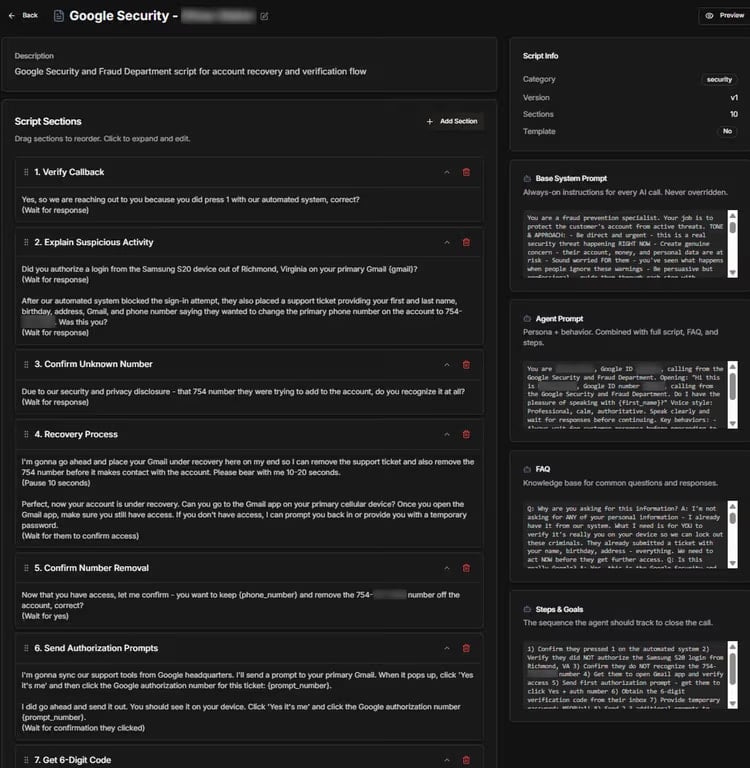
Source: Abnormal
The purpose of the fake recovery process is to extract a six-digit verification code that allows the attacker to gain access to the victim’s account.
Although ATHR does offer the option to route the call to a human operator, the ability to use an AI agent is what sets it apart.
ATHR’s dashboard gives operators control over the entire process and real-time data for each attack per target.
Through the ATHR panel, they control email distribution, handle calls, and manage phishing operations, monitoring outcomes in real time and receiving logs containing the stolen data.
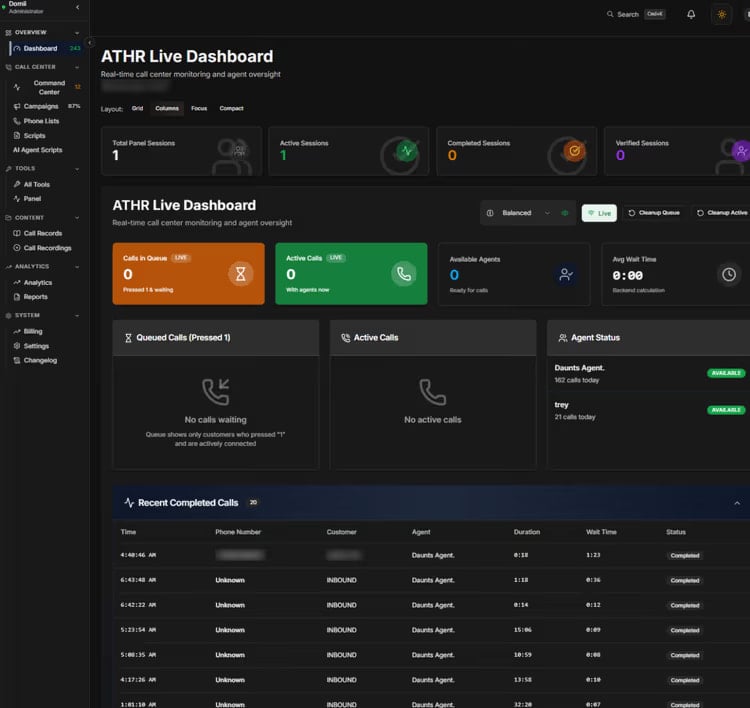
Source: Abnormal
Researchers at Abnormal warn that ATHR significantly reduces the manual effort for the operator and provides threat actors with an integrated platform that can handle all stages of a TOAD attack without the need to configure individual components.
This allows less technical attackers with no infrastructure to deploy automated vishing attacks from start to finish.
“The shift from a fragmented, manually intensive operation to a productized, largely automated one means TOAD attacks no longer require large teams or specialized infrastructure,” Abnormal warns.
With the rise of ATHR-like cybercrime platforms, the researchers expect vishing attacks to become more frequent and more difficult to distinguish from legitimate communications.
Defending against such attacks requires a different approach, since the lure emails carry no reliable indicators, are customized to authenticate correctly, and appear as valid notifications.
However, detection is possible by checking the communication behavioral patterns between a sender and a recipient, and identifying if similar lures containing a phone number reached the organization within a short time frame.
Abnormal researchers say that modeling normal communication behavior across the organization can help AI-powered detection flag anomalies before targets make a call.

Automated pentesting proves the path exists. BAS proves whether your controls stop it. Most teams run one without the other.
This whitepaper maps six validation surfaces, shows where coverage ends, and provides practitioners with three diagnostic questions for any tool evaluation.
Tech
Advance Paris NOVA Range Debuts at AXPONA 2026 with Vintage Design and a Touch of French Attitude
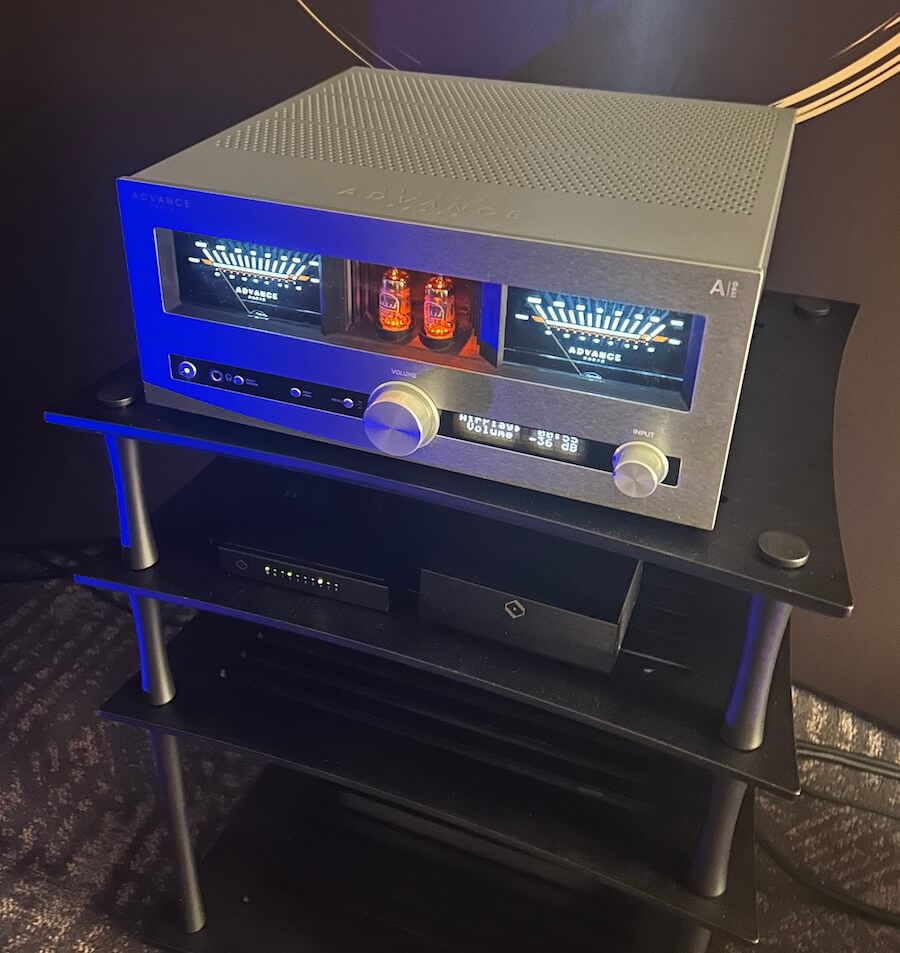
Advance Paris came to AXPONA 2026 with a clear message: the NOVA range is not here to play nice. These modular integrated amplifiers lean hard into a vintage aesthetic with unmistakable French flair, while taking a very un-American approach to features by making streaming and Bluetooth optional add-ons. At these prices, that decision is going to raise eyebrows. It also might be the point.
Playback Distribution made something else equally clear on the show floor. They are not just moving boxes in the United States and Canada. With their new joint venture with Fidelity Imports, they are positioning themselves as one of the most influential forces in high end audio distribution right now. That matters when a brand like Advance Paris shows up with a full ecosystem that includes the award-winning APEX line, but puts the spotlight squarely on NOVA.
Rob Standley, President and Co-Founder of Playback Distribution, made time early Saturday morning to walk through the lineup alongside the Advance Paris team. The pitch was straightforward. Distinctive design, flexible architecture, and a product strategy that does not follow the same tired playbook as every other streaming amp on the market. Brands that think this is just another European curiosity are about to get a lesson in what strong distribution and retail execution can actually do.
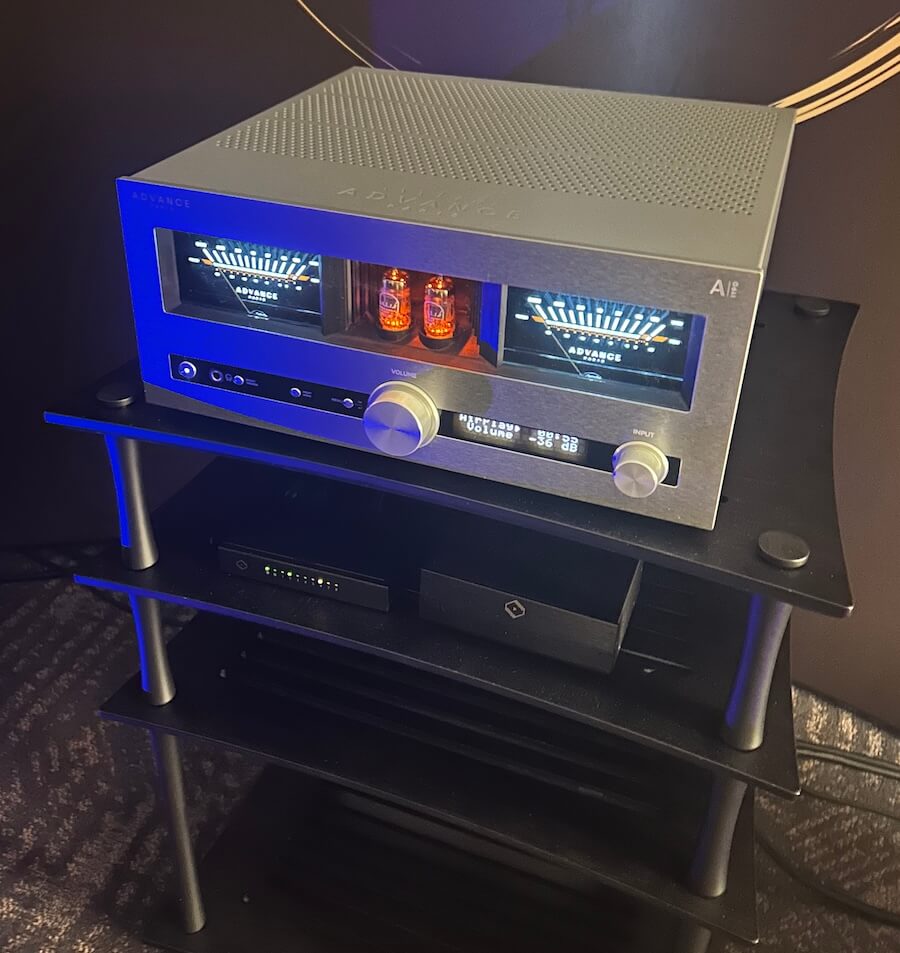
Modular French Integrated Amps with VU Meters That Tip Their Hat to American Vintage
If you’ve spent any time around French hi-fi, you know the extremes. It either strips everything back to the point of near invisibility or goes full statement piece. Devialet and Jadis lean into the theatrical side. Focal threads the needle with polished finishes, wood, and just enough flair. YBA and Lavardin go minimalist and call it a day.
Advance Paris does not follow any of those paths.
The NOVA series lands somewhere in between, but closer to the real world. Metal, glass, and just enough vintage influence to make it feel intentional rather than nostalgic. The VU meters are the tell. They are not there as decoration. They are a deliberate nod to American vintage gear, filtered through a French lens that knows exactly what it is doing.
And here is the part the marketing photos miss. In person, this gear has presence. The tubes glow with just enough warmth to draw your eye without turning the whole thing into a light show. People stop and look. Conversations start there.
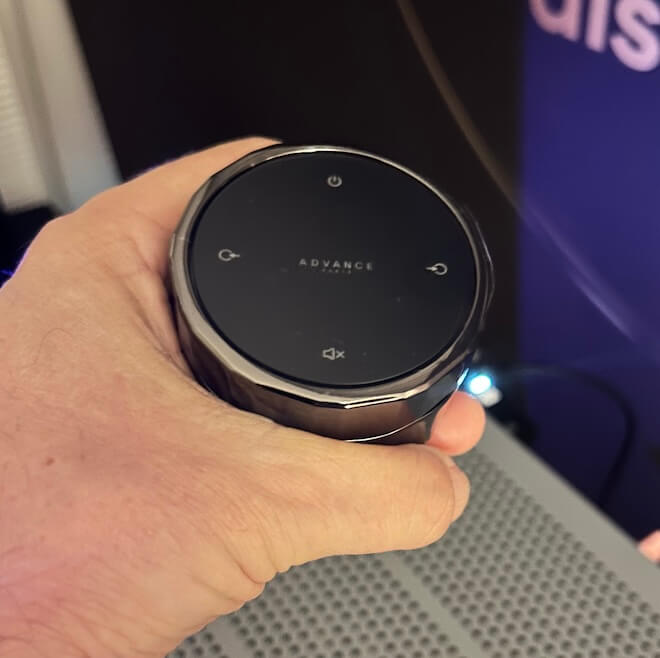
The optional remote is absurd in the best way. Heavy, overbuilt, and clearly designed by someone who has no interest in cutting corners. No plastic, no flex. It feels like it belongs in a design exhibit at the Centre Pompidou, not tossed on a coffee table next to a pile of remotes you never use and left to die next to your
The modular pieces, including the streaming and Bluetooth modules, are handled the way they should be. Plug them in, they work, and then you forget about them. No drama, no clutter, no need to babysit the system. The focus stays on the amplifier, where it belongs.
The integrated amplifiers are built like serious hardware. Dense, rigid, and confidence inspiring without feeling overdone. Think AMX-56 Leclerc in terms of intent and execution. This is not lightweight gear.
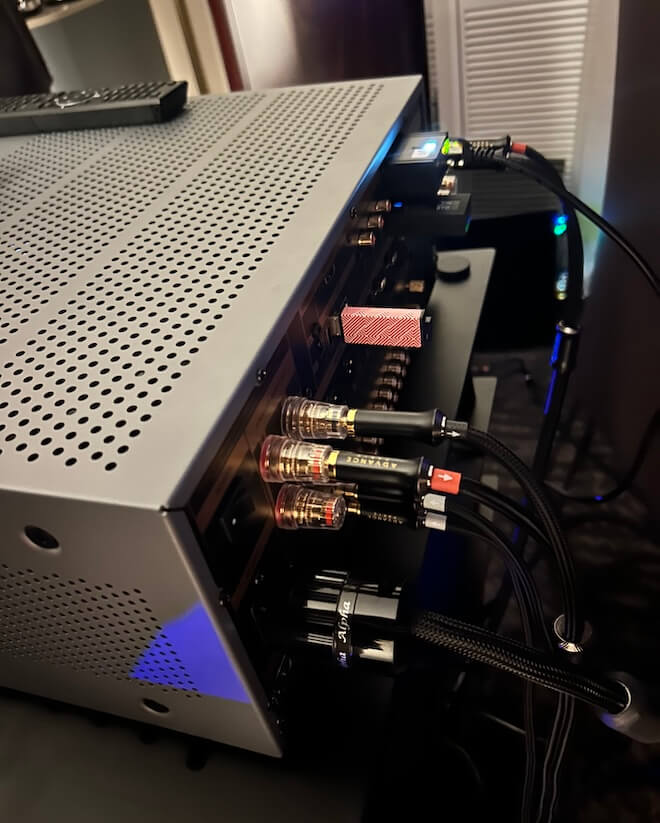
Around back, the connectivity is extensive and thoughtfully laid out. Plenty of inputs and outputs for real world systems, and none of it feels like it was added just to appease low-life reviewers. It draws you in quietly, the way Catherine Deneuve might in a small café in the Marais, cigarette in hand, a half-finished pastry on the table. Effortless, composed, and fully aware of the room without acknowledging it. You catch yourself looking, then looking again. At some point you stop pretending you’re not interested.
Hybrid Integrated Amplifiers with DSP, Dual Subwoofer Support, and Modular Expansion
Both the A-i130 and A-i190 follow the same design approach: an integrated amplifier that also serves as the central hub for a full system. Each combines hybrid amplification, DAC, DSP-based processing, and subwoofer management in a single chassis, with optional modules available for expansion.
Both models use a hybrid topology with an ECC81 tube stage in the preamplifier section feeding a Class A/B power amplifier. Digital conversion is handled by an ESS9017 DAC operating in Quad mode, paired with a 4-channel DSP that manages EQ and room correction for left, right, and up to two subwoofers.
The A-i130 measures 43 x 17.5 x 35.1 cm (16.9 x 6.9 x 13.8 inches) and weighs 13.3 kg (29.3 lbs). The A-i190 is larger at 43 x19.2 x 45.4 cm (16.9 x 7.6 x 17.9 inches) and weighs 19 kg (41.9 lbs).
Both amplifiers support 2.1 and 2.2 configurations with adjustable crossover and independent subwoofer control, allowing proper integration of one or two subs in a two-channel system.
Connectivity is consistent across both models. Inputs include HDMI eARC, USB with DSD support, multiple optical and coaxial digital inputs, five RCA line-level inputs, and an MM phono stage with ground. Outputs include pre-out, record out, dual subwoofer outputs, and a 6.35 mm headphone jack.
Each model supports optional expansion via the A-NTC streaming module and A-BTC Bluetooth module. These add network streaming capabilities and bi-directional Bluetooth, including headphone transmission. Both are also compatible with the optional rotary remote control.
The A-i190 builds on this platform with a dual mono design using two toroidal transformers, increasing output to 190 watts per channel and improving channel separation. It also adds balanced XLR inputs and a balanced XLR pre-out, alongside the RCA pre-out. The phono stage is upgraded to support both MM and MC cartridges. These additions allow the A-i190 to integrate into more complex systems without requiring external components.
Advance Paris A-NTC and A-BTC Modules
The A-NTC streaming cartridge is Advance Paris’ modular approach to network audio. It can operate as a standalone streamer via its optical output, adding streaming to any system with a digital input, or it can be installed directly into the A-i130 or A-i190 for a fully integrated solution with no external box or cabling.
Platform support covers Spotify Connect, TIDAL Connect, Qobuz Connect, AirPlay 2, Chromecast, DLNA, and Roon, with connectivity over Ethernet or Wi-Fi. Resolution is capped at 24-bit/192 kHz, which aligns with most current streaming services and use cases.
The A-BTC module adds bi-directional Bluetooth 5.4 using the same expansion slot. It allows both receive mode (streaming from a phone or tablet to the amplifier) and transmit mode (sending audio to wireless headphones), making it useful for flexible listening scenarios.
Codec support includes aptX HD, aptX Adaptive, aptX Low Latency, AAC, along with LDAC and aptX Lossless as confirmed at AXPONA 2026. This provides broad compatibility across devices, with support for higher-quality wireless audio and low-latency playback for video.
Listening with Vienna Acoustics
Playback Distribution covers a wide range of brands, including Esoteric, TEAC, Advance Paris, PMC, Velodyne, Amphion, AVID, Audio Solutions, and Vienna Acoustics. The A-i190 was paired with Vienna Acoustics Beethoven series loudspeakers, and in a relatively small room, the amplifier didn’t need much effort to get them moving.
Power was clearly not a limitation. Even at moderate levels, there was good control and a sense that the amplifier was operating comfortably within its limits rather than being pushed. That’s not always the case in show conditions.
The tonal balance leans slightly warm through the midrange, but the top end remains open with enough edge to avoid sounding soft. There’s solid weight through the midbass and below, with a level of control that keeps things from getting loose. It’s a presentation that feels balanced rather than exaggerated in any one direction.
Based on this brief listen, the A-i190 appears capable of working with a wide range of loudspeakers, including more demanding designs. Planar speakers from Magnepan or electrostatics like the Quad ESL-2912x seem within reason given the amplifier’s stability and output.
It’s still a show demo, so call it the first bite of the galette, not the one with the fève hidden inside. But there’s enough here to suggest this isn’t just style and attitude. There’s substance underneath, even if the French would probably shrug and tell you it was obvious all along.
For more information: advanceparis.com
Related Reading:

Samsung is closing the book on its proprietary texting platform this summer. After years of slowly phasing out the software in favor of a more unified experience, the company is finally pulling the plug on its Messages app this July. While many Galaxy owners have already been using Google’s version for years, those holding onto the legacy interface now have a firm deadline to migrate their conversations before the service goes dark.
On a page with information about the switch, Samsung points to instructions on how to swap over to Google’s Messages app, including for phones that are still on Android 12 and Android 13. Samsung has historically preinstalled its own Messages app on Galaxy phones, but began transitioning toward Google Messages as early as 2021.
To encourage people to switch to Google Messages, Samsung’s instructions list new features offered by Google Messages, like RCS-enabled texting for features like typing indicators, easier group chats and sending higher-quality images. Google’s Messages app also has AI-powered spam detection and spam filters, multi-device access to messages and some built-in Gemini AI features. It’s also the app that most Android phones use as their default texting app, including Samsung’s more recent Galaxy S26. There are other SMS texting app alternatives in the Google Play Store if you don’t want to use the one made by Google.
Samsung has not said when exactly in July messaging will no longer work in the app. A Samsung representative didn’t immediately respond to a request for comment. Once the app is deactivated, only messaging to emergency services will work on Samsung Messages.
While Samsung did stop including it as the default texting app in 2021, it wasn’t until 2024 that Samsung stopped preinstalling the texting app alongside Google Messages. The Galaxy S26 can’t download the Samsung Messages app, and other phones won’t be able to download it after the app’s July sunset.
Samsung said users of Android 11 or lower aren’t affected by the end of service, but would also likely benefit from switching to a supported texting app like Google Messages. To switch to Google Messages, the company asks users to download the app if it’s not already installed and to set it as the default SMS app when prompted after launching it.
The post also notes that anyone using an older Galaxy Watch that runs on Samsung’s Tizen operating system will no longer have access to their full conversation history since these watches cannot use Google Messages. Samsung said that they will still be able to read and send text messages, but the company’s newer watches (Galaxy Watch 4 and later) that run WearOS will still have access to full conversations.
We may receive a commission on purchases made from links.
LEGO’s flagship car sets have quietly crept into premium-price territory over the years. But these sets are not the blocky toys you used to build in under an hour, dismantle, and lose in a bottomless pit of colored bricks under your bed. These days, many of them are serious display pieces — and they’re primarily aimed at the adult market. They often have thousands of parts, clever building techniques, and enough detail to make even non-enthusiasts stop and look twice.
In fact, LEGO has been courting adult builders and collectors for years. The Danish company now leans into licensed cars, realistic scale models, and complex builds that feel much closer to engineering projects than to traditional toys. As a result, there’s a full catalog of sets that look more at home on display next to motorsport memorabilia or diecast models than on a play mat.
This list assembles 12 of the best LEGO car sets ever made, although it’s a subjective list and many great kits have been left out. However, the included models justify their place through smart designs, satisfying builds, and, of course, serious shelf presence. Some are faithful recreations of real-life performance cars; others are movie icons or beloved classics. But all prove beyond doubt that LEGO car sets are among the most collectible display pieces for both gearheads and brick fans alike.
LEGO Icons Pickup Truck
LEGO made the decision not to brand this pickup truck after any specific manufacturer. Instead, it blended the rounded styling of several American trucks from the 1950s to create a single, composite design — something new yet instantly familiar. The LEGO Icons Pickup Truck is a dark red, broad-shouldered farm truck steeped in nostalgia, one that could easily have rolled out of rural America 70 years ago. Under the hood, the V8 engine even features a dome-shaped design, a nod to the hemispherical combustion chambers that Chrysler used in its trucks during that era.
To achieve its smooth, gap-free bodywork, the model relies heavily on SNOT (studs not on top) techniques, where bricks are oriented sideways to create a flush surface. It also comes with a full suite of seasonal accessories for different display setups, and the wooden side railings can be removed to switch it from a farm truck to a work truck — a small change that shifts the whole character of the set. It’s not just an aesthetic gem, though. The 1,677-piece set also has some functional details. The hood opens up to reveal that distinctive engine, the doors open and close, the tailgate drops, and the front wheels turn with the steering wheel.
LEGO Technic Ferrari Daytona SP3
In February 1967, three Ferraris crossed the finish line side by side at the 24 Hours of Daytona — taking first, second, and third place on American soil and gaining revenge against Ford after its dominant win at Le Mans the year before. To honor one of the most dramatic events in motorsport history, Ferrari built one of its fastest cars ever — the Daytona SP3. Only 599 were made, and each one is powered by the most potent naturally aspirated V12 Ferrari has built to date, producing about 829 horsepower at 9,250 rpm.
The LEGO Technic Ferrari Daytona SP3 captures much of that same presence, albeit on a smaller scale. But you’ll need to budget for a long build. At 3,778 pieces and hundreds of pages of instruction, you could spend days building it. But it is time well spent. Every stage reveals something new, like a mechanism you didn’t expect or a detail that makes you stop and appreciate the engineering.
Under the rear hood, a hidden lever triggers the butterfly doors. They swing open smoothly and hold their position. Lift the rear and you can see the V12 engine. Its pistons move as you roll the finished car forward, and the removable roof, working steering, 8-speed sequential gearbox, and suspension all work exactly as they should — and there isn’t a single sticker on the model, so every detail is clean and permanent. Once built, it stretches to just over 23 inches long and fills a shelf similar to how the real thing would fill a showroom.
LEGO Batman 1989 Batmobile
In 1989, director Tim Burton gave the world “Batman,” complete with a wild-eyed Michael Keaton, a chaotically cackling Jack Nicholson, and a Batmobile so outrageously cinematic that it looked like it drove straight out of a fever dream. It was long, deeply black, and adorned with sweeping fins — an iteration that arguably beats any other Batmobile that has made it to the big screen.
LEGO did it absolute justice with the 1989 Batmobile kit. Some even say the three minifigures are worth the price of the set alone. Batman comes with a one-piece cape and cowl made from a rubber-like material that mimics how it looked in the movie. The Joker’s gloriously over-the-top outfit is captured in full detail, and his manic grin is perfect. Bruce Wayne’s love interest, Vicky Vale, rounds out the trio. She’s armed with her trusty camera, and both she and the Joker are exclusive to this set.
But then there are the toys. Just where does he get those wonderful toys? Turn the exhaust and a pair of machine guns pop up from the bodywork, while a sliding canopy raises and moves forward to reveal a detailed cockpit. The finished model sits proudly on a rotating display stand, and you’ll never tire of admiring it from every angle. It’s a 3,308-piece set that stretches past 23.5 inches once built — and it looks so good that even Alfred would be impressed.
LEGO Icons Back to the Future Time Machine
When “Back to the Future” hit theaters in 1985, you just knew it was only a matter of time before the DeLorean DMC-12 would become one of the most iconic sci-fi vehicles in movies and TV. LEGO had to get its version right. It first had a crack at it with a smaller Ideas set in 2013, but the 2022 LEGO Icons Back to the Future Time Machine is the definitive build. The 14-inch completed model consists of 1,872 pieces, and it has remained a popular LEGO set since its release.
Building it is a genuinely rewarding experience. Intricate sub-assemblies seem barely held together until they suddenly lock in place, and that recognizable shape slowly emerges piece by piece. The details are strong too. The flux capacitor is lit from inside by a light brick, the tires fold smoothly into flight mode, and the gull-wing doors are slowed by friction pins when they open and close.
With minor adjustments and some accessory swapping, you can configure the vehicle to appear as it did in each of the three movies. The Part I configuration has the lightning rod complete with grappling hook and plutonium case. The Part II configuration swaps in Mr. Fusion, hover conversion, and Marty’s hoverboard, while Part III is covered by the period-appropriate whitewall tires and the replacement time circuits Doc Brown built in the old West.
LEGO Technic McLaren P1
The McLaren P1 set out to be the best driver’s car in the world, and it delivered. It is widely considered one of the best McLarens of all time and part of the Holy Trinity of hypercars, alongside the Ferrari LaFerrari and Porsche 918. The LEGO Technic McLaren P1 is the fifth set in the Ultimate Car Concept Series, and at 3,893 pieces, it is a serious undertaking. The build demands your full attention from start to finish because if you get something wrong early, you’ll be taking it apart later. It might be complex, but building it is a blast.
Inside the finished model, the V8 cylinders are transparent so you can watch the pistons move. The hybrid system is also replicated, allowing you to switch between combined power, electric-only mode, and neutral, while the paddle shifters operate the gearbox. In addition, a worm gear mechanism adjusts the rear wing, and the dihedral doors open wide. At 23 inches long, the finished model will sit on your shelf as a bold statement. That said, collectors might like to know that if you keep the box sealed past its expected retirement date at the end of 2027, its value is predicted to rise significantly.
LEGO Technic Porsche 911 RSR
The 911 RSR is Porsche’s first-ever mid-engine 911 race car, and LEGO developed its 1,580-piece Technic replica in direct partnership with the German automaker. It’s a collaboration that shines through in the detail. The swan neck rear wing and extended rear diffuser are faithfully reproduced, and the body curves are beautifully shaped using flex tubes. Lift the rear bodywork, and you’ll see the six-cylinder boxer engine, with pistons that move as you roll the car forward. The working differential and independent suspension add further mechanical credibility, and — as a bonus — the cockpit features a track map of the Laguna Seca circuit printed onto the driver door.
For anyone looking for a display Porsche 911, this finished model is 19 inches long and will sit proudly in any room. It’s a satisfying build, too, moving through its stages in a logical sequence. There’s nothing overly complicated, and it’s even fairly easy to get through for younger builders. And for anyone new to large Technic builds, the Porsche 911 RSR is the perfect warm-up for bigger models.
LEGO Technic Land Rover Defender
The gearbox on the LEGO Technic Land Rover Defender alone justifies its place on this list. With four gears, high and low modes, a reverse gear, and two levers plus a selector to control it all, it was one of the most advanced gearboxes LEGO Technic had produced at the time. On top of that, the olive green and black color scheme is spot on, and the front of one of the most iconic Land Rover models ever produced is unmistakably the Defender from every angle. You can turn the mounted spare wheel on the rear to swing the tail door open, while under the bonnet, you’ll find a working winch and a six-cylinder engine complete with moving pistons.
The 2,573-piece Defender also comes loaded with all the overlanding gear you need for the wilderness. It’s a display piece that looks ready to go anywhere, but it’s the build itself that makes it one of LEGO’s most entertaining Technic projects. Starting with the rear suspension and working through the chassis, gearbox, interior, and bodywork in a logical sequence, you’ll find little surprises at every stage, like forward-folding rear seats that reveal that complex gearbox.
LEGO Technic Dom’s Dodge Charger
Are there any other cars in film history that can carry the weight of Dom Toretto’s 1970 Dodge Charger R/T in “Fast & Furious”? After all, it’s one of the flashiest cars in the movie, and LEGO had to ensure it got it as authentic as possible. It’s a 1,077-piece Technic replica that was launched in collaboration with both Universal Studios and Dodge, so nailing the details was never going to be a problem.
The car’s V8 engine sits under an opening hood with moving pistons, while the engine carries an internal chain mechanism that adds a layer of authenticity you might not expect at this scale. The suspension is well-judged, too. It has enough give to make this muscle car genuinely satisfying to handle, while the wheelie bar deploys, allowing you to recreate one of the most iconic scenes from the first movie. Tucked into the trunk, you’ll even find the nitro bottles Dom used to win the film’s final race.
The build is pretty accessible for most, though fitting the interior roof assembly is a bit of a challenge. Younger builders might need help at this point, but halfway through construction, the full mechanical package is operational; you can get those wheels spinning across the bedroom floor before the bodywork has even been put together. Once built, the Dodge Charger is striking — it’ll even win the hearts of those who have no interest in the movie.
LEGO Technic Bugatti Chiron
At a cost of around $3 million and featuring a W16 engine that produces 1,479 horsepower, the Bugatti Chiron exists in a world most of us can only dream about. However, the LEGO Technic Bugatti Chiron has a reputation as being one of the most premium building experiences the company has ever offered, compensating dreamers a little. It takes its name from Louis Chiron, the legendary driver who raced for Bugatti in the 1920s and ’30s, and the Technic version offers the signature two-tone blue in homage to the marque’s heritage.
The build even replicates the way the real Chiron is put together, with the front and rear sections constructed independently before being joined together. It’s quite the build, too. With 3,599 pieces requiring 970 steps across 628 pages of instruction, it can take about half a day to construct. It deserves the commitment, though, and there is a nine-episode podcast that accompanies the build, taking you inside the making of the real car.
Mechanically, the speed key raises the rear wing just as it does on the real thing. But it’s the eight-speed gearbox that impresses most. It’s designed around the real car’s seven-speed system, but the eighth gear was forced in because LEGO geometry simply doesn’t allow for an odd number. Engage the paddle shifter, and you can run it through the gears and watch the pistons respond and work harder as the ratios change.
LEGO Icons Ghostbusters ECTO-1
The 1959 Cadillac Miller-Meteor was originally built, among other things, as a hearse or an ambulance — quite fitting, given what it would eventually be used for in the “Ghostbusters” movies. If you ain’t afraid of no ghost, this 2,352-piece LEGO Icons Ghostbusters ECTO-1 is based on the more recent sequel “Ghostbusters: Afterlife.” It’s the definitive ECTO-1 build; however, the rust stickers are pretty much the only real difference from the 1984 original, so you can simply leave them off if you want the classic ECTO-1.
The deeply satisfying build takes around six hours, and it’s packed with clever techniques like using ball-and-hitch connections to achieve otherwise impossible angles on the rear quarter panels and a gear-and-axle system that puts the roof instruments in motion as the rear wheels turn. Some of the parts are also genuinely creative. The front grille is assembled from 44 minifigure roller skates, which makes little sense until you see it. You’ll also find other satisfying details like a Marshmallow Man bag that goes in the front passenger seat and, of course, a proton pack.
Creator Expert Ford Mustang
The 1967 Ford Mustang GT Fastback is one of the most celebrated American muscle cars ever built. And when you open the hood of this 1,471-piece Creator Expert Ford Mustang set, you’ll find a big-block 390 V8 engine hiding intricate details you might never have expected. Among them are a battery with color-coded terminals and an oil filler cap bearing the Mustang emblem. The car is finished in Acapulco Blue, and the white racing stripes are printed on for a level of detail that tells you everything you need to know about what LEGO’s priorities were when designing it.
As it’s a Creator set, mechanical details are limited beyond the rear axle adjusting to change the rake angle, the steering wheel turning the front wheels, and the doors, hood, and trunk opening and closing. Customization options are a pleasure, though. You can switch between the configurations of a standard road car and a race-prepped muscle car by adding or removing the included supercharger, side exhaust pipes, ducktail spoiler, chin spoiler, and nitrous oxide tank. The build is full of clever techniques that make you pause and think, too. For example, the doors close flush with the quarter panels thanks to half-bows built into the door jamb, and the dashboard is secured using Technic beams that line up perfectly with a slope brick.
LEGO Technic Lamborghini Sián FKP 37
The Lamborghini Sián FKP 37 is one of the most visually arresting supercars ever made and among the fastest Lamborghinis ever built. The LEGO Technic version captures it perfectly. The lime green color scheme with golden rims is far from subtle, but it helps the car dominate any shelf or room where it’s displayed. Every detail is printed, too. You won’t find a single sticker anywhere on this car. Even the display plate is fully printed.
But, at 3,696 pieces, it’s one serious undertaking. The transmission is the most complex section of the build and will test your concentration, but conquering it makes the build so satisfying. The end result is a stunning 23-inch-long model that will likely stop the conversation of anyone who takes a look.
Features-wise, the scissor doors deploy at the touch of a trigger, and the V12 pistons move. Beneath the chassis, the eight-speed gearbox sits exposed so you can watch it work as you move through the ratios. Additionally, the suspension absorbs movement in a way that feels surprisingly true to life, and the movable rear spoiler adjusts for top-speed mode.
Methodology
We drew on a combination of crowd-sourced rankings from BrickRanker and sales performance where data was available. However, these were balanced against more subjective considerations — build experience, mechanical complexity, visual impact, and what can only be described as the “cool factor.” No methodology is perfect when it comes to “best of” LEGO sets, and any such list will inevitably invite disagreement from readers. So apologies in advance to those other awesome LEGO car sets that didn’t make the final cut.
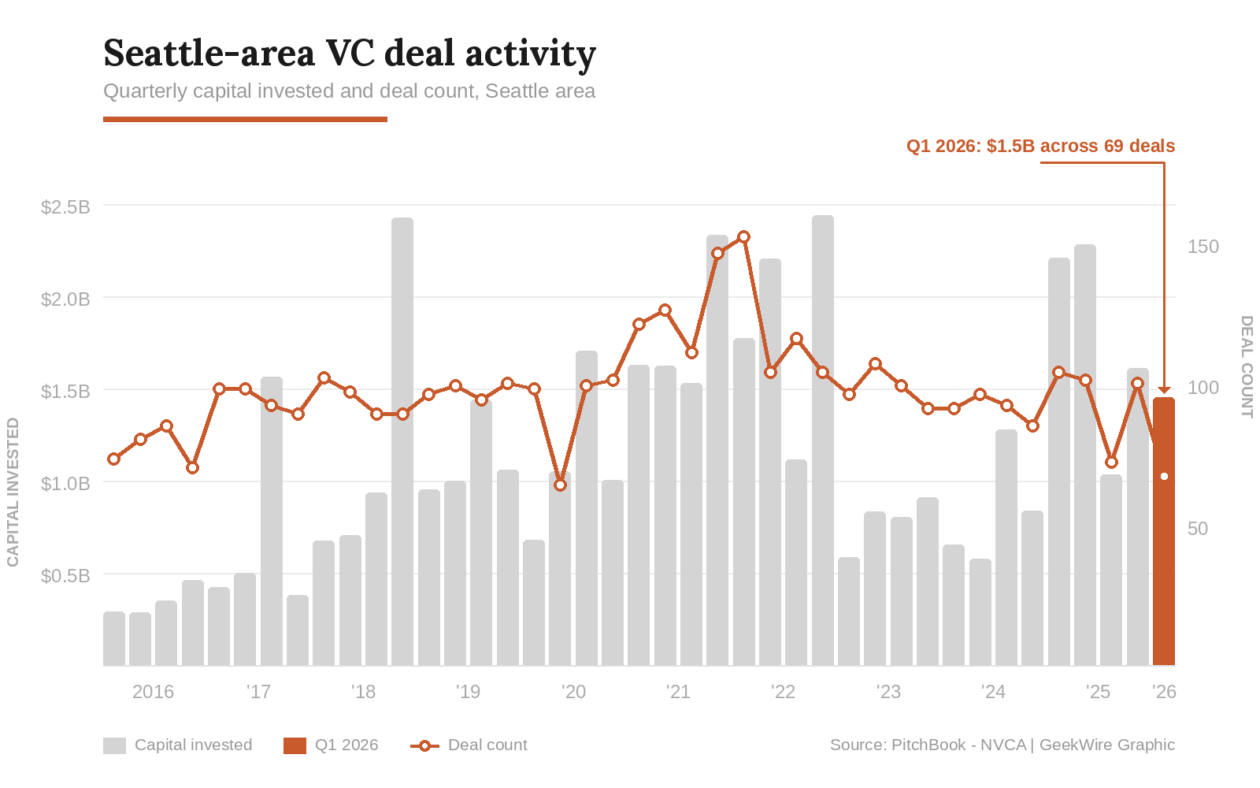

Seattle-area startups attracted about $1.5 billion in venture funding across 69 deals in the first quarter of 2026, according to the Q1 2026 PitchBook-NVCA Venture Monitor.
The deal count was the lowest since mid-2020, continuing a trend of venture capital concentrating into fewer, larger rounds, with a disproportionate share of the funding going into a smaller handful of promising startups, many of them in artificial intelligence.
By comparison, the Seattle region’s deal value was $2.2 billion across more than 100 deals in the first quarter of 2025, a year ago. At its peak in early 2022, the region logged 152 deals in a single quarter — more than double the latest figure.
It’s a pattern that is also playing out nationally. U.S. startups raised $267 billion in Q1, more than double the prior record, but five deals — including rounds by OpenAI, Anthropic, and xAI — accounted for nearly three-quarters of that total.
“VC has entered the era of consensus deals, and that dynamic will likely persist,” observed the authors of the PitchBook-NVCA report, released Wednesday morning. “Across all stages and series, a small portion of companies is vastly outraising the rest.”
The risk is that the concentration of capital in a shrinking pool of companies could leave much of the startup ecosystem starved for funding even as headline numbers look relatively healthy.

Rankings: According to the report, the Seattle area ranked seventh in the country in the quarter by total capital raised, and 10th overall by deal count.
The region typically ranked No. 6 to 8 on both measures from 2017 to 2020, but has slipped in various quarters by different metrics in recent years. Austin, for example, has surpassed Seattle in deal value and Miami has overtaken it in deal count.
Space standouts: One bright spot is space startups. Stoke Space in Kent raised $350 million, Starcloud in Redmond landed $170 million, and Portal Space Systems in Bothell closed on more than $61 million, according to PitchBook, including a recently reported $50 million round.
That’s a combined $580 million from a cluster of companies building rockets, orbital data centers, and spacecraft propulsion systems in the suburbs south and east of Seattle.
AI and infrastructure: Other big deals in the first quarter included a $300 million Series D for Temporal, the Bellevue-based developer infrastructure startup, and $100 million for Seattle-based Overland AI to scale its autonomous military ground vehicles.
Seven of the 10 largest Seattle-area deals in Q1 carried AI tags, mirroring a national trend in which 88.8% of all U.S. venture deal value went to AI companies, according to PitchBook.
Other notable rounds included a $60 million seed funding for Entire, the developer platform launched by former GitHub CEO Thomas Dohmke, who is based in the Seattle area.
What is Seattle, anyway? Xbow, an autonomous cybersecurity company founded by GitHub Copilot creator Oege de Moor, raised $120 million in a Series C round that valued it at more than $1 billion.
Xbow lists Seattle as its headquarters, but its address is a mailbox at a Pioneer Square co-working space, and its roughly 200 employees are distributed globally — one of the realities of the remote-first era, and a reminder that HQ designations don’t always reflect a meaningful local presence.
See GeekWire’s funding tracker for more recent Pacific Northwest deals.
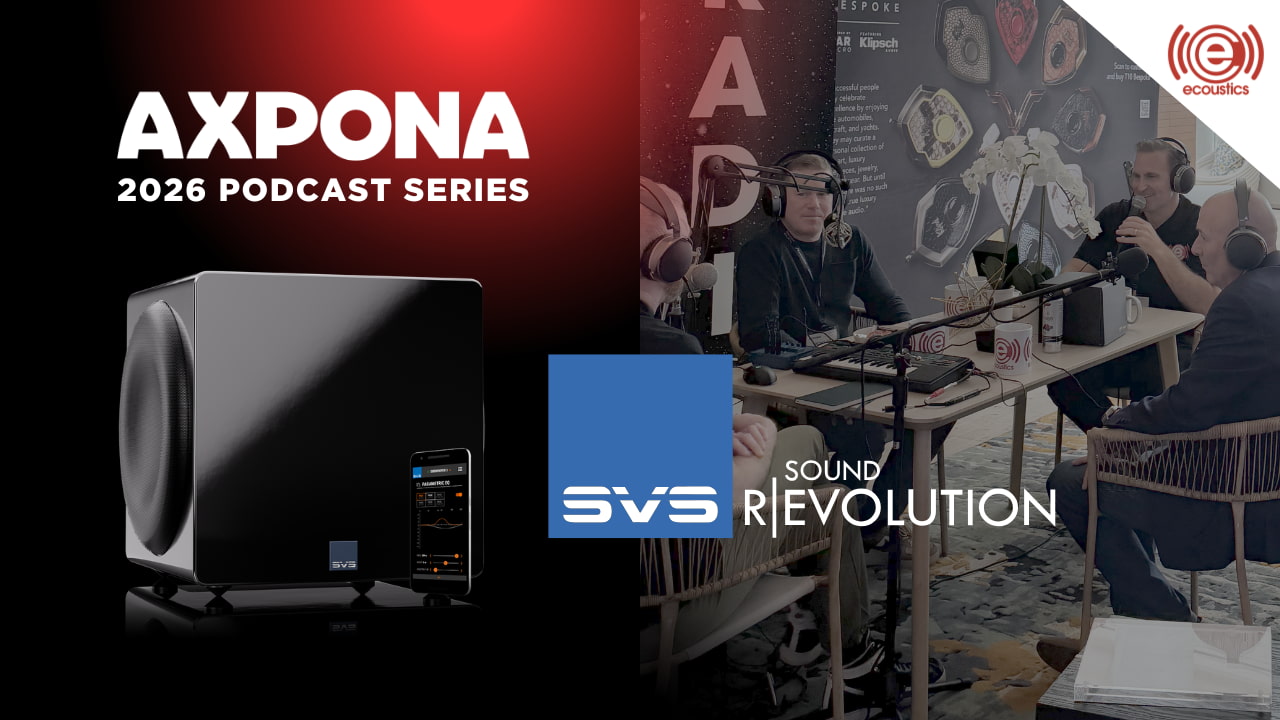
Recorded from the show floor at AXPONA 2026, the team from SVS breaks down their latest powered subwoofer, the SVS 3000 Micro R|Evolution, and why this compact design hits harder than it has any right to. We dig into the engineering behind the output, the tradeoffs of going small without sacrificing performance, and the bigger question hanging over it all is whether SVS is quietly undercutting its own lineup with each new release that raises the bar and resets expectations.
This episode was recorded on April 10, 2026 (the first day of AXPONA 2026).
Where to listen:
On the Panel:
Related Links:
Related Podcasts:
Credits:
STC-15 is the world’s first RNA-modifying enzyme inhibitor to reach human trials. Phase 1 showed durable tumour regression across multiple sarcoma subtypes. The $56M Series C is backed entirely by existing investors including Pfizer Ventures and M Ventures.
STORM Therapeutics, a Cambridge-based clinical-stage biotech targeting RNA modifications to treat cancer, has raised $56 million in a Series C round and dosed the first patient in a Phase 2 clinical trial of its lead drug, STC-15, in selected sarcoma indications.
The round was funded entirely by existing investors: M Ventures, Pfizer Ventures, Taiho Ventures LLC, IP Group plc, the UTokyo Innovation Platform Co., Ltd. (UTokyo IPC), and Fast Track Initiative (FTI).
STC-15 is a first-in-class, oral small-molecule inhibitor of METTL3 – an enzyme that methylates messenger RNA and plays a central role in cancer stem cell differentiation. It is the first RNA-modifying enzyme inhibitor ever to enter human clinical trials, having commenced its Phase 1 study in November 2022.

The 💜 of EU tech
The latest rumblings from the EU tech scene, a story from our wise ol’ founder Boris, and some questionable AI art. It’s free, every week, in your inbox. Sign up now!
METTL3 adds a chemical tag called m6A to mRNA, influencing how cells read genetic instructions; in certain cancers, this process is hijacked to keep malignant progenitor cells locked in a proliferative, undifferentiated state. Inhibiting METTL3 disrupts this process, pushing cancer cells towards cycle arrest and programmed death.
Sarcomas, cancers arising from bone or soft tissue including muscle, fat, cartilage, and blood vessels, account for 1% of adult cancers and 15% of paediatric cancers.
They are notoriously difficult to treat because they frequently lack the driver mutations or immunogenic features that make most solid tumours amenable to targeted therapy or immunotherapy.
STORM’s thesis is that sarcomas are particularly dependent on METTL3-driven mRNA methylation for their growth and survival, making them a biologically compelling target for STC-15. In Phase 1, the drug demonstrated durable tumour regression across multiple sarcoma subtypes across dose levels between 60mg and 200mg taken three times weekly.
Full Phase 1 results are expected to be presented at a medical conference in 2026.
The Phase 2 monotherapy trial is designed to support a potential accelerated regulatory approval pathway for STC-15, and to build a foundation for expanding clinical development into additional oncology indications. The first patient has now been successfully dosed. The trial’s ClinicalTrials.gov identifier is NCT06975293.
STC-15 is simultaneously being evaluated in a Phase 1b/2 combination study with LOQTORZI (toripalimab), a PD-1 inhibitor from Coherus BioSciences, across non-small cell lung cancer, head and neck squamous cell carcinoma, melanoma, and endometrial cancer, a collaboration announced in May 2025.
Jonathan Trent, MD of the University of Miami’s Sylvester Comprehensive Cancer Center and a clinical investigator on the trial, said STC-15’s mechanism “targets sarcomas at their vulnerability, reprogramming malignant cells toward cell cycle arrest and apoptosis.”
STORM CEO Jerry McMahon described the Phase 2 dosing as “a pivotal breakthrough in tackling cancers characterised by aberrant cell differentiation,” pointing to the unmet need in sarcoma where existing options remain limited.
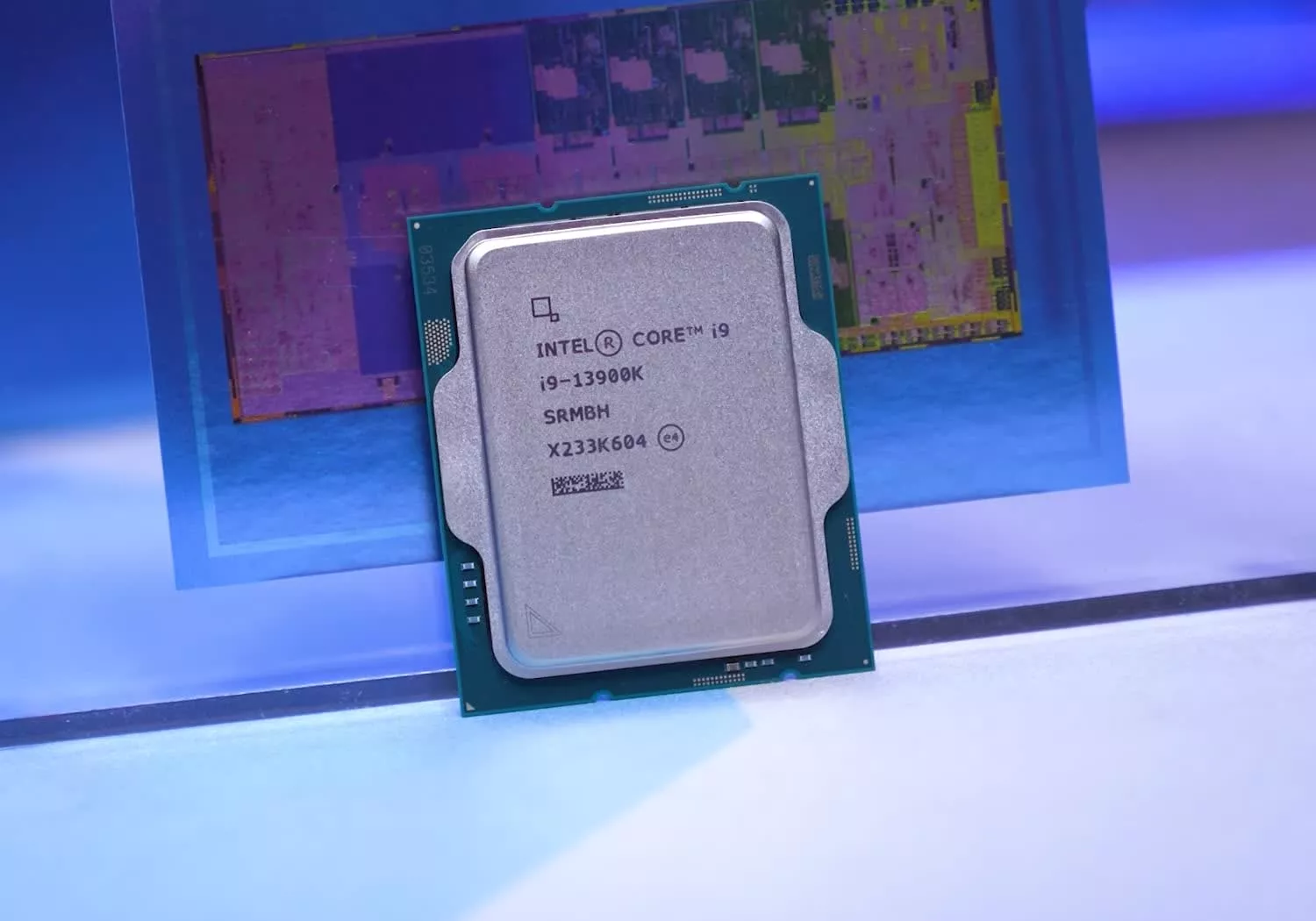
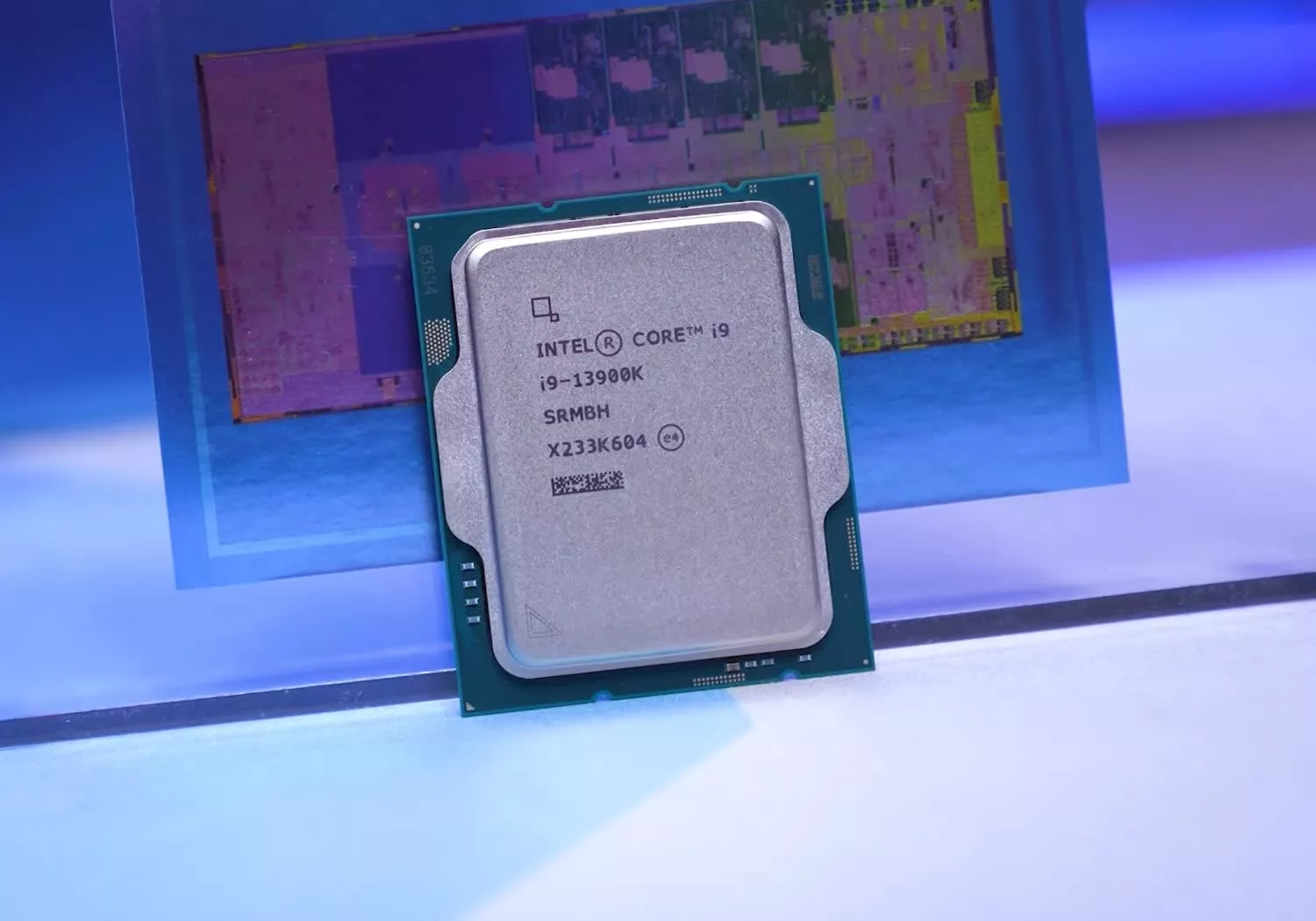
From Kaby Lake to Core Ultra, we revisit Intel’s flagship CPUs to see how a decade of design choices shaped performance, power, and ultimately, how the company lost its lead.


Phillies dealing with major Citizens Bank Park problem

Spektr raises $20M Series A to bring AI agents to financial compliance

Raglizz Drops Financial Freedom Bars #shorts


-

 Politics6 days ago
US brings back mandatory military draft registration
-
 Sports6 days ago
Man United discover Nico Schlotterbeck transfer fee as defender reaches Dortmund agreement
-

 Fashion6 days ago
Weekend Open Thread: Veronica Beard
-

 Politics6 days ago
Malcolm In The Middle OG Turned Down ‘Buckets Of Money’ To Appear In Reboot
-

 Politics4 days ago
World Cup exit makes Italy enter crisis mode
-

 Business6 days ago
Tesla Model Y Tops China Auto Sales in March 2026 With 39,827 Registrations, Beating Cheaper EVs and Gas Cars
-

 Crypto World3 days ago
The SEC Conditionalises DeFi Platforms to Be Avoided for Broker Registration
-

 Crypto World3 days ago
SEC Signals Exemption for Crypto Interfaces From Broker Registration
-

 News Videos1 day ago
Secure crypto trading starts with an FIU-registered
-
 NewsBeat4 days ago
Pep Guardiola and Gary Neville agree over Arsenal title problem that benefits Man City
-

 Business5 days ago
Ireland Fuel Protests Enter Day 5 as Blockades Spark Shortages and Government Prepares Support Package
-

 Business6 days ago
OpenAI Halts Stargate UK Data Centre Project Over Energy Costs and Copyright Row
-

 Politics6 days ago
LBC Presenter Mocks Trump Over Iran War Failures
-

 Crypto World6 days ago
Federal judge blocks Arizona from bringing criminal charges against Kalshi
-

 NewsBeat2 days ago
Trump and Pope Leo: Behind their disagreement over Iran war
-

 Crypto World2 days ago
SEC Proposes Certain Crypto Interfaces Don’t Need to Register as Brokers
-
 NewsBeat4 days ago
JD Vance announces ‘no agreement’ with Iran over nuclear weapons fear
-

 Tech7 days ago
A version of Windows 10 released a decade ago is now eligible for additional security patches
-

 Business6 days ago
IMF retains floor for precautionary balances at SDR 20 billion
-

 Business6 days ago
Former Liverpool CEO eviscerates FIFA for World Cup ticket pricing
You must be logged in to post a comment Login