Politics
reMarkable Paper Pure Review 2026: The Best Distraction-Free Tablet For Work And Note-Taking

We hope you love the products we recommend! All of them were independently selected by our editors. Just so you know, HuffPost UK may collect a share of sales or other compensation from the links on this page if you decide to shop from them. Oh, and FYI — prices are accurate and items in stock as of time of publication.
I first got my hands on the reMarkable Paper Pro last year and it’s safe to say that I haven’t shut up about it since. Swapping to an e-ink tablet ended my years of lugging notebooks and half-finished diaries everywhere, and having my notes, calendars and to-do lists all in one place (without the risk of losing a sheet) turned out to be the answer to so many of my organisational issues. So naturally, when the Swedish tech firm invited me to roadtest their latest offering, I couldn’t have said yes faster.
Enter the reMarkable’s new entry-level tablet, the Paper Pure.
As with all of reMarkable’s products, the Paper Pure is essentially a digital writing tablet for reading documents and textbooks, sketching and note-taking that attempts to fully replicate paper writing. Unlike the slick, slippery glass of typical tablets, the display on the Paper Pure has a special surface that mimics paper, so every pen stroke has just the right amount of resistance, making writing, doodling, or annotating documents feel totally natural.
HOWEVER, while the new 10.3-inch black-and-white paper tablet still offers reMarkable’s renowned paper-like writing feel and workflow-focused features, it instead comes with a much lower price tag – and a whole whack of new upgrades.
What affords it a lower price tag you ask? Well, unlike the Pro, the Paper Pure is strictly black and white only (so no more colourful highlighter options) and there is no backlight. The pay off? reMarkable Paper Pro starts at £559, while the Paper Pure starts at £359. For many, that £200 saving is going to be the deciding factor.
“With reMarkable Paper Pure, we challenged ourselves to make the signature reMarkable writing experience more accessible to even more people,” said Mats Herding Solberg, Chief Design Officer at reMarkable. “Together with reMarkable Paper Pro and reMarkable Paper Pro Move, it completes our transition from reMarkable 2 to a family of third-generation paper tablets. Whether you want a colour display, frontlight, and all the other latest technology, or just an excellent digital notebook, there’s a reMarkable Paper tablet for you.

It’s a solid idea – I’ve recommended my Paper Pro to everyone, but the price tag does mean it’s not as simple as just casually popping out and buying one willy nilly. And after a month of road testing the Paper Pure myself, I can safely say that you’re not missing out by opting for this new, more bank account-friendly model.
Like its predecessors, the Paper Pure has 100s of templates you can use for each of your individual projects, as well as standard lined paper options and blank pages for scribbling. Everything can be tagged and organised into folders, making it easy to find everything (instead of wondering where the hell you left that post-it note in your kitchen).
You can cut, copy, and resize content effortlessly and even convert your handwritten notes to typed text. If I don’t manage to get something done on my to-do list, I can simply circle it, cut it and paste it onto the next day within seconds. Instead of scrambling through my bag looking for my paper diary, I can switch between my to-do list, my diary and whatever notebook I’m working on seamlessly.
However, for me, the upgrades are where the Paper Pure really sings.
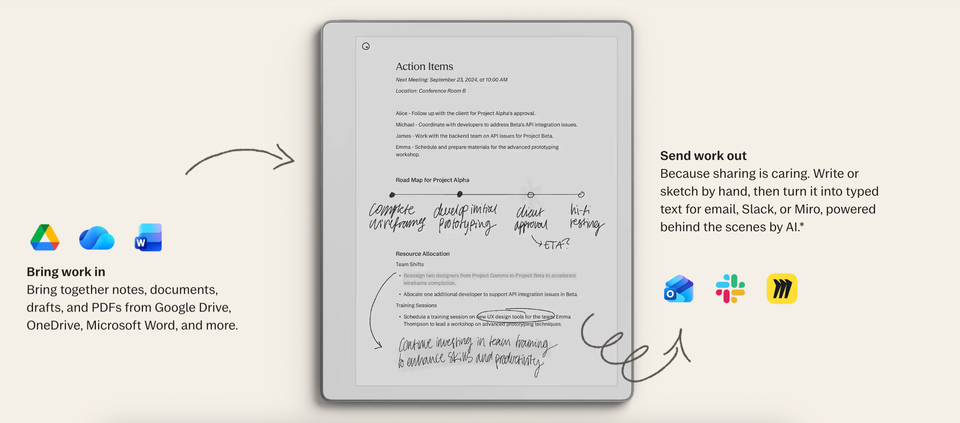
With the new model, you can link your reMarkable to your Google Calendar or Microsoft Outlook, and your tablet can create meeting notes prefilled with information with a tap, reducing time spent preparing for meetings. As someone who needs to scribble notes, I love being able to import documents from my Google Drive and having them automatically turned into paper tablet-native text documents – which I can then easily reupload back to my Drive when I’m done (tell you what, it’s a blessing for when you need to sign documents!).
With the Paper Pure you can also convert webpages saved through Remarkable’s Chrome extension or mobile apps into editable notebooks and you can now link your tablet to Slack for an even smoother workflow.
The reMarkable Paper Pure is 100% distraction free – there are no notifications, pop-ups or apps. I have an attention span that is utterly non-existent and I often struggle on my laptop (especially when I’m meant to be focusing on just writing) as I have too much temptation to go and check emails. Yes you can connect your tablet to the internet, but there’s no chance of you getting distracted by apps.
Less distraction, more focus, and £200 left over? That’s the kind of tech upgrade we can actually get behind.
reMarkable Paper Pure, available bundled with Marker for £359, or with Marker Plus and Sleeve Folio for £399, reMarkable.com
You must be logged in to post a comment Login