
TL;DR
Akamai disclosed a 1.8 billion dollar, seven-year cloud deal with Anthropic, its largest contract ever. The stock rose 27 per cent in a day as the CDN company’s AI cloud pivot received its most significant validation.





What if we could turn off the lights, flip on a flashlight, and watch the world transform in a dim purple glow? If you’re a fan of forensic crime dramas, or you’ve used ultraviolet tools at work to detect counterfeit money, then you know that a UV flashlight can open a new world of exploration. But UV light isn’t just a tool for police procedurals — you can harness its power at home.
Visible light, or light that we see with our naked eye, is only a tiny portion of the spectrum. Invisible light, like infrared and UV, remains unseen by the eye, but we often use it in our daily lives. We use X-rays to diagnose broken bones and microwaves to re-heat last night’s burritos.
UV light may not be able to warm up your snack, but a UV flashlight, or black light as it’s sometimes called, causes substances to fluoresce, making the invisible, visible. You may have one sitting in your junk drawer, an oddity that you don’t know how to use, or perhaps you’ve invested in a multi-use tool that includes a UV light. Here are three ways that you can put that UV flashlight to work around the house — just be careful: extended exposure to UV light can cause skin irritation, and you’ll want to avoid direct eye contact. A standard long-wave, portable flashlight should be safe when used properly, but be sure to read all instructions first.

If you have an aversion to creepy crawlies, you may want to skip to the next section, but if you or your family are entomophiles (people interested in bugs and insects), grab that UV flashlight and read on! Some insects and arachnids actually glow under UV light, like scorpions and some millipedes. Fungi or mushrooms are also often fluorescent. Whether you’re hoping to see these creatures on a camping trip or looking to keep them out of certain spaces, try using UV light to spot them.
You can also use a UV light to attract other insects that won’t glow under the light. Called blacklighting, the process involves using a UV light to attract moths and other insects at night to observe or collect them. This may be a fun project to do with your kids on a warm evening if they like bugs.
Insects and arachnids aren’t the only things found in nature that will glow under UV light. Some minerals and gemstones do as well, including fluorite and opals. In Michigan, syenite rocks containing fluorescent sodalite glow under UV light. Known locally as Yooperlites, these rocks are even featured on the state’s tourism website!

If you’re an at-home DIYer, you should definitely have a UV flashlight in your arsenal of handy tools. It can come in handy to detect automotive, HVAC, and even plumbing leaks. To detect leaks in your vehicle, you’ll need to pick up a UV leak detection kit and pinpoint where the potential leak is located. The kit will have a special dye that will illuminate when your UV flashlight hits it. You simply add the dye to the fluid that you think may be leaking, such as the engine oil or air conditioning refrigerant, run the appropriate system for a few minutes, and then use your flashlight to check for leaks.
The process is similar if you’re looking for a leak in your HVAC or plumbing systems. Inject the appropriate dye, run the system or your water for a few minutes, then use your flashlight and look for fluorescence. In all instances, you’ll want the room to be as dark as possible so you can easily spot that telltale glow.

This may be one of the most common household uses for UV flashlights: seeking out that potential mess made by your cat, dog, or even your wayward hamster. Potty accidents are just part of the package deal when it comes to pet ownership. Whether you have a new puppy, an elderly pet, or strife within the household that’s leading to your cat marking its territory, accidents happen. If you’re getting a whiff of urine but can’t find it, try darkening the room and deploying that UV flashlight. Urine and other biological fluids contain phosphorus that naturally glows, but you’ll need a UV light to see it.
If the mess is recent and still damp, it may not glow, but wet messes are easier to spot with the naked eye and may not require a UV flashlight. Make sure the room is dark, and get close to suspicious surfaces, or you may miss the soiled area. While other things glow under a black light, urine should appear yellow. You may see a puddle, splashes, or drips that will disappear once you turn off the UV light, so mark the spot for clean-up first and invest in a good upholstery cleaner.

General Motors has reached a privacy-related settlement with a group of law enforcement agencies led by California Attorney General Rob Bonta.
Back in 2024, The New York Times reported that automakers including GM were sharing information about their customers’ driving behavior with insurance companies, and that some customers were concerned that their insurance rates had gone up as a result.
The settlement announcement from Bonta’s office similarly alleges that GM sold “the names, contact information, geolocation data, and driving behavior data of hundreds of thousands of Californians” to Verisk Analytics and LexisNexis Risk Solutions, which are both data brokers. Bonta’s office further alleges that this data was collected through GM’s OnStar program, and that the company made roughly $20 million from data sales.
However, Bonta’s office also said the data did not lead to increased insurance prices in California, “likely because under California’s insurance laws, insurers are prohibited from using driving data to set insurance rates.”
As part of the settlement, GM has agreed to pay $12.75 million in civil penalties and to stop selling driving data to any consumer reporting agencies for five years, Bonta’s office said. GM has also agreed to delete any driver data that it still retains within 180 days (unless it obtains consent from customers), and to request that Lexis and Verisk delete that data.
“General Motors sold the data of California drivers without their knowledge or consent and despite numerous statements reassuring drivers that it would not do so,” Bonta said in a statement, adding that the settlement “requires General Motors to abandon these illegal practices and underscores the importance of the data minimization in California’s privacy law — companies can’t just hold on to data and use it later for another purpose.”
GM had previously settled with the Federal Trade Commission over its data sales, with a final order banning General Motors and OnStar from selling certain data with consumer reporting agencies.
Techcrunch event
San Francisco, CA
|
October 13-15, 2026
GM told Reuters that the settlement “addresses Smart Driver, a product we discontinued in 2024, and reinforces steps we’ve taken to strengthen our privacy practices.”
When you purchase through links in our articles, we may earn a small commission. This doesn’t affect our editorial independence.


ai and ml
Deletion of a longstanding privacy assurance sparks concerns
Google has changed Chrome’s disclosure language about how its on-device AI works, but that doesn’t mean the company intends to capture on-device AI interactions.
The Chrome menu modification, which isn’t universally rolled out yet even in Chrome 148, was noted this week on Reddit.
The “On-device AI” message in Chrome’s System settings previously read, “To power features like scam detection, Chrome can use AI models that run directly on your device without sending your data to Google servers. When this is off, these features might not work.”
But the message changed recently – it lost the phrase “without sending your data to Google servers.”
That prompted privacy advocate Alexander Hanff to question whether the edit signaled an architectural change that would see local AI interactions processed by Google servers instead of remaining on-device.
“Why was the sentence ‘without sending your data to Google servers’ removed from the on-device AI description in Chrome’s Settings UI?” Hanff asked. “Was the previous text inaccurate? Has the architecture changed? Was the wording withdrawn on legal advice because Google was unwilling to defend it as a representation?”
Asked about this, a Google spokesperson said, “This doesn’t reflect a change to how we handle on-device AI for Chrome. The data that is passed to the model is processed solely on device.”
It appears this situation deserves a more genteel rendering of Hanlon’s Razor – “Never attribute to malice that which is adequately explained by stupidity.”
In this case, it’s “Never attribute to malice that which is adequately explained by bad timing.”
Word of the menu modification surfaced as Chrome was rolling out the Prompt API, which is designed to provide web pages with a programmatic way to interact with a browser-resident AI model. The API’s arrival and public discussion of it drew attention to the fact that Chrome has been silently downloading Google’s 4GB Nano model onto users’ devices. The coincidence of these events made it seem that Google was preparing to capture on-device prompts and responses, which would be a significant privacy retreat.
In fact, Chrome has been letting Nano sleep on the couch for early adopters dating back two years when local AI was implemented in Chrome 126 as a preview program. While Google hasn’t yet made model downloading and storage opt-in, the biz did earlier this year implement a way to deactivate and remove the space-hogging model.
“We’ve offered Gemini Nano for Chrome since 2024 as a lightweight, on-device model,” a Google spokesperson explained, pointing to relevant help documentation.
“It powers important security capabilities like scam detection and developer APIs without sending your data to the cloud. While this requires some local space on the desktop to run, the model will automatically uninstall if the device is low on resources. In February, we began rolling out the ability for users to easily turn off and remove the model directly in Chrome settings. Once disabled, the model will no longer download or update.”
The edit to the “On-device AI” message occurred in early April. According to Google, Gemini Nano in Chrome processes all data on-device.
But when websites interact with Gemini Nano in Chrome – via the Prompt API, for example – they can see the inputs and outputs of the model. In such cases, the data handling would fall under the privacy policy of the website interacting with the user’s Nano instance.
Google decided to change its “On-device AI” message to avoid confusion – and perhaps to preclude legal claims alleging policy violations – when the user is interacting with a Google site that calls out to the Nano model on-device, in support of some service it provides.
In that scenario, the Google site would have access to the prompts it sends and responses it gets from the user’s on-device model. That interaction would happen “without sending your data to Google servers,” at least in the context of a user querying a model running in Google Cloud.
But since the user’s on-device Chrome-resident Nano model would send data to the Google site in response to that site’s API calls, that data transmission might be interpreted as a violation of the local AI commitment language. Hence the edit.
Google’s decision to have Gemini Nano become a Chrome squatter is a novel way of doing things, given that co-opting people’s computing resources has largely been the province of covert crypto-mining scripts. But perhaps after years of offering Gmail and Search at no monetary cost, Google feels entitled to a few gigabytes of Chrome users’ local storage and occasional bursts of their on-device compute. ®


Akamai disclosed a 1.8 billion dollar, seven-year cloud deal with Anthropic, its largest contract ever. The stock rose 27 per cent in a day as the CDN company’s AI cloud pivot received its most significant validation.
TL;DR
Akamai Technologies disclosed a 1.8 billion dollar, seven-year cloud infrastructure deal with a customer it described only as “a leading frontier model provider.” Bloomberg identified the customer as Anthropic. The stock rose 27 per cent in a single day, the largest rally in the company’s 28-year history. A company that built its business delivering web pages faster than anyone else just became an AI infrastructure provider on the strength of one contract.
The deal is the centrepiece of a quarter in which Akamai’s cloud infrastructure services revenue grew 40 per cent year over year to 95 million dollars, while its legacy content delivery business declined 7 per cent. The company is being repriced by investors not for what it has been for two decades but for what one contract suggests it could become. The question is whether a single customer commitment, however large, constitutes a transformation or a concentration risk.
The 1.8 billion dollar contract is the largest in Akamai’s history. Revenue from the commitment is expected to begin in the fourth quarter of 2026, contributing approximately 20 to 25 million dollars in that period. The seven-year term provides visibility that Akamai’s legacy CDN business, which operates on shorter cycles and faces persistent price compression, has never offered.
The deal follows a 200 million dollar, four-year cloud services agreement that Akamai signed in February with another unnamed US technology company, under which the customer will use a multi-thousand NVIDIA Blackwell GPU cluster. Together, the two contracts represent two billion dollars in committed cloud revenue from customers that Akamai did not have two years ago.
Anthropic signed to take all of SpaceX’s Colossus 1 data centre capacity, adding more than 300 megawatts and over 220,000 NVIDIA GPUs to its compute footprint. The Akamai deal extends the same logic: Anthropic is buying compute capacity from every available provider as demand for Claude outpaces supply. Dario Amodei, Anthropic’s chief executive, said the company experienced “80x growth” in annualised revenue and usage in the first quarter of 2026 and is “working as quickly as possible” to secure more computing resources.
Akamai was founded in 1998 at MIT to solve the problem of delivering web content without congestion. For two decades, it operated the world’s largest content delivery network, caching and distributing web pages, video streams, and software downloads across more than 4,000 locations in 130 countries. The CDN business made Akamai indispensable to the internet. It also became a commodity.
Under chief executive Tom Leighton, who moved from chief scientist to the top role in 2013, the company spent a decade diversifying. The first pivot was into cybersecurity, which now accounts for 55 per cent of revenue at 590 million dollars per quarter, growing 11 per cent year over year. The second pivot, into cloud computing, began with the 900 million dollar acquisition of Linode in 2022 and is now producing the growth that investors had been waiting to see.
Leighton told CNBC that the deal represents validation of the company’s “different approach” and that Akamai has “a very strong pipeline of major enterprise customers, including some that have very large cloud needs.” The company announced at NVIDIA’s GTC event in March that it would deploy thousands of NVIDIA RTX PRO 6000 GPUs and build what it described as the “industry’s first global-scale implementation of NVIDIA’s AI Grid,” pushing AI inference closer to end users to reduce latency and cost.
Anthropic’s decision to sign a 1.8 billion dollar contract with Akamai reflects the constraint that defines the current AI infrastructure market: demand for compute exceeds the capacity of any single provider. Anthropic already runs Claude across Google tensor processing units, Amazon’s custom chips, and NVIDIA hardware. It has signed with SpaceX for data centre capacity. It is exploring building its own chips.
Anthropic is exploring building its own AI chips as its run-rate revenue surpasses 30 billion dollars, but custom silicon takes years to design and validate. In the interim, Anthropic is buying capacity wherever it can find it. Akamai’s distributed network of edge locations, originally built for CDN traffic, offers something that centralised hyperscale data centres do not: the ability to run inference workloads close to end users, which reduces latency for the real-time applications that enterprises are beginning to deploy.
Nebius acquired Eigen AI for 643 million dollars to optimise inference performance, a bet that the most valuable layer in AI infrastructure is not raw compute but the efficiency with which that compute is used. Akamai’s pitch to Anthropic rests on a similar premise: that distributed inference at the edge is more efficient for certain workloads than centralised processing in a hyperscale facility.
Akamai reported first-quarter revenue of 1.074 billion dollars, up 6 per cent year over year. Adjusted earnings per share were 1.61 dollars. Cloud infrastructure services revenue was 95 million dollars, up 40 per cent. Security revenue was 590 million dollars, up 11 per cent. Delivery and other revenue was 389 million dollars, down 7 per cent.
The cloud segment represents less than 9 per cent of total revenue. The 1.8 billion dollar deal, at approximately 257 million dollars per year, would more than double the segment’s current annual run rate. The contract transforms cloud from a promising but small division into the company’s primary growth engine, at least on a committed-revenue basis.
For the full year, Akamai is forecasting revenue of 4.45 to 4.55 billion dollars and adjusted earnings of 6.40 to 7.15 dollars per share. The guidance does not yet reflect the full impact of the Anthropic contract, which begins contributing in the fourth quarter. Analysts will spend the next two quarters trying to determine whether the deal is a one-off or the first in a series.
Anthropic launched a marketplace for Claude-powered enterprise software, and committed 100 million dollars to the Claude Partner Network, signalling that the company’s commercial ambitions extend well beyond model development into the infrastructure and services layers that support enterprise AI deployment. The scale of Anthropic’s expansion explains the compute hunger that produced the Akamai deal.
But a 1.8 billion dollar contract with one customer concentrates risk as much as it concentrates revenue. Anthropic’s annualised revenue has grown from approximately 900 million dollars in late 2025 to a reported 30 billion dollar run rate. Growth at that pace creates demand for infrastructure. It also creates the conditions for a correction if the demand curve flattens. Akamai’s stock gained 27 per cent on the announcement. The company’s ability to sustain that valuation depends on whether Anthropic’s growth trajectory holds for seven years.
Leighton said there is more coming. The company’s history suggests patience. Akamai survived the dot-com crash, navigated the commoditisation of its original business, and spent a decade building a cybersecurity franchise before the market rewarded it. The AI cloud deal is the latest reinvention of a company that has been reinventing itself since 1998. The difference is that this time, the reinvention depends on one customer’s continued appetite for compute, and on the assumption that the demand for AI inference at the edge will grow as fast as the demand for AI itself.
For the last 24 months, one narrative justified every over-provisioned data center and bloated IT budget: the GPU scramble. Silicon was the new oil, and H100s traded like contraband. Reserve capacity now or your enterprise would be left behind.
The bill is now due, and the CFO is paying attention. Gartner estimates AI infrastructure is adding $401 billion in new spending this year. Real-world audits tell a darker story: average GPU utilization in the enterprise is stuck at 5%.
That utilization floor is driven by a self-reinforcing procurement loop that makes idle GPUs nearly impossible to release. What makes this shift more urgent is the CapEx reality now hitting enterprise balance sheets. Many organizations locked in GPU capacity under traditional three- to five-year depreciation cycles, with the hyperscalers being at five years. That means the infrastructure purchased during the peak of the “GPU scramble” is now a fixed cost, regardless of how much it is actually used.
As those assets age, the question is no longer whether the investment was justified. It’s whether it can be made productive. Underutilized GPUs are not just idle resources, they are depreciating assets that must now generate measurable return. This is forcing a shift in mindset: from acquiring capacity to maximizing the economic output of what is already deployed.
For the “Tier 1” enterprise — the Intuits, Mastercards, and Pfizers of the world — access was rarely the true bottleneck. Leveraging deep-pocketed relationships with AWS, Azure, and GCP, these organizations secured capacity reservations that sat idle while internal teams struggled with data gravity, governance, and architectural immaturity.
The industry narrative of “scarcity” served as a convenient smokescreen for this inefficiency. While the headlines focused on supply chain delays, the internal reality was a massive productivity gap. Organizations were activity-rich (buying chips) but output-poor (generating near-zero useful tokens).
At 5% utilization, the math simply doesn’t work. For every dollar spent on silicon, 95 cents is essentially a donation to a cloud provider’s bottom line. In any other department, a 95% waste metric would be a firing offense; in AI infrastructure, it was just called “preparedness.”
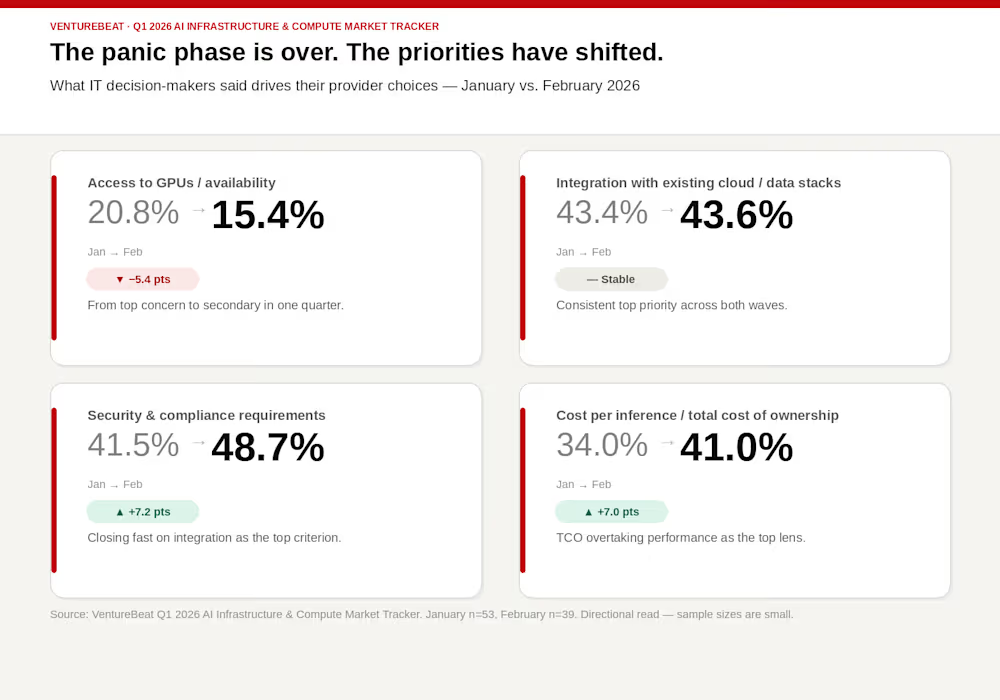
VentureBeat’s Q1 2026 AI Infrastructure & Compute Market Tracker confirms that the panic phase has officially broken. The tracker is directional rather than statistically definitive — January surveyed 53 qualified respondents, and in February there were 39 — but the pattern across both waves is consistent. When we asked IT decision-makers what actually drives their provider choices today, the results show a market in rapid pivot:
The access collapse: “Access to GPUs/availability” factor dropped from 20.8% to 15.4% in a single quarter — from primary concern to secondary in 90 days.
The pragmatic pivot: “Integration with existing cloud and data stacks” held steady as the top priority at roughly 43% across both waves, while security and compliance requirements surged from 41.5% to 48.7% — nearly closing the gap with integration.
The TCO mandate: “Cost per inference/TCO (total cost of ownership)” as a top priority jumped from 34% to 41% in a single quarter, overtaking performance as the dominant procurement lens.
The era of the blank check is dead. Inference is where AI becomes a line item.
Training and even fine-tuning were a tactical project; inference is a strategic business model. For most enterprises, the unit economics of that model are currently unsustainable. During the initial pilot phase, flat-fee licenses and bundled token deals allowed for architectural waste. Teams built long-context agents and complex retrieval pipelines because tokens were effectively a sunk cost.
As the industry moves toward usage-based pricing in 2026, those same architectures have become liabilities. When metered billing is applied to an infrastructure stack that sits idle 95% of the time, the cost per useful token becomes a line-item emergency the moment a project moves into production.

The shift highlighted in our Q1 data represents more than just a budget correction; it is a fundamental change in how the success of an AI leader is measured.
For the last two years, success was about “securing” the stack. In the efficiency era, success is “squeezing” the stack. This is why cost optimization platforms saw the largest planned budget increase in our survey, becoming a top-tier priority as organizations realize that buying more GPUs is often the wrong answer.
Increasingly IT users are asking how to stop paying for GPUs they aren’t using. They are moving away from measuring GPU activity (how many chips are powered on) and toward GPU productivity (how many useful tokens are generated per dollar spent).
The luxury of underutilization is now a liability. The next act of the enterprise AI play is more about finding a way to make the silicon you already have pay for itself.
As organizations move from proof-of-concept to production, the focus is shifting away from the latest GPU and toward the architecture of token generation. In this new economic reality, every enterprise must decide its role in the token economy: will you be a token consumer, paying a permanent tax to a model provider, or a token producer, owning the infrastructure and the unit economics that come with it?
This choice is not just about cost; it is about how an organization decides to handle complexity. Owning inference infrastructure means overcoming KV cache persistence, understanding the storage architecture, knowing what are tolerable latency guarantees, and addressing power constraints. It also introduces real-world enterprise limitations, power availability, data center footprint, and operational complexity, that directly impact how far and how fast AI can scale.
At the core of this challenge is KV cache economics. Storing context in GPU memory delivers performance but comes at a premium, limiting concurrency and driving up cost per token. Offloading KV cache to shared NVMe-based storage can improve reuse and reduce prefill overhead, but introduces tradeoffs in latency and system design. As NVMe costs rise and GPU memory remains scarce, organizations are forced to balance performance against efficiency.
For a token producer, managing these tradeoffs, across memory, storage, power, and operations, is simply the cost of doing business at scale. For others, the overhead remains too high, requiring a different path.
VentureBeat’s Q1 tracker shows that the market is already voting on this strategy. The top strategic direction for enterprises is now to move more workloads to specialized AI clouds, a category that grew from 30.2% to 35.9% in our latest survey.
These providers — including Coreweave, Lambda, and Crusoe — are evolving. While they initially gained ground by serving model builders and training-heavy workloads, their revenue mix is changing rapidly. Today, training represents roughly 70% of their business volume, but inference customers now make up 30%. We expect that ratio to flip by the end of 2026 as the long tail of enterprise inference begins to scale.
These specialized providers are gaining strategic attention because they are not just selling GPU access. They are selling the removal of infrastructure friction. They optimize the full stack — storage, networking, and scheduling — around inference-first economics rather than general-purpose cloud operations. For an organization aiming to be a token producer, these environments offer a more efficient factory floor than traditional hyperscalers.
For organizations that realize they cannot efficiently build or manage their own inference factories, a different trend is emerging. Our survey found that the intention to evaluate inference outsourcing and managed LLM providers jumped from 13.2% to 23.1% in a single quarter.
This nearly 10-percentage-point increase represents a realization that building inference infrastructure internally often creates hidden costs. Providers like Baseten, Anyscale, FireworksAI, and Together AI offer predictable pricing and service-level agreements without requiring the customer to become experts in vLLM tuning or distributed GPU scheduling.
In this model, the enterprise remains a token consumer, but one that is actively looking to price away the complexity of the stack. They are learning that managing inference internally is only viable if they have the volume to justify the operational burden.
The choice to be a producer is also being made easier by a new layer of hybrid-cloud AI platforms. Solutions from Red Hat, Nutanix, and Broadcom are designed to operationalize open-source inference infrastructure without forcing every company to become a systems integrator.
The challenge is that modern inference depends on complex open-source components like vLLM, Triton, and Kubernetes. These systems rely on a rapidly evolving stack, with vLLM for high-throughput serving, Triton for model orchestration, and Ray for distributed execution, each powerful on its own, but complex to integrate, tune, and operate at scale. For most enterprises, the challenge isn’t access to these tools, it’s stitching them together into a reliable, production-grade inference pipeline. The promise of these newer platforms is portability: the ability to build an inference stack once and deploy it anywhere, whether in a hyperscaler, a specialized cloud, or an on-premises data center.
Our Q1 2026 AI Infrastructure & Compute Market Tracker confirms that interest in these DIY-but-managed stacks is growing, jumping from 11.3% in January to 17.9% in February, alongside provider adoption, with a steady rise in organizations leaning into open source. This flexibility matters because enterprise AI will not be centralized in one place. Inference workloads will be distributed based on where data lives, how sensitive it is, and where the cost of running it is lowest.
The winner in the next phase of the token economy will not be the platform that forces standardization through restriction. It will be the one that delivers standardization through portability, allowing enterprises to switch between being consumers and producers as their needs evolve.

Fixing the 5% utilization wall requires more than just better software; it requires a structural overhaul of the efficiency stack. Many organizations are discovering that high activity is not the same as high productivity. A cluster can run at full tilt but remain economically inefficient if time-to-first-token is too high or if inference requests spend too much time in prefill.
Inference economics are determined by how much useful output a cluster generates per unit of cost. This requires a shift from measuring GPU activity — simply having the chips powered on — to measuring GPU productivity. Achieving that productivity depends on three technical levers: the network, the memory, and the storage stack.
The network is the often-ignored backbone of inference economics. In a distributed environment, the speed at which data moves between compute nodes and storage determines whether a GPU is actually working or merely waiting.
RDMA (Remote Direct Memory Access) has become the non-negotiable standard for this move. By allowing data to bypass the CPU and move directly between memory and the GPU, RDMA eliminates the latency spikes that traditional network architectures introduce. In practical terms, an RDMA-enabled architecture can increase the output per GPU by a factor of ten for concurrent workloads.
Without this level of networking, an enterprise is effectively paying a “waiting tax” on every chip in the rack. As model context windows expand and multi-node orchestration becomes the norm, the network determines whether a cluster is a high-speed factory or a bottlenecked warehouse.
As models become larger and context windows expand toward the millions of tokens, the cost of repeatedly rebuilding the prompt state has become unsustainable. Large language models rely on key-value (KV) caches to maintain context during a session. Traditionally, these are stored in local GPU memory, which is both expensive and limited.
This creates a “memory tax” that crushes unit economics as concurrency rises. To solve this, the industry is moving toward persistent shared KV cache architectures. By storing the cache centrally on high-performance storage rather than redundantly across multiple GPU nodes, organizations can reduce prefill overhead and improve context reuse.
Newer architectures are already proving this out. The VAST Data AI Operating System, running on VAST C-nodes using Nvidia BlueField-4 DPUs, allows for pod-scale shared KV cache that collapses legacy storage tiers. Similarly, the HPE Alletra Storage MP X10000 — the first object-based platform to achieve Nvidia-Certified Storage validation — is designed specifically to feed data to inference resources without the coordination tax that causes bottlenecks at scale. WEKA is another provider in this space.
Beyond the physical hardware, new algorithmic contributions are redefining what is possible in inference memory. Google’s recent presentation of TurboQuant at ICLR 2026 demonstrates the scale of this shift. TurboQuant provides up to a 6x compression level for the KV cache with zero accuracy loss.
Techniques like these allow for building large vector indices with minimal memory footprints and near-zero preprocessing time. For the enterprise, this means more concurrent users on the same hardware estate without the “rebuild storms” that typically cause latency spikes. The caveat: compression standards remain contested — no open-source consensus has emerged, and the space is shaping up as a proprietary stack war between Google and Nvidia.
Storage is no longer just a backend decision; it is a financial one. Platforms like Dell PowerScale are now delivering up to 19x faster time-to-first-token compared to traditional approaches, according to Dell. By separating high-performance shared storage and memory-intensive data access from scarce GPU resources, these platforms allow inference to scale more efficiently.
When a storage layer can keep GPU-intensive workloads continuously fed with data, it prevents expensive resources from sitting idle. In the efficiency era, the goal is to drive the 5% utilization wall upward by ensuring that every cycle is spent on token generation, not on data movement.
But as the stack becomes more efficient, the perimeter becomes more porous. High-productivity tokens are worthless if the data powering them cannot be trusted.
The final barrier to achieving return on AI is not a technical bottleneck, but a trust bottleneck. As enterprise AI shifts from simple chatbots to autonomous agents, the risk profile changes. Agents require deep access to internal systems and intellectual property to be useful. Without a sovereign architecture, that access creates a liability that most organizations are not equipped to manage.
VentureBeat research into the state of AI governance reveals a stark disconnect. While many organizations believe they have secured their AI environments, 72% of enterprises admit they do not have the level of control and security they think they do. This governance mirage is particularly dangerous as agentic systems move into production. In the last 12 months, 88% of executives reported security incidents related to AI agents.
Data sovereignty is often treated as a geographic or regulatory checkbox. For the strategic enterprise, it must be treated as a core architecture principle. It is about maintaining control, lineage, and explainability over the data that powers an agentic workflow.
This requires a new approach to data maturity, modeled on the traditional medallion architecture. In this framework, data moves through layers of usability and trust — from raw ingestion at the bronze level to refined gold and, eventually, platinum-quality operational data. AI inference must follow this same discipline.
Agentic systems do not just need available context; they need trusted context. Providing the wrong data to an agent, or exposing sensitive intellectual property to a non-sovereign endpoint, creates both business and regulatory risk. Compartmentalization must be designed into the stack from the start. Organizations need to know which models and agents can access specific data layers, under what conditions, and with what lineage attached.
The fundamental question for the agentic future is whether to bring the data to the AI or the AI to the data. For highly sensitive workloads, moving data to a centralized model endpoint is often the wrong answer.
The move toward private AI — where inference happens closer to where trusted data resides — is gaining momentum. This architecture uses sovereign clouds, private environments, or governed enterprise platforms to keep the data perimeter intact.
This is where the choice to be a token producer becomes a security advantage. By owning the inference stack, an enterprise can enforce governance and lineage at the infrastructure layer. It ensures that the intellectual property used to ground an agent never leaves the organization’s control.
The battle for AI dominance will not be decided by who owns the largest GPU clusters. It will be won by the companies with the best inference economics and the most trusted data foundation.
The organizations that win the efficiency era will be those that deliver the lowest cost per useful token and the fastest path to production. They will be the ones that have moved past the hoarding hangover to focus on productive output.
Achieving return on AI requires a shift in mindset. It means moving from a culture of securing the stack to a culture of squeezing the stack. It requires architectural rigor, a focus on token-level ROI and a commitment to sovereignty. When an organization can generate its own tokens efficiently and securely, AI moves from a science project to an economically repeatable business advantage.
That is how ROI becomes real. That is where the next generation of enterprise advantage will be built.
Rob Strechay is a Contributing VentureBeat analyst and principal at Smuget Consulting, a research and advisory firm focused on data infrastructure and AI systems.
Disclosure: Smuget Consulting engages or has engaged in research, consulting, and advisory services with many technology companies, which can include those mentioned in this article. Analysis and opinions expressed herein are specific to the analyst individually, and data and other information that might have been provided for validation, not those of VentureBeat as a whole.

All 20 of America’s state-run healthcare marketplace sites “include advertising trackers that share information with Big Tech companies,” reports Gizmodo, citing a report from Bloomberg:
Per the report, seven million Americans bought their health insurance through state exchanges in 2026, and many of them may have had personal information shared with companies, including Meta, TikTok, Snap, Google, Nextdoor, and LinkedIn, among others. Some of the data collected and shared with those companies included ZIP codes, a person’s sex and citizenship status, and race.
In addition to potentially sensitive biographical details about a person, the trackers also may reveal additional details about their life based on the sites they visit. For instance, Bloomberg found trackers on Medicaid-related web pages in Rhode Island, which could reveal information about a person’s financial status and need for assistance. In Maryland, a Spanish-language page titled “Good News for Noncitizen Pregnant Marylanders” and a page designed to help DACA recipients navigate their healthcare options were found to be transmitting data to Big Tech firms…
Per Bloomberg, several states have already removed some trackers from their exchange websites following the report.
Thanks to Slashdot reader JoeyRox for sharing the news.
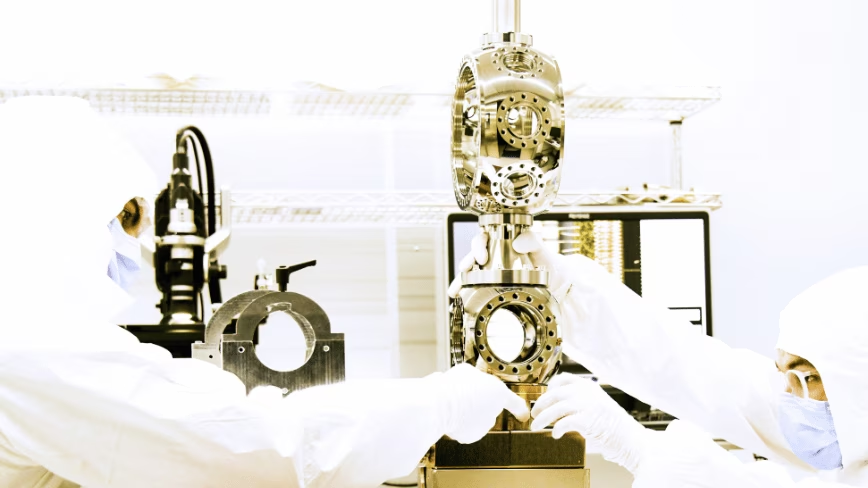
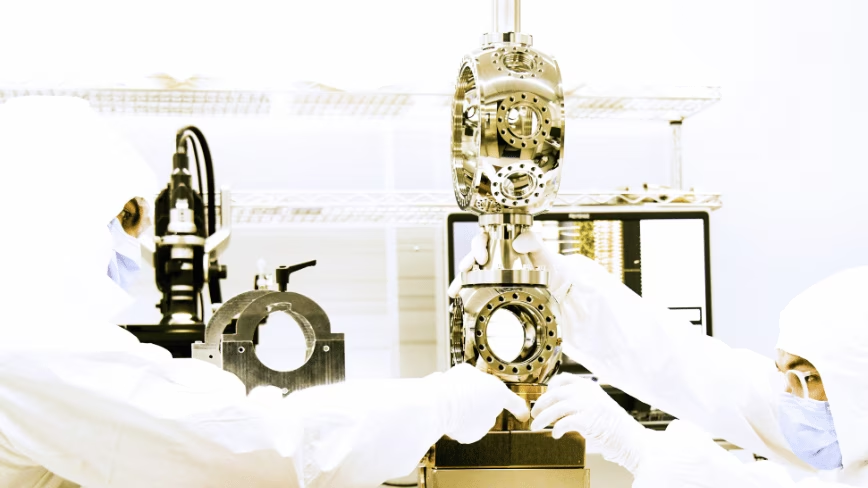
Honeywell-backed Quantinuum filed for a US IPO targeting a valuation above 20 billion dollars. The quantum computing company reported 30.9 million dollars in annual revenue and 192.6 million in losses, pricing itself on a fault-tolerant machine planned for 2029.
TL;DR
Quantinuum filed for a US initial public offering on Thursday that could value the company at more than 20 billion dollars. In the year ended 31 December 2025, Quantinuum reported revenue of 30.9 million dollars and a net loss of 192.6 million dollars. The company is asking public market investors to pay a premium of more than 600 times revenue for a quantum computer that does not yet exist in its final form. The computer it is building, a universal fault-tolerant machine called Apollo, is scheduled for 2029.
The filing is significant not because of Quantinuum’s current financials, which are modest by any standard, but because of what the IPO market’s appetite for it will reveal about how investors price a technology that has been five to ten years away from commercial utility for the past twenty years. Quantinuum is backed by Honeywell, which owns 54 per cent of the company. JPMorgan and Morgan Stanley are leading the offering. The ticker will be QNT on the Nasdaq Global Select Market.
Quantinuum was formed in 2021 from the merger of Honeywell Quantum Solutions and Cambridge Quantum Computing. It builds quantum computers based on trapped-ion architecture, a technology in which individual atoms are suspended in electromagnetic fields and manipulated with lasers to perform calculations. The company claims the highest average two-qubit gate fidelity in the industry as of December 2025, a measure of how accurately the machine performs the basic operations of quantum computation.
Its customers include BMW, Airbus, JPMorgan Chase, HSBC, Mitsui, and Thales. BMW expanded its multi-year partnership with Quantinuum in May 2026 to apply quantum computing to catalyst chemistry research for fuel cells. Airbus is exploring quantum simulation for hydrogen-powered aircraft. JPMorgan has been working with Quantinuum since 2020 and is one of the most active corporate users of its software development kit.
These are research partnerships, not production deployments. No company is running quantum computing in production at a scale that affects its bottom line. The partnerships exist because the companies believe quantum computing will eventually transform their industries and want to be ready when it does. The word “eventually” carries all the risk.
Quantinuum’s 2025 revenue of 30.9 million dollars represented 34 per cent growth over the prior year’s 23 million dollars. The net loss of 192.6 million dollars represented 34 per cent growth over the prior year’s 144.1 million dollars. Revenue and losses grew at exactly the same rate.
The first quarter of 2026 was worse. Revenue fell to 5.2 million dollars from 19.1 million dollars in the same quarter a year earlier. The net loss expanded to 136.6 million dollars from 30.5 million dollars. The quarterly numbers suggest that revenue is lumpy and dependent on the timing of contract milestones, a pattern common in pre-commercial deep technology companies.
The target valuation of more than 20 billion dollars would represent a doubling from the 10 billion dollar pre-money valuation at which Quantinuum raised 600 million dollars in September 2025. Before that, it raised 300 million dollars in January 2024 at a 5 billion dollar valuation. The valuation has quadrupled in two years while the company’s revenue has grown from 23 million to 31 million dollars.
Quantinuum’s hardware roadmap has four generations. The current system, Helios, is commercially available. Sol is planned for 2027. Apollo, the system that the company describes as universal and fully fault-tolerant, is planned for 2029. A fault-tolerant quantum computer is one that can perform complex calculations with enough error correction to produce reliable results, the threshold at which quantum computing transitions from a research tool to a commercial platform.
Riverlane raised 75 million dollars to build chips that solve quantum error correction, targeting one million error-free operations by 2026. Error correction is the central engineering challenge of the field. Without it, quantum computers produce results that are too noisy to be useful for the complex simulations that justify the technology’s theoretical advantages. Quantinuum’s Apollo is designed to solve this problem at the system level. Whether it will, and whether 2029 is achievable, are the questions on which the IPO valuation rests.
Europe is spending billions on quantum computers, with governments in Germany, the Netherlands, France, and the United Kingdom launching or expanding national programmes. France has committed 500 million euros to five startups building fault-tolerant quantum machines. The public investment reflects a consensus among policymakers that quantum computing is a strategic capability, even as the private market struggles to determine what the capability is worth before it works.
Quantinuum would join a small cohort of publicly traded quantum computing companies. IonQ, which uses the same trapped-ion technology, went public via SPAC in 2021 and is the only pure-play quantum stock with positive returns in 2026, up 16 per cent year to date after posting more than 100 million dollars in annual revenue. Rigetti Computing, which uses superconducting qubits, is down 10 per cent. D-Wave Quantum is down 9 per cent.
IQM has built 30 full-stack quantum computers from its facility in Finland and announced a 1.8 billion dollar SPAC merger to list on the NYSE. The quantum computing sector is pre-profit and largely sentiment-driven, with stock prices moving on milestone announcements, government contracts, and capital raises rather than fundamentals. Quantinuum’s IPO would be the largest quantum computing listing to date and would set a valuation benchmark for the entire sector.
The risk is that the benchmark reflects the market’s enthusiasm for a technology whose commercial timeline remains uncertain. Industry experts surveyed in 2025 said quantum utility is at most ten years away, a timeline that has not changed meaningfully in a decade. Google’s chief executive said five to ten years. NVIDIA’s chief executive said at least fifteen.
Honeywell’s decision to take Quantinuum public is part of a broader restructuring that includes the spin-off of its aerospace division and the separation of its advanced materials business. The IPO gives Quantinuum access to public capital markets and gives Honeywell a path to gradually reduce its 54 per cent stake. The 600 million dollar raise in September 2025 was led by investors including JPMorgan, which is now also leading the IPO underwriting, a dual role that reflects the degree to which the investment banking community’s interests are aligned with the offering’s success.
Quantinuum’s filing is a bet that public market investors will value a quantum computing company the way private markets have: on the promise of a technology that does not yet work at scale, priced against a future in which it does. The 30.9 million dollars in revenue is not the product. The product is Apollo, a machine that is three years and several fundamental engineering breakthroughs away. The IPO is a wager that the market will pay 20 billion dollars for the right to wait.
Robots are incredibly precise, but being gentle is not always their strong suit. A machine that can build a car with near-perfect accuracy can still apply too much pressure when working in places where even the smallest mistake matters, like inside a human eye or during delicate surgery. That is why researchers at Shanghai Jiao Tong University are developing a new type of force sensor that could help robots “feel” what they are touching more accurately.
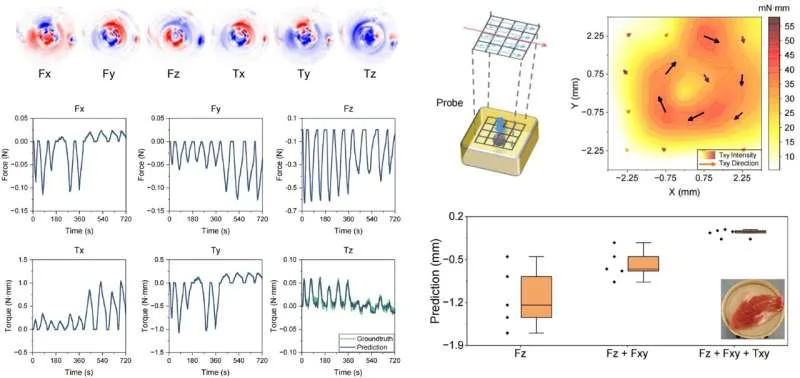
The sensor is tiny, about the size of a grain of rice at just 1.7 millimeters wide, making it small enough to fit inside advanced surgical tools. What makes it especially interesting is that it does not rely on traditional electronics. Instead, it uses light to measure force from every direction, including pressure, sliding movements, and twisting. Here is how it works. At the tip of an optical fiber sits a soft material that slightly changes shape when it comes into contact with something. That tiny deformation alters how light travels through the sensor. The altered light pattern is then sent through optical fibers to a camera, which captures it like an image. Researchers then use a machine learning model to study those light patterns and translate them into precise force readings. In simple terms, the system learns how to “read” touch through light alone, without needing a bunch of wires or multiple separate sensors packed into such a tiny space.
Modern surgical imaging is already incredibly advanced. Surgeons today can see inside the human body with impressive clarity. But one thing they still struggle with, especially during minimally invasive procedures, is actually feeling what their tools are touching. A surgeon may be able to see the area clearly on a screen, but distinguishing between healthy tissue and something problematic often comes down to experience and instinct rather than feedback from the instrument itself.
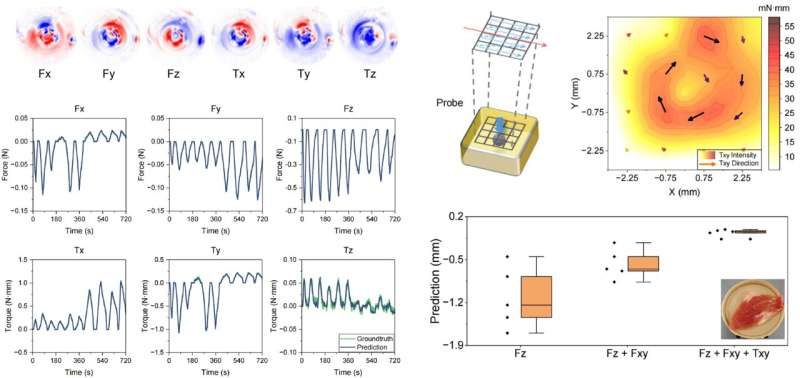
That is exactly the problem this new sensor is trying to solve. During testing, researchers used it on a soft gelatin block with a small hard sphere hidden underneath, meant to mimic a tumor inside human tissue. The sensor detected the hidden object by sensing differences in stiffness as it moved across the surface. In robotic surgeries, where doctors operate in extremely tight spaces and cannot always rely on direct touch, this kind of tactile feedback could make procedures safer, more precise, and far less dependent on guesswork.
Right now, these results are still more of a proof that the idea works rather than a finished medical breakthrough. The researchers themselves admit there is still a lot left to figure out. Building sensors this tiny with consistent quality at scale is much harder than making a single working version in a lab. The setup process also still needs to become simpler and more reliable before it can realistically be used in hospitals. On top of that, the sensor has not yet undergone the long-term stress testing that medical devices need before doctors would trust them during real procedures.

Even so, the core idea behind the technology feels genuinely promising. Instead of relying on multiple complicated sensing parts, the system uses a much simpler setup built around a single optical channel and a camera. That kind of simpler design often makes technologies easier to improve and scale over time once the engineering matures. The team is now working on fitting the sensor into actual robotic surgical tools and testing it in environments closer to real operating rooms. And while a sensor the size of a grain of rice that can “feel” may sound like a tiny innovation on paper, it could become incredibly important for surgeons guiding robotic instruments through spaces smaller than a fingernail.
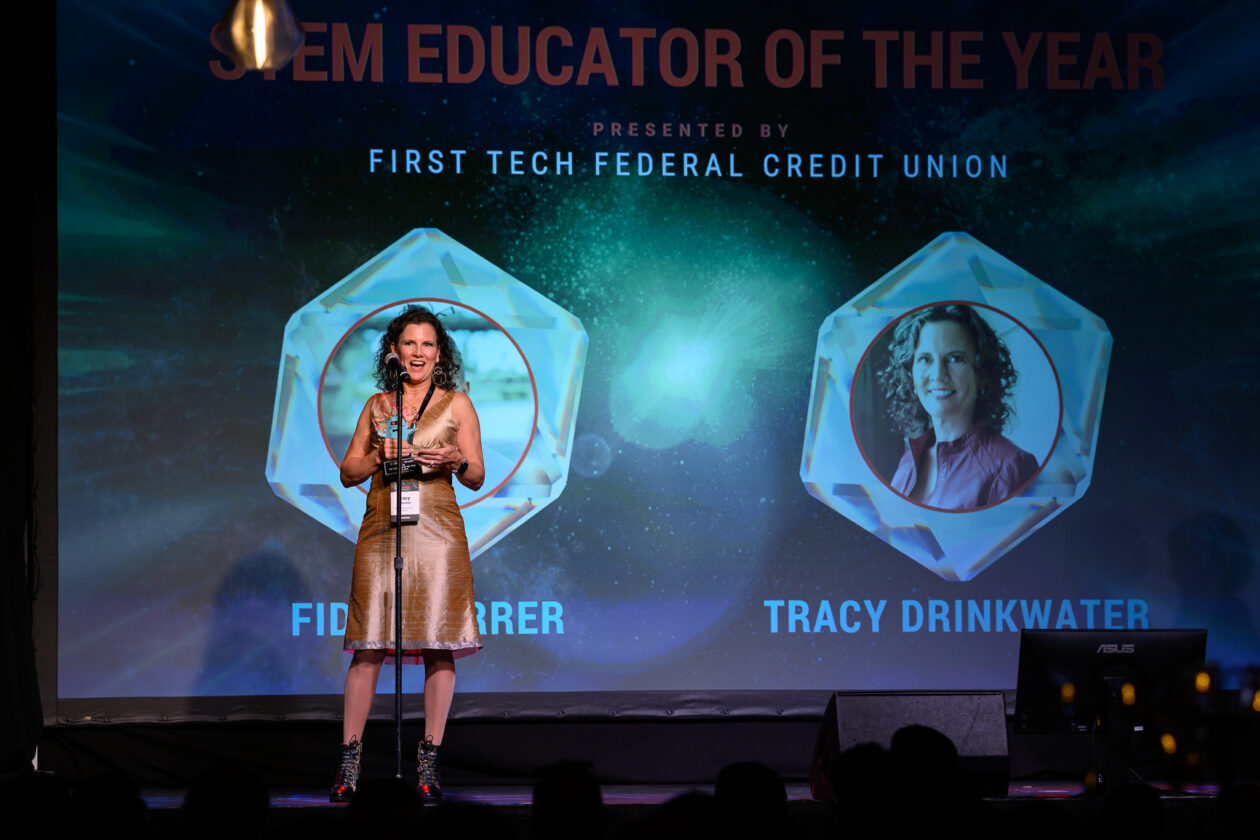

This week on the GeekWire Podcast: Conversations with finalists and special guests at the annual GeekWire Awards about AI, innovation, startups, and the forces reshaping their industries. Guests on this episode include:

Plus, a special trivia challenge marking GeekWire’s 15th year hosting the event, featuring a serendipitous and fun connection to Andrew Putnam of Microsoft, a pioneer in FPGAs (field programmable gate arrays) and a winner of the 2017 GeekWire Award for Innovation of the Year (pictured above).
With GeekWire co-founders Todd Bishop and John Cook
Subscribe to GeekWire in Apple Podcasts, Spotify, or wherever you listen.

Unlike the other glasses I tested, Even doesn’t sell a subscription plan; everything’s included out of the box.
The only downside I could find with the G2 is that it is largely devoid of offline features, so the glasses have to be connected to the internet to do much of anything. Considering the G2’s capabilities, it’s a trade-off I am more than happy to make.
There are plenty of capable captioning eyeglasses on the market, but they are surprisingly similar in both looks and features. While many are quite capable, none had the combination of power and affordability that I got with Even’s G2. Here’s a rundown of everything else I tested.
Photograph: Christopher Null
Photograph: Christopher Null
Photograph: Christopher Null
Leion’s Hey 2 is the price leader in this market, and even its prescription lenses ($90 to $299) are pretty affordable. The hardware, however, is heavy: 50 grams without lenses, 60 grams with them. A full charge gets you six to eight hours of operation; the case adds juice for up to 12 recharges.
I like the Leion interface, which lays out caption, translation, “free talk” (two-way translation), and a teleprompter feature on its clean app. You get access to nine languages; using Pro minutes expands that to 143. Leion sells its premium plan by the minute, not the month, so you need to remember to toggle this mode off when you don’t need it. Pricing is $10 for 120 minutes, $50 for 1,200 minutes, and $200 for 6,000 minutes. There’s no offline use supported, and I often struggled to get AI summaries to show up in English instead of Chinese (regardless of the recorded language).
Photograph: Christopher Null
Photograph: Christopher Null
You’re not seeing double: XRAI and Leion use the same manufacturer for their hardware, and the glasses weigh the same. The battery spec is also similar, with up to eight hours on the frames and another 96 hours when recharging with the case. XRAI claims its display is significantly brighter than competitors’, but I didn’t see much of a difference in day-to-day use.
The features and user experience are roughly the same, though Leion’s teleprompter feature isn’t implemented in XRAI’s app, and it doesn’t offer AI summaries of conversations. I also didn’t find XRAI’s app as user-friendly as Leion’s version, particularly when trying to switch among the admittedly exhaustive 300 language options. Only 20 of these are included without ponying up for a Pro subscription, which is sold both by the month and minute: $20/month gets you a max of 600 upgraded transcription minutes and 300 translation minutes; $40/month gets you 1,800 and 1,200 minutes, respectively. On the plus side, XRAI does have a rudimentary offline mode that works better than most. For prescription lenses, add $140 to $170.
Photograph: Christopher Null
Photograph: Christopher Null
AirCaps
AirCaps does not make its own prescription lenses. Instead, you must purchase a pair of $39 “lens holders” and take them to an optician if you want prescription inserts. I was unable to test these with prescription lenses and ultimately had to try them out over my regular glasses, which worked well enough for short-term testing. Frames weigh a hefty 53 grams without add-on lenses; the company couldn’t tell me how much extra weight prescription lenses would add to that, but it’s safe to say these are the bulkiest and heaviest captioning glasses on the market. Despite the weight, they only carry two to four hours of battery life, with 10 or so recharges packed into the comically large case. Another option is to clip one of AirCaps’ rechargeable 13-gram Power Capsules ($79 for two) to one of the arms, which can provide 12 to 18 extra hours of juice.
The AirCaps feature list and interface make it perhaps the simplest of all these devices, with just a single button to start and stop recording. Transcriptions and translations are available for free in nine languages. For $20/month, you can add the Pro package, which offers better accuracy, access to more than 60 languages, and the option to generate AI summaries on demand (though only if recordings are long enough). As a bonus: Five hours of Pro features are free each month. Offline mode works pretty well, too. The only bad news is that these bulky frames just aren’t comfortable enough for long-term wear.
Photograph: Christopher Null
Photograph: Christopher Null
The most expensive option on the market (up to $1,399 with prescription lenses!) weighs a relatively svelte 40 grams (52 grams with lenses) and offers about four hours of battery life. There’s no charging case; the glasses must be charged directly using the included USB-connected dongle.
The glasses are extremely simple, offering transcription and translation features—with support for about 80 languages, which is impressive. I unfortunately found the prescription lenses Captify sent to be the blurriest of the bunch, making the captions comparatively hard to read. And while the device supports offline transcription, performance suffered badly when disconnected from the internet. I couldn’t get translations to work at all when offline. For $15/month, you get better accuracy and speaker differentiation, and access to AI summaries of conversations. Prescription lenses cost between $99 and $600.

Why you can trust TechRadar
We spend hours testing every product or service we review, so you can be sure you’re buying the best. Find out more about how we test.
Specifications
Dimensions: 137 x 12 x 7.6mm (5.4 x 0.47 x 0.31”)
Weight: 7.8g (0.3oz)
Frequency response: 10Hz-80kHz (-0.5dB)
Output: 3.5mm stereo/S-Balanced
Hi-Res support: PCM 32-bit/384kHz; DSD256
Output power: ≥1.59V/79mW @ 32Ω / ≥2.0V/14mW @ 300Ω
Connection: USB-C/A/Lightning
This model delivers lower harmonic distortion and a wider dynamic range, and it does so in a device that’s even smaller than the already tiny original. With an unchanged price tag the second-generation GO Link is one of the most affordable ways to improve your audio experience, especially for music on the move.
The GO Link 2 was announced in February 2026 with a recommended retail prices of $59 / £59 (about AU$111). That’s the same price as the original model and slightly less than the larger GO Link Max, which has a balanced 4.4mm output as well as the standard 3.5mm socket.
Pricing is competitive with the likes of the FiiO KA11 and KA1 headphone DAC/amps.

The GO Link 2 is based on the same ESS SABRE DAC as before, but this time around it comes with what iFi calls Dynamic Range Enhancement, which adds up to 6dB between the loudest and quietest moments. It also features lower harmonic distortion — up to 62% lower than the first-gen model, iFi says.
Although there’s only a 3.5mm output, the GO Link 2 features iFi’s S-Balanced system which iFi claims significantly reduces crosstalk between channels by “applying balanced circuitry principles to a single-ended headphone output”.
This is the first GO Link model that’s fully compatible with iFi’s Nexis app, which you can use to customize the filters and apply firmware updates — but only on Android so far. As an iPhone/iPad user I wasn’t able to take advantage of those features, as the iPhone app wouldn’t communicate with the DAC. Hopefully an update is incoming.
Features score: 4 / 5

The GO Link 2 will make you smile. It delivers excellent clarity, a spacious soundstage and a really inviting audio experience, especially on nice headphones. It’s pretty great on budget ones, too.
I already have an iFi desktop DAC/amp, and I was pleased by how close this comparatively microscopic model sounded to its much more expensive sibling at sensible listening levels. It’s particularly impressive at the low end, which it handles with power and precision, and if you’re upgrading your phone or laptop you’ll be really pleased that you did.
One of my favourite songs for testing audio is the live version of Peter Gabriel’s Digging in the Dirt. It’s beautifully performed and recorded, but there’s a lot going on from the very low end to the very high, with a subterranean percussive bass, all kinds of instruments, and powerful vocals from Gabriel and Paula Cole. The GO Link 2 took it all in its stride, delivering a deeply involving sound from an Apple Lossless stream. I had a lot of fun with FLACs too, for instance U2’s remastered Achtung Baby and Talk Talk’s various masterpieces.
The GO Link 2 is surprisingly loud, and louder still when you connect it to a computer: there was a noticeable increase in volume when I played the same Apple Lossless audio on my Mac compared to on my iPhone.
However, I did find that being able to push the headphones harder on my Mac was counter-productive: towards full volume, snare drums and distorted guitars became harsh, while deliberately loud-mastered pop music such as Kygo and Selina Gomez’s It Ain’t Me became too bright and noticeably distorted by the deep bass notes. The same thing didn’t happen on iPhone.
If you like to listen loud on a computer then a desktop DAC or one of iFi’s more powerful DACs will have more headroom for your headphones.
Sound quality: 5 / 5
Dongles don’t get much dinkier than this. The GO Link 2 is absolutely tiny, with the main section smaller than half of a Biro pen. It’s 8% smaller than the first generation model, and it’s 29% lighter.
There are no buttons, no switches, nothing to turn or poke or press, and because it’s too small to have a screen it has a colour-changing status LED instead. That LED is green for PCM audio from 44.1 to 96kHz; yellow for PCM from 176.4 to 384kHz; and blue for DSD256.
The USB-C connector is attached with a short braided cable to the main unit, which has a 3.5mm headphone socket. Although the GO Link 2 is USB-C it comes with adapters for USB-A and Lightning ports, covering all the bases.
The cable feels very thin and I’d worry about it fraying long term; it’s a known issue with some of the first-generation models, so it’s probably wise to treat the GO Link 2 with care.
Design score: 4 / 5
It doesn’t get much easier than this: plug it in and you’re good to go, although as ever with USB audio devices if you’re connecting to a Mac you’ll need to tweak Audio and MIDI setup on your computer to enable higher quality than 16-bit/44.1KHz.
It’s a shame that the app that enables you to adjust filters and other settings is currently Android-only, although I was quite happy with the out-of-box settings.
Usability and setup score: 4 / 5
The original GO Link is much-loved, and iFi has very sensibly decided not to mess with its winning formula. Instead it’s refined it with more dynamic range, even smaller dimensions and the same plug-and-go ease of use. The GO Link 2 is cheap and it’ll make you cheerful.
Value score: 5 / 5
|
Attributes |
Notes |
Rating |
|---|---|---|
|
Features |
S-balanced 3.5mm output and good hi-res audio support. App compatibility is currently Android-only. |
4/5 |
|
Design |
Function over form: tiny size means little room for design flair or fancy features. |
4/5 |
|
Sound quality |
Even better than before with wider range. |
5/5 |
|
Value |
An instant, enjoyable audio upgrade that’s perfect for phones. |
5/5 |
FiiO’s KA1 is similarly small and equally affordable, but unlike the GO Link 2 it also supports MQA rendering. It’s available in both USB-C and Lightning options.
For an extra 20% over the GO Link 2 or KA1’s price you could buy iFi’s larger but still eminently portable GO Link Max, which has higher power output and both 3.5mm and 4.4mm balanced outputs.
I tested the iFi GO Link 2 for 10 days using my usual headphones and IEMs: BeyerDynamic DT990 Pro open-back headphones, DT770 closed-back headphones, and the affordable and punchy SoundMagic E11C IEMs.
I listened to a range of music on my iPhone 16 Pro, my iPad Pro and my Mac mini, with sources including lossy and lossless streaming, uncompressed multitrack projects on my Mac, and FLAC audio files.






HarrisX Poll Found 52% of Registered Voters Support the CLARITY Act


Channel 5 – All Creatures Great and Small series 7 new post


Upbit adds B3 Korean won pair as Base token gains Korea access

Image AI models now drive app growth, beating chatbot upgrades


AP Dhillon – Old Money (Official Audio)


Weekend Open Thread: Marianne Dress

NCP car park operator enters administration putting 340 UK sites at risk of closure


Five killed in Texas plane crash identified as Amarillo pickleball players
Anna Nicole Smith’s Daughter Attends 2026 Kentucky Derby
New Netflix Movies in May 2026 — My Top 3 Picks to Stream

Ignore market noise, India’s long-term story intact, say D-Street bulls Ramesh Damani and Sunil Singhania


Venus Williams’ Best Met Gala Looks Over the Years


Bitcoin mining equities rise in 2026 as BTC lags behind
Melissa Joan Hart and More Stars Attend 2026 Kentucky Derby


Luka Doncic Injury Update: Doncic’s Hamstring Recovery Slows Lakers’ Hopes Against Thunder: Can He Run Yet?


Winning Numbers Drawn as Jackpot Resets to $20 Million


Is Man United v Liverpool on TV? Channel, streaming and how to watch Premier League fixture

Netflix’s 10-Part Miniseries Based on a True Story Is a Perfect Weekend Binge
“Storage Wars” star Darrell Sheets' ex-wife breaks silence on his death

Q1 2026 Tech Layoffs AI Wave Hits 81,747 as Firms Shift to AI Infrastructure





You must be logged in to post a comment Login