Nearly two centuries have passed since a mechanical grass cutting device was first patented, and here’s what the first lawn mower looked like. The lawn care market in the U.S. hit 57.77 billion in 2024 with estimates showing a sizable increase into the next decade. Meaning, the familiar hum of small engines across American suburbs every weekend will continue to rise.
While homeowners across the country take pride in their well-manicured lawns, it’s important to remember to exercise caution around these machines. Unfortunately, one misstep around a lawn mower could land you or someone else in the hospital. In fact, per a Lawn Starter study from 2024, 90 people die annually in riding mower related incidents, far outpacing fatalities from bears, sharks and snake bites combined.
Some hazards include using the wrong type of mower for your property, being careless around the spinning blades, failing to collect loose items from your lawn prior to mowing, and blowing clippings onto the road. While some of these blunders seem obvious, there may be some you haven’t considered.
Advertisement
It’s important to get the correct mower for your property’s terrain
If you’re not familiar with landscaping equipment such as the difference between a zero turn vs. riding mower, you might conclude one option is just as good as the next. Unfortunately, the wrong type of machine could put you in danger, depending on the topography of your yard.
Advertisement
For instance, a zero-turn mower doesn’t perform as well on slopes. The maximum uphill angle you should navigate on a zero turn is 10 – 15 degrees. Anything greater and the front wheels can pop up, you can begin losing traction and sliding, or even tip over. Residential zero-turns can easily weigh well over 600 pounds, making a rollover accident potentially deadly.
If your lawn is hilly, you’d be much better off opting for a lawn tractor. These units can be more stable on inclines as the engine sits directly over the front wheels and the deck is mounted in the middle under the seat. A lawn tractor can typically handle slopes up to 20 degrees, making it a much safer choice for some. Although, you should always maintain a mowing path that takes you straight up and down a slope. Both zero-turns and lawn tractors alike can tip if navigating a hill at an angle.
Advertisement
Lawn mower blades spin at high RPM and can cause devastating injuries
Natasha Zakharova/Getty Images
Blades are the most obvious hazard posed by a lawn mower. These hunks of metal rotate up to 3,600 RPM underneath the deck and can certainly lead to serious injury if an operator or bystander get too close. Putting things into perspective, according to the American Academy of Orthopaedic Surgeons, the force imparted from a spinning mower blade can be compared to a .357 Magnum pistol firing a round into your hand, to say nothing about its ability to sever fingers or toes.
Often this happens due to careless actions. There are modern safety features which automatically turn off the machine when lifting off the operator seat of a zero-turn mower or lawn tractor. Push-behind mowers usually have a similar kill switch when you let go of the handle. That’s being said, these kill switches aren’t foolproof. It’s vital to always turn off the blades before getting anywhere near the ground around the cutting deck of your mower.
Advertisement
Walk through your yard looking for obstacles prior to mowing
Kiara Bloom/Getty Images
One of the ways to mitigate risk while mowing, is to briefly walk around your property looking for anything that might interfere with the mower’s job. This can include toys, fallen branches, rocks or any other debris that might get in the way. This serves multiple safety-related purposes.
First, things like rocks can damage your mower blades, creating chips, bends and curls. While a dull blade isn’t good for your grass, the consequences go deeper. Following contact, a blade can become weaker structurally, leading to parts of it potentially flying off at the time of impact or after. Metal shards becoming projectiles are clearly a hazard to both the operator and those in the immediate area. Even if a piece lands harmlessly on the ground, you’re still dealing with metal pieces strewn about your yard. Also, a bent or broken blade can easily be off balance which increases stress throughout the machine.
Even if the blade doesn’t suffer damage as a result of hitting debris, the debris itself becoming a projectile is still a significant concern. According to Mississippi State University, a mower can propel loose items in your grass at speeds as high as 200 mph. Most mowers are equipped with a cover over the discharge to help prevent projectiles from traveling farther. Regardless, it’s recommended to keep other people away from the immediate area while the mower is in operation.
Advertisement
Be careful not to discharge grass clippings onto your street
Ligora/Getty Images
It might seem harmless, but if you’re not bagging your grass, you should never coat your neighborhood road in clippings. Loose pieces of grass create a traction nightmare for two-wheeled vehicles like motorcycles or bicycles, especially on a corner. It’s even more dire if the clipping’s become wet, as it can be equivalent to an ice patch. It’s not only a perilous situation for motor bikes, but it’s also illegal in some areas of the country. For example, in the state of Virginia it’s considered a Class 1 misdemeanor.
Fortunately, there are some easy solutions to this issue, even if your lawn grows directly adjacent to the road. You can equip your mower with a bag to collect the clippings or install a mulch kit. Often, a mulch setup blocks the side chute, keeping the clippings under the deck to be cut multiple times and reduced in size. Regular deck cleaning is essential, otherwise wet build-up can cause a frustrating situation for your lawn mower.
Even without a bag or mulch kit, you can mow in a pattern that points the chute away from the road. This distributes the clippings back onto your lawn instead, making it safer for everyone.
Electrolyte powders, dissolvable tablets, and trendy ready-to-drink waters have graduated from the pockets of athletes to one of wellness’s buzziest categories.
And it’s a crowded market, worth an estimated $39 billion globally in 2025 and forecast to double within the next decade. Much of the growth has been fueled by wellness trends and influencer-fronted hype cycles, like Prime Hydration, created by YouTubers Logan Paul and KSI, which the company claimed pushed past $1 billion in sales in a single year. In other internet corners, dozens of celebrity and podcaster-adjacent brands are all promising a means of optimizing your way to hydration.
These products are marketed as daily essentials for everyone—from office workers to gym regulars—promising to combat brain fog, improve skin, banish fatigue, and aid recovery. Here’s everything you need to know about the electrolyte obsession, and when these products are actually worth buying.
What Are Electrolytes?
Electrolytes are essential minerals, among them sodium, potassium, calcium, magnesium, and chloride, that carry an electrical charge once dissolved in fluid. That charge is what lets the body do much of its basic work, such as helping muscles and nerves work correctly. They work to ensure fluid stays balanced inside and outside every cell, as a serious imbalance can cause headaches, muscle cramps, dizziness, fatigue, and weakness. In more serious cases, severe electrolyte imbalances can interfere with heart function and require medical treatment.
Advertisement
Who Needs Electrolytes?
For most healthy adults, the body has been regulating electrolyte levels perfectly well long before trendy, flavored hydration sticks landed on supermarket shelves. In fact, if you eat a reasonably balanced diet and drink water when you’re thirsty, there’s a good chance you’re already getting everything you need.
The sachet earns its place in roughly three situations. Studies from the American College of Sports Medicine suggest that water alone is sufficient for exercise lasting less than an hour, but electrolytes become increasingly useful during longer sessions of prolonged, sweat-heavy exercise, particularly in high temperatures or humidity. They’re also useful for illness involving heavy fluid loss, which is why oral rehydration salts are a recognized medical treatment rather than a wellness trend. And you should also consider them during long stretches of fasting, when the food that usually supplies these minerals is absent.
Are There Natural Electrolytes?
There are many sources of electrolytes in everyday foods. If you’re eating a reasonably varied diet (fruits, vegetables, lean protein, whole grains, nuts, seeds), your electrolyte stores are continually being topped up without the need for specialist drinks or powders.
Research by the Beverage Hydration Index shows that milk-based drinks can maintain hydration for longer than plain water. The combination of protein, natural electrolytes and small amounts of fat slows the rate at which fluid leaves the stomach, helping the body retain hydration for longer. Coconut water too can replenish potassium.
Advertisement
The Nutrition Source from Harvard’s School of Public Health notes that, essentially, “any beverage containing electrolyte minerals may be labeled an electrolyte drink. Some are very costly yet only contain a small amount of these nutrients, while others may contain a high amount of only one nutrient such as potassium or sodium.”
Can You Have Too Many Electrolytes?
For healthy adults, an occasional electrolyte drink is unlikely to cause harm. Daily consumption, however, can sometimes be counterproductive.
Many electrolyte products contain significant amounts of sodium, despite the fact that most populations already consume considerably more salt than recommended. The World Health Organization estimates the global average of sodium intake a day is more than double its recommended limit and roughly 1.89 million deaths a year can be linked to excess intake. Regularly adding extra sodium may not be ideal for anyone managing high blood pressure or cardiovascular risk. Some formulations also contain substantial amounts of added sugar, making them nutritionally closer to soft drinks than health products.
Anyone recovering from illness or sweating through an August shift outdoors has a fair case for supplementing. For everyone else, the best approach to hydration remains an unremarkable one. Electrolytes themselves are nonnegotiable. Electrolyte products are mostly just a lifestyle purchase.
Samsung Galaxy Unpacked took place earlier in the week, and amongst the key launches we the got a look at a brand new compact foldable: the Samsung Galaxy Z Flip 8. This clamshell phone is Samsung’s slimmest and lightest Flip yet, measuring just 6.1mm thick when folded, and weighing in at 180g.
Preorders are open now, and if you’ve decided this is the phone for you, now’s a great time to get a case sorted. Below, I’ve rounded up a selection of my favorites in the US and in the UK. I’ve focused on reputable brands like Otterbox, Spigen and Casetify, alongside Samsung’s official offerings, but I’ve also mixed in a handful of Amazon options for those seeking something cheaper. As a relatively niche launch, there isn’t the usual glut of cases to choose from, but I was pleasantly surprised to see a decent range available.
When making your selection, keep in mind what you need from a case. Do you want the toughest case, with reinforced corners, to keep your foldable safe from bumps and scratches? Are you seeking a fun designs that lets you express some personality? Or do you need something minimalist that lets the phone itself take center stage? I’ve also included a number of MagSafe options.
Advertisement
Scroll down to browse my favorite Samsung Galaxy Z Flip 8 cases and covers, to keep your new clamshell safe and looking great.
US cases for the Samsung Galaxy Z Flip 8
Advertisement
UK cases for the Samsung Galaxy Z Flip 8
Sign up for breaking news, reviews, opinion, top tech deals, and more.
Politico reports that in the Virginia area alone there’s dozens of data center projects “that altogether need 70 gigawatts of power — equivalent to 70 nuclear plants” — currently seeking connection to their grid. But there’s also concerns about a Virginia data center powered with natural gas and backup diesel generators:
When Virginia’s top environmental regulator received an analysis warning of data center pollution, it took him less than five minutes to forward it to seven people on his staff… Internal emails obtained by POLITICO through a public records request paint a portrait of an agency that moved quickly to defend the only data center in Virginia that is powering itself — in what former officials and environmental health advocates described as an unusual effort to shape the debate around an industry whose global epicenter is in the state. The agency’s pushback focused on the report’s findings that the facility in Loudoun County could release harmful amounts of air pollution through eight bus-sized natural gas turbines — as allowed by permits granted by the Department of Environmental Quality [DEQ] itself… The request comes as data centers are devising new ways to produce their own power as a way to temper growing public discord over rising electricity prices amid the AI construction boom.
Virginia has more than 600 data centers. The report [commissioned by Virginia’s 54-year-old environmental nonprofit Piedmont Environmental Council] raised concerns that the data center’s on-site power system, which also includes dozens of backup diesel generators, could cause tens of millions of dollars in health damages to people living around the facility, owned by Vantage Data Centers… [The analysis also argued the pollution could lead to 3.4 to 6.5 premature deaths annually.] People living near the Vantage facility in Sterling say its natural gas turbines produce constant noise and air pollution. The permits for Vantage issued by DEQ in 2023 allow cumulative emissions of seven different pollutants, including 95 tons per year of nitrogen oxides and more than 56 tons of soot. Both contribute to asthma and heart attacks.
Those figures are in line with other state permits for minor sources of pollution, but DEQ’s permits for Vantage have sparked local concerns because of the facility’s location in a residential area… [Viriginia environmental quality officials] raised questions about whether the report wrongly described the facility’s potential air pollution as dangerous, when soot levels in Loudoun County are deemed acceptable by America’s Environmental Protection Agency (EPA). Health experts, including former EPA air quality official Michael Korber, told POLITICO that soot pollution can negatively affect human health even at EPA-approved levels. The World Health Organization’s standard for ambient soot pollution is nearly half of what EPA suggests is safe. Some current and former staffers on Virginia’s Department of Environmental Quality believe it’s inappropriate for the agency to issue aggressive statements on the healthfulness of the data centers, with one former department leader saying Virginia’s DEQ “is not the health department.”
I’ve been following the Minimal Phone since its initial crowdfunding days. The first iteration had the right idea trapped inside the wrong body, I’d say. Plastic build, no 5G, an underwhelming camera, and e-paper ghosting that frustrated early adopters; all these issues kept the phone from reaching a wider audience.
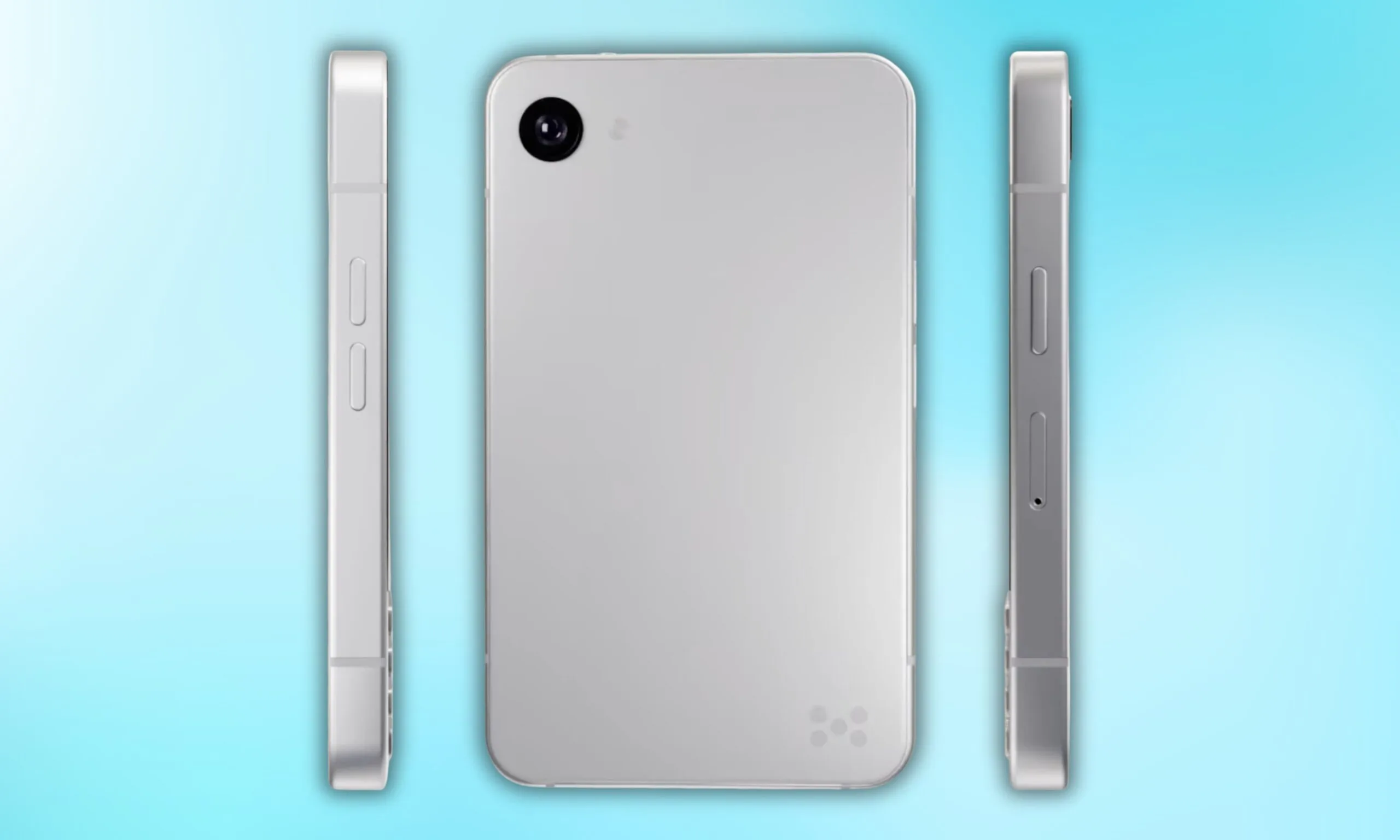
Now, founder Armen Youssefian has posted what appears to be a 360-degree render of the Minimal Phone 2 on X, and from what I can see, the team has done its homework.
@Youkhna / X
What do the renders actually reveal about the MP02’s design?
Quite a bit, actually. The phone will be available in two colors: a clean silver and a matte black. To me, the MP02 immediately looks like a more premium device. The rounded corners and the polished metallic frame running around the display give it that iPhone 5s energy, though it’s a bit wider.
Flip it over, and you get a minimal back panel with a single camera and the Minimal Company’s signature dot logo at the bottom right. No camera bump, no cluttered array, just clean, intentional design.
Up front, the iconic full QWERTY keyboard returns, which is visibly refined from the original’s 35-key layout. The keyboard section appears to sit in a slightly recessed area, which yet again reminds me of another classic: the BlackBerry phones.
Advertisement
Is the MP02 actually getting 5G this time?
Minimal Company’s co-founder Andre Youssefian also teased the next Minimal Phone on X, calling it the “world’s smallest 5G QWERTY physical keyboard phone.” That confirms the arrival of 5G cellular connectivity on the device, one of the biggest complaints surrounding the original model.
However, neither co-founder has revealed any other specifications of the Minimal Phone 2 yet. An early-access waitlist is live on the company’s official website; that’s currently the only concrete commitment the company has made, though. That’s why I’d move ahead with cautious optimism.
What Minimal Phone 2 could do differently is bring genuine Android utility to that space in a premium package. I’d say that the design ambition is there, but it will be the specs that decide whether the execution follows.
Also high on list of reasons to buy the Mission 1 Pro is that, in my experience, when properly color graded, footage from the Mission 1 Pro pairs seamlessly with footage from any other camera. This is especially true in good light, but overall the look of footage is leaps and bounds beyond the Hero 13. Some combination of the bigger sensor, better lens, 10-bit GP-Log2, and higher bit rate leads to more cinematic looking footage than I’ve seen coming out of an action camera.
Other great improvements include support for fast charging. You can get to 80 percent in about 20 minutes, fully charged in just over 30 minutes. Battery life is great too, I managed about 3 hours shooting 4K 24fps. I was also impressed to see that the battery itself, while bigger, is backwards compatible with the Hero 13 and vice versa, which is a nice touch if you happen to have quite a few extra batteries lying around (and let’s be honest, what GoPro user doesn’t).
The low light performance is also a highlight. I don’t need a camera that sees in the dark, but it’s nice to be able to shoot in twilight and get usable results. For all the ballyhoo about how bad low light performance is in older GoPros, I never found it all that limiting, but if you did, the Mission 1 Pro is your camera. I’m happy to report that GoPro has exercised considerable restraint with the new Low Light mode, there is none of the heavy processing and weird artifacts that often plague low-light modes.
Out of the box with the default color profile the Low Light mode in the Mission 1 Pro most closely matches with you get from the Insta360 Ace Pro 2, which is really solid. But don’t forget that the real power of the Mission 1 Pro comes from shooting GP-Log. When you do that in low light, and then color grade yourself, the results are better than any other action camera I’ve tried. My one gripe is that you can’t control noise reduction in Low Light mode.
Advertisement
There’s way too much to cover in a short review like this, but it’s worth saying that audio is improved, with more mics, the rear screen is slightly bigger, and the settings menus are more extensive and easier to customize. It’s also worth calling out that GoPro Lab has alternative firmware for the Mission 1 Pro, which enables quite a few interesting features, including up to 300 Mbps video.
What’s Not So Great
Photograph: Scott Gilbertson
To get the most out of the Mission 1 Pro you’re going to want to post process your video. It needs to be edited and color graded to pull the most value out of what you can shoot with the Mission 1 Pro. This makes perfect sense given that it’s partly aimed at pro filmmakers who are naturally going to edit and color grade their footage. If you go this route, you will end up with better looking movies than what you’ll get from any other action camera. The downside is that this is a lot of work. I’ve joked in quite a few WIRED guides that I have a massive amount of video footage sitting on hard drives waiting for me to edit it. I really do, and I still haven’t got around to editing it.
The audio community is far from perfect, but it has a long history of taking care of its own. Much of that support happens behind the scenes through donations, replacement equipment, introductions and favors that readers will never hear about. Some people are more generous than others, but when a respected small company gets knocked flat, the community usually responds.
Capra Audio now needs that help. According to a GoFundMe organized by family friend Morgan Andreychuk, Brian Hayden and his family were forced to take refuge on the second floor of their West Virginia home before being rescued at 2 a.m. The flooding reportedly submerged their vehicles, 3D printers, servers and much of the inventory used to operate Capra Audio.
The company has earned a strong reputation within the headphone community for its replacement comfort headbands and 3D-printed headphone designs. A GoFundMe has been launched to help the family rebuild both its home and livelihood.
The disaster comes only days after a major fire caused extensive damage to Artnovion, the Portuguese manufacturer of acoustic treatments for high-end audio, home theater and professional spaces. The July 15 fire destroyed one building in its Sobrosa warehouse complex after the roof collapsed, although no injuries were reported.
Advertisement
Different countries. Different disasters. The same reminder that behind every specialist audio brand are real people, families and livelihoods that can disappear in a matter of hours.
Who Is Capra Audio?
We’ve all been there: you unpack a new pair of headphones and love the way they sound, but they’re too uncomfortable to wear for more than 10 minutes. You return them, find a comfortable pair, and breathe a sigh of relief. Then disaster strikes a year later: the headband tears, disintegrates, or otherwise fails.
Capra Audio began as a one-man operation created to give headphone owners the freedom to repair failed headbands while improving comfort in the process. The company now offers an impressive range of replacement and upgraded headbands at surprisingly reasonable prices.
Advertisement
A small subset of Capra Audio’s products, for sale on CapraAudio.com
Who Cares About Headbands?
You may never have experienced a failed headphone headband, but companies like Capra Audio still matter. Headphone manufacturers are under no obligation to sell replacement headbands or continue offering them once a model has been discontinued.
Capra Audio’s aftermarket solutions are valuable not only from a comfort perspective, but also from an ownership one. Rather than throwing away an otherwise functional pair of headphones because a simple, inexpensive part has failed, owners can replace the headband and extend the life of their headphones considerably.
More Than Just Headbands
Capra Audio is run by one person: Brian Hayden. A genuine headphone enthusiast, his work extends well beyond designing improved replacement headbands. Brian also creates complete headphones from scratch and releases the designs for free.
Advertisement. Scroll to continue reading.
Advertisement
Anyone with access to a 3D printer can download the files and build the headphones at home. Capra Audio currently offers five models through Printables.com, including the notable Satyr 4.
3D printed headphones, or DIY headphones in general, will not appeal to everyone, but they can be a lot of fun to build and modify. If you already own a 3D printer and have some spare cash for dynamic drivers and the necessary hardware, why not give one a shot?
Capra Audio Satyr 4. Credit: Capra Audio
How Can You Help?
Capra Audio is not a giant corporation with warehouses full of replacement inventory. It is Brian Hayden, his family, and a small business that has earned the trust of headphone enthusiasts by solving problems larger manufacturers often ignore.
The GoFundMe has already raised over $19,000 toward its $30,000 goal through 202 donations, but there is still considerable ground to cover. The money will help with relocation, essential equipment, lost inventory, and rebuilding both the family home and Capra Audio.
Advertisement
Donations matter, but sharing the fundraiser can also put it in front of someone who is able to help. The audio community takes care of its own. This is one of those moments when showing up actually matters.
In context: When a market is utterly dominated by a single player as AI infrastructure has been by Nvidia, it’s tough for any rival to make a dent. No company knows this better than AMD. They’ve been battling in many segments against Nvidia, as well as other semiconductor giants like Intel, for decades now.
That challenge hasn’t deterred AMD. If anything, it seems to have sharpened the company’s focus. At its recent Advancing AI event in San Francisco, AMD rolled out an unusually dense wave of announcements spanning AI infrastructure for the cloud and enterprise data centers, AI-powered client devices, and physical AI for robotics.
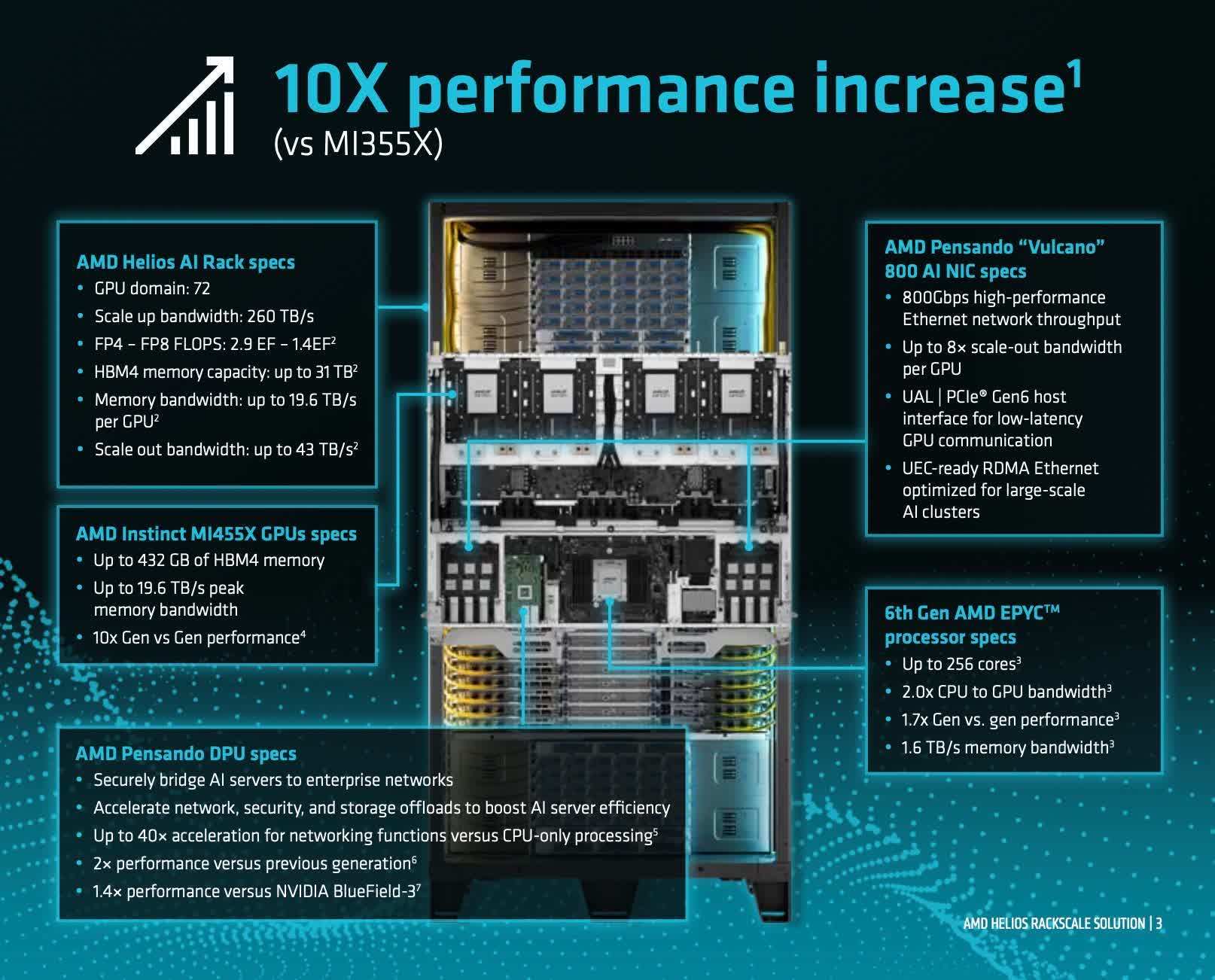
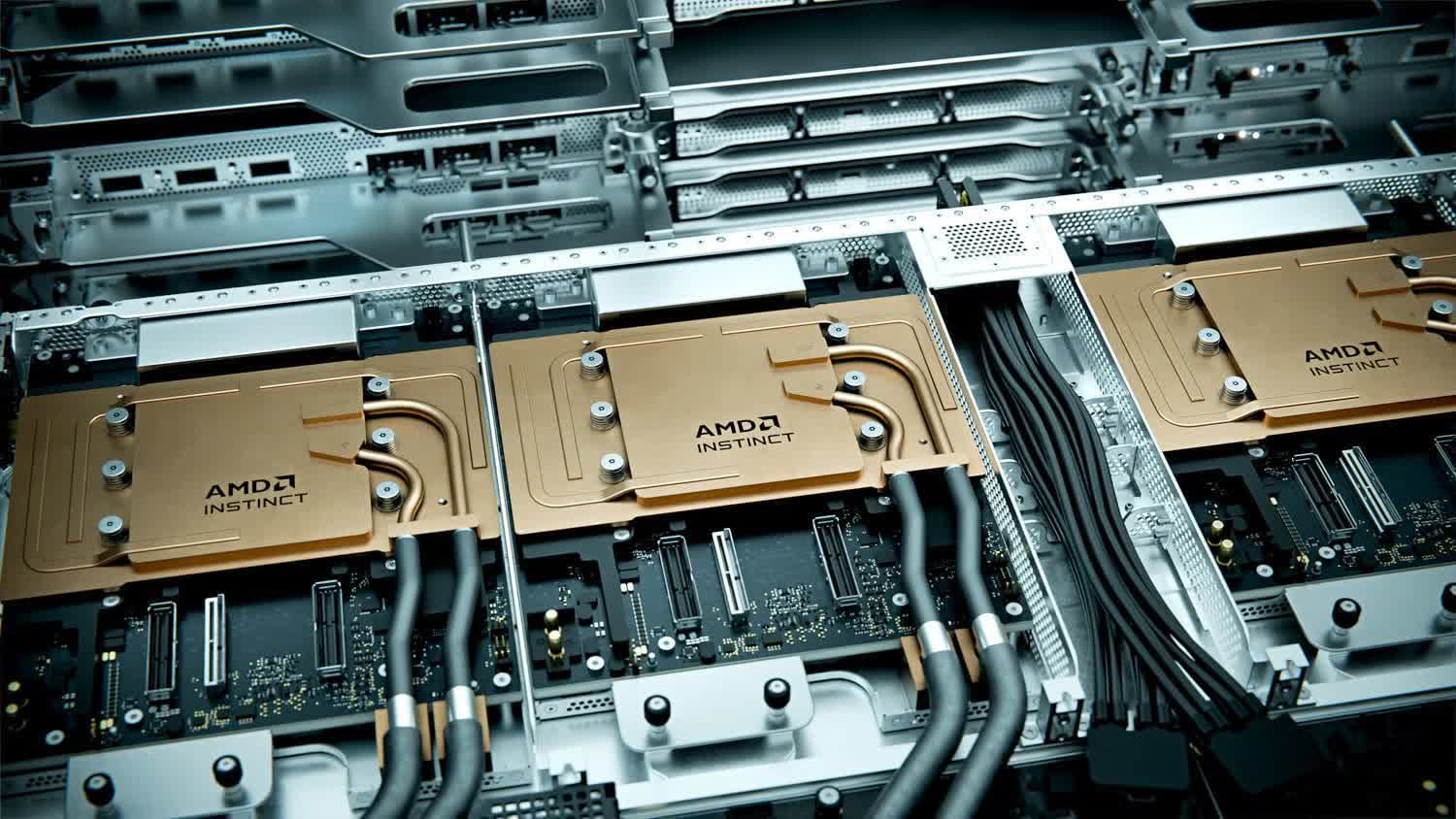
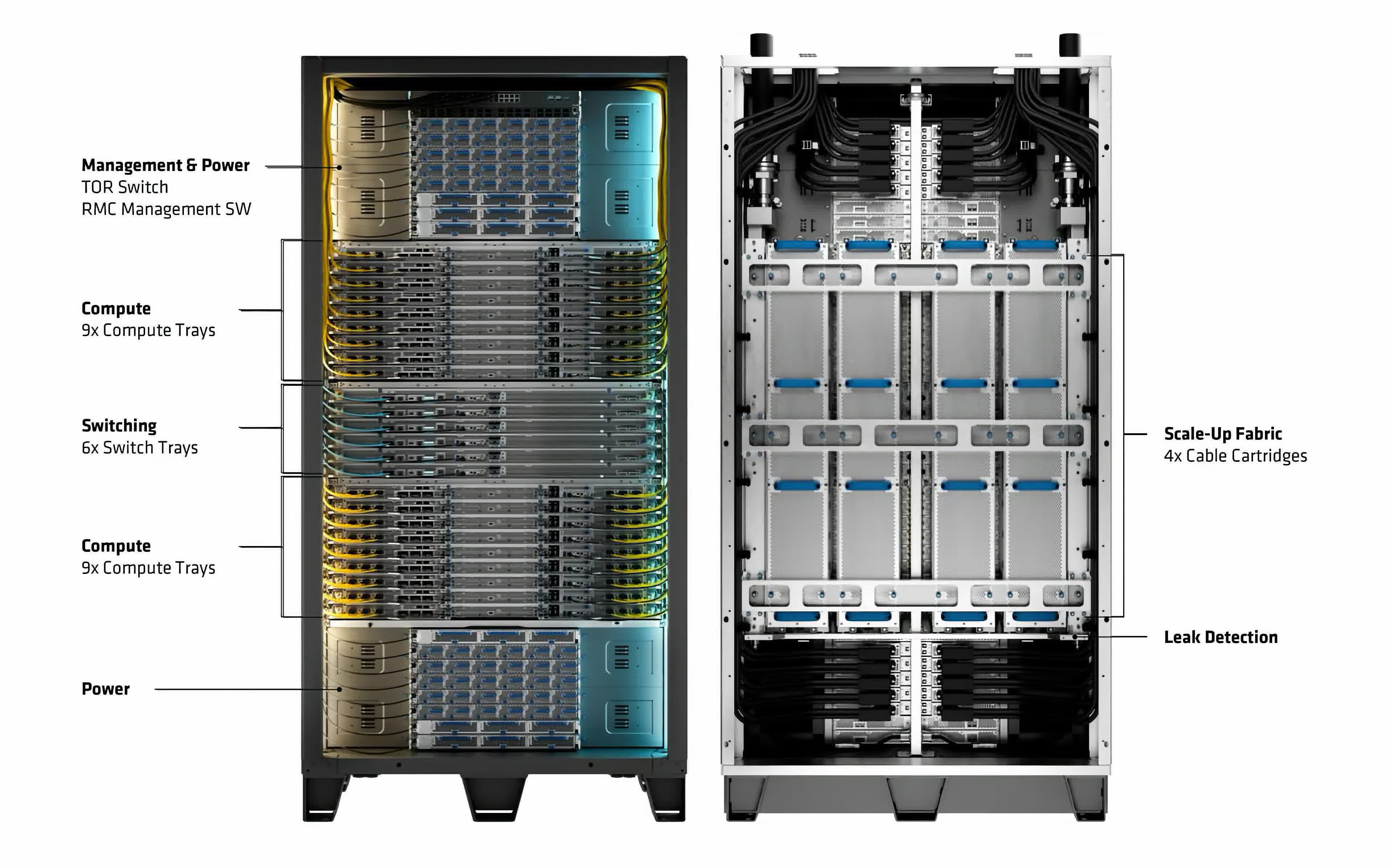
AMD first previewed Helios at last year’s event, but actually shipping it is an important step, both philosophically and practically. Nvidia has trained the market to expect rack- and datacenter-scale solutions as table stakes for AI infrastructure, and without a shipping rack product of its own, AMD was at a real disadvantage. With Helios shipments now set to begin later this quarter, AMD can credibly call itself a serious contender in AI infrastructure, and organizations shopping for the technology now have a legitimate alternative to weigh.
Advertisement
That new confidence was reflected in the customers and partners AMD paraded on stage. From Anthropic and OpenAI on the frontier-model side to Meta and enterprise customers like AT&T, there was a genuine sense of energy and partnership running through the event.
CEO Lisa Su went out of her way to highlight how closely AMD had co-designed Helios with its earliest customers, a reminder of how much it pays to actually listen to what buyers want before finalizing a product.
AMD didn’t stop at building a credible alternative; it also made some aggressive claims about outperforming the competition outright.
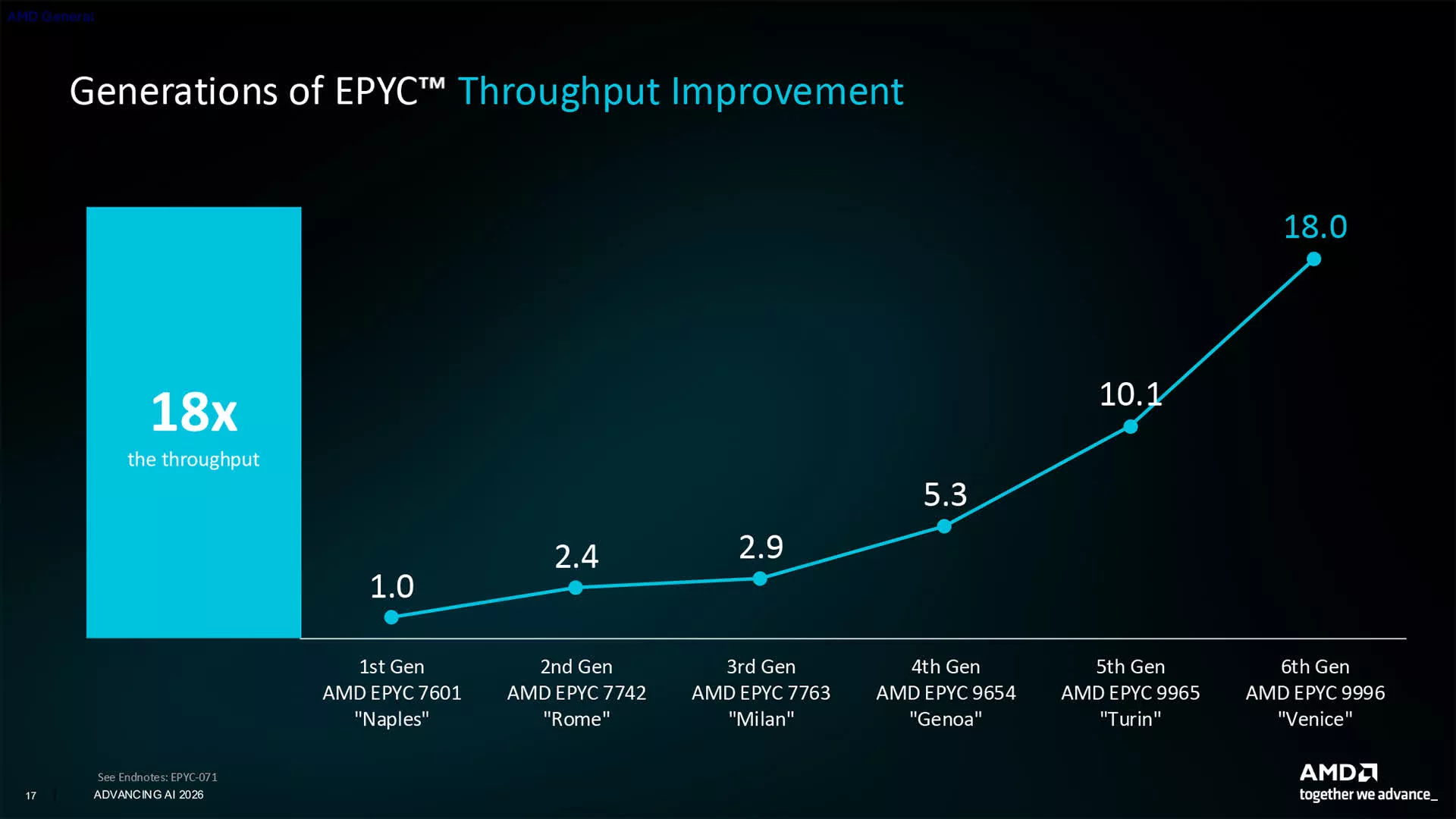
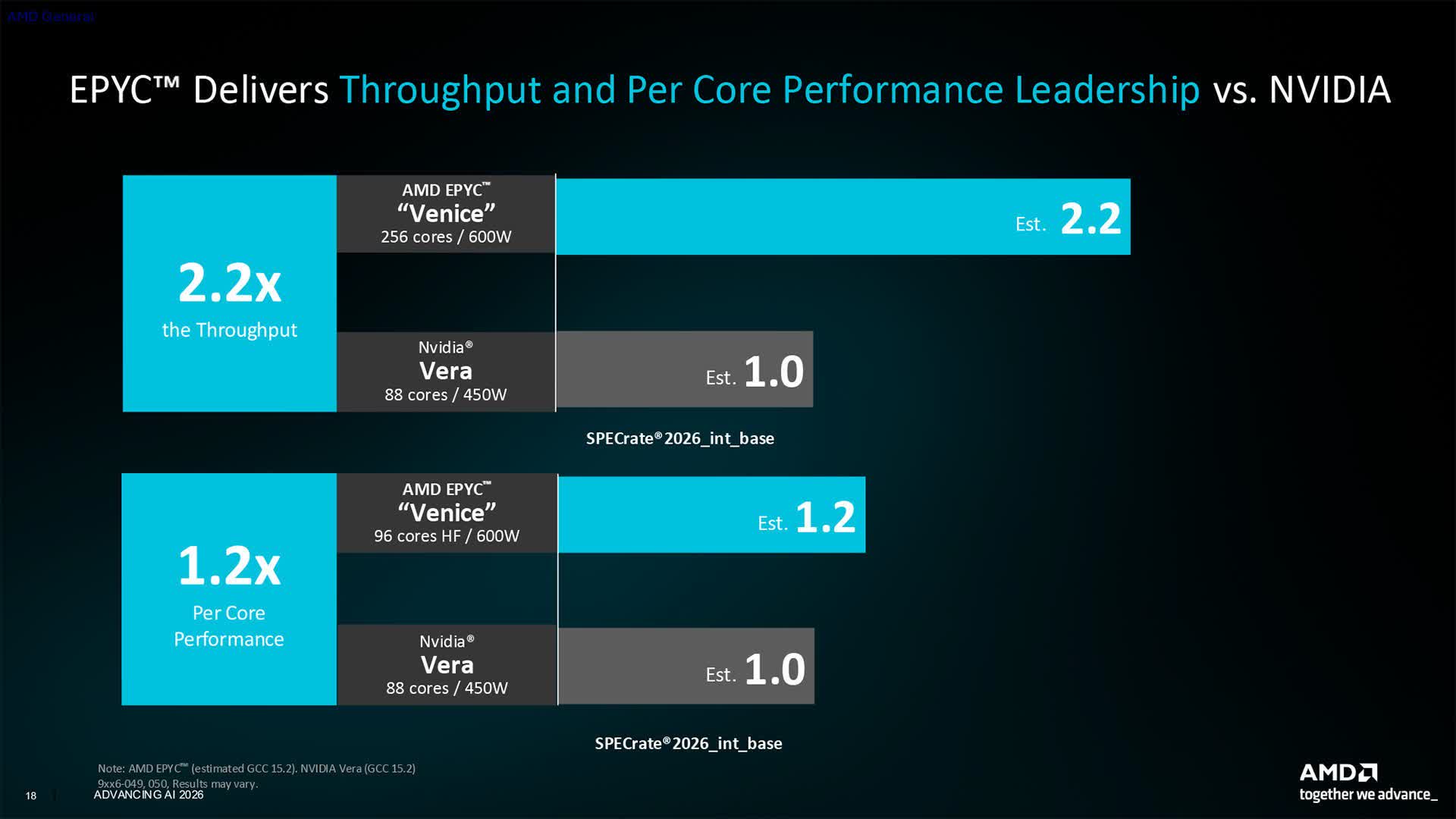
How well benchmark claims translate to real-world performance is always hard to judge in advance, but AMD touted 20% greater per-core performance for its latest Epyc CPUs over Nvidia’s new Vera CPU, among other figures.
Advertisement
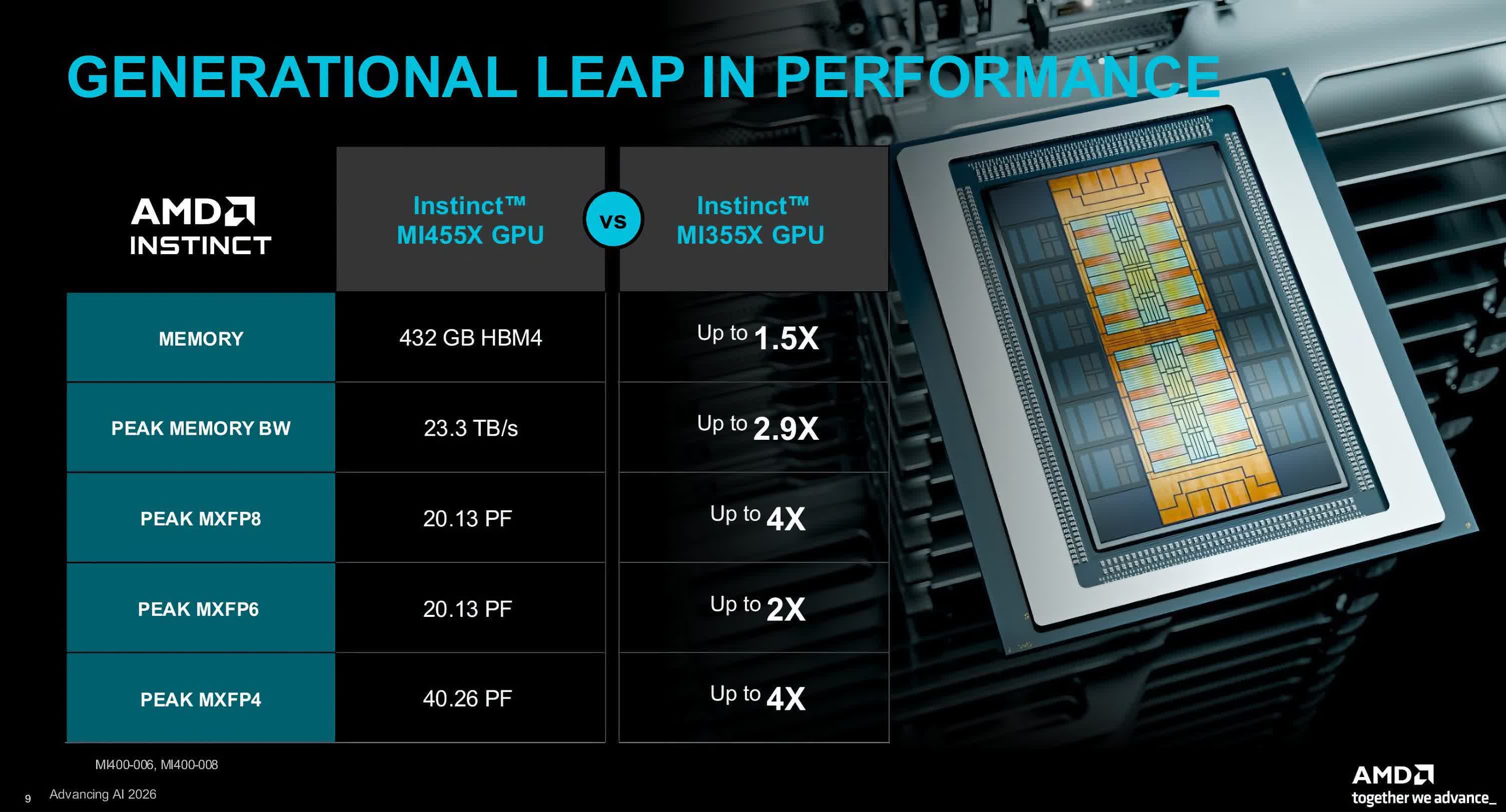
The company also highlighted Helios’s larger HBM4 memory capacity and faster memory bandwidth compared with similar Nvidia rack systems. However those numbers hold up once independent, third-party benchmarks arrive, it’s fair to say AMD is now offering a hardware alternative to Nvidia. For customers chasing low-latency inference, AMD also announced a partnership with Cerebras that will let a Cerebras rack sit side by side with a Helios rack for demanding workloads.
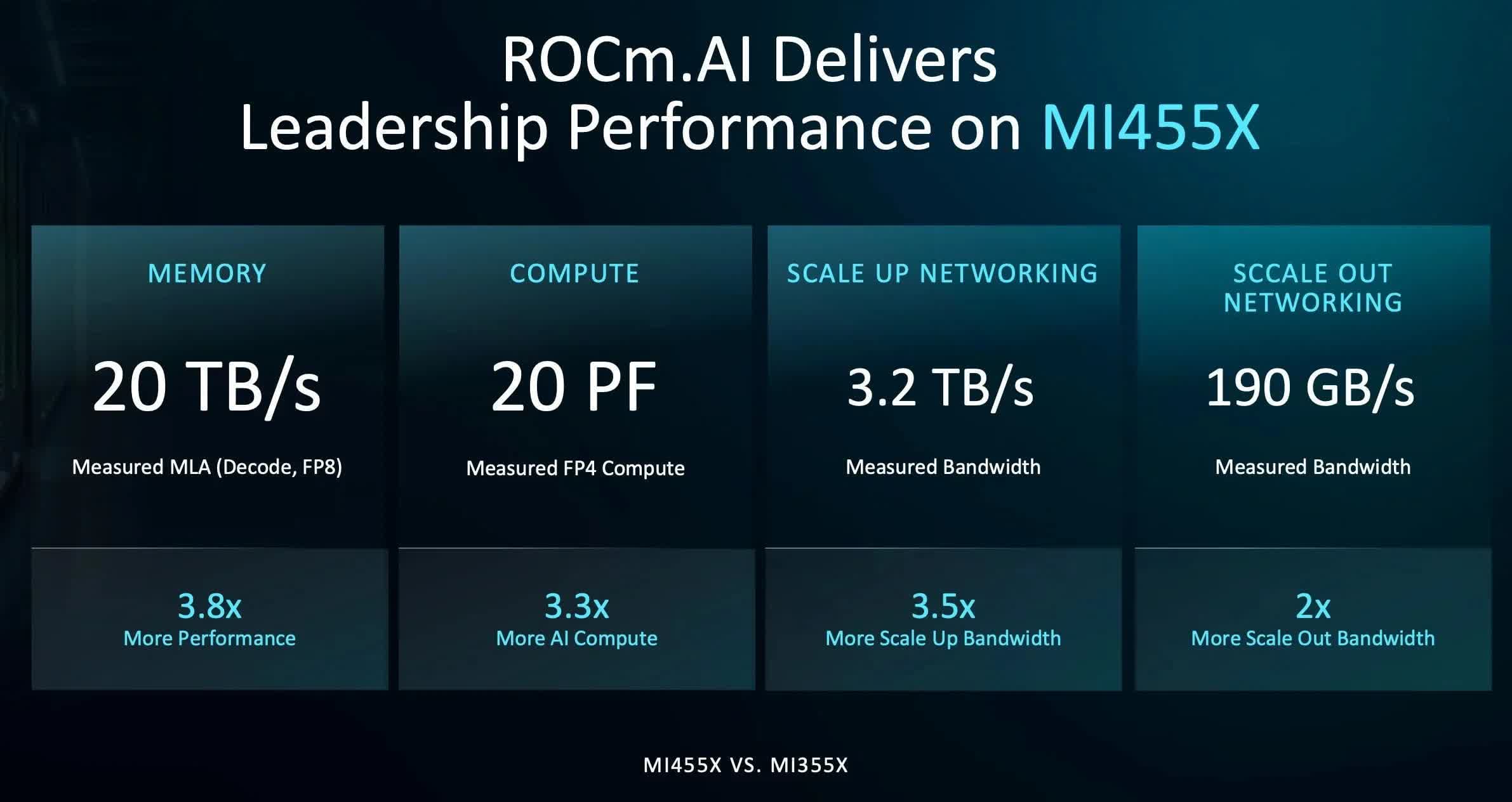
Of course, AI infrastructure is about more than hardware, and one of the more intriguing announcements from Advancing AI was a new version of AMD’s software stack, called ROCm.ai. It’s designed to use AI-assisted programming to make building software optimized for AMD hardware significantly easier – including, for example, porting code originally written in CUDA over to ROCm.
Given Nvidia’s roughly two-decade head start with CUDA, a wholesale industry shift won’t happen overnight, but it does make the so-called “CUDA moat” look less daunting than it once did. A ROCm.ai feature called Hyperloom, purpose-built to optimize AI applications for ROCm, looks particularly compelling: at the event, Anthropic described how an engineer let Claude run autonomously over a single weekend to adapt and tune performance on an AMD Instinct MI355X chip – and came back Monday to a working, steadily improving performance curve.
Beyond the data center, AMD also had something to say about PCs and robotics. On the PC side, the company detailed a new AI-focused deskside computing device, codenamed Gorgon Halo, built on an enhanced version of its Ryzen AI Max APU that pairs a Zen 5 CPU with an RDNA 3.5 GPU.
Advertisement
The device will offer up to 192GB of unified memory, at a price still to be determined but likely steep given current DRAM costs. Even so, it’s an interesting entry in the growing class of developer-focused AI systems hitting the market.
More surprising was a new partnership with Cisco to bring AI agent management, observability, and tokenomics tools to this class of device. Leveraging Cisco’s Cloud Control, AI Defense, and Splunk technologies, the joint solution is aimed at organizations planning to deploy AI-focused PCs at scale.
Details are still thin, but it’s a notable partnership that shows how AMD and Cisco are working to bring more comprehensive AI tooling to the enterprise.
Finally, AMD made several announcements in physical AI and robotics. Few people realize AMD has had a substantial presence in industrial robotics for years, largely thanks to the technology it picked up when it acquired Xilinx in 2022.
Advertisement
The kind of reprogrammable FPGAs Xilinx has built for years are essential to many robotics systems, both for adapting to new AI algorithms and for sensor fusion – tying together the camera and sensor feeds most robots rely on. Combined with AMD’s traditional CPUs and GPUs, that gives the company a broad portfolio to draw from.
The result is the new Kria AI SOM, a system-on-module, and the Kria AI Robotics Developer Platform that pairs it with a carrier board for robotics designs. Both are built around AMD’s Ryzen AI Embedded X100 series SoCs, alongside new open-source Kria AI Robotics Platform software. Together, it’s a comprehensive toolkit for robotics developers and further cements AMD’s role as a significant player in the field.
Nvidia will almost certainly remain the AI infrastructure leader for the foreseeable future, but it’s now clear AMD has come to play, and that’s good news for everyone. As in any market, competition drives faster, better advancements, and it will be worth watching how the AI semiconductor landscape continues to evolve from here.
Bob O’Donnell is the founder and chief analyst of TECHnalysis Research, LLC a technology consulting firm that provides strategic consulting and market research services to the technology industry and professional financial community. You can follow him on Twitter @bobodtech
Raspberry Pi’s new 10.1-inch Touch Display 2 lands at $80 with a 1200 × 1920 IPS panel and ten-finger touch, sitting above the $40 5-inch and $60 7-inch models
The upgrade breaks backward compatibility, extending compatibility with the Raspberry Pi 5 and Compute Modules only, ruling out Pi 4 and earlier as well as the entire Zero lineup
The 10.1-inch Touch 2 also offers an IPS display that offers viewing angles of 85 degrees, matched by the 7-inch variant, even as the 5-inch variant clocks in a bit lower at 80 degrees
The Raspberry Pi 5 is a surprisingly capable device, and it finally has an “official” 10-inch display that can hold a candle to its capabilities.
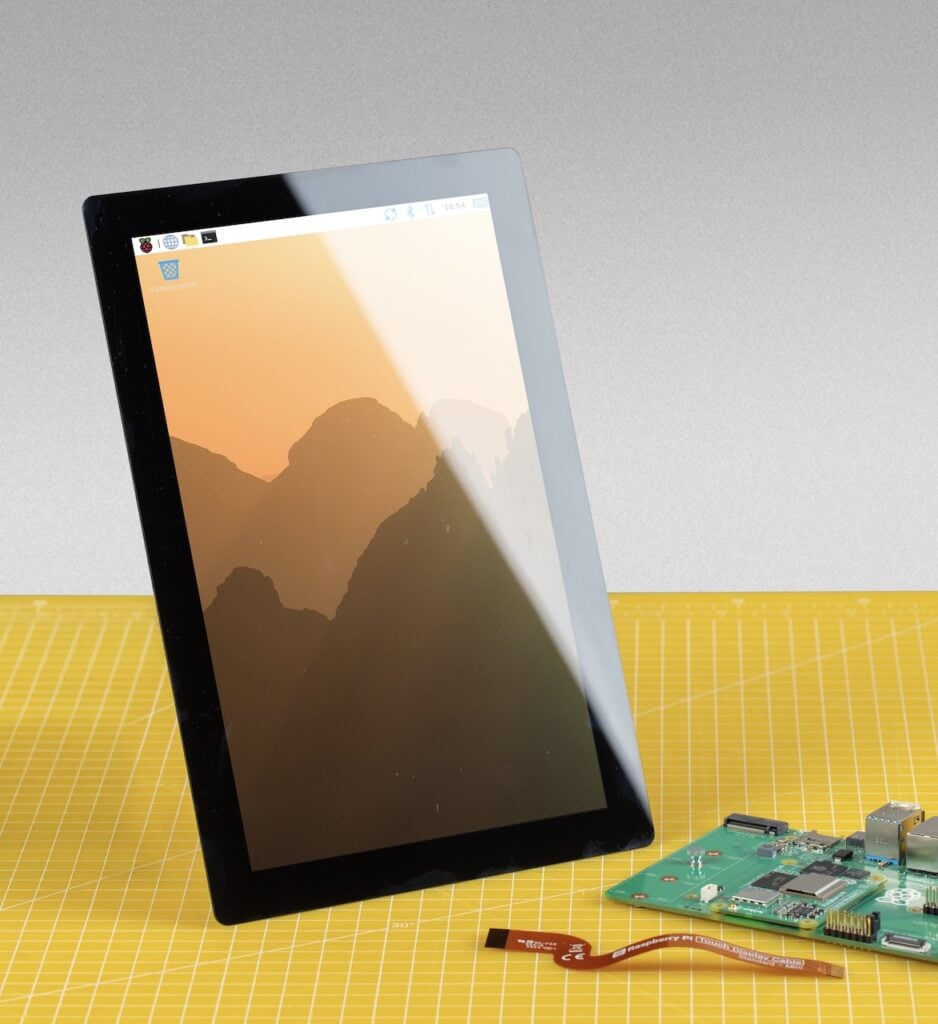
While the new Touch Display 2 has already had 5-inch and 7-inch offerings, the 10-inch variant is new, offering a slew of upgrades under the hood even as it cuts down on peak brightness to go with the larger display.
It is also the first Touch Display that leaves most of the Raspberry Pi installed base behind, essentially scrapping support for older Raspberry Pi options as well as its current Zero lineup.
Latest Videos FromTechRadar
The 10.1-inch Raspberry Pi Touch Display 2 (Image credit: Raspberry Pi Foundation)
Advertisement
A new display with compromises for a limited user base
While the 10-inch Raspberry Pi Touch Display 2’s announcement is direct about the incompatibility, explaining that the higher resolution needs four DSI lanes and the newer connector is found only on Raspberry Pi 5 and Compute Module IO boards, it says nothing about what that means in practice.
The restriction effectively cuts off a large segment of the user base that runs older Raspberry Pi models, as well as anyone building on the Zero line.
At $80, the display is relatively affordable for its size, and there are real upgrades under the hood.
Resolution rises to 1200 × 1920 in native portrait, the touch controller returns to 10 points after the 5-inch and 7-inch models were limited to 5, and the switch to an IPS panel tightens the worst-case touch response from 40 ms to 35 ms. The 85-degree viewing angle is worth qualifying, though: it beats the 5-inch panel’s 80 degrees but matches the 7-inch exactly, despite the announcement presenting it as a step up across the board. Those variants are listed at $40 and $60, respectively.
Sign up to the TechRadar Pro newsletter to get all the top news, opinion, features and guidance your business needs to succeed!
The math might be a bit ugly for some, considering that a Compute Module with an I/O board isn’t how most people buy their Raspberry Pis, and that the pair generally costs more than a board with I/O onboard bought outright.
Advertisement
That matters more than usual right now. The cheapest compliant path is real enough: a 1GB Raspberry Pi 5 at $45 plus the $80 display comes to $125. But anyone wanting memory headroom is buying into a market that has moved sharply against them.
The 16GB Raspberry Pi 5 has climbed from $120 in November 2025 to $305 by April 2026 as Raspberry Pi passed on what it describes as a seven-fold rise in LPDDR4 pricing. The irony is pointed. The company has protected pricing on the Zero series and Pi 3 by drawing down existing LPDDR2 inventory, and those are precisely the boards this display locks out.
(Image credit: Raspberry Pi)
The one thing Raspberry Pi does gloss over is peak brightness, which drops to 400 nits from the 500 nits of its older 5- and 7-inch siblings, a difference that will show in the brightly lit rooms where kiosks and signage actually live.
Advertisement
While the panel offers a decent 225 ppi pixel density, slightly outdoing the 7-inch at 210, it does not hold a candle to the much sharper 5-inch display, which shares the 7-inch’s resolution across a smaller area for 294 ppi. That makes the 10-inch a middle-of-the-road offering at best in terms of sharpness.
On raw value, the largest panel is the strongest in the family. Its 135.4 × 216.6 mm active area works out to roughly 366 square millimeters of screen per dollar, against about 224 on the 7-inch and 171 on the 5-inch.
The most telling detail about the launch, however, may be the production commitment: Raspberry Pi guarantees availability until at least January 2030, a promise it extends to the smaller Touch Display 2 variants as well.
Coupled with an operating range of −20°C to +70°C and the Compute Module compatibility, that reads less like a hobbyist accessory than a panel intended for embedded integrators building point-of-sale terminals, industrial HMIs, and signage on a decade-long design cycle.
Advertisement
For makers, the 10-inch is a straightforward, if slightly dimmer, upgrade that costs backward compatibility and, at current board prices, rather more than the sticker suggests. For the industry customers Raspberry Pi has courted since listing publicly, it is something harder to buy than a screen: a component with a guaranteed support horizon, available only to those already standardized on the company’s newest boards.
I’ve been reviewing laptops for well over a decade, sometimes testing more than 30 devices per year. They aren’t all winners, and many should be avoided, no matter how slick the marketing or cheap the discount. Good news: It’s my job to recommend laptops that fit your budget and won’t make you regret your purchase six months later. These are my favorite laptops that I’ve tested myself and would highly recommend you buy.
Updated July 2026: I’ve reevaluated the laptop landscape given recent price increases, including Apple’s MacBook lineup. I’ve also included notes from my recent testing of the Dell 14S.
The Laptops I Recommend Most
Apple
Advertisement
MacBook Air (M5, 2026)
When friends or family ask what laptop to buy, I always start with the MacBook Air. It is far more powerful than its compact size suggests. It’s a shame about the recent $200 price increase from $1,099 to $1,299, but even at that new price, it remains my top pick because it nails the big picture. Everything from the trackpad to the speakers are of the highest quality, and it delivers all the performance and battery life the average person needs.
With the latest M5 chip, its GPU matches the M3 Pro MacBook Pro, easily handling everything from gaming to video editing. That’s not at all what the MacBook Air is designed for, but the performance is there when you want to dabble. It’s what makes it feel like a do-it-all machine, all contained in a fanless chassis that’s still one of the thinnest laptops you can buy. Oh, and did I mention it’ll last well over a full work day away from the wall socket and perform just as well on battery as when plugged in? In almost every aspect, it’s the gold standard.
While the lower price of the new MacBook Neo might be tempting, the MacBook Air is the better choice for anyone working at a computer all day. With its superior performance, extra memory, faster storage, and Thunderbolt ports, you will never have to question if you have the right tool for the job. (And unless you already know you need a MacBook Pro, you probably don’t.)
Advertisement
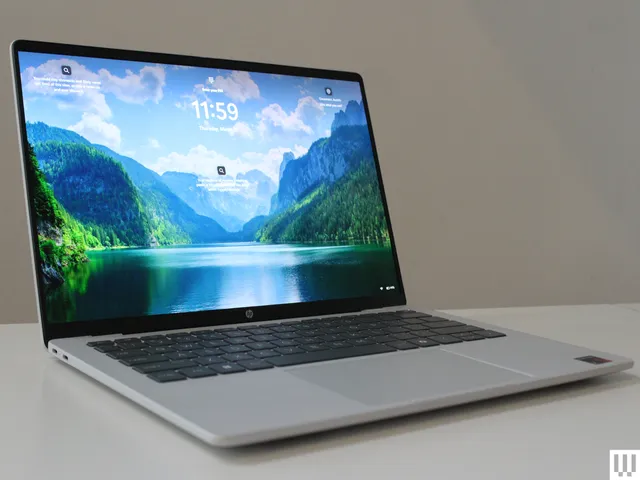
If you prefer Windows or need it for specific applications, the HP OmniBook Ultra 14 is the strongest alternative to the MacBook Air. It might just be the best laptop HP has ever made. The device is beautifully built and incredibly sturdy, with a thin chassis (though the height of the feet makes it taller on the table next to the MacBook Air), an oversized haptic trackpad, and polished metal edges. I also appreciate the three Thunderbolt 4 ports split between both sides for convenient charging, as well as the surprisingly good speakers.
I tested the high-end model, which features a fast Snapdragon X2 Elite, 32 GB of RAM, and a gorgeous 2880 x 1800 OLED display. The screen offers near-perfect colors, excellent brightness, and astounding HDR performance. It doesn’t get much better than this. My only real complaint is that the glossy OLED screen is quite reflective and lacks an anti-glare coating. It’s hoped there will soon be more configuration options, as I’d love to see this higher-end OLED panel available in a cheaper configuration. (The base configuration sold directly from HP has a dimmer, lower resolution screen.)
My other favorite alternative to the 15-inch MacBook Air is the Lenovo IdeaPad Slim 5x. I was impressed by the overall package for this laptop. The price has increased since I reviewed it, up from $900 to $1,150. But compared with the competition, it still rises to the top, primarily thanks to its fantastic 2560 x 1600 OLED display with a 165-Hz refresh rate. I highly recommend spending the $30 to upgrade from the base screen (sold on Amazon) to this excellent OLED version (sold by Lenovo). Additionally, while it is slightly thicker than the MacBook Air, that extra space allows for a great selection of ports, including HDMI, USB-A, and an SD card slot. The Snapdragon X2 Plus isn’t quite an M5 killer, but I was happy with the performance and battery life provided. While I can no longer say it’s the best laptop under $1,000, in a world where laptop pricing keeps increasing, it’s the best value for what you get.
If you are actually shopping for a laptop under $1,000, I’d point you in the direction of the Dell 14 Plus. It came out last year, and in recent months it’s become one of the few Windows laptops worth buying at this price. It has a sharp screen, a decent touchpad, and great battery life. Performance is solid too, using previous-gen Intel chips and 16 GB of RAM. The Dell 14 Plus is exactly that, and it’s currently the best Windows laptop you can buy for less than $1,000.
Advertisement
I used to recommend the Surface Laptop 13.8 (also known as the 7th Edition) as one of my top picks. While I still love this laptop, it’s risen in price dramatically and no longer feels like as good of a value, especially since it’s two years old. The 2024 model now starts at $1,200, while the next-generation model with the Snapdragon X2 chips costs $1,700.
Cheap Laptops That Are Actually Good
While “cheap” means something different to everyone, the best budget laptops generally fall under $750. This is where Windows truly shines, offering great specs for less money. Thanks to the latest processors from Qualcomm and Intel, these laptops now offer battery life that rivals Apple. The best affordable laptop I’ve checked out is the HP OmniBook 5. The model I tested has a Snapdragon X processor, 16 GB of RAM, 512 GB of storage, and a 14-inch OLED screen. Discounts fluctuate frequently, but right now you can buy the 256-GB model directly from HP for $630. That’s a killer deal.
I also recently tested the new HP OmniBook 3, which uses the same chip as the OmniBook 5. It frequently sells for less than the OmniBook 5 by at least a $100 or so. While the OmniBook 3 is a good alternative, the OmniBook 5 is much thinner and looks more modern. Neither laptop has a particularly great touchpad, which is easily the biggest flaw in both laptops. The OmniBook 5 is the better buy if you can afford it, though.
The MacBook Neo is Apple’s new entry-level laptop. It initially started at an aggressive $599, but that price has recently been raised to $699. Even at that price, the laptop shines when it comes to the display. It offers the best screen you can find at this price, bringing the macOS experience to an unprecedented value, even at $699 (or $799 for the 512 GB model). Apple clearly gave priority to the front-of-screen experience, delivering a premium feel across the display, build quality, and keyboard. While the 8 GB of RAM, outdated ports, and slower SSD are notable drawbacks—making the MacBook Air a better choice for remote workers—the Neo is the most premium-feeling laptop available for students, travelers, and casual users.
Given how good some of these budget laptops are, it’s a bit harder to find a place for Chromebooks. The standout option is still the Lenovo Chromebook Plus 14. It’s the most premium Chromebook available, with an OLED screen, 16 GB of RAM, and battery life that rivals the MacBook Neo. Its price just keep going up, though, now up to $849. That’s far too expensive for what you get.
Advertisement
Instead, I recommend the Acer Chromebook Plus 516, which is the best of the cheaper Chromebooks. While it’s a bit thick and the screen isn’t the sharpest (especially for a 16-inch laptop), it’s the best laptop you can buy for under $500, and it occasionally dips down to $349. Acer didn’t skimp on the quality of the touchpad, either, which I appreciate. Windows laptops are about to get much stronger in this category, however, just as higher-priced Chromebooks will be seemingly phased out over time and replaced by the upcoming Googlebooks.
Powerful Laptops for Those Who Need It
Apple
MacBook Pro (M5 Max)
While the laptops above are great for the average person, content creators and gamers need extra performance. For the former, the 16-inch M5 Max MacBook Pro is the ultimate choice. It combines immense power with surprising portability and fantastic battery life—a rare feat. The M5 generation is the most impressive yet, with a greatly expanded GPU and significantly boosted on-device AI processing thanks to a more efficient Neural Engine and faster memory bandwidth. While it is one of the most powerful AI laptops available, the MacBook Pro isn’t for everyone; it is built specifically for professional creatives and engineers running heavy, demanding applications. It’s become more expensive in 2026, but there’s still nothing quite like it on the market.
Advertisement
There are a number of Windows alternatives to the MacBook Pro, including the Asus ProArt P16 and Lenovo Yoga Pro 9i. And while these are both powerful, they take an old-school approach to performance, using hot-and-heavy discrete graphics cards that significantly reduce the battery life to achieve that level of performance. The Dell XPS 14 takes a different approach, ditching the discrete GPU for Intel’s new X9 chip (also known as B390). The results are seriously impressive, replicating the performance of an RTX 4050 without the downsides of using a discrete GPU. Moreover, the Dell XPS 14 has a level of polish in its design really seen only on MacBooks—even surpassing them in some areas.
If you plan on gaming more than a couple of times a week, you will want a dedicated gaming laptop. After testing dozens over the past year, the Lenovo LOQ 15 really stands out. While it is thick and fairly plain-looking, it delivers where it counts. While many budget gaming laptops only feature an entry-level Nvidia RTX 5050 GPU, the LOQ 15 pushes the performance further, delivering well over 60 fps in almost any game at Medium settings—and up to 113 fps in Cyberpunk 2077. That is incredibly impressive for the price. While the current-gen RTX 5050 model is out of stock at the moment, you can still buy last year’s model.
There’s a whole world of gaming laptops outside the budget-tier, though. I’ve tested an assortment of options, and I always come back to the Razer Blade 14 and Razer Blade 16. Portable, minimalist, and extremely well-made, they have rightfully earned their reputation as the MacBooks of PC gaming—along with the MacBook Pro–like price tag. Their sleek design means they work just as well for school or work as they do for gaming, without the bulk of a traditional gaming laptop. While there are more powerful options out there, nothing quite matches the Razer Blade.
Other Good Laptops I’ve Tested
Photograph: Luke Larsen; Getty Lede
If you choose one of the laptops above, you will be very happy with your purchase. However, if you are looking for a specific feature or a different price point, I have included a few other options below. While each of these recently tested laptops has at least one minor drawback, they could still be the perfect choice depending on your needs and currently available discounts.
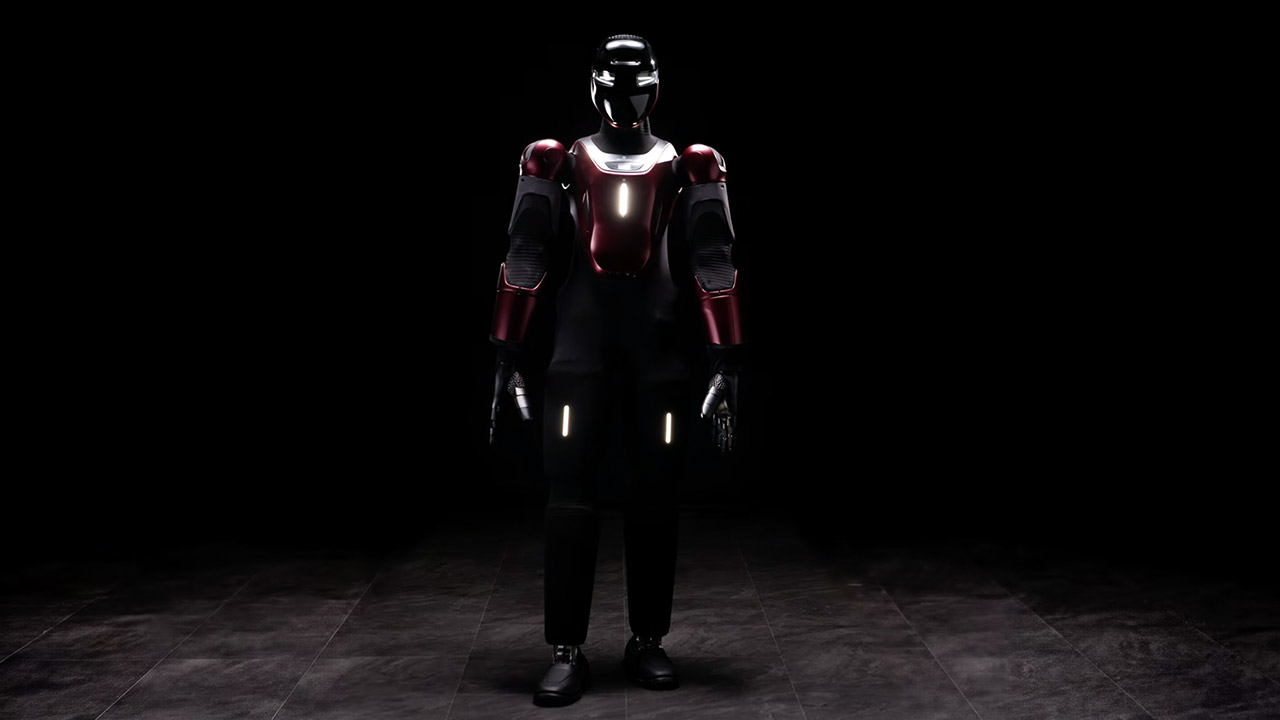
Italian engineers in Genoa just showed a humanoid that went from concept sketch to walking, sensing machine in half a year. Generative Bionics revealed Gene.01 at AMD’s Advancing AI event in San Francisco, presenting it as a ready platform rather than a distant laboratory project. The same team that showed a concept at CES in January delivered a complete, sensor-equipped robot by July.
What first strikes you about Gene.01 is the way it’s covered in a layer that allows it to sense touch, temperature, proximity, and pressure all at the same time. This allows the machine to detect when someone is approaching and modify its own location or course before they even touch it. When someone makes touch, the pressure data continues to flow in, providing the robot with a steady stream of information about where the pressure is coming from and how hard it is being applied. As a result, engagement with the robot seems far less abrupt and more natural.
Three models, one lightweight platform R1 Air (20 DOF, monocular camera), R1 (26 DOF, binocular camera, head+waist joints), and R1 Edu (26 DOF…
Easy setup – no coding required for basic use Unbox, power on, and start. Manual teaching feature: physically pose the robot, and it replays the…
More DOF = more expressive movement 26‑DOF models (R1 / R1 Edu) add head and waist articulation for smoother dance and running. For safety reasons…
That force information also influences how people teach the robot new tricks. An operator can lead an arm through an action while also giving the robot feedback on how firmly to grip or press. Just watching a video is often insufficient; all important contact details are lost; however, with the skin on the robot, the demonstration includes both the path the arm is taking and the effort being put in, so the robot has a much clearer picture of what ‘tight enough’ actually looks like when it goes to repeat the job on its own.
The control system treats the entire body, including the mechanical design and decision-making process, as a one long continuous flow. The robot’s model, as well as the models of the human workers around it, are fed into the same optimization loop. From the start, this loop takes into account everything from balance and walking to joint loading and the amount of space required by those around it. This is all based on years of study at the Italian Institute of Technology, as well as a publication published in Nature Machine Intelligence that discusses the same process on an earlier research platform; Gene.01 is the first industrial version of that work.
Advertisement
Generative Bionics does not present Gene.01 as a finalized product ready for use in any factory. It’s more of a foundational platform that can be customized in three main areas. The operation’s brain can be programmed for a specific type of job. The outer shell can be customized to meet a specific location, and the hands and feet can be replaced with the appropriate equipment for the job. The first real-world example is already underway at shipbuilder Fincantieri, where the hands will be transformed into welding equipment ideal for the confined and difficult-to-access places common in shipyards. We anticipate to see some tests later this year.
Teams can begin using the platform before receiving a physical unit to operate with. You can download a digital model of Gene.01 and run it in the same simulation or planning software you now use. All you have to do is run a single command to pull in the robot’s description and get a good notion of how it will perform in real life, given its current geometry and sensor configuration.
































































You must be logged in to post a comment Login