
Connect with us
DAPA Banner

Tech

5 Cheap Harbor Freight Alternatives To Expensive DeWalt Products

Published

on


DeWalt is frequently cited alongside Makita and Milwaukee as one of the best premium contractor-grade hand and power tool brands on the market. The company has earned a sterling reputation for power, performance, and reliability. That said, the black and yellow tools are also among the most expensive models that you’re likely to find on the shelves of your local hardware store.

Those who are interested in getting tools with similar specs and features to those built by DeWalt, but who want to expand their collection without breaking the bank, might be interested in taking a look at what Harbor Freight has to offer. The company’s website frequently invites its customers to compare its tools to more expensive models made by rival brands, including DeWalt. In particular, you might find that the retailer’s Hercules premium power tool brand and Icon hand tool brand are often compared to DeWalt. There are even some Harbor Freight tools that are more powerful than DeWalt models.

Advertisement

Many of these tools aren’t just more affordable, but they’re also quite highly rated. So you might find that there are quite a few user-approved DeWalt alternatives that are worth buying. By taking a look at the specs offered on the tools themselves and also seeing what customers and pros have had to say about them, you might get a better idea about which of the Harbor Freight options might be a worthwhile substitute for the more expensive DeWalt models.

Advertisement

Hercules 15 Amp 12-inch Dual-Bevel Miter Saw (HE74)

Harbor Freight often models its designs after popular tools made by rival brands, and several users have noted that one of the company’s miter saws looks a lot like DeWalt’s. That said, you can get this one for a lot cheaper.

The Hercules 15 Amp 12-inch Dual-Bevel Miter Saw (HE74) retails for $349.99, meaning that it’s a full $299 cheaper than the DeWalt 15 Amp 12-inch Double Bevel Sliding Compound Miter Saw (DWS780) that you might compare it to. It isn’t just the design that’s similar, either. The specs are pretty impressive as well. This tool’s 15 Amp motor is able to rotate the blade at speeds up to 4,100 RPM. It has a 14-inch crosscut capacity, a 6 ¾-inch vertical cut capacity, and a 7 ½-inch nested capacity for crown molding. The saw can miter 60 degrees to the right or 50 degrees to the left, while the miter detent plate has 10 positive stops and an override system for fine adjustments. 

The tool also includes an LED blade guide system to help line up your cuts, and it comes with a 60-tooth carbide-tipped blade. It boasts an impressive score of 4.9 out of 5 on the Harbor Freight website, aggregated from over 3,600 reviews, with 99% of users claiming that they would recommend the item to others. “The power is incredible,” said one reviewer. “I cut through a 4×4 test piece, and the saw’s motor didn’t bog down at all. The fit and finish is impeccable, and the entire saw was 100% accurate right out of the box.” With that in mind, it’s easy to see why this miter saw is often counted as one of the best Hercules power tools sold at Harbor Freight.

Advertisement

Hercules 15 Amp 12 ½-inch Portable Thickness Planer (HE091)

Woodworkers who often utilize rough-cut or irregularly shaped boards will eventually want to invest in a feed-through board planer. The DeWalt 12 ½-inch Thickness Planer (DW734) is one of the top-rated standing planers on the market, regularly being cited as among the most popular choices on sites like Amazon and Home Depot (though the 13-inch model is usually ranked a bit higher). Even so, buying one is a big investment. The yellow and black model retails for $549.00.

Alternatively, you can invest in the Hercules 15 Amp 12 ½-inch Portable Thickness Planer (HE091), which goes for just $399.99. Like the DeWalt, this tool has a 15 Amp motor, promising the same ability to deliver up to 96 cuts per inch. This helps keep board surfaces smooth as they’re planed. It also shares DeWalt’s 3-knife cutting head design. Additionally, the planer has a material removal gauge to help keep cuts consistent across multiple passes, a turret depth stop that makes it easy to maintain a standard thickness across boards, a 4-post carriage lock that helps reduce snipe, and a tool-free dust port with 2 ½-inch and 4-inch diameters for different-sized hoses.

Advertisement

This tool has a 4.8 out of 5 on the Harbor Freight site, with 97% of buyers claiming that they would recommend it. “This thing is solid and does a really stellar job on anything I’ve thrown at it, one reviewer stated. “The price is perfect, the cut quality is great, it’s sturdy, and is ready to go right out of the box. The adjustments are clear and it works really well. This new is far better than buying name brand on marketplace for cheap.”

Advertisement

Fortress 27 Gallon 200 PSI Oil-Free Vertical Shop/Auto Air Compressor (FT27200)

If you’re interested in getting some pneumatic tools, such as an air-powered nail gun, impact wrench, paint sprayer, or grinder, then you’re going to need a decent air compressor. DeWalt sells a few of these, but they can be quite pricey. The DeWalt 27-gallon 200-PSI Portable Vertical Electric Air Compressor (DXCM271) is a solid option — but it will run you $856.69.

Harbor Freight’s alternative to this is the Fortress 27 Gallon 200 PSI Oil-Free Vertical Shop/Auto Air Compressor (FT27200). You can already see that it matches most of the specs right there in the name, but this compressor also has a soft-start motor, a full roll cage for the pump and motor assembly, a hose wrap, a cord wrap, 10-inch tires, an integrated control panel, 2-inch gauges, and two universal brass couplers. It has an effective regulated pressure range of 0-155 PSI and delivers 5.1 SCFM at 90 PSI. Best of all, it’s just $399.99 — less than half the price of the DeWalt.

This guy has a 4.5 out of 5 on the Harbor Freight site with a 90% customer recommendation rating. There are a couple of scattered complaints about how long the compressor takes to reach the desired pressure and a few more stating that the 78 dB motor is too loud, but the vast majority of reviews are positive. “Fills up from zero to full in 9:38 seconds,” one reviewer said. “Ran it for 30 minutes straight for the initial break-in period. The drain valve is a little lower than I’d like, but it’s still workable. Solid unit, unbeatable price.”

Advertisement

Hercules 13 Amp 4 ½-inch to 6-inch Trigger-Grip Angle Grinder (HE65)

Another tool you might be considering for your collection is an angle grinder. These are incredibly useful for all kinds of tasks, from cutting to grinding to sanding. That said, they’re also one of the most nerve-wracking tools for even pros to use due to their rapid rotation and the fact that they offer less guard protection than most cutting tools, so you want to make sure that you get a good one.

Harbor Freight compares its Hercules 13 Amp 4 ½-inch to 6-inch Trigger-Grip Angle Grinder (HE65) to the exceptionally highly rated DeWalt 13 Amp 4 ½-inch Corded Angle Grinder (DWE43116). Both of these tools have the same-sized electric motor, but the DeWalt only promises 9,000 RPM when not under load, while the Hercules edges past it at 10,000 RPM. It also has a trigger-grip handle with an optional lock-on function, a 2-position side handle, a metal gear case, and comes with three separate tool-free guards for different-sized attachments: 4 ½-inch, 5-inch, and 6-inch. The Hercules is also $99.99 while the DeWalt is $158.99.

Advertisement

This tool has a 4.8 out of 5 on the Harbor Freight website with a 97% recommendation rate. “You can pay twice as much for a similar tool, but why?” asked one reviewer. “I removed tile in my large kitchen and used this tool to remove the glue underneath. […] I had this grinder going for hours at a time for close to a week. Very solid tool.” There are a handful of negative reviews, but there don’t appear to be any consistently reported issues that suggest a problem in the tool’s design.

Advertisement

Hercules 12 Amp Variable Speed Fixed Base Router with Plunge Base (HE041)

Another woodworking tool that might be on your list is a good fixed-base router. You’ll need one of these if you want to create those fancy patterned edges on table tops, cut out smooth slots to use as handles, or any other number of applications that involve shaping and removing wood.

The DeWalt 12 Amp Corded 2 ¼ Horsepower Fixed and Plunge Base Router Kit (DW618PKB) retails for $244.00 and allows you to make just about any type of cut you might want. It’s also worth noting that this particular kit includes a tool bag, which the Harbor Freight model does not. That said, the Hercules 12 Amp Variable Speed Fixed Base Router with Plunge Base (HE041) has the same size motor and just about everything you might need to make fixed and plunge cuts, and it will only run you $124.99.This is a variable-speed router that promises 10,000-25,000 RPM. It has a 6-speed variable control dial, integrated dust collection, works with ¼-inch and ½-inch shanks, has a built-in LED worklight, and adjusts within 1/64-inch increments.

The tool has a 4.8 out of 5 on the Harbor Freight site with an impressive 98% recommendation rate. “I was impressed the first time I hit the power switch,” said one of the reviewers. “The feel of power through the handles. The way it removed oak and pine both with ease. The accessories were easy to use. The dust removal system works well and not blown into your face. Incredible power for a great price.”

Advertisement

Our methodology

Harbor Freight asks customers to compare several of its tools and accessories to models made by other brands right on its website, suggesting that it offers products that are comparable to pro-grade models at a fraction of the price. In preparing this article, we started by looking at several of the Harbor Freight products that explicitly stated that they were comparable to models made by DeWalt. We had several criteria for the options that we chose: We wanted to make sure that we were not only showcasing tools and accessories that were similar in design, but also ones that advertised comparable specifications and features while being sold at a significantly lower price than their DeWalt counterparts.

Once we had picked out a few options, we broke down what the product was, how its specs and features compared to those of the rival DeWalt model, and the difference in price. We also took a look at what users have had to say about these tools to get a better idea of whether or not they actually live up to Harbor Freight’s promises in real-world applications, and whether any weaknesses were regularly reported that potential buyers might want to know about.

Advertisement


Source link

Advertisement
Continue Reading
Click to comment

You must be logged in to post a comment Login

Leave a Reply

Tech

KeeperDB brings zero-trust database access to privileged access management

Published

on

Database credentials remain one of the most common attack vectors in enterprise breaches, yet most organisations still manage them through shared spreadsheets, hardcoded connection strings, or standalone credential vaults with no session oversight. Keeper Security, the Chicago-based cybersecurity company best known for its password management platform, is attempting to close that gap with KeeperDB, a new capability that embeds database access controls directly into its privileged access management (PAM) platform.

The product was announced at RSA Conference 2026 in San Francisco, where Keeper also collected 18 industry awards across categories including password management, privileged access management, and zero-trust security.

What KeeperDB actually does

KeeperDB adds a vault-native database access interface to KeeperPAM, Keeper’s unified privileged access management platform. In practical terms, this means developers, database administrators, and security teams can connect to MySQL, PostgreSQL, Oracle, and Microsoft SQL Server databases directly from the Keeper Vault, without exposing credentials in plaintext or relying on separate database management tools.

Every database session is governed by centralised policies, with full session recording for audit and compliance purposes. The idea is straightforward: if organisations already store their passwords, secrets, and privileged credentials in Keeper, database access should live there too, rather than requiring a separate tool with its own credential store.

Advertisement

“KeeperDB represents a natural evolution of our zero-trust architecture,” said Darren Guccione, CEO and co-founder of Keeper Security. “By embedding database access directly into the vault, we eliminate the credential sprawl that creates risk in most enterprise environments.”

Advertisement

The credential sprawl problem

The challenge KeeperDB addresses is well documented. Database credentials in most organisations are scattered across configuration files, environment variables, CI/CD pipelines, and individual developer machines. When an employee leaves or a credential is compromised, tracking down every instance of that credential becomes an exercise in archaeology.

Traditional database access tools compound the problem. Each tool maintains its own connection profiles and saved credentials, creating multiple copies of sensitive information outside any centralised governance framework. For organisations subject to SOC 2, HIPAA, PCI DSS, or similar compliance requirements, this fragmentation makes audit preparation significantly more time-consuming.

KeeperDB’s approach consolidates database access under the same zero-knowledge encryption and policy engine that already governs passwords, SSH keys, API tokens, and remote desktop sessions in KeeperPAM. Credentials are never exposed to users in plaintext, access is granted based on role-based policies, and every query session is recorded.

Proxy mode for existing workflows

Recognising that many teams have established workflows with existing database clients, Keeper is also introducing KeeperDB Proxy. This companion feature allows developers to continue using their preferred tools (pgAdmin, MySQL Workbench, DBeaver, and similar clients) while routing connections through Keeper’s infrastructure. The proxy maintains centralised policy enforcement, credential protection, and session visibility without requiring teams to abandon their existing tooling.

Advertisement

This is a pragmatic concession. Asking database administrators to switch from tools they have used for years is a reliable way to generate friction and reduce adoption. By offering both a native vault interface and a proxy mode, Keeper is betting that organisations will adopt whichever path creates the least disruption.

A broader PAM strategy

KeeperDB is the latest addition to a platform that has expanded considerably beyond its password management origins. KeeperPAM now includes password and passkey management, secrets management for DevOps and CI/CD pipelines, privileged session management with recording, remote browser isolation, secure remote desktop and SSH access via Keeper Connection Manager, and now database access.

The company’s strategy is to consolidate multiple point solutions into a single platform with a single credential store and a single policy engine. For managed service providers (MSPs), Keeper announced a revamped 2026 partner programme in February with tiered discounts and expanded enablement resources, suggesting that the mid-market and channel are key growth targets alongside direct enterprise sales.

The F1 connection

Keeper’s RSAC presence coincided with the company’s broader visibility push. Now in its third season as the official cybersecurity partner of the Atlassian Williams F1 Team, Keeper launched a global advertising campaign in March 2026 featuring driver Alex Albon. The campaign, filmed during pre-season testing in Bahrain, draws parallels between the real-time data protection required in Formula 1 operations and the identity-first security model that Keeper promotes for enterprise environments.

Advertisement

Williams uses KeeperPAM to protect passwords, infrastructure secrets, and privileged accounts both at its Grove headquarters and trackside, where race strategy, telemetry, and engineering systems depend on tightly controlled access to sensitive data.

What this signals

The broader trend KeeperDB reflects is the continued consolidation of identity and access management tools. Organisations that once maintained separate solutions for password management, secrets management, privileged access, remote connectivity, and database access are increasingly looking for unified platforms that reduce complexity and the number of credential stores to protect.

Keeper is not the only vendor pursuing this strategy. CyberArk, BeyondTrust, and Delinea have all expanded their PAM platforms in recent years. What distinguishes Keeper’s approach is its zero-knowledge architecture (meaning Keeper’s own servers cannot access customer data) and its consumer-grade user experience, which the company argues drives higher adoption rates than traditional enterprise PAM tools.

KeeperDB is available now for KeeperPAM customers, with support for MySQL, PostgreSQL, Oracle, and Microsoft SQL Server. KeeperDB Proxy is expected to follow in a subsequent release.

Advertisement

Source link

Continue Reading

Tech

The Dreame Miracle Pro finally gives my scalp and hair the attention they deserve

Published

on

Why you can trust TechRadar


We spend hours testing every product or service we review, so you can be sure you’re buying the best. Find out more about how we test.

Dreame Miracle Pro: two-minute review

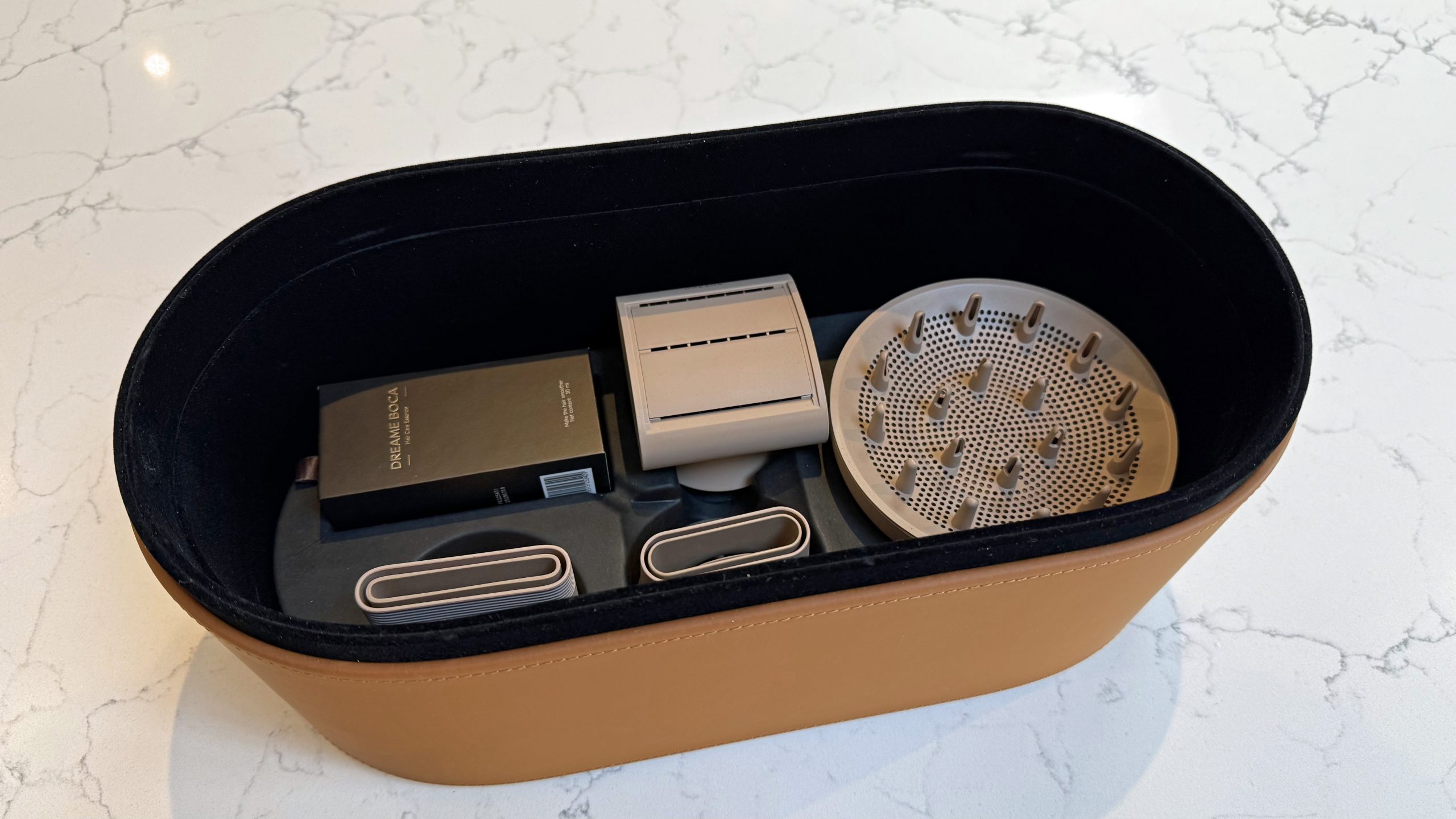
The Dreame Miracle Pro is a premium dryer that does a lot more than just dry your hair. Alongside six modes — Cool, Scalp, Essence, Comfort, Quick Dry, AI Smart — it comes with a built-in essence mister, a ring of red and near-infrared light therapy around the barrel, and a distance sensor that automatically adjusts heat and airflow depending on how close the dryer is to your head.

Advertisement

Source link

Continue Reading

Tech

Open Graphics Card Powers Cyberpunk “Laptop”

Published

on

For once, we can avoid debating in the comments what constitutes a “cyberdeck”, because [LCLDIY] does not refer to his cyberpunk masterpiece as such — he calls it a laptop. Considering the form factor is more like an all-in-one with a built-in laser projection keyboard, that’s arguably an even more controversial label to use, but as stylish this build is, it’s what’s inside it that interests us most.

This would be much easier than the original for our old eyes, especially in the dark.

No, not the cash-register motherboard that serves as the brain, though that has got to be worth some hacker cred. No, it’s the graphics card [LCLDIY] designed to drive 10″ electroluminescent (EL) displays that really has us interested. EL screens have a unique and beautiful glow that many find captivating, but we don’t see them all that often for two reasons. One is price: if you can’t find them surplus, they’re not cheap. The other is driving them, which [LCLDIY]’s project helps with, because the graphics card is open source.

The card is PCI, so you’ll need an adapter to plug it into a modern PCIe slot, or you’d have to redesign the thing. Since this isn’t elegant-engineering-a-day, we know which we’d do. The card is based on the CHIPS65548/5 chip, which means you should be able to find driver support under Linux and Windows. [LCLDIY] seems to be using Windows 2000, but that might just be because it’s all been downhill since then.

If the cyberpunk laptop wasn’t enough inspiration, [LCLDIY] also created a giant-scale Game Boy using the same 10″ screen and DIY graphics card. The soft glow of the EL display is particularly suited to the low-res nature of the retro games, as it’s not entirely unlike a CRT. You can see it in action–both builds!– in videos embedded below.

The last time somebody posted an EL display here, they had to build the driver board for it, too.

Advertisement

Source link

Advertisement
Continue Reading

Tech

Fixing Your Slow SSD Might Be Easier Than You Think

Published

on


Solid-state drives have completely changed the game for storage on computers and laptops. No moving parts, no RPM (revolutions-per-minute) to worry about, and lightning-fast read and write speeds. Even early SSDs were impressive, but once the M.2 format hit the market, things got even better. While SSDs are currently monstrously expensive, pretty much every modern desktop and laptop uses them, mostly due to the demands of modern software, video games, and operating systems.

Here’s the thing, though. Even though modern SSDs are super fast, and they will last a lot longer than most hard drives due to their lack of moving parts, they can still slow down. As you fill them up with data, which can happen very quickly if it’s a smaller SSD, that advertised speed of several thousand megabytes per second goes down fast. 

Fortunately, modern operating systems like Windows support a standard hardware command to help you solve this issue, with a very fitting name: TRIM. TRIM cleans up so-called blocks of data so that the SSD knows which ones to use, making it more efficient and increasing its lifespan.

Advertisement

Why should you use TRIM?

Although it has a much cooler name, TRIM is essentially the modern equivalent of disk defragmentation, which Windows can still do. Defragmenting old hard drives brought all the data closer together in a more accessible spot, allowing the hard drive to cycle through the data more efficiently and make it faster. TRIM doesn’t work on the same principle as defragmentation, as SSDs and HDDs store data in different ways, but TRIM does serve a similar purpose. It increases your SSD’s efficiency and lifespan by clearing up empty blocks of data that are no longer in use.

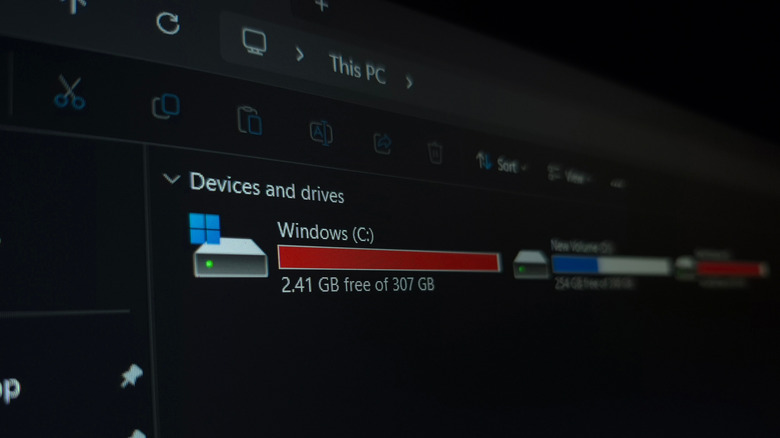
Recent releases of Windows run this process automatically in the background, and you can check this through the drive’s properties from inside This PC on your computer. If the scheduled optimization (which you can find inside of Properties > Tools > Optimize) is set to On, then Windows runs TRIM for you on a weekly basis. 

Advertisement

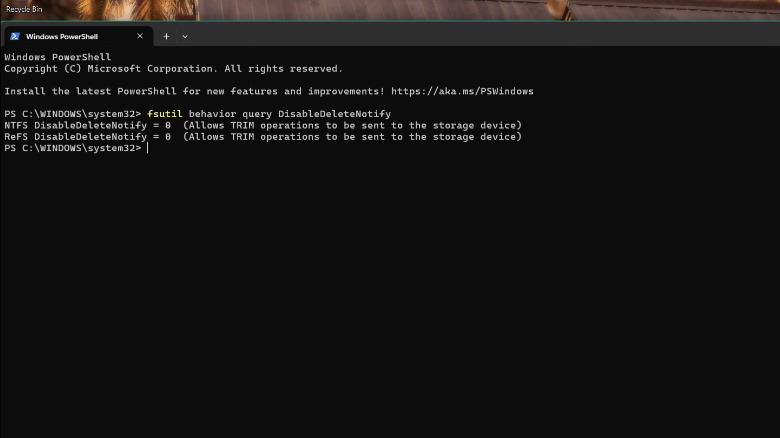
Another way to check if TRIM is on is through PowerShell. Simply run PowerShell with administrator privileges. Next, type “fsutil behavior query DisableDeleteNotify” without the quotes, then hit Enter.

If both values are zero, then TRIM is on, and you don’t need to worry about it. We would not recommend disabling it, as in this era of highly unpredictable SSD prices and the importance of keeping our data safe and secure, it’s always a good idea to keep your SSD on its best behavior, and TRIM definitely helps out with that.


Advertisement

Source link

Continue Reading

Tech

Please, Apple, let me turn off this one feature on my iPhone

Published

on

We’ve all been there at one point or another; you unlock your iPhone with the intention of checking the weather or sending a quick text, only to be greeted by a sea of little red circles. 

They’re everywhere, screaming for your attention like a digital toddler until you open the app and clear it. It’s a core part of the iOS experience, sure, but after years of staring at these tiny stress-inducers, I’ve had enough. The problem? I can’t really do much about it. 

App badges are my worst enemy

The problem with app badges is that they are designed to be addictive. They’re pitched as helpful reminders, but in reality, they’re designed to draw you into an app to see what’s “new,” even when there’s nothing of substance actually waiting for you. 

Every time I unlock my iPhone and see a bunch of badges on my home screen, I’m immediately distracted. Instead of doing what I actually set out to do, I find myself mindlessly scrolling through a feed just to make the number go away.

Advertisement
iPhone 17 in handiPhone 17 in hand
Image Credit (Trusted Reviews)

Advertisement

It’s even more infuriating when the badges refuse to leave. We’ve all dealt with that one stubborn app – it’s the Oura app for me at the moment, oddly enough – where you’ve cleared every notification, read every message, and checked every update, yet the badge remains. 

For a company that prides itself on “clean” design, the home screen often looks like a messy desk covered in red Post-it notes.

No, I’m not going to disable them one by one

Now, I know what the power users among you are going to say, “Just go into Settings and turn them off!” And yes, technically, you can. 

But, there’s the catch: Apple forces you to do it on an app-by-app basis. I have hundreds of apps installed on my iPhone, and the idea of diving into the notification settings for every single one of them to toggle off “Badges” leaves me in a cold sweat – and besides, it’d take the better part of an afternoon.

Advertisement

It begs the question: why isn’t there a system-wide toggle? Apple gives us “Silence Unknown Callers” and “Focus” modes to reclaim our digital sanity, yet it won’t give us a single master switch to kill the red dots. It’s a bizarre omission when you really think about it, especially for an operating system that is supposed to be the very pinnacle of user-friendliness.

Advertisement

Android fixed the issue years ago

What makes this even harder to swallow is that our friends over in the Android camp solved this ages ago. 

Samsung Galaxy S26 UltraSamsung Galaxy S26 Ultra
Image Credit (Trusted Reviews)

On most Android skins, app badges (or “dots”) are intrinsically linked to the notification shade. If you swipe away a notification because you’ve seen it and decided it’s not important, the badge on the app icon vanishes too. A system that, in my mind, makes a lot of sense.

On iOS, the badge and the notification centre live in two completely different worlds. You can clear your entire lock screen, but those red circles will stay pinned to your icons until you manually open the app. 

Advertisement

At the very least, Apple should give us the option to mirror that Android-style functionality in the Settings menu for those of us who find the current system a little bit archaic.

It probably won’t change any time soon

As much as I’d love to be optimistic, I’m not holding my breath. With the reveal of iOS 27 scheduled for WWDC in early June, the rumour mill is buzzing about the long-awaited reveal of the Gemini-powered Siri and even more powerful AI features, but a badge overhaul is nowhere to be found.

Advertisement

Badges have been a staple of the iPhone since the very beginning, and despite Apple redesigning the notification system multiple times over the last decade, they’ve remained largely untouched. It seems Apple is perfectly happy with the status quo, even if it means our home screens remain a cluttered, distracting mess for the foreseeable future. 

Advertisement

Please, Apple, prove me wrong.

Source link

Advertisement
Continue Reading

Tech

The Document Foundation Removes Dozens of Collabora Developers

Published

on

Long-time GNOME/OpenOffice.org/LibreOffice contributor
Michael Meeks is now general manager of Collabora Productivity. And earlier this month he complained when LibreOffice decided to bring back its LibreOffice Online project, as reported by Neowin, which had been inactive since 2022. After the original project went dormant — to which Collabora was a major contributor — they forked the code and created their own product, Collabora Online.

But this week Meeks blogged about even more changes, writing that the Document Foundation (the nonprofit behind LibreOffice) “has decided to eject from membership all Collabora staff and partners.
That includes over thirty people who have contributed faithfully to LibreOffice for many years.” Meeks argues the ejections were “based on unproven legal concerns and guilt by association.”

This includes seven of the top ten core committers of all time (excluding release engineers) currently working for Collabora Productivity. The move is the culmination of TDF losing a large number of founders from membership over the last few years with: Thorsten Behrens, Jan ‘Kendy’ Holesovsky, Rene Engelhard, Caolan McNamara, Michael Meeks, Cor Nouws and Italo Vignoli no longer members. Of the remaining active founders, three of the last four are paid TDF staff (of whom none are programming on the core code).
The blog It’s FOSS calls it “LibreOffice Drama.” They’ve confirmed the removals happened, also noting recently adopted Community Bylaws requiring members to step down if they’re affiliated with a company in an active legal dispute with the Foundation. But The Documentation Foundation “also makes clear that a membership revocation is not a ban from contributing, with the project remaining open to anyone, and expects Collabora to keep contributing ‘when the time comes.’”

Collabora’s Meeks adds in his blog post that there’s “bold and ongoing plans to create an entirely new, cut-down, differentiated Collabora Office for users that is smoother, more user friendly, and less feature dense than our Classic product (which will continue to be supported for years for our partners).

Advertisement

This gives a chance to innovate faster in a separate place on a smaller, more focused code-base with fewer build configurations, much less legacy, no Java, no database, web-based toolkit and more. We are excited to get executing on that.

To make this process easier, and to put to bed complaints about having our distro branches in TDF gerrit [for code review], and to move to self-hosted FOSS tooling we are launching our own gerrit to host our existing branch of core…
We will continue to make contributions to LibreOffice where that makes sense (if we are welcome to), but it clearly no longer makes much sense to continue investing heavily in building what remains of TDF’s community and product for them — while being excluded from its governance. In this regard, we seem to be back where we were fifteen years ago.

Source link

Advertisement
Continue Reading

Tech

Anthropic says Claude Code subscribers will need to pay extra for OpenClaw usage

Published

on

It’s about to become more expensive for Claude Code subscribers to use Anthropic’s coding assistant with OpenClaw and other third-party tools.

According to a customer email shared on Hacker News, Anthropic said that starting at noon Pacific on April 4 (today), subscribers will “no longer be able to use your Claude subscription limits for third-party harnesses including OpenClaw.” Instead, they’ll need to pay for extra usage through “a pay-as-you-go option billed separately from your subscription.”

The company said that while it’s starting with OpenClaw today, the policy “applies to all third-party harnesses and will be rolled out to more shortly.”

Anthropic’s head of Claude Code Boris Cherny wrote on X that the company’s “subscriptions weren’t built for the usage patterns of these third-party tools” and that Anthropic is now trying “to be intentional in managing our growth to continue to serve our customers sustainably long-term.”

Advertisement

The announcement comes after OpenClaw creator Peter Steinberger said he was joining Anthropic rival OpenAI, with OpenClaw continuing as an open source project with support from OpenAI.

Steinberger posted that he and OpenClaw board member Dave Morin “tried to talk sense into Anthropic” but were only able to delay the increased pricing by a week.

“Funny how timings match up, first they copy some popular features into their closed harness, then they lock out open source,” Steinberger said.

Techcrunch event

Advertisement

San Francisco, CA
|
October 13-15, 2026

Cherny, however, insisted that Claude Code team members are “big fans of open source” and that he himself “just put up a few [pull requests] to improve prompt cache efficiency for OpenClaw specifically.”

Advertisement

“This is more about engineering constraints,” he said, adding that Anthropic is still offering full refunds for subscribers. “We know not everyone realized this isn’t something we support, and this is an attempt to make it clear and explicit.”

Meanwhile, OpenAI recently shut down its Sora app and video generation models, reportedly to free up computing resources and as part of a broader effort to refocus on winning over the software engineers and enterprises that are increasingly relying on products like Claude Code.

Source link

Advertisement
Continue Reading

Tech

Rec Room shutdown, robot umps, torpedo bats, FedEx meets Amazon, and OpenAI’s odd media buy

Published

on

This week on the GeekWire Podcast: Rec Room, the Seattle-based social gaming platform once valued at $3.5 billion, is shutting down — and Snap is picking up some of the pieces.

Todd talks about what it was like fielding calls from distraught users on the night of the announcement. John offers his thoughts on what the shutdown says about the VR hype cycle, and whether everyone betting on the AI boom should take notes.

Plus: Major League Baseball’s new automated ball-strike system is already exposing umpires and creating a whole new kind of showboating — including one player who was so confident the robot would overrule the ump that he just started walking to first base.

Also on the show: Todd road-tests Amazon’s new FedEx Office returns partnership (pro tip: don’t ask for stamps), OpenAI makes a head-scratching move into media by acquiring tech talk show TBPN, John gets fooled by an April Fools’ prank, WSU researchers take on the torpedo bat, and our weekly trivia question ties Apple’s 50th anniversary to a piece of Microsoft lore.

Subscribe to GeekWire in Apple Podcasts, Spotify, or wherever you listen.

Advertisement

Audio editing by Curt Milton.

Source link

Continue Reading

Tech

JerryRigEverything Disassembles LG’s Rollable Phone and Unrolls the Secrets From a Lost Prototype

Published

on

JerryRigEverything LG Rollable Phone Disassembly Teardown
Back in 2021, rumors circulated about a new LG phone with a screen that unfurled like a scroll, similar to a roll-up map rather than a fold. Interestingly, they had planned to release it that year, but LG decided to discontinue its entire mobile division. As a result, the idea fizzled, only to resurface recently with a prototype reaching Zack Nelson (of JerryRigEverything fame).


Zack Nelson began by looking at the exterior elements. In its compressed state, the screen measures around 6.8 inches diagonally. With a simple command, the display expands to 7.4 inches diagonally, thanks to the internal motors. It generates a rather mild buzzing noise, which is thankfully muffled by software that includes some great sound effects. Users can watch the item expand in size in real time and even get dynamic backgrounds that adapt on the fly.

Sale


Samsung Galaxy Z Fold7 Cell Phone, 256GB AI Smartphone, Unlocked Android, AI Photo Edits, Large Screen…
  • BIGGER, YET SLIMMER THAN EVER: Who would’ve guessed that wider could also be lighter? The design of Galaxy Z Fold7 is refined to feel like a…
  • BEST CAMERA ON A FOLD YET: You asked for more – now you can have the most. Galaxy Z Fold7 now boasts an ultra-premium 200MP camera with Pro-Visual…
  • SCREENSHARE FOR STREAMLINED ASSISTANCE: Intrigued by something you see? Go Live with Google Gemini, then screenshare or point your camera at it for…

Jerry Rig Everything LG Rollable Phone Disassembly Teardown
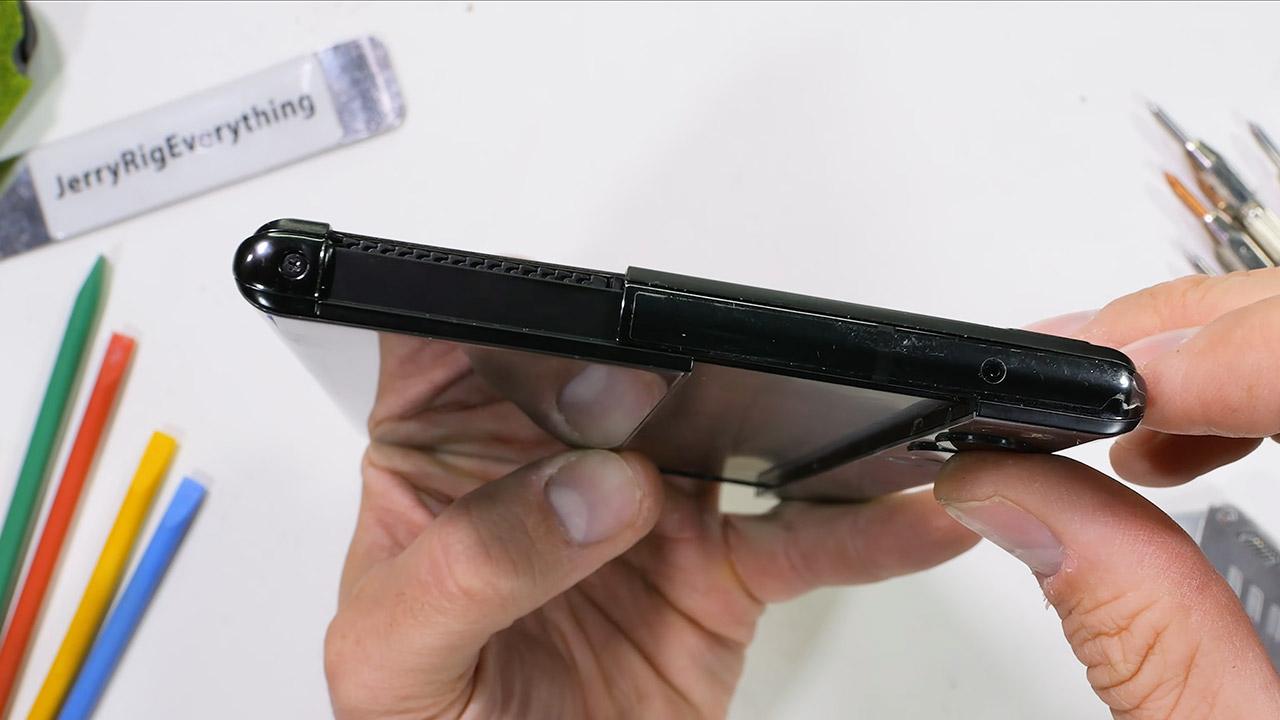
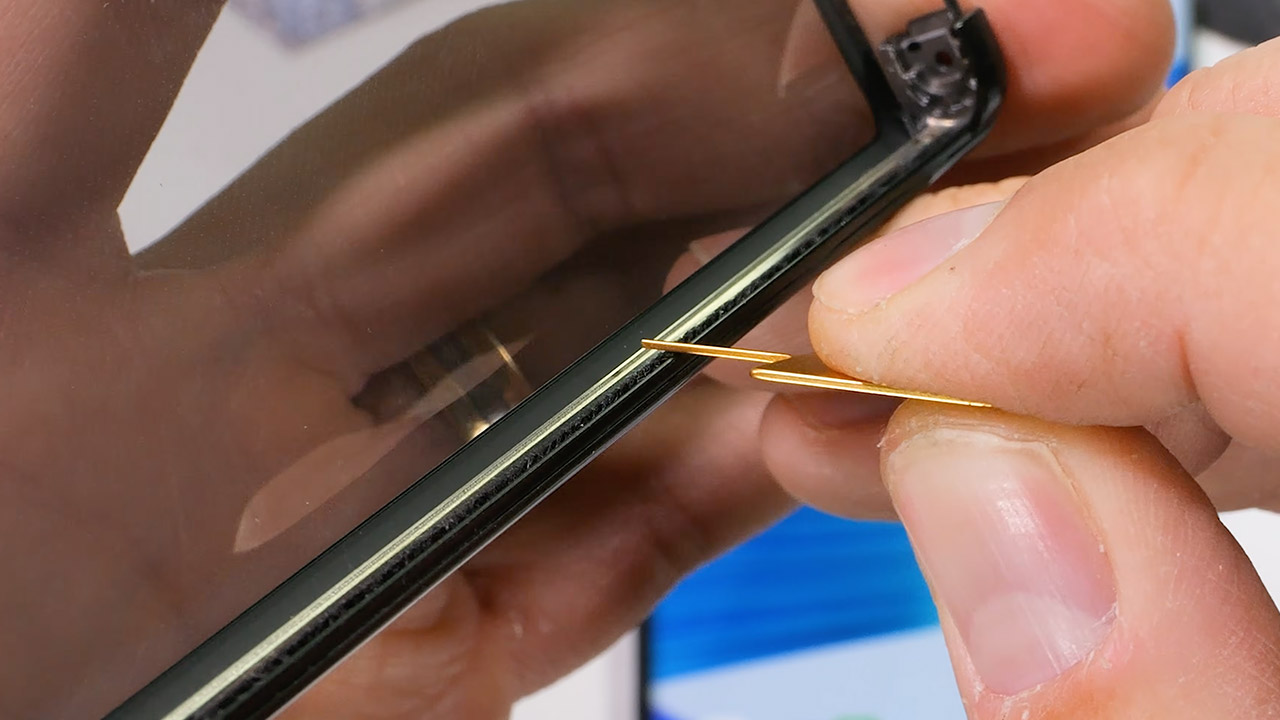
Nelson removed two Phillips head screws near the roller bit as he began to disassemble it. He applied heat to the back glass, and it popped straight off in one piece. With the glass removed, the side panel came away, and he discovered all these minuscule little hair-like things designed to keep dust from entering the flexy screen area. These tiny hairs are enclosed in a metal cage that protects the part that rolls up.

Jerry Rig Everything LG Rollable Phone Disassembly Teardown
After that, Nelson proceeded on to check the actual roll component itself, which required him to retract it completely for some extra wiggle room to free it from the frame. He was surprised to see the screen curved around a pretty mild radius, compared to the other folding phones. Behind the screen, there are a series of elevated slats that rise upwards like escalator steps, helping to keep the entire structure flat and stable during expansion.

Jerry Rig Everything LG Rollable Phone Disassembly Teardown
Other interesting features include little zipper-like linkages along the top and bottom margins of the screen. The sides have metal guides going along them to keep everything neat and tight. It all operates in tandem with two geared motors that communicate via a rack system. There are even three little spring-loaded arms that help keep the entire thing straight and smooth during extension, ensuring that it does not wobble or become stuck. LG stated that the entire system can withstand around 200,000 cycles, which is a significant number given the amount of stress placed on it.

Jerry Rig Everything LG Rollable Phone Disassembly Teardown
Deeper inside the phone, you’ll find a battery rated a solid 4500 milliamp hours, as well as the usual suspects like a Snapdragon processor, 12 gigs of RAM, and 256 gigs of storage. The rear camera configuration includes a 64-megapixel primary sensor with optical stabilisation and a 12-megapixel ultra-wide lens. On the back, you’ll find a power button that also serves as a fingerprint reader. All of the connection wires are arranged in a fairly straightforward manner that may be simply disassembled.

Jerry Rig Everything LG Rollable Phone Disassembly Teardown
The screen has a plastic layer that may be scratched with a fingernail, similar to the flexible screens on other phones. When you roll it up, the active portion rests behind the rear glass, allowing you to quickly check alerts and even take selfies (with the main cameras). If anything gets in the way, the software will pause the roll and offer a friendly warning.

Advertisement

Source link

Continue Reading

Tech

Simulating A Glowing Fireplace With An RP2040

Published

on

Today, fireplaces, their cozy glow once a household staple, are mostly a thing of the past. In fact, a decent amount of old fireplaces are completely blocked up! [David Capper] brings back the atmosphere without the actual flames, with his RP2040-based fireplace glow simulator.

It’s not just a string of LEDs with some PWM brightness control, either. No, [David] goes into detail about the black body radiation that gives these fires their colors. He then uses the theory of black-body radiation to determine the colors that the LEDs glow to simulate the colors of a real fire.

But the colors alone don’t make for a good simulated fire, so [David] adds the heat equation. It starts with a grid wherein each cell has a temperature. Over time, cells are randomly selected to have heat added to them (increasing the cell’s temperature), then he applies the heat equation to diffuse and decay the heat within the grid for a nice simulated crackling fire. Add in a custom PCB and a nice little 3D-printed case and you’re ready for a cozy hacker time.

Advertisement

Source link

Advertisement
Continue Reading

Trending

Copyright © 2025