Tech
5 Useful iPad Accessories You Can 3D Print Yourself


There’s so much to love about owning an iPad. Apart from having all the advantages of the Apple ecosystem, it has a lot of tricks up its sleeve. Like other tablets, lots of cool gadgets work with it, including mini projectors, USB hubs, power banks, and even gaming controllers. And because it’s available in different sizes and specs, it’s a highly flexible tool, whether you’re a casual gamer or someone using it for your daily work.
That said, commercial iPad accessory offerings do have some limitations. Since they’re designed for the average person’s needs, they may be missing specific features you need. In some cases, the limitation may be purely aesthetic, such as a design that fits the theme of your home office or personal taste. But in other cases, it may be functional things like improving your remote-work setup, adding necessary storage, or making sure your accessories have a home.
Thankfully, if you have access to a 3D printer and some filament lying around, the world is your oyster. With so many free, editable 3D models available online, you can maximize your iPad with the perfect set of accessories. You can print accessories to customize the color and size of your iPad, as well as add features that you think are missing. Whatever your needs, there are several options worth considering for 3D printing.
iPad stand
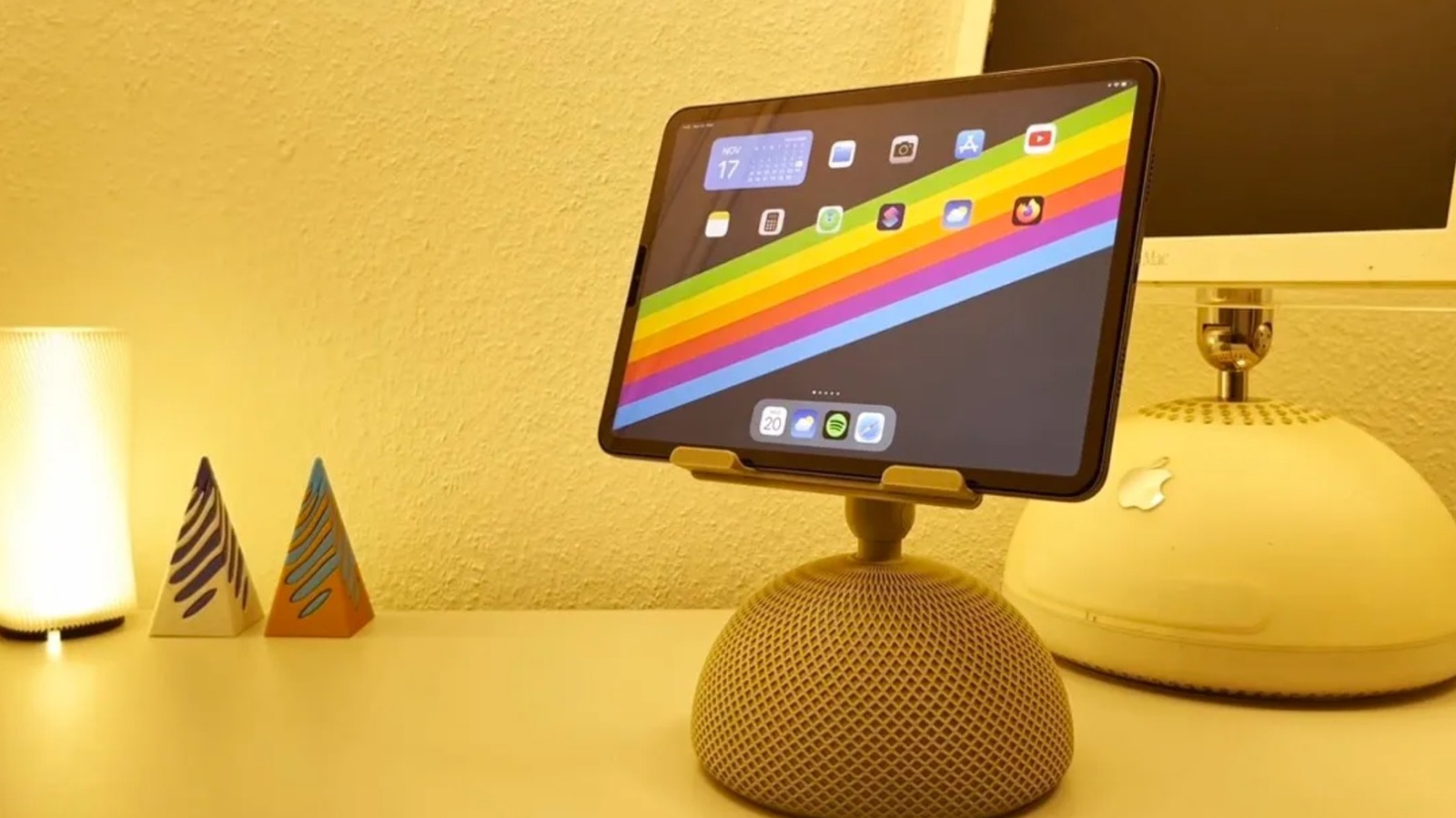
A stand is one of the most useful accessories out there for making your iPad a laptop replacement. And if the dimensions are right, you won’t necessarily need to find an iPad-specific model. There are plenty of iPad stands on the market, but 3D printing lets you choose designs that aren’t so common in stores. For example, creator EBdesign shared a retro iMac-inspired iPad stand you can find on MakerWorld. There’s also Abstractia Design’s Wibble iPad stand.
People with a sense of humor can find cartoonish iPad stands, like the Splashy iPad Stand on Thingiverse, which makes the tablet look like it’s splashing into water. There are also iPad holders that look like retro PCs and Roblox ninjas. However, with those options, you’ll need to do some extra printing to really get the full effect. If you have a taste for gothic horror, there’s an iPad stand on Printables that looks like a human jaw, which has been downloaded over 800 times. Similar to the viral 3D-printed check engine light pumpkin, it can make for a cool addition to your Halloween decor.
For improved, space-saving functionality, you can print stand risers with storage, like the Kumiko Drawer Riser from Printables. Designed with a Kumiko-inspired pattern, it integrates with the creator’s iPad/tablet riser model. And if you want to make your desk accessories match, 3D designer Meyui_2157659 also makes pen holders, lamps, and Post-it note holders. There are also iPad holders that have built-in headphone stands.
Apple Pencil holders and cases
Depending on how you use your Apple Pencil, there are storage options for your desk or for traveling. For people who are invested in the Gridfinity system, there’s an Apple Pencil holder that fits a 5×1 grid. If you’re committed to the cute, bubblegum aesthetic, there are several Apple Pencil holder designs to choose from. On MakerWorld, creator 3Deepdesigns made a melting lollipop Apple Pencil holder that over 6,200 people have downloaded. Some people have even added more details, like color-changing filament and sprinkles. There are also models that look like a donut, a Poké Ball, or a strawberry on whipped cream. And if you want even more quirky designs, there are melting eyeball and rat-themed stylus pen holders too.
If you’re always on the go, there are also Apple Pencil cases that are made with movement in mind. For example, if you always need it within reach, there’s a sleek, pencil-shaped holder that you can attach to your bag via a carabiner. You could also 3D print a protective shell that looks like a fountain pen, which has a clip that you can use to attach it to your shirt pocket. But if you’re a professional, you might want a case with magnets, hinges, and space for extra tips that you can use on the way to client meetings. However, you’ll need to pay attention to which Apple Pencil model you own before printing, especially if the case is designed with tight tolerances.
iPad cases
While many iPad users have opted for ready-made portfolio cases or even those with child-friendly, antimicrobial designs, 3D printing gives you access to unique case options. For example, one of the common reasons people love the iPad is how it looks. So if you want to be able to see the sleek design you paid for, you could 3D print bumper cases instead. Unlike a full case, bumper cases are fitted only on the sides of the iPad, which can help prevent corner dents. They also tend to be lighter and use less printing material than full cases. Since these cases don’t protect the screen itself, you shouldn’t expect 360-degree protection. On MakerWorld, there’s a two-piece 11-inch iPad Air case model that has a barely-there vibe. But if you want something that protects all four sides, there’s a Printables bumper case file that covers all four sides and has an Apple Pencil holder.
It’s important to understand that the designs need to be specific to your iPad model. When choosing what file to print, make sure to check for reviews regarding fit and tolerance issues. Alternatively, there’s no shortage of 3D-printing files for full, flexible TPU cases, which allow for more protection. But if you’re tired of boring-looking cases, you can find a 3D-print project on Thingiverse that uses an old iBook shell and printed parts to hold an 11-inch iPad, keyboard, and trackpad.
Apple Pencil caps and accessories
Losing your Apple Pencil cap can be really annoying, especially since it can lead to your first-generation Apple Pencil’s Lightning connector getting damaged. To keep this from happening, you can print an Apple Pencil cap saver that keeps it within reach at all times. Made of a soft, flexible material, it loops around both the Apple Pencil and its cap.
If the damage is already done and the cap is missing, you can 3D print a replacement for your Apple Pencil too. Since you can choose filament in any color, you can even play around with the design. On MakerWorld, you can find models for Apple Pencil caps that look like a pineapple, a heart, or a gloved finger that looks like it’s pointing, which could be cool for presentations.
These days, there are even 3D-printable Apple Pencil cap designs that can act like fidget toys. Some 3D-print files for caps include loose chains with a star or mace at the end. And if you want to give the tips a home, you could print a desk stand with storage or a compact storage box. There’s also an Apple Pencil accessory case that is useful for working remotely in cafes, which can also keep your Lightning adapter, cap, and replacement tips in a safe place. Some 3D print models for accessory cases also recommend using magnets to keep everything secure.
Charging dock
While there’s no shortage of charging stations for Apple devices, many models, like the Anker charging station, only have slots for the iPhone, Apple Watch, and AirPods. Although some products come close to the MagSafe charging experience, like the Kuxiu Magnetic Smart Connector Charger, there isn’t a single iPad that supports MagSafe charging. In general, most people tend to use the typical USB-C charging setup, which can be a little annoying since you have limited ports to begin with. For people who own several Apple devices as well as products from other ecosystems, these ready-made docks may not fit every gadget. If you’re an iPad owner looking for a dock that you can use so you don’t forget to charge it alongside your other devices, you can 3D print a custom multi-device charging station.
One popular charging station design on MakerWorld has room for an extension cord and cable storage. There are even remixes with an Apple Pencil insert, Apple Watch charging extensions, and USB-C parking. And if some of your devices are from other ecosystems, there are also users who have added Samsung Galaxy Watch charger clips. You can even adjust the size to accommodate your extension cord, fit the full length of your iPad, or better suit your workspace. But if you don’t need everything in one place, there’s also a cool wall-mounted iPad charging dock you can 3D print.
You must be logged in to post a comment Login