Tech
7 Best Alarm Clock Apps For Android Users | 2026 Edition

Do you struggle to wake up on time every morning and find yourself running late to the office, college, or appointments? If yes, it’s time to break the cycle of hitting the snooze button over and over and end up getting late by using alarm apps for Android phones.
While there are thousands of alarm apps available on the Play Store, no one really has the time to test them all. So this is where we step in to help you select one from a list of best free alarm clock apps for Android, which includes tried and tested apps that will force you to get out of bed.
Why is Sleep Important?
Sleeping is one of, if not the most important functions of humans, as it gives time to your brain and body to repair muscles, re-energize functions like memory, and get rid of the day’s fatigue. As a result, getting a good night sleep is super important. However, the number of hours you should be sleeping depends on factors like age. If you aren’t getting in the right numbers, then a lack of sleep can increase the chances of obesity, diabetes, depression, high blood pressure, stroke, and heart disease.
Fortunately, checking how many hours you should sleep is pretty straightforward. CalculatorYogi has a neat sleep debt calculator feature, which takes into account your age, and how many hours you sleep regularly. It then calculates the sleep deficit you might have and helps you get back on track.
Top 7 Free Android Alarm Apps For Heavy Sleepers
1. Alarmy (Sleep If U Can)

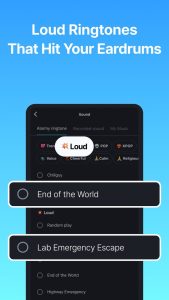
If you regularly snooze or turn off the alarm to go back to sleep, this app is perfect for you. Voted as the most annoying alarm clock app for Android, Alarmy has a unique method of waking up users. It requires you to complete a certain task or puzzle to turn off your morning alarm.
The difficulty levels of these challenges are also adjustable. So in case you are a stubborn one, set the difficulty mode to hardest and you will find yourself awake on time.
In addition to this, if you like to start your morning by reading news, horoscope or checking the weather, Alarmy offers that too.
Why use Alarmy?
- Best alarm app for heavy sleepers.
- Different challenges like math equations, shaking the phone, barcode scan, and taking a picture to turn off the alarm.
- Features like “prevent app uninstall” and “phone turn-off.”
Download Alarmy for free
2. I Can’t Wake Up
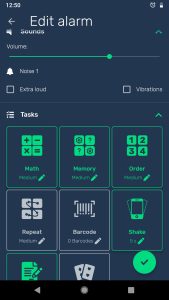
If the title above is applicable to you, this Android app has 8 different Wake Up Tasks that won’t let you turn off the alarm unless you complete them. These include Math, Memory, Order (setting tiles in order), Repeat (sequence), Barcode, Rewrite (text), Shake, and Match.
The idea behind it is to make your mind alert enough to prevent it from going back to sleep. The UI is pretty basic, but multiple facilities compensate for it by getting the job done. There is also an Awake Test that pokes you after few minutes to ensure you are awake. So no cheating!
Why use I Can’t Wake Up?
- Variety of Wake Up Tests to choose from
- Option to choose snooze music
- Smooth wake up mode – offers dimmed screen, rising volume
- Awake Test to ensure you are awake
Download I Can’t Wake Up for free
3. Sleep as Android

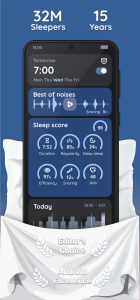
Sleep as Android primarily serves as a sleep tracking app. It studies and analyzes your sleep pattern throughout the night and wakes you up at the most optimal time with a gentle alarm sound. To activate sleep tracking, turn on the sleep mode and place the phone on your mattress.
There are options for setting up tasks and puzzles like the previous app. But the best part about this alarm app is it can be integrated with wearable gear such as Optional Pebble, Android Wear, Galaxy Gear, Google Fit, Samsung S Health. It can also be integrated with Spotify and Philips Hue smart bulbs.
Why use Sleep as Android?
- Displays sleep tracking stats
- Support for wearables and Spotify
- Records sleep talking activity
- Detects and prevents snoring as well as jet lag too
Download Sleep as Android for free
4. AMdroid Alarm Clock
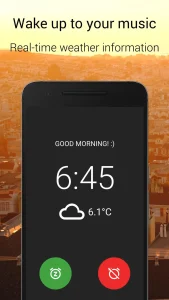
AMdroid is another free alarm app for Android heavy sleepers that allows you set up multiple alarms and customize them fully to wake you up gently. The interface design is visually pleasing with a dark theme, and the settings are quite flexible. Apart from setting up wake-up challenges, the app can automatically disable alarms on public holidays by syncing through your calendar.
Another remarkable feature of AMdroid is its location awareness. It means it can figure out if you are at a restaurant or office to prevent stray alarms going off. It also tracks the time you snoozing to help you cut down on it. Heavy sleepers can also put up a pre-alarm for the app to wake you up gradually and activate sleep tracking for bedtime notifications and more.
Why use AMdroid Alarm Clock?
- Android Wear integration
- Track sleep patterns and snooze time with Stats
- Countdown alarm timer for quick afternoon naps
- Location-aware alarm app
Download AMdroid Alarm Clock for free
6. Shake-it Alarm
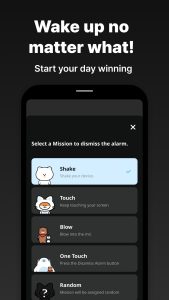
If you hate solving math equations or puzzles to wake up, try the Shake-it Alarm. To turn off the alarm, you will either have to shake it, scream loud or touch off. It comes with a tutorial to help you get used to the app.
You can force yourself to wake up by using “Deactivate Home Button” which will prevent you from exiting the app and turning it off before completion of the task.
The unique feature of this app is “Send Message To” which will send a message to your pre-decided friend or family member to wake you up in case the alarm sounds weren’t sufficient.
Why use Shake-it Alarm?
- Unique wake-up challenges
- Can message friends or family to wake you up on time
Download Shake-it Alarm for free
7. Alarm Clock Xtreme

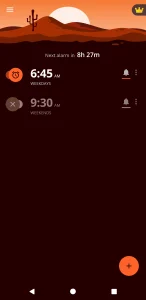
Alarm Clock Xtreme comes with a free sleep tracker, stopwatch, and timer. It will wake you up gently to your favorite music and prevent dismissing of alarms accidentally by using an extra-large snooze button. It has options like auto-snooze with a max limit, nap alarm, random music alarm, etc.
Obstacles like math problems, captcha, barcode scanning and much more help to jumpstart the brain early morning. More than 30 million Android users have installed this free alarm app for Android, and it carries a rating of 4.5 stars, so it’s definitely worth checking out.
Why use Alarm Clock Xtreme?
- Best music alarm app
- Get a daily sleep cycle analysis
- Auto-snooze, auto-dismiss, nap alarm
Download Alarm Clock Xtreme for free
Final Words
All the apps listed above are free and offer something unique. Feel free to pick any of them which suits your requirements. Also check out our article on best android scanner app here. Do tell us which free alarm clock app you liked the most and in case we missed any other alarm app for Android, let us know in the comments. Until then, rise and shine early because the best way to make your dreams come true is to wake up!
You must be logged in to post a comment Login