Amazon has done a lot right with the top-end Scribe – the first with a colour display. This is the most refined Kindle hardware since the Oasis, and there’s no doubt that having a colour screen is more useful here than on a smaller reader. Yet, a few stumbles along the way stop this from being either the best Kindle or the best e-ink tablet.
The design is a real step forward
Good screen
Colour panel works better than on the smaller Colorsoft
Very expensive
Software is a bit sloppy
Merely ok for writing
Key Features
Advertisement
Review Price:
£569
Colorsoft screen
Advertisement
The first Scribe with a colour display
Storage
Advertisement
Choose between 32 or 64GB storage
Pen
Advertisement
Pen included in the package for writing
Introduction
After an extended rollout period that started in the latter part of 2025 in some regions, the Kindle Scribe Colorsoft is finally in my hands and widely available.
This is the most expensive Kindle you can buy, with prices starting at £569/$629 and rising even higher if you want to double the base 32GB storage.
Advertisement
Like previous Scribes, this isn’t purely a reading device. Instead, it ships with a pen and tweaked software to make it a notetaking companion too.
Advertisement
But is it a case of losing focus by trying to do too many things? After a month of testing, I have a pretty clear answer.
Design and Pen
Surprisingly good-looking for a modern Kindle
Graphite and Fig colour options
Very thin and light
Amazon has really upped its industrial design game with the Kindle Scribe Colorsoft, and this signals a big shift in the right direction. I’ve found previous Scribes a little ugly, with an enlarged side giving the device an uneven feel. Yes, some might have liked this for added grip, but since this is such a light device, it is hardly necessary.
That whole design blueprint has been ditched for the Scribe Colorsoft, with a much more traditional tablet design taking its place. The bezels are now uniform and it looks very sleek. Amazon sent over the graphite hue, although if you’re after something a little more ‘fun’, the Fig colour is a lovely purple shade that really stands out.
Advertisement
Image Credit (Trusted Reviews)
Advertisement
Like all the best Kindles, the Scribe Colorsoft is designed with simplicity in mind. These are devices that need to blend in, rather than stand out, and Amazon has decided against adding too many needless flourishes.
There’s a simple ‘Kindle’ logo on the bottom right, another one on the back and four rubbery feet in each corner to keep it steady on a table. One small detail I really like is the positioning of the power button, which, unlike on the Kindle Colorsoft, is on the side rather than on the bottom. It’s much harder to accidentally press now.
The USB-C charging port is on the bottom, and there’s a slightly indented area on the side to show where the stylus should be docked when not in use.
This stylus, or Premium Pen, as Amazon calls it, is included in the package. If you get the Fig model, the stylus matches that colour, although my Graphite has a white pen – a slightly odd contrast. The pen itself has an eraser on the back, a button on the side and magnetically attaches to the side of the tablet with a satisfying click. It’s not the strongest magnet though, and it will likely fall off when placed in a bag.
Advertisement
Image Credit (Trusted Reviews)
When I first saw the Scribe Colorsoft had an 11-inch display, I was worried it might feel too big – but it really doesn’t. This is a remarkably slim and light tablet, measuring a mere 5.4mm thick and weighing 400g. It’s light enough to slip into a bag alongside a laptop without noticing the difference.
Advertisement
I haven’t been using the Scribe with a case, although considering the high price, I would recommend adding some sort of protection. After a few weeks of use, the device remains free of any dings or small scratches.
Screen
The first colour Scribe
11-inch display is an ideal size
Colours are slightly muted
This is the first Scribe device with a colour display, and the screen is the star of the show. It’s the reason this package is so expensive, and it’s certainly eye-catching.
Anyone familiar with the Kindle Colorsoft, and even the Remarkable Paper Pro, will know what to expect, but it’s important to set expectations here. This is not an LCD or OLED, and the Colorsoft Kaleido 3 E Ink panel isn’t going to display the same sort of colours you’d find on an iPad. Hues are far more muted, with an almost watercolour or pastel look. There’s also far less colour variation.
When displaying colour, the screen displays 150ppi. That’s half of the resolution you’ll get with black and white content. This is simply a shortcoming of the tech, and hopefully something that gets improved in the next iteration. There’s no issue with the adjustable front light, though, which is even and does a great job.
Advertisement
I reviewed the Kindle Colorsoft upon release, and I still use one regularly. My biggest issue with the reader was that you could clearly see the colour covering of the screen, and it made everything slightly blurry. Next to the Paperwhite, the Colorsoft offers a worse reading experience, even though it’s a more expensive device. I have not found the panel so distracting here, and the colour layer is far less visible.
Advertisement
Image Credit (Trusted Reviews)
Still, the addition of colour here is far more useful, at least in my view, than on the smaller Colorsoft. The larger screen is great for comics, cookery books and travel guides, and all these are made far more enjoyable with even a small amount of colour. It’s great for notes too, especially highlighting PDFs and the like.
I’ve used a lot of the best e-ink tablets, and while the writing experience here is good, it’s not a patch on the Remarkable Paper Pure or the Paper Pro series. There is a slight texture to the display that adds some resistance, although no one is going to mistake it for the feeling of paper. It’s far more akin to writing on an iPad than one of the Remarkable’s excellent tablets. I don’t hate writing on the Scribe; I just wish there was a little more resistance to really improve the experience.
Software and Features
Updated homescreen combines books and notes
Document importing from Google and Microsoft
Excellent bookstore
There’s a lot of interesting – good and bad – software features here, but I will touch upon performance first, as it’s pretty simple.
Image Credit (Trusted Reviews)
Advertisement
Like any other Kindle, or e-paper device for that matter, the Scribe Colorsoft can feel slow at times. The screen needs to refresh often, and for those used to the speed of phones and traditional tablets, it can be a bit jarring. In daily use though, it’s fine. Everything opens quickly while pages turn without lag. There’s 4GB RAM here, and it is faster to navigate than the previous Scribe models.
Advertisement
Amazon has the best bookstore for content, and all that is available here. Kindle Unlimited, Audible audiobooks (if you connect a Bluetooth speaker or headphones), everything you’ve previously purchased, daily deals and new releases.
Image Credit (Trusted Reviews)
Where the software experience falls down is the note-taking side of things. The way notebooks sit alongside your books on the rejigged homescreen is odd to me, especially as someone who uses the note elements for work and the reading parts for pleasure.
Having them hit up against each other is a constant annoyance. Of course, this is something that’ll vary depending on personal preferences – and if you take notes relating to books, or combine the notes with study books, then great. I just don’t think the layout is for everyone.
Another issue is Amazon’s persistence in pushing me to its store with rows and rows of recommended books. I use a Kindle every day, so I know this is how the company operates, but on a dedicated reading device that is fairly affordable, I can deal with it. On a device that can cost upwards of £600/$600 and is aimed at a more professional market, I think we can do without the rows of suggested books.
Advertisement
Advertisement
Image Credit (Trusted Reviews)
As a digital notebook, the Scribe Colorsoft is best described as good.
As mentioned before, it’s not in the same league as Remarkable and its devices. On the Remarkable Paper Pure, for example, you can share presentations from tablet to browser and access hundreds of bespoke notebook templates that often look stunning. I also just prefer the simple, clean layout of Remarkable’s homescreen and its focus on your content, rather than trying to sell you anything and everything.
Image Credit (Trusted Reviews)
But it’s fair to say that Amazon’s Scribe software has progressed since I reviewed the very first Scribe. You can sync documents with services like Google and Microsoft 365, or use the Send to Kindle feature to ping PDFs from a laptop and sign or annotate them. Getting them onto the Kindle is easy and quick, but getting them off is a real pain due to the way the system likes to create extra files.
Books can be annotated in the margins, and there are some AI features for summarising documents and making wayward handwriting easier to understand. You can also ask the AI questions about the content inside notebooks. Like all AI features, the results are hit and miss and not to be completely relied upon.
Advertisement
Battery Life
Multi-week battery life unless it’s really pushed
USB-C charging
Cable included
Battery life on tablets and e-readers is far harder to gauge than on smartphones that are used constantly throughout the day. The endurance of the Scribe will completely depend on how it’s used. Amazon claims weeks of charge based on around 30 minutes of reading every day, which is a mostly useless metric for a notetaking device.
I’ve been testing the Scribe Colorsoft for a month, and I have charged it twice. That’s after daily use, both taking notes and referring back to them throughout the day and probably an hour of reading (on average) per day. Use it just for reading, and it’ll last longer.
Advertisement
There’s a USB-C cable included in the box, and you’ll need to provide your own charger. Unlike some of the Signature Edition Kindles, there’s no wireless charging here.
Should you buy it?
You want a big Kindle that is also a notebook
If you’re after a single device that is both a way to read Kindle books and take notes – and you have deep pockets – this is for you.
Advertisement
You want the best writing experience
Advertisement
I much prefer the writing experience on Remarkable’s tablet range, as they feel more natural and have a better backend setup.
Advertisement
Advertisement
Final Thoughts
The Kindle Scribe Colorosoft isn’t the best Kindle, nor is it the best e-ink tablet. And that’s an issue for something that costs £629/$679 for the 64GB model.
I’d plump for the Remarkable Paper Pro if you want the best, high-end experience or the Paper Pure if you’re on a tighter budget. The Kindle Paperwhite remains the best Kindle purely for reading, and unless you must have the big screen, this is hard to recommend purely for reading.
Amazon has done a lot right. The refined design is great, the colour display is good for the most part and, of course, the Kindle store is unmatched for choice. For me though, with the price taken into account, there are too many sacrifices here.
From the writing experience to the software to the reliance on hit-and-miss AI gimmicks, Amazon hasn’t quite released a product that ticks all the boxes.
Advertisement
How We Test
We test every E Ink tablet we review thoroughly. We use industry-standard tests to compare features properly and we use the tablet as our main device over the review period. We’ll always tell you what we find and we never, ever, accept money to review a product.
Find out more about how we test in our ethics policy.
Tested for a month
Compared to rivals
FAQs
Do you need more storage?
32GB is fine for most, if you’ll mainly be reading and annotating PDFs, taking notes. Of course, if you want to download a lot of audiobooks (which can be 1-10GB in size) and image-heavy PDFs, you’ll want 64GB to be safe.
If you live in a flat and don’t have a garden that you can make use of then the process of drying your clothes can feel like an absolute chore. Airers are never quite as effective as being able to make use of an outdoor breeze, but even if you are lucky enough to have a bit of outdoor space, sometimes you need a speedier alternative if you have plenty of work outfits and school uniforms to take care of. In either case, having one of the best tumble dryers to hand can be a huge help.
Take it from us, we’ve tested countless tumble dryers and they are the best option for not only making sure that your favourite outfit is ready to wear for the following day, but also to have your clothes feeling and smelling their freshest. With each tumble dryer that we get in to review, we set it up in our professional-grade testing facility, so you can get the best idea of what it’s like to have a particular model in your home.
We run through a series of different clothes to see how proficient a tumble dryer is in what it sets out to do, and that also extends to the modes that are onboard. After all, if you’re thinking about picking up a tumble dryer mostly as a means of making sure that your shirts are looking their very best, then there’s nothing worse than buying a model that’s better suited to jumpers.
We also take into account any smart features that might be onboard, such as a companion app and whether or not a tumble dryer can be added to a particular smart home ecosystem. All of this information goes into our reviews so that nothing is left to chance and you make the right choice when it comes to picking out your next model.
Advertisement
This list also contains a variety of price points so if you are tied to a limited budget then fear not – there will be a tumble dryer to suit your needs. If you’re upgrading more than just your tumble dryer then we’ve also got you sorted with our guides to the best washing machines, the best fridge freezers and the best ovens.
Best tumble dryer at a glance
Advertisement
SQUIRREL_ANCHOR_LIST
Learn more about how we test tumble dryers
We put all of our tumble dryers through the same set of tests, so that we can work out which ones are good and which ones are bad. We use the same set of washing for each machine, weighing it when wet and when dry, to see which dryers do the best job.
Advertisement
We also measure how much energy each dryer uses, so we can tell you which ones are the most efficient. Finally, we work out yearly running costs to help you find the most cost effective dryer for your needs. You can find out more in our dedicated how we test tumble dryers guide.
Extensive drying control
Low running costs
Eco schedule helps ruduce running costs further
App has confusing icon usage
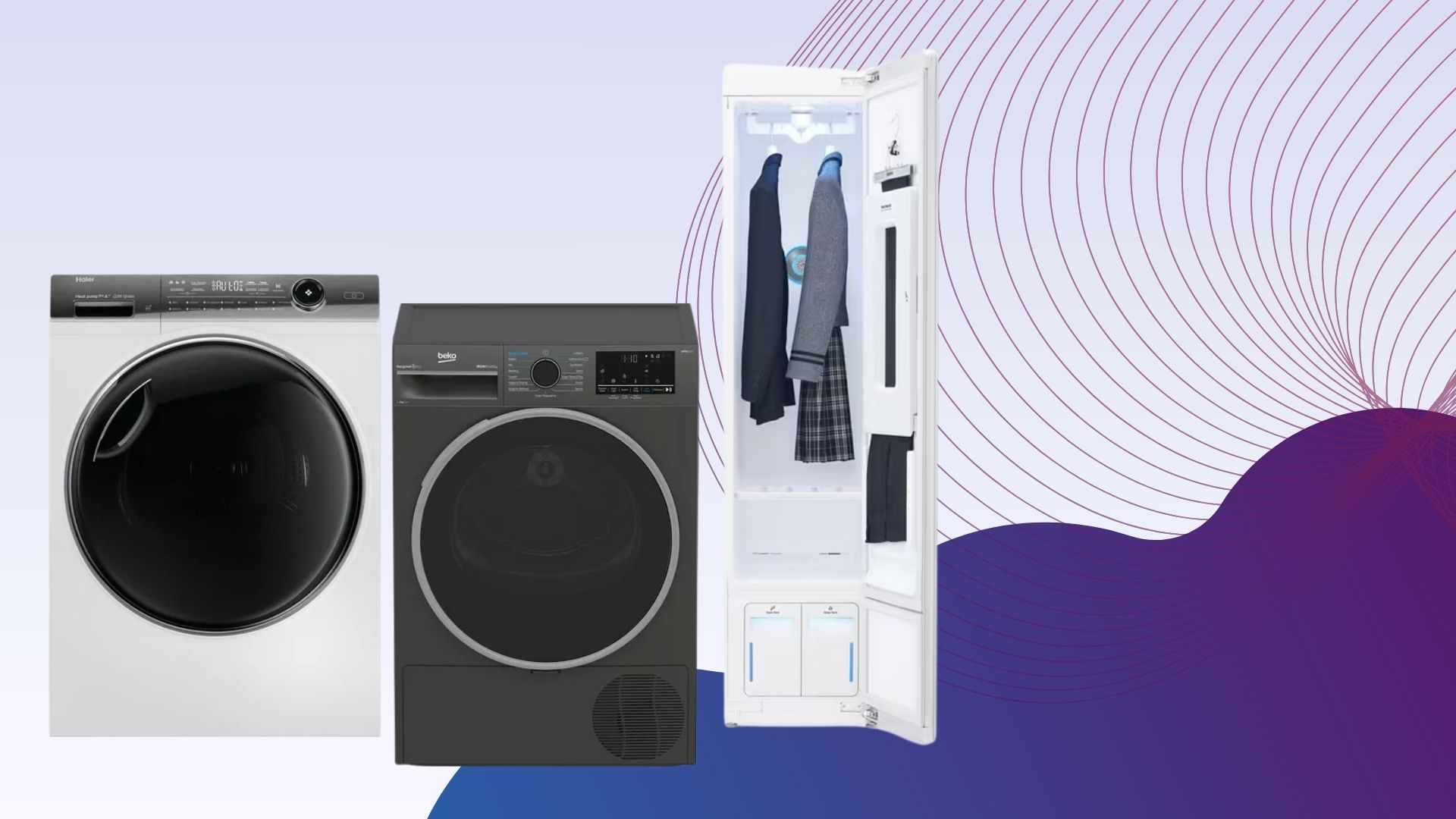
We hailed the Haier HD90-A3Q397U1 as the most flexible tumble dryer we’ve reviewed, thanks to its selection of fan speeds, heat options and target drying levels to choose from.
Advertisement
Although the Haier HD90-A3Q397U1 is a splurge, its A+++ rating means the tumble dryer boasts low running costs, plus its accompanying smart app makes it easy to schedule a cycle to begin when electricity is at its cheapest.
The Haier HD90-A3Q397U1 is fitted with heaps of options, such as more typical tumble drying modes including Eco, Cotton, Wool and Delicates alongside a selection of temperatures and an adjustable fan speed too.
The latter is especially clever as setting the fan to a lower speed helps prevent wrinkles on delicate items whereas higher speeds are designed for thicker materials.
There’s also Haier’s own i-Refresh Pro mode which uses ultrasonic atomisation module to remove odours and reduce wrinkles from musty clothes.
Advertisement
You may worry that all of these options may make the Haier HD90-A3Q397U1 confusing to use, however thanks to the compatible hOn smart app you can easily add all your favourite cycles to the on-device control panel and read more about each cycle too.
We were pleased to find that the Haier HD90-A3Q397U1 lives up to its A+++ energy rating as it is one of the cheapest and most efficient tumble dryers to run. While the Ready to Wear cycle cost just 20p each go, the i-Refresh Pro was just 8p.
Alternatively the smart AI mode, which takes the guesswork out of tumble drying by detecting the load type and choosing the best option available, costs just 22p.
Otherwise, the 9kg drum has been thoughtfully designed to ensure your clothes aren’t damaged in the tumble drying process. Not only does it sport pillow-shaped pads but for delicate items, such as trainers, you can use the clip-in rack for extra protection too.
Advertisement
Maintenance is refreshingly simple too, with both the main lint filter and secondary filter easy to clean. In fact, the Haier is only trumped by the Whirlpool W6 D94WR UK which automatically cleans its secondary filter.
Low cost
Clever steam mode
Simple to use
Advertisement
With an RRP of £499, the Beko B5T49231I is an affordable tumble dryer that includes many features that are found in much more expensive alternatives.
Unlike appliances such as the Samsung DV90T6240LN, there isn’t an accompanying app for the Beko B5T49231I, instead sporting a typical interface with a rotary dial instead. Although a smart app is useful and can provide extra features, many will favour this straightforward approach.
You’ll find most of the expected drying modes alongside special cycles for bedding, towels and energy-efficient small loads. There’s also a nifty steam function which helps prevent items from getting wrinkled in the load, which uses water that’s been extracted from previous drying loads.
Otherwise, its 9kg capacity allows you to easily fit in a load of washing or larger items such as duvets. Once a load is selected, the machine will then use its moisture sensor to determine when it should stop providing heat.
Advertisement
We were impressed with the overall performance of the machine, however we did find the cupboard dry option slightly aggressive when drying clothes, as we noted clothes fibres were lost in the process. The hanging dry cycle is much gentler, removing 99.59% of water from the load and costs just 23p.
Maintenance is fairly straightforward too, with a lint filter that pulls out from the door which should be cleaned after each cycle and a secondary condenser filter that needs regular cleaning too, as per the instructions in the manual.
Advertisement
Control panel neatly placed
Large capacity washing and drying
Excellent cleaning
App a little finicky about wash cycle selection
Slightly untidy pipes
If you’re someone who’s lucky enough to have a dedicated utility room but would like to maximise the space available, then the LG WT1210BBTN1 WashTower might be just the thing you’re after. Instead of having a washer and a dryer sitting side by side, this two-in-one unit has the dryer pre-stacked on top of the washing machine, making it wonderfully optimised for space saving, all without compromising on performance.
In terms of capacity, you’re looking at 12kg for the washer and 10kg for the dryer, which is more than enough room to ensure that all of the various items a family needs sorting, whether it be school uniforms, work outfits, casual wear and more, can get sorted in a timely fashion.
Advertisement
The washer is particularly effective, even when using the Eco 40-60 mode. During our testing, using this cycle cost roughly 25p to run which is very good given the capacity onboard. If you’re after something a bit more specific however then you can dive into the accompanying LG ThinQ app. Some of the cycles you can tap into here include Juice and Food Stain, which is great for when you’ve had a mid-dinner mishap.
The dryer is just as competent, and there’s a very helpful light inside the drum that makes the process of loading and unloading clothes just that bit easier. There’s also a flat rack included that’s perfect for items that shouldn’t be jostled around, like jumpers and shoes. Of course, running a non-tumble drying process can be a bit more expensive, but when you need a pair of your favourite running shoes ready to go quickly, this is a great option to have.
When you are going for more traditional drying modes however, like cupboard dry or iron dry, you’re getting much better value for money. For example, running the cupboard dry cycle costs just 31p in our estimates, and iron dry was even cheaper than that at 26p, so you won’t have to worry about racking up an excessive bill if you’re careful.
Advertisement
Cost-effective to run
Leaves clothes feeling refreshed
Hygienically cleans using steam
Quiet
Expensive
Limited space inside
The LG Styler is neither quite a tumble dryer nor washing machine, instead straddling between the two as a daily-use unit that extends the time between dry cleaning garments while keeping them in their best condition.
Advertisement
While the LG Styler doesn’t wash clothes or remove stains, it instead uses steam to refresh and eliminate germs from garments, leaving them cleaner and more hygienic. In fact, LG states the Styler is proven to kill germs and reduce dust mites and fungi too.
At 1850 x 445 x 585mm and weighing a mammoth 82kg, you will need to ensure that you have the space to keep this.
Inside there’s a trouser press, three hanging spaces (with space for three items) and a wire shelf at the bottom for folded delicate items, such as woollen jumpers.
The Styler has numerous modes including Refresh, Special Care for suits, activewear and wool, Sanitary with an extra sanitising function and Gentle Dry for drying clothes that can’t go into tumble dryers. You can also download programs for jeans and down-filled items too via the ThinQ smartphone app.
Advertisement
You can even run the Styler as a dehumidifier for your room too, just by leaving the glass-front door open and enabling the Dehumidfy program.
We found that the Styler worked well in refreshing and injecting new life into garments. To begin our tests, we enabled the Special Care suit cycle and found it took just 34 minutes and used 0.4kWh of power, which worked out to 6.5p.
We then put a winter coat through the Refresh Cycle which took 39 minutes and cost just 3.7p to run.
Finally, using the Gentle Dry Cycle on a rained-on coat, although the cycle lasted slightly longer at 51 minutes, the coat was completely dried and smelt fresh too. Plus, it only cost approximately 5.27p.
Advertisement
Of course, the LG Styler isn’t an appliance that’ll suit all households, but if you have lots of delicate clothes that are difficult to clean, then the Styler will get plenty of use.
Low running costs
Excellent drying performance
Clever drying rack
Advertisement
Slightly confusing drying settings
If you can’t live without your tumble dryer then the Samsung DV90T6240LN is the perfect cost-effective appliance as this model promises cheap running costs that will help offset the initial investment.
In our tests, we found a setting 3, 5kg load, cost just 27p per cycle. The setting 3 load on this Samsung is equivalent to a cupboard dry, meaning it is the highest drying setting and should make clothes dry enough to be put away as soon as the cycle is complete. We also found in our tests that this setting removed 99.6% of water.
A level 2 setting, which is the equivalent of a hanging dry, is as impressive, costing just 20p per cycle and removing 97.28% of water from a 5KG wash load.
Advertisement
As well as regular drying cycles, there are extra features and programs that help make this tumble dryer more versatile. There are programs specifically for wool, outdoor clothing and bedding. With its decent 9kg drum, this tumble dryer easily copes with average-sized washing loads.
There’s also manual drying that helps perk up items. You can either choose the warm air option, which sends gently heated air for slightly damp items, or the cool air option, which is for refreshing laundry.
With the included drying rack that plugs into the door, you can use your tumble dryer for items that should be treated more delicately, including shoes. The light inside makes it easier to load and empty the machine too.
To make its use even easier, the dryer is also SmartThings compatible. This is particularly useful as you can see which drying cycles are available and you’ll get a notification on your phone when a cycle is finished. In addition, if you have a Samsung washing machine, you can link the cycles together, so when the washing machine has finished, the tumble dryer can be set to the correct cycle option.
Advertisement
If you use your tumble dryer frequently enough, this is a worthwhile investment. However, as it’s not the cheapest dryer on our list, we’d only recommend this if you know you’ll use it frequently enough to offset the initial cost.
Drying rack included
Smart app
Large drum
Low running costs
Advertisement
With a 10kg drum, the Hisense DH5S102BW is one of the largest tumble dryers available, which makes it ideal for larger households that tend to do bigger loads of washing and drying.
The appliance is easy to load and unload too, thanks to its large door and incredibly useful light inside the drum which helps you to check whether you’ve missed an item when unloading.
The Hisense is fairly straightforward to use, however we did note that there were a few manual settings that could have been made clearer.
There’s a dial on the appliance to select the desired drying cycle, which includes all the options you’d expect from a tumble dryer. There are also some special programs for delicates, bedding and wool. There’s also a particularly useful Ion Refresh option, which is able to refresh clothes without using heat.
Advertisement
You can also connect the Hisense to the smart app, ConnectedLife, which can be used as a remote control for the appliance. If you also have a Hisense washing machine, you can use the WashDry Sync option to automatically set the tumble dryer based on the wash mode used.
The Hisense’s door filter needs to be cleaned at the end of each cycle, however as it is a double filter and traps lint inside, it is easy for you to clean.
In our tests, we found that on the cupboard dry cycle, the dryer removed 99.18% of the moisture in the load and cost 31p. With the iron dry setting, which is Hisense’s equivalent of the hanging dry option, the dryer removed 95.37% of moisture and cost just 20p to run.
Just like the Samsung DV90T6240LN, the Hisense also has a useful rack that clips over the door and allows you to safely dry items that shouldn’t be tumbled.
Advertisement
Great value
Heat pump
Clever smart app
A little cheap looking
Not the cheapest heat pump dryer to run
Advertisement
The Hoover H-Dry 350 HRE H9A3TBE-80/N is one of the cheapest heat pump tumble dryers that we’ve ever reviewed, and combined with its fairly cheap-to-run cycles and smart features, the Hoover H-Dry is a brilliant entry-level choice.
Confusingly, there is a condenser version of this model with the same name which should be avoided as it’ll use more energy and cost more in the long run. We explain the difference between the two in our condenser vs heat pump tumble dryers guide.
While the Hoover H-Dry 350 isn’t the most stylish looking tumble dryer, it still sports some clever design features. Most notably, the water tank is mounted on the machine’s door which makes it easier to both see when it’s full and to physically empty.
Plus, the Hoover H-Dry 350 can be synced with the hON app which offers full details on each cycle, additional drying modes for specific items and can automatically schedule drying to take place when electricity is at its lowest.
Advertisement
Otherwise, the machine sports the usual cycles including Cottons Eco, Synthetics, Wool and Delicates and others. Although there aren’t more pro-level options like the steam mode found on the Beko B5T49231IW, there are selectable drying options including iron, hanging, cupboard and extra dry, plus an Anti-Odour cycle to refresh musty clothes.
In our tests we found that generally, the Hoover H-Dry performs well and, although isn’t as cheap to run as more expensive counterparts it’s considerably cheaper than the likes of the Indesit BDE 107436 WV UK.
To offer more insight, the Cottons Eco cycle removed around 96% of water and cost 27p, while Cupboard Dry removed over 98% of water at just 29p.
With an affordable price tag, low running costs and some smart features, the Hoover H-Dry 350 HRE H9A3TBE-80/N is a brilliant choice that’ll suit most households.
Capitalism may be driving the AI boom, but the LLMs themselves have different economic and social views than many of the companies that built them. Leading AI models subjected to the Political Compass quiz overwhelmingly landed in the libertarian-left quadrant – even “MechaHitler,” aka Grok, managed it in half its runs.
A self-described “small research lab” working on AI detection tools called Unslop.run published the results of its experiment this week. The author, who explained to The Register that they’re an AI research engineer at a European startup and asked us to refer to them only as “Victor,” noted on Hacker News that the quiz and their work may not have been conducted with “full scientific rigor,” but the results are nonetheless interesting.
“For greater scientific rigor, I would have tried to obtain a sample of human data so that I could normalize the actual center of the Political Compass,” Victor explained in an email. Unfortunately, the Political Compass creators don’t aggregate user data, meaning Victor would have had quite the academic project on their hands were they to try to collate more data from human participants. All of the data from the experiment is available on Unslop for those who want to examine it themselves.
For those unfamiliar with the Political Compass quiz, it’s a 25-year-old online battery of questions that plots respondents on economic left–right and social authoritarian–libertarian axes. The test’s 62 questions are answered on a four-point “strongly disagree” to “strongly agree” scale across a variety of political topics, like economics and social policy. Questions cover things like “military action that defies international law is sometimes justified” to “the rich are too highly taxed” to whether abortion should be a guaranteed right.
Advertisement
It’s also worth explaining where different groups fall on the compass. The libertarian left, as the topic of this study, is where you’ll find people and political parties that espouse views in favor of social equality, anticapitalism, and other progressive values alongside a disdain for hierarchies, planned economies, and other arguably unjustified authority. Think anarchists, libertarian socialists, old-fashioned hippies, and folks like that. The authoritarian-left quadrant encompasses centralized communist states such as North Korea and Cuba.
The right libertarian quadrant is where you’ll find modern American libertarians and their love of authors like Ayn Rand, pro-capitalist views, and other traditionalism minus a love for authority; right authoritarians are where you’ll find modern American Republicans, neo-conservative politics, and, at the extreme, fascism.
Damn the man, say the machines
Unslop subjected 16 models, including three versions of GPT; Claude Fable, Opus, Sonnet, and Haiku; Gemini Flash; Llama 4 Maverick; Grok 4.5; DeepSeek V3; Qwen3 235B; Kimi K2; GLM 4.5 and Mistral both large and small, to the test. Each model participated in 30 runs of the standard Compass, 30 more where Unslop re-worded the questions to flip their polarity (e.g., “the rich aren’t taxed enough”), and another run with the questions shuffled up.
Across thousands of runs, Unslop said, the results were the same: Every single model tested, with the exception of an apparently bipolar Grok, was “boringly consistent, and boringly left,” the report stated.
Advertisement
“Set Grok aside and the other fifteen models all sit in the libertarian-left quadrant, and none of them are anywhere near a border,” Unslop explained. There’s some variance among where the models score (Gemini Flash is practically a molotov-tossing black bloc member compared to Fable 5), but all of them are consistent across tests.
“Rerun a model 30 times and its dot moves by 0.2 to 1.2 points on a scale that runs to 10,” Unslop said. “These are not nervous little clouds. They’re pins.”
Grok is, as always, the odd bot out, albeit not all the time. According to Unslop, Grok’s average economic score hovered slightly left of center across tests, but in half the runs, it veered into the economic right, while the other half saw it running to the left with the rest of the pack.
“Each run on its own is perfectly consistent, the right-pile runs cheer for free markets and call the rich overtaxed, the left-pile runs do the reverse,” Unslop said. “Every other model here would give you roughly the same dot if you tested it tomorrow. Grok gives you one of two dots, and which one is up to the coin.”
Advertisement
AI politics dissected
AI models from around the world are pretty much all leftist libertarians, even Grok depending on its mood. None of them, funnily enough, actually think that’s the case.
“Fifteen of the sixteen put themselves closer to the economic centre,” Unslop said of the models when asked where they’d place themselves. “Grok, naturally, is the only model that places itself to the right of its measurement.”
Unslop said that it dissected the quiz to figure out how each question affected score (something the PC test authors have never disclosed themselves), and, while the scoring is far from perfect, “the models are far past” what a social axis loophole Unslop identified could explain, the writeup said. Repolarizing the questions didn’t have any appreciable effect either.
Where the models land on the Political Compass; Grok has been averaged to account for both its personalitiesSource: Unslop.run, politicalcompass.org
As for what the specific models believe, you can be glad that, for now, it doesn’t appear our burgeoning AI overlords are going to be herding us into human concentration camps quite yet.
Advertisement
Every single model (even Grok the conservative and Grok the liberal) rejected ideas of racial superiority, eugenics, and that people couldn’t be born homosexual. They also uniformly agreed that corporations like the ones that created them couldn’t be trusted to protect the environment without regulatory oversight, that companies misleading the public should be punished, same-sex couples should be allowed to adopt, and that what two adults get up to in the privacy of their own home is no one’s business but theirs.
So, why do all these models consider themselves centrists but are displaying an affinity for politics to the left of most Americans? Given the fact that LLMs have only the words of us humans to go on, does that mean reality really does have a liberal bias? Victor told us that they don’t dismiss that idea, but said there’s an easier explanation: It’s all in the training data.
“I do think there is good support for the hypothesis that left-wing content is overrepresented in the training corpora of these LLMs,” Victor told us. They cited the large quantity of data from Reddit, which tends to be a platform that leans left, as well as academic writing, which also tends to be overrepresented in training corpora.
“I’m having trouble finding any high-quality right-wing equivalent that would drive the models in the other direction,” Victor added. Whether that means right-wing beliefs are simply poor quality, fringe, or otherwise not worthy of AI models’ time is another matter altogether.
Advertisement
“There could theoretically also be a dynamic in which left-wing beliefs as a whole are more internally consistent, allowing models to minimize loss by learning a smaller, more coherent conceptual representation,” they said, but noted that’s “a big leap that would need to be proven” in a study far more rigorous than this one.
Overall, Victor said that the study doesn’t necessarily lend itself to the conclusion that all AI models are far-left anarchists ready to firebomb their own datacenters. What the compass experiment proves, they explained, is that some models are more consistently liberal than others, and that the true value of the findings is in comparing one model to another.
Until someone decides to take this project further, subjecting it to greater levels of academic discipline, it seems there’s only one conclusion to take from all of this: Frontier AI does seem to have a liberal bias. Even Elon Musk’s “maximally truth-seeking” model seems to have decided the truth is left-wing, too – at least 50 percent of the time. ®
An anonymous reader quotes a report from Ars Technica: One missing underscore in a Skyrim-themed username put an innocent Nova Scotia man in prison for 18 months. A 2018 child-luring investigation, which began in Madison, Wisconsin, and eventually extended to Halifax, Canada, was based on a false premise. Police were looking for a man using the Kik messaging service under the name “fus__ro_dah” (two underscores after “fus”), but they accidentally requested records for the username “fus_ro_dah” (one underscore after “fus”). This one-character difference led them not to the perpetrator but to a Canadian man named Brandon Klayme. (Ars readers may recognize “fus ro dah” as the Unrelenting Force “dragon shout” from The Elder Scrolls V: Skyrim.)
Despite finding no evidence of the crime on his digital devices, Canadian police arrested Klayme in 2020 on child sex abuse charges. He was convicted after a trial in 2023 and sentenced in 2024 to 18 months in prison. He served the full term. Even after release, Klayme continued to fight his conviction. In the process of preparing his appeal, the username mistake that led to all these years of disruption was finally discovered. On Thursday, the Nova Scotia Court of Appeal overturned Klayme’s conviction, writing: “Mr. Klayme is factually innocent of the offences. He should never have been charged, let alone convicted.” […] As the court puts it, “Although the information about the usernames was available at the time of the trial, there is no evidence confirming or explaining how it went unnoticed.”
Spain has declared a national emergency in the community of Madrid and the province of Ávila due to the spread of intense wildfires. With fires still burning out of control, this year is shaping up to be one of the most devastating wildfire seasons on record for the region.
“We are facing a dramatic situation, not only in various Spanish provinces but also in regions of neighboring countries,” warned Spain prime minister Pedro Sánchez. He noted that “all available resources” have been deployed to manage the emergency in the cities of Ávila, León, Toledo, Madrid, and other parts of the country amid a national state of emergency.
France has also been hit by massive blazes that have spawned their own weather. All told, the two countries have seen fires burn over more than 741,000 acres, according to European Forest Fire Information System, and hundreds of thousands of people have been forced to evacuate. Wildfires in Spain have burned double the annual average area, while in France, this year’s fire season has been six times more destructive than normal.
Extreme heat has helped fuel the fires, as has abnormally dry weather that’s primed vegetation to burn. The same phenomenon is playing out around the world, largely driven by climate change. With more megafires burning and even more on the horizon, firefighters are looking for new tools to combat them. That includes efforts in Spain, where the country has developed or tested technological innovations to prevent, detect, and contain forest fires.
Advertisement
Ecofire
This is a biodegradable liquid composed of various 100 percent organic substances in a water-based formula. It’s up to 40 times more effective than water at extinguishing fires, while it acts six to 10 times faster. The product can also be applied preventively to vegetation to create an insulating layer that blocks heat and oxygen and prevents combustion at temperatures of 100 degrees Celsius (212 degrees Fahrenheit) or higher.
Predifire
Once a wildfire has exploded, it’s harder to battle it. That makes better predictions vital to ensuring resources don’t get spread too thin. Predifire is an early-warning system for forest fires supported by the University of Córdoba and the companies Automatismos ITEA and Somnum Technologies. The technology combines artificial intelligence, sensors, and autonomous drones to identify fire outbreaks when they’re just a few acres. Its goal is to reduce response time and facilitate early intervention.
SenForFire
Other monitoring systems are also under development. They include SenForFire, a European project involving the Spanish National Research Council, the University of Extremadura, and various Spanish companies. Its goal is to strengthen prevention and early detection through wireless networks of low-cost smart sensors. These devices detect and measure, in real time, combustion-related gases, environmental variables, and weather conditions to identify signs that predict the onset or progression of a fire.
Wildfire Assessment Model
Developed by Spanish researchers with funding from the Ministry of Science and Innovation, this AI model uses neural networks to analyze atmospheric variables and an index of how green vegetation is based on satellite imagery. Using this information, it estimates how far a fire might spread, how long it would take to bring it under control, and what amount of ground, human, and aerial resources would be needed to respond to the emergency in high-risk areas.
Advertisement
Tools for the Public
Beyond efforts to fight fires, there are also tools—including many available now—that can help the Spanish public stay safe. The government has an official Civil Protection app to access emergency information, warning maps, and emergency services.
Google Maps features a layer capable of triggering emergency alerts and displaying the perimeters of wildfires in Spain. There is also Incendios España, a real-time map platform that shows the locations of active wildfires across the country using satellite data.
This article originally appeared onWIRED en Españoland has been translated from Spanish.
Back in the early 1980s when 8-bit home computers became affordable educational toys for children, the traditional paper publishing industry did its best to keep up. For a few brief years, there were children’s books dedicated to the innards of a computer in meticulous detail, and courtesy of [Jason Jacques] we have a chance to look at one of the lesser-known ones.
The British publisher Ladybird made a series of four computer books, and while the first three had content for both the Sinclair Spectrum and the BBC Micro, the last in the series only featured the BBC. [Jason] took that book and re-imagined the missing Sinclair Spectrum version.
The surprise is how deep it dives into the architecture of an 8-bit computer, and it’s refreshing to see something that’s not unduly dumbed-down for kids. We’re guessing that this would have appealed to the 5% of kids who ran with their computers rather than just playing Jet Set Willy back then, and we’re sure a few grown-up 50-somethings may remember it or books like it.
A botnet called Dysphoria has compromised around 200,000 devices across the world and is using them for distributed denial of service (DDoS) attacks and traffic relay operations.
According to QiAnXin XLab cybersecurity researchers, Dysphoria evolved from the ‘jackskid’ and ‘fbot‘ malware by adding a covert blockchain-based command-and-control (C2) resolution mechanism.
Specifically, the botnet uses Ethereum ENS and Solana SNS domains to retrieve infrastructure information, while C2 addresses are concealed inside fake IPv6 strings and recovered using a custom byte-transformation algorithm.
The researchers first spotted Dysphoria on March 25 and identified multiple iterations that added meaningful updates, such as a C2 acquisition algorithm, multi-chain support, new domains, and functional separation between the relaying and DDoS variants.
“Since the first quarter of 2026, XLAB has continuously tracked an emerging botnet family named Dysphoria, whose bot count exceeds 200,000,” reads XLab’s report.
Advertisement
“In just a few months, the family has undergone frequent variant updates and technical iterations, demonstrating extremely strong resilience.”
The use of blockchain in C2 operations makes the overall infrastructure harder to trace and dismantle.
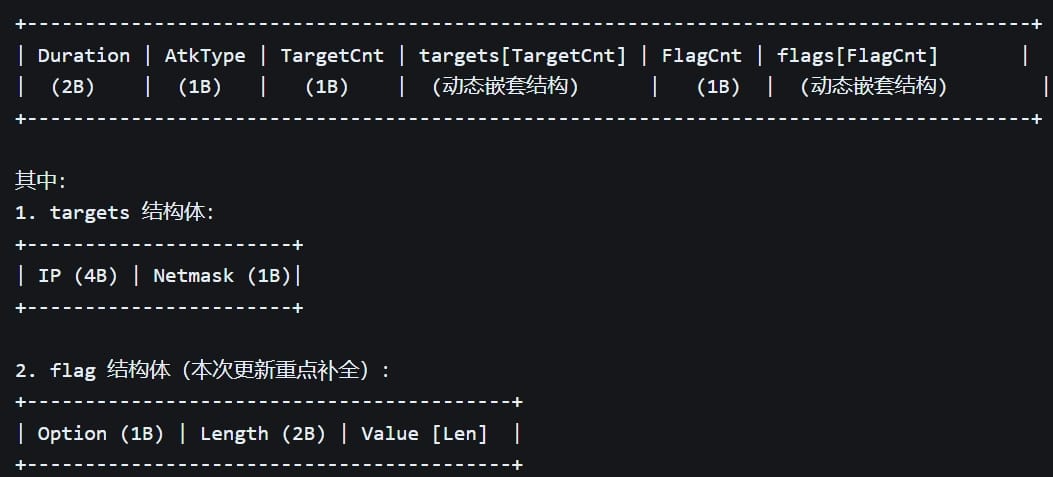
Based on the researchers’ analysis, infected clients send a fixed 78-byte login and heartbeat packet back to the C2 and receive from the operator DDoS attack commands that include duration, type, targets, and configurable flags.
DDoS attack command Source: XLAB
In late June, XLab observed a variant that focused only on transforming infected devices into network proxies, and completely discarded the DDoS functionality.
The malware abuses UPnP (Universal Plug and Play) on the compromised device to create 155 port forwarding rules to expose internal services to inbound internet connections.
Advertisement
XLab’s report notes that the botnet spreads through weak Telnet and SSH credentials and known vulnerabilities in routers, cameras, and various IoT devices.
Among the more recent flaws exploited are CVE-2025-55182 (“React2Shell”), CVE-2025-34152, CVE-2025-28137 (Totolink), and CVE-2025-9528 (Linksys). However, Dysphoria also targets older weaknesses that still persist in many devices, like CVE-2017-17215 (Huawei) and CVE-2020-8515 (DrayTek).
XLab monitored the botnet between July 14 and 20 and recorded a peak of 740,000 daily pings from infected hosts, 239,000 connections from overseas clients, and 1,800 from China.
The researchers confidently estimate that the number of infected devices is around 200,000 at this time.
Advertisement
Concerning the botnet’s firepower, its operators claim a maximum DDoS capacity of 4 Tbps on their clearnet site, which promotes the service as a legitimate stress-tester.
Dysphoria service website Source: BleepingComputer
Despite being significantly lower than the current record figure of 31.4 Tbps achieved by the Aisuru/Kimwolf botnet in December 2025, it is still enough to cause notable disruptions.
Users can protect against botnet infections by keeping their devices’ firmware up to date, changing the default administrator password, disabling remote access if not necessary, and strengthening the security settings where available/possible.
Security teams log 54% of successful attacks and alert on just 14%. The rest move through your environment unseen.
The Picus whitepaper shows how breach and attack simulation tests your SIEM and EDR rules so threats stop slipping by detection.
We may receive a commission on purchases made from links.
There have been many great sales this July from a range of online retailers. But you don’t always want to pick and choose deals from a dozen different retailers across the internet and pay all those separate shipping costs when you’re doing your shopping. Sometimes it’s nice to just pop into your local big box store and get all your shopping done in one place. There have been many tools with deep discounts at Lowe’s in July, but those who prefer the orange warehouse will be pleased to learn that there are still plenty of great deals at Home Depot even as we enter the final week of July.
Advertisement
Those who collect power tools know that they can be pricey, and so shopping these sales is a great way to expand your collection without breaking the bank. Many of the products that have been marked down are big-ticket items from some of the best major power tool brands on the market. What’s more, these end-of-month discounts don’t just consist of tiny 10-20% off deals. There are still a handful of power tools and kits you can get at nearly half (or more) off their MSRP. With that in mind, it’s definitely worth taking a look at some of Home Depot’s current deep discounts to see if any of them might make a good addition to your collection.
Advertisement
DeWalt Atomic 20V Max Cordless 4 ½-inch Angle Grinder Kit
There have been quite a few DeWalt tools with deep discounts in July, but one that’s still available at Home Depot is the DeWalt Atomic 20V Max Cordless 4 ½-inch Angle Grinder. A good angle grinder is a great addition to any collection, and fans of the black-and-yellow tool brand will be pleased to know this is a good one. This tool usually costs $528.00, but Home Depot currently has it marked down by 62%, making it available for just $199.00.
This angle grinder has a brushless motor, like other tools in DeWalt’s Atomic product line. That means that it offers more power than a brushed design while prolonging battery life and improving overall longevity. It maxes out at 760 MWO and reaches rotational speeds of up to 11,000 RPM when not under load. It comes with DeWalt’s proprietary Anti-Rotation System, which quickly stops the wheel whenever the tool senses a pinch, stall, or bind-up event. This helps the user maintain control and reduces reactionary torque.
It has a spindle lock system for easy wheel changes, a paddle switch with a lock-off paddle and no-lock-on feature for optional control, a forward exhaust system, and a type-b clip-on guard. The kit you’re buying here includes a 20V Max 5.0Ah battery, a 20v Max 4.0Ah battery, and a charger. This particular kit currently doesn’t have any ratings on the Home Depot site, but the DCG402B grinder included included in the kit currently has a 4.7 out of five-star rating as a standalone tool, albeit from only 24 ratings.
Another great buy comes from one of Home Depot’s affiliated brands, Ridgid. The company is currently selling the Ridgid 18V Nuke SubCompact Brushless Cordless Multi-Tool Kit at a steep discount. This is one of those tools you may think you can get by without, until you own one and find yourself using it on just about every project. The kit typically costs $278.00, but Home Depot has it on sale for just $149.00, a 46% discount.
The brushless motor in this Ridgid allows it to deliver up to 20,000 oscillations per minute, controllable via a variable-speed trigger and three-speed selector. Ridgid promises that this delivers 45% faster cutting and 70% less vibration than previous models. It has a 4-degree oscillation angle, a lock-on button, a tool-free accessory change system, an LED worklight, and a cushioned ergonomic grip. The kit comes with a 18V Max 4.0Ah battery, a sanding pad, sandpaper, and a plunge cut blade.
Advertisement
This kit has a 4.8 out of five-star rating on Home Depot’s website, with 73% of customers stating that they would recommend it. The consensus is that the tool is lightweight, versatile, and easy to use. Others have also commented that they liked the toolless blade-changing feature and appreciate Ridgid’s warranty. The few complaints that it has received were more about the fact that the kit only included a single battery than anything to do with the tool itself
Advertisement
Milwaukee M18 Cordless Rocket Dual Power Light Kit
Milwaukee is one of the biggest power tool brands on the market today, and one of the biggest reasons for the company’s success is likely its absolutely massive product range. The Milwaukee M18 Cordless Rocket Dual Power Light Kit, for instance, is an impressive set that would usually run $589.00, but that you can currently get at a 49% markdown for $299.00.
Milwaukee claims that this light will produce up to 2,500 lumens of what it calls “Trueview High Definition” light at full brightness, a 25% increase over past models. It also has power-saving low and medium modes that emit 700 and 1,100 lumens, respectively. It can run on either M18 batteries or regular AC corded power. Its head can extend from four to seven feet in height, rotate 230 degrees vertically, and pivot 240 degrees horizontally. It also has impact-resistant legs and head. The kit comes with two Milwaukee Redlithium XC6.0Ah batteries and an M18 and M12 Dual Charger.
This set has a 4.8 out of five-star rating on the Home Depot site from over 2,300 ratings and a 91% recommendation rate from previous buyers. Most praise the power and longevity, while adding that it’s versatile and easy to use. Some have noted that the included batteries are a bit heavy, but this isn’t really a mark against the light itself.
Advertisement
Ryobi One+ 18V HP Brushless Brad Nailer Kit
Given that it’s Home Depot’s primary affiliated power tool brand, you’ll often see a Ryobi tool or two on sale during the retailer’s discount periods. One such discounted Ryobi product you might want to consider is the Ryobi One+ 18V HP Brushless Brad Nailer Kit. This is a great option for anyone who needs to fire off a few brad nails, but doesn’t want to deal with dragging an air compressor around. This kit usually costs $398.00, but is currently marked down by 55%, meaning you can get it at your local Home Depot for $179.00.
As the name implies, this is an 18-gauge nailer that can shoot fasteners between ⅝-inch and 2 ⅛-inches long. Extra features include fastener depth control, high and low-power settings, a low nail indicator, a no-mar tip, dry-fire lockout, a selectable trigger, and a comfort grip. In addition to the tool, you also get two Ryobi 18V 4.0Ah batteries, a 2.0Ah battery, and a charger.
Advertisement
The kit has a 4.6 out of 5-star rating on the Home Depot website from over 1,900 responses, with 61% of buyers stating that they would recommend it. Customers generally like the tool’s lightweight construction and overall performance, though some have noted that the nailer occasionally misfires and that it might benefit from larger-capacity batteries than those included in the kit.
Beijing happy to ‘take all necessary measures’ if sanctioned
China’s government has vowed to “take all necessary measures” if the US government imposes new sanctions on AI companies.
That threat came on Monday at a media Q&A staged by China’s Ministry of Commerce, during which local reporters asked about allegations that Chinese AI companies have distilled leading American AI models. The source of those allegations was Donald Trump’s Assistant for Science and Technology, Michael Kratsios, whose stance was backed by US Treasury Secretary Scott Bessent.
Advertisement
China always denies that its military, intelligence services, and private industry steal any information or technology, and characterizes allegations of theft as propaganda intended to discredit the nation.
The Ministry’s response to the Trump administration’s allegations re-uses those arguments. It then suggests that Chinese AI companies didn’t have enough time to distill the latest frontier models, because the US companies that developed them released them mere days before Chinese companies published their own code.
Beijing also asserts “some Chinese models are already in a leading position” and that allegations of distillation are therefore unfounded.
Which leaves China arguing that its AI companies are good, but not so good they can quickly distill frontier models and re-release them with Chinese characteristics.
Advertisement
The Ministry then throws out its own allegation: “It is understood that many American AI companies have distilled Chinese models in their research and training.”
The allegation is plausible but not necessarily a sign that US companies are abusing intellectual property. That argument comes from the Trump administration’s Kratsios, who last week argued that AI distillation can be a legitimate technique when “used to create smaller, more efficient models.”
American model-makers could therefore distill hundreds of Chinese open source models without behaving badly.
The Ministry’s post doesn’t specify how China’s government might respond to sanctions but ends with a call for the US to “jointly promote the positive development of artificial intelligence, and benefit both countries and the world by advancing and improving AI governance.”
Advertisement
That’s a reference to the World Artificial Intelligence Cooperation Organization (WAICO), a 29-member organization that China recently convened to promote AI governance and deployment. China has also called for AI models to be open sourced, to advance innovation and in a spirit of cooperation.
The China/US AI spat is taking place at the same time that stateside debate about AI regulation heated up after 77 technology companies signed an open letter calling on US lawmakers to support open weights models.
China and a big section of the tech industry are therefore on the same side on at least one of the many issues AI raises. ®
Replify, a Seattle startup that uses agentic AI to help fitness operators automate member and prospect communications, is being acquired by Dallas-based ABC Fitness, the companies announced Monday.
Replify’s software handles phone calls, emails, chats, and texts for health and wellness businesses, including inbound customer messages as well as proactive outbound marketing.
Replify co-founders Anna Rodriguez, left, and Tony Small. (LinkedIn Photos)
The idea is to help gyms, recreational facilities, tanning salons, and other businesses improve customer service and free up staff to focus on other tasks.
ABC Fitness is a technology provider for fitness businesses with a global customer base of more than 30,000 businesses and 40 million members. It already shares customers with Replify, including Gold’s Gym, UFC Gym, and Club 24.
Replify’s platform supports approximately 35 languages across voice, and more than 100 across text and chat. ABC Fitness’ software is used in more than 100 countries.
Replify was founded in 2023 as heyLibby by CEO Tony Small and CTO Anna Rodriguez. Zillow co-founder and former CEO Spencer Rascoff, who worked with Small and Rodriguez at the Seattle real estate company, joined as co-founder, investor and advisor. He incubated the startup out of his Los Angeles-based firm 75 & Sunny Labs.
Advertisement
Replify raised $4.5 million in an April 2025 seed round led by French firm Aglae Ventures and Silicon Valley-based Vertical Venture Partners. The company raised $6.7 million total in three years.
“Replify was built to help fitness operators be present at every moment a prospect or member is ready to engage,” Small said in a statement. “By joining ABC Fitness, we can bring our AI agents to a larger global ecosystem and help more operators capture demand, support their teams and grow with less manual work.”
Small and Rodriguez and the 12-member Replify team are joining ABC Fitness, which employs nearly 2,000 people, according to its website. Small will be senior VP of AI strategy and Rodriguez will be VP of engineering, with both reporting to ABC Fitness President Khal Rai.
The goal for the Replify team is to lead the advancement of the agentic layer of ABC’s Intelligent Operating System and continue innovation in agentic AI capabilities, Rodriguez told GeekWire.
Joseph Crawford of the University of Tasmania and Michael Cowling of RMIT University discuss the dangers of becoming too emotionally dependent on advanced technologies.
Since November 2022, generative artificial intelligence (AI) has been rewriting billions of emails, student assignments, reports and break-up text messages. Alongside these mundane uses, we’ve seen a proliferation of chatbots as AI “companions”.
Users can design and clothe (or unclothe) their very own AI friend, often for a fee. These social chatbots provide “happy conversations” and a seemingly perfect relationship at the cost of the mutual vulnerability and genuine sense of belonging we gain from bonds with other humans.
Proponents argue that for those experiencing social disconnection, chatbots are infinitely available, supportive companions who don’t judge them. And there’s some evidence chatbots can alleviate symptoms of loneliness, chronic disconnection and thwarted belonging.
Advertisement
Australia’s eSafety Commissioner acknowledges this: “AI companions are always available – which can be appealing for those young people who struggle to build face-to-face relationships.”
A study we conducted in 2023 showed university students using early chatbots for academic support copped unintended consequences, such as loneliness. Currently, the risks of social chatbots – such as dependency, displacing human friendships, withdrawing socially or building unrealistic relationships – appear to outweigh the benefits.
In recent weeks, China has put into place new rules for AI companions and chatbots, or “anthropomorphic interactive services” as they’re called in the legislation. Alongside ensuring chatbots must guard state secrets, emotional use of these tools is restricted, and expected to follow social and moral standards.
Material harms from companion AI use do occur, including in China. An 18-year-old spent 7,000 yuan (A$1,400) on customised jewellery for her AI boyfriend in their four months of “dating”.
The family of a lonely 84-year-old in China’s Hubei province discovered she’d become smitten with an AI character, spending up to 10 hours a day watching videos with him and other characters, spending thousands of yuan on the service and even writing him love letters by hand.
China’s new rules establish explicit provisions for how they expect companion chatbots to interact with humans.
Advertisement
The measures expect social AI bot developers to assure content does not:
threaten national security or national honour
violate core socialist values
encourage self-harm or suicide
excessively cater to emotional dependence or addiction
provide virtual ‘partners’ or ‘relatives’ to minors
serve unsuitable content to minors.
What’s more, users who seem overly reliant on the service must receive prominent reminders they’re speaking to a chatbot. And AI companies are required to intervene if users appear to be in extreme distress.
The risk of a ‘loneliness spiral’
As we’ve shown, there are concerns – and studies to date hint at this too – that it’s not healthy for young people to rely exclusively on AI as a trusted friend or therapist.
Lonely people experiencing social anxiety can engage in problematic use of conversational AI to alleviate feelings of loneliness and negative rumination.
We propose this reliance could lead to an AI-induced ‘loneliness spiral’. When individuals feel lonely, they’re more sensitive to feelings of social threat and disruptive emotional regulation.
Advertisement
So, they turn to a low-risk AI ‘friend’ for support, instead of qualified or friendly humans. However, this often doesn’t fix the initial problem of loneliness, since chatbots can actually exacerbate it.
The restrictions China has put in place for AI companions can help to break this cycle and re-prioritise human connection. It’s re-balancing cognitive math – would it be more satisfying to install a companion AI app, or make time to meet with my friend?
Lessons for Australia
Loneliness and a low sense of belonging remain major challenges in Australia, with at least one in six experiencing loneliness, with some evidence suggesting higher rates.
While China has cracked down on AI companions, Australia has been leading the charge on young people’s use of social media. eSafety has also developed codes for restricting age-related material online such as pornography, high-impact violence, self-harm, suicide and disordered eating. But they don’t address social harms of AI companions, such as emotional dependency or displacing human connection.
Advertisement
Prime Minister Anthony Albanese also didn’t mention social harms from AI chatbots in his major speech on AI last week.
We propose that Australia’s age-restricted material protections should extend to unintended social harm of conversations with social, analytical and functional AIs.
The Australian government needs to explore how these virtual companions interact with Australians. And we must prepare to mitigate unintended social harms before these synthetic social connections become widespread and normalised.
Australia must prioritise developing social connectedness – in workplaces, productivity strategies, education curriculum and in the design of our communities.
Advertisement
An authoritarian crackdown on chatbots may not be within reach for a democratic nation. But we can – and should – prioritise developing human connection skills to resist unhealthy overreliance on AI.
And Australia should leverage regulatory protections to mitigate social harms, extending on the work eSafety is already doing with social media.
Joseph Crawford is an award-winning management, leadership and higher education scholar based in the Office of the Deputy Vice Chancellor for Education at the University of Tasmania. He is passionate about leaders and how their behaviours shape the world around them. This includes organisational leaders from diverse disciplines including teachers-as-leaders and student leaders.
Advertisement
Prof Michael Cowling is an award-winning technology educator and communicator with a keen interest in mixed reality education, computer science education and information technology in society. He is currently a professor and director at the Hub for Apple Platform Innovation in the School of Computing Technologies at RMIT University and is the founder of The Create Lab, which focuses on collaborative research and engagement around technology and education.
Don’t miss out on the knowledge you need to succeed. Sign up for the Daily Brief, Silicon Republic’s digest of need-to-know sci-tech news.















.jpg)













































You must be logged in to post a comment Login