

Tech
Apple’s Touch-Screen MacBook Pro To Have Dynamic Island, New Interface


Apple’s forthcoming touch-screen MacBook Pro models — the company’s first-ever laptops to support touch input — will feature the iPhone’s Dynamic Island at the center top of their OLED displays and a new interface that dynamically adjusts between touch and point-and-click controls, according to a Bloomberg report citing people familiar with the plans.
The 14-inch and 16-inch models, code-named K114 and K116, are slated for release toward the end of 2026 and won’t be part of Apple’s product announcements in the first week of March. The redesigned interface brings up a contextual menu surrounding a user’s finger when they touch a button or control, and enlarges menu bar items when tapped, adapting the available controls based on whether the input is touch or click.
Apple does not plan to position the machines as iPad replacements or describe them as touch-first; the physical design retains the full keyboard and large trackpad of the current MacBook Pro. Last year’s Liquid Glass redesign in macOS Tahoe, which added more padding around icons and touch-optimized sliders in the control center, was partly groundwork for this shift.


The global TV business just tilted again. Weeks after Sony sent shockwaves through the industry by negotiating a manufacturing partnership with TCL, Panasonic has made its own decisive move. The company announced a “strategic partnership” with China-based Skyworth aimed at strengthening and accelerating sustainable growth in its U.S. TV business. The agreement takes effect April 1, 2026.
Let’s not pretend these are routine supply-chain tweaks. When two of Japan’s most recognizable TV brands shift production relationships toward Chinese manufacturing giants within weeks of each other, that signals something bigger than cost optimization. It reflects a structural reset in how premium TV brands compete in 2026 — where scale, panel access, pricing pressure, and speed to market matter as much as brand heritage.
Sony’s move was significant. Panasonic’s is equally telling. The balance of power in the TV industry continues to migrate east, and legacy brands are adapting in real time.
“North America remains a key strategic region for Panasonic, with consumers consistently recognizing the exceptional quality and value of our products,” said Akira Toyoshima, CEO of Panasonic Entertainment & Communications Company (PEAC). “The new business model change will leverage the power of Panasonic’s core technical excellence in AV processing, quality, and service standards with the global scale economy of Skyworth’s manufacturing volume and speed to provide a winning formula for the customer value proposition.”
What It Means for the U.S. TV Market in 2026
Here’s what we know so far.
Skyworth USA Corporation will serve as the principal operating partner in the U.S., handling sales, marketing, and logistics. Panasonic, meanwhile, retains responsibility for development expertise and quality assurance to ensure its established performance standards are maintained.
In plain terms: Skyworth will manufacture Panasonic-branded TVs for the U.S. market.
Panasonic has also confirmed it will continue to support all TVs sold through April 2026, as well as models produced under the new agreement. Customer service and warranty coverage are not being handed off and forgotten.

The real question that TV reviewers and industry analysts are already circling, is what this means for Panasonic’s product development going forward, particularly its highly regarded OLED lineup. Over the past several years, Panasonic has delivered OLED models with some of the strongest video processing and image accuracy in the category.
If manufacturing shifts, does the performance DNA remain intact? That’s the part that will determine whether this is simply a business realignment or something more consequential.
Skyworth is hardly new to OLED. The company already produces OLED TVs under its own brand using LG Display panels; the same panel supplier Panasonic relies on. On paper, that creates technical overlap. In practice, the U.S. market is where things get complicated.
Panasonic has struggled to regain meaningful traction in the United States. Once the undisputed king of plasma, the company exited that business in 2014, which led to a 10-year absence from the U.S. TV market. Although Panasonic did continue TV operations internationally, their return to the crowded U.S. TV market in 2024 failed to capture shoppers attention, despite generally high praise among reviewers.
So what happens now?
The likely framework is straightforward: Skyworth manufactures Panasonic-branded TVs at a cost structure designed to win back market share. That requires profitability for both companies. This isn’t charity. It’s math.
Panasonic will define the product, whether OLED or LCD based on its performance standards, processing expertise, and brand expectations. Skyworth’s role will be to engineer and source the components at scale to meet those targets.
The pressure point comes if Panasonic’s traditional quality benchmarks push costs beyond what the U.S. market will bear. At that stage, both sides face a decision: preserve every performance advantage and accept limited volume, or adjust specifications to hit competitive price tiers.
That balance between maintaining Panasonic’s performance DNA and achieving aggressive pricing, will determine whether this partnership strengthens the brand or quietly reshapes it.

In other words, if you’re shopping for a high-end Panasonic TV built entirely under the company’s current structure, now might be the moment to act. Once the Skyworth agreement takes effect and newly manufactured models begin arriving in the U.S., the formula, even if only slightly, could change.
That’s not a knock on Skyworth. It’s a reality of scale manufacturing in a brutally competitive market. If a TV can’t be produced at a price that resonates with a broad enough audience, it won’t survive long no matter how good it looks in a calibration lab. Performance definitely matters, but sales volume keeps the lights on.
Who Is Skyworth?

Skyworth may not have the brand recognition in the U.S. of fellow Chinese heavyweights Hisense and TCL, but globally, it is a major force. The company ships roughly 36 million TVs annually and ranks among the top five worldwide in TV revenue, reportedly moving ahead of Sony in overall TV sales revenue. That’s not a minor player, which is why this move by Panasonic is rather significant.
Under the broader Skyworth Group umbrella, the company manufactures far more than televisions. Its portfolio includes consumer electronics, display devices, digital set-top boxes, security systems, networking and communications equipment, semiconductors, refrigerators, washing machines, smartphones, and LED lighting. Skyworth sells products under its own brand while also operating as an OEM for other companies — a role that makes this Panasonic agreement less surprising.

In the U.S., recent Skyworth-branded introductions include the Canvas Elite Art TV and the Clarus S1 Outdoor TV — niche-focused models aimed at lifestyle and specialty segments rather than direct mainstream domination.
In addition to the Panasonic-Skyworth agreement, the company has also outlined a broader corporate shift. Effective April 1, 2026, Panasonic confirmed that PEAC (Panasonic Entertainment & Communication) will be reintegrated into the main Panasonic Corporation structure. The stated objective is to strengthen the long-term positioning of Panasonic’s consumer business globally including in the United States.
The Bottom Line
The TV business isn’t just competitive in 2026. What we are witnessing is a monumental shift in power that is going to change what we buy and from brands that many of us might not have considered a few years ago. But is that bad news for the consumer?
On one side, display technology keeps advancing at a relentless pace: brighter OLED panels, better processing, smarter platforms. On the other, brand stability is anything but secure. Former giants are fighting to stay relevant, and consolidation across both TV and audio continues to thin the herd. Legacy names aren’t disappearing quietly; they’re restructuring, and partnering with rivals in China to make themselves more competitive. That tension was on full display at CES 2026.
While walking the halls of the Venetian during the show, I noticed a suite marked Skyworth. Inside were several televisions clearly wearing the Panasonic badge. Not concept sketches. Not mockups. Finished sets. I took a few photos. That didn’t last long.

I was quickly informed that photography wasn’t permitted and that what I was seeing was not something I could report on. At the time, it was obvious something was brewing. The question wasn’t whether Skyworth was involved with Panasonic, it was how deep the relationship would go.
Now we know.
With Panasonic’s official announcement confirming a strategic partnership and manufacturing shift, what felt like a quiet industry rumor on a CES show floor has become a formal restructuring of one of Japan’s most storied TV brands.
In the case of both Sony and Panasonic, it will likely take another year before the real impact of their manufacturing partnerships with major China-based TV companies becomes clear, as new product cycles roll out and revised models reach the U.S. market. 2026 will be a transition year, and 2027 should provide a more accurate picture of how these strategic shifts affect performance, pricing, and brand positioning.
Find out more about skyworthusa.com.
Related Reading:
Tech
Qobuz Connect Lands on Cambridge Audio StreamMagic Gen 2 and Gen 3 in Upgrade for Legacy Product Owners
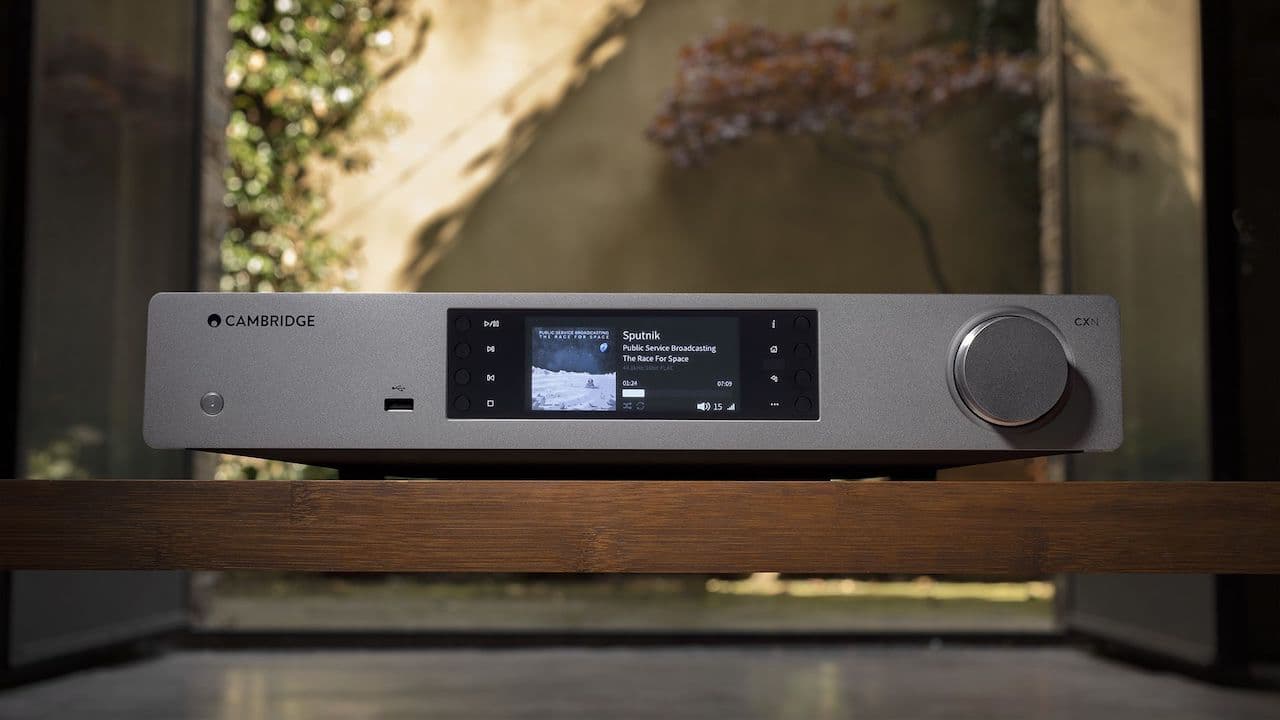
In an era where “new model” usually means “time to replace the old one,” Cambridge Audio just did something refreshingly unglamorous and important. The company has rolled out Qobuz Connect to its legacy StreamMagic Gen 2 and Gen 3 platforms, extending modern streaming control to products that have been sitting in racks and on shelves for years.
That means owners of the StreamMagic 6 V2, CXN, CXR, Azur 851N, CXN V2, and Edge NQ can now control playback directly from the Qobuz app via an OTA update; no new hardware, no forced upgrade cycle. Qobuz still works through the StreamMagic app as before, but Connect adds a more direct, native control path that many subscribers prefer.
It’s good to see a brand remember that its customer base didn’t magically appear in the last 24 months. Supporting Gen 2 and Gen 3 after rolling out Qobuz Connect to Gen 4 isn’t flashy, but it sends a clear message: what you bought still matters. Your streamer didn’t just age out because a new box showed up with a higher number on it.

It also proves something else; customers aren’t shouting into the void. The questions, feature requests, and yes, the complaints that show up on Instagram, Facebook, Audiogon, and the forums? They do get seen. Sometimes they even lead to action. That kind of accountability shouldn’t be rare in the hi-fi category, but too often it is.
There are plenty of alternatives out there. Some cost less. Some arguably do more. In a crowded field, long-term support isn’t just goodwill on the part of the manufacturer but smart business strategy. It’s also hard not to wonder whether Cambridge’s recent decision to appoint Fidelity Imports as its new U.S. distributor played a role here. Distribution shifts aren’t just about logistics and dealer networks, they’re about market responsiveness. If you’re trying to rebuild momentum and reinforce trust in a crowded category, showing existing owners that their gear still has a future is a smart place to start.
This update follows Cambridge’s recent additions of Spotify Lossless, Amazon Music, and QPlay to the StreamMagic platform. Rather than introducing new hardware, the company has continued expanding service support across existing models.
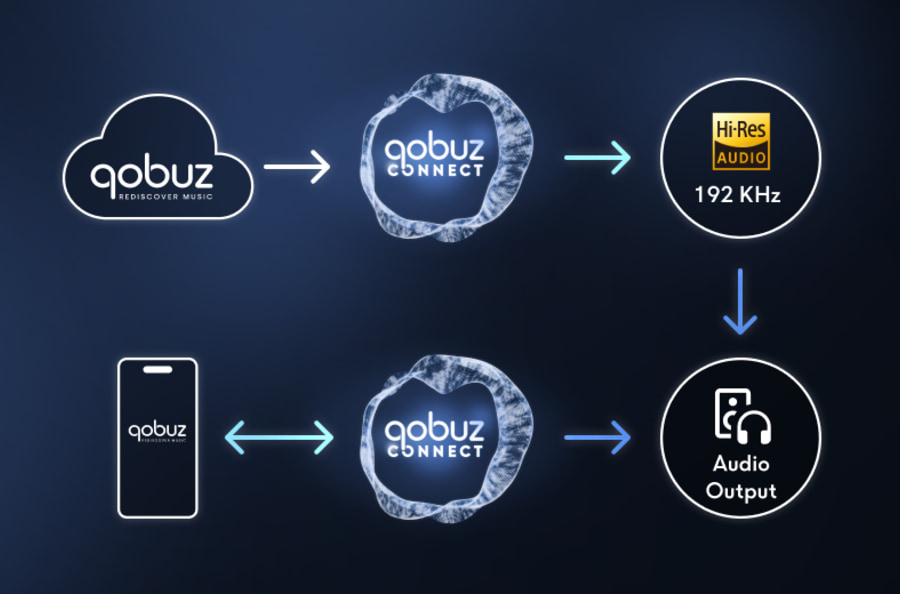
What Is Qobuz Connect and Why Should Cambridge Audio Owners Care?
Qobuz Connect lets subscribers stream directly from the Qobuz app to compatible devices over Wi-Fi or Ethernet, turning the app into the primary control interface. Your Cambridge streamer (or other supported hardware) becomes the playback endpoint, while your phone or tablet functions as the remote. The result is native control with full lossless and high-resolution streaming up to 24-bit/192 kHz. So no Bluetooth, no compressed handoffs, and no need to route playback through a secondary app.
Launched on May 15, 2025, Qobuz Connect has expanded quickly. In less than a year, support has grown to more than 100 hardware partners, covering A/V receivers, network streamers, powered speakers, and integrated amplifiers. That broader compatibility keeps control centralized inside the Qobuz app while giving subscribers more flexibility across systems and brands.
The Bottom Line
The biggest winner here is the existing Cambridge Audio owner. Adding Qobuz Connect to StreamMagic Gen 2 and Gen 3 extends the useful life of hardware that, in many cases, is still performing at a very high level. It removes friction, adds native app control, and keeps those products aligned with how people actually stream music in 2026. No new box required. No forced upgrade cycle.
In 2026, StreamMagic isn’t just a control app, it’s Cambridge’s full streaming ecosystem. It supports major services including Qobuz, TIDAL, Spotify (including Lossless where available), Amazon Music, QPlay, AirPlay 2, Chromecast built-in, Roon Ready integration, and local UPnP playback.
With Qobuz Connect now folded into that framework across multiple generations, Cambridge has strengthened the platform’s long-term relevance. In a crowded streaming market where alternatives are plentiful and often cheaper, sustained software support is what separates a product you replace from one you keep.
Related Reading:
A former candidate in the 2026 race for governor of California and a popular YouTuber have been kicked off Kalshi’s platform for alleged violations related to insider trading, the popular prediction market revealed Wednesday.
In a blog post detailing the cases, Kalshi’s head of enforcement, Robert DeNault, noted that the company’s surveillance system had flagged suspicious behavior in both instances.
In the case of the political candidate, Kalshi cited a video posted online “that appeared to show him trading on his own candidacy.” Kalshi froze the candidate’s accounts and reported the activity to the Commodity Futures Trading Commission, the government agency that oversees prediction markets. It instituted a five-year ban and is fining the account a penalty 10 times the size of the initial trade, which Kalshi says it intends to donate to charity.
While Kalshi does not mention the candidate by name, DeNault notes that they have recently dropped out of the race and shifted to running for Congress. This fits the description of only one person involved in the race: Kyle Langford, a far-right Republican candidate best known for inflammatory antisemitic comments praising Nazis. Langford has since dropped out and launched a campaign styled as a progressive Democrat in California’s 26th district.
In May 2025, Langford posted a video to X showing a screen recording of a trade order placed on Kalshi for an event in the governor’s race. Shortly after the incident, Kalshi confirmed that it was looking into Langford’s activities. In his description of the investigation into the candidate, DeNault notes that Kalshi began its investigation that May.
“Tensions between the USA and Iran are at an all-time high, and the media has chosen to cover a $200 campaign gimmick (aka betting on I, myself) from last year,” Langford said in a statement to WIRED. “Is this really the state of our political discourse?”
This is not the only suspension tied to the California governor race; as Politico reported on Tuesday, Democratic megadonor Stephen Cloobeck, who was briefly a candidate before dropping out to endorse representative Eric Swalwell, has also been blocked by the platform for attempting to trade on the race. “In the event we ever see a candidate trading on their own candidacy, it triggers disciplinary action on the exchange. Their trade gets frozen. They may be permanently suspended from having an account,” DeNault said in a statement. Cloobeck confirmed the bets to Politico and said he is still able to trade on other events.
This crackdown underscores how expansive definitions of “insider trading” can be on prediction markets; while traditional insider trading cases hinge on subjects profiting from “material nonpublic information”—confidential data or intelligence that can impact stock prices—here, even placing bets while working on an election or running for office can violate the rules.
In the case of the YouTube streamer, Kalshi reports that its surveillance systems flagged the account based on “statistically anomalous” trading success. It also received concurrent tips from Kalshi users, who had flagged the unusual activities. “We investigated and found that the trader was employed as an editor for the streamer’s show and likely had access to material nonpublic information connected to his trading,” DeNault writes in the report. The account was frozen before it could withdraw funds; it is now suspended for two years, and it has also received a financial penalty. Kalshi did not disclose the identity of the YouTube streamer.
As prediction markets have exploded in popularity, there has been a series of high-profile incidents of suspected insider trading, including major trades made just prior to geopolitical events like the US capture of Venezuelan leader Nicolás Maduro. In Israel, two Polymarket traders were recently arrested for leaking classified information in connection to trades made on military activity. Following the Maduro incident, Congress introduced a bill to ban government officials from insider trading on prediction markets—but there have not been any enforcement actions made public.

Hours after an ICE agent shot and killed Renee Good in Minneapolis, the Trump administration was already working to shape the narrative. Official White House accounts flooded social media with clips of burning flags and clashes between locals and federal immigration agents, casting protesters—not the killing—as the story.
Among the accounts amplifying that message was Johnny MAGA, a pro-Trump X account with nearly 300,000 followers. “They’re burning the American flag right now in Minneapolis,” the anonymous account claimed, sharing a clip from the White House’s official rapid response feed. “And they really expect you to believe that ICE shot an innocent civilian.”
To its audience, Johnny MAGA looked like an independent voice, another outraged supporter in the MAGA media ecosystem. The account regularly boosts Trump’s Truth Social posts and goes to bat for the administration, attacking Democrats like California governor Gavin Newsom.
But this isn’t just a regular account. Johnny MAGA appears to actually be a White House staffer named Garrett Wade who works for the Trump administration as a rapid response manager, helping to run the very same White House account his anonymous MAGA account amplifies. A phone number associated with Wade is linked to Johnny MAGA, according to a WIRED review of publicly available records, and the connection was confirmed by a source close to the White House.
Wade and the White House did not respond to requests for comment.
The Johnny MAGA account was created in September 2021, according to its X profile. (It originally used a different handle, which referenced Wade’s birth year, according to records reviewed by WIRED.) While the account’s earliest available posts focused on NFTs, it has been a consistent pro-Trump presence since at least 2022.
The operator of the Johnny MAGA account has not disclosed an official relationship with the White House while operating the Johnny MAGA X account. Multiple media outlets, including Mother Jones, TownHall, and the New York Post, have all linked out to posts on the Johnny MAGA account seemingly as organic reflections of public sentiment on political issues.
Since Trump took office last year, the Johnny MAGA account has supported administration priorities like immigration enforcement, and allies like Turning Point USA. After Trump posted a racist AI-generated video depicting Barack and Michelle Obama as apes earlier this month, the Johnny MAGA account boosted the White House’s claim that the president didn’t watch the entire video, posting, “the most obvious tell that Trump’s Truth Social post wasn’t intentional is that he would’ve posted the entire thing if he had seen it. It’s a masterpiece.”
While the Trump administration has long cultivated a growing cast of conservative creators to spread its messaging online, a White House staffer moonlighting as an anonymous MAGA influencer would blur the already hazy line further, making it nearly impossible to distinguish between official government messaging and what appears to be organic digital support. This lack of disclosure risks undermining public trust, disinformation researchers suggest.
“People have a right to know who is trying to manipulate public opinion, and they have a right to know whether or not they’re experiencing astroturf politics,” says Samuel Woolley, a University of Pittsburgh professor who studies disinformation and media ethics. “This lack of transparency and the conflict of interest surrounding this account and the lack of disclosure all amount to a breach of public trust.”
There is very little public information online about Wade, but Federal Election Commission records link him to former White House senior communications leadership. Donations from 2023 through WinRed made by a Garrett Wade from suburban Philadelphia—where Wade graduated high school—list his employer as “tech school” in March 2023 and in December that year as Opinion Architects, a digital consultancy group. The donations also list Wade as residing in the Bucks County area of Pennsylvania, where he previously lived, according to public records. The phone number associated with Wade and with Johnny MAGA—who in the past has listed his location as Philadelphia—is also geolocated to the Bucks County area.

Google is making it very easy to feel like a music producer, whether you have the skills or not. The company has announced that ProducerAI, an AI-powered music-making platform, is joining Google Labs, bringing together sound generation, visuals, and video into one experimental creative tool.
ProducerAI is powered by a preview version of Lyria 3, Google’s newest music-generation model. You can describe what you want, and the AI helps you build it, whether that means crafting beats, shaping melodies, or experimenting with entirely new sounds.
ProducerAI first launched in July 2025 to let users collaborate with an AI agent to generate music, workshop lyrics, and remix tracks from text prompts. Until now, it relied on its own underlying models. Joining Google Labs gives it access to a much larger AI toolkit.
Inside Google’s AI-powered music studio

As a part of Google Labs, ProducerAI will pull from several of Google’s models. Lyria 3 handles music generation, while Gemini powers the conversational interface that guides users through ideas and edits.
Nano Banana will generate album art, and Veo will be used to create AI-generated music videos, turning a song idea into a complete audio and visual project. Google says it will also embed SynthID watermarks into ProducerAI outputs.
This flags AI-generated audio, images, video, and text, adding transparency as AI music becomes harder to distinguish from human work. But companies like Sony have already developed a tool to detect original songs used in AI-generated tracks.
The ProducerAI team has already worked with artists like The Chainsmokers, Lecrae, and Anjulie to shape the platform. Google positions ProducerAI as an experiment, not a replacement for musicians. However, this collaboration arrives at a time when AI-generated songs are topping Billboard charts, drawing scrutiny from artists and listeners alike.
Tech
Visual imitation learning: Guidde trains AI agents on human ‘expert video’ instead of documentation


For years, the “last mile” of digital transformation has been littered with forgotten PDFs and ignored training manuals.
Organizations spend millions on sophisticated software like SAP or Salesforce, only for employees to struggle with basic navigation. Now, as the era of agentic AI arrives, companies face a double-edged sword: they must teach human employees to collaborate with AI, while simultaneously teaching AI agents to navigate the labyrinthine interfaces of the modern enterprise.
One idea that seems to be gaining momentum among AI-forward businesses: using screen recordings and tutorials/walkthroughs of someone performing an enterprise task — be it creating a new ticket or processing an invoice — and training AI to replicate the flow based on the screen capture. Just this week, a startup called Standard Intelligence went viral on X showing an early demo of open-ended version of this for the physical and digital world.
But the truth is, there are already players tackling this problem for the enterprise itself square-on: case-in-point, Guidde, an Israel startup born during the video-centric years of the COVID-19 pandemic, today announced an oversubscribed $50 million Series B funding round led by PSG Equity to address this exact knowledge infrastructure crisis.
Instead of feeding an agent a static PDF manual, Guidde provides high-fidelity “Video Ground Truth”—a rich stream of data captured from real human experts as they navigate complex software.
The investment signals a shift in how the tech industry views documentation—not as a static byproduct of work, but as the critical telemetry needed to train the next generation of autonomous digital agents.
Technology: from video capture to world models
At its core, Guidde is an AI Digital Adoption Platform (ADAP). However, its technological breakthrough lies in what happens behind the scenes during a recording.
Guidde isn’t just recording pixels; it is capturing every click, scroll, and latent interaction with the HTML page—the subtle pauses, the specific scroll depths, and the corrections a human makes when a system lags. This telemetry transforms raw video into a Vision-Language-Action (VLA) training set.
Meanwhile, the platform’s Magic Redaction automatically obscures sensitive data like passwords or credit card numbers during capture, ensuring materials remain secure and HIPAA-aligned.
“Every time you click a button, you drag-and-drop, you scroll, you type, we gather the interaction… all of it, we do cleanse it—there’s no private information,” explained Guidde co-founder and CEO Yoav Einav in an exclusive interview with VentureBeat.
Under the hood, the platform captures the underlying metadata and DOM (Document Object Model) changes synchronized with the video frames. The differentiator is the telemetry hidden beneath the surface.
This rich metadata creates a “digital world model” of enterprise software. And because each enterprise uses its own unique mix of apps and processes, Guidde is creating a data moat that allows enterprise agents to reason through legacy UIs with the same spatial awareness as a human, ensuring that automation actually works in a production environment rather than just a lab demo.
For a human, it’s a tutorial. For an AI agent, it is a high-fidelity map of the interface. This allows agents to “see” and reason through complex UIs the way humans do, solving the “last mile” of automation where agents previously failed due to lack of specific enterprise and in-situ usage context.
In a sense, Guidde is building a “self-driving car” like a Waymo for computer usage.
Product: three pillars of Guidd-ance
The platform has evolved into three distinct products designed to scale with an organization’s maturity:
-
Guidde Create: The engine for subject matter experts to turn workflows into documentation in minutes.
-
Guidde Broadcast: A personalized recommendation engine—often compared to Netflix—that delivers answers inside the tools people actually use. It knows who the user is and what department they are in to surface relevant content exactly when needed.
-
Guidde Discover: The newly launched “agentic” pillar. Like Waze mapping roads by observing drivers, Discover maps software routes by tracking how employees work. It understands the workflow, creates the content, and updates it automatically when the UI changes.
Training humans how to use AI — and AI using humans
The most non-obvious aspect of Guidde’s growth is its dual-purpose mission. “We’re the only platform that trains both humans and agents,” Einav stated.
As companies roll out AI tools like Microsoft 365 Copilot or ServiceNow agents, they hit a proficiency gap. One of Guidde’s largest customers revealed they were paying over $1 million a year for a sophisticated AI tool, yet “nobody knows how to use them because they did like a 30-minute training session, and then that’s it.” Guidde closes this gap by providing “bite-sized” video tutorials in the flow of work.
Simultaneously, these videos train the AI agents themselves. Foundation models like Gemini or GPT-4 often hallucinate when tasked with specific enterprise workflows because they weren’t trained on the highly specific, internal “vanilla workflows” found in private enterprise systems. Guidde provides the “starting point,” the “metadata,” and the “x, y coordinates of the button” that an agent needs to complete an action without getting stuck.
The multimodal advantage
To maintain this level of accuracy, Guidde employs a multimodal infrastructure. The system doesn’t rely on a single model; instead, it uses a “fleet” of models that evaluate one another.
-
Google Gemini: Generally used for visual tasks like analyzing PDFs or PowerPoints.
-
Anthropic Claude: Leveraged for writing the storyline and narrative scripts.
-
Feedback Loops: When a user edits a video, that data is fed back into the model to prevent the same mistakes from occurring in future captures.
This approach allows Guidde to replace a legacy stack of six or seven disconnected tools—Loom for capture, Adobe Premiere for editing, 11Labs for text-to-speech, and Synthesia for avatars—with a single, AI-native platform. “We basically pack everything for you,” Einav says, “and automate the entire process based on your brand guidelines.”
Video-first origin story
The genesis of Guidde lies in a frustration familiar to any product leader. Before founding the company, Einav and co-founder Dan Sahar spent years mastering video traffic at Qwilt, a company they started in 2010 to analyze how people watched Netflix and Disney+.
When COVID-19 hit, they saw a massive opportunity to apply that video expertise to the workplace. They observed that short video explainers could increase free-to-paid account conversions by 30%, but the friction of creating them was unsustainable.
In an interview, Einav recalled the “tedious work” of the old world: “My team in Israel were creating the content, someone in the US with a US accent was doing the narration, someone in the marketing team would write the script… and someone in the enablement team would do the edit.” This fragmented workflow meant a single video took two to three weeks to produce. “And then two weeks later, the product changes, and you need to redo it from scratch,” Einav added.
Guidde was built to collapse this cycle into seconds. By automating the “Magic Capture” of a workflow, the platform generates a structured narrative script and professional AI voiceover instantly. This removes the editing bottleneck, transforming subject matter experts into “training powerhouses.”
Licensing and market impact
Guidde’s pricing structure reflects its transition from a utility to a core piece of enterprise infrastructure:
-
Free: $0 (Up to 25 videos, web-app support).
-
Pro: $18/creator/month (Unlimited videos, brand kits).
-
Business: $39/creator/month (Unlimited text-to-voice, analytics).
-
Enterprise: Custom pricing (Multi-language translation, SSO, Magic Redaction).
The platform’s impact is already visible in the numbers: a 41% reduction in video creation time and 34% fewer inbound support tickets.
For customers like Emerson, this translates to 40–60% quicker guide creation. Support teams, in particular, are finding they can offload 80% of their ticket volume with agents—but only if those agents have the content to be useful.
“The agent without the content is useless,” Einav warns, noting that most enterprise documentation is either years out of date or entirely undocumented.
Community and industry early reception
Guidde already claims 4,500 enterprise customers and seeks to expand this number with its new round of funding. Support and operations leaders have been vocal about the platform’s ease of use. Christopher Cummings, VP of Client Experience at DocNetwork, highlighted its ability to provide “quick, personalized video responses to customer questions.”
Meanwhile, Wren Cotrone, a Director of Customer Support, noted that “Once you set the branding the way you want, you can really zoom through this stuff.”
Ronen Nir, Managing Director at PSG, summarized the investment thesis: “Guidde is solving one of the biggest blockers to successful AI adoption: the knowledge infrastructure.”
Why this matters now
The paradigm shift from text-only LLMs to agentic video intelligence is the defining trend of 2026. Guidde’s Series B signals that the “ground truth” for enterprise agents will come from raw video observation, not static documentation.
By capturing how work gets done across 10s of millions of workflows, Guidde is building a dataset that few others possess.
As Einav put it: “It starts with humans in the loop, and over time moves toward full autonomy.” For the modern enterprise, the map is no longer a static document—it’s a living, breathing video intelligence layer that guides both the workforce and the agents that support them.
Tech
Pick Alexa’s personality: Amazon lets users choose ‘Brief,’ ‘Chill,’ or ‘Sweet’ conversation styles


Tired of Alexa’s constant chatter? Wish Amazon’s voice assistant would just get to the point without all the extra stuff? Maybe I’m just speaking for myself? Anyway, relief is finally here.
Amazon is rolling out a new option to keep Alexa’s responses blessedly perfunctory in a new “Brief” mode for Alexa+, along with options for “Chill” and “Sweet” conversation styles that adjust the AI assistant’s tone and delivery across Alexa+ devices.
Ask Alexa how it’s going in Brief mode, for example, and the response might be a curt “All systems operational.” Switch to Chill and it’s a zen “all systems are in harmony.” Go with Sweet and you’ll get something like an exuberant “radiating pure joy!” (Responses differ each time.)
It’s a first for the voice assistant, available now for Alexa+ users. Users can switch by saying “Alexa, change your personality style” or through the Alexa app under device settings. Personality styles can also be paired with any of Alexa’s eight voice options, which include different genders and regional dialects.
Alexa’s default personality also remains an option, and can be restored at any time.
Amazon has previously offered voice customization for Alexa, including celebrity add-ons like Samuel L. Jackson and Melissa McCarthy, but those were paid extras that altered phrasing on a limited set of responses rather than system-wide personality adjustments.
The new option is part of Amazon’s broader Alexa+ overhaul, which has made the voice assistant more conversational, with the ability to take actions such as ordering takeout and booking dinner reservations. The company made the AI-powered upgrade available to all U.S. customers earlier this month, nearly a year after it was unveiled.
The personality feature reflects a trend in consumer AI. For example, ChatGPT lets users customize its tone and behavior through custom instructions, and Google’s Gemini offers different response styles. Microsoft has been testing a “Personality Studio” for Copilot and introduced a “Real Talk” mode that mirrors the user’s conversational style.

We may receive a commission on purchases made from links.
I’ve always been fond of creating and building things right from childhood, which is why I gifted myself a budget-friendly 3D printer a few years ago. With constant lockdowns and staying at home becoming the norm, I could spend a lot of time modelling objects and see them come to life. From home upgrades to making useful kitchen gadgets to building shelves for my home office, I’ve saved quite a bit of money thanks to my 3D printer. A 3D printer can also teach you several virtues. For starters — patience. Since prints can take several hours to complete, you automatically learn to wait patiently. Another important factor you learn as you keep using a 3D printer is that you may need many accessories to build an ecosystem that produces high-quality, reliable prints.
I realized this the hard way, after tons of failed prints, warping issues, clogged nozzles, and whatnot. To save you from these hassles, we’ve made a list of some must-have 3D printer accessories you can buy on Amazon. In my opinion, these accessories and peripherals can go a long way toward ensuring better prints and a more cohesive experience when 3D printing. Additionally, some of these accessories can even improve the functionality of your prints or let you print large objects in smaller parts and then join them together. I’ve used all of these gadgets personally and can attest that they’re super helpful, whether you’re new to the hobby or a 3D-printing veteran.
Layerneer 3D printer bed adhesive
If you’re new to 3D printing, you would assume that you can directly print an object on the print bed. While this is true, you may occasionally face issues with certain materials or print beds that have poor adhesion. A simple yet effective solution to this problem is using a glue stick. Spreading some glue on the print bed and printing on it prevents the object from getting detached from the bed during large prints. Generally, large prints take a lot of time, so there’s a chance the bed’s temperature may drop slightly — leading to the object getting detached and the print being ruined. The Layerneer 3D printer bed adhesive solves this problem.
Technically, you can use any standard glue stick to make sure your prints stay in place. However, the Layerneer adhesive stands out with its applicator design that’s specifically made for 3D printer beds. This makes it easier to apply and spread the glue evenly. Uneven application can lead to print issues since it could lead to bed leveling inaccuracies. Along with keeping your prints in place, the Layerneer adhesive is also useful to prevent warping. It has no odor, it’s water-soluble, and you can easily release the object from the bed once it cools down. This is an absolute must for large 3D prints.
Biqu CryoGrip Pro Glacier build plate
If you’re new to 3D printing, you would assume that you can directly print an object on the print bed. While this is true, you may occasionally face issues with certain materials or print beds that have poor adhesion. A simple yet effective solution to this problem is using a glue stick. Spreading some glue on the print bed and printing on it prevents the object from getting detached from the bed during large prints. Generally, large prints take a long time, so there’s a chance the bed’s temperature may drop slightly, leading to the object detaching and the print being ruined. The Layerneer 3D printer bed adhesive solves this problem.
Technically, you can use any standard glue stick to make sure your prints stay in place. However, the Layerneer adhesive stands out with its applicator design that’s specifically made for 3D printer beds. This makes it easier to apply and spread the glue evenly. Uneven application can cause print issues by introducing bed leveling inaccuracies. Along with keeping your prints in place, the Layerneer adhesive also helps prevent warping. It has no odor, it’s water-soluble, and you can easily release the object from the bed once it cools down. This is an absolute must for large 3D prints.
Aeorum 3D printing toolkit
There are a bunch of accessories and tools that are useful regularly when dealing with 3D printers. Instead of buying all the tools separately, Aeorum has made it easy by compiling them into a single toolkit that can be stored in a bag. The kit includes everything from a scraper to remove filament from the print bed to a finishing tool that can improve the quality of the final print by removing excess filament or irregular edges. Honestly, this tool is a worthwhile investment, as you can use it to make holes or cavities in your print to join multiple parts or add extras like magnets.
You also get filers, pliers, metallic brushes, screw drivers, and a carrying case to store them all. Whether you’re a beginner or planning to set up a print farm to mass-produce 3D-printed toys, this toolkit will certainly come in handy. In the latter case, the tools will help you achieve a more professional look with fewer sharp edges and rough corners. In turn, that should help with better reviews and repeat orders.
Cregrant 3D filament storage box
A couple of weeks into 3D printing, everything was going well until one fine day, I started experiencing stringing issues with my 3D prints. I looked on several online platforms and forums for solutions, which led me to adjust various parameters on the printer’s interface. The issue persisted despite that. After a little bit of digging around, I found that the issue was with the filament I was using. Thanks to the tropical climate in my region, my filaments had picked up moisture, which can lead to stringing issues. This issue is inevitable if you store your filament spools out in the open.
That’s when I realized the importance of filament storage boxes. These specialized containers are air-tight, meaning they do not allow moisture from the atmosphere to enter. As a result, your filaments stay dry and completely safe — which means no stringing issues anymore. The Cregrant 3D filament storage box is affordable, can store up to 10 filaments or five filaments and five raisin bottles if you also have an SLA printer, and is both dust- and waterproof. If your printer doesn’t have an AMS system and you use multiple filaments, this is the best way to store them.
Guulibera 3D printer stand
When I first got my 3D printer, I set it up next to my computer on my work desk. It didn’t take me long to realize why that was a bad decision. When printing at high speeds, 3D printers tend to shake and cause vibrations, regardless of whether you have a bed-slinger or a Core-XY machine. Now that’s definitely uncomfortable and distracting when I’m sitting at my desk while trying to get work done. I decided to invest in a dedicated table for the printer. The Guulibera printer stand is a good option that serves its purpose well while also providing additional functionality.
For starters, the top surface has ample space for a large 3D printer, a smaller SLA printer, or a filament dryer box like the one mentioned above. Then, there are three large rows to store your filament spools, so you don’t need extra shelves or cabinets. On the right side, there’s a drawer to store essential tools and accessories, with shelves below it for larger tools and products. Notably, the stand remains stable even with two 3D printers on it, which is commendable.
Verones sandpaper kit
Those of you who have already worked with wood for DIY projects may already know the importance of sanding your objects to give them a more polished look. That’s exactly why I recommend getting a bunch of sandpapers of different grits, even for your 3D-printed models. The Verones sandpaper kit includes 90 pieces ranging from 400 grit to 3,000 grit and can be used for both wet and dry sanding. There are nine grit levels with 10 sheets of each, so you’re sorted for a long duration with this pack.
If you’re a beginner and you just started printing your first few objects, you may not need a sandpaper kit. After all, the goal with your first few prints should be to have fun and try different models, experiment with supports, and learn how slicers, infill patterns, and walls work. But, once you get a little serious, you may want to smooth out rough edges, protrusions, and other imperfections in your prints. Additionally, if you’re printing with supports, you may want to sand the surface after removing the supports to give it a smoother finish.
Rhinocats magnets
This is a niche accessory that not everyone may find useful, but it’s certainly nice to have if you’re enthusiastic about exploring the depths of 3D printing. The Rhinocats magnets are small and can turn out to be useful in several ways. For instance, I use them a lot to print fridge magnets that I either use on my own refrigerator or give out to friends as gifts. Simply print a shape of your choice and attach two magnets to the back. Similarly, you can make badges or pins to attach to clothing.
Another use case for these magnets is making toys or objects that require printing in multiple parts and then attaching them. One way to do it is to attach magnets with opposite polarity, so the objects automatically align and snap together when they come close. You will also find several models on online forums that use magnets, such as wallets and cardholders. If you’re well-versed in designing your own objects, you can also create custom prints that use magnets to secure certain parts. The possibilities are endless.
Comgrow filament dryer box
Remember, I mentioned how moisture in your filament can ruin your prints? While a waterproof filament storage box can definitely help keep fresh spools from attracting moisture, what do you do if you already have a bunch of filaments that have been exposed to external moisture? Well, you get a filament dryer box. The Comgrow filament dryer box is one of the most affordable options that does the job well. It sucks out moisture from your filament, so if you have multiple spools lying around, it’s best to put them in this machine, dry them, and then store them in a dry box.
Alternatively, you can also use the dryer while printing. Route the filament to the printer via the dryer box. This way, the filament stays dry throughout the printing process. You can use PLA and ABS filaments with the Comgrow dryer box, and it also lets you set a temperature and a time duration for the filament to stay dry.
Kraftprotz 3D printer super glue
Along with glue to hold your prints in place on the print bed, you may also occasionally require adhesive to glue multiple 3D-printed parts together to form a larger object. Unfortunately, most traditional adhesives fall short in this regard, as they don’t adhere well to plastic surfaces. A standard glue stick may not be sticky enough to hold large parts together, while a stronger glue may just burn through the plastic layers of your print. The Kraftprotz 3D printing super glue solves that problem. It’s specifically made to stick PLA and PETG, so you don’t have to experiment with different adhesives.
Per the brand, the glue also works with ABS, TPU, and nylon, which is excellent, since a lot of large prints that need to be assembled generally need reinforcement, which is why they’re printed using harder materials like ABS. Kraftprotz also claims that the glue leaves no residue or doesn’t cause any warping, which is important if you’re going to sell your prints. I’ve also used 3D printing glue to stick a few of my broken prints, and it has done a fairly good job. However, don’t trust it to hold liquids without seepage.
Vacbird vacuum bags for filament storage
Ideally, a filament storage box should solve the issue with your spools attracting moisture when not in use. However, what if you have way too many filament spools lying around, some of which you may not be using regularly? In such instances, I would recommend storing your filaments in Vacbird’s vacuum bags. You get 30 bags in one pack, which is excellent if you have a large rack to store filaments. Simply dehydrate your filaments using the dryer box, pack them into vacuum bags, and use the built-in suction tool to remove any air.
The best part is that all of these bags are reusable, so if you’re going to use a spool regularly, get it out of the bag and replace it with another one. The suction tool uses USB for power, so you can even plug it into your phone or a power bank and carry out the suction process. Note that you can store a maximum of one kilogram filament in each bag. I’ve been using these bags to store all my filaments, and I would say they are even more effective than a storage container, especially if you live in a dusty environment.
Hardell digital caliper
When you first get a 3D printer, the first few prints are usually models you download from various websites and forums. In fact, that is exactly how I used my 3D printer for the first two years. Once I got bored with the prints online, and I felt the need to make custom objects to use around the house, I learned to design my own items. Handles for utensils, cup holders that fit my desk, and shelves built as per the specific dimensions of my bedroom wall — these were all possible because I decided to make my own models. An extremely important factor when designing your own objects is getting the dimensions right.
If you’re making a replacement handle for a broken pot, you need to get the measurements right to the millimeter. That’s when I decided to get a digital caliper. The Hardell digital caliper is an affordable option that just works. Stretch the prongs, measure the desired object, and you will see the reading on the display. Another reason behind recommending the Hardel caliper is USB-C charging. Instead of replacing cells, a quick 20-minute charge can give you three months of usage.
Preciva threaded inserts
You might be aware of the fact that 3D printers can also be used to make replacement parts for gadgets, appliances, and vehicles. If you’re going to be using these parts for serious work, it’s not ideal to glue them into place or use magnets to fasten them. For such objects, I always use nuts and bolts. Of course, you can’t use screws with plastic items, so you’ll first have to use Preciva’s threaded inserts. The kit includes a soldering iron with several tips that create cavities to insert screws and bolts. There are a plethora of projects that involve screwing multiple 3D-printed parts together.
Whether it’s gears, opening and closing mechanisms, or ball bearings, you can use nuts and bolts to put them together and create a functional object. I once printed a safe for my wardrobe that used bolts to keep the hinge in place. Similarly, the Raspberry Pi case I printed also used screws to fasten the top onto the bottom portion. Funnily, I have also printed replacement parts for my old 3D printer that I screwed into place using third-party screws.
Creality Clog Poke
One issue that plagues many 3D printers after a few weeks or months of use is a clogged nozzle. If your printer randomly stops extruding, it’s time to check the nozzle and remove any clogged filament. The simplest way to do that is using a dedicated accessory, like the Creality Clog Poke. Turn on your printer, set the nozzle temperature to the filament’s melting temperature, and then insert the Clog Poke tool into the nozzle. This particular version from Creality is quite long, which is useful if the clog is deep down inside the extruder. Notably, it’s best-suited for nozzles that extrude 1.75-millimeter filament.
Without a tool like this, you would have to dismantle the hot end to remove any clogs, and that would take up a lot of time. For beginners, it’s also risky since they may not know how to put the contraption back together. At just $10, it certainly deserves a place in your toolbox. A lot of people use a needle for this purpose, but the Creality Clog Poke is much more convenient because it can reach farther down.
How we picked these accessories
Since stepping into the world of 3D printing, I have gradually accumulated these accessories as and when I have needed them for specific use cases. For instance, I got a filament dryer when I realized I was facing stringing issues with my prints due to the filament being moist. Similarly, I added the nozzle declogger to my arsenal when the hot end of my printer kept facing clogging issues. Essentially, these are all accessories that have practical use cases when operating a 3D printer regularly. The idea is to make 3D printing an enjoyable experience while eliminating niggles that can ruin the ease of use for beginners.
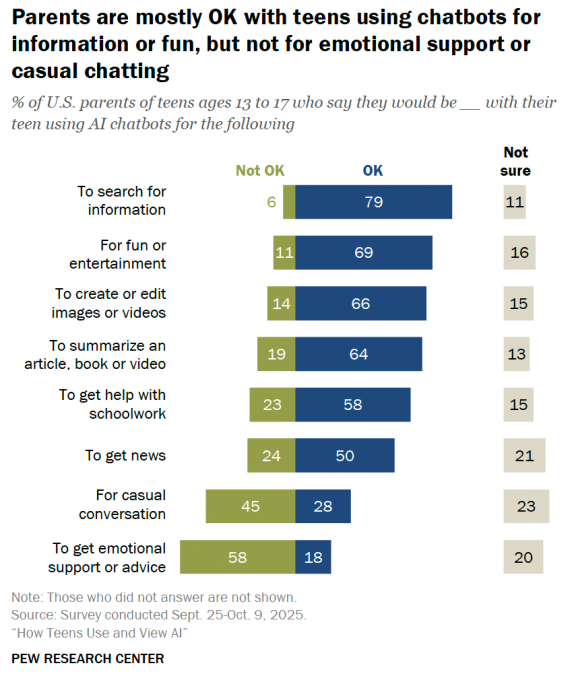
AI chatbots have become embedded in the lives of American teenagers, according to a report published Tuesday by the Pew Research Center.
While the most common uses of AI among this demographic are to search for information (57%) and get help with schoolwork (54%), teens are also using AI to fill roles that would typically be occupied by friends or family. Sixteen percent of U.S. teens say they use AI for casual conversation, while 12% use AI chatbots for emotional support or advice.
Some teens may find solace in talking to chatbots, but mental health professionals are wary. General purpose tools like ChatGPT, Claude, and Grok are not designed for such uses, and in the most extreme cases, these chatbots can have life-threatening psychological effects.
“We are social creatures, and there’s certainly a challenge that these systems can be isolating,” Dr. Nick Haber, a Stanford professor researching the therapeutic potential of LLMs, told TechCrunch recently. “There are a lot of instances where people can engage with these tools and then can become not grounded to the outside world of facts, and not grounded in connection to the interpersonal, which can lead to pretty isolating — if not worse — effects.”

Pew’s survey also shows a discrepancy between teenagers’ self-reported AI usage and the extent to which their parents think they engage with this technology. About 51% of parents said that their teen uses chatbots, while 64% of teens reported using them.
The majority of parents are okay with their teens using AI to search for information (79%) or get help with schoolwork (58%), but far fewer parents approve of their teens using AI chatbots for casual conversation (28%) or to get emotional support or advice (18%). In fact, 58% of parents are not okay with their child using AI for such purposes.
AI safety is a contentious topic among leading tech companies, to say the least. But one popular chatbot maker, Character.AI, made the choice to disable the chatbot experience for users under the age of 18. This decision followed public outcry and lawsuits filed over two teenagers’ suicides, which took place after prolonged conversations with the company’s chatbots. OpenAI, meanwhile, made the decision to sunset its particularly sycophantic GPT-4o model, which sparked backlash from people who had come to rely on the model for emotional support.
Techcrunch event
Boston, MA
|
June 9, 2026
Though a majority of teens use AI chatbots in some way, they have mixed feelings about the impact of this kind of technology on society. When asked how they think AI will impact society over the next 20 years, 31% of teens said the impact would be positive, while 26% said it would be negative.

Initial guess-work about Apple’s low-cost MacBook in 2023 set pricing at about $500, but surprise increases in component pricing since then are a problem in 2026.

Apple MacBooks
Industry forecasts project Apple’s MacBook shipments will rise 1.4% quarter over quarter and 3.7% year over year in early 2026. Total MacBook shipments are expected to reach 21 million units in 2026, up from 20.55 million in 2025, a modest gain that stands out in a weakening market.
Global notebook shipments are expected to decline in early 2026 due to cautious enterprise spending and a slower consumer upgrade cycle. Apple’s expansion is happening against that backdrop, not in spite of it.
Continue Reading on AppleInsider | Discuss on our Forums

why waking early won’t make you more successful

Family Offers $1 Million Reward for Recovery Amid Ongoing Search

Ripple CTO Details Why XRPL Prevents Any Single Entity from Owning the Chain


-

 Video6 days ago
XRP News: XRP Just Entered a New Phase (Almost Nobody Noticed)
-

 Politics3 days ago
Baftas 2026: Awards Nominations, Presenters And Performers
-

 Fashion5 days ago
Weekend Open Thread: Boden – Corporette.com
-

 Sports2 days ago
Women’s college basketball rankings: Iowa reenters top 10, Auriemma makes history
-

 Politics2 days ago
Nick Reiner Enters Plea In Deaths Of Parents Rob And Michele
-
 Sports7 days ago
Clearing the boundary, crossing into history: J&K end 67-year wait, enter maiden Ranji Trophy final | Cricket News
-

 Crypto World1 day ago
XRP price enters “dead zone” as Binance leverage hits lows
-

 Business3 days ago
Mattel’s American Girl brand turns 40, dolls enter a new era
-

 Business3 days ago
Law enforcement kills armed man seeking to enter Trump’s Mar-a-Lago resort, officials say
-

 Entertainment7 days ago
Dolores Catania Blasts Rob Rausch For Turning On ‘Housewives’ On ‘Traitors’
-
 NewsBeat2 days ago
‘Hourly’ method from gastroenterologist ‘helps reduce air travel bloating’
-

 Tech3 days ago
Anthropic-Backed Group Enters NY-12 AI PAC Fight
-

 NewsBeat3 days ago
Armed man killed after entering secure perimeter of Mar-a-Lago, Secret Service says
-

 Tech1 day ago
Unsurprisingly, Apple's board gets what it wants in 2026 shareholder meeting
-

 Politics3 days ago
Maine has a long track record of electing moderates. Enter Graham Platner.
-

 Crypto World7 days ago
WLFI Crypto Surges Toward $0.12 as Whale Buys $2.75M Before Trump-Linked Forum
-
 NewsBeat20 hours ago
Police latest as search for missing woman enters day nine
-

 Crypto World20 hours ago
Entering new markets without increasing payment costs
-
 Sports2 days ago
2026 NFL mock draft: WRs fly off the board in first round entering combine week
-

 Crypto World6 days ago
83% of Altcoins Enter Bear Trend as Liquidity Crunch Tightens Grip on Crypto Market