







Connect with us
DAPA Banner
DAPA Coin
DAPA
COIN PAYMENT ASSET
PRIVACY · BLOCKDAG · HOMOMORPHIC ENCRYPTION · RUST
ElGamal Encrypted MINE DAPA
🚫 GENESIS SOLD OUT
DAPAPAY COMING

Tech

Best Sports Streaming Service for 2026

Published

on

Watching sports in the streaming era can be a fractured and frustrating experience for fans. Leagues have found it immensely lucrative to slice up their schedules and sell portions off to the various streaming services, each of which is desperate for live sports programming. This leaves most fans without a single subscription that covers all the games they want to watch. Instead, you need to cobble together a collection of services and then remember which games are on which service on which nights.


Pros

  • Robust live channel selection
  • Excellent cloud DVR
  • Great interface and useful search bar


Cons

  • Not a lot included in 4K upgrade

Peacock, owned by NBC, offers some live sports to go along with its on-demand entertainment. The $11-a-month Premium tier gives you access to the NBA playoffs through the Western Conference Finals as well as English Premier League soccer, select WWE events, Indy Car races and some PGA golf tournaments. The service also airs a few other less popular sports, such as rugby, figure skating, cycling and track and field. Access to Sunday Night Football is great during the NFL season, but for most of the year, the platform is best suited for soccer and wrestling fans. You can upgrade to the Premium Plus plan at $17 per month to stream ad-free.

Advertisement


Pros

  • Low price
  • Live NBA playoffs, WWE, Premier League


Cons

  • More sports content available elsewhere

Prime Video will show first- and second-round games through May 17.


Pros

  • Included with Amazon Prime


Cons

  • Limited sports content beyond NBA playoffs

Hulu Plus Live TV offers an interesting middle ground for sports fans. On the one hand, the service lacks the ability to get many league-owned channels, but on the other, it comes automatically bundled with an ESPN Unlimited subscription. 


Pros

  • Solid channel lineup Hulu on-demand
  • Disney Plus and ESPN Unlimited included
  • Unlimited DVR


Cons

  • Fewer channels than YouTube TV

ESPN’s direct-to-consumer streaming service comes in two flavors. The ESPN Unlimited plan costs $30 a month (or $300 a year) and lets you stream all ESPN linear networks: ESPN, ESPN2, ESPNU, ESPNews, ESPN Deportes, SEC Network and ACC Network. You also get access to programming on ESPN on ABC, ESPN Plus, ESPN3, SECN Plus and ACCNX.


Pros

  • Lots of live NHL and other sports
  • Original content
  • Team-centric features


Cons

  • Pricey without bundle
  • No live NFL or NBA games

DirecTV has grown to offer streaming-only packages, including its new-ish MySports subscription for $70 a month.

Advertisement


Pros

  • Carries large selection of sports channels and networks
  • Ideal for channel surfers
  • Live pause feature


Cons

  • Expensive
  • Must upgrade to access most RSNs

Fubo starts at $56 a month for its Sports bundle, but you’ll need the $74-a-month Pro plan to get most of the RSNs if offers. It includes ESPN, but not TBS and TNT, though that’s less of an issue now that the NBA has parted ways with Turner. It also has most of your local networks, like ABC, NBC, CBS and Fox, along with FS1, FS2, BeIn Sports, the Big 10 and the Golf Channel. 


Pros

  • Great for soccer fans
  • Easy to navigate
  • Lots of channels for live sports


Cons

  • Lacks TNT, TBS and other Turner channels
  • Expensive

The Sling TV packages don’t have a ton to offer any but the most casual fan. Sling Blue currently lacks a single RSN, but you can use it to watch some national broadcasts. Sling TV’s Orange plan includes ESPN, while the Blue plan has FS1 and the NFL Network — but neither gives you access to ABC, which could be a problem for many fans.


Pros

  • Inexpensive live TV option
  • Can use AirTV 2 tuner for local channels
  • Offers ESPN, TBS, FS1


Cons

  • Little access to local stations

Take the NBA playoffs, for example, where you needed to subscribe to three streaming services to watch nationally televised games on any given night this past season. And this situation carries into the playoffs with games on ESPN, NBC/Peacock and Amazon Prime Video.

If you’re more of a diehard fan of your local MLB team and care more about watching its games than catching national broadcasts, you’ll need a regional sports network. And options are limited for cord-cutters. Fubo and DirecTV are the only live TV streaming services that offer a wide selection of RSNs. A better bet for watching baseball is an in-market streaming plan for your team.

Advertisement

Given the range of sports and sports fans, it’s impossible to point to one streaming service as the single solution for your sports-watching needs. Most likely, you will need to mix and match. But I do have some good news to share for frustrated fans. 

For one, there are no long-term contracts with any of the streaming services, which means you can sign up at the start of the season and cancel your subscription at the end — or somewhere in the middle if your team is suffering through a rough season to the point you no longer want to watch.

For another, some of the live TV streaming services, including Fubo and DirecTV, have started offering skinny bundles geared towards watching sports. These skinny bundles have a reduced set of channels for a lower monthly cost, which can save you some money (or allow you to deploy some of your sports-watching budget to another streamer you might need). And Sling now offers Day, Weekend and Week passes starting at $5 that let you jump in and out for a specific game or two.

At CNET, we’ve done the research to help you assemble the best roster of streaming services for the sports and teams you want to watch. You might need to add and subtract from your lineup depending on the season to keep your monthly costs at a reasonable level, but there is probably a small group of streaming services that will work for you on any given month of the year.

Advertisement

Keep reading to see the best streaming services for sports fans and learn which sports each service is best for watching as you map out the best lineup of streamers for the sports and teams you care about.

Best sports streaming services of 2026

Pros

  • Robust live channel selection
  • Excellent cloud DVR
  • Great interface and useful search bar

Cons

Advertisement
  • Not a lot included in 4K upgrade

YouTube TV costs $83 a month, though new subscribers can get a discount for the first few months. And it offers skinny bundles starting at $55 a month based on different genres and sports.

YouTube TV offers four RSNs, along with FS1, FS2, ESPN and all of the major national networks. The standard package includes just about every league channel with the exception of the NHL Network. There is an additional Sports Plus package, but it doesn’t offer much other than Tennis Channel and NFL Red Zone, so you might be able to skip it.

Plug in your ZIP code on YouTube TV’s welcome page to see which local networks and RSNs are available in your area.

Advertisement

Pros

  • Low price
  • Live NBA playoffs, WWE, Premier League

Cons

  • More sports content available elsewhere

Peacock, owned by NBC, offers some live sports to go along with its on-demand entertainment. The $11-a-month Premium tier gives you access to the NBA playoffs through the Western Conference Finals as well as English Premier League soccer, select WWE events, Indy Car races and some PGA golf tournaments. The service also airs a few other less popular sports, such as rugby, figure skating, cycling and track and field. Access to Sunday Night Football is great during the NFL season, but for most of the year, the platform is best suited for soccer and wrestling fans. You can upgrade to the Premium Plus plan at $17 per month to stream ad-free.

Advertisement

Pros

  • Included with Amazon Prime

Cons

Advertisement
  • Limited sports content beyond NBA playoffs

Prime Video will show first- and second-round games through May 17.

Prime Video is included with an Amazon Prime subscription for $15 a month or $139 a year. You can also subscribe only to Prime Video for $9 a month.

Advertisement

Pros

  • Solid channel lineup Hulu on-demand
  • Disney Plus and ESPN Unlimited included
  • Unlimited DVR

Cons

  • Fewer channels than YouTube TV

Hulu Plus Live TV offers an interesting middle ground for sports fans. On the one hand, the service lacks the ability to get many league-owned channels, but on the other, it comes automatically bundled with an ESPN Unlimited subscription. 

Hulu Plus Live TV costs $90 a month and carries five RSNs along with all the major networks, plus ESPN, FS1 and FS2. It also offers the NFL Network, but even the Sports add-on lacks the MLB, NHL, NBA or Tennis channels. The biggest appeal of the add-on is the inclusion of NFL Red Zone. Otherwise, it doesn’t bring much value to the package. 

The inclusion of the Disney bundle might make Hulu Plus Live TV more appealing than some of the other services on this list. Not only do you get full access to the sports on ESPN Unlimited, but you also get Disney Plus. Perhaps Hulu Plus Live TV could be a good compromise for sports fans who are also Disney lovers or who share a house with those who are. 

Advertisement

Click the “View all channels in your area” link at the bottom of Hulu Plus Live TV’s to see which local networks and RSNs are available where you live.

Advertisement

Pros

  • Lots of live NHL and other sports
  • Original content
  • Team-centric features

Cons

  • Pricey without bundle
  • No live NFL or NBA games

ESPN’s direct-to-consumer streaming service comes in two flavors. The ESPN Unlimited plan costs $30 a month (or $300 a year) and lets you stream all ESPN linear networks: ESPN, ESPN2, ESPNU, ESPNews, ESPN Deportes, SEC Network and ACC Network. You also get access to programming on ESPN on ABC, ESPN Plus, ESPN3, SECN Plus and ACCNX.

There is also a $13-a-month ESPN Select plan that is like a rebranding of ESPN Plus. It offers you access to thousands of live games — including small college conferences, whose games you can’t watch anywhere else — but not the NFL or NBA.

An ESPN Unlimited subscription encompasses a lot of sports — more than 47,000 live events a year, according to ESPN. There’s the NFL and WWE with recent major deals, and ESPN’s rights portfolio also includes the “NBA; NHL; MLB; WNBA; UFC; UFL; SEC; ACC; Big 12; College Football Playoff; 40 NCAA championships, including the NCAA Women’s Basketball Championship; LaLiga, Bundesliga, NWSL and FA Cup soccer; Australian Open, Wimbledon and US Open tennis; The Masters, PGA Championship, PGA Tour and TGL golf” and more, according to the company.

Advertisement

For NFL fans, this ESPN Unlimited lets you watch every Monday Night Football game and the ManningCast during the regular season, as well as one Wild Card playoff game.

For NBA fans, an ESPN Unlimited subscription will let you watch 80 regular-season games — that includes games shown on ESPN and ABC. It will show Wednesday night doubleheaders throughout the season before adding Friday night doubleheaders and Saturday night and Sunday afternoon games starting midseason.

Advertisement

Pros

  • Carries large selection of sports channels and networks
  • Ideal for channel surfers
  • Live pause feature

Cons

  • Expensive
  • Must upgrade to access most RSNs

DirecTV has grown to offer streaming-only packages, including its new-ish MySports subscription for $70 a month.

It’s the priciest of the five major live TV streaming services, but it’s also the one with the most RSNs and offers the most for sports fanatics. Its cheapest signature offering is the $85-a-month Entertainment package that includes the major networks as well as ESPN and FS1. You’ll need to move up to the Choice plan to get any available RSN and many league channels, such as the Big Ten Network and NBA TV. You can use its channel lookup tool to see which local channels and RSNs are available in your area.

Advertisement

If you don’t mind fewer channels, check out the MySports Genre Pack, a budget-friendly option with 20-plus channels and access to ESPN Unlimited at no extra charge. Channels include NBC, FS1 and NBA TV.

Advertisement

Pros

  • Great for soccer fans
  • Easy to navigate
  • Lots of channels for live sports

Cons

  • Lacks TNT, TBS and other Turner channels
  • Expensive

Fubo starts at $56 a month for its Sports bundle, but you’ll need the $74-a-month Pro plan to get most of the RSNs if offers. It includes ESPN, but not TBS and TNT, though that’s less of an issue now that the NBA has parted ways with Turner. It also has most of your local networks, like ABC, NBC, CBS and Fox, along with FS1, FS2, BeIn Sports, the Big 10 and the Golf Channel. 

You’ll have to pay an extra $8 a month for the Fubo Extra Package or the $105-a-month Elite streaming tier, which includes Sports Plus for the NHL, NBA, MLB, SEC, PAC 12 and Tennis channels. Check out which local networks and RSNs FuboTV offers here.

Advertisement

Pros

  • Inexpensive live TV option
  • Can use AirTV 2 tuner for local channels
  • Offers ESPN, TBS, FS1

Cons

Advertisement
  • Little access to local stations

The Sling TV packages don’t have a ton to offer any but the most casual fan. Sling Blue currently lacks a single RSN, but you can use it to watch some national broadcasts. Sling TV’s Orange plan includes ESPN, while the Blue plan has FS1 and the NFL Network — but neither gives you access to ABC, which could be a problem for many fans.

The Sports Extra add-on, which costs $11 a month for either the Blue or Orange plan or $15 for the combined Orange and Blue plan, offers the NBA, NHL and MLB channels, along with the PAC 12, BeIn Sports and Tennis Channel, among others.

The individual plans start at $46 a month each, and the combined Orange and Blue plan starts at $61 a month (in some regions, it’s a little more). You can see which local channels you get here.

Sling is unique among live TV streaming services with its one-day pass for $5 for watching a specific game on a specific night. There are also weekend and week passes, which could be useful for watching the end of, say, a golf or tennis tournament.

Advertisement
  • Availability of sports programming: Some services offer greater access to live broadcasts on major networks, while some platforms are better for specific leagues or sport types.
  • Local channels/RSNs: You’ll need a live streaming service to watch most RSNs without cable, but if you want to watch games on a local station, an antenna or basic live TV streaming package could meet your needs.
  • Simultaneous streams: Services usually charge more for more streams. Be sure you’re covered for yourself and other members of your household, and consider whether you have to pay extra to share your account.

You may know many of the services on this list, but it’s not fully reflective of every sports streaming platform available. There are separate apps out there for Fox Sports, NBA, NFL, DAZN, F1 TV and more that may offer what you want. There are plenty of other ways to stream and other options to choose from. As we analyzed these streaming platforms, we considered a few things, including price, content availability and user-friendly navigation.

We considered which platforms provide live channels across the spectrum for football, soccer, basketball, baseball, golf, tennis, wrestling and other fields. We also analyzed which ones offer access to RSNs and the most budget-friendly platforms for you to stream major sporting events. Some services are worth the cost for access to live broadcasts, and while the less expensive platforms are better for a single games or seasonal runs.

Sports streaming services compared

Monthly price Channels, sports RSNs?
DirecTV Starts at $85 ESPN, ABC, NBC, Fox, CBS, TBS, TNT, F1 Yes
Hulu with Live TV Starts at $90 ABC, NBC, CBS, Fox, ESPN, TBS, TNT, FS1, FS2 Limited
Fubo Starts at $56 ABC, NBC, CBS, Fox, ESPN FS1, FS2, Big 10, RSNs Yes
YouTube TV Starts at $55 ABC, NBC, CBS, Fox, ESPN, TBS, TNT, FS1, FS2, league channels Limited
Sling Starts at $46 ESPN, TBS, FS1, some major networks No
ESPN Unlimited $30 NBA, NHL, MLB, UFC, college sports, soccer, tennis, golf No
Peacock Starts at $11 NBA, Premier League, WWE, golf, rugby No

HBO Max: The video-on-demand streaming service launched a sports add-on package called B/R Sports, and it’s available on the Standard and Premium plans. You can stream content such as NBA, NHL, NCAA and US Soccer games. Because it’s an add-on option, we left the service off this list, but if you’re an HBO Max subscriber — and cord-cutter — who wants to watch live games from TBS, TNT and truTV, it’s a great option.

Advertisement

Advertisement

Don’t some on-demand streaming services show live sports, too?

Yes. Hulu and Prime Video air live sports once in a while, but their sports offerings are currently fairly limited. 

Advertisement

Hulu has started streaming select NHL hockey games on its regular service, but it tends to save most of its sports streaming for its Hulu Plus Live TV package.

Prime Video has partnered with the NFL to exclusively stream Thursday Night Football. This means that anyone who wants to watch their team play on Thursday night will need to have a Prime Video subscription. If you’re not an Amazon Prime member and only want a standalone streaming subscription, it’s $9 per month. This could be important for fans while the season is in action who may only want to use the streaming service for sports. Prime airs a few WNBA games over the summer, but that’s about it.

While these services do air some sports offerings, they focus mainly on on-demand entertainment. This might change in the future, but right now they don’t offer too much specifically for sports fans.


Show more

Advertisement

Is there a lag or delay when streaming sports live compared with cable?

Advertisement

There is. The streaming delay is often as long as 40 seconds, compared with around 5 seconds for cable and satellite.

This might be particularly worrisome for those with X, group chats and phone push notifications, where a delay of this length can lead to spoilers of big plays. It could also potentially make it difficult for sports bettors to get in on the action. If you plan on betting, it might be a good idea to watch your game via cable or satellite.

Advertisement

Turning off your phone’s notifications and staying away from X will let you stream your games without spoilers. Sure, your friends might try to call and text to brag about the score, but you can always choose to ignore them while you watch.


Show more

Advertisement

Can I cancel my subscriptions when the season is over?

Advertisement

Yes. All of these services are free of contracts and you can cancel at any time. Some offer free trials or special introductory discount memberships, which you will only get to use once. If you cancel and return at a later date, you will most likely have to pay full price. That said, you might not need a particular service year-round, which might make temporary cancellation an appealing way to save a few bucks.


Show more

Advertisement

How do I access these services on my devices?

Advertisement

All of the services on this list have apps that you can download. You will need a smart TV or a streaming device to watch the content on your TV. Just search for the name of the service on your smart TV or device, download the app on your TV and enter your sign-in information, and you should be ready to stream.

You can also download the apps of these services on your phone, iPad or Android device for streaming around the house or on the go.


Show more

Source link

Advertisement
Continue Reading
Click to comment

You must be logged in to post a comment Login

Leave a Reply

Tech

Out Of All The E-Bikes Sold At Walmart, Shoppers Say This One Is The Best

Published

on


We may receive a commission on purchases made from links.

With gas prices soaring, electric bikes have become a popular alternative for commuting. It’s a great way to reduce road congestion, air pollution, and encourage a healthy lifestyle. However, as e-bikes become more popular, it can be tough to know which one is best for you. Walmart has a huge collection of e-bikes, but one has stood out with a 4.8 out of 5 stars after 1,419 reviews. 

Advertisement

The Ancheer Gladiator electric vehicle is on sale for $430 at this time of writing, discounted from its usual $740 MSRP. However, customers feel it’s well worth the money. The 500W motor generates enough power to reach 20 miles per hour and the 48V, 10.4Ah lithium-ion battery offers 60 miles of range. Reviewers say that the battery performs well, with one reporting that their bike had only used about two-thirds of its battery life after a 35 mile trip into the countryside.

With a Shimano 3+7 shock absorption system and both front and rear disc brakes brakes, the Gladiator has capabilities that both city commutes and trail cruisers can appreciate. One reviewer said they bought the Gladiator for hunting, using it to go up and down steep dirt roads. Another added that it’s easy to pedal and that its LCD display is straightforward and easy to understand.

Advertisement

Is the ANCHEER Gladiator good for off-roading?

Ancheer squarely markets the Gladiator as a mountain bike, and much of the ad copy on the e-bike’s listing reflects that market segment. The brand mentions using the bike to cruise a mountain and explore new trails thanks to its ability to tackle “extreme conditions.” But how much of this is just PR language and how much is actual capability?

The truth seems to be closer to the latter. Someone who put 300 miles on their Gladiator, including a lot of pretty technical trails, found that the e-bike could really handle anything that was thrown at it without even getting a flat tire. They didn’t go so far as to call it a mountain bike, but they did report that riding it was a fun experience according to their Reddit review

There are going to be performance limitations when you get an e-bike that is this cost-effective. Multiple reviews on Walmart felt the brakes were nowhere near where they should be. It’s not going to be as capable as more trusted brands focused on off-roading, and that’s reflected in the price difference — Yamaha’s mountain e-bikes cost upward of $6,500. However, SlashGear has previously mentioned the Ancheer Gladiator in our list of e-bikes built for rough terrain since it’s still plenty capable and reliable on easier adventures.

Advertisement


Source link

Advertisement
Continue Reading

Tech

AI agents can now make you a personalised podcast on Spotify

Published

on

Spotify is leaning even harder into AI, and this time it wants your chatbot to double as a podcast producer.

The streaming service has launched a new beta feature called Save to Spotify. This lets AI agents like OpenClaw, Claude Code and OpenAI Codex generate personalised podcast-style audio briefings directly inside your Spotify library.

The idea is fairly simple: instead of reading through notes, schedules or research documents yourself, you can ask an AI assistant to turn them into an audio episode. You can then listen to it later. Spotify says the feature can handle everything from daily briefings and travel plans to study notes and deep dives into specific topics.

Once generated, the Personal Podcast is saved like a regular episode inside Spotify. It is ready to stream during a commute, workout or wherever else you normally catch up on podcasts.

Advertisement

Getting started is a little more developer-focused than Spotify’s usual features. Users need to install the Save to Spotify CLI tool from GitHub. Then they must connect their Spotify account through a browser login. After that, they prompt their AI agent to create a podcast. Spotify automatically adds the generated episode to the user’s library.

Advertisement

Spotify also shared a few examples of how to use the tool. One suggested prompt creates a five-minute morning briefing using your calendar, inbox and news feeds. Another turns holiday plans into an audio travel itinerary complete with restaurant recommendations and airport routes. You could even ask for a narrated explainer on this year’s World Cup.

The move shows how aggressively Spotify is embedding itself into the AI ecosystem beyond music streaming. The service already integrates with AI assistants like Claude and ChatGPT for playlist controls and recommendations. However, Save to Spotify pushes things much further by treating AI-generated audio as a first-class feature inside the app.

Advertisement

Spotify also quietly confirmed another AI update alongside the launch: users can now interact with the AI DJ in four additional languages beyond English and Spanish.

For now, Save to Spotify remains in beta. However, it’s a pretty clear sign of where Spotify sees the platform heading next — less passive listening, more AI-generated audio built around your own life.

Source link

Advertisement
Continue Reading

Tech

Latest OnePlus 16 rumours show OnePlus has something to prove

Published

on

The OnePlus 16 might still be months away, but if the latest rumours are accurate, OnePlus is preparing one of its most over-the-top flagship phones yet.

According to leaks shared by Digital Chat Station, the OnePlus 16 could arrive with a staggering list of specs. These may include a 240Hz display, LPDDR6 RAM, a 200MP zoom camera, and a massive 9,000mAh battery. In addition, Qualcomm’s next-gen Snapdragon 8 Elite Gen 6 Pro chip is also tipped to power the device.

Some of those upgrades make sense. Others feel like OnePlus is simply turning every number up to the maximum.

The jump to a 200MP zoom camera is probably the most believable move here. OnePlus phones have traditionally lagged behind Samsung and Google when it comes to camera consistency, so improving the telephoto hardware would be a logical next step.

Advertisement

The rest of the rumoured spec sheet, though, borders on excessive. A 240Hz refresh rate would comfortably outpace almost every flagship on the market. However, realistically, very few apps or games would fully support it. Even the OnePlus 15’s already-aggressive 165Hz panel felt beyond what most users actually needed.

Advertisement

The same goes for the supposed 9,000mAh battery. That would make it one of the biggest batteries ever fitted into a mainstream smartphone. In fact, it would be nearly double the size of the Galaxy S26 Ultra’s 5,000mAh cell.

What makes these leaks more interesting is the timing. Rumours surrounding OnePlus itself haven’t exactly been calm lately, with reports suggesting Oppo could scale back OnePlus operations in the US; the company has already scaled back operations in the UK and Europe in recent weeks.

Advertisement

Alternatively, they could potentially merge the brand more closely with Realme. Nothing has been confirmed either way, but the uncertainty has been enough to spark questions. People are wondering where OnePlus fits within Oppo’s wider strategy.

That’s partly why the OnePlus 16 rumours feel so aggressive. This doesn’t sound like a company playing it safe. Instead, it sounds like a brand trying to build a headline-grabbing flagship. Their aim is to remind people what made OnePlus exciting in the first place.

There’s also a reason to stay cautious. Digital Chat Station reportedly edited the original leak post to remove some of the speculation, suggesting the details may still be in flux. But even if only half of these rumours prove true, the OnePlus 16 already sounds like it’s aiming to be one of 2026’s most outrageous Android phones.

Advertisement

Advertisement

Source link

Continue Reading

Tech

Worm rubs out competitor’s malware, then takes control

Published

on

Security

All your compromised credentials are belong to us now instead of the other gang

There’s a mysterious framework worming its way through exposed cloud instances removing all traces of TeamPCP infections, but it’s not benevolent by a long shot: Whoever is behind this bit of malware may be cleaning up who came before, but only so they can take their place.

Advertisement

Discovered by security outfit SentinelOne’s SentinelLabs researchers and dubbed PCPJack for its habit of stealing previously compromised systems from TeamPCP, the worm was first spotted in late April hiding among a Kubernetes-focused VirusTotal hunting rule. It stood out from known cloud hacktools, said SentinelLabs, because the first action it always takes is to eliminate tools associated with TeamPCP attacks. 

The script didn’t stop there, though.

“We initially considered that this toolset could be a researcher removing TeamPCP’s infections,” SentielLabs said. “Analysis of the later-stage payloads indicates otherwise.”

“Analyzing this script led us to discover a full framework dedicated to cloud credential harvesting and propagating onto other systems, both internal and external to the victim’s environment,” SentinelLabs continued. In other words, this thing will harvest credentials from everywhere it can get its hands on, and then find new, unsecured cloud environment targets to spread itself to. 

Advertisement

TeamPCP came onto the scene late last year, and since then has made a name for itself primarily by undertaking a successful compromise of the Trivy vulnerability scanner. That act spread credential-harvesting malware which attackers then used to pivot to more valuable targets, and became one of the most notable supply chain attacks in recent memory. 

Unlike TeamPCP’s campaign, which relied on the spread of compromised software by human actors, this one spreads on its own accord. 

Infections start when already-infected systems look for exposed services, including Docker, Kubernetes, Redis, MongoDB, and RayML, as well as exposed web applications. Once it finds a vulnerable environment, it runs a shell script on the target system that sets up an environment to download additional payloads and searches for TeamPCP processes and artifacts to kill. 

That part of the infection downloads the worm itself, along with modules to enable lateral movement, parse credentials and encrypt them for exfiltration, and for scanning the web for new environments to infect. 

Advertisement

From there, the worm goes to work with the second module in its kit that conducts the actual credential thefts. This portion of the infection targets environment variables, config files, SSH keys, Docker secrets, Kubernetes tokens, and credentials from a list of finance, enterprise, messaging, and cloud service targets so long that we recommend taking a look at it here, or just assuming whatever you’re using is probably being targeted. 

SentinelLabs noted that the lack of a cryptominer in the malware package is unusual, and said the particular services it targeted suggests its goal is either conduct its own spam campaigns and financial fraud with the stolen data, or to make the data it harvests available to those planning similar crimes. 

The worm’s practice of removing TeamPCP files could be opportunistic, or could mean there’s drama going on in the cybercrime world. 

“We have no evidence to suggest whether this toolset represents someone associated with the group or familiar with their activities,” SentinelLabs noted. “However, the first toolset’s focus on disabling and replacing TeamPCP’s services implies a direct focus on the threat actor’s activities rather than pure cloud attack opportunism.”

Advertisement

Because this is a worm relying on unsecured cloud and web app instances ripe for targeting, mitigation recommendations are pretty simple: Keep your cloud platforms secure, and ensure authentication is required even for instances of things like Docker and Kubernetes that aren’t exposed to the internet. ®

Source link

Continue Reading

Tech

ShinyHunters demands ransom after Canvas hack

Published

on

Hackers give operator Instructure until 12 May to ‘negotiate a settlement’.

Cyber extortion group ShinyHunters has claimed responsibility for a second breach into edtech giant Instructure – this time, for hacking into the Canvas login portal.

The hackers replaced the Canvas login page with a message that claimed responsibility for an earlier Instructure breach and threatened to leak stolen data if ransom demands aren’t met.

“ShinyHunters has breached Instructure (again). Instead of contacting us to resolve it they ignored us and did some ‘security patches’,” the message seen by news publications read.

Advertisement

“If any of the schools in the affected list are interested in preventing the release of their data, please consult with a cyber advisory firm and contact us privately at TOX to negotiate a settlement. You have till the end of the day by May 12 2026 before everything is leaked,” it continued.

Bleeping Computer reported that the threat actors’ message appeared in around 330 educational institutions’ portals. It was up for approximately 30 minutes before being taken down. ShinyHunters told the publication that the stolen data contains private messages, user records and enrolment data.

Canvas is used by more than 8,000 educational institutions globally, including several in Ireland, such as the University of Galway and Munster Technological University (MTU). The platform enables communication between students and faculty, and provides coursework management and grading services.

Earlier this week, MTU informed users of a cybersecurity breach into Instructure, which it believed, at the time, did not affect its services. Yesterday (7 May), the institution advised caution, and told staff and students that Canvas remains safe to use.

Advertisement

Meanwhile, in a statement to SiliconRepublic.com, the University of Galway said: “Services have been restored following a relatively low level of disruption in the last 24 hours. We are continuing to liaise with the company affected to understand the full nature and extent of the breach.”

According to the company’s status page, Instructure first began experiencing issues at around 6.30pm Irish Standard Time yesterday. At the time of publication, the services are back online for “most users”.

Last Friday (1 May), Instructure disclosed that it experienced a cybersecurity incident perpetrated by a criminal threat actor. ShinyHunters claimed responsibility for the attack and claimed to have stolen 280m records. The threat actor also published a list of more than 8,800 institutions that were affected by its attacks on Canvas.

On 6 May, Instructure said the stolen information includes “certain identifying information of users at affected institutions, such as names, email addresses and student ID numbers, as well as as messages among users”.

Advertisement

In March, ShinyHunters was linked to a breach of the European Commission’s Europa.eu platform, where 350GB of data, across multiple databases, was reportedly accessed and stolen.

Don’t miss out on the knowledge you need to succeed. Sign up for the Daily Brief, Silicon Republic’s digest of need-to-know sci-tech news.

Updated 8 May, 12.34 pm: The article has been updated with a statement from the University of Galway.

Advertisement

Source link

Continue Reading

Tech

Instagram’s Messaging Encryption is Ending. Here’s What You Should Know

Published

on

Friday is the last day for your encrypted Instagram DMs. After May 8, the platform will no longer support the feature, it announced in a help post.

Instagram said in March that it would stop offering end-to-end encryption to its roughly 3 billion users worldwide. At the time, Meta said the feature, which required people on the platform to opt in, had a low adoption rate.

A Meta spokesperson told CNET that nothing has changed in its plans since that announcement and repeated a statement from March: “Very few people were opting in to end-to-end encrypted messaging in DMs, so we’re removing this option from Instagram in the coming months. Anyone who wants to keep messaging with end-to-end encryption can easily do that on WhatsApp.”

Advertisement

WhatsApp is also owned by Meta.

Read more: I Tried Signal, Telegram and WhatsApp, and This Is the One I’d Recommend

The change means that there’s no longer the option to keep private messages on Instagram shielded from potentially prying eyes. By default, if law enforcement agencies are given access to someone’s Instagram messages, there’s no encryption to prevent them from reading them. With the option enabled, Instagram users could keep messages private, with only the keys on their devices able to unlock them. However, anyone in an encrypted chat could also share messages with Meta if they were reporting an incident, or with anyone else if they chose. 

How to get your encrypted messages

According to the help page message, you’ll be able to download any encrypted messages you have: “If you have chats that are affected by this change, you will see instructions on how you can download any media or messages you may want to keep,” the company said. “If you’re on an older version of Instagram, you may also need to update the app before you can download your affected chats.”

Advertisement

Source link

Continue Reading

Tech

Cloudflare says AI made 1,100 jobs obsolete, even as revenue hit a record high

Published

on

Cloudflare on Thursday joined a growing list of tech companies — including Meta, Microsoft, and Amazon — that have reported increased revenue alongside massive layoffs, attributing both trends to their use of AI.

Cloudflare, which provides internet security and performance services to millions of websites worldwide, announced it was cutting its workforce by approximately 20%, which equates to 1,100 people, it said as part of its first quarter 2026 earnings report on Thursday.

“We’ve never done something like this in Cloudflare’s history,” co-founder and CEO Matthew Prince said Thursday on the quarterly conference call, marking the first mass layoff in the company’s 16-year history. The company is cutting people from all teams and geographies except for salespeople who carry revenue quotas, CFO Thomas Seifert detailed on the call.

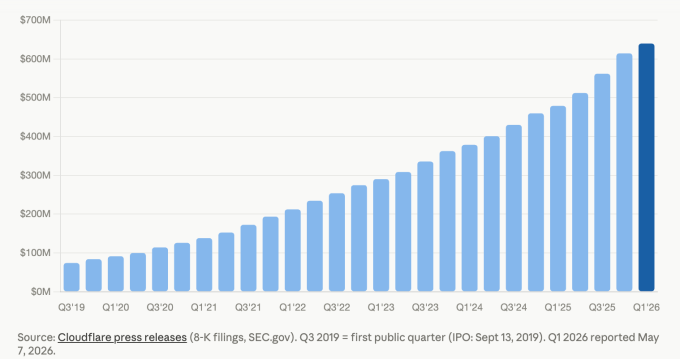
The news of the workforce cuts came as the company reported quarterly revenues of $639.8 million, a 34% year-over-year increase and the highest single quarter in the company’s history. However, this was coupled with a loss of $62.0 million compared with losing $53.2 million in the year-ago quarter.

Advertisement

That widening loss, even as revenue surged, highlights a familiar paradox in Cloudflare’s story: the company is growing fast but has yet to turn a consistent profit. But the loss was a smaller percentage of revenue, and the quarter was coupled with a lot of other positive indicators. For instance, Cloudflare reported that it had over $2.5 billion in “remaining performance obligations,” a year-over-year growth of 34%. RPO is the favorite metric these days to indicate revenue under contract but not yet delivered.

Hence, Prince insisted, the 20% cuts were not to reduce expenses but were strictly because of its use of AI.

“Today’s actions are not a cost-cutting exercise or an assessment of individuals’ performance; they are about Cloudflare defining how a world-class, high-growth company operates and creates value in the agentic AI era,” Prince and Cloudflare co-founder and COO, Michelle Zatlyn, wrote in a related blog post about the layoffs.

Techcrunch event

Advertisement

San Francisco, CA
|
October 13-15, 2026

Prince acknowledged on the call that even though Cloudflare has been selling AI-powered products, it was at first cautious about adopting AI itself.

Advertisement

“Internally, the tipping point was last November. At that point, across our teams, we began to see massive productivity gains, team members that were two, 10, even 100 times more productive than they had been before. It was like going from a manual to an electric screwdriver,” he described.

“Cloudflare’s usage of AI has increased by more than 600% in the last three months alone,” he added.

Image Credits:SEC filings; Cloudflare press releases /

Prince highlighted the internal use of AI coding, saying that virtually the entire R&D team is now using the company’s own Workers platform — a tool that lets developers build and run software directly on Cloudflare’s global network — including its vibe coding feature. He also noted that 100% of the code produced this way and deployed for use in Cloudflare’s products is “now reviewed by autonomous AI agents.”

But it’s not just developers who are using AI internally, he said. “Employees across the company from engineering to HR to finance to marketing run thousands of AI agent sessions each day to get their work done.”

As a result, these highly productive, AI-powered employees require fewer support staff, he argued.

Advertisement

“A lot of the support people that provide support behind them, those roles aren’t going to be the roles that, you know, drive companies going forward,” Prince said.

Interestingly, Prince says that Cloudflare “will continue to hire people, and we’ll continue to invest in them because the people that are embracing these tools are just so much more productive than we’d ever seen before. I would guess that in 2027 we’ll have more employees than we did at any point in 2026.”

Cloudflare said it ended its first quarter before layoffs with a headcount of about 5,500.

The pattern Prince described — deploying AI gains as justification for workforce reductions even during a period of strong revenue growth — is fast becoming a familiar script across the tech industry. Whether it reflects true structural transformation or acts as convenient cover for cost discipline is a question that investors and employees will be wrestling with for some time to come.

Advertisement

When asked by an analyst on the call why the company needed to cut so deeply after such a good quarter, Prince said, “Just because you’re fit doesn’t mean you can’t get fitter.”

When you purchase through links in our articles, we may earn a small commission. This doesn’t affect our editorial independence.

Source link

Advertisement
Continue Reading

Tech

Nothing’s open earbuds are finally getting a second colour

Published

on

Nothing has expanded the Nothing Ear (open) lineup with a blue colourway, set to go on sale on 11 May, nearly a year after the earbuds launched exclusively in white.

The addition marks the first time the Ear (open) has received an alternative finish, a gap that stood out against the broader Nothing earbud range, which launched with black and yellow options across other models in 2024, giving the open-ear variant a noticeably more limited visual identity from the start.

That single-colour restriction was an unusual choice for Nothing, a brand that has leaned heavily into distinctive industrial aesthetics and bold colour pairings as a core part of its market positioning across both phones and audio hardware since launching in 2021.

The new blue sits on the more restrained end of the spectrum for Nothing, described as a subdued shade rather than the vivid tone seen on the recently released Nothing Phone (4a), which adopted a brighter, more saturated blue finish that drew considerable attention at launch earlier this year.

Advertisement

Nothing teased the colourway earlier this week through its community forum under the codename “Flaaffy,” with the formal announcement confirming the 11 May release date following subsequent posts on the brand’s X account, where a short promotional caption referenced the ocean, the sky, and Yves Klein among its blue-themed references.

Advertisement

The Ear (open) itself sits in a still-emerging product category, with open-ear earbuds occupying a distinct space from in-ear and over-ear designs, prioritising ambient awareness over isolation and finding a growing audience among commuters and outdoor users who prefer to keep some connection to their surrounding environment.

Nothing has not announced any changes to the hardware, driver configuration, or software features alongside the new finish, meaning the blue Ear (open) carries the same specifications as the original white model released in 2024.

The blue Nothing Ear (open) goes on sale on 11 May, with pricing expected to match the existing model’s retail rate.

Advertisement

Source link

Continue Reading

Tech

NASA’s Curiosity Mars Rover Was Stuck in a Rock: Watch It Free Itself

Published

on

Problems in space can be complex and dangerous. But NASA’s Curiosity Mars rover spent the end of April embroiled in a much simpler problem: It got stuck in a rock.

Curiosity’s woes began on April 25 when it drilled into a 28-pound rock NASA nicknamed Atacama. In a moment that could’ve come straight out of a Flintstones episode, Curiosity became stuck, and when it tried to pull its drill out, it yanked the whole rock with it. 

“Drilling has fractured or separated the upper layers of rock in the past, but a rock has never remained attached to the drill sleeve,” NASA said in a blog post.  

Advertisement

Such problems are comical here on Earth, where we can just shake the tool and the rock around until it’s free. Not so on Mars. Radio signals can take nearly half an hour to travel between Earth and Mars. Curiosity’s controllers had to send instructions and then wait upward of 30 to 45 minutes to see if the rover did anything. 

It took five days of troubleshooting, but NASA’s Jet Propulsion Laboratory crew finally freed Curiosity from its overly attached new friend on May 1. 

A black and white image of NASA's Curiosity wrestling with a rock stuck on its drill arm.

Curiosity shook and rotated the rock around in the air for days before finally shaking it off. 

Advertisement

NASA

Watch Curiosity free itself from Mars’ clingiest rock

NASA’s Curiosity is known for sending panoramas of the Martian surface. Still, this time, the cameras caught Curiosity doing something many construction workers have to deal with every day. NASA posted two GIFs of the event. The first is a head-on shot, and the other is from a higher angle.

In the GIFs, you can see Curiosity drilling into the rock, a task it’s done many times before. Except when the rover lifts its arm, the rock comes along with it. The rover pauses right at the start before giving in to its fate and lifting the rock off the ground. 

Since these are stitched images, you don’t see the drill arm’s finer movements, but NASA says the rock was tilted, and the drill was rotated and vibrated multiple times over the course of the events. The rock finally falls free at the end. 

Advertisement

A representative for NASA told CNET that the rover was not harmed in the incident.

Source link

Advertisement
Continue Reading

Tech

How Commodore Made A Sync Splitter

Published

on

Recently we featured an unusual Commodore 8-bit computer on the bench of [Tynemouth Software] — a Commodore 64 in a PET case. One of the unique parts it had was a board which took the composite output from the mainboard and split out the sync pulses for the monitor, and now they’re back to give it a full reverse engineer.

Perhaps the first surprise is why this board is necessary at all, after all one might expect an 8-bit machine to have those signals already at hand. It seems that the VIC chip inside the 64 did the combination to composite internally, so no such luck for the Commodore engineers. The board they designed then is a complete and very well-engineered sync splitter.

The technology of a video signal has its origins in the 1930s, so it’s not hard to extract both vertical and horizontal sync pulses with little more than a few passive components and a couple of transistors. The trouble with such a simple approach is that the output will work, but it will be messy and crucially, not have quite the required timing. The Commodore board uses the same approach as a simple discrete circuit of having a pair of filters with a time constant selected to catch the relevant sync, but extends it with extra logic. There are one-shots designed to provide clean pulses of exactly the right length, and gates that provide blanking to remove the chance of pulses ending up where they shouldn’t. The video path is the only part which might differ from a conventional sync splitter, because as the output from the 64 is all-digital, it takes a TTL-level through a gate rather than a more conventional analogue path.

Advertisement

You can see the rest of the machine in our original write-up, and we’re reminded that the boards haven’t been cleaned at their owner’s request, to preserve their patina.

Source link

Advertisement
Continue Reading

Trending

Copyright © 2025