
Tech
Castlevania Port Lets You Whip-Crack Through Dracula’s Castle on the SEGA Master System

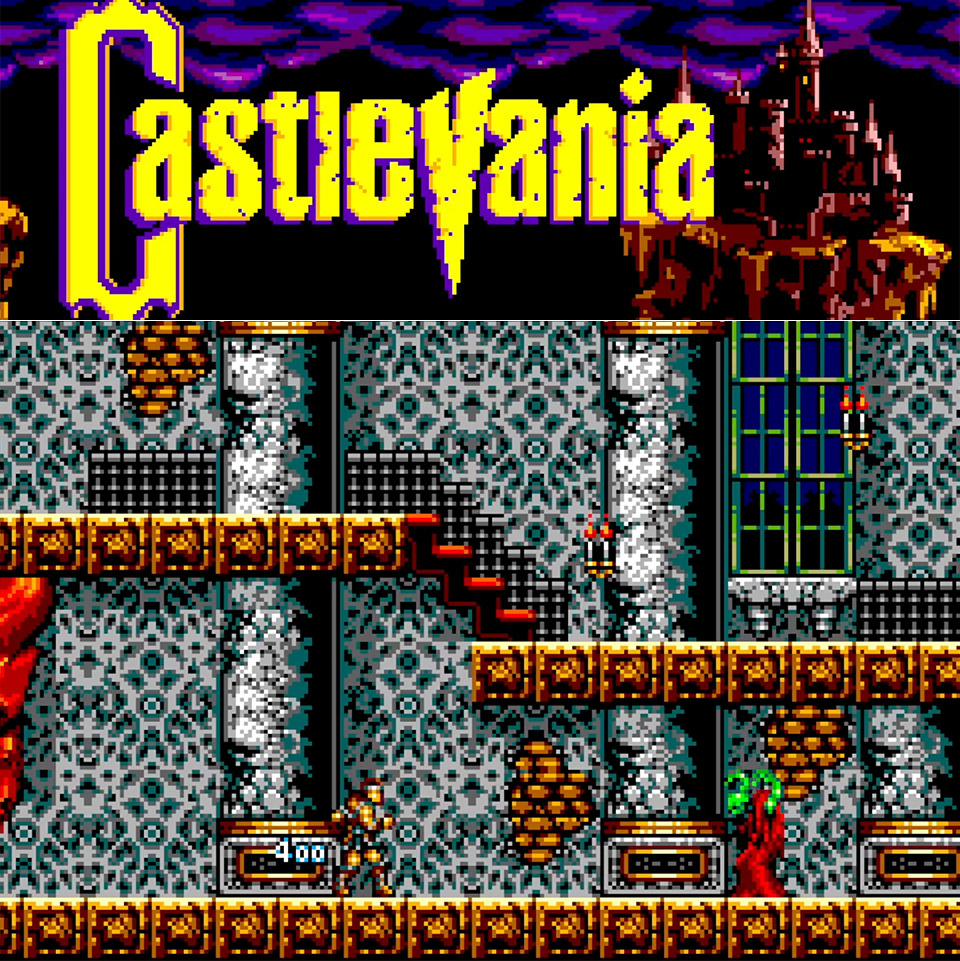
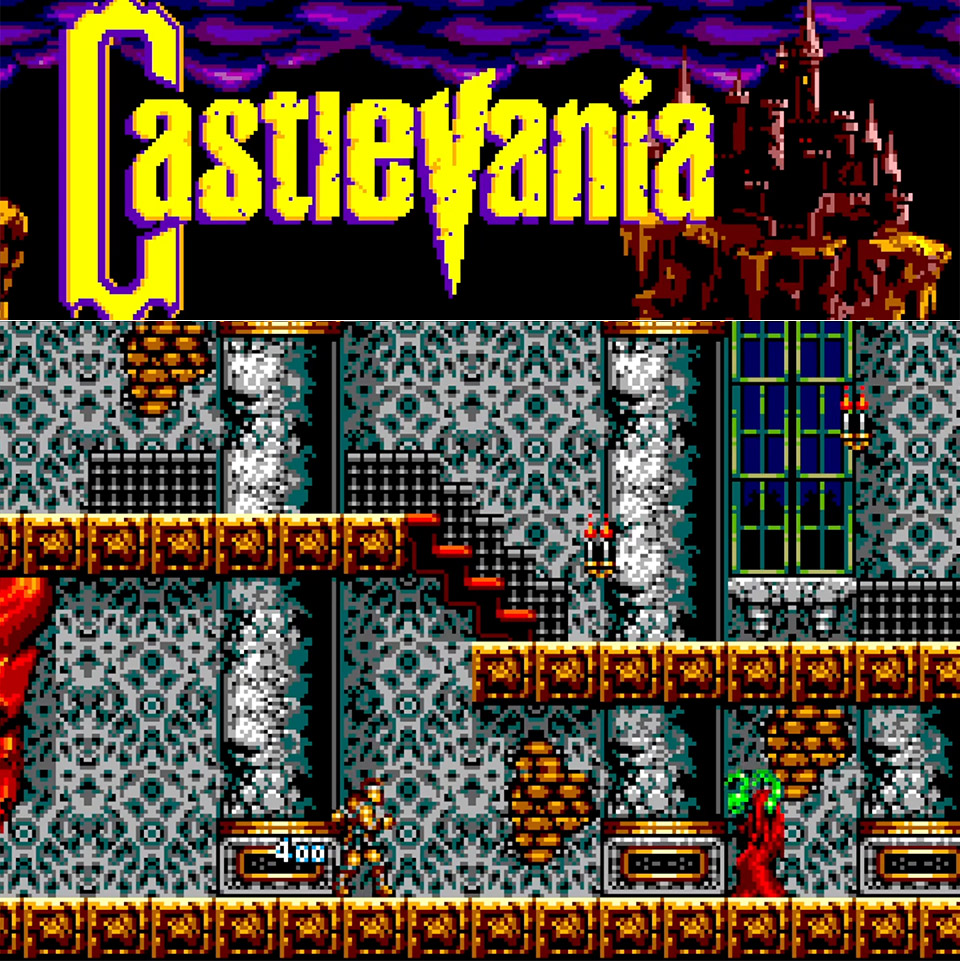
SEGA Master System owners can finally get their hands on a playable Castlevania. Developer xfixium stunned everyone by releasing sample version 0.1 on the SMS Power forums on February 14, 2026, right in the midst of Valentine’s Day. This homebrew project ports the 1986 NES classic to the 8-bit SEGA console, retaining the majority of the original while adding visual flare drawn from the X68000 version that inspired Castlevania Chronicles.
Xfixium handles the coding and visuals, while Mondo adds some great visual elements and Louis The Sega Nerd brings the soundtrack to life. When you boot up the ROM on an emulator or your actual hardware, you will see the title screen, intro sequence, and even a sound test. From there, you may choose between traditional mode, which looks like the NES, and enhanced mode, which has finer redrawn details that expand the Master System’s limited color palette.
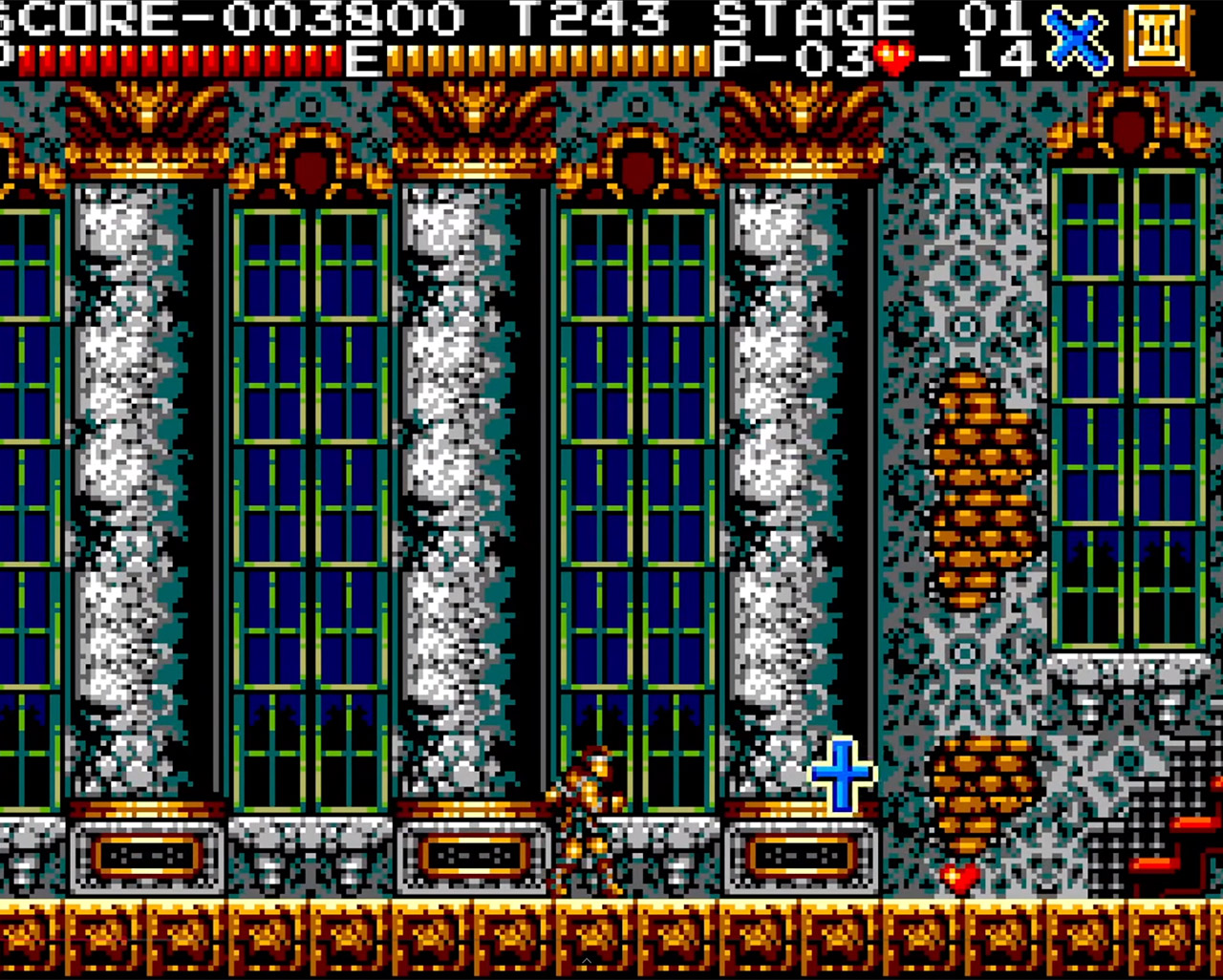
All six stages are available for exploration, however for the time being, Trevor Belmont’s sprite from Castlevania III serves as a temporary hero, whipping through castles that are still mostly vacant. You can climb stairs, avoid hazards, and cross dangerous platforms, but power-ups and adversaries are currently placeholders, with large empty spaces begging for your attention. There are a few problems, but the movement feels robust, and xfixium developed smooth scrolling from the start as a proof of concept.

In enhanced mode, the graphics really come to life. On the Master System display, the colors are more bright, the backgrounds have some depth, and the sprites have lovely sharp edges.Side-by-side comparisons reveal the difference, as what appeared blocky on the NES now appears much more detailed and with deeper tones. According to forum members, it appears similar to what the Mega Drive was capable of years ago and has a higher visual impact than the 8-bit NES.
The soundtrack conversions are straight from the NES but have been reworked to accommodate the Master System’s PSG chip. Louis has done an excellent job on songs such as the stage themes and boss music, and he has made the entire set available online for anyone to listen to. Right now, the early plays reveal some beautiful melodies, however a few notes fall short of the NES versions. The FM sound chips will be upgraded in the future, but the existing mix is already receiving high accolades for making the best use of the hardware.
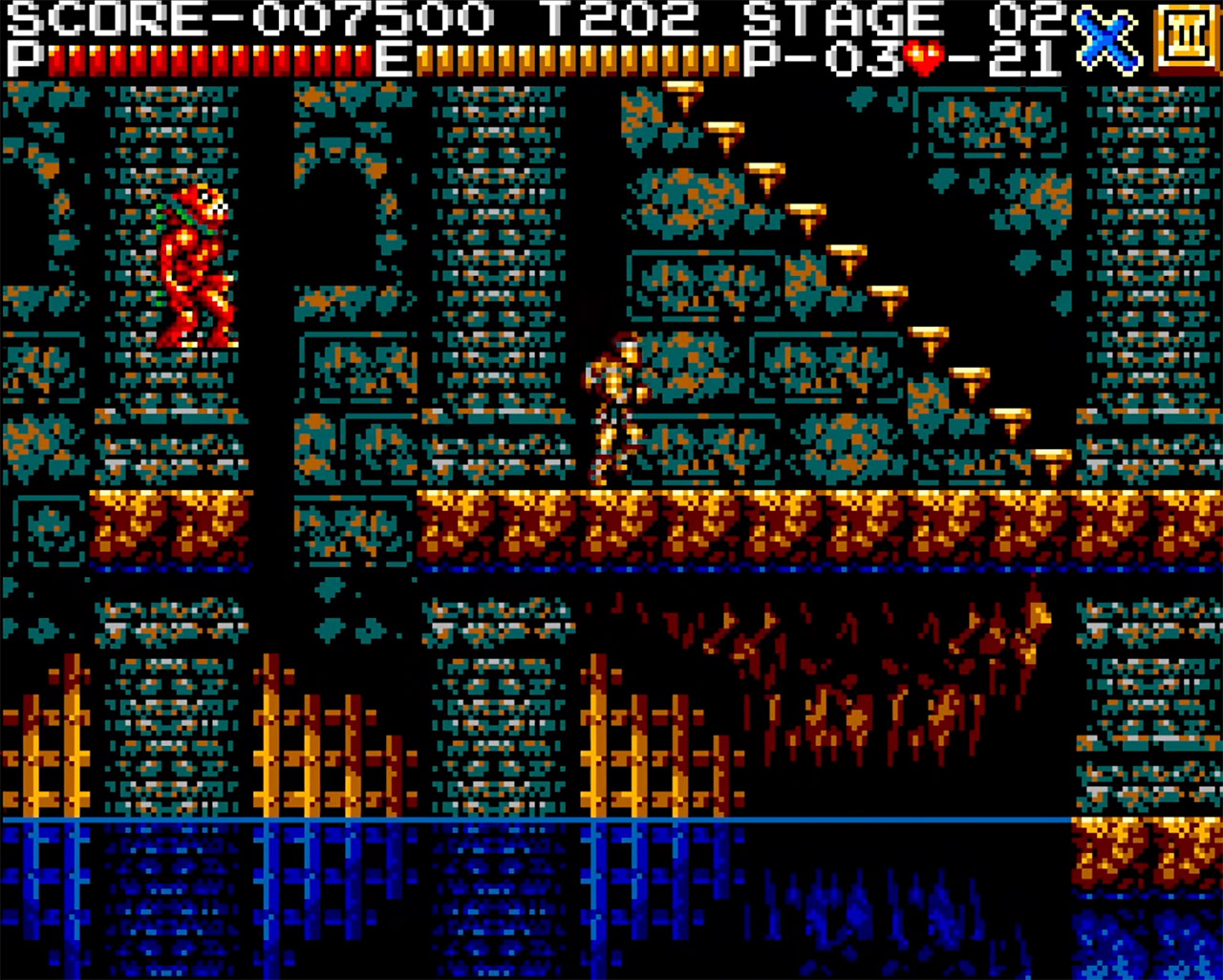
The standard two-button control scheme makes gameplay extremely simple. The whip button is on one side and the leap button on the other, while the D-pad controls all other movements with precision. There are no fancy additions yet, only pure action that requires you to properly timing your swings and hops. The good news is that real hardware testing show it operates extremely well, even on original Master Systems and newer clones, with no slowdowns in sight. Download it here.
[Source]


Nick Shirley—the right-wing creator whose YouTube investigation sparked the Trump administration’s immigration crackdown in Minnesota—claims that his most recent video about alleged fraud in California was bolstered by data provided by none other than Edward Coristine, one of the first members of the so-called Department of Government Efficiency (DOGE) known online as “Big Balls.”
Coristine, who joined DOGE at 19 years old with no prior government experience, was staffed across several agencies including the Social Security Administration (SSA) and the Small Business Administration (SBA). Before joining DOGE, Coristine worked at Elon Musk’s Neuralink for several months and founded a startup known for hiring black hat hackers.
In an interview with Coristine published on Shirley’s YouTube channel on Thursday, Shirley claims that Coristine personally pulled data on Medicaid spending for businesses based in California as potential targets. Coristine nodded along, telling Shirley that the government must create more opportunities to crowdsource fraud investigations.
The information Coristine allegedly pulled for Shirley was from a dataset published by the DOGE team at the Department of Health and Human Services (HHS) in February. In a post to X at the time, the HHS DOGE team referred to it as “the largest Medicaid dataset in department history.” The post also claimed that the dataset could be used to “detect” large-scale fraud.
“After that, I went to California based off that dataset you had helped me extract, and these fraudsters also weren’t even trying to hide it,” Shirley told Coristine in Thursday’s interview.
Coristine said that by open-sourcing data on government spending, vigilante investigators like Shirley who are “more well-positioned” could uncover fraudulent payments. “You are someone who actually went to the places where we were spending all this money and confronted the people and got to know the truth. I think we just have to create more opportunities for that to happen. We have to continue to open source data,” Coristine said.
The intersection of the right’s favorite fraud influencer and one of the most notorious DOGE engineers exemplifies the next evolution of DOGE and the Trump administration’s fight against “waste, fraud, and abuse.”
Shirley’s videos have become key pieces of evidence for the Trump administration’s fraud and immigration crackdowns. When Shirley released his December video claiming to have uncovered more than $100 million in Somali-run childcare fraud in Minnesota, figures like vice president JD Vance shared it. A surge of immigration agents were then sent to Minnesota, resulting in mass arrests, detainments, and the deaths of two protesters, Renee Good and Alex Pretti.
Early in their YouTube video, Shirley and Coristine directly tie fraud to immigrant communities and foreigners. “A lot of the money is being stolen and siphoned out of the country,” Coristine says, without providing evidence. “Once that money is in a suitcase to Somalia, that’s never coming back,” Shirley replies.
Later in the video, Shirley and Coristine cite specific examples of “waste and fraud” identified by DOGE, including funding for a “Sesame Street style children’s TV program in Iraq” and “tax policy consulting in Liberia.” Both programs were supported by the US Agency for International Development (USAID), which DOGE effectively shut down in the early months of 2025. Coristine also alleged that the SBA “did a terrible job,” particularly with loans during the height of COVID, and that there were “no checks at all on who’s receiving money, not even the most basic checks of like, if [a Social Security number] is real.”
Tech
From kelp pots to kilns: UW’s CoMotion Labs reveals 8 startups joining its newest climate cohort


The University of Washington’s CoMotion Labs has selected the second cohort of startups for its Climate Tech Incubator. The founders are tackling wide-ranging sustainability challenges including boosting EV adoption, reducing plastic use, supporting local food and beverage production, and developing smart climate strategies for cities.
The six-month program is located at the Seattle Climate Innovation Hub, a public-private partnership in the city’s downtown. The venue supports climate entrepreneurship beyond the incubator and hosts regular public events.
Eight early-stage startups participating in the program receive support in building teams, developing their business plans, forging strategic partnerships and preparing to make their pitch to investors. The cohort will share their progress at a demo day in September.
Jared Silvia, partner at Gliding Ant Ventures and former CEO of BlueDot Photonics, is a CoMotion mentor.
“If our region is serious about being a leader in climate tech, we need to find more ways to support more founders,” Silvia said. “The Climate Tech Incubator is a fantastic addition to the support ecosystem.”
Here are the participants:
Astraeus Ocean Systems is a maritime ag-tech startup, offering water-quality monitoring and crop modeling for shellfish and seaweed growing operations. The Bellingham, Wash.-based company’s founding team includes two Ph.D.-holding research scientists and a leader in business development.
Benchmark Star helps facilities managers comply with clean building regulations by automating regulation tracking and streamlining utility data reporting. The effort launched out of a Seattle Climate Innovation Hub hackathon last year and is led by Renee Gastineau, who has worked in clean energy for more than a decade.
Climate Solutions International is the brainchild of Jan Whittington, a UW urban planning professor. Whittington developed strategies for helping cities take action on climate change while making their infrastructure more resilient in a warming world. The World Bank funded her to apply the approach across 300 cities in 30 countries, and her startup is turning that expertise into a business.
EVQ is a one-stop, AI-powered platform helping drivers find, buy and operate electric vehicles, demystifying battery charging and other hurdles to EV ownership. The Seattle startup spun out of Coltura, a nonprofit promoting EV policies and research founded by EVQ CEO Matthew Metz.
FlameWise produces portable kilns for individuals and communities to turn unwanted woody debris into biochar that sequesters carbon and provides soil benefits. The kilns are a low-smoke alternative to burn piles. Seattle’s Korina Stark launched the effort following challenges to manage wood waste on her own 20-acre forested property.
OceanMade offers seaweed-based pots for nurseries, landscapers, gardeners and small farms who want to avoid plastic waste. The kelp containers also support root development and naturally degrade in the soil after planting. CEO Emily Power previously worked at Microsoft for nearly eight years before founding the Seattle startup in 2021.
REearthable is manufacturing biodegradable plastics from waste limestone recovered from mining operations. The material from the Seattle-area startup is suitable for cosmetics, food packaging and other applications. CEO Charlotte Wintermann is a serial entrepreneur with a background in sales, marketing and business strategy.
Seeking Ferments produces fermented beverages and kombucha that are brewed in Seattle from locally sourced ingredients. Co-founders Jeanette Macias and Lyz Macias launched their startup in 2019 and now sell their beverages online and at farmers markets and their “filling station.”
Related: UW’s CoMotion Labs names six startups for inaugural climate and green tech incubator

OpenAI announced a major reorganization on Friday as the company’s CEO of AGI deployment, Fidji Simo, takes medical leave to focus on her health. OpenAI president Greg Brockman will handle the product teams in Simo’s absence. Simo’s previous title was CEO of applications.
Brad Lightcap, the chief operating officer and one of CEO Sam Altman’s top deputies, is transitioning to a “special projects” role. Kate Rouch, the chief marketing officer, is taking a leave of absence to focus on her health. Rouch has been undergoing treatment for breast cancer. When she returns, it will be in “a different, more narrowly scoped role,” according to a note Simo shared with OpenAI staff which was viewed by WIRED.
“As I shared when I joined, I had a relapse of my neuroimmune condition a few weeks before starting the job,” Simo said in the note which was sent in OpenAI’s “core” Slack channel. “It’s been a bit of a rollercoaster since, and the last month has been particularly rough health-wise. For my entire time here, I’ve postponed medical tests and new therapies to stay completely focused on the job and not miss a single day of work. I took time off for the first time two weeks before the break for some medical tests, and it’s now clear that I’ve pushed a little too far and I really need to try new interventions to stabilize my health.”
Simo is expected to take “several weeks” of leave according to her internal post.
In his new role, Lightcap will be in charge of the company’s forward-deployed engineers, which embed within enterprise organizations and help integrate OpenAI’s technology, among other duties.
OpenAI will begin searching for a new CMO, Simo said. The company is also looking for a chief communications officer to replace Hannah Wong, who left her position in January. Chris Lehane has taken over as the leader of the communications team in the interim.
“We have a strong leadership team focused on our biggest priorities: advancing frontier research, growing our global user base of nearly 1 billion users, and powering enterprise use cases,” said an OpenAI spokesperson in a statement. “We’re well-positioned to keep executing with continuity and momentum.”
Simo joined OpenAI in August 2025, where she took over many of the company’s consumer-facing products, including ChatGPT, Codex, and the social-video app Sora. She recently shuttered the Sora app and told staff that the company needed to cut side projects and refocus around its core products.
The decision comes as OpenAI eyes an IPO as soon as this year. The company recently raised $122 billion in the largest funding round the tech industry has ever seen, which valued the company at $852 billion.


The two largest Gemma 4 models – 26B Mixture of Experts and 31B Dense – require an 80GB Nvidia H100 GPU to run unquantized in bfloat16 format. Google claims these models deliver “frontier intelligence on personal computers” for students, researchers, and developers, providing advanced reasoning capabilities for IDEs, coding assistants, and agentic workflows.
Read Entire Article
Source link

OpenAI has spent the last few weeks seemingly trying to refocus on using AI for business instead of what execs dubbed “side quests,” dumping its AI video generator and its plans for an adult-themed chatbot. So this week, of course, the company announced it’s jumping into the media business.
OpenAI said it was acquiring Technology Business Programming Network, better known as TBPN, which runs a 3-hour show streamed on weekdays that delves into the biggest topics — and brings in the biggest names — in tech business.
(Disclosure: Ziff Davis, CNET’s parent company, in 2025 filed a lawsuit against OpenAI, alleging it infringed Ziff Davis copyrights in training and operating its AI systems.)
OpenAI said it added TBPN to “help create a space for a real, constructive conversation about the changes AI creates,” Fidji Simo, CEO of AGI deployment at OpenAI, wrote in a message to employees shared by OpenAI. Simo said the company also wanted to take advantage of TBPN’s marketing prowess. “They have a strong pulse on where the industry is going, their comms and marketing ideas have really impressed me,” Simo said.
TBPN launched in October 2024 and has been compared to ESPN in how it covers tech — two guys at a big desk with news, analysis, commentary and banter about topics such as AI, crypto, startups and the defense industry. The show’s two hosts and co-founders, Jordi Hays and John Coogan, have had some of tech’s biggest names in studio — OpenAI’s Sam Altman, Meta’s Mark Zuckerberg, Microsoft’s Satya Nadella, entrepreneur Mark Cuban and Salesforce’s Marc Benioff, to name some.
The show is streamed live from 11 a.m. to 2 p.m. PT Monday through Friday on YouTube and X from the Ultradome, a studio on a Hollywood film lot. The show has 70,000 viewers daily and looks set to make more than $30 million in revenue this year, according to the Wall Street Journal.
TBPN co-host Hays acknowledged in a statement that the show has been “critical” of the AI industry.
“After getting to know Sam and the OpenAI team, what stood out most was their openness to feedback and commitment to getting this right,” Hays said. “Moving from commentary to real impact in how this technology is distributed and understood globally is incredibly important to us.”
In an era of fast-moving media consolidation, it’s a fair question — can TBPN keep saying what they really think, even if that ruffles OpenAI’s feathers? In her statement, Simo said OpenAI wants the show to maintain its “editorial independence.”
“TBPN will continue to run their programming, choose their guests, and make their own editorial decisions,” she said. “That’s foundational to their credibility, and it’s something we’re explicitly protecting as part of this agreement.”
Altman, OpenAI founder, echoed that sentiment with a posting on X. also calling TBPN his “favorite tech show.”
“We want them to keep that going and for them to do what they do so well,” Altman posted. “I don’t expect them to go any easier on us, am sure I’ll do my part to help enable that with occasional stupid decisions.”
The acquisition prompted some criticism and concern on social media as people wondered whether TBPN could really maintain editorial independence.
“Reporters doing accountability journalism are getting mowed down by mass layoffs & are now almost extinct — while the targets of their accountability reporting are giving hundreds of millions of dollars to pundits,” David Sirota, a longtime columnist and founder of the investigative news outlet The Lever, posted on X. “What stage of the media dystopia is this?”
TBPN will be under the supervision of OpenAI’s Chief Global Affairs Officer Chris Lehane, who joined the company in October 2024 and is the company’s main strategist in working with government officials. Decades ago, he worked in the White House of President Bill Clinton — helping to handle the Whitewater and Monica Lewinsky investigations — and as press secretary to Vice President Al Gore. Lehane also set up a procrypto super PAC called Fairshake that helped defeat anticrypto candidates during the 2024 elections and helped Airbnb battle housing regulations.

HarperCollins is tapping into AI to bring some of its book franchises to life. Specifically, the publisher is teaming up with Toonstar, an AI animation studio, to turn them into digital shows. The first project will be an adaptation of Lisa Greenwald’s “Friendship List” series, which will also be joined by a graphic novel.
You’d be forgiven for being unaware of Toonstar, a studio that received some buzzy early on for simplifying typically complex animation pipelines with AI, but has mostly remained under the radar. Its biggest claim to fame is producing StEvEn and Parker YouTube series, which has amassed 3.38 million subscribers and sometimes has episodes reaching around a million views. It’s not something I’ve heard animation fans speaking about, though. And honestly, it was tough to sit through a few minutes of its sub-South Park animation.
“By leaning into the [AI] technology, we can make full episodes 80 percent faster and 90 percent cheaper than industry norms,” Toonstar co-founder John Attanasio, told The New York Times last year. In that same interview, the company revealed that it uses AI across its production, including having it dub dialog for international audiences, as well as working on storylines.
Toonstar initially pitched itself as an animation studio leaning into Web3 and NFTs, but those technologies seem virtually absent from the company’s presence today. Space Junk, one of its early series, was “put on hold for a variety of reasons,” a representative told Engadget. “It’s possible we’ll resurrect the concept in the future,” they added. Its original domain now points to a crypto gambling site.
“We’re honored to bring Friendship List to life as an animated series,” Attanasio said in a press release. “Our artist-centered approach ensures these beloved characters and stories stay true to the author’s vision, while our Ink & Pixel production technology enables fast, high-quality production at scale which unlocks the ability to meet audiences where and when they enjoy content today.”
Toonstar has certainly proved it can make “content” for YouTube. Can it actually produce an enjoyable animat edshow? That’s another question entirely.

Iranian strikes have reportedly knocked out key AWS availability zones in Bahrain and Dubai, leaving parts of both regions effectively offline for an extended period and forcing Amazon to urge teams and customers to shift workloads elsewhere. “These two regions continue to be impaired, and services should not expect to be operating with normal levels of redundancy and resiliency,” an internal Amazon communication memo reads. “We are actively working to free and reserve as much capacity as possible in the region for customers, and services should be scaled to the minimal footprint required to support customer migration.” Big Technology reports: With the war now nearing its sixth week, Iran has made Amazon infrastructure in the Gulf an economic target and is now eyeing its peers. Amazon’s Bahrain facilities have been hit multiple times, including a Wednesday strike that caused a fire. And its facilities in the UAE also sustained multiple hits. The IRGC is threatening multiple other U.S. tech giants, including Microsoft, Google, and Apple.
Amazons infrastructure in Bahrain and Dubai each have three ‘availability zones’ or clusters of compute. Both Bahrain and Dubai have a zones that are “hard down” and and “impaired but functioning,” per the internal communication. “We do not have a timeline for when DXB and BAH will return to normal operations,” the internal post said.

Researchers have determined that Microsoft’s LinkedIn is scanning browser plug-ins and other information without permission, building user profiles using data that the company did not get permission to take.

Safari
A European advocacy group claims LinkedIn is probing browser extensions through its website code. Fairlinked e.V. published its “BrowserGate” report alleging LinkedIn detects installed browser extensions by probing for known identifiers through JavaScript. The group says the technique reveals personally identifiable information.
Safari users are less likely to be affected by this specific mechanism, based on how extension detection typically works across browsers. Apple’s browser model limits fingerprinting surfaces, which reduces how much information sites can infer from installed extensions.
Continue Reading on AppleInsider | Discuss on our Forums
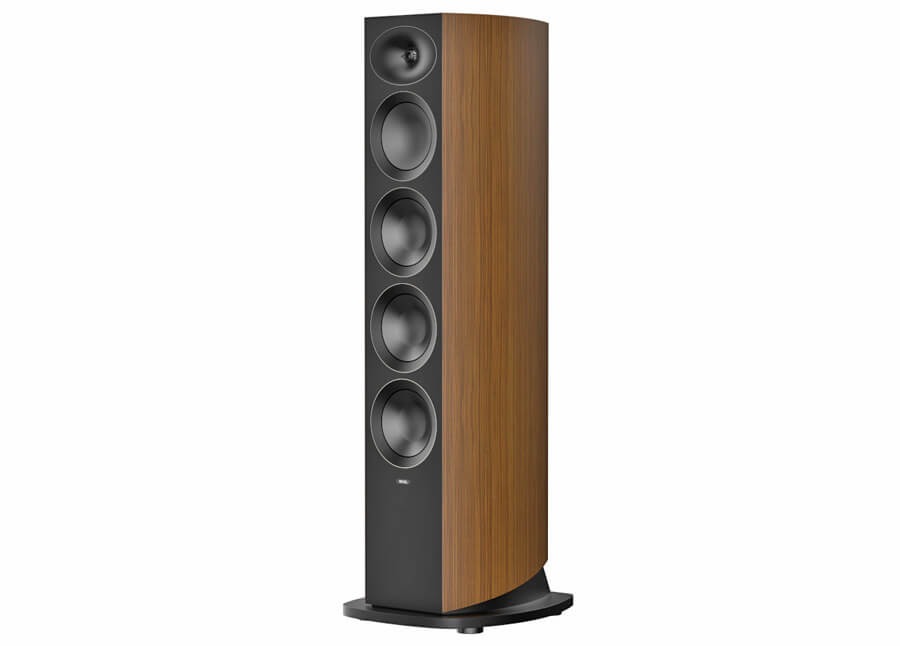
Revel is heading into AXPONA 2026 (April 10-12) with a clear focus: the debut of its new Performa4 speaker series, expected to fall between $2,000 and $7,000 per pair. Under the HARMAN Luxury Audio Group umbrella, which also includes Arcam, JBL Synthesis, Lexicon, and Mark Levinson, Revel isn’t going after statement pricing here. Performa4 is aimed at the part of the market where most serious systems are actually built, and where the competition is crowded, well established, and not particularly forgiving.
Revel Performa4 Speaker Series
Revel’s Performa4 Series is a new loudspeaker line built on the company’s established approach to acoustic design and measurement. It reflects three decades of engineering focused on controlled performance and consistent results in real-world listening environments.
Revel’s Performa4 Series consists of two floorstanding models (F346 and F345), two bookshelf speakers (M146 and M145), a center channel (C245), and a powered subwoofer (B140). With multiple configurations available, the Performa4 lineup can be used in both two-channel music systems and multichannel home theater setups.
“At Revel, science is at the heart of everything we do. The Performa4 series represents the culmination of thousands of hours of research, development, and real-world testing. With our new 7th-generation Acoustic Lens waveguide and advanced DCC and MCC transducers, we’ve raised the bar for what’s possible in this class,” said Jim Garrett, Senior Director of Product Strategy and Planning at HARMAN Luxury Audio.
Acoustic Lens Waveguide, DCC and MCC Transducers Explained
The Performa4 series uses Revel’s Deep Ceramic Composite (DCC) and Micro Ceramic Composite (MCC) drivers, developed to improve stiffness while keeping mass low and reducing unwanted coloration.
Woofer and midrange drivers are built on cast aluminum frames designed with Finite Element Analysis to optimize airflow, control resonance, and maintain structural stability. Each driver also uses an inverted surround and integrated trim ring, which simplifies the front baffle and keeps the layout clean.
Revel’s 7th-generation Acoustic Lens waveguide is paired with a 1-inch DCC dome tweeter to improve integration with the midrange driver. The waveguide is designed to control dispersion more consistently across the listening area, while also supporting higher efficiency and lower distortion, including at off-axis positions.
Revel Performa4 Industrial Design
The Performa4 series adopts a clean, modern design that builds on Revel’s established cabinet approach without adding unnecessary complexity.
All models use magnetically attached grilles for a flush, hardware-free front panel, along with black accent detailing that keeps the visual profile consistent across the range. Cabinets are internally cross-braced to improve rigidity and reduce unwanted vibration.
Curved side panels are finished in real wood veneers, available in Natural Walnut and Black Walnut, offering a straightforward aesthetic that fits into both traditional and contemporary spaces.
Revel Performa4 Models
F346
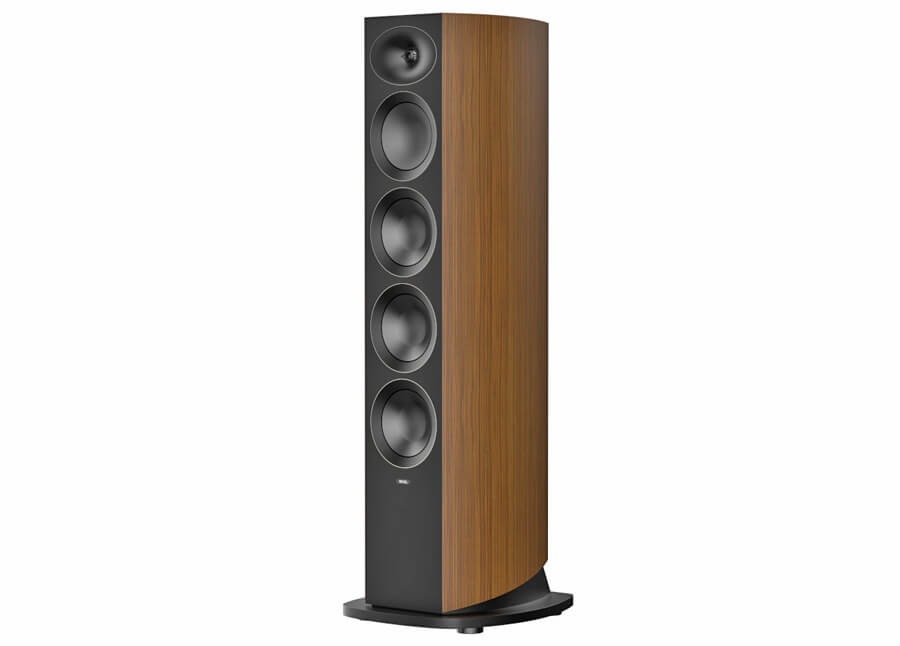
The F346 is a 3-way floorstanding loudspeaker and the top model in the Performa4 series.
It uses three 6.5-inch (165mm) MCC woofers, a 6.5-inch (165mm) DCC midrange driver, and a 1-inch (25mm) DCC dome tweeter paired with Revel’s 7th-generation Acoustic Lens waveguide.
Dual rear-firing ports provide low-frequency extension, while dual 5-way binding posts support bi-amping or bi-wiring. The cabinet is fitted with solid aluminum feet and includes optional floor spikes for added stability.
The F346 is rated for a frequency response of 30Hz to 40kHz (±6dB), with 88dB sensitivity and a nominal impedance of 6 ohms. Recommended amplifier power ranges from 20 to 250 watts.
F345
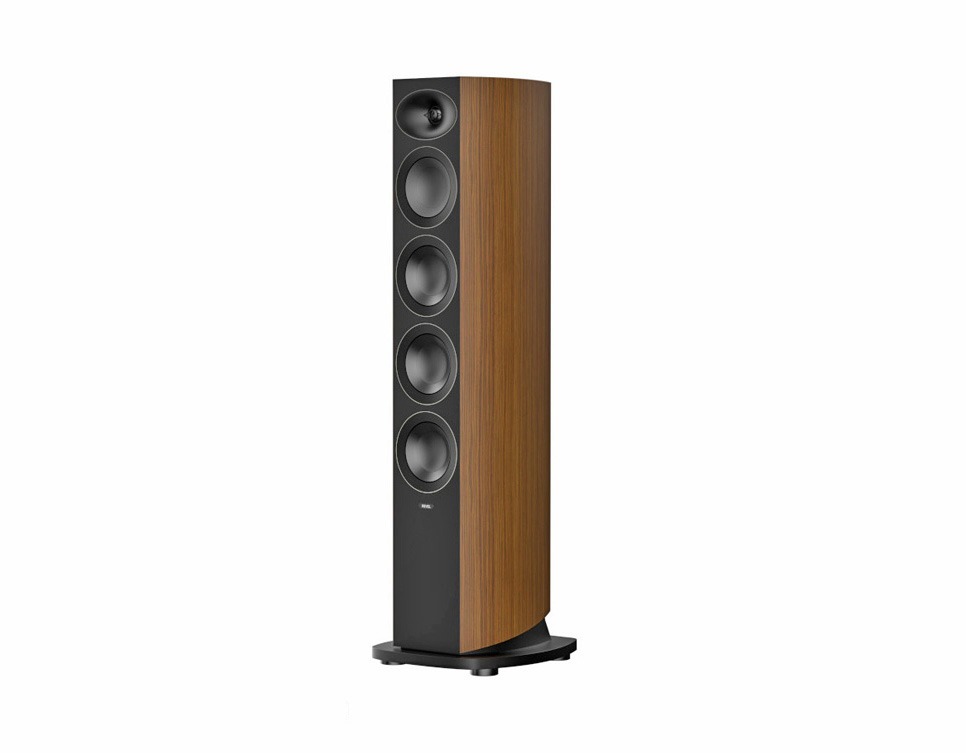
The F345 is a 3-way floorstanding loudspeaker that shares the same core design as the F346, using smaller drivers in a more compact cabinet.
It features three 5.25-inch (130mm) MCC woofers, a 5.25-inch (130mm) DCC midrange driver, and a 1-inch (25mm) DCC dome tweeter paired with Revel’s 7th-generation Acoustic Lens waveguide.
Dual rear-firing ports support low-frequency output, while dual 5-way binding posts allow for bi-amping or bi-wiring. The cabinet includes solid aluminum feet with optional spikes for placement flexibility.
The F345 is rated for a frequency response of 36Hz to 40kHz (±6dB), with 87dB sensitivity and a nominal impedance of 6 ohms. Recommended amplifier power ranges from 30 to 225 watts.
M146
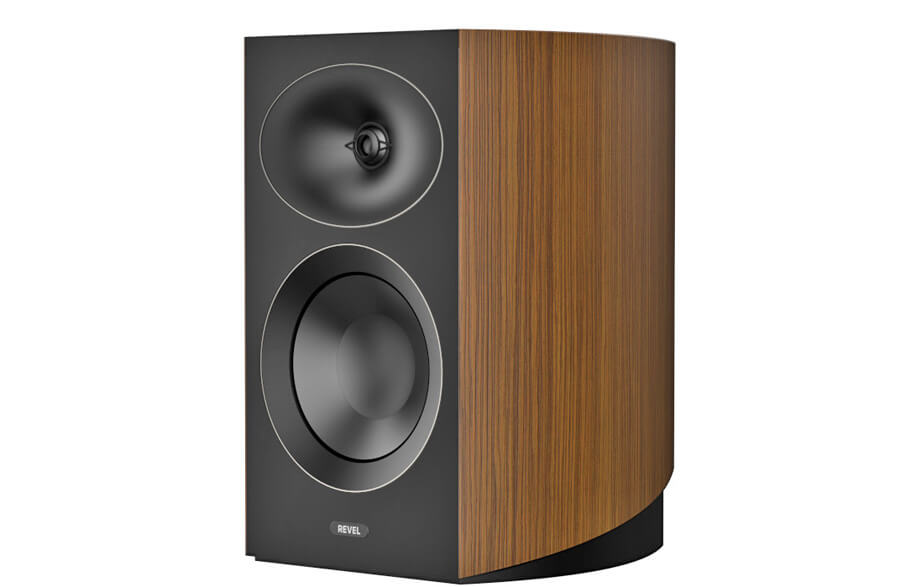
The M146 is a 2-way bookshelf or standmount speaker positioned in the middle of the Performa4 lineup.
It uses a 6.5-inch (165mm) MCC woofer paired with a 1-inch (25mm) DCC dome tweeter and Revel’s 7th-generation Acoustic Lens waveguide.
The crossover network incorporates air-core inductors, and dual 5-way binding posts support bi-amping or bi-wiring. Optional MFS4 floor stands are available for proper placement and listening height.
The M146 is rated for a frequency response of 43Hz to 40kHz (±6dB), with 86dB sensitivity and a nominal impedance of 6 ohms. Recommended amplifier power ranges from 15 to 200 watts.
M145
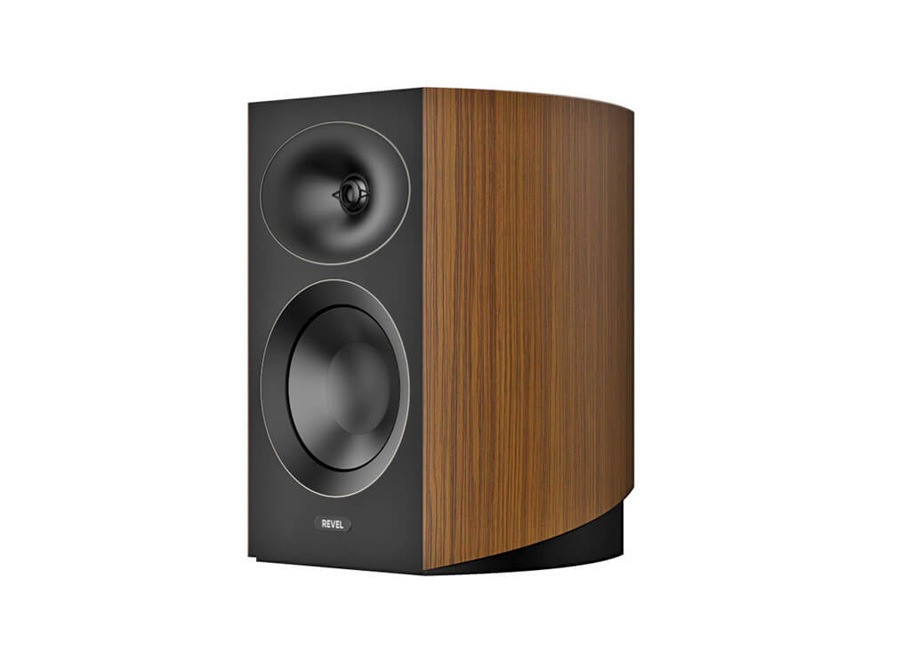
The M145 is a compact 2-way bookshelf speaker and the smaller option in the Performa4 lineup.
It features a 5.25-inch (130mm) MCC woofer paired with a 1-inch (25mm) DCC dome tweeter and Revel’s 7th-generation Acoustic Lens waveguide.
Like the M146, it includes 5-way binding posts for flexible connectivity and is compatible with the optional MFS4 floor stands for proper positioning.
The M145 is rated for a frequency response of 54Hz to 40kHz (±6dB), with 85dB sensitivity and a nominal impedance of 6 ohms. Recommended amplifier power ranges from 15 to 150 watts.
C245
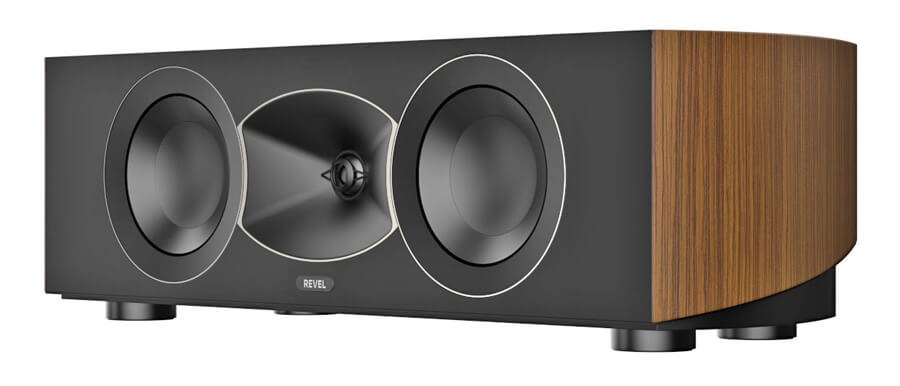
The C245 is a dedicated center channel speaker designed for use in multichannel systems with other Performa4 models.
It features dual 5.25-inch (130mm) MCC woofers flanking a 1-inch (25mm) DCC dome tweeter, paired with Revel’s 7th-generation Acoustic Lens waveguide for consistent dispersion across the front soundstage.
The C245 is rated for a frequency response of 55Hz to 40kHz (±6dB), with 86dB sensitivity and a nominal impedance of 6 ohms. Recommended amplifier power ranges from 15 to 200 watts.
B140
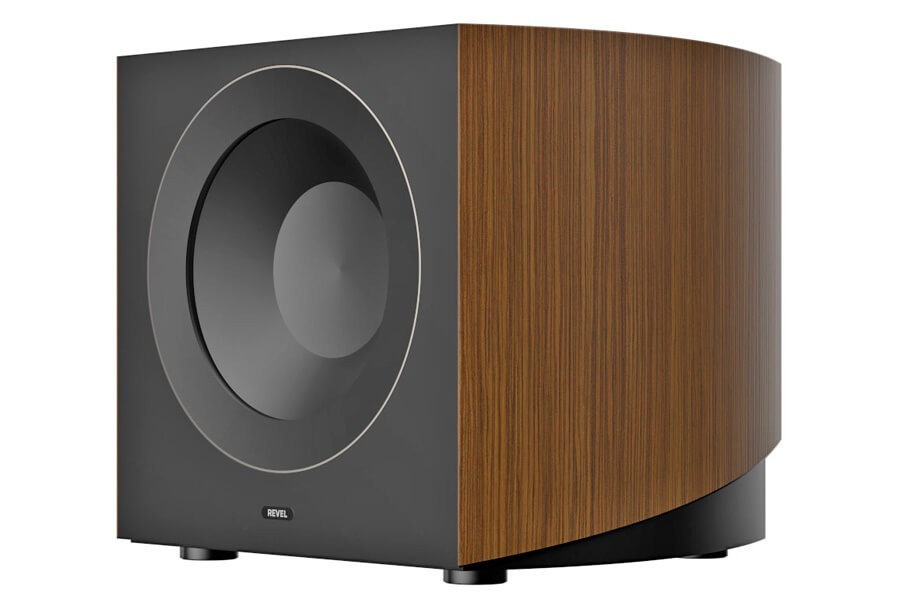
The B140 is a powered subwoofer designed to integrate with the Performa4 series in both two-channel and home theater systems.
It uses a 10-inch (250mm) fiber-composite woofer driven by a 750-watt RMS Class D amplifier, with up to 1,500 watts peak output. The design targets low-frequency extension down to 26Hz.
Rear-panel controls include a variable low-pass filter (50–150Hz), LFE input, phase adjustment, volume control, and auto on/off functionality. A rear-ported enclosure using Revel’s Constant Pressure Gradient design is intended to reduce turbulence and maintain cleaner low-frequency output.
MFS4 Floorstands
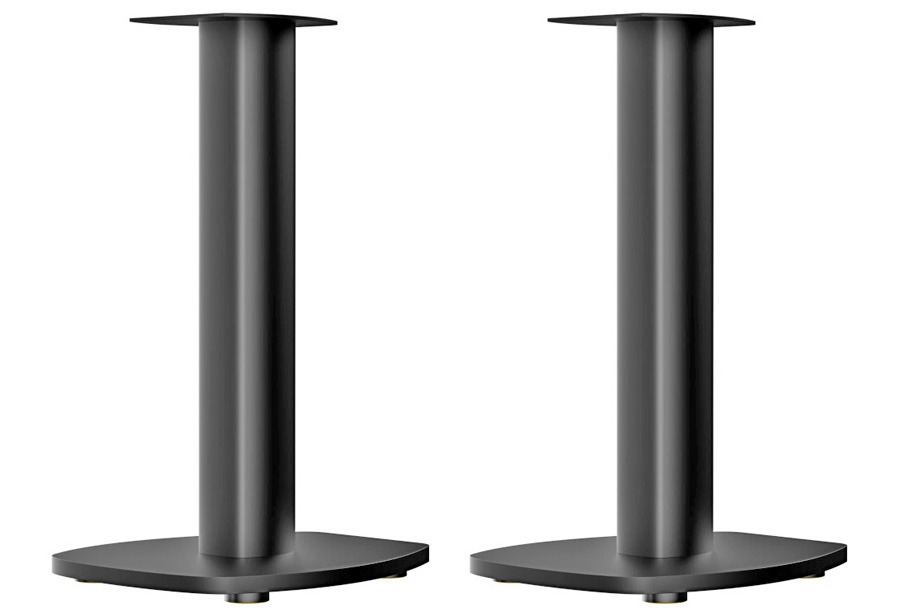
Revel also offers the optional MFS4 floor stands for the M146 and M145 bookshelf speakers.
Constructed from extruded aluminum and steel, the MFS4 stands are designed to position each speaker at an appropriate listening height. They include built-in cable management and optional spikes for use on carpeted surfaces. The stands are sold in pairs.
Revel Performa 4 Comparisons
| Revel Model | F346 | F345 | M146 | M145 | C245 |
| Speaker Type | Floorstanding | Floorstanding | Bookshelf | Bookshelf | Center |
| Price | $6,999/pair | $4,999/pair | $2,999/pair | $1,999/pair | $1,499/each |
| Speaker Configuration | 3-way | 3-way | 2-way | 2-way | 2-way |
| Tweeter | 1-inch (25mm) DCC Dome Tweeter with Acoustic Lens and 7th-Generation Waveguide | 1-inch (25mm) DCC Dome Tweeter with Acoustic Lens and Waveguide | 1-inch (25mm) DCC Dome Tweeter with Acoustic Lens and Waveguide | 1-inch (25mm) DCC Dome Tweeter with Acoustic Lens and Waveguide | 1-inch (25mm) DCC Dome Tweeter with Acoustic Lens and Waveguide |
| Midrange | 1 x 6.5 in (165 mm) Deep Ceramic Composite (DCC) Cone Driver | 1 x 5.25 in (135 mm) Deep Ceramic Composite (DCC) Cone Driver | N/A | N/A | N/A |
| Woofer | 3 x 6.5 in (165 mm) Micro Ceramic Composite (MCC) Cone Woofers | 3 x 5.25 in (135 mm) Micro Ceramic Composite (MCC) Cone Woofers | 1 x 6.5-inch (165 mm) Micro Ceramic Composite (MCC) Cone Woofer | 1 x 5.25 inch (130 mm) Micro Ceramic Composite (MCC) Cone Woofer | 2 x 5.25-inch (135 mm) Micro Ceramic Composite (MCC) Cone Woofers |
| Enclosure Tuning | Bass-Reflex via Dual Rear-Mounted Ports | Bass-Reflex via Dual Rear-Mounted Ports | Bass-Reflex via Rear-Mounted Port | Bass-Reflex via Rear-Mounted Port | Bass-Reflex via Rear-Mounted Port |
| Nominal Impedance | 6 Ohms | 6 Ohms | 6 Ohms | 6 Ohms | 6 Ohms |
| Sensitivity @ 1m, 2.83V | 88 dB | 87 dB | 85.5 dB | 85 dB | 86 dB |
| Recommended Amplifier Power | 20-250W | 30-225W | 15-200W | 15-150W | 15-200W |
| Frequency Response +/-6 dB | 30 Hz – 40 kHz | 36 Hz – 40 kHz | 43 Hz – 40 kHz | 54 Hz – 40 kHz | 55 Hz – 40 kHz |
| Crossover Frequency | 275 Hz / 1.7 kHz | 350 Hz / 2.1 kHz | 1.7 kHz | 1.8 kHz | 1.8 kHz |
| Dimensions | 44.4 x 14.1 x 16.3 inches
1127 x 357.33 x 414.48 mm |
40.9 x 11.9 x 13.9 inches
1038 x 301.86 x 352.46 mm |
14.1 x 9.7 x 12.7 inches
359 x 245.56 x 322.57mm |
11.6 x 7.9 x 9.6 inches
294 x 200 x 245mm |
7.1 x 23.4 x 10.9 inches
181 x 594.5 x 277 mm |
| Product Weight | 87.5 lbs / 39.7 kg | 64 lbs / 29.1 kg | 24.3 lbs / 11 kg | 15 lbs / 6.8 kg | 27.1 lbs / 12.3 kg |
Revel B140 Subwoofer
| Revel Model | B140 |
| Product Type | Powered Subwoofer |
| Price | $2,999/each |
| Driver | 250mm (10-inch) Coated Fibre Composite Cone Driver in a cast-Aluminum frame |
| Amplifier Type | Class D amplifier |
| Power Output | 750W RMS (1500W peak) |
| Enclosure Tuning | Bass-Reflex via Rear-Mounted Port |
| Controls | Auto Power, Crossover, Level, Phase |
| Inputs | RCA LFE/Line Level, 3.5mm, 12V Trigger |
| Frequency Response +/-6 dB | 26Hz – 150Hz |
| Crossover Frequency (Variable) | 50Hz – 150Hz |
| Dimensions | 14.8 x 16.9 x 17.2 inches (376.2 x 429.28 x 436.37 mm) |
| Weight | 61.3 lbs / 27.8 kg |
The Bottom Line
Revel’s Performa4 series is a calculated move into one of the most competitive segments in loudspeakers. The combination of DCC and MCC driver materials, the 7th-generation Acoustic Lens waveguide, and consistent cabinet engineering across the range points to a focus on controlled dispersion, tonal consistency, and predictable in-room performance; areas where Revel has historically been very disciplined.
The lineup is clearly built for flexibility. It can anchor a straightforward two-channel system or scale into a full home theater without mixing and matching across different voicings. That matters for buyers who want system coherence without overthinking every component swap.
What’s less clear is how much separation there is between models beyond size and output, and whether the subwoofer’s pricing will make sense for buyers building out a full system. There’s also no indication of built-in room correction or system-level integration features, which are becoming more common even in passive speaker ecosystems when paired with modern electronics.
This is for listeners who want a complete, measurement-driven speaker system in the $2,000 to $7,000 range without stepping into five-figure territory. Not entry-level, not cost-no-object—right in the middle where most serious systems live.
At AXPONA 2026, the F346 will be demonstrated with an Arcam SA45 integrated streaming amplifier and CD5 CD player, which should give a clear sense of how the top model performs with both streaming and physical sources.
Pricing & Availability
The Revel Performa4 series begins shipping in April through authorized Revel dealers and custom installation installers. All models are available in Natural Walnut and Black Walnut wood veneer finishes.
Suggested retail pricing is as follows:
- F346 Triple 6.5-inch Floorstanding Speaker – $6,999/pair
- F345 Triple 5.25-inch Floorstanding Speaker – $4,999/pair
- M146 6.5-inch Bookshelf Speaker – $2,999/pair
- M145 5.25” Bookshelf Speaker – $1,999/pair
- C245 Dual 5.25” Center Channel Speaker – $1,499/each
- B140 10-inch Powered Subwoofer – $2,999/each
- MFS4 Floor Stands – $699/pair
The Revel Performa4 series will make its official debut at AXPONA 2026, April 10-12, at the Schaumburg Convention Center in Chicago, IL.
For more information, visit www.revelspeakers.com
Related Reading:


The technology is designed to reduce strike zone disputes, long the source of baseball’s most heated arguments. Under the new system, each team receives two challenges per game and only loses a challenge if it is incorrect. In practice, this incentive has quickly reshaped game-day strategy – and last Saturday’s…
Read Entire Article
Source link
The Vikings Evidently Have a Dream Draft Scenario

Edward ‘Big Balls’ Coristine Is Helping Out on Viral Fraud Videos Now

TRUMP FOOLED EVERYONE || MARKET CRASH ||


-

 NewsBeat1 day ago
Steven Gerrard disagrees with Gary Neville over ‘shock’ Chelsea and Arsenal claim | Football
-

 Business1 day ago
No Jackpot Winner and $194 Million Prize Rolls Over
-
Entertainment4 days ago
Fans slam 'heartbreaking' Barbie Dream Fest convention debacle with 'cardboard cutout' experience
-

 Crypto World2 days ago
Gold Price Prediction: Worst Month in 17 Years fo Save Haven Rock
-

 Fashion6 hours ago
Weekend Open Thread: Spanx – Corporette.com
-

 Tech5 days ago
The Pixel 10a doesn’t have a camera bump, and it’s great
-
 Entertainment6 days ago
Lana Del Rey Celebrates Her Husband’s 51st Birthday In New Post
-
Crypto World4 days ago
Dems press CFTC, ethics board on prediction-market insider trades
-

 Tech5 days ago
Avatar Legends: The Fighting Game comes out in July and it looks pretty slick
-

 Sports3 days ago
Tallest college basketball player ever, standing at 7-foot-9, entering transfer portal
-

 Tech4 days ago
EE TV is using AI to help you find something to watch
-

 Fashion6 days ago
Amazon Sundays: Soft Spring Layers
-

 Business2 days ago
Login and Checkout Issues Spark Merchant Frustration
-

 Fashion7 days ago
When Evening Dressing Gets Colorful for Spring
-

 Tech6 days ago
Elon Musk’s last co-founder reportedly leaves xAI
-

 Tech4 days ago
How to back up your iPhone & iPad to your Mac before something goes wrong
-

 Tech4 days ago
Apple will hide your email address from apps and websites, but not cops
-

 Politics4 days ago
Should Trump Be Scared Strait?
-

 Crypto World4 days ago
U.S. rule change may open trillions in 401(k) funds to crypto
-

 Tech4 days ago
Flipsnack and the shift toward motion-first business content with living visuals
You must be logged in to post a comment Login