Connect with us
DAPA Banner
DAPA Coin
DAPA
COIN PAYMENT ASSET
PRIVACY · BLOCKDAG · HOMOMORPHIC ENCRYPTION · RUST
ElGamal Encrypted MINE DAPA
🚫 GENESIS SOLD OUT
DAPAPAY COMING

Tech

Chinese hackers target telcos with new Linux, Windows malware

Published

on

China

A Chinese cyber-espionage campaign has been targeting telecommunications providers with newly discovered Linux and Windows malware dubbed Showboat and JFMBackdoor, respectively.

The operation has been active since at least mid-2022 and targeted organizations across the Asia Pacific and parts of the Middle East. It was attributed to the Calypso threat group, also tracked as Red Lamassu.

According to researchers at Lumen’s Black Lotus Labs and PwC Threat Intelligence, the threat actor set up and used multiple telecom-themed domains to impersonate their targets.

The Showboat Linux malware

The Linux implant Calypso uses in these attacks, dubbed Showboat/kworker, is a modular post-exploitation framework built to  for long-term persistence after initial compromise. The initial infection vector is unknown.

Advertisement

According to a report today from Black Lotus Labs, once Showboat is deployed on a target system, it starts collecting information about the host and sends it to a command-and-control (C2) server.

The malware can also upload or download files, hide its own process, and establish persistence via a new service.

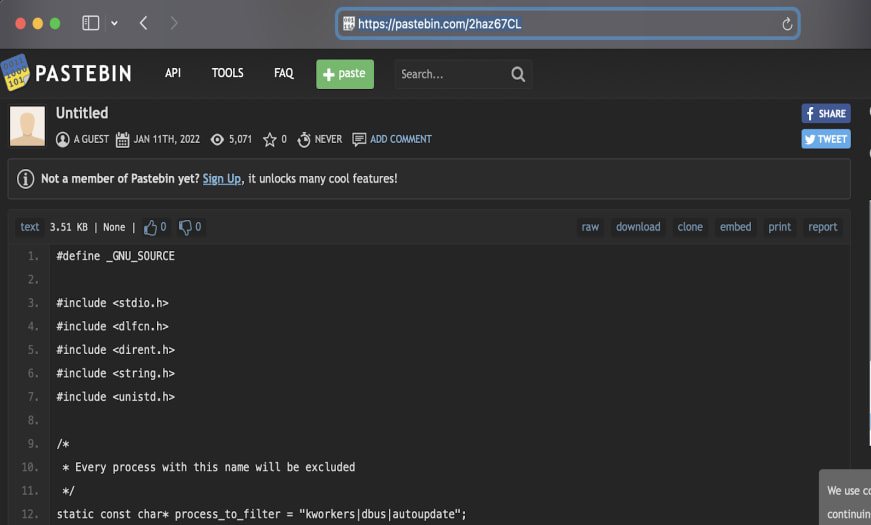
“One notable feature is the ‘hide’ command, which enables a process to conceal itself on a host machine by retrieving code stored on external websites such as Pastebin or online forums for use as a ‘dead drop’, Lumen’s Black Lotus Labs researchers explain.

Pastebin page used in the attacks
Source: Lumen

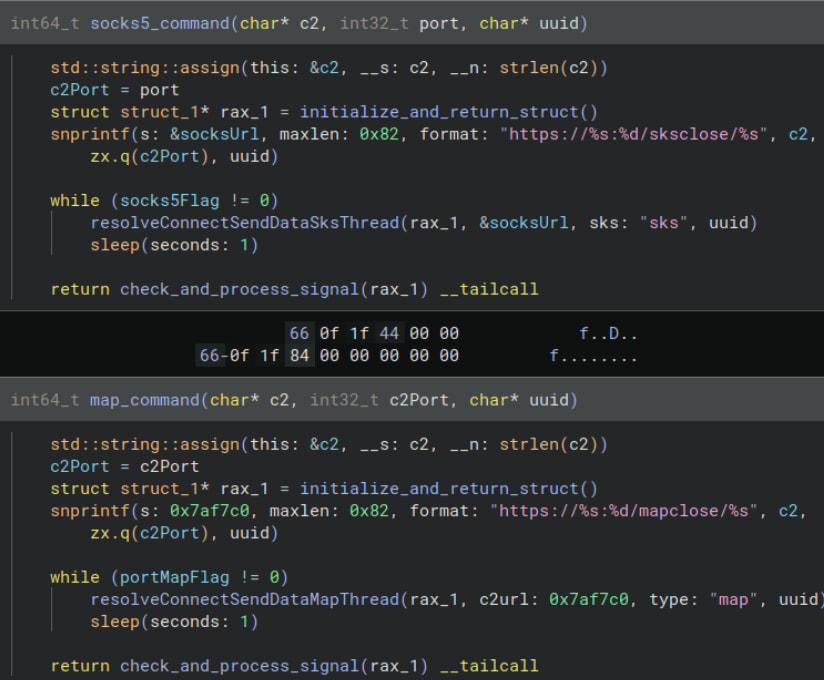
Its most notable function is acting as a SOCKS5 proxy and port-forwarding pivot point, serving as a foothold on compromised endpoints and enabling the attackers to move to other systems on the internal network.

SOCKS5 and portmap functionality
Source: Lumen

The JMFBackdoor Windows malware

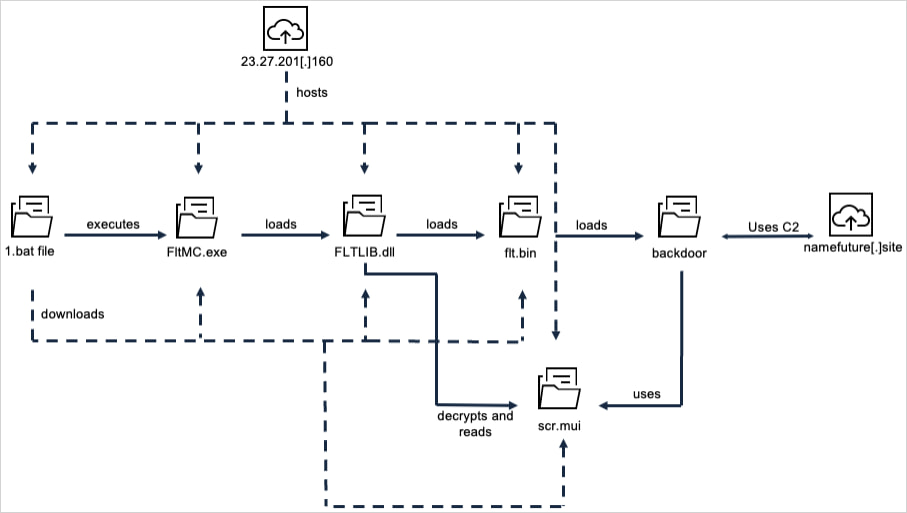
Researchers at PwC Threat Intelligence analyzed Red Lamassu’s infection chain on Windows and noted that it starts with the execution of a batch script that drops payloads to stage a DLL-sideloading procedure (fltMC.exe + FLTLIB.dll). Ultimately, the final payload called JMFBackdoor is loaded.

The Windows attack chain
Source: PwC

According to the researchers, JFMBackdoor is a full-featured Windows espionage implant that has the following capabilities:

  • Reverse shell access — Remote command execution on the infected machine.
  • File management — Upload, download, modify, move, and delete files.
  • TCP proxying — Uses the victim system as a network relay into internal systems.
  • Process/service management — Start, stop, create, or kill processes and services.
  • Registry manipulation — Modify Windows registry keys and values.
  • Screenshot capture — Take screenshots of the victim’s desktop and encrypt them for exfiltration.
  • Encrypted configuration management — Store/update malware settings in encrypted configs.
  • Self-removal and anti-forensics — Hide activity, remove persistence, and delete traces.

Infrastructure analysis suggests that the hackers follow a partially decentralized operational model, in which multiple clusters share similar certificate-generation patterns and tooling but target distinct victim sets.

Lumen concludes that the tooling is likely shared across multiple China-aligned threat groups, each targeting different regions and using the same malware ecosystem.

Advertisement

article image

Automated pentesting tools deliver real value, but they were built to answer one question: can an attacker move through the network? They were not built to test whether your controls block threats, your detection rules fire, or your cloud configs hold.

This guide covers the 6 surfaces you actually need to validate.

Download Now

Source link

Continue Reading
Click to comment

You must be logged in to post a comment Login

Leave a Reply

Tech

Aura’s impressive e-ink photo frame doesn’t even look digital

Published

on

What’s the most cliche possible gift you can give a relative? A digital photo frame, displaying a rotating slideshow of family photos. Now Aura has completely refreshed this product space with its gorgeous Aura Ink frame, which uses e-ink to create a display that doesn’t even look digital.

Digital frames have always been so popular (yet mostly disappointing) because there’s an undeniable allure to the idea of them — it feels like magic to imagine hanging artwork on your wall that you can change depending on your mood. In practice, these devices usually look clunky. You need to plug them in and figure out how to hide a bulky cord, and does anyone even want another bright screen in their home anyway? This problem was already on the Aura founders’ minds when they started the company 10 years ago, but color e-ink wasn’t feasible until now to use in a digital frame.

“E-ink is definitely next level,” co-founder and CTO Eric Jensen told TechCrunch. “We have people tell us that they hung it up, had friends over, and their friends were like, ‘How did you print that picture so quickly?’”

E-ink is the same technology that you see on e-readers, which lets you read a book without feeling the same strain that you get from staring at an LED screen for too long. But there aren’t that many color e-ink devices on the market aside from the Kindle Colorsoft, because the company that manufactures e-ink displays can only currently produce six colors: red, blue, green, yellow, white, and black.

Advertisement

It’s hard to imagine what your favorite family portraits and travel photos would look like with only six colors. But Aura has created a dithering algorithm — a technique that blends a limited color palette into patterns the eye reads as smooth gradients — that renders images close enough to the originals that its e-ink frame could finally go to market.

“I’m learning color theory from our chief scientists, and as far as I understand it, there’s not a good definition for how many colors this represents well,” Jensen said. “It’s all sort of theoretical and comes down to how people perceive it. Everyone’s a little different, so it’s actually taken a lot of testing with a lot of people in a lot of different spaces and different lighting conditions in order to get where we are today.”

How Aura’s dithering algorithm breaks photos down into six e-ink colorsImage Credits:Aura

All of Aura’s frames connect to the Aura app, which is where you can upload photos from your phone, web, email, iCloud, or Google Photos. I found the process to be pretty user-friendly — easy enough for a less tech-savvy relative to navigate, which matters for a product that lives or dies on whether non-technical users will actually set it up.

The app also has social features, so if your sister has a great new photo of her baby, she can upload it to your shared library and it will appear on your frame. (I didn’t try this, since I don’t know anyone else with an Aura frame, but if I did, I would probably use this feature to prank my family members with ridiculous photos. Am I a bad person?)

In addition to the 13.3-inch Ink frame, Aura also sent me its more classic, 12-inch LED Aspen frame as a point of comparison. But the LED frame surprised me with how good it looks in its own right (it feels like the Prada of digital frames). The lighting is about as unobtrusive as an LED screen can be, and it’s anti-glare, which makes the frame look way more premium. Aura’s frames also benefit by surrounding the LED screen with a paper-like matting display, which helps trick the eye into reading it as a printed photograph.

Advertisement

Aura says it designed its dithering algorithm for portraits of people, since users tend to highlight family photos. I’m a rebel, so I decided to load my frames with travel photos. When comparing the same photo on the Ink and the Aspen, it’s very clear that the colors aren’t exact, but as a digital photographer who isn’t that picky, I didn’t care very much. The distorted color palette almost seems like an artistic choice, even if I know it’s reflective of a technological limitation. But when I showed the two Aura frames to an analog film photographer who painstakingly studies the small color aberrations in his darkroom prints, he thought that the Ink frame needed some work. I disagree, but if you look at the photos below and are bothered that the white balance isn’t perfectly consistent across each of the three image from my phone, then you might not like the Ink frame.

Image Credits:TechCrunch

By default, the Ink frame changes photos once per day, and it will usually do this change in the middle of the night, when you’re least likely to be paying attention. If you manually change the pictures via the app, do not be alarmed if the frame looks like it’s glitching — it takes about a minute for the hardware to run the dithering process and render the six-color, e-ink version of your image.

I am very bad with anything involving hammers and nails — all of the art in my apartment is hung up using Command strips — but mounting hardware that Aura includes feels sturdy. It’s easy to take the frame on and off the wall, but you probably only will need to take it down to charge the frame via USB-C once per month. (When the lights are off or you’re not in the room, the display will go to sleep, helping save battery.) I don’t think that the Ink frame looks too out of place, but if it does, maybe it’s because it’s surrounded by art made in other mediums. Or maybe it’s the black frame. Or I did a bad job at placement. Look, I can’t help that I added the Ink frame to a gallery wall that I assembled three years ago!

Image Credits:TechCrunch

At $499, I wouldn’t call the Ink frame cheap (the Aspen runs $229, by the way). But aside from its color inconsistencies — which you can argue are more of a feature than a bug — I’ve loved having the Ink frame on my wall. With the unavoidable technical limitations of e-ink in mind, it’s hard for me to imagine how Aura could’ve made a better product.

When you purchase through links in our articles, we may earn a small commission. This doesn’t affect our editorial independence.

Source link

Advertisement
Continue Reading

Tech

Go eyes robotaxis and acquisitions after Japan’s biggest IPO of 2026. Here’s why it matters

Published

on

Go’s IPO — Japan’s biggest so far this year — has done more than provide a much-needed boost to the country’s languishing listing season. It has also supplied the taxi-hailing app with the capital required to address an existential issue: Japan’s shortage of drivers.

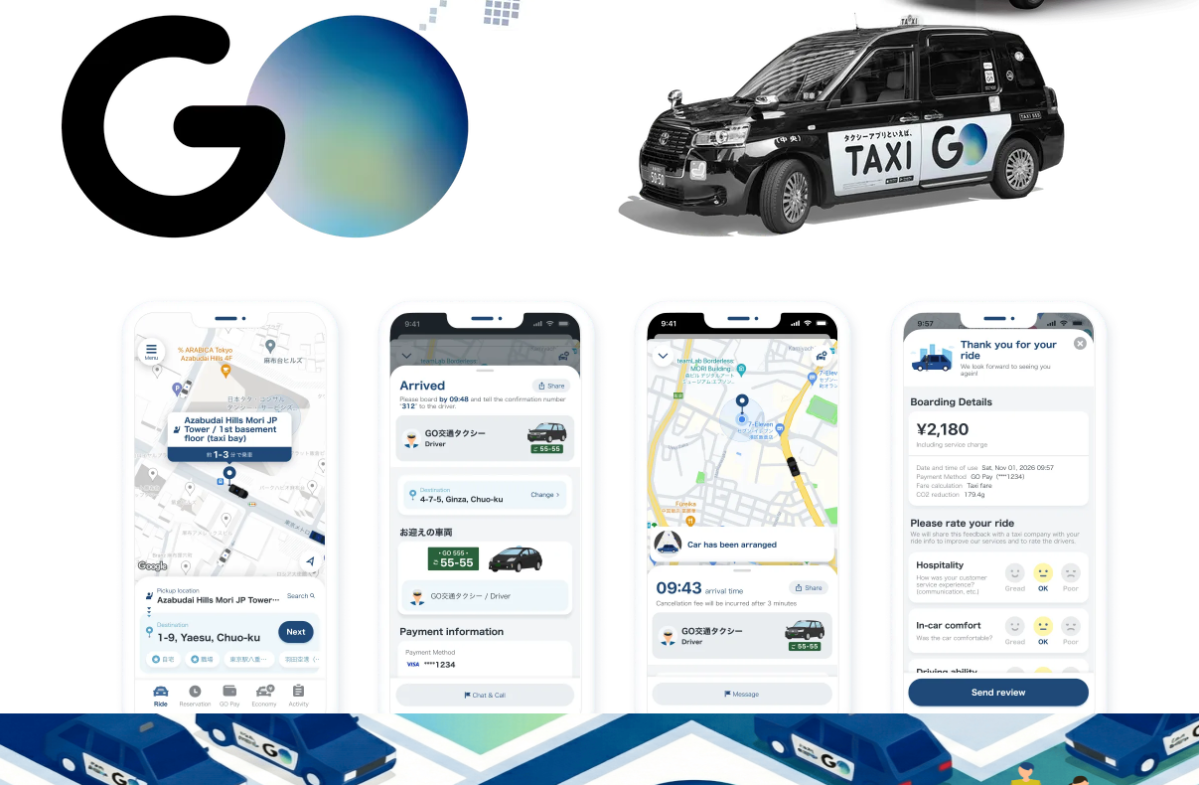
Go, which went public Tuesday, plans to use the ¥88.6 billion ($553 million) raised in its IPO to expand its robotaxi business and make acquisitions, according to a company spokesperson.

“We intend to use the proceeds from the sale of newly issued shares toward investment in research and development related to robotaxis and investment in business expansions, including strategic mergers and acquisitions in our business inside and outside of the taxi industry,” the spokesperson said.

The Japanese taxi-hailing company’s debut came in one of Japan’s quietest listing seasons, at a time when the government has been telling startups to sell themselves rather than go public. Go drew investments from BlackRock, Wellington Management, and M&G Investment Management in the process, underscoring where global institutional money is willing to go in Japan right now. The stock has since pulled back below its offering price, closing at ¥2,314 on Friday, down about 4% from the IPO price of ¥2,400.

Advertisement

Go’s robotaxi ambitions are rooted in a human problem. Japan’s taxi industry is running out of drivers. The number of taxi drivers has fallen roughly 20% in recent years, according to a report citing Japan’s Ministry of Land, Infrastructure, Transport and Tourism.

An aging population means that figure is unlikely to recover. Ride-share services launched in Japan in 2024, but remain limited to certain areas and require drivers to be employed by a taxi company; restrictions that have done little to address the shortage.  

Go was founded in 1977 as a taxi operator and now runs Japan’s largest ride-hailing app with 35 million downloads, 85,000 partner vehicles, and an 80% share of Japan’s taxi app market by usage time, covering 46 of Japan’s 47 prefectures.

Go believes robotaxis will be part of its future — although it’s not clear when that vision will become a reality.

Advertisement

Go has partnered with Waymo, an autonomous driving subsidiary of Alphabet, alongside Nihon Kotsu, one of Japan’s biggest taxi operators. Go is responsible for strategic coordination of the partnership, according to the spokesperson. CEO Hiroshi Nakajima has previously said that Go will not invest in autonomous driving systems itself, according to Nikkei Asia.

Go has not set a timeline for fully driverless operations.

“We plan to begin driving fully autonomously, without a human specialist present, when we validate our technology and receive approval to do so,” the spokesperson said.

In the meantime, Go is looking for ways to give its traditional business a competitive edge. For instance, the company has partnered with Kakao T, Alipay, and WeChat Pay that allows inbound travelers from South Korea, China, and Taiwan to hail Go-affiliated taxis directly from their local apps.

Advertisement

Go is not the only company betting on Tokyo’s robotaxi future.

In March, Uber, Wayve, and Nissan announced plans to pilot robotaxi services in Tokyo by late 2026, marking Uber’s first autonomous vehicle partnership in Japan. The service will use Nissan Leaf electric vehicles powered by Wayve’s AI Driver, and will be bookable through the Uber app.

Uber has also teamed up with S.Ride to let international visitors book rides through the Uber app. Didi Mobility Japan, a joint venture between SoftBank and Didi Chuxing, has a similar arrangement.

When you purchase through links in our articles, we may earn a small commission. This doesn’t affect our editorial independence.

Advertisement

Source link

Continue Reading

Tech

Honor of Kings Introduces Hero Devara and Launches HOK Plus 2.0 in India

Published

on

Honor of Kings is increasing its reach in India through the release of HOK Plus 2.0. This update comes with various enhancements, including more rewards, improved gameplay, creator programs, and esports developments. Another feature of this update is a new character named Devara, who draws inspiration from Indian culture.

Honor of Kings is rolling out a ₹10 million reward program for its users in India with the launch of HOK Plus 2.0. Through “Play to Earn”, players will be motivated to play the game, create content, participate in campus activities, and socialize. Players will get the opportunity to participate in the Treasure Hunt game and stand a chance of winning smartphones and Amazon gift cards. Honor of Kings will give even greater rewards to players as part of its celebration on June 27.

Devara Debuts as Honor of Kings’ New India-Inspired Hero

HOK Plus 2.0 will introduce Devara, a hero inspired by India, in the game Honor of Kings. Devara battles at the Clash Lane and uses his lightning abilities when he is battling. He is able to deal massive damage and perform well from the front line. Honor of Kings has been inviting people to suggest Hindi lines for their heroes. Some of these lines have been selected and used in Devara’s voice lines, which were recorded by Sanket Mhatre.

The launch of Devara will be marked by a range of offline events in Delhi, Mumbai, and Bengaluru. These will allow gamers to experience themed activities and engage with other players. The events aim to celebrate the hero’s debut and strengthen the game’s connection with its Indian player community.

Advertisement

HOK Studio Expands Support for Indian Content Creators

HOK Devara

HOK Plus 2.0 introduces new opportunities for content creators through HOK Studio. The new creator policy rewards content creators for strong performance and regional rankings. Selected creators can move into the HOK Advanced Creator Program and receive exclusive benefits. The company has also partnered with Live Insaan to support community growth. Players will soon be able to join influencer-led teams in the HOK India Influencer Team Tournament.

Honor of Kings is also bringing new activities to campuses and gaming cafes across India. The campus program will cover 32 colleges in four cities between July and September. Students will have opportunities to compete, create content, and engage with the community. The game will also organize Devara-themed 1v1 challenges at selected gaming cafés. Participants can earn rewards and compete for cash prizes and smartphone giveaways.

Revenant XSpark has qualified to represent India at the 2026 Asian Games Esports Qualifiers. The team claimed its place by winning the NESC 2026 LAN Grand Finals held in Pune. The competition in Kuala Lumpur brings together top teams from across the region. Successful teams will secure spots at the 20th Asian Games in Nagoya, Japan. Their qualification showcases the progress of India’s Honor of Kings esports ecosystem.

New Heroes, Gameplay Modes, and Quality-of-Life Improvements

There are new updates in Honor of Kings to enhance its gameplay through HOK Plus 2.0. The players can get familiar with Annette, Lorion, and Florentino in Arena of Valor. Users can discover Super Flow Brawl 2.0 and apply strategic thinking and gameplay mechanics in this mode. There are even certain events happening during the match to affect its flow.

June 27 marks the date of the Peak Day festival, where players in Honor of Kings will have various opportunities to get rewarded during the event. Participants in the event will be able to engage in specific activities, collaborations, and community events at the festival. There are limited-time vouchers and unique collectibles for the participants. The participants will have access to free heroes and bonuses at the festival.

Advertisement

Source link

Continue Reading

Tech

LEGO Builds a Life-Size Koenigsegg Sadair’s Spear Megacar That Hits 69 MPH

Published

on

LEGO Technic Koenigsegg Sadair's Spear Megacar
Collaboration between LEGO and Koenigsegg built a vehicle that turns heads for all the right reasons. The two companies created a full-scale version of the Sadair’s Spear using LEGO Technic pieces, and the finished machine drives under its own power on real roads and courses.


Over 327,906 unique components went into this massive effort, which resulted in an automobile weighing a whopping 1800 kilos, despite the fact that the bricks themselves only accounted for about 400 kg. The long and laborious procedure came to a conclusion after almost 9,400 hours of work, when the team gave their approval and declared it ready for testing.

Sale


LEGO Technic Koenigsegg Jesko Absolut Grey Hypercar, Sports Car Building Set for Boys and Girls, Vehicle…
  • A hypercar toy for kids ages 10 and up – This LEGO Technic Koenigsegg Jesko Absolut Grey Hypercar car building toy set for kids features authentic…
  • Build the features of this sport car toy – Builders explore lots of engineering concepts as they assemble the articulated V8 engine and the…
  • Realistic door design – The model features a dihedral synchro-helix door system, which allows the doors to rotate 90 degrees while moving outwards…


The entire car is built from the ground up on a lightweight body made of LEGO Technic pieces, while a custom-made chassis underneath handles all structural stresses and houses the electric motor and complex mechanisms that bring this cool car to life, and then there’s that one show-stopping feature we can’t get enough of. The car has a working Ghost Mode, a trick that the real hypercar does as well, in which the rear body portion lifts up, the dihedral synchro-helix doors swing out on their own, and the mirrors fold flat.

Advertisement

LEGO Technic Koenigsegg Sadair's Spear Megacar
The next challenge came on the Goodwood hillclimb track in the United Kingdom. Markus Lundh, the test driver, drove the brick-built automobile up the famed incline in reverse configuration, reaching a high speed of 111 kilometers per hour, or 69 miles per hour in the United States. This figure more than twice the previous record for the fastest drivable LEGO car manufactured by the LEGO Group.

LEGO Technic Koenigsegg Sadair's Spear Megacar
Markus said he had a great time driving the thing; it reminded him of the time he got the Sadair’s Spear to the top of that hill the year before, but when he took the LEGO version up, he was particularly impressed with the engineering that the Technic team did. The massive life-size creation corresponds with a new official 1:8 scale LEGO Technic model of the same car, which has 4,104 pieces and reproduces many of the same features, but at a scale that allows it to be displayed on a desk or shelf. The smaller counterpart also includes a working Ghost Mode sequence, a detailed V8 engine with moving parts, a 9-speed transmission that moves, and suspension at both ends.

Source link

Continue Reading

Tech

Siri AI, Apple TV, & more come to your car with CarPlay in iOS 27

Published

on

CarPlay is seeing one of its biggest updates in years thanks to the upcoming release of iOS 27. Here are all the new features, including Siri AI and Apple TV apps.

At WWDC 2026, Apple officially unveiled its next version of iOS. The update, iOS 27, will be released in the fall of 2026 and is packed full of useful new features.

CarPlay, Apple’s in-car UI, is powered by iOS, so this new software will bring a bunch of enhancements to your car. This year, at least one major feature will require some serious automaker support.

Siri AI in CarPlay

Apple Intelligence seemed to occupy almost half of Apple’s WWDC keynote. A lot is going on, and a good portion of that is reflected in the car.

Advertisement

On phones that support Apple Intelligence, Siri will become Siri AI. That means Siri will be more capable and get a new look.

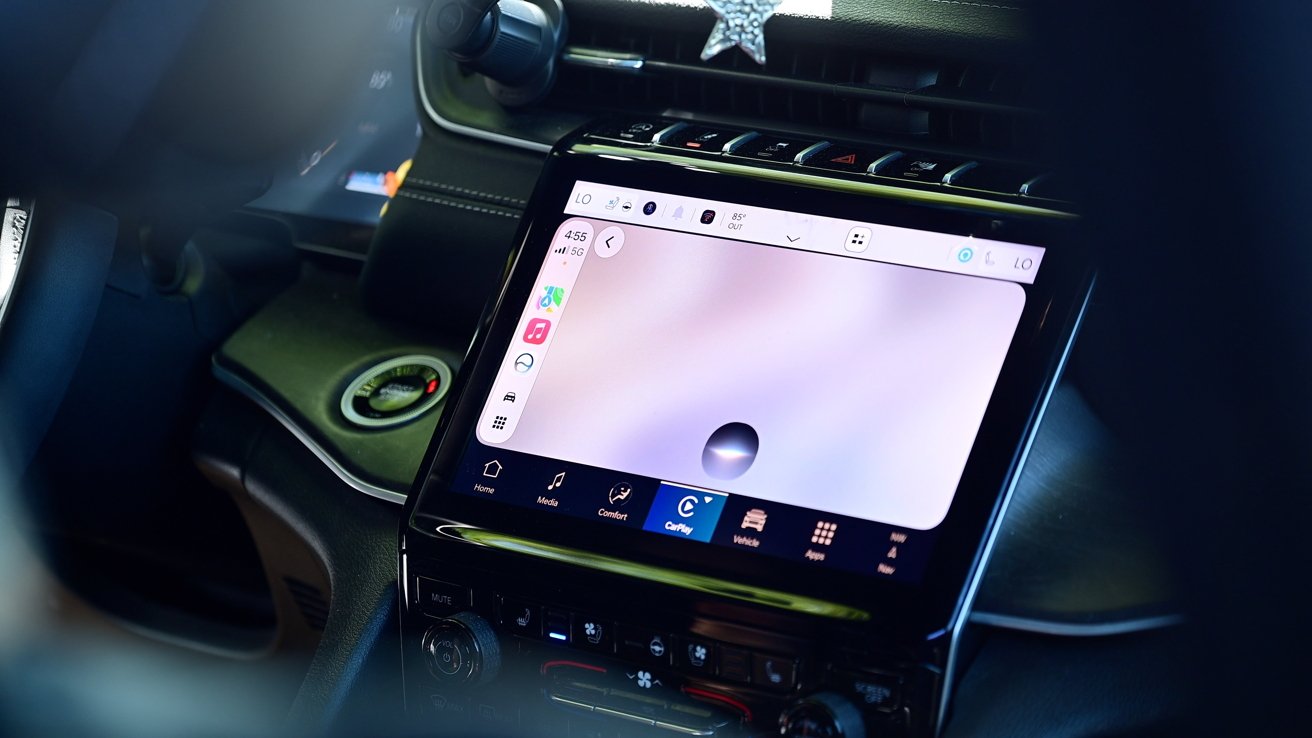
When you invoke Siri AI, it now has a dark, glassy orb at the bottom of your car’s display. It mimics the look of the new UI that lives in the Dynamic Island on iPhone.

Close-up of a car's center console featuring a large touchscreen infotainment display with navigation and app icons, surrounded by dark dashboard controls and a decorative star hanging above

New Siri AI orb in CarPlay with iOS 27

Siri is more conversational now, going back and forth with you as you ask questions and follow-ups. Apple’s digital assistant has more personal context, too.

Advertisement

While testing it, I could ask more complicated questions with multiple action items. As I left the house, I asked Siri to turn off the lights in the studio, get me directions to my son’s school, and text my wife my ETA.

All of your Siri conversations are saved in the new Siri app. It has the same icon as on iPhone, iPad, and Mac, and allows you to go back to the previous conversation you’ve had.

Those conversations also sync across your platforms via iCloud. So if I start a conversation in the car, I can pick it up on my iPad when I get to where I’m going.

Dark car dashboard screen showing an infotainment interface with apps and video thumbnails, overlaid by a centered voice assistant popup that says Listening with microphone and stop controls

New chat-style interface for apps with iOS 27 CarPlay

Advertisement

Along with the new Siri AI, Apple is allowing any app to offer up a conversation mode. This was previously limited to AI apps like ChatGPT or Perplexity.

The idea is that those apps could possibly tap into Apple Intelligence models and offer you the ability to chat, rather than use physical taps within the app.

If you had a pizza app, you could open it, tell the app what you wanted with your voice, which could build your order, give you a total, and submit it with an estimated pickup time. There’s a new UI element for this that hovers over the app’s contents.

Both first-party and third-party media apps will get upgrades thanks to iOS 27. This includes the Apple Music and Apple Podcasts apps.

Advertisement

Apple Music looks more organized and has a richer layout thanks to added media graphics. The big change, though, is the addition of the mini player.

Close-up of a car's touchscreen infotainment system showing a music app library with colorful album covers, playlists, and playback controls in a dark, modern vehicle interior

New mini player in Podcasts and Apple Music apps with iOS 27 CarPlay

The new mini player sits in the top-right corner of the display when you have something playing. It minimizes, showing the album art and a play/pause button.

That way, while something is playing, you can browse the rest of the app while still retaining quick control of the current media.

Advertisement

Before, it would be two taps to get to the media if you weren’t on the “now playing” screen. You would have to tap the play icon in the top-right corner, then hit pause, which isn’t ideal if you’re driving.

A similar refresh comes to the Apple Podcasts app. It has a streamlined UI and a mini player.

That mini player is a new UI element that isn’t going to be exclusive to Apple apps. Apple has made it available to anyone who is creating media apps for CarPlay, and you can expect many of the popular streaming apps to adopt it.

Apple TV and video support for CarPlay

Another major change is video support. This is much more robust than what was previously included in iOS 26.

Advertisement

As part of iOS 26, Apple allowed apps to stream their content on a car’s infotainment system via AirPlay. It was only on supported cars that had to get approved through Apple’s MFi Program.

Large touchscreen car dashboard display showing a tablet-style home screen with multiple colorful app icons arranged in rows against a dark abstract background

Grid of apps in the simulator with iOS 27

Now, Apple is allowing full, native video streaming applications as a new app category with iOS 27. AirPlay is still an option, but now you can browse and select content from the car’s interface, too.

I was able to test this out for myself using Apple’s new CarPlay simulator in Xcode. Apple is offering up initial support with the inclusion of the Apple TV app inside of CarPlay.

Advertisement
Car dashboard with a wide touchscreen displaying a streaming service interface, showing rows of movie and TV show posters, titles, and navigation icons against a dark interior background

Apple TV app in CarPlay with iOS 27

There are several asterisks here. Automakers themselves still have to enable this, which means that we most likely will be waiting for that to happen.

When a vehicle does add support, it must be in park for any videos to play. That counts whether the content is started via AirPlay or a native video player.

Car dashboard display screen showing a black media player interface with pause button centered, minimal controls along the bottom, and HBO Max logo in the upper left corner

Playing a video in CarPlay with iOS 27

Advertisement

One neat trick is that if you are watching a video and you move the car from park to drive, your video will automatically fall back to audio-only. That’s great for things like sports when you still want to follow along, even if you can’t watch it.

Other small changes for CarPlay in iOS 27

Aside from the big new features, there are a lot of other changes, tweaks, and optimizations Apple is rolling out to its in-car solution.

Wireless connection is now said to be more stable than before. Hopefully, that reduces the audio lag that can sometimes be present.

Navigation apps are now able to communicate with the car’s system. The idea behind this is that the car can see your route and suggest any changes.

Advertisement

The most obvious use case here is for EVs. If you put in a route, and your car realizes you only have so much battery remaining, it may propose the ideal charging station to add to the trip.

This whole back and forth is permission-based, so you must OK it before the communication happens, and you must OK any changes to the route. Otherwise, no information or route is shared with your car.

There are a few new icons with iOS 27. In Wi-Fi settings, if you use wireless CarPlay, there is a new CarPlay icon on the network to help identify it, and there is an updated battery icon system-wide.

Person's hand gesturing toward a car's central touchscreen displaying a wallpaper selection menu with colorful abstract backgrounds, icons on the left side, and dashboard controls surrounding the screen

New wallpapers in CarPlay with iOS 27

Advertisement

Finally, there are new wallpapers. Apple added 12 wallpapers for CarPlay in iOS 27, and they all have a similar swirl, like with the iOS 27 ones for iPhone, iPad, and Mac.

By going into the settings app, users can choose one of the new wallpapers that come in various colors.

CarPlay will be updated automatically when iOS 27 is released to the public.

Advertisement

Source link

Continue Reading

Tech

Ctrl-Alt-Speech: Close Your Apps And Think Of England

Published

on

from the ctrl-alt-speech dept

Ctrl-Alt-Speech is a weekly podcast about the latest news in online speech, from Mike Masnick and Everything in Moderation‘s Ben Whitelaw.

Subscribe now on Apple Podcasts, Overcast, Spotify, Pocket Casts, YouTube, or your podcast app of choice — or go straight to the RSS feed. To get extended episodes with additional coverage, support us on Patreon.

In this week’s roundup of the latest news in online speech, content moderation and internet regulation, Ben is joined by Jen Weedon, a T&S veteran of Meta and Niantic. She is currently consulting and teaching at Columbia school of International and Public Affairs. Together, Ben and Jen discuss:
Advertisement

And in the extended episode for Patreon supporters, they cover:

Our fun links this week are the How Alberta eradicated rats (Ben) and Mogwooooo’s Instagram account (Jen).

If you’re already a Patreon supporter, you can get the extended episode on Patreon.

Filed Under: age verification, ai, ai slop, artificial intelligence, content moderation, jen weedon, trust and safety, uk

Companies: anthropic, telegram

Advertisement

Source link

Advertisement
Continue Reading

Tech

Hackers exploit info disclosure bug in Gravity SMTP WordPress plugin

Published

on

Hackers exploit info disclosure bug in Gravity SMTP WordPress plugin

Threat actors are exploiting an unauthenticated information disclosure vulnerability in the WordPress plugin Gravity SMTP, active on 100,000 sites.

The flaw is tracked as CVE-2026-4020 and received a medium severity rating. It affects all versions of the plugin from 2.1.4 and older and has been addressed in version 2.1.5, released on March 17.

WordPress security company Defiant is warning that hackers are actively exploiting the vulnerability. The company’s Wordfence firewall has blocked more than 17 million attempts against protected customers.

image

The issue stems from an exposed REST API endpoint in Gravity SMTP, whose ‘permission_callback’ always returns ‘true,’ allowing unauthenticated GET requests to receive a comprehensive JSON “System Report” generated by the plugin. The exposed information may contain:

  • API keys, secrets, and OAuth tokens for configured email integrations
  • Credentials for third-party email services, including Amazon SES, Google, Mailjet, Resend, and Zoho
  • WordPress configuration details, including installed plugins, themes, and software versions
  • Server and PHP environment information
  • Database configuration details, including server version and table names

Despite its medium-severity rating, the CVE-2026-4020 vulnerability can be exploited without authentication, and the exposed information can be used to steal email service credentials.

This allows an attacker to impersonate the victim to third parties and also to gain detailed information about the site’s software stack and the potential vulnerabilities present.

Advertisement

“The exposure of live third-party API credentials means an attacker could abuse the site’s connected email services, while the detailed system report significantly lowers the effort required to plan further attacks against the site,” Wordfence researchers warn.

Wordfence says exploitation activity spiked on June 7, with 4 million requests being blocked that day. Similar activity was recorded for several days afterward.

Exploitation volume
Exploitation volume
Source: Wordfence

The security firm listed the most prolific source IP addresses for exploit requests, which website administrators should add to their blocklists.

A key indicator of compromise is requests to ‘/wp-json/gravitysmtp/v1/tests/mock-data’ found in web server access logs, particularly those including the ‘?page=gravitysmtp-settings’ query parameter.

Yesterday, the company issued a separate advisory about a critical, unauthenticated, arbitrary file-deletion flaw in the Avada Builder WordPress plugin, used on one million sites.

Advertisement

This vulnerability is identified as CVE-2026-8713 and allows attackers to delete arbitrary files on the server through a path traversal flaw, provided a published Avada form is configured to save submissions to the database.

Deleting critical files, such as wp-config.php, can revert the site to its initial setup state, potentially leading to a full site takeover and remote code execution.

The issue was fixed in version 3.15.4, which is the recommended upgrade target for website administrators. No active exploitation of CVE-2026-8713 has been observed yet, but this is a good candidate, so quick action is advised.


article image

Security teams log 54% of successful attacks and alert on just 14%. The rest move through your environment unseen.

The Picus whitepaper shows how breach and attack simulation tests your SIEM and EDR rules so threats stop slipping by detection.

Advertisement

Get the whitepaper

Source link

Continue Reading

Tech

IEEE Rolls Out Large Language Models Training Course

Published

on

Large language models have moved out of the research lab and into engineers’ daily workflow. LLMs serve as reasoning engines that can orchestrate complex tasks including identifying vulnerabilities in source code and transforming fragmented project discussions into rigorous technical specifications.

While the general public uses AI tools to write email and plan vacations, technical professionals use LLMs as core architectural elements that are fundamentally changing how digital infrastructures are built and maintained. As the AI models move into mainstream engineering practice, the demand for technical expertise is rising.

The LLM technology market is expected to grow by about 33 percent every year through 2030, according to MarketsandMarkets. The rapid expansion suggests that proficiency in implementing and securing the models is transitioning from a niche into a core requirement for technologists.

To use LLMs effectively, technical professionals must move beyond treating them as conversational robots. At a fundamental level, the AI systems are built on the transformer architecture, a framework that replaced the older method of processing data in a fixed, sequential order. Unlike earlier models that analyzed information one step at a time, transformers use self-attention mechanisms to ingest vast datasets simultaneously.

Advertisement

For technical professionals, LLMs are core architectural elements that are fundamentally changing how digital infrastructures are built and maintained.

Relying on such LLMs without understanding their internal logic creates a significant reliability risk. To build tools that work consistently, developers must understand the core principles that govern how the models process information and generate results. By mastering how a model processes information and how its internal settings influence the result, developers can move away from a trial-and-error approach toward a more precise one to ensure the AI tool handles complex data reliably.

Four ways LLMs are changing jobs

Here are areas that integrate large language models.

Moving past basic prompts. Developers are using application program interfaces (APIs) to connect LLMs directly to their databases and software tools. Employing the APIs allows AI to perform work such as executing code or searching through internal repositories.

Advertisement

Fixing the “hallucination” problem. LLMs are at risk of hallucinations, which are generated facts or code that looks correct but actually is wrong or broken. To fix the problem, retrieval-augmented generation (RAG) forces AI to look up information in a trusted source such as a company’s database.

Prioritizing data security. When using AI with proprietary code, security is a major concern. Engineers must learn how to set up “private” instances of the models to ensure that sensitive company data stays within a secure cloud environment and is not used to train public versions.

The future of collaboration. By automating repetitive coding tasks and summarizing thousands of pages of documentation, LLMs let engineers spend more time on high-level designs and solving important issues.

Online course program helps with mastering the tech

The gap between people who use AI and those who understand how to build with it is growing wider. To help technical professionals stay ahead, IEEE offers a five-course online program, Large Language Models Demystified, available through the IEEE Learning Network.

Advertisement

The program, developed by IEEE Educational Activities in partnership with the IEEE Computer Society, is built for people who want to understand the “how” and the “why” behind the technology. Rather than just teaching basic prompting, the curriculum dives into the engineering behind generative AI, including:

  • Evolution, impact, and hands-on exercises: the shift from statistical methods to modern transformers, including hands-on model optimization.
  • Understanding transformer architectures: the mathematical core of self-attention and positional encoding, implemented in NumPy and Python.
  • Architectural analysis and implementation: advanced LLM design with practical model-building exercises.
  • Training and modeling with PyTorch: end-to-end pipelines in PyTorch, leveraging parameter-efficient techniques such as low-rank adaptation and quantization.
  • Optimization, alignment, and deployment: performance scaling, reinforcement learning from human feedback (RLHF), group-relative policy optimization, RAG, and agentic AI.

Upon completion of the program, participants earn professional development credits and a digital badge from IEEE to verify their expertise.

Enroll in the course program on the IEEE Learning Network.

Organizations looking to prepare their teams to work on LLMs can connect with an IEEE content specialist to discuss group enrollment and tailored training paths.

From Your Site Articles

Advertisement

Related Articles Around the Web

Source link

Advertisement
Continue Reading

Tech

ART-Glove Records Every Touch So Robots Can Learn to Handle Objects Like People Do

Published

on

ART-Glove Robots Touch
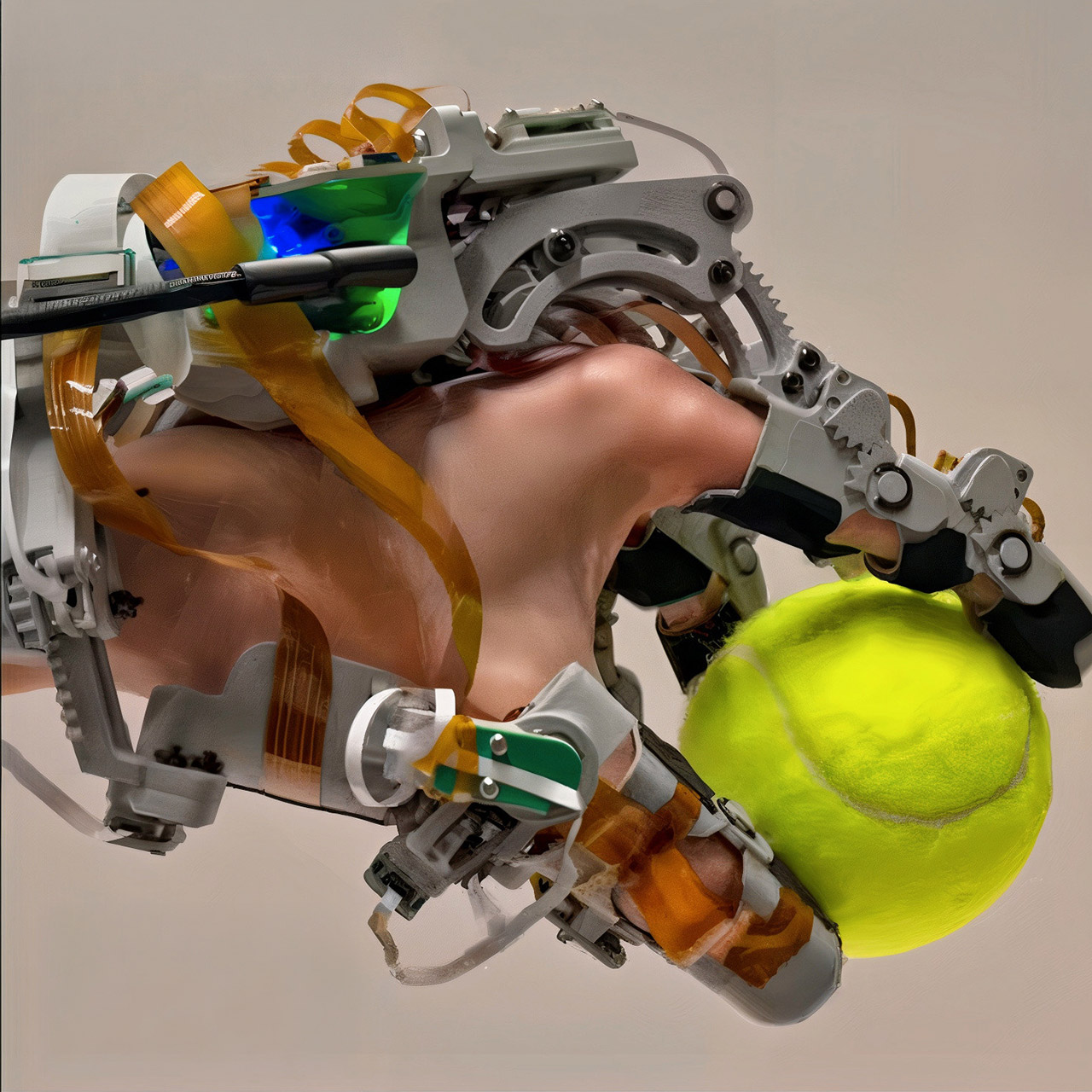
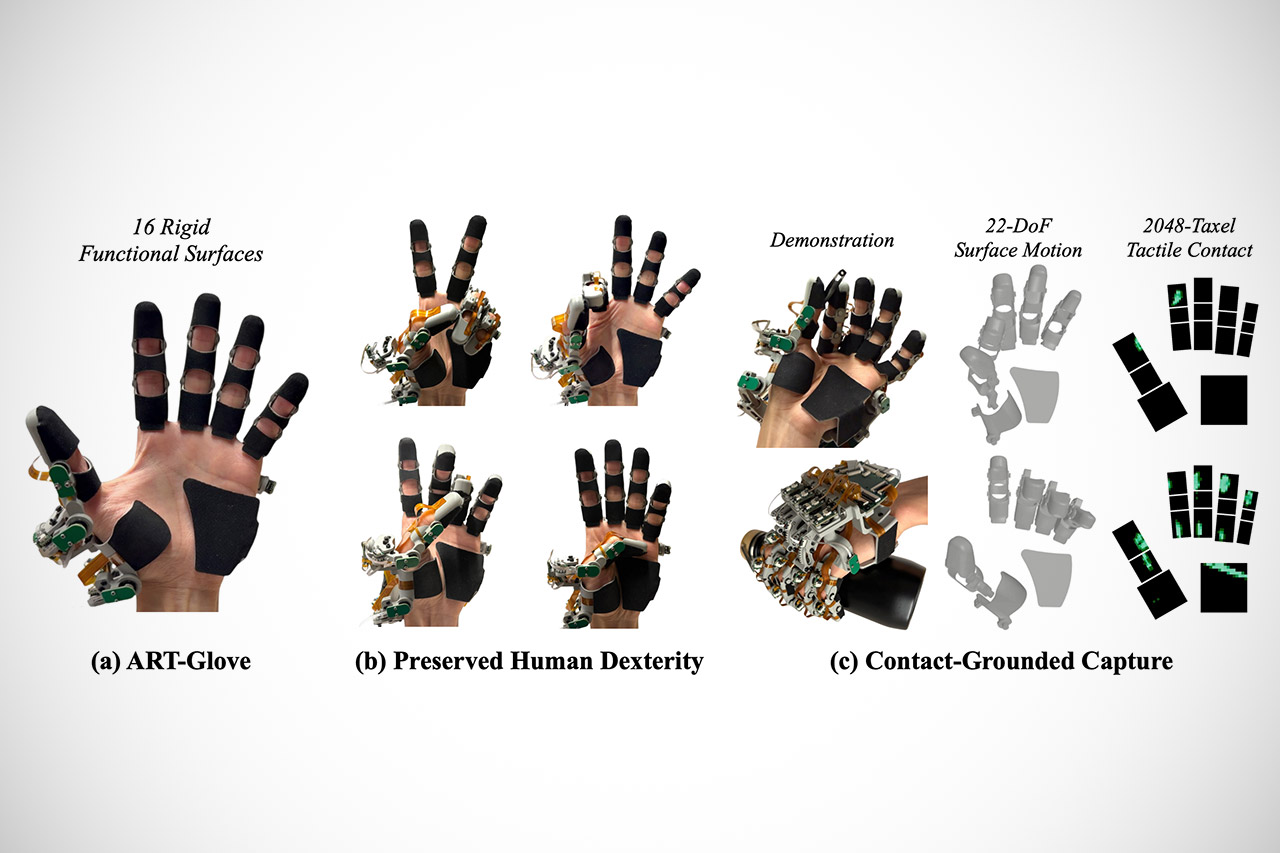
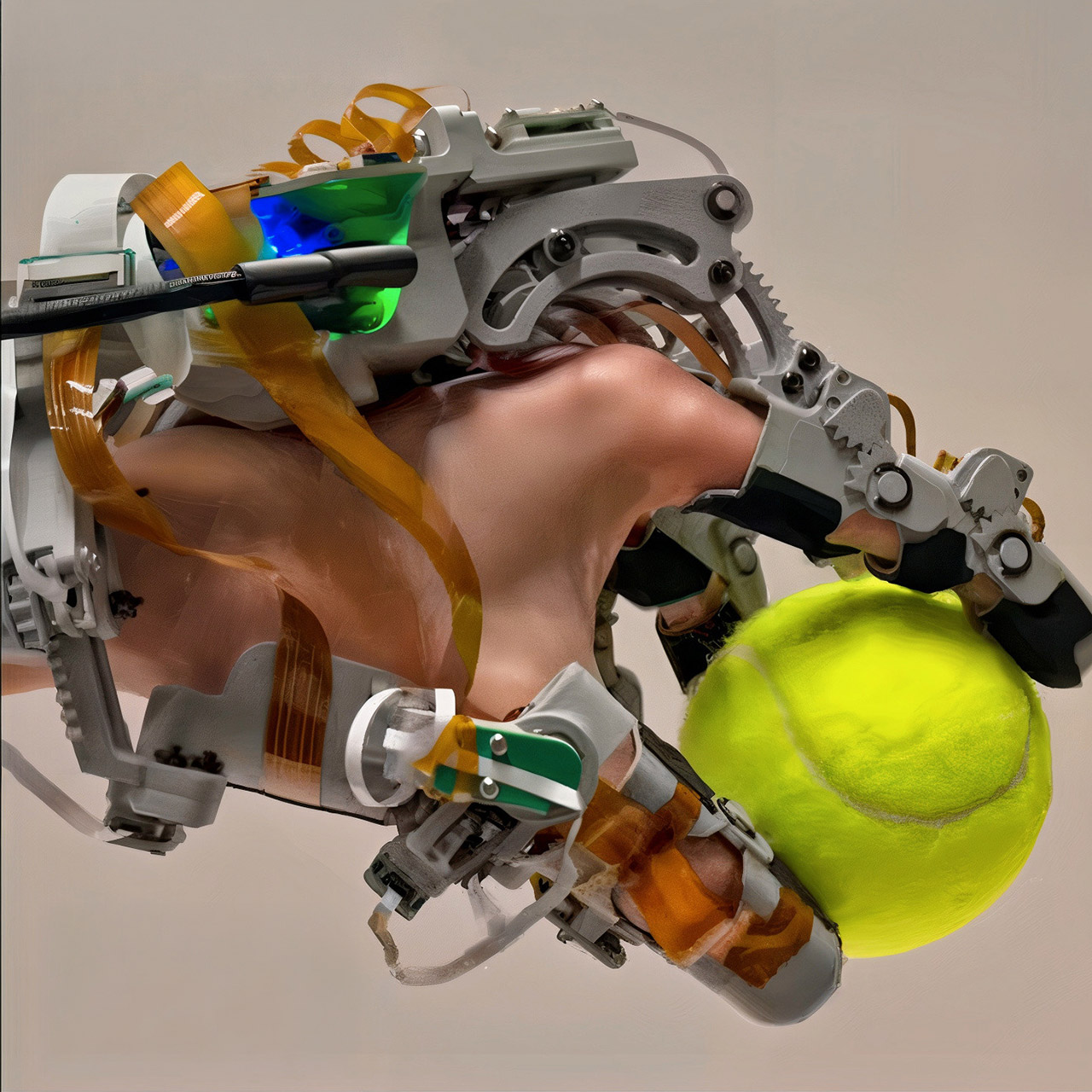
Researchers at Carnegie Mellon University built a wearable system that captures both the exact movements of a human hand and the precise locations and forces where it presses against objects. The device, called ART-Glove, or Articulated Tactile Glove, tackles a long-standing gap in robot training. Robots have grown skilled at seeing their surroundings through cameras, yet they still struggle when tasks require careful contact, variable grip force, or coordinated finger adjustments during everyday actions like turning a key or unscrewing a cap.


The majority of current models for collecting demo data result in an uncomfortable trade-off. Teleoperation setups provide robot-ready orders but frequently exclude the natural sensation of a hand, leaving you feeling like you’re in a robot. Pure video recordings keep your hand free, but contact information remains a mystery, inferred at best with limited reliability. Soft sensing gloves provide some pressure data, but their exact shape varies with each wearer, making it difficult to translate it onto a robot hand.

ART-Glove Robots Touch
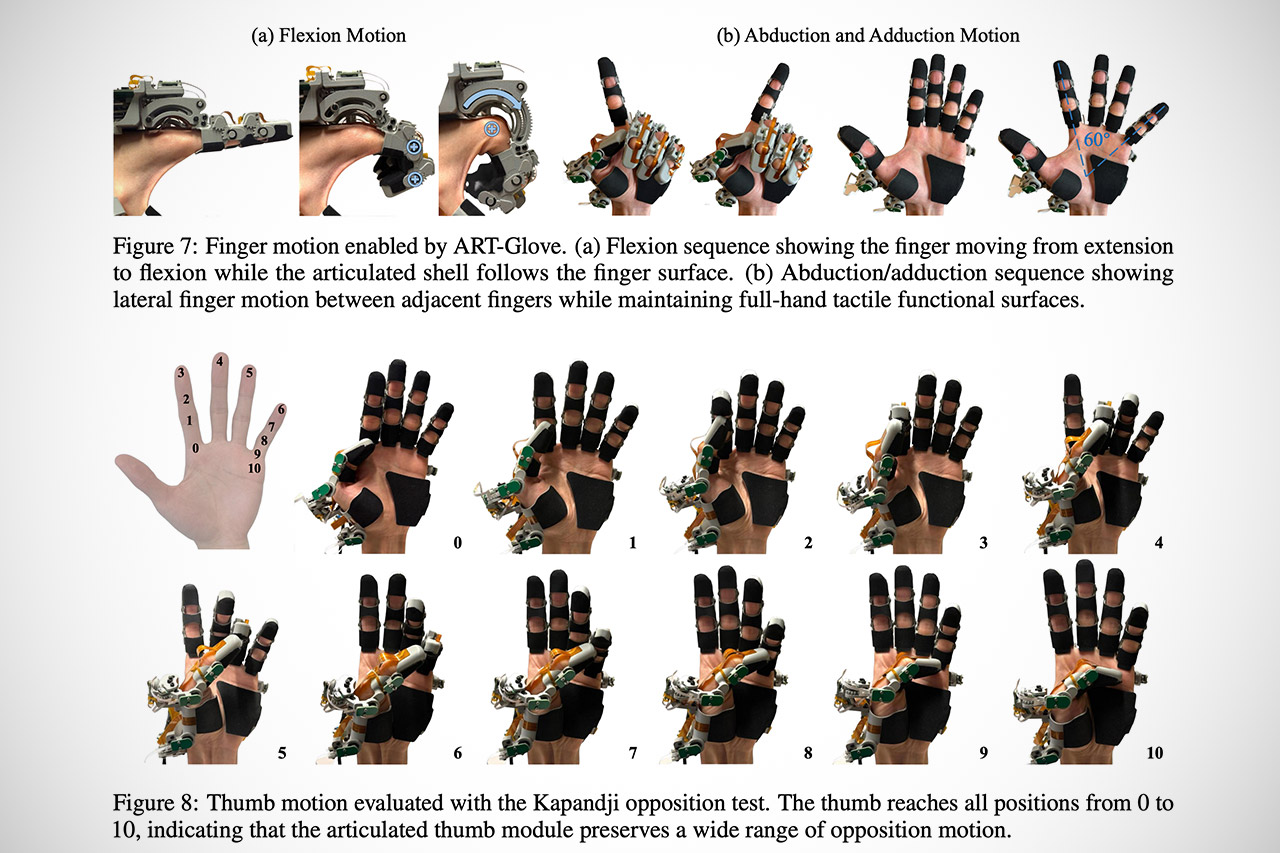
ART-Glove avoids these issues by utilizing a hybrid technique. The primary contact zones on your hand are covered by 16 hard surfaces: three on each finger, three on the thumb, and a broader one across the palm. These pieces provide a recognized geometry on the hand side of things, so any recorded touch contains explicit information about where exactly on the hand the contact occurred and at what angle, among other things. The rigid sections are linked together by 22 joints, all of which are aligned with real human hand anatomy, including multi-axis rotations at the thumb base. They’ve also managed to keep the size down while maintaining natural motion by developing three separate joint systems. Some are rather simple, consisting of shafts and sleeves with gears that transfer to encoders on the back of the hand. Others employ direct bearings or curved slots to provide tighter clearances. All of this is tracked by magnetic rotary encoders, which add no additional friction or wear points.

ART-Glove Robots Touch
Each hard surface is now covered with a thin piezoresistive layer. Each of these seven flexible circuit modules contains 2048 separate pressure-sensing devices, or taxels, as there is a lot of pressure sensing going on. These sensors monitor real-time force distribution over the hand. On the back of the glove, there’s also a small STM32 microprocessor that reads both the joint encoders and the entire tactile array before synchronizing everything at 120 samples per second. You’ll get a live output stream with 22 degrees of freedom in joint motion, as well as high-resolution pressure maps.

ART-Glove Robots Touch
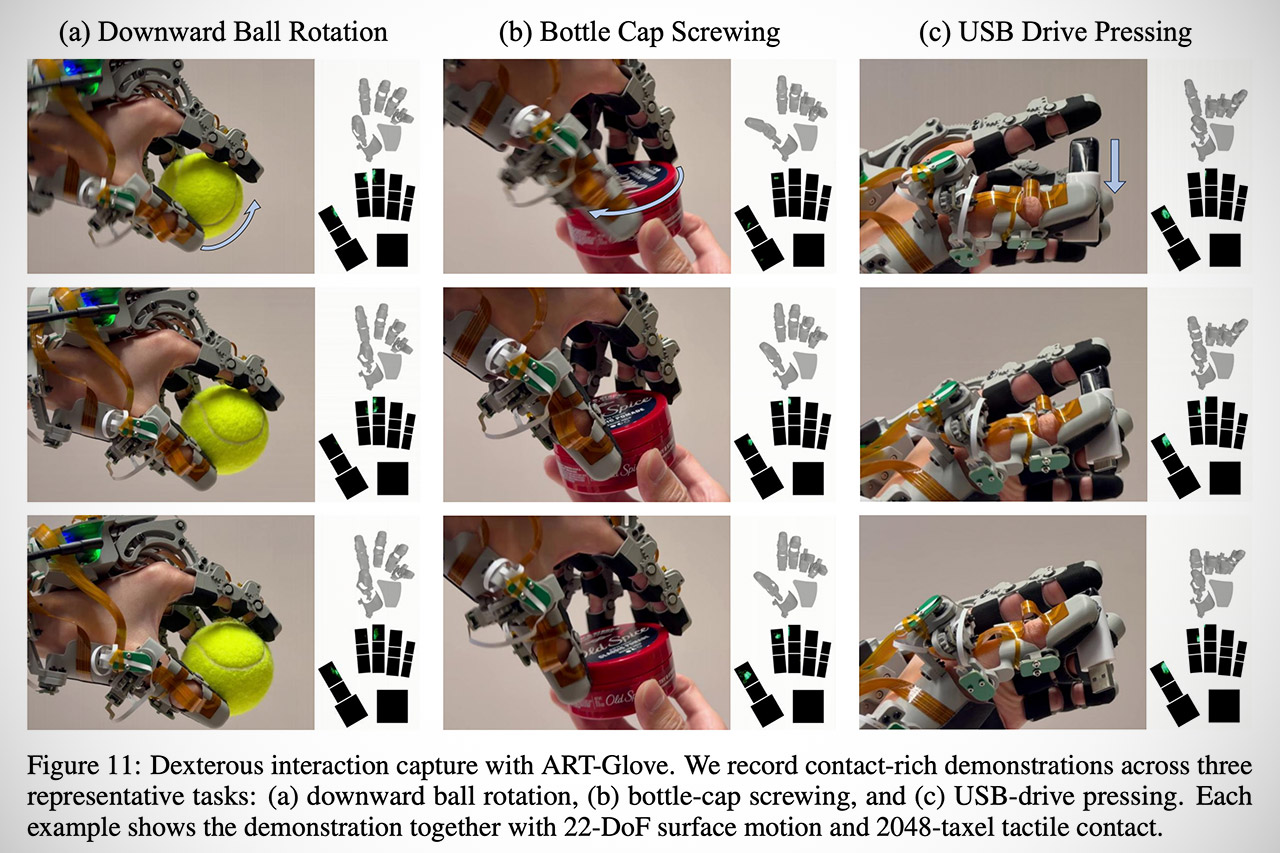
When someone puts on the glove and completes a task, the system records the entire physical story. During a ball rotation exercise, for example, it demonstrates how the contact points vary constantly to keep the force in line with gravity. When someone screws a bottle cap, the pressure patterns begin to move and intensify as the fingers adjust their grip and torque. Pressing a USB drive into a port demonstrates a coordinated multi-finger grab followed by localized pushing force. All of this appears in its own chronology, with a reference to the specific location on the surface where contact occurred.
[Source]

Source link

Advertisement
Continue Reading

Tech

Best Gaming TV for 2026: Get the Lowest Input Lag and Highest Picture Quality

Published

on

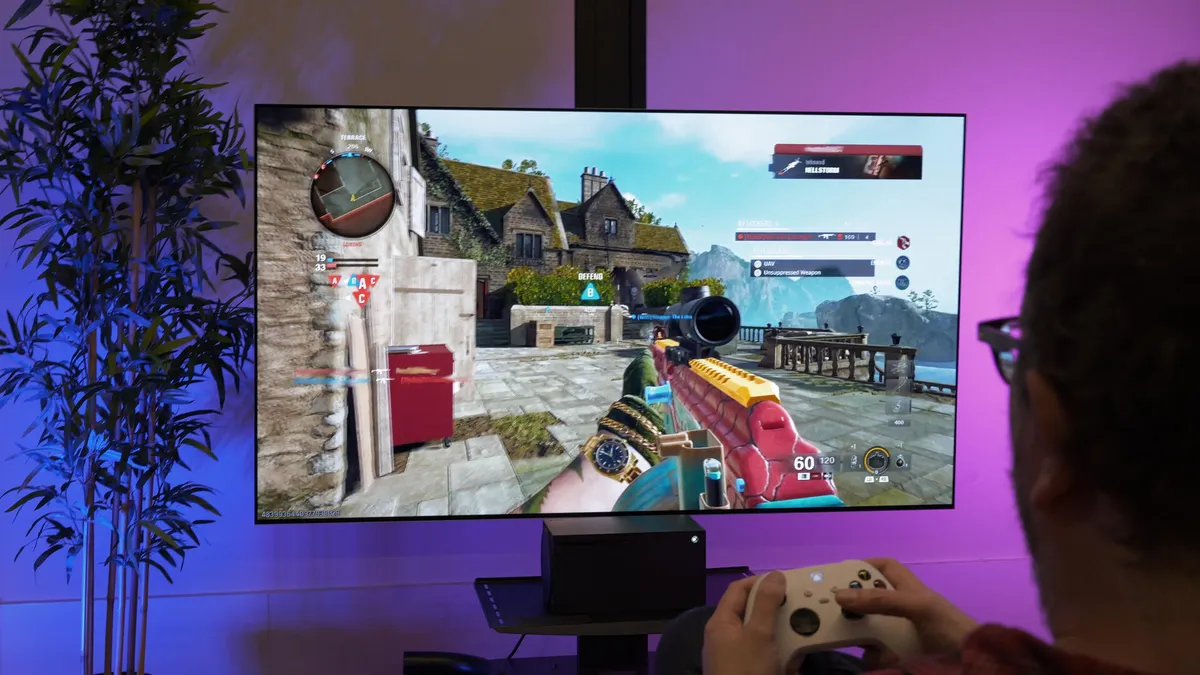
call-of-duty-g5-1

Carly Marsh/CNET

In every CNET TV review, I compare three or more similar TVs side by side in a dedicated, light-controlled test lab. With each review, I employ a rigorous, unbiased evaluation process that has been honed by more than two decades of TV reviews. I test TVs with a combination of scientific measurements and real-world evaluations of TV, movies and gaming content.

To ensure I can evaluate the picture quality of every TV, I connect each one to an AVPro Connect 8×8 4K HDR splitter so each one receives the same signal. I test the TVs using various lighting conditions, playing different media, including 4K HDR movies and console games, across a variety of test categories, from color to video processing to gaming to HDR.

In order to measure each TV, I use specialized equipment to grade them according to light output and color. My hardware includes a Konica Minolta CS-2000 spectroradiometer and a Murideo Six-G 4K HDR signal generator. I use Portrait Displays CalMan Ultimate software to evaluate every TV I review according to its brightness, black levels and color.

Advertisement
Leo Bodnar Lag Tester sitting on a desk

The Leo Bodnar Lag Tester samples three regions of the screen for latency, and these are averaged to give each TV’s lag score

I play a variety of games from an Xbox Series X or PlayStation 5, and note the effects of gaming modes and settings as well as the 4K/120Hz and VRR input capabilities. Helpfully, the Xbox includes a 4K/120Hz and HDR compatibility test: Settings>TV and display options>4K TV details. The page will detail the HDR modes it supports (including Dolby Atmos) and whether it will support VRR — if a TV gets ticks in all the boxes it means it has the best compatibility with high-end Xbox games.

Our reviews also account for such things as features, design, smart TV performance, connectivity including HDMI inputs and gaming compatibility.

Measuring input lag (in milliseconds) is an important component of my process for testing gaming TVs.

Advertisement

Check out the page on how CNET tests TVs for more details.

Input lag will often be lower in game mode than in any other mode on your TV. Here are a few more gaming-specific aspects I looked at for each TV.

How to turn on game mode. In most cases, viewing in game mode isn’t automatic, so you’ll have to turn it on manually, and sometimes the gaming monitor setting can be difficult to find. Many use a picture mode called “Game” while some, like Samsung and Vizio, let you apply game mode to any setting. 

Advertisement
Samsung Q9 TV

Sarah Tew/CNET

Game mode makes a difference, but not at all frequencies. As you can see in the table above, many TVs cut lag substantially when you turn on game mode, but plenty don’t. In general, expensive TVs with elaborate video processing get more of a benefit when you engage game mode. Additionally, and as I noted above, the Boost mode on LG OLEDs only works on 60Hz and not 120Hz.

Most TV game modes are good enough for most gamers. No matter how twitchy you are, it’s going to be tough to tell the difference between 10 and 30 milliseconds of input lag. Many gamers won’t even be able to discern between having game mode on and off — it all depends on the game and your sensitivity to lag.

Turning game mode on can hurt image quality (a little). TV-makers’ menus often refer to reduced picture quality. Reduced picture quality is generally the result of turning off that video processing. In my experience, however, the differences in image quality are really subtle with console gaming, and worth the trade-off if you want to minimize lag for a great gaming experience.

4K HDR gaming lag is different from 1080p. The display resolution you play at has an impact, and since new consoles prominently feature 4K HDR output for games, I started testing for 4K HDR lag in 2018. In general, the numbers are similar to the lag with standard 1080p resolution, but as you can see from the chart above, there are exceptions.

Testing is an inexact science. I use Leo Bodnar lag testers. Here’s how they work, and how I use them. I use two of these Bodnar lag testers — one in 1080p and one in 4K HDR — which use onboard optical sensors to measure and report input lag. When plugged into an HDMI port, the Bodnars make the screen flash in three different places and you place the unit’s onboard optical sensor flush onto the screen at these points. They calculate the lag at each position and you average the three readings to get a score. You might see different lag test results from different review outlets, which may use Bodnar or another method.

Advertisement

Source link

Continue Reading

Trending

Copyright © 2025