Atmospheric carbon dioxide hit a new record in April, averaging about 431 parts per million at NOAA’s Mauna Loa Observatory. That’s up from under 320 ppm when the site began measurements in 1958. Scientific American reports: Greenhouse gases, such as carbon dioxide, are measured as a proportion of the total atmosphere. The numbers are presented as the number of molecules of a particular gas out of a million total molecules, or ppm. Climate scientist Zachary Labe of Climate Central, a nonprofit that researches climate change, says the new record is “depressing” but not unexpected. “It’s just another sign that carbon dioxide continues to increase in our atmosphere as our planet continues to warm,” he says. “For many climate scientists, this is just ‘here it is again, another record in the wrong direction.'”
Labe explains that the amount of CO2 in the atmosphere tends to peak in April each year as decaying plants release greenhouse gases after winter. Some of that CO2 gets reabsorbed by plants as they grow during the warmer months. But NOAA’s data show a worrying trend, with the average monthly amount of CO2 steadily increasing. […] Although the amount of CO2 in the atmosphere has continued to rise, there was a reduction in U.S. emissions in 2023 and 2024. That trend, however, was reversed in 2025, at least partially because of the increased electricity demand from artificial intelligence data centers. Still, Labe says there are reasons for optimism as the use of renewable energy sources such as solar and wind expands.
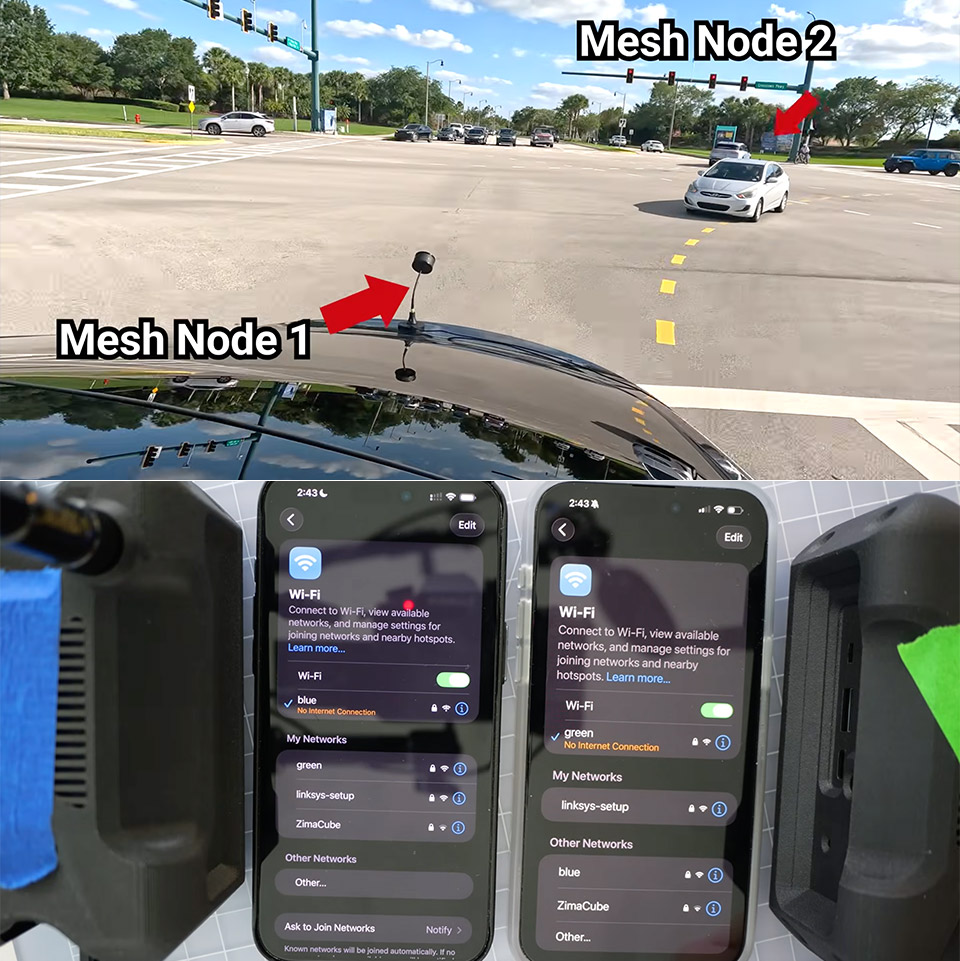
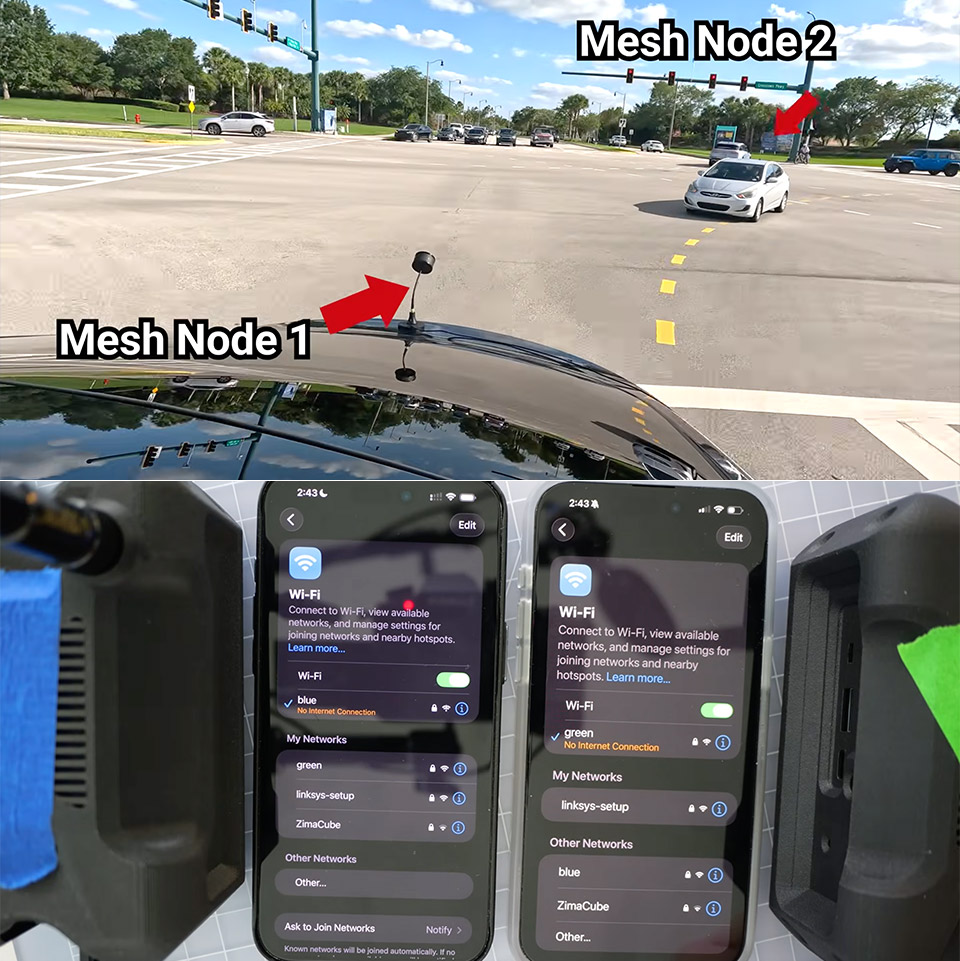
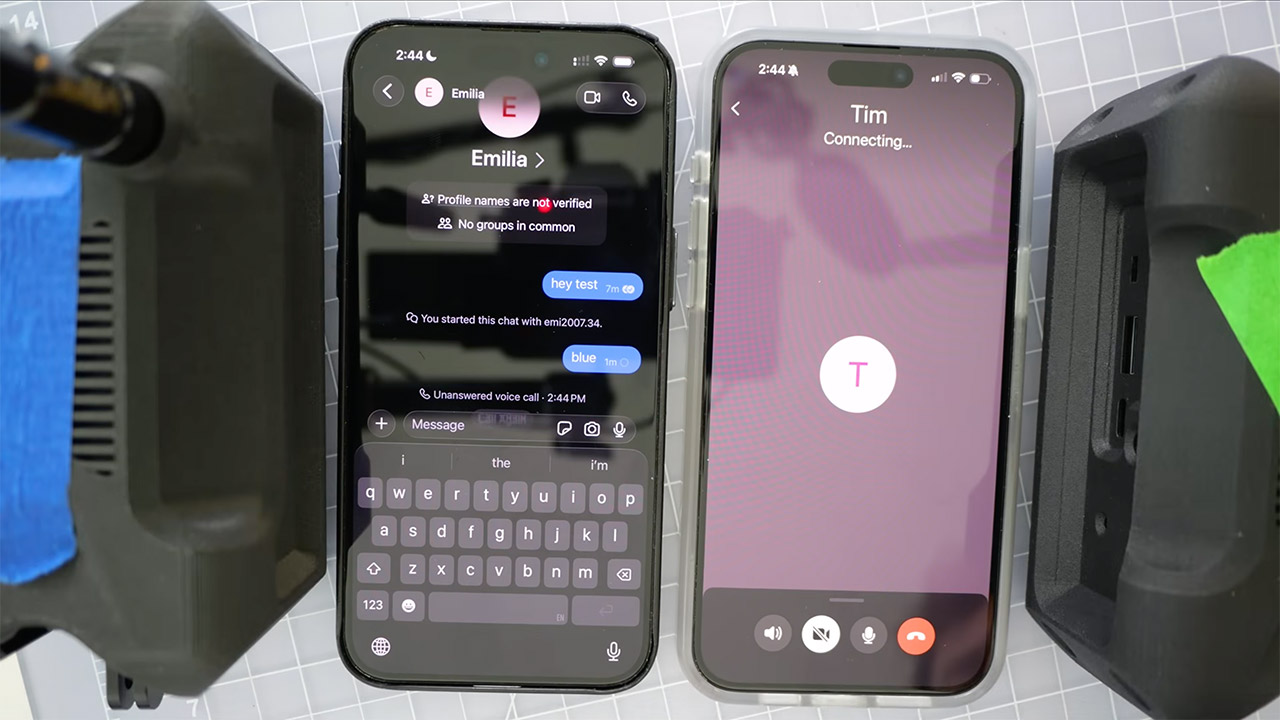
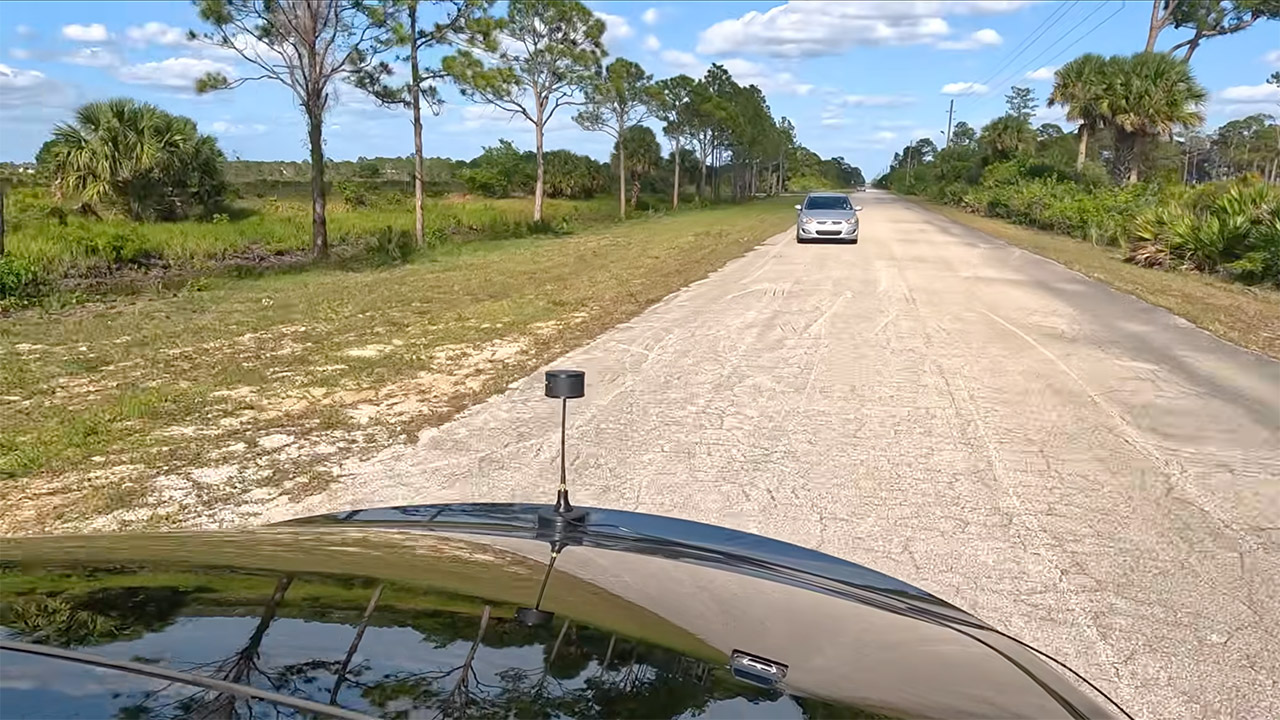
Cars race down a nearly vacant stretch of highway. Two drivers grasp their phones tightly as a FaceTime video call continues between them. The speedometer reads 70 mph, but there are no cell bars in sight, nor do any familiar Wi-Fi networks appear. HaLow technology within each vehicle communicates with a handful of little boxes mounted on the dashboards. These units form a private wireless web that connects the vehicles, with each box essentially chatting to the one next to it, effortlessly passing data so the link never fails.
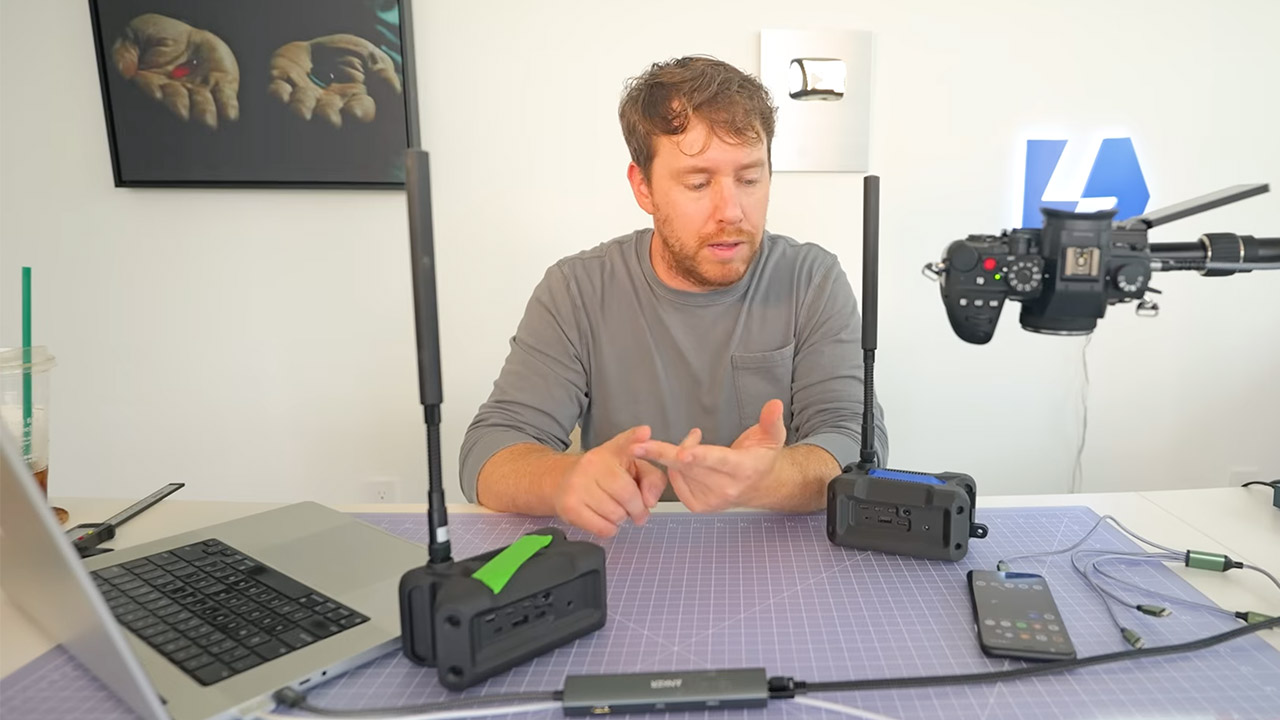
These boxes are referred to as Haven nodes. Each one includes a unique radio chip that can communicate over longer distances than standard Wi-Fi. These chips operate at lower radio frequencies, allowing them to easily penetrate trees, hills, and open spaces. A simple small antenna extends the reach even further – one node may be tucked in a backpack or on a car roof, and if you add a few more, the network reaches across miles of open countryside. Data just jumps from node to node, finding the shortest path downward like water.
A New Way to WiFi: Deco Mesh technology gives you a better WiFi experience in all directions with faster WiFi speeds and strong WiFi signal to cover…
Better Coverage than traditional WiFi routers: Deco S4 three units work seamlessly to create a WiFi mesh network that can cover homes up to…
Seamless and Stable WiFi Mesh: Rather than wifi range extender that need multiple network names and passwords, Deco S4 allows you to enjoy seamless…
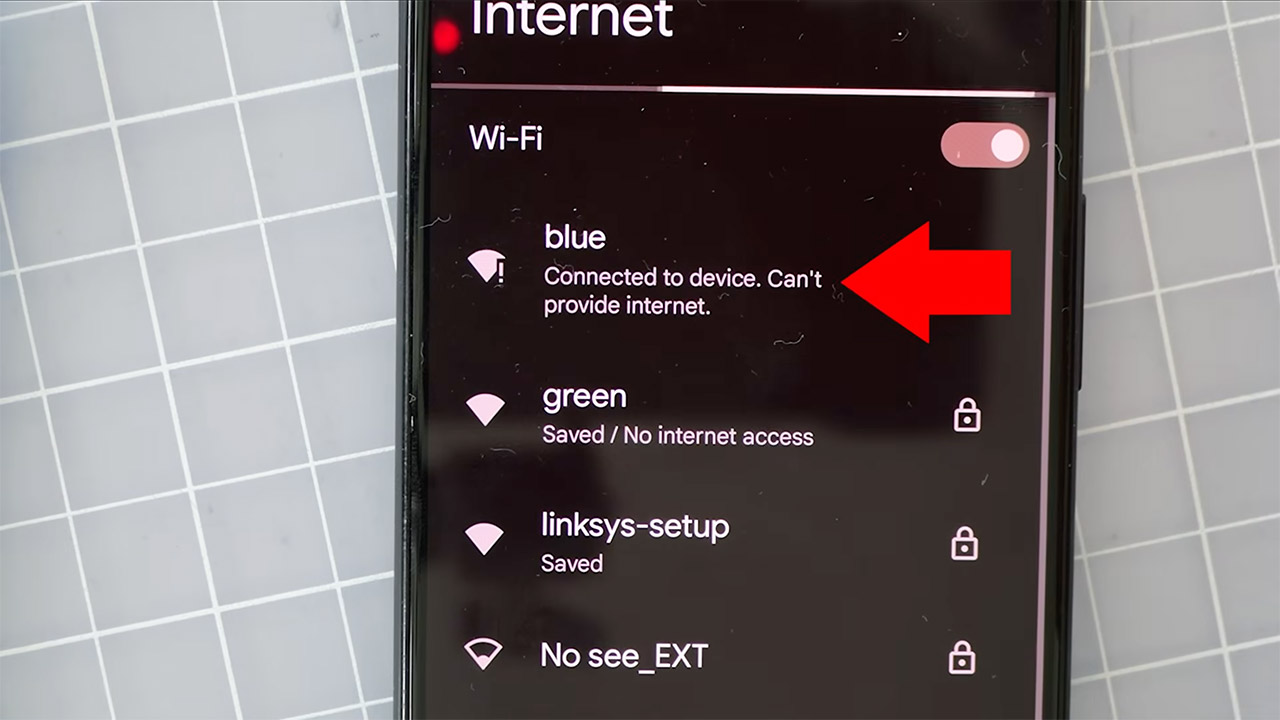
Your phone does not need to attempt to connect to the wider internet, just the nearby node. The nodes all create a mesh and keep everything local. The software inside the nodes determines the fastest route between any two places using well-established mesh connection principles. When a new node joins, it just slots in without requiring any further setup, because the entire group reorganizes itself whenever one node moves or loses power. The device is powered by a small battery pack or even a car outlet, allowing it to operate for hours in the middle of nowhere.
FaceTime works because the app is pre-programmed to allow phones to connect straight when they are on the same local network, something developers added years ago for speedy indoor talks. People quickly forgot about it as apps began relying on remote servers. In this mesh configuration, the phones simply discover each other as they would in a living room, but now that living room is the entire roadway. The call connects without hesitation, and the video streams smoothly enough to hold a typical conversation; the audio remains crystal clear even as the automobiles weave through hairpin corners.
Signal operates in the same way; once all of the phones are connected to the mesh, voice calls can begin immediately. Other apps, such as WhatsApp and Zoom, simply fail since they continue to rely on external servers for authentication. Another open source tool called Mumble can manage voice chats and even broadcast music across the same network without any problems. The mesh has plenty of speed for all of this because the low frequency radios continue to send out consistent data rates across hundreds of yards between nodes.
It only takes a few minutes to set up the nodes; simply place them wherever you need coverage, turn them on, and then connect to the network using your phone, as the name will appear for you to choose. There is no need to create an account or pay a monthly subscription, and you will not be reliant on any towers or wires. Some people have even used this approach to stay in touch with friends when hiking, boating, or anywhere out in the wilderness; simply drop a few nodes and you may continue as usual. The coverage increases as you add additional nodes or replace the antennas with better ones.
The new facility marks a key milestone in GridBeyond’s plans for continued expansion.
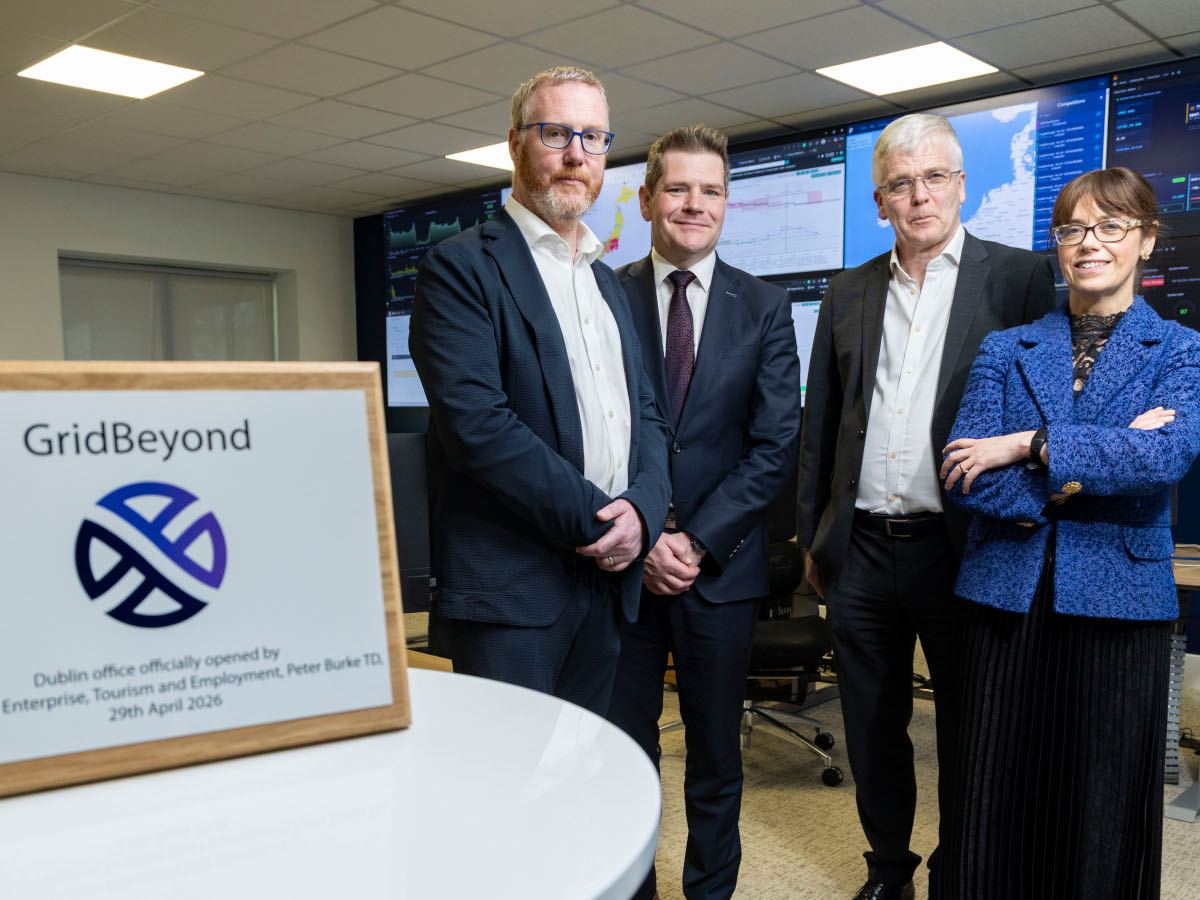
Irish founded smart energy company GridBeyond has today (6 May) officially opened the new Dublin-based global headquarters. The new facility is a key element in the organisation’s expansion plans and will serve as the central hub for GridBeyond’s global operations across nine electricity markets on four continents.
Established in 2010 by Michael Phelan and Richard O’Loughlin, GridBeyond uses AI-powered technologies and techniques to optimise energy generation, distribution and storage. The company employs more than 160 people and has seven global locations across Europe, Asia, North America and Australia.
GridBeyond has stated that the new headquarters has been designed to support both operational scale and future growth, with the aim of creating an environment focused on collaboration, innovation and employee wellbeing as the company continues to attract talent in Ireland and internationally.
Advertisement
Commenting on the announcement, the Minister for Enterprise, Tourism and Employment, Peter Burke, TD said, “GridBeyond is an excellent example of the ambition and capability of Irish companies operating at the forefront of the global energy transition.
“The opening of their new headquarters in Dublin reinforces Ireland’s position as a hub for innovation in energy and technology and demonstrates how Irish SMEs are developing solutions with real global impact. Supporting companies like GridBeyond to start, scale and succeed internationally remains a key priority for the Government.”
Michael Phelan, the CEO and co-founder of GridBeyond, added, “This new headquarters reflects the scale GridBeyond has reached as a global energy optimisation platform. Managing over 5GW of assets across multiple markets requires real-time intelligence, automation and deep market expertise.”
In March of this year Samsung Ventures invested in GridBeyond as part of a €12m equity round. GridBeyond explained the company will use the funding to accelerate expansion across key strategic markets including in the UK, Ireland, the US, Japan and Australia.
Advertisement
Don’t miss out on the knowledge you need to succeed. Sign up for the Daily Brief, Silicon Republic’s digest of need-to-know sci-tech news.
Looking for the most recent Connections answers? Click here for today’s Connections hints, as well as our daily answers and hints for The New York Times Mini Crossword, Wordle, Connections: Sports Edition and Strands puzzles.
Whoa, how about today’s NYT Connections puzzle? Every once in a while, the puzzle editors decide to go all out and toss us an all-symbol grid, but usually the symbols are… somewhat recognizable? This one has a very distinct style, but it’s also a real stumper. If you threw up your hands today and went hunting for the answers, I don’t blame you one bit.
In a sense, it’s easier than it looks, once you realize the icons are supposed to represent simple graphic versions of the clues. But that purple category especially gave me a headache. Read on for clues and today’s Connections answers, complete with explanations.
Advertisement
The Times has a Connections Bot, like the one for Wordle. Go there after you play to receive a numeric score and to have the program analyze your answers. Players who are registered with the Times Games section can now nerd out by following their progress, including the number of puzzles completed, win rate, number of times they nabbed a perfect score and their win streak.
Here are four hints for the groupings in today’s Connections puzzle, ranked from the easiest yellow group to the tough (and sometimes bizarre) purple group.
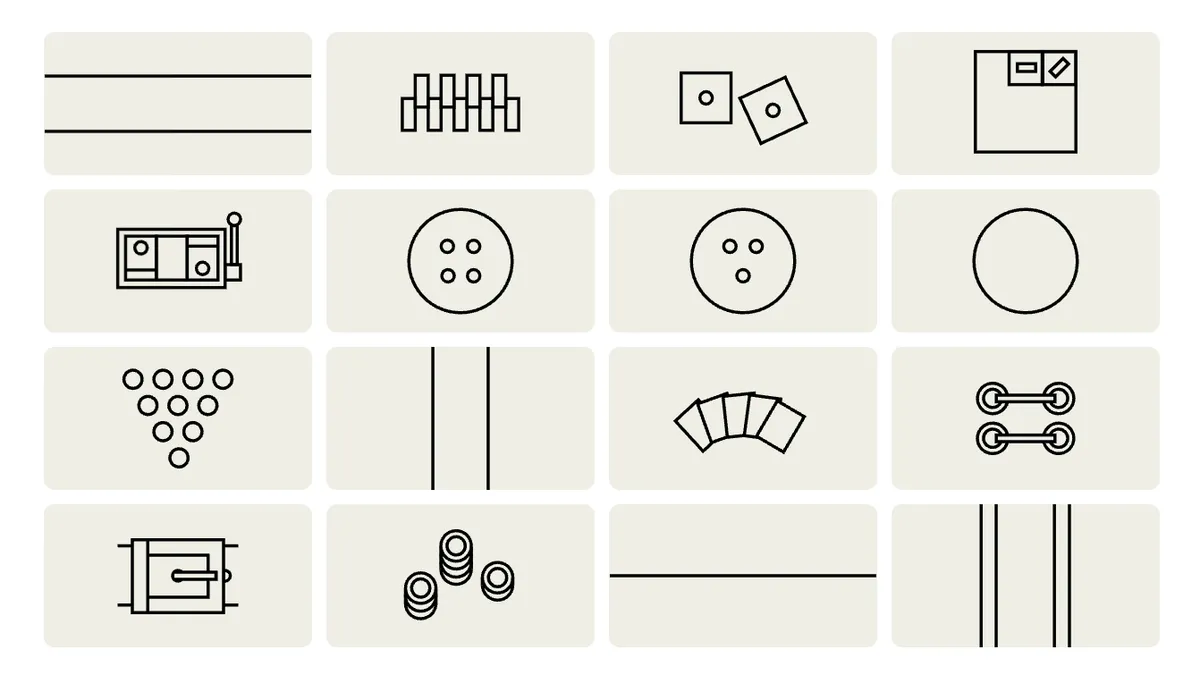
If you’re like me, you just want to know what those symbols are! Here’s an easier way to see what all the symbols mean.
What do all those symbols mean? We explain.
Advertisement
NYT/Screenshot by CNET
Top row, left to right: Horizontal trisection, zipper, dice, scorecard.
Second row, left to right: Slot machine, button, bowling ball, circle.
Third row, left to right: Bowling pins, vertical trisection, cards, laces.
Fourth row, left to right: Buckle, chips, horizontal bisection, lane.
Advertisement
What are today’s Connections answers?
The completed NYT Connections puzzle for May 6, 2026.
NYT/Screenshot by CNET
The yellow words in today’s Connections
The theme is found in a casino. The four answers are cards, chips, dice and slot machine.
Explanation of answer: It’s kind of tough to tell which is which, but I think the cards are three rows over and three down (looks like a spread-out hand of playing cards).
Advertisement
The chips are two spaces over to the right on the bottom row (looks like stacked chips).
The dice are three over to the right on the top row, showing two ones (snake eyes!).
And the slot machine is the second one down on the first row (you can see three symbols showing up, plus the lever).
The green words in today’s Connections
The theme is ways to fasten things. The four answers are buckle, button, laces and zipper.
Advertisement
Explanation of answer: Looks to me like the buckle is the first design on the bottom horizontal row.
Then, the button is the round circle with four holes in it (very similar to the bowling ball next to it).
The laces icon is four over and then one up from the bottom (looks kind of like two pairs of laced eyelets in a shoe).
And the zipper is two over to the right on the top row, where you can kind of picture it as zipper teeth.
Advertisement
The blue words in today’s Connections
The theme is seen in a bowling alley. The four answers are bowling ball, bowling pins, lane and scorecard.
Explanation of answer: This was my favorite one! The bowling ball is three over and two down, the circle with three holes in it (confusing since it’s right next to the button).
The bowling pins are three down on the far-left row (10 little circles arranged in a triangle).
The lane is the far-right icon on the bottom row (double lines indicate the gutter).
Advertisement
And the scorecard is the far-right image in the top row, which shows the scorecard itself, the mark for a gutterball or miss, and the slash for a spare.
The purple words in today’s Connections
The theme is flag designs. How did anyone get this without solving the rest of the puzzle?! The four answers are circle, horizontal bisection, horizontal trisection and vertical trisection.
Explanation of answer: Circle is the circle, duh, located at the far right in the second row down. (It appears on the Japanese flag, for one.)
Horizontal bisection is the bottom row, three columns over (the Polish flag is one of many that uses that design, with different colors above and below the line).
Advertisement
Horizontal trisection is the far-right icon on the top row, as appears on numerous flags, such as Germany’s black-red-gold design.
And the vertical trisection icon is two over from the left and three down (easily confused with the bowling alley lane). Ireland and France are among the flags with vertical trisections. (The three divided sections don’t seem equal in the NYT puzzle, though.)
Toughest Connections puzzles
We’ve made a note of some of the toughest Connections puzzles so far. (This one might make the list!) Maybe they’ll help you see patterns in future puzzles.
#5: Included “things you can set,” such as mood, record, table and volleyball.
Advertisement
#4: Included “one in a dozen,” such as egg, juror, month and rose.
#3: Included “streets on screen,” such as Elm, Fear, Jump and Sesame.
#2: Included “power ___” such as nap, plant, Ranger and trip.
#1: Included “things that can run,” such as candidate, faucet, mascara and nose.
Apple’s long-delayed Siri upgrade is no longer just an embarrassing AI setback, as the company has agreed to a very real, very hefty settlement. The company is paying $250 million to settle a class-action lawsuit alleging it misled iPhone buyers in the US about the AI-powered Siri features announced as part of Apple Intelligence.
According to the Financial Times, the case centers on Apple’s promise of a more personalized Siri that was first shown at WWDC 2024 and promoted alongside newer iPhones.
Siri running on iPhoneRachit Agarwal / Digital Trends
Why is Apple paying out a quarter of a billion dollars?
Apple originally pitched the new Siri as a major part of its Apple Intelligence rollout. The assistant was supposed to understand more personal context, read what was happening on a user’s device, and take actions across apps. But that version of Siri never really arrived. Apple did roll out some Apple Intelligence features over time, like writing tools, image-generation features, and a decent ChatGPT integration. Meanwhile, the more ambitious Siri overhaul, however, was delayed well beyond the iPhone 16 launch window.
Siri editing photo with voice commandApple
The lawsuit covers US buyers of the iPhone 16 lineup and iPhone 15 Pro models. Those were the devices Apple marketed as capable of running Apple Intelligence features. Over the last couple of years, the company has been trying to convince users and investors that it can seriously compete in the AI race. But the delay was obvious, and Apple publicly acknowledged the Siri delay in March 2025. This came several months after the iPhone 16 launched.
Apple still plans on delivering it
The upgraded Siri is reportedly still on the roadmap. Apple now plans to offer the new version this year, with reports pointing to iOS 27 and a partnership with Google that would let Apple use Gemini models to help power the experience. Two years later, the feature still isn’t fully here, and Apple may be paying hundreds of millions of dollars for the gap between the demo and the delivery.
Summer is right around the corner. We’re headed out on adventures and bringing our stuff with us. Here are all the tech and tips that WIRED Reviews recommends for your travels.
There is asurprisingly robust debate among frequent travelers about whether it’s best to carry on a suitcase or to check it. Sure, checking a bag saves you from worrying about space restrictions and confusing security requirements, needing to tote your suitcase into a bathroom stall with you, and sweating about snagging overhead bin space once you board. But you need only one reallybad experience with checking luggage to convince you to avoid doing so whenever possible in favor of being a carry-on purist. My version of that incident occurred at the Delta counter in Dulles International Airport and almost made me miss my flight. (In fact, I’d prefer to not even use a carry-on! But that’s another story entirely.)
I fly more often than I’d like—short work trips, cross-country flights to visit family, and international vacation hauls. I’ve tested countless carry-on suitcases and have now enlisted my family members to help as well. These are the best carry-on suitcases that we’ve found that will fit pretty much any traveler’s needs.
Updated May 2026: I completely overhauled this piece with new picks, new write-ups for existing picks, and updated FAQs. I also checked links and prices to ensure the most up-to-date information.
Table of Contents
Best Overall
Does it surprise you that I didn’t pick the iconic Away polycarbonate carry-on, that gorgeous colorful unit that jump-started the whole direct-to-consumer luggage movement from one of the few affluent-millennial–coded companies to have weathered multiple scandals and economic storms successfully since its founding in 2015? Sometimes it surprises me, too. Multiple WIRED staffers own the hard-sided carry-on because it’s good-looking and reasonably priced. However, I prefer the brand’s Softside Carry-On. In general, I prefer soft-sided luggage because it shows scuffs less easily, won’t crack, and is more flexible if I overpack.
With regard to this specific soft-sided case, it also has a little more flexibility than its hard-shelled cousin regarding organization options. It has exterior pockets, but they’re cleverly hidden. The straps compress a back panel over half the suitcase, so your stuff is squeezed down evenly. There’s a proprietary interior stabilizer to help keep it balanced—it never tipped over on its front, even when I was trying to slide tote bags or backpacks onto the handle while rolling it down a rickety aluminum gangway ramp. It has three exterior handles, not just two, so you can fling it about any which way. Also, the bag’s profile and hardware are pleasantly understated. There’s no giant shiny logos or ugly plastic zipper pulls, and all the available colors are attractive.
Advertisement
The nylon is also water-resistant; last year, I sat (sadly) with my Softside in the rain in the Philippines, waiting for a ferry, and it kept its contents dry. Unlike other carry-ons that falsely bill themselves as small enough for international carriers, the Softside’s dimensions are accurate. I’ve flown on multiple international flights with it to Europe and Asia without issue.
Best Value
Bagsmart
Getaway 20-Inch Carry-On
In all previous versions of this guide, I have recommended a Travelpro suitcase for this category. But this year, Bagsmart’s latest carry-on suitcase shocked me with its strong value. I picked the 20-inch version to test because it comes in a yellow mango color that’s just plain gorgeous. While this one may not pass the requirements for carry-on size on all budget or international airlines, it’s available in a 19-inch version that should work universally.
Advertisement
Travelpro
Maxlite Air V2 Compact Carry-On
Both my 8-year-old and my 11-year-old conducted suitcase-racing tests and commented on how smoothly the four-way spinner wheels rolled compared to much more expensive suitcases. The Getaway also never toppled forward off-balance, which Travelpro suitcases have an unfortunate tendency to do, in my experience. The storage options are identical to other, much more expensive suitcases, with several interior zip pockets and a compression panel. It’s expandable and has a TSA-combination lock. It also comes with a few fun accessories, like a luggage tag and a piece of nylon webbing that you can clip to the outside if you end up having to check it.
About my only complaint is that the telescoping handle is a bit wobbly, but its value is amazing for around the $150 mark. (It also comes in a slightly pricier front-opening version ($170) with a padded front compartment for your tech.) If you’re unwilling to ditch Travelpro, I recommend the Maxlite Air V2 ($160), which comes in at around the same price point but weighs about two pounds less. It’s also expandable, the wheels roll smoothly, my hand fits in the handle, and the interior is made from 100 percent postconsumer recycled plastic bottles.
Any product that emits radio frequencies must pass through the FCC’s equipment authorization process before it can be legally imported or sold in the US. That includes the obvious stuff like phones, tablets, PCs, Wi-Fi routers, along with the growing number of gadgets that insist on adding Bluetooth or Wi-Fi… Read Entire Article Source link
Across the world, digital workflows are becoming the default, but few countries have pushed this transition as far, and as fast, as India. With platforms like DigiLocker and Aadhaar-based authentication enabling billions of transactions, entire ecosystems are now operating without physical paperwork.
Which raises a fundamental question: in a system without paper, what replaces the signature?
At first glance, this appears to be a story about efficiency—faster processes, reduced paperwork, seamless execution. But that framing is incomplete. What is unfolding is far more fundamental: a shift in how trust itself is constructed.
Advertisement
Article continues below
Because a signature, at its core, has always answered three simple questions, who agreed, what they agreed to, and whether that agreement can be proven legally later. For decades, we relied on a physical act to answer these questions. Today, we are beginning to rely on esign software.
Rakesh Dosi
Advertisement
Chief Business & Product Officer, Protean eGov Technologies Ltd.
Work Has Changed. Signatures Are Catching Up
For a long time, the signature wasn’t just a mark, it was a ritual. You procured stamp paper, printed something, signed it, scanned it, sent it back. It felt like completion. But that feeling came from a world where work moved slowly enough for these pauses to exist.
Advertisement
That world doesn’t really exist anymore.
Today, work is no longer confined to offices or even time zones. A decision can start in Mumbai, get reviewed in Singapore, and be executed in London, often within the same day. Workflows are not linear anymore; they’re layered, parallel, and embedded into the tools we use every day.
Sign up to the TechRadar Pro newsletter to get all the top news, opinion, features and guidance your business needs to succeed!
In such an environment, a physical signature is not just slow, it is misaligned. And the data is starting to reflect that shift.
Advertisement
Trust has moved from familiarity to verification
For a long time, trust was built on something deeply human recognition.
A signature worked not because it was foolproof, but because it was familiar. You saw it, you recognized it, and that recognition stood in for trust.
But familiarity, as it turns out, is a fragile proxy.
A handwritten signature can be imitated. It can be forged, scanned, copied, or lifted from one document and placed onto another.
And yet, for decades, systems continued to rely on it—not because it was secure, but because it was accepted. Trust, in that world, was based on continuity. “This looks right” was often enough.
What has changed is not just technology but the expectation of trust itself.
Advertisement
Trust is no longer about whether something looks right
Today, trust is no longer about whether something looks right. It is about whether it can be proven to be right.
E-Stamping/Digital Stamping and Electronic signatures represent that shift. They are not built on visual similarity or human memory. They are built on cryptographic verification, a system where legal document, identity, intent, and integrity are mathematically bound to the document.
When you sign electronically, several things happen simultaneously:
Advertisement
You can stamp the paper for the agreement value on the fly
Your identity is authenticated through secure digital credentials
The document is encrypted and linked to your signature
Any change to the document after signing becomes immediately detectable
A verifiable audit trail is created, timestamped, traceable, and tamper-evident
Post signing the document, get a AI based summary of the document signed and stamped.
In other words, trust is no longer implied. It is engineered.
This is a fundamental shift—from subjective trust to objective trust.
From “I recognize this” to “I can verify this” to “I can hold this document legally in any court of law”
At Scale, Systems Matter More Than Steps
Scale has a way of exposing everything we try to hide inside a process.
Advertisement
In small systems, inefficiencies are tolerable. A delayed signature, a missing page, a manual follow-up—these are inconveniences. But when the same process is required to operate across millions of transactions a day, those inconveniences don’t stay small. They compound. They multiply. They become risk.
India provides a compelling example. Whether in payments, telecom onboarding, insurance issuance, or public service delivery, systems are designed to handle millions of concurrent transactions. In such environments, consistency becomes more critical than speed.
Physical signatures introduce variability they can be illegible, misplaced, or disputed. They require additional verification layers, each adding time and cost.
Electronic signatures operate differently. They are deterministic. Every transaction follows a defined protocol. Authentication, consent, and execution happen within a structured framework, eliminating ambiguity and reducing dependency on manual intervention.
Advertisement
Because of this, e-signatures can be embedded directly into systems triggered automatically, executed instantly, and recorded seamlessly. The workflow does not pause for a signature; the signature becomes part of the workflow.
At scale, systems cannot rely on human intervention at every critical step. They need processes that are predictable, repeatable, and integrable. Electronic signatures are not just a faster alternative to physical ones they are aligned with how modern systems are designed to function.
Because when you are operating at the scale of millions, the question is no longer “Can this work?”
It is “Will this work the same way, every single time?”
Advertisement
Compliance Is Becoming Embedded, Not Enforced
Compliance used to be something you proved after the work was done.
A document moved, someone signed it, it got filed away and somewhere down the line, an auditor would come in and ask: Can you show me what happened here? Compliance, in that world, was retrospective. It relied on reconstruction piecing together intent, sequence, and authenticity from static records.
That model worked when workflows were slower, linear, and contained within physical boundaries.
Advertisement
Today, transactions occur instantly and across distributed systems. By the time an audit begins, the moment it seeks to verify has already passed. Compliance, therefore, cannot remain an afterthought.
Electronic signatures fundamentally shift this paradigm. They transform the act of signing into a compliance event. E stamping and digital stamping have further redefined what the digital signature journey looks like in practice, not as a sequence of disjointed steps, but as a single, continuous transaction.
The act of stamping, once a separate logistical exercise involving procurement, verification, and physical handling, now happens contextually now of agreement, bound directly to the document, the signer’s identity, and the transaction value. Increasingly, this journey is being enhanced by AI-driven capabilities.
Intelligent systems can now summarize executed documents instantly, highlighting key clauses, obligations, and risks—reducing the cognitive load on users and decision-makers post signing. AI can also classify documents, flag anomalies, detect missing signatures, and provide contextual insights across large volumes of agreements.
Advertisement
In this model, signing is no longer just about execution; it becomes a point of understanding, verification, and intelligence. The signature doesn’t merely conclude a process it activates a smarter one.
At the moment of execution, identity is verified, timestamps are recorded, documents are sealed against tampering, and every interaction is logged. Compliance is no longer something that needs to be proven later it is built into the transaction itself.
This reduces ambiguity and eliminates reliance on interpretation. More importantly, it shifts compliance from a periodic checkpoint to a continuous state. Organizations are no longer preparing for audits; they are operating within systems that are inherently auditable.
This is particularly significant in regulated ecosystems like finance, insurance, and government services—where trust is not just important, but foundational.
Advertisement
The Real Shift: Alignment with a Digital-First World
If you step back, the rise of electronic signatures is not about replacing paper. It is about alignment.
– Physical signatures belong to a world that was: local, linear, and dependent on human coordination
– Electronic signatures belong to a world that is: distributed, system-driven, and built on verifiable trust
Advertisement
India’s digital public infrastructure from Aadhaar to DigiLocker, is simply accelerating this transition by providing the rails on which such trust can operate at scale.
So, the question is no longer whether electronic signatures are “better.”
The more precise answer is this: They are better suited to the world we now live in.
And that, more than anything else, is why they are becoming the default.
This article was produced as part of TechRadar Pro Perspectives, our channel to feature the best and brightest minds in the technology industry today.
The views expressed here are those of the author and are not necessarily those of TechRadarPro or Future plc. If you are interested in contributing find out more here: https://www.techradar.com/pro/perspectives-how-to-submit
Sharp Consumer Electronics has struck a distribution agreement with CANAL+ that will see the streaming platform pre-installed across Sharp’s TiVo-powered smart TV range in eight European markets.
The arrangement covers France, Hungary, the Netherlands, Poland, Romania, Slovakia, Belgium, and the Czech Republic, spanning the range of territories where CANAL+ currently operates its subscription service.
Across those markets, the CANAL+ app will come pre-installed on all Sharp smart TVs that run the TiVo operating system, removing the step of manual installation from the app store that can reduce ‘discovery’ of streaming services that compete for prominence on crowded home screens.
That content catalogue spans premium sports rights, theatrical film releases, and original series, giving Sharp TV owners in the covered markets access to programming that sits closer to a traditional pay-TV bundle.
Advertisement
Alongside the pre-installation, Sharp is integrating a dedicated CANAL+ shortcut into the remote controls of supported TV models for even quicker access to the streaming app.
Advertisement
TiVo, whose operating system underpins the Sharp smart TV range in this new partnership, also forms part of the three-way arrangement, with the platform’s content-first interface offering assistance in surfacing CANAL+ content to viewers who are browsing for films, series, and live sport.
CANAL+ EVP of industrial partnerships Philippe Schwerer noted the company’s intent to strengthen its position in the smart TV market and extend access to its content catalogue to its 26.3 million subscribers across Europe, a figure that reflects the broadcaster’s scale relative to newer streaming entrants competing in the same regional markets.
Advertisement
Sharp has not confirmed which television models will carry the pre-installed app and dedicated remote button, though the partnership covers new devices running TiVo across all eight European territories where CANAL+ holds broadcast rights.
An anonymous reader quotes a report from CNBC: OpenAI President Greg Brockman concluded his testimony on Tuesday, where he largely rebutted Elon Musk’s account of the early years of the startup and negotiations that occurred at the company. Brockman testified that he never made any commitments to Musk about the company’s corporate structure, and he never heard anyone else make them. He emphasized that OpenAI is still governed by a nonprofit. “This entity remains a nonprofit,” Brockman said, referring to the OpenAI foundation. “It is the best-resourced nonprofit in the world.” […] Brockman, who spoke from the witness stand in federal court in Oakland, California, over the course of two days, also revealed that Musk had enlisted several OpenAI employees to do months of free work for him at Tesla, Musk’s electric vehicle company. That work mainly included efforts to overhaul the company’s approach to developing self-driving technology as part of the Autopilot team there in 2017. During his two days on the stand, Brockman answered questions about his personal financial ambitions, his understanding of OpenAI’s structure and Musk’s involvement at the company, which they co-founded with other executives in 2015.
In Musk’s testimony last week, the Tesla and SpaceX CEO said that the time, money and resources he poured into OpenAI had been integral to the company’s success. He repeatedly said that he helped recruit the company’s top talent. Brockman said Tuesday that while Musk was helpful in convincing some employees to take the leap to join OpenAI, he was a polarizing figure for others. “Elon had a reputation of being an extremely hard driver,” Brockman said. He added that “certain candidates were very attracted” by Musk’s involvement at OpenAI, and that “certain candidates were very turned off.” Musk testified last week that a former OpenAI researcher named Andrej Karpathy joined Tesla, but only after he had planned to leave the startup already. Brockman said that Musk, after he hired Karpathy, approached him with “an apology and a confession,” about the hire, and that neither Musk nor Karpathy had told him the researcher planned to leave OpenAI before that. Musk was generally not very available for meetings and conversations, Brockman said, so he relied on employees, including Sam Teller and former OpenAI board member Shivon Zilis, as proxies. Brockman testified that open sourcing OpenAI’s technology was “not a topic of conversation” during Musk’s time with the nonprofit, despite Musk’s claims that it was supposed to be central to the organization. He also described tense 2017 negotiations over a possible for-profit arm, saying Musk became angry when equity stakes were discussed. “He said Musk declined the proposal during an in-person meeting, then tore a painting of a Tesla Model 3 car off the wall, and began storming out of the room,” reports CNBC. He also demanded to know when the cofounders would leave the company.
Brockman further said Musk wanted control of OpenAI because he disliked situations where he lacked control, citing Zip2 and SolarCity as examples Musk had raised. He also testified that Musk partly wanted control to help fund his broader SpaceX ambition of building a “city on Mars.”
CNBC notes the trial will resume at 8:30 a.m. PT on Wednesday, with Shivon Zilis expected to testify. She is the mother of four of Musk’s children and a former OpenAI board member.
Nearly 30 years after Altec Lansing introduced the first multi-channel digital soundbar, Klipsch has just introduced another first: the first soundbar with integrated DIRAC Live room correction. Unveiled at CEDIA Expo 2024, the Klipsch Flexus Core 300 soundbar took a little longer than expected to hit the market, but it’s here now and we’re excited to put it through its paces.
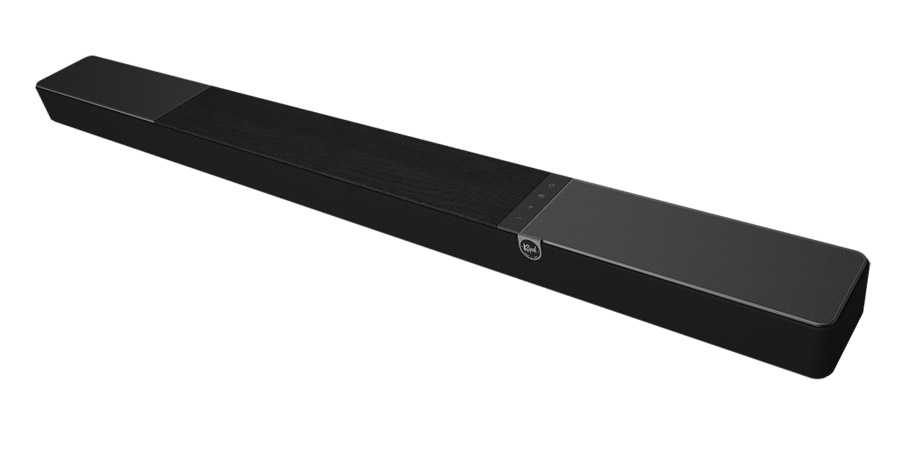
The Klipsch Flexus Core 300 is available in black (pictured) and walnut finishes.
What Is It?
The Klipsch Flexus Core 300 ($1,199.99) is the latest soundbar in the Klipsch Flexus line. The bar is described as “5.1.2-channel” as it uses both up-firing and side-firing reflective drivers to extend the soundstage above and around the listener. Amplifiers designed by sister company Onkyo are built-in, so you won’t need to add an A/V receiver or amplifier. The Flexus Core 300 supports both Dolby Atmos and DTS:X immersive surround as well as legacy audio formats like PCM, Dolby Digital and DTS surround. The company claims a frequency response of 43Hz–20kHz, though listening suggests that this is a bit optimistic, at least on the low frequency end.
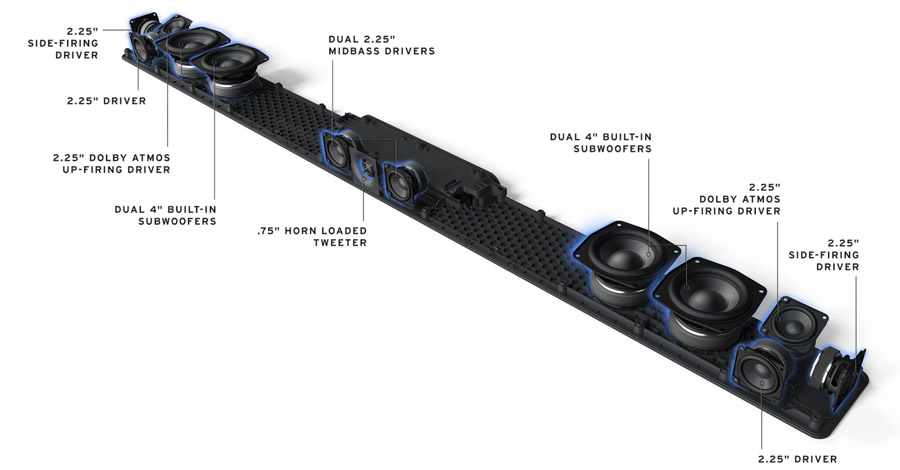
The Flexus Core 300 bar features 285 total Watts of clean Onkyo power, driving 13 speakers. This includes four front-firing, two side-firing and two up-firing drivers as well as four integrated woofers for low frequency reproduction. The 13th driver is a dedicated ¾-inch horn loaded tweeter for the center channel.
Driver layout of the Klipsch Flexus Core 300 soundbar.
At 54 inches wide, 3 inches tall and almost 5 inches deep, it’s one of the larger bars we have tested. It makes a great visual match for a 65 inch or 75 inch TV, though its depth will make wall-mounting a challenge. If you’re placing it on a credenza or console, be sure your TV’s stand or feet give you enough clearance so the bar doesn’t block the TV screen or IR sensor.
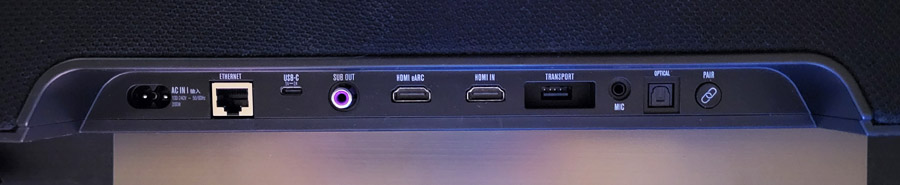
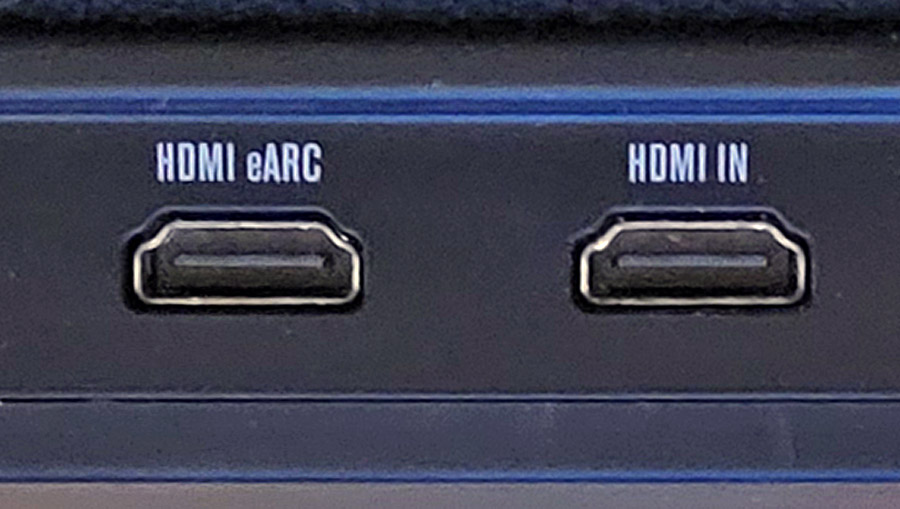
The bar includes an HDMI port with ARC/eARC for connection to a TV as well as a second HDMI port for direct source connection. This second HDMI port is particularly handy if you are using the bar with an older TV or projector without ARC/eARC support or one that is limited in its ability to pass through all audio formats.
The Flexus Core 300 also includes a fiberoptic digital audio input, an RCA output for a wired subwoofer, a USB-C port for digital music playback and firmware updates, an Ethernet jack for hard-wired network connection, as well as a mic input for the calibration microphone. The USB port marked “Transport” is for connection of a wireless transmitter dongle which enables optional rear speakers and up to two wireless subwoofers. The bar also includes Bluetooth and WiFi wireless connectivity with support for Apple AirPlay 2, Google Cast, Spotify Connect and TIDAL Connect.
Advertisement
Like most high-end soundbars, the Flexus Core 300 supports the addition of wireless rear channel speakers and a subwoofer. Actually the Core 300 can support up to two wireless subwoofers for enhanced immersion and low bass reproduction. And unlike most bars, the unit also includes a standard RCA subwoofer output so you can use it with virtually any third party powered subwoofer. In fact, you could connect two wireless subwoofers and a wired one for a prodigious amount of bass, even in a large room.
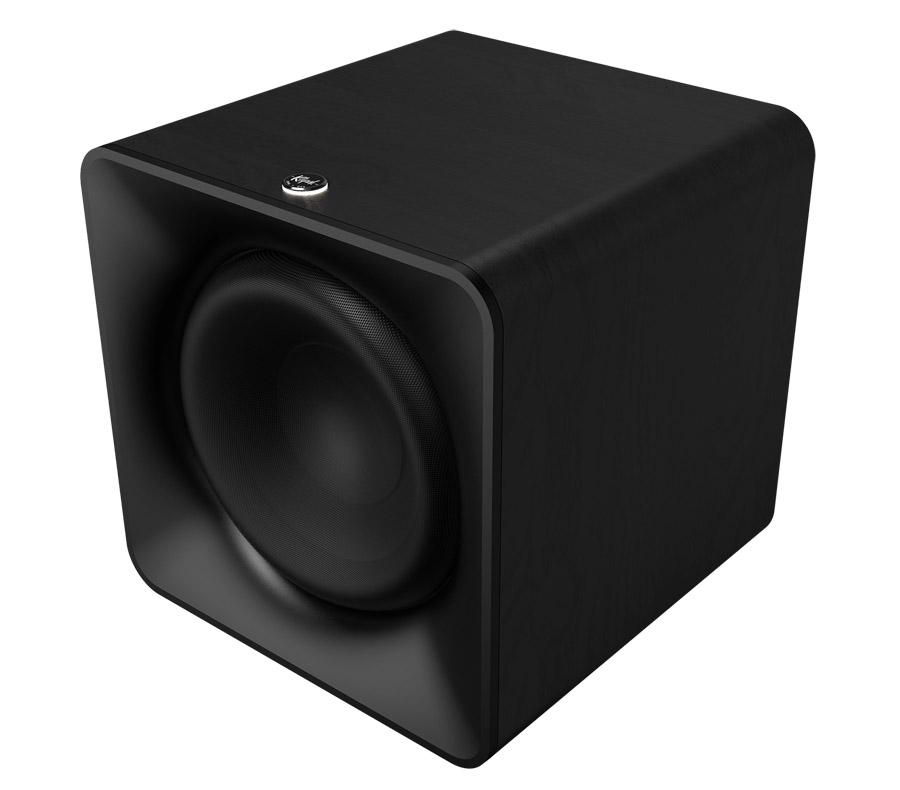
The Klipsch Flexus SUB 200 is a 15-inch cube with 200 watts of Onkyo amplification on board.
We tested the bar on its own and with the Klipsch Flexus SURR 200 rear speakers ($499/pair) and Flexus SUB 200 subwoofer ($599) for a total system price of around $2,300. A smaller SURR 100 speaker is also available which omits the up-firing driver. A smaller wireless subwoofer (SUB 100) is also available for use in smaller spaces.
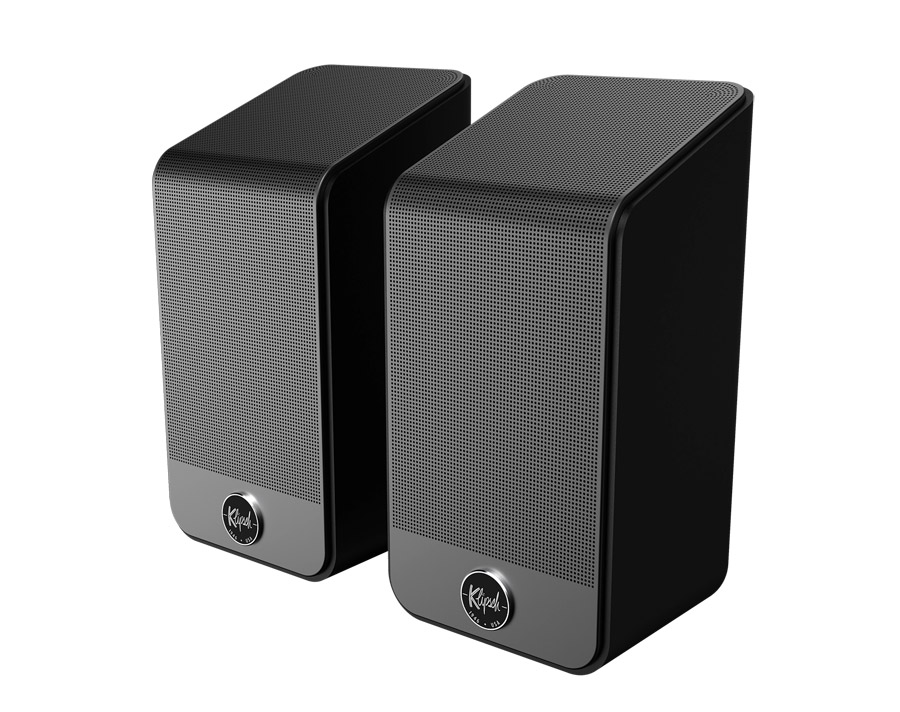
Klipsch Flexus SURR 200 speakers ($499/pair).
The SURR 200 speakers include both front-firing and up-firing drivers, expanding the bar from 5.1.2-channels to 7.1.4 channels. They include a threaded stand mount, but no keyhole mount so you’ll need a stand or bookshelf for them (be sure not to block the upfiring driver for height sounds).
All That with a Side of DIRAC
What sets the Flexus Core 300 apart from any other soundbar-based system is support for DIRAC Live room correction. As soundbars and speaker systems expand to more and more channels, the speakers interact not only with their environment (walls, furniture and ceiling) but also with each other. DIRAC Live room correction identifies and corrects for room frequency anomalies by applying digital filters, adjusting phase, EQ and levels of each speaker. This allows the system to work more coherently as a whole, with all drivers helping to compensate for idiosyncrasies in the listening room.
The DIRAC version included with the Flexus Core 300 is the limited bandwidth version, though the full bandwidth version is available from DIRAC for a nominal upgrade fee (Currently $99).
Advertisement. Scroll to continue reading.
Advertisement
Features and Functionality
In addition to DIRAC Live, the Flexus Core 300 has plenty to offer from a features standpoint. It decodes the two most popular immersive surround sound formats – Dolby Atmos and DTS:X – as well as other legacy versions of Dolby and DTS surround and PCM. It doesn’t support more obscure immersive formats like AURO-3D, Sony 360RA, MPEG-H or Eclipsa Audio, but few soundbars do. The Flexus 300 offers Night Mode for compressed dynamic range as well as a dialog boost in case you’re having trouble hearing voices over the action. Surround modes include “Movie” and “Music” which change the overall surround presentation and EQ curve. There’s even a tri-band equalizer (Bass, Midrange, Treble) in the mobile app.
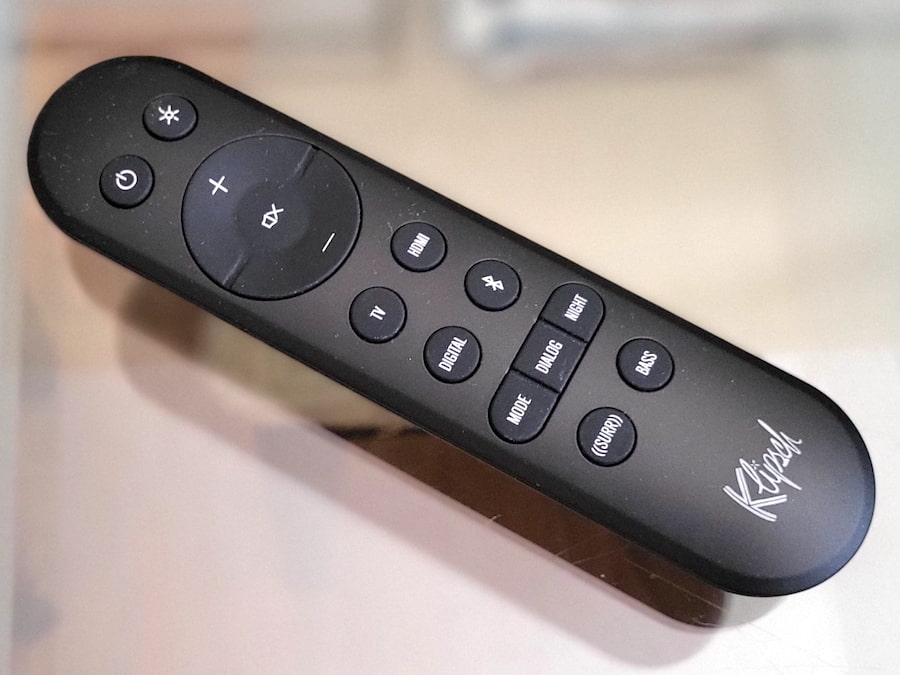
The Flexus comes with a fairly robust remote control that handles all of the essentials, including direct buttons for each input selection, volume and mute. The remote also includes access to surround modes (Movie or Music), Dialog mode and Night mode. Another nice touch is that the remote provides adjustment of the surround channel levels (side, rear and height) as well as a variable bass control. Many bars require that you dive into the app for these kinds of adjustments.
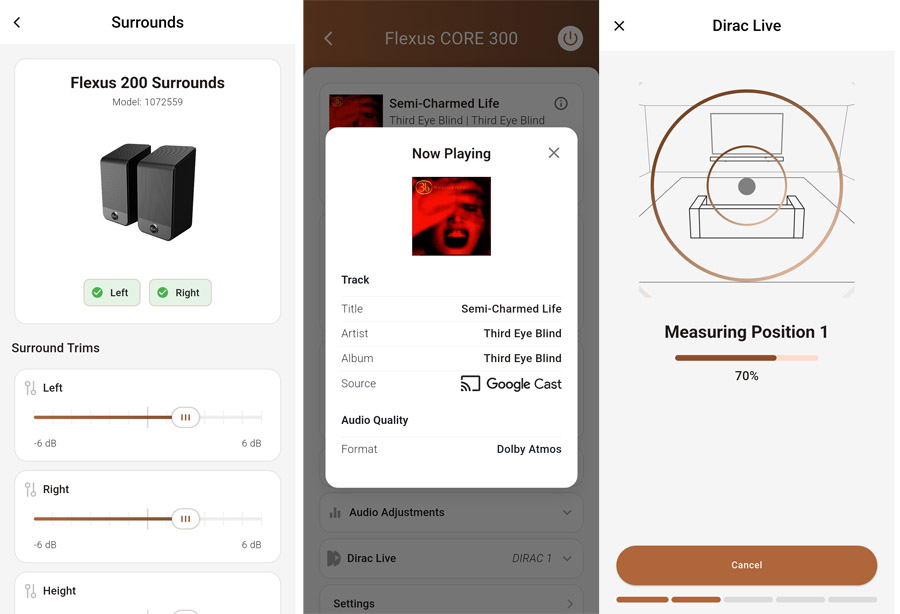
While you can get sound out of the bar without doing a full set-up, you’ll be best-served installing the Klipsch Connect app for Android and iOS. This allows you to connect the system to the internet for firmware updates, enable Google Cast, adjust options, and make direct adjustments to the levels of the various speakers from within the app. The app is also essential to perform DIRAC Live calibration using the included microphone.
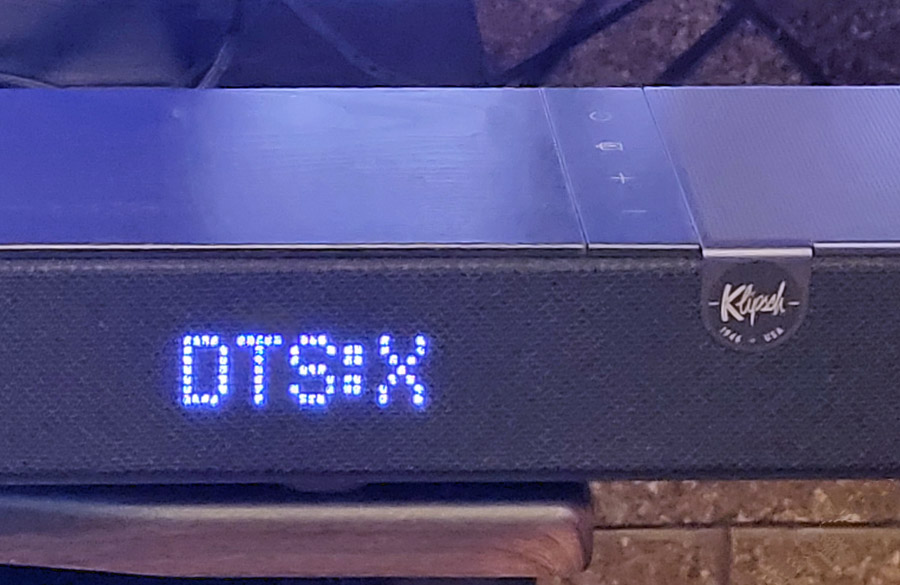
Pro Tip: If you want to see what audio format is coming into the bar, press and HOLD the LED light button on the top right of the remote control. This will display the surround format, e.g. Dolby Atmos or DTS:X on the soundbar’s LED screen.
The Set-Up
For the most part, the Flexus Core 300 is “plug and play.” If your TV has an HDMI port with ARC (Audio Return Channel) or eARC (enhanced Audio Return Channel), then this is the connection you should use. Connect an HDMI cable between the bar’s HDMI/eARC port and the TV’s HDMI/eARC port and this will get you sound from the TV, its on-board tuner, any built-in streaming apps and any devices connected to the TV. Though it should be automatic, you may need to get into your TV’s “audio output” settings menu to set the output to “external speakers” (or something similar) in order to enable the audio output over HDMI.
The HDMI eARC port may be the only one you need. But it’s nice to have a second one.
Once connected, we’d recommend installing the Klipsch Connect mobile app on your phone or tablet. Connect your phone or tablet to WiFi, load the app and click on the “+” button to add the Flexus Core 300 bar. The Klipsch Connect app will then walk you through the rest of the set-up. Be sure to enable “Google Cast” in the app if you intend to use that feature to cast audio from a phone, PC or tablet to the bar.
We listened to the bar on its own for a while, then added the optional Flexus Sub 200 wireless subwoofer and Flexus Rear 200 wireless speakers. Note that adding a wireless sub or wireless rear speakers requires connecting a wireless transmitter dongle to the rear USB port marked ”Transport” on the back of the bar. A dongle comes with the subwoofer and with the rear speakers.
Advertisement
The dongle that comes with the subwoofer is identical to the one that comes with the rear speakers, except for the pairing. If you use the dongle that came with the sub, you’ll need to manually pair the rear speakers by pressing the pairing buttons on both the speakers and the soundbar. And if you use the dongle that came with the rear speakers, then you’ll need to manually pair the subwoofer by pressing the pairing button on the sub and the bar. One dongle can support up to two wireless subwoofers and a pair of rear speakers.
After adding the rear speakers, rear channel height adjustments were automatically enabled on the remote and in the app.
I do have to mention that, after adding the rear speakers, I started hearing dropouts and other audio glitches coming from the rear right speaker. It was bad enough that I sent them back to Klipsch for a replacement pair, only to have the same problem with the new pair. Doing a bit of research, I found that the Flexus products can be subject to wireless interference from other wireless devices. Klipsch uses a proprietary low latency wireless “Transport Link” connection among its products. It transmits on the 2.4 GHz band and apparently this connection can be disrupted if your speakers are too close to a wireless router or network repeater.
After some debugging, I found the interference was not being caused by my main router, but by my TP-Link mesh network extender, which was around 5 feet from the right speaker. Fortunately I was able to move the repeater about 2 feet. And in that position it was far enough from both rear speakers not to cause any audible distortion or interference to either one.
Advertisement
DIRAC Live in Action
While I did do some listening before setting up DIRAC, most of my testing was done after running through the basic (bandwidth-limited) DIRAC Live correction and calibration process. Getting through it was simple, moving the included mic to three different positions while the app went through its test tone generation and measurements. The entire process took less than 15 minutes.
Advertisement. Scroll to continue reading.
With the DIRAC profile applied, the biggest improvements were in bass definition and imaging precision in the lower midrange. A slight boominess in the lower bass in my listening room was pretty much eliminated by DIRAC and vocals stood out more clearly after calibration. Within the app, you can toggle back and forth, with and without DIRAC. I found the sound was pretty noticeably improved with DIRAC processing applied and didn’t notice any significant artifacts.
The limited bandwidth version only measures and corrects the speakers from 20 Hz to 500 Hz, so upper midrange and treble frequencies are unaffected by the calibration. If you’ve got a highly reflective or problematic room, you might want to invest the $99 to upgrade to the full bandwidth version of DIRAC Live.
Advertisement
Listening
On its own, the Klipsch Flexus Core 300 provided a huge upgrade in sound compared to the built-in speakers in our TCL QM8K TV. And those speakers are actually pretty decent as they were designed in partnership with Bang and Olufsen. Bass was more solid and extended, soundstage width and height was improved, and dialog intelligibility was dramatically improved. On Dolby Atmos and DTS:X content, sounds extended to the sides of the room, but nothing sounded like it was coming from behind me.
On clips like the intro scene from season 1 of “Andor,” rain fell gently from vaguely above and in front of me, while dialog in the nightclub was articulate and audible above the background music. On a more complicated Dolby Atmos scene like the worm attack on the spice crawler about an hour into “Dune,” the swirling sands, music and Bene Gesserit voices were a bit less coherent and distinct, though still vastly better than the sound from the TV speakers.
Moving onto Dolby Atmos music tracks like the EDM track “Alive” by KX5/deadmau5, spatiality on this track was pretty good with a wide, tall and deep soundstage but the bass drop was not super impactful. Additional Dolby Atmos music tracks, like “Rocketman” by Elton John reinforced this opinion. Good dynamics, nice width, some height, but not truly “immersive.”
Send in the Reinforcements
Truth be told, I’ve never been that impressed with a one-piece soundbar, except maybe the $70,000 one from Steinway Lyngdorf. The cabinet of a soundbar just isn’t large enough to do deep bass, and as good as virtualization has gotten over the years, nothing can substitute for a real pair of speakers behind the listening position to create an immersive surround soundstage. So I was eager to add the SUB 200 and SURR 200 speakers to the mix. Doing so was pretty simple. Since I used the wireless dongle that came with the SURR 200 speakers, they were pre-paired with the bar, and all I had to do was plug-in the subwoofer and hit the pairing button on both the sub and the soundbar in order to establish a link.
Advertisement
Adding the subwoofer and rear speakers immediately expanded the soundstage to encompass the whole room with a dome of sound, and bass took on much more impact, heft and substance with the SUB 200 active. Tracks that were a bit thin-sounding, like EDM tracks from Kx5, now had power and substance. And, when the chorus kicked in in Elton John’s “Rocket Man” in Dolby Atmos. the room exploded in sound, with my listening seat at the epicenter.
Diving back into music listening, I queued up my Dolby Atmos playlist on Amazon Music, which includes the Dolby Atmos remix of Pink Floyd’s “Dark Side of the Moon.” The cash register sounds that open the song “Money” were spaced all around the room making me feel like I was inside the mix. The SURR 200 speakers were particularly effective at creating a full wall of sound behind the listening position. Integration from left rear to right rear was seamless. It literally sounded like there was a third rear speaker between the two actual ones.
Other favorite Dolby Atmos music tracks like Ed Sheeran, “Shape of You” and A-Ha “Take On Me” were reproduced on the Flexus system with great spatiality and seamless motion as voices and instruments moved around the room. And on mellower singer/songwriter tracks in Dolby Atmos like Aoife O’Donovan’s “Prodigal Daughter” and Freya Ridings’ “Lost Without You,” female vocals were presented naturally, without excessive stridency while the natural acoustics of the recording space were captured nicely.
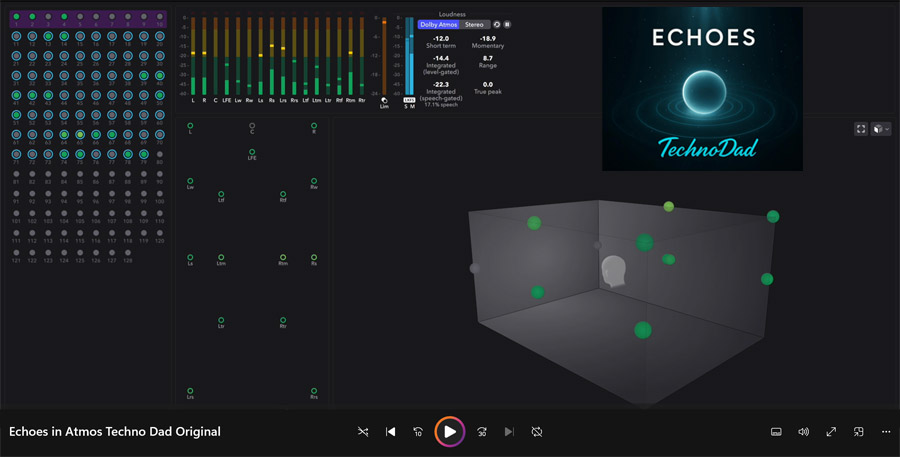
It wouldn’t be a Dolby Atmos test without some content from Channa Da Silva, a.k.a. “Technodad.” On the Flexus Core system, his original track “Echoes” (available in Dolby Atmos on Apple Music) made awesome use of the entire soundstage, front to back, side to side and top to bottom with percussion and synth tracks dancing all around the room. Technodad also offers a Dolby Atmos calibration toolkit, which is super helpful in setting up a home theater or surround sound system. You can check out at SpatialCD.com.
Advertisement
“Echoes” by Technodad, is available on Apple Music in Dolby Atmos, or as an MP4 video, complete with Dolby Atmos renderer visualization.Find out how to download it here.
For DTS:X we put on several UHD Blu-ray Discs, including “Harry Potter and the Sorcerer’s Stone.” About 20 minutes into the film, when Harry enters the magical world of Diagon Alley with Hagrid, the soundscape expands to encompass the entire room with sounds coming from above and behind the listening position. And on “Ex Machina” (also about 20 minutes in), we’re treated to a more claustrophobic sonic experience when a power failure leads to a series of warning tones and foreboding chirps.
Harry’s entrance into Diagon Alley in “Harry Potter and the Sorcerer’s Stone” on UHD Blu-ray Disc is accompanied by an eruption of immersive sound in DTS:X.
The 4K UHD Blu-ray of “Blues Brothers” also features a remixed/remastered DTS:X soundtrack, used to great effect during scenes like the mall chase, with destruction, broken glass and debris raining from all directions. The DTS:X soundtrack also captures the ambiance of a live performance when Cab Calloway takes the stage for his performance of “Minnie the Moocher” in a huge auditorium and the Blues Brothers themselves follow with their own performance. The space of the concert hall was captured nicely in DTS:X on the Flexus system.
Advertisement. Scroll to continue reading.
A Few Words About Stereo Music
Unlike some soundbars, the Klipsch Flexus Core 300 doesn’t currently offer a pure stereo mode. Any stereo content is automatically upmixed to Dolby Surround. You can choose between “movie” and “music” modes, both of which do a pretty good job keeping the stereo soundstage intact, with some air and ambiance added. Movie mode is a bit more dynamic and punchy, while music mode is more laid back, with nice clarity of male and female vocals in the center channel.
Caveats, But Not Deal Breakers
As I noted above, initial set-up of the rear speakers required me to move my mesh network repeater around to prevent interference with the rear speakers, but eventually I was able to find a suitable spot for it. Also, when casting music from my phone via Google Cast, the connection was inconsistent. Qobuz couldn’t reliably connect to the bar via Google Cast. Amazon Music could connect via Google Cast, even passing Dolby Atmos tracks to the bar, but it would sometimes randomly lose the connection, requiring a power cycle to reconnect.
I should note that this issue was device dependent – it worked better on a Google Pixel 10 Pro phone vs. Samsung Galaxy S21FE phone. But even on the Google phone, the bar would occasionally lose the plot, requiring manual disconnect and reconnect of the bar from Amazon Music. If you just access a playlist and hit “play,” you’ll probably be OK, but if you start moving around between tracks or experimenting with surround modes on the bar, you may lose the connection.
Advertisement
The Klipsch Connect app allows you to adjust speaker levels, see details of connected sources and perform DIRAC calibration.
If you enjoy listening to music encoded in Dolby Atmos, you’re probably best off using a dedicated streamer like an Apple TV 4K (for Apple Music) or a Fire TV stick (for Amazon Music), either connected through the TV or directly to the Flexus Core 300’s dedicated HDMI port. This provided a much more reliable and stable listening experience. Of course, we still can’t get gapless playback for Dolby Atmos music tracks via streaming music services (which made listening to “Dark Side of the Moon” a bit annoying), but that’s not the soundbar to blame. For gapless playback on Dolby Atmos tracks, you’ll need to get your Dolby Atmos music on physical media like the amazing “Dark Side of the Moon” 50th Anniversary Dolby Atmos remix on Blu-ray Disc (which sounded particularly sweet on the Flexus Core 300 system).
Physical specifications of all components included in this review:
Flexus Core 300 soundbar: 54 x 3.07 x 4.96 inches (WxHxD) | 18.7 lbs
Flexus Sub 200 subwoofer: 15.25 x 15.25 x 15.25 inches (WxHxD) | 36 lbs
Flexus Surr 200 rear speakers: 4.13 x 8.75 x 4.31 inches (WxHxD) | 2.5 lbs
The Bottom Line
Despite a few hiccups in the set-up process, as well as inconsistent Google Cast performance, the Flexus Core 300 soundbar put in a strong audio performance on music and movies. While I personally wouldn’t be satisfied with the bar on its own, I found that the full system – Flexus Core 300 bar, SUB 200 subwoofer and SURR 200 rear speakers provided a dynamic, expansive, almost cinematic experience at home and was equally competent with both music and movies. While the system price tag ($2,300) isn’t exactly “cheap,” it’s actually less than comparable flagship soundbar-based systems from Sonos and Sony. And with DIRAC Live room correction and calibration thrown in, the system actually provides solid value.
Pros:
Punchy dynamic sound for music and movies
Second HDMI port supports direct source connection
Can do Dolby Atmos music from Amazon Music via Google Cast
DTS:X support worked flawlessly from Kaleidescape and Blu-ray Discs
DIRAC Live optimizes sound for your specific room
Cons:
Rear channels are a bit low in the mix (but can be adjusted)
Google Cast connection was a bit unreliable
Rear speakers were subject to wireless interference from Wi-Fi router (but fine once I moved the router)

















































You must be logged in to post a comment Login