Connect with us
DAPA Banner

Tech

Computer Won’t Run Windows 11? Google’s ChromeOS Flex Is a Solid Alternative

Published

on

Google is issuing you its periodic reminder that you aren’t tethered to Microsoft’s operating system if you own a PC. In fact, the search giant is making it easier than ever to switch over to ChromeOS Flex.

As part of a new partnership with Back Market, a refurbished electronics company, Google is now offering ChromeOS Flex USB Kits to make installing its signature OS a breeze on PCs and Macs alike.

Whether you’ve been purposefully avoiding a Windows 11 update or you’re one of the more than 500 million computer owners with a PC that is too old for an operating system upgrade, your Windows 10 PC hasn’t received an update since last October when Microsoft ended its support for it. (Microsoft’s Extended Security Updates program will keep pushing critical updates your way until this coming October for $30, a fee I doubt many people clinging to an old PC are willing to pay.)

Advertisement

When your operating system stops getting updates, you’re facing down the barrel of a security nightmare — no more exploits will get fixed, leaving your system (and potentially sensitive data) vulnerable to bad actors. Google’s ChromeOS Flex continually supports older devices than Windows 11, which could make it a good alternative until you upgrade to another PC.

The new Back Market USB kit is available now for $3, or you can download ChromeOS Flex for free by following the simple instructions included at the end of this article.

A quick ChromeOS Flex history lesson

Google’s ChromeOS isn’t available to install on a laptop or desktop like Windows or Linux, but the next best thing is Google’s ChromeOS Flex. Formerly known as Neverware CloudReady, the OS is primarily built for businesses and education. But ChromeOS Flex is free for personal use, and it’s so lightweight that it’s great for breathing new life into a computer that’s struggling from the demands of Windows, MacOS or Linux. 

Google acquired Neverware in December 2020, and the result was ChromeOS Flex. While CloudReady was good, Flex is much closer to the experience you’d get with a Chromebook or other ChromeOS device. That includes the official Chrome browser, support for Family Link (or school-issued) accounts, and Phone Hub, which lets you connect to an Android phone to view notifications and share files between the phone and laptop. The one thing you don’t get is access to the Google Play Store and Android apps.

Advertisement

ChromeOS Flex runs well even on old hardware. That’s why it’s such a good option for repurposing a laptop that can no longer run current versions of Windows, MacOS or Linux. Google guarantees Flex to work, however, only on a growing list of certified models. If your model isn’t certified, that doesn’t mean it won’t work, though. It just means that full functionality and performance aren’t a given.  

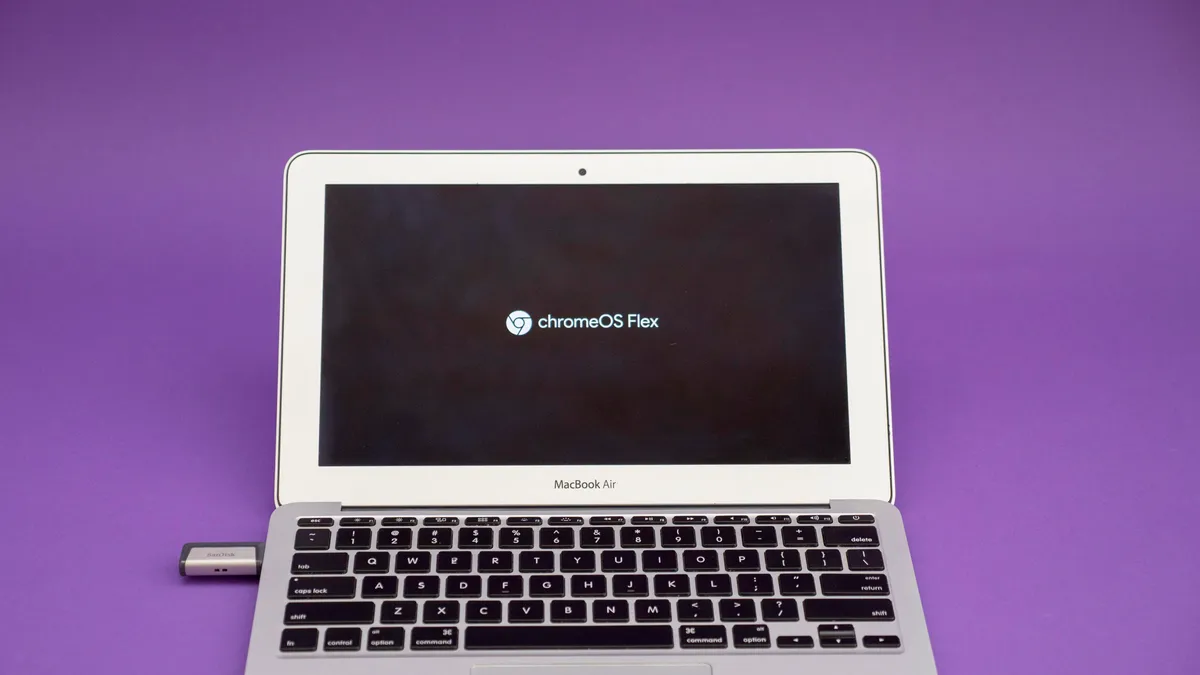
MacBook Air open on a desk showing the installation screen for ChromeOS Flex on the display.

You can wipe a laptop’s drive and install ChromeOS Flex or run the OS off a thumb drive to test it out first. 

Josh Goldman/CNET

You choose: Trial run or full install

One of the best features of ChromeOS Flex is that you can run it off a USB flash drive or SD card to test it out first without completely overwriting your current OS. For best performance, it’s not recommended to run Flex full-time from a flash drive, but it will let you see if it works for your needs. 

Advertisement

Installing ChromeOS Flex is quick and painless. The first step is to gather everything you need:

  • A USB thumb drive or SD card 8GB or larger
  • A Windows, Mac or Linux computer to install ChromeOS Flex on

Note that installing ChromeOS Flex will completely erase your entire hard drive. Any important files should be backed up first. You’ll also need a ChromeOS, Windows PC or Mac device with the current version of the Chrome browser installed. This will be used to create the ChromeOS Flex USB installer, and it doesn’t need to be the same device you plan to install it on. The thumb drive will also be completely erased when creating the installer.

To run ChromeOS Flex, the target laptop (or desktop) will need to be Intel or AMD x86-64-bit compatible (newer than 2010 for the best experience), have 4GB RAM or more, have at least 16GB of storage and you’ll need full administrator access to the BIOS. Once you have everything you need, it’s time to create the USB installer. 

  • Open a Chrome browser window on a ChromeOS, Windows PC or Mac device and add the Chromebook Recovery Utility extension via the Chrome web store. This is what you’ll use to build the USB/SD card installer. 
  • Go to the Chrome browser’s extensions menu located at the top right of the Chrome browser window (it looks like a tiny puzzle piece). Click on it, and a drop-down list of extensions will appear. Find the Chromebook Recovery Utility on the list and click on it to launch. The utility might need to be toggled on, too, which can be done by clicking on Manage Extensions at the bottom of the drop-down list of extensions. 
screen-shot-2022-08-23-at-12-52-18-pm.png

In the Recovery Utility, instead of selecting a model to recover, you’ll select ChromeOS Flex. 

Josh Goldman/CNET

  • When the Chromebook Recovery Utility launches, you’ll be asked to identify what model Chromebook you’ll be recovering. However, there will be a link labeled Select a model from a list in the dialog box. Click that link, and from the Select a manufacturer drop-down list that appears, select Google Chrome OS Flex. Below that drop-down is another labeled Select a product from which you’ll choose Chrome OS Flex.  
  • Next, insert your flash drive or SD card into the device you’re using to create the installer, select it as your target drive and then click Create now. The creation process takes up to 20 minutes but mine was done in half that time. Once the installer is finished, the drive can be ejected and is ready to use. 
screen-shot-2022-08-23-at-1-18-07-pm.png

When the installer is done, your USB drive or SD card are ready to use to run or install ChromeOS Flex. 

Advertisement

Josh Goldman/CNET

You’re almost done. It’s time to grab the laptop you want to convert to a Chromebook. Make sure the laptop is turned off and insert your ChromeOS Flex installer thumb drive or SD card. 

The next step is to boot the laptop from the thumb drive instead of the internal storage drive. This requires you to press a boot key while the laptop is booting. Boot keys vary by manufacturer. For instance, on a MacBook Air, the boot key is the Option key. Google has a list of boot keys for major manufacturers if you’re not sure what yours is.   

Turn on the laptop and, as it boots, press the boot key to interrupt the boot process. You may need to press and hold the key, or press it repeatedly, to enter the boot menu. If done correctly, the laptop should give you the option to select which drive you’d like to boot from: the laptop’s internal drive or your USB drive. Select the USB drive and press Enter

Advertisement
MacBook Air open showing the boot drive menu on the display.

Once you enter the boot menu options, select the USB installer drive you created to get started. 

Josh Goldman/CNET

If you’ve done everything correctly, you’ll see the ChromeOS Flex splash screen followed by a Welcome to ChromeOS Flex screen. (If not, retrace your steps using Google’s installation guide.) From there, you can choose to test the OS and run it directly from the flash drive or install ChromeOS Flex on the internal storage. Doing the latter gives you the best performance; however, it also erases all content from the internal drive, and the native OS can’t be recovered. If you aren’t 100% certain you want to use ChromeOS Flex, try running it from the USB drive first. 

The full OS installation can take up to 20 minutes (my MacBook Air took less than 5 minutes, though). Regardless of how you run it, the setup process is the same. Select a Wi-Fi network, agree to Google’s terms of service, choose whether the Chromebook is for yourself or a child, and then sign in with your Google account information. 

Advertisement
ChromeOS Flex installed on an old MacBook Air.

Sign in to ChromeOS Flex with a Google account and password and you’re ready to get to work.

Josh Goldman/CNET

Ta-da, Chromebook! At least, close enough for most needs. Performance will depend on what your laptop has. My install was on an early 2015 MacBook Air, and it’s much faster than it was with MacOS on it. The only downside for my particular model is that the built-in webcam is not supported, but an external USB webcam worked just fine. 

If you’ve got a USB flash drive and an old laptop, it’s certainly worth the minimal effort to test out and, again, it’s free. 

Advertisement

Source link

Continue Reading
Click to comment

You must be logged in to post a comment Login

Leave a Reply

Tech

Hidden IT problems are quietly creating risk, shadow IT, and lost productivity

Published

on

Presented by TeamViewer


Enterprise technology failures are largely invisible. Research from TeamViewer, based on a global survey of 4,200 managers and employees, finds that the majority of digital dysfunction never reaches the IT help desk.

Employees work around slow applications, failed logins, and intermittent glitches rather than reporting them, leaving organizations without an accurate picture of how their technology is performing. The cumulative cost is significant: employees lose an average of 1.3 workdays per month to digital friction, with impacts ranging from delayed projects and lost revenue to increased employee turnover.

The research, which surveyed managers and employees across nine countries, confirms what many have long suspected: the productivity loss from digital friction is significant, and most of it never surfaces in an IT support queue, says Andrew Hewitt, VP of strategic technology at TeamViewer.

Advertisement

“Enterprise outages are visible because they trigger clear, system-level failures,” Hewitt says. “But much of the real disruption happens earlier, in the form of digital friction: slow apps, login issues, or intermittent glitches that don’t cross alert thresholds. These smaller issues often go unreported or are normalized by employees, even though they quietly drain productivity.”

What is digital friction and why does it go unreported?

The most common sources of friction — connectivity failures, software crashes, hardware problems, and authentication issues — aren’t edge-case scenarios, but everyday experiences employees have learned to absorb without escalating. Connectivity problems were the most widespread, with nearly half identifying them as the top productivity killer among common technology issues.

That tendency to absorb rather than report is central to the problem. Many workers don’t trust their IT team to resolve issues quickly or effectively, so when a login fails or an application stalls mid-task, the path of least resistance is to restart the device, switch tools, or use a personal phone.

“Employees are under more pressure than ever to prove output,” Hewitt says. “When reporting feels unlikely to result in a quick resolution, it creates a false sense of stability at the system level while the employee experience quietly deteriorates.”

Advertisement

How much productivity does digital friction cost organizations?

The business consequences extend beyond inconvenience. Many organizations report delays in critical operations, revenue loss, and lost customers as a result of IT dysfunction. Most respondents lose time each month, and few expect improvement, citing increasing complexity of workplace technology as a primary concern.

The human cost runs parallel. Workers link digital friction to frustration, decreased motivation, and burnout, and many believe it contributes to turnover, with onboarding replacements stretching to eight weeks or more.

“Employees are happiest when they feel productive and accomplished at the end of the day,” Hewitt says. “When people can’t make progress in their day-to-day work, frustration builds and burnout follows. Great technology might not be a main attractor of talent, but bad technology can certainly play a role in driving it away.”

Why employees use personal devices and unauthorized tools instead of reporting IT problems

When workplace technology consistently fails to meet employee needs, workers find alternatives, with a substantial share of respondents admitting to using personal devices or unauthorized applications as workarounds. That’s the entry point for shadow IT, or the use of unapproved hardware, software, or cloud services outside IT’s visibility and control. While employees turn to these tools simply to stay productive, they introduce security vulnerabilities, data leakage risks, and compliance gaps that IT teams may not discover until a breach occurs.

Advertisement

“Quite simply, it demonstrates that the IT environment is not meeting the employees’ needs,” Hewitt said. “While this helps maintain short-term productivity, it introduces significant risks and pushes work outside of IT’s visibility and control.”

TeamViewer ONE addresses this by combining remote connectivity with real-time endpoint monitoring, giving IT teams the ability to detect and resolve device and application issues before employees reach for an alternative. When the underlying environment is stable and support is fast, the impulse to work around it diminishes.

How fragmented IT infrastructure creates blind spots across devices, apps, and networks

Addressing digital friction at scale requires more than faster help desk response times. Traditional metrics such as mean time to resolution and ticket volume capture only a fraction of actual issues. A more complete picture requires measuring lost time, interrupted workflows, and employee sentiment across devices, applications, and network environments.

“Leaders need to move beyond measuring performance through IT tickets alone,” Hewitt said. “Performance should be viewed through the lens of employee experience and real-time digital workplace data.”

Advertisement

Fragmented infrastructure makes this difficult. When devices, applications, and networks operate in separate silos, IT teams struggle to trace root causes or identify systemic issues before they spread, often responding to symptoms rather than underlying problems.

TeamViewer ONE is designed to close that gap, integrating digital employee experience analytics, remote support, and device management into a single platform. Instead of piecing together signals from disconnected tools, IT teams get a consolidated view of endpoint health, application performance, and network conditions across the entire organization.

How organizations can shift from reactive IT support to proactive system monitoring

Achieving proactive IT is not a single-step transformation. Hewitt describes it as a progression: starting with endpoint management and security, building toward real-time visibility into the digital employee experience, and ultimately using automation and AI to resolve issues before they reach employees.

TeamViewer AI is built to support each stage of that progression, using continuous monitoring to surface anomalies and correlate signals across the digital environment, identifying patterns of poor experience before they escalate. When issues are detected, it suggests remediations, generates scripts to fix problems autonomously, and handles routine tasks such as common troubleshooting without requiring IT intervention, shifting the workload from reactive firefighting toward proactive oversight.

Advertisement

And while AI’s effectiveness depends on the completeness of the data it works with, consolidating onto a platform like TeamViewer ONE removes that limitation by giving AI a complete, real-time data foundation to work from.

How system performance lays the foundation for productivity, retention, and competitive advantage

TeamViewer ONE isn’t a wholesale replacement of existing IT infrastructure, but a unifying layer that connects insight with action, which enables organizations to ramp up productivity, improve retention, and ultimately realize a significant competitive advantage. It begins with visibility into what is actually causing friction across their environment. From there, leaders can use that data to prioritize fixes, and then scale remediation through automation as confidence and capability grow.

“Reducing digital friction isn’t about overhauling everything at once,” Hewitt said. “Leaders should start small, gain visibility into what’s actually causing friction, fix the biggest pain points, then scale those improvements through automation and AI. Even incremental progress can make an impact on employee engagement and productivity.”

Dig deeper: Fix it before they feel it from TeamViewer.

Advertisement

Sponsored articles are content produced by a company that is either paying for the post or has a business relationship with VentureBeat, and they’re always clearly marked. For more information, contact sales@venturebeat.com.

Source link

Continue Reading

Tech

Spotify Adds ‘Verified’ Badges To Distinguish Human Artists From AI

Published

on

Spotify is adding “Verified by Spotify” badges to distinguish human artists from AI-generated personas, using signals like linked social accounts, consistent listener activity, merchandise, and concert dates. The BBC reports: The world’s most-used music streaming service said the ‘Verified by Spotify’ text and green checkmark icon would appear next to artist names when they meet “defined standards demonstrating authenticity.” This could include having linked social accounts on their artist profile, consistent listener activity or other “signals of a real artist behind the profile,” the company said, such as merchandise or concert dates.

In its blog post, Spotify said “more than 99%” of the artists listeners actively search for will be verified, representing “hundreds of thousands of artists.” It said the process would prioritize acts with “important contributions to music culture and history”, rather than “content farms,” with the platform rolling out verification and badges over the coming weeks.

Source link

Continue Reading

Tech

Oura Adds More Detailed Hormonal Health Insights To Its Series 3 And 4 Rings

Published

on


Oura just announced a couple of new features that keep an eye on hormonal health for women. The pre-existing Cycle Insights feature, which tracks menstrual cycles, will now take hormonal birth control methods into consideration. The smart ring maker says that this “first-of-its-kind experience” will help users see how these methods can impact overall biometric data.

This has been designed to provide “personalized guidance during complex hormonal changes,” so it can integrate data from over 20 combinations of birth control methods. These include pills, patches, IUDs and implants. Users should be able to use Cycle Insights to gauge whether or not these methods are impacting temperature patterns, sleep and recovery, in addition to keeping an eye on bleeding and various potential side effects.

Advertisement

There’s also a partnership component here. Oura has teamed up with virtual health platform Twentyeight Health. The pair developed a portal within the smart ring app that users can tap to “seamlessly connect” with a licensed health provider to discuss birth control options, and they can provide new prescriptions.

This is, however, a post-Roe v. Wade United States. There are valid fears that period-tracking data could be used in court cases. In other words, there are more than a few reasons why people might consider keeping this kind of stuff private and away from the prying eyes of tech companies.

Oura has also announced a new Menopause Insights feature that tracks quality of life across 22 potential symptoms. The app includes a questionnaire that provides a “fully personalized, on-demand explanation of results, based on personal response and longitudinal biometric data.” The company promises this can give users “actionable results” that can inform lifestyle changes.

Both of these tools will be available globally, with a rollout beginning on May 6. There is a spot of bad news here, however, as these features are only for Oura Ring 3 and 4. The Oura Ring 4 is likely the best smart ring out there, for those considering wading into the wearable waters.

Advertisement


Source link

Advertisement
Continue Reading

Tech

Online DRM Or A Bug: Sony’s Silence Adds To Recent PS Update Confusion

Published

on

from the silent-treatment dept

Over a decade ago, Microsoft was getting set to release its new Xbox One console. In the lead-up to launch day, a bunch of rumors began swirling about some of the online requirements the console would come with. Details weren’t to be found, so the public was left to speculate what these requirements would entail. Would the console always need to be online when launching games? Would it need to check in online on a certain cadence for games to work, such as every day? Every 30 days?

Microsoft did very little to calm the waters in all this speculation. Very little came out from the Xbox team prior to launch, and what did come out was often confusing. What became very obvious, however, was that the lack of clear and direct messaging from Microsoft made a bad situation much worse. The backlash to the requirement rumors was severe and Xbox largely ended up scrapping them.

Fast forward to the present and the internet has exploded the past few days with claims that an update pushed to PlayStation consoles has introduced a 30 day online check in requirement for newly purchased games.
Some PlayStation users have noticed a new online DRM policy for digital games purchased on the PlayStation Store: newly purchased digital games now display a “Valid Period” tag showing a start date, an end date, and a countdown timer. If the console does not connect to the internet within 30 days, the game’s license reportedly expires, and the title becomes unplayable until an online connection is restored.

The story broke over the weekend through Lance McDonald, the well-known modder who managed to patch Bloodborne to run at 60 frames per second. He posted on X: “Hugely terrible DRM has now been rolled out to all PS4 and PS5 digital games. Every digital game you buy now requires an online check-in every 30 days. If you buy a digital game and don’t connect your console to the internet for 30 days, your license will be removed.

Advertisement

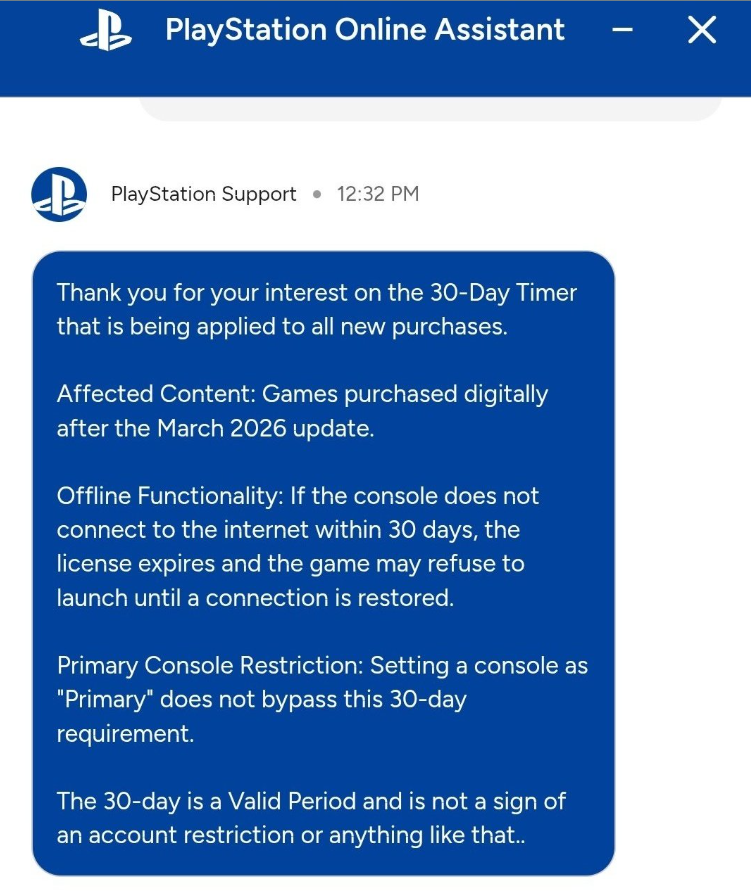
We thought about reporting this story as soon as McDonald surfaced it. However, several users also swore they saw nothing of the sort in their libraries, so we waited. Thus far, Sony has not made any official public statement, but a few hours ago, a PlayStation Support assistant confirmed to a user that the 30-day timer is not a bug at all.

That support assistant being referenced is a bot, however, not a human being behind a keyboard. You can see the response it gave in the screenshot below.

That is, at the time of this writing, the most that Sony has said about whatever the hell is going on here. As a result, all kinds of people, big and small within the gaming community, are losing their shit over this new “online DRM requirement” for existing consoles that previously didn’t have it. Oh, and it’s a requirement that Sony mocked Microsoft for trying to require way back in 2013 before the backlash.

The silence is, as they say, deafening. Is this fully intentional? Not all the reporting suggests that at all. Other reports indicate that this is just a bug in the update and this was not intended to be rolled out at all.

Shortly after the issue surfaced, video game preservation site Does it play? weighed in on the matter. It reported hearing from an anonymous insider that the timer was actually just a bug. “From what we gathered, Sony accidentally broke something while fixing an exploit. They’ve known about the confusing UI for a while, but didn’t see it as urgent,” their X post read.

However, many noted that an accidental deployment still implies Sony was testing the concept, since the interface had already been built. Throughout the confusion, Sony has yet to provide an official comment regarding the issue.

Advertisement

That last sentence is the most important one. Hey, Sony: what the actual hell is going on here?

The fact that all of this rumor, speculation, and angst has gone on for at least a couple of days now without a single word being uttered directly from Sony is remarkably stupid. The waters need to be calmed and that’s only going to happen by the company speaking up. Was it a bug? Cool, say so and let’s move on. Is the online requirement DRM now a thing? Much less cool, but at least we’ll know where the company stands (though, then we can start talking about Sony changing its policies on consoles after they are sold).

What can’t happen is this vacuum of information because Sony wants to give the public the silent treatment. That’s just bad business.

Filed Under: 30 day timer, drm, playstation, playstation online assistant

Companies: sony

Advertisement

Source link

Continue Reading

Tech

Microsoft and Amazon join Pentagon’s push to build AI-first military with classified network deals

Published

on

The U.S. Pentagon in Washington, D.C. (BigStock Photo)

Microsoft and Amazon joined other leading artificial intelligence companies in signing deals to deploy their technology in classified Pentagon networks, the Defense Department announced Friday, accelerating a push to build what the military is calling an “AI-first fighting force.”

The agreements — which also include OpenAI, Google, Nvidia, SpaceX and the startup Reflection — will give those firms’ AI systems access to the military’s most classified network environments, known as Impact Level 6 and Impact Level 7. The Pentagon said the technology will be used to analyze data and improve battlefield decision-making.

“Together, the War Department and these strategic partners share the conviction that American leadership in AI is indispensable to national security,” the Pentagon said in a statement, using the Trump administration’s preferred name for the Defense Department.

The Pentagon says the effort is already well underway. More than 1.3 million Defense Department personnel have used GenAI.mil, the military’s official AI platform, generating tens of millions of prompts and deploying hundreds of thousands of agents in just five months, according to the department. Officials say the technology has cut some tasks from months to days.

The deals come as the Pentagon is locked in a legal battle with Anthropic, one of the nation’s leading AI labs, which had sought guarantees its technology would not be used for mass domestic surveillance or fully autonomous weapons. The Defense Department moved to blacklist Anthropic earlier this year, calling the company a national security risk — a designation Anthropic is contesting in court.

Advertisement

On Thursday, Defense Secretary Pete Hegseth called Anthropic CEO Dario Amodei an “ideological lunatic” and slammed the company during a Senate Armed Services Committee hearing.

Bloomberg reported that the Pentagon negotiated its deal with Amazon Web Services late into Thursday night, according to two officials briefed on the talks.

“We look forward to continuing to support the Department of War’s modernization efforts, building AI solutions that help them accomplish their critical missions,” AWS spokesman Tim Barrett said in a statement.

Hundreds of Google employees sent a letter to company leadership this week urging them to refuse to let the Pentagon use its AI on classified data.

Advertisement

“We want to see AI benefit humanity; not to see it being used in inhumane or extremely harmful ways,” they wrote, according to The Washington Post.

Source link

Continue Reading

Tech

FBI says hackers are making millions from stolen cargo – losses ‘surged’ to nearly $725 million in 2025

Published

on


  • Incidents rose 18% and theft value rose 36% in 2025
  • FBI warns of “cyber-enabled strategic cargo thefts”
  • Basic security hygiene already goes some way to preventing attacks

The FBI has warned cybercriminals are increasingly targeting cargo shipments with hacking and impersonation tactics – and making a hefty profit doing so.

With incidents rising 18% in 2025 and the average value per theft up around 36% (to $273,990) due to criminals targeting high-value goods, losses in the US and Canada alone hit around $725 million over the year, a significant 60% year-over-year increase.

Source link

Advertisement
Continue Reading

Tech

Brendan Carr ‘Launches’ His Bogus FCC ‘Review’ Of ABC Broadcast Licenses And It’s Just Pathetic And Stupid

Published

on

from the weak-men-afraid-of-words dept

Brendan Carr’s FCC claims to be moving forward their their plan to “review ABC’s broadcast licenses” because Jimmy Kimmel made a joke about the president’s wife. And it’s every bit as dumb and legally baseless as you might expect.

Carr has sent a letter to ABC/Disney saying he’s accelerating the review of their existing broadcast licenses. It’s very clearly because the Trump administration wants to annoy, harass, and pressure ABC into firing Kimmel. But since that’s a direct assault on the First Amendment, they’re trying to do an end around and pretend that the review is because ABC is “violating DEI requirements.”

Carr’s underlying legal argument is genuinely and profoundly stupid. He’s claiming that ABC’s ordinary, modest, and inconsistent corporate diversity practices are racist against white men, and therefore violate the already fairly thin anti-discrimination components of the Communications Act.

It’s absolute fucking gibberish. But you’ll notice that most outlets, including this piece from CNBC, try to make the effort sound like sensible policy being conducted by reasonable adults:

Advertisement

“The letter orders the company to file for early renewal for ABC-owned television stations and notes the action is related to an investigation into Disney’s DEI efforts, which began last year.

Disney confirmed on Tuesday that it received the FCC’s order initiating an accelerated review of its licenses. The FCC said in the letter that Disney now has 30 days — or until May 28 — to file for the renewals.”

As we noted previously, ABC only actually owns about eight licenses to begin with. Most ABC broadcast licenses (230 or so) are actually owned by right-wing friendly local broadcasters already loyal to the president. We’ve noted how these stations routinely air right wing agitprop, and have been rewarded by Trump and Carr with a series of merger approvals that violate existing media consolidation limits.

The actual process of yanking a broadcast license is also a complicated, difficult, and extremely time consuming affair. Were Carr to actually do this (beyond sending Disney a stern letter to put on a show for the press), you’re talking about potentially years of legal wrangling. A fight Carr would very likely lose, because, again, his entire underpinning argument is baseless and stupid.

Carr doesn’t actually want a legal showdown with deep-pocketed Disney over this turd of a case. They’re just hoping to make life so costly and annoying for ABC/Disney that the company not only fires Kimmel, but thinks twice about supporting any journalist, satirist, or comedian who dares challenge the administration. It’s also a message to other networks that host voices critical of the unpopular president.

Advertisement

This is, if the pathetic U.S. press coverage of this FCC inquiry is any indication, already having an effect. A good chunk of the news reports on this inquiry (see: this Semafor piece) can’t be bothered to be honest about the pathetic, baseless nature of this censorship effort. Many outlets seem dedicated to helping Trump and Carr pretend this is any sort of above-board review. They’re enablers.

Anna Gomez, the FCC’s lone Democratic official (because Republicans refuse to fill the other seat), correctly notes that this whole dumb First Amendment violating gambit will fail:

“This is the most egregious action this FCC has taken in violation of the First
Amendment to date. As part of its ongoing campaign of censorship and control, the
White House called publicly for the silencing of a vocal critic, and this FCC has now
answered that call. This is an unprecedented and politically motivated attempt to
interfere with how broadcasters operate, and this unlawful overreach will fail.”

You know it’s bad when even Ted Cruz is blasting your baseless censorship campaign as stupid:

“It is not government’s job to censor speech, and I do not believe the FCC should operate as the speech police.”

You might recall that the last time Disney capitulated to these dim fascists (temporarily suspending Kimmel because he made some jokes about the deceased right wing social media propagandist Charlie Kirk), it resulted in the company losing millions of streaming video customers and amusement park attendees. Hopefully Disney execs learned their lesson from that experience.

Advertisement

The problem for Trump is that as his health, influence, popularity, and political power wane, he and Carr’s threats will carry less and less weight, even among feckless corporations. They’re just weak men afraid of words, ideas, and comedy, desperately trying to pretend that they have power to permanently stifle jokes. It’s foundationally pathetic and embarrassing, something press coverage should make very clear.

Filed Under: 1st amendment, brendan carr, broadcast, broadcast licenses, censorship, comedy, dei, fcc, free speech, jimmy kimmel, licenses

Companies: abc, disney

Source link

Advertisement
Continue Reading

Tech

1X shows off Neo humanoid robot helping humans make more of its kind

Published

on

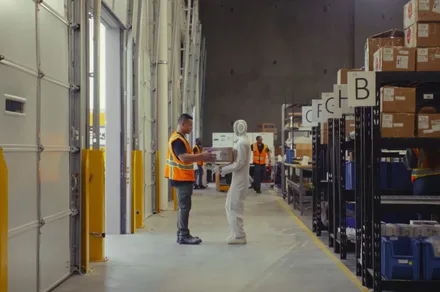
Norwegian-American robotics firm 1X Technologies has offered a glimpse into what scaled humanoid robot production looks like, and it’s surprisingly circular. In a newly released demo, its Neo robot is shown assisting humans on the factory floor, helping build more Neo units as the company moves toward full-scale manufacturing.

Robots helping build more robots

At the center of the demo is 1X’s Neo humanoid robot, a bipedal machine designed primarily for domestic environments that is now stepping into early manufacturing workflows. The footage shows Neo performing repetitive, assistive tasks alongside human workers, effectively becoming part of the assembly process.

The setup shows how 1X is approaching production at its Neo Factory, where robots are involved in close collaboration with humans. The company has also emphasized a vertically integrated model that involves designing and manufacturing core components in-house, including motors, batteries, sensors, and structural parts.

Advertisement

This end-to-end control allows 1X to iterate quickly on both hardware and manufacturing processes, while scaling output as demand grows. The factory has already begun full-scale production, with plans to deliver thousands of units following strong early interest and pre-orders.

Scaling a still-evolving product

Despite the polished demo, Neo remains a work in progress. The robot is designed to operate autonomously, but it’s not quite there yet. So 1X is relying on guided assistance from human operators to supervise and help the robot complete unfamiliar tasks, which also enables it to learn over time.

This learning loop is central to how Neo improves, combining real-world deployment with continuous training. Early versions are expected to expand their capabilities gradually as they gain more experience in both factory and home environments.

With production now underway, 1X is effectively turning Neo into both the product and part of the process. If this model is successful, future iterations may not just assist humans in daily life but also play a direct role in building the next generation of 1X robots.

Advertisement

Source link

Continue Reading

Tech

Apple was surprised by AI-driven demand for Macs

Published

on

Apple’s iPhone sales and Services revenue were the stars of the show in the tech giant’s most recent quarter, but the Mac quietly outperformed — helped by growing demand for AI workloads.

Wall Street investors had expected to see Mac revenue in the low $8 billion range, but Apple reported $8.4 billion in the second quarter ended March 28 — a notable beat for a non-core segment of the tech giant’s business. In addition, investors ahead of earnings believed that Mac sales would be essentially flat year-over-year. Instead, Mac sales were up 6% on an annual basis, the company told investors. The company’s total revenue was $111.2 billion, a 17% increase from the same period last year.

Apple chalked up some of the Mac growth to recent product launches, including the well-received MacBook Neo. However, those fun, colorful computers were only on sale for a few weeks after the March 4 preorders began. Realistically, most units shipped mid- to late March, and some demand may have been pushed into April as certain models sold out.

Apple CEO Tim Cook told analysts on the company’s Q2 earnings call on Thursday that customer demand for the Neo was “off the charts” and higher than Apple had expected. He also noted that Apple set a record in the quarter for customers new to the Mac, partly due to the Neo.

Advertisement

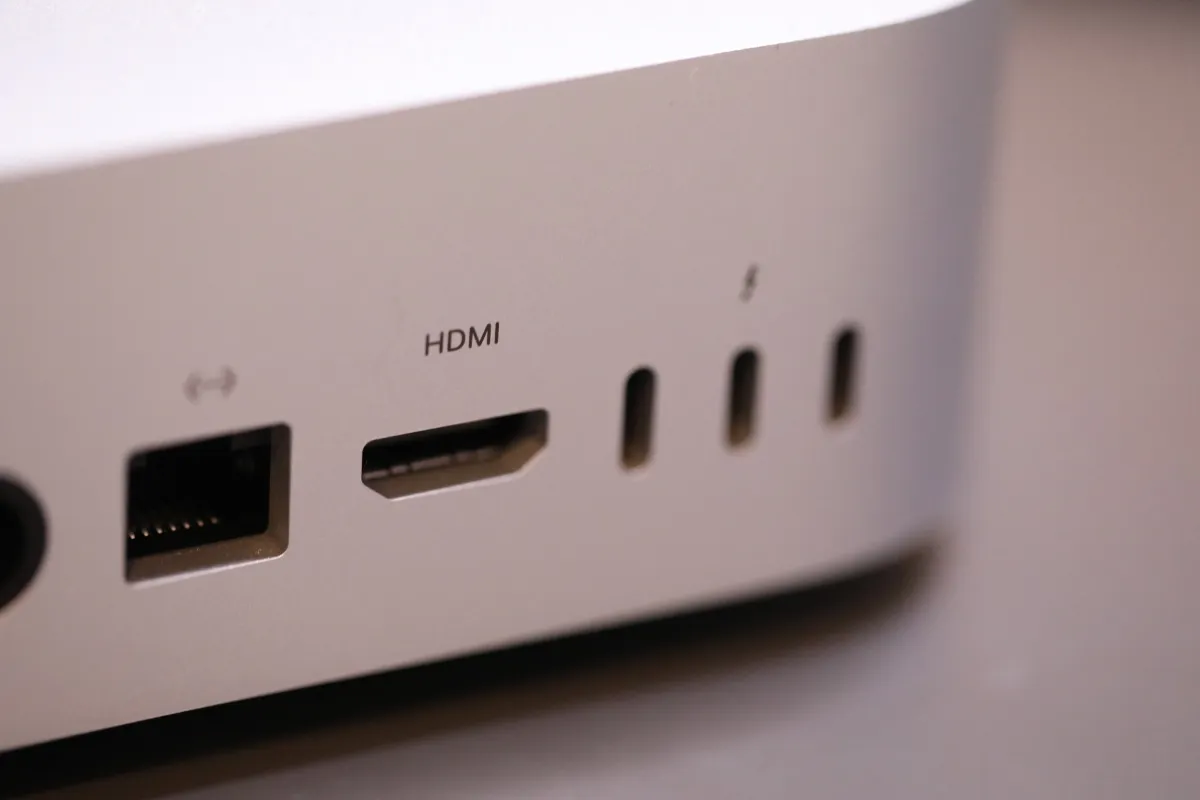
Cook attributed the Mac sales growth to the use of the platform for running local AI models, like OpenClaw — something that took Apple somewhat by surprise as Mac mini and Mac Studio devices sold out in recent weeks.

“Both of these are amazing platforms for AI and agentic tools, and the customer recognition of that is happening faster than what we had predicted, and so we saw higher than expected demand,” Cook said of these Mac sales. He also noted that the Mac mini was the top-selling desktop in China — a market that’s been in an OpenClaw frenzy as of late.

Still, Mac revenue was flat on a quarter-over-quarter basis, suggesting this new demand has yet to scale. Cook said it may take Apple “several months” to reach supply-demand balance on the Mac mini and Studio models.

Techcrunch event

Advertisement

San Francisco, CA
|
October 13-15, 2026

“We’re not at the point where we’re saying this [constraint] is going to end anytime soon. And it’s not because of a problem, per se, other than we just under-called the demand,” Cook explained.

Advertisement

Enterprise demand for the Mac was also at play. Apple pointed to a couple of larger companies, including Perplexity, that had turned to Mac as their preferred platform for building enterprise-grade AI assistants.

He also said Apple was “supply constrained on the MacBook Neo,” and has even seen school systems, like Kansas City Public Schools, dropping Chromebooks for the Neo.

When you purchase through links in our articles, we may earn a small commission. This doesn’t affect our editorial independence.

Source link

Advertisement
Continue Reading

Tech

AI nailed emergency diagnoses better than doctors in Harvard trials

Published

on

AI has plenty of messy use cases, but emergency medicine may be one place where it can do some real good. A Harvard study comparing AI performance against doctors using patient data from emergency-room cases revealed that OpenAI’s o1 reasoning model outperformed human doctors in emergency triage diagnosis, especially in cases where decisions had to be made quickly with limited information.

What did the test reveal?

A part of the Harvard trial included 76 patients who arrived at the emergency room of a Boston hospital. The AI model and two human doctors were given the same electronic health record, including basic details like vital signs, demographic information, and a short nurse-written note explaining why the patient had come in.

The AI managed to identify the exact or near-exact diagnosis 67% of cases. Meanwhile, the human doctors scored between 50% and 55%. In the second test, more detailed information was provided, which caused the AI’s accuracy to rise to 82%. On the other hand, the humans scored between 70% and 79%. It is worth noting that this gap was not statistically significant.

Why doctors aren’t being replaced yet

The premise of this study revolves around text-based medical reasoning, and not the full reality of emergency care. Researchers note that AI did not assess a patient’s distress, appearance, tone, body language, or other real-world signals doctors use in the actual ER.

Dr Adam Rodman, another lead author and a doctor at Boston’s Beth Israel Deaconess Medical Center, said AI could become part of a “triadic care model” involving the doctor, patient, and AI system.

While the results are impressive, the technology isn’t ready to be dropped into emergency rooms just yet. Experts raised concerns over accountability, patient safety, AI errors, and whether doctors may start deferring too quickly to AI recommendations. As of right now, it can only be good enough to offer second opinion when doctors need one fast.

Advertisement

Source link

Continue Reading

Trending

Copyright © 2025