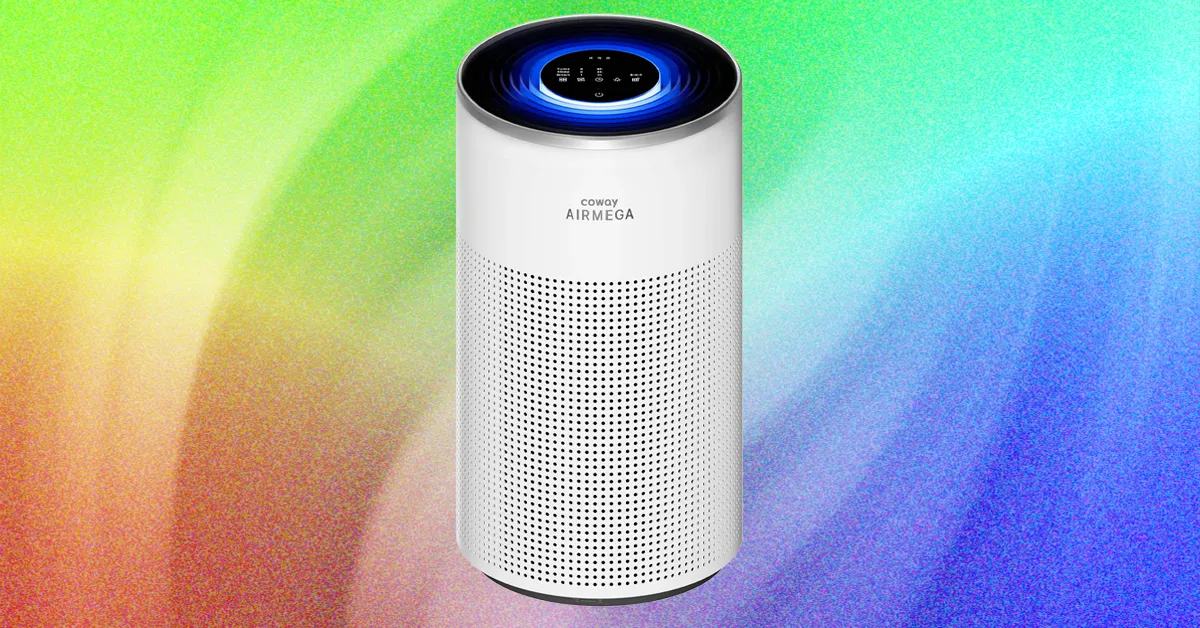
Inside, the Halo has a cylindrical IEST-certified HEPA three-stage filter that claims to capture 99.97 percent of nano-sized particles down to 0.3 microns, but in my opinion the coolest feature is the MegaScan Particle Sensor, which continuously monitors the air in real time to detect smoke, fine dust, and allergens down to PM2.5. PM2.5, typically used as the standard measurement for air purifiers’ ability to measure and lower levels of microscopic allergens or pollutants, are tiny airborne particles that measure 2.5 micrometers or less in diameter. They are particularly dangerous because their size means they can penetrate deep into the lungs and cause serious illness like asthma, heart disease, and lung cancer.
From the purifier’s top touchscreen panel, you can control fan speed, timer, and settings. On the quietest sleep setting, my decibel monitor app wasn’t even able to pick up the noise, as the fan wasn’t perceptible above the ambient noise of my house, even when I switched off all nearby appliances. Coway claims it’s 17 decibels in sleep mode, which I believe after not even being able to hear the machine in this mode. On the highest turbo setting, my decibel reader had it hovering around 75 decibels, which is akin to running a dishwasher or a vacuum.
As part of the Airmega Halo’s sleep features (in addition to whisper-quiet functioning), it has a low yellowish night light when in sleep mode, but this can also be turned off so the top panel is completely dark. It has a light sensor and automatically enters sleep mode, dimming lights and noise level when low light is detected.
Advertisement
When in smart mode and it’s dark for more than three minutes, the machine will automatically enter sleep mode. If the pollutant levels are “good” for more than three minutes, the fan stops automatically to save energy. But if it detects pollutants, it will restart the fan.
It has four lights indicating air quality levels: blue for good, green for moderate, yellow for unhealthy, and red for very unhealthy. The colored lights show in a halo around the top of the machine. I found it sort of tough to distinguish between levels at a glance because this color-coding system differs from the US AQI standards of green for good, yellow for moderate, red for unhealthy, purple for very unhealthy, and maroon for hazardous.
Mixed Signals
Hopefully, you come to WIRED Reviews because we actually vigorously test the gear we recommend. I didn’t just read the specs online and flip through the instruction manual—this machine was put through some intensely bad air to see if it could hold its own.
As with all air purifiers I test, the Halo was put through testing in various unhealthy air quality situations. I used this model for nearly a month, moving around my house to test in different locations: when cooking on my unventilated gas stove, under my living room window that draws in a lot of building and exhaust fumes, and outside my cat’s litter box. Additionally, I use an indoor air quality monitor to test pollutant levels against what the machine claims.
The Italian cybersecurity start-up aims to fight AI hackers using AI-powered innovations.
Exein, an Italy-headquartered cybersecurity start-up that protects smart, connected devices from hackers, has joined the global collection of unicorns post a $270m funding round that brought the company to a $1.7bn valuation. The round was led by Headline, with participation from Sofina, Goldman Sachs and others.
Established in Rome in 2018 by CEO Gianni Cuozzo, Exein has additional offices in Germany, Taiwan and the US. The company builds technology to secure hardware at the processor level and is embedded in 2bn chips globally. Consumers include Nvidia, AWS and Mediatek, among others.
Cuozzo told the Financial Times that the new investment is necessary to enable the organisation to compete on a global scale for limited cybersecurity and computing professionals.
Advertisement
Additionally, Exein intends to release its own foundational model for AI security in 2027. Cuozzo explained, “We are moving from having security software to having a secure model that is running constantly on the device and will automatically react to attacks.”
He added, “Right now I think the hackers have the edge. Exein’s plan is to use embedded AI technology to combat threats and provide “machine-based protection in a world of machine-based attacks”.
As the world becomes more digitally connected and advanced, the risk of cybersecurity breaches is increasing. It was recently confirmed that 12 Irish account holders are among the 680 global consumers of Revolut who had their sensitive data exposed.
Also, late last week OpenAI’s Sam Altman, announced that the company will not be going public this year as “Right now would be an ill-advised moment to go public.”
Advertisement
He explained that the company isn’t ready and that there is much to be done in the way of safety, alignment and showing how the industry and governments can work together.
Don’t miss out on the knowledge you need to succeed. Sign up for the Daily Brief, Silicon Republic’s digest of need-to-know sci-tech news.
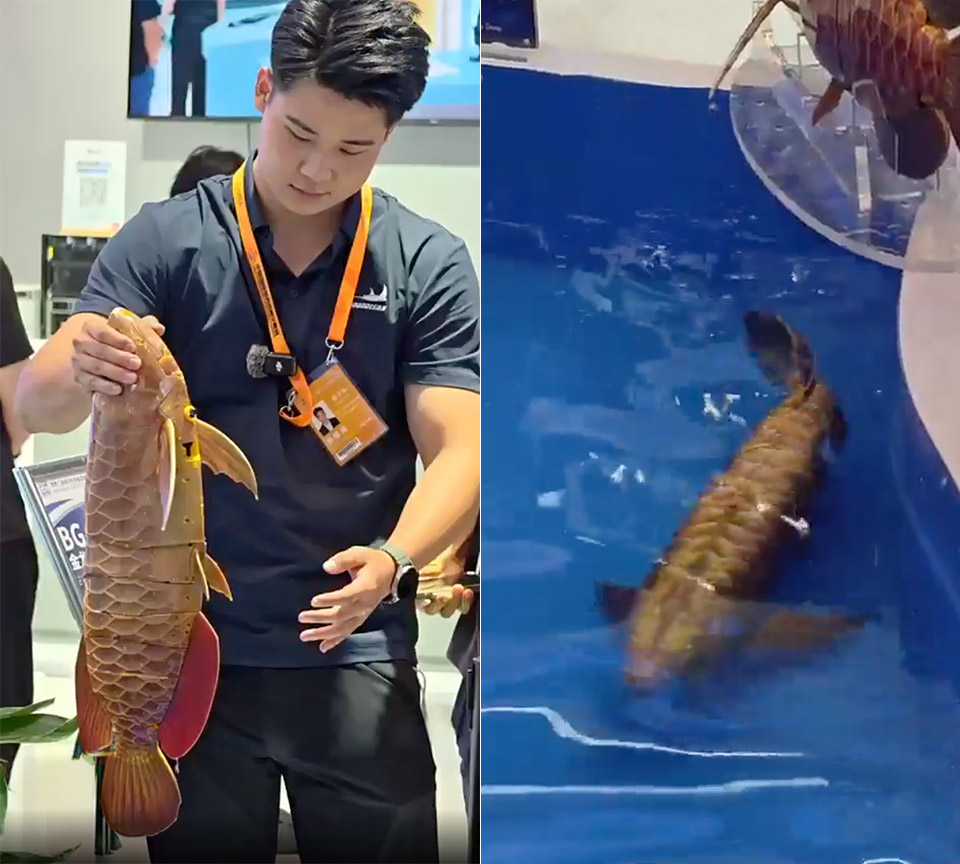
Crowds in Hall 3 at Beijing’s Shougang Park last week kept stopping at a small tank. A slender golden fish with layered scales was rising, sinking, and turning with a soft flick of its tail. Only after it changed course on its own did most people accept they were watching a machine, not an arowana that had wandered into a trade-fair display.
Boyagongdao Marine Technology Group debuted the BG-5 Golden Dragon Fish at the 2026 China International Fair for Trade in Services, and it was a huge hit. The robot is essentially a replica of the arowana’s long body and glossy gold coloring, down to the details. According to the catalogue’s specifications, it is 640 millimeters long, 204 millimeters wide, and 90 millimeters high, weighing around 3 kilograms. It is supposed to be capable of operating at depths of up to 5 meters and reaching speeds of up to 0.6 meters per second.
DUAL 1/1.1″ SENSORS & TRIPLE AI CHIP SYSTEM: Custom-built dual 1/1.1″ square sensors deliver unprecedented 360 image quality. Combined with a triple…
FLAGSHIP 8K50FPS 360 VIDEO: Hit record on our 360 action camera and capture your world in stunning native 8K50fps video. Every view, every highlight…
IN-HOUSE AI MODEL FOR EFFORTLESS 360 EDITING: Insta360’s own AI model, built specifically for 360 editing. New AI Director edits your footage…
According to those working on the exhibit, the fish was not programmed with a predetermined course; instead, the robot’s onboard sensors detect its surroundings and plans a new path as it goes. That’s kind of the purpose; canals, lakes, and tunnels change all the time, and a human operator just cannot keep up with every twist and turn.
The propulsion system is quite interesting, as it is a flexible tail with three joints divided into seven segments that work together to send a wave down the fish’s body, just like a real fish. There are no spinning propellers, so it’s much quieter and less noticeable than your usual underwater drone. All of the electronics are safely stored in the main cabin, which includes all of the high-precision sensors and a fancy global vision control system you’d expect for a task like this, as well as a modular layout to make servicing easy.
Advertisement
They have a version called the BG-5V that not only conducts path planning, task allocation, and formation control, but it can also coordinate with multiple units, so you could have a number of these robots working together to cover different parts of the ocean at once. This seems very fascinating, and it demonstrates how the same technology can be used for both a tank demo and a more complex work.
The device’s small size is also a significant advantage, since it can fit into shallow water and tight channels that larger drones cannot. Furthermore, it is meant to be quiet, allowing you to join a school of genuine fish and observe marine life, or to slide through water tunnels and hydropower sites without disturbing anything. The battery life and camera resolution were kept under wraps, although they did indicate it’s good for 5 meters, so it’s not a deep-ocean submarine. Even still, the combination of a looker that resembles an expensive aquarium fish, a tail that moves like one, and some extremely intelligent sensors is not difficult to understand, as this is a company with substantial underwater knowledge and the possibility for even more…
For the best part of a decade, abusive deepfake “pornography” websites have published thousands of nonconsensual videos depicting women, including high-profile celebrities, politicians, and public figures, into sexual situations. Now, in what is likely the largest takedown of explicit deepfake websites to date, officials in New York have seized more than a dozen of the harmful sites.
On Monday, the Manhattan District Attorney’s Office announced the seizure of 12 domains which it says have been used for “unlawfully” sharing, publishing, and selling celebrity deepfake videos. Around 1,200 people—overwhelmingly women—were depicted in nonconsensual sexual images and videos on the websites, the office says. These included social media influencers, actors, activists, athletes, musicians, and politicians.
“These horrific violations of privacy follow victims into their careers and personal lives and take an immense toll on emotional and mental well-being,” district attorney Alvin Bragg said in a statement, urging potential victims to come forward and contact his office’s cybercrime bureau. The office says its investigations into who is responsible for the websites, plus those who uploaded damaging videos of victims, are ongoing.
The seizures, carried out under New York’s criminal procedure laws, mark perhaps one of the most significant and sweeping actions against websites hosting explicit deepfake videos since the technology first emerged at the end of 2017. As artificial intelligence technology has improved, a dark industry of websites, apps, and bots has appeared: They are designed to “undress” photos of women or create graphic sexual videos that include them. The images and videos are increasingly realistic and can be generated in seconds.
The Manhattan District Attorney’s Office has not publicly named the websites it has seized. However, ahead of Bragg’s announcement, WIRED independently observed several of the sites’ homepages being replaced by takedown notices—“THIS DOMAIN HAS BEEN SEIZED”—late last week, with the sites now saying they have been taken over following a seizure warrant issued by a New York State Supreme Court.
“The takedowns are a significant win in the fight against synthetic nonconsensual intimate imagery (NCII),” says Leonie Oehmig, a researcher at the Institute for Strategic Dialogue (ISD), who has studied the deepfake creation ecosystem. Oehmig says that enforcement of state laws shows that the harmful content can be tackled and that the seized sites don’t appear to be accessible if using VPNs to try and access them from other locations. “This shows that meaningful, coordinated enforcement is achievable even where regulation itself remains fragmented across jurisdictions.”
The websites were likely viewed millions of times. Many used names that included phrases such as “sex celebrity” or promised “real deepfakes.” They hosted false videos of some of the world’s most famous celebrities, with one saying, “various actresses’ faces are used for deepfakes.”
Advertisement
Videos could be several minutes in length and include fully sexually explicit scenes—often swapping the faces of celebrities or public figures into existing pornographic videos. Archived versions of the websites show some videos had been watched tens of thousands of times, with one of the websites claiming to have been online since 2018.
Server count, the company argues, is not what makes a network fast. How those servers are built, connected, and peered is what’s actually important. Anyone weighing up the best VPN for speed will want to pay attention.
The rebuild now promises a 41% average increase in per-server throughput across the network. It’s a meaningful jump, but the more interesting story is how IPVanish got there.
It comes down to four things: faster hardware, smarter peering, more redundancy, and a leaner software stack. Individually, none of these are flashy. Together, they’re meant to do one thing, which is to keep your connection steady enough that you forget the VPN is on.
Advertisement
Faster hardware, more headroom
IPVanish has moved its entire network to 50Gbps server ports, a fivefold jump over the 10Gbps setup it ran before.
More capacity per VPN server means more headroom when everyone piles on at once.
Advertisement
On a busy Sunday evening, a higher-capacity server is better placed to keep traffic moving rather than choking under load.
The peering upgrade most VPNs skip
Your traffic does not just bounce between data centers. It travels from your ISP, through the virtual private network (VPN), and out to whatever site or stream you are using.
A network with fast server-to-server benchmarks but a poor path to the networks its customers actually use will still crawl through congested middle-mile transit.
Advertisement
IPVanish says it now peers directly at more than 40 internet exchanges worldwide, placing its servers in the same meet-me rooms as the ISPs carrying your traffic. In practice, that can mean fewer hops and a shorter, more direct route to your destination.
NEW: Leave No Trace — A weekly newsletter on digital privacy and online surveillance. Leave No Trace investigates the companies and governments putting our digital freedom at risk — and the people fighting back.
📩 Subscribe now to get every edition delivered to your inbox every Friday, launching this September.
Redundancy, reach, a greener engine, and OpenVPN boost
On coverage, IPVanish now spans 150 locations across 55 countries, and it labels which servers are physical and which are virtual so you know where each one actually sits. It told us earlier this year that the expansion was aimed at easing peak-hour congestion in high-demand regions.
Advertisement
The bigger reliability play is redundancy. Every major city now runs two independent data centers with separate providers and connectivity, so if one goes dark from a power cut or fiber break, you stay online on the other.
Behind the scenes, a switch from IPTables to NFTables lets servers process traffic more efficiently, drawing less power and heat along the way.
IPVanish also added OpenVPN Data Channel Offload on Windows recently, promising almost three times faster connections. That is expected to narrow the old gap between OpenVPN‘s trusted security and WireGuard‘s speed.
Advertisement
A VPN you never want to turn off
On paper, 50Gbps ports and direct peering push IPVanish ahead of the 10Gbps hardware many rivals still run.
Port capacity is shared, so the real proof is testing, not the spec sheet. Our fastest VPN rankings and latest results will show how much of this you actually feel. The ambition, in IPVanish’s words, is a VPN you never want to turn off.
Genesis brought its Magma GT Concept to life on a 9-kilometer stretch of Italian mountain road last week. The mid-engined grand tourer, first shown as a still object at Le Mans in June, rolled onto the closed Strada Borromea on Mount Mottarone for the Tutto Bene Hillclimb, an invitation-only gathering of 85 cars overlooking Lake Maggiore.
Organizers Race Service and BorromeodeSilva treat the 51-corner route as a moving showcase of automotive design rather than a timed competition. Drivers have the freedom to make their own decisions and choose their own pace. Genesis seized this opportunity to show that their forest green coupe was more than just a beautiful design concept. You can now add 800 horsepower thanks to a twin-turbo 3.2 liter V8, identical to the one found in the GMR-001 hypercar, which is mounted out back and sends everything to the rear wheels.
BMW MODEL CAR KIT – Racing enthusiasts can fuel their imaginations with the LEGO Technic BMW M4 GT3 EVO Race Car (42226) building set for boys and…
AUTHENTIC DETAILS – This race car playset features iconic BMW detailing and is equipped with a working steering function, a detailed 6-cylinder…
BUILD, PLAY & DISPLAY – Kids can enjoy assembling their model car and racing it down an imaginary track, then display it on a shelf or table to…
The wet roads and rain pinging off the bodywork prevented the driver from really letting fly. Spectators had their umbrellas out as the Magma GT sat on the starting line, looking stunning. At the green, there was a brief period of wheelspin before the V8 kicked in and the car began to drive at a steady speed. Footage from the NM2255 Raw Car Sounds channel demonstrates how effectively the prototype goes through turns and pulls out even when the road becomes slippery.
Advertisement
When the driver opened the throttle, the valley filled with a deep rumbling from the exhaust. The sound was like that of a true mid-engine vehicle, not a muffled luxury sedan. Even at relatively low speeds, the automobile would begin to slide on the damp road. That’s a gentle reminder that Genesis wasn’t attempting to break any records with this one-off, but rather to keep it together. Still, the car appeared rooted and eager to do its job, with its low profile and broad stance just doing what the driver ordered it.
André Lotterer, fresh off his seventh-place finish at Lone Star Le Mans, was given the opportunity to drive the X Skorpio Concept over the same route for its European debut. Genesis also unveiled the GMR-001 and Box Buggy Concept, and with so many cars on the slope, things got a little chaotic. The Magma GT’s butterfly doors opened, revealing a lava orange leather interior that contrasted nicely with the green exterior.
Production is still years away, with rumors of a roadster, track-hardened variant, and GT3 racecar circulating. For one afternoon in the Italian Alps, the Magma GT only needed to climb, stay steady, and sound like it belonged with the luxury vehicles that often utilize these roads. It accomplished all three [Source]
After you upgrade your iPhone to iOS 27, you might notice your device doing a little extra thinking. That’s because the update brings a revamped Search system to your device, and it needs some time to get to know everything on your iPhone.
You can download iOS 27 now by going to Settings>General>Software Update>Update Now and following the prompts on your screen.
At June’s Worldwide Developers Conference, Apple announced that it was rebuilding its Search interface for iOS 27. The company said the restructure would make searching across your device faster, more reliable and more accurate. In order to do that, iOS 27 has to reindex items across your iPhone. So after you update, you’ll see a banner in Settings that reads “Optimizing Search and Siri.” This is a normal part of the update, and it could take a while to finish, but the good news is you can still use your iPhone during this process.
Here’s what you need to know about the indexing and optimization process once you download iOS 27.
What is indexing?
Data indexing is the process of scanning and organizing metadata from data assets into an index so it can be easily searched.
Advertisement
“Think of it like the index of a book,” data management company Komprise wrote online. “[The index] doesn’t hold the content, but it tells you where to find it, and what’s inside.”
Apple’s support page about Spotlight indexing says that Spotlight search indexes your iPhone when you first set up your device, as data changes on your device and after you update your iPhone. So your device has reindexed before and you likely never noticed – I know I didn’t.
Apple also notes that your iPhone’s index “stays on your device and isn’t shared with Apple or your other devices.”
Indexing can take hours or days
You can still use your iPhone, even when it’s indexing.LuckyDuck via Getty Images
Apple’s support page notes that indexing could take anywhere from a couple hours to a few days. When I updated my iPhone to a beta version of iOS 27, my iPhone took a couple hours to index, but the more stuff you have stored on your phone, the longer it will take.
The process takes longer this time around because Apple rebuilt its Search interface in iOS 27. So the update isn’t just adding a few more things to the index, it’s implementing a new search system.
Advertisement
That means the system isn’t just crawling through the new stuff — it needs to go back through all the data in your phone. Think of it like cataloging new items you’ve bought versus creating an inventory of everything in your home.
Apple does offer a few suggestions on how to speed up the process:
Plug your device into a power source.
Connect your device to Wi-Fi.
Don’t use your iPhone.
OK, can I still use my iPhone?
You can! Indexing doesn’t prevent you from using your iPhone, but it goes faster if you set the phone aside.
If you do use your iPhone during the process, your Spotlight search results might be incomplete because it hasn’t finished indexing. Otherwise, your device should operate as usual. Which is good because I couldn’t imagine going without my phone for a few days at this point – don’t judge me.
Spotlight search still not working?
If your iPhone is finished indexing – the banner in Settings will go away – and you’re still running into issues, you should review your Search settings and make sure Spotlight has access to your apps. Here’s how to check.
Advertisement
Tap Settings.
Tap Search.
From here, you can adjust what shows up in Spotlight, and near the bottom of the menu, you can review which apps Spotlight has access to. You can tap into each app to grant or revoke Spotlight permission.
However, there doesn’t seem to be a way to grant or revoke Spotlight access across all apps at once, so you have to go into each individual app to do this.
Zach began writing for CNET in November, 2021 after writing for a broadcast news station in his hometown, Cincinnati, for five years. You can usually find him hanging out with his wife, son and dog. You can reach him at zmcauliffe@cnet.com.
See full bio
The latest iOS update is out now. Apple released iOS 27 on Monday, Sept. 14 (just as I predicted). You’d be forgiven for thinking Siri AI is the only new addition, but the OS includes several other features — even if they aren’t especially groundbreaking.
You can download iOS 27 now by going to Settings>General>Software Update>Update Now and following the prompts on your screen.
I’ve been using iOS 27 betas since June, and found a handful of useful new features, including a new Liquid Glass slider, and even started testing the revamped Siri after avoiding the digital assistant for a decade. Overall, my phone feels snappier and opening apps is almost instantaneous.
Apple’s iOS 27 brings a lot of quality of life upgrades to your device without as many standout new features as previous iOS updates — similar to Liquid Glass in iOS 26. There are also a few questionable changes, such as a new way to access your Notification Center, which isn’t unusual for these annual upgrades. Overall, iOS 27 is an inoffensive update filled with subtle improvements that you might not notice unless they’re pointed out.
As the official pointer-outer person, that’s my cue to give you a virtual tour around Siri AI and some of my favorite changes, as well as a few updates that left me scratching my head.
Advertisement
Note that my experience with these features is based on beta versions of iOS 27, so it’s possible some of them work differently on the public release. Siri AI is still in beta, even after the public release of iOS 27, and remains an opt-in experience.
iOS 27’s best improvements
Siri gets an AI overhaul
The latest iOS update has convinced me to turn over some daily digital chores to Siri, such as looking up driving directions or checking my schedule. Despite a few flaws, Siri worked well when I asked it to plot my route in CarPlay, find a cake recipe and perform a number of other simple tasks. The result? I’m now comfortable using Siri for small jobs.
In iOS 27, Siri AI is disabled by default, so you have to enable it if you want to use it. Here’s how to do so.
Tap Settings.
Tap Siri.
Tap Try New Siri.
It can also take time to go from being waitlisted to being able to ask Siri AI for a gift recommendation for your friend based on a text thread. Don’t forget: Siri AI is also still in beta in iOS 27, so you could run into bugs or have odd experiences with the digital assistant. Plus, Siri AI is only available in Apple Intelligence-compatible devices. iPhone 14 models or older (or the iPhone 15 or 15 Plus models) can’t access the enhanced assistant.
New Liquid Glass slider, and one questionable option
Screenshot by Zach McAuliffe/CNET
After Apple launched Liquid Glass in iOS 26, the company added ways to adjust transparency to address readability issues. With iOS 27, you can get as close to disabling the design as possible thanks to a new Liquid Glass slider. After installing iOS 27, you’re given an option to adjust just how liquidy or glassy you want things. But if you skip that screen, here’s where to find the Liquid Glass slider.
Tap Settings.
Tap Appearance.
Tap Liquid Glass.
From here, you can make Liquid Glass elements on your device more or less transparent by dragging the slider to the right. If you want more see-throughness, so elements are more transparent, drag it left. I find it difficult to tell menus and background items apart — I don’t understand who would want this option, but it’s there if you do.
I’ve been happily using the totally frosted look (slider all the way to the right) for a few weeks now. While I didn’t mind Liquid Glass as much as other folks, the frosted setting ensures I can read and see the text, menus and icons properly.
Advertisement
Safari gets an upgrade, too
My CNET colleague Jason Chun has been enjoying the Safari upgrades in iOS 27, including favorable UI tweaks. He noted that the All Tabs icon replaces the three-dot menu in Safari’s Compact toolbar. He also likes the return of the Bookmarks icon to the top of a new tab next to Reading List and History, and that Safari can automatically organize tabs.
Apple finally gives you the choice to adjust the volumes of your ringtones, alerts and alarms independently. This has been greatly helpful, ensuring my alarm isn’t so loud that it wakes up my infant son at night, yet keeping my ringtone loud enough during the day that I can hear it over him crying.
To separate the volume levels, you have to disable two switches:
Tap Settings.
Tap Sounds & Haptics.
Disable the switches next to both instances of Match Ringtone Volume.
You can then use the sliders beneath those switches to change the volume of your alarms and your alerts without affecting your ringtone volume.
Pasting photos and links into messages is easier
Screenshot by Zach McAuliffe/CNET
There’s also an easy way to paste photos, links from social media and more into Messages in iOS 27. If you copy one of those things and go into a chat, Messages will display an option above your keyboard to paste the item into your message before you start typing.
It’s a simple adjustment that streamlines texting assets to folks. Before, you had to long-press on the text box and tap Paste. That’s not a lot of steps, but tapping the option above the keyboard is faster.
Advertisement
I also appreciate how this makes it easier to ensure I’m pasting the intended photo or link into a message instead of another link or text from hours ago. I’ve pasted unrelated gibberish into texting fields many times before iOS 27.
The Weather app shows different elements
Screenshot by Zach McAuliffe/CNET
The Weather app gets another small tweak, showing more weather elements throughout the day. You can see hour-by-hour forecasts for rain and winds in your area by tapping water drop and wind symbols in the Conditions bar in the app. You can also see those conditions for the coming days of the week.
This is a welcome feature that helps me plan my day before stepping out the door with just a glance.
New on-screen timer
Screenshot by Zach McAuliffe/CNET
You also don’t need to go into your clock app to set a timer in iOS 27. If you open the timer in your Control Center, a new timer window will appear at the top of your screen with a horizontal dial you can pull left or right to get the exact countdown you need (down to 15-second increments). You can set and start a timer from here and access it while in other apps.
I like being able to quickly set and keep track of a timer without switching apps — a small but mighty improvement.
Three changes I’m still lost on
A standalone Siri app is now a thing
Screenshot by Zach McAuliffe/CNET
Apple Intelligence-compatible devices get a new Siri app in iOS 27 that lets you interact with the digital assistant in a similar way to other chatbots, such as Gemini on Android, and access past conversations or requests within the app.
I struggle to see the appeal of this app over the regular Siri voice assistant. It feels easier to use Siri without the app in most instances, such as asking the assistant to look up the hours of a local bookstore.
Advertisement
Even if you’re using the Siri app as a search engine, it feels easier to, you know… use a search engine. I asked Siri to check the news, for example, and the app would regularly give me news that was at least a few days old. This is better than when I tested an earlier beta version of iOS 27 and the app gave me news from about a month prior, but it’s still not what I’m looking for.
It does give you links at the bottom of queries to verify information, which is good if you use the app as such. However, a search engine such as DuckDuckGo could give me those links without forcing me to wade through a preamble that might be full of outdated or incorrect information.
Notification Center has a new home thanks to Siri AI
If you do enable the new Siri AI, your iPhone’s Notification Center gets a new home — much to my dismay. Instead of two sections for the drag-from-the-top touch shortcuts, now there are three. Instead of dragging down from the center of your home screen to see your notifications, now you have to drag down from the top-left corner of your home screen. If you drag down from the center, you open a new Search or Ask bar.
I’m right-handed and this is dreadful. It’s one of the more annoying things about iOS 27. It messes with my muscle memory and my expectations of where things are located on my phone.
Advertisement
The good news is that if you don’t enable Siri AI (or later disable it), you can still access your Notification Center by dragging down from the top center of your home screen. It does mean you’d need to sacrifice using Siri AI — it all comes down to your UX preference.
The tiny clock is tiny and morally wrong
Screenshot by Zach McAuliffe/CNET
You can shrink your lock screen clock in iOS 27 when customizing your lock screen. Tap the highlighted button in the picture above and the clock shrinks down into the date bar across the top of your screen.
Sure, that option lets you see more of your lock screen background. However, I’m an advocate of the lock screen’s big clock and therefore consider the tiny clock to be heresy. Tiny clock feels too small to be comfortably legible. People who like this setting: Can you see Pluto on a clear night without a telescope?
iOS 27 is a step in the right direction
Siri AI is the centerpiece of the update, and Apple has improved on the digital assistant enough that if you don’t already use it, I’d suggest giving it another chance. Most of the other new features are small improvements and upgrades that make for a pleasant, if sometimes underwhelming, experience.
Zach began writing for CNET in November, 2021 after writing for a broadcast news station in his hometown, Cincinnati, for five years. You can usually find him hanging out with his wife, son and dog. You can reach him at zmcauliffe@cnet.com.
See full bio
Cornelis, a company creating networking technology to help AI chips communicate more effectively, announced Monday that it has raised $205 million in a funding round led by IAG Capital Partners.
It also announced a product called Active Compute Fabric, a network technology that targets the fact that much GPU time is wasted waiting for data to arrive. Cornelis hopes to address this with a networking fabric that lets chips process and send information at the same time.
The company, which spun off from Intel in 2020, is competing with Nvidia by offering an open architecture, meaning customers can use a variety of GPU and accelerator hardware with Cornelis’ networking fabric. Though Nvidia chips can technically run on other networking fabrics, they’re optimized to run on Nvidia’s own software, making it much easier — and more enticing — for customers to use Nvidia’s full GPU stack. Cornelis is part of a new wave of AI infrastructure companies emerging to break apart Nvidia’s market dominance, piece by piece (or chip by chip, one could say).
Cornelis has already started shipping its product and is working on a new generation of it, expected to be released later this year.
OpenAI has bought smartphone camera maker Glass Imaging in a deal worth over $300 million, according to a report from The Wall Street Journal. The company, founded in 2019 and based in Los Altos, California, had previously raised about $30 million in funding from investors.
Glass Imaging was founded by Ziv Attar and Tom Bishop, a pair of former Apple engineers who previously led the team that developed Apple’s Portrait Mode. This background directly informs the work they now do at Glass Imaging, where they use AI to overcome the physical size constraints of smartphone cameras. Rather than using AI to edit a photo after it’s been taken, Glass Imaging uses neural networks to learn about individual camera systems — like the different cameras on various smartphone models — to yield better images from the moment the shutter clicks.
OpenAI did not immediately respond to a request for comment. The ChatGPT maker is rumored to be working on its own hardware, like smartphones, earbuds, and AI companion devices.
In 2025, OpenAI CEO Sam Altman and famed Apple designer Jony Ive revealed that they had been working together on a device startup called io, when OpenAI bought Ive’s company for $6.5 billion.
A defense lawyer appealing his client’s murder conviction submitted a brief containing made-up police testimony and witnesses fabricated by OpenAI’s ChatGPT, New Mexico’s highest court said. The New Mexico Supreme Court on Wednesday fined the attorney, Stephen Aarons [for $5,000], and held him in contempt for failing to verify the accuracy of the court filing, which Aarons said he prepared with help from the AI program… and said they will refer him to an attorney disciplinary board for investigation.
Aarons in a statement to Reuters said he had used ChatGPT to summarize the trial proceedings when he agreed to take up the defendant’s appeal last year, and did not understand the degree to which AI could “hallucinate” facts. “I am remorseful but hopeful that the disciplinary board takes into account it was an honest mistake,” he said…. Dozens of lawyers have been sanctioned for filing briefs where AI made up case citations or misquoted the law. Aarons’ filing appears to have gone further, containing fabricated witness testimony in a criminal appeal…
Aarons told the court at an August 21 hearing that he fed a computer-generated transcript and other case materials to ChatGPT, presuming it would generate “a bulletproof summary.” The justices sounded incredulous that Aarons was not fully aware of how AI can make mistakes. “Counsel, do you watch the news? Do you listen to the radio? Do you read anything about what’s going on in the world?” Justice C. Shannon Bacon said at the hearing. “Because the problem with lawyers relying on AI hallucinations is an above-the-fold story every single day.”
Advertisement
“OpenAI did not immediately respond to a request for comment.”
























































You must be logged in to post a comment Login