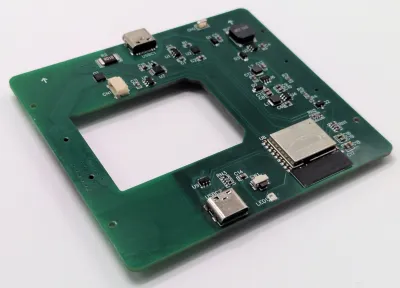
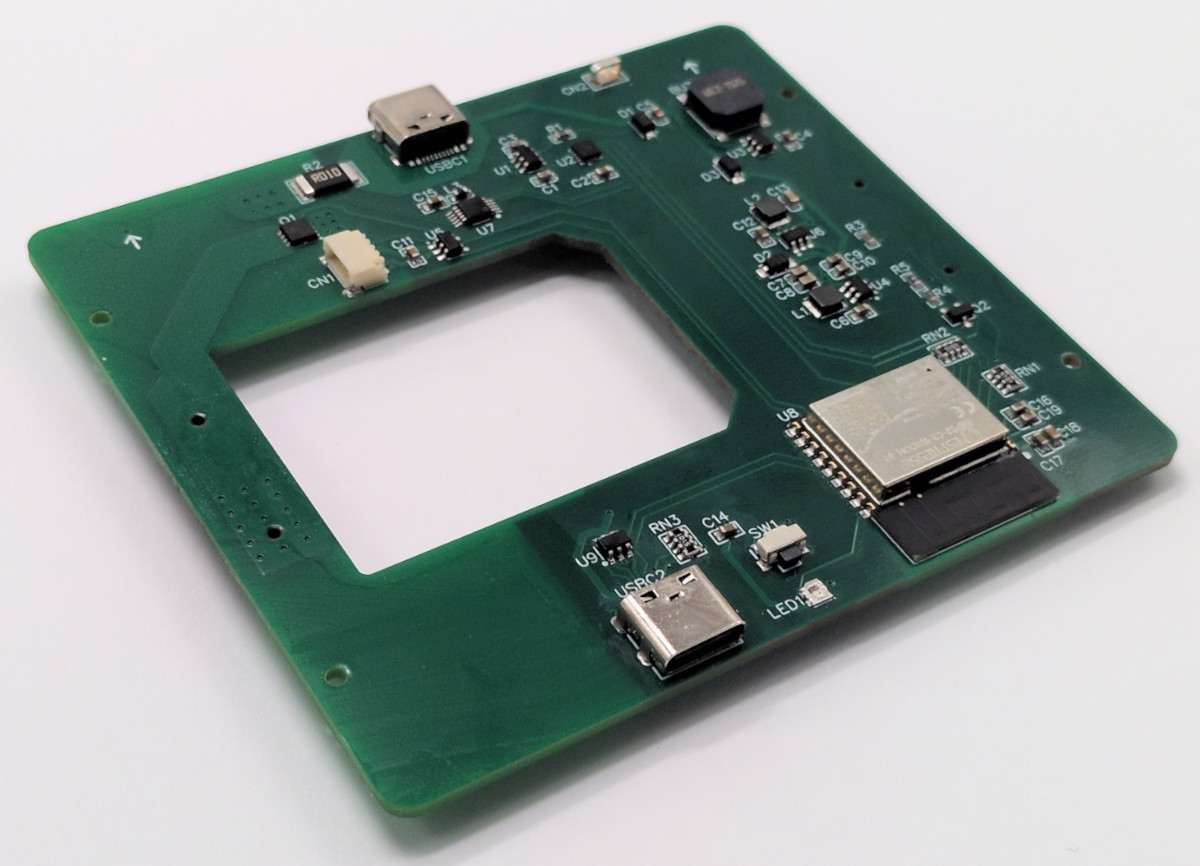
This reflow rig is designed for smaller work, with a working area of 80 mm x 70 mm. There are two options for the heating element—either a metal core PCB-based heater, or a metal ceramic heater. The former is good for working with Sn42Bi58 solder paste at 138 C, according to [Vitaly], while the latter will happily handle Sn63Pb37 at 183 C if the dirty stuff is more your jam.
Running the show is an ESP32-C3-WROOM, which serves up a web-based control panel over Bluetooth for setting the heating profiles. Using Bluetooth over WiFi might seem like an odd choice at first, but it means you don’t have to add the hot plate to the local wireless network to access it, handy if you’re on the move. It’s also worth noting that you can’t run this off any old USB charger—you’ll need one compatible with USB Power Delivery (PD) that can deliver at least 100 watts.
If you’re needing to whip up small boards with regularity, a hotplate like this one can really come in handy. Files are on GitHub for those eager to build their own.
The death of a duck in the Austin, Texas enclave of Mueller Lake has neighbors raising concerns about autonomous vehicles and whether they belong there.
While humans are responsible for killing animals with their cars all the time, this incident has brought negative attention to the new technology. Local media picked up on the duck incident after a resident posted in a Mueller neighborhood Facebook group that an Avride autonomous vehicle (with a human safety operator behind the wheel) ran over and killed a duck, and did not stop afterwards. “It didn’t slow down or hesitate at all, just steamrolled through,” the post, which KXAN reported on, reads.
Residents’ familiarity with this particular duck, which was nesting in a pot located outside of a local Italian eatery, has added to the outrage and mistrust of the autonomous vehicle technology. For those concerned about the future of the duck’s eggs, local residents have them in an incubator, Axios’ Austin reports.
An Avride spokesperson confirmed with TechCrunch that the vehicle was in autonomous mode at the time. Avride hasn’t paused testing on public roads altogether. However, the company has adjusted its area of operations by excluding certain streets around the lake in Mueller neighborhood where the incident with the duck occurred, according to spokesperson Yulia Shveyko.
Advertisement
The resident also claimed in their post that the vehicle failed to stop at a stop sign. Avride told TechCrunch it did not find evidence to support that claim. The vehicle came to complete and appropriate stops at all relevant stop signs.
Shveyko said the team has reviewed vehicle data and behavior, including replaying the scene multiple times in simulation. Avride is now evaluating potential improvements to the technology to help avoid similar situations in the future, she said. Notably, this includes running a series of controlled experiments in simulation to ensure that any changes do not negatively impact the vehicle’s safety performance in other scenarios.
Avride isn’t the only company testing or commercial deploying autonomous vehicles in the city. Zoox has been testing in the city. Tesla and Waymo, in partnership with Uber, also operate a commercial robotaxi service in parts of Austin.
Motorola is gearing up to launch the successor to last year’s Razr 60 Ultra. Early CAD renders recently offered a first look at the device, suggesting that the upcoming Razr 70 Ultra won’t change much in terms of design. However, a new leak now hints that Motorola could focus on unique colors and finishes to help it stand out.
What are the new color options?
Reliable tipster OnLeaks has shared press renders (via Android Headlines) of the Razr 70 Ultra in two standout finishes: Orient Blue Alcantara and Pantone Cocoa Wood. The Orient Blue variant is expected to feature a faux leather back with a diamond stitch pattern, giving it a premium look and feel. The Cocoa option, on the other hand, could feature a wood-like texture with visible grain.
OnLeaks/Android Headlines
Instead of just offering the device in different shades like most smartphone makers, Motorola appears to be giving each color a distinct finish, adding a tactile element that goes beyond standard glossy or matte coatings. With the overall design expected to remain unchanged, the finishes should help the company differentiate the new model from its predecessor.
OnLeaks/Android Headlines
Motorola has already taken this approach with previous Razr models, offering vegan leather backs and Pantone-inspired colors. The Razr 70 Ultra seems to be taking that a step further by pairing bold colors with more noticeable textures. It’s a subtle shift, but one that could make the device feel more unique.
What else do we know about the Razr 70 Ultra?
Although Motorola hasn’t officially shared any details yet, the device is expected to pack Qualcomm’s Snapdragon 8 Elite Gen 5 chipset, paired with 16GB of RAM and 512GB of storage. The images also suggest that Motorola may stick with a dual-camera setup, though it’s unclear if there will be any sensor upgrades.
More details should surface in the coming weeks ahead of the official launch, which could take place later this month. Motorola unveiled the Razr 60 Ultra in April last year, so it’s likely the successor will arrive around the same time.
Verne, the autonomous mobility company spun out of Croatian hypercar maker Rimac, launched commercial robotaxi rides in Zagreb on 8 April alongside Pony.ai and Uber. The vehicles operate with safety operators onboard for now. Waymo is targeting London for Q4 2026.
Verne, the autonomous mobility company spun out of Croatian electric hypercar maker Rimac Group, has launched what it is calling Europe’s first commercial robotaxi service in Zagreb, Croatia. From 8 April, members of the public can book and pay for autonomous rides through the Verne app.
The service will shortly also be available through the Uber platform, following a three-way partnership announced on 26 March between Verne, Pony.ai, and Uber.
The vehicles in service are Arcfox Alpha T5 robotaxis equipped with Pony.ai’s seventh-generation autonomous driving system. They operate autonomously, but trained safety operators are onboard during this early phase of the rollout.
Advertisement
The three companies have said they aim to transition to fully driverless operations as soon as regulatory approvals and safety performance benchmarks allow.
The 💜 of EU tech
The latest rumblings from the EU tech scene, a story from our wise ol’ founder Boris, and some questionable AI art. It’s free, every week, in your inbox. Sign up now!
Under the partnership structure, Pony.ai provides the autonomous driving technology; Verne owns the fleet and manages operations on the ground, including regulatory approvals; and Uber integrates the service into its ride-hailing platform.
The result is surprising in geographic terms. Zagreb is a city of under a million people, and Europe’s most prominent autonomous mobility efforts have been concentrated in larger western markets, Waymo has announced plans for a fully driverless service in London in the fourth quarter of 2026, and Germany has hosted multiple competing programmes for years.
Verne’s Croatian origins explain part of the answer. The company has spent years in close discussion with Zagreb’s regulators and local authorities, a process made easier by its ties to Rimac, which is headquartered in the city and is one of Croatia’s highest-profile technology companies.
Marko Pejković, Verne’s co-founder and CEO, said the launch delivered on a commitment the company had made publicly: “We said we would launch in Zagreb in 2026. Today, we did. This is just the start.”
Advertisement
Verne’s current service uses Pony.ai’s technology rather than its own platform, which is still in development. The company originally planned to use Mobileye’s autonomous driving system before switching to Pony.ai ahead of the launch.
Verne has a factory near Zagreb that is expected to begin producing its own purpose-built robotaxi this year, a compact two-seat vehicle with no steering wheel or pedals, designed from the ground up for driverless ride-hailing.
The Arcfox Alpha T5 deployment is understood to be a bridging arrangement while that vehicle reaches production readiness. Beyond Zagreb, Verne has begun permitting discussions with 11 cities across the EU, UK, and the Middle East, with more than 30 additional cities under active consideration.
For Pony.ai, which listed on Nasdaq in late 2024, the Zagreb launch is the first deployment of its technology in commercial service outside China, where it recently reached unit economics breakeven in two tier-one cities.

Odds are, if you like neon lights, you’re not thrilled with the LED faux-“neon” strips that are supposed to replace them. They’ve got their advantages, but the light quality of RGB LEDs lacks something compared to the emission spectrum of nobel gas, at least to purists. On the other hand, you cannot create an animation by bending glass tubes, like [David Hamp-Gonsalves] has demonstrated with his Neon Animated Eye.
Back in the day, you’d have needed dozens of tubes for a flickery animation, but [David] figured that since these LED strips are flexible, why not flex them? He’s using addressable LEDs — WS2812s, specifically — so activating and deactivating the pupil of the eye is easy-peasy. Opening and closing the lid is accomplished with a geared motor driven by a TB6612 driver turning a barrel cam. The ends of the stiff LED strip being brought together and pulled apart result in the blinking effect here, but as [David] points out you’re hardly limited that specific motion. There’s a whole world of Tron-like glowing animatronics that can be created with this technique. Code and STLs are available on GitHub, though, if you want to replicate the eye exactly.
[David] says he’d like to see this in a storefront someday, but given that fatigue life is a thing, it might be something to keep in your back pocket for seasonal displays like Christmas and Halloween rather than something that’s going to run 24/7. On the other hand, if you’re careful about limiting flexion and which faux-neon strip you buy, you might be able to create an animation that can last for years.
Advertisement
This is hardly the first time we’ve seen these faux-neon strips , but it is the first time we’ve seen them animated. We can’t help but think the Hauntimator software we featured before would be a good paring with this hack.
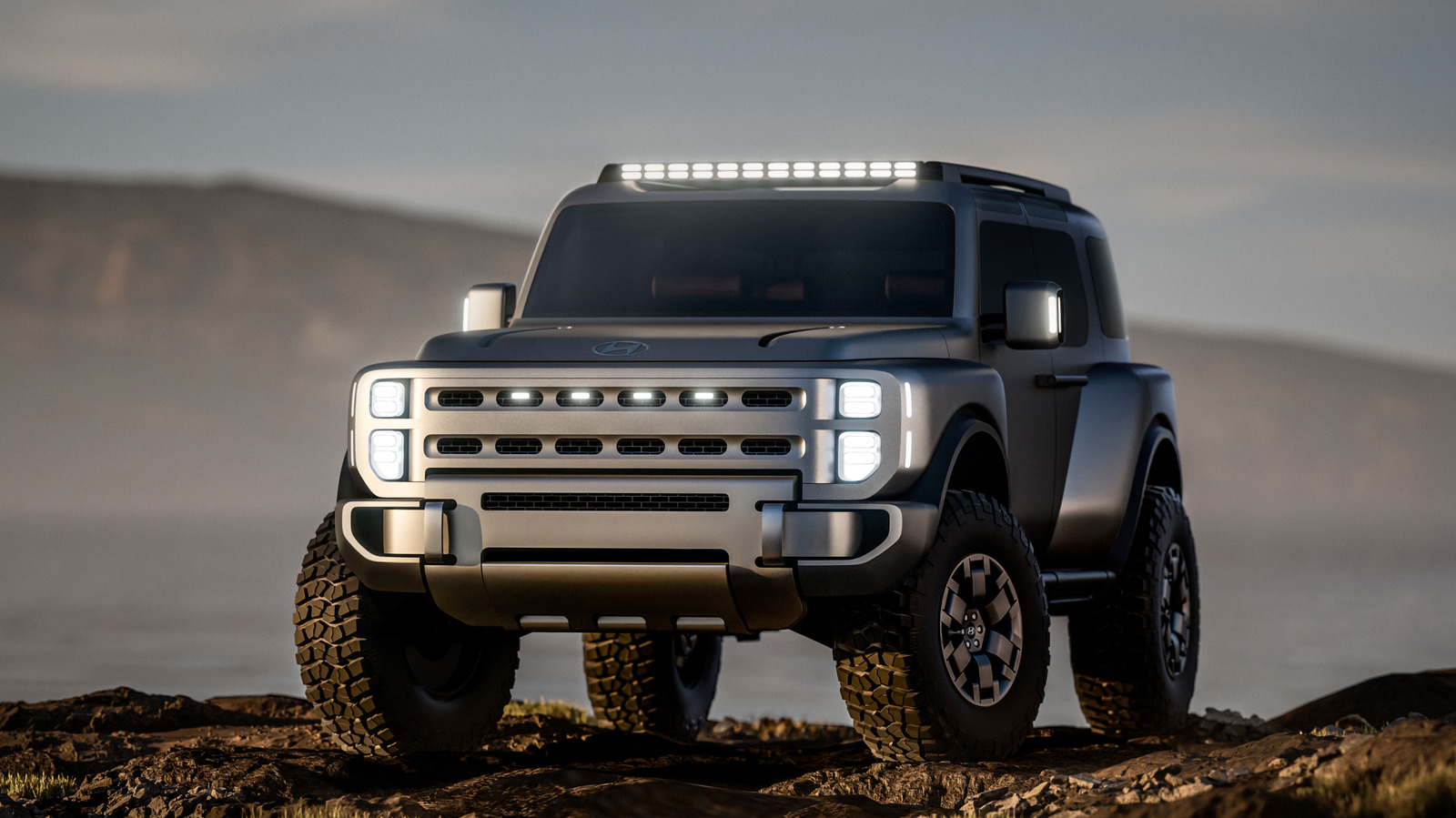
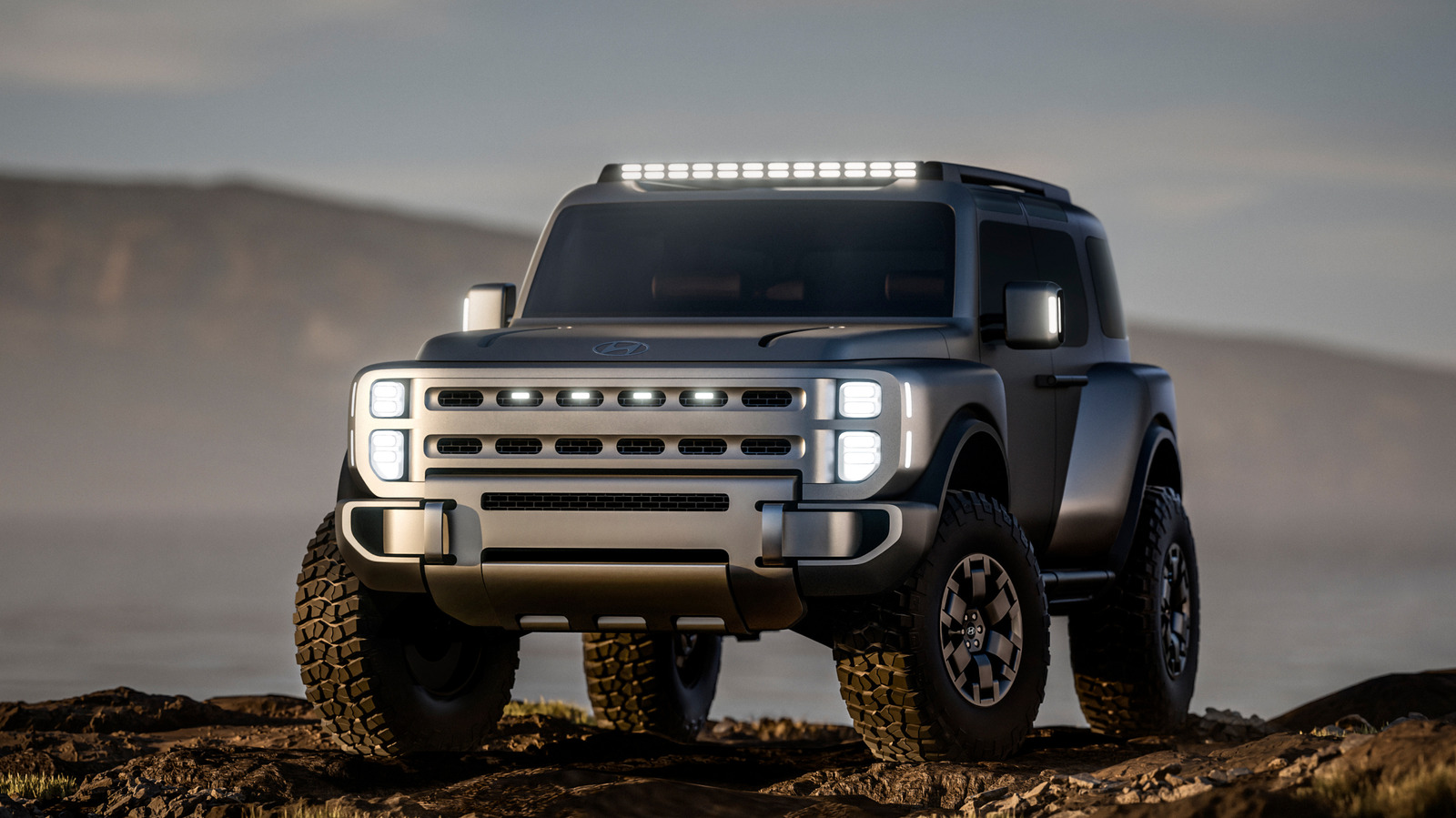
Hyundai unveiled its “Boulder” concept off-roader at the 2026 New York International Auto Show, and it’s decidedly unlike other Hyundais we’ve come to know. Firstly, it’s a big, body-on-frame SUV, which is an interesting turn of events, given how every other Hyundai produced for the United States has been unibody.
This puts it right in contention with off-roaders like the Jeep Wrangler and Ford Bronco, but also potentially against the likes of the Chevy Colorado and Ford Ranger. Now, a body-on-frame SUV isn’t exactly high tech. In fact, it was the de facto layout for decades prior to the popularity of unibody construction. However, the Boulder still feels like a pretty big step forward for off-road vehicles and SUVs as a whole, as Hyundai seems committed to body-on-frame vehicles in the future. Hyundai notes that a truck will be coming first (in 2030), and then more vehicles riding on that platform will follow.
Advertisement
Hyundai’s Boulder concept represents a transition toward off-roading in the future
Although it might seem like this move toward body-on-frame construction is actually a blast from the past, what makes the Boulder unique in that it takes the best parts of this old technology and combines it with newer tech. This vehicle maintains the improved towing capacity and durability of a body-on-frame construction, while generally allowing for more wheel travel and differential setups that come with off-roading. At the same time, the concept is designed with modern features like coach-style doors that capable of side loading and a double-hinged rear tailgate that opens from either side.
Advertisement
There are still several questions that need answers: Is the Boulder eventually coming to fruition, or is it just a concept? What drivetrain is Hyundai planning, and perhaps most importantly, will it be priced in a way that drivers will agree with? We will likely have to wait a few years to get any satisfying answers to most of those questions.
But the Boulder is an encouraging look at what the future might hold for SUVs designed on the more rugged side of the spectrum. A technologically advanced and (hopefully) efficient dedicated off-roader riding on a good platform might win a lot of fans over from Jeep.
AI developer Anthropic says its newest Claude artificial intelligence model is so good at finding cybersecurity vulnerabilities that it’s not releasable to the public. The company is instead providing the tool to big tech infrastructure providers so they can patch the flaws it finds.
In late March, word began to leak that Anthropic’s latest AI model, dubbed Claude Mythos (PDF), was going to be a leap forward for the company’s AI technology. Now, the company has previewed its capabilities and warned that Mythos represents a major cybersecurity threat, as its capabilities represent a leap forward in finding and exploiting online security vulnerabilities.
“AI models have reached a level of coding capability where they can surpass all but the most skilled humans at finding and exploiting software vulnerabilities,” the company said in a blog post Tuesday. Anthropic said Mythos Preview, which has not been released to the public, has already found what it says are thousands of severe security vulnerabilities “in every major operating system and web browser.” Asked for comment, a representative for Anthropic directed CNET to the company’s blog post.
Advertisement
To address the cybersecurity risks, Anthropic said it’s launching a consortium called Project Glasswing that includes Apple, Amazon Web Services, Broadcom, Cisco, CrowdStrike, Google, JPMorgan Chase, the Linux Foundation, Microsoft, Nvidia and Palo Alto Networks. Anthropic said those organizations and more than 40 others will have access to Mythos in order to start the work of shoring up defenses against AI attacks and exploits. It’s committing $100 million in usage credits for Mythos and $4 million in donations to open-source security organizations.
“The dangers of getting this wrong are obvious, but if we get it right, there is a real opportunity to create a fundamentally more secure internet and world than we had before the advent of AI-powered cyber capabilities,” Anthropic CEO Dario Amodei posted on X.
In a video posted to YouTube about Project Glasswing, leaders from companies including Microsoft, the Linux Foundation and Anthropic discussed the damage that software vulnerabilities can cause.
Large cloud computing companies have already been working with the new model to find vulnerabilities. “What we have found has been illuminating,” Anthony Grieco, chief security and trust officer at Cisco, wrote in a blog post. “Now the real work begins. AI-powered analysis uncovers data at a scale and depth that legacy frameworks were not designed to accommodate.”
Advertisement
Amazon Web Services said the model has already found ways to strengthen code even in its most well-tested systems. Amy Herzog, vice president and chief information security officer at AWS, called Claude Mythos Preview a “step-change in reasoning and AI capabilities for cybersecurity.”
How significant is this new model?
The phenomenon of AI being able to discover, and potentially exploit software vulnerabilities, is not new — the DARPA Cyber Grand Challenge has had several instances of AI drawing attention in this area, said Michal Salát, threat intelligence director for Norton.
But now, AI tech that’s available to anyone has some of those capabilities. “Anthropic’s Project Glasswing is focused on safeguarding this powerful technology, which can transform vulnerability research but also pose a serious risk if misused for malicious purposes,” Salát said in an email to CNET. “While it represents a major step forward from current top models such as Opus 4.6, the underlying capability already exists today, and vulnerability research is rapidly emerging as one of the primary, real-world use cases for AI in cybersecurity.”
National policymakers, who have been going back and forth on the need for federal AI regulation, will likely watch the consortium’s progress closely.
Advertisement
Sen. Mark Warner praised the initiative in a statement. “I applaud these leading companies for recognizing this threat and proactively sharing information, capabilities and computing capacity to better protect our critical infrastructure,” the Virginia Democrat said. “As AI dramatically accelerates the discovery of new vulnerabilities, I hope industry will correspondingly accelerate and reprioritize patching.”
Warner, whose state is a hotbed of AI data centers, recently called a proposed moratorium on data center construction “idiocy,” but has also warned about the risks to society posed by rapid AI development leading to massive job losses.
Advance Paris NOVA Range Debuts at AXPONA 2026: Integrated Amplifiers, Streaming Module, and Bi-Directional Bluetooth Dongle with aptX Low Latency Support
Advance Paris is bringing its new NOVA flagship series to AXPONA 2026, and it feels like the next deliberate step in a push that has already kicked down more than a few doors on this side of the pond. The French brand, which has quietly built momentum in the U.S. and Canada with its retro-leaning aesthetic and feature-rich designs, is officially unveiling a five-product NOVA range built around two integrated amplifiers, a modular streaming cartridge, a bi-directional Bluetooth dongle, and a rotary remote that leans hard into tactile control.
Unlike some of its compatriots; YBA, Devialet, Metronome, and Jadis, that tend to favor either stark minimalism or full blown luxury theatrics, Advance Paris has found a middle ground that actually resonates with North American listeners. NOVA sits at the top of that strategy, combining amplification, streaming, and wireless connectivity into a modular system designed to evolve over time rather than lock users into a single box solution.
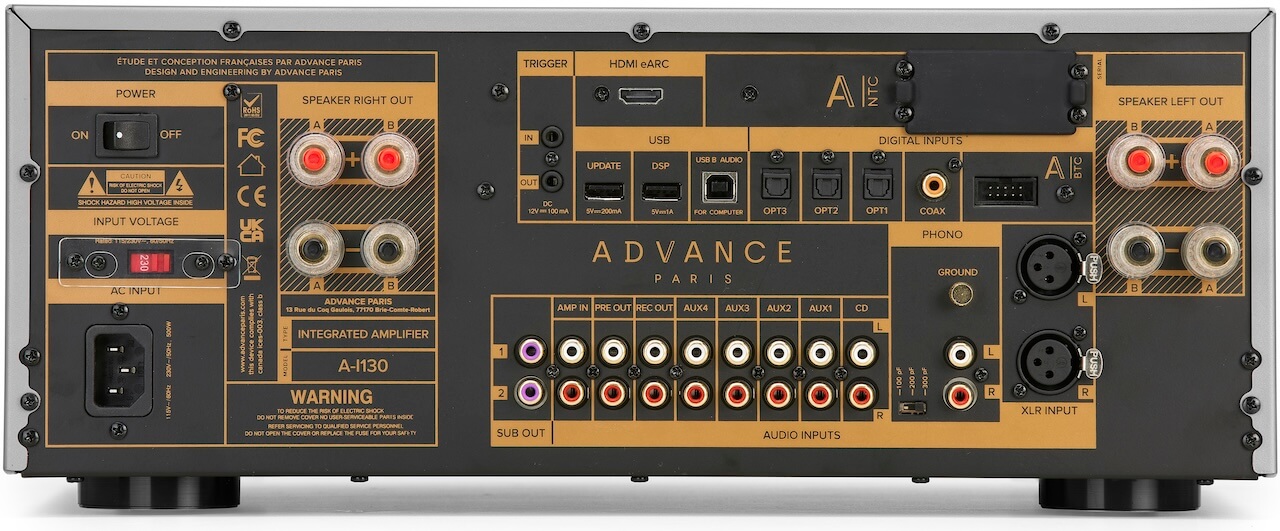
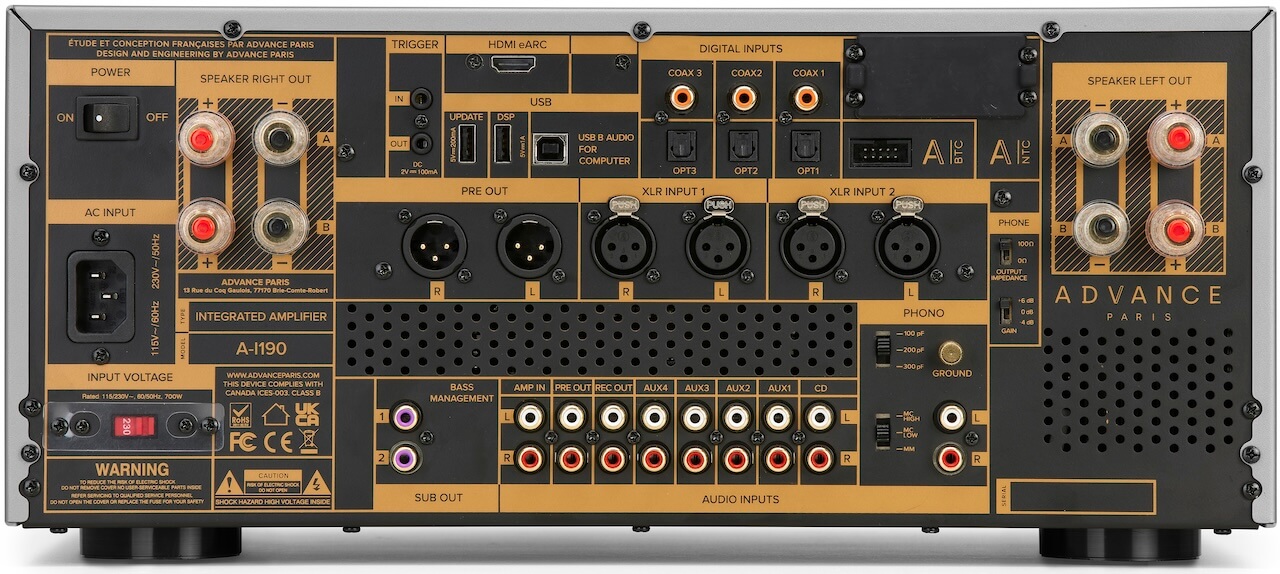
A-i130 & A-i190 Integrated Amplifiers
A-i130A-i190
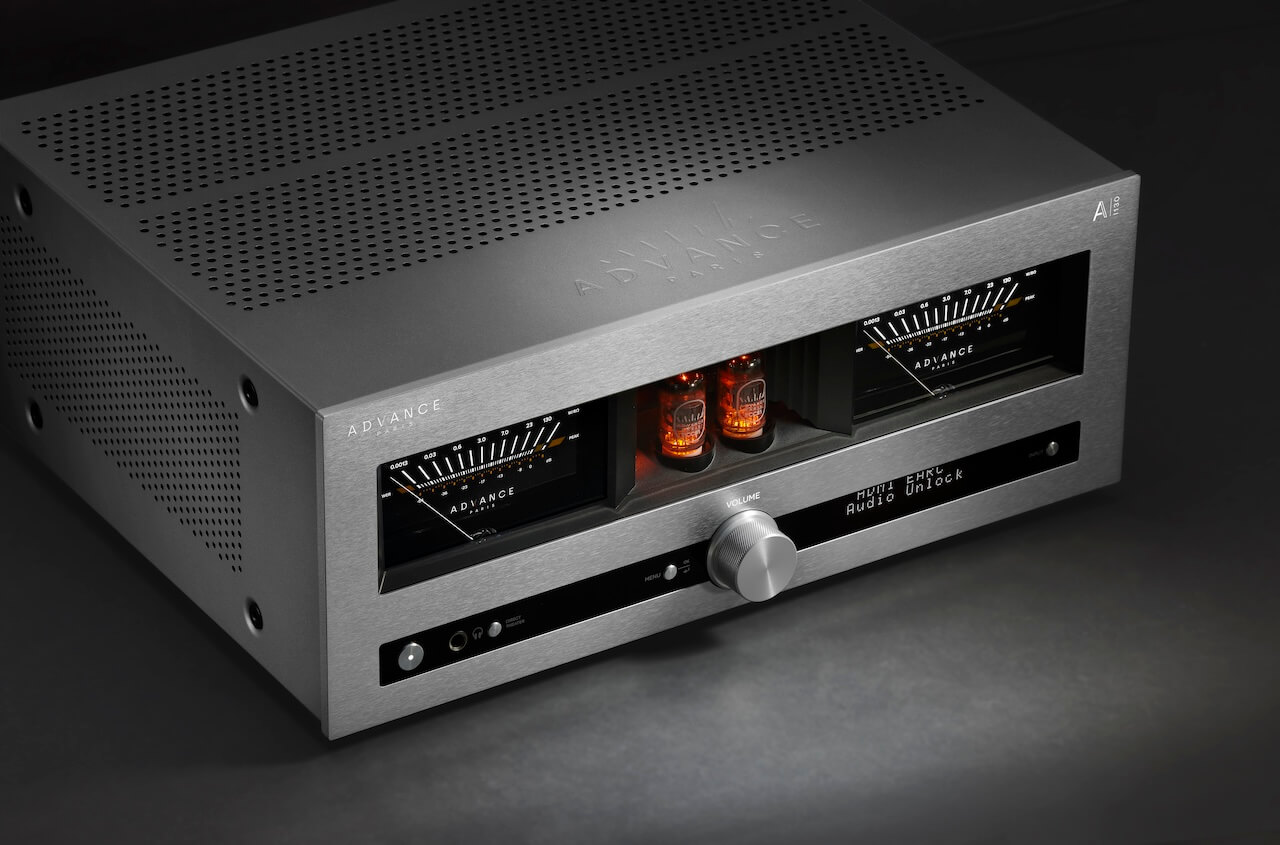
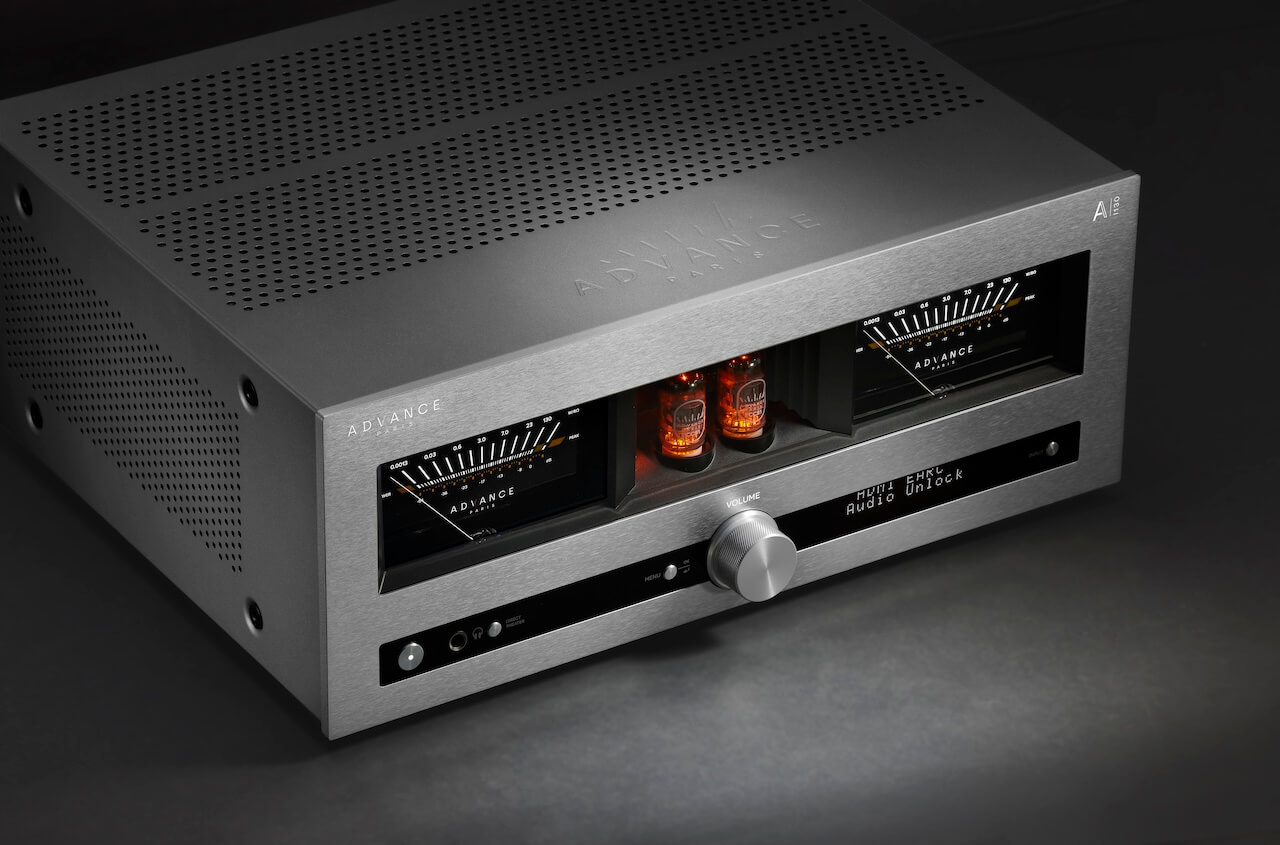
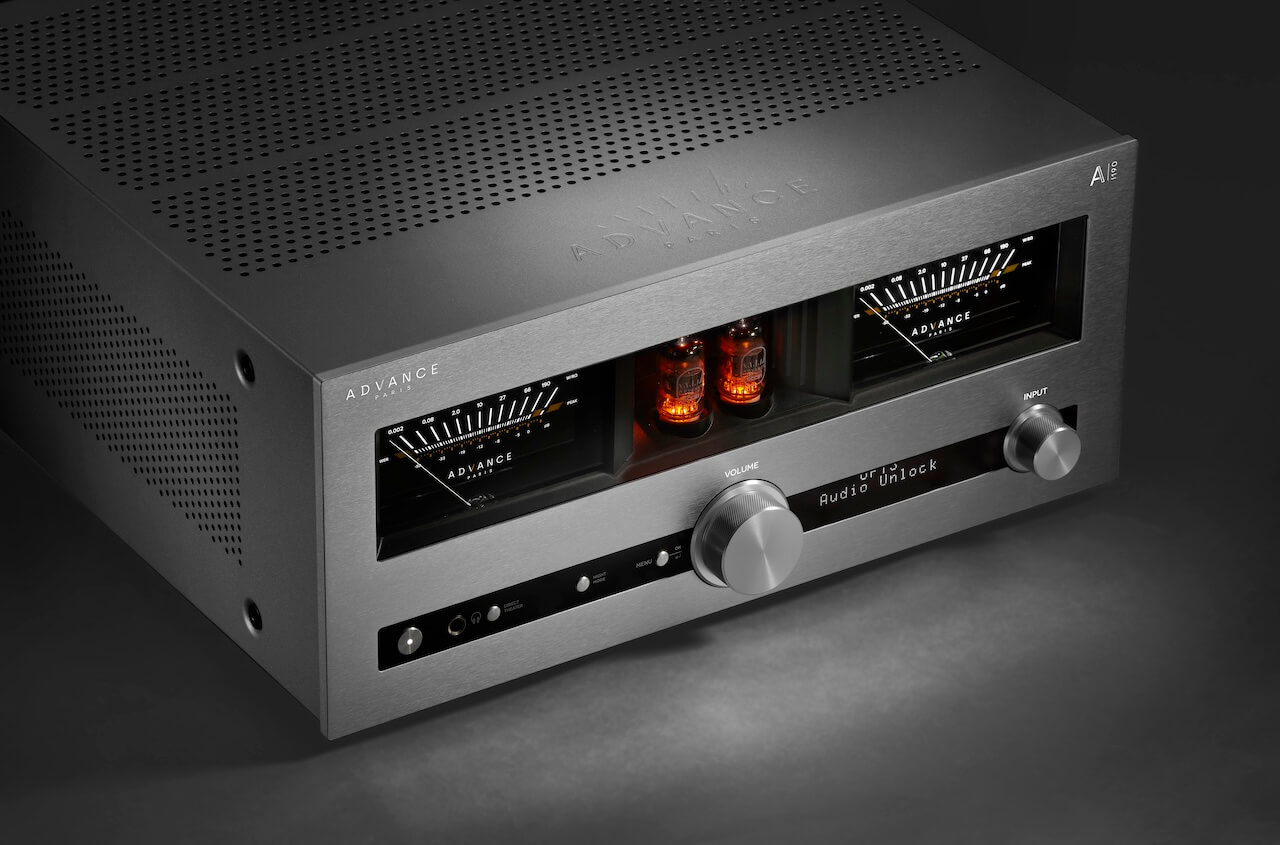
Both the A-i130 and A-i190 are built on the same core idea: this isn’t just an integrated amplifier, it’s the control center for an entire system. Advance Paris is combining hybrid amplification, DSP, DAC, and subwoofer management into one chassis and then letting you expand it later with modular add-ons. That’s the play.
At their core, both models use a hybrid design with an ECC81 tube preamp stage feeding a Class A/B output section. You get some harmonic texture without sacrificing control. On the digital side, both rely on an ESS9017 DAC running in Quad mode, paired with a 4 channel DSP that handles EQ and room correction across left, right, and up to two subwoofers.
Subwoofer integration is taken seriously here. Both support 2.1 or 2.2 configurations with a proper crossover and independent control, which immediately separates them from a lot of integrated amps still pretending subs don’t belong in two channel systems.
Advertisement
Add HDMI eARC, USB with DSD support, multiple optical and coaxial inputs, five line level RCA inputs, MM phono (with ground), pre-out, record out, dual sub outs, and a 6.35 mm headphone jack, and both units are clearly designed to replace a stack of separates without feeling compromised.
They also share the same expansion path. Both include slots for the optional A NTC streaming cartridge and A BTC Bluetooth module, enabling full streaming or bi-directional wireless audio including headphone transmission. And yes, both support the rotary remote if you want tactile volume control without getting off the couch.
Physically, these are not compact lifestyle boxes.
A-i130A-i190
The A-i130 measures 43 x 17.5 x 35.1 cm (16.9 x 6.9 x 13.8 inches) and weighs 13.3 kg (29.3 lbs). Think of it as the Marion Cotillard of the lineup; refined, composed, and quietly in control of the room.
Advertisement
The A-i190 grows in every direction at 43 x 19.2 x 45.4 cm (16.9 x 7.6 x 17.9 inches) and 19 kg (41.9 lbs), which tells you exactly what’s going on inside before you even turn it on. This one is Vincent Cassel; leaner than you expect, hits harder than it should, and absolutely not here to play nice.
Where they diverge is power, architecture, and connectivity.
Advertisement. Scroll to continue reading.
The A-i130 delivers 130 watts per channel into 8 ohms using a single toroidal transformer. Its connectivity is extensive but entirely single ended on the analog side. You get five RCA line inputs, an MM phono input with grounding terminal, and RCA outputs for pre out, record out, and dual subwoofers. Digital inputs include three optical, three coaxial, USB audio with DSD support, and HDMI eARC for TV integration. There’s also a 6.35 mm headphone output on the front. It’s a complete, modern hub without unnecessary complexity—and for most systems, it’s not leaving anything on the table.
Advertisement
The A-i190 takes that foundation and pushes it into more serious territory. It moves to a dual mono design with two toroidal transformers, effectively isolating each channel and increasing output to 190 watts per channel with greater headroom. Connectivity expands where it actually matters: in addition to the same five RCA line inputs and digital suite (optical, coaxial, USB, HDMI eARC), the A-i190 adds balanced XLR inputs and a balanced XLR pre out alongside the RCA pre out. The phono stage is upgraded to support both MM and MC cartridges, and it retains dual subwoofer outputs and record out. In other words, it’s not just more power—it’s built to integrate into more demanding, higher-end systems without forcing compromises.
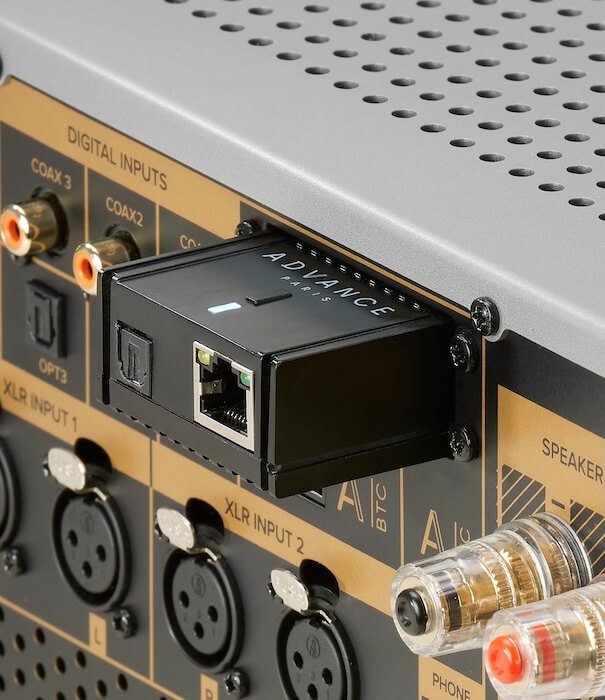
A-NTC Streaming Cartridge Turns NOVA into a Real Network Player
The A-NTC is Advance Paris’ modular answer to streaming, and it’s designed to work two ways without overcomplicating things. On its own, it can function as a standalone streamer via its optical output, adding network playback to any system with a compatible digital input. Install it into the expansion slot on the A-i130 or A-i190, and it disappears into the chassis; no extra cables, no extra box, just a fully integrated streaming amplifier.
It supports the platforms that actually matter: Spotify Connect, TIDAL Connect, Qobuz Connect, AirPlay 2, Chromecast, DLNA, and Roon, with connectivity over Ethernet or Wi-Fi. Output is capped at 24-bit/192 kHz, which covers the vast majority of real world streaming use cases without pretending to chase numbers for marketing.
The key point here is integration. This isn’t another streamer fighting for shelf space, it’s part of the ecosystem. Clean, functional, and exactly what most people will use.
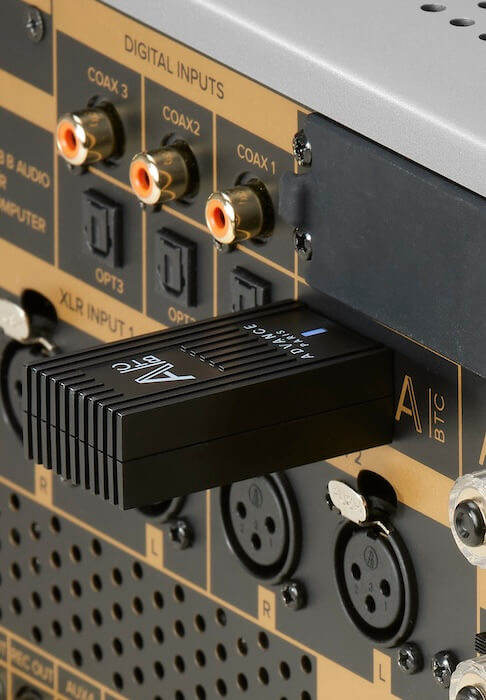
A-BTC Bluetooth Dongle Adds Wireless Flexibility Without Pretending It’s Perfect
The A-BTC is a bi-directional Bluetooth 5.4 module that uses the same expansion slot, adding both transmit and receive functionality to the NOVA platform. You can stream from your phone to the amplifier or send audio out to a single pair of Bluetooth headphones; useful for late night listening or keeping the peace when the rest of the house is asleep.
Codec support includes aptX HD, aptX Adaptive, aptX Low Latency, and AAC, which gives you solid coverage for both sound quality and low latency video use. Lip sync should be tight with aptX LL, and aptX Adaptive handles variable bitrate conditions more gracefully than older standards.
Advertisement
What it does not include is just as important: there’s no LDAC and no aptX Lossless. That’s going to matter if you’re running newer wireless headphones that rely on those codecs for maximum resolution. In other words, this is a well executed, practical Bluetooth solution, but it’s not chasing the bleeding edge of wireless audio.
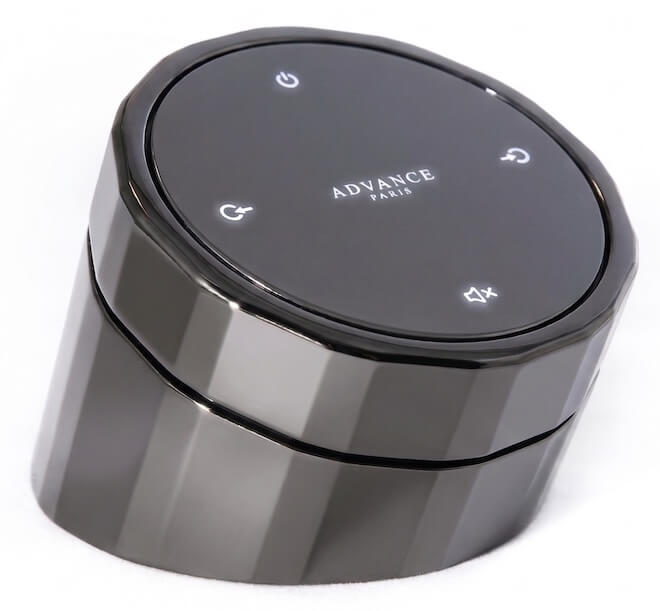
A-RTR Rotary Remote Brings Back Tactile Control
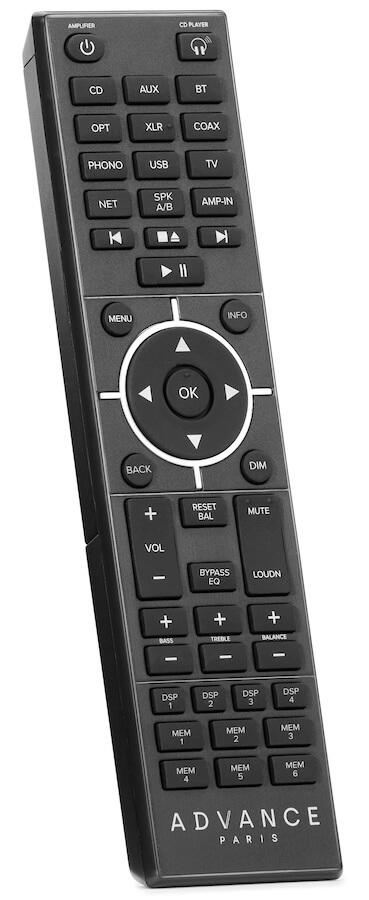
The optional A-RTR rotary remote is exactly what it looks like: a solid, weighty metal control designed to live on your coffee table or listening surface, not get lost between couch cushions. It connects wirelessly to the A-i130 and A-i190 via the A-BTC Bluetooth module, so yes—you need that piece in place for this to work.
Functionally, it keeps things simple. The rotating crown handles volume, while additional controls manage input selection and power. No screen, no app dependency, no nonsense. Just direct control with a physical interface that mirrors the design language of the amplifiers themselves.
This is clearly aimed at listeners who are tired of poking at phones or dealing with plastic remotes that feel like they came free with a toaster. It’s not about adding features, it’s about restoring a more tactile way to interact with the system.
As Cédric Léon, Product Manager at Advance Paris, puts it: “With these new products, we are offering a future proof audio solution that is both powerful and versatile—and really leans into the modern and sleek aesthetic Advance Paris is known for. Whether you’re looking for the best possible sound quality, streaming flexibility, or an amplifier that can adapt to a variety of needs, this new product lineup has it all.”
Advertisement
Advertisement. Scroll to continue reading.
The Bottom Line
The NOVA range stands out because it combines a hybrid tube front end, Class A/B power, 4-channel DSP with real subwoofer integration, and a modular expansion path that lets you decide how far down the streaming and wireless rabbit hole you want to go. Two slots, two modules, and a clear upgrade path.
The execution matters. Both integrated amplifiers function as serious control centers with proper inputs and outputs, HDMI eARC, and flexible bass management, which is something a lot of competitors still treat like an afterthought. The A-i190, in particular, leans into higher end territory with dual mono architecture and balanced connectivity, making it viable in more ambitious systems.
The modular approach will feel familiar to anyone who has spent time with NAD and its MDC ecosystem, especially in the Master Series. Same idea: don’t lock the user into a fixed feature set that ages out in two years. Let them add what they need. The difference here is that Advance Paris is applying that concept to a more stylistically distinctive platform.
That said, there are tradeoffs. At these prices, a lot of competing integrated streaming amplifiers already include network streaming out of the box. Here, it’s a paid add-on. And while the Bluetooth module is well executed, the lack of LDAC and aptX Lossless means it’s not chasing the highest tier of lossless wireless audio performance.
Advertisement
The A-RTR remote is another interesting play. It’s tactile, heavy, and clearly designed to be part of the experience, but it will look very familiar if you’ve seen what Devialet and MOON by Simaudio have been doing for years. Whether that’s homage or imitation depends on your level of cynicism.
So who is this for? Someone who wants a modern, feature rich integrated amplifier with real system flexibility, but doesn’t want to be locked into an all in one streaming platform that may age poorly. Someone who values tactile control, clean system integration, and the ability to evolve over time.
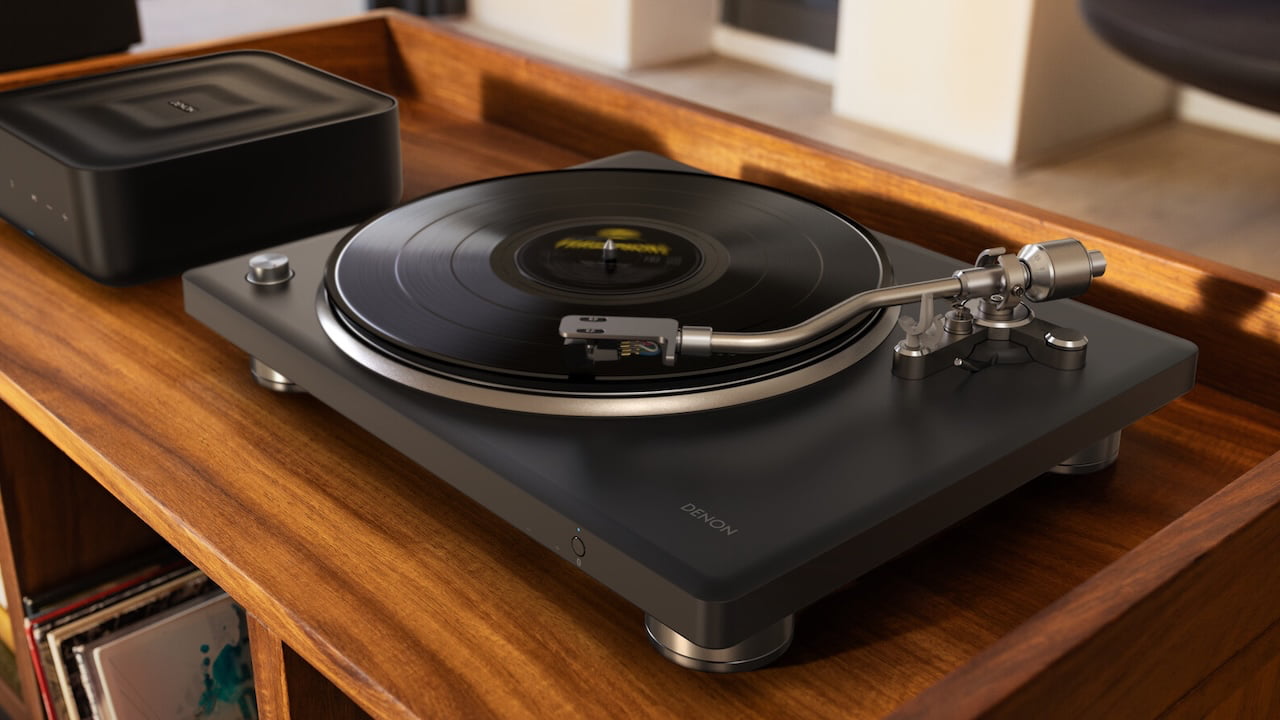
The Denon DP-500BT is a premium turntable aimed at both new vinyl listeners and experienced collectors, combining Denon’s proven analog performance with the added flexibility of Bluetooth streaming. Designed to deliver rich, detailed sound through its traditional outputs while supporting modern listening habits, it bridges the gap between classic hi-fi and everyday convenience.
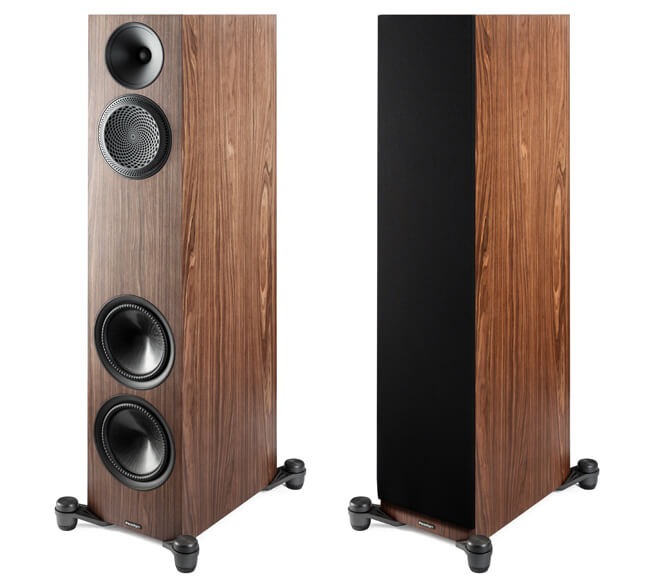
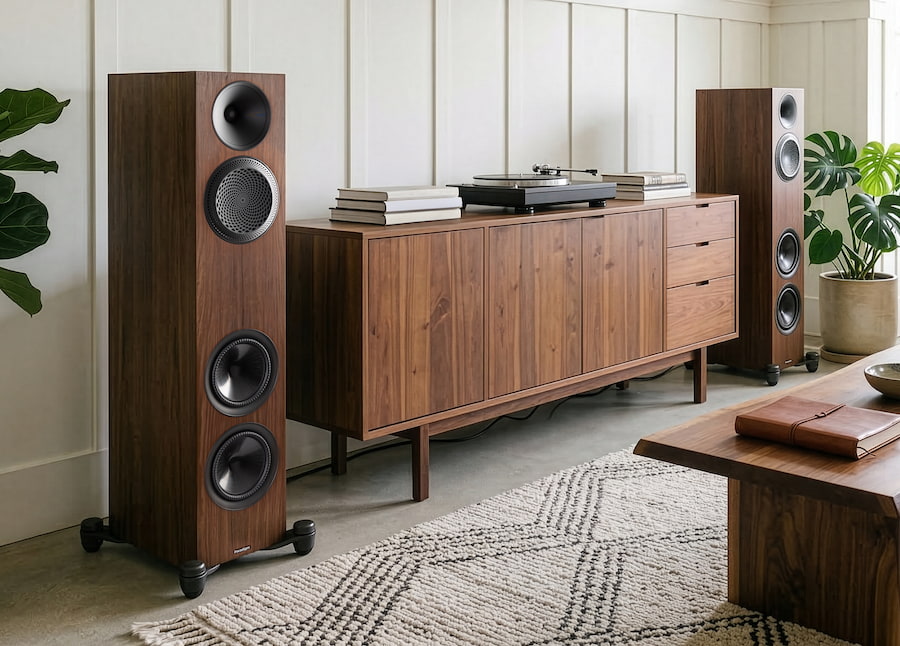
Toronto-based Paradigm is debuting its Premier Series v2 loudspeaker series at AXPONA 2026 which is priced from $800 to $2,300 per pair. Although the company is leaning hard into its usual talk of trickle-down tech and refined engineering, the real story is far simpler: they’ve managed to keep this line genuinely affordable in a market that’s been sprinting in the opposite direction.
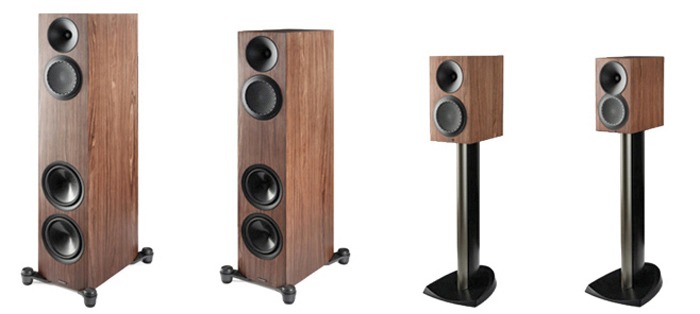
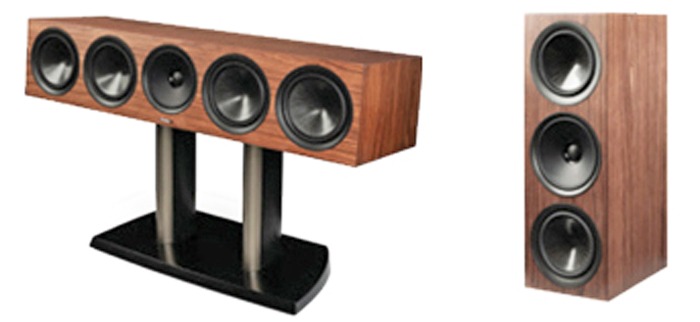
The new lineup is a full-system play, covering the 820F and 720F floorstanding speakers, 220B and 120B bookshelf models, the 620C center channel, and the 520LCR for flexible front-stage or custom-install use. Built as a ground-up redesign of the original 2018 Premier Series, the v2 range pulls design cues and driver technology from Paradigm’s higher-end offerings without dragging pricing into five-figure territory.
Like DALI, Paradigm remains one of the few speaker manufacturers still doing everything in-house; from driver design to cabinet construction, backed by extensive testing and measurements in its own anechoic chamber. That level of control tends to show up where it counts: tighter tolerances, more consistent performance, and fewer surprises once the speakers hit real rooms.
The Premier v2 Series is clearly designed as a complete, accessible ecosystem, but the headline isn’t just the redesign or the model count. It’s that Paradigm didn’t lose its grip on reality with the pricing. In 2026, that alone makes this launch worth paying attention to.
Advertisement
“With the Premier v2, we wanted to make a reference-grade acoustics platform available at a more attainable price point,” says John Bagby, Managing Director at PML Sound International. “By using some of the technologies and materials developed for our award-winning Founder Series and tuning them for this new line, we’ve delivered a strong level of value—and an experience that we are incredibly excited to share with our dealers and fans.”
Advanced Driver and Enclosure Technologies
The v2 series integrates a range of driver and enclosure technologies designed to deliver balanced, accurate sound across the full frequency range:
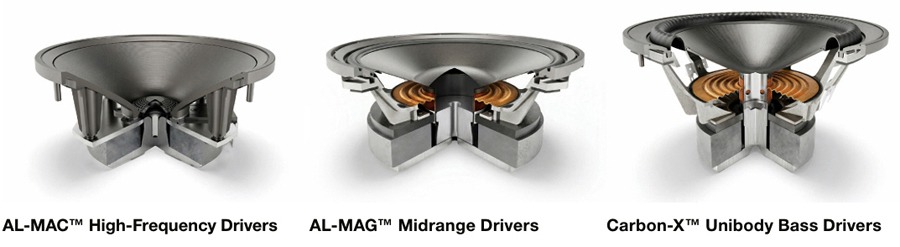
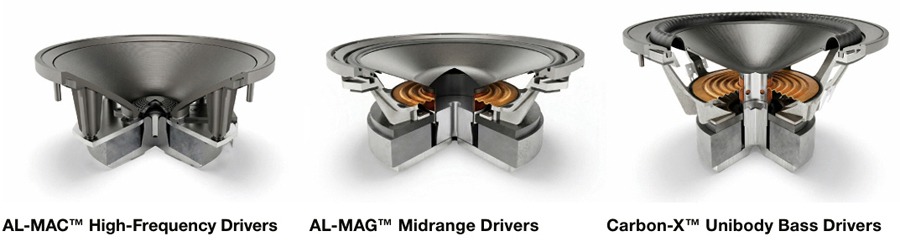
AL-MAC High-Frequency Drivers: A blend of aluminum, magnesium, and ceramic designed to reduce resonances and deliver a clean, controlled treble response without added harshness.
AL-MAG Midrange Drivers: Engineered for high sensitivity and responsiveness, these drivers keep vocals and instruments clear, focused, and tonally accurate.
Carbon-X Unibody Bass Drivers: One-piece cone construction designed to maintain rigidity under load, delivering deeper bass with better control and less distortion at higher output levels.
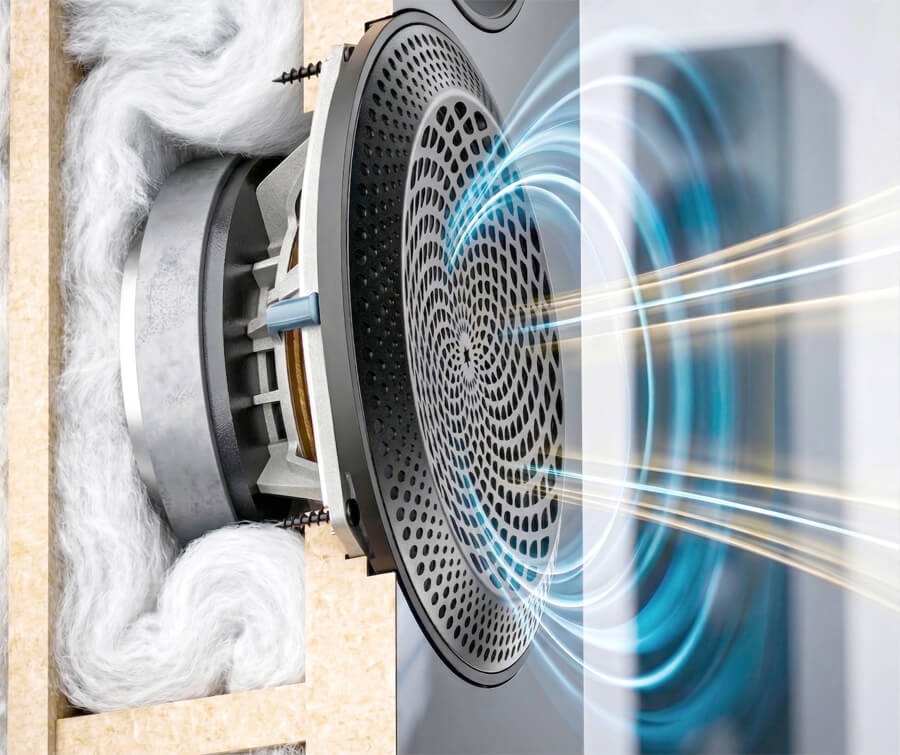
Patented Sound Guides: The PPA (Perforated Phase-Aligning) Lens and OSW (Oblate Spheroidal Waveguide) work together to focus sound toward the listener, ensuring a wide “sweet spot” regardless of the room’s layout. Paradigm’s Oblate Spheroidal Waveguide (OSW) is a proprietary tweeter waveguide designed to improve sound dispersion. It focuses the tweeter output on the listening area, reducing off-axis reflections and enhancing clarity
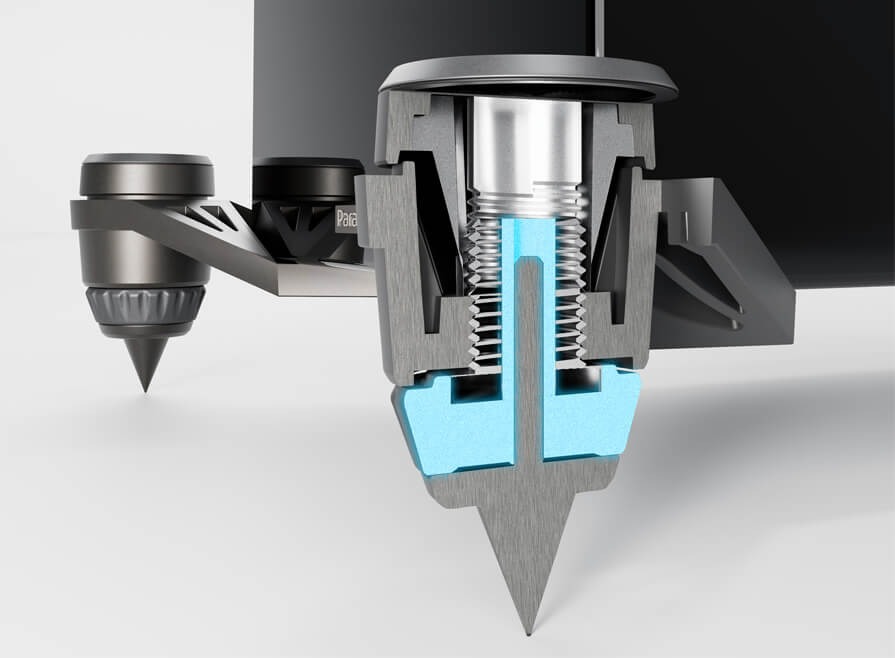
Outrigger Shock-Mount Isolation Feet: An adjustable system that decouples the speaker from the floor to reduce vibration, helping deliver tighter, more controlled bass on any surface using the included spikes or rubber feet.
From Affordable Entry Point to Serious High Performance
The Premier v2 is positioned as a clear step up for listeners ready to move beyond entry-level gear and into a more refined, higher-performance home audio system.
“We designed the Premier v2 for the enthusiast who is ready to move into a higher tier of performance without the typical high-end cost,” says Badar Qureshi, CEO of PML Sound International. “This series represents the future of our brand by proving that truly exceptional audio can be both approachable and attainable. We are committed to ensuring that Paradigm remains the standard for performance in its class, giving our customers a clear path to owning a world-class listening experience.”
Advertisement
Premier v2 820F
The 820F v2 sits at the top of the Premier v2 lineup, built to anchor a serious two-channel or home theater system. With multiple 7-inch Carbon-X bass drivers and a high-volume enclosure, it’s designed to move a lot of air; delivering deep, controlled bass and a wide, room-filling soundstage without losing composure as volume climbs.
Advertisement. Scroll to continue reading.
Premier v2 720F
The 720F v2 delivers floorstanding scale without dominating the room. Its 3-way design uses dual Carbon-X unibody bass drivers for low-frequency control and rigidity, paired with a dedicated AL-MAG midrange and AL-MAC tweeter for a more cohesive, full-range presentation. Adjustable Outrigger Shock-Mount feet help keep things stable and isolated, so the speaker maintains composure and clarity even when pushed harder.
Premier v2 220B
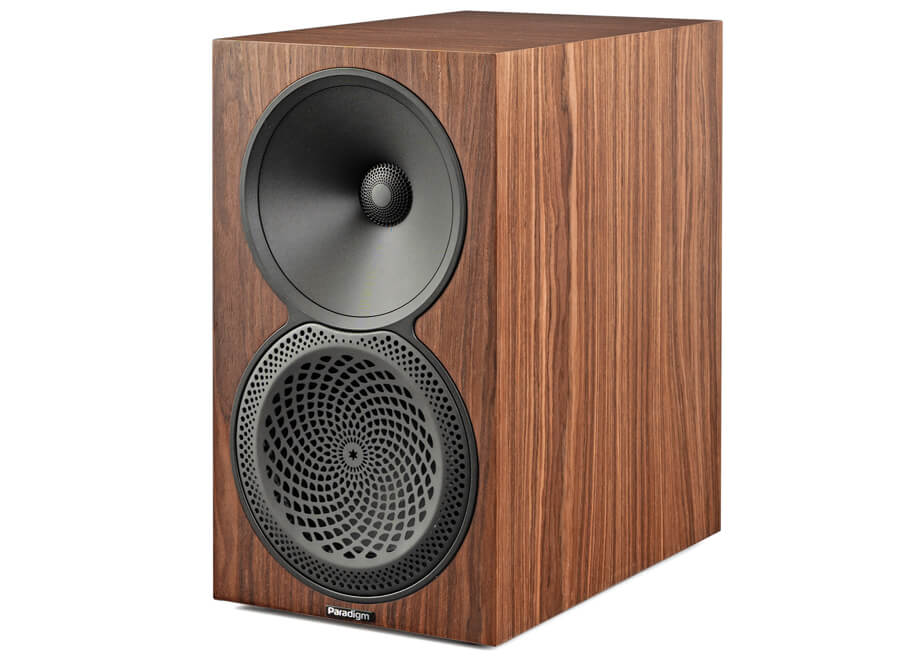
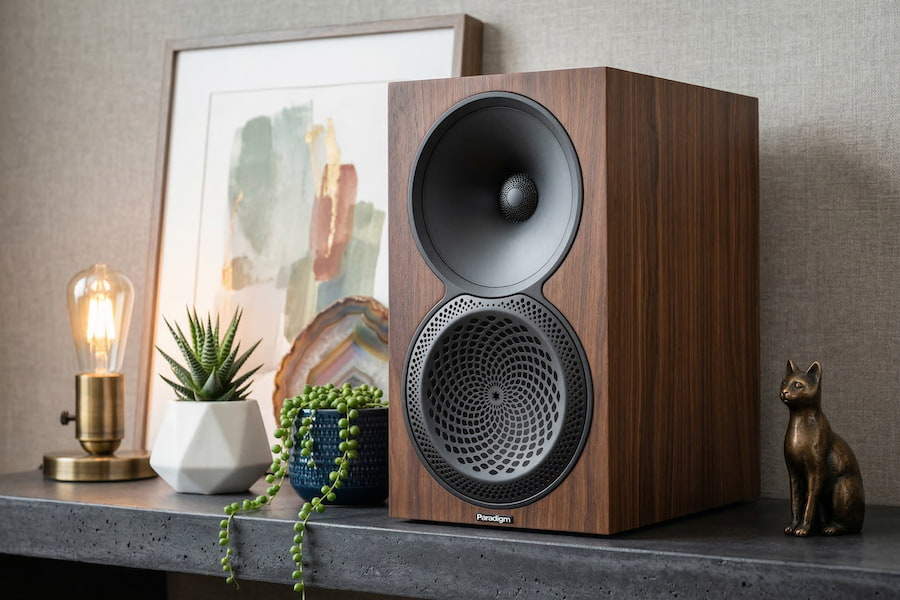
The 220B v2 is a larger bookshelf or standmount design built around a 1-inch AL-MAC tweeter and a 6-inch AL-MAG driver, paired with a cabinet that offers more internal volume than you’d expect at this size. The result is deeper bass extension and greater dynamic range, making it viable in both smaller rooms and more open spaces. It’s a strong option for listeners who want something close to floorstander performance without committing to full-size towers.
Premier v2 120B
The Premier 120B v2 is positioned as the entry point into the lineup, built for smaller spaces without giving up on sound quality. This compact 2-way bookshelf pairs a 1-inch AL-MAC tweeter with a 5.5-inch AL-MAG mid-bass driver to deliver a detailed, surprisingly expansive soundstage for its size. It works equally well as a dedicated stereo pair or as part of a larger home theater system.
Premier v2 620C Center Channel
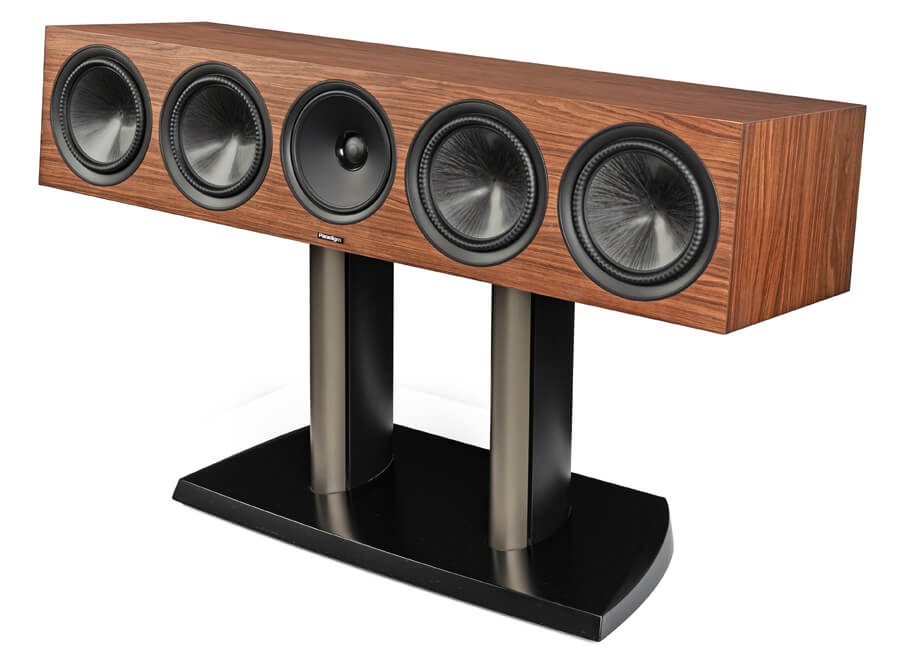
The 620C v2 is a substantial center channel built for larger home theater systems. It uses a 4-driver array paired with dual passive radiators to deliver deeper, more impactful low-end while retaining the placement flexibility of a sealed cabinet design. The goal here is straightforward: clear, intelligible dialogue with enough weight and presence to anchor even bigger, more demanding setups.
Premier v2 520LCR
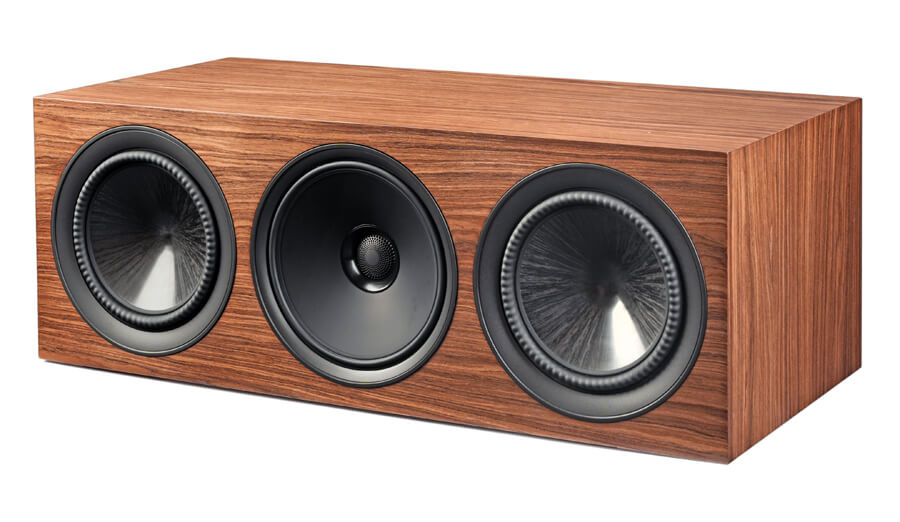
The 520LCR v2 is a dedicated left, center, right solution built for high-performance home theater systems. Its sealed acoustic suspension design allows for flexible placement—inside cabinetry or out in the open—without sacrificing clarity or control. A coaxial AL-MAG midrange helps lock in dialogue and imaging, creating a more cohesive and seamless front soundstage. It can be positioned horizontally as a center channel or vertically for left, right, or even surround duties, making it one of the more versatile options in the lineup.
Paradigm Premier Series V2 Speakers Comparison
Paradigm Premier Series V2 Model
820F
720F
220B
120B
Product Type
Floorstanding Speaker
Floorstanding Speaker
Bookshelf/Standmount Speaker
Bookshelf/Standmount Speaker
Price (each)
$1,299.99
$999.99
$549.99
$399.99
Design
4-driver, 3-way ported floor standing speaker with AL-MAC, AL-MAG, Carbon-X, OSW™, and PPA™
4-driver, 3-way ported floor standing speaker with AL-MAC, AL-MAG, Carbon-X, OSW™, and PPA™
2-driver, 2-way ported bookshelf with AL-MAC, AL-MAG, OSW™, and PPA™
2-driver, 2-way ported bookshelf with AL-MAC, AL-MAG, OSW™, and PPA™
2nd Order Electro-acoustic at 1.8kHz (tweeter/midrange)
2nd Order Electro-acoustic at 450Hz (midrange/woofer)
2nd Order Electro-acoustic at 1.3kHz (tweeter/midrange)
2nd Order Electro-acoustic at 500Hz (midrange/woofer)
2nd Order Electro-acoustic at 1.1kHz (tweeter/midwoofer)
2nd Order Electro-acoustic at 1.2kHz (tweeter/mid woofer))
High-Frequency Driver
1” (25mm) AL-MAC™ Ceramic Dome with Oblate Spheroid Waveguide (OSW™) and Per forated Phase-Aligning (PPA™) Tweeter Lens, ferro-fluid damped / cooled
1” (25mm) AL-MAC™ Ceramic Dome with Oblate Spheroid Waveguide (OSW™) and Per forated Phase-Aligning (PPA™) Tweeter Lens, ferro-fluid damped / cooled
1” (25mm) AL-MAC™ Ceramic Dome with Oblate Spheroid Waveguide (OSW™) and Perforated Phase-Aligning (PPA™) Tweeter Lens, ferro-fluid damped / cooled
1” (25mm) AL-MAC™ Ceramic Dome with Oblate Spheroid Waveguide (OSW™) and Perforated Phase-Aligning (PPA™) Tweeter Lens, ferro-fluid damped / cooled
Mid-Frequency Driver
6” (152mm) AL-MAG™ Cone with Perforated Phase-Aligning (PPA™) Lens, and a 2” high-temp multi-layered voice coil with ventilated Apical™ former
6” (152mm) AL-MAG™ Cone with Perforated Phase-Aligning (PPA™) Lens, and a 2” high-temp multi-layered voice coil with ventilated Apical™ former
N/A
N/A
Mid/Bass Frequency Driver
N/A
N/A
6” (152mm) Ultra-High-Excursion AL-MAG™ Cone with Perforated Phase-Aligning (PPA™) Lens, Gen3 Active Ridge Technology (ART™) with Vertical Mounting System, and a 1” high-temp multi-layered voice coil with ventilated Apical™ former
5.5” (140mm) Ultra-High-Ex cursion AL-MAG™ Cone with Perforated Phase-Aligning (PPA™) Lens, Gen3 Active Ridge Technology (ART™) with Vertical Mounting System, and a 1” high temp multi-layered voice coil with ventilated Apical™ former
Bass Frequency Driver
Two 7” (177mm) Ultra-HighExcur sion CARBON-X™ Unibody Cone, Gen3 Active Ridge Technology (ART™) with Vertical Mounting System, and a 1” high-temp multi-layered voice coil with ventilated Apical™ former
Two 6″ (152mm) Ultra-HighExcur sion CARBON-X™ Unibody Cone, Gen3 Active Ridge Technology (ART™) with Vertical Mounting System, and a 1” high-temp multi-layered voice coil with ventilated Apical™ former
N/A
N/A
Passive Radiator
N/A
N/A
N/A
N/A
Frequency Response (On Axis)
±3dB from 52Hz – 40kHz
±3dB from 55Hz – 27kHz
±3dB from 58Hz – 40kHz
±3dB from 62Hz – 24kHz
Frequency Response (Off Axis)
±3dB from 39Hz – 30kHz
±3dB from 39Hz – 30kHz
±3dB from 51Hz – 21kHz
±3dB from 55Hz – 32kHz
Low Frequency Extension
21Hz (DIN)
27Hz (DIN)
36Hz (DIN)
39 Hz (DIN)
Sensitivity Room/Anechonic
93dB / 90dB
92dB / 89dB
91dB / 88dB
90dB / 87dB
Amplifier Power Range
15 – 250 Watts
15 – 220 Watts
15 – 130 Watts
15 – 130 Watts
Max Input Power
180 Watts
180 Watts
80 Watts
70 Watts
Impedance
Compatible with 8 ohms
Compatible with 8 ohms
Compatible with 8 ohms
Compatible with 8 ohms
Weight (each)
65 lbs (29.5 kg)
57.3 lbs (26 kg)
20.1 lbs (9.1 kg)
16.3 lbs (7.4 kg)
Dimensions (HWD)
43.4” x 13.1” x 18.6”
110.2 cm x 33.3 cm x 47.2 cm
Advertisement
39.6” x 12.5” x 17”
100.6 cm x 31.8 cm x 43.2 cm
14.6” x 8.3” x 12.9”
37.1 cm x 21.1 cm x 32.8 cm
Advertisement
12” x 7” x 12.1”
30.5 cm x 17.8 cm x 30.7 cm
Finishes
Piano Black, Black Walnut, Walnut
Piano Black, Black Walnut, Walnut
Piano Black, Black Walnut, Walnut
Piano Black, Black Walnut, Walnut, Satin White
Paradigm Premier Series V2 Model
620C
520LCR
Product Type
Center Channel Speaker
Left, Center, Right Channel Speaker
Price (each)
$1,299.99
$899.99
Design
4-driver, 2-passive radiator, 3-way sealed center channel speaker with AL-MAC, AL-MAG, Carbon-X, OSW™, and PPA™
4-driver, 3-way sealed LCR speaker with AL-MAC, AL-MAG, Carbon-X, OSW™, and PPA™
Crossover
2nd Order Electro-acoustic at 1.7kHz (tweeter/midrange) 2nd Order Electro-acoustic at 750Hz (midrange/woofer)
2nd Order Electro-acoustic at 1.5kHz (tweeter/midrange) 2nd Order Electro-acoustic at 650Hz (midrange/woofer)
High-Frequency Driver
1” (25mm) AL-MAC™ Ceramic Dome with Oblate Spheroid Waveguide (OSW™) and Per forated Phase-Aligning (PPA™) Tweeter Lens, ferro-fluid damped / cooled
1” (25mm) AL-MAC™ Ceramic Dome with Oblate Spheroid Waveguide (OSW™) and Perforated Phase-Aligning (PPA™) Tweeter Lens, ferro-fluid damped / cooled
Mid-Frequency Driver
Coaxial 6” (152mm) AL-MAG™ Cone, a 2” high-temp multi-layered voice coil with Apical™ former, Patented Dual-Sync™ Continuous Flux Motor
Coaxial 6” (152mm) AL-MAG™ Cone, a 2” high-temp multi-layered voice coil with Apical™ former, Patented Dual-Sync™ Continuous Flux Motor
Mid/Bass Frequency Driver
N/A
N/A
Bass Frequency Driver
Two 7” (177mm) Ultra-High Excursion CARBON-X™ Unibody Cone, Gen3 Active Ridge Technology (ART™) with Vertical Mounting System, and a 1” high-temp multi-layered voice coil with ventilated Apical™ former
Two 6” (152mm) Ultra-High Excursion CARBON-X™ Unibody Cone, Gen3 Active Ridge Technology (ART™) with Vertical Mounting System, and a 1” high-temp multi-layered voice coil with ventilated Apical™ former
Passive Radiator
Two 7” (177mm) Ultra-High Excursion CARBON-X™ Unibody Passive Raditators with Gen3 Active Ridge Technology (ART™) and Vertical Mounting System
N/A
Frequency Response (On Axis)
±3dB from 49Hz – 31kHz
±3dB from 75Hz – 40kHz
Frequency Response (Off Axis)
±3dB from 45Hz – 31kHz
±3dB from 64Hz – 32kHz
Low Frequency Extension
33Hz (DIN)
50Hz (DIN)
Sensitivity Room/Anechonic
93dB / 90dB
93dB / 90dB
Amplifier Power Range
15 – 180 Watts
15-120 Watts
Max Input Power
120 Watts
80 Watts
Impedance
Compatible with 8 ohms
Compatible with 8 ohms
Weight (each)
48.1 lbs (21.8 kg)
31.1 lbs (14.1 kg)
Dimensions (HWD)
8.9” x 41” x 13.7”
22.6 cm x 104.1 cm x 34.8 cm
8.3” x 23.4” x 12”
Advertisement
21.1 cm x 59.4 cm x 30.5 cm
Finishes
Piano Black, Black Walnut, Walnut
Piano Black, Black Walnut, Walnut, Satin White
Paradigm Premier v2 720F
The Bottom Line
Chasing better sound usually ends the same way: higher prices, diminishing returns, and a lot of second-guessing. The Premier Series v2 doesn’t pretend to rewrite that reality, but it does offer a more grounded path through it.
What makes this lineup stand out isn’t some radical new concept. It’s execution. Paradigm is leveraging its in-house design, driver development, and anechoic testing to deliver a complete, coherent speaker family that pulls meaningful technology down from its higher-end lines without dragging the price into absurd territory. That balance, real engineering, full system flexibility, and pricing that still feels tethered to reality is the hook.
What’s missing? No dedicated subwoofer in the Premier v2 lineup. You’ll need to look at Paradigm’s Defiance or Essentials series, or elsewhere if you want to round out a full-range system. Not a dealbreaker, but it’s part of the equation.
Who should be looking at these? Anyone ready to move beyond entry-level speakers but not interested in playing the five-figure game. The Premier v2 series makes the most sense for listeners building a serious two-channel or home theater system who want consistency across channels, solid engineering, and performance that doesn’t collapse when pushed.
Advertisement
In a crowded sub-$10,000 category, that’s not a small thing. Paradigm isn’t chasing hype here. They’re offering a system you can actually live with and afford.
Price & Availability
The Paradigm Premier Series v2 Loudspeakers are priced individually (not in pairs) and the stands for smaller bookshelf models are not included. Look for them in June 2026 from Authorized Paradigm Dealers at the following prices:
Premier 820F v2 (Floorstanding) — $1,299.99 /each
Premier 720F v2 (Floorstanding) — $999.99 /each
Premier 220B v2 (Bookshelf) — $549.99 /each
Premier 120B v2 (Bookshelf) — $399.99 /each
Premier 620C v2 (Center Channel) — $1,299.99 /each
Premier 520LCR v2 (LCR Channel) — $899.99 /each
The Premier v2 series will make its public debut at AXPONA 2026 (April 10-12) at the Renaissance Schaumburg Hotel & Convention Center, where attendees will be the first to experience the new lineup through live demonstrations.
Flashpoint warns cybercriminals use emojis to evade detection
Emojis replace fraud and financial keywords to bypass filters
Symbols like 💳, 🔑, 🤖 signal cards, credentials, and malware
Just as everyone else these days, cybercriminals use emojis, too. But they’re not just using them to make their messages fun or exciting, they’re also using them to hide their communication in plain sight and evade security analysts’ scrutiny.
This is according to a new report from threat intelligence experts, Flashpoint. Published earlier this week, Flashpoint says threat actors may substitute emojis for keywords associated with fraud techniques, financial activity, as well as specific platforms or services.
“For example, replacing “credit card” with 💳 or “bank” with 🏦 can help bypass basic keyword filters or reduce visibility in automated moderation systems,” the report states. “When combined with slang, abbreviations, and multilingual phrasing, this creates a layered form of obfuscation that complicates large-scale monitoring efforts.”
Article continues below
Advertisement
In other words, security professionals scouring the dark web for news of breaches and new malware services need to start adding emojis to the list of monitored keywords, too.
Numerous categories
Flashpoint has split the emojis crooks use into a few categories, such as Financial Activity, Access Credentials and Compromise, Tools, Automations, and Services, Targets and Geography, and Urgency, Success, and Status.
Advertisement
Some emojis, such as 💰 and 💸 can signal profit, successful fraud, or payouts, while 🪙 can suggest cryptocurrency-related activity.
These emojis – 🔑, or 🔓, relate to credentials and account access, as well as successful breaches and unlocked accounts. For Tools, Automation, and Services, emojis like 🤖, ⚙️, or 🧰 describe malware, settings, toolkits and bundled services.
Sign up to the TechRadar Pro newsletter to get all the top news, opinion, features and guidance your business needs to succeed!
The full list of analyzed emojis can be found here.
Advertisement
Flashpoint also says that there is another practical side to using emojis and that is – being able to communicate properly across regions and languages. Not everyone in the cybercriminal community speaks (proper) English, and being able to inform everyone about certain activity – quickly – most definitely helps.















































You must be logged in to post a comment Login