

Tech
Elon Musk confirms target window for next Starship launch



If you’re wondering what happened to the Starship, then rest assured, SpaceX engineers are still working to get it airborne again soon.
In fact, in a post on X on Saturday, SpaceX chief Elon Musk confirmed an earlier stated target window for the 12th launch of the most powerful rocket: next month.
In that case, the Starship could be blasting off from SpaceX’s Starbase site in near Boca Chica, Texas, in a matter of weeks, treating onlookers and those watching online to a spectacular display of raw rocket power.
The 12th Starship flight is particularly special because it involves a new version — the third — of the first-stage Super Heavy booster, which lifts the upper-stage Ship to space.
Version 3 of the Starship rocket is 124.4 meters tall, making it just over a meter taller than its predecessor. Its engines have also been given a power upgrade, together with a number of design tweaks that will improve the rocket’s overall performance.
This year promises to be an exciting one for the Starship as SpaceX is heavily focused on getting it ready for a trip to the moon in the Artemis III mission.
First, it needs to achieve a number of important milestones, including getting the Ship to orbit, refueling the Ship in Earth orbit, and then landing it back at Boca Chica in a similar way to how it’s already landed the Super Heavy booster.
The Artemis III mission is currently set for 2027, though that date could slip due to technical challenges with the rocket. NASA wants to use a modified version of the Ship to land two astronauts on the lunar surface in what would be the first crewed moon landing since 1972.
The astronauts won’t travel to lunar orbit aboard the Ship, flying instead aboard an Orion spacecraft launched by NASA’s SLS (Space Launch System) rocket. Once in lunar orbit, they’ll transfer to SpaceX’s Ship and descend to the lunar surface.
The same Orion spacecraft is about to carry its first crew on a voyage around the moon in the Artemis II mission, which will pave the way for the Artemis III lunar landing in a few years’ time.



On February 19, 2025, a SpaceX Falcon 9 booster fell back toward Earth, its fiery descent slicing across Europe’s night sky. Researchers at the Leibniz Institute of Atmospheric Physics in Germany captured the event using their lidar system, running it during the predicted reentry window. A new study published in…
Read Entire Article
Source link


Traditional software governance often uses static compliance checklists, quarterly audits and after-the-fact reviews. But this method can’t keep up with AI systems that change in real time. A machine learning (ML) model might retrain or drift between quarterly operational syncs. This means that, by the time an issue is discovered, hundreds of bad decisions could already have been made. This can be almost impossible to untangle.
In the fast-paced world of AI, governance must be inline, not an after-the-fact compliance review. In other words, organizations must adopt what I call an “audit loop”: A continuous, integrated compliance process that operates in real-time alongside AI development and deployment, without halting innovation.
This article explains how to implement such continuous AI compliance through shadow mode rollouts, drift and misuse monitoring and audit logs engineered for direct legal defensibility.
From reactive checks to an inline “audit loop”
When systems moved at the speed of people, it made sense to do compliance checks every so often. But AI doesn’t wait for the next review meeting. The change to an inline audit loop means audits will no longer occur just once in a while; they happen all the time. Compliance and risk management should be “baked in” to the AI lifecycle from development to production, rather than just post-deployment. This means establishing live metrics and guardrails that monitor AI behavior as it occurs and raise red flags as soon as something seems off.
For instance, teams can set up drift detectors that automatically alert when a model’s predictions go off course from the training distribution, or when confidence scores fall below acceptable levels. Governance is no longer just a set of quarterly snapshots; it’s a streaming process with alerts that go off in real time when a system goes outside of its defined confidence bands.
Cultural shift is equally important: Compliance teams must act less like after-the-fact auditors and more like AI co-pilots. In practice, this might mean compliance and AI engineers working together to define policy guardrails and continuously monitor key indicators. With the right tools and mindset, real-time AI governance can “nudge” and intervene early, helping teams course-correct without slowing down innovation.
In fact, when done well, continuous governance builds trust rather than friction, providing shared visibility into AI operations for both builders and regulators, instead of unpleasant surprises after deployment. The following strategies illustrate how to achieve this balance.
Shadow mode rollouts: Testing compliance safely
One effective framework for continuous AI compliance is “shadow mode” deployments with new models or agent features. This means a new AI system is deployed in parallel with the existing system, receiving real production inputs but not influencing real decisions or user-facing outputs. The legacy model or process continues to handle decisions, while the new AI’s outputs are captured only for analysis. This provides a safe sandbox to vet the AI’s behavior under real conditions.
According to global law firm Morgan Lewis: “Shadow-mode operation requires the AI to run in parallel without influencing live decisions until its performance is validated,” giving organizations a safe environment to test changes.
Teams can discover problems early by comparing the shadow model’s decisions to expectations (the current model’s decisions). For instance, when a model is running in shadow mode, they can check to see if its inputs and predictions differ from those of the current production model or the patterns seen in training. Sudden changes could indicate bugs in the data pipeline, unexpected bias or drops in performance.
In short, shadow mode is a way to check compliance in real time: It ensures that the model handles inputs correctly and meets policy standards (accuracy, fairness) before it is fully released. One AI security framework showed how this method worked: Teams first ran AI in shadow mode (AI makes suggestions but doesn’t act on its own), then compared AI and human inputs to determine trust. They only let the AI suggest actions with human approval after it was reliable.
For instance, Prophet Security eventually let the AI make low-risk decisions on its own. Using phased rollouts gives people confidence that an AI system meets requirements and works as expected, without putting production or customers at risk during testing.
Real-time drift and misuse detection
Even after an AI model is fully deployed, the compliance job is never “done.” Over time, AI systems can drift, meaning that their performance or outputs change due to new data patterns, model retraining or bad inputs. They can also be misused or lead to results that go against policy (for example, inappropriate content or biased decisions) in unexpected ways.
To remain compliant, teams must set up monitoring signals and processes to catch these issues as they happen. In SLA monitoring, they may only check for uptime or latency. In AI monitoring, however, the system must be able to tell when outputs are not what they should be. For example, if a model suddenly starts giving biased or harmful results. This means setting “confidence bands” or quantitative limits for how a model should behave and setting automatic alerts when those limits are crossed.
Some signals to monitor include:
-
Data or concept drift: When input data distributions change significantly or model predictions diverge from training-time patterns. For example, a model’s accuracy on certain segments might drop as the incoming data shifts, a sign to investigate and possibly retrain.
-
Anomalous or harmful outputs: When outputs trigger policy violations or ethical red flags. An AI content filter might flag if a generative model produces disallowed content, or a bias monitor might detect if decisions for a protected group begin to skew negatively. Contracts for AI services now often require vendors to detect and address such noncompliant results promptly.
-
User misuse patterns: When unusual usage behavior suggests someone is trying to manipulate or misuse the AI. For instance, rapid-fire queries attempting prompt injection or adversarial inputs could be automatically flagged by the system’s telemetry as potential misuse.
When a drift or misuse signal crosses a critical threshold, the system should support “intelligent escalation” rather than waiting for a quarterly review. In practice, this could mean triggering an automated mitigation or immediately alerting a human overseer. Leading organizations build in fail-safes like kill-switches, or the ability to suspend an AI’s actions the moment it behaves unpredictably or unsafely.
For example, a service contract might allow a company to instantly pause an AI agent if it’s outputting suspect results, even if the AI provider hasn’t acknowledged a problem. Likewise, teams should have playbooks for rapid model rollback or retraining windows: If drift or errors are detected, there’s a plan to retrain the model (or revert to a safe state) within a defined timeframe. This kind of agile response is crucial; it recognizes that AI behavior may drift or degrade in ways that cannot be fixed with a simple patch, so swift retraining or tuning is part of the compliance loop.
By continuously monitoring and reacting to drift and misuse signals, companies transform compliance from a periodic audit to an ongoing safety net. Issues are caught and addressed in hours or days, not months. The AI stays within acceptable bounds, and governance keeps pace with the AI’s own learning and adaptation, rather than trailing behind it. This not only protects users and stakeholders; it gives regulators and executives peace of mind that the AI is under constant watchful oversight, even as it evolves.
Audit logs designed for legal defensibility
Continuous compliance also means continuously documenting what your AI is doing and why. Robust audit logs demonstrate compliance, both for internal accountability and external legal defensibility. However, logging for AI requires more than simplistic logs. Imagine an auditor or regulator asking: “Why did the AI make this decision, and did it follow approved policy?” Your logs should be able to answer that.
A good AI audit log keeps a permanent, detailed record of every important action and decision AI makes, along with the reasons and context. Legal experts say these logs “provide detailed, unchangeable records of AI system actions with exact timestamps and written reasons for decisions.” They are important evidence in court. This means that every important inference, suggestion or independent action taken by AI should be recorded with metadata, such as timestamps, the model/version used, the input received, the output produced and (if possible) the reasoning or confidence behind that output.
Modern compliance platforms stress logging not only the result (“X action taken”) but also the rationale (“X action taken because conditions Y and Z were met according to policy”). These enhanced logs let an auditor see, for example, not just that an AI approved a user’s access, but that it was approved “based on continuous usage and alignment with the user’s peer group,” according to Attorney Aaron Hall.
Audit logs should also be well-organized and difficult to change if they are to be legally sound. Techniques like immutable storage or cryptographic hashing of logs ensure that records can’t be changed. Log data should be protected by access controls and encryption so that sensitive information, such as security keys and personal data, is hidden or protected while still being open.
In regulated industries, keeping these logs can show examiners that you are not only keeping track of AI’s outputs, but you are retaining records for review. Regulators are expecting companies to show more than that an AI was checked before it was released. They want to see that it is being monitored continuously and there is a forensic trail to analyze its behavior over time. This evidentiary backbone comes from complete audit trails that include data inputs, model versions and decision outputs. They make AI less of a “black box” and more of a system that can be tracked and held accountable.
If there is a disagreement or an event (for example, an AI made a biased choice that hurt a customer), these logs are your legal lifeline. They help you figure out what went wrong. Was it a problem with the data, a model drift or misuse? Who was in charge of the process? Did we stick to the rules we set?
Well-kept AI audit logs show that the company did its homework and had controls in place. This not only lowers the risk of legal problems but makes people more trusting of AI systems. With AI, teams and executives can be sure that every decision made is safe because it is open and accountable.
Inline governance as an enabler, not a roadblock
Implementing an “audit loop” of continuous AI compliance might sound like extra work, but in reality, it enables faster and safer AI delivery. By integrating governance into each stage of the AI lifecycle, from shadow mode trial runs to real-time monitoring to immutable logging, organizations can move quickly and responsibly. Issues are caught early, so they don’t snowball into major failures that require project-halting fixes later. Developers and data scientists can iterate on models without endless back-and-forth with compliance reviewers, because many compliance checks are automated and happen in parallel.
Rather than slowing down delivery, this approach often accelerates it: Teams spend less time on reactive damage control or lengthy audits, and more time on innovation because they are confident that compliance is under control in the background.
There are bigger benefits to continuous AI compliance, too. It gives end-users, business leaders and regulators a reason to believe that AI systems are being handled responsibly. When every AI decision is clearly recorded, watched and checked for quality, stakeholders are much more likely to accept AI solutions. This trust benefits the whole industry and society, not just individual businesses.
An audit-loop governance model can stop AI failures and ensure AI behavior is in line with moral and legal standards. In fact, strong AI governance benefits the economy and the public because it encourages innovation and protection. It can unlock AI’s potential in important areas like finance, healthcare and infrastructure without putting safety or values at risk. As national and international standards for AI change quickly, U.S. companies that set a good example by always following the rules are at the forefront of trustworthy AI.
People say that if your AI governance isn’t keeping up with your AI, it’s not really governance; it’s “archaeology.” Forward-thinking companies are realizing this and adopting audit loops. By doing so, they not only avoid problems but make compliance a competitive advantage, ensuring that faster delivery and better oversight go hand in hand.
Dhyey Mavani is working to accelerate gen AI and computational mathematics.
Editor’s note: The opinions expressed in this article are the authors’ personal opinions and do not reflect the opinions of their employers.
Welcome to the VentureBeat community!
Our guest posting program is where technical experts share insights and provide neutral, non-vested deep dives on AI, data infrastructure, cybersecurity and other cutting-edge technologies shaping the future of enterprise.
Read more from our guest post program — and check out our guidelines if you’re interested in contributing an article of your own!
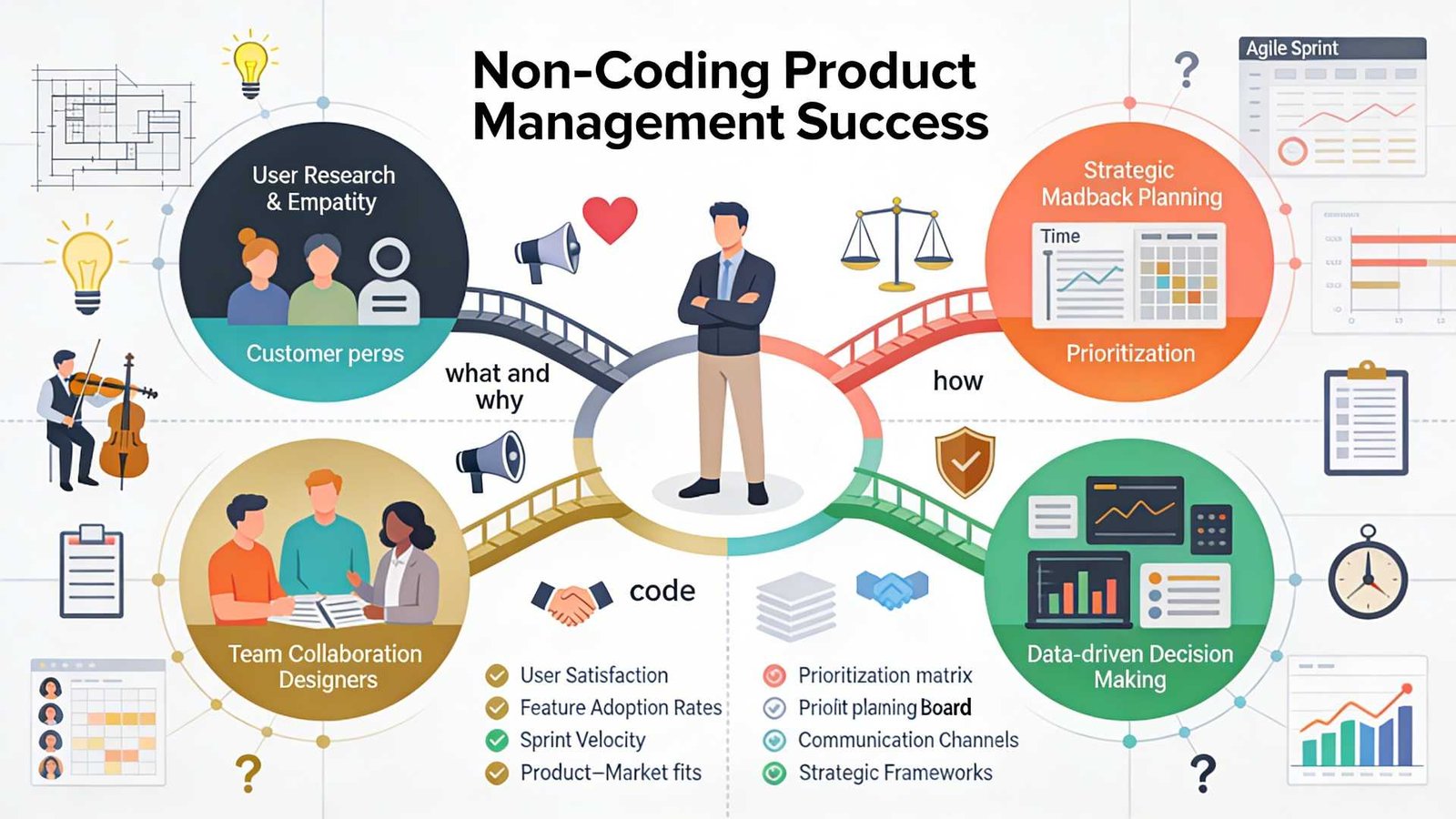
I remember the first time I sat in a sprint planning meeting. I was a junior product manager and felt on top of the world. I had my roadmap ready. I had my user stories written. I felt prepared.
Then the lead engineer started talking.
He asked whether the API endpoints were ready to receive the payload. He mentioned something about refactoring the legacy code before we could touch the database schema. He looked at me, waiting for an answer. I stared back, completely blank. I had no idea what he was talking about.
In that moment, the heavy cloud of Imposter Syndrome settled over me. I thought I had made a huge mistake. I thought that because I could not write a single line of Java or Python, I had no business telling engineers what to build.
If you are reading this, you are probably feeling that same fear. You are looking at job descriptions that list “Computer Science degree preferred” and wondering if you should quit before you start.
I am here to tell you to stop worrying. I have been in this industry for over a decade. I have led products used by millions of people. And to this day, I still cannot code.
The short answer is yes. You can absolutely be a successful product manager without knowing how to code. In fact, sometimes it is actually an advantage. Let’s talk about why.
The Myth of the Technical Genius
There is a common misconception in the tech industry. People think a Product Manager is just a CEO who knows how to code. This idea comes from the early days of software, when the lines between engineering and management were blurry.
Today, the roles are very different.
The job of an engineer is to answer the question: “How do we build this?”
The job of a product manager is to answer the question: “Why are we building this, and who are we building it for?”
If you spend all your time worrying about how, you will forget about the why. A non-technical product manager brings a different perspective. You are not bogged down by the code’s limitations. You are focused on the user’s pain points.
Your goal is not to write the software. Your goal is to deliver value to the customer and the business. You need to be the voice of the user, not the server’s.
Why Non-Technical PMs Are Often Better
It might sound strange, but not knowing how to code can actually make you a better product manager.
When you have a technical background, it is easy to fall into the “solution trap.” A user tells you they have a problem. If you are an engineer at heart, your brain immediately jumps to the technical solution. You start thinking about database tables and logic flows.
But a great PM needs to fall in love with the problem, not the solution.
As a non-technical product manager, you are forced to ask more questions. You have to ask “why” five times to understand the root cause because you cannot just assume a fix. This curiosity leads to deeper user insights. You rely on data, customer interviews, and market research rather than your own assumptions about how the software works.
You also become a better delegator. You have to trust your engineering team. This builds a healthy relationship. Engineers hate being micromanaged by a PM who thinks they can code better than them. When you admit you don’t know the code, you empower the engineers to own the technical decisions. You tell them what needs to happen, and you let them decide how to make it happen.
Bridging the Gap: Tech-Literacy vs. Coding
Now, let’s be realistic. You cannot be completely ignorant of technology. You are building software, after all.
You do not need to be a coder, but you do need to be “tech-literate.” Think of it like being an architect for a house. The architect does not need to know how to wire the electrical panel or weld the pipes. But they need to know that pipes go in the walls and that electricity is dangerous if handled incorrectly.
Here is what you actually need to understand:
1. Understand the Vocabulary
You need to speak the language. If an engineer says the “server is down,” or the “API is broken,” you need to know what that implies for the user. Learn the difference between front-end (what users see) and back-end (data and logic). Understand what a database does. This helps you communicate.
2. Understand Feasibility
You need to develop a sense of how hard things are. If you ask for a button to move two pixels to the left, that is usually easy. If you ask for that button to suddenly predict the future using AI, that is hard. As you work with teams, you will learn to estimate effort even if you cannot write the code yourself.
3. Understand Trade-offs
Engineering is all about trade-offs. We can build it fast, but it might be buggy. We can build it perfectly, but it will take six months. Your job is to help the team make these decisions based on business value. You don’t need code to understand that a two-month delay might kill the product launch.
The Skills That Actually Matter
If you take coding off the table, what should you focus on? The best product managers I know share a specific set of skills that have nothing to do with GitHub repositories.
Deep User Empathy
Can you put yourself in the customer’s shoes? Can you feel their frustration when the app is slow? This is your superpower. You need to be the user’s champion in a room full of people discussing technical constraints.
Ruthless Prioritization
You will always have fewer resources than you want. You will have a list of ten features and only enough time to build two. The skill of saying “no” is far more valuable than the skill of writing Java. You need to review the data and decide what offers the most value right now.
Communication and Storytelling
You need to rally the team. You have to convince stakeholders that your roadmap is the right one. You need to explain complex features to the sales team in simple words. This requires high emotional intelligence and excellent communication skills.
Strategic Thinking
Where is the market going? What are competitors doing? How does this product fit into the company’s long-term vision? These are the questions you get paid to answer.
If you feel your foundation in these areas is weak, focusing on them is a better use of time than learning C++. Structured learning can significantly accelerate this process. For example, the Product Management Course at Techcanvass focuses heavily on these core competencies. It covers the entire lifecycle from planning to execution, which is exactly what hiring managers look for.
How to Work with Engineers When You Can’t Code
The biggest fear for a non-technical product manager is losing the engineering team’s respect. I used to worry about this every day. Over time, I learned that engineers do not respect you for your coding skills. They respect you for bringing clarity.
Here is how to win them over:
Be Honest: Never pretend to know something you don’t. If they use an acronym you don’t know, ask for clarification. Say, “I am not familiar with that term. Can you explain it to me in simple terms?” They will appreciate the honesty.
Focus on the “What” and “Why”: Bring them clear requirements. Engineers hate vague instructions. If your user stories are clear and your acceptance criteria are solid, they will love you.
Shield Them: Protect your team from noise. If upper management is demanding changes every day, it is your job to push back. If you protect their time so they can code in peace, they will be your biggest allies.
Bring Data: When you ask for a feature, back it up with numbers. Don’t say “I think we should do this.” Say “Data shows 40% of users drop off at this screen, so we need to fix it.” Engineers respond well to logic and data.
When Should You Learn Technical Concepts?
While you don’t need to code, getting a certification or taking a course that covers the basics of software development lifecycles (SDLC) is very helpful.
You should understand concepts such as project management software, Agile, and Scrum. You should know how data flows through a system. You should understand what an API is.
But there is a difference between learning these concepts and learning to write syntax. You want to reach a level where you can draw a box on a whiteboard and label it “Database,” not a level where you can query that database yourself.
If you are looking to break into the field or move up to a Senior role, focus on certifications that validate your management skills first. A strong foundation in business analysis and product lifecycle management will serve you better than a coding bootcamp. The Techcanvass product management course is designed to bridge that gap, giving you the vocabulary and the strategic tools without forcing you to become a developer.
Conclusion
So, let’s go back to the original question. Can you be a Product Manager if you don’t know how to code?
Yes. A thousand times, yes.
The world is full of brilliant engineers who can build anything. But the world is short on people who can figure out what needs to be built. The world needs people who can listen to users, analyze markets, and lead teams with empathy.
Do not let the “technical” requirement in a job description scare you away. Your value lies in your vision, your strategy, and your ability to execute.
You are not there to write the code. You are there to write the future of the product.
Pie charts are perhaps the most common data visualisation tool, especially when illustrating comparisons or percentages. They allow you to easily see how each of the slices contributes to the total. Google Sheets gives you an immediate and simple way to create one. This is how you make a pie chart in Google Sheets.
How To Make a Pie Chart in Google Sheets?
The process to make a pie chart is fairly simple. Here’s how:
- Open Google Sheets and put your data into a table.
- Choose the columns and rows you want to add to the chart.
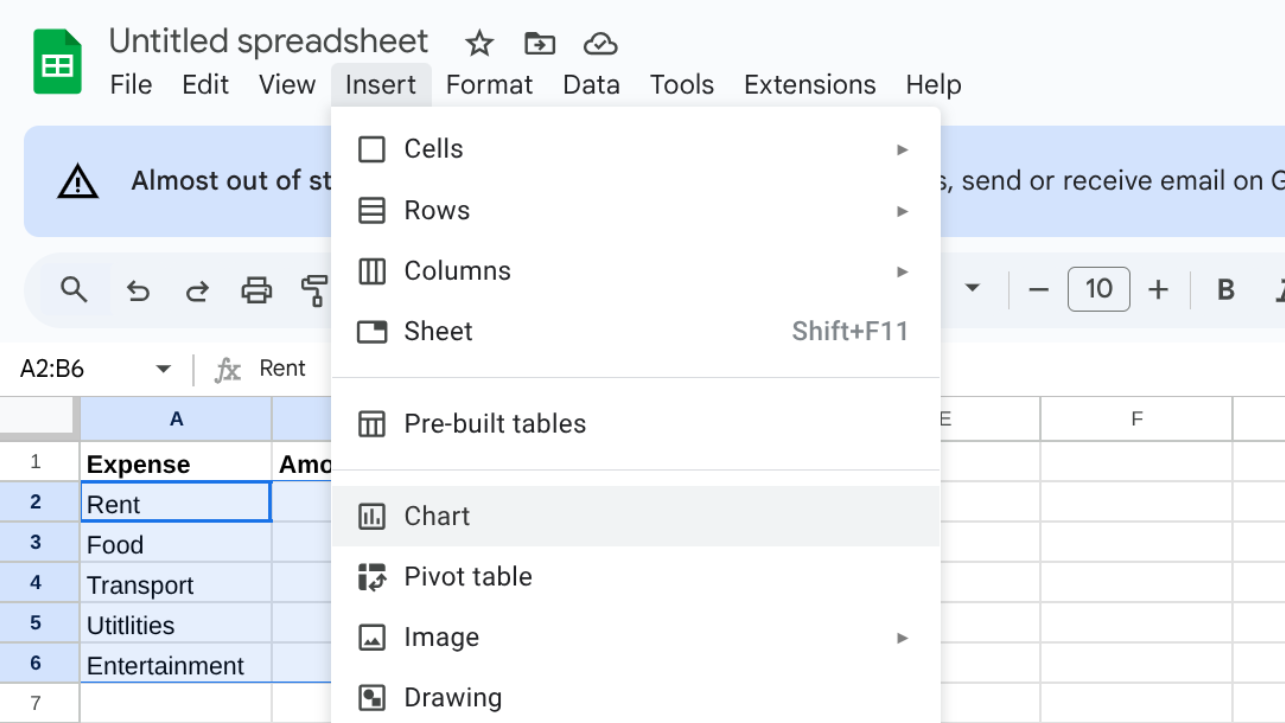
- Click on the Insert menu at the top.
- Choose Chart from the dropdown.
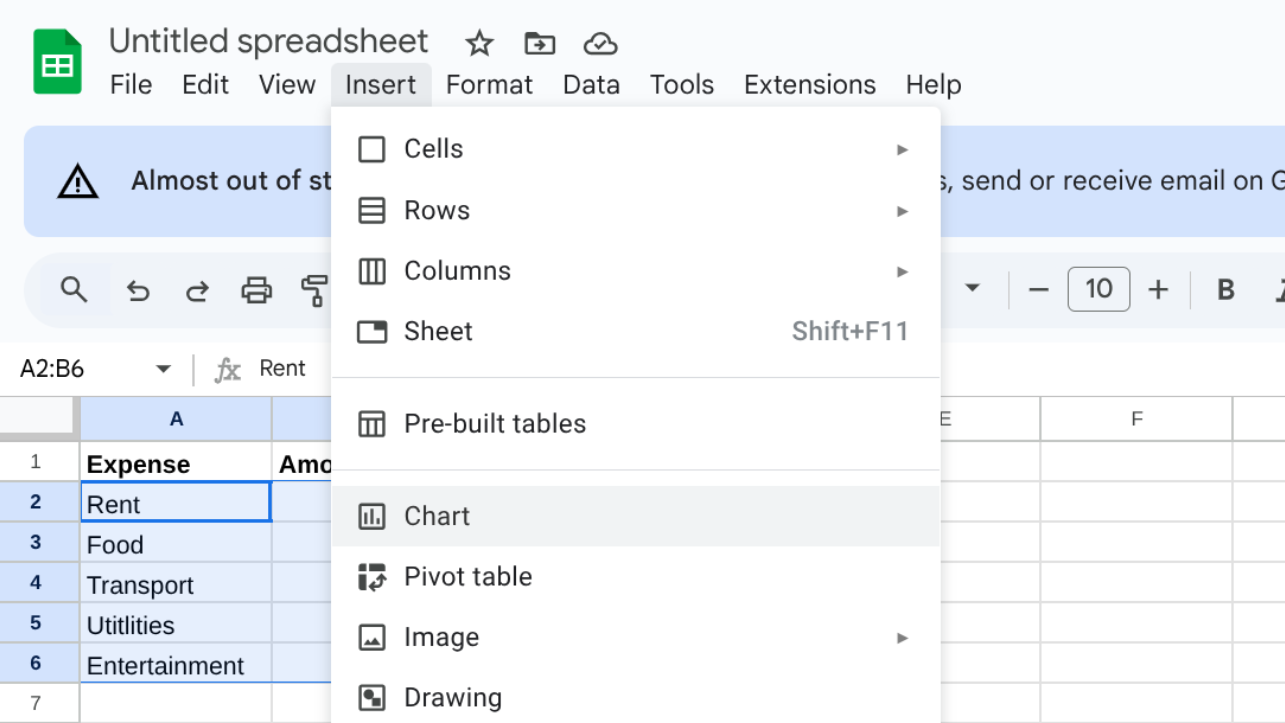
- Then, Google Sheets may display a different type of chart.
- Switch to Chart Editor on the right-hand side and convert it into a Pie chart.
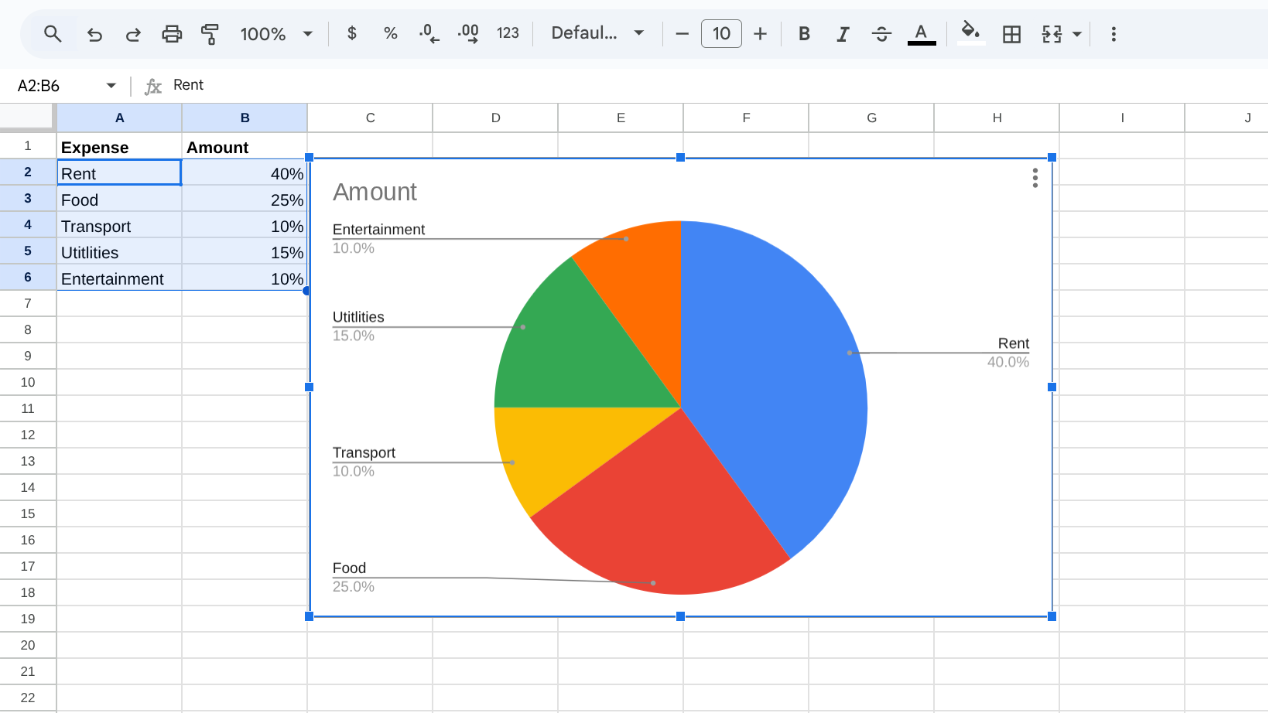
- Include personal touches within the text, design, and color spaces to make the text more readable.
How To Make a 3D Pie Chart in Google Sheets?
Here’s how you can continue the steps after making the regular pie chart to turn it into a 3D one:
- Once your pie chart is ready, open the Chart Editor on the right.
- Go to the Customize settings.
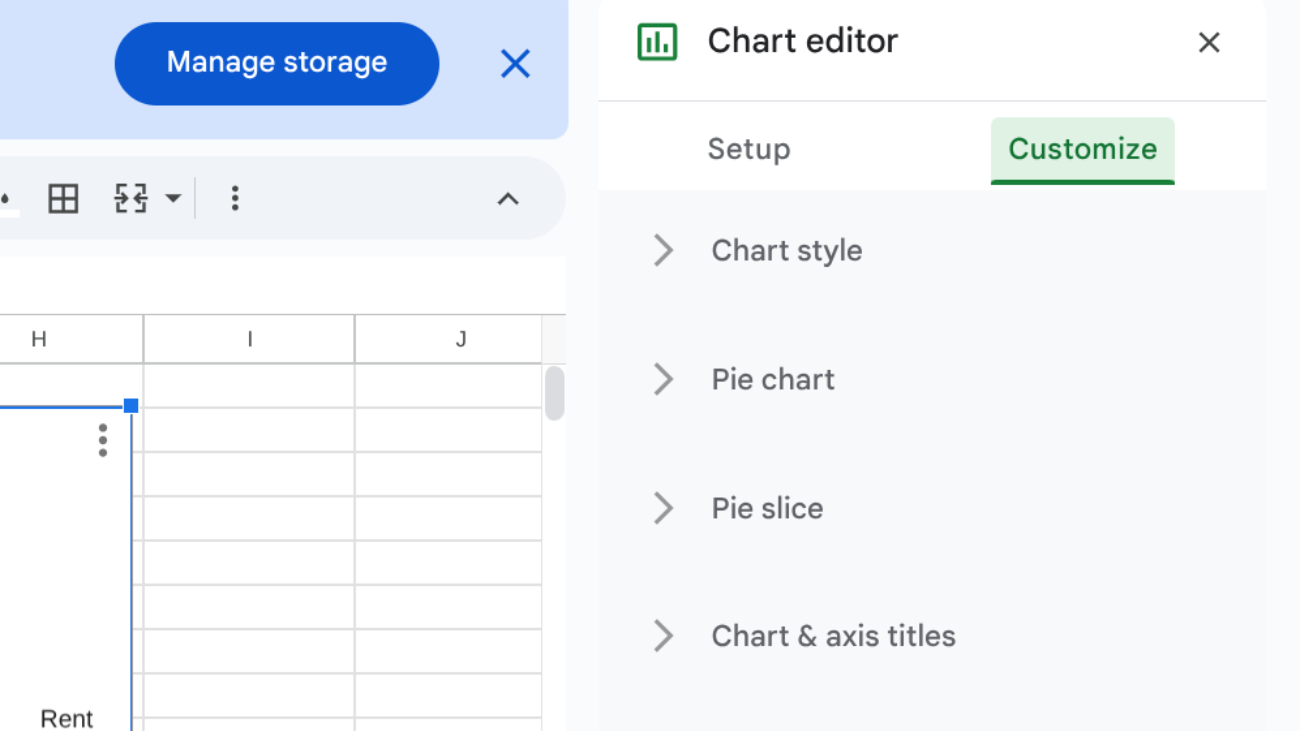
- Under Chart style, select the 3D box.
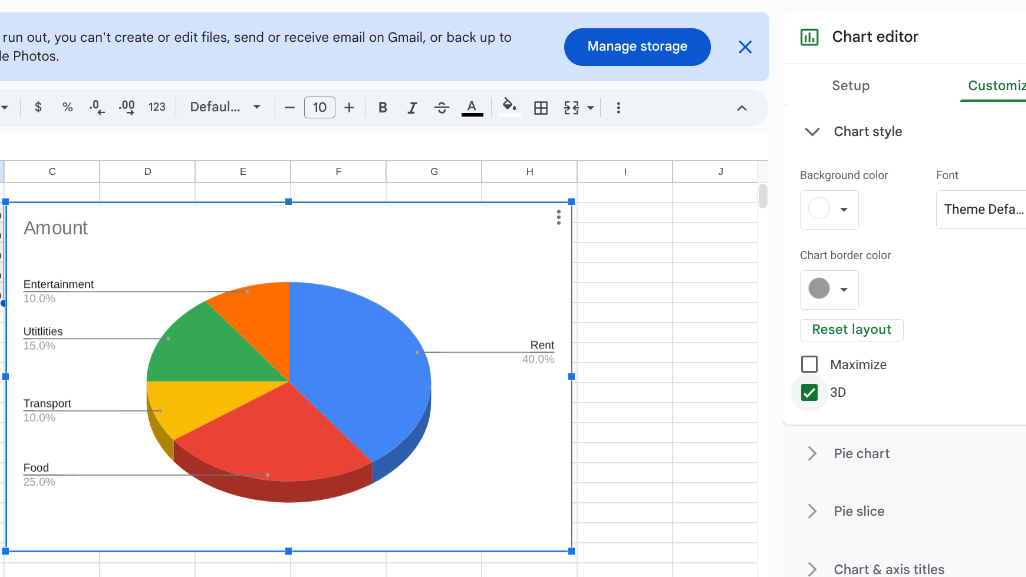
- Edit text, design, or colours as needed.
How To Make a Pie Chart with Percentages in Google Sheets?
Here are simple steps to make a pie chart with percentages:
- Click on your pie chart to open the Chart Editor on the right side.
- Go to the Customize tab and expand the Pie chart section.
- Under the Slice label, choose Percentage from the dropdown list.
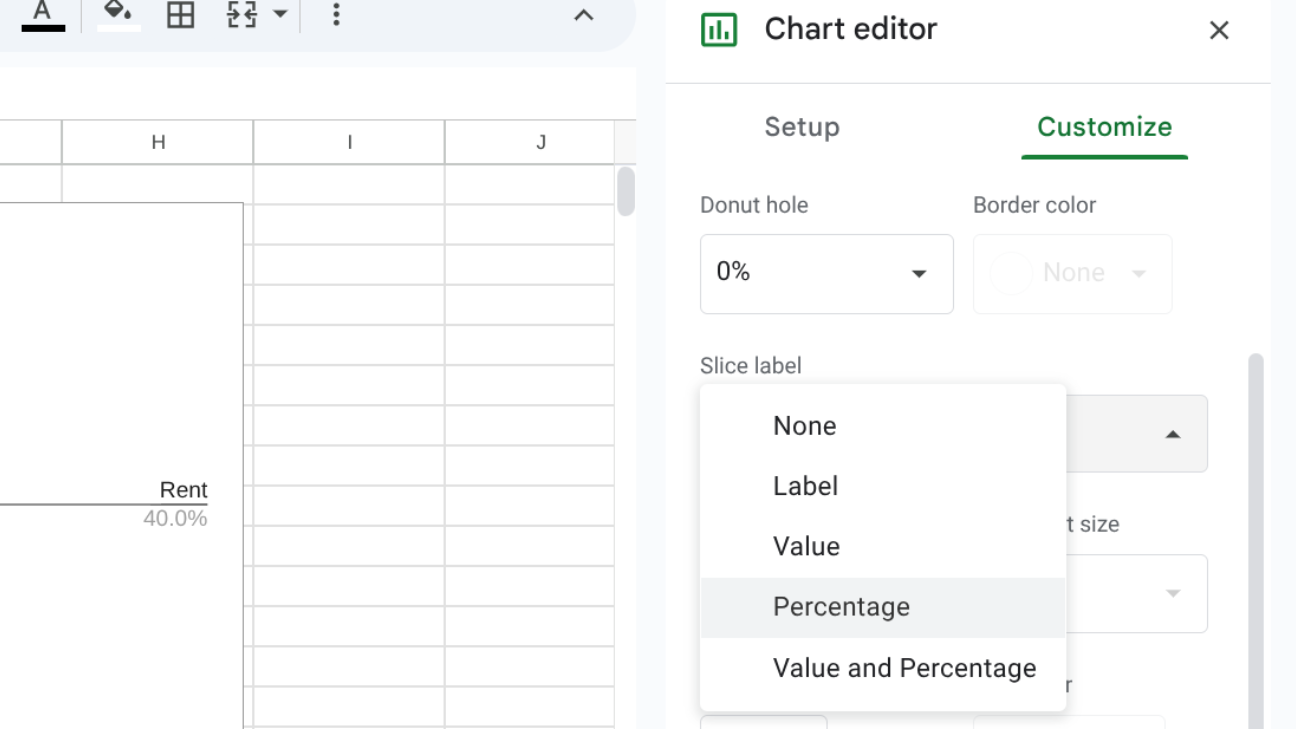
- Now, percentages will appear inside the slices, so you don’t need them in the legend.
- If you want to keep a legend, open the Legend section under Customize.
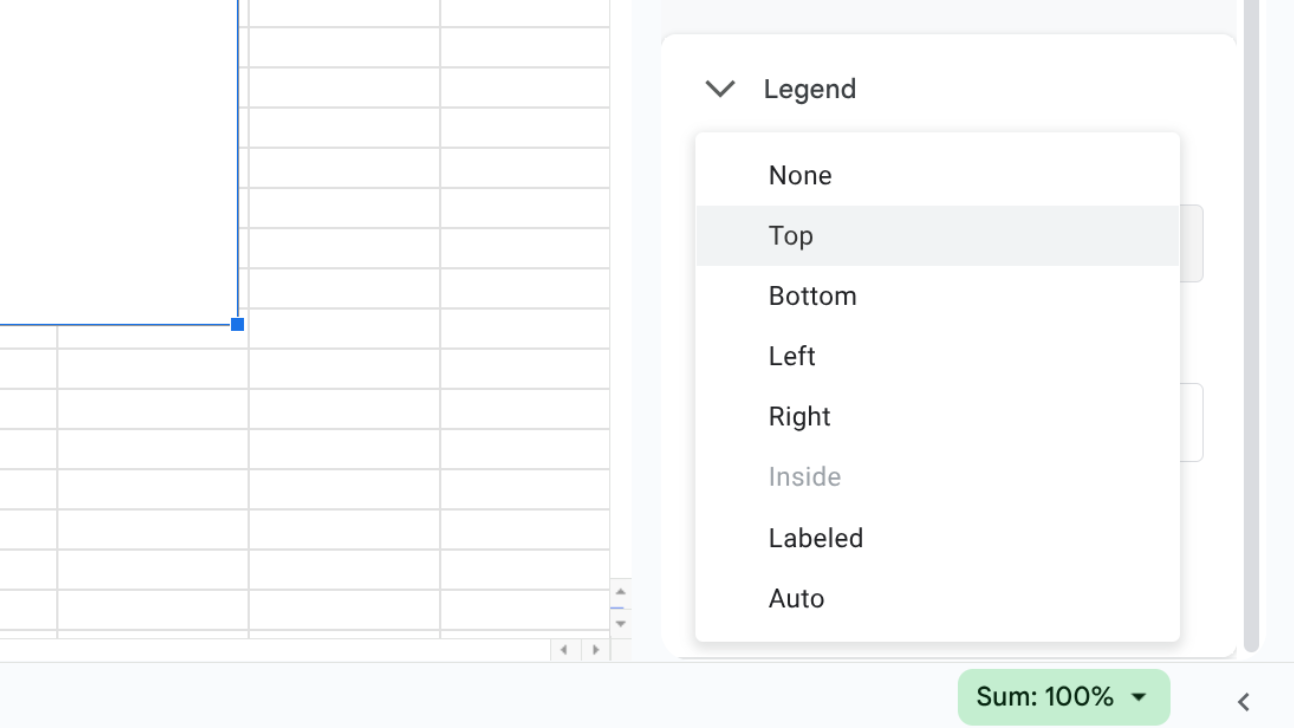
- From the Position dropdown, select where you’d like the legend to appear (top, bottom, left, or right).
- Your chart will subsequently display both percentages in the slices, along with a legend to quickly identify them.
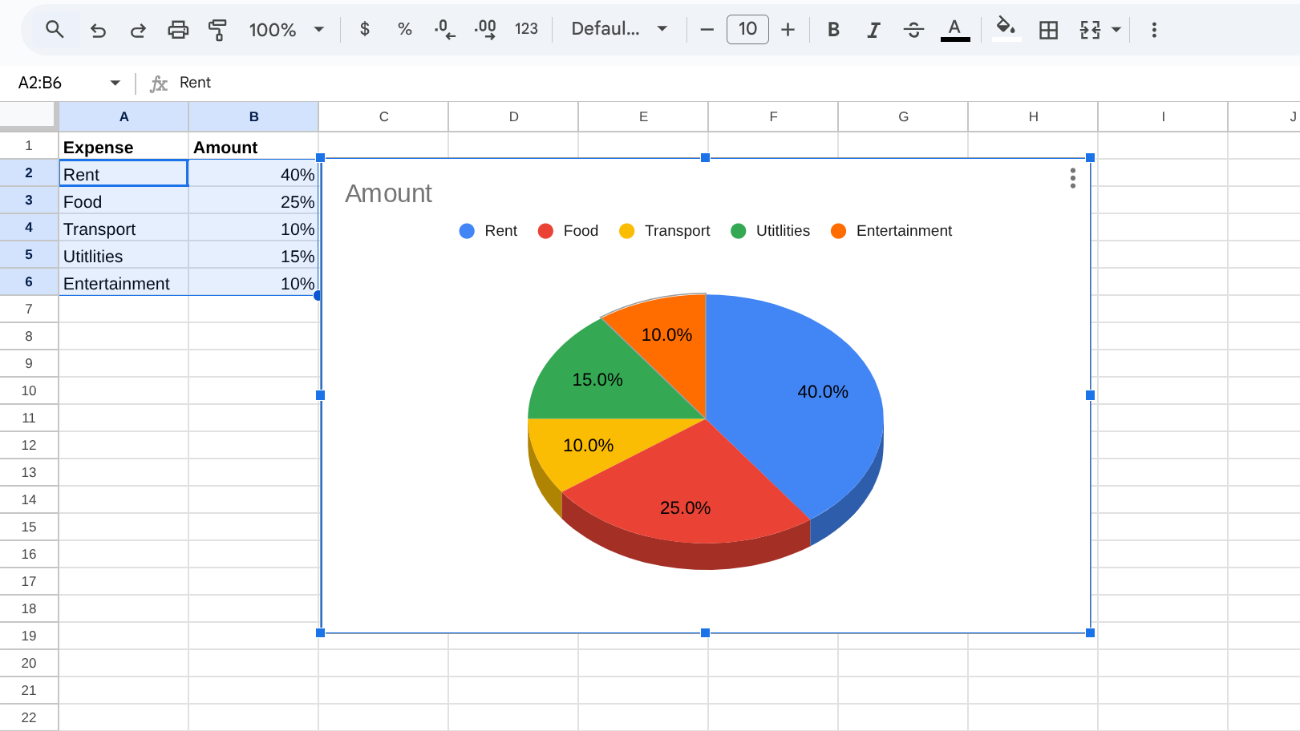
By following these steps, you can create a pie chart in minutes using Google Sheets. It’s a useful feature for anyone who wants to present data in a clearer way. With labels, colours, and design options, your chart can look both smart and professional.


This 1959 Bell Labs film provides a glimpse into a world where computers were little more than a collection of clever mechanical and magnetic tricks for storing anything in memory. It’s the story of engineers seeking to develop a solution to store binary data that was fast, reliable, and non-volatile, and could be accessed at any time without having to wait for a drum to spin or a tape to scan. One segment stands out for its innovative solution: the Twistor memory.
Engineers at the time were stuck with inefficient storage systems. Magnetic core memory was the best they had, with small ferrite rings threaded with wires holding magnetic states representing 0s and 1s. When they sent a pulse over the wires, it reversed the state and wrote some data, but reading it required slamming a little voltage through it and quickly erasing it. Access times were reasonable at 10 microseconds, but reading erased all data.
Then the brilliant minds at Bell Labs created the Twistor. Essentially, it is a device that substitutes all of the individual rings with a long, thin ribbon of magnetic material wrapped around a fine copper wire. Each twistor works as a small linear storage element. The current flowing through the wire and the surrounding solenoid generates a magnetic field that aligns the domains along the ribbon in one way or the other, allowing a bit to be stored right there. Its name comes from the helical wrap, which allows for quite thick packaging in sheets or modules.

Twistor memory would be demonstrated with 26 wires, all of which were part of a large array. They could access it in around 5 microseconds and store thousands of bits per module. Larger versions simply employed broader bands to create even larger grids. Data remained stable even after the power was turned off, just as core memory. The concept claimed to be easier to build than manually threading all of those tiny little rings. One of the best features is that you can just slide a card in with a magnet on it to prevent writing to specific bits, preserving your data.

Now, we see in the film how the researchers were able to squeeze a lot of information onto just one plane of twistors, which is significantly less area than a drum or tape. Compare this to drum memory, which would spin a coated cylinder at thousands of revolutions per minute, storing only a thousand 20-bit words with access delays of about a millisecond while you waited for the proper location to spin under the head. Tapes provided a lot of space, but only sequential access, which was acceptable for backups but not good for running a program quickly.

Ferrite sheet variations also emerged, some with holes pressed into thin magnetic plates to approximate difficult-to-replicate core designs but in a far more compact form, as well as stacking modules capable of storing 50,000 words or more. People were particularly drawn to the Twistor because of its ability to combine speed, density, and relative simplicity. Its beginnings stretch back to 1957, and by the mid-1960s, it had made its way into real-world applications, such as 1ESS telephone switching systems. In call routing tables, reliable semi-permanent storage was especially important.

Semiconductors appeared a little later and dramatically changed everything; memory shrunk down to small silicon chips that were much cheaper and could hold a lot more data. The Twistor only had a brief commercial presence before fading away, along with other contenders such as bubble memory and magnetic storage. Still, technology first appeared in 1959, and it gave us a true taste of what it was capable of, downsizing equipment to minuscule sizes that could one day fit in your pocket.
[Source]


We may receive a commission on purchases made from links.
What kind of AA batteries do you use at home? Based on sales numbers, there’s a good chance it’s one of the best battery brands you can buy, like Energizer or Duracell. Considering Kirkland is the house brand of one of the largest retailers around, Costco, you may keep Kirkland AA batteries in your junk drawer or emergency kit. While the more common question might be if Energizer batteries are better than Duracell, let’s take a closer look at how the pink bunny brand compares to Kirkland batteries.
Kirkland only offers one type of AA battery, whereas Energizer sells several different models that cater to the various needs of users, such as price point, power output, or cold-weather performance. The most common are standard Energizer and Energizer Max alkaline batteries, with Max explicitly designed to offer longer runtime but at a higher cost. After testing several major brands — though not Kirkland — with a custom battery testing rig measuring voltage output and drop, CNET determined Energizer Max outperforms the others.
Consumer Reports found that Kirkland’s alkaline batteries significantly outperformed Energizer Max, which had a middling score overall. Consumer Reports tested more brands overall and used two different devices — a flashlight and a toy — though the organization doesn’t get into specifics when it comes to how it tested these brands. However, some YouTube channels show exactly how they tested AA batteries. With all this data in mind, Kirkland AA batteries appear to be the better option over Energizer — if you’re factoring in price and if you’re looking at alkaline batteries only, that is.
When it comes to alkaline, Kirkland AA batteries have an edge over Energizer
One of the most extensive tests of AA batteries currently on YouTube comes from Project Farm, which tried out 16 different models on identical fans. Standard alkaline Energizer batteries only lasted for 4 hours and 43 minutes. Both Kirkland and Energizer Max were in the top 25% of runtimes, with Kirkland running for 7 hours and 29 minutes and Energizer Max going another half hour with 8 hours and 3 minutes.
Project Farm also ranked over two dozen battery models by combining runtime with other metrics, including capacity, voltage output, and subfreezing performance. Based on the scoring system, Energizer Max just edged out Kirkland, though both were in the middle of the pack. Standard Energizer batteries were further down the list. However, when price was factored into the equation, Kirkland ended up two spots higher than Energizer Max for having slightly better value.
YouTube channel Lumencraft used a T3 flashlight to test many different brands, judging runtime by how long a battery could keep the device at 55% of its maximum brightness. Like Consumer Reports, but unlike Project Farm, Lumencraft found Kirkland to be superior, as the T3 lasted 30.45 minutes with its battery, whereas both Energizer Max and standard AAs lasted only 22.2 minutes. While it wasn’t the longest-running alkaline battery overall, Lumencraft recommends Kirkland as the best in its class because it came relatively close while offering the most value. That’s because Kirkland AA batteries are pretty cheap — they’re exclusively available in a 48-pack that costs $16.99. That’s a dollar less than what you’d pay for just half the number of Energizer’s standard industrial batteries, while a 48-pack of Energizer Max costs $25 — $8 more than Kirkland’s AAs.
Kirkland’s lithium batteries aren’t worse — they’re nonexistent
Kirkland may have an edge over Energizer, but only for traditional alkaline batteries. When other technologies like lithium and nickel are included in the mix, Energizer becomes the clear standout. That’s because Kirkland doesn’t offer either of these types of batteries. Energizer does, and its lithium batteries outperform pretty much all alkaline models, including its own Energizer Max as well as those from Kirkland.
The difference between lithium and alkaline batteries is the chemicals and mechanisms used to generate current. Nickel batteries also use different technology, but all of these types of AAs are the same shape and can be used for some — but not all — of the same products. Some lithium batteries (like smartphones, tablets, and EVs) are obviously rechargeable, including AA types. However, disposable AA lithium batteries are also available, so it’s important to know which type you have.
Though Kirkland scores much better than Energizer Max in Consumer Reports’ rankings of AA batteries, Energizer Advanced Lithium outperforms Costco’s brand, while Energizer Ultimate Lithium AA tops every other battery tested. Energizer lithium batteries also tied for the second-longest lasting batteries in the fan tests conducted by Project Farm, significantly outperforming the alkaline batteries from Energizer and Kirkland.
Lumencraft names Kirkland its best alkaline battery but also notes that alkaline, as a whole, is an inferior technology. The reviewer included Energizer NiMH and Energizer Lithium batteries in its tests and found that, alongside Rayovac, Energizer’s NiMH had the worst performance in its class, though it still outlasted all alkaline models. Energizer Lithium batteries were close to the best but had similar results to more affordable brands, so Lumencraft did not recommend them — just as it ranked Kirkland AA batteries higher than Energizer Max because of the value.
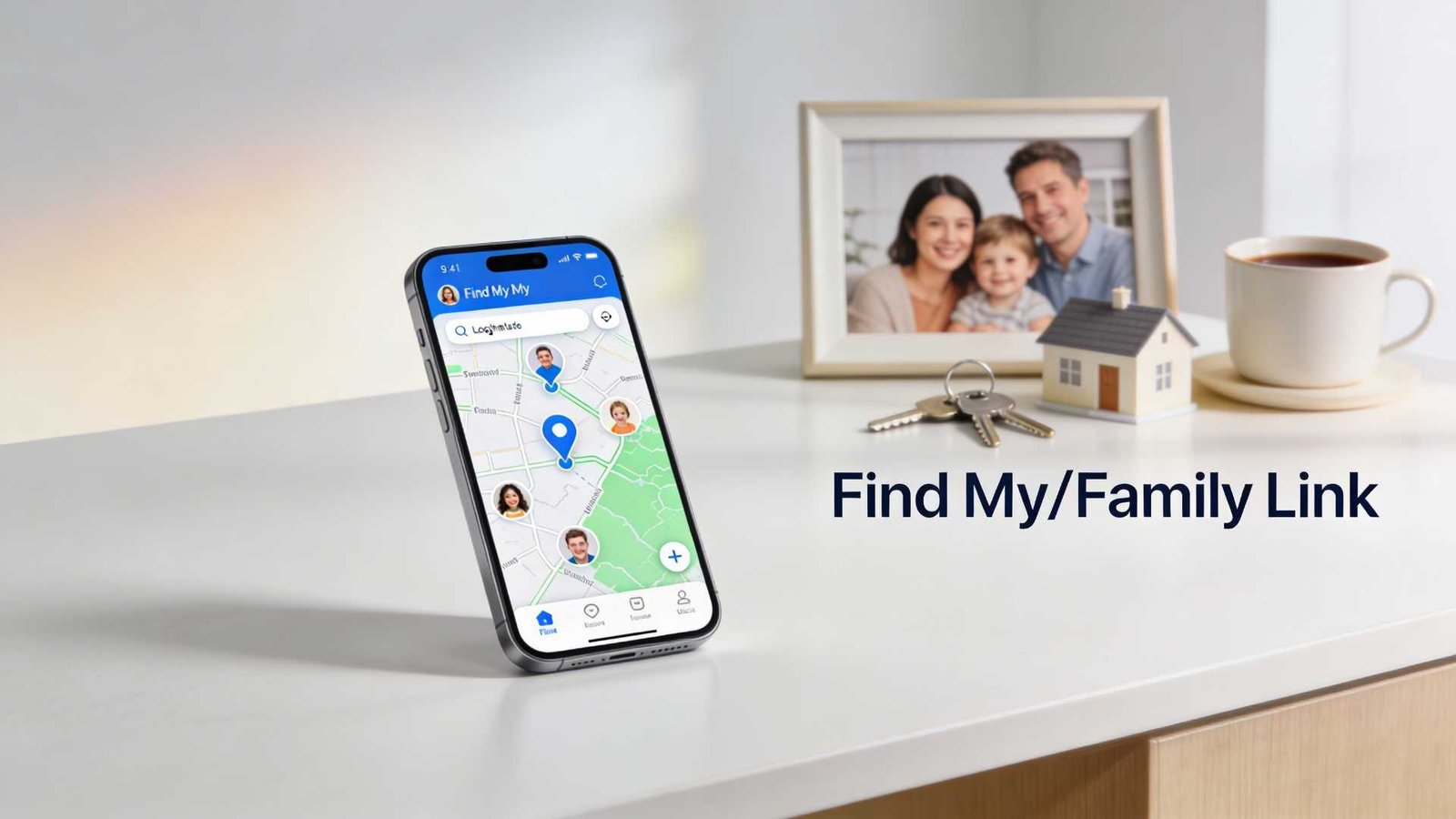
As of February 2026, the safest way to track a phone’s location is to use built-in location sharing (iPhone/Android) or a family safety app where everyone knows it’s enabled.
If you’re here because you want to track someone “without them knowing,” pause for a second: apps designed for secret monitoring are a common abuse vector, and regulators have taken action against “stalkerware” providers that enable covert surveillance.
Quick picks
- Best for iPhone families: Apple Find My (location sharing + Family Sharing).
- Best for finding a lost Android phone: Google Find Hub / Find My Device (android.com/find).
- Best for supervised kids on Android: Google Family Link (parent view of child’s device location).
- Best cross-platform family circles: Life360 (opt-in location sharing + place alerts).
- Best for Samsung Galaxy households: SmartThings Find.
- Also useful: Google Location Sharing controls (easy to stop/review who can see you).
Selection criteria (what we’re recommending and why)
- Consent-first: The tools below are designed for opt-in location sharing, family supervision, or finding your own lost device.
- Official support: We prioritize Apple/Google/Samsung documentation when the feature is built into the OS ecosystem.
- Easy off switch: You should be able to stop sharing quickly (and know where that setting lives).
1) Apple Find My (iPhone): best for Apple families
Apple’s Find My can share your location with specific people and lets you manage sharing from the Find My app (People tab) once “Share My Location” is enabled.
You can also choose how long to share your location (for an hour, until end of day, or indefinitely), which is ideal for school runs and trips.
How to verify on your iPhone: Open Find My → Me (enable Share My Location) → People (share with a contact).
Tradeoffs: Everyone needs Apple devices/Apple IDs for the smoothest experience, and location accuracy still depends on signal, battery, and permissions.
2) Google Find Hub / Find My Device (Android): best for lost-phone recovery
Google’s help docs say you can locate an Android device on the web at android.com/find (and you’ll need the Google Account that’s on the device).
Google also positions “Find Hub” as the way to find supported Android devices, which is useful when a phone is misplaced or stolen (this is different from tracking a person day-to-day).
How to verify: Visit android.com/find on a computer, sign in, and see whether your device appears.
Tradeoffs: If the phone is offline, results depend on which find/offline settings were enabled beforehand.
3) Google Family Link: best for parents managing a child’s Android device
Google’s Family Link help explains that parents can find a child’s Android (and compatible Fitbit) device location in the Family Link app once location sharing is turned on.
The documented setup path is Family Link → Location → Set up location (then choose the child and turn it on), and Google notes it may take time to show a location.
How to verify: In Family Link, open Location and confirm you can see the child’s device on the map after setup.
Tradeoffs: This is for supervised family use; it’s not a stealth tool, and that’s a good thing.
4) Life360: best for mixed iPhone + Android households (opt-in “circles”)
Life360’s Google Play listing describes real-time location sharing, place alerts, and location history as core features, plus an SOS option depending on plan/features.
Internet Matters (a UK-focused online safety org) describes Life360 as a location-sharing app for parents and notes that members can turn off live tracking.
How to verify: Before relying on it, check the app’s permissions (Location) and test a Place Alert (home/school) with a family member.
Tradeoffs: Features can vary by subscription tier and platform, so confirm what your plan includes inside the app store listing and in-app settings.
5) Samsung SmartThings Find: best for Galaxy users
Samsung’s UK support page says SmartThings Find can locate registered Galaxy phones, tablets, and wearables using Samsung accounts (and it replaced/absorbed “Find My Mobile”).
Samsung also describes additional features, such as location sharing and geofencing-style notifications, in its support documentation, which can be helpful in a Samsung-heavy household.
How to verify: Confirm the device is signed into a Samsung account and SmartThings Find is enabled in the relevant Samsung settings/app.
Tradeoffs: Best experience is inside the Samsung ecosystem, and setup must be done before you need it.
6) Google Location Sharing controls: best for “who can see me?” cleanup
If you’ve shared your location in Google’s ecosystem before, Google Help documents a way to review and stop sharing via your Google Account settings (myaccount.google.com → People & sharing → Location Sharing).
This is handy when you’re troubleshooting why someone can still see you, or you just want to revoke access quickly.
How to verify: Open Location Sharing in your Google Account and confirm the list of people you’re currently sharing with.
How to choose (quick decision guide)
- If the goal is “find a lost phone,” start with Apple Find My (iPhone) or android.com/find (Android).
- If the goal is “keep tabs on a kid’s device with supervision,” use Family Link (Android) or Find My family sharing on iPhone.
- If your household mixes iPhone and Android, consider an opt-in family app like Life360, then test alerts before you rely on them.
FAQ
Can I track someone without them knowing?
For parents/guardians, the safer approach is to use built-in family features or a family safety app that lets you see and control location sharing, not “hidden.” it.
Regulators have taken action against providers accused of enabling covert surveillance (“stalkerware”), so “secret tracking” isn’t just a tech decision—it can be a legal and safety problem.
How do I stop sharing my location on iPhone?
Apple’s Personal Safety guidance says you can stop sharing with a specific person in Find My by selecting them under People and tapping “Stop Sharing My Location.”
How do I stop sharing my location with someone through Google?
Google Help documents stopping location sharing through your Google Account’s Location Sharing page by selecting the person and choosing Stop.
Why is the location inaccurate or delayed?
Even with the right app, location can lag due to permissions, battery saving, device connectivity, and whether the phone is currently online (Google notes offline behavior depends on settings).
What if I suspect my phone is being monitored?
TechCrunch outlines common Android settings abused by spyware/stalkerware (like Accessibility, Notification access, and device admin) and suggests reviewing unknown access and apps.
Be careful: removing monitoring software can alert whoever installed it, so think about personal safety before making changes.
Do I need to install anything on the other person’s phone?
With built-in tools (Find My, Find Hub/Find My Device, Family Link), the “other device” typically needs the feature enabled and the right account/family setup—there isn’t a legitimate shortcut that avoids that.
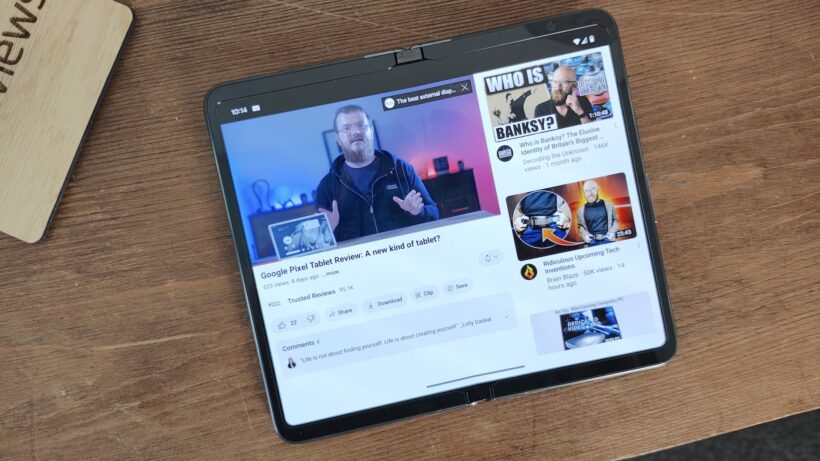
Every time I pick up a modern book-style foldable, I have the same thought: this is brilliant, but not perfect.
For years, the foldable market has settled on tall, skinny designs that technically tick the ‘big inner screen’ box but never quite nail the experience of having a genuine tablet in your pocket – recent additions like the Galaxy Z TriFold aside, anyway.
That’s why the sudden rush back to passport-style foldables – led, somewhat ironically, by Apple – feels like a course correction. And as someone who still pines for the Oppo Find N and has a soft spot for the original Pixel Fold, I couldn’t be more on board.
Apple’s set to bring back my favourite style of foldable
The long-rumoured iPhone Fold is shaping up to be exactly the kind of device I’ve wanted foldables to evolve into.
According to reports, Apple’s first foldable iPhone will pair a 5.3-inch outer display with a 7.7-inch inner screen, using a wide aspect ratio that’s closer to an iPad than a stretched-out phone – essentially, an iPhone that unfolds into a small-screen iPad.
That’s exactly the form factor I fell in love with when Oppo launched the first Find N.
By today’s standards, it’s undeniably thick and heavy, but the proportions were spectacular. The outer screen was a sensible width, not a painfully narrow strip, and the inner display’s roughly 4:3 ratio made everything from split-screen multitasking to big-screen gaming feel natural.
It looked and behaved more like a mini tablet than a stretched phone, and that made the world of difference in everyday use.
Google clearly saw the appeal too. The OG Pixel Fold copied the compact and scaled it up with a wider, shorter outer display that opened into a broad canvas perfect for tablet-style layouts. It was flawed in other ways, and Android apps weren’t ready for that wide in-between aspect ratio, but the core idea was solid.
With the Pixel 9 Pro Fold stepping away from that iconic design, it looked like the design was dead and buried. But Apple looks set to dig it back up and breathe new life into it.
If the reports are right and the iPhone Fold really is going for a wide, almost iPad-like inner screen, that could be a huge win for usability. I can easily imagine iPad-style apps running on the inside, with proper sidebars, multi-column layouts, and real tablet UIs, while the outside gives you a traditional iPhone experience that’s neither absurdly tall nor awkwardly wide in the hand.
Crucially, Apple is one of the few companies that can actually drag the app ecosystem along with it. Where Android makers had to bend around whatever third-party apps were willing to support, Apple can largely do the opposite; ship a new form factor, provide the tools to developers and watch them fall in line.

If anyone can make the ‘iPhone that unfolds into an iPad’ dream actually work in terms of software, it’s Apple. And that’s a huge part of why this passport-style revival suddenly feels like it has a shot.
Android manufacturers are gearing up to compete
Of course, the moment Apple even looks at a new form factor, the rest of the industry snaps to attention.
Samsung is already preparing its answer in the form of the unofficially dubbed ‘Galaxy Wide Fold’.
Various reports suggest that Samsung is working on a passport-style foldable with a 5.4-inch outer OLED and a 7.6-inch inner display, using a 3:4 aspect ratio when unfolded. It’ll sit alongside the more traditional, taller Galaxy Z Fold 8, with Samsung allegedly planning to mass-produce around half a million units and launch it in the second half of 2026.

Oppo, meanwhile, looks like it’s coming full circle. According to the latest leaks, Oppo is said to be planning not one but two foldable launches in 2026: the Find N6 in February and the Find N7 in September. The N6 is said to stick fairly close to the book-style formula, with a 6.62-inch cover screen and an 8.12-inch inner panel, but things get more interesting with the Find N7.
It’s tipped to keep much of the Find N6’s hardware, but pivot back to a wider, passport-like aspect ratio – explicitly positioned to compete not only with Apple’s iPhone Fold but Samsung’s Wide Fold, while also nodding back to Oppo’s original Find N design.
In other words, the company that arguably did the ‘pocket tablet’ concept best the first time around is taking another stab at it, just as Apple and Samsung are jumping in.
Foldables of all shapes and sizes on the horizon
The thing that excites me most isn’t any one phone – it’s that foldable design finally seems to be loosening up again.
For the past few years, the category has felt oddly conservative considering it’s on the bleeding edge of technology. You either get a compact flip phone that unfolds into something resembling a regular phone, or you get a book-style foldable that opens up into a vaguely square-ish tablet.

Of course, year-on-year updates leaned on better hinge designs, thinner chassis, nicer cameras and a reduction of the foldable screen crease, but it’s hardly the sort of thing that makes you sit up and think “wow, this is the future of phones”.
2026 looks like it’ll finally be different, and as a foldable fan, that’s exactly what I’ve been waiting for. I don’t want every device to chase the same silhouette forever – I want choice, I want weird experiments, I want some phones to unapologetically prioritise media, others to double down on multitasking, and a few to basically be tiny tablets that just so happen to fit in my pocket.

And it just so happens that passport-style foldables happen to sit right at the intersection of all that; it’s big enough inside to feel like a tablet, compact enough outside to work like a normal phone, and now finally backed by an app ecosystem that’s far better equipped to handle unconventional displays than it was during the early days of foldables.
So yes, I’m absolutely delighted they’re coming back – and this time, with Apple, Samsung and Oppo all throwing their weight behind the idea, it feels like they might stick around.
Samsung’s next flagship devices will offer Perplexity as part of an expansion to support multiple AI agents in Galaxy AI. Perplexity’s AI agent will work with apps including Samsung Notes, Clock, Gallery, Reminder and Calendar, according to the announcement. And, some third-party apps will support it, though Samsung hasn’t yet said which. The news comes just a few days before Samsung’s Galaxy Unpacked event, so we can expect to find out more about that integration and how it fits in with Samsung’s revamped Bixby very soon.
What we know so far is that the Perplexity agent will respond to the wake phrase, “Hey Plex” (not to be confused with the streaming service Plex). It can also be initiated by quick-access physical controls. In a statement, Samsung’s Won-Joon Choi, President, COO and Head of the R&D Office for Samsung’s Mobile eXperience Business, said the expansion of Galaxy AI is aimed at giving users more choice and flexibility in getting their tasks done. “Galaxy AI acts as an orchestrator, bringing together different forms of AI into a single, natural, cohesive experience,” Choi said.
Samsung previously announced a partnership with Perplexity last year to integrate the company’s AI search engine into Samsung TVs. Perplexity has been in hot water though over alleged content scraping and copyright infringement, and was even sued in September by Merriam-Webster — yes, the dictionary — and Encyclopedia Britannica.

Tesla has made a bold pricing move on its long-anticipated Cybertruck, offering one of its more affordable trims at a price that finally starts to feel within reach for a broader range of buyers. For a limited time, the dual-motor all-wheel-drive Cybertruck is listed at $59,990 in the U.S. – the lowest price yet for the futuristic electric pickup and a significant shift from the vehicle’s previously high price tags.
The discounted price, which CEO Elon Musk says will only be available for 10 days, represents a rare opportunity for prospective buyers who have been turned off by the Cybertruck’s historically premium cost and slower-than-expected sales.
Tesla’s typical strategy of incremental price cuts and new configurations has been on full display with the Cybertruck, a model that faced considerable delays and a long lead-up since its 2019 unveiling. Originally pitched with a target base price closer to $40,000, the production version has consistently landed well above that figure.
This latest offer is not just a response to consumer feedback on pricing
It’s a tactical move to stimulate demand after the Cybertruck’s sales performance lagged significantly behind early expectations. With sales dropping nearly 48% in 2025 compared with the previous year, and overall electric vehicle deliveries softening across markets, Tesla is using the price reduction as a short-lived incentive to boost interest.

The $59,990 version of the Cybertruck isn’t a stripped-down work truck – it retains significant features like all-wheel drive, an estimated EPA range near 325 miles, a powered tonneau cover, bed power outlets, and other functional elements that matter to buyers. However, compared to higher-priced trims, there are compromises: textile seats instead of premium seating, reduced towing capacity, and fewer luxury amenities.
This temporary price drop could be Tesla’s most aggressive bet yet to broaden the Cybertruck’s appeal
Since its market debut, the Cybertruck has battled challenges including quality control issues, recalls, and a pricing strategy that many viewed as out of step with mainstream pickup buyers. By offering a sub-$60K entry point – even if only briefly – Tesla is signalling that it still believes in the Cybertruck’s potential as a serious competitor in the electric truck space.
Electric pickups are quickly gaining traction thanks to growing consumer interest and increasing competition from legacy automakers. A more attainable price may help Tesla attract customers who might otherwise opt for rivals like the Ford F-150 Lightning or Rivian R1T, both of which offer compelling alternatives in similar segments.

If you’re in the market for an electric pickup, this 10-day pricing window could be one of the few chances to secure a Cybertruck at a cost that doesn’t demand a premium luxury-vehicle budget. The deal makes the Cybertruck competitive with other EV trucks on price, but you’ll need to act quickly – Tesla has made it clear this isn’t a long-term price change.
For buyers on the fence about waiting for future price reductions or alternative models, this limited price promotion underscores how fickle EV pricing can be and how strategic timing might save thousands. Whether the Cybertruck will become a mainstream choice remains to be seen, but for now, this brief dip in price offers one of the best opportunities to own Tesla’s electric pickup without paying top dollar.

Five players expected to miss Everton vs Man Utd after Michael Carrick gives injury update

Rocket reentries are leaving measurable lithium pollution in the upper atmosphere

Maryam ko Batayn – Request For Financial Grant to Punjab Government


-

 Video6 days ago
Bitcoin: We’re Entering The Most Dangerous Phase
-
 Crypto World6 days ago
Can XRP Price Successfully Register a 33% Breakout Past $2?
-

 Video3 days ago
XRP News: XRP Just Entered a New Phase (Almost Nobody Noticed)
-

 Fashion2 days ago
Weekend Open Thread: Boden – Corporette.com
-

 Sports6 days ago
GB's semi-final hopes hang by thread after loss to Switzerland
-

 Politics16 hours ago
Baftas 2026: Awards Nominations, Presenters And Performers
-
 Tech6 days ago
The Music Industry Enters Its Less-Is-More Era
-

 Business5 days ago
Infosys Limited (INFY) Discusses Tech Transitions and the Unique Aspects of the AI Era Transcript
-

 Entertainment4 days ago
Kunal Nayyar’s Secret Acts Of Kindness Sparks Online Discussion
-

 Video6 days ago
Financial Statement Analysis | Complete Chapter Revision in 10 Minutes | Class 12 Board exam 2026
-
 Tech5 days ago
Retro Rover: LT6502 Laptop Packs 8-Bit Power On The Go
-
 Sports4 days ago
Clearing the boundary, crossing into history: J&K end 67-year wait, enter maiden Ranji Trophy final | Cricket News
-

 Business10 hours ago
Mattel’s American Girl brand turns 40, dolls enter a new era
-

 Business6 hours ago
Law enforcement kills armed man seeking to enter Trump’s Mar-a-Lago resort, officials say
-

 Entertainment4 days ago
Dolores Catania Blasts Rob Rausch For Turning On ‘Housewives’ On ‘Traitors’
-

 Business5 days ago
Tesla avoids California suspension after ending ‘autopilot’ marketing
-

 Tech5 hours ago
Anthropic-Backed Group Enters NY-12 AI PAC Fight
-

 Politics6 days ago
Eurovision Announces UK Act For 2026 Song Contest
-

 NewsBeat4 hours ago
Armed man killed after entering secure perimeter of Mar-a-Lago, Secret Service says
-

 Crypto World4 days ago
WLFI Crypto Surges Toward $0.12 as Whale Buys $2.75M Before Trump-Linked Forum