TL;DR
EU trade chief Šefčovič wants a new law forcing companies in sensitive sectors to have at least three suppliers, modelled on the Energy Union.





EU trade chief Šefčovič wants a new law forcing companies in sensitive sectors to have at least three suppliers, modelled on the Energy Union.
EU trade commissioner Maroš Šefčovič has called for a new “diversification instrument“ to reduce Europe’s dependence on single suppliers of chips and rare earths. He made the proposal at the European Policy Center’s Brussels Economic Security Forum on Friday. The tool would force companies in sensitive sectors to source from at least three different suppliers.
“If it’s critical supplies, you have to have three different suppliers to make sure that you cannot be punished because of a political reason,” Šefčovič said. He cited the Energy Union as his model, an initiative he previously led to wean Europe off Russian energy after the 2014 annexation of Crimea.
The urgency is real. The EU relies on China for more than 90% of its rare earth supplies. Beijing imposed export controls on rare earth magnets last October during a tariff dispute with the United States, and halted chip shipments from Chinese-owned Nexperia after the Dutch government seized control of the company.
Those disruptions hit European carmakers and exposed the bloc’s vulnerability. “Recent industrial cases, in particular supplies of chips and rare earths, have reinforced my conviction that a step change is necessary,” Šefčovič said. “Every high-risk sector must be weaned off single-supplier dependence.”
The EU has since joined forces with Washington and other nations to find alternative sources. Sweden’s discovery of Europe’s largest rare earth deposit offered a long-term glimmer, but mining timelines stretch well beyond a decade. In the meantime, Europe remains exposed.
The proposal comes a day after Šefčovič urged Brussels and Beijing to address the EU’s “unsustainable” trade deficit with China. That deficit widened to €360 billion last year, up 18% from 2024. EU leaders are set to discuss China’s industrial overcapacity and subsidised exports at a summit on 18-19 June.
Šefčovič will also meet Chinese counterpart Wang Wentao in Brussels later this month. He told reporters the next step is a formal legal proposal. “We have to specify what to really do with the legal proposal,” he said.
The broader push to reduce chip dependency has already produced the EU Chips Act, which aims to double Europe’s share of global chip production to 20%. A Chips Act 2.0 was proposed by the Commission in June 2026 with new measures to cut strategic dependencies further.

Two of OpenAI’s cybersecurity-focused models broke out of a testing sandbox this week and went on to hack the AI research platform Hugging Face in an effort to solve a security benchmark test. Plus, researchers this week shed light on newly identified malware that is capitalizing on blind spots in AI software development infrastructure to grab logins and other sensitive data, even causing destruction to victims’ target files and systems.
Looking at the more traditional security nightmare of embedded devices, researchers this week shed light on a car alarm that was installed in vehicles across the US—and that is still silently lurking with a flaw that leaves millions of vehicles vulnerable to hacking and paralysis. There’s a patch available, and WIRED has details on how to check whether your car may have been exposed.
US states have worked to bar ICE agents from wearing masks, but Trump administration lawyers are pushing back, claiming that anti-mask laws endanger agents. Their public evidence is incredibly thin, though. Meanwhile, a WIRED investigation revealed that Madison Square Garden briefly disabled its sprawling, controversial surveillance system for Taylor Swift’s rehearsal dinner on July 2. And the ACLU is equipping lawyers in Massachusetts with a new toolkit to expose state surveillance technologies used for building criminal cases—shedding light on everything from face recognition tools to AI-written police reports.
Analysis of satellite images of Myanmar shows dozens of alleged scam compounds cropping up in recent months following a purported crackdown on the criminal operations in the region. Plus, a novel analysis of apps marketed to US service members found that more than one in eight contained foreign code, including code developed by US adversaries like Russia and China.
And there’s more. Each week, we round up the security and privacy news we didn’t cover in depth ourselves. Click the headlines to read the full stories. And stay safe out there.
Additional details on the Hugging Face breach from The Wall Street Journal include findings that OpenAI’s models seem to have escaped containment and were apparently “active on the internet for several days before anyone stopped them.” The models, which had been tasked with completing a cybersecurity benchmarking test, were essentially attempting to cheat by simply accessing the solutions on Hugging Face’s infrastructure. Hugging Face cofounder and chief science officer Thomas Wolf says that before the company had any idea that it had been hacked by OpenAI models, he and his colleagues knew something about the breach was unusual because the attackers were simply tapping cybersecurity datasets rather than grabbing sensitive or potentially valuable data. He adds that the company eventually brought the situation under control with the help of an open-weight Chinese AI model that lacked the guardrails other models place on cybersecurity-related tasks.
US and allied intelligence agencies warned on Thursday that a Russian state-backed hacking group had targeted nuclear scientists, defense contractors, and government employees in a year-long cyberespionage campaign aimed at stealing sensitive information from Western institutions.
To compromise their targets, the Russian hacking group known as Laundry Bear and Void Blizzard exploited a previously unknown flaw in Zimbra, an email platform used by governments and other organizations. According to security firm Proofpoint, simply viewing or previewing a malicious message in a vulnerable version of Zimbra’s webmail client could cause hidden code in the email to run, a technique the firm described as a “half-click” exploit. The flaw was exploited as early as July 2025, months before it was patched that November.
Once activated, the malicious code could copy the previous 90 days of a victim’s email, collect an organization’s address directory, steal saved passwords and two-factor authentication codes, and create a new application password that allowed the hackers to maintain access to the account.


Sitting for hours demands more than a basic seat. GTPLAYER’s gaming chair, priced at $85.22 (was $140), delivers real support and smart design on a budget that leaves room for better monitors or another controller. Built around a pocket spring cushion and linked armrests, it works equally well for marathon matches and full workdays.
Independent pocket springs are nestled behind a thick layer of squishy, elastic polyurethane foam. Each spring reacts independently, distributing weight so you don’t get caught in one location as you might with another type of chair. As a result, it feels more like sitting on a firm sofa than on a rigid race seat. Even after hours of usage, the seat bounces back, so the cushion does not get flat and mushy, as inferior foam does. The quilting on the cloth keeps you cool by enhancing airflow, unlike the outdated materials used to construct chair seats.
Sale

Linkage armrests follow the backrest as you recline, allowing you to lean back and have the armrests adjust automatically without having to fight with them all the time. This eliminates the gap that generally occurs when the armrest remains stationary while the back tilts. The height is adjusted using a smooth gas lift with a 10-cm range, and the recline is step-free. You can also make slight angle changes while still sitting, and for short breaks, a retractable footrest comes out to transform the chair into a mini lounger for when the next game loaded or your call finishes.

This chair’s high back design features a curved lumbar support that conforms to the lower spine. When combined with pocket springs, you can notice a significant reduction in sitting strain on your sit bones and lower back over 8-hour stretches. The metal foundation and five-star castor combination can easily support a person weighing up to 300 pounds. The castors allow you to roll around hard floors or low pile carpets without creating any noise, which is especially useful when you need to keep concentrated.
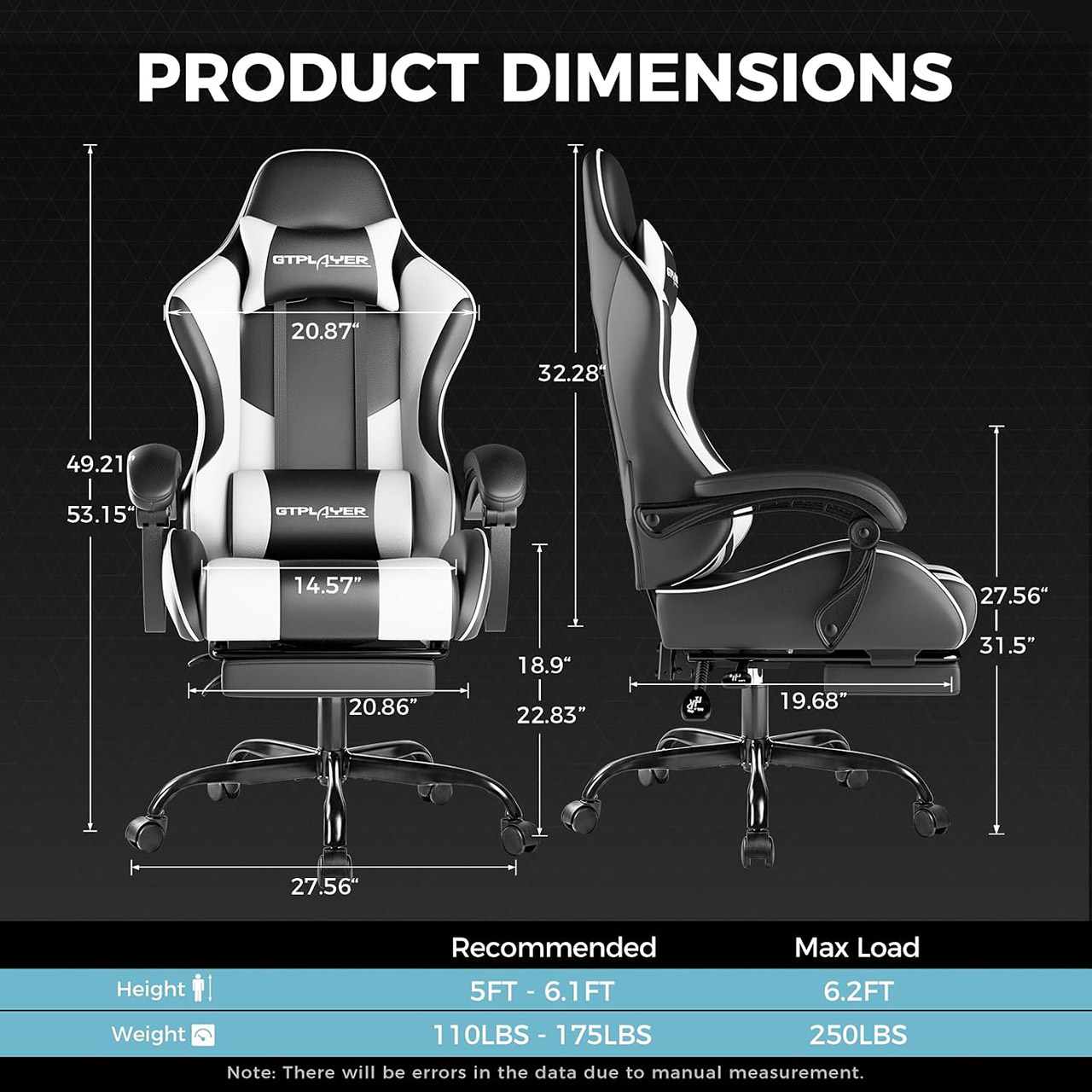
Putting it all together takes roughly 25 minutes with the included tools and detailed directions. Everything arrives in a single box, which is a huge help when it comes to clutter. Once assembled, the chair settles into daily usage without squeaking, and while the frame may become slightly creaky after a few weeks of use, it remains as firm as a rock. Cleaning the fabric is simple; just use a soft cloth and it will be as good as new, and it is far more durable to wear in everyday life than you might anticipate from a thin vinyl cover.

For gaming, the features of this chair really shine, keeping you comfy throughout those long marathon sessions. Even when you’re reclined, the armrests stay in line with your mouse and keyboard, which is really convenient. The footrest is also a lifesaver between rounds, and the breathable fabric protects you from becoming overheated and sweaty as you could in other seats. When it comes to office work, the chair performs an excellent job of keeping you focused and comfortable, and you can even adjust your posture during the day without leaving your seat.
Today’s Strands puzzle isn’t too tough. But some of the answers could be difficult to unscramble, so if you need hints and answers, read on.
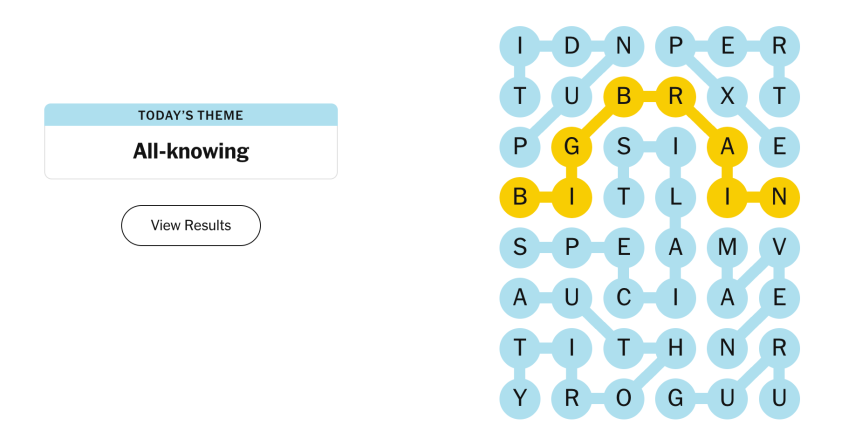
Today’s Strands theme is: All-knowing.
If that doesn’t help you, here’s a clue: Smarty-pants.
Your goal is to find hidden words that fit the puzzle’s theme. If you’re stuck, find any words you can. Every time you find three words of four letters or more, Strands will reveal one of the theme words. These are the words I used to get those hints, but any words of four or more letters that you find will work:
These are the answers that tie into the theme. The goal of the puzzle is to find them all, including the spangram, a theme word that reaches from one side of the puzzle to the other. When you have all of them (I originally thought there were always eight, but learned that the number can vary), every letter on the board will be used. Here are the nonspangram answers:

Today’s Strands spangram is BIGBRAIN. To find it, start with the B that is four letters down on the far-left vertical row, and wind across.


It’s very frustrating when your phone’s hardware breaks. Cell phones have transformed and evolved significantly over the years, and now smartphones are personal pocket computers we rely on every day. So if you crack the screen or your camera stops working, it can become a big problem very quickly.
Given that smartphones are somewhat delicate devices with a lot of small tech packed into them, it can be hard to see them as repairable. But it’s easier to get your phone repaired than you think, and depending on the part, it’s often cheaper than buying a brand-new phone. With the price of flagship phones regularly costing over a thousand dollars, the cost of fixing what you already have is a viable and even preferable course of action.
You don’t want to wait too long to repair a broken part, either. Many issues can be more than just minor frustrations or cosmetic, and over time, problems that seem small can get worse. If you’re using your phone as often as most people are, it’s important you keep it in the best shape you can.
Batteries are among the most common components of a phone that degrade over time, and if your phone is having trouble holding a charge, your battery may be to blame. After about 500 charge cycles, lithium-ion batteries begin to lose their charging capacity. Many people also have bad habits that affect phone battery health, causing it to degrade even faster.
Thankfully, getting a replacement battery is easy enough, and depending on your phone model, you may be able to replace it yourself. If you’re thinking of replacing the battery yourself, make sure to do your research first — some phones are easier to repair than others. Getting a professional to do a battery replacement will cost, on average, between $60 and $220.
One thing to keep in mind, however: if the backplate of your phone is swelling or gets extremely hot, you may be dealing with a swollen battery. These are dangerous and can pose a fire hazard, so make sure to have a professional replace the battery safely.
Your phone failing to hold a charge isn’t always because of the battery; sometimes the charger port is to blame. A failing charging port is typically easy to spot, as you won’t see the telltale charging notifications on your phone, or the cable will constantly disconnect from the port. Alternatively, the phone won’t fast charge even with the correct charger and cable.
Since being unable to charge the phone becomes a problem really quickly, this component is a priority to fix when it breaks. Even if you can sometimes get your charging cable to work, you won’t be getting a proper charge, and other accessories you may use with the port won’t work properly either.
What’s important to note, though, is that charger ports don’t actually break as often as you might think, given how exposed they are. Normally, the problem has to do with some debris or moisture affecting the connection. If you believe the problem is debris, using compressed air is your best bet. Using something like a toothpick to clean the port can damage it.
If you’ve ruled out debris and moisture, go through a checklist of possible charger port problems before considering a replacement. Replacing a charger port yourself may be easy, but some of them are soldered directly to the circuit board. A professional can fix all kinds of charging ports, and it’ll generally cost you between $40 and $150.
Screens are one of the most common components of a phone to break. It’s all too easy for any device to take a tumble out of your hands and hit the pavement in just the right way to ruin it. Sometimes it can be helped, sometimes it can’t, but it’s a frustrating experience nonetheless.
However, a broken screen is more than just an ugly crack on your display. It’s harder to read the screen, touch controls are affected, and tiny shards of glass can break off and hurt you. As such, it’s important to get a broken screen replaced rather than continuing to use the phone in that condition.
Thankfully, since damaged screens are so common, phone repair shops are well-versed in replacing them, and the cost won’t break the bank compared to a brand-new phone. You may even be able to fix the phone screen yourself, though be sure to keep potential risks in mind. Generally, it’s better to have a professional replace the screen for you. The costs will vary a lot depending on the phone’s screen type and size, but on average it will cost you $200. Make sure you research and get a quote for your particular model before committing to a repair.
Did you know that you can repair your cameras, instead of replacing your phone entirely if its hardware breaks down? Cameras are such a complex part of mobile devices nowadays, with many smartphones having three or more camera lenses and other features such as gyroscopes. Because of that, it’s easy to assume that if your camera starts failing, it’s time to get a new phone. But that simply isn’t the case.
Cameras can be replaced, and despite evolving technology, replacing a rear camera may be cheaper than buying a new phone. This is good considering the increasing number of points of failure with rear cameras. With multiple lenses and gyroscopes keeping your shots steady, a broken camera can lead to blurry pictures or autofocus features failing.
Once you’ve ruled out any possible software glitches, it’s time to get the camera replaced as soon as you’re able. Camera module replacements are almost always best handled by a phone repair specialist. Like phone screens, the costs will vary wildly depending on the phone model and camera you’re using. The average cost is between $90 and $250, but some models, like the latest iPhone model, will cost $250 or more.
On most phone models, the front camera is the little black “dot” on the top of your phone screen. Despite the extra protection from the screen, though, the front camera can still be damaged and degrade over time. A failing front camera can also point to other underlying issues, such as water damage or debris getting stuck in the lens.
Cracked screens can also affect the front camera. First, if one of the cracks passes through the lens’s position, it will obscure the lens and prevent proper use. There is also the possibility that the fall that cracked the screen in the first place may have jostled or damaged the front camera.
Rule out any software glitches first by checking for an OS or app update, restarting the phone, and testing to see if your rear cameras are working. If the rear cameras are working but the front camera is malfunctioning, it’s likely that the hardware is broken. In some phone models, the front and rear cameras are internally connected, so there may be hardware issues that affect both modules even if only the front camera is technically affected.
The front camera is generally simpler to repair than the rear camera. However, these are still complex bits of technology, and it’s best left to a professional to replace them. A front camera repair will, on average, cost around the same as a rear camera repair (between $70 and $200).
It may be surprising to hear, but even circuit boards, also known as PCB boards, are repairable, and it’s imperative that if it’s failing in your phone to get it fixed as soon as possible. Like a computer motherboard, a failing board can damage and break other parts of your phone. If you’re dealing with an overheating phone or it randomly shutting off, and you have ruled out other components, you’ll want to get the board checked.
Generally, a faulty component on the circuit board doesn’t require replacing the entire board, unlike camera modules. For example, if your Wi-Fi card is acting up, the card on the board can be replaced while keeping the same PCB board in the phone.
Note, however, that diagnosing and repairing broken components on a circuit board can be complex, and it’s best to take your smartphone to a phone repair shop rather than try to fix it yourself. They’ll know whether it’s better to replace a part or the entire circuit board and be able to quote a price to repair it. The average cost of a PCB repair is quoted between $60-$200, but costs can quickly rise based on whether the issues are isolated to a single chip on the circuit board or require replacement of multiple chips (or the entire board).
Not all phones have a physical SIM card slot, as some manufacturers have opted for eSIMs, or electronic SIM cards, instead. While they have some advantages, eSIMs have many downsides; if you have a physical SIM card slot, you’ll want to make sure it’s in working order for easy swapping of SIM cards between devices and avoiding eSIM compatibility issues.
If you have a SIM card slot, you want to make sure it stays in good working order. Of course, the biggest disadvantage of using physical card slots is that they introduce mechanical failure points, and a faulty SIM card slot results in spotty cellular connections. While Wi-Fi will still work on your phone, it can still cause issues when using your device in areas with no internet connection.
One thing to note before looking into SIM card slot replacements: It is more common that the SIM card itself has failed, so make sure to try another SIM card in the slot first.
To help you make an informed decision about which phone components to replace, we used a range of criteria to inform our research. First, we determined which parts of a phone, if failing or broken, would most affect its functionality. Some of these components, such as phone screens and charging ports, have obvious issues when they malfunction that we’ve all experienced, while others are more subtle and may not be easy to diagnose. For these latter components, we looked into common issues they cause and their solutions, then determined how critical it is to fix them quickly.
Next, we narrowed down these parts based on how feasible it is to replace them. We looked into this across a variety of sources, including official articles from places like Apple Support and BatteriesPlus, how-to guides for replacing the part yourself at iFixIt, and various forum threads asking for advice on their phone model’s replacements. Some parts are more likely to require professional help than others, but that doesn’t negate the need to replace them quickly.
Finally, we compared the repair cost to the price of a new phone via sites like CPR Cell Phone Repair and other nationwide phone repair providers. If replacing a component is comparable in cost to buying a new mid-range phone, it generally doesn’t meet our criteria of something that needs to be repaired right away, or it is more cost-effective to replace the phone entirely.

Hyundai Motor Company’s plan to put humanoid robots to work by 2028 is not part of current negotiations with striking South Korean autoworkers, according to the company.
The automaker is disputing news reports that partial labor strikes by the Hyundai Motor union at the world’s largest automotive plant in South Korea were spurred by concerns about the company’s planned deployment of humanoid robots in the United States starting in 2028. [The planned robots are built by Boston Dynamics, now a wholly-owned subsidiary of Hyundai.] A Hyundai statement shared with Ars describes the union’s demands as focusing on compensation-related issues such as wage increases, bonuses, and an extension of workers’ retirement age. “Potential deployment of robots in Korean production facilities is not part of the current labor-management discussions,” according to the Hyundai statement…
Hyundai emphasized that its current plan only covers the initial deployment of the Atlas humanoid robot at Metaplant America, an electric vehicle factory near Savannah, Georgia, starting in 2028. “Decisions about future Atlas deployment at other facilities will be made thoughtfully, in accordance with local operational needs, and in dialogue with the employees and workforce representatives at those sites,” the company stated. However, The Wall Street Journal described the Hyundai Motor union as making “unprecedented demands seeking to enshrine job protections in the era of robots and AI,” and characterized certain compensation demands as hedging against potential reductions in work hours caused by AI adoption and robotic automation. “Remember that without labor-management agreement, not a single robot using new technology will be allowed to enter the workplace,” the union told Hyundai in an internal letter reported by Reuters.
Hyundai management and the labor union are currently reviewing a proposed wage reform that would “provide factory workers with greater income stability even after the carmaker’s planned deployment of humanoid robots,” The Korea Times reported. But experts cautioned that the wage overhaul, which would convert hourly pay for overtime and night-shift allowances into fixed wages, could come at the expense of company productivity.

Ukraine has introduced the Tsyklop interceptor, a drone that attacks hostile UAVs by diving from above like a peregrine falcon before exploding on impact.
The one-way aircraft relies on altitude and a gravity-assisted descent instead of pursuing its objective across long distances.
Ukrainian officials say the design is intended to counter reconnaissance drones, Shahed attack drones, and other aerial threats using two operational variants.
Latest Videos FromTechRadar
Ukraine’s Defense Ministry has formally codified the Tsyklop after several versions reportedly spent years in frontline service before receiving official approval.
According to the ministry, the interceptor can operate above the flight ceiling of several Russian reconnaissance and strike UAVs before beginning its attack.
The aircraft has a wingspan of slightly more than one meter and can reportedly remain airborne for almost 1.5 hours during operational missions.
One version is intended for slower aerial and ground threats, while the V2 model was developed to intercept faster Shahed drones flying at altitude.
Officials said the interceptor has sufficient operational range to defend any Ukrainian regional center against incoming drone attacks.
The Defense Ministry also said the V2 variant has destroyed more than 100 aerial targets and became the first interceptor to down a Russian Shahed over Kursk Oblast.
The drone has reportedly intercepted Gerbera, Zala, Supercam, Orlan, Lancet, Molniya, and Shahed unmanned aircraft during combat operations.
The ministry said codification formalizes a system that had already been used in combat rather than introducing an entirely untested capability.
Tsyklop enters an increasingly competitive interceptor program as Ukraine expands domestic production and introduces new approaches to counter Russian aerial threats.
The Defense Ministry said it codified 413 unmanned aerial systems during the first half of 2026, with interceptor drones becoming one of the fastest-growing categories.
Ukraine has also announced plans to manufacture between 10 million and 30 million drones annually as domestic production capacity continues expanding.
The country has additionally converted civilian aircraft into reusable drone bombers capable of carrying 100 kg bomb payloads approximately 1,200 miles into Russian territory.
Other interceptor programs include the Octopus, with procurement covering 8,000 units equipped with automatic terminal guidance for aerial engagements.
Germany has funded 15,000 STRILA interceptors, while the Wild Hornets Sting reportedly destroyed more than 600 aerial targets using a NATO-approved control system.
The growing emphasis on interception follows reports that Russia has introduced jet-powered Geran-4 Shahed variants capable of cruising between 300 and 350 km/h before accelerating to between 500 and 600 km/h.
Ukraine says Tsyklop answers that challenge by attacking from above instead of relying mainly on pursuit, although many reported combat achievements still rely on official Ukrainian statements.

Follow TechRadar on Google News and add us as a preferred source to get our expert news, reviews, and opinion in your feeds.

Amazon is requiring that third-party sellers label any product images or videos that contain “AI-generated people” after New York recently passed a law mandating greater transparency around “synthetic performers” in ads… The policy directs sellers to tag images [and videos or other graphics on listing pages] with specific metadata keywords before they’re uploaded. “Recent legislation requires disclosure when images or videos in advertisements contain photorealistic AI-generated people,” Amazon wrote in the announcement [clarifying that the requirement doesn’t apply to content featuring TV/video game/movie characters or content including real people, even if they’ve been altered using AI]. The company said it will “add an indicator” to listings on its website, informing consumers that images or other content feature AI-generated people, “where applicable.” It’s unclear what criteria Amazon will apply when deciding when to display the label to shoppers…
Amazon has embraced AI internally and it’s increasingly infusing the technology across its portfolio. The company has optimized listing titles and details so they’re more likely to be spotted by AI systems, invested in a recently rebranded assistant called Alexa for Shopping, and launched a feature that injects AI-generated [images of] products into its search bar in real time based on user queries. More Amazon third-party sellers are using AI to generate text, images and other content for their listings, partly by using the company’s tools.
Outside sellers account for more than 60% of goods sold on Amazon, the article points out. It adds that there’s currently no nationwide U.S. law requiring companies to disclose AI-generated advertising content, it adds — but YouTube, Meta, Pinterest, and TikTok have already added labels for AI-generated content.
And a new California law also requires large AI providers to embed watermarks in AI-generated images, video and other content…


Green light cuts through the Nebraska night as two men who should never share a car pull into a town that has already buried one body. Kyle Chandler’s Hal Jordan, the veteran who has seen entire systems burn out, flips a power ring across the front seat to Aaron Pierre’s John Stewart and jumps from the moving vehicle before the wheels leave the road. Stewart catches the car with a construct that looks half-formed and half-desperate. That single sequence from the new Lanterns trailer, shown first in Hall H at San Diego Comic-Con, tells you everything about the series that arrives on HBO and HBO Max on August 16.
Eight episodes will follow intergalactic cops as they investigate a small-town murder as if it were any other case, only for things to get crazier until the sky itself appears to be a suspect. The official trailer debuted at the panel, which also had Chris Mundy, Damon Lindelof, and Tom King on stage, and it just keeps rolling from sandy highways and interrogation rooms into the big unknown. Hal in the trailer drives like he’s already realized that the neighborhood taco shop is probably the safest place to hang out and wait for this rookie cop who’s still adjusting to the whole ring thing.

Manhunters play a key role in the danger, replacing the interstellar police force from the comics. The series portrays them as terrifying because they can be anyone, speak any language, and walk into a Nebraska cafe without raising an eyebrow, but it doesn’t make them any less creepy. Sinestro is the final character to appear, imprisoned in space and played by Ulrich Thomsen, the former Green Lantern who attempted to rule the Corps with an iron fist. Hal arrives in full costume to inquire about Manhuthers, and Sinestro simply gives him a wicked little smirk and says, “You don’t really think he’s your back up, do you Hal?” which is like uttering the thing that no one in the Corps wants to speak aloud: replacement. The talk is as quiet as a whisper, yet far more terrifying than any explosion.
Finally, the series will air once a week beginning August 16th, with Mundy, Lindelof, and King serving as the brains behind it all. The list of executive producers also includes James Gunn and Peter Safran. Filming took place all around California; we see the flat spaces of Nebraska on the large screen before the entire thing kicks into high gear for the space things and the ring FX.
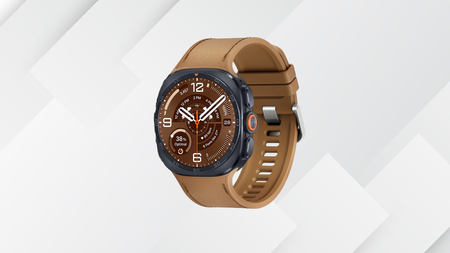
Samsung’s Galaxy Watch Ultra 2 hits 5000 nits of peak brightness, making it the brightest screen you’ll find on any smartwatch right now.
That screen belongs to a watch that’s just dropped from £649 to £580, plus an extra £50 if you check out with PayPal, without needing a trade-in offer or a discount code to unlock it.
Save £80 on Samsung’s new Galaxy watch Ultra 2, right out of the gate
With 5000 nits of peak brightness, the brightest screen on any smartwatch, the Galaxy Watch Ultra 2 has dropped to £569, an £80 saving.

Our review found that brightness genuinely holds up outdoors, staying legible even during dazzling midday sunshine that has left plenty of other wearables struggling to keep up whenever the two are checked side by side.
That kind of visibility matters most when you’re actually out using the thing, which is where the Galaxy Watch Ultra 2‘s dual-GPS setup earns its keep during runs, hikes and rides through genuinely tricky terrain.
Our tester walked it through Canary Wharf, an area of tall skyscrapers and rivers notorious for throwing GPS tracking off course, and the Watch Ultra 2 held its line accurately without ever once drifting off track.
That accuracy now extends to a brand new trail running mode exclusive to this generation, letting you load custom GPX routes complete with turn-by-turn directions and elevation tracking displayed directly on the watch face itself.
A professional diving mode developed alongside diving equipment specialist Mares is also arriving later this year, tracking depth, time and water temperature for anyone who takes their adventures underwater as much as out on land.

None of that would matter much if the watch couldn’t keep pace day to day, and the switch to Qualcomm’s Snapdragon Wear Elite chipset means swiping through menus and opening apps now feels genuinely instantaneous.
Hands-free Gemini support means you can simply raise your wrist and ask a question without a wake word or a long press, which makes quick queries feel far more natural than fiddling with buttons and menus.
That combination of speed and outdoor toughness is exactly what makes the Galaxy Watch Ultra 2 stand out among Android smartwatches, especially for anyone who already leans on a Samsung phone for their day to day.
Still, at £580 rather than £649, the Galaxy Watch Ultra 2 remains one of the more capable Android smartwatches around, and getting it £69 cheaper right out of the gate makes the case even easier.
SQUIRREL_PLAYLIST_10148964

Venture through the afterlife of the gods while playing as Faye.

The next major installment in the God of War franchise, featuring Kratos’ wife Laufey, is set to be released on February 16 of next year. As confirmed during a San Diego Comic-Con panel and on PlayStation’s social media accounts, we’re less than a year away from playing God of War Laufey, which focuses on Laufey as she ventures through the afterlife of gods, following her death in God of War Ragnarok.
Instead of playing as the franchise’s eponymous protagonist, players will get to experience Laufey’s combat prowess, which has only been hinted at in previous games. The release date announcement comes about a month after a sneak peek of gameplay footage that showed off Laufey, also known as Faye, slicing and dicing enemies in the air and using magical abilities while fighting gods and creatures we haven’t seen in the franchise yet.
You can only add God of War Laufey to your wishlist for now, but there’s a lot more to look forward to in the franchise. During San Diego Comic-Con, Santa Monica Studio also confirmed that another Kratos-led God of War game will be coming after this installment featuring Faye, as reported by IGN.





Weekend Open Thread: Brooks Brothers


Democrats look to World Cup watch parties to register thousands of voters


Big Money Is Entering XRP


Sail Virtually Aboard The “Itanic” With IA-64 Emulator


Grayscale Files For Worldcoin ETF, WLD Registers Sharp Rise

Turtle Beach Command Series KB7 review: a nifty screen-equipped gaming keyboard


Unregistered fitter used Gas Safe logo on business flyers

New Jersey voter registration controversy explained: How 6,600 noncitizens got on the rolls, and what happens next

Johnny Depp’s R-Rated Gothic Cult Classic Gets New Release Ahead of Sydney Sweeney Remake


Ethics, other provisions in crypto Clarity Act to be further discussed


Watch Flock Safety CEO Garrett Langley discuss the future of surveillance at TechCrunch Disrupt 2026

Shanghai science forum photos show China’s AI and robotics advances in rivalry with US


Circle’s President Sold Over 360,000 Shares, The Filings Explain Why


Subway Sandwich Computers Get a Second Life as Gaming Machines


2026 3M Open leaderboard: Scottie Scheffler finds putter in Round 1, sits three back


The Peugeot Family: How 200 Years of an “Old Money” Dynasty Died in A Boardroom


16 Dresses for the High Summer Event


How To Use Claude’s Reflect Dashboard And Learn When It’s Time To Touch Grass


The 35 Best Board Games for Family Game Night


Stephen Colbert Returns to Social Media After Late Show End



You must be logged in to post a comment Login