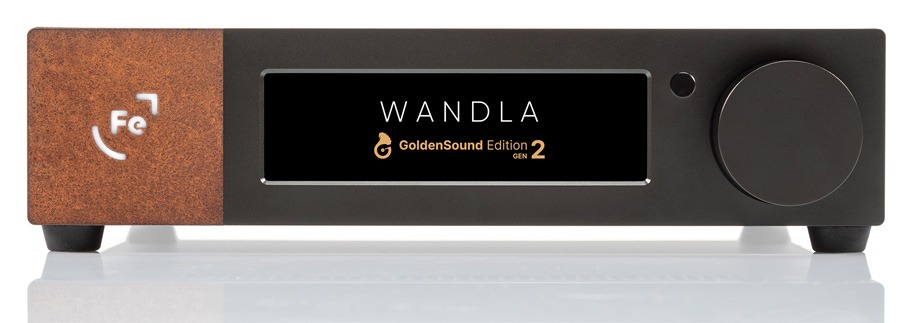
Ferrum Audio arrives at CanJam NYC 2026 with a new iteration of one of its most talked about digital components: the WANDLA GoldenSound Edition Gen 2 DAC/Preamp. Building on the original WANDLA platform and the first GoldenSound Edition, the new model refines the design with updated processing features while retaining the core architecture that helped put Ferrum on the map with serious headphone and personal audio enthusiasts.
Can the Polish manufacturer stand out in a very crowded high end DAC category dominated by Chord Electronics, RME, TEAC, and Schiit Audio? Recent performance suggests the answer may very well be yes.
Since emerging as an independent brand in 2022, Ferrum Audio has quickly become one of the most recognizable names in high end personal audio to come out of Poland. The company made a particularly strong impression at CanJam NYC 2022, where its early products drew attention for combining advanced digital engineering with a modular ecosystem designed to work seamlessly with its power supply and headphone amplification lineup. The WANDLA platform continues that trajectory.
At its core, all WANDLA models share the same fundamental architecture:
Advertisement
SERCE Module: Ferrum’s proprietary DSP engine designed for high performance digital signal processing and system control.
DAC Chipset: ESS Sabre ES9038PRO, one of the most widely respected DAC chips used in high end digital playback.
Hi-Res Audio Support: Native decoding of DSD512 and PCM up to 32-bit/768kHz.
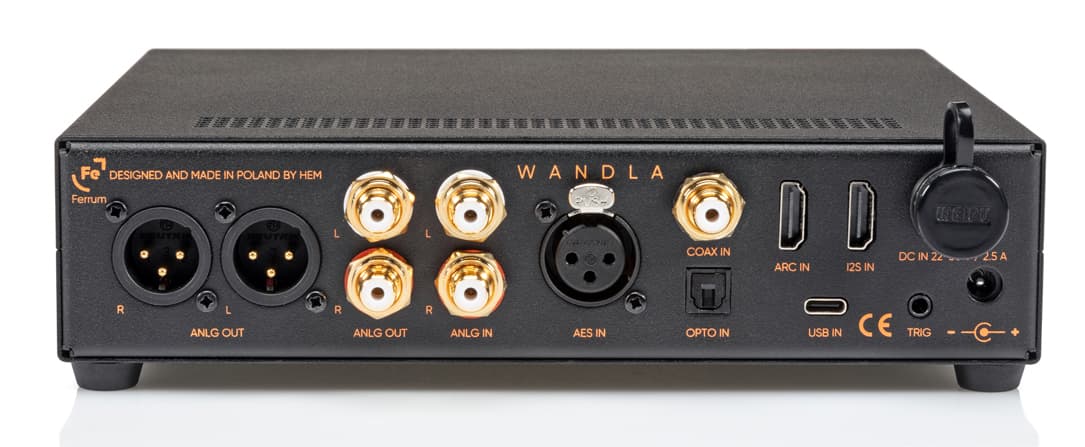
Connectivity: A wide range of digital and analog connections including HDMI ARC, I2S, USB, coaxial and optical inputs, alongside both balanced XLR and unbalanced RCA outputs.
However, the Gen 2 takes things a step further with significant upgrades to three key capabilities within Ferrum’s Sweet Spot Tuning platform: Impact+, Tube Mode, and Spatial Enhancement.
Sweet Spot Tuning
Sweet Spot Tuning is designed to give listeners greater control over the sound while preserving the precision, transparency, and musicality that define the WANDLA platform. The goal is straightforward: help listeners find their personal sweet spot.
Whether adding weight and authority in the low frequencies, introducing the warmth associated with classic valve designs, or expanding the sense of space within a recording, the WANDLA GoldenSound Edition Gen 2 offers a wider range of customization while maintaining the performance expected from a high-end digital to analog converter.
Impact+
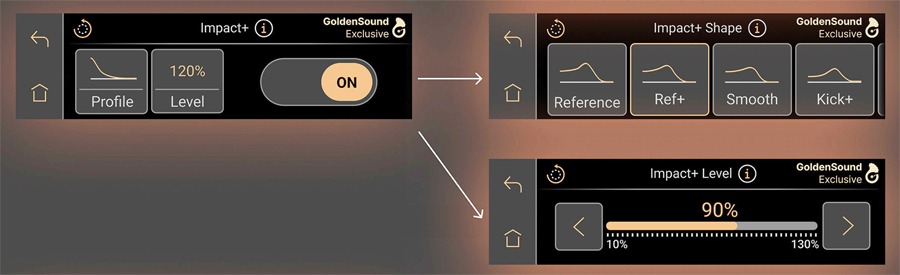
Impact+ is Ferrum’s advanced low frequency enhancement system. In the original GoldenSound Edition, Impact+ used a carefully tuned bass shelf combined with an additional peak to deliver a more realistic and powerful low end presentation.
With the GoldenSound Edition Gen 2, the system has been expanded to include seven selectable sound profiles, allowing listeners to tailor bass response and overall tonal balance to their preferences or specific headphones and systems. The available profiles include:
Reference
Ref+ Smooth
Kick+
DD Comp
DD Comp+
Sub Bass
Each of the new profiles is designed to deliver a distinct combination of bass shaping and dynamic response, allowing the sound to be tailored to different headphones and speaker systems.
Rather than relying on a single fixed enhancement, listeners can select the profile that best suits their system and then adjust the overall Impact+ level from 10% to 130%. This makes it possible to fine tune the balance between subtle reinforcement and more pronounced low end impact.
Advertisement
Advertisement. Scroll to continue reading.
All processing is handled internally with 64-bit precision, ensuring that these adjustments remain smooth, controlled, and faithful to the original recording. With Impact+ and Ferrum’s Sweet Spot Tuning, low frequency performance becomes something listeners can shape with far greater precision.
Tube Mode
In the previous GoldenSound Edition, Tube Mode introduced the musical sweetness associated with second harmonic distortion, subtly enriching the sound in a way reminiscent of classic valve (tube) amplification.
Building on that concept, Tube Mode in the GoldenSound Edition Gen 2 has been expanded to allow users to match the WANDLA’s sonic character to the tonal signatures of specific tube types. Rather than simply adding a harmonic component, the updated Tube Mode now models the sound characteristics of five classic valve designs: EL34, KT88, 300B, 2A3, and 7062.
Listeners can also adjust the strength of each Tube Mode profile with a variable range from 10% to 200%, making it possible to apply anything from a subtle hint of warmth to a more pronounced tube-like character.
Advertisement
With Tube Mode and Ferrum’s Sweet Spot Tuning, the WANDLA GoldenSound Edition Gen 2 provides a flexible way to experience classic valve tonality within a modern digital platform, giving listeners the kind of tonal shaping options often used in recording studios when shaping the final sound of a performance.
Spatial Enhancement
The next upgraded feature is Spatial Enhancement, Ferrum’s technology designed to expand the soundstage and improve the three dimensional presentation of music.
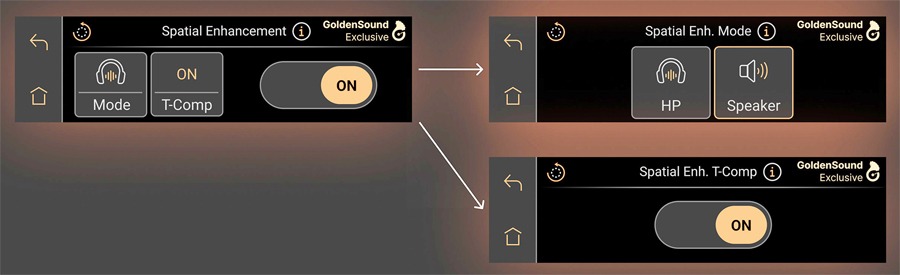
Originally, Ferrum’s implementation of Spatial Enhancement offered two dedicated modes, one optimized for loudspeakers and another for headphones. With the GoldenSound Edition Gen 2, Ferrum introduces a new spatial audio refinement called Transient Compensation, or T Comp, which fine tunes the spatial processing algorithm to better manage high frequency transients.
The result is a more convincing sense of depth and instrument placement, creating a clearer three dimensional soundstage without the imaging shifts often associated with traditional crossfeed systems.
Users can independently toggle the spatial processing, select the appropriate output mode for headphones or loudspeakers, and engage T Comp to further refine the spatial presentation.
Advertisement
The Complete WANDLA Experience
Alongside these new capabilities, the WANDLA GoldenSound Edition Gen 2 retains the features that helped establish the original platform’s reputation. These include the SERCE DSP module, WANDLA’s fully balanced architecture, proprietary amplification stage, optimized digital inputs, carefully tuned digital to analog conversion, and Dynamic Digital Filtering.
Ease of operation remains central to the design thanks to the intuitive touchscreen interface, while Ferrum Streaming Control Technology ensures seamless integration into modern digital audio systems.
When paired with Ferrum’s HYPSOS power supply, WANDLA also benefits from 4TSD voltage sensing capabilities, further optimising performance.
Advertisement
Advertisement. Scroll to continue reading.
WANDLA Specifications Comparison
WANDLA GoldenSound Edition Gen 2 (2026)
WANDLA GoldenSound Edition (2024)
WANDLA DAC/Preamp (2023)
Product Type
DAC/PREAMP
DAC/PREAMP
DAC/PREAMP
Price
$3,295
$3,295
$2,795
DAC Chip
ESS Sabre ES9038PRO
ESS Sabre ES9038PRO
ESS Sabre ES9038PRO
DAC resolution
768 kHz / 32-bit, DSD512
768 kHz / 32-bit, DSD 512
32-bit/768k, DSD256
Digital inputs
USB Type-C (up to PCM 768 kHz / 32-bit, DSD512, DoP256)
4.65V RMS unbalanced at 0 dBFS, 1kHz Sine Wave – 9.3V RMS Balanced.
Frequency Response
10 Hz – 200 kHz +/- 0.1 dB (analog inputs)
10 Hz – 200 kHz +/- 0.1 dB (analog inputs)
10Hz to 200kHz +/- 0.1dB (analog inputs)
DAC THD
-121 dB (0.00009 %)
-121 dB (0.00009 %)
-121 dB (0,00009%)
DAC THD+N
-118 dB unweighted
-115 dB unweighted
-115 dB unweighted
Analog Input THD
-123 dB @ 2 VRMS
-123 dB @ 2 VRMS
-123 dB @ 2 VRMS output level
Dynamic Range (A-weighted)
Analog 127 dB Digital 119 dB
Analog 127 dB Digital 119 dB
Analog 127 dB Digital 122 dB
Crosstalk
-120 dB at 1 kHz, better than -100 dB for 20 Hz – 20 kHz
-120 dB at 1 kHz, better than -100 dB for 20 Hz – 20 kHz
-120dB for 1kHz better than -100dB for 20Hz to 20kHz
Output Impedance
22 Ω unbalanced 44 Ω balanced
22 Ω unbalanced 44 Ω balanced
22 Ω unbalanced 44 Ω balanced
Power Consumption
10 W idle, 15 W max
10 W idle, 15 W max
0 watts idle/15 watts max
Power inputs (22-30 VDC)
5.5/2.5 mm DC connector, centre positiveProprietary Ferrum Power Link (FPL) 4-pin DC connector
5.5/2.5 mm DC connector, center positive proprietary Ferrum Power Link (FPL) 4-pin DC connector
22-30 VDC proprietary FPL 4-pin DC connector (FPL) 5.5/2.5 mm DC connector centre positive
Power Adapter
100-240 VAC to 24 VDC
100-240 VAC to 24 VDC
100-240 VAC to 24 VDC
Remote control
Included
Included
Dimensions
21.7 x 20.6 x 5 cm
Advertisement
8.6″ x 8.1″ x 2.0″
21.7 x 20.6 x 5 cm
8.6″ x 8.1″ x 2.0″
21.7 x 20.6 x 5 cm
Advertisement
8.6″ x 8.1″ x 2.0″
Weight
1.8 kg / 3.97 lb
1.8 kg / 3.97 lb
1.8 kg / 3.97 lb
The Bottom Line
Ferrum Audio continues to make serious waves in the DAC and preamp category with the WANDLA series, and the GoldenSound Edition Gen 2 pushes that momentum even further. By expanding its Sweet Spot Tuning platform with deeper control over bass response, spatial presentation, and tube inspired harmonic shaping, Ferrum is giving listeners tools that are rarely seen in a modern digital component.
For headphone listeners and two channel enthusiasts building a high performance digital front end, the WANDLA Gen 2 offers a flexible control center that can feed external amplification, powered speakers, or a dedicated headphone chain. To get the most out of it with headphones, however, Ferrum clearly intends it to be paired with the Ferrum OOR Headphone Amplifier, which completes the company’s reference signal path.
It is not inexpensive, but for listeners looking for a highly configurable DAC and preamp platform designed to integrate into serious personal audio systems, the WANDLA GoldenSound Edition Gen 2 looks like a compelling option.
Price & Availability
The WANDLA GoldenSound Edition Gen 2 is priced at $3,295 (£3295 / €3295) through Ferrum and Authorized Dealers.
The search giant and, increasingly, AI leader today announced a sweeping series of updates to its Gemini AI models embedded into Google Workspace — the productivity suite of cloud-based apps including Drive, Docs, Sheets, Slides, and more. They’re being made available both to individual consumers and enterprises, though you’ll need an AI Pro ($20 per month) or higher subscription plan for the former, and your enterprise will need to be enrolled in the “Gemini Alpha” program and have the features switched on by an administrator.
The biggest news: it’s now possible to have Gemini automatically create these file types from a single text prompt and fill them out with information gathered from other files and apps throughout you, the user’s Google Workspace, including emails, chats, files, and the open web via Google Search.
Advertisement
By synthesizing information across these disparate apps and experiences, Gemini acts as an assistant capable of drafting, iterating, and perfecting complex, finished, professional-grade content in seconds, effectively ending the era of the manual “dig” for information.
The message is simple: the era of searching across multiple windows, tabs, files and folders for your information is over — Gemini will do it and put it all together for you in a nearly finished product, simply from a plain English (or language of your choosing) natural language text prompt!
And best of all for enterprise technical leaders — this feature is now provided first-party by Google themselves, short-cutting or eliminating large parts of the need to build their own orchestration system (if they don’t wish to pursue this route and have most of their data in these Google applications, albeit).
Prompt to document, spreadsheet, slide deck and more
The rollout spans the entire Workspace suite, with specific features tailored to the unique demands of each application:
Advertisement
Google Docs: “Help me create”: The new “Help me create” experience allows users to generate fully formatted first drafts by simply describing their goal. Because Gemini can access Drive, Gmail, and Chat, a user can prompt: “Draft a newsletter using the meeting minutes from my January HOA meeting and the list of upcoming events”. The result is a contextualized document that includes smart chips and structured formatting, rather than a generic template.
Google Sheets gets a 9x speed boost: The most striking efficiency claim in this release involves “Fill with Gemini”. A 95-participant study conducted by Google found that using Gemini to auto-populate tables with categorized or summarized data was 9x faster than manual entry for 100-cell tasks. Users can now describe a goal—like optimizing a weekly schedule to maximize profit while balancing staff skills—and Gemini handles the multi-step construction from start to finish.
Google Slides gets narrative-first design: Slides is receiving updates that allow Gemini to act as a design collaborator. It can now turn rough brainstorm sketches into editable diagrams and generate slide layouts that balance visual weight and hierarchy while matching the theme of an existing deck. Google also teased an upcoming feature that will generate an entire presentation from a single prompt based on a reference document.
Google Drive: The Knowledge Base: Perhaps the most fundamental shift is in Google Drive, which is moving from “passive storage” to an “active knowledge base” that compiles data from multiple files and file types stored there and allows Gemini to access it and move it around as needed in creating and editing projects.
Advertisement
AI Overviews: Similar to Google Search, Drive will now provide a summarized answer with citations at the top of search results, removing the need to open multiple files to find a specific detail.
Ask Gemini in Drive: This allows for complex, cross-file queries, such as comparing multiple catering proposals or synthesizing months of research on a specific topic.
Projects: Users can now save curated lists of sources as “projects” to share with others, maintaining built-in security and compliance controls.
Not just Gemini — numerous Google AI models power this experience
While the user interface of the new Workspace updates is designed for simplicity, the backend architecture relies on a specialized ensemble of Google’s most advanced AI models.
These features are not powered by a single general-purpose engine but rather a suite of task-specific models developed by Google DeepMind and Google Research.
Gemini 3 Flash & Deep Think: The core text generation, summarization, and reasoning capabilities—such as “Help me create” in Docs and “AI Overviews” in Drive—are driven by the Gemini 3 family. Specifically, Gemini 3 Flash is utilized for high-speed summarization, while Gemini 3 Deep Think handles more complex reasoning tasks involving science, research, and engineering.
Google Research OR-Tools: To solve the “advanced optimization problems” in Sheets, such as complex employee scheduling or budget maximization, Google integrates its OR-Tools (Operations Research tools) alongside DeepMind’s logic models.
Nano Banana 2 (Gemini 3 Flash Image): The professional layouts and editable diagrams found in Slides are generated by Nano Banana 2, a state-of-the-art multi-image-to-image model. This model handles everything from text-to-image generation to complex style transfers, ensuring that new slides match a company’s existing brand aesthetics.
Veo & Lyria 3: For multimedia integration, Google utilizes Veo for high-fidelity video generation and Lyria 3 for professional-grade music and vocal arrangements, both of which include SynthID watermarking for AI identification.
Licensing and availability
Google is positioning these features as premium additions to its ecosystem. The new Gemini capabilities are rolling out in beta starting today.
Feature Set
Advertisement
Target Audience
Availability
Google AI Ultra & Pro
Individual power users
Advertisement
English (Global for Docs, Sheets, Slides)
Gemini Alpha
Business/Enterprise customers
English (Global for Docs, Sheets, Slides)
Advertisement
Google Drive Updates
U.S. Customers (Initial)
English (U.S. Only for now)
The Gemini Alpha program is a pre-release initiative that allows Google Workspace administrators to grant users early access to experimental AI features before they are made generally available.
Advertisement
To participate, your organization must have a supported subscription — such as Business Standard, Business Plus, Enterprise, or Education tiers — along with Google AI Pro or Ultra add-ons.
Participation is managed entirely by your Google Workspace administrator, as the program is turned off by default. An admin can manually enable accessvia the Google Admin console by navigating to Menu > Generative AI > Gemini for Workspace and selecting the Alpha features panel. Once enabled, eligible users can begin reimagining their content creation journeys using these next-generation tools.
For business users, Google emphasizes that these features are built with “enterprise-grade data protections,” ensuring that sensitive company data used to ground Gemini’s responses remains confidential and is not used to train global models
Community and leadership reactions
The announcement was met with immediate traction on social media, spearheaded by CEO Sundar Pichai. In a post on X, Pichai highlighted the practical, time-saving nature of the updates:
Advertisement
“New Gemini updates to make @GoogleWorkspace more personal, helpful and collaborative… no more digging through folders.”
The reaction from the broader tech community has focused heavily on the “9x faster” claim for Sheets, a metric that resonates with data analysts and project managers who spend a significant portion of their week on manual data entry.
Yulie Kwon Kim, VP of Product for Workspace, framed the release as a fundamental reimagining of content creation, stating that Gemini is no longer just a “tool” but a “partner that works alongside you throughout the creative process”.
As these features move from beta to general availability in the coming months, the true test will be how effectively Gemini handles the nuance of complex, real-world data without human intervention. For now, Google has signaled its intent: the era of starting with a blank page is officially over.
AI is the latest escalation in the cloud contest — and enterprise technical leaders should take note
For CTOs, CIOs, and product managers, the deep integration of Gemini into Google Workspace is not merely a suite of new features; it is a fundamental shift toward an “agentic” operating model.
Advertisement
This announcement arrives just 24 hours after Microsoft unveiled “Copilot Cowork,” a cloud-based AI agentic tool designed to compl
ete work on a user’s behalf across the entire Microsoft 365 suite. Both tech giants are now converging on a singular vision: the AI assistant as an execution layer that can navigate multiple files, formats, and data sources to independently plan and deliver finished workplace materials.
By transforming static storage into an active knowledge base, these platforms are providing technical leaders with a framework to reduce the “digital debt” of searching through siloed applications, effectively reimagining white-collar work as a series of delegated outcomes rather than manual tasks.
The scale of this transformation is underpinned by Google’s massive and rapidly expanding footprint. As of early 2026, Google Workspace has surpassed 3 billion monthly active users globally. Within this ecosystem, the paid enterprise segment is seeing explosive growth, with approximately 11 million paying business customers—up from 8 million just one year prior.
Advertisement
More specifically, over 8 million paid Gemini Enterprise seats have already been deployed across more than 2,800 companies. While Microsoft leverages a multi-model architecture incorporating Anthropic’s Claude models for its “Cowork” features, Google is doubling down on its own integrated stack of Gemini 3 and DeepMind logic to provide a seamless, context-aware environment for its vast user base.
From an interpretive standpoint, this “Gemini-fication” of work represents the democratization of advanced analytics. When a manager can use natural language to solve complex optimization problems in Sheets or generate entire presentations from a single prompt, the traditional boundaries of professional roles begin to blur.
While early studies suggest these agentic tools can lead to productivity gains of 15% to 35%, the real value for technical leaders lies in headcount leverage—the ability to maintain high output with leaner teams.
As AI assistants evolve into autonomous agents that navigate enterprise data to “do the work for you,” the role of the knowledge worker is shifting from “creator” to “orchestrator,” requiring a strategic pivot in how enterprises hire and measure human talent in an AI-first economy.
Microsoft has released Windows 11 KB5079473 and KB5078883 cumulative updates for versions 25H2/24H2 and 23H2 to fix security vulnerabilities, bugs, and add new features.
Today’s updates are mandatory as they contain the March 2026 Patch Tuesday security patches for vulnerabilities discovered in previous months.
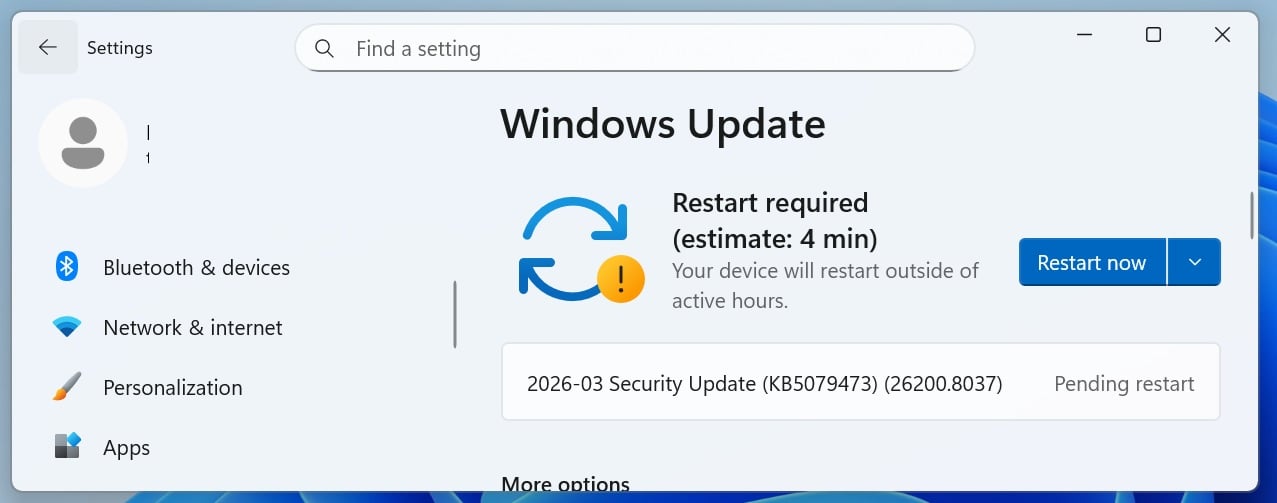
You can install today’s update by going to Start > Settings > Windows Update and clicking on ‘Check for Updates.’
This is the third ‘Patch Tuesday’ release in 2026, and it’s based on 24H2, which means 25H2 gets the same update. There are no exclusive or special changes. You’ll get the same fixes across the two versions of Windows 11.
Advertisement
What’s new in the March 2026 Patch Tuesday update
After installing today’s security updates, Windows 11 25H2 (KB5079473) will have its build number changed to 26200.8037 25H2 and 26100.8037 (24H2), and 23H2 (KB5078883 ) will be changed to 22631.6783.
Microsoft says this update includes additional high-confidence device targeting data, increasing coverage of devices eligible to automatically receive new Secure Boot certificates. This means more devices should get a Secure Boot update, but the installation is automatically handled by Microsoft.
In addition, a bug has been fixed that improves File Explorer search reliability when searching across multiple drives or “This PC”.
Microsoft says this update also improves how Windows Defender Application Control (WDAC) handles COM objects, allowing listing policies.
Advertisement
Here’s the full list of fixes and improvements:
[Emoji] New! The Emoji 16.0 release introduces a small thoughtfully curated set of new emojis, one from each major category. Each emoji carries timeless symbolism and practical versatility. These new emojis now appear in the emoji panel.
[Backup & Restore]New! The first sign-in restore experience is now part of Windows Backup for Organizations, bringing this restore capability to more device types. This experience restores user settings and Microsoft Store apps automatically at first sign-in on Microsoft Entra hybrid joined devices, Cloud PCs, and multi‑user environments. This capability helps create a consistent setup process during device refreshes, upgrades, or migrations.
[Quick Machine Recovery]New!Quick Machine Recovery (QMR) now turns on automatically for Windows Professional devices that are not domain‑joined and not enrolled in enterprise endpoint management. These devices receive the same recovery features available to Windows Home users. For domain‑joined or enterprise managed devices, QMR stays off unless it is enabled by the organization.
Advertisement
[Taskbar & System Tray]
New! A built‑in network speed test is now available from the taskbar. You can open it from the Wi‑Fi or Cellular Quick Settings, or by right-clicking the network icon in the system tray. The speed test opens in the default browser and measures Ethernet, Wi‑Fi, and cellular connections. This feature helps check network performance and troubleshoot issues.
Improved: When the taskbar is set to uncombined and you have an app open with multiple windows, they no longer all move as a set to the overflow area when there is not enough space on the taskbar. Only the windows that don’t fit move to the overflow menu. This change prevents the overflow menu from appearing with large unused space.
[Accounts] New! The account menu on the Start menu now includes a new option that directs you to the benefits page, making it easier to explore and manage your Microsoft account benefits.
Advertisement
[Camera Settings] New! You can control pan and tilt for supported cameras in the Settings app. The controls appear under Settings > Bluetooth & devices > Cameras, in the “Basic settings” section for your selected camera.
[Built-in Sysmon]New!Windows now brings System Monitor (Sysmon) functionality natively to Windows. Sysmon helps you capture system events for threat detection, and you can use custom configuration files to filter the events you want to monitor. Windows writes captured events to Windows Event Log, which allows security tools and other applications to use them.
Built‑in Sysmon is off by default. You must enable it before you can use it.
Advertisement
Option 1: Settings
Go to Settings > System > Optional features > More Windows features, then select Sysmon.
Option 2: PowerShell or Command Prompt
Advertisement
Run the following command: Dism /Online /Enable-Feature /FeatureName:Sysmon
After the feature installs, complete the setup by running: sysmon -i
Note: If you already installed Sysmon from the Sysinternals, uninstall it before enabling the built‑in version.
[Widgets]New! Widget Settings now open as a full‑page experience in the Widgets app instead of opening in a dialog.
[Desktop Background]New! You can set WebP (.webp) images as your desktop background from Settings > Personalization > Background, or by right‑clicking the image in File Explorer.
[Search on Taskbar]
New!Group headers now show the number of results, so you can quickly see when more results are available. Select a group header to see all results for that group and hide results from other groups.
Advertisement
New!You can preview search results by hovering over a result and selecting Preview to see the content without opening it.
Improved: Updated the icon for the Search process in Task Manager so it now shows a magnifying glass.
[Storage Settings] Improvements for Storage Settings include:
[Remote Server Administration Tools (RSAT)]New! This update adds support for Remote Server Administration Tools (RSAT) on Windows 11 Arm64 devices. IT administrators can now install and use tools such as Active Directory Domain Services and Lightweight Directory Services Tools, Active Directory Certificate Services Tools, Server Manager, Group Policy Management Tools, DNS Server Tools, and DHCP Server Tools. These tools are available as optional features and can be installed through Settings > System > Optional Features or from Control Panel > Programs > Turn Windows features on or off.
Advertisement
[Windows Update Settings] Improved: Responsiveness of the Windows Update settings page.
[Login and lock screens] Improved: Sign‑in screen reliability.
[Nearby Sharing] Improved: Reliability when sending larger files with Nearby Sharing.
[Projecting] Improved: Reliability of displaying the project menu after pressing Windows logo key + P.
Advertisement
[Printing] Improved: Performance of the Windows printing service (spoolsv.exe) to help printing run more smoothly and reduce slowdowns during high‑volume printing.
[File Explorer]
Improved: You can now open a new File Explorer window more reliably. Holding the Shift key and selecting the File Explorer icon on the taskbar, or using the middle mouse button, now opens a new instance of File Explorer instead of the current one.
Improved: File Explorer now includes an Extract all option on the command bar when you browse non‑ZIP archive folders.
Advertisement
Improved: Reliability of displaying devices on the Network page in File Explorer.
[Display]
Improved: This update improves reliability when your PC wakes from sleep.
Improved: Display-related performance improvements to help reduce the time for a PC to resume from sleep, especially when the system is under heavy load and in other scenarios.
Advertisement
[Other] Improved: This update improves visual consistency across Windows, including the taskbar when auto‑hide is on, credential fields in the Windows Security dialog, and the print dialog.
Microsoft is not aware of new issues with this month’s Patch Tuesday.
Malware is getting smarter. The Red Report 2026 reveals how new threats use math to detect sandboxes and hide in plain sight.
Download our analysis of 1.1 million malicious samples to uncover the top 10 techniques and see if your security stack is blinded.
Meta announced new features today aimed at cracking down on scams perpetrated via its platforms. First, Meta is launching AI tools for identifying impersonator of brands and celebrities, as well as for detecting deceptive links, which should help it to quickly take down frauds. Second, it is adding new alerts to caution against interacting with a potentially fraudulent account. Facebook will roll out alerts for suspicious friend requests, WhatsApp is getting warnings for device linking requests, and Messenger will also issue warnings if an account seems suspect.
Finally, Meta is also continuing to expand its processes for advertiser verification. The company said it aims to have verified advertisers account for 90 percent of its ads revenue by the end of the year, up from the current share of 70 percent. Last year, Meta estimated that marketing for scams and banned products could have been responsible for 10 percent of its 2024 revenue.
The social media company has been ramping up its actions against scams, particularly those known as celeb bait. Last month, it sued three entities from Brazil and China that were behind scams that leveraged images and deepfakes of popular people to promote dubious products and investment schemes. Meta said today that over the course of 2025, it removed 159 million scam ads as well as 10.9 million Facebook and Instagram accounts tied to criminal scam centers.
In multiple functions of mem_protect.c, there is a possible way to execute arbitrary code due to a logic error in the code. This could lead to local escalation of privilege with no additional execution privileges needed. User interaction is not needed for exploitation.
An integer overflow in the tt_var_load_item_variation_store function of the Freetype library in versions 2.13.2 and 2.13.3 may allow for an out of bounds read operation when parsing HVAR/VVAR/MVAR tables in OpenType variable fonts. This issue is fixed in version 2.14.2.
In multiple functions of mem_protect.c, there is a possible out of bounds write due to an integer overflow. This could lead to local escalation of privilege with no additional execution privileges needed. User interaction is not needed for exploitation.
In multiple functions of mem_protect.c, there is a possible out-of-bounds write due to a logic error in the code. This could lead to local escalation of privilege with no additional execution privileges needed. User interaction is not needed for exploitation.
Glassdoor’s Employee Confidence Index surveys US workers to discover how many feel positive about their companies’ six-month outlooks. Read Entire Article Source link
A new technique dubbed “Zombie ZIP” helps conceal payloads in compressed files specially created to avoid detection from security solutions such as antivirus and endpoint detection and response (EDR) products.
Trying to extract the files with standard utilities like WinRAR or 7-Zip results in errors or corrupted data. The technique works by manipulating ZIP headers to trick parsing engines into treating compressed data as uncompressed.
Instead of flagging the archive as potentially dangerous, security tools trust the header and scan the file as if it were a copy of the original in a ZIP container.
The “Zombie ZIP” technique was devised by Bombadil Systems security researcher Chris Aziz, who found that it works against 50 of the 51 AV engines on VirusTotal.
Advertisement
“AV engines trust the ZIP Method field. When Method=0 (STORED), they scan the data as raw uncompressed bytes. But the data is actually DEFLATE compressed – so the scanner sees compressed noise and finds no signatures,” the researcher explains.
A threat actor can create a loader that ignores the header and treats the archive for what it is: data compressed using the standard Deflate algorithm used in modern ZIP files.
The researcher has published a proof-of-concept (PoC) on GitHub, sharing sample archives and additional details on how the method works.
To cause popular extraction tools (e.g., 7-Zip, unzip, WinRAR) to generate an error, the researcher says that the CRC value that ensures data integrity has to be set to the uncompressed payload’s checksum.
Advertisement
“However, a purpose-built loader that ignores the declared method and decompresses as DEFLATE recovers the payload perfectly,” Aziz says.
Yesterday, the CERT Coordination Center (CERT/CC) published a bulletin to warn about “Zombie ZIP” and raise awareness of the risks posed by malformed archive files.
While a malformed header may trick security solutions, the agency says that some extraction tools are still able to correctly decompress the ZIP archive.
The CVE-2026-0866 identifier has been assigned for the security issue, which the agency says is similar to a vulnerability disclosed more than two decades ago, CVE-2004-0935, affecting an early version of the ESET antivirus product.
Advertisement
CERT/CC proposes that security tool vendors must validate compression method fields against actual data, add mechanisms to detect inconsistencies in archive structure, and implement more aggressive archive inspection modes.
Users should treat archive files with caution, especially those from unknown contacts, and delete them immediately if their attempts to decompress them end with an “unsupported method” error.
Malware is getting smarter. The Red Report 2026 reveals how new threats use math to detect sandboxes and hide in plain sight.
Download our analysis of 1.1 million malicious samples to uncover the top 10 techniques and see if your security stack is blinded.
Moltbook, the platform designed for AI agents only, has been snapped up by social media giant Meta for an undisclosed sum.
Moltbook has been drawing both affection and disquiet in equal measure since the human-free platform where AI agents can ‘talk’ to each other launched back in January. Now social media giant and Facebook owner Meta has decided to add it to its stable of AI purchases, having picked up Manus back in January for a cool $2bn. Financial details have not been disclosed for this latest deal.
The news comes just weeks after Open AI poached the man behind the technology used by Moltbook – OpenClaw. OpenAI said at the time it was hiring OpenClaw founder Peter Steinberger to develop the “next generation of personal agents”. In a post on X announcing the addition, OpenAI CEO Sam Altman said that personal agents will fast become one of the company’s core offerings.
Advertisement
OpenClaw, formerly known as Clawd (a pun that drew legal letters from Anthropic) is an open source project that lets users create personal AI agents, and quickly went viral on launchin November last year. It was also called ‘MoltBot’ for a time, before Steinberger landed on its final name.
Then Moltbook launched in January, using OpenClaw technology. Moltbook is a Reddit-style social media network where only AI agents could post, and humans could “observe”. The results could be, as one might imagine, concurrently entertaining and disturbing.
The site quickly went viral with AI agents, including many from OpenClaw, creating a new religion called ‘Crustafarianism’, among other things. Moltbook founders Matt Schlicht and Ben Parr will now join Meta’s Superintelligence Labs (MSL), the unit run by former Scale AI CEO Alexandr Wang. Meta paid a whopping $14.3bn for Scale AI back in June 2025, as it vies to compete with the likes of OpenAI and Google in the battle for AI consumers.
The Meta acquisition was originally broken by Ina Fried at Axios, to whom Meta confirmed: “The Moltbook team joining MSL opens up new ways for AI agents to work for people and businesses.” Siliconrepublic.com has reached out to Meta for comment.
Advertisement
Don’t miss out on the knowledge you need to succeed. Sign up for the Daily Brief, Silicon Republic’s digest of need-to-know sci-tech news.
Amazon has secured a temporary win in its fight with Perplexity over the use of AI shopping bots. Bloomberg reported that a San Francisco federal court has determined that Perplexity must stop using its Comet web browser’s AI agent to make purchases for users on Amazon’s marketplace. The AI company will have a week to appeal the decision, otherwise it has been ordered to stop accessing any password-protected areas of Amazon’s systems and destroy its copies of Amazon’s data while the two companies continue to argue their cases.
“Amazon has provided strong evidence that Perplexity, through its Comet browser, accesses with the Amazon user’s permission but without authorization by Amazon, the user’s password-protected account,” District Judge Maxine Chesney wrote in placing the temporary block.
“The preliminary injunction will prevent Perplexity’s unauthorized access to the Amazon store and is an important step in maintaining a trusted shopping experience for Amazon customers,” an Amazon spokesperson told Bloomberg.
Amazon sent a cease-and-desist letter to Perplexity over the AI company’s shopping bots in November. According to Amazon, use of the Comet agent to make purchases is a violation of its terms of service. “Perplexity will continue to fight for the right of internet users to choose whatever AI they want,” a representative from Perplexity said of this week’s decision.
Dash cams have become one of the most sensible additions you can make to a car, and Botslab has spent the past few years building a range that punches well above its weight on resolution, sensors and software.
Spring Deal Days has brought three of the brand’s strongest models down to their lowest prices yet, covering everything from a compact dual-camera setup to a full four-channel system that watches every angle simultaneously.
BOTSLAB G300H Plus 4K Dual Dash Cam
The G300H Plus is the entry point here, but the STARVIS 2 sensor it runs on is anything but entry-level, delivering double the low-light sensitivity and colour accuracy of the standard STARVIS chip found in most cameras at this price. That means you’ll get better footage from wet nights and unlit roads from most cameras around the £80 mark.
Built-in GPS logs your speed, route, and location into every clip, the 5GHz Wi-Fi transfers footage to the Botslab app in seconds. There’s also voice commands, which let you snap a photo or start recording without lifting your hands from the wheel.
This model steps things up by pairing a 4K front camera with a dedicated 2K rear unit, so you get sharp coverage of what is happening both in front and behind the car, with a six-layer F1.5 aperture lens that pulls in enough light to capture license plates clearly at 15 metres.
Advertisement
It’s also the only camera in this roundup with a full ADAS suite, adding lane departure warnings, forward collision alerts, close-following reminders, and a two-hour fatigue prompt that nudges you to pull over and rest.
The super capacitor design also means it handles extreme temperatures in both the winter and summer.
The G980H is the most comprehensive of the three dash cams, running four 3k cameras simultaneously to cover 560 degrees.
Its Sentry parking mode goes further than most – triggering the moment someone edges close to the car rather than waiting for an impact. It also pre-records and stores eight seconds of footage before a G-sensor event fires, giving you the full picture of any incident rather than just the aftermath.
And with wa 128GB card included, you can get the camera up and running without any additional costs.
The report shows that women in Ireland, raising funds, have outshined their European peers.
TechIreland, the all-island portal that showcases start-ups and the Irish innovation landscape, has released the Female Founder Funding Review 2026, which tracks investment into women-founded startups throughout 2025.
The report shows that last year, 82 Irish start-ups being led by women raised a total of €131m, which was recorded as the highest number of women-led start-ups funded in any given year. For comparison in 2025 there were 36 organisations that raised between €0.1m and €0.3m but only eight in 2024. 11 companies raised €18.7m.
Despite this positive figure however, the average deal size was shown to have significantly declined. In 2024, the average raise was €3.9m, dropping to €2.3m in 2025, with the report suggesting that this is as a result of an increase in the volume of deals being made.
Advertisement
The median figure also dropped to just €100k last year, compared to €1.5m in 2024, indicating that the divide between the smaller group of large rounds and the large number of very small rounds is widening. The report does say however, that even in this landscape Irish female founders are outshining their European peers in the raising of early-stage funding.
“While the Dealroom startup ecosystems portal shows a decline in the number of early-stage rounds for women founded start-ups, the trend in Ireland represents a nearly two-fold increase in the number of rounds raised by women founded start-ups last year. Thanks to the heavy lifting by Enterprise Ireland through their focused support for women entrepreneurs.”
TechIreland’s research suggested that angel networks, for example HBAN and AwakenAngels, as well as early-stage accelerator programmes such as Fierce and NextWave, alongside flagship supports such as Enterprise Ireland’s PSSF and HPSU, play a critical role in building a strong platform for women founders.
The report also highlights a key sectoral influence. Funding into the life sciences and healthcare sectors made up almost 70pc of the total funds raised. This was mirrored in wider Europe where health remains a top sector among female founders.
Advertisement
The enterprise software sector also performed well, growing from €10.7m raised by 10 start-ups in 2024, to €30.7m raised by 22 companies in 2025. Other sectors experiencing growth included the agri/food space, consumer and e-commerce, while cleantech and fintech continue to decline.
Funding was also disproportionate regionally. Similar to previous years, companies in Dublin dominated the overall figures. More than 90pc of all funding into start-ups established by women took place at Dublin locations. The report attributed this to the fact that ProVerum, which accounted for nearly half of all funding raised, is a company based in Dublin.
Commenting on the findings of the report, the chair of TechIreland, Brian Caulfield said, “2025 was an interesting year for female founders from a fundraising perspective. On the face of it, the numbers held up pretty well.
“While it’s encouraging to see so many female founded companies raising capital, it’s a concern that the market has bifurcated, a very small number of companies raising large rounds, and a very large number of companies raising very small rounds, largely led by Enterprise Ireland. The mid-market of seed and Series A raises is being hollowed out.”
Advertisement
Sarah Walker, who oversees startups and entrepreneurship at Enterprise Ireland said, “The headline TechIreland figure, 82 companies raising in 2025, is almost double last year and the highest level of activity since 2017 which is cause for celebration.
“While the increased number of women led and co-founded companies raising is encouraging, TechIreland reports total funding levels of €131m in 2025, down from €145m in 2024, reflecting a challenging funding environment.”
Lorraine Curham, the founder of Fierce added, “For Ireland, the next challenge is what comes after that first cheque. In more mature ecosystems, founders are supported not just by programmes, but by strong networks, investor relationships and ecosystem layers that help companies move from early traction into follow-on capital and scale. Ireland has the pipeline. What it needs next is the infrastructure layer to scale it.”
Don’t miss out on the knowledge you need to succeed. Sign up for the Daily Brief, Silicon Republic’s digest of need-to-know sci-tech news.