
GameSir G8+ MFi: One-minute review
The GameSir G8+ MFi is the controller that the G8 Galileo probably should have been from the start. It takes the same full-size grips, Hall effect thumbsticks and triggers, and programmable back buttons that made the original one of the best mobile grips going, then layers on MFi certification for iPhone and iPad Mini, swappable ABXY button caps, dual vibration motors, and crucially, improved case compatibility.
Best of all? It’s still the same $79.99 / £79.99 / AU$129.99 asking price.
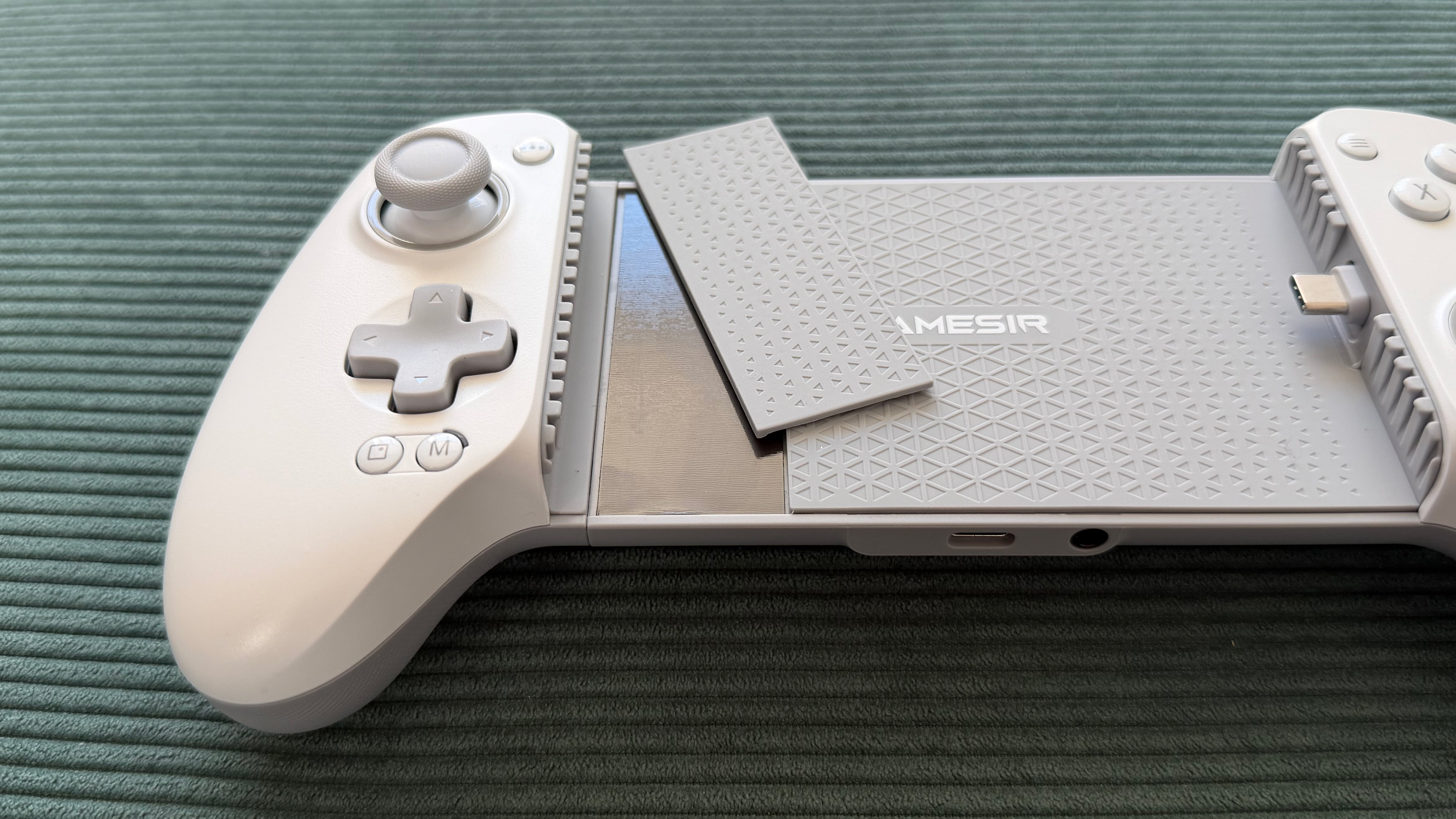
Having tested both of these mobile controllers side by side on the same phones and games, the G8+ MFi addresses just about every gripe I had with the G8 Galileo. The case compatibility improvements alone are worth shouting about, with magnetically swappable silicone pads and a camera bump panel that let you adjust clearance depending on whether your phone is cased or caseless.


The screenshot button has been nudged further from the D-pad, and the ability to physically swap button caps to match your layout is a nice bonus for anyone who switches between Xbox and Nintendo-style mapping. The core controller feel, including the high stick sensitivity and trigger response, is identical to the G8 Galileo, but the GameSir app now works on both iOS and Android.
There are vibration motors in each grip now, which should be a nice add-on, but sadly, they go completely unused by every game I tested on both Android and iOS. Admittedly, that’s more the fault of developers than GameSir, however. With that oversight, there’s probably not quite enough here to justify replacing an original G8 if you’re an Android user. But for everyone else, this is the version to buy.

GameSir G8+ MFi: Price and availability
- List price: $79.99 / £79.99 / AU$129.99
- Available via Amazon, GameSir, and major retailers
- Same price as the G8 Galileo it effectively replaces, but both are available
GameSir launched the G8+ MFi in late 2025, two years after the G8 it’s built on, but despite the upgrades, it retains the same $79.99 / £79.99 / AU$129.99 price tag. That sees it continue to undercut rivals like the Backbone One 2nd Gen ($99.99 / £99.99), though it can now stack up head-to-head with them on compatibility thanks to the added MFi certification.
GameSir’s naming across the G8 range remains confusing, and a shared price point doesn’t help matters. The G8+ comes in both Type-C (wired, that I’m reviewing here) and Bluetooth variants.
There’s also the original G8 Galileo, which is Android-only. Sometimes it’s called the G8+, sometimes it’s the G8 Plus. Sometimes Galileo gets a shoutout in there, sometimes he doesn’t. If you’re shopping, double-check you’re getting the right version for your device and not selling yourself short on feature set.
GameSir G8+ MFi: Specs
| Row 0 – Cell 0 |
GameSir G8+ MFi |
|
Price |
$79.99 / £79.99 / AU$129.99 |
|
Dimensions |
9.02 x 4.20 x 2.13in / 229 x 106.8 x 54.2mm |
|
Weight |
10.72oz / 304g |
|
Connection |
Wired USB-C (pivoting connector) |
|
Compatibility |
iPhone (USB-C), iPad mini 6+, Android 8.0+ |
|
Software |
GameSir App (iOS and Android) |
GameSir G8+ MFi: Design and features
- Familiar G8 ergonomics with a wider platform and stretch for iPad mini compatibility
- Swappable ABXY button caps and improved case compatibility
- Works natively with both Android and iOS devices
If you’ve used the GameSir G8 Galileo, the G8+ MFi will feel immediately familiar. In fact, if you’ve used an Xbox 360 or Series controller, the G8+ will feel familiar too. The full-size, contoured grips are the same chunky shape as Xbox’s offering, and the same laser-engraved texturing carries over from the G8.
It’s noticeably comfortable to hold and feels like a proper device rather than a homebrew solution to gaming on your phone. The same overall build quality remains, too: it’s robust, doesn’t flex or creak, and materials feel premium.
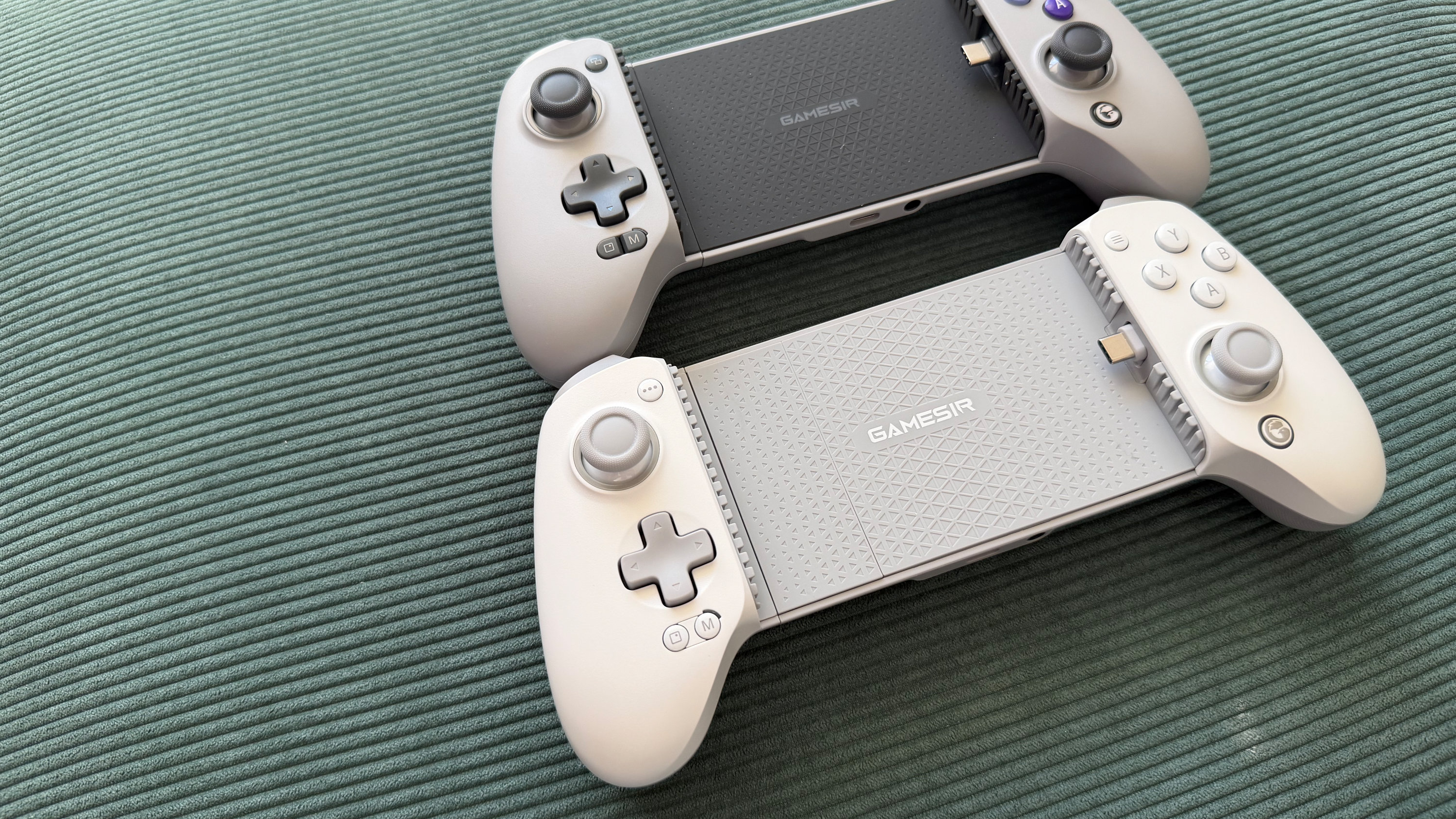
Placed side by side with its sibling, the G8+ MFi’s phone deck is noticeably wider, but in isolation, I’m not sure you’d actually clock the difference. It’s heavier too, at 304g versus the G8’s 252g, though again the extra weight didn’t really register during testing. The light grey-and-white colorway is an improvement from the G8 Galileo’s uniform, darker grey for my eye. It looks a little more refined in this brighter skin, but that’s personal taste, and you don’t get a choice anyway.
The MFi certification is the headline upgrade and a welcome addition for Apple fans. Where the G8 Galileo only officially supported Android, the G8+ MFi is certified for iPhones with USB-C and the iPad mini 6 and newer. It auto-detects which platform it’s connected to and switches mode accordingly, which worked without issue across both my POCO X5 Pro 5G and iPhone 17 Pro during testing. The GameSir app recognized the controller on both phones, too, which wasn’t the case with the G8.
The wider stretch range, a full 30mm increase over the original, means the G8+ MFi can now accommodate an iPad mini, though without one to hand, I’ll have to take GameSir’s word for it. What I did appreciate was the removable magnetic back panel on the left side of the phone deck. This easily pops off to create more clearance for phones with larger camera bumps. It’s a nice quality of life addition that did its job perfectly with my cased iPhone, though
I’m not sure what GameSir thinks I’m going to do with that easily losable piece. A slot to tuck it into or even a magnetic spot on the back to stow it would have been much appreciated. I imagine we’ll see a lot of G8 Plus’ with a black stripe on the left side over time.
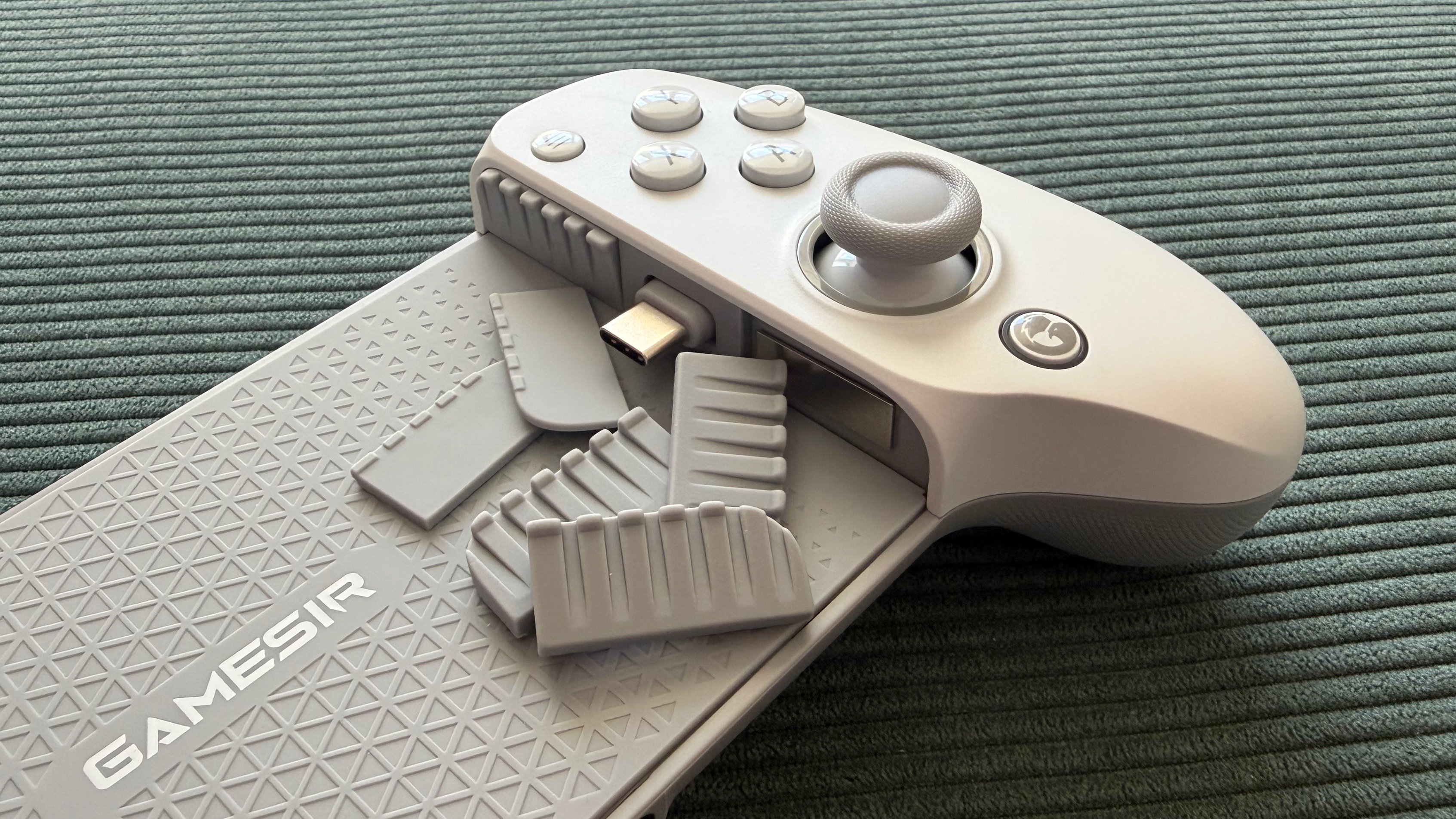

Case compatibility is where the G8+ MFi makes its biggest practical design improvement over the G8. GameSir now includes magnetic silicone pads of different thicknesses to change the buffer size around the port.
I played with my iPhone case on, and the controller accommodated it comfortably, which was something I couldn’t manage on the G8 Galileo without worrying about the USB-C connector angle. It’s probably still not going to handle a chunky Otterbox, but standard slim cases are no longer a problem. For all the clever tweaks and design changes, the USB-C connector is still my favorite choice GameSir made, and I’m glad it’s unchanged on the G8+. It pivots freely up and down, which makes seating and removing your device a doddle.
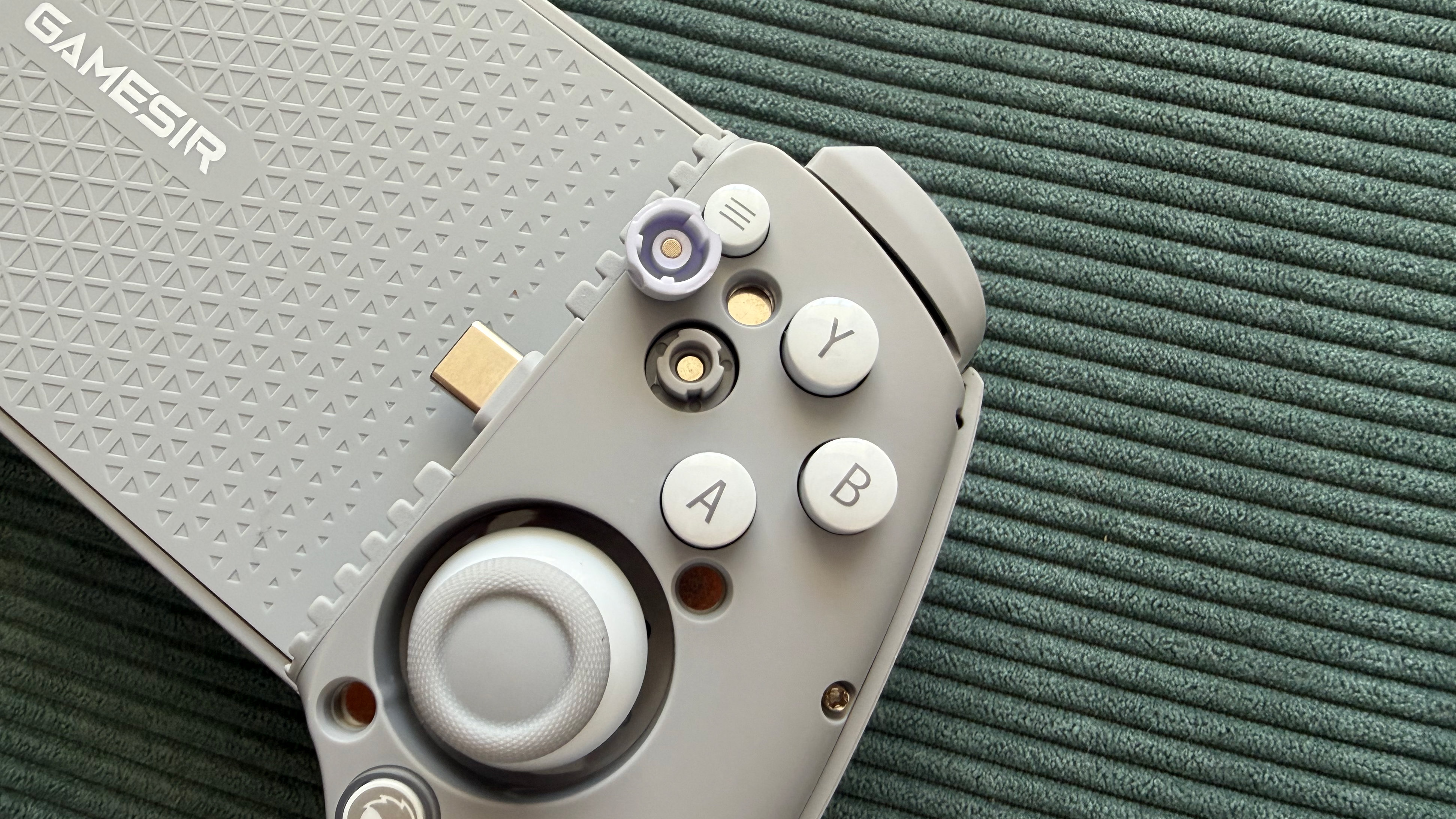
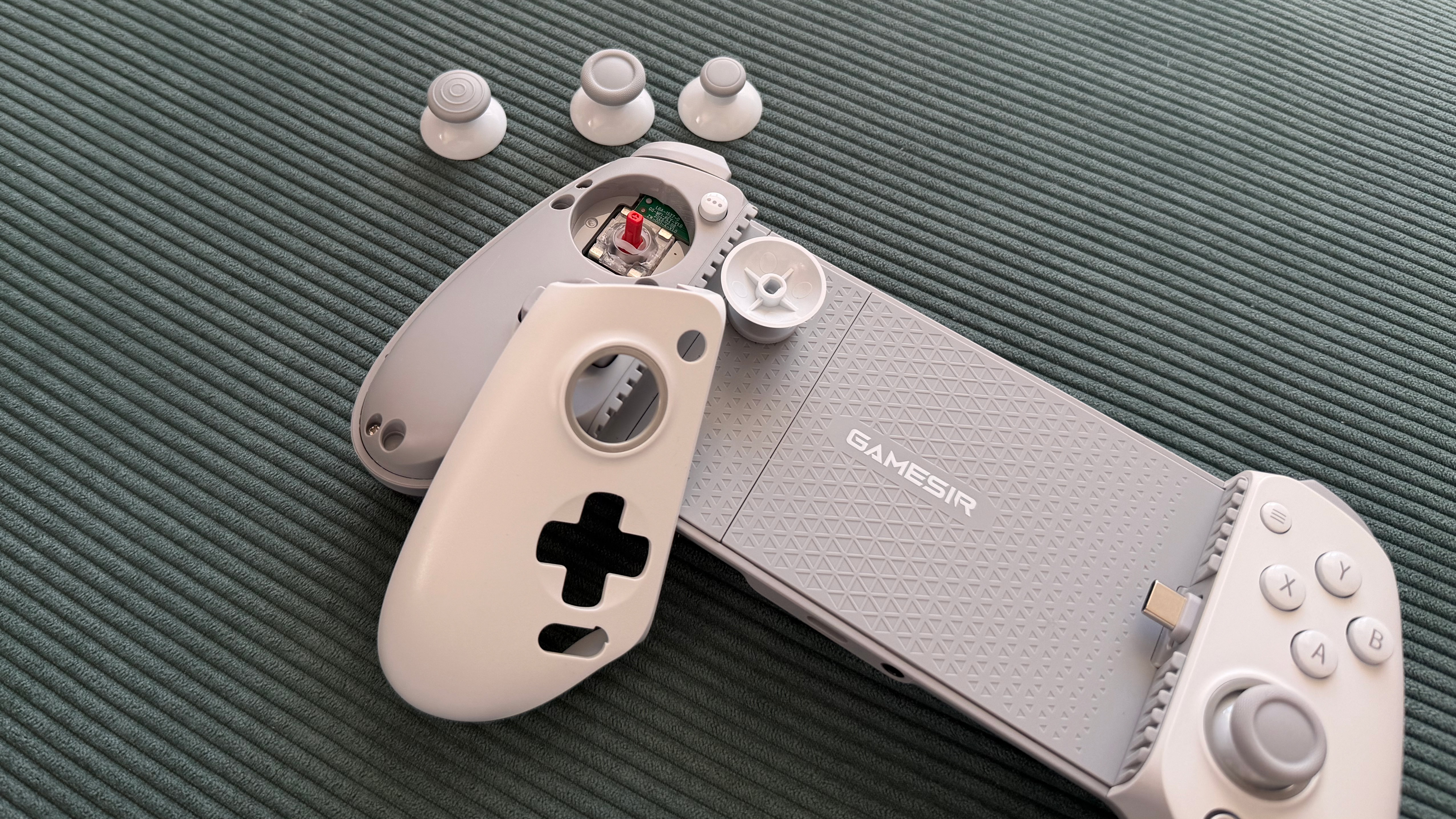
The magnetic faceplate system on the grips carries over from the G8, too, but the G8+ MFi adds swappable ABXY button caps on top of the interchangeable thumbstick options. You can physically rearrange the face button layout to match Xbox or Nintendo mapping, which is a nice complement to the software remapping available in the app. Three replacement thumbstick caps are included (short, tall, dome), but you still only get one of each.

GameSir G8+ MFi: Performance
- Hall effect sticks and triggers, including hair-trigger mode
- Two customizable M buttons on the back
- Vibration motors in each grip, though they’re rarely used
When it comes to gaming with the GameSir G8+ MFi, the bits that were great before are still just as great here; en-something-ification clearly isn’t in the GameSir dictionary. The Hall effect thumbsticks and triggers are, as far as I can tell, identical to those on the GameSir G8 Galileo.
The sticks are smooth and precise with a high level of sensitivity. If you’re coming from a cheaper controller, you may need some time to adjust, but increased control is certainly worth the effort.
The triggers have full analog travel along with a hair-trigger mode that’s snappy and reliable, perfect for shooters. If you’re upgrading from the G8, there’s no change in input quality here, which is no bad thing, but don’t jump across expecting an even better experience. Deadzone and hair-trigger settings are configurable through the GameSir app, and the app now working on iOS means iPhone users get the same tuning options Android users have always had.
The G8+ MFi’s d-pad has a slightly mushy wobble, though a snappy, clicky feel when you fire it off. Travel distance is short with a clear click for each direction, including diagonally. The screenshot button has been repositioned slightly further from the D-pad down compared to the G8, and the improvement was both noticeable and very welcome. I didn’t accidentally trigger it during testing, which was a recurring frustration for me previously
Around the back of the G8+ are two programmable buttons, labeled M1 and M2 (compared to L4 and R4 on the last model). They’re something of a rarity for mobile controller grips at this price, with the likes of the Backbone One skipping them entirely. I found them well-sized and positioned just about perfectly.
They’re close to where your fingers naturally rest without getting in the way, taking just the right amount of force to avoid accidental presses. They ship unbound by default, so you’ll need the GameSir app to assign functions, and you can only mirror existing buttons on them, no macros.

The dual asymmetric vibration motors are the one new feature that falls flat. They work fine in the GameSir app’s test mode, delivering both strong and subtle vibrations that feel perfectly capable, if a little slow to spin up. The problem is that no game I tested, on either Android or iOS, actually utilized them.
Fortnite, Call of Duty Mobile, Forza Horizon 5, and Shadow of the Tomb Raider via Xbox cloud gaming, nothing. I believe this is actually a mobile gaming ecosystem issue rather than a GameSir problem; developers just aren’t bothering or don’t have the means to communicate this information to devices. That may well change in the future, but right now, don’t go grabbing the G8+ expecting haptic feedback as you’d get on console.
The GameSir G8+ MFi features passthrough USB-C charging and a 3.5mm headphone jack, which carry over from the G8 Galileo, and both worked without issue again throughout testing. Passthrough charging reported fast charge speeds on both the POCO X5 Pro and iPhone 17 Pro with no overheating.
The headphone jack remains a welcome inclusion for latency-free wired audio The dedicated GameSir button on the controller has inconsistent behavior on Android, sometimes acting as a home button and occasionally opening the GameSir app instead. On iOS, it seemed to do nothing at all, but it will light up a different color to confirm you’re in the right compatibility mode for your device.

Shoudl you buy the GameSir G8+ MFi?
Buy it if…
Don’t buy it if…
Also consider…
Can’t decide if the GameSir G8+ MFi is the one to get? Here’s how it compares to other, similar controller grips.
| Row 0 – Cell 0 |
GameSir G8+ MFi Galileo MFi |
Razer Kishi Ultra |
Backbone One 2nd Gen |
|
Price |
$79.99 / £79.99 / AU$129.99 |
$149.99 / £149.99 / AU$269.95 |
$99.99 / £99.99 / AU$179.99 |
|
Dimensions |
9.02 x 4.20 x 2.13in / 229 x 106.8 x 54.2mm |
9.64 x 4.36 x 2.53in / 244.8 x 110.8 x 64.3mm |
6.93 x 3.70 x 1.34in / 176 x 93.98 x 34.03mm |
|
Weight |
10.72oz / 304g |
9.38oz / 266g |
4.86oz / 138g |
|
Connection |
Wired (USB-C) |
Wired (USB-C) |
Wired (USB-C / Lightning) |
|
Compatibility |
Android, iOS |
Android, iOS |
Android, iOS |
|
Software |
GameSir App |
Razer Nexus |
Backbone App |
GameSir G8+ MFi: One-minute review
- I spent a few days testing on both an iPhone 17 Pro and POCO X5 Pro
- I played Fortnite, Call of Duty Mobile, Need for Speed No Limits, plus Forza Horizon 5 and Shadow of the Tomb Raider via Xbox Cloud Gaming
- I played with the various customization options and tried to get the rumble working, unsuccessfully
I approached testing the GameSir G8+ MFi with the question of not only how it fared in general, but specifically how it compared to the G8 Galileo upon which it was built. I used the same two phones and the same set of games to put them directly head-to-head. This allowed me to isolate exactly what’s changed between the two controllers and whether those changes are meaningful in practice.
I tested case compatibility with a slim iPhone case, tried all swappable thumbstick and button cap configurations, checked vibration motor response across multiple games on both platforms, and verified that the GameSir app provided full functionality on both iOS and Android. I also investigated the GameSir button behavior on both operating systems and tested passthrough charging on both devices.
First reviewed April 2026
You must be logged in to post a comment Login