
GEEKOM A5 Pro: 30-second review
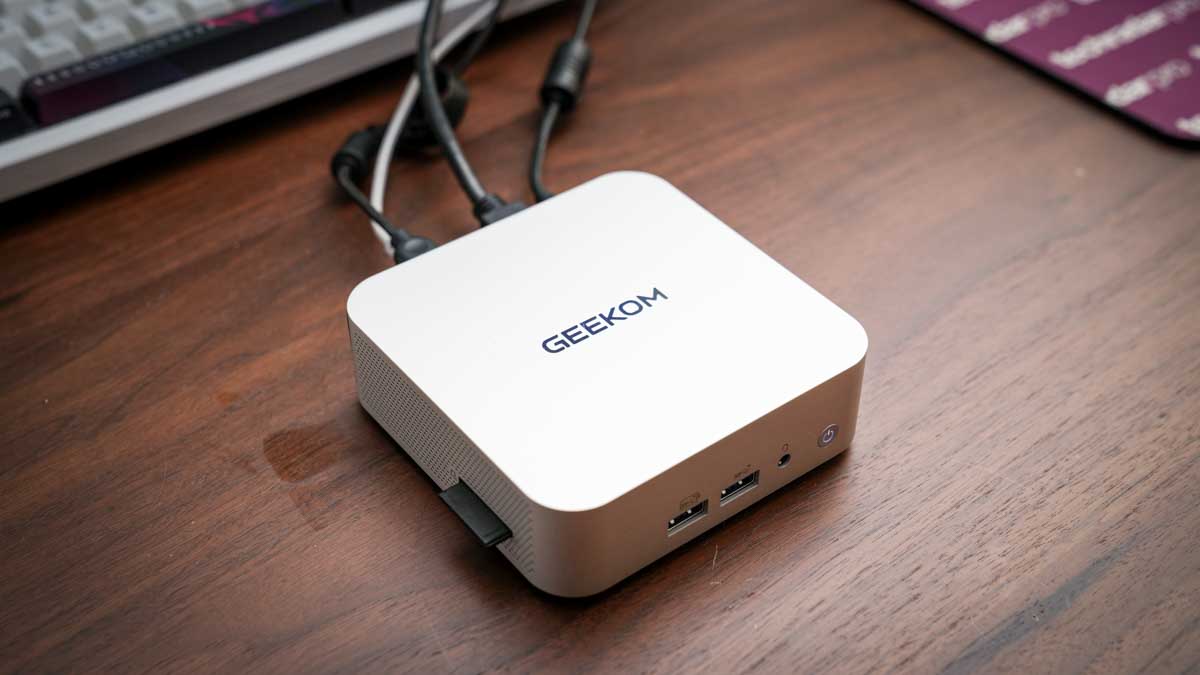
The Geekom A5 Pro at 112.4 x 112.4 x 37mm is one of the smaller Mini PCs that I’ve looked at; however, removing it from the box, the all-aluminium casing gives it an instantly premium look and feel. The finish is exceptional, and it’s a good, solid machine that will be equally at home in the office or used as a portable machine in the field, for events or any situation where a PC is required. The design is decidedly premium, and unlike some of the more plastic Mini PC options, there’s an overall feeling of quality and style that would make this a perfect option for offices as well as stylish studios.
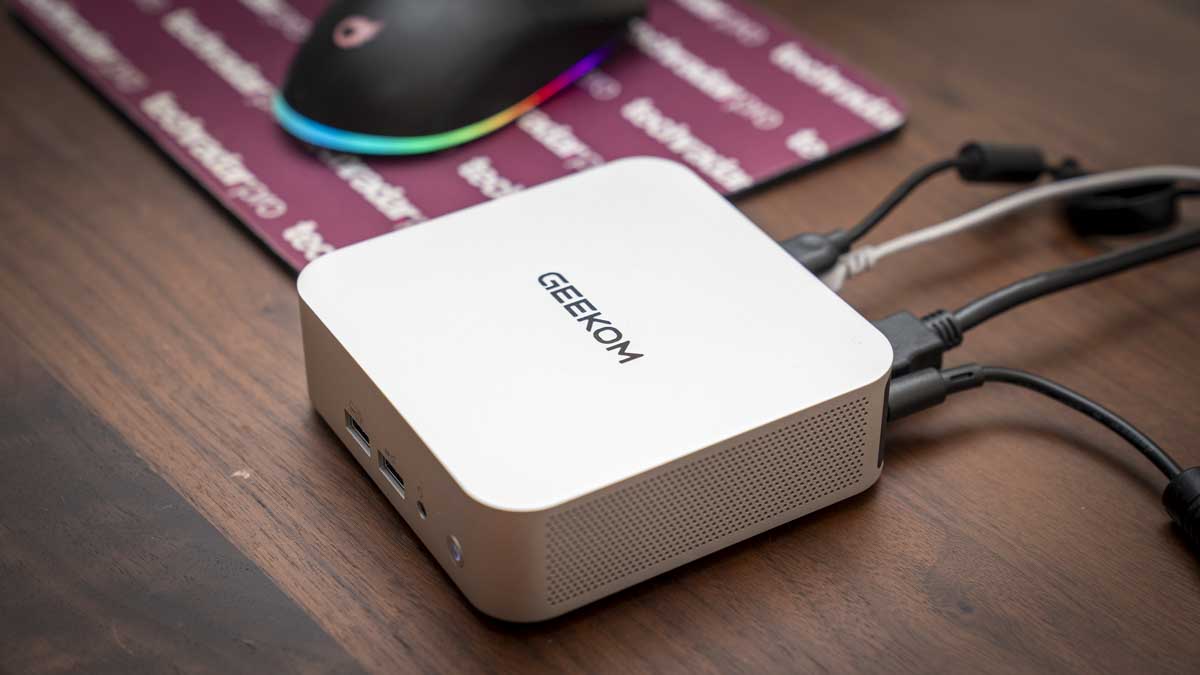
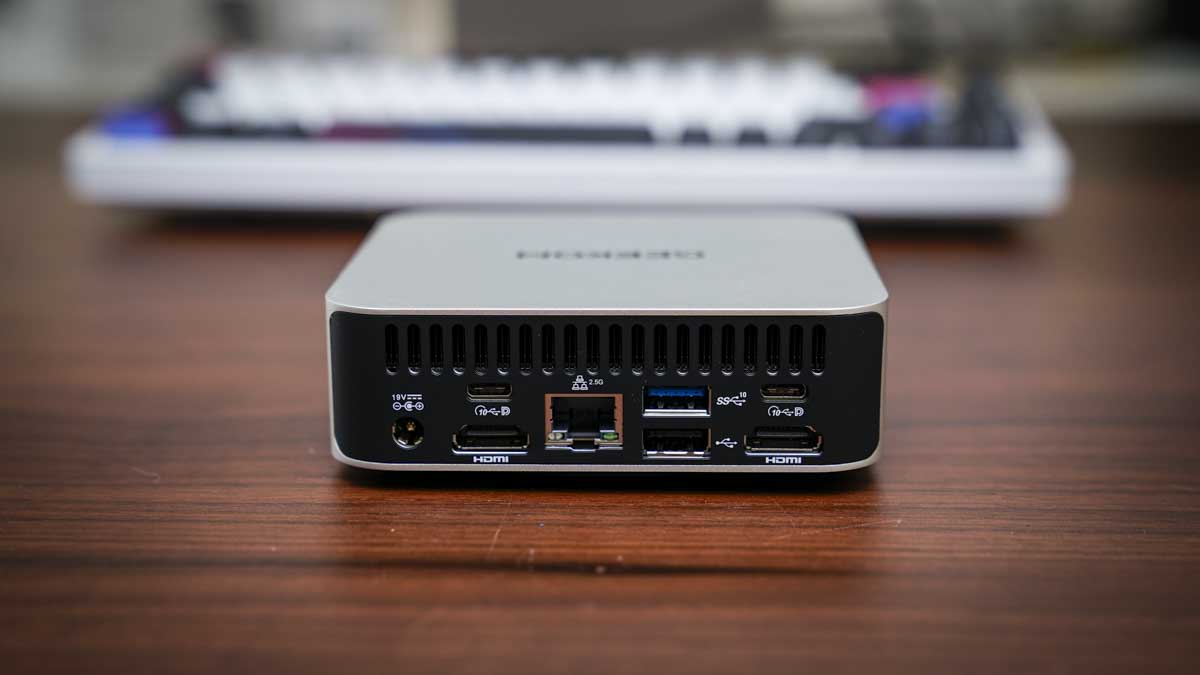
One of the features that I like about this machine is the port layout, which, as ever, is split between the front and rear. The front features two USB 3.2 Gen 2 Type-A ports and a 3.5mm audio combo, and on the side is an SD card reader. Around the back, there are two more USB Type-A ports, one 3.2 Gen 2 and the other USB 2.0.
There are also two USB 3.2 Type-C ports, dual HDMI 2.0 ports, and the 2.5GbE LAN port. That LAN port is a step up from Gigabit Ethernet that I usually see on machines of this size and price, and when connected to the UGREEN NAS, it delivered faster file transfer rates for archiving images and footage.
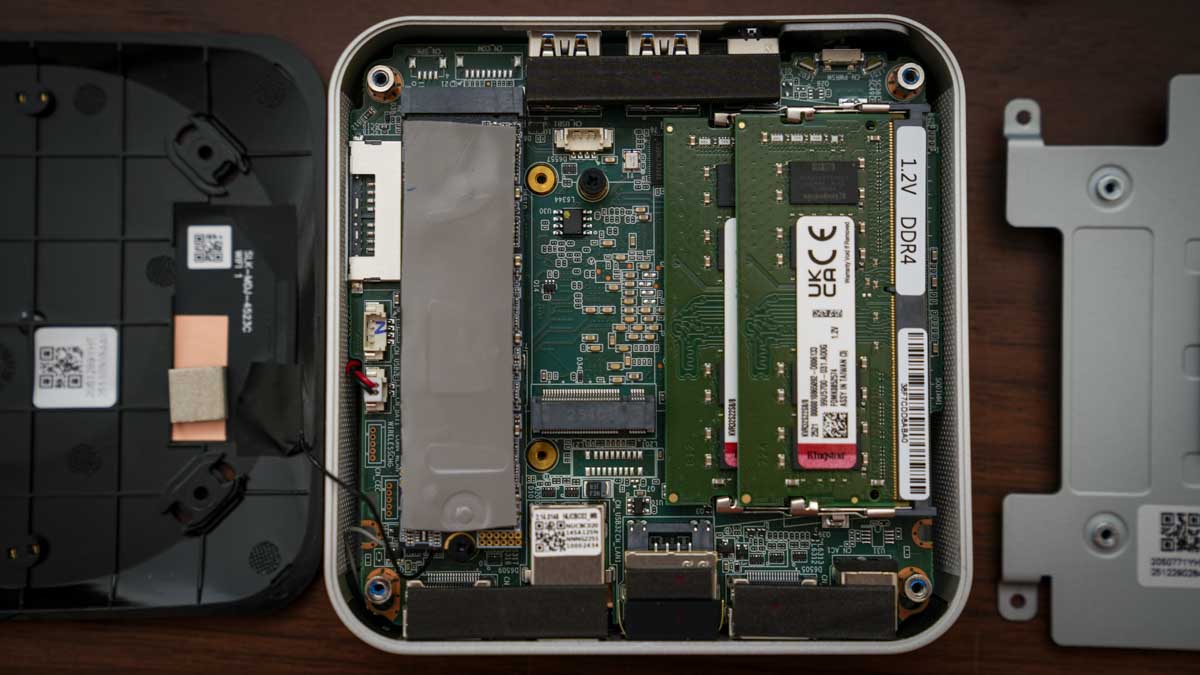
Powering the machine is an AMD Ryzen 5 7430U, which is paired with 16GB of DDR4. The 16GB is split between two channels, 8GB in each, and this helps ensure that the dual-channel potential is utilised, which is something that has limited other Mini PCs that offer the same RAM but in a single channel, which proves to be far slower. This dual-channel configuration did provide a boost in performance over similar machines, with applications loading faster, especially with Lightroom and Photoshop.
As I pushed the system with the creative apps, the cooling system IceBlast 2.0 kicked in. For a small machine, the noise was kept to a minimum and far lower than I would have expected. For most of the test, it was effectively silent, and even under extended office use, writing this review, the fan noise was hardly noticeable.
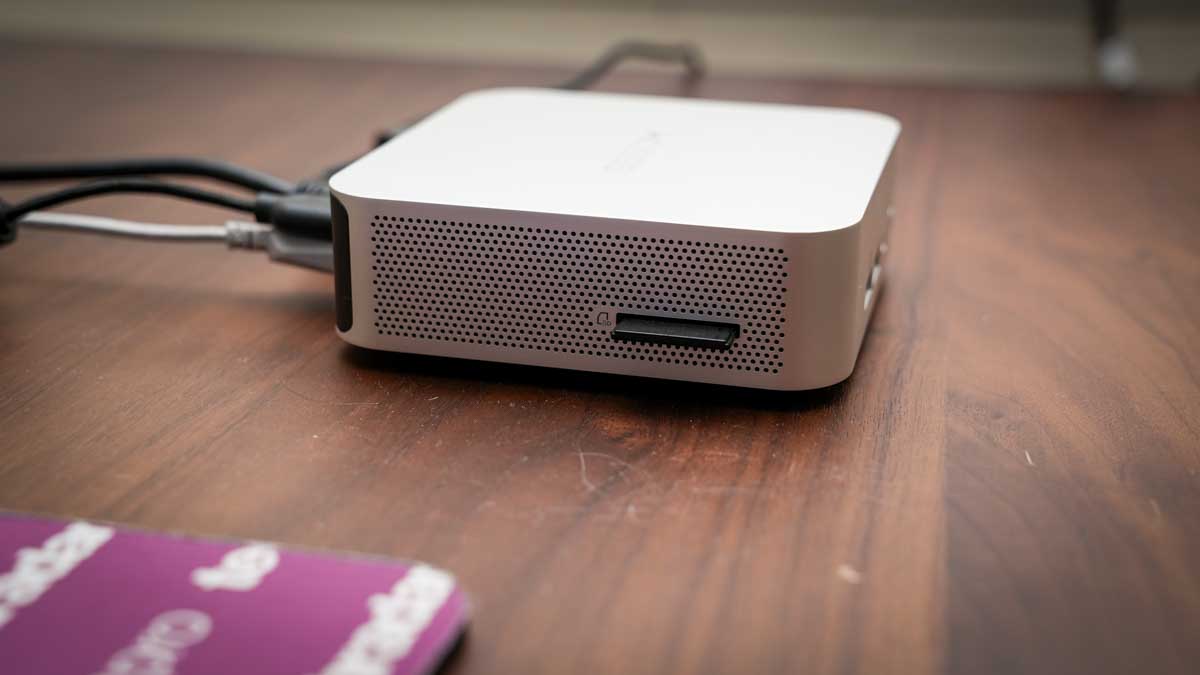
One of the additions that I always like to see is an SD card reader on the side. This just makes downloading images and videos that much faster, without needing to locate a card reader. Transferring 90GB of data from an SD card took around 9 minutes and 30 seconds, which is a reasonable speed.
Another feature that highlights its use in the office is the ability for quad display output, and this can be done through the dual HDMI and dual USB-C. I was only able to test with two 4K BenQ monitors running via HDMI or USB-C, but the machine was powerful enough to cope.
While this machine’s GPU is limited, especially for gaming or mid-level creative work, for office use, the small machine packs plenty of power – expect to see it included in our guide to the best mini PCs soon.
GEEKOM A5 Pro: Price and availability
- How much does it cost? $499/£499 RRP
- When is it out? Available now
- Where can you get it? Directly from Geekom and Amazon.com
The Geekom A5 Pro is available from Geekom in the US for $569 and via Geekom UK for £518.
You can save an extra 7% when you use our exclusive code TECHA5PRO
This mini PC is also available from Amazon.com and Amazon.co.uk.

GEEKOM A5 Pro: Specs
CPU: AMD Ryzen 5 7430U
GPU: AMD Radeon Vega 8 Graphics
Memory: 16GB DDR4 SODIMM(Max 64GB)
Storage: 1TB M.2 2280 PCIe 3.0 ×4 NVMe SSD (up to 2 TB) and M.2 2242 SATAIII SSD, (up to 1 TB)
Display output: 2x HDMI 2.0 (4K@60Hz), 2x USB 3.2 Gen 2 Type-C
Front Ports: 2 x USB 3.2 Gen 2 Type-A (10Gbps), 3.5mm audio jack
Rear ports: USB 3.2 Gen 2 Type-A (10Gbps), USB 2.0 Type-A, 2 x USB 3.2 Gen 2 Type-C, 2x HDMI 2.0, 2.5GbE RJ45, DC in
Wireless: Wi-Fi 6, Bluetooth 5.2
Kensington lock: Yes
OS: Windows 11 Pro
Dimensions: 112.4 x 112.4 x 37mm
In the box: A5 Pro Mini PC, VESA mount, 65W power adapter, HDMI cable, user guide
Warranty: 3 years
GEEKOM A5 Pro: Design
The Geekom A5 Pro is one of the smallest mini PCs I have tested, yet while closely packed, the ports, both front and back, are well laid out. The all-aluminium alloy chassis gives it a real premium feel and means that if you want this as a portable machine, that build quality should stand up. The machine feels solid and well-made, with a minimalistic quality that will appeal to many.
When it comes to the size, as already mentioned, it is small at 112.4 x 112.4 x 37mm, just larger than your palm-sized, so if you want, it’s more than small enough to be attached behind a monitor on a VESA bracket or slipped into a bag for location use.
The included VESA mount makes monitor mounting easy; however, as it is so small, it will equally take up very little space on a desk. One practical issue with VESA mounting is that if it is hidden behind a monitor, reaching the SD card reader on the side may be an issue. If you are planning to use the card reader, placing it on your desk will be a better idea, especially as it takes up so little room.
When it comes to connectivity, there are a surprising number of options considering the small size. On the front, there are two USB 3.2 Gen2 ports and an audio jack, while on the side, there’s the SD card reader.
Round at the rear, there’s the rest of the connections: dual HDMI 2.0 ports for monitors, dual USB-C ports with DisplayPort support, a USB 3.2 Gen 2 Type-A and a USB 2.0 port, and the 2.5GbE LAN port. The rear port density is well balanced considering the size, and the fact that it has a 2.5GbE LAN over the more usual Gigabit Ethernet is good to see.
As this is such a small machine, decent cooling is essential, and here the IceBlast 2.0 cooling system is in place. This uses dual copper heatpipes and a large fan with side intake and rear output so that plenty of cool air is drawn through the system.
In practice, even under load, I found that the machine remained exceptionally quiet, which is good if you’re using this as an everyday office machine for general work and light creative use. Even when pushing the GPU harder with Lightroom catalogues or video timelines, the fan remained relatively subdued. Just checking the heat of the chassis, and it remained cool to the touch throughout the test.
While this is in no doubt due to the cooling system, the fact that the chip’s 20W TDP means that the entire system will be running cooler than many higher-powered mini PCs.
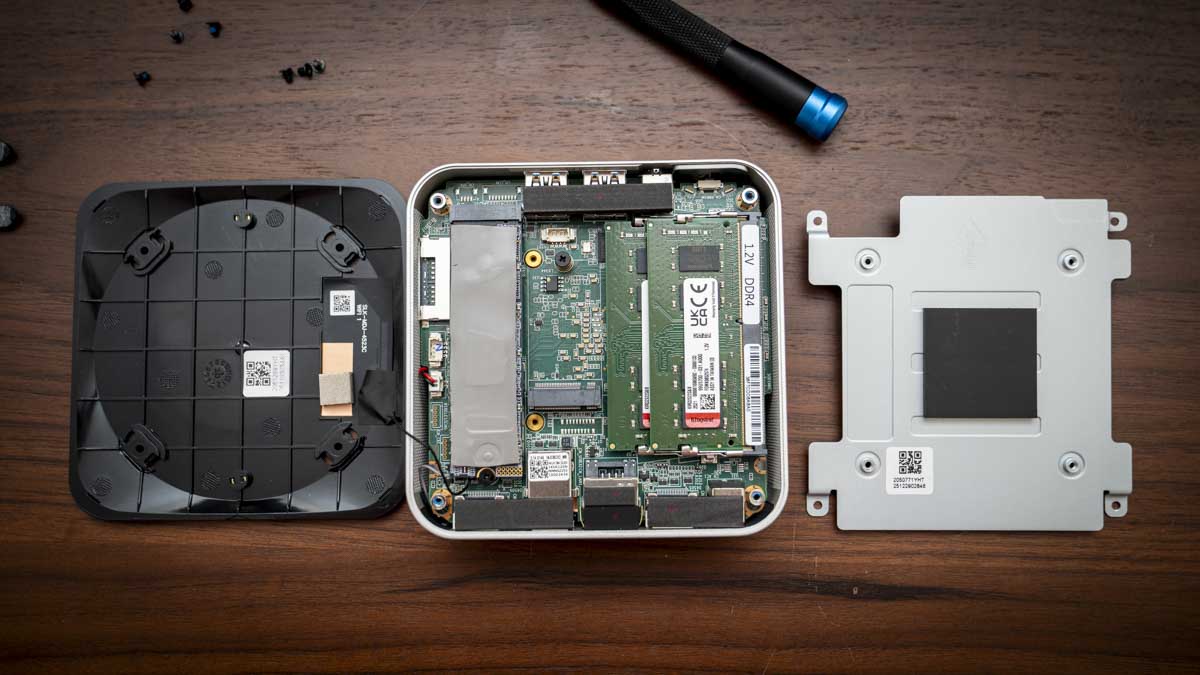
Through the test, I took a look at the upgrade root for RAM and SSD, and the internal access is notably easier than that of some competitors. Removing four screws from the base lifts the cover, revealing both SO-DIMM and M.2 slots, all accessible without too much issue.
The primary M.2 2280 slot takes NVMe drives up to 2TB, and the secondary M.2 2242 SATA slot adds up to 1TB more, enabling a potential 3TB of internal storage. Upgrading RAM to up to 64GB is equally straightforward.
GEEKOM A5 Pro: Features
Taking a look at the features, aside from the computing components, the small size has to lead the field. The fact that you have such a small machine in a solid aluminium chassis does make this Mini PC instantly appealing. Although from the outset, the lack of a powerful GPU means that while this is a good, powerful PC for office-based work, for creative and gaming, its feature set and performance are limited.
At the heart of the machine is an AMD Ryzen 5 7430U featuring a 6-core, 12-thread chip based on Zen 3 architecture with a 20W TDP, boosting to 4.3GHz. Essentially, this processor is focused on efficiency rather than performance.
What makes a difference to this machine compared with others that I have looked at that also use this processor is the RAM configuration. The 16GB arrives as two 8GB sticks in dual-channel mode, which delivers a noticeably better experience than single-channel alternatives that I have used.
Storage technology is on the older side, with a PCIe 3.0 x4 NVMe SSD in the primary slot. There is a second slot for storage, although this is an M.2 2242 SATAIII SSD, so it is still relatively fast and will take a module up to 1TB. It’s also worth noting that PCIe 4.0 is increasingly common at this price point, and the absence of a Gen 4 drive is a disappointment, even if the Gen 3 speeds are unlikely to cause an issue for office work.
On the side of the machine is the SD card reader, which will appeal to creative users. Transferring image files from an SD card is quick, and having the reader built in without needing an external adapter or hub is convenient and keeps additional accessories off the worksurface.
Networking is also a step up from most machines of this type, with a 2.5GbE LAN port on the rear. During the test, I connected this to the UGREEN NAS via a wired router, and transfer rates were noticeably faster than with Gigabit connections.
While quad-display output is supported via dual HDMI 2.0 and dual USB-C with DisplayPort, during this test, I was limited to two 4K monitors.
Connectivity was also solid for the most part, with Wi-Fi 6 and Bluetooth 5.2 handling wireless connectivity. Wi-Fi performance was consistent at close range but sensitive to line-of-sight distance to the router, with occasional signal drops when the machine was farther from the Eero network.
The Kensington security slot is a useful inclusion for anyone deploying this machine in a shared office or workspace environment. At this price, it is not a common feature, and its inclusion reinforces the professional positioning Geekom aims for with the A5 Pro.
GEEKOM A5 Pro: Performance
Benchmark scores
Benchmark Results:
CrystalDiskMark Read: 6994.18 MB/s
CrystalDiskMark Write: 6188.09 MB/s
Geekbench CPU Multi: 12,600
Geekbench CPU Single: 2,382
Geekbench GPU: 30,577
PCMark Overall: 7,536
Cinebench CPU Multi: 12,133
Cinebench CPU Single: 1,700
3DMark Fire Strike Overall: 3,091
3DMark Fire Strike Graphics: 3,376
3DMark Fire Strike Physics: 15,071
3DMark Fire Strike Combined: 1,094
3DMark Time Spy Overall: N/A
3DMark Time Spy Graphics: N/A
3DMark Time Spy CPU: N/A
Wild Life Overall: 6,834
Steel Nomad Overall: 188
Windows Experience Overall: 8.0
Getting into the performance and the use of this machine was almost instantly apparent. For office-based work, Microsoft Office and all its applications, browsing the internet and light creative work in CapCut, this machine excelled. However, as soon as I started to place demands on the GPU, the machine’s speed started to struggle.
Checking the benchmark results highlighted the strengths of the machine and the PCMark overall score of 5,933, the Geekbench multi-core of 6,903, and the WEI score of 8.0, all of which highlighted that the A5 Pro is a very capable home office machine.
Over other very similar machines that I have tested, the dual-channel RAM configuration has recently given this machine the edge when it comes to performance, although there are still slowdowns. Switching between Lightroom Classic and Photoshop was notably faster, although there’s still quite a wait for many applications to load.
Where this machine is most at home is when running Microsoft Office, and with all applications, Word, Excel, and PowerPoint, the A5 Pro was able to handle everything from large documents to image-heavy presentations without issue.
This is where the Ryzen 5 7430U and the Zen 3 architecture work well and provide fast and reliable performance. Web browsing, media streaming, and general Windows use are where this machine’s strengths definitely lie.
Switching the type of work to light creative, the A5 Pro continues to perform well, although the 1TB SSD capacity is slightly limiting.
Lightroom Classic opened and catalogued files from the Canon EOS R5 C without issues, and basic editing and batch export were manageable once the application had loaded, which can take a while. Photoshop handled basic editing as well as complex multi-layer files at a reasonable speed, although I did find that as I built up complex focus layer stacks, which created larger files, there was a notable slowdown as the Vega 8 graphics started to work harder. Adobe Bridge showed the GPU limits more clearly, with thumbnail rendering becoming especially slow.
Again, referring back to the benchmarks, the Geekbench GPU score of 13,683 and Fire Strike Graphics of 3,376 show the Vega 8 limitations. 1080p video editing is possible, but 4K starts to challenge the system. In Premiere Pro and DaVinci Resolve, 4K timeline work slowed considerably once effects and colour grading were applied. At 1080p, both applications were more manageable, and in a lighter editor like CapCut, the machine handled social media editing well. This is a machine that you can use for some creative work, but it should be seen first as an office machine rather than creative.
As ever, to really push the system, I loaded a series of games, and this is where the machine really hit its limits. Demanding titles like Indiana Jones and the Great Circle would not run, and Hogwarts Legacy was equally beyond the hardware. Older, less demanding titles ran at low settings, which is about as much as the Vega 8 can handle.
Under sustained load, the IceBlast 2.0 cooling system performed well. Even when the machine was working hard, the fan noise remained relatively low, considerably quieter than that of machines running higher-TDP processors in similarly sized chassis. The 20W limit means there is less heat to manage, and the dual copper heatpipe system seemed to keep the machine in check.
The 20W TDP is both an advantage if low power systems are essential to you, especially out in the field or as part of Van Life; however, it’s also the machine’s limitation. The power consumption is exceptionally low, and through the test, I was able to run the machine from a compact power station for a full day, making it a great portable option for location work or van life setups.
The trade-off for this low power draw is the performance, especially under GPU-intensive creative and gaming workloads. If you are looking for a machine for productivity, this machine is a great choice. If you need a machine for more demanding creative use, then look for a higher-powered machine.
GEEKOM A5 Pro: Final verdict
The Geekom A5 Pro is a well-balanced and genuinely impressive home and office mini PC that just about justifies its price.
The all-aluminium build, dual-channel RAM, 2.5GbE networking, SD card reader, quiet operation, and three-year warranty all come together as a well-balanced offering that just takes the edge over similar machines that I have looked at recently. It essentially runs everything that most offices will need, including Microsoft Office and some creative apps.
The PCIe 3.0 SSD and the Vega 8 GPU do feel like older technologies and do limit the machine’s performance, but these aren’t really an issue for the intended market.
If your daily work stays within Office, browsing, and light photo or video editing, the A5 Pro is more than sufficient for your needs. If 4K video editing or GPU-intensive creative work is part of your day-to-day tasks, then the 20W chip will leave you frustrated. If you’re a home-office professional, small-business owner, or content creator who needs a capable secondary machine, this is a good choice at a reasonable cost.
Should I buy the GEEKOM A5 Pro?
|
Value |
Aluminium build, dual-channel RAM, 2.5GbE, SD card reader, and a three-year warranty just make this a reasonable value. |
3.5 |
|
Design |
A well built machines at this size and price, with the all-aluminium chassis and compact form factor being genuinely impressive. |
4.5 |
|
Features |
2.5GbE, SD card reader, quad display support, easy internal access, and VESA mount included mean that there’s plenty on offer |
4 |
|
Performance |
Excellent for productivity and light creative work; however, the 20W Vega 8 GPU reaches its limit quickly with 4K video or gaming |
3.5 |
|
Overall |
A premium-feeling, practically well-equipped home office mini PC that runs quietly, although a little pricy |
3.5 |
Buy it if…
Don’t buy it if…
For more productivity machines, we’ve reviewed the best business laptops around.
You must be logged in to post a comment Login