Tech
Google Earth’s Flight Simulator Arrives on the Web for Quick Aerial Adventures

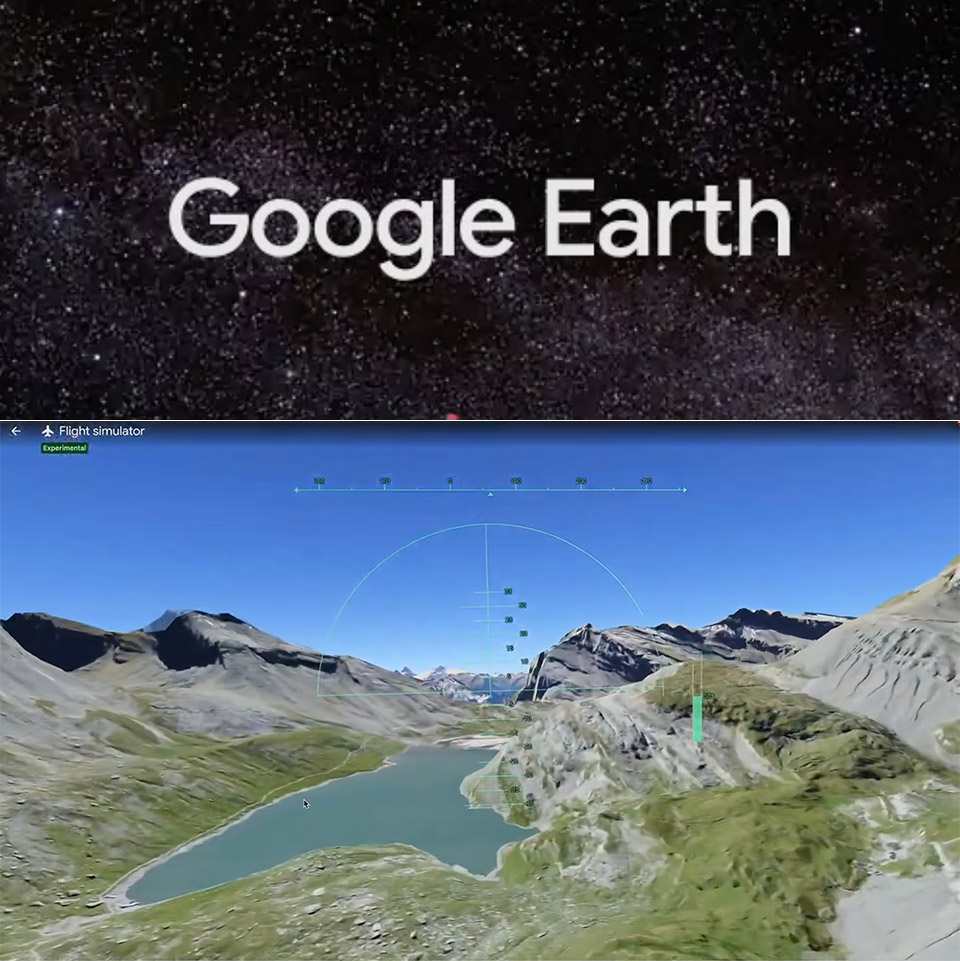
Google rolled out an experimental flight simulator inside its web-based Earth viewer this week. The addition revives a tool long present in the desktop software and opens it to anyone who opens a browser tab. People have been able to access a version of this tool in the desktop software for years, though it stayed mostly out of sight. The web edition brings it to anyone with a browser and an internet connection without extra software.


Getting to the Google Flight Simulator is much easier than you may think; just a few clicks on a computer, you’re ready to go. Go to earth.google.com and then click the Explore Earth button at the top. Now, navigate to the Tools menu and scroll down to find the flying simulator option. When you click on it, the view switches to a cockpit perspective, and you are now looking at the spot you were before zooming in on. Changing the map view to Satellite is like icing on the cake because you can see everything in stunning high-resolution photos and 3D.
Sale


REALFLIGHT Evolution RC Flight Simulator Software with Interlink DX Controller Included RFL2000 Air/Heli…
- A fresh and modern user interface that’s even easier and more intuitive to use, virtually eliminating the need to use a mouse or keyboard with the…
- More than a dozen of the newest and most popular ultra micro, sport, scale, EDF and trainer aircraft from E-flite, HobbyZone and Hangar 9 plus…
- Fly at the newest PhotoField – the main flying site from Triple Tree Aerodrome, home of the world-famous “Joe Nall” and other events
Controls are also far more basic than you might expect, which is intentional. The arrow keys control steering and climbing, while the Page Up and Page Down keys control engine power. If you don’t enjoy keymashing, you can make manual adjustments by clicking on the power gauge. The important thing to remember is that you may switch to mouse control by just clicking within the main display.

The first time you try to fly, you’ll probably roll too quickly and feel all over the place. This is because the flight model is a little rough around the edges, but with little practice, you’ll get the feel of it. If you crash into a building, don’t worry; simply click the restart prompt to get back in the air. Flying over actual satellite photographs dramatically changes the game. When data is available, cities look to be actual cities with real building footprints and heights, and mountain ranges and coastlines all correspond to what you see in the photographs. Even low passes over landmark buildings give a far different impression of size than a 2D map. Of course, how well everything works depends on your connection and the operating system you’re using. If you fly too fast or make too many sharp maneuvers, loading delays may become an issue. In the worst-case scenario, you may encounter visual glitches, albeit these are infrequent.
Google incorporated this little feature as part of their ongoing effort to bring all of the advantages of the desktop version to the web browser. Apparently, customers requested that the flight simulator be included in the web version, and it was. The company has indicated that it was merely something they thought would be enjoyable to add, which makes sense given that it is a tiny feature that is not expressly designed to help you become a Master Pilot. Everything is handled by a single type of airplane, with no weather impacts or sophisticated systems to cope with. Of course, if you’re serious about flying, there are better expert flight simulators out there. For the time being, and at no cost, this tiny selection is a wonderful addition.
[Source]
You must be logged in to post a comment Login