It probably won’t come as much of a surprise to find that most of the Hackaday staff aren’t exactly what you’d call sports fanatics, so we won’t judge if you didn’t tune in for the Super Bowl last week. But if you did, perhaps you noticed Ring’s Orwellian “Search Party” spot — the company was hoping to get customers excited about a new feature that allows them to upload a picture of their missing pet and have Ring cameras all over the neighborhood search for a visual match. Unfortunately for Ring, the response on social media wasn’t quite what they expected.
Nope, don’t like that.
One commenter on YouTube summed it up nicely: “This is like the commercial they show at the beginning of a dystopian sci-fi film to quickly show people how bad things have gotten.” You don’t have to be some privacy expert to see how this sort of mass surveillance is a slippery slope. Many were left wondering just who or what the new system would be searching for when it wasn’t busy sniffing out lost pups.
The folks at Wyze were quick to capitalize on the misstep, releasing their own parody ad a few days later that showed various three-letter agencies leaving rave reviews for the new feature. By Thursday, Ring announced they would be canceling a planned expansion that would have given the divisive Flock Safety access to their network of cameras. We’re sure it was just a coincidence.
Speaking of three-letter agencies, the Environmental Protection Agency has announced this week that they will no longer incentivize the inclusion of stop-start systems on new automobiles. The feature, which shuts off the engine when the vehicle comes to a stop, was never actually required by federal law; rather, the EPA previously awarded credits to automakers that added the feature, which would help them meet overall emission standards. Manufacturers are free to continue offering stop-start systems on their cars if they wish, but without the EPA credits, there’s little benefit in doing so. Especially since, as Car and Driver notes, it seems like most manufacturers are happy to be rid of it. The feature has long been controversial with drivers as well, to the point that we’ve seen DIY methods to shut it off.
An incredible story ran in The Washington Post yesterday (free to read archive) that’s so wild that it’s almost hard to believe. In fact, if it wasn’t from The Washington Post, we’d be sure it was some kind of conspiracy theory fanfic. The short version goes like this: a Norwegian researcher who was so confident the “Havana syndrome” wasn’t the result of a directed energy weapon decided to prove it by not only building some sort of pulsed RF device based on leaked classified documents, but fired the thing at himself as a test. We’re not sure what the Norwegian equivalent to the “Shocked Pikachu Face” meme is, but we’ll give you one guess as to what happened.
Advertisement
If that wasn’t crazy enough, the article goes on to casually mention that the US Department of Homeland Security secretly purchased a similar pulsed-energy weapon for several million dollars on the black market during the Biden administration, and is currently studying it. Despite it apparently containing Russian components, the Feds have yet to determine who actually built the thing. You’ll have a hard time finding a bigger proponent for the free exchange of information than Hackaday, but even we have to admit…maybe there are some things it’s better we don’t know about.
Perfect for Meshtastic
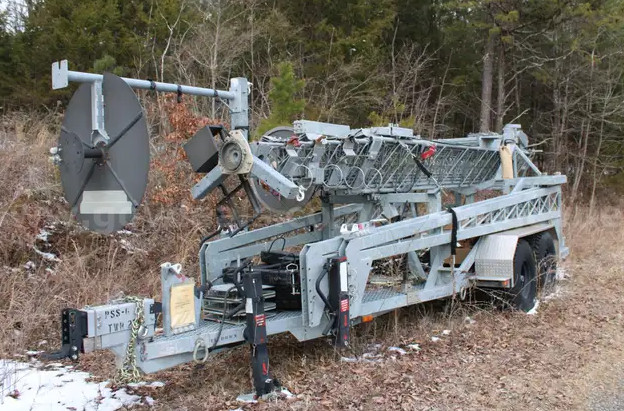
Of course, if you’re looking to really maximize the effects of your black market pulsed-energy weapon, you’ll need to get it up high (maybe, what the hell do we know). Or perhaps you’re just a radio enthusiast. In either event, if you’re within driving distance of Tennessee, you’ll want to keep an eye on this government auction for an 80-foot-tall mobile communications tower. According to the listing posted by the Madisonville Police Department, the towable rig was built in 2016, weighs in at a little over 10,000 pounds, and has been kept in storage. It just needs some air in the tires to get it moving again.
As of this writing, the high bid is just $565, but with 18 days left to go on the auction, we suspect that number will be considerably higher when the gavel drops. We’ll check back next month to see what it sold for, and on the off-chance that any of you actually buy it, please let us know.
If all this talk of mass surveillance and shady government dealings has you down, perhaps a quick game of web-based Descent will lighten the mood. It’s the product of a port to Three.js by [mrdoob], completed with the aid of Claude. We know many of you are critical of AI-produced code, and not without good reason, but the results in this case are pretty slick.
Finally, we’ll go out on a limb and guess that more than a few in the audience are fans of the film Short Circuit, which turns 40 years old this year. In celebration, an event is being planned for June in Astoria, Oregon, where parts of the movie were filmed. As if you needed any other reason to meet Steve Guttenberg, you’ll also get the chance to pose for pictures with Johnny 5 and sit in on Q&A discussions with the cast and crew. There’s even going to be licensed merch for sale, which we can only hope means you’ll be able to buy one of those miniature J5’s from Short Circuit 2. It’s not the sort of event Hackaday generally covers, but we’re certainly tempted.
Advertisement
See something interesting that you think would be a good fit for our weekly Links column? Drop us a line, we’d love to hear about it.
Mercedes-Benz is about to change something fundamental about how cars feel to drive, and it’s not just another software update. The company is bringing steer-by-wire tech to a production vehicle for the first time, starting with the refreshed EQS, and it’s a pretty big departure from how steering has worked for over a century.
Mercedes-Benz
And yes, this is the same kind of tech that’s been used in aircraft for years, and was even showcased on the Mercedes-Benz Vision Iconic. Now, it’s finally making its way into a luxury sedan.
What does “steer-by-wire” actually mean here?
In simple terms, Mercedes is removing the physical connection between the steering wheel and the front wheels. Instead of a mechanical linkage, your inputs are sent electronically to actuators that turn the wheels.
Mercedes-Benz
That might sound a bit unnerving at first, but Mercedes says it has built in multiple redundancies, sensors, and control systems to ensure safety. In fact, the company has already tested the setup for over a million kilometers before bringing it to production. There are also some real advantages here. Because everything is software-controlled, the steering ratio can change dynamically depending on speed, making parking easier while keeping things stable at highway speeds.
Mercedes-Benz
And then there’s the design twist. Since there’s no need for a traditional steering column, Mercedes is pairing this system with a yoke-style steering wheel. It’s flatter, more futuristic, and designed to improve visibility of the instrument cluster.
Why this could be a turning point for cars
With steer-by-wire, carmakers get far more flexibility in how steering behaves, how interiors are designed, and even how future autonomous features are integrated. It also opens the door to a more “software-defined” driving experience. Things like steering feel, responsiveness, and feedback can be tuned digitally, rather than being locked in by hardware.
Mercedes-Benz
Of course, there’s still a trust factor to overcome. Removing a direct mechanical link between driver and wheels is a bold move, and not everyone will be comfortable with it right away. But if Mercedes gets the balance right, this could end up being one of those changes that feels strange at first… and completely normal a few years down the line.
With a denser battery the Arlo Pro 6 adds more battery life over the previous iteration, while maintaining the excellent 2K image quality and flexible installation. With an Arlo Secure subscription you get very powerful object detection, with the highest tier offering person and vehicle recognition into the mix, plus a custom AI detection where you can spot an open gate, missing wheelie bin or pretty much anything else you can think of. All of this together makes the Arlo Pro 6 one of the best and most comprehensive security cameras, but subscriptions are also very expensive and have relatively short video history periods compared to the competition.
You need Arlo Secure for cloud storage and object detection
Introduction
The Arlo Pro 6 2k+ is a somewhat familiar-looking device.
Advertisement
In fact, it looks pretty much like every Arlo camera back to the Arlo Pro 3. Don’t judge this camera on its external looks, as there are enough internal changes that make it a worthy successor to the previous generation (the Arlo Pro 5), including easier setup and a denser battery.
With a more powerful cloud subscription service behind the camera, the Pro 6 can form part of a very capable security system, just don’t expect it to be cheap.
Advertisement
Design and Installation
USB-C Charging
Wall mountable
Can connect to Wi-Fi or a Smart Hub
You can buy the Arlo Pro 6 2K in packs of one, two, three or four, with more expensive kits working out cheaper per camera.
Take a look at the Arlo Pro 5, and the Pro 6 doesn’t seem that different: both look the same, have the same resolution, have a spotlight and are controlled via the same app and cloud service.
Advertisement
But, look a little more closely, and there are some clear changes. First, the camera has a USB-C port, rather than the old magnetic connector of the previous model. That’s a good change, as any USB-C cable can be used, and you don’t have to worry about losing the proprietary connector. In my experience, the USB-C cable seems to charge the battery slightly faster, too.
Image Credit (Trusted Reviews)
Advertisement
Talking of the battery, the new version has a higher-density pack, with 15% more battery life. That should help reduce how often you have to take the camera down for charging, although where it’s pointed and how often recording is triggered.
Image Credit (Trusted Reviews)
Bluetooth is a new addition to the camera, too, which speeds up discovery time when installing the camera. Guaranteed, you only need that the once, but I’ll take anything that makes life easier.
This camera can be connected to Wi-Fi directly or to a Smart Hub, if you have one. A Smart Hub also provides offline recording, although you do lose many of the camera’s best features if doing so.
If you want to go offline and avoid paying for a cloud subscription, something like the EufyCam S4 might make more sense.
Advertisement
Image Credit (Trusted Reviews)
Advertisement
The Arlo Pro 6 comes with a fully adjustable wall mount, which is the same as the one the company has used for years. That’s handy, as you can unscrew and older camera and fit the new one if you need to.
If starting from scratch, the mount is easy to attach to a wall and gives plenty of flexibility to point the camera where you want it.
Features
Needs a subscription to get the most out of the camera
Custom AI detection with the highest subscription tier
Flexible object detection
The Arlo Pro 6 slots into the Arlo app alongside any other cameras you might have. It remains one of my favourite security apps, as it’s so configurable. There’s a home screen that lets me select the location’s modes: Arm Away, Arm Home and Standby.
Just like with a security system, such as the Ring Alarm, these modes let me choose which cameras are active at any time. For example, I have my outdoor cameras record when set to Arm Home, and everything turned on when set to Arm Away.
Advertisement
Advertisement
This page also has customisable widgets, so you can have shortcuts to any camera you want, but you don’t have to have previous of all cameras.
As mentioned above, if you have a Smart Hub you can record offline, but you lose out on all of the smart features. Realistically, then, you need to have an Arlo Secure plan, just be prepared to pay a lot for it.
Arlo Secure gives you cloud recording for one camera at a resolution of up to 2K, with just seven days of history (very stingy), plus Person, Animal, Vehicle and Package Detection.
Upgrade to Secure Multi-Cam and you get cloud storage for four cameras, but otherwise the same features as the single camera package. This costs £11.99 a month, which is still expensive but better overall value than the single camera option if you have more than one camera.
Advertisement
The most advanced features come with the Arlo Secure Plus subscription, which upgrades recording to a maximum of 4K (not relevant here, but it is if you have an Ultra camera), 14 days of cloud history and the new AI detection features, which I’ll get into shortly. This costs £19.99 a month, making it very expensive.
With the more basic package, I can easily cut down on alerts by using motion zones to focus the camera on important areas, and then the excellent people, animal and vehicle detection. Get the right mix, and the number of alerts plummets.
Advertisement
Image Credit (Trusted Reviews)
Pay for the more expensive package and you get person recognition (facial recognition, as most people would call it). You can let the camera pick up people and name them, or feed in photos from your photo library to give the Pro 6 a head start.
Image Credit (Trusted Reviews)
Oddly, people detection is only available on a single camera in your home, so pick the one that makes most sense; most other systems that I’ve tested run facial recognition across all devices.
Vehicle recognition is another new feature. It’s like facial recognition for cars, in that you can tell the camera to spot certain vehicles. This can run on all cameras.
Advertisement
There’s also Custom Detection, which involves taking two snapshots with something different between them: a gate open or a wheelie bin missing, for example. You can then get alerts when the action is detected, either through motion being triggered, by firing the rule at a set time, or when the mode changes.
Advertisement
I set up one to watch for the back door opening, but this proved to be not very reliable, often triggering when there was any motion. I think that the glass doors, and the distance from the camera, confused the system, so Custom Detection might work better with bigger, more obvious changes.
It’s all very clever, and the system is virtually limitless, provided you can train the system, but it’s a very expensive option to have.
Advertisement
All video is recorded to the cloud (assuming you have a subscription), and is available in the Feed section. This can be filtered by date, by device, and then by event type, of which there are far too many to name here. There’s enough granularity to quickly find a clip, although Arlo doesn’t have the fancy AI search that Ring now has.
Image Credit (Trusted Reviews)
Performance
Sharp 2K video
Excellent night vision
Arlo has long been towards the top of the quality tables, and the Pro 6 keeps that record up. Footage is very similar to that from the Pro 5, which isn’t a criticism.
Advertisement
During the day, the footage is exceptionally sharp, and detailed through the frame, with the 160° lens capturing a lot of what’s going on. Colours are excellent and there’s detail through the frame. This is about as good as you can expect from a 2K video camera.
Image Credit (Trusted Reviews)
At night, the Pro 6 can use its spotlight to shoot in full colour, and the results are impressive, with almost as much detail as during the day. The only real change is that motion gets a bit blurry, so it takes a bit of hunting to find a clip where someone’s face is clear; those frames do exist. Again, I’ve not seen better from a 2K camera.
Image Credit (Trusted Reviews)
Arlo says that the battery can last up to eight months on a single charge, although how that pans out will depend on where the camera’s pointing. I recommend angling any battery powered security camera away from high activity areas, such as a main road, to increase battery life.
Based on initial testing, I think that I’d get a good five months between charging, if not longer.
Advertisement
Advertisement
Should you buy it?
You want excellent quality and flexibility
Brilliant 2K footage day and night, flexible placement and long battery life all make this camera a winner whether it’s inside or out.
Advertisement
You want something cheaper to run
Advertisement
This camera works best with an Arlo Secure subscription, which is very expensive compared to the competition, even though it is very good.
Final Thoughts
The overall Arlo system and app remain one of the best available, and the new AI features let you do more than with any other camera, thanks to the training mode. But you have to be prepared to pay for the luxury, and Arlo Secure is expensive and has limited video history compared to the competition.
Advertisement
If you’ve got Arlo Pro 5 cameras, there’s very little here to make it worth the upgrade, but if you’ve got older cameras or are starting from scratch, the Arlo Pro 6 is a brilliant, high-quality camera. If you’d rather have something with cheaper running costs, then read my guide to the best outdoor security cameras.
How we test
Unlike other sites, we test every security camera we review thoroughly over an extended period of time. We use industry standard tests to compare features properly. We’ll always tell you what we find. We never, ever, accept money to review a product.
Find out more about how we test in our ethics policy.
Used as our main security camera for the review period
We test compatibility with the main smart systems (HomeKit, Alexa, Google Assistant, SmartThings, IFTTT and more) to see how easy each camera is to automate.
We take samples during the day and night to see how clear each camera’s video is.
FAQs
Do you need a cloud subscription to use the Arlo Pro 6 2K?
Advertisement
Without a subscription you can view the live feed and get basic notifications, and record to a hub; you need a subscription for cloud storage and for the more advanced detection options.
What’s the difference between the Arlo Pro 6 2K and the Arlo Pro 5?
The Pro 6 has a higher density battery, USB-C charging and it has Bluetooth for faster setup.
Anthropic announced a few hours ago that starting tomorrow, Saturday, April 4, 2026, at 12 pm PT/3 pm ET, it will no longer be possible for those Claude subscribers to use their subscriptions to hook Anthropic’s Claude models up to third-party agentic tools, citing the strain such usage was placing on Anthropic’s compute and engineering resources, and desire to serve a wide number of users reliably.
“We’ve been working hard to meet the increase in demand for Claude, and our subscriptions weren’t built for the usage patterns of these third-party tools,” wrote Boris Cherny, Head of Claude Code at Anthropic, in a post on X. “Capacity is a resource we manage thoughtfully and we are prioritizing our customers using our products and API.”
The company also reportedly sent out an email to this effect to some subscribers. However, it’s not certain if subscribers to Claude Team and Enterprise will be impacted similarly. We’ve reached out to Anthropic for further clarification and will update when we hear back.
Advertisement
To be clear, it will still be possible to use Claude models like Opus, Sonnet, and Haiku to power OpenClaw and similar external agents, but users will now need to opt into a pay-as-you-go “extra usage” billing system or utilize Anthropic’s application programming interface (API), which charges for every token of usage rather than allowing for open-ended usage up to certain limits, as the Pro and Max plans have allowed so far.
The reason for the change: ‘third party services are not optimized’
The technical reality, according to Anthropic, is that its first-party tools like Claude Code, its AI vibe coding harness, and Claude Cowork, its business app interfacing and control tool, are built to maximize “prompt cache hit rates”—reusing previously processed text to save on compute.
Third-party harnesses like OpenClaw often bypass these efficiencies. “Third party services are not optimized in this way, so it’s really hard for us to do sustainably,” Cherny explained further on X.
He even revealed his own hands-on attempts to bridge the gap: “I did put up a few PRs to improve prompt cache hit rate for OpenClaw in particular, which should help for folks using it with Claude via API/overages.”
Advertisement
Prior to the news, Anthropic had also begun imposing stricter Claude session limits every 5 hours of usage during business hours (5am-11am PT/8am-2pm ET), meaning that the number of tokens you could send during those sessions dropped.
This frustrated some power users who suddenly began reaching their limits far faster than they had previously — a change Anthropic said was to help “manage growing demand for Claude” and would only affect up to 7% of users at any given time.
Discounts and credits to soften the blow
Anthropic is not banning third-party tools entirely, but it is moving them to a different ledger. The new “Extra Usage” bundles represent a middle ground between a flat-rate subscription and a full enterprise API account.
The Credit: To “soften the blow,” Anthropic is offering existing subscribers a one-time credit equal to their monthly plan price, redeemable until April 17.
The Discount: Users who pre-purchase “extra usage” bundles can receive up to a 30% discount, an attempt to retain power users who might otherwise churn.
Capacity Management: Anthropic’s official statement noted that these tools put an “outsized strain” on systems, forcing a prioritization of “customers using our core products and API.”
‘The all you-can-eat buffet just closed’
The response from the developer community has been a mixture of analytical acceptance and sharp frustration.
Advertisement
Growth marketer Aakash Gupta observed on X that the “all-you-can-eat buffet just closed,” noting that a single OpenClaw agent running for one day could burn $1,000 to $5,000 in API costs. “Anthropic was eating that difference on every user who routed through a third-party harness,” Gupta wrote. “That’s the pace of a company watching its margin evaporate in real time.”
However, Peter Steinberger, the creator of OpenClaw who was recently hired by OpenAI, took a more skeptical view of the “capacity” argument.“Funny how timings match up,” Steinberger posted on X. “First they copy some popular features into their closed harness, then they lock out open source.”
Steinberger claimed that he and fellow investor Dave Morin attempted to “talk sense” into Anthropic, but were only able to delay the enforcement by a single week.
Advertisement
User @ashen_one, founder of Telaga Charity, voiced a concern likely shared by other small-scale builders: “If I switch both [OpenClaw instances] to an API key or the extra usage you’re recommending here, it’s going to be far too expensive to make it worth using. I’ll probably have to switch over to a different model at this point.”
.“I know it sucks,” Cherny replied. “Fundamentally engineering is about tradeoffs, and one of the things we do to serve a lot of customers is optimize the way subscriptions work to serve as many people as possible with the best mode
Licensing and the OpenAI shadow
The timing of the crackdown is particularly notable given the talent migration. When Steinberger joined OpenAI in February 2026, he brought the “OpenClaw” ethos with him.
OpenAI appears to be positioning itself as a more “harness-friendly” alternative, potentially using this moment as a customer acquisition channel for disgruntled Claude power users.
Advertisement
By restricting subscription limits to their own “closed harness,” Anthropic is asserting control over the UI/UX layer. This allows them to collect telemetry and manage rate limits more granularly, but it risks alienating the power-user community that built the “agentic” ecosystem in the first place.
The Bottom Line
Anthropic’s decision is a cold calculation of margins versus growth. As Cherny noted, “Capacity is a resource we manage thoughtfully.”
In the 2026 AI landscape, the era of subsidized, unlimited compute for third-party automation is over.
For the average user on Claude.ai, the experience remains unchanged; for the power users running autonomous offices, the bell has tolled.
Microsoft is investigating and working to resolve Exchange Online mailbox access issues that have intermittently affected Outlook mobile and macOS users for weeks.
When it first acknowledged this service issue (tracked under EX1256020) last week, Microsoft said it started on March 11 and that the root cause was a newly introduced virtual account. While the company flagged it as resolved on April 1, the incident has been re-added to the admin message center under a different tag (EX1268771).
“We’ve received reports from affected tenants that the impact scenario originally communicated through SHD EX1256020 is still ongoing. We’re working to restart the Notification Broker service on affected portions of Exchange Online service infrastructure to remediate impact while we continue our analysis into the underlying root cause,” Microsoft says.
“Impact may occur intermittently for some users accessing their Exchange Online mailboxes in the Outlook mobile apps or the new Outlook for Mac desktop client. This section may be updated as our investigation progresses.”
Advertisement
In the latest update issued on Thursday evening, the Exchange Online team said it’s still investigating the root cause and working on additional measures to prevent this issue from recurring.
While Microsoft has yet to share which regions or how many users have been affected by this issue over the last three weeks, it flagged this as an incident, which typically applies to critical service issues with noticeable user impact.
Earlier this month, Microsoft mitigated an Exchange Online outage that prevented users from accessing mailboxes and calendars via Outlook on the web, Outlook desktop, Exchange ActiveSync, and other Exchange Online connection protocols.
The same day, it fixed a separate issue that caused Office.com or Microsoft 365 Copilot web sign‑in problems affecting the Microsoft Copilot desktop app, Copilot in Microsoft Teams, and Copilot in Office apps.
Advertisement
Another Exchange Online service outage that intermittently blocked email via the Internet Mailbox Access Protocol 4 (IMAP4) was addressed in January, while a similar incident blocked Exchange Online access via the classic Outlook desktop client in November.
Automated pentesting proves the path exists. BAS proves whether your controls stop it. Most teams run one without the other.
This whitepaper maps six validation surfaces, shows where coverage ends, and provides practitioners with three diagnostic questions for any tool evaluation.
The Qilin ransomware group has stolen data from Die Linke, a German democratic socialist political party, and is threatening to leak it.
On March 27, a day after the threat actor compromised its network, the party disclosed a cyber incident but stopped short of confirming a data breach.
Founded in 2007, the Die Linke (Left Party) is currently represented in the German parliament (Bundestag) through 64 members. It has 123,000 registered members and participates in several state governments, especially in eastern Germany.
“According to current findings, the attackers aim to publish sensitive data from the internal areas of the party organization as well as personal information of employees at the party headquarters,” Die Linke says.
Advertisement
“It is currently unclear whether and to what extent this has succeeded or has already occurred. However, such a risk exists.”
The party clarified that its membership database wasn’t impacted, specifically stating that the attackers failed in their effort to obtain member data.
Die Linke said that it received information that behind the attack is the Qilin ransomware group, describing the threat actor as Russian-speaking cybercriminals that are both financially and politically motivated. The German party also said that the attack on its systems “does not appear to be coincidental in this context.”
“Such digital attacks, and ransomware use in particular, are often part of hybrid warfare and constitute an attack on critical infrastructure,” commented the party.
Advertisement
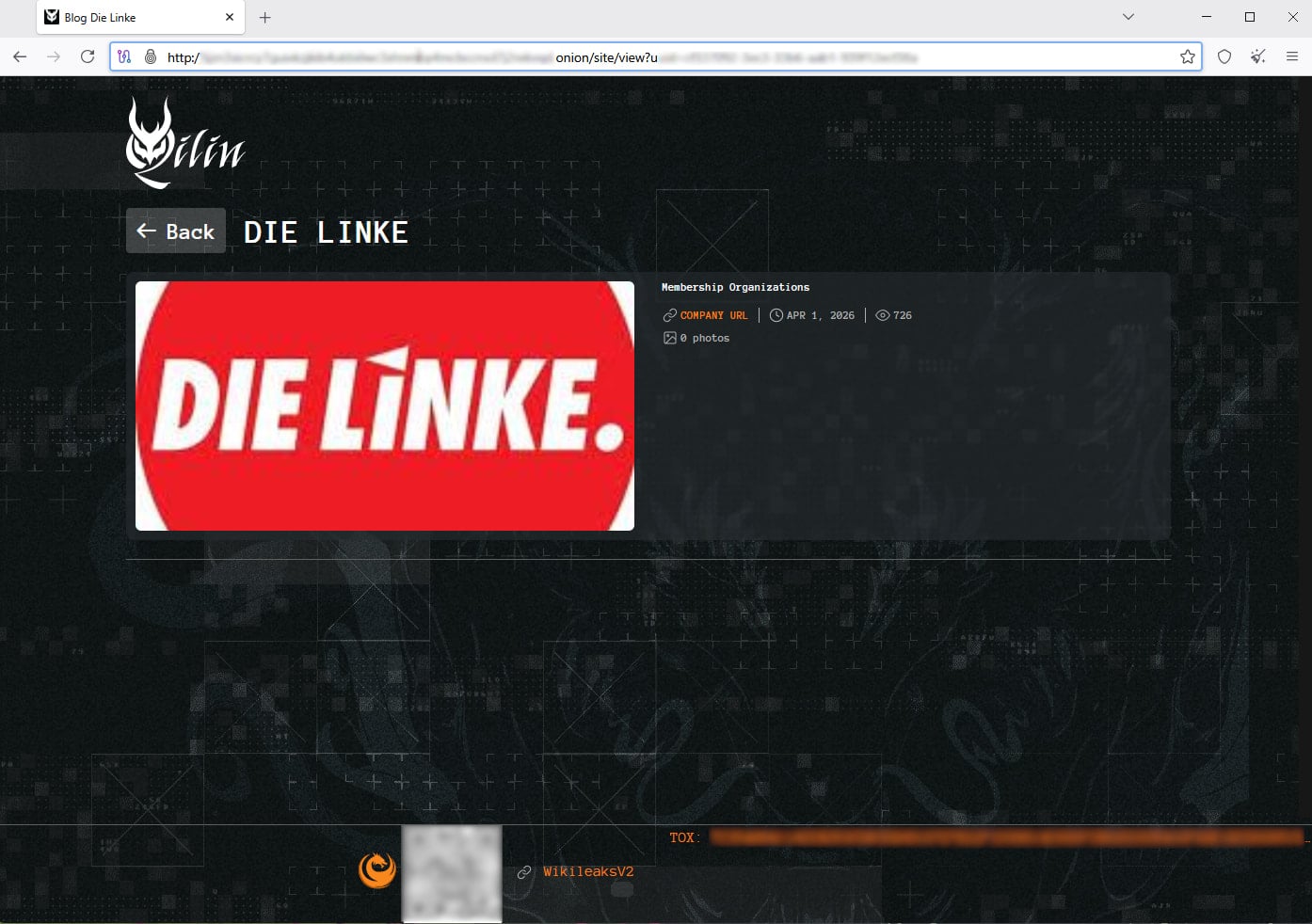
On April 1st, Qilin claimed the attack on Die Link publicly, adding it to the list of victims on its data leak site without publishing any data samples.
Qilin’s post on the dark web Source: BleepingComputer.com
Threatening to publish stolen data is a standard pressure tactic to coerce victims into paying a ransom.
Die Linke has notified the German authorities and filed a criminal complaint with the police. Additionally, the party is working with independent IT experts to help them safely restore impacted systems.
Russia-linked threat actors have targeted political parties in Germany in the past. In 2024, Mandiant uncovered a campaign from APT29 targeting CDU, a major political party in the country, with a backdoor named WineLoader.
Automated pentesting proves the path exists. BAS proves whether your controls stop it. Most teams run one without the other.
This whitepaper maps six validation surfaces, shows where coverage ends, and provides practitioners with three diagnostic questions for any tool evaluation.
In the Chinese calendar, 2026 marks the year of the Fire Horse, and it could also be the year of the Hisense TV.
The Fire Horse represents a “rare, high-energy, and transformative year” that happens every sixty years, which for a Chinese company such as Hisense, must be a good omen.
It feels confident this is the year where it can become a leader in the UK market. It wants to be in pole position with the new RGB TVs, it’s sponsoring the FIFA World Cup which will give it a global reach, and its TVs – at least based on its 2025 output – reached new levels of quality and performance.
It’s all looking good, right?
Advertisement
Yes, but there is one area where Hisense needs to improve on with its RGB TVs, and it’s a biggie.
Advertisement
An overreliance on Dolby Vision
When I went to Leeds to see the biggest TV in the world, the 116UXN, I was initially impressed by its high brightness and dazzling colour performance. If RGB is the future of TVs, then it’s going to be a very colourful one.
With the test discs I brought with me (Across the Spider-Verse, First Man, Babylon), the 116UXN produced a bright, varied, rich but also balanced colour performance. It served up black levels without much in the way of blooming or bleeding, an impressive level of dimming control for a screen of this size.
Advertisement
Image Credit (Trusted Reviews)
While there were some issues: a little bit of green tint here, some colour shifting when up close to the screen and some slightly washed out black levels, the performance seemed a strong one.
And then I switched away from Dolby Vision titles and things were… not so great.
Advertisement
Image Credit (Trusted Reviews)
With HDR10 and there was more noticeable discolouration, shots in films went from sharp to soft and back to sharp again. The Dirty Screen Effect seemed more obvious, with images that lacked clarity and detail, along with obvious colour banding. For a £24,999 screen, that’s rather unacceptable.
In HDR10+ the performance slipped further, colours that came across as inconsistent, images with soft sense of detail in dark scenes and the strangest thing was the local dimming struggled to react with scenes that switched from bright and dark, the entire screen repeatedly flashing and over-brightening the image.
Image Credit (Trusted Reviews)
You could call these first-gen gremlins that come with every new tech but I think the UXN is too reliant on Dolby Vision to help with its processing.
This is an issue I’ve seen before on Hisense TVs in years past, but I felt the U8Q had shrugged that off with a more consistent performance across all its HDR modes.
Advertisement
Advertisement
It came up again when I went to TCL’s NXT Roadshow event in Paris. There was a line-up of several TVs that included TCL’s SQD Mini LED and RGB Mini LED, a Samsung QN90F, a Sony A95L QD-OLED and a Hisense UXN.
And the Hisense was the worse performing TV of the bunch.
One test feature a white stripe in the middle of a green block, and where the other TVs managed to keep the stripe ‘white’, with the Hisense, the stripe was polluted by green tones surrounded it, coming across as a light green. The Hisense RGB didn’t look very bright, colours were all over the place with red tones looking orange, blues were more teal-like in its Standard picture mode.
Advertisement
Throw in more obvious blooming than other models and it was a very shaky and imprecise performance from the Hisense UXN.
Image Credit (Trusted Reviews)
Picture processing is an area that Hisense needs to shore up. The Hisense RGB I saw in Leeds was very reliant on Dolby Vision to control its performance, but without Dolby’s guiding hand, the performance became much more inconsistent.
Advertisement
What this calls into question is Hisense’s PQ philosophy. Every TV brand has one (or should have one), but beyond trying to make its TVs very bright and colourful, I can’t describe what Hisense’s ethos is. Is it respecting the source? Is it going full-on with colour expression? Is it trying to do all the above?
I hope what I saw with the UXN isn’t an omen for the upcoming UXQ, UR9S and UR8S. In all the time I’ve been reviewing Hisense TVs, processing has been hit and miss.
Advertisement
If it truly wants to be a leader in the market, it has to lead the way in picture quality – it has to be better than its rivals. If, like the Fire Horse it wants to have a transformative year, then this is the biggest hurdle it has to clear.
The Maytag Man is one of the most enduring characters in American advertising, lonely because no one needs his help repairing a Maytag appliance. The Maytag brand, too, has endured—going back to the days when Frederick Maytag’s washers involved wooden tubs and cranks. Maytag was the first company to put an agitator at the bottom of a washing machine, a design still in use today, and it was the first to stack a washer and dryer, and one of the earliest adopters on smart appliances. But mostly, the brand has eschewed novelty and staked its claim on durability and reliability for its heavy-duty dishwashers, washers, dryers, refrigerators, and ovens. This is true even as Maytag folded into ownership by former competitor Whirlpool.
Maytag remains one of the few appliance companies to offer 10-year limited warranties on essential parts. But Maytag promo codes are a bit more ephemeral, offering short-term deals on appliances that will hopefully last a decade. Here’s how to get a Maytag coupon code and Maytag promo codes, and find closeout deals on last season’s Maytag appliances to save even more.
Save Big With Maytag Appliance Closeout Deals
One of the easiest ways to find a deal on Maytag appliances is to look at the overstock and closeout deals, which offer significant markdowns on last season’s items as Maytag looks to clear out space for the new models. These deals do not require a Maytag coupon code, but they do require knowing where to look.
Go to the Maytag outlet site for appliance closeout deals. As of April 2026, this includes a $729 range with a built-in air fryer that used to sell for $1,300, and a $600 deal on a well-reviewed top-load dryer that previously sold for a thousand dollars. These deals generally last only until supplies run out.
Advertisement
Claim Free Delivery on Major Appliances Over $399
From now through April 8, Maytag customers can get free delivery on appliances priced $399 and above. Even better, Maytag will also haul away your old appliance for free. This deal does not require a Maytag discount code and includes standard home delivery for refrigerators, ranges, and laundry units. The discount will be applied automatically in your online shopping cart when you check out. Also, be sure to check the Maytag deals page often for current offers and rotating Maytag discounts and sales.
Select Customers Can Get a Special Maytag Promo Code
We may receive a commission on purchases made from links.
DIYers across the spectrum of proficiency and expertise levels often reach for Ryobi equipment. The tool brand is well suited to home improvers and other consumer-level tool users. The Japanese toolmaker has an in-store brand deal with Home Depot (which is why you won’t find Ryobi tools at Lowe’s), making the lime green tools a visible staple on the home improvement store’s shelves. Users frequently tout the combination of low prices and included features that make the budget-friendly equipment feel like professional-grade gear.
Advertisement
Users often praise many pieces of Ryobi equipment, with a wide cross section of the catalog garnering great review scores from buyers. Also, some of its most valuable tools and accessories run the gamut from outdoor power tools to intuitive measurement and layout solutions. These 15 products are some of Ryobi’s most highly rated items that DIYers often say they can’t live without. Each one delivers on key areas that DIYers rely on, including favorable price tags and ease-of-use features like comfortable grips and the ability to serve multiple roles during a renovation.
Advertisement
Link Speed Bench Mobile Workstation
The Link Speed Bench Mobile Workstation is a versatile force multiplier for DIYers. The tool is available direct from Ryobi for $219 and features 72 reviews with a 4.6-star average rating. Buyers can also find it at Home Depot ($240 with 444 reviews and a 4.5 rating). It works as a cart that can support up to 300 pounds of material or equipment. The tool moves on 10-inch, all-terrain wheels with a steel frame. It also features a quick setup that allows it to fold out into a pop-up workbench, supporting up to 400 pounds.
The solid wood work surface measures 42 inches by 22 inches and is entirely replaceable, giving users peace of mind, especially when handling heavy-duty work or demanding tasks that can result in damage to the surface. It allows for four-sided edge clamping, with miter saw mounting capabilities as well. The fast pop-up action makes it capable of moving your gear into position ahead of a job and then transforming into your primary workbench in seconds, making the whole task far less complicated.
Advertisement
ONE+ 18V/40V Dual Platform Charger
The ONE+ 18V/40V Dual Platform Charger is one of Ryobi’s new tools, existing alongside a range of high-profile additions to the Ryobi catalog in 2026. The charger offers a 12-amp charge rate for 18V ONE+ batteries and a 6-amp output in the 40V port. Both elements are contained in a compact unit that can be mounted on the wall for efficiency. Ryobi tool users who rely on a range of different equipment can get significant support from a dual-use charger like this. Specifically, it’s an ideal choice to keep both your outdoor power tools and standard 18V renovation-focused gear powered up without having to invest in numerous charging devices.
It’s available from Ryobi for $99 and has 13 reviews with a 4.7-star average rating. It can also be found at Amazon for $75 (at the time of writing) and Home Depot for $99, where it enjoys a 4.7-star rating from 48 buyers. The charger delivers extremely quick charge times for batteries across two of Ryobi’s most prominent tool platforms. Ryobi calls it the “fastest 18V ONE+ charger” available, offering a 15-minute charge time for a 4Ah EDGE battery, while it takes just an hour to recharge a 6Ah 40V battery.
Advertisement
Link Wall Storage Kit (15-Piece)
Ryobi’s Link Wall Storage Kit is a key element in optimizing your workspace, creating better organization that extends into every job you tackle as a DIYer. Most professionals will have developed a system for organizing and storing their equipment through years of practical experience, while home improvers looking to tackle jobs on the weekend or in the evenings don’t have that same muscle memory. As such, it’s perhaps even more important for prosumers to prioritize organizational equipment to keep frustrations to a minimum.
Ryobi’s Link organizational equipment is fairly inexpensive, making it a natural focal point for anyone thinking about revamping their organizational capabilities. The 15-piece kit is available from Ryobi for $129. It includes five 33-inch wall rails (and a range of hooks) that can each hold up to 75 pounds per foot. The set is also available from Home Depot for the same price, where it has amassed a 4.5-star average rating across 649 reviews. The price tag is the primary selling point. Other solutions in this realm often retail for significantly more. However, many users offer strong praise for the storage tool, too. They note that it’s a quality option for those with limited space, as well as DIYers who may be seeking a large, modular installation.
Advertisement
18V ONE+ HP Airstrike 18-Gauge Brad Nailer Kit
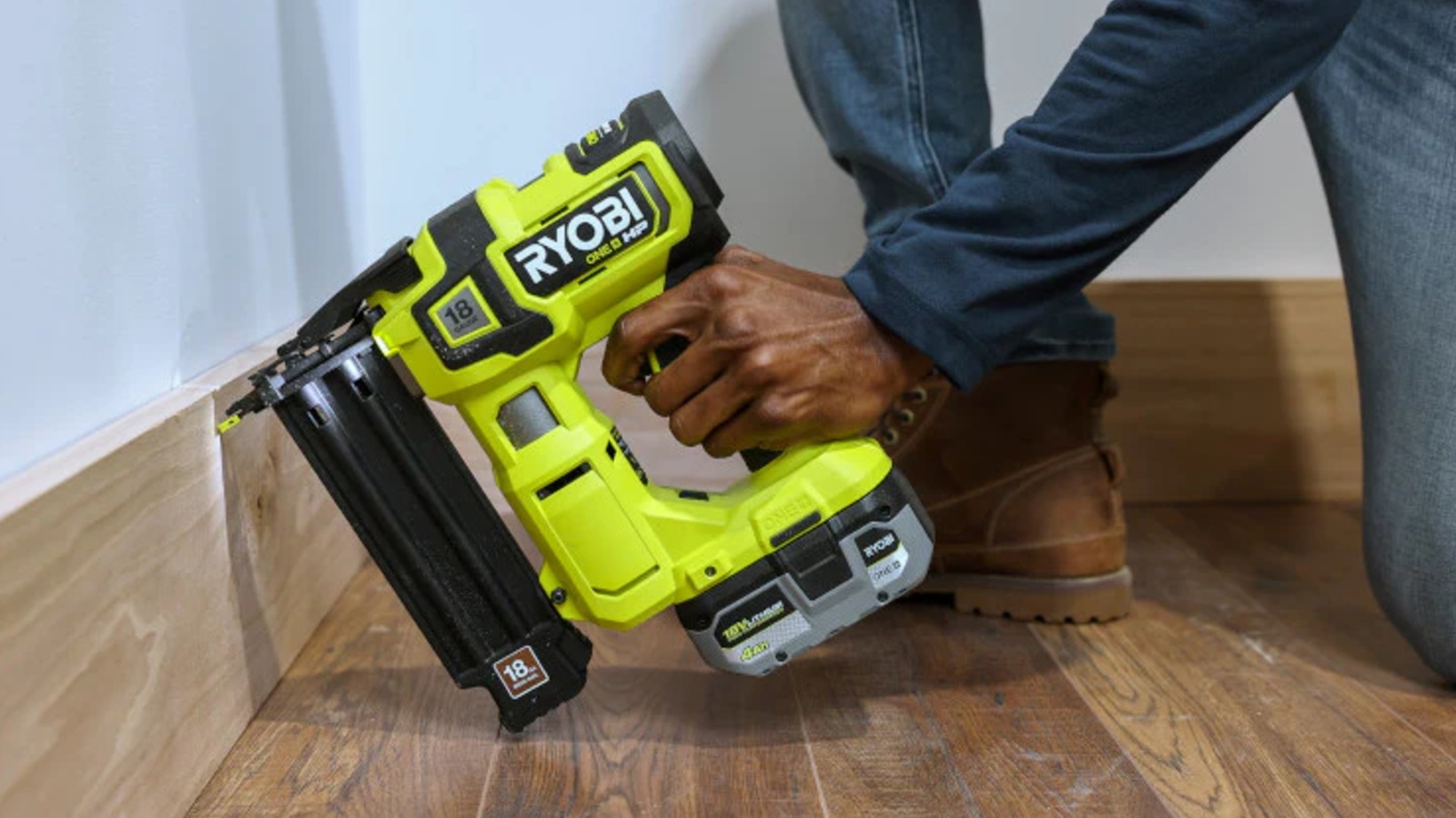
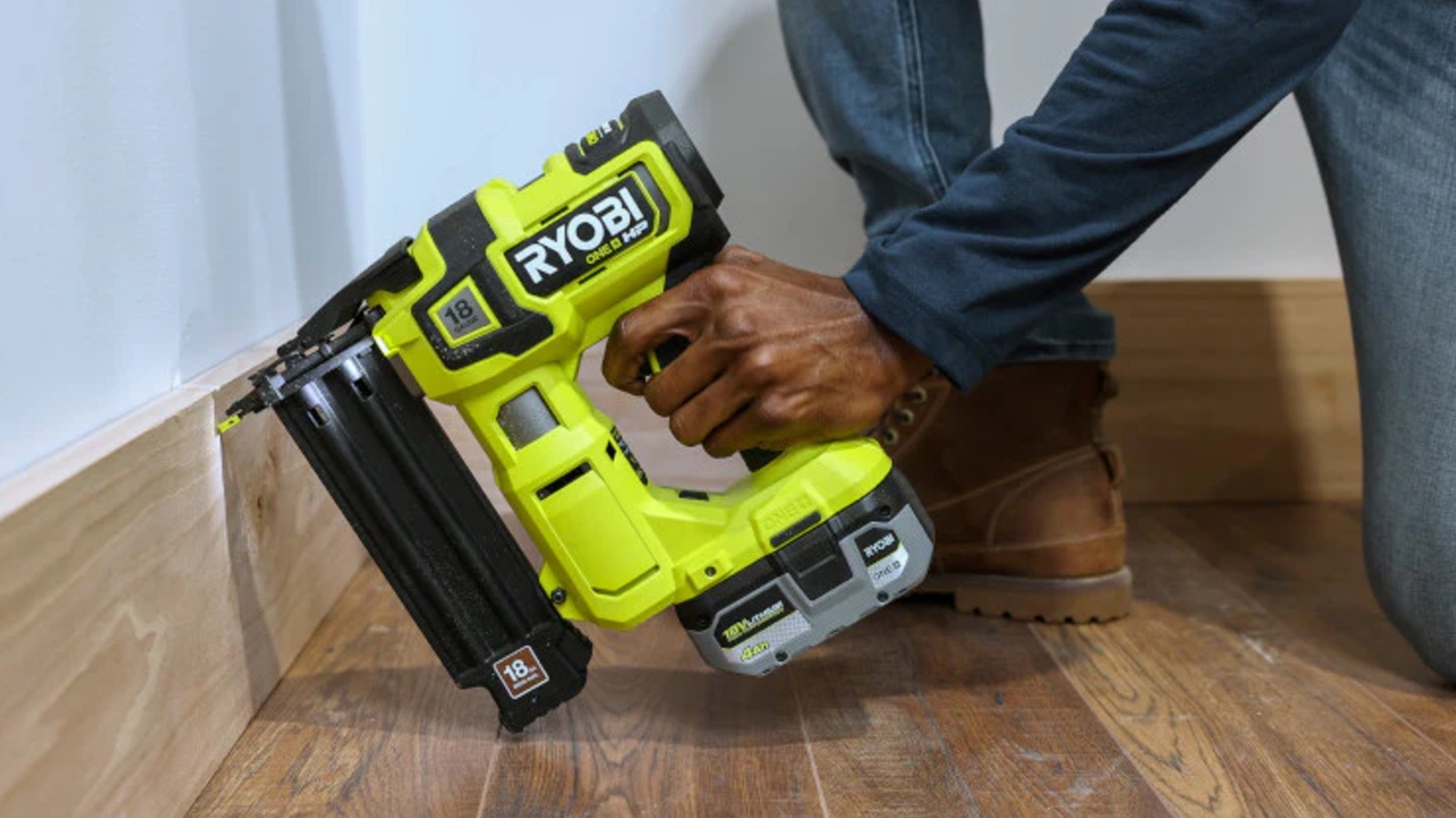
The 18V ONE+ HP Airstrike 18 Gauge Brad Nailer is available from Ryobi in either a bare tool ($179; 4.8-star average rating with 1,018 reviews) or as a kit featuring a 4Ah battery and charger ($259; 4.9-star average from 143 buyers). Home Depot buyers also give it a 4.8-star average from around 2,000 reviews for each option. The tool features Ryobi’s ONE+ HP technology that promises to deliver “60% more nail driving power” with the capacity to sink up to 2,250 nails per charge. The tool’s Air Strike technology underpins its cordless performance, delivering a truly mobile fastening tool that offers speed, precision, and versatility in one solution.
Advertisement
The tool is a brad nailer, among Ryobi’s wider range of nail guns, making it a general-purpose fastener that can deliver 2-1/8-inch nails into workpieces, including hardwoods. The AccuDrive nose improves your line of sight while operating the tool, making the whole process more efficient. It also features an LED work light. The unit is ideal for securing trim work and handling a variety of other light- to moderate-duty installation tasks.
Advertisement
18V ONE+ HP 4-1/2-Inch Angle Grinder
An angle grinder is a tool that easily finds a home in just about any DIY toolkit. It’s a solution that can handle a wide range of tasks. The angle grinder’s power comes from its ability to handle virtually any job that requires a spinning tool accessory. Ryobi’s 18V ONE+ HP 4-1/2-Inch Angle Grinder is a solid option at a great price. Buyers note the tool’s strong power output and appear to frequently move to this option as a replacement for an older, corded model in their collections. Many note this change specifically, while others highlight the cordless nature of the tool independently.
For the kit, Ryobi has it listed for $209, and 149 buyers have given it a 4.8-star average rating. For those who don’t require additional power elements, the bare tool has a 4.7-star average rating from 44 buyers with a $129 price tag. The tool can deliver up to 210 cuts per charge with the equivalent performance of an 11-amp corded grinder. The tool introduces an upgraded foot angle that makes flush cutting easier, and it utilizes a three-position side handle and a paddle switch to improve your grip on the unit.
Advertisement
USB Lithium Multi-Head Screwdriver Kit
Light-duty tools are equally valuable for both professional and consumer requirements. Not every tool needs to be a mauler, and the USB Lithium Multi-Head Screwdriver Kit showcases this well. The tool exists within Ryobi’s USB Lithium category, delivering great power at a small scale. The tool is available from Home Depot for just $50, and it features 500 reviews with a 4.6-star average rating. It comes with an organizational case and a 10-piece bit set, along with three interchangeable heads, including right-angle and offset driving solutions.
The tool’s batteries are USB rechargeable, and they can also be used as power packs to charge your phone or consumer electronics in a pinch. It offers up to 200 RPM speeds while operating with a small tool body. The attachments can be swapped between different fixed orientations, allowing you to utilize the accessory heads in a range of setups.
Advertisement
Whole Stud Detector
Finding studs in the wall doesn’t have to be a challenge. Ryobi’s Whole Stud Detector is an easy-to-use option that features multiple LEDs along the top line. As a result, both ends of the stud can be found as you move the tool across a wall’s surface. This allows users to find the entire width of the stud rather than just its center or an edge. The tool is available from Ryobi for $35 and features a 4.7-star average rating with 608 reviews.
Stud detectors help renovators make faster decisions about where to secure decorations and mounting brackets on the wall. Identifying their location is critical to creating a secure hold that won’t waver with time. Alternatives do exist, but securing new components to studs remains the best option for long-lasting and rock-solid staying power. This stud detector offers one-handed operation and can identify the thickness of the wall in question up to 1-½ inches to identify both wood and metal studs. It also features an integrated stud marker.
Advertisement
300-Piece Drill and Drive Kit
Your drill is a key solution in many renovation tasks, but it’s useless without the correct accessory attached to its chuck. This is where a product like the 300-Piece Drill and Drive Kit comes into play. This kit is available at Home Depot for $69 and features 4,809 reviews with a 4.6-star average rating. The kit includes just about every drilling and driving accessory you might require across a broad spectrum of tasks, including driving bits, hole saws, and spade bits. All of these play a pivotal role in a DIYer’s ability to handle most tasks they encounter. Drilling and fastening are two cornerstone functions of any job, from hanging a new door to installing decking or shelves.
Advertisement
This collection also comes with titanium-coated bits and three drill stoppers for added precision. It’s also eligible for a $25 discount when opening a Home Depot Consumer Card, reducing the price to $44. For renovators with a particularly lengthy list of jobs on the docket, this offer might be worth considering.
Advertisement
1,800 PSI 1.2 GPM Electric Pressure Washer
Not all renovation jobs involve building or altering something. Often, you’ll run into the need to clean away dirt or grime. This is where a tool like the 1,800 PSI 1.2 GPM Electric Pressure Washer can deliver serious functionality. Rather than investing in a full-size unit that’s not always easy to manage, the mobile Ryobi pressure washer offers solid performance in a compact package.
The tool produces a high-pressure output that’s more than capable of blasting away buildup on your driveway, cleaning windows around the house, or spraying down cars. It comes with 15-degree and turbo nozzles, featuring ¼-inch quick-connect capability for fast changes to handle high-intensity spraying and lighter-duty work in quick succession. It’s available from Ryobi and Home Depot for $99, with a 4.4-star average rating from 1,225 reviewers at the latter. Owners note that it’s powerful enough to handle plenty of cleaning jobs and is easy to bring up a ladder, too, making tasks at height, like cleaning gutters, simpler to manage.
Advertisement
Link 17-Inch Tool Bag
The Link 17-Inch Tool Bag is a versatile organizational solution that can make your job easier, regardless of what it might entail. The bag features 39 interior pockets and a range of external tool-holding options, combining for a total weight capacity of 60 pounds. Users also note that it’s built with a strong fabric material that feels sturdy, even when loaded up with tools. Others are pleased with the amount of storage space available within the bag, noting that the roominess surprised them.
The tool is available direct from Ryobi for $84. It can also be found at Home Depot for the same price, where it carries a 4.8-star rating from 74 reviewers. The adjustable internal dividers allow for extensive customization, and the bag itself makes for an ideal solution to fill with essential gear before leaving your shed or garage to handle a job without needing to run back and forth for more equipment.
Advertisement
18V ONE+ Brushless Belt Sander
Ryobi’s 18V ONE+ Brushless Belt Sander is an ideal tool for tackling large-scale sanding tasks. This can be the perfect accompaniment for preparing deck boards for the coming seasonal turnover, for example. It’s available at Ryobi for $166 and has 292 reviews with a 4.6-star average rating. As such, this is a relatively low-cost sander that can add a new dimension to your existing sanding equipment for more efficient work across the board.
Buyers say it’s easy to control the tool while highlighting its power and the resulting speed at which it churns through a sanding job. Although users do recommend pairing it with a larger battery, as the constant-on state naturally drains your power packs’ charge. The tool is capable of speeds up to 850 FPM with a belt that measures 3 inches by 18 inches. The tool also features a pommel handle that rotates into five positions to support comfortable use across a range of requirements you might encounter.
Advertisement
Door Hinge Template
The Door Hinge Template is an accessory that makes this particular job far easier. Admittedly, it’s not something that renovators will need if they aren’t planning on installing new doors, but for tackling new trim work around transitions or door installation, the $35 price tag at Home Depot makes for a low-cost accessory that can significantly improve your workflow. Over 1,000 Home Depot buyers have given this product a 4.3-star average rating, and the accessory features a guide stop and a 15/32-inch router bit ideal for cutting out the groove for your hinge hardware.
Advertisement
The tool features non-marring clamps to secure the unit to your door without the need to fasten it with screws or nails, keeping the door in pristine condition as you prepare to route out the groove for your hardware. This accessory unit makes tackling the precision work involved in getting the finishing touches correct much easier.
Advertisement
8,125-Watt Gasoline-Powered Portable Generator
Portable power is frequently essential for those operating in more demanding environments. Keeping your corded power tools running or delivering support for corded equipment in an inhospitable workspace requires a generator. The 8,125 Watt Gasoline Powered Portable Generator offers 6,500 running watts with an 8,125 starting watt output. It features CO sensors with an automatic shutoff function to improve safety while also utilizing an automatic voltage regulator that offers more reliable power. It’s available from Home Depot for $861 and has a 4.3-star average rating from 1,522 reviewers.
The generator can be a key solution for those tackling ambitious building projects around their home, or as a crucial element in repairing parts of your property after a natural disaster. It’s built with a robust wraparound hand truck frame and sits on 10-inch wheels to make mobility easier. The 6-gallon fuel tank delivers up to ten hours of runtime at a 50% load, and it supports four 120V outlets as well as a 120/240V 30-amp twist-lock output. There are also USB ports on the tool to allow for phone or other device charging.
Advertisement
15-Inch Compact Laser Level
A key asset in the arsenal of an industrious renovator, the 15-Inch Compact Laser Level is a tool that speeds up your progress when hanging pictures or tackling a host of other finishing touches around the house. The tool features a red laser output with a 15-foot range, and it utilizes integrated push pins that allow for temporary wall mounting. The rotating bubble vial allows you to leverage the tool precisely in either horizontal or vertical level orientations. It has a 4.6-star average rating from 881 buyers at Home Depot and retails for $25.
The tool is easily tossed in a tool bag, with a body that’s roughly the same size as a compact tape measure. Instead of marking lines on your wall and then worrying about touching up paint or other cleanup, utilizing this leveling solution delivers a simple option for finding the top line for hanging a picture or shelf.
Advertisement
ONE+ 18V Hybrid LED Tripod Stand Light
Lighting is everything on the jobsite. Regardless of the project, seeing what you’re doing is a basic essential. Attic insulation refits or crawlspace repairs frequently demand specific, additional lighting elements, but low-light workspaces aren’t the only areas that can benefit from this kind of tool. Painting often takes place in bright, airy rooms, but as the sun moves in the sky, your ability to perceive changes in hue diminishes. A work light allows you to cast uniform illumination onto the work surface, providing enhanced visibility to ensure you’ve met your goals.
The ONE+ 18V Hybrid LED Tripod Stand Light is a quality option in this regard, retailing at Home Depot for $139. It has a 4.8-star average rating from 759 buyers, and its versatility is a big reason for the high praise. The tool offers 2,700 lumens of light output that can deliver piercing illumination in a small area for detailed work or effectively light up a large workspace. The tool sits on an adjustable, 5-foot stand and has the ability to collapse down to a height of 22 inches. The tool operates on Ryobi’s ONE+ 18V battery system with added hybrid power flexibility, allowing for either 10 hours of runtime on a single battery charge or constant power when plugged into the wall. It also features two brightness settings and a 310-degree pivoting head for even greater flexibility.
Advertisement
Methodology
Each of these products has been reviewed by at least 50 buyers, with many having hundreds or even thousands of total ratings. They all have 4.3-star average ratings or better, with numerous products exhibiting near-perfect scores across all user feedback on their performance. They come from many different corners of the Ryobi catalog, offering something that can be beneficial for many different DIY projects and user requirements.
We may receive a commission on purchases made from links.
Project Farm is a popular YouTuber with over 3.8 million subscribers. The fast-talking host is known for posting videos comparing everything from chainsaws to torque wrenches, and tarps to power tools. One aspect of Project Farm videos that makes them valuable when comparing tools and equipment is the objective data shared in the videos, such as cutting time and downforce measurements in a comparison that pit DeWalt against cheaper battery chainsaw brands.
In early 2026, the channel extended that rigor to a test of tool sets, comparing 10 kits containing socket wrenches, combination wrenches, hex keys, and other assorted mechanic-friendly tools. The list of brands represented included DeWalt, Husky, Amazon Basics, Kobalt, Workpro, Duratech, Craftsman, Vevor, and Gearwrench.
Advertisement
The test covered objective and subjective evaluations. These included weight, toolbox organization, ratchet arc-swing, ratchet back drag, ratchet head size, maximum torque when using the ½-inch open-end and closed-end wrenches, and the torque required to break the sockets and ratchets included in the sets. After all the results were tallied, DeWalt ranked second among those brands, with the Gearwrench 243-piece tool set coming out on top.
Advertisement
What’s included in the Gearwrench 243-piece tool set?
If you’re not familiar with Gearwrench tools, it’s a budget-friendly company that, despite its price, ranks as one of the tool brands mechanics choose over Snap-On. Gearwrench’s mechanics tools are protected by a lifetime warranty, albeit one that only applies to the original purchaser.
The 243-piece Gearwrench set isn’t the biggest mechanics tool set on Amazon. However, it’s well-stocked with many common hand tools mechanics use every day, such as ¼, ⅜, and ½-inch drive sockets, 90-tooth ratchets, combination wrenches, and a magnetic bit driver set, all contained in a three-drawer toolbox.
The set includes 24 ¼-inch drive standard-depth sockets ranging from 5/32-inch to 9/16-inch and 4 mm to 15 mm. In addition, there are 23 ¼-inch drive deep sockets sized 3/16-inch to 9/16-inch and 4 mm to 15 mm. The ⅜-inch drive socket set has 29 standard-depth and 27 deep sockets. Standard ⅜-inch drive socket sizes include ¼-inch to 1-inch and 6 mm to 22 mm, while the deep sockets cover a similar range but only go up to 19 mm. Thirty-one ½-inch drive standard-depth sockets cover a range from ⅜-inch to 1-½-inch and 10 mm to 24 mm.
Advertisement
The Gearwrench tool set also contains combination wrenches with sizes from ¼-inch to ¾-inch and 6 mm to 19 mm. The magnetic bit driver set includes 30 bits, including Torx, hex, slotted, and Phillips varieties.
The Allen Scythe is one of those fantastic pieces of vintage agricultural machinery which would never be allowed to be manufactured today for health and safety reasons. It’s a two-wheel walk-behind device with a frightening reciprocating cutter bar which makes short work of almost anything. It’s the perfect tool for the roughest of brush clearance, but it demands respect. [Way Out West Workshop Stuff] has one, and is replacing the vintage Villiers two-stroke engine with an electric motor.
The conversion is straightforward enough, the Villiers crankshaft being replaced with a straight-through axle that can be driven by the motor. We particularly like the use of a cable tie as a splash lubricator. The shaft is turned to accept the Villiers’ bearings, the gear to drive the Allen, and a chain sprocket where the cord start would go on the engine. A mounting plate puts the motor above, a chain is fitted, and it’s ready to go once a hefty battery pack has been installed.
There are two videos below the break, showing construction, and finally the machine in action. The electric Allen is every bit as useful as the original, without the noise and vibration. Villiers motors can be temperamental, so we’d view it as an upgrade worth having.






























































You must be logged in to post a comment Login