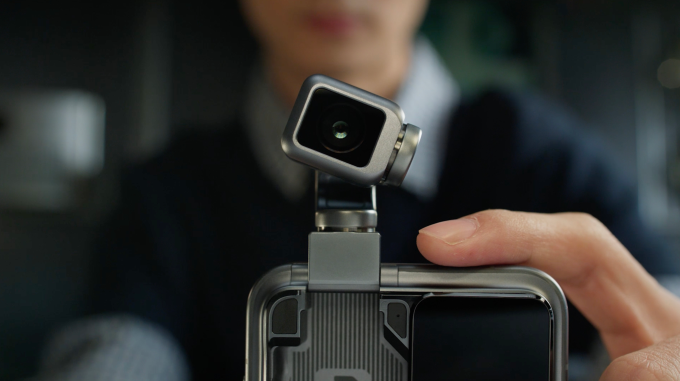









Honor first teased its “Robot phone” with a movable camera arm earlier this year. Ahead of the Mobile World Congress (MWC) in Barcelona, the Chinese company provided more details about the device, including how the robot can respond to different situations without commands. The company said that it is planning to launch this device in the second half of this year.
Honor said that the robot also has a “personality” and can respond to you with “head shakes” and can also dance to the beat of music. The company noted that users can talk to the assistant on the phone through text and voice. Honor showed a video of a person asking for apparel suggestions, and the robot nodding or shaking to suggest an outfit.
The phone has a 200-megapixel camera on a moving robot three-axis gimbal with stabilization tech. The company said that the camera can smoothly rotate around and capture smooth videos and photos. It also has a Super Steady mode for video capture. The company said the phone can get cinematic shots through its Spinshot feature that makes the robot camera rotate by 90 or 180 degrees.
Image Credits: Honor
The robotic camera also allows for more fluid video calls that can track you through AI-powered object tracking. The tech is like Apple’s Center Stage on steroids if it works.
The company said that it developed its own micro motor to control the robotic camera’s movements. It noted that it used some techniques used in foldable phones to make the camera more sturdy and fit the four-degree-of-freedom gimbal system into the body of a phone. Honor said that it is using the same materials for the robotic arm as the Honor Magic V6’s hinge, with 2800 MPa tensile strength.
Advertisement
Image Credits: Honor
Honor also released the Honor Magic V6 foldable with a 6,600 mAh battery, the Honor MagicPad 4 tablet, and the Honor MagicBook 14 laptop at its event.
Ultrahuman has released the highly anticipated Ring Pro for preorder with a price of AU$739 in Australia
It improves on battery life and heart-rate tracking, but its charging case steals the show
Singapore and New Zealand availability and price TBC
Just a day after Ultrahuman’s CEO broke his silence on the new Oura-beating smart ring, it went up for preorder in most major markets for $479 / £419 / AU$739. That makes the new Ultrahuman Ring Pro a lot pricier than the $349 / £329 / AU$599 Ring Air, but the several improvements its brings — including the promised 15-day battery life — does seem to justify the premium.
Alongside the better battery comes improved sensors for better heart-rate tracking, especially during sleep, and an upgraded dual-core CPU that enables on-chip processing so the Ring Pro doesn’t need to rely on a paired phone. Ultrahuman also says that the CPU offers more accurate metrics thanks to machine learning.
(Image credit: Ultrahuman)
It’s the new charging case that steals that show in my opinion. Not only does it extend the smart ring’s battery life to a staggering 45 days, it features an LED light that gives you a clear visual indication of how much battery it still holds.
Advertisement
It even has enough onboard storage to save a year’s worth of health data from the Ring Pro. It will also provide haptic feedback when delivering alerts. If that wasn’t enough, a built-in speaker will sound a small alarm when you activate the Find My Case feature in the app.
It’s still a little up in the air
One of the main reasons I like Ultrahuman is that you get all your key metrics without a subscription. There are a few that are locked behind a paywall, but most users can get by without paying for any of them. Moreover, it plays well with iOS and Android.
All the improvements I’ve listed above are tempting me to upgrade from my Ultrahuman Ring Air — despite the Ring Pro’s high asking price — and I’m glad I’m not based in the US.
Advertisement
The Ultrahuman Ring Air is my daily driver (Image credit: Sharmishta Sarkar / TechRadar)
As an Australian, I can already pre-order the Ring Pro, but it’s as yet uncertain whether it will be available to buy in the US. It’s availability in other APAC regions is also yet to be confirmed.
Sign up for breaking news, reviews, opinion, top tech deals, and more.
The Ring Pro is the product named in Ultrahuman’s patent-infringement case against Oura, which it lost in the US, meaning the company’s products are banned from being imported into America and the Ring Air was pulled from shelves last year.
Perhaps Ultrahuman has done its due diligence this time and the Ring Pro will soon find its way to US customers, especially since the Ring Air is one of the best smart rings on the market and I’m hoping the Ring Pro will prove just as good.
Apple Stores are preparing for a significant number of physical product launches during its early March event, with the new MacBook getting its own table.
A new MacBook is on the way
From Monday, Apple will be making multiple product announcements before holding a three-city “experience” event. While the actual products that will launch are not officially known, it seems Apple is expecting one to make a big impression on consumers. Retail workers were told to prepare for a sudden influx of customers in early March due to its program of product launches this week, writes Mark Gurman in the Bloomberg “Power On” newsletter. The prelaunch planning for the week is at a similar level to an iPhone launch, meaning Apple has big expectations for its lineup. Rumor Score: 🤯 Likely Continue Reading on AppleInsider | Discuss on our Forums
Lenovo has given the Yoga 9i 2-in-1 Aura Edition a refresh for 2026 and launched the new device at this year’s Mobile World Congress. The convertible laptop comes with a new Canvas Mode when the Yoga Pen Gen 2 case it’s bundled with is attached to the A-cover. When you lay the device down on a flat surface with the case attached, you’ll get a slight elevation on the display, which may make it easier to sketch or draw.
The Copilot+ laptop is powered by Intel Core Ultra Series 3 processors with integrated graphics, has up to 32GB in memory and runs Windows 11. Its 14-inch screen has a resolution of 2,880 x 1,800 pixels, has a variable refresh rate of 120 Hz and supports multi-touch. In addition to the new Canvas Mode, the device also supports Tablet, Tent, Stand and traditional Laptop Modes like its predecessors do. The Yoga 9i 2-in-1 Aura Edition Gen 11 will be available in May, with prices starting at $1,949.
Lenovo has also launched the new Yoga Pro 7a at MWC 2026. This Copilot+ laptop is powered by AMD Ryzen AI Max+ Series processors and comes with up to 128GB of RAM, so it can be used for heavy AI tasks. It has a 15.3-inch 2.5K PureSight Pro OLED display and is equipped with a big Force Pad trackpad that doubles as a drawing tablet. You can get the device starting in August this year for at least $2,099.
For a more affordable option, there’s the new IdeaPad Slim 5i Ultra laptop, which also has Copilot+ features. It’s powered by Intel Core Ultra processors and comes with either a WUXGA OLED or a WQXGA IPS LCD 14-inch display that has a VRR of 120 Hz. The device was designed for portability, with its thinnest part measuring just 11.9 mm in depth, and weighs 2.5 lbs. It will be available starting in October for at least $799.
Advertisement
Another affordable option is the new Idea Tab Pro Gen 2, which is specifically targeted towards students. It’s powered by theSnapdragon 8s Gen 4 Mobile Platform and has a 13-inch 3.5K display. The Tab Pro Gen 2 is Lenovo’s first tablet to ship with its Qira AI assistant and the company’s AI tools. It will be sold with a Lenovo Tab Pen Plus included for $419 starting in July.
You can always count on Lenovo to show up at a tech conference with a cool laptop concept or two. At CES 2026, we glimpsed the Legion Pro Rollable laptop with a display that expands sideways and the ThinkPad Rollable XD laptop with a display that extends upward. And now, not even two months later, Lenovo has another laptop display concept at Mobile World Congress 2026: the ThinkBook Modular AI PC Concept.
Instead of a rollable or foldable display, this ThinkBook concept has a detachable secondary display that creates a couple of different ways to spread out your work.
In addition to this latest laptop concept, Lenovo announced a number of products at MWC that will ship this year. I’ll get to the other laptop updates from the show, but first, let’s get our heads around Lenovo’s funky, modular ThinkBook concept.
Advertisement
ThinkBook Modular AI PC Concept
This ThinkBook concept looks like a typical laptop, except that it has an extra display on the top cover that faces outward. Each display is a 14-inch panel, but the secondary display can be detached and deployed in a few different ways.
With the secondary display attached to the laptop’s top cover on the back of the primary display, you’ve got the best way to carry the ThinkBook in transit. This back-to-back display arrangement can be used to present to someone sitting across from you — whatever you’re seeing on the screen facing you, they can see on the screen facing them.
More useful are the other two display modes:
1. Remove the keyboard (yes, the keyboard comes off, too), swap the second display in its place, and you’ve got a dual-screen laptop with double the workspace. The detachable keyboard has Bluetooth, so you can use it in this dual-screen mode.
Advertisement
2. Remove the rear secondary display, then set it up next to the laptop as a second screen off to the side, as you would with a portable monitor. The removable kickstand, hidden in plain sight on the bottom of the laptop, magnetically attaches to the display to prop it up in either landscape or portrait mode. You’ll need to use the included cable to connect the display to the laptop, which creates some clutter, but it’s still a useful setup for those busy times of day when you need to keep an eye on more things than will fit on a single 14-inch screen.
With the detachable Bluetooth keyboard, you can use the ThinkBook Modular AI PC with both of its displays arranged vertically side by side.
Josh Goldman/CNET
The keyboard and secondary display connect via pogo pins that Lenovo has favored for its Magic Bay ecosystem of swappable accessories. Each is easy to swap in and out, and they create a satisfying connection when snapped into place.
Advertisement
Additional modularity comes by way of the ThinkBook’s ports. The ports include USB-A, USB-C and HDMI; these can be exchanged for one another. A bay is located on each side of the laptop for these modular ports, and the extras are housed in a small AirPod-like case.
The ThinkBook Modular AI PC has modular ports you can swap in and out.
Josh Goldman/CNET
This is one dual-screen laptop concept that I would really like to see because you aren’t paying a penalty in weight to gain the versatility of this modular design. Many dual-screen laptops are so heavy that I’d rather just have a desktop with two monitors instead.
Advertisement
But with the ThinkBook Modular AI PC Concept, it’s as portable as most 14-inch laptops, weighing just 3 pounds. The detachable display is so thin and light that I thought it was just a mockup when I first picked it up and not an actual operational display.
My only notes would be to encourage Lenovo to strengthen the kickstand on the back of the modular display. It’s too puny to provide a solid base for the display. And I’d like a little rubber nub on the end of it so it doesn’t slide around so easily.
The kickstand is a bit too flimsy.
Advertisement
Josh Goldman/CNET
ThinkPad updates also include a focus on serviceability
Lenovo announced a slew of ThinkPad laptop updates at MWC, and modularity shows up in a couple of them. In both the ThinkPad T series laptop and ThinkTab X11 tablet, Lenovo has introduced a battery that can be removed without tools for greater serviceability. Just press two tabs, and the battery comes right out. The ThinkPad T series laptops also feature bottom panels that are easier to remove, simplified internal layouts and user-replaceable USB-C ports.
The ThinkPad T14 Gen 7 features up to a 14-inch 2.8K OLED display powered by the latest Intel and AMD processors. The ThinkPad T14 weighs close to 3 pounds — 2.8 pounds, according to Lenovo. The slimmer ThinkPad T14s weighs less than 2.5 pounds, which is exceptionally light for a 14-inch laptop.
Stop the presses! Is that a ThinkPad in a color other than black?
Advertisement
Josh Goldman/CNET
In a major shakeup for a ThinkPad, the ThinkPad T14 will be available in a color other than black. You can get it in Cosmic Blue, which is a blue so dark it might as well be black. But, hey, when the light catches it just right, you can see that it is, in fact, navy blue in color.
But if you think that the keyboard will also get the Cosmic Blue treatment, you’ll be disappointed to know that the keys remain a basic, ThinkPad black.
Both ThinkPad T series laptops will start shipping in Q2, with the ThinkPad T14 starting at $1,799 and the ThinkPad T14s starting at $1,899.
Meanwhile, the ThinkTab X11 is a rugged Android tablet featuring an 11-inch 2.5K display and is powered by a Qualcomm Snapdragon X series CPU. It’s expected to be available in Q2, starting at $499.
Advertisement
You’ll need to wait until the second half of the year for the ThinkPad X13 Detachable.
Josh Goldman/CNET
Lenovo also introduced a larger, less rugged tablet in the ThinkPad X13 Detachable. It has a 13-inch display that you can detach from the keyboard for a true tablet experience. Its battery and USB-C ports are also user-replaceable, again showing Lenovo’s focus on repairability and product longevity. The ThinkPad X13 Detachable won’t start shipping until Q3, starting at $1,999.
How well do you concentrate at work? For me, it very much depends on how I’m feeling that day, what else I have on my mind and a miscellany of other factors. One technique I use fairly successfully to keep me focused is a pomodoro timer, and at Mobile World Congress 2026 I found what I believe could be the perfect AI pomodoro companion.
I first saw Lenovo’s Magic Bay Tiko at last year’s MWC, but at the time it was just a concept. The little circular module perches on the top of your Lenovo laptop display, attached via the magnetic Magic Bay on the rear. The module is home to an adorable animated companion called Tiko, who you can interact with via text or voice.
Accessories with AI agents are becoming increasingly popular, particularly in the wearables space, with many companies starting to offer pins and pendants. They can take on a variety of tasks, such as life logging and transcription. They can also carry out tasks for you, such as adding things to your calendar or checking your calendar to see if you’re busy.
Advertisement
Tiko has a number of standard agentic AI capabilities — it can start and stop your music, open a web page for you or answer a question. You can also interact with it by using emoji. Give it a book emoji, for example, and it will pop on its glasses and sit reading with you while you work. But my favorite Tiko feature effectively turns it into a body-doubling buddy, which I feel would be useful for keeping me on track on distracted days.
Don’t tell me this little guy wouldn’t make you want to stay on track.
Katie Collins/CNET
Body doubling is a technique where you work alongside someone else — either physically or virtually — to keep you on track and accountable. Tiko comes with a timer, allowing you to track a focused work session. When you need a break, you can switch over to “wellness break” for 10 minutes of relaxation before you carry on. You can even choose to add 1 minute of breathing exercises, which Tiko will do with you, to keep you calm.
Advertisement
A traditional pomodoro timer is 25 minutes of work followed by a 5-minute break, but this is flexible. I’m enamored with the idea of a physical manifestation of the timer perched above my screen, with a sweet animated friend to help keep me in check.
The good news for me is that Tiko is no longer a concept from Lenovo. The company wants to sell the Magic Bay accessory later this year — although it doesn’t know exactly when, or how much it will cost. The less good news is that you’ll need to have a Lenovo laptop with a Magic Bay port, which I do not. It might be impractical to consider getting a new laptop just for Tiko, but it could sway me if I was already in the market for one.
Lenovo AI Workmate Concept
Lenovo’s AI Workmate concept is still a work in progress.
Advertisement
Katie Collins/CNET
Another AI companion concept from Lenovo that remains a concept for now is its AI Workmate. This is a kind of stationary tabletop robot, not dissimilar to the Pixar lamp, but with an orb for a head.
With a combination of cameras, microphones and projectors, the AI Workmate can undertake a variety of tasks, including helping you generate and display presentations or turn your written work or art into a digital asset.
I asked the Workmate to make me a presentation about giraffes. Using Lenovo’s proprietary models, it generated a three-slide presentation entitled “The Majestic Giraffe: Nature’s Tall Enigma.” It was factually accurate, as far as I could tell, if disappointingly free of pictures. It’s robotic head swivelled around and projected the slides onto the wall next to me.
I also asked the Workmate to generate me a postcard of Barcelona. It displayed the work on the table in front of me, and I scribbled some text over the top. The Workmate then scanned the entire image, including my writing and sent it straight to the printer for me, leaving me with a tangible souvenir to take away from our encounter.
Advertisement
I can’t say I would necessarily want something as large and bulky on my own desk, and I’m not exactly sure what practical use I work make of the AI Workmate concept at this stage. But it was still fun to play with, and interesting to see how tech companies are imagining ways to bring AI to physical life so they can assist us in at our work.
Apple is expected to push its Gemini-trained Apple Foundation Models and new chatbot-like Siri functions during WWDC, but Core ML could also see an update to Core AI to emphasize the priority shift.
iPhone 17 Pro Max will be an AI powerhouse thanks to its feature set
Core ML is a framework that allows developers to implement machine learning technology into their apps. In recent years, its functionality has spread to generative tools and AI. According to the Power On newsletter, Apple is going to release a Core AI framework during WWDC 2026. It is a replacement for Core ML, though both frameworks could exist in tandem for some time. Rumor Score: 🤔 Possible Continue Reading on AppleInsider | Discuss on our Forums
MWC 2026 officially gets underway on March 2 and will continue through March 5, but the announcements are already pouring in ahead of its start. We can always count on the annual tech event to bring tons of new phones, laptops and tablets, and we’re expecting to see some robots and other gadgets too — plus plenty of AI news, of course. In addition to the announcements, MWC is our chance to get hands-on time with some of the most interesting new devices, like the Xiaomi 17 Ultra and Honor’s Robot Phone.
Engadget’s Mat Smith is on the ground in Barcelona, and we’ll be updating this story as the week goes on to keep you in the loop on everything that caught our attention. Keep checking back here for the latest MWC news.
Lenovo
How silly does this look when its flexible display is fully extended in portrait mode? (Sam Rutherford for Engadget)
Lenovo pulled up to MWC with a bunch of new products and concepts, but if there’s one thing everyone’s going to be talking about, it’s the Legion Go Fold. (Check out Sam Rutherford’s coverage of the Legion Go Fold here). In short, the Legion Go Fold is a concept foldable gaming handheld with a flexible display that can unfurl to a massive 11.6 inches. Or, it can be folded in half to become a 7.7-inch display. It has detachable controllers, and there are multiple mounting points along the tablet so you can switch things up between landscape and portrait mode. The left and right gamepads can also be combined into one controller with an accessory, and the display can be propped up kickstand-style with the folio cover.

You think we’re done here? We’re not. The Legion Go Fold can go laptop mode too, with a strip of pogo pins where a wireless keyboard can be connected. Its right gamepad can serve as a mouse, thanks to the inclusion of a little scroll wheel and a hidden sensor. That gamepad also features a tiny circular OLED display below the buttons, which can both show widgets such as the time and be used as a touchpad.
Advertisement
It is a concept, though, so don’t get your hopes up too much about this one going into production. And if it does ever become a real, buyable product, it’ll no doubt be expensive.
The Lenovo Modular AI PC concept is an ambitious mashup between a traditional clamshell and a dual-screen notebook with hot swappable ports. (Sam Rutherford for Engadget)
Lenovo also announced its Modular AI PC concept — a laptop with two displays and a detachable keyboard. As Sam Rutherford, who got a chance to check it out in person, explained, “This allows you to move its keyboard and secondary display around at will, so the system can better adjust to its environment or workload.” Perhaps even more exciting is that it has hot swappable ports. Lenovo demonstrated it with USB-C, USB-A and HDMI connectors, but said others could be possible too.
Still, while everything looked pretty polished in the demo, Lenovo says this one will remain a concept.
The Lenovo Yoga 9i 2-in-1 Aura Edition Gen 11 (Lenovo)
It hasn’t all been concepts at MWC. Lenovo also refreshed some of its existing tablet and laptop lineups for 2026. The company introduced the Yoga 9i 2-in-1 Aura Edition Gen 11 (with the new Canvas Mode configuration), starting at $1,949, and the new 15.3-inch Yoga Pro 7a, which starts at $2,099. It’s updated its more affordable IdeaPad Slim 5i Ultra laptop ($799) as well. All of those new laptops come with Copilot+ features. For students, Lenovo is launching the 13-inch Idea Tab Pro Gen 2, starting at $419, with its Quira AI assistant and AI tools. You can find all the specs and release dates for those here.
Advertisement
Honor
The Robot Phone. (Image by Mat Smith for Engadget)
Honor teased its Robot Phone this past fall and we just finally got a proper look at it at MWC. And it’s pretty freakin’ cute. The phone is equipped with a camera that’s mounted on a highly mobile 4-degrees-of-freedom gimbal, which tucks away into a compartment on the back when it’s not in use (making for a pretty beefy camera bump). In a demo at MWC, the camera, which behaves like a little robot head, bobbed along to music and showed off some of its gesture skills, like cocking its “head” and nodding in agreement.
Honor didn’t reveal too much spec-wise, but the company says the primary camera uses a 200-megapixel sensor. The gimbal will offer three-axis stabilization, which will be coupled with camera modes such as Super Steady Video and AI Object Tracking. The Robot Phone isn’t quite ready for release at the moment, but the company says it will launch later this year.
Be sure to check out Mat Smith’s writeup on the Robot Phone for a more in-depth look.
Honor’s humanoid robot. (Image by Mat Smith for Engadget) (Image by Mat Smith)
It’s not a humanoid robot reveal without some backflips and a choreographed dance performance. Honor introduced its robot at MWC with all the spectacle we’ve come to expect (though the bot didn’t do any talking). It’s simply called the Honor Robot, and the company has plans for it to be used in both industrial and domestic settings.
Advertisement
Honor Magic V6 (Honor)
The Robot Phone isn’t the only phone Honor showed off at MWC. The company also announced its Magic V6 smartphone, which it says is the thinnest phone in its category, measuring 8.75mm folded and 4.0mm open in the white colorway. The other three colors — black, gold and red — are slightly thicker, at 9mm folded and 4.1mm open.
Not too much has changed from the V5, though, which only came out in August 2025. It does however have the Snapdragon 8 Elite Gen 5, with 16GB RAM and 512 GB storage. As for the cameras, there are two 50-megapixel lenses and a 64-megapixel telephoto, plus a 20-megapixel f/2.2 selfie lens on the cover and internal display.
The international version of the Magic V6 will have a 6660mAh battery with 25 percent silicon content, while the version sold only in China will boast a battery with a rated capacity of more than 7000mAh and 32 percent silicon content. Honor hasn’t yet shared details about pricing and availability.
Honor MagicPad (Honor)
Ahead of MWC, Honor also announced what it claims is the thinnest Android tablet in the world: the 4.8mm thick MagicPad 4. We’re expecting to hear more about this at Honor’s press conference on Sunday, but so far we know it features a 12.3-inch 165Hz OLED display and weighs just 450g. It comes with up to 16GB of RAM and 512GB of storage, and is powered by Qualcomm’s Snapdragon 8 Gen 5 chipset. The thinness doesn’t count the camera bump, Honor notes. The MagicPad 4 has 13MP rear and 9MP front cameras. It also boasts spatial audio, with eight speakers.
Advertisement
Just as the display is slightly smaller than the previous MagicPad, the MagicPad 4 has a smaller battery at 10100 mAh. It comes with a 66W fast charger. The MagicPad 4 will run Honor’s MagicOS 10. We don’t yet know how much it will cost, but we’ll update this after Honor’s press conference (where we’re also expecting to see the company’s robot) with any new details.
Xiaomi x Leica
Mat Smith for Engadget
Xiaomi kicked off MWC this year by announcing the global launch of its 17 Ultra smartphone, which debuted first in China back in December. It’s unclear if the phone will ever come to the US, but it’s now rolling out in Europe. Xiaomi teamed up again with Leica to make a photography-focused smartphone, and the 17 Ultra sports a 1-inch 50-megapixel camera sensor with a f/1.67 lens, a telephoto setup with a 200MP 1/1.4-inch sensor, and a 50MP ultrawide camera. There’s also a manual zoom ring around the camera.
Check out our hands on for our first impressions of what it’s like shooting with the Xiaomi 17 Ultra. And there’s more to it than just the camera. The 17 Ultra has a 6.9-inch OLED 120 Hz display that peaks at 3,500 nits of brightness, and a 6000mAh silicon-carbon battery. The Xiaomi 17 Ultra starts at £1,299 (roughly $1,750).
Leica also announced a new phone made in partnership with Xiaomi at MWC. It looks a whole lot like Xiaomi’s 17 Ultra, but isn’t the 17 Ultra, exactly.
Advertisement
Leica Leitzphone by Xiaomi hands-on at MWC 2026 (Image by Mat Smith for Engadget)
Like the 17 Ultra, Leica’s Leitzphone by Xiaomi has a 1-inch camera sensor and physical controls for zoom and other settings, using a mechanical ring around the camera unit. It features a Leica-designed intuitive camera interface with the option to show just the essentials when you’re shooting, hiding all the modes and labels. There’s a monochrome shooting mode and Leica filters.
The Leica branding is splashed all over it in design and wallpapers, but it’s otherwise pretty similar to the 17 Ultra, with the same specs. Like the 17 Ultra, it has a Snapdragon 8 Elite Gen 5 chip and a 6.9-inch 120Hz display. This one’s priced at €1,999 (roughly $2,362).
The Xiaomi Pad 8 Pro (Xiaomi)
In addition to the 17 Ultra, Xiaomi announced two new tablets at MWC this year: the Xiaomi Pad 8 and Xiaomi Pad 8 Pro. There’s nothing revolutionary here, but they’re lightweight and thin, with both being 5.75mm thick and weighing 485g, and have a 9200mAh battery. The Pro model is powered by a Snapdragon 8 Elite chip, while the regular Pad 8 uses the Snapdragon 8s Gen 4 chipset.
Xiaomi also unveiled a new 5000mAh powerbank, the UltraThin Magnetic Power Bank 5000 15W. The 6mm thick power bank comes in three colors with an aluminum alloy shell: orange, silver and charcoal gray. Along with that, the company introduced the Xiaomi Tag, its own take on the Bluetooth item tracker. The Xiaomi Tag has a built-in hanging loop so it can be attached directly to a keyring, and the company says it will work with both Apple Find My and Google’s Find Hub for Android.
Advertisement
Tecno
Tecno
We can always expect to see some wild phone concepts at MWC, and this year we’re starting with one from Tecno. The company unveiled a modular concept smartphone design that can be as thin as 4.9mm in its base configuration. There’d be 10 modules to choose from based on the announcement, including various camera lenses, a gaming attachment and a power bank, relying on magnets to keep it all together — or Modular Magnetic Interconnection Technology, as Tecno is calling it.
The Baseus PicoGo line has expanded with the AM52 Qi2.2 MagSafe battery packs, which bring more features and faster speeds to the pocketable chargers. One even has a built-in cable.
Baseus PicoGo AM52 review: 10,000 mAh packed as small as it can get
I already compared the fall lineup of Baseus battery packs to Apple’s odd iPhone Air MagSafe Battery, so there’s no need for it today. The two I’m reviewing are massive 10,000 mAh batteries packed in what qualifies as a “slim” case. The Baseus PicoGo AM52 power bank is Qi2.2 certified and MagSafe compatible. One has an integrated cable and the other doesn’t. Continue Reading on AppleInsider | Discuss on our Forums
Consider a powerful parallel between the advancements made during the Renaissance and the developments made by today’s engineers.
The Renaissance was a uniquely fertile era. Its ethos of curiosity and creativity fostered unprecedented collaboration across disciplines. Artists, scientists, philosophers, and patrons engaged in a shared pursuit of human potential, beauty, and advancements in art, science, and literature.
But the Renaissance wasn’t just a cultural awakening. It was a systems-level transformation: a convergence of disciplines, minds, and methods that redefined what humanity could achieve. And in many ways, it mirrors the collaborative spirit we strive for within our IEEE communities.
Collaboration Is a Catalyst
During the Renaissance, breakthroughs didn’t happen in isolation. They emerged from intersections of different disciplines. Collaboration was the norm: Artists worked with mathematicians to perfect their creations’ accuracy, and architects consulted astronomers to design buildings that reflected celestial order. It was interdisciplinary design thinking centuries before the concept was given a name.
Advertisement
It is at the intersections where disciplines and communities meet that the sparks of transformation ignite. The intersection of engineering and medicine gives us lifesaving devices. The intersection of computing and art produces immersive experiences from virtual, augmented, and mixed reality technology that expands human imagination. The intersection of policy and technology ensures ethical innovation. The outcomes of these crossroads remind us that progress is rarely linear. It is woven from the threads of various expertise, perspectives, and values.
When we collaborate across specialties, from electrical and biomedical to aerospace and software, we unlock new possibilities. And when we engage with industry, educators, policymakers, standard developers, and the public, we elevate those possibilities into solutions. We do it together, because no single engineer or technologist, and no one discipline can solve all the challenges we face.
The Renaissance teaches us that collaboration is a catalyst for advancing society. And so, I ask: What if we are living in a new, modern renaissance?
What if our members are today’s da Vincis, designing systems that serve humanity? What if our volunteers are modern-day patrons, investing time, talent, and heart into building a better world? What if our students and young professionals are the architects of tomorrow’s breakthroughs, fluent in computer code, ethics, and global impact, ready to collaborate across borders, sectors, and disciplines?
Advertisement
What if our conferences, technical standards, and humanitarian technologies are the printing presses of our time, disseminating knowledge, sparking dialogue, and scaling solutions? What if our collective imagination is the canvas upon which the next century of innovation will be painted?
And what if, like the Renaissance, our era is defined not only by invention but also by intersection, where many voices and perspectives converge to shape technologies that reflect humanity’s full spectrum?
Imagine engineers working together with ethicists to ensure responsible AI; with environmental scientists to safeguard our planet; and with local communities to design solutions that solve their challenges. Also imagine engineers partnering with disaster relief agencies to design real-time systems, restore communication networks, and deliver lifesaving technologies when survivors need them most.
So let us think like Renaissance creators. Let us design with empathy and collaborate across boundaries. Let us honor that legacy by not just preserving the past but also by building systems that empower the future for everyone.
Advertisement
When we unite technical excellence with human purpose, we don’t just innovate; we elevate. And in doing so, we carry forward the timeless truth of the Renaissance: Humanity’s greatest achievements are born not from isolation but from intersection and connection.
We spend hours testing every product or service we review, so you can be sure you’re buying the best. Find out more about how we test.
GameSir G7 Pro: one-minute review
GameSir is a controller brand that’s only gone from strength to strength over the last few years. Reliably offering forward-thinking controllers for Xbox and Switch consoles as well as PC and mobile, they’re (typically) competitively priced and offer more features and longevity than even first-party gamepads.
That trend continues with the GameSir G7 Pro, which has easily entered my top three on the GameSir tier list alongside the GameSir Tarantula Pro and GameSir Kaleid. Many of the features that make those other two pads so desirable are present and accounted for here: Hall effect sticks that prevent drift, as well as fantastic trigger lock and remappable button options.
Advertisement
On top of that, the G7 Pro leans into modularity. Similar to the Victrix Pro BFG Reloaded or Thrustmaster eSwap X2 H.E., the G7 Pro has swappable d-pad and stick top modules (though the extra stick tops here are identical and act more like spares). You’ve also got the option to swap out the controller’s face and grip plates, though that’s strictly for cosmetic purposes.
Almost everything about the controller exudes quality; I’d use the G7 Pro over the official option any day. The only slight misstep here that prevents it from earning a perfect five stars, for me, is the face buttons. While using tactile micro switch tech like others in the GameSir lineup, these have a strange halfway bump that makes for a pretty lumpy press feel. It’s something you’ll likely get used to over time, but I definitely prefer the cleaner presses found on the GameSir Kaleid and competing pads like the 8BitDo Ultimate 2.
(Image credit: Future)
Advertisement
GameSir G7 Pro: Price and availability
List price: $79.99 / £89.99 (around AU$114)
Available to buy now at GameSir’s website, as well as Amazon
Multiple colorways and special editions exist at various price points
The standard GameSir G7 Pro comes in at $79.99 / £89.99 (around AU$114), slightly pricier than most other GameSir models, though this is understandable when taking the additional modularity into account.
Many colorways and special editions are available for the G7 Pro, some based on games developed by teams in China, including Wuchang: Fallen Feathersand Zenless Zone Zero. The latter even includes a layered keychain and is the one I received for this review.
As mentioned, prices vary for these special editions, and you can also pick up compatible face plates and stick tops from the GameSir website if you so desire.
Sign up for breaking news, reviews, opinion, top tech deals, and more.
Advertisement
GameSir G7 Pro: specs
Swipe to scroll horizontally
Price
$79.99 / £89.99 (around AU$114)
Dimensions
6.9 x 6.8 x 3.7in / 177 x 173 x 94mm
Advertisement
Weight
9.6oz / 272g
Compatibility
Xbox Series X|S, Xbox One, PC
Advertisement
Connection type
Wireless (2.4GHz, Bluetooth), Wired (USB-C)
Battery life
Around 12 hours
Advertisement
(Image credit: Future)
GameSir G7 Pro: design and features
Like many controllers in the ‘Designed for Xbox’ stable, the GameSir G7 Pro bears the approximate silhouette of the Xbox Wireless Controller. It’s a similar size and weight, but there are a number of improvements here that put the G7 Pro lightyears ahead of the official model.
From a pure look and feel perspective, I love this thing. The swappable faceplates add a good bit of personality and put forward a more cost-effective solution than Xbox’s own Design Lab, if you’re into the cosmetics of a controller, of course. The rubberized grips on the rear of the pad are sublime, too; among the sturdiest and most comfortable I’ve ever had the pleasure of testing.
Staying on the rear of the controller for a second, you have a pair of remappable buttons that are strictly optional; you can flick a small switch on either side to fully lock the button, preventing you from pressing it if you’d prefer. You’ll also find the trigger lock toggles back here, as well as a switch for swapping between Bluetooth and 2.4GHz wireless connectivity options.
Advertisement
The front of the pad is pretty standard stuff. You have an Xbox-like asymmetrical stick layout here, as well as the d-pad, face buttons, and Home and share buttons. A Multifunction button also exists here, as it does on other GameSir controllers.
This is immediately useful if you want to make quick and simple adjustments, such as headset and mic volume adjustment, and remappable button assignment. You can do all this in the GameSir Nexus app on Xbox and PC, too, but having on-device shortcuts in addition to that is a real boon.
(Image credit: Future)
GameSir G7 Pro: performance
Once again, GameSir has provided a near-luxurious play experience at a mid-range price with the G7 Pro. Hall effect sticks are pretty standard nowadays (and arguably expected), but they’re here and feel great nonetheless.
Advertisement
One thing that really impressed me about the G7 Pro is its trigger locks. Again, nothing new, but I almost always prefer the tighter press of a digital trigger if given the option. On the G7 Pro, they work flawlessly, and it offers one of the most tactile and responsive digital trigger options in the business.
Immediacy really is the keyword here. The micro switch-powered d-pad, as well as the claw grip bumpers and rear remappable buttons, all offer such clicky and immediate responsiveness that I can highly recommend this controller if you’re a competitive gamer.
The one misstep here has to be the face buttons, though, and it’s a real shame they don’t feel quite as nice as everything else on the G7 Pro. Here, as mentioned above, there’s an awkward half-press that makes the face buttons feel uncomfortably bumpy at first. I got used to it after some time with the controller, but the quality of them here is a noticeable step down from the brand’s other products.
On battery life, I managed roughly 12 hours on a single charge. That’s about average for wireless controllers at this price point, so no real complaints here. The inclusion of a charging dock is a really nice touch, and I found that it charges the controller fairly quickly, going from empty to full in about two hours.
Advertisement
(Image credit: Future)
Should I buy the GameSir G7 Pro?
Buy it if…
Don’t buy it if…
Advertisement
Also consider…
If the GameSir G7 Pro isn’t quite what you’re after, here are a couple more recommendations that might fit your preferences a little better.
Swipe to scroll horizontally
Row 0 – Cell 0
GameSir G7 Pro
8BitDo Ultimate 2
GameSir Tarantula Pro
Advertisement
Price
$79.99 / £89.99 (around AU$114)
$59.99 / £49.99 (around AU$90)
$69.99 / £69.99 (around AU$105)
Advertisement
Dimensions
6.9 x 6.8 x 3.7in / 177 x 173 x 94mm
5.7 x 4.1 x 2.4in / 147 x 103 x 61mm
6.2 x 3.9 x 2.4in / 157 x 99 x 61mm
Advertisement
Weight
9.6oz / 272g
8.7oz / 246g
11.52oz / 325g
Advertisement
Compatibility
PC, Nintendo Switch, mobile
PC, Nintendo Switch
PC, Nintendo Switch
Advertisement
Connection type
Xbox Series X|S, Xbox One, PC
PC, Android (Switch version sold separately)
PC, Switch, Switch 2, Android, iOS
Advertisement
Battery life
Around 12 hours
10-15 hours
Around 12 hours
Advertisement
How I tested the GameSir G7 Pro
Tested for two weeks
Primarily tested on PC with both wireless and wired connections
Played a wide variety of single and multiplayer games
My GameSir G7 Pro testing largely took place on PC, using the controller in both wired and wireless capacities. As a fan of the best fighting games, I found the G7 Pro, its circular d-pad, and clicky remappable buttons, to be a wonderful fit for Street Fighter 6and Tekken 8.
I also got plenty of use out of its digital trigger option, allowing for quick and responsive access to alternate hotbars in Final Fantasy 14 Online.