Tech
How Fake Remote Workers Get In


For many security teams, the expected route into the corporate network begins with a phishing email or exploited vulnerability. Certain techniques differ, exploiting the hiring process to gain legitimate access.
In July, the US Department of State released an alert warning of North Korean IT workers impersonating nationals of other countries for the purpose of obtaining work. Once employed, those workers then send their salaries back to parent agencies in North Korea.
The FBI has also warned that fraudulent workers may use their access to copy source-code repositories, exfiltrate proprietary information and support other cybercriminal activity. After being discovered or dismissed, some have attempted to extort their employers by threatening to publish stolen code and data.
These operations expose a gap between checking an identity and proving who is using an account. For instance, a résumé may appear credible, and a laptop may arrive at a domestic address. But, neither of those controls, on its own, proves that the person interviewed is the person who receives the device, or the person who ultimately signs in.
The challenge for service desk agents is how they can confirm the person requesting access is both real and a legitimate new hire.
How Fake Remote Workers Defeat Recruiting Controls
Changing their nationality or identity: This is a key tactic of North Korean IT workers, who will falsify information when registering for online platforms. This might include forging identification documents, impersonating another person, or using a proxy to register an account.
Create fake profiles using AI: To add legitimacy to their identities, fake workers may also create professional profiles and social media accounts. They use AI to support these efforts, matching tone and language to real IT professionals.
Unorthodox payment methods: Fake workers may attempt to avoid being paid by direct deposit, instead favoring money transfers or cryptocurrency. North Korean workers have been observed using a third party for salary deposits, paying the third party for use of the account.
Disguising their location: Tools such as VPNs and remote desktop software may be used to hide the fact that a person is working from abroad.
Using overseas facilitators: Some fake workers will use proxies for device delivery and use. Employer-issued computers are delivered to an address in the country where the worker claims to live. The facilitator keeps the devices powered on and connected, allowing workers overseas to control them remotely.
Verizon’s Data Breach Investigation Report found stolen credentials are involved in 44.7% of breaches.
Effortlessly secure Active Directory with compliant password policies, blocking 6+ billion compromised passwords, boosting security, and slashing support hassles!
Why Employment Checks do not Prove Who is Using the Laptop
Background checks, right-to-work checks and identity screening are built to confirm that the details supplied by a candidate are credible. However, fake remote-worker operations exploit the gaps between several different forms of verification.
An organization may confirm that an identity exists, that the named person is eligible to work and that a laptop was delivered to an approved address. It can still issue credentials to an account that is ultimately controlled by someone else.
The tactics employed in operations like the North Korean IT workers are designed to satisfy specific controls:
- The stolen or proxy-supplied document satisfies the identity request.
- The fabricated résumé satisfies the recruiter’s initial review.
- The proxy or skilled worker satisfies the interview panel.
- The facilitator’s address satisfies the equipment-delivery process.
- The laptop farm satisfies location and device expectations.
- The third-party account satisfies the payroll process.
Warning Signs of a Fake Remote Worker
No single indicator proves that an applicant is part of a fake worker operation. However, there are several warning signs to watch out for, as outlined by the US Department of State:
- Frequent changes to registered information.
- A mismatch between the account holder’s name and the name on the registered payment account.
- Multiple accounts created using the same ID.
- Multiple accounts accessed from the same IP address, or a single account accessed from multiple IP addresses in a short period.
- Unusually high hours logged in.
Securing the Onboarding Process Against Fake Hires
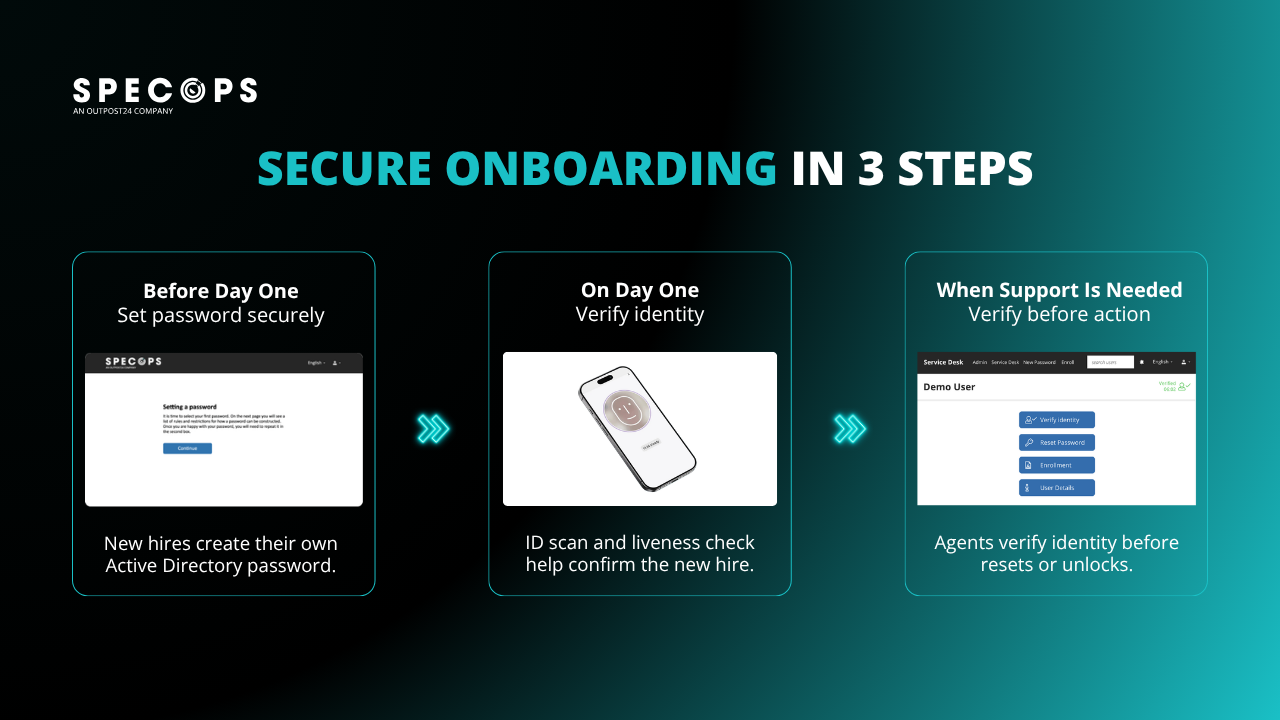
Organizations need robust vetting processes for freelance and remote hire to mitigate the risk of fake workers. Solutions like Specops Secure Onboarding allow organizations to confirm identity at a crucial point, by adding government-issued identity-document scanning and biometric liveness detection to the onboarding process.
The document check helps confirm that the identity document is genuine, while the biometric check compares the person completing onboarding with the photograph on that document.
Liveness detection then establishes that a real person is physically present, rather than a photograph, recording or manipulated video being presented to the camera.
A valid identity document may still have been stolen or supplied by a third party. Similarly, a face that appears to match an uploaded image may be presented through a replay or deepfake. Document validation and biometric liveness work together to provide stronger evidence than either control can offer alone.
With support for more than 16,000 document types, Specops Secure Onboarding can apply this process across a wide range of remote and international hiring scenarios.

Turn Identity Proofing into an Access Control
The central lesson from fake remote worker operations is that identity should not be treated as a one-off hiring record.
Organizations need to confirm that the approved identity belongs to the live person receiving access, and they need a reliable way to repeat that check when access is recovered or changed.
By combining government-issued document validation with biometric liveness on day one, then requiring identity confirmation before service-desk agents act, Specops Secure Onboarding provides trusted identity-proofing checkpoints at the moments most likely to be targeted.
Contact us today to see how Specops solutions can secure your service desk against increasingly sophisticated identity attacks.
Sponsored and written by Specops Software.
You must be logged in to post a comment Login