This week Slashdot reader joshuark found the story of exactly how in 2025 ProPublica reporter Renee Dudley confirmed Microsoft was running tech support for the U.S. Defense Department through China, America’s biggest cybersecurity adversary — and how that investigation ultimately changed U.S. government policy.
The reporter first found an ad offering $18 to $28 to hire Americans as “digital escorts” for China-based tech support, then just searched LinkedIn for people who apparently had answered the ad. They discovered that at the time “Behind the scenes, unseen by the users at the U.S. government, it’s not just one person who responds,” explains ProPublica’s podcast. “It’s two people… The China-based engineer is the one who knows how to fix the problem. On their end, they produce a block of code to solve it and send it over to the digital escort in the U.S. The digital escort then just copy-pastes it… All of this so that they can follow the government’s rule: that you have to be a U.S. citizen or permanent resident to handle sensitive data.”
But amazingly to confirm it, ProPublica’s researcher just had to input “Microsoft” and “escort” into the U.S. Patent Office search bar, and actually found patents related to digital escorts — along with names of the current and former Microsoft employees listed as inventors. Had the government signed off on the practice? “I could see what Microsoft actually told the government,” the reporter says on the podcast, “And there was no mention of foreign engineers being used, and definitely no mention of China.”
ProPublic’s story was published on a Tuesday, according to the podcast, and by Friday “Microsoft said it had stopped using China-based engineers to support Defense Department cloud systems.” And America’s Defense Department “also opened up an investigation, looking into whether any of Microsoft’s China-based engineers had compromised the government’s national security.
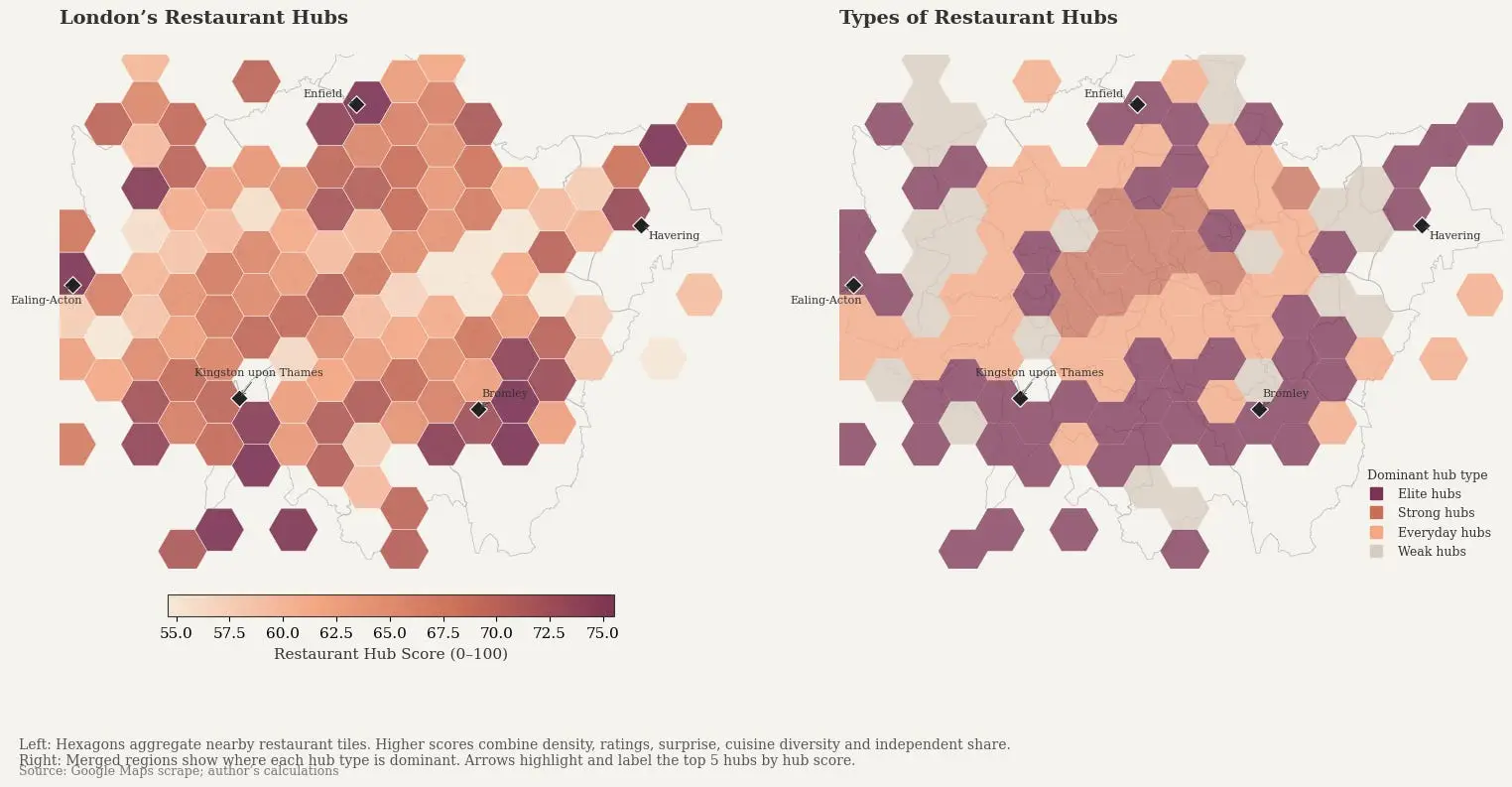
We all know that Google and other big players pick and choose what information people see, but we sometimes overlook it outside of the search and social media space. [Lauren Leek] decided to take a look at how Google Maps picks winners and losers in the restaurant scene in London.
Building a machine learning model to determine a new restaurant recommendation (as one does), [Leek] uncovered interesting, and perhaps concerning, elements of how Google Maps ranks restaurants. Broken down by relevance, proximity, and prominence, many new restaurants face the issue of not drawing traffic without reviews and vice-versa causing a vicious cycle. Relevance and proximity are fairly straightforward, but what goes into “prominence?”
[Leek] found that “it is not just what people think of a place – it is how often people interact with it, talk about it, and already recognise it.” This leads to chains and high foot traffic areas awash in reviews while more out-of-the-way places find it more difficult to draw traffic. Some of this is expected and would be happening even when word of mouth was the primary way to find out where to eat, but as with many things, the algorithm amplifies this, along with the undisclosed paid placement of restaurants in Maps results.
While still in its infancy, [Leek] built a public dashboard where people can sort restaurants in the city. The machine learning algorithm is designed to identify places that are hidden gems that punch above their Google Maps weight and may make you look like the trendy one (if you live in London).
Advertisement
Zooming out further, [Leek] found larger clusters that revealed restaurant “diversity, in other words, is not just about taste. It is about where families settled, which high streets remained affordable long enough for a second generation to open businesses, and which parts of the city experienced displacement before culinary ecosystems could mature.”
We spend hours testing every product or service we review, so you can be sure you’re buying the best. Find out more about how we test.
Adobe is a popular brand when it comes to all things creative, including AI content generation and editing. With its newly improved Firefly tool, Adobe has taken AI content generation a step further with realistic, real-time outputs.
In addition to being highly accurate, Firefly is also one of the most affordable tools on the market today. But is it the best AI video editor for your needs? Read on to find out. In this article, we’ve put Firefly to the test, examining its features, pricing, ease of use, and overall value for money.
Advertisement
Adobe Firefly: Plans and pricing
Adobe Firefly is available online by clicking here, as well as part of the Creative Cloud suite of apps.
Latest Videos From
It offers one of the most generous free video editing software we’ve seen. Instead of capping your monthly or one-time usage, Adobe allows you to generate a limited number of images and videos each day. This means you can continue using Firefly for a longer period, provided you stay within the daily limits.
What we like about the free plan is that Firefly does not lock its image or video editing features behind paywalls. Even on the free plan, you get access to features such as Generative Fill, Background Removal, AI Markup, video upscaling, text-based editing, as well as audio features such as generating soundtracks, speech, text-to-avatar, and more. Unlike other platforms, Firefly’s free plan can actually come in handy for limited individual use.
(Image credit: Adobe Firefly)
Its paid plans are also among the most inexpensive we’ve seen in the category, with the Standard plan starting at $8.49 per month when billed annually, which comes with 2,000 credits.
Advertisement
With this plan, you get access to all the AI models Firefly has to offer, with hard upper limits on the number of images and videos you can generate with each model. Videos, however, are capped at a maximum duration of five seconds, which might not be enough for users looking to generate long-form content. Besides this, you get access to unlimited Firefly Boards, while the remaining features stay the same as those in the free plan.
Sign up to the TechRadar Pro newsletter to get all the top news, opinion, features and guidance your business needs to succeed!
Next is the Pro plan at $16.99 per month (4,000 credits), billed annually, where you get unlimited access to several AI models such as Gemini 2.5 Flash, FLUX.1 Kontext, and others. The maximum number of images and videos you can generate is also higher than in the Standard plan.
Then there’s the Pro Plus plan, priced at $29.38 per month, where you get up to 10,000 credits and higher limits on image and video generation. In this plan, a wider range of models comes with unlimited access, including Gemini 3.0, ChatGPT Image, Runway Gen-4.5, and Gemini 3 Nano Banana Pro 2K.
Advertisement
Finally, there’s the Premium plan at $118.93 per month, offering 50,000 credits and unlimited access to almost all AI models except a few. This plan is ideal for large content creation and creative teams.
Adobe Firefly: Features
Right off the bat, what impressed us most about Firefly is its brainstorming and early-stage concepting feature called Firefly Boards. It is essentially an infinite-canvas mood board and ideation workspace that lets you upload your own images, sketches, or stock images, or generate new ones.
You can select multiple assets and combine elements while brainstorming ideas with your creative team. This is similar to Midjourney- or Discord-style iteration, giving remote creative teams a space to flesh out new ideas.
Advertisement
(Image credit: Adobe Firefly)
Moreover, Firefly offers access to more than 10 popular video, audio, and image models, each with its own limits on the amount of content you can generate. Some notable features are Generative Expand and Generative Fill, which let you expand the canvas of an image or video after it has been generated using Adobe’s AI engine. Similarly, there’s also Generative Remove, which helps you remove elements from a piece of content.
Firefly also throws in a range of audio features, such as the ability to generate speech, translate videos from one language to another, or add text-to-sound effects to your content. However, we were a bit disappointed with its video editing features, such as trimming, arranging, and refining content, all of which are still in beta. Its AI assistant is also at a very early stage and currently supports only one conversation at a time.
You also have the option to upload an image to provide Firefly with a style or structure reference and create a consistent look across a batch of images. Unlike many other AI tools, Firefly allows you to use your own images to train its AI models and create custom models. This is still an early-stage feature, and we expect it to improve over the next year or so.
Firefly has also expanded its multilingual reach and now supports prompts in more than 100 languages, along with translations in more than 20 languages. There’s also an option for bulk actions such as background removal, color grading, and cropping.
Advertisement
Its mobile apps have also improved a lot over the past year and now offer native iOS and Android apps with an experience that’s very close to the web interface. And of course, Firefly is part of Adobe’s broader AI-powered content generation and editing ecosystem, integrating directly with apps like Photoshop and Illustrator.
Adobe Firefly: Interface and in use
Adobe Firefly is by far one of the most improved image and video editing software we have seen in a long time. One of the biggest criticisms of Firefly was that it did not offer any option to edit the images it generated. However, all that has changed with its revamped user interface.
Not only did it generate a pretty high-quality image for us, but it also provided several editing options. We especially liked its Tune feature, which is currently in beta and allows you to change the look of an image by selecting from a list of preconfigured options.
Advertisement
There is also a prompt option, which lets you keep fine-tuning your generated image with follow-up prompts.
(Image credit: Future)
However, if that is too much work, there are several fine-grained controls available. For instance, there is a Fill feature that lets you fill any blank spaces in the image with an element of your choice. Similarly, there’s the Remove feature, which lets you remove any element you do not want in the final result.
What we liked the most is its Select feature, where you can select a particular element in an image or video and then type a prompt to edit only that selected portion. This helps avoid unwanted changes in other parts of the image or video and ensures that the edit is applied only to the section you selected.
(Image credit: Future)
The generation interface itself is pretty simple. You’ll see a prompt box at the bottom of your screen, along with a panel on the left-hand side where you can control the generation settings.
Advertisement
For instance, you can select the model you want to use, the resolution, the aspect ratio (16:9 or 9:16), and the duration of the video. There is also an advanced setting where you can enter a random seed value to experiment with the AI engine settings.
What we found particularly eye-catching is the prompt enhancement feature, which lets you improve your prompts before generating an image or video. This helps you create more detailed prompts, which in turn result in more accurate outputs.
Adobe Firefly: How we tested
We tried the free version of Adobe Firefly over several days and were quite impressed with the results. We first tried to create an AI image with the following prompt:
Advertisement
“A tired line cook in a stained white apron, frowning with exhaustion, wiping sweat off his forehead while chopping six carrots on a wooden cutting board. Behind him, a dim, cluttered restaurant kitchen with steam rising from a pot. Photorealistic, dramatic low lighting, shot on 35mm film.”
As soon as we hit Generate, Firefly got to work and produced a pretty impressive image that closely matched our prompt.
(Image credit: Future)
However, it’s worth noting that Firefly is a tad slower compared to the likes of Fliki or Kapwing. That said, the accuracy of the results is worth the wait.
Once the image was generated, we clicked on it to open the editing panel and played around with the settings. For instance, we selected the burning steel pot behind the cook and prompted Firefly to change it to a wooden pot instead.
Advertisement
Rather than simply making the change, Adobe gave us an Edit Strength slider, allowing us to control how strongly the wooden effect was applied to the pot.
(Image credit: Future)
We then tried the Remove feature by selecting a bunch of carrots and asking Firefly to remove them. Adobe once again impressed us, as it accurately removed the carrots without distorting the chopping board around them.
(Image credit: Future)
Lastly, we used the Upscale feature to improve the quality of the image. This took the longest, more time than it took to generate the image in the first place. However, we were once again very satisfied with the final result.
We also generated an AI video using the following prompt:
Advertisement
“A woman in a red coat walks across a rain-soaked city street at night, neon signs reflecting in the puddles, camera slowly tracking alongside her.”
(Image credit: Future)
The results were again highly accurate, the colors were vibrant, and we were impressed by how closely Firefly followed the prompt without significantly diverging from the intended output.
Adobe Firefly: Alternatives
Although Adobe Firefly is a much-improved product, it does have a few shortcomings, which is why you may want to consider some alternatives. For instance, Adobe isn’t the best choice if you want to generate AI avatars. Although it offers the feature in a limited capacity, the results are not what you’d expect from a dedicated AI avatar generation tool.
Advertisement
In that case, you can try Kapwing, which offers one of the most extensive collections of AI avatars. You can choose from a wide range of characters, including traditional human-inspired faces and more outlandish options such as aliens, Cupid, demons, cyborgs, Dracula, and more.
Kapwing produces some of the best photorealistic AI avatars we have seen in the industry. It is also one of the few tools that can render videos in 4K quality. That said, it is a bit on the expensive side, with plans starting at $16 per month.
If you need a dedicated AI assistant to help with content generation and editing, you can try Fliki, which offers an AI Copilot that understands natural language inputs and helps you achieve your desired results more effortlessly. It also includes licensed YouTube music and advanced video generation options such as stop-motion videos.
Fliki also offers a wider range of customization options compared to Adobe Firefly, such as choosing the format and template, customizing the type of character, selecting the AI model you want to use, and adding voiceovers, captions, and AI avatars.
Advertisement
Adobe Firefly: Final verdict
Adobe Firefly is one of the best-known names in the content creation industry, and its recent improvements put it right at the top of our list of the best AI video editors. Firefly offers more than 10 AI models for image, video, and audio generation, helping you create photorealistic images, videos, and audio with simple prompts.
We were particularly impressed by Firefly Boards, which helps you brainstorm ideas on an endless online canvas in real time while collaborating with your content team. Firefly has also improved its editing interface and tools and now supports follow-up prompt editing, along with features like Generative Fill and Generative Remove.
That said, it has a few drawbacks, such as the lack of mature video editing tools, which are still in beta, and rather limited AI avatar generation capabilities. That said, if you already use Adobe tools like Illustrator or Photoshop, adding Firefly to your repertoire is a no-brainer.
Single datacenter and just three services taken down by ‘upstream’ power problem, while the rest of a zone and region kept humming
Google Cloud last week experienced an outage that analysts say demonstrates that not all promises of cloudy resilience are created equal.
Google’s incident report explained that three services – the VMware Engine (GCVE), NetApp Volumes, and Bare Metal Solutions (BMS) – experienced a 15-hour outage due to a cooling failure in its europe-west4-a zone.
Advertisement
The report includes the following detail: “The datacenter serving europe-west4-a for GCVE, BMS, and NetApp has experienced a power failure, which subsequently caused a cooling failure.”
The important detail there is that Google uses a discrete datacenter for those three services.
Another notable element of the incident report is the admission that “An electrical fault occurred on the utility grid upstream of the datacenter, disrupting the electrical distribution gear and cooling equipment.”
Google hasn’t explained how an upstream failure caused that disruption but did say it “proactively turned down workloads in order to protect customer data from any risks posed by running infrastructure in a high temperature environment.”
Advertisement
Whenever your correspondent talks to hyperscalers or datacenter operators about how they ensure resilience, they tell me about their use of multiple redundant pieces of energy infrastructure, plus on-site generation capabilities that can keep a datacenter powered for days if necessary.
We’ve asked Google if it had generators or other energy sources at this site, and if so, why it nonetheless had to turn down workloads. We’ve not received a response at the time of writing. Google told us its incident analysis “is currently ongoing” and promised to follow up once it is available.
Hidden dependencies
We also asked Google if it advertises the fact that some of its services are tied to a single datacenter, a matter of interest because like other hyperscalers it divides its cloud into “regions” that typically comprise multiple “zones” spread across a city or other locale. Like its hyperscale peers, Google recommends placing workloads across different zones and regions to ensure resilience. Yet this incident shows some services can be tied to a single datacenter in a zone – and that those single datacenters can experience problems while the rest of the zone keeps working.
Analysts told The Register the outage shows organizations need to dig into clouds’ promises of resilience.
Advertisement
“The real issue is transparency: customers are generally told to use multiple zones and regions for resilience but are rarely given visibility into whether a particular managed service has a single-datacenter dependency within a zone,” said Biswajeet Mahapatra, principal analyst at Forrester. “As a result, many organizations assume the cloud abstraction provides more facility-level redundancy than may actually exist for specialized services.”
“The underlying architecture is not necessarily unusual,” he added. “AWS, Azure, and Google all operate services that rely on dedicated hardware, storage platforms, or tightly coupled infrastructure that may not be distributed across multiple facilities in the same way as core compute and storage services.”
Gartner Director Analyst Adrian Wong reminded The Register of the 2023 outage at Google Cloud’s europe-west9-a region, the cause of which was a water leak that Google said “originated in a non-Google portion of the facility.”
Google uses a tool called “Spanner” to replicate data across zones, but in the flooded zone Google’s Spanner configuration didn’t work once one building became unavailable.
Advertisement
“It is very hard to figure out how an individual region is architected,” Wong said. “Our customers are often surprised by that,” he added.
The incident report for last week’s outage includes an apology.
“We know how much you rely on Google Cloud, and we regret the impact on your productivity,” the document states, before promising a final incident report will detail “preventative actions.”
But as this incident shows, knowing how Google plans to avoid future incidents of this sort won’t arm customers with the knowledge to understand if those mitigations will address hidden design issues that can reduce resilience. ®
Newegg is knocking $50 off AMD’s Ryzen 7 7700X3D with promo code PKC337, bringing it down from its $329 to $279. At that price, it becomes a stronger value proposition against the Ryzen 7 7800X3D while gaming performance stays nearly identical. Our full review is coming this week.
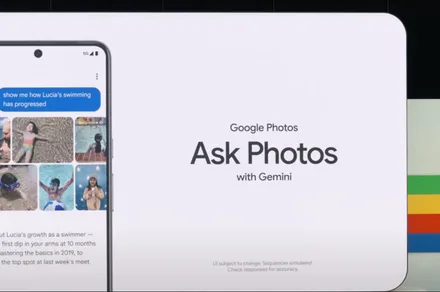
Google Photos is giving users an easier way to leave its Gemini-powered search when a simple keyword would do. A new toggle now sits at the top of the results page, letting users switch between Ask Photos and classic search without digging through settings.
The change appears to address feedback from people who opted into Ask Photos but wanted a quicker way to return to classic search when Gemini was slower or less useful for a straightforward query.
Why did Google add the toggle?
Ask Photos is built for complicated requests. It can understand natural-language questions and search for details inside images, including prompts such as “What’s my license plate?” Classic search is quicker when you only need to find a person, place, object, date, or keyword.
Reddit users complained about irrelevant results, missing keyword matches, and the disappearance of an obvious route back to classic search. Some found that the most reliable workaround was disabling Ask Photos through the Gemini settings entirely.
Advertisement
Google had already acknowledged the problems. It paused the rollout in June 2025 over latency, quality, and user-experience concerns before bringing Ask Photos back with faster handling for simple searches.
What the new toggle actually does
Users who have enabled Ask Photos will see classic search on the left and Ask Photos on the right. Google still chooses which system it believes suits the query, but either view is only a tap away. Classic search can remain selected across several basic searches. A more complicated question may switch the app back to Ask Photos, where it stays until changed manually.
People who have not opted in can continue using regular search. Google may still show them the toggle, but selecting the AI side opens the onboarding process first. Gemini still gets a prominent place in Google Photos. At least users no longer have to hunt through settings whenever classic search would work better.
A new Quordle puzzle appears at midnight each day for your time zone – which means that some people are always playing ‘today’s game’ while others are playing ‘yesterday’s’. If you’re looking for Monday’s puzzle instead then click here: Quordle hints and answers for Monday, July 20 (game #1638).
Quordle was one of the original Wordle alternatives and is still going strong now more than 1,500 games later. It offers a genuine challenge, though, so read on if you need some Quordle hints today — or scroll down further for the answers.
Enjoy playing word games? You can also check out my NYT Connections today and NYT Strands today pages for hints and answers for those puzzles, while Marc’s Wordle today column covers the original viral word game.
Advertisement
SPOILER WARNING: Information about Quordle today is below, so don’t read on if you don’t want to know the answers.
Latest Videos From
Quordle today (game #1639) — hint #1 — Vowels
How many different vowels are in Quordle today?
• The number of different vowels in Quordle today is 4*.
* Note that by vowel we mean the five standard vowels (A, E, I, O, U), not Y (which is sometimes counted as a vowel too).
Advertisement
Quordle today (game #1639) — hint #2 — repeated letters
Do any of today’s Quordle answers contain repeated letters?
• The number of Quordle answers containing a repeated letter today is 2.
Quordle today (game #1639) — hint #3 — uncommon letters
Do the letters Q, Z, X or J appear in Quordle today?
• Yes. One of Q, Z, X or J appears among today’s Quordle answers.
Rheya combines emergency battery power with software designed to predict sewage spills
Power failures at pumping stations can turn routine blackouts into environmental pollution
Rheya battery will predict the underlying causes of spills before they occur
UK startup Rheya Labs has developed backup batteries designed specifically to keep sewage pumping stations running during power failures across Britain.
The company was named one of 20 finalists in Ofwat’s £7.5 million Water Discovery Challenge, run by the Water Innovation Fund.
Each finalist receives up to £100,000 in seed funding, forming part of a wider £7.5 million pot distributed over 20 months.
Latest Videos From
A different approach to an old problem
Sewage spills are a longstanding, common issue, often blamed on overloaded systems or heavy rainfall.
Advertisement
England recorded around 290,000 sewage discharges from storm overflows during 2025, lasting roughly 1.9 million hours combined across the network.
Power failures at pumping stations are widely recognised as one trigger for these spills, alongside heavy rainfall and ageing infrastructure
Rheya Labs is now working on a system that pairs instant battery backup with software designed to flag faults before they cause spills.
Advertisement
Sign up to the TechRadar Pro newsletter to get all the top news, opinion, features and guidance your business needs to succeed!
When power cuts strike, Rheya’s batteries instantly take over the pumps, preventing raw sewage from spilling into rivers and streets.
The system also applies machine learning to pump data, aiming to predict the underlying causes of spills before they occur.
Co-founder Ben Taylor said sewage pollution remains an ever-growing crisis across the UK, calling power resilience at pumping stations a hidden but major cause.
Advertisement
Predictive analytics may give Rheya the edge
Elsewhere, Sydney Water has trialled sodium-ion battery packs at its Bondi pumping station, offering a cheaper alternative to lithium-ion systems.
That Australian project, backed by a $10.6 million grant, pairs a 30-kWh sodium-ion pack with rooftop solar generation for backup power.
Advertisement
In New York, Viridi’s 150 kWh lithium-ion battery system replaced diesel generators, supplying backup power for between 32 and 90 hours.
Unlike those systems, Rheya’s technology reportedly combines instant power backup with predictive analytics, potentially spotting faults before failures actually happen.
“With our rapidly changing climate, it is more vital more than ever that we double down on our efforts to create a water system able to support lives and livelihoods,” said Jo Jolly, Ofwat’s Director of Innovation.
“The array of new ideas from new players is astounding. The challenge is getting these ideas delivering impact on the ground, with the sense of urgency these times need.”
Advertisement
Whether Rheya’s approach genuinely outperforms established sodium-ion and lithium-ion systems remains unproven outside controlled trials and early pilot deployments so far.
Independent verification of Rheya’s spill-prediction claims has not yet appeared in public trials, leaving the early results largely anecdotal for now.
Up to ten finalists, potentially including Rheya, will share £550,000 each next April, funding further testing before wider rollout across the water network.
The success of this project will ultimately depend on whether predictive software matches the reliability already demonstrated by simpler sodium and lithium alternatives.
A painting of Jimothy, the viral raccoon, by Seattle artist Ryan Henry Ward. (@henry_beyond_museums via Instagram)
Jimothy isn’t just a viral internet sensation — he’s a cause for good.
A painting of the beloved raccoon by Seattle artist Ryan Henry Ward attracted a winning bid of $6,543.21 in an informal Instagram auction this weekend, with all proceeds directed to the Ballard Food Bank.
The winning bidder for the 24-by-24-inch painting was identified by Ward as Angela Galdabini, who posted a picture of the painting hanging on her wall.
Now the auction gift is going viral in its own way, attracting a matching donation from Amazon, which encouraged other Seattle-area companies to follow suit. According to the tech giant on Monday, T-Mobile, Alaska Air and Brooks have all gotten on board.
“When we saw a local artist giving back to the Ballard Food Bank, inspired by a little raccoon that’s brought so much joy, we wanted to help,” Kara Hurst, Amazon’s chief sustainability officer, said in a statement. “Amazon is proud to match the winning bid, and we’re calling on other Seattle-based companies to join us.”
Jimothy seemed destined to be captured by Ward, a prolific muralist whose colorful, whimsical work is seen across the Seattle region on buildings, fences, garage doors and elsewhere. His art frequently features a variety of animals and other characters, including Sasquatch.
Ward called Jimothy “the hero we needed” in his Instagram post on Saturday, and said he was giving to Ballard Food Bank because the organization helped him through some of his hardest times.
The viral Jimothy sensation took off last week when the raccoon was spotted in Ballard and a video attracted millions of views on Instagram. The craze spread around the world and other videos have emerged online, sparking immense curiosity and adoration, and a flood of memes, artwork, food, crafts, poetry, songs and more.
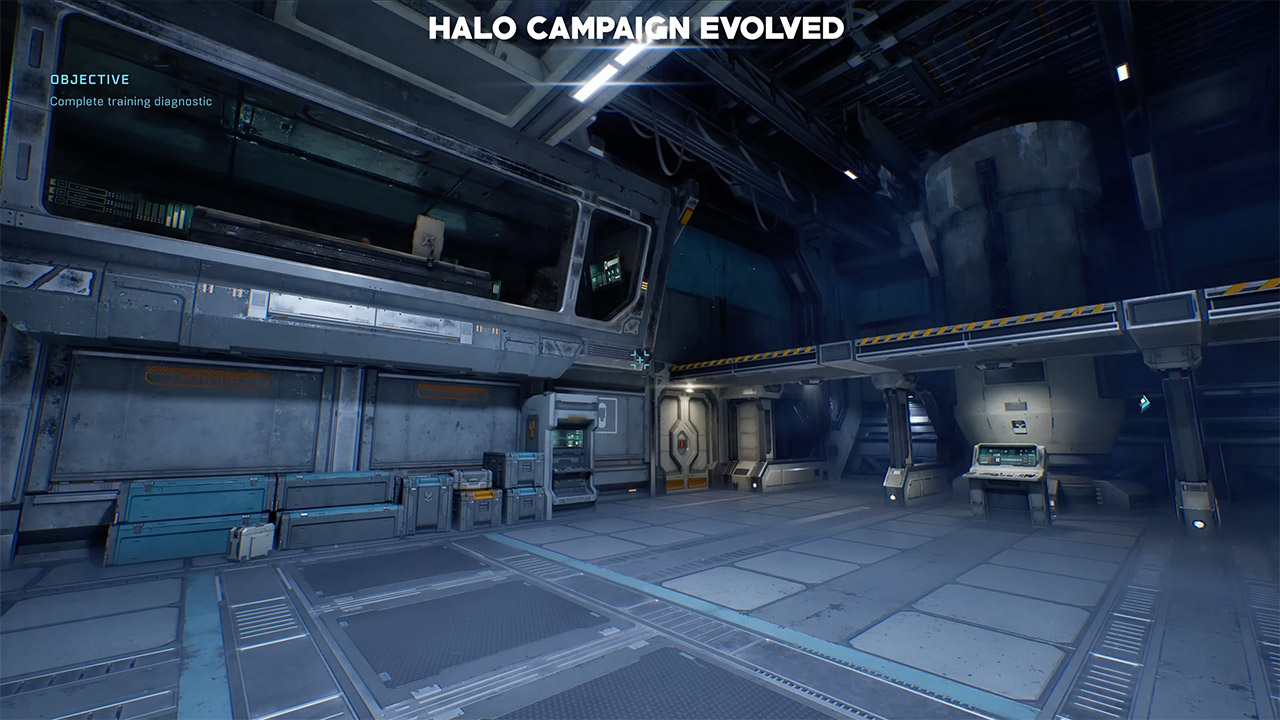
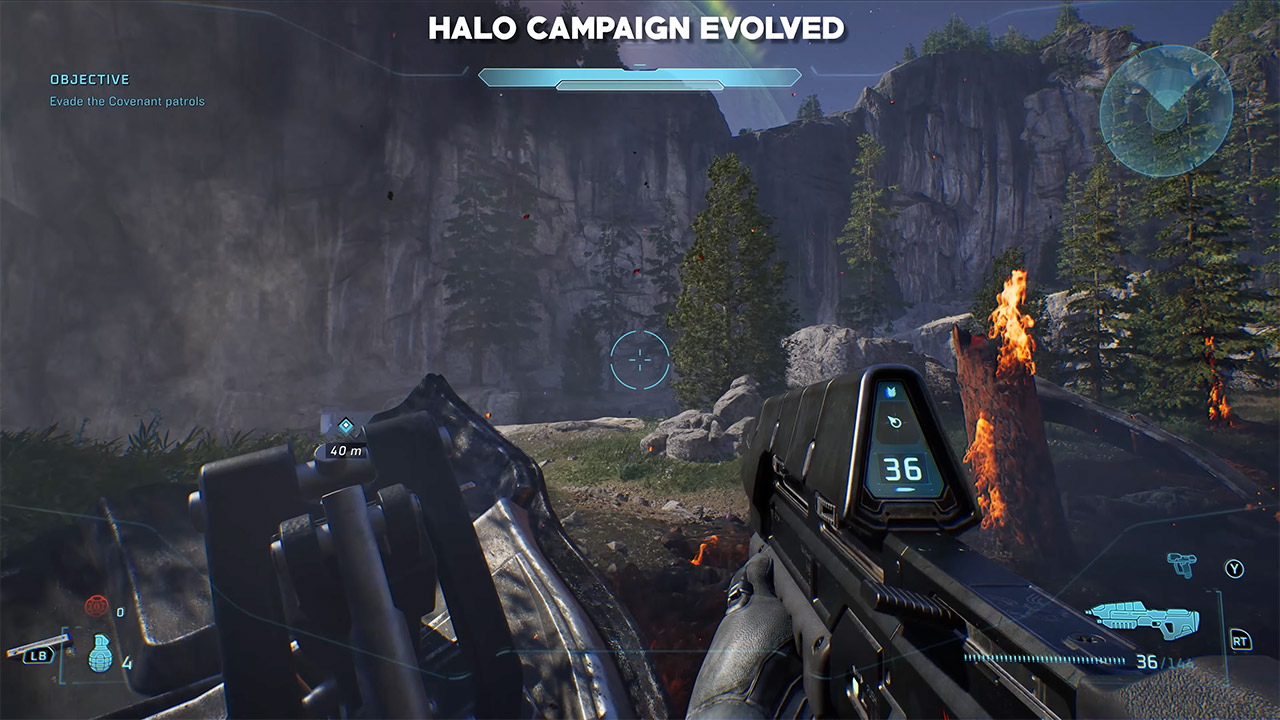
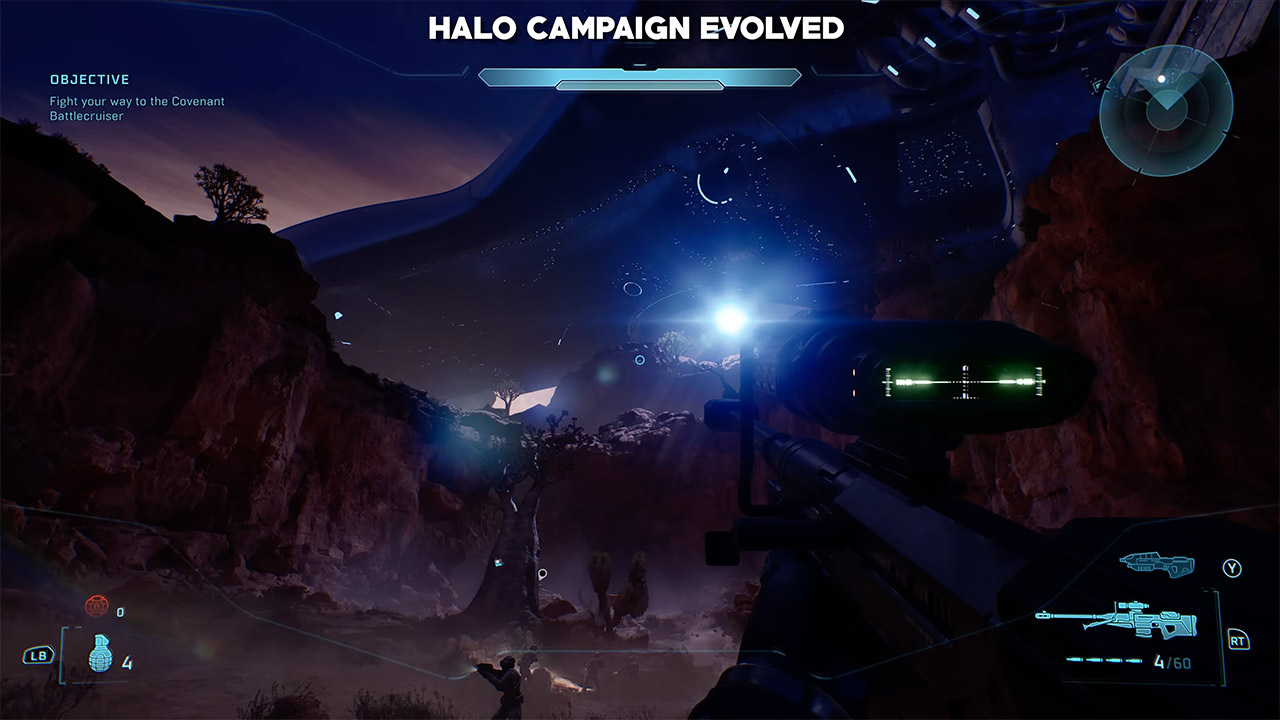
In 2001 a green-armored soldier woke up on a mysterious ring and changed everything for console shooters. Twenty-five years later Halo Studios has torn that entire campaign down to the studs and rebuilt it in Unreal Engine 5. Campaign Evolved is not a simple polish pass. Every corridor, every beach, every Forerunner structure has been constructed again from scratch. Side-by-side footage now circulating makes the gap impossible to ignore.
When you walk into the Cryo Bay of the Pillar of Autumn, the first thing you notice is the difference. The earliest chambers were basic boxes with flat panels and a gentle, even glow. In the new version, the same space is turned into a thick tangle of machinery, cables that appear to be hanging free, frost clinging to every surface, and crew members bustling about with purpose, and the light no longer simply sorta… fills the room like it used to. No, it bounces off polished metal, catches on frost, and creates these lovely soft shadows that appear to change and move every time you turn a corner.
As players step outside onto the Silent Cartographer beach, the difference becomes even more apparent. The original shoreline was a rather uninteresting expanse of sand and rock, with a limited outlook. However, Campaign Evolved takes the same shoreline and transforms it into an actual place. The waves are now smashing in with considerable volume, and rather than being flat smooth sheets of grass and scrub, they are pushing up through the sand in small groups. And way out in the horizon, you can see the distant rocks with their evident fissures and weathering. The ring continues to curve overhead, but the sky and atmosphere now adjust to time of day and weather in ways that the 2001 engine could never have predicted.
The most significant transition in materials can be seen in forerunner architecture. Early Halo structures were basically large slabs of concrete with simple geometric designs on them. The new buildings have the same immense scale and harsh shape, but each surface has fine grooves, slight discoloration, and reflective edges that catch the light in a completely different way depending on whatever angle you look at them from. Because the team has been able to push the level of detail without sacrificing performance, distant walls remain sharp rather than blurring, and the lumen lighting inside those same halls is a game changer, filling the space with soft bounced light and proper reflections that move with you as you move.
Character models and vehicles are making the same transition. Elites used to move around with these rigid, limited joints and basic armor plates. Every plate now has a genuine thickness, every joint has adequate articulation, and the energy shields respond with clearer visual input. The Warthog has gained some weight and is now more stable on the ground. The tires leave actual tracks, and as it goes, it creates actual heavy clouds of sand and dust that linger in the air for a while. Even little items like ammo crates and computer terminals now have readable lettering on them, and you can see all these wear marks that are worth looking closely at.
Campaign Evolved will be released on July 28 for the Xbox Series X|S, PlayStation 5, and PC. Early footage shows that the technological leap is enormous, since the geometry is denser, the materials respond to light properly, and the surroundings can bear careful examination. The original game was groundbreaking for its time, but this upgraded edition simply brings the same plot and locations to life in a way that modern hardware can now handle. [Source]
Although life tends to find a way, something first has to kickstart said lifeforms. Exactly how the first biological cells formed on Earth – and potentially on other worlds – remains an enduring mystery. Some theories point to the early Earth’s surface conditions as a viable laboratory for the self-assembly of the first viable membranes, RNA, DNA and associated molecular machinery, while seeding of the Earth’s primitive atmosphere by sugars and other precursors from asteroids and kin is required in other theories.
Recently [Izaskun Jiménez-Serra] et al. added to this debate with the reported detection of four-carbon sugars in the form of erythrulose in the interstellar medium. Using the 40 meter radio telescope at Yebes and the 30 meter radio telescope at Granada the signatures of this sugar was detected in a molecular cloud near the center of the Milky Way.
These sugars likely form on these interstellar dust grains from more basic two-carbon aldehydes and alcohols, with them providing conceivably a source of energy for early metabolic processes of developing lifeforms. This specific type of sugar is highly prevalent in Earth’s fruits, and thus its prevalence in interstellar space is at the very least an interesting coincidence, if not another puzzle piece in the overarching question of abiogenesis.


























































You must be logged in to post a comment Login