Connect with us

Tech

How To Fix Windows Update Error 0x80070643: 2026 Guide

Published

on

Windows Update Error 0x80070643 usually occurs when something goes wrong during an update. Unfortunately, since there can be several reasons behind this error, the troubleshooting tips can range from just a simple restart to repairing the .NET Framework. Let’s take a look at the solutions in detail.

What Causes The Windows Update Error 0x80070643?

The Windows Update Error 0x80070643 error usually occurs inside the Windows Update utility, and is accompanied by one of two messages:

  1. There were some problems installing updates, but we’ll try again later. If you keep seeing this and want to search the web or contact support for information, this may help: (0x80070643).
  2. Failed to install on [date] – 0x80070643.

Some underlying causes of the errors can include corrupted Windows system files, issues with the .NET Framework, corrupted registry entries, incomplete installations of previous Windows updates, and conflicts with Antivirus programs.

Troubleshoot Windows Update Error 0x80070643

Before proceeding, we recommend restarting your PC and trying the update again. A quick restart flushes the memory and can help solve issues relating to the RAM or storage. If the error still persists, here are some of the methods you can try:

1. Restart Windows Update Services

The most common cause of error 0x80070643 is a glitch in the Windows Update service. Restarting the service may resolve the issue. Here’s how:

Advertisement
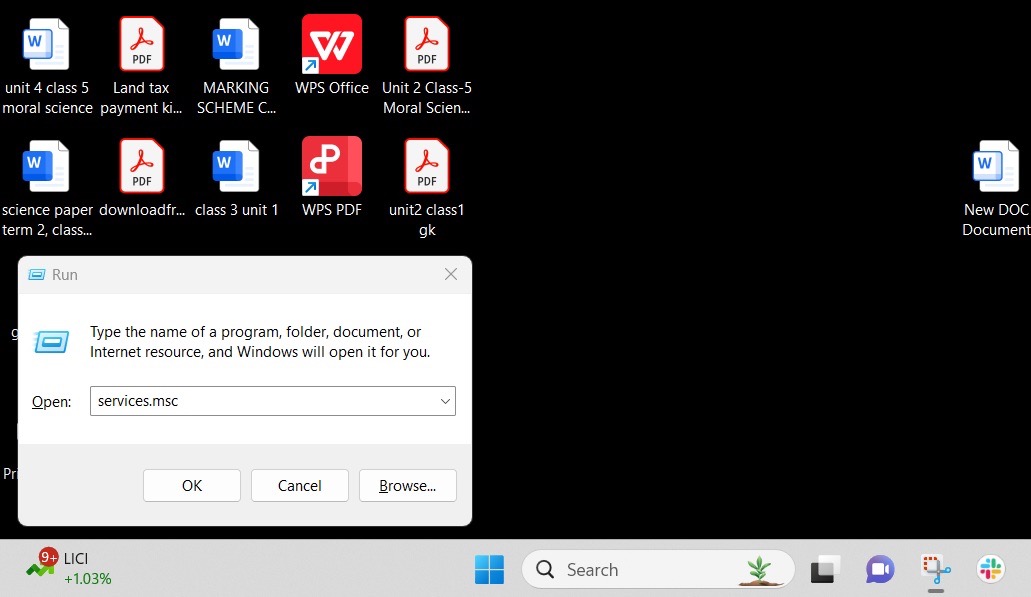
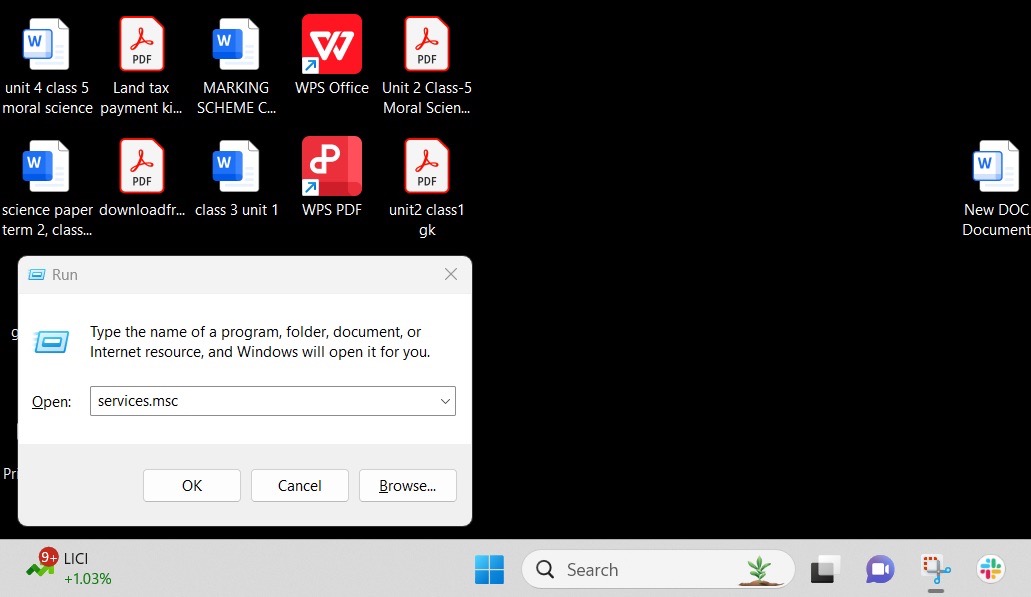
  1. Press Windows + R, then type services.msc, to open the Services app.
    Image to open the services app and solve the Windows Update Error
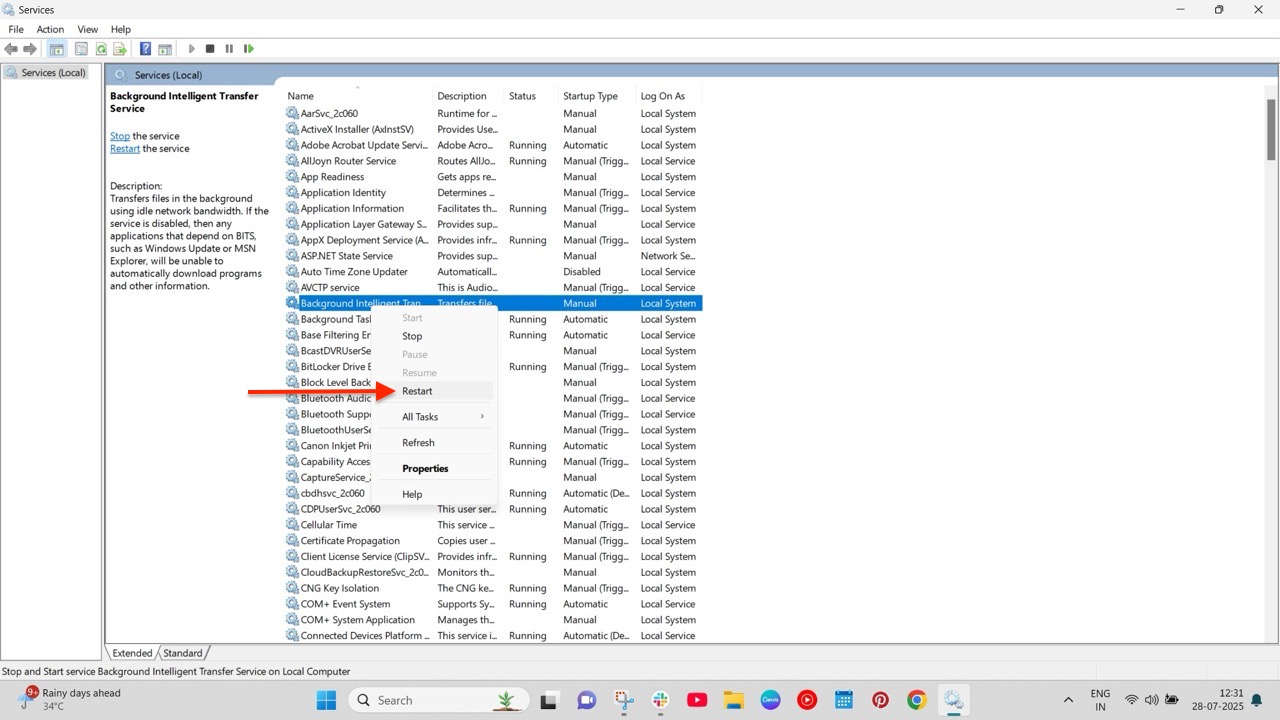
  2. Navigate to Background Intelligent Transfer Service (BITS) > Windows update.
  3. Right-click on the service and select Restart.
    Image to restart background services and fix the Windows Update Error 0x80070643

2. Run the Windows Update Troubleshooter

The Windows Error Troubleshooter scans your PC for potential issues that could be causing Windows updates to fail. To do so:

  1. Open the Settings app, and navigate to Update & Security > Troubleshoot > Additional troubleshooter.
  2. Select Windows Update and click Run the Troubleshooter.

The troubleshooter will now run and identify the root cause of the problem. Follow the on-screen instructions carefully.

3. Repair the .NET Framework

The .NET Framework is used for building and running applications on Windows. It provides a common platform consisting of a runtime environment and different libraries. But like any other software, the framework can get corrupted and cause errors with Windows updates. Fortunately, there is a framework repair tool for such cases. To use it:

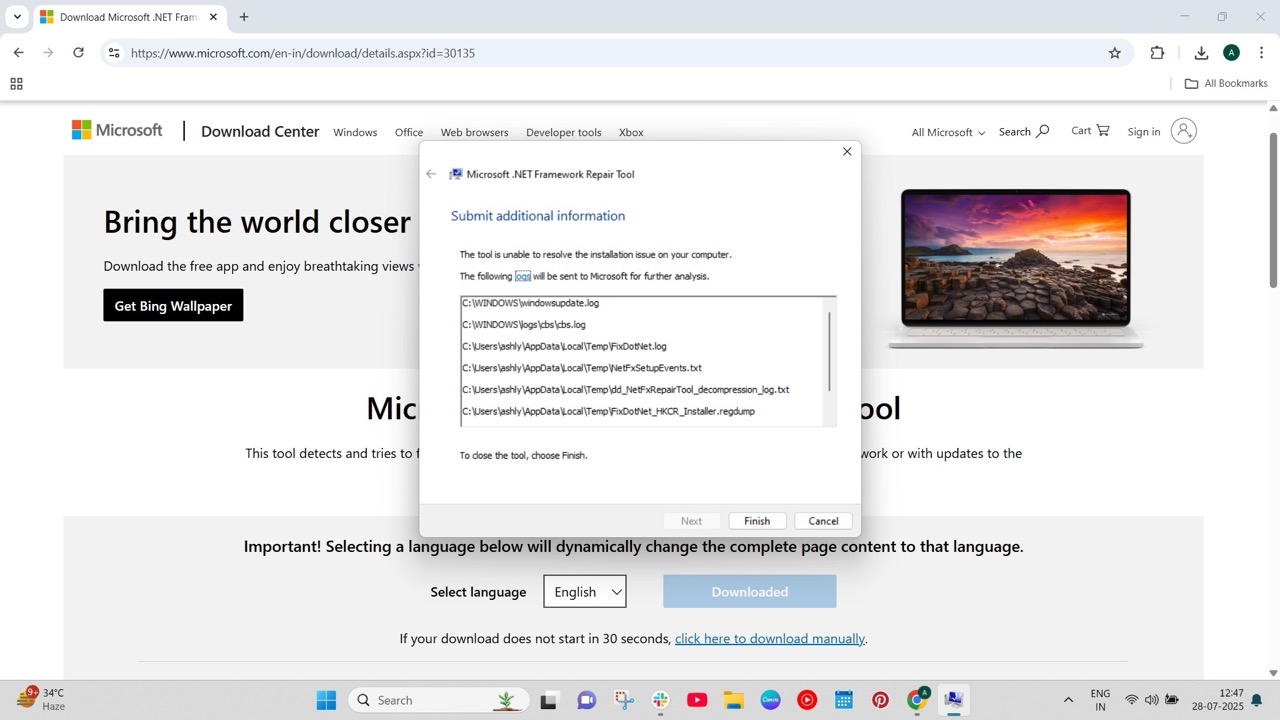
  1. Head to the .NET Framework Repair Tool website and download it.
  2. Open the tool and follow the on-screen instructions.
    Image to repair the .NET framework and fix the Windows Update Error 0x80070643
  3. After the repair, restart your system.

4. Disable Antivirus Software

If you have a third-party antivirus software, such as McAfee, installed on your PC, it may be interfering with Windows Update and blocking key files from installation, which can cause the error.

We recommend temporarily disabling the anti-virus software and trying the update again. Remember to re-enable the program after updating.

5. Do a System File Check

As stated above, corrupted system files can be the root cause of the problem. Performing a system file check can identify missing files and help you fix them. Here’s how:

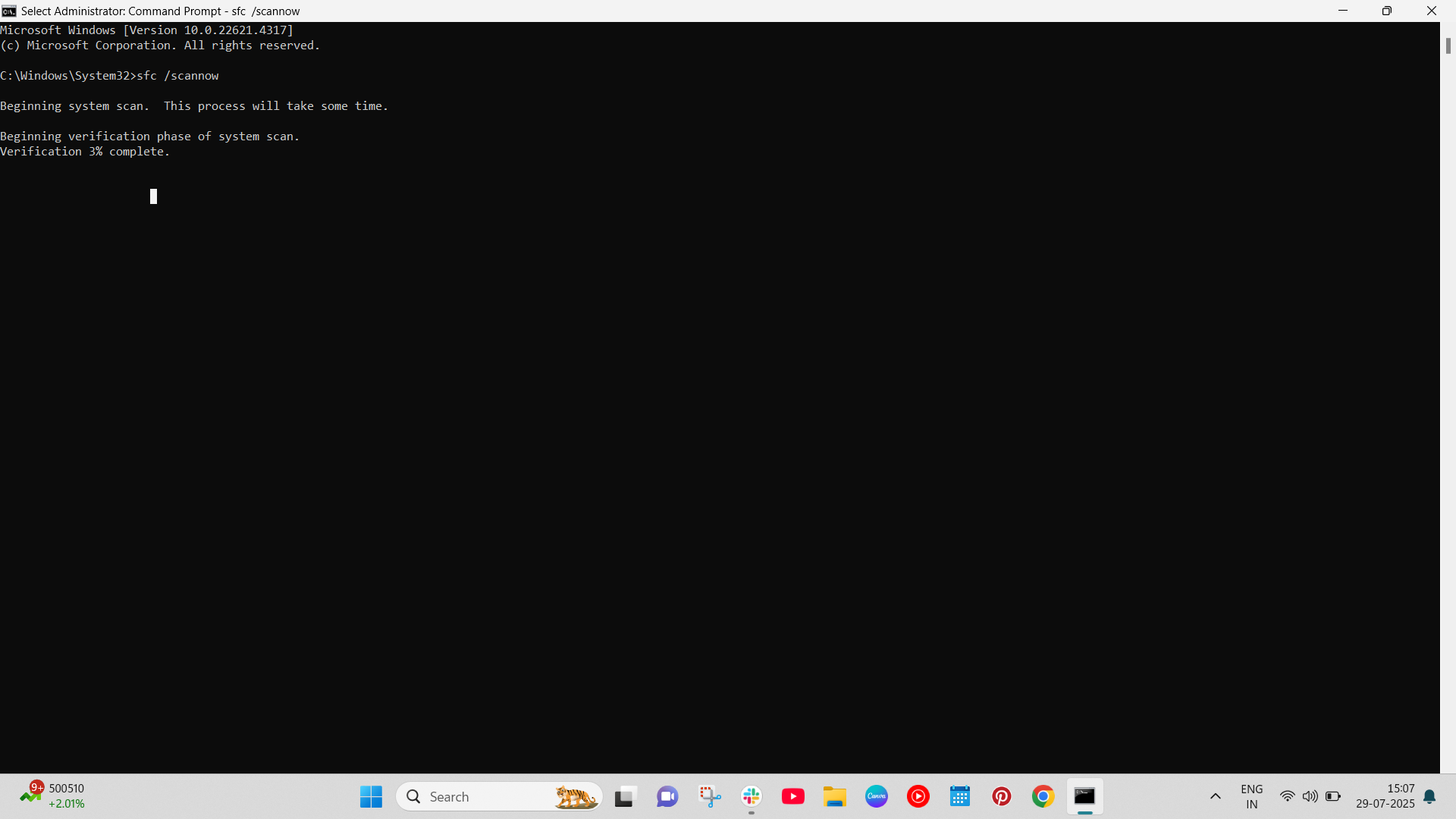
  1. Open Command Prompt with administrator privileges.
  2. Run the commands given below:
    sfc /scannow
    DISM.exe /Online /Cleanup-image /Restorehealth

    Image to repair broken system files

This command will locate the missing system files and replace them with the appropriate ones from the internet.

Conclusion

That’s it. We hope one of our solutions helped you solve the infamous Windows Update Error 0x80070643. However, if the issue still persists, we recommend contacting Microsoft’s customer service and explaining the issue to them.

Advertisement

Source link

Continue Reading
Click to comment

Leave a Reply

Your email address will not be published. Required fields are marked *

Tech

Your AI-generated password looks unbreakable, but researchers say it could fall in hours on old computers

Published

on


  • AI-generated passwords follow patterns hackers can study
  • Surface complexity hides statistical predictability beneath
  • Entropy gaps in AI passwords expose structural weaknesses in AI logins

Large language models (LLMs) can produce passwords look complex, yet recent testing suggests those strings are far from random.

A study by Irregular examined password outputs from AI systems such as Claude, ChatGPT, and Gemini, asking each to generate 16-character passwords with symbols, numbers, and mixed-case letters.

Advertisement

Source link

Continue Reading

Tech

Crime blotter: Man accused of stealing 60 iPhones from Walmart

Published

on

A Best Buy employee is accused of a MacBook discount scam, a man is wanted in the theft of MacBooks, and a campaign report says an ex-Senator improperly spent on Apple products, all in this week’s Apple Crime Blotter

Close-up of a person's hands cuffed behind their back while another person's hands secure the metal handcuffs, suggesting an arrest or detention in an indoor setting
Man in handcuffs

The latest in an occasional AppleInsider, looking at the world of Apple-related crime.
Continue Reading on AppleInsider | Discuss on our Forums

Source link

Continue Reading

Tech

4 Ways To Check Apple Store Gift Card Balance (2026)

Published

on

Apple Store gift cards are a convenient gifting option for many people, since they allow a person to buy whatever they want. If you recently received an Apple Store gift card, but aren’t sure of its balance, there are plenty of ways to check it from different devices like your iPhone, MacBook, or even a Windows laptop. Here’s how.

1. Use Apple’s Website

The easiest way to check your Apple Store gift card balance is by heading to the official Apple website. To do this:

  1. Go to the Apple Support website.
  2. Sign in with your Apple ID.
  3. Enter the PIN of your gift card.
    Screenshot of the website used to check Apple Store gift card balance

That’s it. You should now see the remaining balance on your gift card.

2. Check Balance on iPhone & iPad

  1. Open the App Store on your iPhone.
  2. Click on the profile button on the top right.
  3. Your balance would be visible underneath your name.

3. Check Balance on MacBook

  1. Open the App Store on your Mac.
  2. Tap on your name located at the bottom left corner.
    Image to check apple store gift card balance from macbook
  3. Your balance should appear underneath the Apple ID.

4. Check Balance on Windows

If you’re using a Windows device and want to check your balance there, you can do so with the iTunes website.

  1. Head to the iTunes website and sign in with your account.
  2. Navigate to Account > View My Account.
  3. Look for your gift card balance.

Frequently Asked Questions (FAQs)

Is the Apple Card balance the same as the Apple gift card balance?

No, Apple Card balance is different, and can be checked by going to the Wallet app.

Advertisement
Where can I redeem an Apple gift card?

An Apple gift card can be used to purchase Apple products, such as hardware and accessories, at any Apple Store or through Apple’s online store in certain regions.

Advertisement

Source link

Continue Reading

Tech

Nvidia could launch its first laptops with its own processors later this year

Published

on

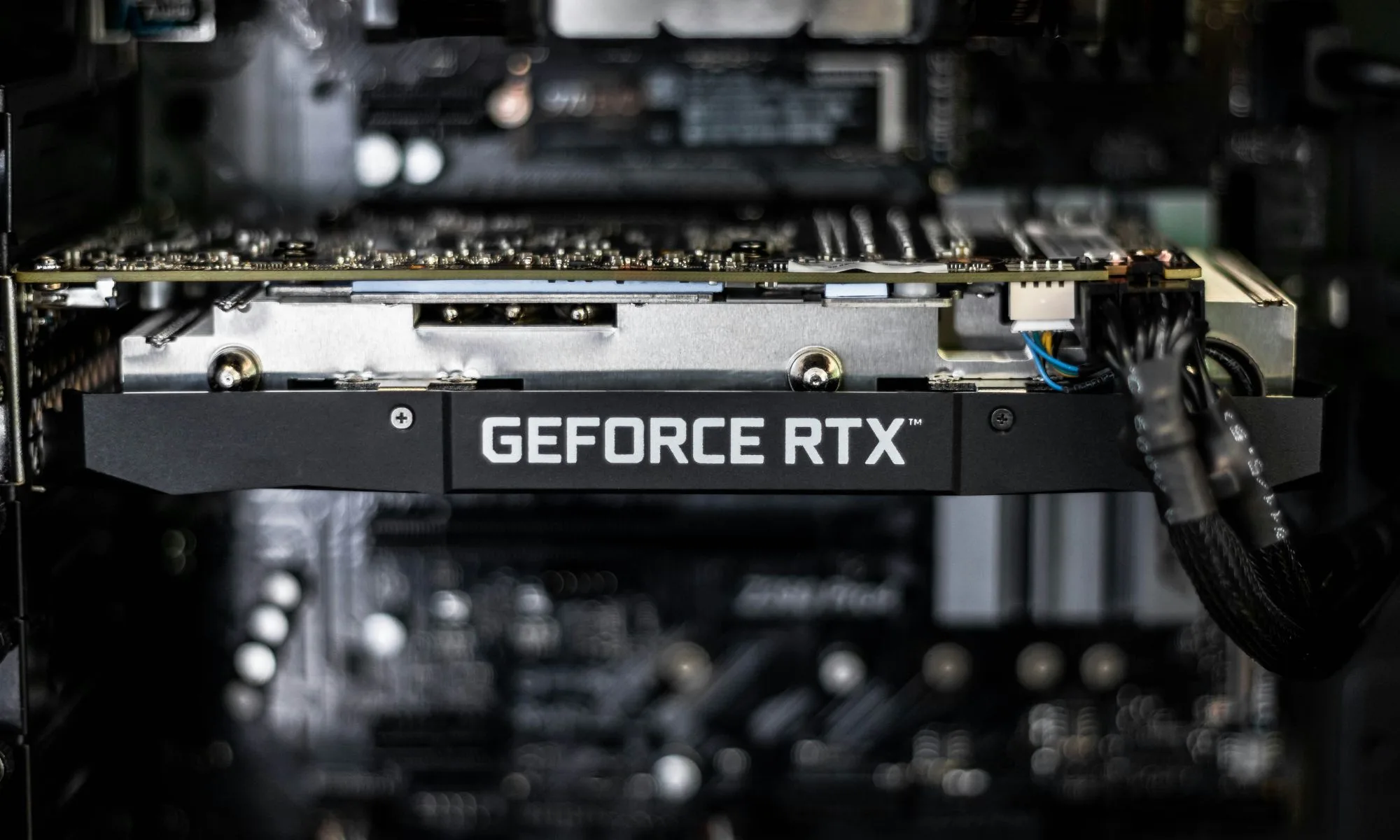
Nvidia is preparing to re-enter the consumer PC market with laptops powered by its own processors, potentially launching before the end of this year. The development, first reported by the Wall Street Journal, marks a significant expansion for the company, which currently dominates graphics chips and AI data-center hardware.

Nvidia’s shift toward full PC processors

Nvidia is developing Arm-based system-on-a-chip processors tailored for laptops. Unlike its traditional role of supplying discrete GPUs that work alongside CPUs from Intel or AMD, these new chips combine CPU, GPU, and dedicated AI acceleration into a single unit. According to the report, major PC manufacturers such as Dell and Lenovo are already working on laptop models that integrate Nvidia’s new processors.

The goal is to build lighter, more power-efficient laptops capable of delivering strong AI performance and competitive battery life. These systems are expected to directly challenge Apple’s MacBooks, which have set the benchmark for energy-efficient performance through Apple Silicon.

This move represents a major strategic shift for Nvidia

While the company has become the backbone of modern artificial intelligence, its presence inside everyday consumer computers has decreased over the last decade. By introducing complete laptop processors, Nvidia is positioning itself to compete directly with Intel, AMD, and Qualcomm as AI-powered computing becomes the new standard.

The broader industry is transitioning to architectures optimized for on-device AI tasks such as real-time language processing, image generation, and local inference. Nvidia’s entry into full laptop processors aligns with this shift and could significantly reshape the Windows PC landscape.

Advertisement

What users can expect

For consumers, Nvidia-powered laptops could mean thinner designs, longer battery life, and improved AI features integrated directly into Windows. While Nvidia’s graphics capabilities have always been a strength, the real advantage could come from cohesive hardware integration similar to what Apple achieved with its unified memory architecture.

However, early devices may face challenges, especially around software compatibility and balancing thermal efficiency with performance – common issues for first-generation platforms.

The first laptops featuring Nvidia’s processors are expected to arrive later this year, with broader availability in 2026. Analysts will be watching closely to see how Nvidia prices these systems and how they perform against established competitors. If successful, Nvidia could rapidly become a major force in consumer PCs once again, marking one of the most significant shifts in the PC processor market in more than a decade.

Source link

Advertisement
Continue Reading

Tech

Google is sunsetting the weather app on Android

Published

on

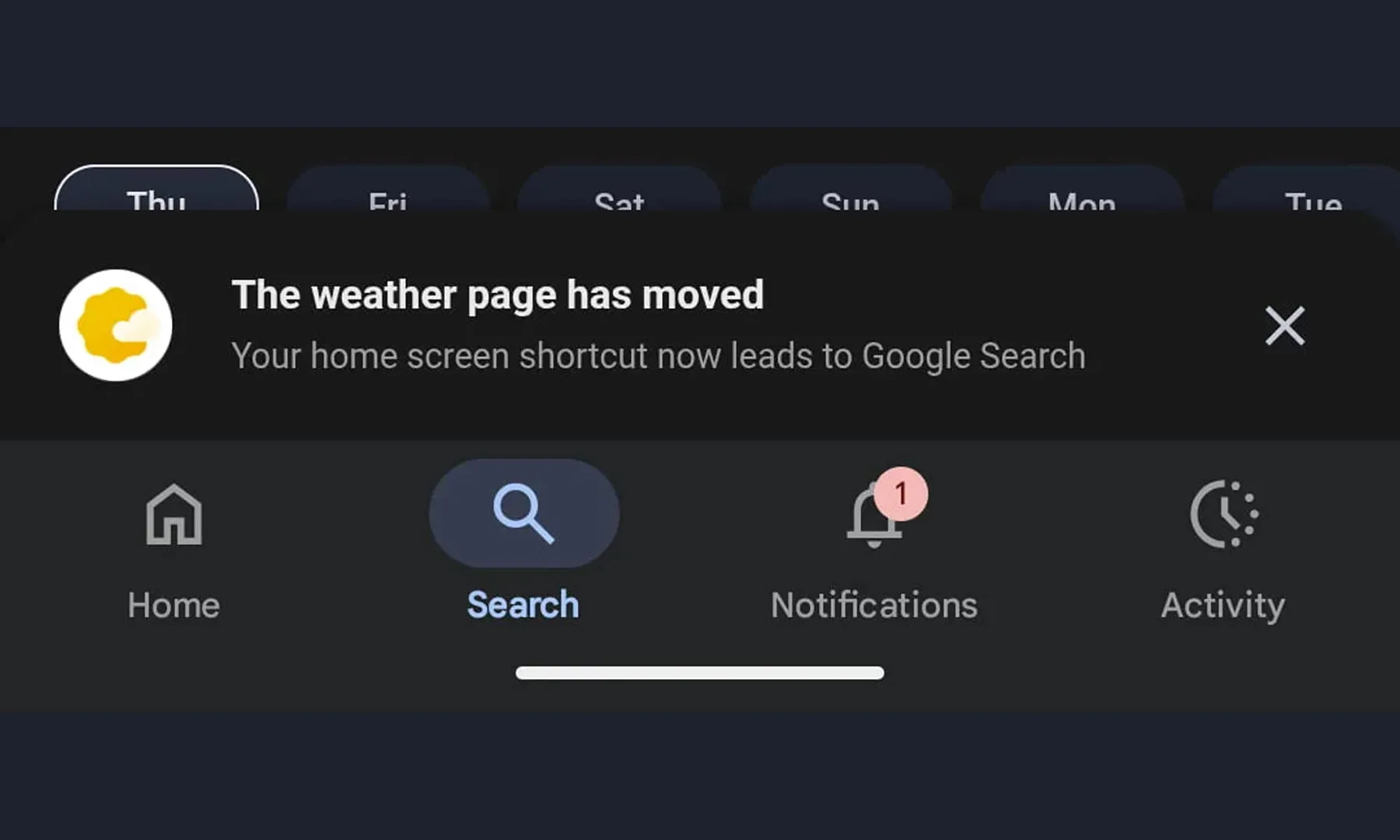
Google is quietly saying goodbye to one of Android’s most familiar mini-apps. The company is phasing out the long-standing Google Weather experience and replacing it with a redesigned weather interface inside Google Search, as reported by 9to5Google.

If you have ever tapped the sun-and-cloud shortcut on your home screen to quickly check the forecast, you have already used what many consider Android’s default weather app. Despite feeling like a standalone app, it was actually a full-screen weather experience built into the Google app. However, that shortcut is now being redirected to a new Search-based weather page, and the change appears to be rolling out widely after months of testing.

The original interface was simple and recognizable. It opened into a clean, full-screen feed with Google’s iconic “Froggy” background, showing current conditions, a 10-day forecast, and quick switching between saved cities. For many Android users, it became the fastest way to check the weather without installing a third-party app.

The replacement keeps most of the same information, but the experience is changing. Instead of a self-contained full-screen app, tapping the shortcut now opens a Google Search results page that includes the weather card alongside other search elements. The redesigned page still shows forecasts, air quality data, and detailed weather metrics. It also introduces an AI-generated summary alongside the usual hourly and 10-day forecasts. However, the experience now behaves like a typical web results page, complete with additional links and search content as you scroll.

Interestingly, Pixel phone owners are mostly unaffected. Those devices already ship with a dedicated Pixel Weather app, meaning the change primarily impacts non-Pixel Android users who relied on the shortcut as their main built-in weather tool. That said, for non-Pixel users, if you prefer quick, dedicated weather tools, this shift might nudge you toward third-party apps. Nonetheless, it is another sign that Google’s future on Android increasingly revolves around Search as the hub for everyday information.

Advertisement

Source link

Continue Reading

Tech

Reboot: Podcast haircuts, in-car Apple TV, and the real F1 on big screens

Published

on

In this week’s “Reboot” column, the unintended consequences of video on Apple Podcasts, Apple TV and AI on CarPlay, and Apple’s big F1 push beyond your iPhone screen.

Crowd watching Formula 1 cars race on a track, with large overlapping Apple Podcasts and Apple TV app icons prominently displayed in the foreground
This week, Apple Podcasts, CarPlay Apple TV, and the real F1, not the movie that appears here – Image Credit: Apple

Reboot is a new weekly column covering some of the lighter stories within the Apple reality distortion field from the past seven days. All to get the next week underway with a good first step.
After a week that saw new import tariffs replacing struck-down ones, Siri unexpectedly missing from Apple developer betas, and more legal wrangling, we can do with all the help we can get.
Continue Reading on AppleInsider | Discuss on our Forums

Source link

Continue Reading

Tech

7 Ways To Fix Apple Watch Battery Draining Fast (2026)

Published

on

Most Apple Watches last only a day or two at most. However, if yours is dying even faster, something could be draining your battery, such as background apps, Hey Siri, or other features. In this article, we’ll cover seven easy ways to fix the Apple Watch battery draining fast.

1. Dim the Screen and Wake Time

image to Dim Screen and Wake Time
Image: Payette Forward

A brighter screen and longer wake time can deplete your Apple Watch battery faster. Reducing the screen brightness and its wake duration not only saves power but also reduces eye strain. This small trick can make a big difference to the battery life of a day.

To do this, head to Settings > Display & Brightness on your Apple Watch. Reduce the brightness slider and reduce the wake duration to a shorter period. You can also disable Wake on Wrist Raise so the screen isn’t turned on unless you press the Digital Crown.

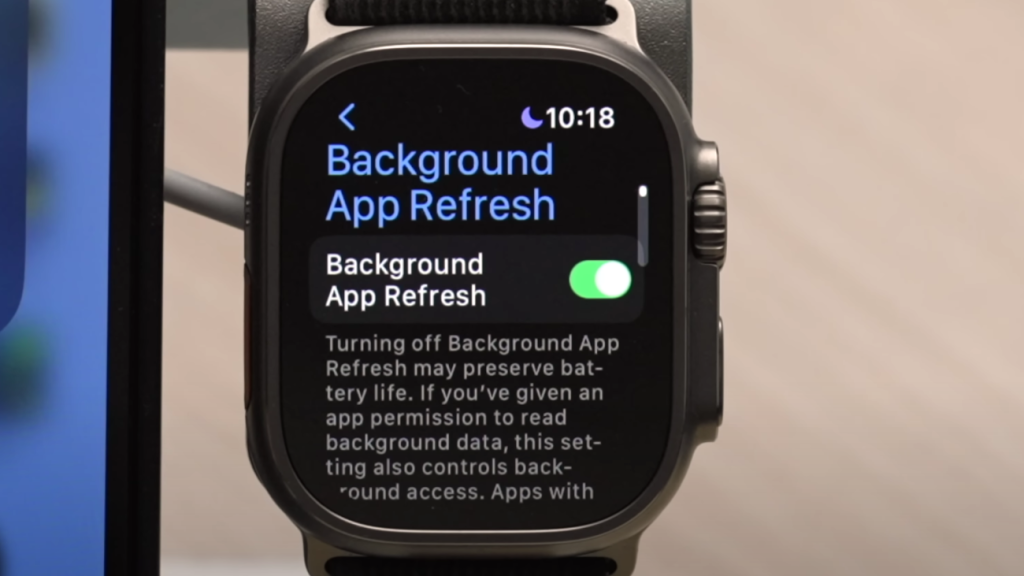
2. Turn Off Background Apps

Most installed apps continue to run in the background to update information. While most don’t affect the battery life, some might. Turning off background app refresh saves battery, and you can opt to do it for all apps or a selected few.

On your iPhone, navigate to the Apple Watch app > My Watch > General > Background App Refresh. Disable it entirely or disable it for specific apps you don’t want to be running in the background.

3. Modify Workout Settings

image to Modify Workout Settings

Workouts consume more battery life since your Apple Watch continuously monitors your heart rate, GPS, and other activity information. If you exercise often, this can noticeably shorten battery life. Thankfully, you can still track your workouts without draining too much power. Using Low Power Mode turns off certain features, like the Always-On display, while still logging your activity.

From your Apple Watch, go to Settings > Battery > Low Power Mode. Or you can proceed to your Workout settings and turn on Low Power Mode and Fewer GPS and Heart Rate Readings to conserve even more battery when you have extended workouts.

Advertisement

4. Turn Off “Hey Siri”

Your Apple Watch is constantly waiting for the “Hey Siri” phrase, which drains a little but an ongoing amount of battery time. If you don’t use Siri very often, disabling this feature will extend your watch’s battery life. You can still activate Siri by pressing and holding the Digital Crown when you need it.

On your Apple Watch, go to Settings > Siri and turn off Listen for ‘Hey Siri.’

5. Turn on Bluetooth

If you disable Bluetooth on your iPhone, your Apple Watch will continue to try to connect, draining your battery more quickly. Bluetooth on provides you with a consistent connection and allows your watch to consume less power to sync data.

On your iPhone, open Settings > Bluetooth and turn it on.

Advertisement

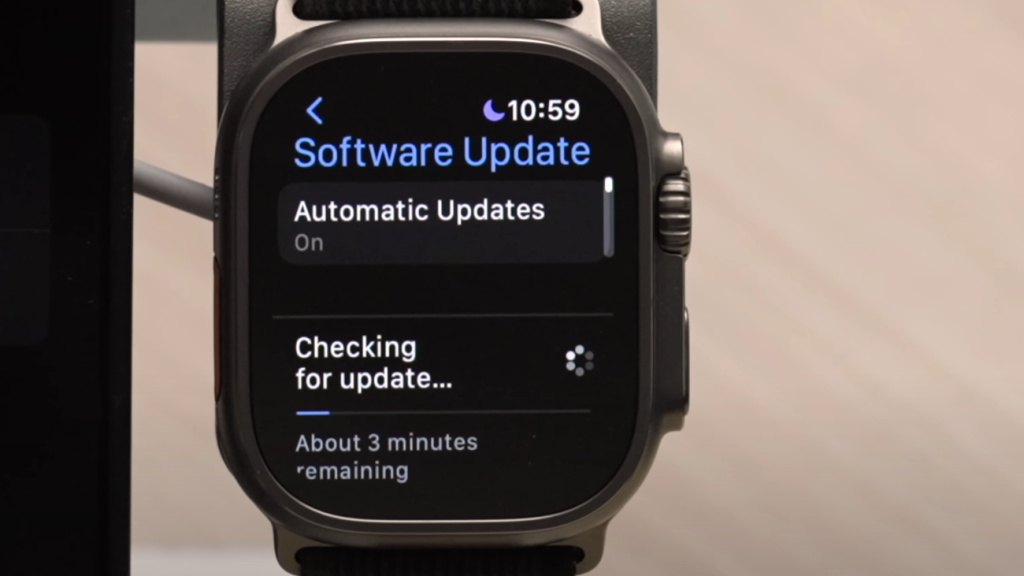
6. Update WatchOS

image to Keep watchOS updated

Software issues can sometimes cause battery drain, and Apple will typically fix those issues through updates. Getting your watchOS updated ensures you get the best updates, bug fixes, and optimized battery life.

Go to your iPhone > Watch app > General > Software Update. Charge your Apple Watch by putting it on the charger and making sure it has at least 50% battery life before you update.

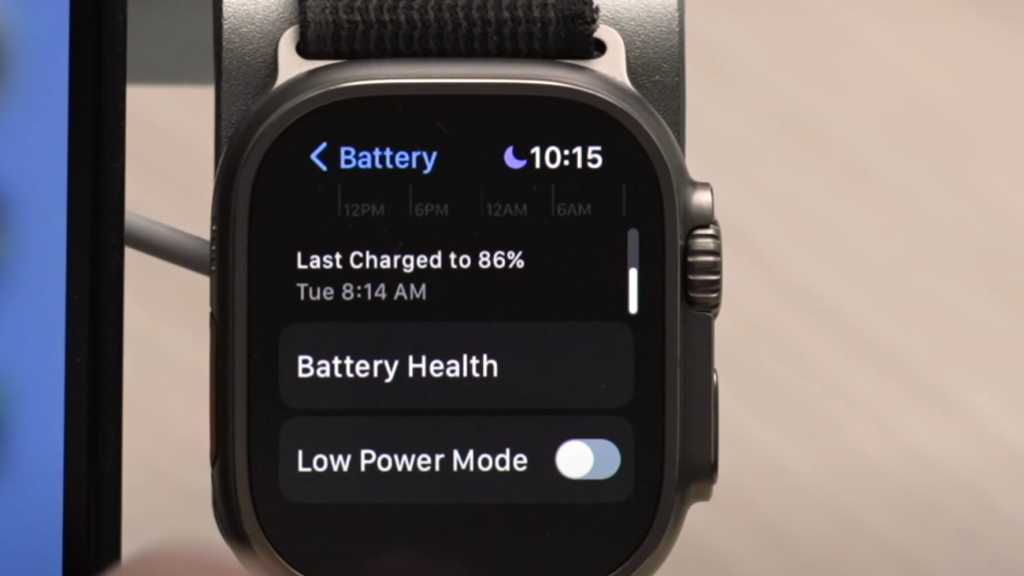
7. Check Battery Health

image for the battery health of your Apple Watch

If the battery health of your Apple Watch is poor, it will not last long despite its power-saving capabilities. The battery capacity will simply decline with time, but knowing its current state can assist you in deciding whether it should be replaced.

On your Apple Watch, go to Settings > Battery > Battery Health. If the maximum capacity is under a certain level, a battery replacement through Apple’s repair service is recommended.

Source link

Advertisement
Continue Reading

Tech

Rocket reentries are leaving measurable lithium pollution in the upper atmosphere

Published

on


On February 19, 2025, a SpaceX Falcon 9 booster fell back toward Earth, its fiery descent slicing across Europe’s night sky. Researchers at the Leibniz Institute of Atmospheric Physics in Germany captured the event using their lidar system, running it during the predicted reentry window. A new study published in…
Read Entire Article
Source link

Continue Reading

Tech

Shadow mode, drift alerts and audit logs: Inside the modern audit loop

Published

on

Traditional software governance often uses static compliance checklists, quarterly audits and after-the-fact reviews. But this method can’t keep up with AI systems that change in real time. A machine learning (ML) model might retrain or drift between quarterly operational syncs. This means that, by the time an issue is discovered, hundreds of bad decisions could already have been made. This can be almost impossible to untangle. 

In the fast-paced world of AI, governance must be inline, not an after-the-fact compliance review. In other words, organizations must adopt what I call an “audit loop”: A continuous, integrated compliance process that operates in real-time alongside AI development and deployment, without halting innovation.

This article explains how to implement such continuous AI compliance through shadow mode rollouts, drift and misuse monitoring and audit logs engineered for direct legal defensibility.

From reactive checks to an inline “audit loop”

When systems moved at the speed of people, it made sense to do compliance checks every so often. But AI doesn’t wait for the next review meeting. The change to an inline audit loop means audits will no longer occur just once in a while; they happen all the time. Compliance and risk management should be “baked in” to the AI lifecycle from development to production, rather than just post-deployment. This means establishing live metrics and guardrails that monitor AI behavior as it occurs and raise red flags as soon as something seems off.

Advertisement

For instance, teams can set up drift detectors that automatically alert when a model’s predictions go off course from the training distribution, or when confidence scores fall below acceptable levels. Governance is no longer just a set of quarterly snapshots; it’s a streaming process with alerts that go off in real time when a system goes outside of its defined confidence bands.

Cultural shift is equally important: Compliance teams must act less like after-the-fact auditors and more like AI co-pilots. In practice, this might mean compliance and AI engineers working together to define policy guardrails and continuously monitor key indicators. With the right tools and mindset, real-time AI governance can “nudge” and intervene early, helping teams course-correct without slowing down innovation.

In fact, when done well, continuous governance builds trust rather than friction, providing shared visibility into AI operations for both builders and regulators, instead of unpleasant surprises after deployment. The following strategies illustrate how to achieve this balance.

Shadow mode rollouts: Testing compliance safely

One effective framework for continuous AI compliance is “shadow mode” deployments with new models or agent features. This means a new AI system is deployed in parallel with the existing system, receiving real production inputs but not influencing real decisions or user-facing outputs. The legacy model or process continues to handle decisions, while the new AI’s outputs are captured only for analysis. This provides a safe sandbox to vet the AI’s behavior under real conditions.

Advertisement

According to global law firm Morgan Lewis: “Shadow-mode operation requires the AI to run in parallel without influencing live decisions until its performance is validated,” giving organizations a safe environment to test changes.

Teams can discover problems early by comparing the shadow model’s decisions to expectations (the current model’s decisions). For instance, when a model is running in shadow mode, they can check to see if its inputs and predictions differ from those of the current production model or the patterns seen in training. Sudden changes could indicate bugs in the data pipeline, unexpected bias or drops in performance.

In short, shadow mode is a way to check compliance in real time: It ensures that the model handles inputs correctly and meets policy standards (accuracy, fairness) before it is fully released. One AI security framework showed how this method worked: Teams first ran AI in shadow mode (AI makes suggestions but doesn’t act on its own), then compared AI and human inputs to determine trust. They only let the AI suggest actions with human approval after it was reliable.

For instance, Prophet Security eventually let the AI make low-risk decisions on its own. Using phased rollouts gives people confidence that an AI system meets requirements and works as expected, without putting production or customers at risk during testing.

Advertisement

Real-time drift and misuse detection

Even after an AI model is fully deployed, the compliance job is never “done.” Over time, AI systems can drift, meaning that their performance or outputs change due to new data patterns, model retraining or bad inputs. They can also be misused or lead to results that go against policy (for example, inappropriate content or biased decisions) in unexpected ways.

To remain compliant, teams must set up monitoring signals and processes to catch these issues as they happen. In SLA monitoring, they may only check for uptime or latency. In AI monitoring, however, the system must be able to tell when outputs are not what they should be. For example, if a model suddenly starts giving biased or harmful results. This means setting “confidence bands” or quantitative limits for how a model should behave and setting automatic alerts when those limits are crossed.

Some signals to monitor include:

  • Data or concept drift: When input data distributions change significantly or model predictions diverge from training-time patterns. For example, a model’s accuracy on certain segments might drop as the incoming data shifts, a sign to investigate and possibly retrain.

  • Anomalous or harmful outputs: When outputs trigger policy violations or ethical red flags. An AI content filter might flag if a generative model produces disallowed content, or a bias monitor might detect if decisions for a protected group begin to skew negatively. Contracts for AI services now often require vendors to detect and address such noncompliant results promptly.

  • User misuse patterns: When unusual usage behavior suggests someone is trying to manipulate or misuse the AI. For instance, rapid-fire queries attempting prompt injection or adversarial inputs could be automatically flagged by the system’s telemetry as potential misuse.

When a drift or misuse signal crosses a critical threshold, the system should support “intelligent escalation” rather than waiting for a quarterly review. In practice, this could mean triggering an automated mitigation or immediately alerting a human overseer. Leading organizations build in fail-safes like kill-switches, or the ability to suspend an AI’s actions the moment it behaves unpredictably or unsafely.

Advertisement

For example, a service contract might allow a company to instantly pause an AI agent if it’s outputting suspect results, even if the AI provider hasn’t acknowledged a problem. Likewise, teams should have playbooks for rapid model rollback or retraining windows: If drift or errors are detected, there’s a plan to retrain the model (or revert to a safe state) within a defined timeframe. This kind of agile response is crucial; it recognizes that AI behavior may drift or degrade in ways that cannot be fixed with a simple patch, so swift retraining or tuning is part of the compliance loop.

By continuously monitoring and reacting to drift and misuse signals, companies transform compliance from a periodic audit to an ongoing safety net. Issues are caught and addressed in hours or days, not months. The AI stays within acceptable bounds, and governance keeps pace with the AI’s own learning and adaptation, rather than trailing behind it. This not only protects users and stakeholders; it gives regulators and executives peace of mind that the AI is under constant watchful oversight, even as it evolves.

Audit logs designed for legal defensibility

Continuous compliance also means continuously documenting what your AI is doing and why. Robust audit logs demonstrate compliance, both for internal accountability and external legal defensibility. However, logging for AI requires more than simplistic logs. Imagine an auditor or regulator asking: “Why did the AI make this decision, and did it follow approved policy?” Your logs should be able to answer that.

A good AI audit log keeps a permanent, detailed record of every important action and decision AI makes, along with the reasons and context. Legal experts say these logs “provide detailed, unchangeable records of AI system actions with exact timestamps and written reasons for decisions.” They are important evidence in court. This means that every important inference, suggestion or independent action taken by AI should be recorded with metadata, such as timestamps, the model/version used, the input received, the output produced and (if possible) the reasoning or confidence behind that output.

Advertisement

Modern compliance platforms stress logging not only the result (“X action taken”) but also the rationale (“X action taken because conditions Y and Z were met according to policy”). These enhanced logs let an auditor see, for example, not just that an AI approved a user’s access, but that it was approved “based on continuous usage and alignment with the user’s peer group,” according to Attorney Aaron Hall.

Audit logs should also be well-organized and difficult to change if they are to be legally sound. Techniques like immutable storage or cryptographic hashing of logs ensure that records can’t be changed. Log data should be protected by access controls and encryption so that sensitive information, such as security keys and personal data, is hidden or protected while still being open.

In regulated industries, keeping these logs can show examiners that you are not only keeping track of AI’s outputs, but you are retaining records for review. Regulators are expecting companies to show more than that an AI was checked before it was released. They want to see that it is being monitored continuously and there is a forensic trail to analyze its behavior over time. This evidentiary backbone comes from complete audit trails that include data inputs, model versions and decision outputs. They make AI less of a “black box” and more of a system that can be tracked and held accountable.

If there is a disagreement or an event (for example, an AI made a biased choice that hurt a customer), these logs are your legal lifeline. They help you figure out what went wrong. Was it a problem with the data, a model drift or misuse? Who was in charge of the process? Did we stick to the rules we set?

Advertisement

Well-kept AI audit logs show that the company did its homework and had controls in place. This not only lowers the risk of legal problems but makes people more trusting of AI systems. With AI, teams and executives can be sure that every decision made is safe because it is open and accountable.

Inline governance as an enabler, not a roadblock

Implementing an “audit loop” of continuous AI compliance might sound like extra work, but in reality, it enables faster and safer AI delivery. By integrating governance into each stage of the AI lifecycle, from shadow mode trial runs to real-time monitoring to immutable logging, organizations can move quickly and responsibly. Issues are caught early, so they don’t snowball into major failures that require project-halting fixes later. Developers and data scientists can iterate on models without endless back-and-forth with compliance reviewers, because many compliance checks are automated and happen in parallel.

Rather than slowing down delivery, this approach often accelerates it: Teams spend less time on reactive damage control or lengthy audits, and more time on innovation because they are confident that compliance is under control in the background.

There are bigger benefits to continuous AI compliance, too. It gives end-users, business leaders and regulators a reason to believe that AI systems are being handled responsibly. When every AI decision is clearly recorded, watched and checked for quality, stakeholders are much more likely to accept AI solutions. This trust benefits the whole industry and society, not just individual businesses.

Advertisement

An audit-loop governance model can stop AI failures and ensure AI behavior is in line with moral and legal standards. In fact, strong AI governance benefits the economy and the public because it encourages innovation and protection. It can unlock AI’s potential in important areas like finance, healthcare and infrastructure without putting safety or values at risk. As national and international standards for AI change quickly, U.S. companies that set a good example by always following the rules are at the forefront of trustworthy AI.

People say that if your AI governance isn’t keeping up with your AI, it’s not really governance; it’s “archaeology.” Forward-thinking companies are realizing this and adopting audit loops. By doing so, they not only avoid problems but make compliance a competitive advantage, ensuring that faster delivery and better oversight go hand in hand.

Dhyey Mavani is working to accelerate gen AI and computational mathematics.

Editor’s note: The opinions expressed in this article are the authors’ personal opinions and do not reflect the opinions of their employers.

Advertisement

Welcome to the VentureBeat community!

Our guest posting program is where technical experts share insights and provide neutral, non-vested deep dives on AI, data infrastructure, cybersecurity and other cutting-edge technologies shaping the future of enterprise.

Read more from our guest post program — and check out our guidelines if you’re interested in contributing an article of your own!

Source link

Advertisement
Continue Reading

Tech

Can I Still Be a Product Manager?

Published

on

I remember the first time I sat in a sprint planning meeting. I was a junior product manager and felt on top of the world. I had my roadmap ready. I had my user stories written. I felt prepared.

Then the lead engineer started talking.

He asked whether the API endpoints were ready to receive the payload. He mentioned something about refactoring the legacy code before we could touch the database schema. He looked at me, waiting for an answer. I stared back, completely blank. I had no idea what he was talking about.

In that moment, the heavy cloud of Imposter Syndrome settled over me. I thought I had made a huge mistake. I thought that because I could not write a single line of Java or Python, I had no business telling engineers what to build.

Advertisement

If you are reading this, you are probably feeling that same fear. You are looking at job descriptions that list “Computer Science degree preferred” and wondering if you should quit before you start.

I am here to tell you to stop worrying. I have been in this industry for over a decade. I have led products used by millions of people. And to this day, I still cannot code.

The short answer is yes. You can absolutely be a successful product manager without knowing how to code. In fact, sometimes it is actually an advantage. Let’s talk about why.

Advertisement

The Myth of the Technical Genius

There is a common misconception in the tech industry. People think a Product Manager is just a CEO who knows how to code. This idea comes from the early days of software, when the lines between engineering and management were blurry.

Today, the roles are very different.

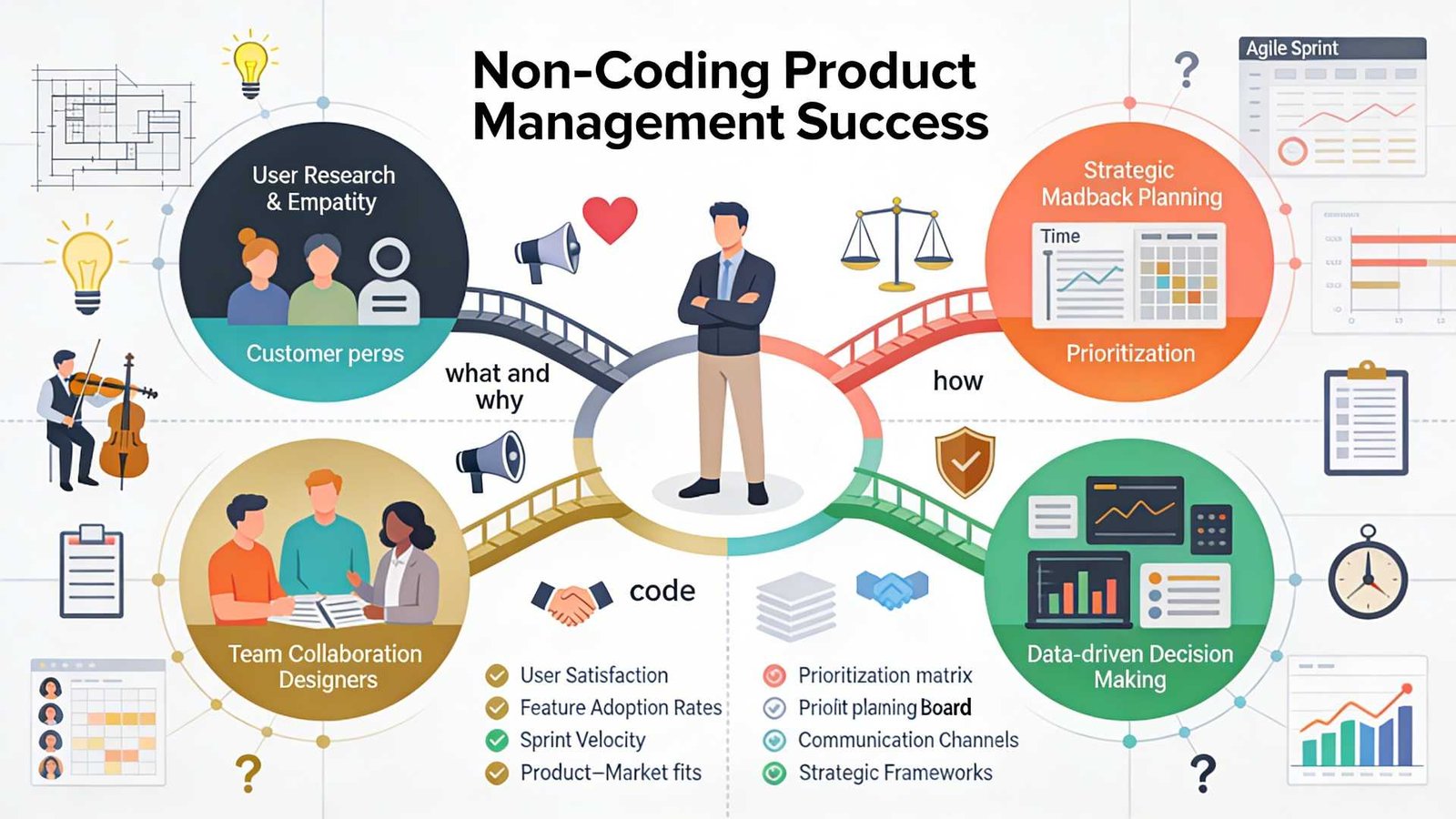
The job of an engineer is to answer the question: “How do we build this?”

The job of a product manager is to answer the question: “Why are we building this, and who are we building it for?”

Advertisement

If you spend all your time worrying about how, you will forget about the why. A non-technical product manager brings a different perspective. You are not bogged down by the code’s limitations. You are focused on the user’s pain points.

Your goal is not to write the software. Your goal is to deliver value to the customer and the business. You need to be the voice of the user, not the server’s.

Why Non-Technical PMs Are Often Better

It might sound strange, but not knowing how to code can actually make you a better product manager.

When you have a technical background, it is easy to fall into the “solution trap.” A user tells you they have a problem. If you are an engineer at heart, your brain immediately jumps to the technical solution. You start thinking about database tables and logic flows.

Advertisement

But a great PM needs to fall in love with the problem, not the solution.

As a non-technical product manager, you are forced to ask more questions. You have to ask “why” five times to understand the root cause because you cannot just assume a fix. This curiosity leads to deeper user insights. You rely on data, customer interviews, and market research rather than your own assumptions about how the software works.

You also become a better delegator. You have to trust your engineering team. This builds a healthy relationship. Engineers hate being micromanaged by a PM who thinks they can code better than them. When you admit you don’t know the code, you empower the engineers to own the technical decisions. You tell them what needs to happen, and you let them decide how to make it happen.

Bridging the Gap: Tech-Literacy vs. Coding

Now, let’s be realistic. You cannot be completely ignorant of technology. You are building software, after all.

Advertisement

You do not need to be a coder, but you do need to be “tech-literate.” Think of it like being an architect for a house. The architect does not need to know how to wire the electrical panel or weld the pipes. But they need to know that pipes go in the walls and that electricity is dangerous if handled incorrectly.

Here is what you actually need to understand:

1. Understand the Vocabulary

You need to speak the language. If an engineer says the “server is down,” or the “API is broken,” you need to know what that implies for the user. Learn the difference between front-end (what users see) and back-end (data and logic). Understand what a database does. This helps you communicate.

2. Understand Feasibility

You need to develop a sense of how hard things are. If you ask for a button to move two pixels to the left, that is usually easy. If you ask for that button to suddenly predict the future using AI, that is hard. As you work with teams, you will learn to estimate effort even if you cannot write the code yourself.

Advertisement

3. Understand Trade-offs

Engineering is all about trade-offs. We can build it fast, but it might be buggy. We can build it perfectly, but it will take six months. Your job is to help the team make these decisions based on business value. You don’t need code to understand that a two-month delay might kill the product launch.

The Skills That Actually Matter

If you take coding off the table, what should you focus on? The best product managers I know share a specific set of skills that have nothing to do with GitHub repositories.

Deep User Empathy

Can you put yourself in the customer’s shoes? Can you feel their frustration when the app is slow? This is your superpower. You need to be the user’s champion in a room full of people discussing technical constraints.

Ruthless Prioritization

You will always have fewer resources than you want. You will have a list of ten features and only enough time to build two. The skill of saying “no” is far more valuable than the skill of writing Java. You need to review the data and decide what offers the most value right now.

Advertisement

Communication and Storytelling

You need to rally the team. You have to convince stakeholders that your roadmap is the right one. You need to explain complex features to the sales team in simple words. This requires high emotional intelligence and excellent communication skills.

Strategic Thinking

Where is the market going? What are competitors doing? How does this product fit into the company’s long-term vision? These are the questions you get paid to answer.

If you feel your foundation in these areas is weak, focusing on them is a better use of time than learning C++. Structured learning can significantly accelerate this process. For example, the Product Management Course at Techcanvass focuses heavily on these core competencies. It covers the entire lifecycle from planning to execution, which is exactly what hiring managers look for.

How to Work with Engineers When You Can’t Code

The biggest fear for a non-technical product manager is losing the engineering team’s respect. I used to worry about this every day. Over time, I learned that engineers do not respect you for your coding skills. They respect you for bringing clarity.

Advertisement

Here is how to win them over:

Be Honest: Never pretend to know something you don’t. If they use an acronym you don’t know, ask for clarification. Say, “I am not familiar with that term. Can you explain it to me in simple terms?” They will appreciate the honesty.

Focus on the “What” and “Why”: Bring them clear requirements. Engineers hate vague instructions. If your user stories are clear and your acceptance criteria are solid, they will love you.

Shield Them: Protect your team from noise. If upper management is demanding changes every day, it is your job to push back. If you protect their time so they can code in peace, they will be your biggest allies.

Advertisement

Bring Data: When you ask for a feature, back it up with numbers. Don’t say “I think we should do this.” Say “Data shows 40% of users drop off at this screen, so we need to fix it.” Engineers respond well to logic and data.

When Should You Learn Technical Concepts?

While you don’t need to code, getting a certification or taking a course that covers the basics of software development lifecycles (SDLC) is very helpful.

You should understand concepts such as project management software, Agile, and Scrum. You should know how data flows through a system. You should understand what an API is.

But there is a difference between learning these concepts and learning to write syntax. You want to reach a level where you can draw a box on a whiteboard and label it “Database,” not a level where you can query that database yourself.

Advertisement

If you are looking to break into the field or move up to a Senior role, focus on certifications that validate your management skills first. A strong foundation in business analysis and product lifecycle management will serve you better than a coding bootcamp. The Techcanvass product management course is designed to bridge that gap, giving you the vocabulary and the strategic tools without forcing you to become a developer.

Conclusion

So, let’s go back to the original question. Can you be a Product Manager if you don’t know how to code?

Yes. A thousand times, yes.

The world is full of brilliant engineers who can build anything. But the world is short on people who can figure out what needs to be built. The world needs people who can listen to users, analyze markets, and lead teams with empathy.

Advertisement

Do not let the “technical” requirement in a job description scare you away. Your value lies in your vision, your strategy, and your ability to execute.

You are not there to write the code. You are there to write the future of the product.

Source link

Advertisement
Continue Reading

Trending

Copyright © 2025