




Connect with us
DAPA Banner

Tech

How to Protect Your Site

Published

on

Your website has transformed into something far greater than an online business card during this time. It has become the lifeblood of your business, the place where you engage with customers, store vital information, and conduct sales. However, the sad thing is that the more we count on our websites, the more they become a target for hackers.

Every day, the criminals are getting more and more intelligent. They are continuously discovering new methods to invade websites through data leaks, viruses, and other attacks. For those who own or design websites, security is no longer a matter that can be ignored but rather a must. A single vulnerability could lead to a variety of negative repercussions, such as the leaking of your customers’ private information, loss of company image, lawsuits, and even financial losses.

In this article, you are going to discover the reasons behind the high importance of website security, the various types of threats and the defences you can employ. The knowledge of these security fundamentals will go a long way in aiding you to provide a safer experience to every single person visiting your site, be they website builders, business owners, or content managers. 

Why Cybersecurity is Crucial in Web Development?

When the security measures of a website are analogized like this: erecting a site without security is similar to building a house and neglecting to put locks on the doors. The dangers are genuine, and they are severe. Therefore, cybersecurity is a prerequisite in web development. If you do not take it, you could encounter: 

Advertisement
  • Fraud or ransom demands resulting in financial losses. 
  • Your customers may become distrustful of you. 
  • You would have to comply with legal requirements concerning the protection of personal data. 
  • Your business ideas and information could be stolen. 
  • If your site gets hacked, Google may de-index it from its search results.

Here’s something important that you must remember: hackers don’t just go after big companies. Small business websites are often easier targets because they usually have weaker security. That’s why it’s crucial to think about protection from the very beginning, when you’re planning, building, and maintaining your website.

What are the Various Common Cyber Threats Against Websites?

Let’s talk about the most common cyber threats that can target your website. Knowing what you’re up against is the first step to staying safe. Here are the big ones you should watch out for:

1. SQL Injection (SQLi)

Hackers sneak harmful code into your website’s input fields to get into your database. They often target login forms, search boxes, and contact forms.

2. Cross-Site Scripting (XSS)

Advertisement

This happens when attackers put malicious scripts on your webpages. These scripts can steal your visitors’ login information or cookies.

3. Distributed Denial of Service (DDoS)

Imagine thousands of fake visitors flooding your site all at once. That’s a DDoS attack! It overwhelms your server, causing your website to crash or become painfully slow.

4. Brute-Force Attacks

Advertisement

Hackers use automated tools to guess passwords repeatedly until they get in. It’s like someone trying every key on a keychain until they find the right one.

5. Malware & Ransomware Injection

Attackers slip harmful files or code into your website. This can steal data, lock up your files until you pay a ransom, or redirect your visitors to scam sites.

6. Session Hijacking

Advertisement

Think of this as someone stealing your visitor’s “session ticket” while they’re logged in. The attacker can then pretend to be that user.

7. Phishing & Social Engineering

This is all about tricking people. Attackers create fake login pages or send convincing emails to get users to hand over their sensitive information.

These threats show why security needs to be built into your website from the start, not added as an afterthought.

Advertisement

Best Practices to Protect Your Website from Cyber Threats

If you don’t want your website to struggle and become a target for cyber threats, here are some simple ways to protect your website:

1. Start with Secure Coding

Good security begins with how you build your website. 

  • Make sure to clean and check all user inputs
  • Use prepared statements for database queries
  • Encode your output to stop XSS attacks
  • Don’t let error messages give away sensitive information about your server. 

When you follow OWASP’s secure coding guidelines, you can build safer websites.

Let’s talk about keeping your website safe. Weak passwords and poor access control are like leaving your front door unlocked for hackers.

Advertisement

2. Strengthen Authentication and Access Control 

If your website has weak passwords and poorly managed access, it’s more prone to intrusions. Start by making sure everyone uses strong passwords. Turn on multifactor authentication — it’s like having a second lock on your door. Only give admin access to people who really need it, and make sure everyone has the right level of permissions for their job.

Use secure login systems like OAuth or single sign-on. And if someone tries to log in too many times and fails, lock their account automatically.

3. Use Firewalls & Security Plugins

Advertisement

Firewalls are your first line of defence. They stop malicious traffic before it even reaches your site. If you’re using WordPress or similar platforms, various plugins can watch for threats in real time and block them. Here are a few plugins that can help:

  • Wordfence
  • Sucuri
  • iThemes Security

4. Keep Software Updated 

Keep everything updated. Old software, themes, and plugins are easy targets for hackers. Make sure your frameworks, server software, and databases are current. Get rid of any plugins you’re not using anymore. When security updates come out, install them right away.

5. Conduct Regular Security Audits  

Check your security regularly to ensure it works well and remains secure. You can: 

Advertisement
  • Run vulnerability scans
  • Review your code
  • Do penetration testing
  • Using tools like Burp Suite and OWASP ZAP can help you find weak spots. 

Some companies even hire ethical hackers to deliberately try to break into their systems; it’s the best way to find problems before real hackers do.

In a Nutshell!

Website security isn’t just a technical thing; it’s essential for your business. With cyber threats getting worse every day, you need to think about security from day one. Follow good coding practices, protect your servers, keep everything up to date, and monitor what’s happening on your site. A secure website builds trust with your customers, protects their data, makes your brand look reliable, and helps your business grow. In today’s online world, security means success. So you can also get in touch with companies that offer web development services and secure your website. 

Source link

Advertisement
Continue Reading
Click to comment

You must be logged in to post a comment Login

Leave a Reply

Tech

GhostClaw turns GitHub habits into a macOS malware pipeline

Published

on

GhostClaw, a macOS infostealer, is spreading through GitHub repositories and developer tools, and it works because routine install habits make running malware feel completely normal.

Terminal window displaying a long AppleScript command describing Antigravity Pack SDK security dialog instructions, including unlocking, selecting an IDE or Terminal, toggling a switch, and choosing Skip, Open Settings, or OK
GhostClaw is spreading across GitHub

Jamf researchers tracked the campaign’s shift from npm packages to GitHub repositories and AI-assisted development environments. The payload, a macOS infostealer, blends into expected behavior rather than exploiting software.
Developers regularly pull code from GitHub, follow README instructions, and run install commands without much hesitation. Familiar patterns build trust, and GhostClaw slips directly into that routine.
Continue Reading on AppleInsider | Discuss on our Forums

Source link

Continue Reading

Tech

The biggest change for Philips 2026 TVs could be its smartest

Published

on

Ta-ra. Seeya later. Bon voyage. Auf wiedersehen.

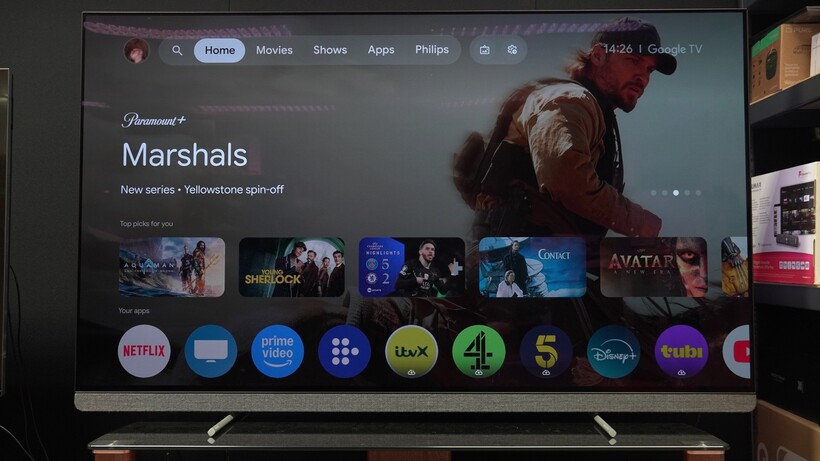
Although Philips probably didn’t use any of those words, it has said goodbye to Google TV with the 2026 TV models, and brought Titan OS into the fold as the main UX partner.

This could be a very good arrangement for Philips.

The battle for customers’ attention in the TV space will, in my view, come down to the user interface. You can throw as many specs at the wall as you want, but at the end of the day, people like a TV that’s easy to use, and while Google TV is very good, in hindsight, perhaps it wasn’t the best partner for Philips.

Advertisement

A smart change?

It’s a change that could end up being a smart move for Philips. Google TV is a big platform; it has all the global apps, it comes with integrated smarts and connectivity such as Google Assistant, Google Home and Google Cast. If you want a capable user experience, then Google TV offers that.

Advertisement

But in the UK at least, it’s had and continues to have an issue with catch-up apps and services. I’ve heard a few voices give their opinion, and at least one issue was that catch-up and on-demand services such as BBC’s iPlayer and Channel 4 did not want to let go of non-negotiables – namely their position at the top of the EPG; whereas Google wanted to bring some flexibility and change to that.

I can’t say that’s the absolute truth on the matter but an opinion that’s been floated as to why Google TV and UK TV services haven’t really got on with each other. It’s likely the reason why Panasonic, released TiVo and Fire TV models in the UK while Europe got Google TV models instead.

Advertisement
Philips 65OLED910 Google TVPhilips 65OLED910 Google TV
Image Credit (Trusted Reviews)

It’s likely the reason why iPlayer rarely appears on Google TV models in the UK, aside from Sony and TCL models, who seem to have gone through the trouble of negotiating their own deals (or using different TV platforms) to get these apps onboard.

Whether it’s a TV or a smart projector, Google TV is almost certainly leaving iPlayer off the list; while Channel 4’s level of support is sketchy. And let’s not beat about the bush – these are apps that many want to have included from the get-go. Not having them is a disadvantage in the minds of UK customers who want a TV that’s easy to use.

And therefore it’s a disadvantage to Philips. The Philips OLED910 is a great TV but I’ll have to highlight the fact that it doesn’t have iPlayer will annoy customers who simply want a TV packaged with everything they might need. Does anyone remember the kerfuffle customers brought up when LG TVs dropped Freeview Play? Is that important to many.

Advertisement

A titan in waiting

But switching to Titan OS makes sense. Philips has practically incubated this user platform from birth, working with them on their less expensive TVs and gradually adding to across the line to the point where it’s available on the flagship level.

Advertisement

It’s certainly not as big a brand name as Google is, but now Philips can weave a story that includes both them and Titan OS, rather than being eased out of the way by Google taking the limelight.

They can build a platform that works for Philips, with much closer collaboration. Titan themselves are looking to bring in some interesting new features, including a sports section that’s tailored to what the viewer wants to watch, rather than what the platform wants you to watch.

Philips Titan OSPhilips Titan OS
Image Credit (Trusted Reviews)

Say you prefer watching tennis? Based on what you’ve clicked, the platform will learn what you like, and rather than focus on shovelling association football to your eyeballs, you’ll instead be presented with tennis content instead.

Advertisement

This is a long-term goal and not something that’s going to be launched in the next few months, but it’s a sign of what can be done on a smaller scale, rather than being a smaller voice next to a global player such as Google.

Advertisement

Titan OS supports Freely, so you get all the catch-up apps and services included from the get-go. It might not have the flash or scale of Google TV, but it’s building up a base and growing in terms of recognition.

After all, what does Philips have to lose? If anything, it should be seen as what Philips can gain from such a move. I think there’s plenty of opportunity available for Philips and Titan to make their mark.

Source link

Advertisement
Continue Reading

Tech

New super stealth speed cameras could catch London drivers exceeding 20 and 30mph limits without any warning signs visible

Published

on


  • TfL introduces radar cameras that monitor five lanes without visible alerts
  • Half of London’s 2024 fatal collisions involved excessive speed
  • Cameras will be installed on 20mph and 30mph roads across ten boroughs

Transport for London (TfL) is moving ahead with trials of radar-based speed cameras which differ significantly from existing roadside systems in both design and operation.

The new devices combine 4D radar tracking with 4K imaging, removing the need for embedded road sensors, visible flashes, or painted markings that typically signal enforcement zones to drivers.

Advertisement

Source link

Continue Reading

Tech

Apple considered buying Halide to upgrade its native Camera app

Published

on

A legal feud between the co-founders of Lux Optics, the developer behind the Halide camera app, revealed that Apple was close to acquiring the company. As first reported by The Information, Apple held acquisition talks for Lux Optics, which also developed the Kino, Spectre and Orion apps, in the summer of 2025.

According to The Information, the deal eventually fell through in September of that year, but the potential acquisition could’ve provided Apple with the third-party software to improve its own built-in camera app. Apple is already rumored to be introducing variable aperture to its upcoming iPhone 18 Pro models, so it’s not surprising that the iPhone maker was looking for software with advanced features to match its possibly upgraded camera hardware.

Despite Apple’s interest, Lux Optics’ co-founders, Ben Sandofsky and Sebastiaan de With concluded that future updates to Halide could increase the company’s valuation and ended the acquisition talks. According to the lawsuit between the co-founders, Sandofsky started investigating de With for the alleged misuse of company funds shortly after the talks with Apple ended. Afterwards, de With was fired from Lux Optics and later joined Apple’s design team. While Halide may remain third-party software for iPhones and iPads, users can still look forward to some software improvements to the built-in camera app, since that’s reportedly one of Apple’s priorities.

Source link

Advertisement
Continue Reading

Tech

Do You Need To Signal If You’re Already In A Turn Lane? What CA Law Says

Published

on


It sounds a bit redundant at first — you’re already in a designated turning lane, yet you must use your turning signal. However, in states like California, you may get a ticket if you don’t. 

According to the California DMV’s Driver’s Handbook, there are certain steps drivers must take before taking a left or right turn. This includes entering a designated turn lane if one is available, looking out for pedestrians and bicyclists, and then turning on a turn signal about 100 feet ahead of the turn itself, usually before stopping behind the limit line. 

While it’s not explicitly stated, this section of the Driver’s Handbook indicates that you’ll need to use the turn signal even if there’s a designated turning lane. This is emphasized in California Code, VEH 22108, which states: “Any signal of intention to turn right or left shall be given continuously during the last 100 feet traveled by the vehicle before turning.” No exceptions are mentioned. 

Advertisement

The United States generally wants you to use a turn signal in a turning lane

California isn’t alone in requiring a turn signal when you’re in a designated turning lane. It’s a pretty general traffic safety law throughout the United States. 

Florida Statute 316.155 requires drivers to use a turn signal any time they turn a vehicle, turning it on 100 feet before the turn. Massachusetts General Laws Chapter 90, Section 14B also requires drivers to use a turn signal “before making any turning movement.” Nebraska Statute 60-6,161 also states that drivers must use a turning signal 100 feet ahead of any turn. 

Advertisement

While it may seem redundant or obvious to the driver, this law exists to keep drivers safe. A turn lane won’t necessarily tell other drivers your thoughts — although it can be assumed. The turn signal itself shows your actual thought process and intentions more clearly. It’s all about communication — to other drivers, to pedestrians, and everyone else around you. 

You will also avoid fines: it’s $238 if you violate California Code 22108 — though some would argue not to pay it. It’s best to just follow the general turn signal rules, whether it’s a designated turning lane or a roundabout.

Advertisement


Source link

Continue Reading

Tech

Are AI tokens the new signing bonus or just a cost of doing business?

Published

on

This week, a topic that has been boomeranging around Silicon Valley bounced into the spotlight: AI tokens as compensation. The idea is straightforward enough — rather than giving engineers only salary, equity, and bonuses, companies would also hand them a budget of AI tokens, the computational units that power tools like Claude, ChatGPT, and Gemini. Spend them to run agents, automate tasks, crank through code. The pitch is that access to more compute makes engineers more productive, and that more productive engineers are worth more. It’s an investment in the person holding them, is the idea.

Jensen Huang, the leather-jacket-wearing CEO of Nvidia, seemed to capture everyone’s imagination when he floated the notion at the company’s annual GTC event earlier this week that engineers should receive roughly half their base salary again — in tokens. His top people, by his math, might burn through $250,000 a year in AI compute. He called it a recruiting tool and predicted it would become standard across Silicon Valley.

It isn’t entirely clear where the idea was first, well, ideated. Tomasz Tunguz, a renowned VC in the Bay Area who runs Theory Ventures and focuses on AI, data, and SaaS startups — and whose writing on all things data has garnered a loyal following over the years — was talking about this in mid-February, writing that tech startups were already adding inference costs as a “fourth component to engineering compensation.” Using data from the compensation tracking site Levels.fyi, he put a top-quartile software engineer salary at $375,000. Add $100,000 in tokens and you’re at $475,000 fully loaded — meaning roughly one dollar in five is now compute.

That’s no coincidence. Agentic AI has been taking off, and the release of OpenClaw in late January accelerated the conversation considerably. OpenClaw is an open-source AI assistant designed to run continuously — churning through tasks, spawning sub-agents, and working through a to-do list while its user sleeps. It’s part of a broader shift toward “agentic” AI, meaning systems that don’t just respond to prompts but take sequences of actions autonomously over time.

Advertisement

The practical consequence is that token consumption has exploded. Where someone writing an essay might use 10,000 tokens in an afternoon, an engineer running a swarm of agents can blow through millions in a day — automatically, in the background, without typing a word.

By this weekend, the New York Times had put together a smart look at the so-called tokenmaxxing trend, finding that engineers at companies including Meta and OpenAI are competing on internal leaderboards that track token consumption. Generous token budgets are quietly becoming a standard job perk, the paper reported, the way dental insurance or free lunch once was. One Ericsson engineer in Stockholm told the Times he probably spends more on Claude than he earns in salary, though his employer picks up the tab.

Maybe tokens really will become the fourth pillar of engineering compensation. But engineers might want to hold the line before embracing this as a straightforward win. More tokens may mean more power in the short term, but given how fast things are evolving, it doesn’t necessarily mean more job security. For one thing, a large token allotment comes with large expectations. If a company is effectively funding a second engineer’s worth of compute on your behalf, the implicit pressure is to produce at twice the rate (or more).

Techcrunch event

Advertisement

San Francisco, CA
|
October 13-15, 2026

And there’s a muddier problem underneath that: at the point where a company’s token spend per employee approaches or exceeds that employee’s salary, the financial logic of headcount starts to look different to its finance team. If the compute is doing the work, the question of how many humans need to be coordinating it becomes harder to avoid.

Advertisement

Jamaal Glenn, an East Coast-based Stanford MBA and former VC turned financial services CFO, similarly points out that what may seem like a perk can be a clever way for companies to inflate the apparent value of a compensation package without increasing cash or equity — the things that actually compound for an employee over time. Your token budget doesn’t vest. It doesn’t appreciate. It doesn’t show up in your next offer negotiation the way a base salary or equity grant does. If companies successfully normalize tokens as pay, they may find it easier to keep cash comp flat while pointing to a growing compute allowance as evidence of investment in their people.

That’s a good deal for the company. Whether it’s a good deal for the engineer depends on questions most engineers don’t yet have enough information to answer.

Source link

Advertisement
Continue Reading

Tech

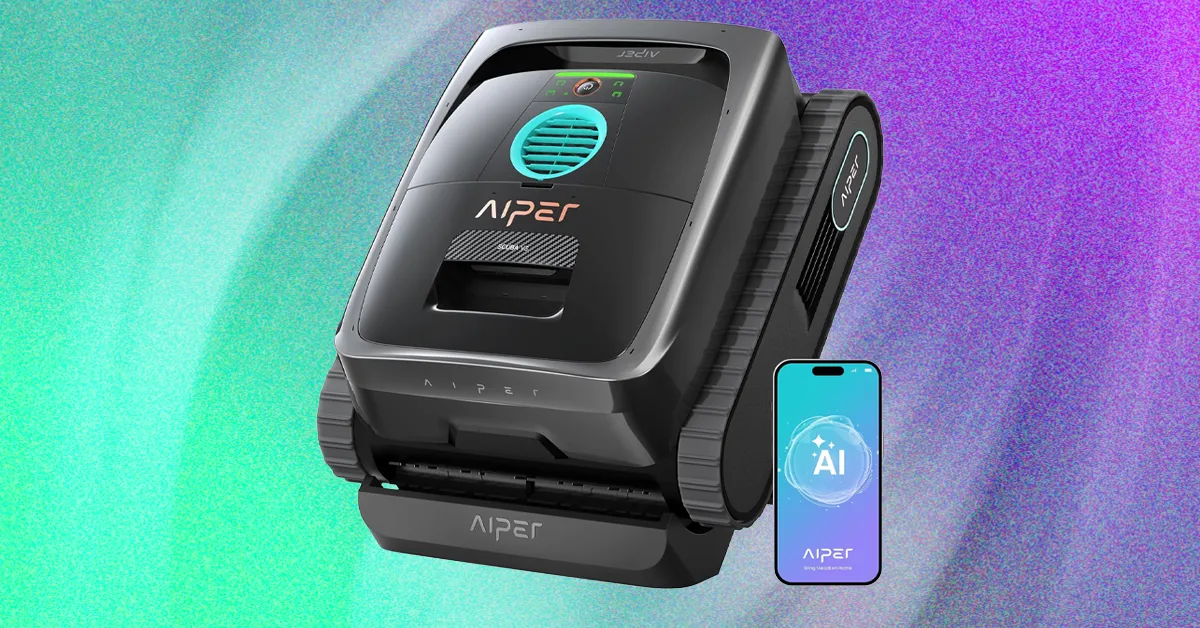
Aiper Scuba V3 Pool Robot Review: Eye on the Prize

Published

on

The app also includes access to two scheduled operational modes for those who would like to leave the robot in the pool, including a calendar-based mode with three frequency levels—90 minutes x 2, 60 minutes x 3, or 45 minutes x 4. The other mode is a bit of a letdown: The so-called AI Navium mode sounds like it uses the AI camera to periodically survey the pool over the course of a week and perform a routine cleaning only when required—but in reality, this mode merely performs a quick analysis of your previous runs and then uses AI to create a schedule for the next few days, based on how you’ve used the robot in the past.

Hungry for Gunk

Video: Chris Null

The Scuba V3 made fairly quick work of debris in my pool during test runs, rarely needing more than a couple of hours to scoop up all visible detritus on the pool floor while also scrubbing the walls and waterline. The AI camera system does seem to work as advertised, even locating small pebbles I tossed into the pool and dutifully routing itself to collect them. With organic debris, the pool looked fully clean after each run (ending between 170 and 190 minutes each time), and with synthetic debris, the Scuba V3 achieved a 96 percent cleanliness rating, with just a few test leaves remaining in some difficult corners. That’s especially good performance given that three hours is not a lot of operating time. And note there’s no way to adjust the running time outside of the scheduled modes; on-demand modes always run the battery until it’s nearly dead. Fortunately, Aiper does seem to make the most of this time, formally specifying a maximum coverage area of a significant 1,600 square feet.

I unfortunately didn’t have much success with the AI schedule mode. After running the analyzer, the app suggested a baffling five-day schedule comprising two floor runs, two floor-plus-waterline runs, and a final floor run. It then ignored the schedule and promptly ran a three-hour floor run, which drained the battery completely. I tried again the next day, and the robot missed its schedule, then ran randomly late in the night. I wasn’t a big fan of leave-it-in-the-pool scheduling before testing the Scuba V3, and this showing didn’t improve that opinion.

Advertisement

Video: Chris Null

When finished with a run, the Scuba climbs to the waterline and sends a push notification to the app, alerting you that it’s ready to be collected and cleaned. Note that you only have 10 minutes to reach it: The Scuba can’t float, so it has to use the last of its juice to run a motor to tread water and hold itself in place. After that 10 minutes is up, the spent Scuba sinks to the floor of the pool and must be retrieved with a pool and hook. My best advice is to set a 175-minute timer each time you launch a run to remind you to watch for the completion notification.

Cleanup can be somewhat involved. The filter basket design features a large lid that makes it easy to access the inner filter, and hosing down both of these filters clean is straightforward. The removable mesh on the interior basket is another story, though. While it’s very effective at capturing dirt and other very fine debris, it’s quite difficult to clean, and if you don’t remove it from the basket, lots of debris gets caught between the mesh and the basket itself. Removing and replacing the mesh is difficult, especially when it’s wet, so I usually just left it in place and cleaned it the best I could after each run, accepting that it would never be perfect. I expect most users will do the same.

Source link

Advertisement
Continue Reading

Tech

Android isn't killing sideloading, but it's making it a lot harder

Published

on


Google has confirmed that Android will not retire app sideloading, but the company is implementing measures that make the process cumbersome – something only “power users” are likely to attempt. According to Matthew Forsythe, the newly introduced advanced flow is designed to protect users from potential coercion, scams, or malicious software.
Read Entire Article
Source link

Continue Reading

Tech

This MagSafe charger costs more than a MacBook

Published

on

If you thought Apple accessories were getting expensive, Hermès has just taken things to a completely different level.

The luxury fashion house is now selling a range of MagSafe-compatible chargers priced from $1250, with some models going well beyond that price.

At the entry point, the Paddock Solo Charger is a single-device magnetic charger priced at $1250. If you step up to the Paddock Duo at $1750, you can charge both an iPhone and an Apple Watch at the same time. Furthermore, there’s also the Paddock Yoyo, also $1750, which adds a wraparound USB-C cable designed for travel.

And if that somehow isn’t enough, Hermès is also bundling these chargers with its leather cases. This pushes prices anywhere between $3725 and $5150, firmly into top-end MacBook territory.

Advertisement

Advertisement

The big sell here isn’t functionality – it’s craftsmanship. Each charger is wrapped in Swift calfskin leather with traditional saddle stitching. It is finished with a subtle “H” logo to help align your device on the magnetic pad. It’s classic Hermès: understated, premium, and unapologetically expensive.

That said, the actual charging experience doesn’t sound all that different from standard MagSafe gear. You’ll still need to bring your own 20W power adapter, as one isn’t included in the box. This is a move that mirrors Apple’s own decision to stop bundling chargers back in 2020. You do at least get a USB-C cable in the box.

Hermès and Apple have worked together for years, particularly on high-end Apple Watch models and bands. However, these chargers aren’t currently sold through Apple itself.

Advertisement

For most people, this is clearly overkill. But for Hermès buyers, that’s kind of the point – it’s less about charging your phone, and more about how you do it.

Source link

Advertisement
Continue Reading

Tech

Tesla’s Upcoming Electric Big Rig Is Already a Hit with Truckers

Published

on

“After nearly a decade of delays and industry skepticism, Tesla’s electric big rig is finally rolling out of Nevada’s Gigafactory for mass production starting summer 2026,” writes Gadget Review. And some truckers who tested the vehicles already love them (as reported by the Wall Street Journal):

Dakota Shearer and Angel Rodriguez, among other pilot drivers, rave about the centered cab that eliminates blind spots during tight maneuvers. The automatic transmission means no more wrestling with 13-gear diesels, reducing physical stress on long hauls. Most surprisingly, the Semi maintains highway speeds on grades where diesel trucks typically crawl at 30 mph. The 500-mile range enables multiple daily round-trips — think Long Beach to Vegas or Inland Empire runs — without range anxiety…

Sure, the Semi costs under $300,000 — roughly double a diesel equivalent — but the math gets interesting quickly. Energy costs drop to $0.17 per mile compared to $0.50-0.70 for diesel fuel. Maintenance requirements shrink dramatically; one fleet reports needing just one mechanic for their electric trucks versus five for 40 diesels… Tesla offers Standard Range (325 miles) and Long Range (500 miles) versions, both handling 82,000-pound gross combined weight at 1.7 kWh per mile efficiency.

The tri-motor setup delivers 800 kW — over 1,000 horsepower equivalent — enabling loaded 0-60 mph acceleration in 20 seconds versus 45-60 for diesel. Fast charging hits 60% capacity in 30 minutes [which Tesla says is 4x faster than other battery-electric trucks] using the new MCS 3.2 standard, while 25 kW ePTO power runs refrigerated trailers without diesel auxiliaries. Charging networks remain the biggest hurdle for widespread adoption. Public charging stations lack the Semi’s massive power requirements, limiting long-haul routes. Tesla plans dedicated fast-charging corridors starting this summer, but coverage remains spotty. The lack of sleeper cabs also restricts the Semi to regional freight rather than cross-country hauling.

Advertisement

Production scales to 5,000-15,000 units by 2026, then 50,000 annually — assuming charging infrastructure keeps pace with demand.
Thanks to long-time Slashdot reader schwit1 for sharing the article.

Source link

Continue Reading

Trending

Copyright © 2025