


Connect with us

Tech

How to send a message via satellite on iPhone

Published

on

Apple’s satellite features were originally designed for emergencies, allowing iPhone users to contact emergency services when cellular and Wi-Fi coverage is unavailable. With recent versions of iOS, Apple has expanded those capabilities to include sending and receiving messages via satellite. This makes it possible to stay in touch with friends and family from remote locations where traditional networks do not reach, such as hiking trails, rural areas or offshore locations.

Messaging via satellite is built directly into the iPhone and works automatically when no cellular or Wi-Fi signal is available. While it is not intended to replace regular messaging, it can be a useful backup when coverage drops.

How to send a message via satellite

Before you can get started, you’ll need to turn on iMessage before you’re off the grid. It’s also important to set up an emergency contact as well as members of your Family Sharing group prior to your departure. This will enable them to message you via SMS without the need to message them first.     To send a message via satellite, open the Messages app when no cellular or Wi-Fi signal is available. If the feature is supported in the current location, the app will display a prompt indicating that satellite messaging is available.

Selecting the option to connect via satellite launches a guided connection screen. Your iPhone will provide real-time instructions to help maintain alignment with the satellite. Once connected, a text message can be typed and sent, although delivery may take longer than usual.

Advertisement

The iPhone will notify you when the message has been sent successfully. Replies from the recipient will also be delivered via satellite, as long as the connection remains active.

What you need before you can send satellite messages

Sending messages via satellite requires a compatible iPhone model and the correct software version. The feature is supported on iPhone models with satellite hardware, beginning with iPhone 14 and later. The device must be running a version of iOS (iOS 18 or higher) that supports satellite messaging, which Apple has continued to refine through recent iOS updates.

The feature also depends on location and availability. Satellite messaging is currently supported in select regions, including the United States and parts of Canada, with expanded support rolling out gradually. The iPhone must be outdoors with a clear view of the sky, as trees, buildings and terrain can interfere with the satellite connection.

Satellite messaging is not designed for continuous conversations. Messages are compressed and sent at a slower pace than standard texts, and delivery times can vary depending on conditions and satellite positioning.

Advertisement

How satellite messaging works on iPhone

When an iPhone loses access to cellular and Wi-Fi networks, the system automatically detects that only satellite connectivity is available. Instead of failing to send, the Messages app prompts the user to connect to a satellite.

On-screen instructions guide the user to position the phone correctly. This typically involves holding the device up and following directional prompts to align it with an overhead satellite. The phone uses built-in sensors to help maintain the connection while the message is being sent.

Messages sent via satellite are text-only and use a reduced data format to ensure they can be transmitted reliably. Images, videos, audio messages and large attachments are not supported.

Who can receive satellite messages?

Satellite messages can be sent to contacts using iMessage or standard SMS, depending on the recipient’s device and settings. If the recipient is using an Apple device with iMessage enabled, the message will be delivered through Apple’s messaging system. If not, the message will be sent as a standard text.

Advertisement

Recipients do not need a satellite-capable device to receive messages. From their perspective, the message appears similar to a regular text, though delivery times may be longer.

Tips for getting a reliable connection

A clear view of the sky is essential for satellite messaging to work properly. Open areas with minimal obstructions offer the best results. Movement, heavy foliage and nearby structures can interrupt the connection.

Because satellite bandwidth is limited, keeping messages short improves reliability and delivery speed. The iPhone may prompt the user to edit longer messages to fit within satellite constraints.

Battery life is also a consideration. Maintaining a satellite connection uses more power than standard messaging, so it helps to conserve battery when relying on satellite features for extended periods.

Advertisement

Limitations to keep in mind

Satellite messaging is designed for occasional use when other networks are unavailable. It does not support group messages, media attachments or read receipts in the same way as standard messaging.

Delivery times can range from under a minute to several minutes, depending on environmental conditions and satellite availability. The feature should not be relied upon for time-sensitive communication unless no other option is available.

Apple has also noted that satellite features may be offered free for a limited period, with potential pricing or subscription requirements introduced in the future depending on region and carrier arrangements.

When satellite messaging can be useful

Messaging via satellite can be helpful for travelers, hikers and anyone spending time in remote areas where coverage is unreliable. It offers a way to check in, share basic updates or request non-emergency assistance when traditional networks are unavailable.

Advertisement

While it is not a replacement for emergency services, it complements Apple’s existing emergency satellite features by providing an additional communication option when users are off the grid.

As Apple continues to expand satellite support, messaging via satellite is likely to become a more familiar part of the iPhone experience, particularly for users who regularly venture beyond the reach of cellular networks.

Source link

Advertisement
Continue Reading
Click to comment

Leave a Reply

Your email address will not be published. Required fields are marked *

Tech

Custom Arm-Mounted Plasma Cannon is a Real-Life Mega Man Mega Buster

Published

on

Real-Life Mega Man Mega Buster
Arnold (Arnov) Sharma grew up playing Mega Man X on an ancient Windows 98 computer. Years later, he turned those hazy memories of his childhood into something he could wear on his forearm. It’s not just a replica but a functional Mega Buster, also known as the Rock Buster. Every detail on this replica stays true to the original, thanks to accurate measurements made in Fusion 360, which started with a reference image scaled to 330 mm in length.


Sharma broke down his design into components that could be printed separately, including the body, front nozzle, handle, and side panel. He ensured that all of the components fit together flawlessly, much like a jigsaw puzzle. He created the entire thing on his 3D printer using standard PLA filament, although it’s worth noting that he left opportunity for experimenting with variables like layer height and speed, which you’ll most likely need to alter depending on your printer.


Bambu Lab A1 3D Printer, Support Multi-Color 3D Printing, High Speed & Precision, Full-Auto Calibration…
  • High-Speed Precision: Experience unparalleled speed and precision with the Bambu Lab A1 3D Printer. With an impressive acceleration of 10,000 mm/s…
  • Multi-Color Printing with AMS lite: Unlock your creativity with vibrant and multi-colored 3D prints. The Bambu Lab A1 3D printers make multi-color…
  • Full-Auto Calibration: Say goodbye to manual calibration hassles. The A1 3D printer takes care of all the calibration processes automatically…

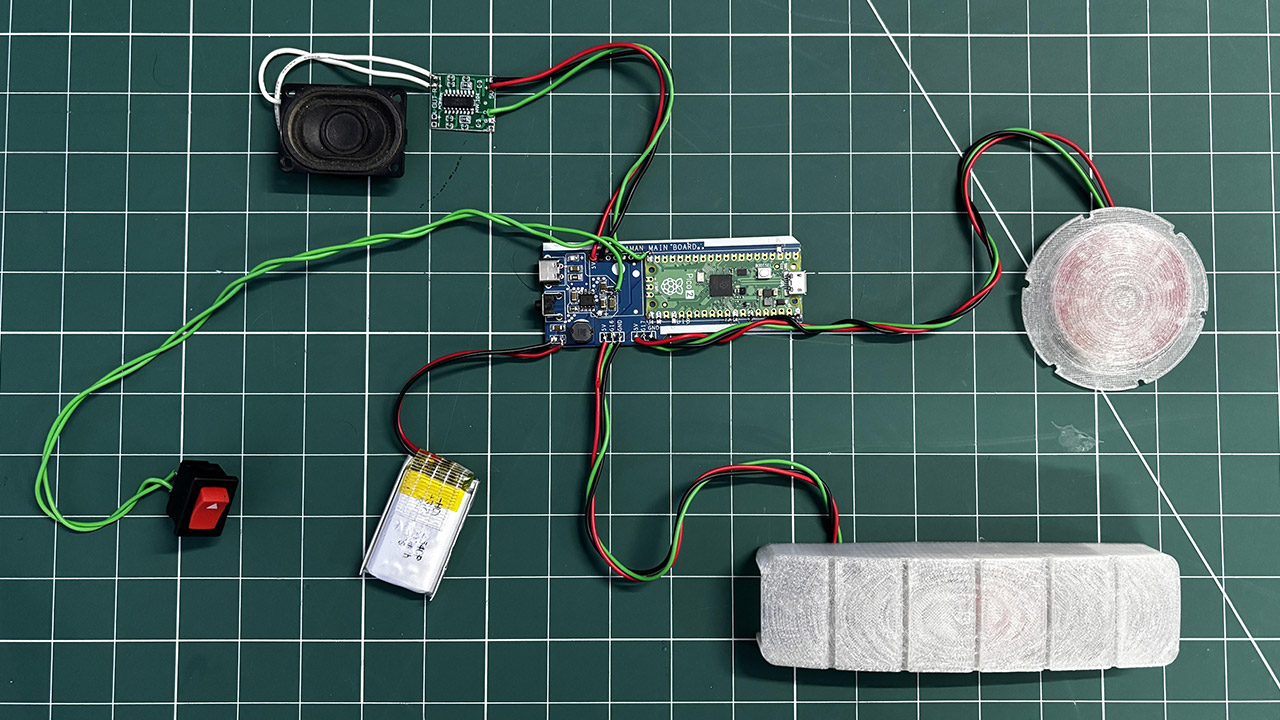
A Raspberry Pi Pico within the Rock Buster controls the lights, music, and power. Sharma created a new PCB from scratch, soldering on SMD parts and applying SnPb 63/37 paste before reflowing everything at 200 degrees Celsius. The Type-C port and vertical push button allow you to charge it or start firing, while a dedicated power circuit powers a 3.7-volt, 1000 mAh lithium-polymer battery.


When you press the button, the front red LED begins to flicker like an in-game shot, while the internal speaker emits a recognizable whine via a PAM8403 amp, increasing the Pico’s output. When you release the button, the light bursts, the sound effect plays, and one bar drops from the six-LED side meter. After six shots, the meter is empty and you’re locked out for a 10-second cooldown, just like in the game.

Advertisement

Real-Life Mega Man Mega Buster
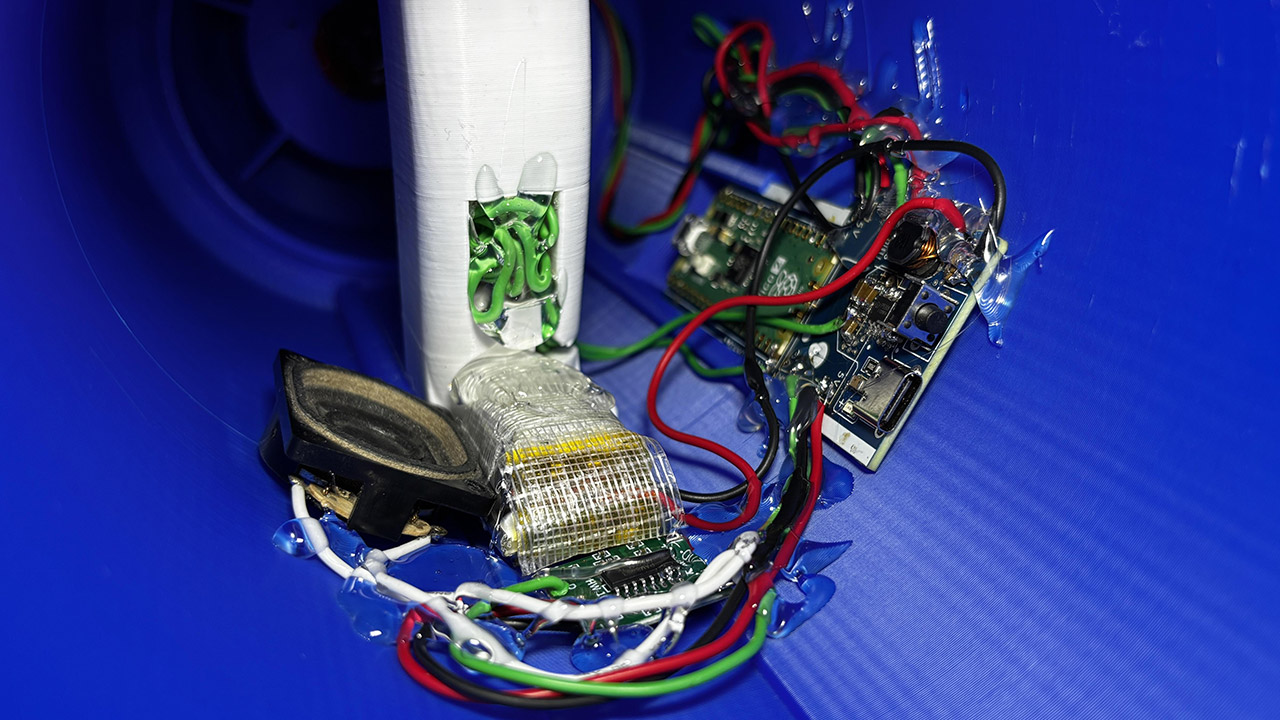
Assembling the Rock Buster begins with the PCB; simply spread some solder paste on the pads, insert the Pico and small components, and heat until they melt. Next come the port and button, then the battery terminals. Test the 5V rail with a voltmeter before encasing everything. Wiring the PAM8403 is rather simple: right input to Pico GPIO 26, ground to ground, power to 5V, and speaker to output. Any small speaker will do, but he rescued an 8-ohm 2-watt device from an old laptop, which works perfectly.

Real-Life Mega Man Mega Buster
Mounting the LEDs is simple; the nozzle holds the firing LED, while the side panel houses the power meter. Sharma used available libraries for sequencing and kept things simple. Put everything together, secure with screws or whatever, and voilà! You’ve acquired a fully functional Mega Buster.
[Source]

Source link

Continue Reading

Tech

My Moleskine wasn’t enough to save my mental health but this app was

Published

on

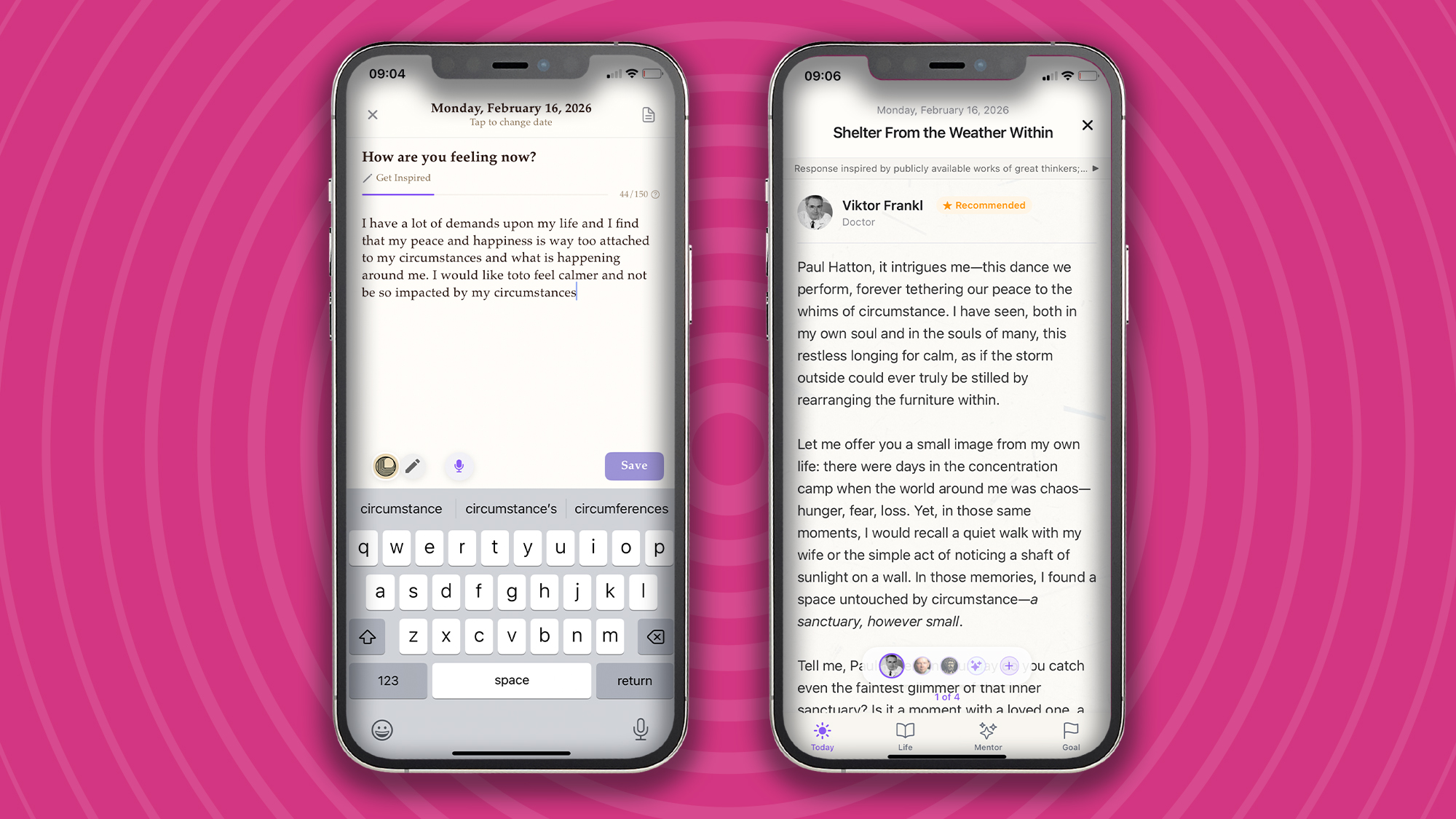
“I have a lot of demands upon my life, and I find that my peace and happiness are way too attached to my circumstances and what is happening around me. I would like to feel calmer and not be so impacted by my circumstances.” So went my journal entry on February 16, 2026.

I’m sure many of us can relate to these feelings of stress when life is throwing more at us than we think we can handle. Over the years, the practice of journaling has provided me with an invaluable space for thought, reflection, and calm. That blend of a quiet space, a Moleskine notebook, and a quality pen is all I need to get into the journaling zone.

Source link

Advertisement
Continue Reading

Tech

Arkanix Stealer pops up as short-lived AI info-stealer experiment

Published

on

Hand

An information-stealing malware operation named Arkanix Stealer, promoted on multiple dark web forums towards the end of 2025, was likely developed as an AI-assisted experiment.

The project included a control panel and a Discord server for communication with users, but the author took them down without notification, just two months after the operation began.

Arkanix offered many of the standard data-stealing features that cybercriminals are used to, along with a modular architecture and anti-analysis features.

Wiz

Kaspersky researchers analyzed the Arkanix stealer and found clues indicating LLM-assisted development, which “might have drastically reduced development time and costs.”

Signs of LLM involvement in coding
Signs of LLM traces in coding
Source: Kaspersky

The researchers believe that Arkanix was a short-lived project for quick financial gains, which makes detection and tracking much more difficult.

Arkanix appears online

Arkanix started being promoted on hacker forums in October 2025, offering two tiers to potential customers: a basic level with a Python-based implementation, and a “premium” one with a native C++ payload using VMProtect protection, integrating AV evasion and wallet injection features.

Advertisement
Arkanix promoted on hacker forums
Source: Kaspersky

The developer set up a Discord server that acted as a forum for the community around the project to receive updates, provide feedback for proposed features, and receive help.

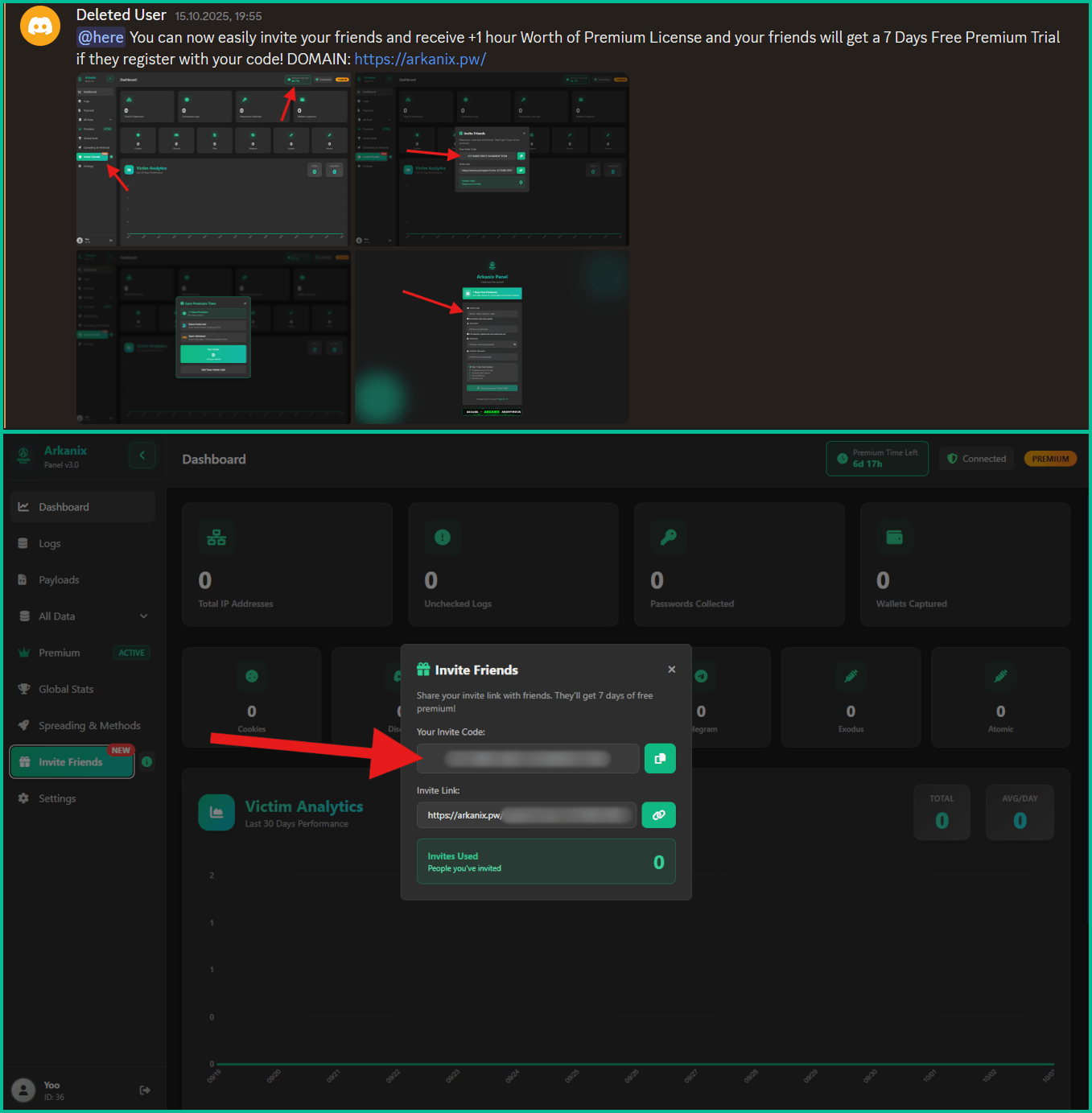
Also, a referral program was established to promote the project more aggressively, giving referrers an extra free hour of premium access, while potential new customers received one week of free access to the “premium” version.

Referral options from within the dashboard
Source: Kaspersky

Data-stealing capabilities

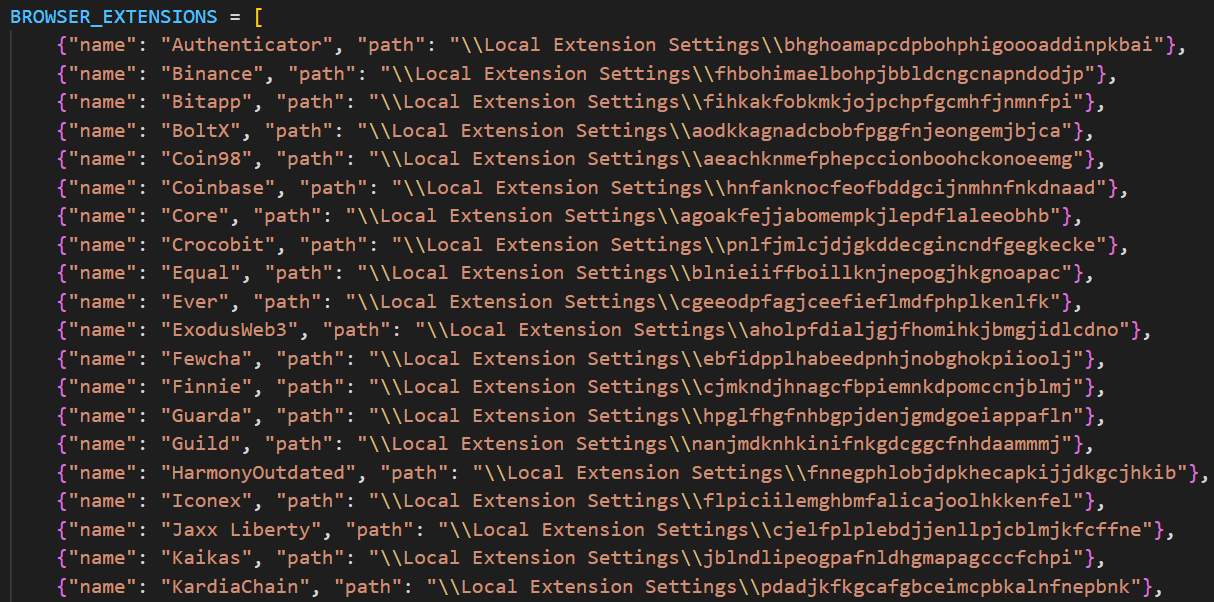
Arkanix malware can collect system information, steal data stored in the browser (history, autofill info, cookies, passwords), and cryptocurrency wallet data from 22 browsers. Kaspersky researchers say that it can also extract 0Auth2 tokens on Chromium-based browsers.

Additionally, the malware can steal data from Telegram, steal Discord credentials, spread via the Discord API, and send messages to the victim’s friends/channels.

Arkanix also targets credentials for Mullvad, NordVPN, ExpressVPN, and ProtonVPN, and can archive files from the local filesystem to exfiltrate them asynchronously.

Additional modules that can be downloaded from the command-and-control include a Chrome grabber, a wallet patcher for Exodus or Atomic, a screenshots tool, HVNC, and stealers for FileZilla and Steam.

Advertisement
Partial list of targeted extensions
Partial list of targeted crypto extensions
Source: Kaspersky

The “premium” native C++ version adds RDP credential theft, anti-sandbox and anti-debugging checks, WinAPI-powered screen capturing, and also targets Epic Games, Battle.net, Riot, Unreal Engine, Ubisoft Connect, and GOG.

The higher-tier variant also delivers the ChromElevator post-exploitation tool, which injects into suspended browser processes for data theft and is designed to bypass Google’s App-Bound Encryption (ABE) protection for unauthorized access to user credentials.

The purpose of the Arkanix stealer experiment remains unclear. The project may be an attempt to determine how LLM assistance can improve malware development and how quickly new features can be shipped to the community.

Kaspersky’s assessment is that Arkanix is “more of a public software product than a shady stealer.”

The researchers provide a comprehensive list of indicators of compromise (IoCs) that include hashes for detected files, along with domains and IP addresses.

Advertisement

Modern IT infrastructure moves faster than manual workflows can handle.

In this new Tines guide, learn how your team can reduce hidden manual delays, improve reliability through automated response, and build and scale intelligent workflows on top of tools you already use.

Source link

Continue Reading

Tech

How To Fix Windows Update Error 0x80070643: 2026 Guide

Published

on

Windows Update Error 0x80070643 usually occurs when something goes wrong during an update. Unfortunately, since there can be several reasons behind this error, the troubleshooting tips can range from just a simple restart to repairing the .NET Framework. Let’s take a look at the solutions in detail.

What Causes The Windows Update Error 0x80070643?

The Windows Update Error 0x80070643 error usually occurs inside the Windows Update utility, and is accompanied by one of two messages:

  1. There were some problems installing updates, but we’ll try again later. If you keep seeing this and want to search the web or contact support for information, this may help: (0x80070643).
  2. Failed to install on [date] – 0x80070643.

Some underlying causes of the errors can include corrupted Windows system files, issues with the .NET Framework, corrupted registry entries, incomplete installations of previous Windows updates, and conflicts with Antivirus programs.

Troubleshoot Windows Update Error 0x80070643

Before proceeding, we recommend restarting your PC and trying the update again. A quick restart flushes the memory and can help solve issues relating to the RAM or storage. If the error still persists, here are some of the methods you can try:

1. Restart Windows Update Services

The most common cause of error 0x80070643 is a glitch in the Windows Update service. Restarting the service may resolve the issue. Here’s how:

Advertisement
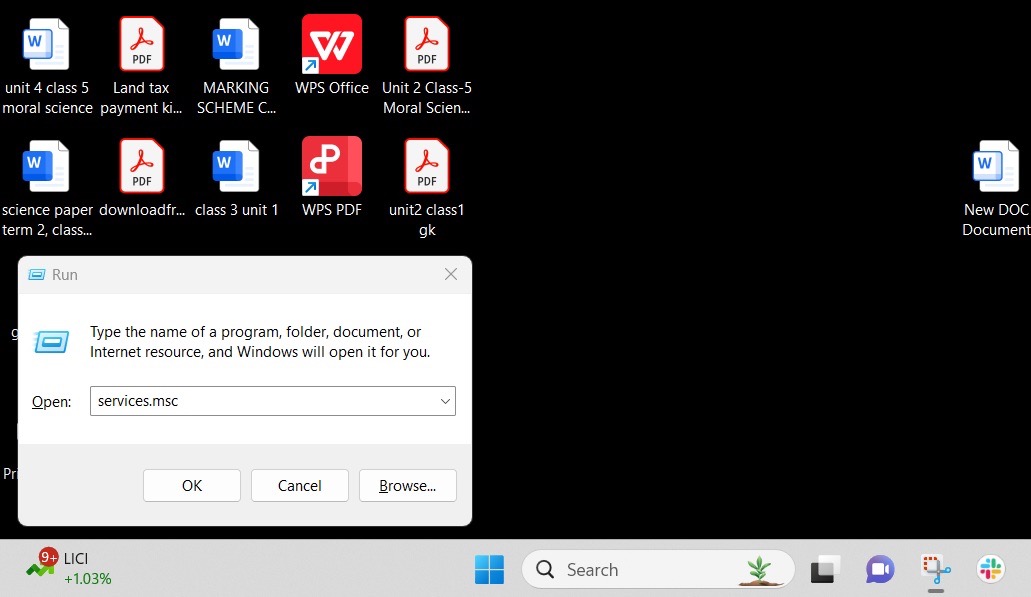
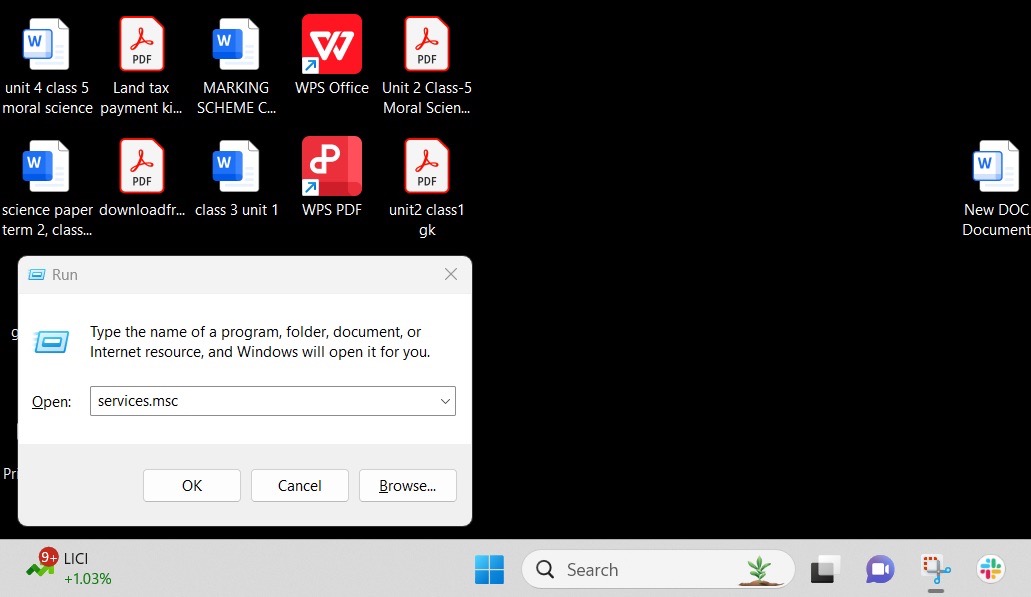
  1. Press Windows + R, then type services.msc, to open the Services app.
    Image to open the services app and solve the Windows Update Error
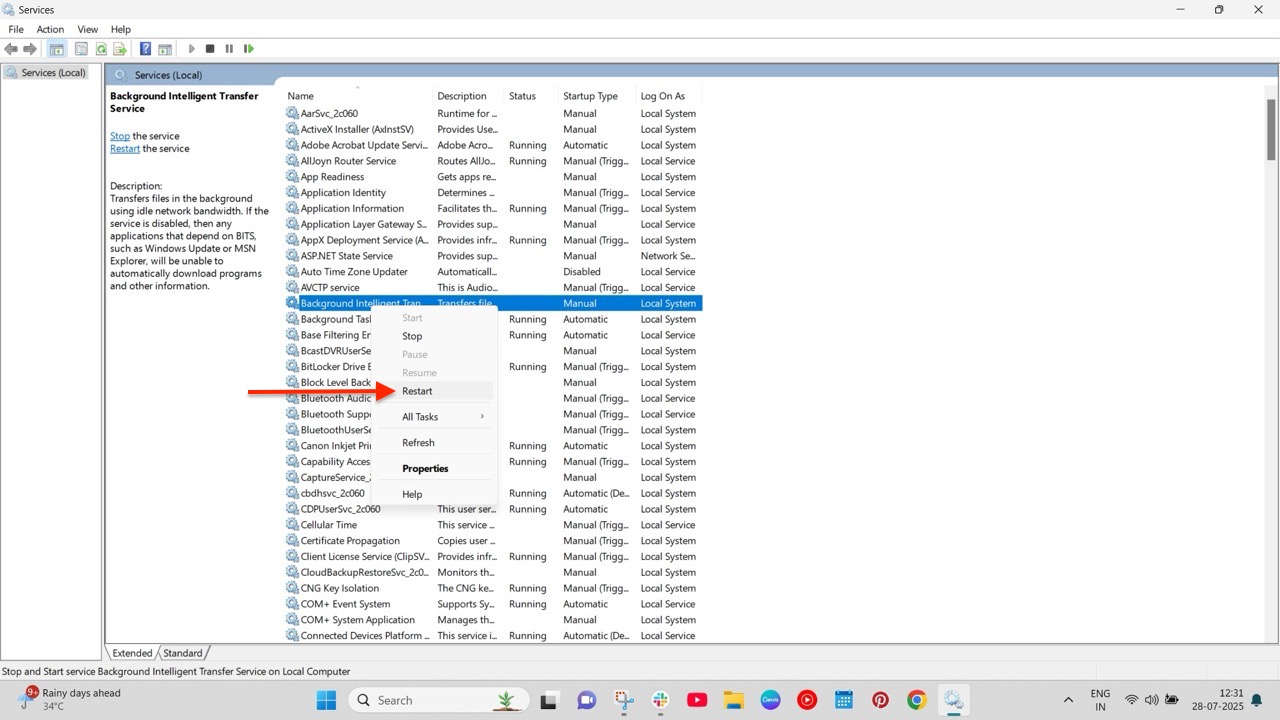
  2. Navigate to Background Intelligent Transfer Service (BITS) > Windows update.
  3. Right-click on the service and select Restart.
    Image to restart background services and fix the Windows Update Error 0x80070643

2. Run the Windows Update Troubleshooter

The Windows Error Troubleshooter scans your PC for potential issues that could be causing Windows updates to fail. To do so:

  1. Open the Settings app, and navigate to Update & Security > Troubleshoot > Additional troubleshooter.
  2. Select Windows Update and click Run the Troubleshooter.

The troubleshooter will now run and identify the root cause of the problem. Follow the on-screen instructions carefully.

3. Repair the .NET Framework

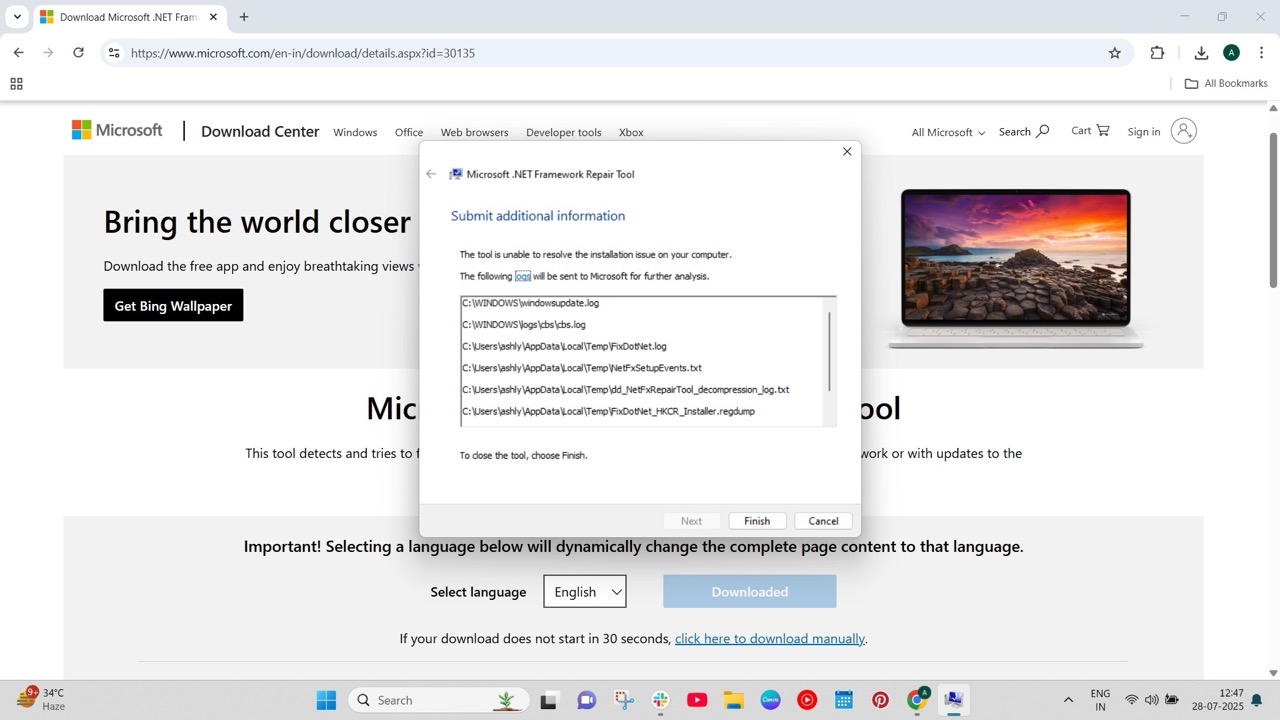
The .NET Framework is used for building and running applications on Windows. It provides a common platform consisting of a runtime environment and different libraries. But like any other software, the framework can get corrupted and cause errors with Windows updates. Fortunately, there is a framework repair tool for such cases. To use it:

  1. Head to the .NET Framework Repair Tool website and download it.
  2. Open the tool and follow the on-screen instructions.
    Image to repair the .NET framework and fix the Windows Update Error 0x80070643
  3. After the repair, restart your system.

4. Disable Antivirus Software

If you have a third-party antivirus software, such as McAfee, installed on your PC, it may be interfering with Windows Update and blocking key files from installation, which can cause the error.

We recommend temporarily disabling the anti-virus software and trying the update again. Remember to re-enable the program after updating.

5. Do a System File Check

As stated above, corrupted system files can be the root cause of the problem. Performing a system file check can identify missing files and help you fix them. Here’s how:

  1. Open Command Prompt with administrator privileges.
  2. Run the commands given below:
    sfc /scannow
    DISM.exe /Online /Cleanup-image /Restorehealth

    Image to repair broken system files

This command will locate the missing system files and replace them with the appropriate ones from the internet.

Conclusion

That’s it. We hope one of our solutions helped you solve the infamous Windows Update Error 0x80070643. However, if the issue still persists, we recommend contacting Microsoft’s customer service and explaining the issue to them.

Advertisement

Source link

Continue Reading

Tech

Where are all the smart smoke and heat alarm systems?

Published

on

As a smart home reviewer, you can well imagine that my home is properly kitted out with connected devices.

What’s become clear over the years is the dearth of smart fire detection products that are actually suitable for UK homes. It’s a perplexing black hole.

It’s not just about smoke

There’s no shortage of smart smoke alarms, even after Google has killed off Nest Protect, perhaps the best-known device.

Hunt around, and it’s easy to find enough smart smoke detectors: the Aqara Smoke Detector, for example, or the Drayton Wiser Smoke Alarm, compatible with the company’s new bridge, which allows for a wider range of devices, not just the heating products (review coming shortly).

Advertisement

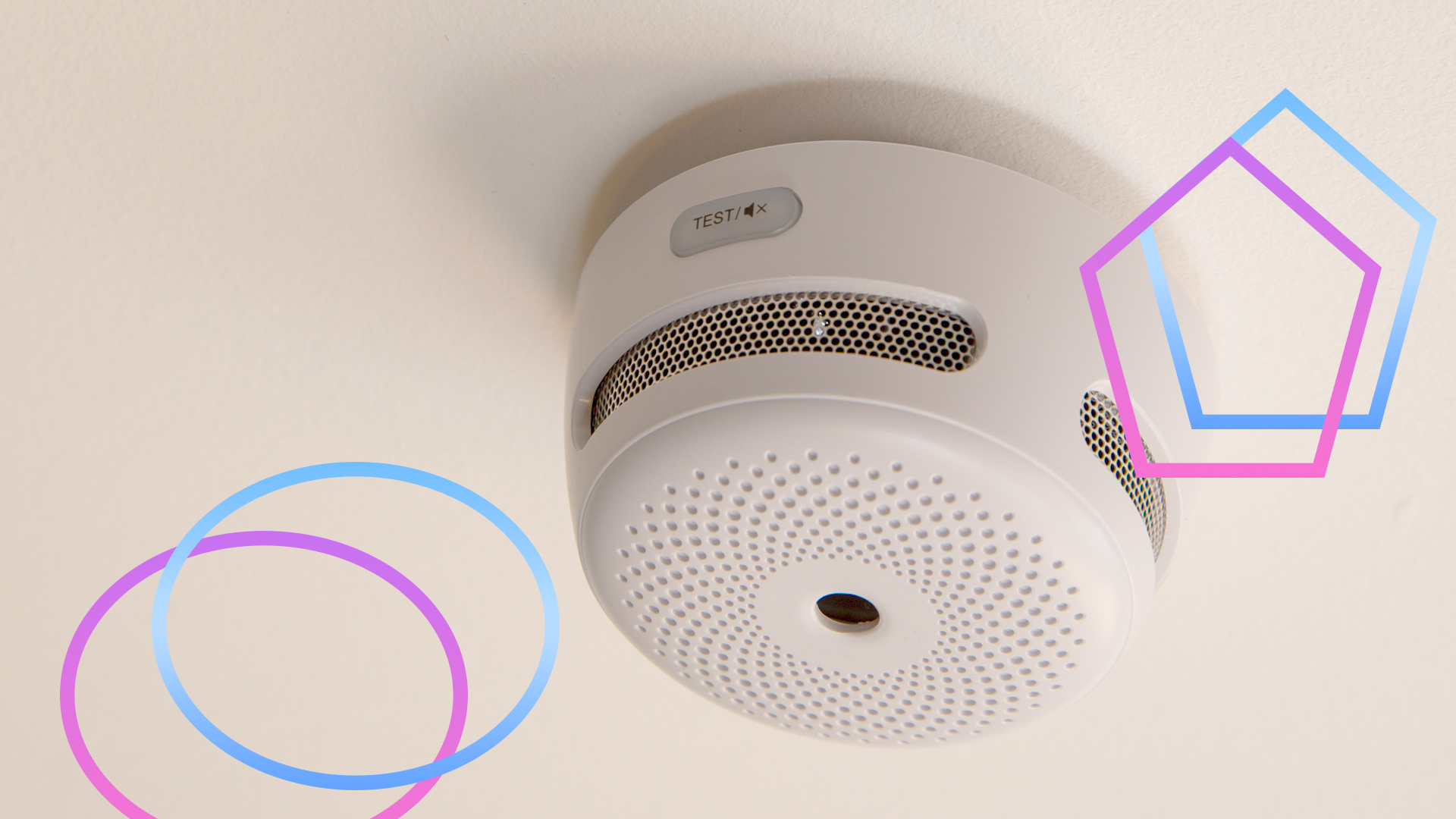
All of them have the issue that they’re just smoke alarms. That is, they detect smoke in the air, and then sound the alert.

Advertisement

For most rooms, this is fine. That old adage, “there’s no smoke without fire,” doesn’t actually apply to smoke detectors installed in kitchens, as their sensors can be fooled by cooking fumes and steam.

That’s particularly true of ionisation smoke detectors, which are more prone to false alerts; photoelectric smoke alarms are better, but can still be triggered by general cooking.

Advertisement

While photoelectric smoke alarms can be placed in a kitchen, it’s recommended that they be placed 3m from a stove or cooking appliance. Given that I live in a narrow Victorian terrace, and the hob is in the middle of one wall, and the ovens are in the middle of the opposite wall, it’s impossible to place a smoke alarm in the right place.

Heat alarms are best for kitchens

For kitchens, heat alarms are recommended. Rather than reacting to smoke, these alarms detect temperature changes: either when a fixed temperature is hit (typically, 58°C), or by measuring a rapid rate-of-rise (ROR) in the temperature.

In other words, heat alarms are looking for temperature signs that demonstrate there’s a fire, and ignore steam and smoke, so are ideal for kitchens. Or garages, in fact.

Advertisement

Advertisement

It’s the combination that counts

It’s safer to have fire detectors spread through you home, interlinked so that one alarm going off sets all off. By placing detectors around the house, you stand a greater chance of waking people in an emergency and detecting a fire at its origin.

In some cases, regulations even require multiple fire alarms. When I had a loft conversion, we were required to have a smoke detector in every habitable room and each corridor, and a heat alarm in the kitchen.

The ideal thing would be to have these as a smart system for two reasons. First, I can monitor them remotely and get warned of issues when I’m out. Secondly, a smart system tells you which alarm triggered the event, so I can check it out quickly.

Getting such a mixed system is far harder than you’d think. As mentioned, most companies only sell smoke detectors. And, you can’t mix-and-match components from different manufacturers if you need an integrated alarm system that triggers everything to go off at once.

Advertisement

As far as I’m aware, there are two main systems: the FireAngel Pro Connected system and X-Sense.

FireAngel is a system that hasn’t been updated in a long time, and the software and app aren’t very good, although the quality of the individual smoke, heat and CO detectors is excellent. I was originally happy with the system, as it replaced my old dumb system and gave me alerts, but when I had to change a couple of sensors, I found the app had duplicates and dead devices I couldn’t remove. Unless the app gets a major overhaul, I wouldn’t bother with it.

Advertisement

X-Sense is much better with a wide choice of wired and wireless detectors (smoke, CO and heat), all for very reasonable prices. It’s my smart fire detection system of choice, but I’d like it if the system were Matter compatible or at least a bit easier to port into other smart home systems.

Advertisement

This does leave a massive gap, and I don’t really understand why there’s no more competition. Heat alarms are a much-needed component, so why don’t more smart companies manufacture them?

Source link

Advertisement
Continue Reading

Tech

How To Silence Your Apple Watch: 2026 Guide

Published

on

Imagine you’re in a meeting, watching a movie at the cinema, or attending an event when your Apple Watch starts beeping or vibrating. It is very embarrassing when everyone around you is quiet. Thankfully, you silence the notifications and taps without missing a step. In this guide, we’ll show you a few different ways to silence your Apple Watch.

Different Methods to Silence Your Apple Watch

1. Quick Mute Using Your Palm

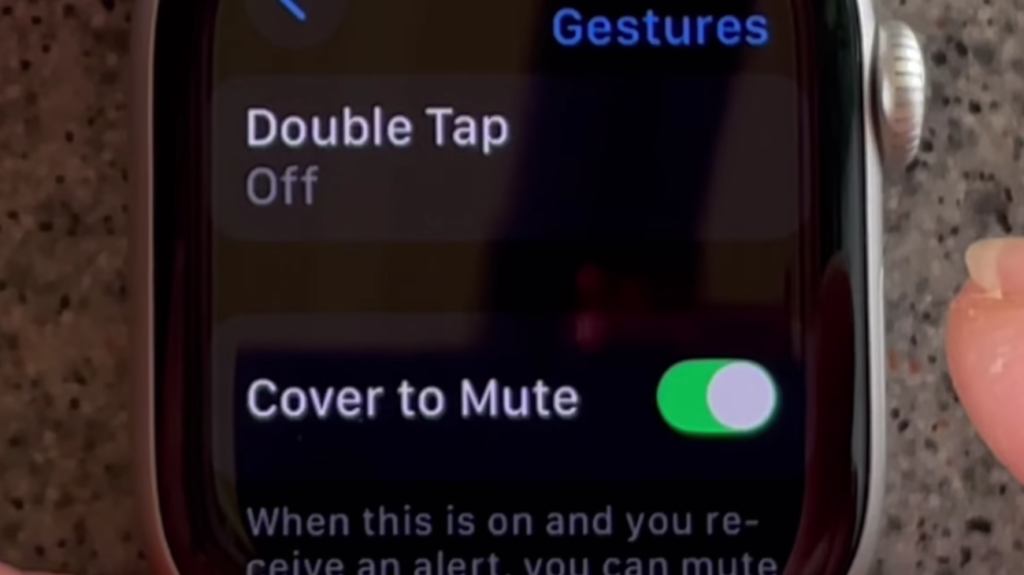
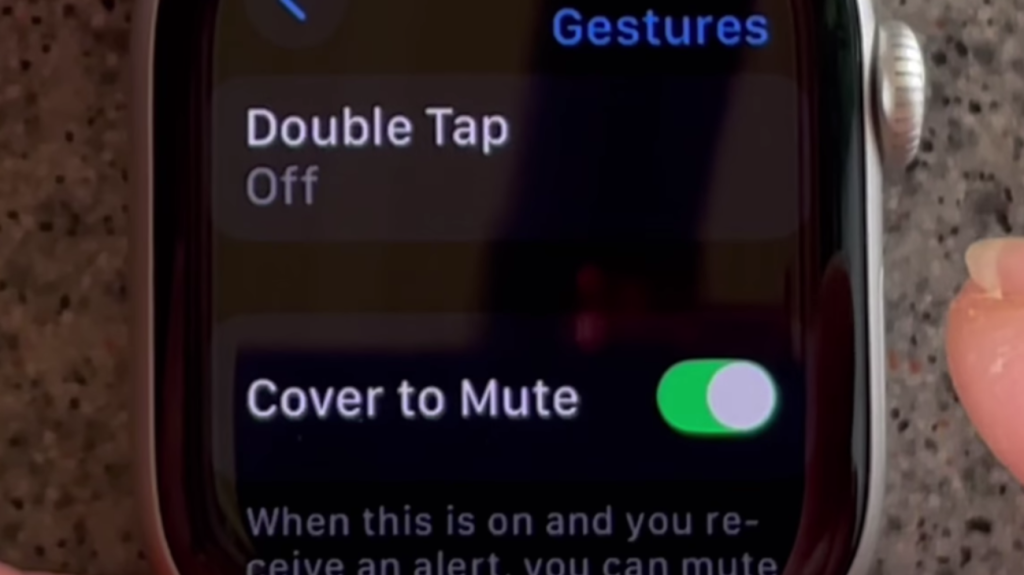
You don’t always have time to tap buttons when your watch goes off. Just cover the screen with your hand, and the sound will stop. However, you need to ensure that the gesture feature is enabled first. To activate this feature:

  1. Go to the Settings app on your Apple Watch.
  2. Tap on Gestures from the list.
  3. Turn on the Cover to Mute option.
    image for Quick Mute Using Your Palm to Silence Your Apple Watch

2. Keep Things Quiet with Theater Mode

If you want your Apple Watch to remain quiet and not display notifications when you move your wrist, Theater Mode is ideal. It’s perfect for dark places like cinemas or late-night events. To turn it on:

  1. Open the Control Center by swiping up.
  2. Find the icon that looks like “Comedy and Tragedy Masks.”
  3. Tap it once. It will turn orange to show it’s active.
    image to Keep Things Quiet with Theater Mode

3. Quickly Silence Sounds with Control Center

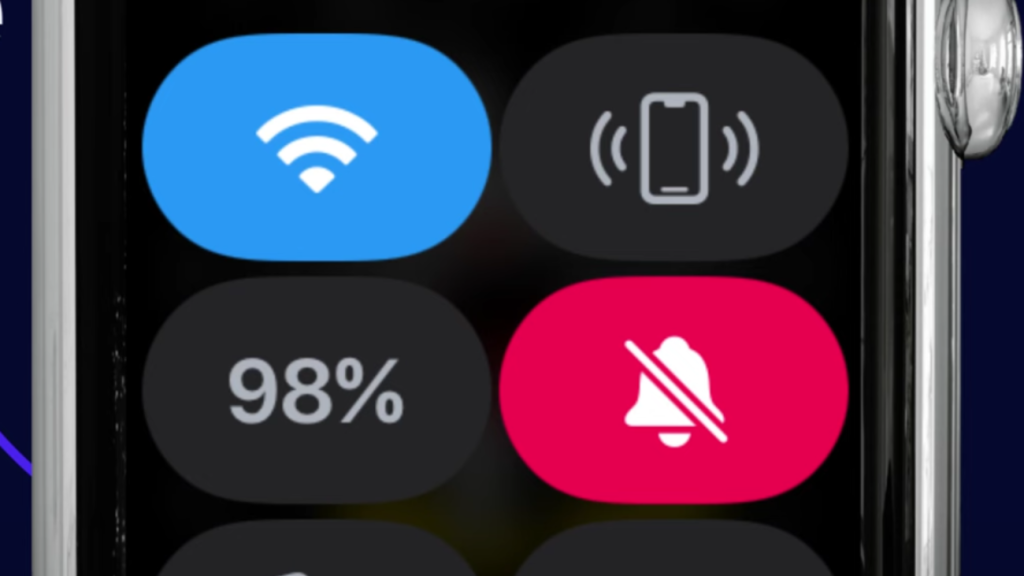
Unlike Do Not Disturb, Silent Mode has to be turned on directly from your Apple Watch. It’s great when you want a sound-free experience but still want to receive alerts quietly. To turn it on:

  1. Press the Side Button to open the Control Center.
  2. Tap on the bell icon once.
  3. When the icon shows a line through it, Silent Mode is active.
    image to Quickly Silence Sounds with Control Center

4. Keep Distractions Away with DND Mode

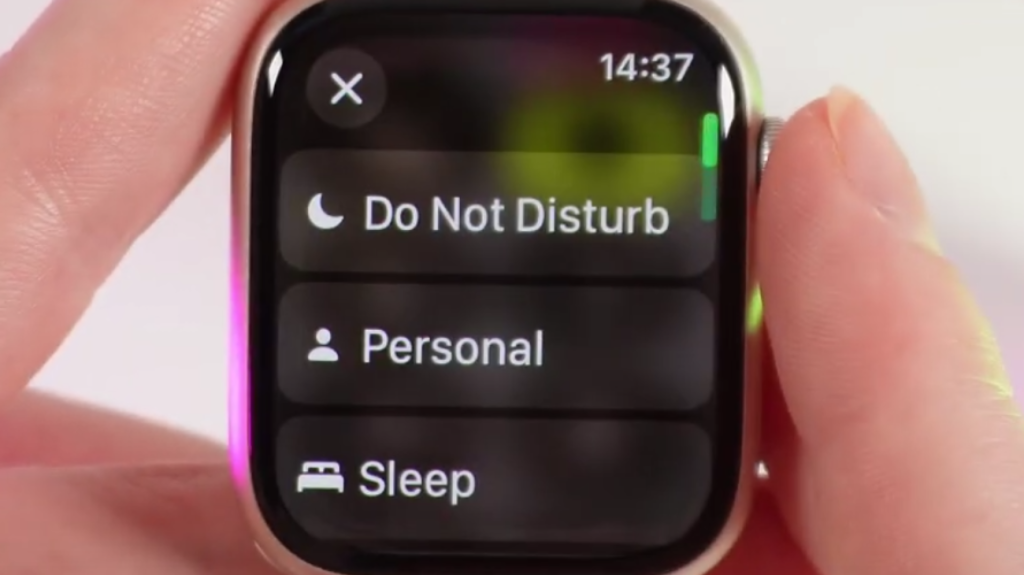
If you want complete silence from your Apple Watch, Do Not Disturb is a great option. It stops all notifications from making noise or lighting up the screen until you decide to turn it off. To turn it on:

  1. Swipe up from the bottom of your Apple Watch screen to open Control Center.
  2. Tap the Moon symbol.
  3. Select Do Not Disturb.
    image to click DND to Silence Your Apple Watch

Each option provides something slightly different. Use Silent Mode for regular silencing, Do Not Disturb for quiet time, Theater Mode when darkness and quiet are preferred, and Cover to Mute for fast, in-a-hurry situations. Choose what suits you best, based on your current location and activities.

Source link

Advertisement
Continue Reading

Tech

What About the Droid Attack on the Repos?

Published

on

A grim reaper knocking on a door labelled "open source"

You might not have noticed, but we here at Hackaday are pretty big fans of Open Source — software, hardware, you name it. We’ve also spilled our fair share of electronic ink on things people are doing with AI. So naturally when [Jeff Greerling] declares on his blog (and in a video embedded below) that AI is destroying open source, well, we had to take a look.

[Jeff]’s article highlights a problem he and many others who manage open source projects have noticed: they’re getting flooded with agenetic slop pull requests (PRs). It’s now to the point that GitHub will let you turn off PRs completely, at which point you’ve given up a key piece of the ‘hub’s functionality. That ability to share openly with everyone seemed like a big source of strength for open source projects, but [Jeff] here is joining his voice with others like [Daniel Stenberg] of curl fame, who has dropped bug bounties over a flood of spurious AI-generated PRs.

It’s a problem for maintainers, to be sure, but it’s as much a human problem as an AI one. After all, someone set up that AI agent and pointed at your PRs. While changing the incentive structure– like removing bug bounties– might discourage such actions, [Jeff] has no bounties and the same problem. Ultimately it may be necessary for open source projects to become a little less open, only allowing invited collaborators to submit PRs, which is also now an option on GitHub.

Combine invitation-only access with a strong policy against agenetic AI and LLM code, and you can still run a quality project. The cost of such actions is that the random user with no connection to the project can no longer find and squash bugs. As unlikely as that sounds, it happens! Rather, it did. If the random user is just going to throw their AI agent at the problem, it’s not doing anybody any good.

First they came for our RAM, now they’re here for our repos. If it wasn’t for getting distracted by the cute cat pictures we might just start to think vibe coding could kill open source. Extra bugs was bad enough, but now we can’t even trust the PRs to help us squash them!

Advertisement

Source link

Continue Reading

Tech

The US Gas Station Convenience Stores You Might Not Know Are Owned By Mexico

Published

on


A transaction in October of 2024, between an American company and a Mexican one, resulted in a chain of U.S.-located gas station convenience stores being owned by the Mexican firm. The American company is Delek US Holdings, Inc., which sold its retail operations for $385 million. These retail operations consisted of 249 convenience stores that operated under the DK brand, located in New Mexico, Arkansas, and Texas. Delek is an energy company involved in petroleum and renewable fuels. As an oil products producer, it has a refining capacity of 302,000 barrels each day. It is also one of five owners of the 650-mile oil pipeline that goes from Wink to Webster in the Permian Basin in Texas, moving over one million barrels per day of crude oil and condensate to the Gulf Coast. 

The Mexican company that bought the convenience stores at Delek’s gas stations is called FEMSA. It’s a huge conglomerate that includes the OXXO chain of 28,800 convenience stores located in Mexico, Chile, Peru, Brazil, and Colombia. FEMSA also owns the largest volume Coca-Cola products franchise bottler in the world. It has a total of over 392,000 employees located in 18 countries, including Europe, having purchased the food retail company Valora in 2022. FEMSA is also involved in many other business ventures, including retail drugstores and digital financial services.

Advertisement

How FEMSA’s acquisition affected DK convenience stores

FEMSA has now rebranded many DK stores, which now operate as OXXO, a well-known brand near the Mexican border. By 2027, all of the stores in the El Paso area, which adjoins the border, will be rebranded as OXXO stores. Once the OXXO brand starts to expand beyond its initial footprint, it may build even larger stores, following the trend of U.S. gas stations turning into massive convenience stores.

As far as the supply of fuel products to the stores, FEMSA has continued to purchase them from Delek after the ownership change. Delek continues to operate hundreds of gas stations under both the DK and Alon brands, positioning itself as a locally sourced, high-quality fuel supplier with a lower carbon footprint. While this acquisition may have been FEMSA’s first attempt to plant its flag in the U.S., the company has said it has plans to become a major player in the U.S. market. FEMSA is not the only foreign operator to land here; the Speedway gas station chain is owned by a Japanese company.

Advertisement


Source link

Advertisement
Continue Reading

Tech

Week in Review: Most popular stories on GeekWire for the week of Feb. 15, 2026

Published

on

Get caught up on the latest technology and startup news from the past week. Here are the most popular stories on GeekWire for the week of Feb. 15, 2026.

Sign up to receive these updates every Sunday in your inbox by subscribing to our GeekWire Weekly email newsletter.

Most popular stories on GeekWire

Source link

Continue Reading

Tech

Elon Musk confirms target window for next Starship launch

Published

on

If you’re wondering what happened to the Starship, then rest assured, SpaceX engineers are still working to get it airborne again soon.

In fact, in a post on X on Saturday, SpaceX chief Elon Musk confirmed an earlier stated target window for the 12th launch of the most powerful rocket: next month.

In that case, the Starship could be blasting off from SpaceX’s Starbase site in near Boca Chica, Texas, in a matter of weeks, treating onlookers and those watching online to a spectacular display of raw rocket power.

The 12th Starship flight is particularly special because it involves a new version — the third — of the first-stage Super Heavy booster, which lifts the upper-stage Ship to space.

Advertisement

Version 3 of the Starship rocket is 124.4 meters tall, making it just over a meter taller than its predecessor. Its engines have also been given a power upgrade, together with a number of design tweaks that will improve the rocket’s overall performance.

This year promises to be an exciting one for the Starship as SpaceX is heavily focused on getting it ready for a trip to the moon in the Artemis III mission.

First, it needs to achieve a number of important milestones, including getting the Ship to orbit, refueling the Ship in Earth orbit, and then landing it back at Boca Chica in a similar way to how it’s already landed the Super Heavy booster.

The Artemis III mission is currently set for 2027, though that date could slip due to technical challenges with the rocket. NASA wants to use a modified version of the Ship to land two astronauts on the lunar surface in what would be the first crewed moon landing since 1972.

Advertisement

The astronauts won’t travel to lunar orbit aboard the Ship, flying instead aboard an Orion spacecraft launched by NASA’s SLS (Space Launch System) rocket. Once in lunar orbit, they’ll transfer to SpaceX’s Ship and descend to the lunar surface.

The same Orion spacecraft is about to carry its first crew on a voyage around the moon in the Artemis II mission, which will pave the way for the Artemis III lunar landing in a few years’ time.

Source link

Advertisement
Continue Reading

Trending

Copyright © 2025