If you’re after a scanner to tackle a mound of paperwork, or even just to stay on top of correspondence and photos, the HP ScanJet Pro 4200 s1 could be just the trick. It’s fast, produces good quality images, and can even handle passports and ID cards – useful if you’re running a B&B or similar business. While we wouldn’t recommend this for everyday scanning, it’s a decent document scanner, and worthwhile if that’s what you’re looking for.
Fast document scanning
Reasonably simple software
Good document image quality
Not the most fully featured software
Key Features
Review Price: £470
A colour document scanner
This scanner is designed to capture high volumes of printed pages very quickly. It can even scan both sides of each page at once, or capture ID documents including passports.
Searchable PDFs
Advertisement
The ScanJet Pro 4200 s1 supports a variety of file formats, including PDF files with recognised, searchable text.
Introduction
While the general-purpose scanners built into multifunction printers are great for capturing kids’ drawings, photos, or the odd letter, they’re not usually ideal for digitising whole stacks of correspondence. Step forward the HP ScanJet Pro 4200 s1, a sheet-fed document scanner capable of ingesting and digitising up to 40 A4 pages per minute.
The 4200 s1 is designed for the desktop, and built for single users – it connects to one PC via USB, not several over the network.
It’s designed specifically for front-of-house duties, such as a reception desk at a hotel, B&B or health club, where its ability to capture ID cards and passports could be quite a time and hassle saver.
Advertisement
Advertisement
Talking of less hassle, this scanner is duplex (double-sided) ready, meaning it can image both sides of each sheet as it passes through – in this mode it captures up to 80 images (sides) per minute (ipm).
Design and Features
Convoluted design looks best when closed
Good physical features
Lacks advanced scan workflow software
Built specifically to power through long documents and archival jobs, the HP ScanJet Pro 4200 s1 isn’t your run-of-the-mill scanner – that’s reflected in its fairly high price. If you’re mostly interested in document scans you can find cheaper choices than this, but rivals don’t all have this scanner’s party trick: the ability to capture thicker ID documents in a comparatively quick and simple way.
That said, ‘simple’ isn’t the adjective I’d use for this scanner’s design. It follows a reversed U-path, which is a grand way of saying that pages are fed in from a front tray, and ejected into a parallel output tray behind it. When out of use, this output folds up around the scanner body, keeping dust out – in this closed configuration the 4200 s1 looks great.
Image Credit (Trusted Reviews)
Advertisement
Image Credit (Trusted Reviews)
Unfurl the rear tray and it doesn’t feel especially rugged, although there is a clever stand that drops down to desk level for extra support. Next you’ll need to pull up the input tray, which feels a bit more solid, with adjustable paper guides. Configured ready for work this scanner suddenly looks a lot more light grey and utilitarian.
Image Credit (Trusted Reviews)
Still, it’s a decent design. If any paper gets jammed during scanning you can open the mechanism lid, or tilt the whole centre section back to get at anything wedged in the bottom feed. That bottom slot is where you’ll offer up any driver’s licenses, passports or other ID – documents presented here are drawn backwards in a straight path, essential for plastic cards, and helpful if you don’t want irate guests with bent passports.
This being 2026 there’s no software in the box – you’ll need to download it from HP’s website. The HP ScanJet Pro 4200 s1 comes with a fully-featured version of HP’s usual scan interface, which in this case is both a blessing and a curse. I usually criticise this software for being oversimplified, but here it mostly does a good job of blending advanced features with a comparatively intuitive interface.
Advertisement
More experienced users might wonder where all the features are: most are hidden in the Document tab on the ‘More’ page. I’ll come back to this shortly, but for now I want to highlight that you don’t get the advanced workflow or batch scanning options common on Canon’s ImageFORMULA or Epson’s WorkForce document scanners – only likely an issue in an enterprise setting.
Advertisement
Scan speed and quality
Very fast scanning
Good quality on documents, less so on photos
I was disappointed with my first test scans with the HP ScanJet Pro 4200 s1. Most document scanners are configured to slightly over-expose white paper, but not its contents, creating a crisp image without a dingy, photorealistic background. Not this one, and not even with the autoexposure feature turned on. I had to delve into the settings to find the ‘Remove background (make white)’ feature, which fixed this issue – it seems odd this isn’t on by default.
Image Credit (Trusted Reviews)
Talking of which, neither is the blank page removal feature, useful if you’re scanning a stack of double-sided paper, not every page of which is printed on both sides. One thing I couldn’t fix is that you can set this scanner to simplex (single-sided) or duplex scanning, but there’s no auto-detect feature to work it out for you.
With the software tweaked a bit more to my liking, the HP ScanJet Pro 4200 s1 started to deliver excellent document scans. Once finished with the physical part of the job, you get to preview thumbnails of the pages you’ve just captured. On this screen you can rotate any disorientated sides, or delete any blanks that may have crept through before accepting and saving the job.
Image Credit (Trusted Reviews)
Advertisement
I found I had to tweak the blank page detection, increasing the sensitivity somewhat, after which it got it right every time. One nice feature here is that sides detected as blank are shown in the preview, but marked, so it’s easy to spot if a lightly-printed page has been wrongly flagged as blank.
Advertisement
Image Credit (Trusted Reviews)
If you’re not familiar with document scanners, prepare to be amused by just how quickly they work. I piled a stack of 10 sheets in the input tray, and the scanner needed just 19 seconds to capture them all single-sided. A duplex version of the same job was no slower. This scanner’s fastest performance on my test was to capture a 12-page, 24-side duplex job in 21 seconds, a rate of 34.3 pages per minute (ppm), or 68.6 images per minute (ipm) – I’ve no doubt it would get closer to the stated 40ppm/80ipm maximum on a longer job.
Next I loaded the input with a truly unpleasant document comprising a mix of ageing, very thin magazine pages and a few A4 sheets. This particular document has passed through at least 50 scanners multiple times over the years, and it represents about the toughest test there is. The HP ScanJet Pro 4200 s1 fed it without any issues, no matter how haphazardly I arranged it in the input.
Image Credit (Trusted Reviews)
Like every document scanner I’ve tested, the 4200 s1 struggled to correct the orientation of one huge title page from a magazine, but otherwise the scanned document was straight and correctly orientated. I had no misfeeds, double-feeds or crumpling in my tests, although I expect the wide-opening mechanism would make it easy to retrieve anything that did get stuck.
Advertisement
Upping the resolution to the maximum 600 dots per inch (dpi), I fed the scanner a batch of 22 postcard-sized photos. You can only scan the front side of these, which is a shame if you have a stack of actual postcards to capture, but it fed them through safely without bending them noticeably. The scanner moves more cautiously at this detail level, but it still completed the full job in a minute and a quarter.
Finally, I tried scanning my driving licence and passport. Here I found the bottom slot was a bit more picky about how you presented documents, but once I’d worked it out it proved reliable and fast.
Advertisement
Image Credit (Trusted Reviews)
I was very pleased with the quality of general document scans – at least I was once I’d tweaked the settings. Text and images were clear, and the sharpness and exposure were perfectly good enough for archival use in an office. ID card scans were fine, too, easily capturing numbers, photos and signatures.
This isn’t marketed as a photo scanner, and I wasn’t surprised to find the quality was a little weak. In particular, the HP ScanJet Pro 4200 s1 struggled to get the details from dark shots, like the ripples on the water of a busy port at night. I used a Kodak Q60 colour target to check the scanner’s dynamic range; sure enough, it struggled to distinguish between very light shades, and it clumped together the darkest shades too. While photo scans were fine for occasional use, this wouldn’t be the right device to digitise your photo archive, even if doing so would be quick.
Image Credit (Trusted Reviews)
Advertisement
Should you buy it?
Buy if you need a front-of-house scanner
This is a specialised scanner, and it’s great for its intended role. If you need front-of-house scanning in a shop, hotel, bank or similar, it will do the job nicely.
Advertisement
Don’t buy for more general use
Advertisement
For everyday scans I’d recommend an MFP instead – ideally one with an automatic document feeder.
Final Thoughts
This looks like an overcomplicated scanner, but for the most part it’s very capable. It’s great for long documents, or for working your way through years of correspondence, and it’s ideal if you also need to capture ID. I love the way it closes up into a small, smart accessory when you’re not using it.
Advertisement
That said, it’s a niche device. While it may be excellent for front desk or reception work, it’s not the best value document scanner I’ve tested, and its software may be a little lacking for power users. For everyday use, I’d choose an MFP with an automatic document feeder (ADF), but if you do run a hotel you’ll love it.
Anthropic has accidentally revealed a huge chunk of how its AI coding tool actually works.
A debug file bundled into version 2.1.88 of its Claude Code package briefly exposed a 500,000+ line codebase (via VentureBeat). This gave developers an unusually detailed look at the system behind one of the fastest-growing AI tools right now.
The file was pulled quickly, and Anthropic says no customer data or credentials were exposed. However, the damage, at least from a competitive standpoint, is already done. The code has been widely mirrored and picked apart online.
At a glance, the leak confirms that Claude Code is far more than just a chatbot wrapper. In fact, it’s effectively a multi-layered system for managing long-running AI tasks. There is also a heavy focus on memory, specifically solving the problem of AI “forgetting” or getting confused over time.
Advertisement
Developers analysing the code pointed to a “self-healing memory” system that avoids storing everything at once. Instead, it keeps a lightweight index (called MEMORY.md) and pulls in relevant information only when needed. The idea is simple: less clutter, fewer hallucinations.
Advertisement
Another standout is something called KAIROS, which hints at a shift towards more autonomous AI. Rather than waiting for prompts, Claude Code can run background processes. This includes a feature dubbed autoDream that tidies up its own memory while idle. Consequently, it’s a more proactive approach than most current AI tools.
The leak also reveals internal model codenames and performance struggles. Notably, one newer model variant reportedly shows a higher false-claim rate than earlier versions. This suggests Anthropic is still ironing out reliability issues even as it scales.
Advertisement
There are also signs of more experimental features, including an “undercover” mode designed to let the AI contribute to public codebases without revealing it’s AI-generated.
For users, Anthropic says there’s no immediate risk. However, the company has warned developers to update away from the affected version and avoid npm installs from a specific window tied to a separate supply-chain attack.
For everyone else, this is a rare glimpse behind the curtain, and a reminder that the race to build smarter, more autonomous AI is still very much in progress.
The company declined to comment on the total scope of the layoffs, though some estimates suggest they could affect as many as 20,000 to 30,000 workers. Oracle employed about 162,000 people worldwide as of the end of May. Read Entire Article Source link
S’pore employers are moving towards skills-based hiring
The Ministry of Manpower released its 2025 jobs report on Mar 20, and the numbers tell a story that would have seemed improbable just a decade ago.
Academic qualifications were not the main determinant in hiring for 79.6% of job vacancies last year, up from 78.8% in 2024 and 74.9% in 2023. The movement is slow enough to miss if you’re not looking, but steady enough to reshape who gets hired in Singapore.
Employers who have made the shift to skills-based hiring report faster recruitment, access to a broader talent pool, and improved employee performance.
Specifically, the change is taking hold in software development, data analytics, and AI-enabled roles across technology, finance, and engineering—the very positions where Singapore is concentrating its growth, and can see some of the highest pay.
Advertisement
A shift driven by tech giants
Image Credit: Framalicious via Shutterstock
This movement did not begin with Singaporean startups going out of the ordinary to see beyond academic qualifications. It actually started with multinational corporations that had the data and scale to test what actually predicted job performance.
Between 2017 and 2022, the share of Google job postings requiring a college degree dropped from 93% to 77%, according to analysis by the Burning Glass Institute.
Today, IBM’s share of United States hires without degrees approaches 20%. The company has proven that capability can precede credentials—and that the door opens wider when employers look at what candidates can do, not where they studied.
Firms in S’pore are starting to follow, particularly in the age of AI
Image Credit: Freepik
Now, firms in Singapore across finance, logistics, and retail are starting to follow.
Beyond academic degrees, companies now look for curiosity, problem-solving, and the ability to learn. This is skills-based hiring—and it’s becoming the default, particularly in the age of artificial intelligence.
More companies are adopting AI into digital workflows, and the tech is rewriting what “entry-level” and “job-ready” mean.
A Sept 2025 report from Morgan Stanley predicts that AI could impact 90% of occupations to some extent. This shift means hiring teams must focus on candidates whose skills align with long-term company goals, many of which will increasingly involve AI.
Advertisement
Thus, what matters is not what someone learned five years ago, but their capacity to learn what is needed five years from now.
Singaporeans are increasingly embracing this mindset, with growing numbers tapping into lifelong learning initiatives like SkillsFuture to stay relevant in a rapidly changing job market.
Over 606,000 Singaporeans tapped into SkillsFuture-supported training in 2025, up from 555,000 in 2024. Of these, 458,000 used their SkillsFuture Credits—a sharp increase from 260,000 the year before.
Nearly 123,000 mid-career individuals specifically chose courses designed to boost employability, up from 112,000 in 2024. These are not hobbyists killing time, but workers betting that skills, not credentials, will be the currency of the next decade.
Advertisement
The results suggest they are not wrong. 73% of respondents to SkillsFuture surveys reported that training improved their work performance, up from 69% in 2024. Moreover, two in three respondents attributed career advancements directly to their courses.
The door is still there, but it is no longer the only way in
It’s no longer about where you went to school. The pathway to hiring has become more flexible, as seen from how a portfolio can open doors that a transcript cannot.
2p2play via Shutterstock
But here comes the uncomfortable reality: Singapore’s education system and its labour market are running on slightly different timelines.
The system still sorts students by qualifications. The market increasingly sorts them by capabilities. The firms now following, in finance, logistics, and retail, are playing catch-up in a game where the rules are still being written.
But that doesn’t mean your degree is useless—it’s just insufficient, as nearly 80% of job vacancies don’t consider your educational qualification when hiring.
Advertisement
What you can do is starting to matter more than what you studied. The workers who understand this distinction—and who invest accordingly in skills that demonstrably transfer to the work itself—are the ones who will define the next decade of Singapore’s economy.
The door is still there, but it is no longer the only way in.
Read other articles we’ve written on Singaporean businesses here.
The revelation comes from a March 26 response to Markey’s investigation into how autonomous vehicle companies use remote assistance operators. Read Entire Article Source link
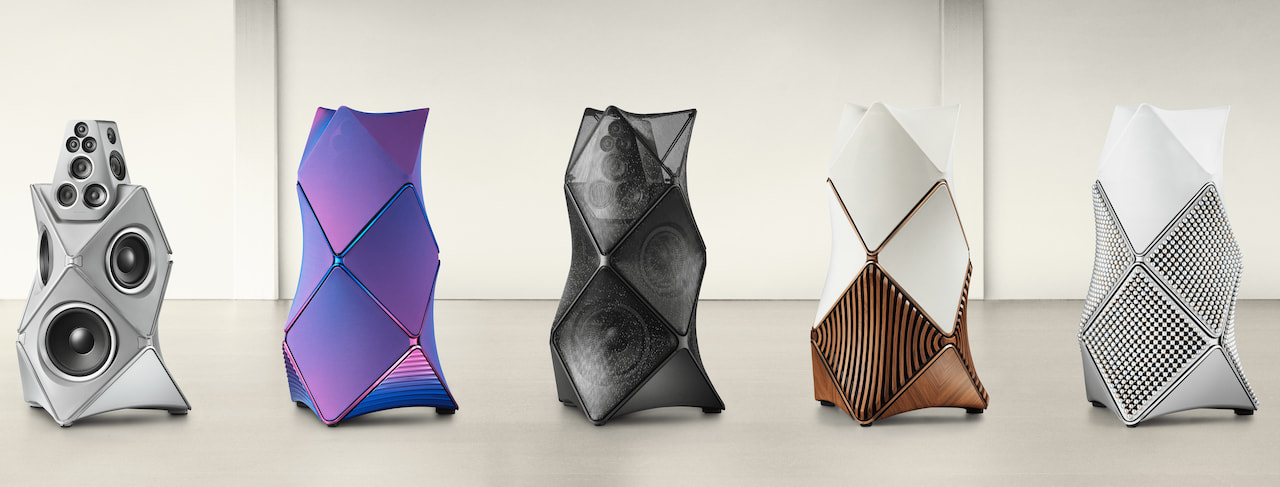
To close out its 100th anniversary in appropriately over-the-top fashion, Bang & Olufsen has introduced the final two models in its five-part Beolab 90 Special Edition series: the Zenith and Monarch. They join the previously released Phantom, Mirage, and Titan variants, all built around the company’s flagship Beolab 90 loudspeaker, which remains in regular production. These aren’t incremental updates or lightly tweaked finishes.
They are ultra-limited, design-forward statements aimed at buyers who treat six-figure audio purchases the way most people treat a weekend Costco run. If you’re weighing one of these against a Bentley SUV and Porsche 911 Turbo on a random Monday and still have enough left over to feed an entire girls soccer team Chick-fil- A and imported herring, Bang & Olufsen knows exactly who you are and would like to have a word.
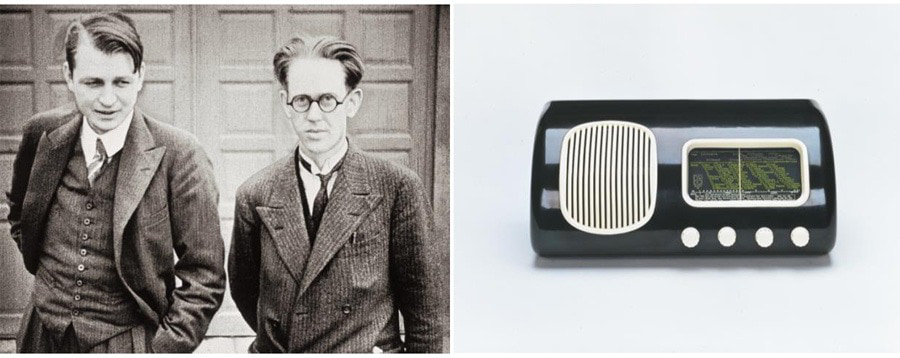
Peter Bang and Svend Olufsen, Founders
Founded in 1925 by Peter Bang and Svend Olufsen, the company didn’t just shape the look of modern audio gear—it built its reputation on turning serious engineering into functional art. A century later, Bang & Olufsen is marking the milestone the only way it knows how: by leaning harder into statement products that remind everyone why the brand still commands attention 100 years on.
The Original Beolab 90
Bang & Olufsen Beolab 90 (original)
The original Beolab 90 landed in 2015 as Bang & Olufsen’s 90th anniversary statement, and it wasn’t subtle. It hit like a controlled detonation. I was there for the debut, and the reaction hasn’t changed since: this thing is a brute, but a smart one. The engineering is serious, the power is borderline absurd, and the design doesn’t ask for your attention—it takes it. You don’t forget hearing a Beolab 90. Not the first time, not the tenth.
Each speaker packs 8,200 watts of built-in amplification driving 18 Scan-Speak drivers, powered by 14 ICEpower amps and four additional Class D units. It’s a ridiculous amount of hardware, housed inside an angular, multi-faceted enclosure that sits on a curved wooden base. The whole thing looks less like a loudspeaker and more like something pulled from a modern architecture exhibit.
Advertisement
And it’s not just brute force. The Beolab 90 backs it up with real flexibility: extensive wired and wireless connectivity, including WiSA, plus a deep toolkit of calibration and room optimization technologies to shape how it performs in your space. This isn’t a flagship that leans on looks alone. It earns it.
Active Room Compensation: Adjusts for room acoustics, furniture placement, and speaker positioning to deliver a more precise soundstage with clearer spatial cues.
Beam Width Control: Lets you dial in how focused or wide the sound dispersion is, shifting from a tight sweet spot to broader room coverage for more relaxed listening.
Beam Direction Control: Enables selection of one of five acoustic “front” positions, allowing the system to redirect the primary listening focus based on your room layout.
Advertisement
Active Bass Linearization (ABL): Dynamically manages bass output relative to volume and available power, enhancing low-end presence at lower levels while protecting the drivers from overload.
Now that the fundamentals of the Beolab 90 are clear, Bang & Olufsen is marking both its 100th anniversary and the speaker’s 10-year milestone with five limited releases: the Beolab 90 Titan Edition, Phantom (Shadow), Mirage, and the new Monarch and Zenith editions, all developed through B&O’s Atelier program.
Advertisement. Scroll to continue reading.
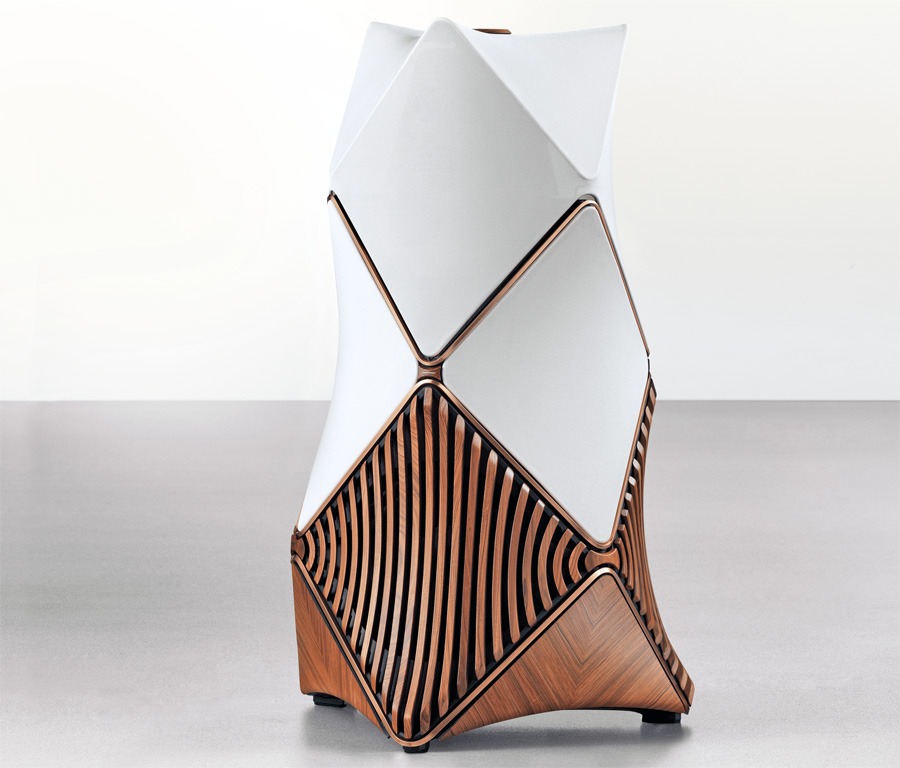
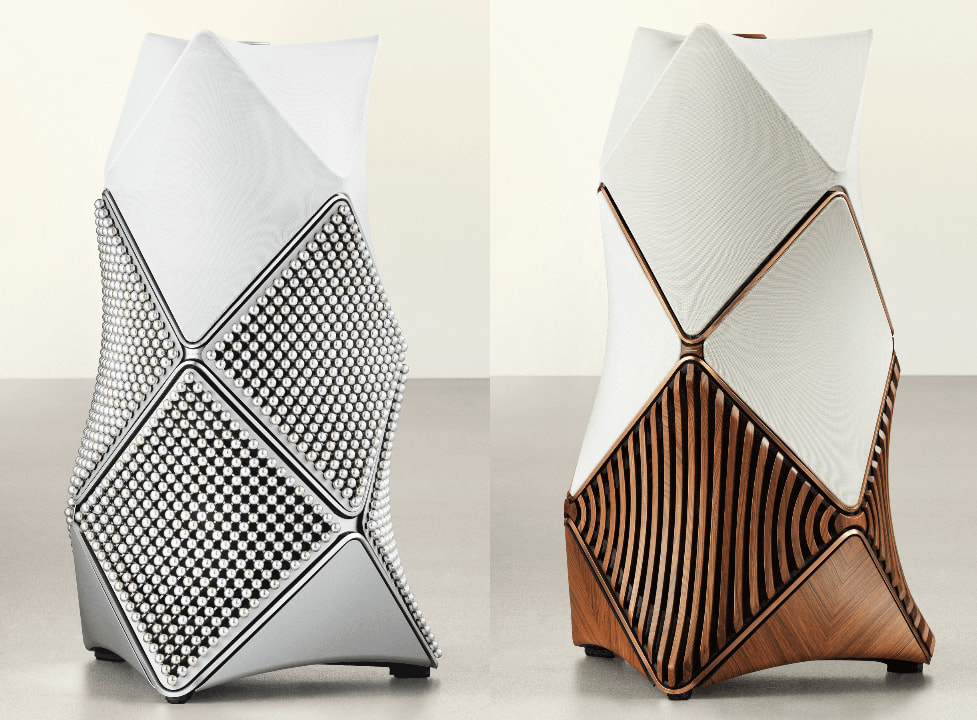
Beolab 90 Monarch Edition
The Beolab 90 Monarch Edition leans into textural sophistication and Danish furniture design heritage, but compared to its sibling, this is the “restrained” one—if anything in this price range can be called that. It’s still sculptural, still a little intimidating, but at least it doesn’t look like it’s about to wake up in the middle of the night and make a decision about your family or dog.
Wood in Motion: Angled and curved rosewood lamellas follow the contours of the aluminium cabinet, creating a 360-degree visual rhythm that nods to classic fabric covers while adding real texture and tactility.
Advertisement
Dynamic Knots: Six wooden knots connect the lamellas, with the front knot incorporating a subtle light-through-wood stripe that adds depth without screaming for attention.
Architectural Flow: A rosewood top ring frames the speaker, while the lower base panels continue the lamella pattern, tying the entire structure together in a cohesive, sculptural form.
Material Dialogue: The interplay between rosewood and ochre-coloured aluminium feels deliberate and balanced, blending natural warmth with precision engineering.
Textured Acoustics: Semi-transparent fabric sections reveal glimpses of the drivers beneath, reinforcing that this is still a serious piece of audio equipment—just dressed like high-end furniture instead of a sci-fi prop.
Advertisement
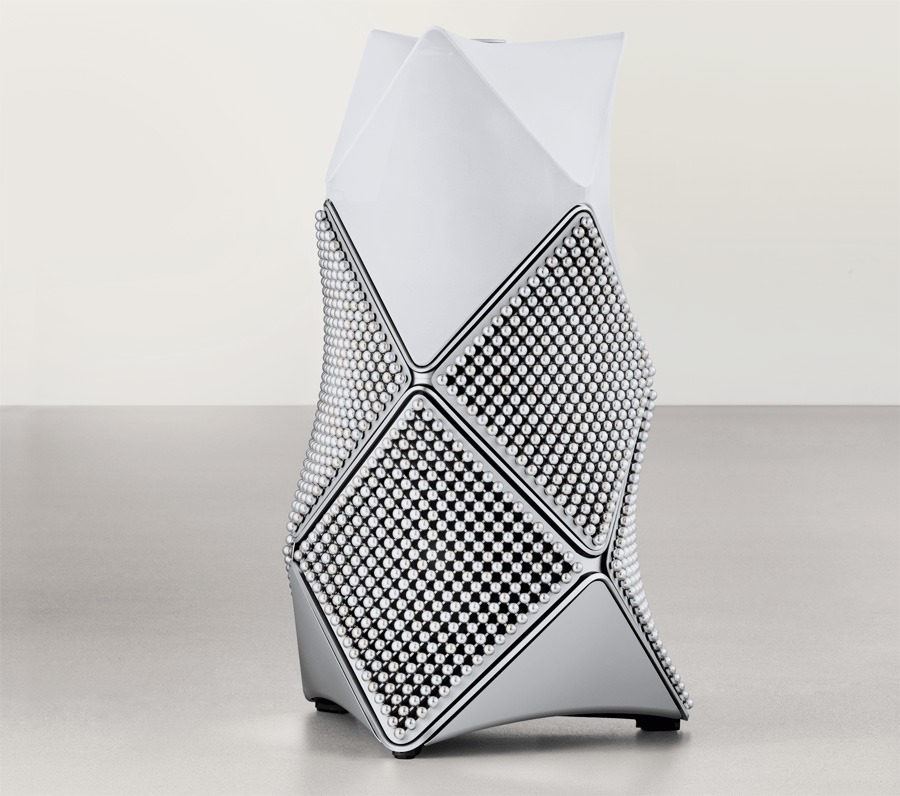
Beolab 90 Zenith Edition
The Beolab 90 Zenith Edition takes a very different path with less restraint, and more spectacle. It’s a study in textural precision and sculptural excess, the kind of design that makes you stop and wonder if it’s genius, madness, or both. We’re honestly torn. Is this Rick James with metal cornrows, or something a high priest would wear in Dune? Either way, subtlety didn’t get an invite.
Pearl Architecture: Six panels feature 289 anodized aluminium spheres each, arranged in seven pearl-inspired finishes that shimmer and shift with the light. It’s mesmerizing—and just a little confrontational.
Facemask Precision: The machined aluminium facemask is pearl blasted and anodized in dark grey, giving it an oyster shell vibe that feels both organic and slightly armored.
Top Lid Inlay: A circular mother-of-pearl inlay crowns the speaker, matching the sphere dimensions and adding a luminous focal point that draws your eye whether you want it to or not.
Sculptural Flow: Curved panels follow the cabinet’s contours, integrating the layered textures into the overall architectural form without completely taming the visual chaos.
Advertisement
Material Harmony: Polished aluminium elements and semi-transparent fabric attempt to balance the design, blending acoustic function with a tactile, almost ceremonial aesthetic that you’re either going to admire—or quietly question.
Advertisement. Scroll to continue reading.
Specifications
Pro Tip: As of now, all Beolab 90 variants; including the Monarch, Zenith, Titan, Phantom (Shadow), and Mirage Editions, share the same internal architecture and specifications. If Bang & Olufsen indicates otherwise, we’ll update the chart accordingly.
Bang & Olufsen Model
Beolab 90
Product Type
Wireless Powered Speaker
Price (pair)
From $211,800 (base model) Special Editions priced higher – refer to Availability and Price section
Designer
Noto GmbH
Construction Materials
Aluminium Fabric Wood
Recommended Room Size
30-200 m² 300-2000 ft²
Driver Configuration (per speaker)
7 x 1″ Scan-Speak Illuminator tweeter 7 x 4 ½” Scan-Speak Illuminator mid-range 3 x 10″ Scan-Speak Discovery woofer 1 x 13″ Scan-Speak Revelator front woofer
Amplification (per speaker)
7 x Bang & Olufsen ICEpower AM300-X for tweeter 7 x Bang & Olufsen ICEpower AM300-X for mid-range 3 x Heliox AM1000-1 for woofer 1 x Heliox AM1000-1 for front woofer
Frequency Range
<12 – >43,000 Hz
Maximum Sound Pressure Level (SPL) @1m
126 dB SPL
Bass Capability (per pair)
118 dB SPL
Advanced Sound Features
Adaptive Bass Linearization Advanced Active Room Compensation Beam Direction Control (5 sides) Beam Width Control
Thermal Protection
Yes
Wireless Connections
Wireless Power Link (24-bit/48kHz) WiSA (24-bit/96kHz)
Physical Connections (Primary Speaker)
1 x RCA (L/R) 1 x MIC / IR 1 x Power Link (RJ45) 1 x S/P DIF (24 bit / 192 kHz) 1 x XLR (L/R) (fully balanced) 1 x Optical (24 bit / 96 kHz) 1 x USB-B (Audio) (24 bit / 192 kHz) 1 x USB-A 2 x Digital Power Link 1 x Digital Power Link / Ethernet 1 x Power
Physical Connections (Secondary Speaker)
1 x USB-B (Audio) 1 x USB-A 3 x Digital Power Link 1 x Power
Dimensions per speaker (WxHxD)
73.5 x 125.3 x 74.7 cm (28.94 x 49.33 x 29.41 inches)
Weight (per speaker)
137 kg / 302 lbs
The Bottom Line
Bang & Olufsen is not chasing volume here. The Monarch and Zenith editions exist to reinforce a point. The Beolab 90 remains one of the most technically ambitious loudspeakers ever built, and B&O can still wrap that engineering in designs that feel closer to gallery pieces than traditional hi-fi.
What is unique? The performance has not changed, and that is intentional. You still get the full Beolab 90 platform with 8,200 watts of amplification, beamforming, room compensation, and one of the most adaptable active speaker systems available. The premium is in the materials, finish, and exclusivity.
Advertisement
What is great is that B&O left the core alone. The Beolab 90 remains a reference level system that can adapt to real rooms in ways most speakers at this level cannot. What is not so great is the price and the design risk. These sit in the middle of the six figure range, and the Zenith in particular will divide opinion and raise some questions from your therapist.
Who are these for? Not anyone chasing value. These are for buyers who want top tier performance and a visual statement that makes everything else in the room feel ordinary. In the context of ultra high-end Danish audio, that price almost feels reasonable when you look at what Børresen is asking for its top models.
Beolab 90 Zenith Edition (left) | Monarch Edition (right)
Pricing & Availability
Following the debut of the Phantom (Shadow) and Mirage Editions at Bang & Olufsen’s San Francisco Culture Store in December 2025, the Beolab 90 Monarch and Zenith Editions are set to make their first public appearance at the same location before heading out on a global tour. Prospective buyers will have a chance to see them up close and hear them in a more controlled setting than the usual trade show chaos. Only 10 pairs of each edition will be produced, which tells you everything you need to know about who these are really for.
Each pair includes a certificate of authenticity, and buyers will also receive a miniature aluminum Beolab 90 sculpture in the matching finish, packaged in a custom aluminum case. It’s equal parts accessory and reminder that you didn’t just buy speakers, you bought into the mythology.
Advertisement
U.S. pricing has not been officially confirmed, but estimates put both the Monarch and Zenith at around $520,000 per pair. In the UK, pricing is reported at £410,000, with EU pricing at €480,000 per pair. For context, the original Beolab 90 launched in 2015 at roughly $78,000, climbed to $135,000 in 2023, and now sits at $211,800 per pair in 2025. Inflation is one thing. This is something else entirely.
KitchenAid is giving its classic stand mixer a thoughtful refresh, as the new Artisan Plus adds three practical upgrades aimed at making everyday baking a little smoother.
At the top of the list is a built-in LED bowl light, which automatically switches on when the tilt-head is lowered. It’s a small but useful addition, as it allows you to keep an eye on texture or consistency without stopping mid-mix.
In addition, KitchenAid has introduced precision speed control and a soft-start function. The latter gradually ramps up mixing speed to avoid the all-too-familiar flour explosion. At the same time, the refined controls give you a bit more accuracy when working with delicate ingredients.
Those changes build on what’s already a well-established formula. The Artisan Plus keeps the familiar tilt-head design but adds a double-flex edge beater that scrapes the bowl as it mixes. It also comes with a secure-fit pouring shield and stainless steel accessories, although existing attachments still work here too. As a result, long-time KitchenAid users won’t need to start from scratch.
Advertisement
Advertisement
There’s also a bit more flexibility in how you use it day to day. The mixer offers 11 speeds, including a new half-fold setting designed for gently combining lighter mixtures, preventing you from knocking the air out of them.
Design-wise, KitchenAid hasn’t strayed far from what made the mixer iconic in the first place. You’ll still get that classic silhouette, now paired with 15 colour options including exclusive finishes like a fetching Sun Dried Tomato, Wild Blueberry and Feather Pink.
It’s a relatively modest update on paper, but that’s arguably the point. Rather than reinventing the mixer, KitchenAid is refining it, adding small, genuinely useful features while keeping the core experience intact.
The Artisan Plus Stand Mixer is available now for $600. This positions it as the brand’s most premium take on a design that’s already stood the test of time.
Google is finally doing the thing Gmail users have been begging for years, which is letting them change the actual username in their Gmail address. This is no longer just an early rollout, as Google says the feature is now available for all Google Account users in the US. So it’s still a limited release, […]
Geely, the Chinese automotive giant that owns Volvo, has just unveiled the Boyue EREV in China with a limited-time price of 107,900 Yuan, or roughly about $14,900. This price is worth noting, considering it’s not a stripped-down city car, but an extended-range SUV. It further highlights the value gulf between China and the US looks even wider.
Geely
This isn’t some tiny -range compromise either. Geely says the Boyue EREV offers up to 375 km of CLTC electric range and as much as 1,525 km of combined range, depending on the variant. It uses a 1.5 liter range extender, a 160kW electric motor, and either a 28.3 kWh or 50.4 kWh LFP battery pack. The larger battery also supports 3C fast charging, which claims to hit 80% charge from 30% in just about 15 minutes.
What else does it offer?
The Boyue EREV also doesn’t cut corners for the price, offering a 14.6-inch central display, an 8.8-inch instrument cluster, Flyme Auto, and support for both Carlink and Huawei HiCar. Keeping up with other high-tech Chinese EVs, you also get 50W wireless charging, an optional 16-speaker audio, an optional HUD, and L2-level driver assistance. It is also a real family SUV too, measuring 4,680mm long with a 2,778mm wheelbase.
Volvo’s parent company Geely unveiled the Boyue EREV SUVGeely
Why this is such a big deal
The bigger story here is not just Geely’s new SUV. It is what this kind of product says about the market split. Reuters reported earlier this week on Geely’s broader importance to Volvo as the Swedish brand navigates a tough car market. It also underlines just how central the Chinese parent has become. And despite US buyers wanting to buy Chinese EVs, they remain largely shut out of this kind of value.
EU reckons it could assert trust and authenticity by removing AI-generated content
The bloc is also drafting a code of practice to protect citizens
Blocking AI altogether might not be the best move, though
The European Union is reportedly considering a ban on AI-generated images and videos – otherwise known as deepfakes – in official communications.
According to new Politico reporting, with ongoing geopolitical tensions rising, elections running their courses and further public announcements, it’s believed the focus would be to protect trust in government messaging.
It’s unclear whether the rule would ban AI-generated content that mimics official people or places, or whether it would apply to all images and videos in political communications.
Article continues below
Advertisement
EU considers a ban on AI deepfakes
As it stands, politicians and policymakers are already voicing concerns over AI’s impact on democracy, with many worried fake content could undermine authentic news.
However, a blanket ban might not be truly effective. While fully banning deepfakes suggests all EU communications are legitimate, it doesn’t stamp out deepfakes appearing on third-party platforms (particularly social media). A further seal of approval to verify the authenticity of any EU communications could also help on this front – but that’s not included within current proposals.
Advertisement
There are also calls for AI-generated content to be labelled more clearly as policymakers see the technology as a growing disinformation threat, particularly in global politics.
Separately, Europe is also looking to control the harmful uses of generative AI. The bloc’s AI Office has already started to draft a code of practice, which independent experts will continue to build on.
Sign up to the TechRadar Pro newsletter to get all the top news, opinion, features and guidance your business needs to succeed!
As for the proposed ban, though, the rules are still being shaped and will need to be agreed before becoming law.
Advertisement
However, some experts have criticized Europe for being so harsh in the rules it set out that it could risk falling behind other nations. “Responsible use beats abstinence,” OECD advisor Walter Pasquarelli wrote (via Politico).
We spend hours testing every product or service we review, so you can be sure you’re buying the best. Find out more about how we test.
Samsung Galaxy Book6 Pro: Two-minute review
The Samsung Galaxy Book6 Pro is a laptop in the ultrabook class, featuring a sublime design that keeps bulk to a minimum.
I was immediately struck by the svelteness of the unit. The clean lines and rounded corners only add to its minimalist chic, as does the steely grey colorway.
Advertisement
It looks and feels every bit as premium as any of our current best laptops. All materials are smooth to the touch, while the metal base is solid. The metal lid isn’t quite as stable as those on some other laptops I’ve tested, but it’s perfectly sufficient for normal use, and the hinge operates very well.
The price you pay for such solidity, though, is that the Galaxy Book6 Pro isn’t exactly light. I tested the 16-inch model, so I wasn’t expecting a featherweight unit, but it’s worth mentioning all the same. At least its thin profile makes it more portable than it otherwise would be.
The Book6 Pro’s all-round performance is excellent. It can handle all kinds of tasks without missing a beat, and I was also amazed by its gaming performance, despite the lack of dedicated GPU. It was able to run AAA titles at respectable graphical settings in perfectly playable states.
Advertisement
(Image credit: Future)
Note that you can feel some heat on the keyboard, with fan noise apparent, even when the laptop is under moderate stress. Thankfully, the noise is relatively hushed, and not likely to cause much disruption.
However, it was the 16-inch 3K AMOLED display of my review unit that really caught the eye. It’s as bright, sharp, and rich as you could wish for, while touchscreen functionality is also great. Unlike the majority of laptops screens, the rounded corners of the frame here add to the display’s appeal, while the super-thin bezel ensures that none of the copious real estate goes to waste.
Sign up for breaking news, reviews, opinion, top tech deals, and more.
The keys on the Galaxy Book6 Pro are a little heavier than you might expect, which can lead to presses failing to register, at least in my experience. The layout is also a little cramped — and it’s a shame that on a laptop of this size, Samsung has chosen to omit a number pad and most navigation keys.
Advertisement
I have fewer complaints about the touchpad, though. Its large size and incredibly smooth surface make navigation a cinch. Also, it mostly avoids encroaching on wrist space when typing; only on a few brief occasions did I accidentally trigger cursor movement.
Battery life is adequate, if not spectacular. It lasted 14 hours in our movie playback test, which is under an hour of that achieved by the Asus Zenbook S 16 and the Apple MacBook Air 15-inch (M4), but an hour more than the Dell 16 Plus.
The Galaxy Book6 Pro is certainly a costly proposition, but when you consider all that it offers, its value becomes more apparent. It’s similarly priced to the aforementioned Zenbook, a close rival in many ways, and more expensive than the Dell 16 Plus. Nevertheless, it’s difficult for either of these alternatives to surpass the sheer quality and glorious display of Samsung’s super-slender machine.
16-inch 2,880 x 1,800 (WQXGA+), Dynamic AMOLED 2X, Anti-Reflective, touchscreen
16-inch 2,880 x 1,800 (WQXGA+), Dynamic AMOLED 2X, Anti-Reflective, touchscreen
Advertisement
Ports and Connectivity
2 x USB-C (Thunderbolt 4), 1 x USB-A 3.2, 1 x HDMI 2.1, 1 x 3.5mm combo audio; Wi-Fi 7, Bluetooth 5.4
2 x USB-C (Thunderbolt 4), 1x USB-A 3.2, 1 x HDMI 2.1, 1 x 3.5mm combo audio; Wi-Fi 7, Bluetooth 5.4
Battery
Advertisement
78Wh
78Wh
Dimensions
14.1 x 9.8 x 0.5 inches (357 x 248 x 12mm)
Advertisement
14.1 x 9.8 x 0.5 inches (357 x 248 x 12mm)
Weight
3.51lbs / 1.59kg
3.51lbs / 1.59kg
Advertisement
Samsung Galaxy Book6 Pro review: Price & availability
(Image credit: Future)
Starts from $1,899.99 / £1,699
Available now
Expensive, but in line with some others
Pricing for the Galaxy Book6 Pro starts from $1,899.99 / £1,699 (about AU$2,740; pricing and availability for Australia is TBC at the time of writing), with the models available now. It can be configured with 16GB or 32GB of RAM, and 256GB, 512GB, or 1TB of storage. There are two Intel Core Ultra CPUs to choose from, the 7 356H and the X7 358H — the latter of which is reserved for the top-tier model. A variant with the Ultra 5 325 is coming soon.
The Galaxy Book6 Pro is an expensive laptop, then — although this isn’t too surprising, given its design and spec. The base model is similarly in price to the Asus Zenbook S 16, which also features a 3K OLED display, but 24GB instead of 16GB of RAM.
However, if you’re in the market for a large laptop that still offers plenty of quality for less, there’s the Dell 16 Plus. The base model is significantly cheaper than the Galaxy Book6 Pro’s, but it still arrives with an Intel Core Ultra 7 chip, 16GB of RAM, and 1TB of storage. Its resolution is lower, but only slightly.
Advertisement
Samsung Galaxy Book6 Pro review: Design
(Image credit: Future)
Incredibly thin
Solid metal enclosure
Quite heavy
In line with many of Samsung’s mobile devices, the Galaxy Book6 Pro is a sleek, premium-looking machine. The dark grey colorway is also very fetching and somehow adds more interest than your typical monochromatic designs.
Every contour is completely flat, while the corners, which are more rounded than most, give the design a softer appearance. Even the underside of the laptop is free of the fuss , with just four discreet rubber feet in each corner.
What’s more, the Galaxy Book6 Pro’s build quality is exceptional. The all-metal chassis is supremely strong, and while the lid isn’t as stable as some other models when open, it stays put under normal usage. The hinge for it is satisfyingly smooth, too. The bezel around the display is incredibly thin, which is always great to see, but the lack of a physical privacy shutter for the webcam, not so much.
The keys are more solidly planted than those of other laptop keyboards, and they also feature backlighting — which, in my opinion, is pretty much an essential feature.
Best of all, though, is just how thin the Galaxy Book6 Pro is. It’s reminiscent of the MacBook Air M1, since it thins out towards the front end. Given my review unit was the 16-inch model, I wasn’t too surprised by its weighty feel, but this does somewhat negate the utility of that slender form when it comes to portability. Still, it certainly makes it easier to slide in and out of a bag.
Advertisement
Samsung Galaxy Book6 Pro review: Performance
(Image credit: Future)
Surprisingly capable graphical performance
Superb display
Keys are a little heavy
Samsung Galaxy Book6 Pro benchmarks
3DMark: Night Raid: 46,524; Fire Strike: 13,987; Steel Nomad: 1,413; Solar Bay: 28,816; Solar Bay Unlimited: 29,056; Solar Bay Extreme: 4,270; Solar Bay Extreme Unlimited: 4,300 Geekbench 6.5: Multicore: 16,837; Single-core: 2,880 Cinebench R23: Multi Core: 16,250; Cinebench R24: Single Core: 121; Multi Core: 995 Crossmark: Overall: 2,125; Productivity: 1,906; Creativity: 2,567; Responsiveness: 1,670 Passmark Overall: 9,831.3; CPU: 36,603.9; 2D Graphics: 889.8; 3D Graphics: 9,241.2; Memory: 4,155.5; Disk: 43,906.2 BlackMagicDisk: Read: 4,369MB/s; Write: 3,371MB/s HandBrake 4K to 1080p: 85fps Total War: Warhammer III: 1080p, Medium: 76fps Total War: Warhammer III: 1800p, Ultra: 22fps Battery Life (TechRadar movie test): 14 hours and 52 seconds
The general performance of the Galaxy Book6 Pro is very good. It handles basic browsing and productivity tasks, as well as 4K streaming, with ease.
What surprised was just how well it handled games. Despite lacking a dedicated GPU, it managed to run Cyberpunk 2077 with the Ray Tracing: Ultra preset selected, without succumbing to disruptive slowdowns or stuttering. Intel’s XeSS Super Resolution 2.0 (in Auto mode) and Frame Generation were both enabled during my sessions.
Advertisement
Of course, the Galaxy Book6 Pro isn’t going to dethrone the best gaming laptops, and the keyboard layout can feel a little cramped when in the typical WSAD position; but it’s impressive, nonetheless.
Some heat was noticeable all over the keyboard during such intensive tasks, no doubt a corollary of that ultra-thin design — but, thankfully, the temperatures remained well within comfortable bounds. Some fan noise did become apparent, even under moderate workloads, but I didn’t find this too disturbing.
(Image credit: Future)
The AMOLED display is every bit as sumptuous as you’d expect it to be. The 3K resolution is satisfyingly crisp, while colors are vibrant and the contrast expectedly deep. The touchscreen functions well, too, responding quickly and accurately to my finger inputs.
I was also fond of the bezel’s rounded corners, which soften the frame and make on-screen content appear neater somehow. It’s a small touch that I wish more laptop displays featured; the best MacBooks have it, but only in the top corners, not the bottom as well.
Advertisement
The keys are nicely damped, but still display relatively shallow travel. However, they’re heavier than others, which resulted in some of my presses failing to register, requiring more force than I’m accustomed to producing. This may be an adjustment you’ll need to make as well, if you’re someone with a light touch.
While the layout is comfortably spaced for typing, it’s a shame there’s no number pad and only a few navigation keys (Insert/ Prt Sc and Delete) on the Galaxy Book6 Pro, given the 16-inch real estate of my unit.
The touchpad on the 16-inch model of the Book6 Pro is large, which is great for navigation. Despite this, there’s also enough room on the sides for resting your wrists while you type. There were times when the cursor moved as a result of my palms coming into contact with the pad, but this wasn’t frequent or long-lasting enough to cause a problem.
Advertisement
Samsung Galaxy Book6 Pro review: Battery life
(Image credit: Future)
Middling longevity
Quick to charge
The Galaxy Book6 Pro offers an average battery life. When I ran a movie on a continuous loop, it lasted 14 hours. This is well below Samsung’s claimed figure of up to 30 hours. However, it’s only an hour less than what the Asus Zenbook S 16 and the Apple MacBook Air 15-inch (M4) managed.
However, it lasted over an hour more than the Dell 16 Plus. It’s also quick to charge, taking about two hours to go from empty to full.
Should I buy the Samsung Galaxy Book6 Pro?
Swipe to scroll horizontally
Row 0 – Cell 0
Notes
Rating
Advertisement
Value
Super expensive, although the base model isn’t too bad for an ultrabook.
3.5 / 5
Design
Advertisement
It’s hard to find fault with the build quality and materials here. It’s exceptionally thin, but quite heavy.
4.5 / 5
Performance
The Galaxy Book6 Pro performs well, even on graphical tasks, while that huge OLED touchscreen display is truly stunning. The keys are a little heavy, though, and the layout of them is compromised.
Advertisement
4.5 / 5
Battery life
Decent, but nothing to write home about. Longevity is somewhere in the middle compared to its rivals.
3.5 / 5
Advertisement
Total
If your pockets are deep enough, you’re unlikely to be disappointed with how this laptop looks and performs.
4.5 / 5
Advertisement
Buy the Samsung Galaxy Book6 Pro if…
Don’t buy it if…
Samsung Galaxy Book6 Pro review: Also consider
How I tested the Samsung Galaxy Book6 Pro
(Image credit: Future)
Tested for several days
Ran our series of benchmarks
Plentiful laptop reviewing experience
I tested the Galaxy Book6 Pro for several days. I used it for all kinds of tasks, from general browsing and light productivity to 4K streaming and AAA gaming. I also ran our series of benchmark tests, designed to assess every aspect of a laptop’s performance.
I have plenty of experience reviewing computing devices of all kinds. I’ve tested numerous laptops, from budget offerings to top-tier gaming machines. I’ve also reviewed desktops, Chromebooks, and tablets.






























































You must be logged in to post a comment Login