The sub $1,000 network streaming market is no longer short on options. Between WiiM, Eversolo, Bluesound, and Cambridge Audio, buyers can choose from a wide range of compact streamers that handle modern services cleanly and integrate easily into existing systems. Most now cover the basics well. What separates them is how they integrate into real world systems, the flexibility they give users, and their performance in everyday listening.
That is where iFi Audio positions the $999 NEO Stream 3 and$399 ZEN Stream 3. Both are built around a modern streaming platform that supports Qobuz Connect, TIDAL Connect, Spotify Connect, and Apple AirPlay 2, allowing users to stream directly from native apps without workarounds or proprietary control layers. Setup is handled through a straightforward IoT process, and ongoing updates are managed through iFi’s Nexis platform rather than requiring users to chase firmware manually.
In practical terms, the NEO Stream 3 is designed for listeners who want a single box that can act as the digital front end of a system, handling streaming duties and conversion without external hardware. The ZEN Stream 3 takes a different approach, focusing on being a quiet and reliable network transport for systems that already have a DAC the owner likes and does not want to replace. Both models lean on improved power design and noise reduction to keep the signal path stable, an area where iFi has traditionally focused its engineering effort.
But is that enough to compete below $1,000? Let’s take a look at what both offer straight out of the box.
Advertisement
NEO Stream 3 and ZEN Stream 3 Share the Same Core Streaming and Noise Control Architecture
Both the NEO Stream 3 and ZEN Stream 3 are built on the same core streaming and noise-control platform, with differences that are deliberate rather than cosmetic. At a baseline level, both models receive refinements to their power supplies, including upgraded polymer capacitors for lower noise delivery and the continued use of ELNA Silmic II capacitors in the audio path. The goal here is consistency and stability, not tonal revoicing, with iFi focusing on cleaner power and predictable behavior in long-term use.
Setup and system management are also shared. Both streamers now include iFi’s updated IoT hardware, enabling faster initial configuration and smoother day-to-day operation.Firmware updates and system control are handled through either a browser based interface or the iFi Nexis app, streamlining setup and ongoing maintenance compared with earlier manual update processes. Exclusive Modes return on both units as well, allowing users to disable unused background processes during playback to minimize potential noise sources.
Noise mitigation remains a defining design priority across both products. Each includes iPurifier2 technology on the S/PDIF outputs and Active Noise Cancellation on the USB ports, specifically aimed at reducing interference from connected storage devices or computers when feeding an external DAC.
The NEO Stream 3 goes further by retaining the OptiBox optical isolation system from the original NEO Stream, which isolates the wired network connection and prevents network-borne electrical noise from entering the audio system. The ZEN Stream 3 does not include OptiBox as one its connectivity features.
On the software side, both units use the latest version of iFi’s ultra-resolution streaming engine. This platform supports Qobuz Connect, TIDAL Connect, Spotify Connect, and AirPlay 2, with improvements focused on stability, smoother web radio playback, and a cleaner interface with deeper configuration options. Control is handled through native apps rather than forcing users into a proprietary ecosystem. Support for Spotify Lossless, however, is still not finalised but we’re told it’s coming.
Advertisement
Where the two models clearly diverge is in system role. The NEO Stream 3 is designed as an all-in-one digital front end, combining network streaming with an integrated DAC capable of handling up to 768 kHz PCM and DSD512. It is intended for users looking to modernize an existing hi-fi system without adding external digital components. The ZEN Stream 3, by contrast, is a dedicated network transport. It supports up to 384 kHz PCM and DSD256 and is meant to slot into systems where a preferred external DAC is already in place.
Both models also incorporate K2 technology developed in collaboration with JVCKENWOOD. This processing is designed to restore harmonic information often lost during recording, mastering, or encoding. Two modes are available: K2, which preserves the original file resolution, and K2HD, which optionally upsamples PCM content to 192 kHz 24-bit. With this generation, K2 processing is no longer limited to internal DACs. Any external DAC connected to either streamer can benefit from K2 processing, while the NEO Stream 3 adds the ability to apply K2HD upsampling internally to PCM material below 192 kHz.
Advertisement. Scroll to continue reading.
NEO Stream 3
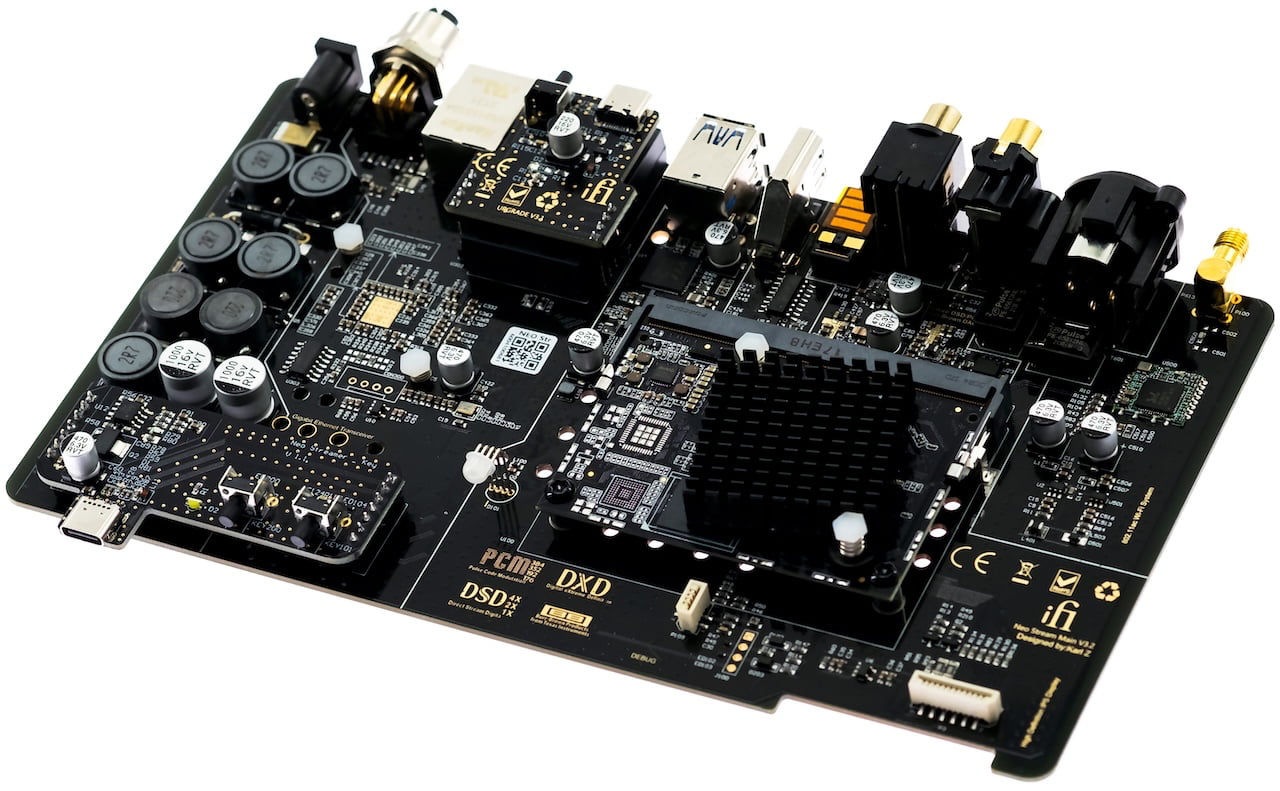
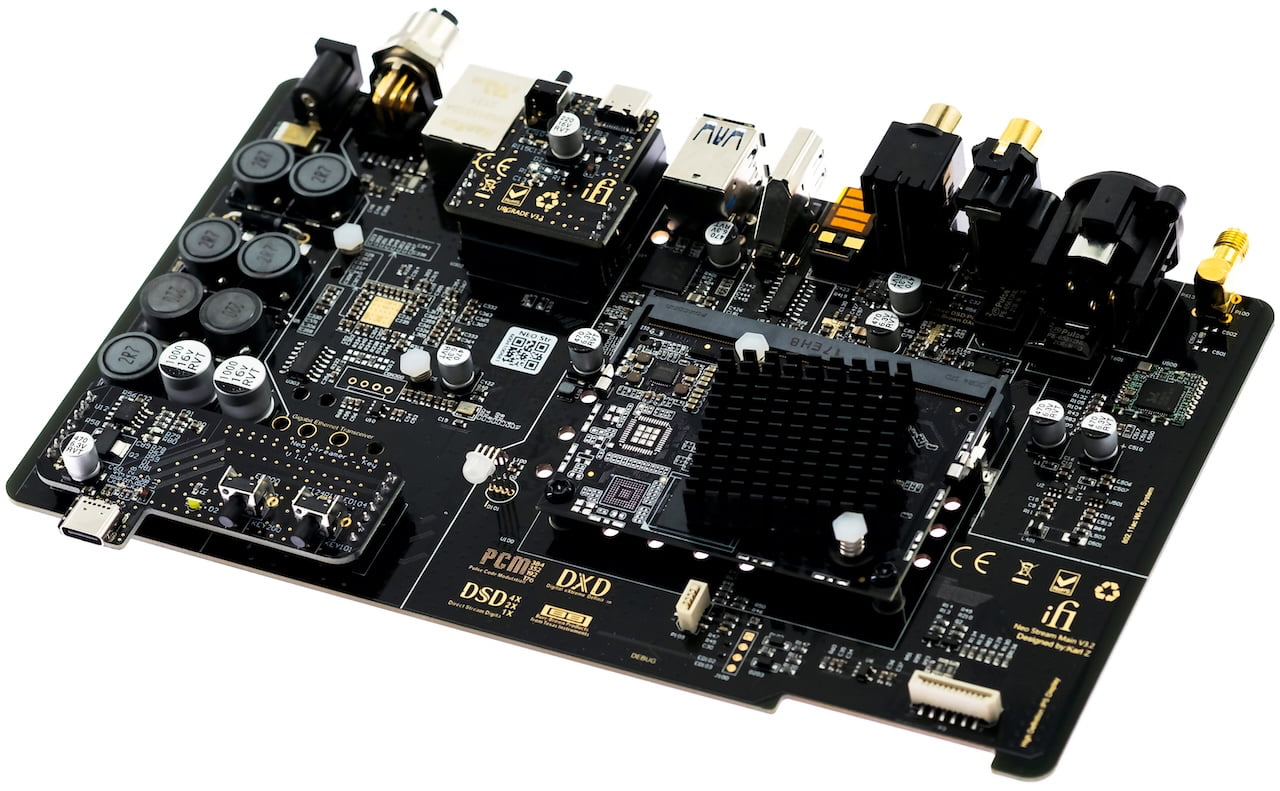
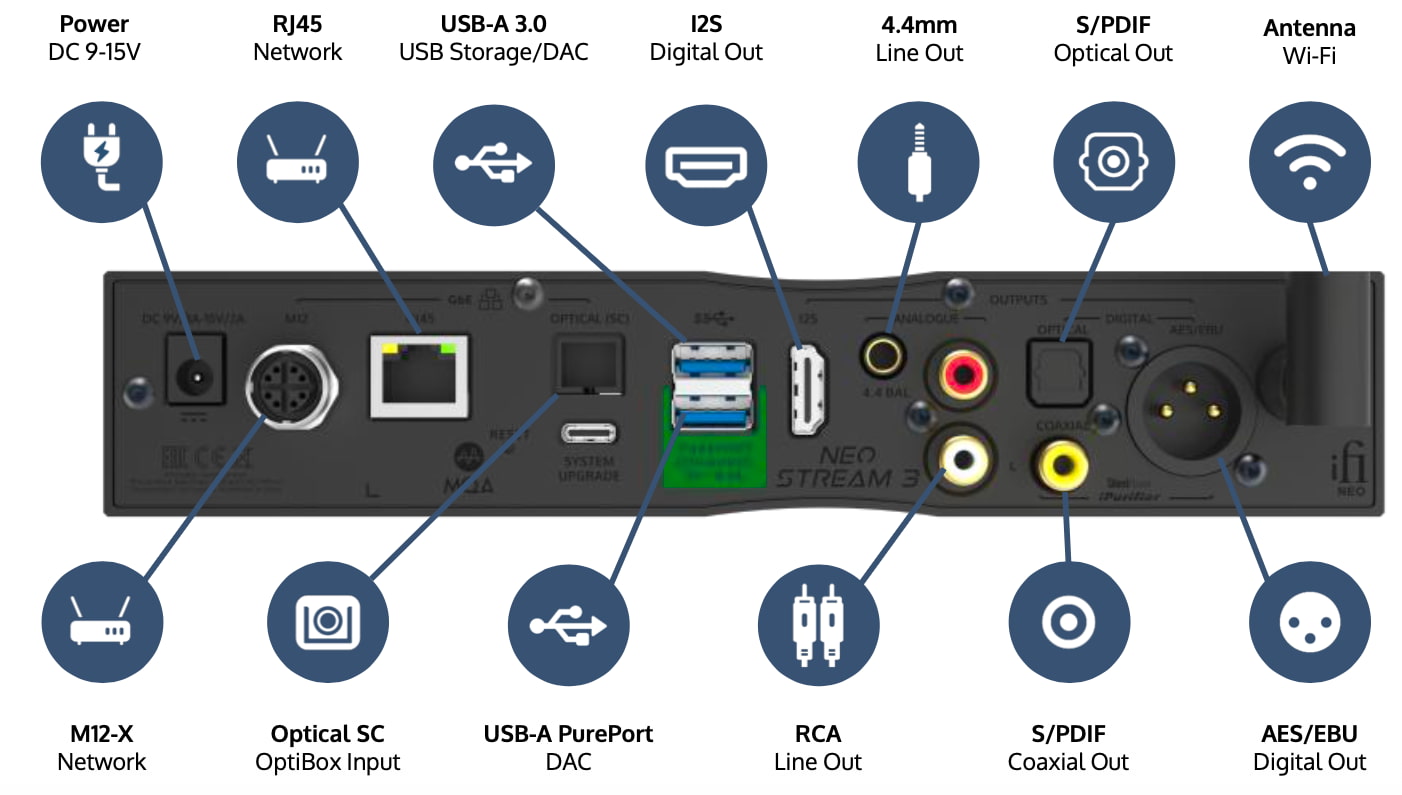
The NEO Stream 3 is a combined network streamer and DAC designed to function as a complete digital source component. It supports Wi-Fi and wired networking via RJ45 Ethernet as well as iFi’s M12-X optical network input. Digital inputs include USB-A for storage or DAC use and a front-mounted USB-C port. Digital outputs are comprehensive, with dual USB-A, S/PDIF optical, S/PDIF coaxial, AES/EBU, and I2S, allowing the unit to operate either as a DAC or as a dedicated digital transport. Analog outputs are provided via a balanced 4.4 mm connection and single-ended RCA.
Internally, the NEO Stream 3 uses a Burr-Brown DAC stage derived from the NEO iDSD 2 and supports high-resolution audio up to 768 kHz PCM and DSD512. Balanced output voltage is rated at 4 V RMS, with 2 V RMS available from the RCA outputs.
Advertisement
Power is supplied via a DC input supporting 9 to 15 volts, with internal regulation using upgraded polymer capacitors and ELNA Silmic II capacitors. Power consumption is under 0.5 watts at idle and approximately 14 watts at maximum load.
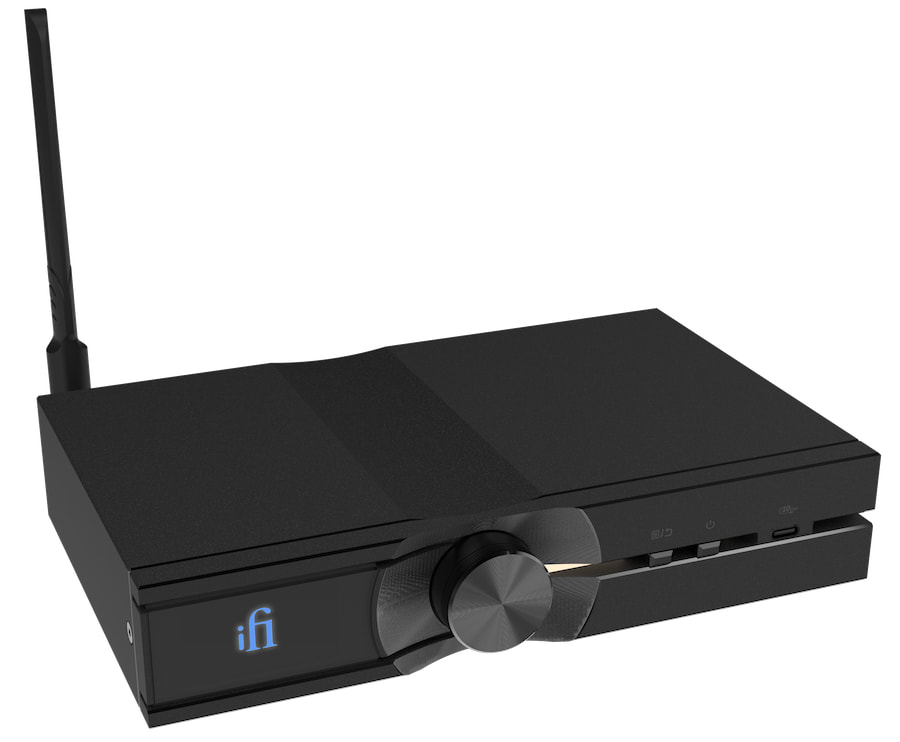
Setup and ongoing updates are handled through a simple browser-based interface or the iFi Nexis app, made possible by the new IoT hardware, so there is no need to fuss with manual update routines. With a compact chassis measuring 214 x 151 x 41 mm (8.4 x 5.9 x 1.6 inches) and weighing just 1 kg (2.26 lbs), the NEO Stream 3 is easy to place on a desk or equipment shelf without demanding much space.
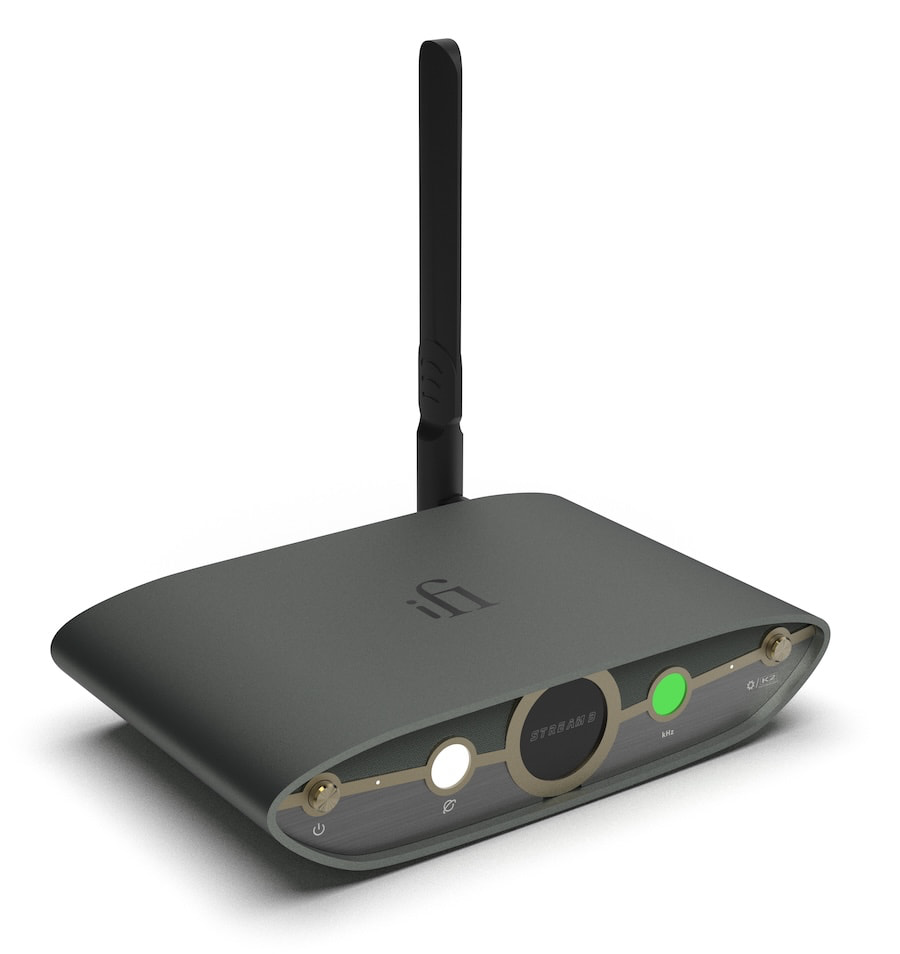
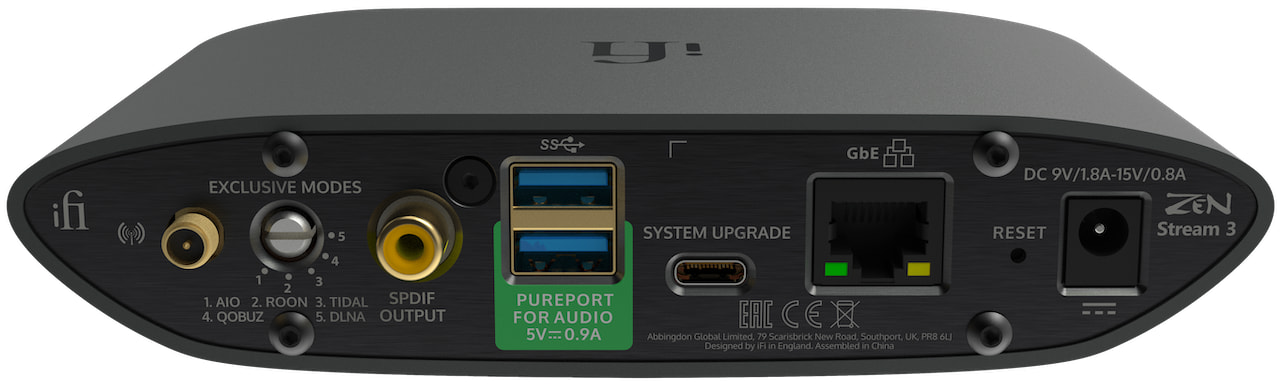
The ZEN Stream 3 is designed as a dedicated network transport for systems where digital conversion is handled elsewhere. It focuses entirely on getting a clean, stable digital signal out to an external DAC rather than duplicating functionality already present in many higher-end systems. Networking is handled via Wi-Fi or RJ45 Ethernet, with two USB-A ports available for local storage or DAC output.
Digital output options include two USB-A outputs for DAC connection and a coaxial S/PDIF output, each incorporating iFi’s iPurifier and Active Noise Cancellation technologies to reduce electrical noise before the signal reaches the DAC. There are no analog outputs and no internal DAC, which keeps the signal path simple and aligned with its role as a transport.
Advertisement
High-resolution support extends up to 384 kHz PCM and DSD256, handled by the same next-generation streaming engine used in the NEO Stream 3. Streaming is managed directly through native apps with support for Qobuz Connect, TIDAL Connect, Spotify Connect, and AirPlay 2, avoiding reliance on proprietary control software. K2 processing is included to restore harmonic information lost during recording or encoding and is applied before the digital output, allowing connected DACs to benefit without altering their internal architecture.
Power delivery has been revised with upgraded polymer capacitors and ELNA Silmic II capacitors to improve stability and reduce noise under load. Power is supplied via a DC input supporting 9 to 15 volts, with idle consumption under 6 watts and a maximum draw of approximately 10 watts. Firmware updates and system setup are handled through a rear USB-C service port, using either a browser-based interface or the iFi Nexis app, enabled by the updated IoT hardware platform.
Physically, the ZEN Stream 3 is compact and lightweight, measuring 158 x 100 x 35 mm (6.2 x 3.9 x 1.4 inches) and weighing 578 g (1.27 lbs). It is sized to sit easily on a desktop or equipment shelf alongside an external DAC, making it a practical drop-in upgrade for your existing system.
With competition this strong, iFi is not trying to win by simply piling on features. The strategy here is differentiation through system role, execution, and the details that tend to matter after the initial setup. That includes easy integration into existing systems, app-native control rather than closed ecosystems, and a design that stays below the psychological $1,000 threshold while still targeting more demanding listeners.
Advertisement. Scroll to continue reading.
That approach comes with tradeoffs. Brands like WiiM have shown that a comprehensive, frequently updated operating system can win over a large segment of the market, especially when paired with features such as room calibration and broad device compatibility. At this point, support for the major streaming platforms is largely table stakes across the category.
Where these products are ultimately judged is not on spec lists or feature counts, but on how smoothly they operate day to day, whether firmware updates are painless rather than disruptive, and how they actually sound once they are part of a real system. iFi is betting that its focus on noise control, power integrity, and flexible system roles will resonate. Whether that is enough to stand out in a crowded sub-$1,000 field will be up to listeners to decide.
The online leak of a full version of Avatar: Aang, The Last Airbender—a highly anticipated animated film in a multimedia fantasy franchise—has divided passionate fans while upsetting those who spent years working on the film.
The leaks began on X late on Saturday night, about six months before Aang was scheduled to premiere on Paramount+. User @ImStillDissin posted two short clips from the film. “Nickelodeon accidentally emailed me the entire Avatar aang movie,” he claimed. He also threatened to stream the entire movie if Paramount didn’t release an official trailer, and he posted a still from the movie’s end credits, revealing previously undisclosed voice-over cast and roles. The media from @ImStillDissin’s posts were later hit with copyright strikes and removed.
But within 48 hours, links to download the full movie appeared on 4chan and X, where some users also directly streamed the film. Across the web, fans said they had successfully pirated and watched what appeared to be a nearly finished and “beautiful” animated film.
While some argued that Paramount deserved to be punished because of certain creative and marketing decisions around the movie, others noted what a blow the leak was to the animators and production crew. A number of those team members took to social media to convey their sadness and frustration.
Advertisement
“We worked on the aang movie for years with the expectation that’d [sic] we’d get to celebrate all of our hard work in theaters. Just to see people unceremoniously leak the film and pass our shots around on twitter like candy,” animator Julia Schoel wrote Tuesday on X.
The user behind @ImStillDissin, who would not reveal his real name due to fear of legal repercussions, tells WIRED that he obtained the movie almost by chance and did not expect his posts to set off such a crisis in the entertainment world. “When I posted those clips I was purely trolling,” he says. “I was expecting a day of clout farming at best, not for the whole thing to blow up like this.”
(While WIRED has done its due diligence in verifying that the person speaking to us was behind the @ImStillDissin X account, we acknowledge that the hacking community is known to troll.)
According to @ImStillDissin, a screen-grabbed version of Avatar: Aang, The Last Airbender was circulating among people he knew from his days in the hacking community, one of whom shared it with him. “Broadly speaking, the supply chain for movies and TV is rife with insecure companies and vendors and lax checks,” he claims. He notes that two different SpongeBob SquarePants movies leaked months before their release dates in 2024. “Someone on 4chan who wasn’t happy at me drip-feeding stuff posted a copy of a draft script [of the new Avatar film] from like two years back,” says @ImStillDissin.
Advertisement
Neither Nickelodeon nor its parent company Paramount have confirmed a hack had taken place, nor have they issued a statement on the matter. They also did not respond to requests for comment.
Originally announced in 2021, Avatar: Aang, The Last Airbender marked the first production for Avatar Studios, a division of Nickelodeon’s animation department.
Some people felt justified in pirating and sharing the movie due to the recasting of voice actors. Last year, during a Reddit AMA, casting director Jenny Jue wrote that the voice cast from the Avatar TV show that aired on Nickelodeon in the 2000s was not returning due to efforts to “match actors’ ethnic/racial background to the characters they’re portraying.”
Boston Dynamics has integrated Google DeepMind into its robotic dog Spot, giving it more autonomous reasoning for industrial inspections like spotting spills and reading gauges. Spot can also now recognize when to call on other AI tools. IEEE Spectrum reports: Boston Dynamics is one of the few companies to commercially deploy legged robots at any appreciable scale; there are now several thousand hard at work. Today the company is announcing that its quadruped robot Spot is now equipped with Google DeepMind’s Gemini Robotics-ER 1.6, a high-level embodied reasoning model that brings usability and intelligence to complex tasks.
[T]he focus of this partnership is on one of the very few applications where legged robots have proven themselves to be commercially viable: inspection. That is, wandering around industrial facilities, checking to make sure that nothing is imminently exploding. With the new AI onboard, Spot is now able to autonomously look for dangerous debris or spills, read complex gauges and sight glasses, and call on tools like vision-language-action models when it needs help understanding what’s going on in the environment around it. “Advances like Gemini Robotics-ER 1.6 mark an important step toward robots that can better understand and operate in the physical world,” Marco da Silva, vice president and general manager of Spot at Boston Dynamics, says in a press release. “Capabilities like instrument reading and more reliable task reasoning will enable Spot to see, understand, and react to real-world challenges completely autonomously.”
You can watch a demo of Spot’s new capabilities on YouTube.
Back in January of last year, the Wall Street Journal published a story about a leather-bound birthday book that Ghislaine Maxwell had assembled for Jeffrey Epstein’s 50th birthday in 2003. The book included letters from various associates, and one of them bore Donald Trump’s name. According to the article, it featured a hand-drawn outline of a naked woman with typewritten text inside. The page was signed with a recognizable squiggly “Donald” signature positioned to mimic pubic hair and closed with the ridiculously creepy line: “Happy Birthday—and may every day be another wonderful secret.”
Trump denied writing the letter and called it “a fake thing” before suing the Journal, Rupert Murdoch, News Corp, and the two reporters for a mere $10 billion. Each count asked for at least $10 billion, because apparently that’s the going rate for Donald Trump’s hurt feelings these days.
On Monday, federal judge Darrin Gayles dismissed the lawsuit, finding that Trump hadn’t come anywhere close to adequately alleging “actual malice,” the standard required for a public figure to win a defamation claim. For those who follow this stuff, that’s about as unsurprising as it gets.
The actual malice standard, established in New York Times v. Sullivan decision, requires a public figure to show that the defendant either knew the story was false or published it with reckless disregard for the truth (which courts have interpreted to require that the publisher actually harbored serious doubts about whether the statement was true). It does not mean, as many people assume, the colloquial meaning of “malice”: that they just don’t like the person. Trump’s complaint was heavy on boilerplate language about malice and light on, well, anything resembling actual facts supporting it. Judge Gayles was blunt about the gap:
Advertisement
The Complaint comes nowhere close to this standard. Quite the opposite.
The “quite the opposite” is the fun part. Trump’s own complaint described the reporters reaching out to him, as well as the FBI and the Justice Department, before publication. Trump gave them a denial, which they printed; the DOJ didn’t respond and the FBI declined to comment. Trump’s argument was essentially that since he told the Journal the letter was fake before publication, running the story anyway proved they had serious doubts about its truth and therefore acted with actual malice.
You hear this a lot from SLAPP defamation filers, pretending that a mere denial by them means that anyone printing what they’re accused of is actual malice. But that’s not how any of this works. Just because you deny something, doesn’t automatically mean the journalists have to believe it’s false. Their evidence can (and often does) reveal that the subjects of their reporting are lying in their denials. A denial is not proof of falsity. It’s just proof that you’re denying something. The court wasn’t buying any of it:
To establish actual malice, “a plaintiff must show the defendant deliberately avoided investigating the veracity of the statement in order to evade learning the truth.”…
As the judge noted, printing Trump’s denial alongside their own journalistic findings demonstrated responsible reporting — the opposite of actual malice, which would require evidence that the reporters had serious doubts about the letter’s authenticity and deliberately avoided investigating further. Then printing the denial alongside the evidence, again, was the opposite of actual malice:
The Article also informed readers that President Trump decried the Letter as a fake and denied writing it. By “allowing readers to decide for themselves what to conclude from the [Article], any allegation of actual malice [is] less plausible.” Turner, 879 F.3d at 1274. See also Michel, 816 F.3d at 703 (holding that “reporting perspectives contrary to the publisher’s own should be interpreted as helping to rebut, not establish, the presence of actual malice.”)
The judge also, somewhat gently, reminded Trump’s lawyers that actual malice is an actual legal standard, not just ‘they don’t like me.’
Advertisement
President Trump’s allegation that Defendants acted with ill-will is insufficient to plead actual malice. Aside from being conclusory and without factual support, “ill-will, improper motive or personal animosity plays no role in determining whether a defendant acted with actual malice.”
Meanwhile, as this lawsuit wound through the courts, the very letter Trump claimed didn’t exist surfaced publicly. The House Oversight Committee subpoenaed the Epstein estate and obtained the birthday book. They released it publicly, and wouldn’t you know it, there’s a page that matches the Journal’s description of the letter exactly:
The judge couldn’t consider the produced letter at this stage of the litigation because Trump disputes its authenticity, which is his right procedurally. And the judge has to treat the claims in the complaint as true. But the rest of us sure can look at it. And judge for ourselves.
The court gave Trump until April 27 to file an amended complaint, and a spokesman for his legal team promised he would “refile this powerhouse lawsuit.” I suppose if you squint hard enough at a complaint a federal judge said “comes nowhere close” to meeting basic legal standards, “powerhouse” is one word you could use for it — just probably not in the way they mean.
The Journal’s defense team also sought attorneys’ fees under Florida’s anti-SLAPP statute. The judge denied the fee request for now, since Trump gets a chance to amend. But that request can be renewed, which means if the amended complaint fares no better, Trump could end up paying for the privilege of having sued the Journal over a story that appears to be true.
This is also a reminder of why we need stronger anti-SLAPP laws in every state, as well as a federal anti-SLAPP law.
Advertisement
This case isn’t over yet, but the judge clearly sees it as just as weak as we said it was when it was filed last year. As always, Trump files these vexatious lawsuits knowing none of them have a real shot — the goal is to burn time and money for media organizations, and scare some of them into softening their coverage or thinking twice before calling out his behavior.
The guy who presents himself as a champion of free speech remains the most anti-free speech president we’ve had in any of our lifetimes, consistently abusing the judicial system as a way to punish those who make him look bad.
Amazon has also announced a telecoms partnership with Apple to power satellite services on its products.
Amazon is acquiring satellite telecommunications provider Globalstar, as the company eyes Starlink’s top rank in satellite services.
The $11.6bn deal buys Amazon Globalstar’s existing satellite operations, infrastructure and licences. According to data compiled by Reuters, Globalstar has 32 planned active low Earth orbit (LEO) satellites.
Amazon plans to integrate Globalstar’s assets into its own space internet service Leo, which aims to have more than 3,200 satellites in space.
Advertisement
Currently, the company has more than 200 satellites in space already, and is planning several launches over the course of the year. SpaceX’s Starlink, for comparison, has around 15,000 authorised satellites with around 10,000 active in orbit.
With the Globalstar integration, Amazon will be able to add direct-to-device (D2D) services to its LEO satellite network and extend cellular coverage. The company said it plans to deploy its own D2D satellites systems by 2028.
Globalstar stockholders can choose to receive, per share, $90 in cash or around 0.3 shares of Amazon stock with a value cap.
Alongside the acquisition, Apple has agreed to use Leo to power satellite services for iPhones and Apple Watches. Apple, which bought a 20pc stake in Globalstar in 2024, had been using the company’s satellites to power its products. Apple has spent years building its satellite features, but struggled to catch up with competitors.
Advertisement
Currently, Amazon said it will continue to support Apple using Globalstar’s existing and planned LEO constellations. The company plans to collaborate with Apple on future projects using Leo.
“By combining Globalstar’s proven expertise and strong foundation with Amazon’s customer obsession and innovation, customers can expect faster, more reliable service in more places – keeping them connected to the people and things that matter most,” said Panos Panay, the senior vice president of devices and services at Amazon.
Earlier this year, Jeff Bezos’s other venture Blue Origin announced TeraWave, a satellite internet service with a planned constellation of around 5,400 satellites. Blue Origin claims that TeraWave will deliver connection speeds of up to 6Tbps anywhere on Earth.
Don’t miss out on the knowledge you need to succeed. Sign up for the Daily Brief, Silicon Republic’s digest of need-to-know sci-tech news.
A live recording from Freddie King arrives for Record Store Day 2026 as Elemental Music presents Feeling Alright: The Complete 1975 Nancy Jazz Pulsation Concerts on a three LP set. Recorded at the Nancy Jazz Pulsations, the release captures King’s full 1975 performance in France, offering a complete and carefully assembled document of the blues guitarist at a pivotal moment in his later career.
While much of this material has appeared on two individual CDs issued in Europe back in 1989, this is the first time the entire show is being released on both CD and vinyl.
I never really gave it much thought before, but the mid-1970s arguably marked a peak for Freddie King who was finally achieving wider success. At the time of this concert he was signed to Robert Stigwood’s RSO Records label and had a new single-disc album out called Larger Than Life which was receiving favorable reviews.
So it makes a lot of sense for Elemental Music to highlight this era with a complete concert recording. Official press materials offer more insights into this new RSD set: “3-LP set featuring the blues legend Freddie King live before more than 50,000 fans in October 1975, the final full year of his life. Joining King are organist Alvin Hemphill, guitarist Ed Lively, pianist Lewis Stephens, bassist Benny Turner and drummer Calep Emphrey. The deluxe package features appreciations from his daughter, Wanda King, as well as ZZ Top’s Billy Gibbons, plus liner notes by author Cary Baker. The set documents an essential blues artist whose ferocious guitar tone, commanding singing, and genre-bridging vision helped reshape modern blues and rock.”
According to an online listing for the CD edition: “The audio was transferred directly from the original stereo tape reels at INA and mastered by Matthew Lutthans at The Mastering Lab, ensuring stunning sound quality that brings every note to life. This limited edition includes rare, previously unpublished photographs from the festival and new liner notes.”
And indeed, on this high energy set you get to hear Mr. King soar. Some fave tracks so far include King’s own “Have You Ever Loved A Woman?” and “The Things I Used To Do” (both released on his RSO album of that time) and the T-Bone Walker classic “Stormy Monday Blues.” And his cover of Dave Mason’s Traffic classic “Feelin’ Alright” is a joy.
Advertisement
The sound quality on this recording is really quite good and I’m pleased about the album pressing quality which is dead quiet and well centered.
While I don’t know the exact RSD pricing for Feeling Alright: The Complete 1975 Nancy Jazz Pulsation Concerts it is fair to guess that it will be in the $60-70 range given its 3LP length.
Alternately, if you don’t score a copy or are on a tighter budget, you can pre-order the 2CD version for $24.98 at Amazon. All in all if you are a Freddie King fan and don’t have many live recordings by him from this era, Feeling Alright would be an key choice for Record Store Day.
Mark Smotroff is a deep music enthusiast / collector who has also worked in entertainment oriented marketing communications for decades supporting the likes of DTS, Sega and many others. He reviews vinyl for Analog Planet and has written for Audiophile Review, Sound+Vision, Mix, EQ, etc. You can learn more about him at LinkedIn.
Subtlety is overrated, and MSI just proved that. The Taiwanese laptop maker has rolled out a sweeping refresh, unveiling more than a dozen new gaming laptops spread across its Cyborg, Crosshair, Raider, Stealth, and Titan lineups.
The models cover 15-inch, 16-inch, and 18-inch form factors, ensuring there’s something for every gamer or professional user, making it hard for buyers to run out of excuses for not upgrading this year.
MSI
So, what’s actually new inside these machines?
It is Intel’s newly announced Arrow Lake-HX Plus chips, specifically the Core Ultra 9 290HZ Plus, that acts as a catalyst for MSI’s new lineup. Other manufacturers, such as Acer, Asus, and Dell, have already launched laptops powered by these chips. MSI is late, but it’s here fully loaded.
Eight of the new MSI laptops, including the Raider 16 Max HX, Raider 18 Max HX, Stealth 18 HX, and Titan 18 HX, run on the Core Ultra 9 290HX Plus chipset. Further, they feature a wide variety of powerful GPUs, ranging from the RTX 5070 Ti and RTX 5080 to the RTX 5090.
Out of all, the Crosshair 16 Max HX is the first laptop to ship with Nvidia’s yet-to-launch 12GB RTX 5070 laptop GPU. Meanwhile, the Raider 16 Max HX, which was present at the CES 2026, delivers a combined system power of 300W, out of which 175W comes from the GPU alone.
Yes, absolutely, MSI has also refreshed the Crosshair 16 HX with relatively older Intel 14th-gen processors and RTX 5050/5060/5070 GPUs. The entry-level Cyborg 15 series returns with quite accessible specs.
Although MSI hasn’t revealed pricing yet, the lineup spans multiple segments, likely from mid-range to premium laptops. To me, the lineup looks like it was launched under some sort of pressure (from competition), as even I’m having trouble keeping a count of the models and their specifications.
Nuclear startup X-energy began its investor roadshow Wednesday as it works toward its IPO, setting its target price between $16 and $19 per share, according to documents filed with the U.S. Securities and Exchange Commission. If it lists at the high end, the startup could net about $814 million.
X-energy and its peers have been riding a renewed wave of interest in fission power as demand for electricity has surged on the back of AI data centers and society-wide electrification.
Amazon is one of X-energy’s biggest backers. The tech giant led a $500 million Series C-1 round and has pledged to buy as much as 5 gigawatts of nuclear power from the company by 2039.
The IPO is sure to come as a relief to X-energy’s investors, which have put about $1.8 billion into the company, according to PitchBook. The startup had previously attempted to go public via reverse merger with a special purpose acquisition company, but the two parties canceled the deal in 2023 as the SPAC craze petered out.
Advertisement
X-energy’s reactor is what’s known as a high-temperature, gas-cooled reactor. Inside, uranium encased in spheres of ceramic and carbon is cooled by helium gas. The gas then transfers heat to a steam turbine loop to generate electricity. The fuel design, known as TRISO, is expected to be safer than previous fuel arrangements, though it’s not widely used today.
The startup said in its SEC filing that it’s already embroiled in a patent dispute with another company that recently went bankrupt. Ultra Safe Nuclear Corporation (USNC) went bankrupt in 2024, and its assets were purchased in bankruptcy to form Standard Nuclear. X-energy alleges that USNC infringed on its fuel fabrication patents and that the matter hasn’t been resolved to its satisfaction during the course of the bankruptcy proceedings.
Outside of China, development of new nuclear reactors has all but stalled, stymied by delays and cost overruns. A new breed of startups hopes that by shrinking reactors, they’ll be able to overcome some of the challenges that have beset traditional designs.
Techcrunch event
Advertisement
San Francisco, CA | October 13-15, 2026
None of the small modular reactor startups have built a power plant yet, though several are racing to meet a deadline of July 4 set by the Trump administration.
Advertisement
While many might miss the arbitrary deadline, they’re still likely to achieve criticality, the moment when fission reactions become self-sustaining.
But the road from criticality to profitable power plants is likely to be long. Mass manufacturing can help bring costs down, but it usually takes around a decade for the process to start paying dividends. What’s more, the number of reactors these companies are planning to build might be more than other companies have attempted, but it might not be high enough to reap the true benefits of mass manufacturing.
X-energy expects that by the time its reactor production techniques are mature — what experts call “Nth-of-a-kind” — it will be able to bring costs down by 30% relative to the first-of-a-kind. Investors should pay close attention to how much that first reactor costs. It could make or break the company’s prospects.
Have you looked at how much your streaming subscriptions are costing you each month and wondered whether there is a smarter way to keep everything you actually watch without paying full price for all of it?
The bundle brings Apple TV’s original programming alongside Peacock’s live sports, NBC shows, and Universal movies into a single subscription managed through your existing Prime Video account and payment method.
Advertisement
On the Apple TV side, that means ad-free access to originals, including Severance, Shrinking, The Studio, and the upcoming fourth season of Ted Lasso, alongside live sports such as Formula 1 and Friday Night Baseball.
Peacock Premium Plus adds NFL Sunday Night Football, Premier League, NBA, and Major League Baseball coverage, plus NBC series like the One Chicago franchise and Law and Order, Bravo content, and Peacock Originals, including The Traitors.
Both services are ad-free within this bundle, with Apple TV offering that experience across its originals and Peacock Premium Plus covering virtually all on-demand content, which is a meaningful upgrade over Peacock’s standard tier.
Advertisement
Everything streams through the Prime Video app on whatever device you already use, from Fire TV and smart TVs to phones, tablets, and games consoles, with no separate apps or logins required for either service.
To add it, open the Prime Video app or head to the Prime Video website, navigate to the subscriptions section, select the Apple TV and Peacock Premium Plus bundle, and complete the sign-up using your existing Amazon account details.
The bundle is available for a limited time, so it is worth acting on sooner rather than later if the combined sports and drama lineup covers enough of what you watch to justify consolidating two separate bills into one lower monthly payment.
Half of American workers now say they use some form of AI technology in their role, pushing the number over the critical point for the first time.
New Gallup research found 50% of employees now reported using AI tools at work in some capacity, a rise of 4% from the previous quarter, and up 21% from the same period just three years ago.
The study also found the mood around using AI at work appears to be changing, with many workers softening their stance on the technology despite the risk it poses to their jobs.
Advertisement
Article continues below
AI acceptance
Taking place over February 4 to February 19, 2026, Gallup’s survey specifically asked 23,717 US employees how often they used AI as part of their role, and what effect it was having on their work.
Advertisement
It found the usage of AI at work is also increasing, with 13% of employees now saying they use AI on a daily basis, with 28% reporting they use it a few times a week or more.
Overall, businesses appear to be getting to grips with the changes, with 41% of employees reporting their organization has integrated AI in a bid to improve organizational practices, up three points from the previous quarter.
Workers in AI-friendly businesses were more likely to report “disruption” and both positive and negative changes in staffing levels, along with a boost in productivity.
Sign up to the TechRadar Pro newsletter to get all the top news, opinion, features and guidance your business needs to succeed!
Advertisement
However only about one in 10 employees in organizations adopting AI said they strongly agree the technology has transformed how work gets done in their organization.
The survey found 27% of employees in those firms embracing AI stating their workplace has changed in disruptive ways to a large or very large extent in the past year – as opposed to just 17% in non-AI firms.
More and more workers are voicing concern about the effect AI will have on their jobs, with a shocking 18% of all employees surveyed saying it would be very or somewhat likely their job will be eliminated within the next five years due to AI or automation.
“Most employees who use AI report improvements in their productivity and efficiency, particularly in leadership and knowledge-based roles where they can readily apply AI to daily tasks,” Gallup noted in its report.
“For many workers, however, these benefits appear at the level of individual tasks rather than broader workplace systems. While some employees report transformational effects, relatively few say AI has fundamentally changed how work gets done across their organization.”
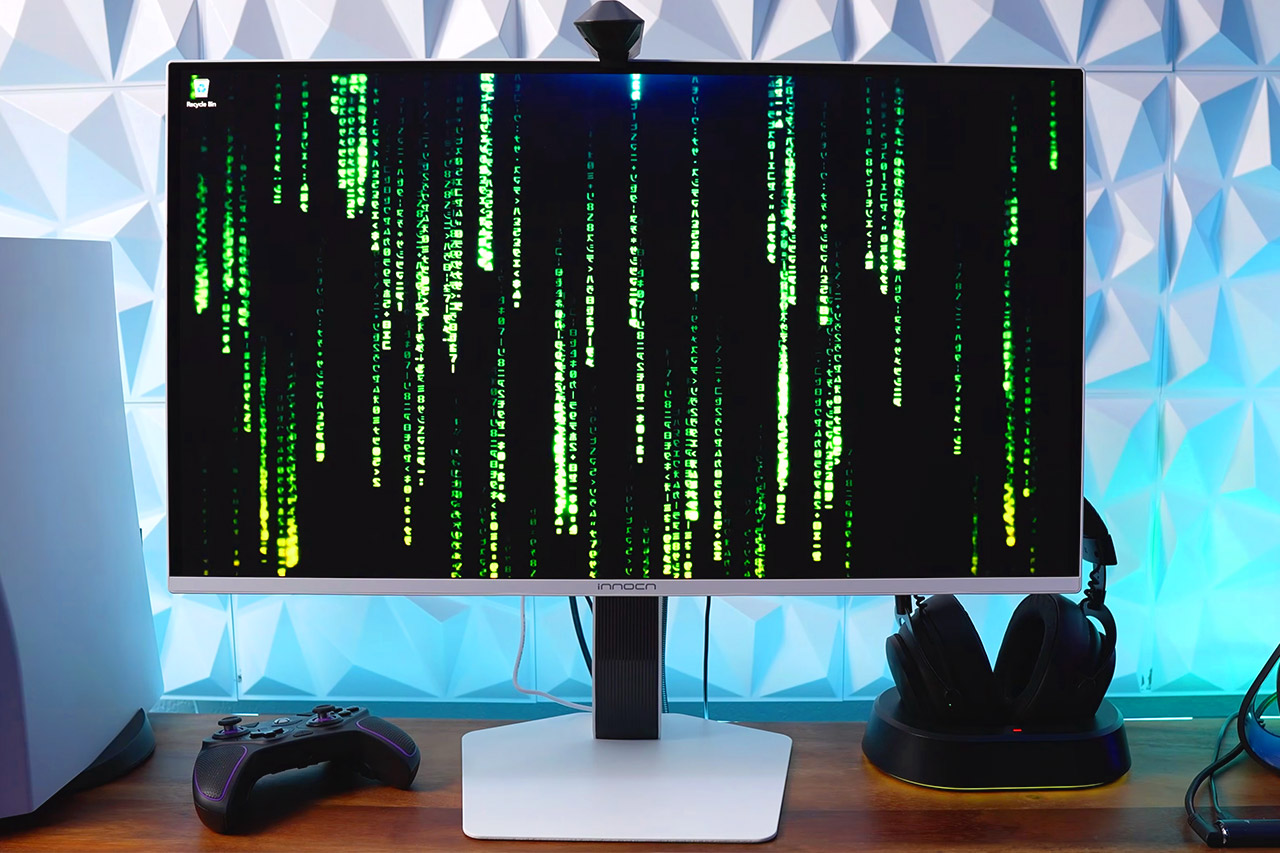
Gamers who are constantly on the lookout for a new screen will notice when a model comes up that provides excellent visuals at a reasonable price. The INNOCN 27″ QD-OLED 2K (model GA27S1Q) is a prime example, priced at $399.98 (was $450). Once out of the box, the stand snaps into place without the need for tools, and you have full movement in all directions, including height, tilt, swivel, and pivot. So, if you’re the type of person who enjoys switching between working at a desk and gaming on the sofa, you can find the perfect angle.
The images on-screen are noticeably vibrant right away, with black areas remaining deep / dark rather than washing out to gray, bringing the highlights and colors to life in each scene. The panel also covers almost all of the colors required for modern games and media, so reds and greens appear nice and vibrant with no dull areas, and the animation remains very clean even when things get really fast. With a 280Hz refresh rate that can reach 280 frames per second and a response time measured in thousandths of a second, fast-moving objects maintain sharp edges and prevent blurring that occurs on slower panels. If you’re a die-hard gamer, you’ll notice the difference in quick turns and abrupt adversary movements, whereas casual sessions simply feel more responsive overall.
Experience Ultimate Gaming Visual Clarity: This 27-inch QD-OLED gaming monitor delivers stunning 1440p resolution with perfect blacks and vibrant…
Dominate with Blur-Free 280Hz Speed: Gain the competitive edge with a blistering 280Hz refresh rate and near-instantaneous 0.03ms response time. Enjoy…
Next-Gen QD-OLED Visual Fidelity: Witness breathtaking contrast and rich colors powered by QD-OLED technology. Enjoy immersive PC gaming and HDR…
Connections are rather comprehensive for a monitor at this price point, with two HDMI 2.1 connections capable of handling consoles and newer graphics cards at full speed, as well as a pair of DisplayPort 1.4 inputs for further versatility if you have a desktop system. The built-in speakers will suffice for brief checks and the odd thing, but most people prefer to plug in headphones for better sound during extended playback.
Advertisement
This monitor has features for both comfort and lifespan. It has low blue light and flicker-free settings to lessen eye strain if you stare at it for an extended period of time, as well as some useful routines that look for static images and adjust brightness to prevent permanent markings from appearing. Don’t worry about the power drain; it’s rather low at roughly 65 watts, so the monitor runs cool and won’t put too much burden on your outlet.
One other advantage is that its slim bezels keep your focus on the image, and the rear has some modest illumination that adds a stylish touch to your setup without drawing too much attention. Overall, for anyone looking at monitors of this size and resolution, this one demonstrates that you don’t have to trade quality for a reasonable price. Give it a few hours, and you’ll see why the word is spreading so quickly, as the mix of crystal-clear visuals and seamless pace makes it a true winner.
































































You must be logged in to post a comment Login