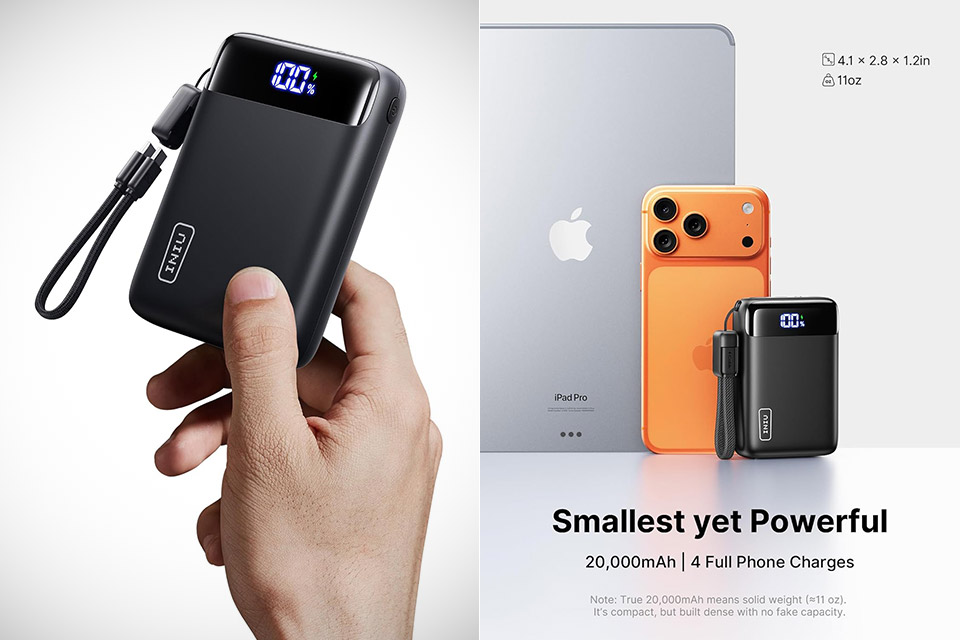
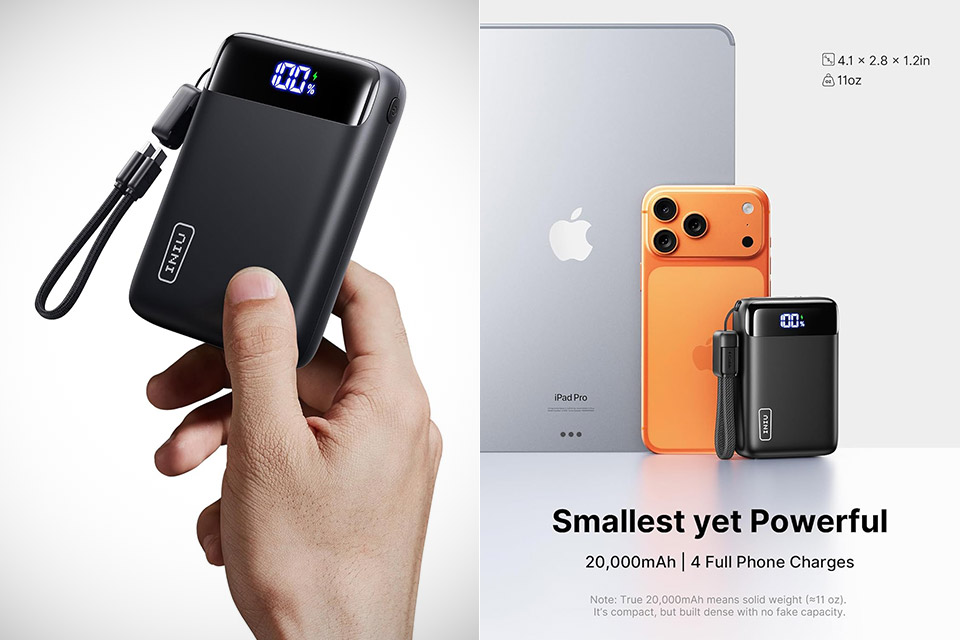
Long journeys highlight how quickly your phone can drain, with all those maps, images, and texts eating away at the battery like there’s no tomorrow. The INIU power bank, priced at $19.79 after coupon is automatically applied at checkout (was $33), comes to the rescue, packing 20,000mAh into a body measuring 2.8 x 4.1 x 1.2 inches and weighing only 11.1 ounces. Tuck it into a jacket pocket or side compartment, and it will sit quietly until you need it.
Its high-density cells are capable of packing a lot of power into such a small footprint without losing output quality. In general, a full charge will last your iPhone 16 up to four complete recharges or your Galaxy S23 up to three, but in practice, it all depends on screen brightness, apps, and so on, so don’t be surprised if it lasts you a full day of mixed stuff before needing a top-up.
Iconic LEGO Collection – The LEGO Speed Champions collection is full of iconic toy car models, including the Pagani Utopia (76915) and Porsche…
LEGO Ferrari Collectible – Features a LEGO Speed Champions collectible model car replica of the Ferrari 812 Competizione plus a driver minifigure with…
Race Driver Minifigure – The set includes a LEGO race driver minifigure to be placed behind the wheel of the race car toy for superfast action on the…
Recharging is a continuous 22.5 watts using PD & QC protocols so your phone charges up faster than with typical banks, which is good. One end is lined with three ports, two USB-C and one USB-A. Two or three devices can share the load, consuming up to 15 watts total. The bank also includes a short braided USB-C cable with a wrist band, eliminating the need to rummage through your luggage for extra cords or get held up at security.
Rather than an ambiguous battery indicator, the front boasts a handy LED display that shows you exactly what percentage is remaining. That way, you can quickly assess whether it will withstand another gadget or if it requires some TLC on its own. Recharging the bank takes about six hours with a regular wall adapter, which is quite fair. The 74-watt-hour rating is airline certified, so there’s no need for any further paperwork.
Hikers and festival-goers appreciate the built-in torch for late-night trips to the restroom or getting to your car in a parking lot. The outside case is durable enough for daily use, and the entire thing stays cool even when left on for extended periods of time.
If you’ve ever worried that your phone is quietly making your water dangerous, wellness influencers have a new fix. It’s a curved stainless steel straw that sells for about $50.
Known as an “EMF straw” or “frequency straw,” the accessory is spreading on Instagram and TikTok, according to WIRED. Influencers claim it can shield users from electromagnetic frequencies, with some saying it can boost energy, support immunity, or improve wellness.
The evidence doesn’t stretch that far. Regulators have warned that EMF-shielding products lack scientific support, and similar accessories have failed to show measurable effects. Research into low-frequency electromagnetic fields from normal devices has also found little evidence of serious health risks.
Why people buy the fear
The EMF straw works because it looks strange enough to feel technical, but familiar enough to feel harmless. It isn’t a router or a medical device. It’s a straw, which makes the claim easier to swallow in the dumbest possible way.
The wellness pitch borrows just enough tech language to sound serious. “EMF” is real. Phones and chargers do emit electromagnetic fields. The leap from that fact to a straw that supposedly turns water into protection is where the whole thing starts wobbling like a Bluetooth speaker on a cheap folding table.
A product doesn’t need to prove much when it can be shown in a short video with a vague detector and a promise that your body is being protected.
Where the science gets thinner
There is a real distinction between types of radiation. High-frequency radiation, such as X-rays and UV exposure, can damage cells. That isn’t the same as the lower-frequency, non-ionizing radiation associated with consumer devices.
Research into phone exposure is still fair. A $50 straw is a very strange place to put your trust. The practical takeaway is much less viral than the videos. Your phone isn’t turning your smoothie radioactive.
AI Visualization
Why the trend keeps spreading
The EMF straw is funny until you remember that products like this are rarely sold as jokes. They are sold into a feed full of health anxiety, distrust, and tech confusion. That makes even a ridiculous-looking straw feel like control.
Spending $50 on a metal straw probably won’t hurt most people. The bigger cost is learning to treat every normal device in your home like a threat, then buying peace of mind every time the feed tells you to.
A third independent supply chain analysis is now pointing in the same direction as the previous two: the iPhone 18 Pro Max will be more expensive at launch. In addition, Apple might have to settle for a slightly thinner margin on the device than it usually charges for other products.
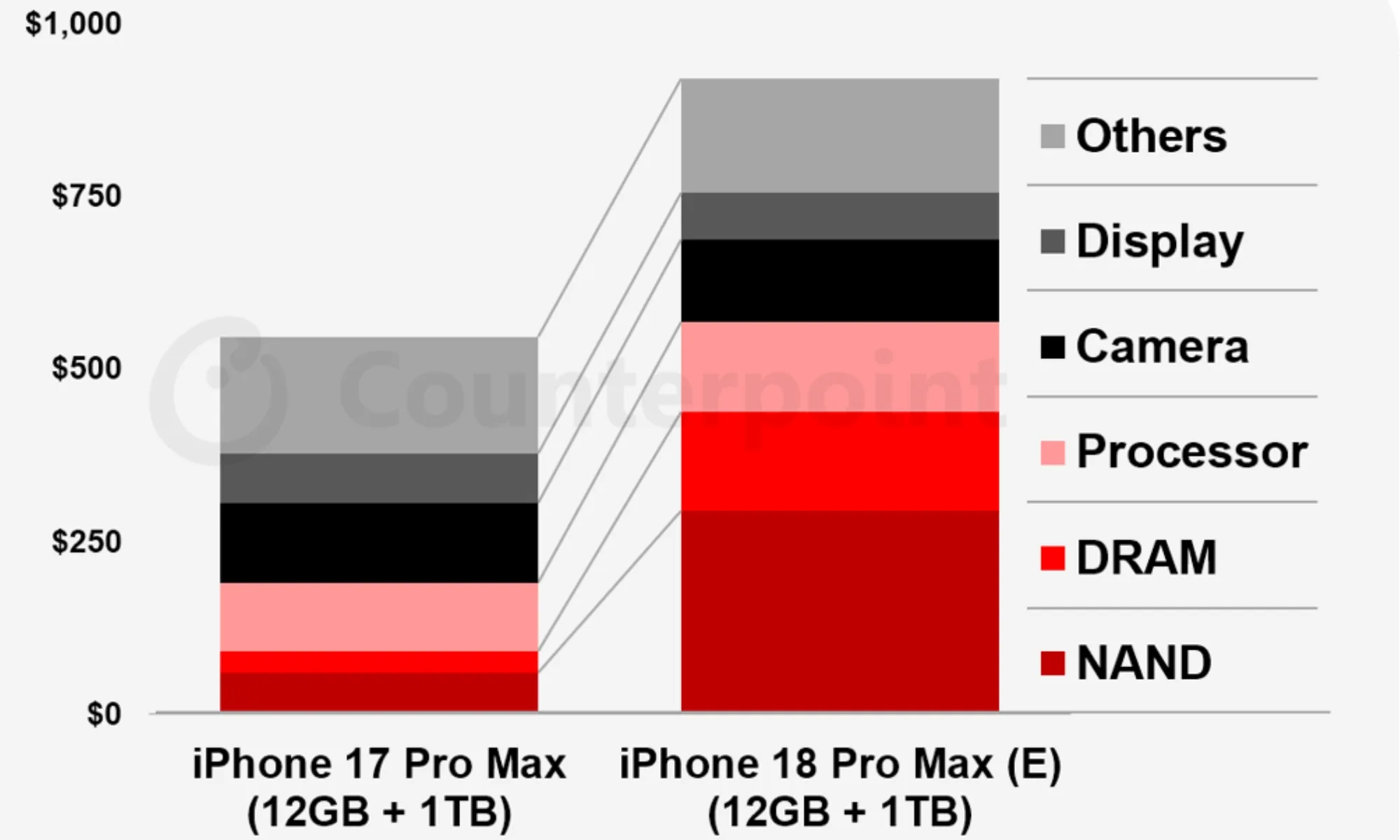
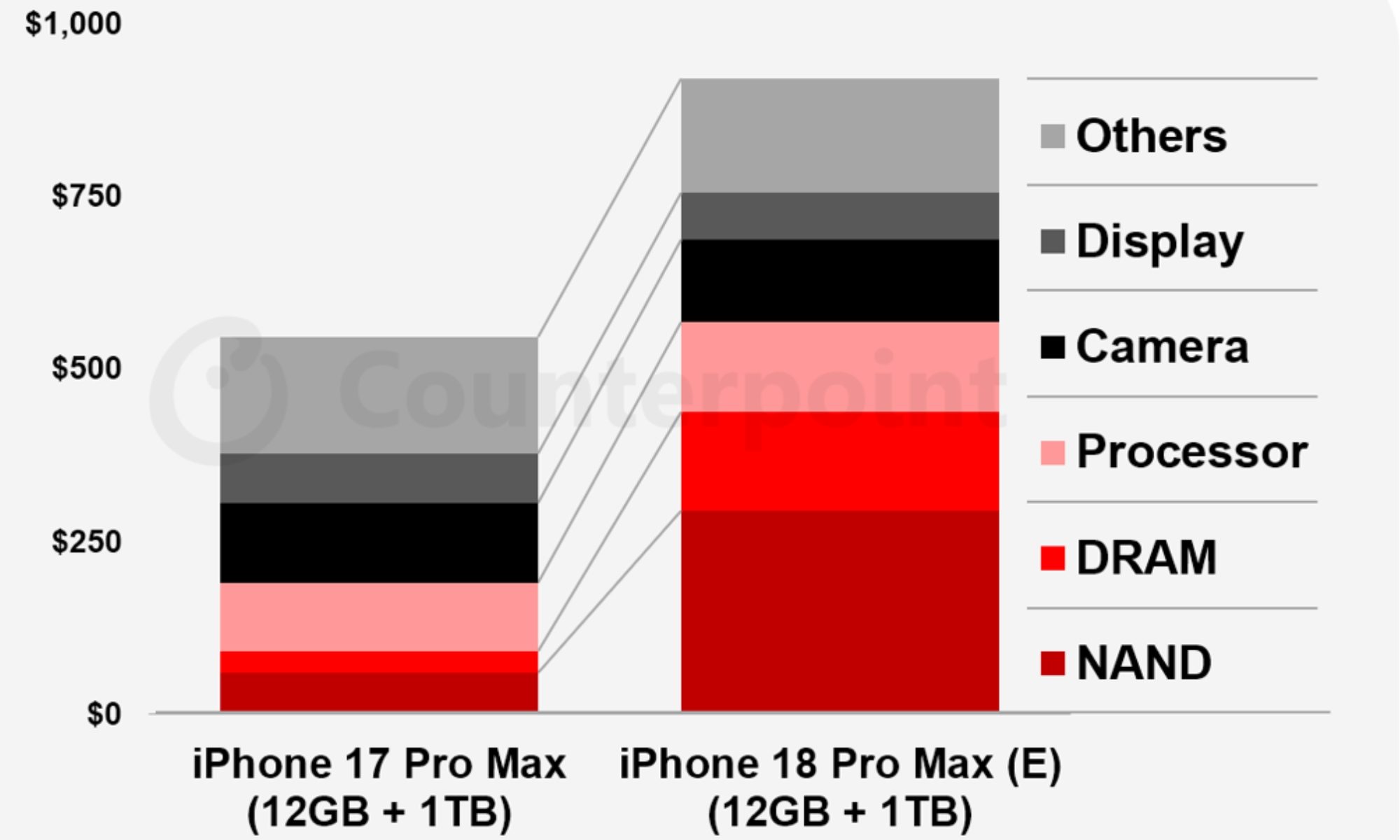
Counterpoint Research’s bill-of-materials estimate for the 12GB plus 1TB iPhone 18 Pro Max shows a cost rise of nearly $300 compared to the same configuration in the iPhone 17 Pro Max.
Counterpoint Research
So what does Counterpoint’s analysis actually show?
As shown in the infographic, display and other components may actually come in cheaper for Apple. However, the new 2nm chipset and the improved camera setup are also contributing toward the revised bill-of-materials estimate.
However, none of their contribution is as heavy as the memory and storage. The infographic doesn’t provide comparative numbers, but the graph indicates that both the NAND and DRAM costs have increased multifolds.
To give you some context, this is the third time a major analyst firm has flagged a significant iPhone 18 Pro Max price increase: WSJ and TechInsights were first, then IDC’s Nabila Popal.
Advertisement
Nirave Gondhia / Digital Trends
Will Apple pass the full $300 bill on to buyers?
Almost certainly, yes, but not to everyone. Remember, it’s the top-tier iPhone 18 Pro Max, with 12GB of RAM and 1TB of storage, that is expected to see a $300 price increase at Apple. Hence, for this model, Apple may pass along the rise in component costs to its customers as a $300 price hike, depending on how aggressively it wants to protect the product’s gross margin.
At $1,599 today, a $300 hike on the 1TB iPhone 18 Pro Max would push it to $1,899, which sounds wild to me. For other variants, including those with 256GB and 512GB of storage, the price increase could be $100 to $200.
Even if the exact numbers vary by the time Apple actually releases the iPhone 18 Pro in September this year, one thing seems increasingly sure: you won’t see the iPhone 18 Pro models debut at the same price as the iPhone 17 Pro did in 2025.
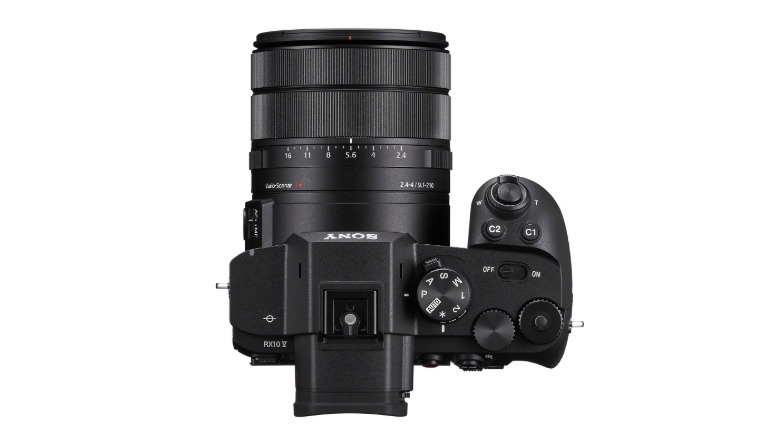
Sony has finally unveiled the RX10 V, a superzoom compact camera that comes with a 24-600mm optical zoom lens and 20.1-megapixel 1-inch sensor. The design has been overhauled compared to the nine-year-old RX10 IV for a more modern look and adds faster speeds, an updated autofocus system and far better video specs. The catch is the $2,300 price, which makes this one of the most expensive compact cameras on the market.
As before, the RX10 V offers tourists, street shooters and others incredible reach thanks to the 9.1-210mm (24-600mm equivalent) f2.4-4.0 lens. The 20.1MP 1-inch stacked sensor appears unchanged and should deliver good-quality images, even in low light, with minimal rolling shutter distortion. It’s disappointing that Sony didn’t upgrade the resolution, though, especially considering the camera’s price. The new model also lacks the RX10 IV’s built-in flash.
The new model does have a new processor that improved burst speeds, though. It can now shoot at 30 fps with no blackout in electronic shutter mode, a nice upgrade over the previous model’s 24 fps shooting speeds. Sony also carried over a feature from its latest mirrorless cameras called “continuous shooting speed boost” that lets you instantly jump to the maximum burst speed to capture decisive moments.
Sony
Autofocus also got a big AI makeover to match the new A7 V. Rather than just humans and animals as before, it can detect the face, eye, head and body of humans, birds and animals, along with vehicles (cars, trains and airplanes) and insects (head and whole body). Thanks to a separate deep AI processor, it will keep tracking subjects even if they turn away, look down or move in an erratic fashion. AF and AE speed has also doubled to 60 fps for continuous tracking, and it now offers 575 AF points compared to 315 before, along with 70 percent sensor coverage.
Video gets perhaps the biggest upgrade, with 4K 60 fps 10-bit video (All-Intra, XAVC S, and XAVC HS formats) that uses the entire sensor width with no pixel binning for extra sharpness. That can be boosted to 4K 120 fps for super slow mo, at the cost of a slight crop, or 1080p at 240 fps. It also supports Sony’s S-Log3 for improved dynamic range and lets you import up to 16 LUTs to preview different “looks” ahead of time. Sony also improved the built-in stabilization so that it smooths video even when you’re walking with it.
Advertisement
The design was completely revamped compared RX10 IV’s bulbous, stodgy look. It’s now sleeker and more squared off to match the A7 V’s aesthetic and has a much larger grip. It comes with a full complement of manual controls including a joystick, three control dials, a control wheel and a new dual top dial (with a photo, video and S&Q selector), plus an AF-ON button for pro autofocus control.
Sony
Both the electronic viewfinder (EVF) and rear display get resolution upgrades to 3.69 million dots (up from 2.4 million dots) and 1.62 million dots respectively. However, the rear display only tilts and doesn’t flip out, so it’s not great for vlogging or selfies. Again, that’s a rather inexcusable omission considering the camera’s price.
Other features include a single UHS-II SD card slot, full-sized NP-FZ100 battery that delivers up to 630 shots on a charge, a micro HDMI port 3.5mm mic and headphone ports and a new high-speed USB-C port for charging and transfers. The RX10 V now supports live streaming at up to 4K 30 fps as well.
Now for the bad news if you’re interested in this new model. The RX10 V just went on pre-order for $2,300, a relative fortune for a 1-inch compact camera. If that price is in your wheelhouse, though, it does offer incredible zoom reach, shooting speeds and video capabilities.
Microdramas are such a rage these days that nearly every kind of company in the attention economy space — be they dedicated microdrama apps, social media giants (TikTok and Instagram) or streaming services (Peacock, Amazon Prime, and India’s JioHotstar) — is building a product to tap the opportunity.
Character.AI, which lets people chat with customized AI avatars, is also tapping this budding market by producing its own microdramas using AI characters. But there’s an interesting twist that takes advantage of the company’s core product: Users older than 18 can chat with these shows’ characters, ask them questions, and even roleplay different storylines.
The startup is launching three microdramas to start with: a romance series dubbed “Last Summer,” a horror show titled, “The Nighttime Game,” and a Hunger Games-like survival microdrama called “Eden Fall.”
Character.AI says these dramas were created using AI production tools, and in the long term, it aims to help users create their own characters and series.
Advertisement
“Starting with a studio-led model, c.ai Series lets our production team develop the format, refine the workflow, and understand what audiences want from Character-native Microdrama entertainment. Over time, the goal is to turn those learnings and workflows into creator tools, enabling users to make their own series from original Characters and share them with a global audience,” a company spokesperson told TechCrunch.
The company said on Thursday that it is also testing a feature, dubbed c.ai FM, that will let users put together audio series, and another that lets you create fiction, called c.ai Reads. The audio series feature is currently available to select users under its experimental c.ai Labs program, which the company says professional writers are using to create serialized audio dramas.
There’s certainly an audience for this form of entertainment. Users spent more than 950 minutes on Character.AI each month in the first half of 2026, according to Sensor Tower.
Advertisement
When you purchase through links in our articles, we may earn a small commission. This doesn’t affect our editorial independence.
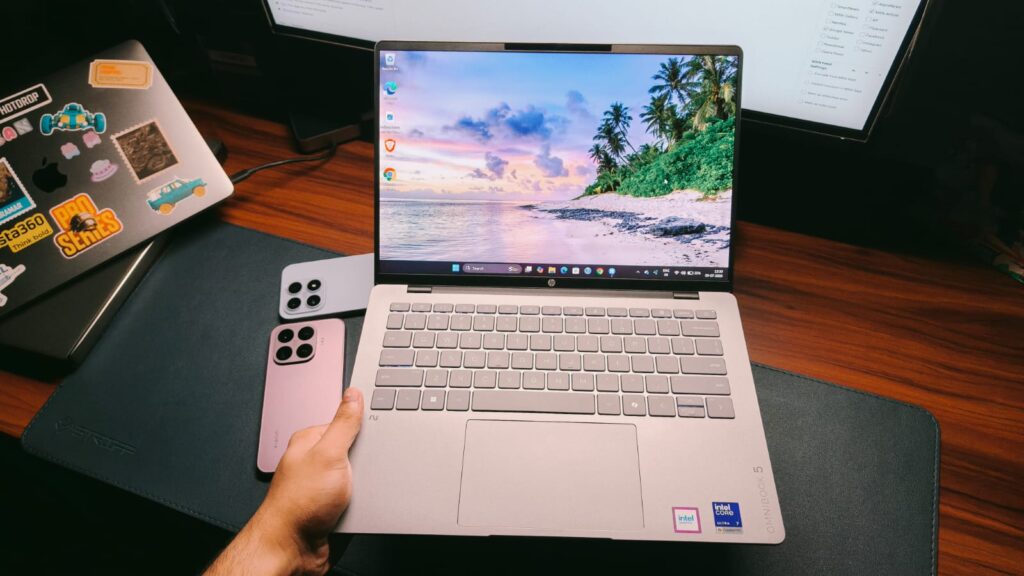
As much as I love reviewing extraordinary laptops like the ZenBook Duo, with its swinging dual screens and detachable keyboard, the truth is most people will never be able to buy one, simply because innovation like that costs money. And given that we are in the great AI era of 2026, with RAM prices having more than doubled, it’s really hard to find a laptop that gets the job done without leaving a huge dent in your wallet. HP’s OmniBook line is a great example of such laptops, and if you’re in the market for a mid-range, powerful laptop, I may have found a solution: the OmniBook 5.
The OmniBook 5 packs Intel’s latest Panther Lake Core Ultra 7 processor, 16GB of LPDDR5X RAM, a sophisticated design, and an OLED display. All this for ₹145,999 seems like a decent package by 2026 standards, which is why I have been testing the laptop for the past 2 weeks. It’s been my daily driver and companion to several coffee shops and a little work trip to Delhi. Is it worth it for your workflow? This review will answer that for you.
HP OmniBook 5 Review
Hisan Kidwai
Advertisement
Summary
The HP OmniBook 5 has all the pillars of a great professional laptop. The design is premium yet sophisticated so as not to draw too much attention. The 2K OLED display is gorgeous not just for watching movies but also for working with spreadsheets. And the performance keeps up with ever-increasing user demands, whether for video editing or code compilation. Not to mention the awesome typing experience and plenty of ports.
Advertisement
Design & Hardware
Design is one area where everyone thinks differently. Most people like an all-metal chassis, while some do prefer plastic. The HP OmniBook 5 is not for the latter. Its chassis is made from anodized aluminum, and I’m a fan. The finish is cool to the touch and doesn’t pick up fingerprints, which is a lifesaver when you’re trying to take photos of the unit. If you’re familiar with the MacBook’s finish, then the one on the OmniBook is a tad bit rougher. In short, the laptop feels elegant and not out of place in a coffee shop or in a corporate meeting. Besides my silver review unit, there’s also a Sahara color option.
Open up the laptop, and you’re greeted with the same premium finish. The keyboard deck is also silver, and there’s a nice cutout to open the laptop with just one hand. I did see some wobble on the screen, but that’s nothing to worry about. The hinge is strong enough to hold the screen while you run to your boss and show them a presentation. Even so, the best thing about the OmniBook 5 is its portability. The laptop weighs just 1.3kg and is 13mm thick. The 14-inch form factor is perfect for attending quick work calls on the go.
To put that to the test, I took the OmniBook 5 on a work trip to Delhi. The lightweight nature meant I wasn’t dragging a brick in my backpack, and my shoulders didn’t hurt even after several hours of travel. I used the laptop to write some articles on my lap at the airport. Despite the air vents underneath, I observed no overheating problems, but more on that in the performance section. As far as durability is concerned, I’m no JerryRigEverything. However, the fact that there was no damage to the OmniBook 5 after I accidentally dropped my backpack at the airport makes me think durability shouldn’t be a concern. I also observed no deck or screen flex even with some substantial force.
When it comes to ports, HP, thankfully, hasn’t skimped on anything. With the OmniBook 5, you get two USB-A ports, one with 10 Gbps signaling. Beyond that, there are two Thunderbolt 4 USB-C ports with 40 Gbps signaling rates and charging support, an HDMI 2.1 port, and a headphone/microphone combo jack.
Keyboard & Trackpad
A good keyboard is quintessential for a professional laptop. After all, most of your days will pass making PowerPoints, editing documents, and replying to emails. I’ve tested many laptop keyboards, and the one on the HP OmniBook 5 is definitely up there. The keys have a similar tactile feel to my MacBook, and that’s a great thing. Feedback is present; there’s a satisfying click after every keystroke, and I didn’t feel cramped when typing long articles, such as this review, on the laptop. I was able to adapt the layout in less than an hour, and even the backlight is strong enough to make the words legible against the light-colored keys.
Almost the same praise carries over to the trackpad as well. It’s not a fancy haptic trackpad, but as far as physical trackpads go, it’s up there at the top. The tracking was accurate throughout the surface, and the best part was the clicks. HP has the easiest-to-use clicking mechanism, which requires little force to activate. Some people may not like that, but since I’m coming from haptic touchpads, the lower activation force for clicking was very helpful. The only gripe I have is that the surface feels a bit rough, which introduces some friction when scrolling.
Display & Camera
We have two ingredients of a professional laptop ready (keyboard & trackpad). It’s now time for the third: the display. That’s because a laptop isn’t just for editing documents. People also like to watch movies on them, too. I have some good news for those people, as the HP OmniBook 5 features a 14-inch 2K OLED panel with a 60Hz refresh rate. As expected, watching shows on the laptop is an absolute joy. The colors feel vibrant without being oversaturated, the blacks are truly black, and even the dynamic range was decent. To be fair, it’s not the brightest display around, with a peak of 300 nits, but when coupled with the deep blacks, the contrast is very decent. I had loads of fun watching an episode of Clarkson’s Farm while on my way back from Delhi.
I have some good news for all the video editor friends as well, since the OmniBook 5’s panel covers 100% of the DCI-P3 color space. You can easily edit videos without worrying about the colors looking off. The 16:10 aspect ratio also helped fit a few extra spreadsheet columns. Just be wary of working in direct sunlight, as the glossy panel reflects a lot. As for the camera, it’s an FHD unit, and like most other Windows cams, it works okay. I found the colors leaning on the cool side, but the sharpness was decent.
Advertisement
Performance
The fourth ingredient of the professional laptop is performance. In fact, it’s the most important pillar so far, as I’m sure anyone would hate waiting for an app to load. With the HP OmniBook 5, you get the latest Panther Lake Intel Core Ultra 7 355 processor, paired with 16GB of LPDDR5X RAM running at 6,800 MHz and a 1TB NVMe SSD. CrystalDiskMark reported read/write speeds of 6,347 MB/s and 5,219 MB/s, respectively, which are on par with other ultrabooks like the ZenBook 14.
In everyday use, the OmniBook 5 is a breeze. I found it a tad faster at launching apps than some of the other laptops I’ve tested recently. There were no hiccups switching between apps, and the 16GB of RAM was enough to keep my 20 Chrome tabs open while I was writing articles. I could also multitask alongside all of that, so office work shouldn’t be a problem for anyone.
For demanding users like video editors, I installed DaVinci Resolve on the OmniBook 5. Then I imported a couple of 4K streams I shot at an event, trimmed them, and did some color grading. Sure, my editing workflow isn’t the most taxing, but if you’re making content for Instagram, then the OmniBook 5 packs enough punch. Similarly, for all my coders, I ran a Python script in VS Code, and it compiled without much delay.
Benchmarks & Gaming
Still, as good as my editing and coding skills are, I can’t test everyone’s workflow here. Maybe you’re into 3D modeling or music production; that’s where benchmarks become more useful. Yes, they don’t paint the full picture, but they do give a number for everyone to judge things. In Cinebench R23, the OmniBook 5 scored 1,907 in the single-core and 10,045 in the multi-core tests. That’s nearly 30% more multi-core performance than the AMD Ryzen AI 5 430. PCMark 10 gave the laptop an overall score of 7,501.
But can the OmniBook 5 game? That’s the eternal question of every laptop buyer. And the answer depends. If by gaming, you mean AAA titles like Cyberpunk 2077 and Indiana Jones: The Great Circle, then nope. However, the integrated graphics can handle esports titles like Valorant and CS:GO pretty fine. I got roughly 190 FPS on high settings in Valorant, which was more than enough to land a few headshots. Thermals are managed well for everyday tasks, but with gaming, I did see some throttling after an hour.
Battery Life & Speakers
If you just need one reason to get the HP OmniBook 5, it’s the battery life. HP has fit in a 59 WHr cell, which might not sound like much on paper, but with Intel’s new efficiency gains, the laptop just refuses to die. On my typical workday, which is writing articles, doing research on Chrome, replying to Slack messages, and watching YouTube, I got roughly 13 hours of screen-on time. That’s more than what I’m currently getting from my MacBook. You also get a 65W fast charger inside the box, which takes the laptop from 0% to 50% in just 30 minutes.
I’m not the biggest fan of downward-firing speakers, since they inherently limit the output and get muffled when the laptop’s on a soft surface. Sadly, that’s also true with the OmniBook 5, but its speakers are quite good. They are loud enough to fill a room, and I did hear many details, especially in the vocals. All that said, they don’t sound as wide and full as the ones on my MacBook, and prioritize the highs a bit much. Just a small complaint.
Advertisement
Verdict
At ₹145,999, the new HP OmniBook 5 has all the pillars of a great professional laptop. The design is premium yet sophisticated so as not to draw too much attention. The 2K OLED display is gorgeous not just for watching movies but also for working with spreadsheets. And the performance keeps up with ever-increasing user demands, whether for video editing or code compilation. Not to mention the awesome typing experience and plenty of ports. Sure, I can nitpick about the speakers or the lack of a higher-refresh-rate screen, but those aren’t big downsides, which is why the OmniBook 5 gets my recommendation.
When President Eisenhower signed the Federal-Aid Highway Act of 1956, he set in motion the largest public works project in American history. The interstate system now spans nearly 47,000 miles across all 50 states. Considering the fact that it moves almost $14 trillion in goods every year, it has become the true circulatory system of America. However, commerce is only part of the story. Millions of drivers get on these highways to get to work, visit family, or even take a road trip.
Jamirae/Getty
There’s a lot to see along the way. These roads cut through some of the most scenic landscapes on the continent: canyon country, alpine passes, large lakes, and open plains with interesting stops and detours. However, not every mile is worth the drive. Some interstates are plagued by traffic congestion, potholes, or stretches that are just boring to drive on for hours nonstop. That said, here are six of the best interstates to drive on and six of the worst.
Advertisement
I-95 (Worst)
Running about 1,920 miles along the East Coast and passing through 15 states, Interstate 95 runs from Florida all the way to Maine. It’s no wonder why some call Interstate 95 the East Coast’s Main Street. It certainly lives up to the name. Interstate 95 is, without doubt, one of the busiest interstates in the country.
One section in Miami sees almost 340,000 vehicles each day so you can expect some delays during rush hour. There’s also regular traffic on this road caused by accidents. A great example is in Virginia, where one truck accident led to a traffic jam that took 36 hours to clear up.
Advertisement
Interstate 95 is also one of the most dangerous highways in the U.S. In 2020, there were 379 deaths on this road, the highest from any interstate in that year. The government has spent billions of dollars repairing and expanding the road, but these projects are taking years to complete. Although that’s not surprising considering it took six decades to complete the highway in the first place.
Advertisement
I-5 (Best)
Interstate 5 is a 1,381-mile highway that passes through California, Oregon, and Washington. It runs the length of the West Coast from Canada to the Mexican border. While you don’t get a view of the Pacific Ocean for most of the ride, Interstate 5 is a scenic route with some fun stops.
If you’re starting off in Washington, this highway cuts through the shadow of Mt Shasta and runs by Skagit River. The southbound stretch through Seattle offers a remarkable view. From the interstate, you can see the Seattle skyline, the Olympic Mountains, Puget Sound, and on a clear day, Mt. Rainier.
When it comes to stops, Interstate 5 puts Pike Place Market, the Seattle Center, and Mount Rainier National Park all within easy reach. When you cross into Oregon, a five-minute detour will bring you to the fork in the road, a large metal fork attached to one of the mile markers. Down in California, you have Disneyland and Old Sacramento with its historic museums.
Advertisement
I-4 (Worst)
The shortest highway on our list, Interstate 4, is a 132-mile stretch between Tampa and Daytona Beach that runs through Orlando. These are three of the largest metropolitan areas in Florida, and carry about 140,000 vehicles every day on some parts of the road. It’s a busy route so it doesn’t take much to cause delays. Accidents and continuous construction rise up to the challenge in that regard.
Near Tampa, the interchange with Interstate 275 has earned the nickname “Malfunction Junction” thanks to the fact it sees about 1,000 accidents per year as of 2023. On top of that, while it’s a short highway, Interstate 4 is actually the deadliest interstate in the United States, when measured by deaths per mile.
Advertisement
Traffic builds around Posner Park, and continues through ChampionsGate and Reunion. And new development along the interstate’s east side has made traffic even worse. The Florida Department of Transportation just finished a seven-year project on this road but has announced another set to finish in the summer of 2031. Hopefully by then you’ll get a smoother ride across the state.
Advertisement
I-70 Denver to Cove Fort, Utah (Best)
Spanning 2,150 miles in total and passing through 10 states, Interstate 70 is one of the longest interstates in the country. However, the stretch worth talking about is west of Denver, where the road cuts through the Rocky Mountains and into Glenwood Canyon, widely considered a scenic route.
Along the way, drivers pass the Buffalo Overlook at Genesee Mountain Park, where bison and elk roam near the highway, before reaching historic mining towns like Georgetown and Idaho Springs, known for local restaurants, rafting, ziplining, and the Georgetown Loop Railroad.
The route then climbs through the Eisenhower Tunnel, the highest point on Interstate 70 at over 11,000 feet, and descends toward Lake Dillon Reservoir and views of the Continental Divide. If you love skiing, you can spot the Loveland, Copper Mountain, and Vail ski resorts right from the road. From there, the drive reaches its highlight at Glenwood Canyon, a roughly 12-mile engineering marvel carved by the Colorado River. This was the last segment of the federal Interstate Highway System that was built, and it opened in 1992.
Advertisement
I-80 (Worst)
Interstate 80 stretches across 2,900 miles and 11 states, from California to New Jersey, making it one of the longest highways in the United States and the second-longest interstate, but its length isn’t the only thing that stands out.
According to a Samsara analysis, Interstate 80 ranks as the most dangerous interstate in the country during winter. The risk builds through the afternoon and evening commute, then peaks again overnight into early morning, when darkness, falling temperatures, black ice, and driver fatigue combine to put drivers at their most vulnerable. These are the same conditions that cause winter weather pileups to spike on interstates nationwide. That danger isn’t spread evenly across the whole route. It’s concentrated in specific segments, particularly in Wyoming, Nebraska, and Iowa, where these conditions hit hardest.
Advertisement
Outside those danger zones, Interstate 80 has a second problem: it simply can’t keep up with the traffic it carries. San Francisco is already known for its bad traffic, but a 3.6-mile stretch on Interstate 80 has become one of the most congested in the country, wasting 600,000 hours every year.
Advertisement
I-84 Western (Best)
To clarify, there are two Interstate 84s in the United States. The first runs east, from Pennsylvania to Massachusetts. We’re more concerned with the western Interstate 84, running 768 miles from Echo, Utah, through Boise to Portland. Interstate 84 is at its most scenic through Oregon, where the road traces the Columbia River Gorge with great stops like Multnomah Falls, Hood River, and the wild west town of Pendleton.
Before reaching Oregon, the drive still has plenty to offer. Coming out of Echo, the road climbs straight into the Wasatch Mountains, and every mile through here leaves you blown away by the scenery. Crossing into Idaho, a short detour off I-84 leads to Twin Falls; the city sits near Shoshone Falls, taller than Niagara, and the Snake River canyon where Evel Knievel once attempted his famous jump. Push on toward Boise, and the road leads into a bustling downtown area, in one of the fastest-growing metro areas in the U.S. From there, I-84 crosses into Oregon, and the final stretch carries you into Pendleton, a town that still wears its western heritage in its wool mills and boot shops, before the interstate presses on toward Portland.
Advertisement
I-70 east of Denver (Worst)
West of Denver, Interstate 70 has some great views, especially of the Rocky Mountains. East of the city, it’s a different story. This stretch of the interstate runs from Denver and cuts through half the continent, passing through Kansas, Missouri, Illinois, Indiana, and three other states before ending near Baltimore, Maryland.
The numbers tell the story. In 2020, Interstate 70 had 134 deaths, or about 6.2 fatalities per 100 miles, according to Stacker’s analysis of the National Highway Traffic Safety Administration’s 2020 Fatality Analysis Reporting System data. In Missouri and Ohio, traffic caused by car crashes and congestion is a major concern, and one section running through St. Louis has even been called one of the scariest roads in the United States, according to drivers.
Indiana drivers have it the worst. In Overdrive’s 2025 Highway Report Card, truckers voted Interstate 70 in Indiana the single worst road in the entire United States, mostly because of its poor maintenance.
Advertisement
I-77 (Best)
Running 610 miles from Cleveland, Ohio, to Cayce, South Carolina, Interstate 77’s highlight is its dramatic climb through the Virginia Appalachians, reaching 3,100 feet at Fancy Gap. On this road, there’s a six-mile climb that gains more than 1,500 feet. Carving the route through the mountainside demanded one of the most ambitious excavation efforts in the entire history of the Interstate Highway System. Runaway truck ramps line the downhill side for safety, while a dedicated climbing lane helps slow-moving trucks heading north.
Advertisement
Interstate 77 takes you through Marietta, Ohio. Sitting on the Ohio River, this is the first settlement in the old Northwest Territory. You’ll find attractions like Campus Martius and the Gothic Revival Castle mansion. The West Virginia stretch adds history and character with stops like Blennerhassett Island, home to a Palladian-style mansion completed in 1800, and the site of Aaron Burr’s alleged plot to invade Mexico. There’s also the Tamarack Cultural Center in Beckley, a showcase of the state’s crafts, food, and culture. Further south, the road passes Bramwell, a West Virginia town known for its 19th-century mansions and the dozen or so millionaires that are said to live there.
Advertisement
I-35 (Worst)
Interstate 35 starts at Laredo, Texas, and stretches 1,568 miles to Duluth, Minnesota. When the road gets to Hillsboro, Texas, it splits into two branches: Interstate 35E heads northeast through Dallas, while Interstate 35W goes through Fort Worth before they connect in Denton and the road continues north.
For years, Interstate 35 has had a bad reputation. In 2019, it was labeled “freeway without a future,” part of a list of highways that, according to the Congress for the New Urbanism, “have reached the end of their useful life.”
Texas is where the problems with this road are more visible. The stretch through Austin between US 290 and Ben White Boulevard is among the most congested in the entire state, costing drivers nearly 600,000 more hours on the road in 2024 alone. This same corridor accounts for about one in four of the city’s road fatalities annually. A single pileup on I-35 in March 2025 involving 17 vehicles claimed five lives, with five survivors requiring critical care. The I-35 Capital Express Central Project is working to address this, but won’t be completed till 2033, so expect more years of lane closures and resulting traffic.
Advertisement
I-90 Seattle to Bozeman (Best)
Going on for 3,021 miles, Interstate 90 is the longest interstate in the country. This road stretches from coast to coast from Seattle to Boston and passes through 13 states. If you’re taking a road trip, the western half from Seattle to Bozeman is where it really comes alive.
The Cascades have long been valued for scenic beauty, prompting a push in the 1990s to conserve the surrounding forested foothills. This helped secure federal protection for the scenic view corridor along Interstate 90 in 1998, making it the nation’s first interstate named a National Scenic Byway.
Advertisement
Leaving Seattle, the highway goes by Snoqualmie Point Park and puts you about an hour from the Snoqualmie Falls. In Idaho, Interstate 90 takes you around the scenic Lake Coeur d’Alene. From there, the route pushes into Montana, where a one-hour detour will take you to Little Bighorn Battlefield Museum, which marks where George Custer made his last stand.
Advertisement
I-10 (Worst)
Stretching 2,460 miles from Santa Monica, California, to Jacksonville, Florida, Interstate 10 is one of the longest and most notorious interstates in the country. It’s also one of the interstates that replaced sections of the historic Route 66, now 100 years old, as America shifted from old routes to the current freeways.
The Louisiana-Mississippi border stretch is one spot where its reputation is well earned. Over 46,000 vehicles cross that state line daily, with rush hour typically seeing the heaviest traffic. It’s not just traffic, either — across three Mississippi counties, I-10 recorded 819 wrecks in a single year, 13 of which were fatal.
It is the kind of road that gets under people’s skin. “I tell all my friends that Interstate 10 is a death trap because there’s always something happening,” Mississippi resident Brian Velasquez said in an interview with SunHerald. “From Diamondhead to the state line, there’s always something, at least twice a month.” The stretch is also riddled with potholes, and infrastructure has struggled to keep pace.
Advertisement
I-15 Montana to Utah (Best)
Running from the Canadian border at Sweetgrass, Montana, down to San Diego, California, Interstate 15 cuts through Idaho, Utah, Arizona, and Nevada across 1,433 miles. Starting in Montana, Helena makes for a natural first stop, a small state capital with a historic downtown featuring Victorian-style buildings and public art.
Crossing into Idaho, you can check out Idaho Falls and the Idaho Potato Museum. From there, the road descends into Utah, passing through Salt Lake City and by the iconic Temple Square. Southern Utah is home to Zion National Park, with its Kolob Canyons section accessible directly off the highway at Exit 40, 40 miles north of St. George. Just past St. George, Interstate 15 carves through the Virgin River Gorge, a 500-million-year-old sandstone canyon so steep and narrow that the original road builders had to be lowered down the cliff faces by rope just to place their explosives.
Advertisement
Methodology
To identify the best and worst interstates to drive in the U.S., we considered the road conditions, safety ratings, and accident and fatality rates. We also looked at the driving experience itself. We considered whether a route offers scenic roads or flat, monotonous stretches. We also checked for iconic stops as well as traffic levels. Driver reviews and Reddit comments gave a ground-level picture of what each route is actually like behind the wheel.
TIDAL is raising prices in the U.S. beginning August 3, 2026, and the move makes the hi-res music streaming market a little more complicated for subscribers trying to decide where their money should go. For most of us that would be a new air conditioner this summer but I digress.
The short version: TIDAL is still a strong option for listeners who care about lossless, hi-res FLAC, Dolby Atmos, and TIDAL Connect. But it is no longer the automatic value play, especially for families and students.
What Did TIDAL Do?
TIDAL says its new prices will take effect on a subscriber’s first billing date on or after August 3, 2026. Until then, existing subscribers remain on their current pricing. TIDAL also says subscribers do not need to do anything if they want to continue; the subscription will simply renew at the updated rate.
The new U.S. pricing is:
Advertisement
Individual: $11.99/month
Family: $19.99/month
Student: $6.99/month
TIDAL’s current pricing page lists those plans with access to more than 180 million tracks in lossless, hi-res FLAC, and Dolby Atmos, along with ad-free and offline listening.
The increases are not massive on the Individual plan, but they are more noticeable elsewhere. TIDAL’s prior U.S. support page listed Individual at $10.99/month, Family at $16.99/month, and Student at $5.49/month. That means Individual goes up by $1/month, Family rises by $3/month, and Student jumps by $1.50/month.
That Student increase is the one that looks the most aggressive. Students are already living on caffeine, expired meal-plan points, and financial anxiety. Asking them to pay more for hi-res audio feels a little cruel, even if the service itself remains very good.
How Does TIDAL Compare to Its Competitors?
Feature
TIDAL
Apple Music
Qobuz
Spotify
Amazon Music
Individual Plan
$11.99
$10.99
$12.99
$12.99
$12.99 ($11.99 Prime)
Family Plan
$19.99
$16.99
$21.90
$21.99
$21.99
Student Plan
$6.99
$5.99
$4.99
$6.99
$5.99
Max Audio Quality
24-bit/192kHz
24-bit/192kHz
24-bit/192kHz
24-bit/44.1kHz
24-bit/192kHz
Immersive Audio
Dolby Atmos
Dolby Atmos
–
–
Dolby Atmos + 360 RA
Best For
TIDAL Connect and hardware support
Apple ecosystem and families
Audiophile album listeners
Discovery and podcasts
Prime and Alexa households
TIDAL’s new $11.99/month Individual plan is still competitive. It is cheaper than Spotify Premium at $12.99/month and Qobuz Studio at $12.99/month when paid monthly. It also matches Deezer Premium at $11.99/month and Amazon Music Unlimited for Prime members at $11.99/month.
The problem for TIDAL is Apple Music. Apple Music remains $10.99/month for Individual, $16.99/month for Family, and $5.99/month for Student. It also includes lossless audio, Hi-Res Lossless up to 24-bit/192kHz, Spatial Audio with Dolby Atmos, and Apple Music Classical.
Advertisement
For families, Apple Music is the obvious price leader. TIDAL’s Family plan is now $19.99/month, compared with Apple Music at $16.99/month. Deezer also sits at $19.99/month, while Spotify and Amazon Music Unlimited are more expensive at $21.99/month.
For audiophiles, Qobuz remains the most direct rival. Its monthly Solo plan is $12.99/month, but Qobuz lowers the effective price to $10.83/month with a $129.99 annual subscription. Qobuz also emphasizes 24-bit hi-res streaming, music journalism, reviews, and a download store, which still gives it a more purist identity than most streaming platforms.
Advertisement. Scroll to continue reading.
Spotify is the strange one. It now costs more than TIDAL for an Individual plan, but its lossless tier tops out at 24-bit/44.1kHz. Spotify still wins on playlists, discovery, podcasts, social features, and habit. It does not win on hi-res audio.
Advertisement
Why Is TIDAL Raising Prices?
TIDAL says it is updating prices so it can continue supporting artists and rightsholders while investing in new features, improvements, and the high-quality listening experience users expect from the platform.
That is the official explanation, and it is also the standard streaming-industry answer. The broader reality is that subscription prices have been moving upward across the category. Spotify now charges $12.99/month for Individual, $18.99/month for Duo, and $21.99/month for Family in the U.S. Apple Music is still less expensive than most of the field, but the days of every major music service sitting around $9.99/month are over.
TIDAL also has to justify continued investment in a platform built around higher-quality audio, Dolby Atmos, hardware integration, offline listening, and artist-focused positioning. None of that is free to operate. The question is whether consumers believe TIDAL offers enough that is genuinely different.
How Does This Impact Consumers?
For Individual subscribers, the impact is annoying but not dramatic. A $1/month increase is not likely to force many serious TIDAL users to cancel, especially if they rely on TIDAL Connect or listen through equipment that makes lossless and hi-res streaming worthwhile.
For Family subscribers, the increase is more meaningful. TIDAL is now $3/month more expensive than Apple Music Family. Over a year, that is a $36 difference. That is not life-changing money, but it is enough to make families compare services more carefully.
Advertisement
For students, TIDAL becomes a harder sell. At $6.99/month, it is now more expensive than Apple Music, Amazon Music Unlimited, Deezer, Qobuz, and YouTube Music student plans. TIDAL may still be the better choice for students with serious audio hardware, but most students are not comparing 24-bit/192kHz playback through a desktop DAC. They are trying to make rent and keep their earbuds charged.
For audiophiles, TIDAL still makes sense if the service fits your system. TIDAL Connect remains a major advantage for streamers, DACs, powered speakers, and network players that support it. The catalog is large, the hi-res FLAC messaging is cleaner than the old MQA era, and the app remains more music-focused than Spotify or YouTube Music.
For casual listeners, Apple Music is now the tougher value to ignore. It costs less, includes lossless and hi-res audio, offers Dolby Atmos, and works extremely well if you already live inside the Apple ecosystem.
The Bottom Line
TIDAL did not price itself out of the market. The Individual plan remains competitive, and the service still has real value for listeners who care about hi-res streaming, Dolby Atmos, TIDAL Connect, and hardware support.
Advertisement
But the price increase weakens TIDAL’s argument for families and students. Apple Music is cheaper. Qobuz is more audiophile-focused. Spotify is better for discovery and social listening. Amazon Music Unlimited makes sense for Prime households. Deezer offers a simpler CD-quality alternative at the same Individual price.
TIDAL is still worth paying for if you actually use what makes it different. If you are only streaming in the car, through cheap Bluetooth earbuds, or from a phone speaker while pretending to hear 24-bit/192kHz magic, the new pricing should make you ask a very simple question: why are you paying for the fancy bottle if you are drinking it from a paper cup?
As part of the major US expansion, Manna will establish a US operations and manufacturing centre in Tulsa, Oklahoma.
Irish drone delivery service provider Manna is targeting US expansion following its recent decision to pause deliveries in Ireland over a lack of regulatory and planning considerations, according to media reports.
Reuters reported that the south-west of the US would be the company’s focus, partnering with companies such as DoorDash, McDonald’s and Uber Eats for food deliveries within the next two months.
Meanwhile, founder and CEO Bobby Healy told TechCrunch that Manna would establish a US operations and manufacturing centre in Tulsa, Oklahoma that will employ about 1,000 people over the next several years.
Advertisement
“This part of the US – Oklahoma, Texas, states around here – will really be the battleground for scaling up and proving all types of drone delivery globally,” Kenny Jacobs, Manna’s new executive chair and president, told Reuters from the launch of the company’s first full-scale US operation.
“The technology is proven. Now it’s about the commercial scalability and showing how quickly you can open up bases and deliver all types of things.”
He added that quick scaling at a low capital expenditure cost per base is possible, as each local drone launch site is no bigger than the area of four car parking spaces, and projected that Manna would operate from 40 bases across Tulsa, Oklahoma’s second-largest city, by mid-2027.
Healy told TechCrunch that manufacturing at the new plant, which is under construction, would begin in about a year’s time, giving Manna time to scale its operations team to between 200 and 300 people.
Advertisement
Of the US expansion, Healy said: “It’s just the size of the market here, consumer behaviour and the fact that the aggregators have consolidated the market so well, and they’re so well run. The United States has the market that everybody wants.”
He said that the company was assessing six more US cities for possible further expansion by the end of 2027, and added: “A company like us, we wouldn’t have had any plans to grow in the United States until the environment was ready from a regulatory standpoint to start growth, and so we’ve decided very clearly that now is the time for us to put every penny we have into the USA.”
Last month, Manna said it would take a “strategic pause” in operations in Ireland over what it described as a lack of a clear national framework surrounding drone technology, and would instead shift focus to the US, UK and other international markets where “regulatory, and planning frameworks are advancing and commercial drone delivery is accelerating”.
As of last month, the company employed nearly 200 people across engineering, technology, operations and corporate functions in Dublin. It said that future employment and planned expansion at local delivery hubs would not proceed for now. Earlier this year, the company announced around 300 new jobs in Ireland, alongside a $50m Series B raise.
Advertisement
Manna already has operational authorisation in both the US and UK, and anticipates full authorisation to operate in the United Arab Emirates.
Jacobs was appointed to his new role this week having previously served as CEO of Irish airports operator DAA, as well as working for Ryanair, Tesco and Metro Group.
Healy said of the appointment: “Kenny is one of the few executives who has scaled aviation, retail and digital businesses internationally and done so commercially. We are entering the most important phase in Manna’s history, taking Irish-built technology to the markets where commercial drone delivery is now a reality.
“Having Kenny as executive chair and president will give Manna the experience at scaling up operations and commercial partnerships.”
Advertisement
Don’t miss out on the knowledge you need to succeed. Sign up for the Daily Brief, Silicon Republic’s digest of need-to-know sci-tech news.
Updated, 11.56am, 9 July 2026: This article was amended to include details of Kenny Jacobs’ career background and Bobby Healy’s comments on his appointment to his new role.
For much of the twentieth century, high-frequency (HF) radio was the primary means of global communication. Satellites displaced HF from the 1970s onward by offering higher data rates, more predictable links, and simpler operation. Yet satellites are expensive, carry finite lifespans, and face a growing set of threats: anti-satellite weapons tested by multiple nations, jamming of fixed-frequency transponders, solar flares that can physically damage spacecraft, and persistent coverage gaps in polar and heavily forested regions. These realities have spurred a broad reassessment of HF as a resilient, infrastructure-independent alternative that can reach any point on the planet via the ionosphere. Modern developments — particularly wideband waveforms supporting up to 48 kHz channels with data rates reaching 240 kbit/s, and fourth-generation automatic link establishment that automates frequency management and link negotiation — have addressed many of HF’s traditional shortcomings. This white paper explains the physics of ionospheric propagation, surveys the satellite vulnerabilities motivating HF’s return, and details the technical standards and techniques that are making reliable, automated HF communications a practical reality.
There were workarounds—European or Australian gamers will likely remember dual-boot adapters that used a local cart to ‘spoof’ the console into accepting an imported American game—but with different TV standards to consider, most players were effectively limited to only the games released in their home territory.
With the SN Operator, that’s all literally consigned to the past. All cart sizes fit, and lockout chips are ignored—insert a game from anywhere in the world and, so long as it’s still in good working order, it’ll load. Modern displays mean old hurdles like different NTSC or PAL display standards are irrelevant.
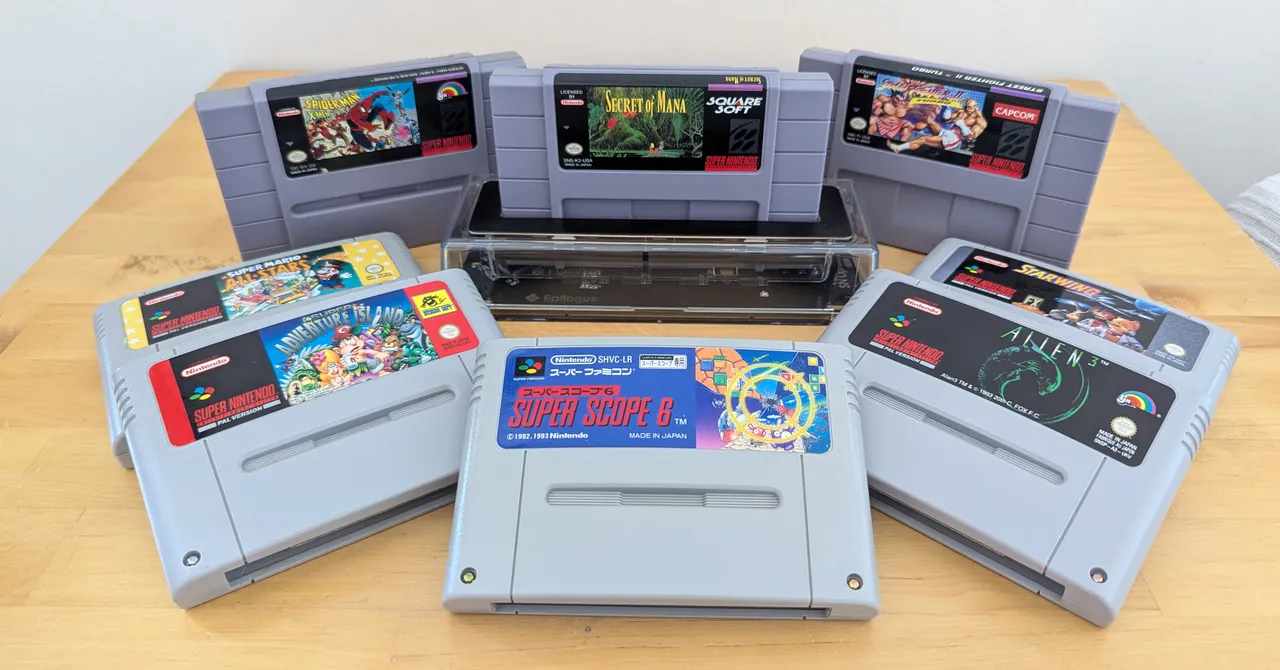
That brings a few material benefits for purists. When the NTSC versus PAL distinction was an issue, it often meant PAL games ran more slowly due to the standard’s lower 50-Hz refresh rate compared to NTSC’s 60 Hz. Being in the UK, I can finally play Street Fighter II Turbo at its original speed, or the classic action platformer Spider-Man and the X-Men in Arcade’s Revenge without Spidey feeling like he’s web-swinging through mud. Region-free also benefits North American players, allowing previously incompatible exclusives from other countries to be imported without worry—great for cult curiosities like Konami’s Pop’n Twinbee games, only released in Japan and Europe.
The Playback software even identifies which region’s version of the game it is—accurately clocking my UK copy of Star Wing (Nintendo couldn’t use the Star Fox name at the time). Counterfeit carts are detected, too. Speaking of Star Fox/Wing, there’s a host of options to tweak how the SN Operator handles Mode 7, the SNES’ pseudo-3D visual trickery. Throwing in super-sampling and upscaling features can give 30+-year-old games quite a glow-up.
Advertisement
Another great touch is how it accounts for classic accessories like the SNES Mouse, supporting titles like Mario Paint or Populous II—a strategy game and another PAL exclusive—with your regular, modern, non-SNES mouse. That same mouse can stand in for the Super Scope, Nintendo’s bulky light-gun peripheral designed for obsolete CRT screens. The only downside is that the precision afforded by a high dots-per-inch (dpi) mouse cursor makes those games incredibly easy, as I discovered with a Japanese copy of Super Scope 6, a six-game showcase for the tool. (Incidentally, it’s really only two games, Blastris and LazerBlazer, with three modes each—historically false advertising!) Still, there were only ever 12 Super Scope games released, so it’s great to see even this incredibly niche category of games considered.
By far the best improvement over the GB Operator, though, is an expanded suite of save data tools. Directly saving progress to a cart as you would on a real SNES remains a baked-in feature, and the SN Operator retains the ability to transfer game saves between your computer and cart, but now virtual save states are supported. At any point, you can create snapshot saves of wherever you are in a game—an absolute godsend in playing through Secret of Mana, a sizeable ’90s Japanese role-playing game (JRPG), and one I can now pick up and put down without worrying about in-game save points.



























































You must be logged in to post a comment Login